

O software de reprodução de sessões regista sessões reais de utilizadores no seu website, para que possa ver onde as pessoas clicam, percorrem a página, ficam bloqueadas ou abandonam. É uma das formas mais rápidas de identificar problemas de UX, detetar erros e melhorar as conversões — sem fazer suposições.
Muitas das melhores ferramentas oferecem planos gratuitos sólidos, mas nem todas merecem o seu tempo. Analisei e testei as principais opções gratuitas e baseadas em períodos de teste para o ajudar a encontrar ferramentas que forneçam informações realmente úteis sem ter de pagar antecipadamente. Esta lista elimina o ruído e mostra-lhe o que é genuinamente utilizável sem custos.
Vejamos as principais opções que podem fazer a diferença para a sua equipa.
Why Trust Our Software Recommendations
6,700+
Reviews
20
Industry experts
16+
Evaluation factors
14
Years
Our team has been testing and reviewing software since 2012. As product managers ourselves, we know how difficult—and important—it is to choose the right software.
For this guide, we evaluated tools using hands-on testing and independent research, scoring tools using our selection criteria.
Our reviews reflect our human editorial judgment, not a sales pitch.
Expert reviewers:
- Andrew LumbySenior TPM
- Cristiano ValimSenior UI/UX Lead


Tabela Comparativa de Software Gratuito de Reprodução de Sessões
Eis os custos base de cada um dos planos pagos das ferramentas que entraram na minha seleção:
| Tool | Best For | Trial Info | Price | ||
|---|---|---|---|---|---|
| 1 | Best for contextual user session replay | Free plan + 14-day trial + free demo available | From $26/month (billed annually) | Website | |
| 2 | Best for cookieless UX friction detection | Free plan + 30-day free trial available | From $2.99/month | Website | |
| 3 | Best for replays linked to funnel drop-offs | Free plan available | From $120/month (billed annually) | Website | |
| 4 | Best for behavioral data analytics | Free plan available | Pricing upon request | Website | |
| 5 | Best for replays linked to funnels and journeys | Free plan + free demo available | Pricing upon request | Website | |
| 6 | Best for behavior-based session filtering | 14-day free trial available | Plans start at $65/month | Website | |
| 7 | Best for eye-tracking heatmaps on free plans | Free plan available | From $39/month | Website | |
| 8 | Best for self-hosted open-source replay | Free plan available | Pricing upon request | Website | |
| 9 | Best for debugging sessions tied to feature flags | Free plan + free trial available | From $50/month | Website | |
| 10 | Best for open-source self-hosted replay | Free plan + 7-day free trial available | From $199/month | Website |


Análises do Melhor Software Gratuito de Reprodução de Sessões
Abaixo encontram-se os meus resumos detalhados das melhores ferramentas gratuitas de software de reprodução de sessões que entraram na minha seleção. As minhas análises apresentam uma visão detalhada das principais funcionalidades, vantagens e desvantagens, integrações e casos de utilização ideais de cada ferramenta, para o ajudar a encontrar a melhor opção para si. Embora a maioria destas ferramentas disponibilize uma versão completamente gratuita, outras oferecem um período de teste gratuito. Adicionei uma nota sobre o que é gratuito em cada uma das minhas análises
 Best for contextual user session replay
- Free plan + 14-day trial + free demo available
- From $26/month (billed annually)
Visit WebsiteCustomer Rating:4.5/5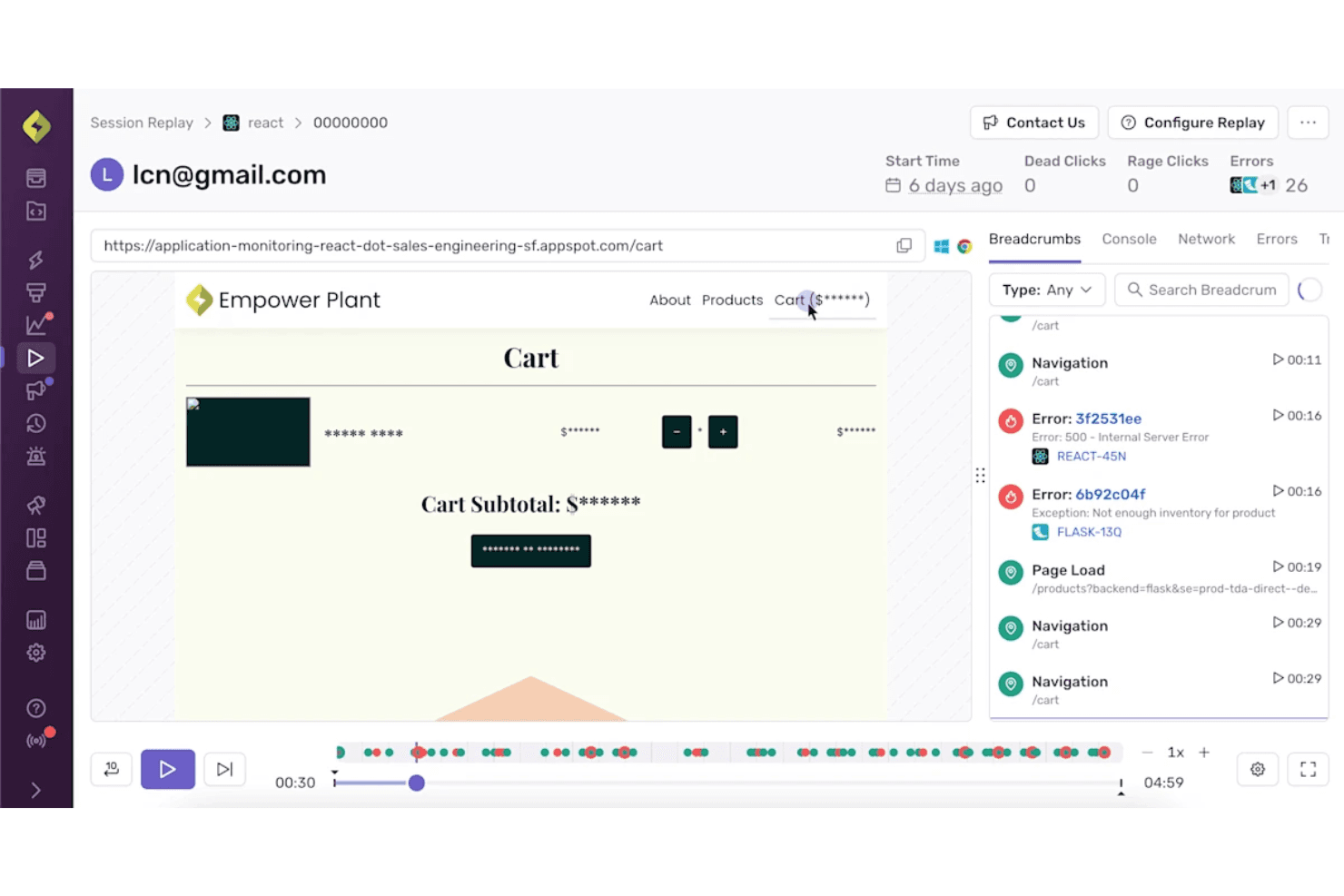
Sentry combines session replay with error details for clearer debugging context. Sentry is a free session replay platform for developer debugging that reconstructs web and mobile sessions, linking playback with errors, traces, console logs, network requests, and rage or dead-click signals.
Who Is Sentry Best For?
Sentry suits developer-led product teams that connect session replays with errors, traces, logs, and rage-click signals during bug triage.
Why I Picked Sentry
I picked Sentry for contextual user session replay because it connects DOM-based replays directly to errors, traces, console logs, and network requests. I use rage-click and dead-click signals to locate broken interactions quickly, then jump from an issue to the exact session moment. Its free plan supports focused debugging with 50 replays per month.
Sentry Key Features
- Mobile app replay: Captures sessions across iOS, Android, React Native, and Flutter apps.
- Session search: Filters replays by browser, device, URL, release, user, and custom tags.
- Privacy masking: Masks text, images, and keystrokes before replay data leaves the browser.
- Replay retention: Stores free-plan replays for 30 days.
Sentry Integrations
Sentry offers integrations with Jira, GitHub, GitLab, Linear, Slack, Microsoft Teams, Datadog, Splunk, Grafana, and Segment, plus SDKs for web, mobile, and server frameworks.
What's Free?
Sentry offers a free-forever plan rather than a limited-time trial. It includes 50 session replays per month, with free-plan replays retained for 30 days.
Pros and Cons
Pros:
- Default masking protects replayed user data
- Rage and dead clicks expose broken interactions
- Error-linked replays speed bug diagnosis
Cons:
- No funnels or heatmaps for UX analysis
- Limited replay volume weakens ongoing monitoring
Learn more about Sentry: Best for cookieless UX friction detection
- Free plan + 30-day free trial available
- From $2.99/month
Visit WebsiteCustomer Rating:4.7/5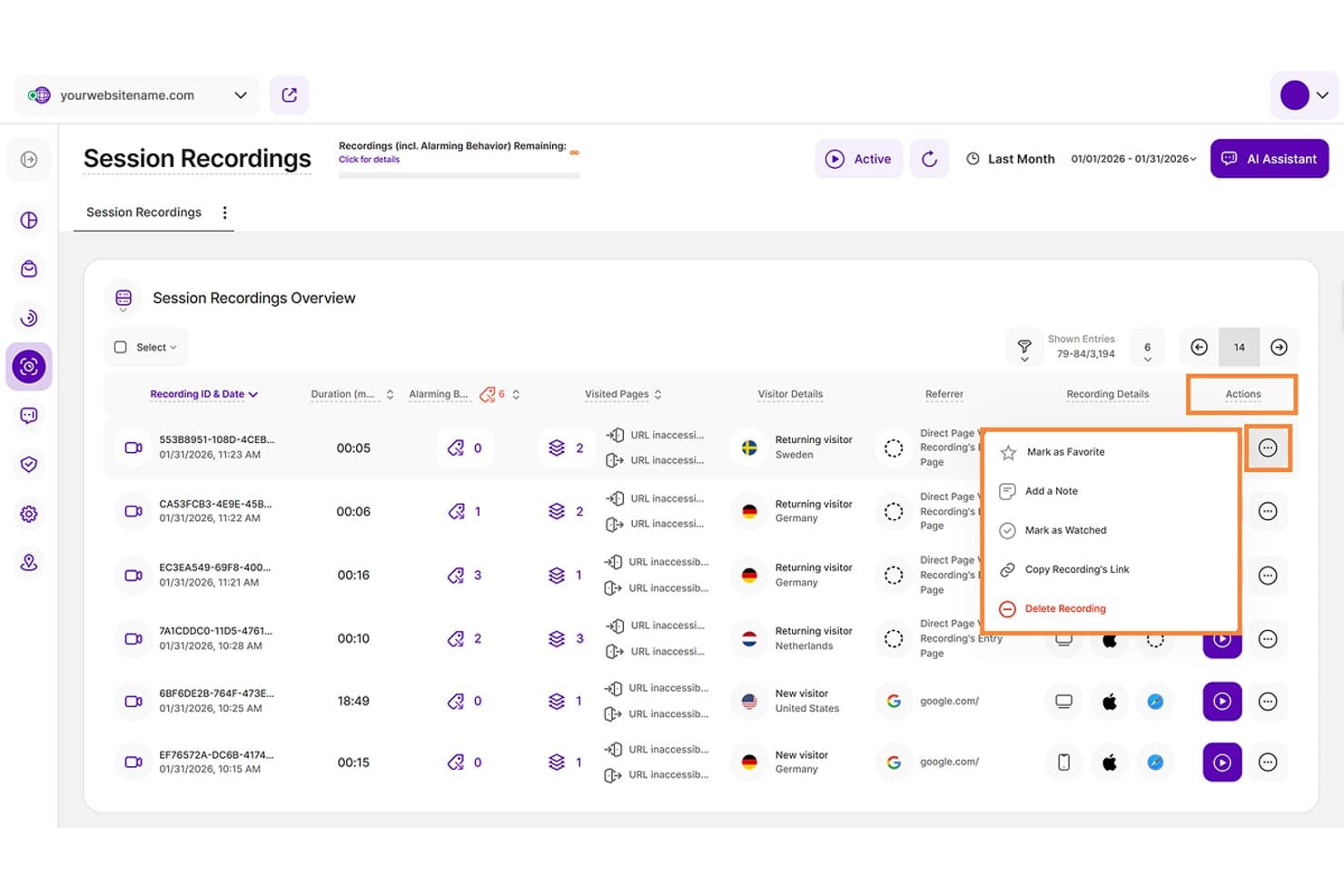
TWIPLA lets users manage session recordings with actions like notes and favorites. TWIPLA is a free session replay and web analytics platform with detailed playback, event timelines, stacked filters, friction signal detection, heatmaps, funnels, and privacy-focused tracking.
Who Is TWIPLA Best For?
Product managers, UX designers, and small teams that need privacy-focused replay analysis and cookieless UX friction detection.
Why I Picked TWIPLA
I picked TWIPLA for Best Free Session Replay Software because its cookieless tracking supports privacy-focused UX analysis. Six automatic friction signals, including rage clicks and dead clicks, appear directly on replay timelines, while stacked filters isolate funnel drop-offs and device patterns. Its Free Forever plan includes 25 recordings total, so it suits targeted investigations rather than ongoing high-volume monitoring.
TWIPLA Key Features
- Replay controls: Skip inactivity and review sessions at speeds up to 8x.
- Recording rules: Record selected URLs, active sessions, or visits above a minimum length.
- Heatmaps: Create click, movement, and scroll maps for desktop, tablet, and mobile.
- Session sharing: Copy recording links and add notes, favorites, or watched statuses.
TWIPLA Integrations
TWIPLA offers marketplace integrations through Wix App Market and Weebly App Center, plus a WordPress plugin. It also supports Google Tag Manager, TYPO3, Smartstore, Drupal, Joomla!, and October CMS, with API keys for custom integrations.
What's Free?
TWIPLA offers a Free Forever plan with 25 recordings total. It also provides a 30-day free trial, while ongoing replay analysis beyond the recording limit requires a paid plan.
Pros and Cons
Pros:
- Cookieless tracking supports privacy-focused UX analysis
- Detailed timelines jump directly to user actions
- Automatic friction signals flag rage clicks
Cons:
- Some iframe content escapes replay capture
- Free recording capacity limits ongoing monitoring
Learn more about TWIPLA: Best for replays linked to funnel drop-offs
- Free plan available
- From $120/month (billed annually)
Visit WebsiteCustomer Rating:4.5/5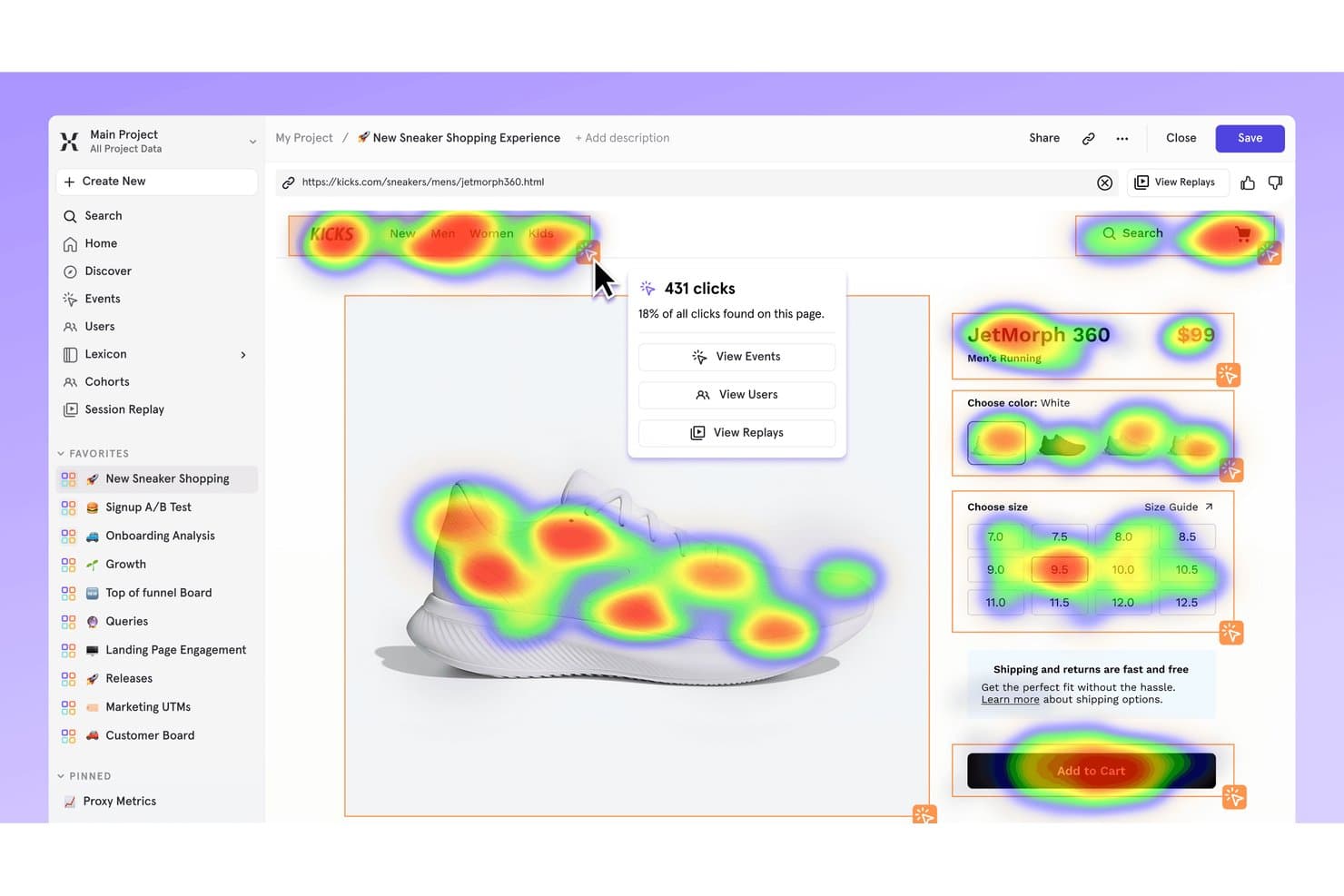
Mixpanel's heatmap shows where users click on a sneaker product page. Mixpanel is a free session replay and product analytics platform with DOM-based playback, funnel and cohort filters, heatmaps, frustration signals, console and network logs, and replay support for web and mobile apps.
Who Is Mixpanel Best For?
Product managers and lean product teams that need to connect session replays with funnel drop-offs, retention data, and user profiles.
Why I Picked Mixpanel
I picked Mixpanel because it links replays directly to funnel drop-offs. I can open sessions from funnel charts, filter them by events, cohorts, or properties, and inspect frustration signals, console logs, and network calls. That helps my team trace a checkout failure from an analytics report to the user behavior behind it.
Mixpanel Key Features
- DOM-based playback: Reconstructs sessions from page structure and changes rather than video.
- Heatmaps and scrollmaps: Visualizes clicks, page views, and scrolling on web pages.
- Mobile session replay: Captures replay data from iOS, Android, React Native, and Flutter apps.
- Privacy masking: Masks text, inputs, images, videos, and sensitive fields by default.
Mixpanel Integrations
Mixpanel offers native integrations with Segment and mParticle, plus JavaScript, iOS, Android, React Native, Flutter, and Electron SDKs. Its ingestion, query, and warehouse APIs support custom integrations.
What's Free?
Mixpanel offers a free-forever plan with unlimited seats, up to 1 million monthly events, and 10,000 session replays per month. It doesn’t charge overages, but platform access is limited after you reach the monthly event limit.
Pros and Cons
Pros:
- Masks sensitive data by default
- Supports web and mobile session replay
- Links replays directly to funnel drop-offs
Cons:
- Heatmaps and scrollmaps exclude mobile
- Retention ends after 30 days
 Best for behavioral data analytics
- Free plan available
- Pricing upon request
Visit WebsiteCustomer Rating:4.5/5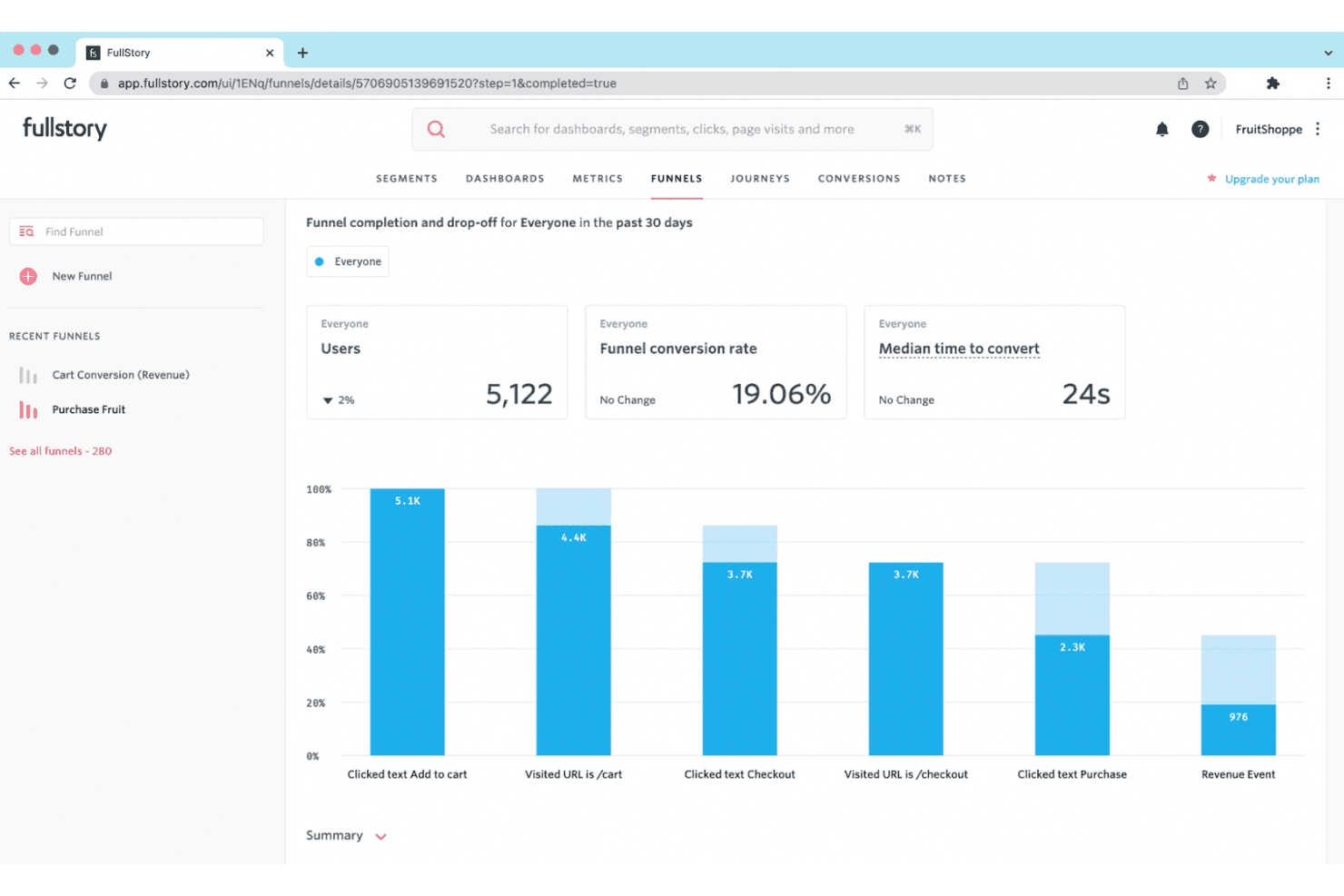
Fullstory provides session replays and behavior insights to help businesses improve digital experiences. Fullstory is a free session replay platform with tagless autocapture, searchable session filters, click and scroll maps, frustration-signal detection, and console and network debugging tools.
Who Is Fullstory Best For?
Fullstory suits product managers and UX designers who need to diagnose usability issues through session replays, heatmaps, and behavioral signals.
Why I Picked Fullstory
I picked Fullstory because its behavioral data analytics connect session evidence with user frustration. I use OmniSearch to isolate rage clicks, dead clicks, and page-speed issues, then review click and scroll maps to locate friction. Dev Tools also links error clicks to console and network activity, helping me trace usability problems to their technical cause.
Fullstory Key Features
- Tagless autocapture: Captures web interactions without manual event tagging.
- Replay controls: Adjust playback speed, skip inactivity, and filter event lists.
- Privacy masking: Masks passwords, payment details, and personal information by default.
- Guest sharing: Creates replay links for external viewers without using team seats.
Fullstory Integrations
Fullstory offers integrations with Slack, Segment, Jira, Adobe Analytics, and Google Tag Manager. It also provides an open API, webhooks, data export, and consent and identity APIs for custom connectivity.
What's Free?
FullstoryFree is a free plan rather than a limited-time trial, with no credit card required. It includes up to 30,000 sessions monthly, 12 months of retention, and 10 users, but excludes advanced features such as dashboards, webhooks, and StoryAI.
Pros and Cons
Pros:
- Heatmaps reveal click and scroll behavior
- Console and network logs aid bug diagnosis
- Detailed frustration signals surface hidden friction
Cons:
- Free data may support AI training
- Capture stops after monthly session cap
Learn more about Fullstory: Best for replays linked to funnels and journeys
- Free plan + free demo available
- Pricing upon request
Visit WebsiteCustomer Rating:4.5/5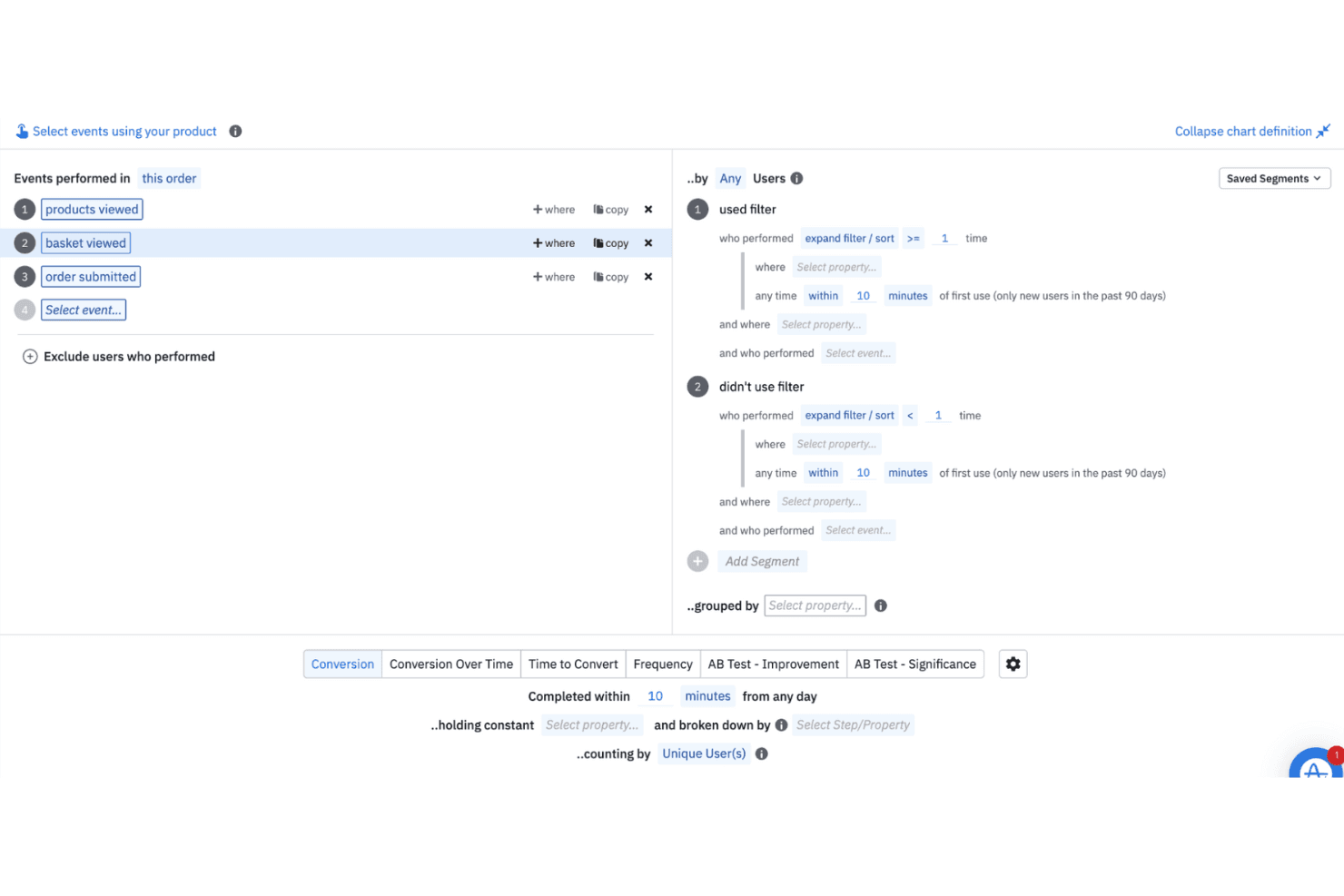
Amplitude helps teams analyze real-time and historical user behavior to guide product decisions. Amplitude is a free session replay software platform with web and mobile recording, event timelines, funnel and journey views, replay search, rage-click detection, and console and network logs.
Who Is Amplitude Best For?
Product managers and digital marketers who need to connect session replays with funnels, journeys, experiments, and user behavior data.
Why I Picked Amplitude
I picked Amplitude because it links session replays directly to funnels and journeys. I can open recordings from a conversion drop-off, then use event timelines, replay search, and rage-click detection to investigate friction. Its free plan includes 10,000 replays monthly, making continuous product diagnosis practical.
Amplitude Key Features
- Console and network logs: Review JavaScript messages, failed requests, and API activity beside replays.
- Mobile app replay: Capture sessions from iOS, Android, React Native, and Flutter applications.
- Privacy masking: Mask text fields, inputs, passwords, cards, phones, and emails by default.
- Skip inactivity: Jump past idle periods with playback controls and adjustable replay speed.
Amplitude Integrations
Amplitude lists 159+ integrations, including Segment, Snowflake, BigQuery, Slack, Optimizely, LaunchDarkly, and HubSpot. SDKs, Google Tag Manager, and the Replay Search API support custom data and replay workflows.
What's Free?
Amplitude offers a free-forever plan with no credit card required. It includes up to 10,000 session replays and 2 million events monthly, with one month of replay retention and unlimited seats.
Pros and Cons
Pros:
- Supports web, iOS, Android, and cross-platform apps
- Exposes console and network errors beside replays
- Links replays directly to funnels and journeys
Cons:
- Requires SDK instrumentation before recording sessions
- Replays expire after one month
Learn more about Amplitude: Best for behavior-based session filtering
- 14-day free trial available
- Plans start at $65/month
Visit WebsiteCustomer Rating:4.6/5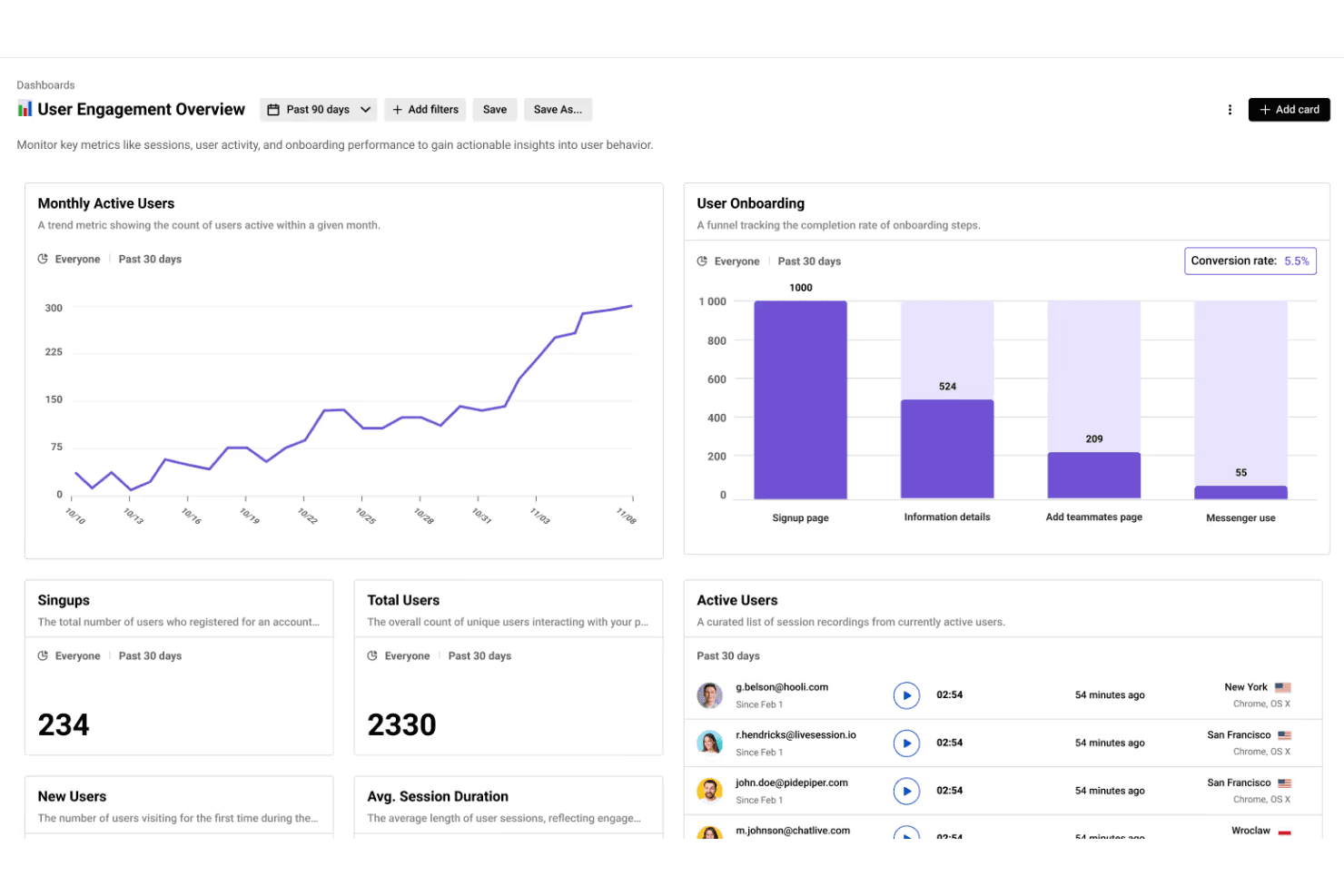
LiveSession combines session replays with analytics to help teams track KPIs and boost user engagement. LiveSession is a session replay and product analytics platform combining mouse, click, and scroll recordings with heatmaps, funnels, segments, filters, and rage and error click detection.
Who Is LiveSession Best For?
LiveSession suits product managers and UX designers at small teams who need behavior-based filtering to diagnose friction in web experiences.
Why I Picked LiveSession
I picked LiveSession because its behavior-based session filtering helps me investigate friction without watching recordings at random. I can combine search terms, save reusable segments, and use Inspect Mode to find clicks on specific CSS elements. The Events explorer also connects rage and error clicks to the replays where users struggled.
LiveSession Key Features
- Heatmaps: Visualize click activity and interaction intensity by URL.
- Funnel analysis: Track user progression through one defined conversion flow.
- Resource backup: Preserve replay styles and fonts after original files are deleted.
- Sensitive input masking: Automatically anonymize passwords and card details.
LiveSession Integrations
LiveSession documents 26 integrations, including Google Analytics, Segment, Mixpanel, Sentry, Bugsnag, Intercom, Zendesk, Slack, Google Tag Manager, and Zapier. Its REST API is available on Pro and above for custom integrations.
What's Free?
LiveSession offers a free-forever plan with session replay, heatmaps, funnels, filters, and segments. It includes 1,000 sessions monthly, one month of data retention, three team members, and two websites or projects; sessions exceeding the monthly limit aren’t recorded. A 14-day Pro trial is also available without a credit card.
Pros and Cons
Pros:
- Heatmaps complement mouse and scroll replays
- Rage and error clicks expose friction
- Behavior-based filtering narrows replay investigations quickly
Cons:
- Developer diagnostics lack console and network context
- Native mobile app replay remains unavailable
Learn more about LiveSession: Best for eye-tracking heatmaps on free plans
- Free plan available
- From $39/month
Visit WebsiteCustomer Rating:4.1/5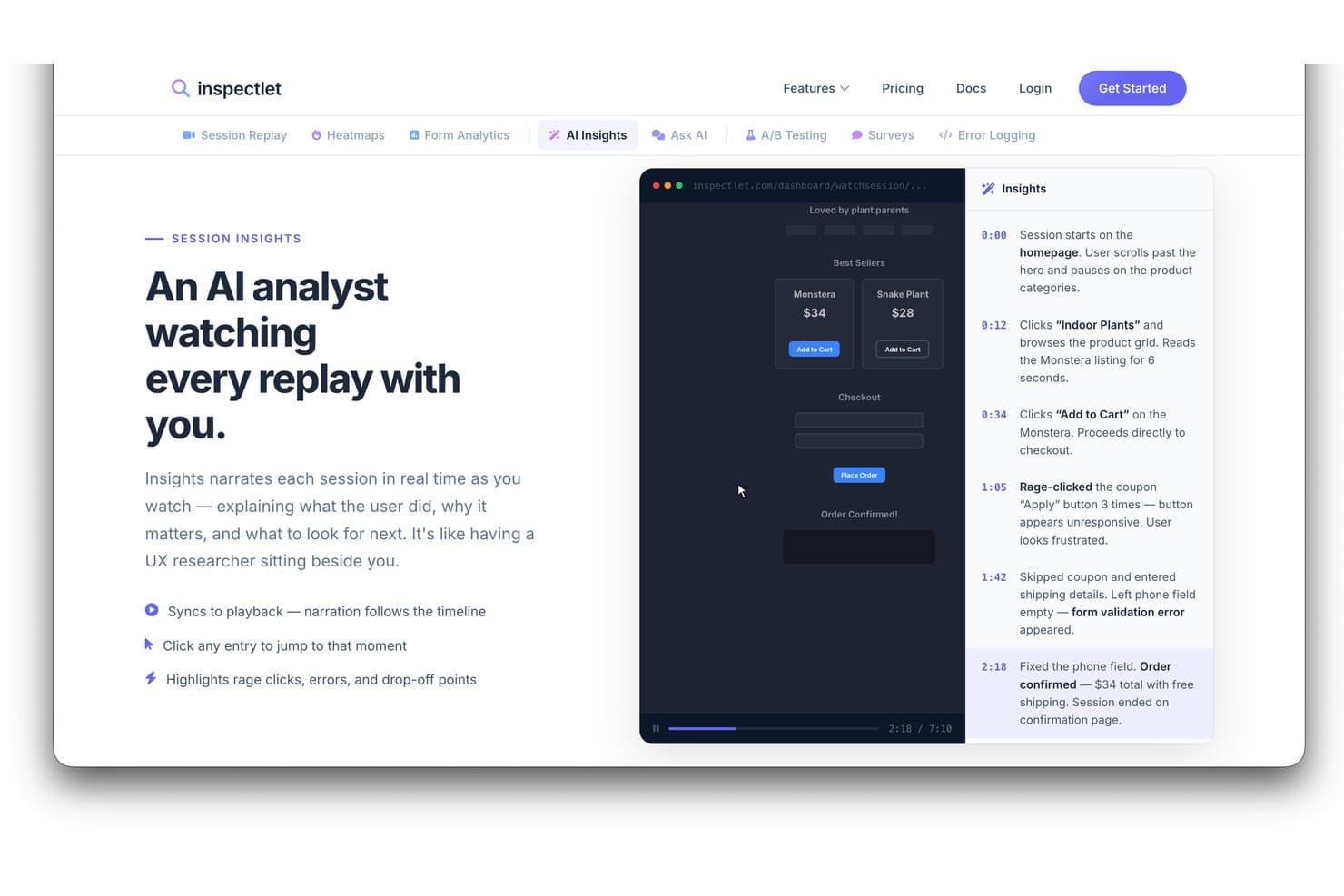
Inspectlet's AI Insights narrates session replays with timestamped events. Inspectlet is free session replay software that combines visitor recordings, heatmaps, AI session analysis, error and rage-click detection, filtering, and A/B testing for websites and single-page applications.
Who Is Inspectlet Best For?
Inspectlet suits product managers and UX designers who need free session replay with eye-tracking heatmaps to diagnose web usability issues.
Why I Picked Inspectlet
I picked Inspectlet as Best for eye-tracking heatmaps on free plans because its free tier maps mouse movement across live pages. I use click dots and scroll-depth maps to see whether visitors notice key CTAs or abandon early. Replay-linked rage-click and JavaScript error detection then connects visual friction to sessions needing investigation.
Inspectlet Key Features
- Session timeline: Review clicks, navigation, and page events in sequence.
- Session filtering: Combine visitor, source, device, page, and conversion filters.
- A/B testing: Create experiments with a visual editor and significance calculations.
- Sensitive data masking: Exclude passwords and selected fields from recordings.
Inspectlet Integrations
Inspectlet documents integrations or setup options for Google Tag Manager, WordPress, Shopify, HubSpot, Convert.com, Slack, and webhooks. API access starts on Growth for custom integrations.
What's Free?
Inspectlet offers a free-forever plan with no credit card or time limit, covering up to 2,500 recorded sessions monthly across three websites. It includes session replay, heatmaps, and A/B testing, but stores data for one month and stops recording new sessions after you reach the monthly limit.
Pros and Cons
Pros:
- Reviewers praise filtering specific sessions
- Rage clicks link directly to replays
- Eye-tracking heatmaps clarify visual attention
Cons:
- Single-user access restricts team review
- Free retention limits historical comparisons
Learn more about Inspectlet: Best for self-hosted open-source replay
- Free plan available
- Pricing upon request
Visit WebsiteCustomer Rating:4.5/5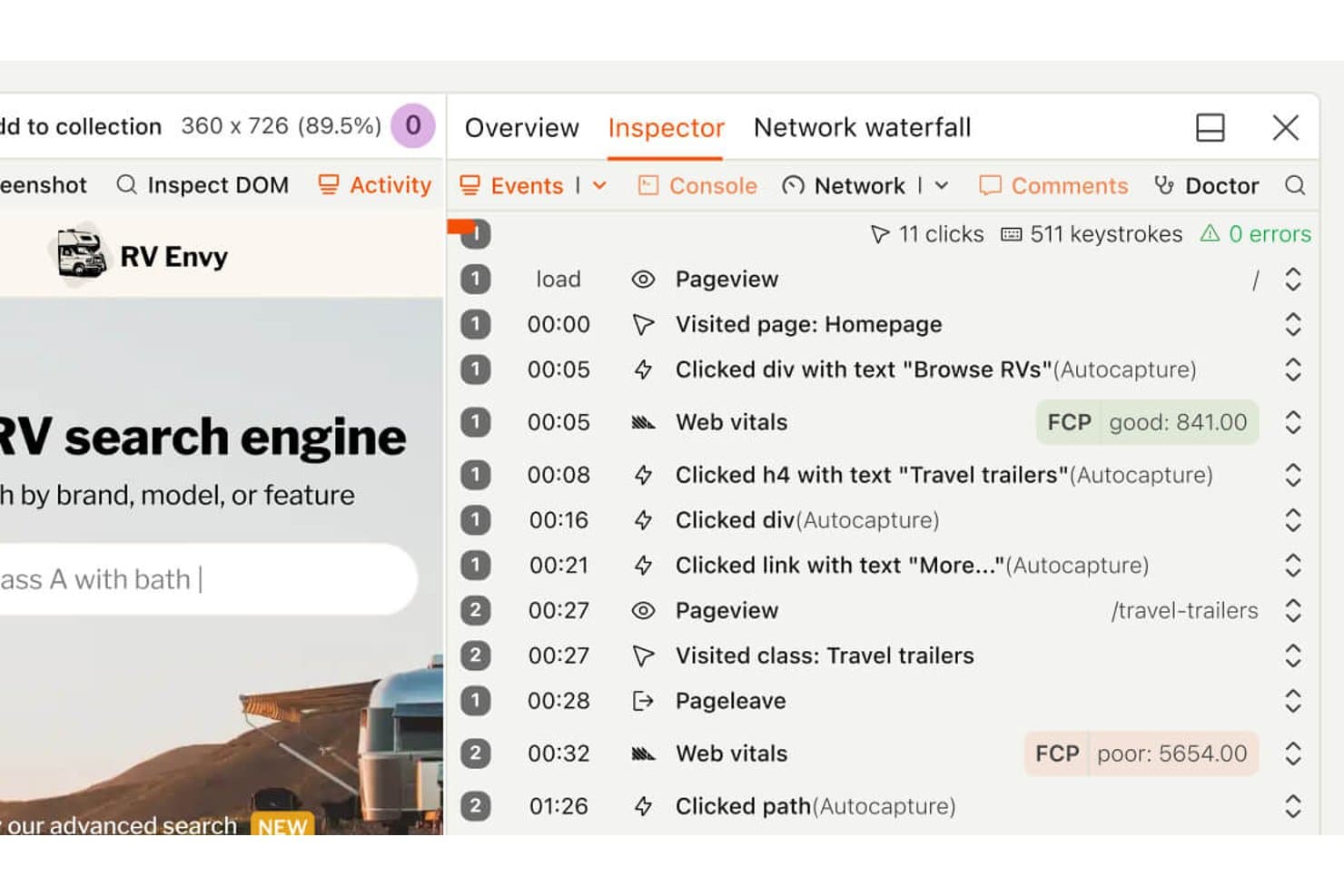
PostHog's session replay timeline shows user clicks and page visits. PostHog is free session replay software that combines DVR-style playback, heatmaps, funnel analysis, feature flags, experiments, error tracking, and synced console and network logs across web and mobile apps.
Who Is PostHog Best For?
PostHog suits product and engineering teams that need open-source, self-hosted session replay alongside funnels, experiments, and error tracking.
Why I Picked PostHog
I picked PostHog because its self-hosted open-source replay runs under the MIT license, giving teams control over their analytics stack. I can pair DVR-style playback with synced console logs, network waterfalls, and a DOM explorer to investigate bugs. Funnel-to-replay links also show where users abandon key product flows.
PostHog Key Features
- Heatmaps: Create heatmaps, scrollmaps, and clickmaps for up to three URLs.
- Frustration signals: Find sessions with rage clicks, dead clicks, or exceptions.
- Mobile replay: Capture sessions from iOS, Android, React Native, and Flutter apps.
- AI session summaries: Ask PostHog AI to find, watch, and summarize recordings.
PostHog Integrations
PostHog integrates with Intercom and Crisp for replay links, plus 50+ CDP destinations including Slack, Salesforce, HubSpot, and PagerDuty. It also provides an API and MCP server for custom workflows.
What’s Free?
PostHog’s free plan lasts indefinitely with no credit card or trial expiry, and includes 5,000 web recordings or 2,500 mobile recordings monthly. It supports unlimited team members but limits you to one project and one month of recording retention; unused recording allowances don’t roll over.
Pros and Cons
Pros:
- Funnel links connect drop-offs to recordings
- Synced console and network logs aid debugging
- Open-source self-hosting supports analytics control
Cons:
- General page text requires manual masking
- Heatmaps cover only three page URLs
Learn more about PostHog: Best for debugging sessions tied to feature flags
- Free plan + free trial available
- From $50/month
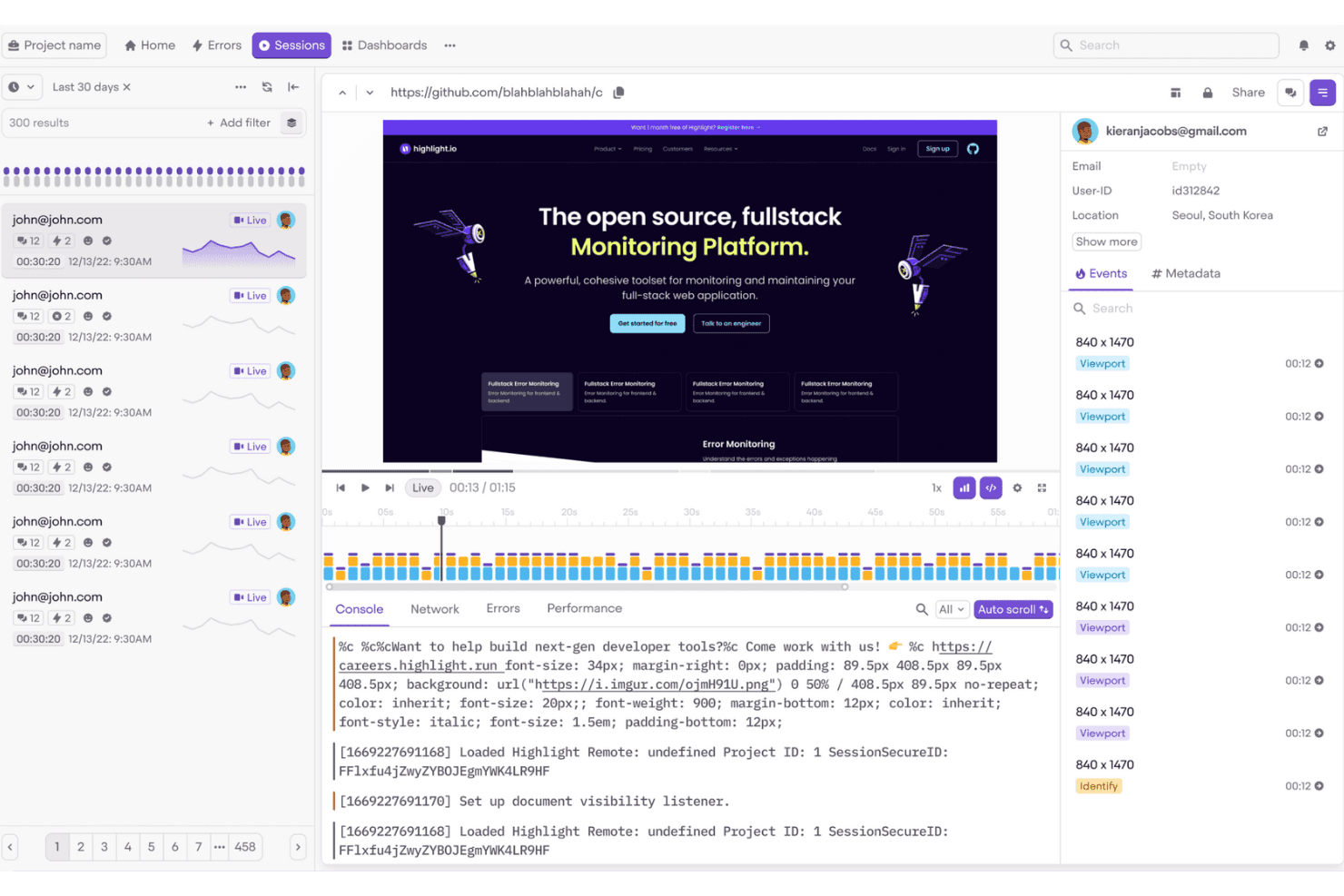
Highlight.io helps frontend teams monitor and debug user sessions easily. Highlight is session replay and observability software, now delivered through LaunchDarkly, with web and mobile playback, flexible session search, console and network logs, error and rage-click detection, and feature-flag context.
Who Is Highlight Best For?
Highlight suits developer-adjacent product teams that need to debug user sessions alongside feature flags, errors, and release context.
Why I Picked Highlight
I picked Highlight because it’s best for debugging sessions tied to feature flags. I can compare replayed sessions by the flags users saw, then inspect console and network logs alongside errors or rage clicks. That makes it easier to verify whether a flagged design change caused friction before expanding its rollout.
Highlight Key Features
- Flexible session search: Filter sessions by identity, device, location, URLs, clicks, and custom event properties.
- Privacy masking: Hide text, images, form inputs, and sensitive data before collection.
- Mobile replay support: Record sessions from Android, iOS, Flutter, and React Native apps.
- Heatmaps: Visualize clicks, taps, and scroll activity with color-coded maps.
Highlight Integrations
Highlight offers a native Jira Cloud integration and connects Vega with GitHub and Slack. It also supports OpenTelemetry and an MCP Server for custom observability workflows.
What’s Free?
Highlight offers a free plan, so you can use it without a time-limited trial. Paid pricing is available upon request, but specific free-plan limits aren’t listed here.
Pros and Cons
Pros:
- Connects replays with errors and logs
- Searches sessions by detailed user context
- Debugs sessions alongside feature flags
Cons:
- Free recording stops at monthly cap
- Requires developer-led SDK setup
Learn more about Highlight: Best for open-source self-hosted replay
- Free plan + 7-day free trial available
- From $199/month
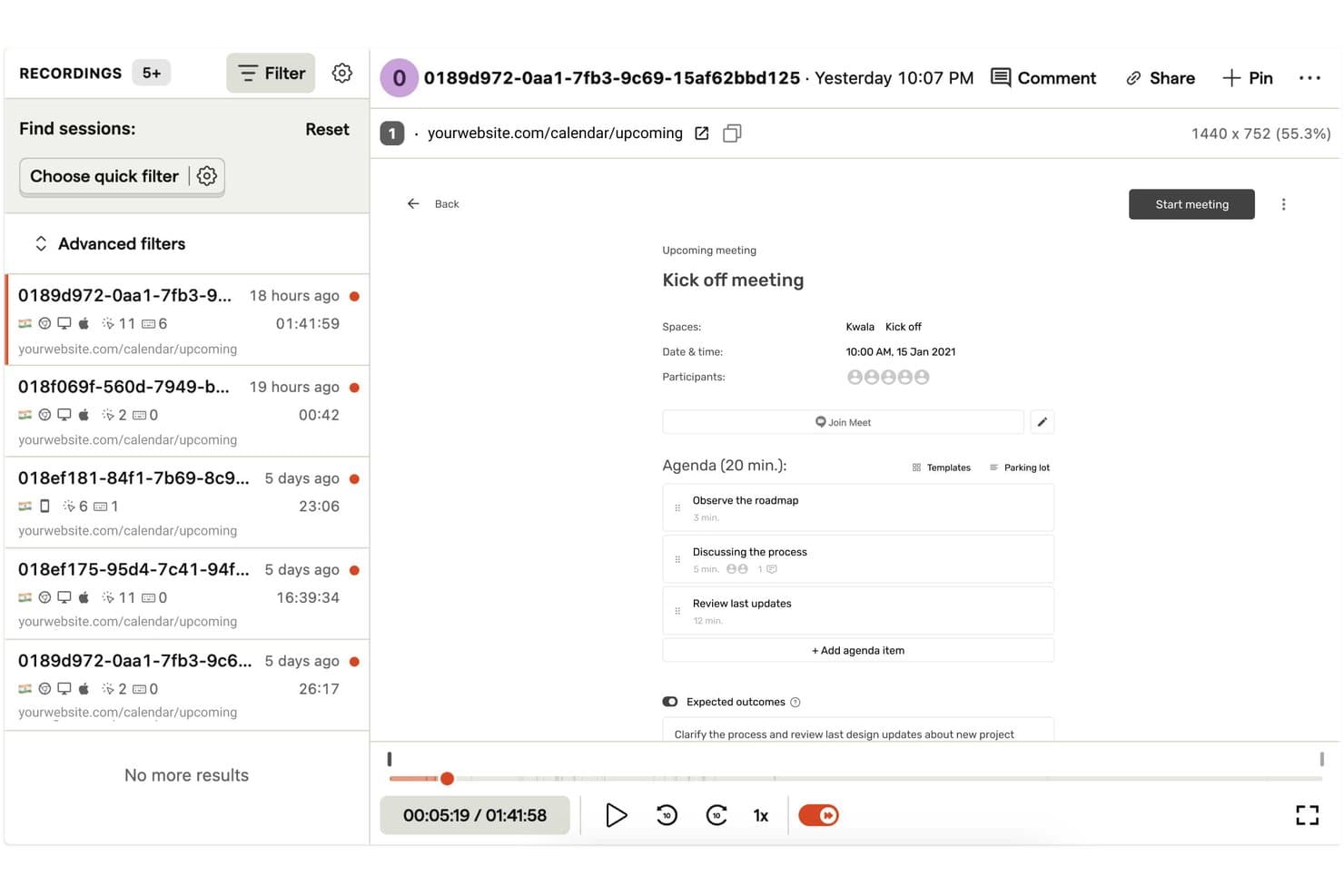
OpenReplay lets users replay and filter recorded user sessions with ease. OpenReplay is a session replay platform with pixel-perfect web and mobile recordings, synchronized console and network logs, heatmaps, error tracking, product analytics, and replay search.
Who Is OpenReplay Best For?
Product and UX teams with DevOps support who need customizable, self-hosted replay and full control over user data.
Why I Picked OpenReplay
I picked OpenReplay because its free, open-source self-hosted edition gives my team control over replay data and customization. We can inspect rage clicks, errors, and dead clicks through OmniSearch, then review synchronized console and network logs. That helps us diagnose a checkout failure without sending customer data to a third-party processor.
OpenReplay Key Features
- Multi-tab sessions: Joins activity across browser tabs into one user journey.
- Heatmaps: Visualizes clicks, mouse movement, and rage-click hotspots.
- Mobile app replay: Supports iOS, Android, React Native, and Flutter SDKs.
- Session highlights: Clips replay moments with notes, tags, and shareable links.
OpenReplay Integrations
OpenReplay offers integrations with Sentry, Datadog, Jira, GitHub, Slack, Google Tag Manager, Redux, Vuex, Pinia, and Apollo. Its REST API supports custom connections for sessions, users, events, and live data.
What's Free?
OpenReplay’s open-source edition is free forever when you host it on your own infrastructure. It’s intended for low-traffic applications, and you’ll manage hosting, storage, scaling, and support through the community.
Pros and Cons
Pros:
- Adjustable 180-day retention supports longer investigations
- Deep diagnostics connect replays with technical context
- Free self-hosting preserves complete data control
Cons:
- Free edition targets low-traffic applications
- Self-hosting demands ongoing DevOps maintenance
Learn more about OpenReplay:
Outro Software Gratuito de Reprodução de Sessões
Eis algumas opções adicionais de software de reprodução de sessões que também oferecem planos ou períodos de teste gratuitos. Embora estas ferramentas não tenham entrado na minha seleção, vale ainda a pena analisá-las:
- 11FullSessionBest for free mobile and web session replay
- 12Microsoft ClarityBest for unlimited session replays at no cost
- 13Hotjar (by Contentsquare)Best for heatmaps, surveys, and session replays in one
- 14UXCamBest for mobile app session replay on free
- 15SmartlookBest for retroactive session replays
- 16Lucky OrangeBest for live chat triggered by rage clicks
- 17MouseflowBest for form drop-off and field-level replay
- 18LogRocketBest for dev-level debugging in session replay
- 19StatsigBest for replays filtered by experiment exposure
- 20ContentsquareBest for enterprises needing GDPR-compliant trials
How I Evaluate Free Session Replay Software
First, I define what counts as free. For session replay, it’s a lasting plan, not a trial, with enough monthly recordings for ongoing review. From there, I split my evaluation into three parts: core functionality, which carries most weight, like replaying and filtering sessions; standout features, like heatmaps; and beyond-feature fit, like upgrade paths.
Core Functionality (Table Stakes For This List)
In addition to my free plan requirements, I use a scoring system to select tools for my list. I score each one on a scale from 0 (does not offer the functionality) to 5 (excels in this area) for each core functionality listed below, based on what's available on the free plan. I then convert the total into a percentage to help assess each tool's overall fit, with extra weight on any functionalities I've deemed essential.
- Session Recording (Essential): I look for reliable playback with standard controls that lets me follow a user’s path through a signup flow or checkout.
- Session Filtering & Search: I check whether you can combine filters such as page, device, and date to find sessions tied to a specific drop-off.
- Click & Scroll Tracking: I assess how clearly recordings show clicks, scrolling, and pointer movement when a user hesitates or misses a key control.
- Error And Rage Click Detection: I look for automatic flags for rage clicks, dead clicks, or JavaScript errors that help pinpoint friction without reviewing every session.
- Data Retention Window: I check how long free-plan recordings remain available so your team can revisit sessions during a review cycle.
Once I have a list of tools that meet the criteria, I consider what sets each platform apart.
Differentiating Factors (What Sets Vendors Apart)
Here's how I compare and contrast different vendors:
Standout Features
I look for click and scroll heatmaps bundled into the free plan, since they let me see aggregate behavior patterns before I dive into individual replays. Console and network logs inside the replay timeline are equally valuable—when I spot a user stalling on a checkout step, I can check for a JS error right there instead of filing a ticket with engineering. I also evaluate how easy it is to share a specific replay clip with a designer or developer through a simple link.
Beyond Features
I check whether free plans include default PII masking, since product teams reviewing sessions with form inputs or personal data need that protection without upgrading. Implementation effort matters too—a single-snippet install like you'll find with Hotjar or Microsoft Clarity gets you recording in minutes, while SDK-heavy setups can stall adoption on lean teams. I also evaluate seat limits, because a free tier that locks you to one login makes it hard to share replays with designers and engineers async.
Como Escolher Software Gratuito de Reprodução de Sessões
As listas complexas de funcionalidades e as estruturas de preços podem dificultar a compreensão do que está realmente a obter com um software gratuito de reprodução de sessões. Para o ajudar a manter o foco enquanto analisa o processo de seleção do software, eis alguns fatores a ter em conta:
| Fator | O que considerar |
| Âmbito da oferta gratuita | Verifique o que está incluído no plano gratuito, como limites de sessões, funcionalidades e acesso de utilizadores. Certifique-se de que satisfaz as suas necessidades básicas sem atualizações imediatas. |
| Escalabilidade | Considere se a ferramenta pode crescer com a sua equipa. Procure planos flexíveis que acomodem o aumento do tráfego e das exigências dos utilizadores ao longo do tempo. |
| Integrações | Garanta a compatibilidade com as ferramentas que já utiliza. Procure integrações com plataformas como o Google Analytics, sistemas de CRM e ferramentas de marketing. |
| Facilidade de utilização | Avalie a interface do utilizador e a navegação. Uma ferramenta fácil de configurar e utilizar poupará tempo à sua equipa e reduzirá a curva de aprendizagem. |
| Conformidade com a privacidade | Verifique se a ferramenta cumpre os regulamentos de proteção de dados, como o RGPD. Isto é essencial para proteger os dados dos utilizadores e manter a confiança. |
| Profundidade das funcionalidades | Avalie a profundidade das funcionalidades disponibilizadas, como mapas de calor, reproduções de sessões e segmentação de utilizadores. Mais funcionalidades proporcionam melhores informações sobre o comportamento dos utilizadores. |
| Assistência ao cliente | Procure opções de assistência rápidas, como chat em direto ou e-mail. Uma assistência fiável ajuda a resolver problemas rapidamente e mantém a sua equipa produtiva. |
O que é o software gratuito de reprodução de sessões?
O software de reprodução de sessões é uma ferramenta que regista as interações dos utilizadores em sites ou aplicações, fornecendo informações sobre o comportamento dos utilizadores. Estas ferramentas disponibilizam frequentemente planos gratuitos ou períodos de avaliação com funcionalidades limitadas ou limites de utilização. Os gestores de produto, designers de UX e profissionais de marketing utilizam-nas normalmente para melhorar a experiência do utilizador e otimizar as taxas de conversão. Os mapas de calor, as gravações de sessões e a análise do percurso do utilizador ajudam as equipas a compreender o comportamento dos utilizadores e a identificar áreas a melhorar.
Funcionalidades do software gratuito de reprodução de sessões
Vamos analisar as funcionalidades normalmente encontradas no software de reprodução de sessões e quais são geralmente incluídas nos planos gratuitos e pagos.
Funcionalidades normalmente gratuitas do software de reprodução de sessões
- Gravações de sessões: Registe as interações dos utilizadores no seu site para compreender o comportamento e identificar problemas.
- Mapas de calor: Visualize onde os utilizadores clicam e percorrem a página para otimizar o esquema e o conteúdo.
- Análise do percurso do utilizador: Acompanhe o percurso dos utilizadores no seu site para encontrar pontos de abandono.
- Análise básica: Obtenha informações sobre o comportamento dos utilizadores através de métricas e dados simples.
- Ferramentas de feedback: Recolha diretamente as opiniões dos utilizadores para melhorar a experiência geral.
Funcionalidades normalmente pagas do software de reprodução de sessões
- Segmentação avançada: Filtre os dados das sessões por dados demográficos ou comportamento dos utilizadores para obter informações mais detalhadas.
- Testes A/B: Teste diferentes versões do seu site para verificar qual tem melhor desempenho junto dos utilizadores.
- Monitorização em tempo real: Observe as interações dos utilizadores à medida que acontecem para resolver rapidamente os problemas.
- Dashboards personalizáveis: Adapte as visualizações de dados para se concentrar nas métricas mais relevantes para os seus objetivos.
- Ferramentas de conformidade com a privacidade: Garanta que a recolha de dados está em conformidade com regulamentos como o RGPD e a CCPA.
Vantagens do software gratuito de reprodução de sessões
A implementação de software gratuito de reprodução de sessões proporciona várias vantagens à sua equipa e à sua empresa. Eis algumas que pode esperar:
- Análise económica: Obtenha informações sobre o comportamento dos utilizadores sem gastar dinheiro, o que o torna ideal para startups e pequenas empresas.
- Informações sobre o comportamento dos utilizadores: Compreenda como os utilizadores interagem com o seu site através de gravações de sessões e mapas de calor, ajudando-o a identificar áreas problemáticas.
- Melhoria da experiência do utilizador: Utilize ferramentas de feedback para recolher as opiniões dos utilizadores e efetuar os ajustes necessários para melhorar a experiência geral.
- Decisões baseadas em dados: Utilize análises básicas para fundamentar decisões e otimizar o desempenho do site com base em dados reais dos utilizadores.
- Configuração rápida: Muitas ferramentas gratuitas oferecem uma instalação e configuração simples, permitindo que a sua equipa comece rapidamente a analisar o comportamento dos utilizadores.
- Sem compromisso a longo prazo: Experimente funcionalidades e vantagens sem ficar vinculado a um contrato, tendo assim flexibilidade para explorar diferentes opções.
- Conformidade com a privacidade: Algumas ferramentas gratuitas incluem funcionalidades básicas de privacidade para ajudar a garantir que os dados dos utilizadores são tratados de forma responsável.
Custos e preços do software gratuito de reprodução de sessões
Compreendo que chegou a este artigo à procura das melhores opções de software de reprodução de sessões disponíveis gratuitamente. No entanto, uma vez que os planos gratuitos oferecem apenas funcionalidades limitadas, é bastante provável que precise de atualizar o seu plano no futuro.
A tabela abaixo resume os planos comuns, os respetivos preços médios e as funcionalidades normalmente incluídas nas soluções de software de reprodução de sessões:
Tabela de comparação de planos de software de reprodução de sessões
| Tipo de plano | Preço médio | Funcionalidades comuns |
| Plano gratuito | $0 | Gravações de sessões, análise básica, mapas de calor, ferramentas de feedback dos utilizadores e armazenamento de dados limitado. |
| Plano pessoal | $5-$25/utilizador/ mês | Análise avançada, segmentação de utilizadores, mais armazenamento de dados e apoio prioritário ao cliente. |
| Plano empresarial | $50-$100/utilizador /mês | Dashboards personalizáveis, monitorização em tempo real, testes A/B e ferramentas reforçadas de conformidade com a privacidade. |
| Plano empresarial avançado | $150+/utilizador/ mês | Acesso a todas as funcionalidades, gestão de conta dedicada, integrações personalizadas e apoio abrangente. |
Perguntas frequentes sobre software gratuito de reprodução de sessões
Aqui ficam algumas respostas a perguntas comuns sobre software gratuito de reprodução de sessões:
Porque deve utilizar reproduções de sessões na investigação de utilizadores para aplicações móveis?
As reproduções de sessões fornecem informações inestimáveis sobre as interações dos utilizadores na sua aplicação. Ajudam a sua equipa a identificar rapidamente problemas e a depurar mais depressa, melhorando a experiência do utilizador a cada visita. Estes dados são cruciais para aperfeiçoar o design e a funcionalidade da aplicação móvel, de modo a corresponder às expectativas dos utilizadores.
Qual é o principal objetivo da reprodução de sessões?
O principal objetivo da reprodução de sessões é compreender o comportamento dos utilizadores e identificar onde o percurso do utilizador é interrompido. Estes dados ajudam a criar fluxos de utilizador que correspondam às expectativas dos clientes e a melhorar o desempenho geral do site.
Como funciona a reprodução de sessões da Datadog?
A reprodução de sessões da Datadog regista todas as alterações ao DOM, como as introduzidas pelos utilizadores, como eventos. Em seguida, reúne estes eventos numa representação visual de cada sessão do utilizador, permitindo-lhe ver exatamente aquilo que os utilizadores experienciam no seu site.
Qual é a taxa de amostragem da reprodução de sessões da Datadog?
A taxa de amostragem na configuração de reprodução de sessões da Datadog varia entre 0.0 e 100.0. Determina a percentagem de sessões gravadas: 0 significa que não há reproduções e 100 significa que todas as sessões são incluídas. Ajuste este valor para controlar o volume de dados.
Como é que as reproduções de sessões ajudam a melhorar os percursos dos clientes?
As reproduções de sessões destacam as áreas onde os utilizadores enfrentam dificuldades, ajudando a localizar e resolver problemas. Ao compreender estes pontos problemáticos, a sua equipa pode tomar decisões baseadas em dados para simplificar o percurso do cliente e melhorar a satisfação.
Os dados de reprodução de sessões podem ser utilizados para depuração?
Sim, os dados de reprodução de sessões são extremamente úteis para a depuração. Ao visualizar as reproduções, os programadores conseguem ver exatamente onde ocorrem os erros no percurso do utilizador, permitindo uma identificação e resolução mais rápidas dos problemas.