

Com tantas soluções diferentes de inteligência de produto disponíveis, é difícil perceber qual é a mais adequada para si. Sabe que quer acompanhar o comportamento dos utilizadores, simplificar a recolha manual de dados, obter informações de forma mais eficiente e aceder a informações detalhadas sobre a concorrência que lhe permitam tomar decisões com recurso a análises preditivas, mas precisa de perceber qual é a melhor ferramenta. Eu ajudo! Nesta publicação, vou tornar a sua escolha mais fácil, partilhando as minhas experiências pessoais com dezenas de ferramentas de inteligência diferentes, utilizadas por grandes equipas e em produtos complexos, bem como as minhas escolhas do melhor software de inteligência de produto.
Why Trust Our Software Recommendations
6,700+
Reviews
20
Industry experts
16+
Evaluation factors
14
Years
Our team has been testing and reviewing software since 2012. As product managers ourselves, we know how difficult—and important—it is to choose the right software.
For this guide, we evaluated tools using hands-on testing and independent research, scoring tools using our selection criteria.
Our reviews reflect our human editorial judgment, not a sales pitch.
Expert reviewers:
- Andrew LumbySenior TPM
- Cristiano ValimSenior UI/UX Lead


Tabela comparativa: software de inteligência de produto
Esta tabela comparativa resume os detalhes de preços das minhas principais escolhas de software de inteligência de produto.
| Tool | Best For | Trial Info | Price | ||
|---|---|---|---|---|---|
| 1 | Best for connecting feedback to product outcomes | Free demo available | Pricing upon request | Website | |
| 2 | Best for session replay with AI-driven insight | Free plan available | Pricing upon request | Website | |
| 3 | Best for capturing all user interactions automatically | Free plan available | Pricing upon request | Website | |
| 4 | Best for open-source product analytics | Free plan available | Pricing upon request | Website | |
| 5 | Best for visualizing user interactions | 14-day free trial + free plan available | From $176/month (billed annually) | Website | |
| 6 | Best for AI-driven revenue impact prioritization | Free demo available | Pricing upon request | Website | |
| 7 | Best for product and user behavior analytics | Free plan + free demo available | Pricing upon request | Website | |
| 8 | Best for in-app user interaction tracking | Free plan + 30-day free trial + free demo available | Pricing upon request | Website | |
| 9 | Best for real-time data analytics | Free plan available | From $140/month | Website | |
| 10 | Best for unified digital and product analytics | Free plan + free demo + 15-day free trial available | From $39/month (billed annually) | Website |


Análises do melhor software de inteligência de produto
Apresentamos abaixo os meus resumos detalhados do melhor software de inteligência de produto que integrou a minha seleção. As minhas análises apresentam uma visão detalhada das principais funcionalidades, vantagens & desvantagens, integrações e casos de utilização ideais de cada ferramenta, para o ajudar a encontrar a melhor opção para si.
 Best for connecting feedback to product outcomes
- Free demo available
- Pricing upon request
Visit WebsiteCustomer Rating:4.8/5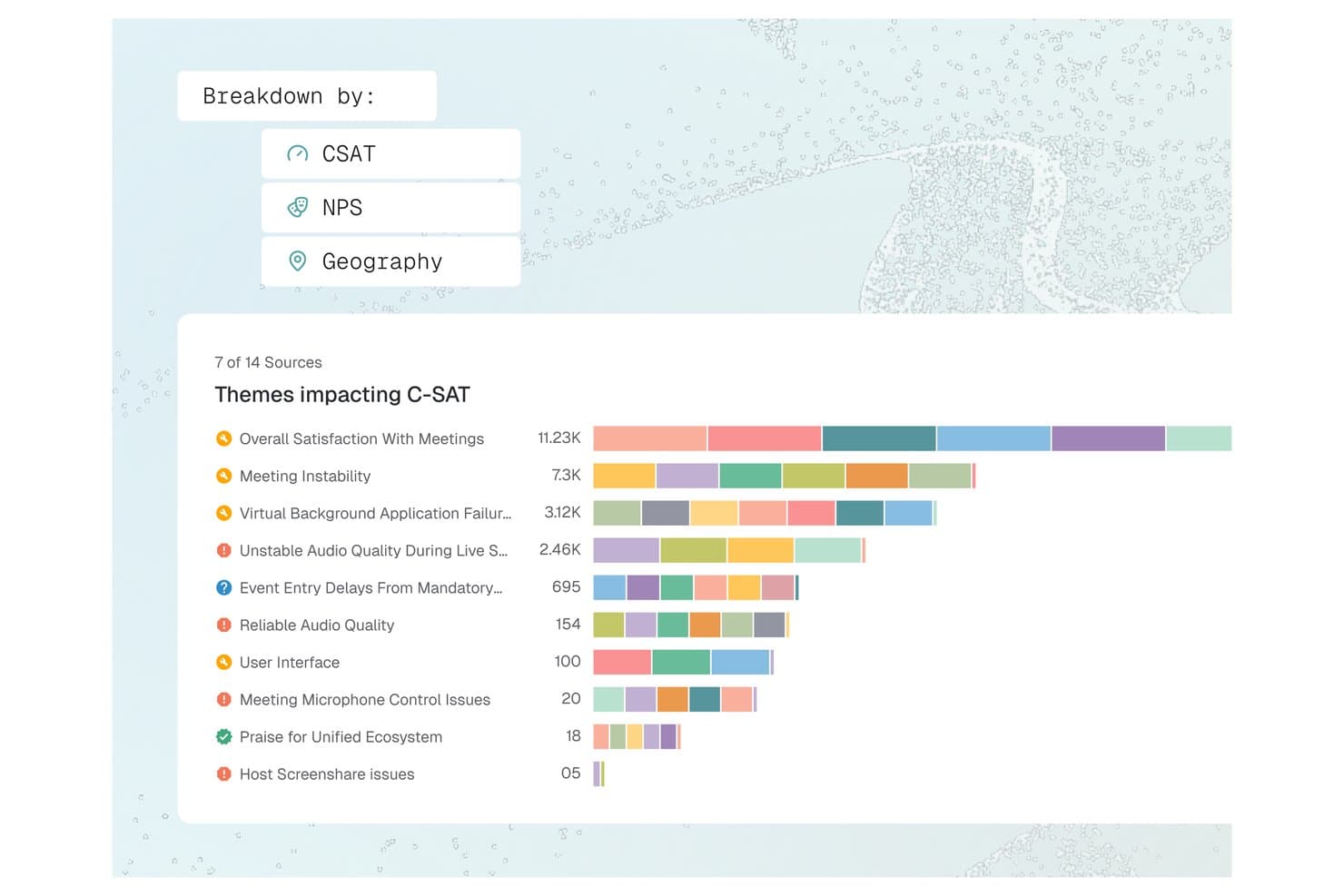
Enterpret offers a C-SAT theme breakdown dashboard that visualizes feedback topics like Meeting Instability and Audio Quality by volume across multiple sources. Enterpret is a customer feedback intelligence platform that unifies support tickets, call recordings, surveys, and social signals into AI-analyzed, structured product insights via an adaptive taxonomy and customer context graph.
Who Is Enterpret Best For?
Enterpret suits product managers and CX leaders at mid-market to enterprise B2B SaaS companies that receive high volumes of customer feedback across multiple channels each month.
Why I Picked Enterpret
Enterpret earns its spot because of how it connects feedback to real product context. The Customer Context Graph links each feedback record to account details, usage patterns, and deal status, so I'm reading complaints in the context of who's actually churning. Wisdom, Enterpret's AI query layer, lets me ask questions like "what are power users saying about onboarding?" and get summaries backed by actual feedback examples, not just aggregated tags.
Enterpret Key Features
- Adaptive taxonomy: Lets you automatically classify unstructured feedback into dynamic, customizable themes using AI-driven tagging.
- Multi-source feedback integrations: Connects and unifies feedback from support tools, surveys, reviews, call recordings, and social channels.
- Data enrichment: Enriches each feedback record with user, account, and product context from connected systems.
- Close-the-loop workflows: Assigns feedback-based tasks to product and engineering teams through workflow integrations like Jira and Slack.
Enterpret Integrations
Enterpret offers native integrations with Zendesk, Intercom, Salesforce, Gong, Slack, Qualtrics, Linear, Jira, Google Play Store, and the Apple App Store. An API is available for custom integrations.
Pros and Cons
Pros:
- Surfaces trends across high-volume feedback data
- Links customer feedback directly to product metrics
- AI taxonomy adapts automatically to feedback
Cons:
- Reporting depth limited without technical configuration
- Initial taxonomy setup demands significant time
Learn more about Enterpret: Best for session replay with AI-driven insight
- Free plan available
- Pricing upon request
Visit WebsiteCustomer Rating:4.5/5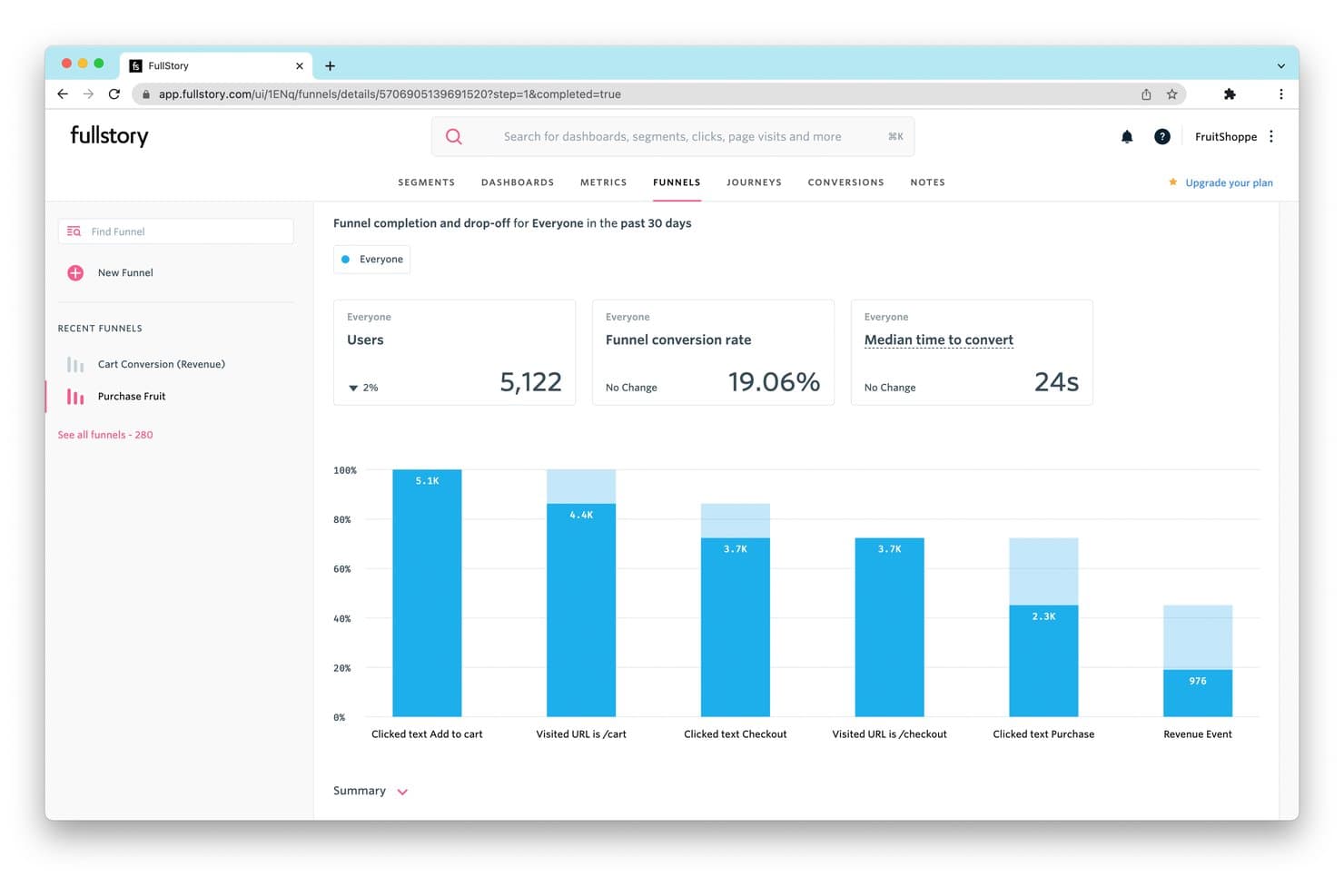
FullStory tracks funnel drop-off rates to reveal where users abandon purchases. Fullstory is a product intelligence platform that combines session replay, autocapture-based behavioral analytics, funnel and path analysis, retention tracking, in-app guides, and AI-powered insight detection across web and native mobile apps.
Who Is Fullstory Best For?
Fullstory is a strong fit for product and growth teams at mid-market to enterprise companies that need to connect qualitative session behavior with quantitative analytics in one place.
Why I Picked Fullstory
Fullstory earns its spot on my shortlist because its session replay capability goes further than most tools I've tested, pairing high-fidelity recordings with AI-generated session summaries via StoryAI that cut through hours of footage in seconds. I'm particularly drawn to Fullcapture™, which captures every click, scroll, and interaction retroactively, so I can define a new behavioral signal today and apply it to data from months ago. Frustration Signals automatically flag rage clicks and error clicks, linking them to estimated revenue impact.
Fullstory Key Features
- Conversion funnels: Multi-step funnel analysis with drop-off visualization that links directly to session replays of users who abandoned at each step.
- Journey Maps: ML-powered path analysis that surfaces the most common routes users take through your product, including unexpected detours and exit paths.
- In-app guides and surveys: Deploy product tours, onboarding checklists, tooltips, and NPS surveys from within Fullstory without engineering support.
- Anywhere: Warehouse: Hourly behavioral data sync to Snowflake, BigQuery, and Redshift for downstream BI and predictive modeling workflows.
Fullstory Integrations
Fullstory offers native integrations with Twilio Segment, Amplitude, Snowflake, Google BigQuery, Amazon Redshift, and RudderStack, plus Intercom, Invoca, Kustomer, and Olark. Its FS.Identity, Element, fs.event, and Consent APIs support custom integrations.
Pros and Cons
Pros:
- Privacy-first data capture with automatic PII masking
- Retroactive behavioral event tracking for web and mobile
- Session replay with AI-powered session summaries
Cons:
- Advanced analytics locked to higher-tier plans
- No built-in A/B testing or feature flags
Learn more about Fullstory: Best for capturing all user interactions automatically
- Free plan available
- Pricing upon request
Visit WebsiteCustomer Rating:4.3/5
Here's the path comparisons feature in Heap. Heap is a product analytics platform that makes user interactions and activity data instantly accessible and usable for businesses. Its primary strength is its automatic data capture feature, which eliminates the need for manual tracking setup, thereby reducing the chances of missed data or insights.
Why I Picked Heap:
I selected Heap for my list due to its automatic user interaction capture capability, which sets it apart from many other tools in the market. While most tools require manual configuration for tracking different events, Heap captures all user actions from the get-go, making it truly "best for capturing all user interactions automatically."
Standout features & integrations:
Heap's key features include automatic event capturing, retroactive analytics, and data governance, which offer a rich, flexible, and secure environment for data analysis. Heap smoothly integrates with platforms such as Salesforce, Optimizely, and Google Ads.
Pros and Cons
Pros:
- Integrates well with many commonly used platforms
- Ability to perform retroactive analytics
- Automatic capturing of all user interactions
Cons:
- Some users might find the user interface less intuitive than competitor platforms
- Can be expensive for small businesses or startups
- Custom pricing may lack transparency for potential customers
Learn more about Heap (by Contentsquare): Best for open-source product analytics
- Free plan available
- Pricing upon request
Visit WebsiteCustomer Rating:4.5/5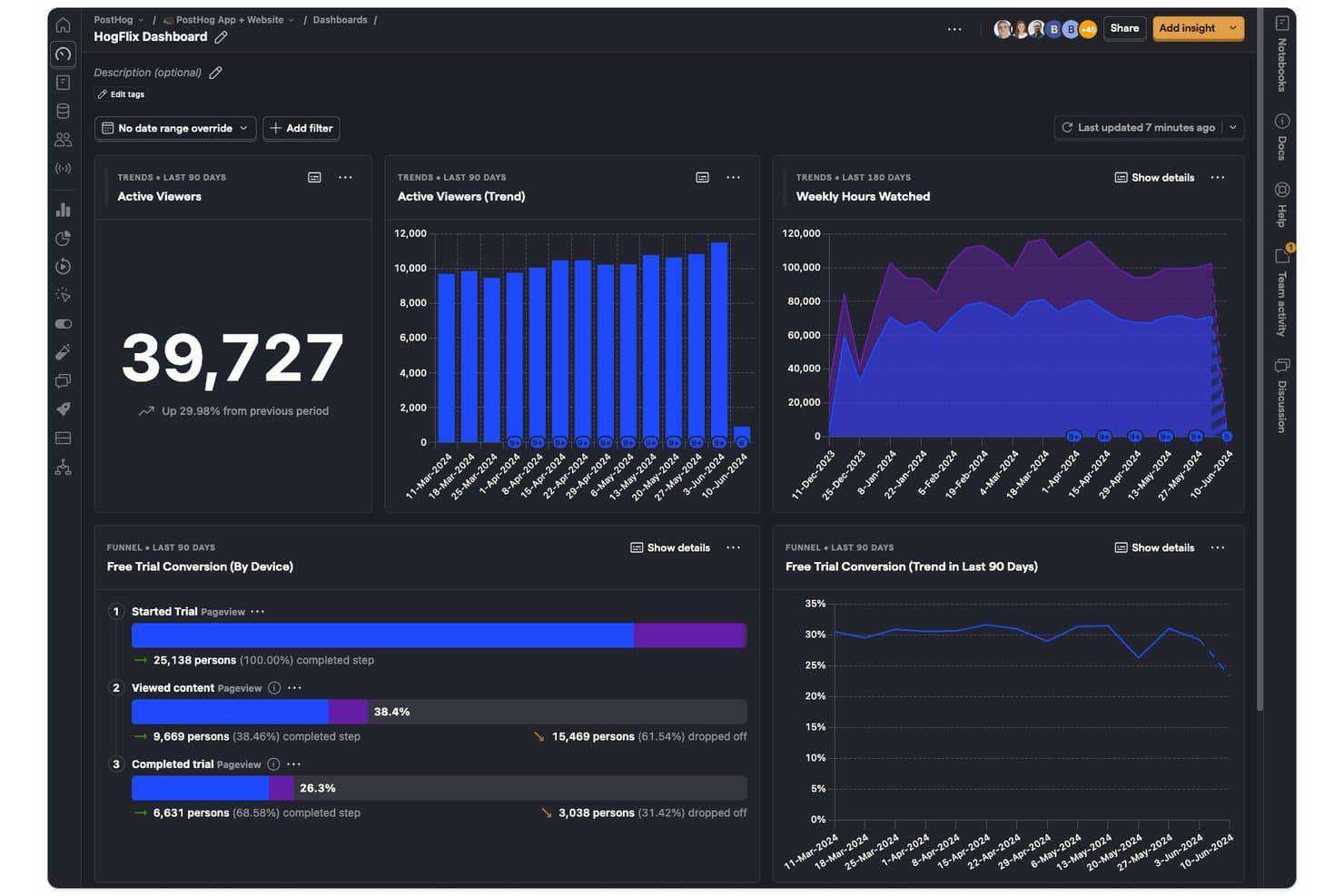
PostHog tracks viewer trends, hours watched, and trial conversions in one dashboard. PostHog is an open-source product intelligence platform that combines product analytics, session replay, feature flags, A/B testing, surveys, and a built-in CDP into a single unified toolset.
Who Is PostHog Best For?
PostHog is a strong fit for technical product teams and developers who want a single platform to cover analytics, session replay, feature flags, and experimentation without stitching together multiple tools.
Why I Picked PostHog
PostHog earns its spot as one of the best on my shortlist because its open-source foundation gives technical product teams something most analytics platforms won't: full visibility into how their data is collected, stored, and processed. I love that autocapture logs clicks, pageviews, and form submissions from day one, while Correlation Analysis automatically surfaces the behavioral factors statistically tied to conversion or drop-off. Teams can jump directly from any funnel step into the session recordings behind it, turning a data point into a real user story without switching tools.
PostHog Key Features
- Lifecycle analysis: Segments users into new, returning, resurrecting, and dormant categories so you can track engagement shifts across your entire user base over time.
- Native A/B and multivariate testing: Runs experiments with both Bayesian and frequentist statistical engines, including holdout groups and group-level testing for B2B products.
- In-app surveys: Triggers NPS, CSAT, PMF, and open-text surveys based on user behavior, event history, or feature flag status, with responses linked directly to analytics data.
- HogQL custom queries: Lets you write SQL directly against your PostHog data for ad hoc analysis and custom reporting beyond the standard insight builder.
PostHog Integrations
PostHog offers 50+ native event destinations, including Slack, Braze, Customer.io, Salesforce, HubSpot, Intercom, and PagerDuty. It also connects to Snowflake, BigQuery, Databricks, and Redshift, with open APIs and Hog functions for custom data pipelines.
Pros and Cons
Pros:
- Advanced funnel analysis with correlation insights
- Session replay tightly integrated with analytics
- Open source with self-hosted deployment option
Cons:
- Limited session replay retention to 3 months
- Interface overwhelms non-technical product teams
Learn more about PostHog: Best for visualizing user interactions
- 14-day free trial + free plan available
- From $176/month (billed annually)
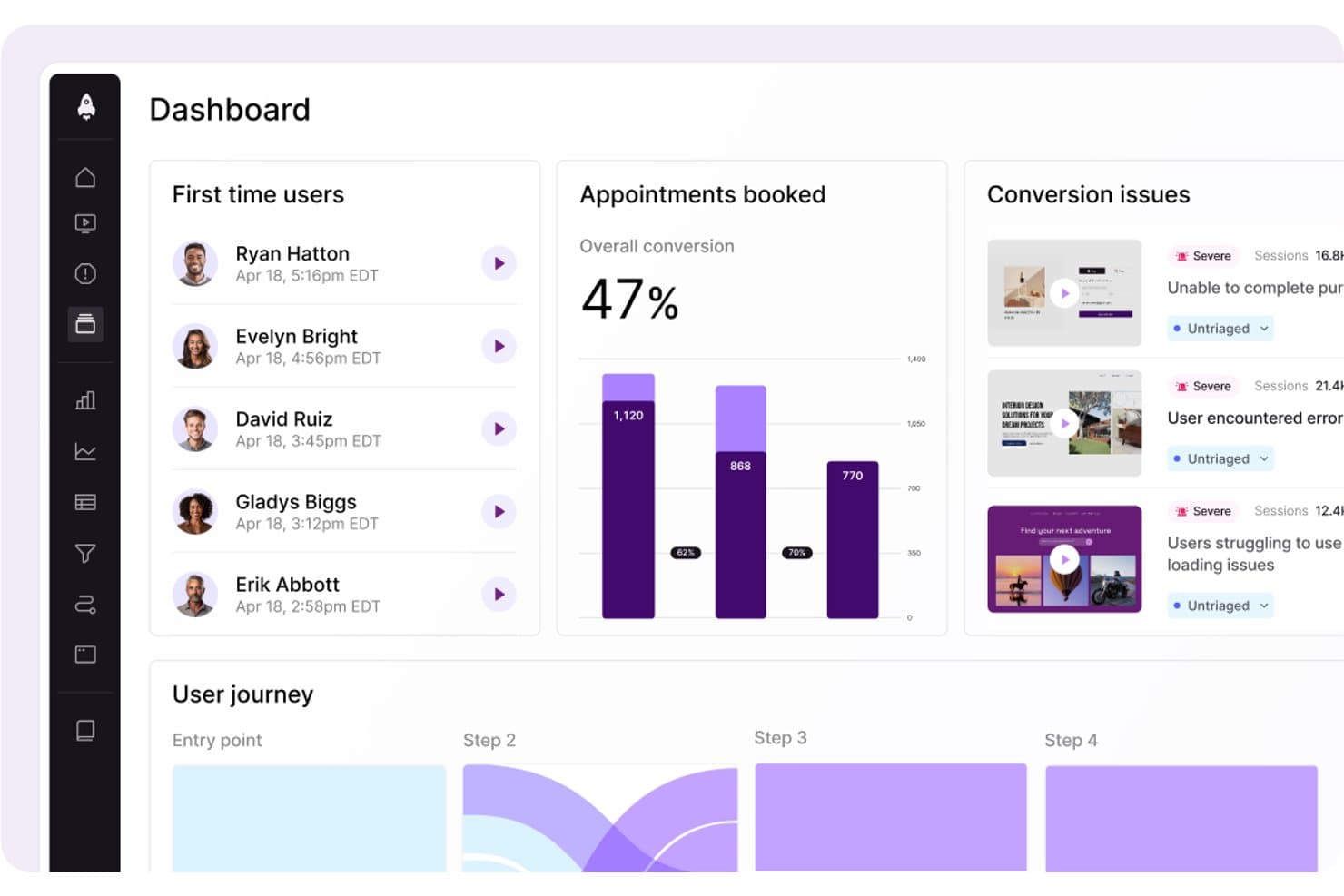
LogRocket surfaces conversion issues and user journey data in one dashboard. LogRocket is a product intelligence platform that combines session replay, product analytics, UX analytics, error tracking, and AI-powered insights through its Galileo AI layer into a single tool.
Who Is LogRocket Best For?
LogRocket is a strong fit for product managers and product analytics teams who need to connect quantitative funnel data with real session context to understand the "why" behind user behavior.
Why I Picked LogRocket
LogRocket earns its spot on my shortlist because of how well it captures and visualizes exactly what users experience. Session replay is the core strength here: pixel-perfect playback across web and native mobile, paired with heatmaps, clickmaps, and rage-click maps that turn raw interaction data into something you can actually act on. I also love that Galileo AI watches sessions automatically and surfaces the moments worth your attention, so you're not scrubbing through hours of footage to find where users struggled.
LogRocket Key Features
- Autocapture with retroactive definitions: LogRocket records every user event automatically and lets you label events in plain language—applied instantly to all historical sessions.
- Path analysis: Visualizes the exact routes users take through your product, forward and backward from any page or event, including drop-off points.
- In-app surveys: Collects qualitative user feedback directly within your product, tied to behavioral session data for added context.
- Streaming data export: Delivers a continuous, warehouse-native data connection to Snowflake, BigQuery, Redshift, Databricks, and Amazon S3 for BI analysis.
LogRocket Integrations
LogRocket offers 75+ integrations, including Amplitude, Mixpanel, Segment, LaunchDarkly, Optimizely, Zendesk, Intercom, Jira, Slack, and Snowflake. It also provides API and MCP access, plus Enterprise streaming exports to Snowflake, BigQuery, Redshift, Databricks, and Amazon S3.
Pros and Cons
Pros:
- AI-driven funnel and heatmap insights
- Autocapture with retroactive event labeling
- Pixel-perfect session replay across web and mobile
Cons:
- Retention analytics less advanced than top competitors
- Advanced AI features require higher plans
Learn more about LogRocket: Best for AI-driven revenue impact prioritization
- Free demo available
- Pricing upon request
Visit WebsiteCustomer Rating:4.7/5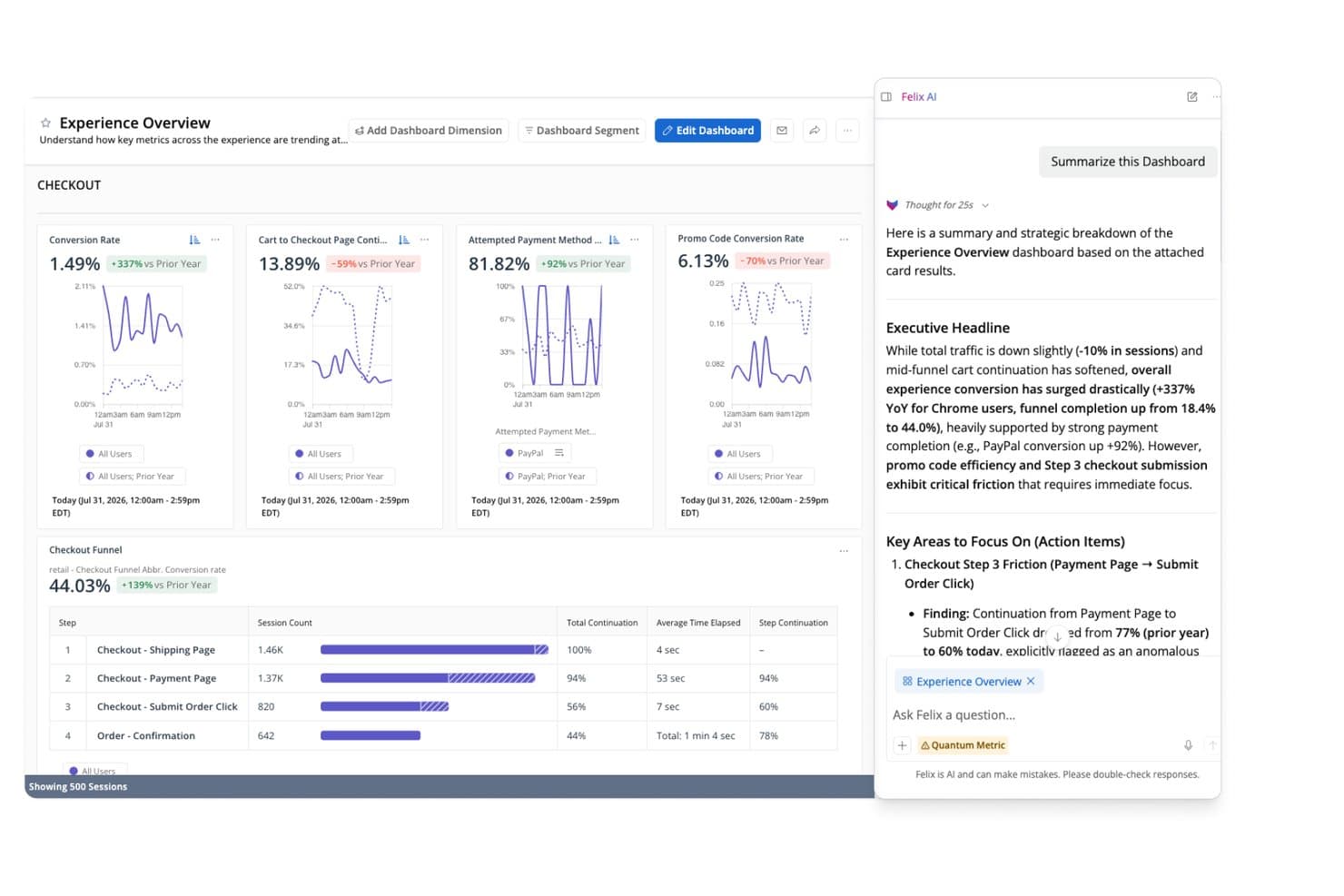
Quantum Metric's Felix AI summarizes checkout funnel insights instantly. Quantum Metric is a product intelligence platform that combines autocapture behavioral analytics, session replay, funnel and journey analysis, AI-driven anomaly detection, and real-time data activation across web and native mobile applications.
Who Is Quantum Metric Best For?
Quantum Metric is a strong fit for enterprise product and digital teams in regulated industries—like financial services, insurance, and retail—that need AI-driven revenue prioritization backed by strict data privacy controls.
Why I Picked Quantum Metric
Quantum Metric earns its spot on my shortlist because its Felix AI Agentic layer does something I haven't seen matched elsewhere: it continuously monitors your digital journeys, quantifies the revenue impact of each friction point, and surfaces prioritized issues before anyone has to go looking. I particularly like Opportunity Analysis, which automatically scores friction against business impact so product and digital teams can defend roadmap decisions with dollar figures, not gut instinct. Pair that with autocapture of 300+ behavioral signals across web and native mobile from day one, and you're working with a platform built around revenue-driven prioritization from the ground up.
Quantum Metric Key Features
- Session replay: Reproduces web and native mobile user interactions with DOM-based fidelity, including a technical pane with network diagnostics for engineering triage.
- Data Streaming: Exports behavioral data in real time to warehouses like Snowflake, BigQuery, Redshift, and Databricks, with support for filters and custom schema alignment.
- Segment Builder: Builds behavioral audience segments using nested AND, OR, THEN, and WHERE logic across hundreds of metrics, usable across all platform views.
- AutoPII scanning: Continuously scans raw data and session replays using Cloud DLP to detect, mask, and purge sensitive information before it's exposed.
Quantum Metric Integrations
Quantum Metric offers documented integrations with Snowflake, Google BigQuery, Databricks, Amazon Redshift, LaunchDarkly, Optimizely, Salesforce Service Cloud, Qualtrics, Medallia, and Slack, plus data enrichment from offline, call center, VoC, and POS sources.
Pros and Cons
Pros:
- Session replay pivots from any aggregate view
- Felix AI agents proactively surface opportunities
- Quantifies revenue impact for every user friction
Cons:
- Relies on third-party tools for experimentation
- No free trial or startup access
Learn more about Quantum Metric: Best for product and user behavior analytics
- Free plan + free demo available
- Pricing upon request
Visit WebsiteCustomer Rating:4.5/5
Here's Amplitude's business KPI dashboard feature. Amplitude is a comprehensive product intelligence platform known for its ability to track and analyze product and user behavior data effectively. Its strength lies in unraveling patterns in user behavior, providing valuable inputs for product development and optimization.
Why I Picked Amplitude:
Amplitude made it to my list due to its robust and detailed user behavior analytics. When evaluating various platforms, I found that Amplitude presents an exceptional ability to parse through user behavior data and draw meaningful inferences, making it a standout choice. Its claim to be "Best for product and user behavior analytics" is underpinned by these strong capabilities.
Standout features & integrations:
Amplitude's key features include real-time analytics, cohort analysis, and advanced segmentation, which are critical in understanding and influencing user behavior. On the integration front, Amplitude aligns well with tools like Slack, Jira, and Zendesk, promoting data sharing and team collaboration.
Pros and Cons
Pros:
- Strong integration capabilities
- Real-time analytics
- Comprehensive user behavior analytics
Cons:
- Custom pricing lacks upfront clarity
- It may take time to navigate and fully utilize the complex feature set
- The cost may be prohibitive for smaller businesses
Learn more about Amplitude: Best for in-app user interaction tracking
- Free plan + 30-day free trial + free demo available
- Pricing upon request
Visit WebsiteCustomer Rating:4.4/5
Here's the multi-app analytics dashboard feature in Pendo. Pendo is a product experience platform that allows businesses to understand their user's interactions within the app. It provides critical insights about in-app user behavior and leverages these to deliver a better user experience.
Why I Picked Pendo:
Pendo emerged as a strong contender in my research, primarily for its in-depth in-app interaction tracking capabilities. I noticed that Pendo excels at providing detailed analytics about how users navigate within an application. It stands apart from the rest because of its unique focus on maximizing user experience, which directly aligns with its prowess in tracking in-app interactions.
Standout features & integrations:
Pendo is loaded with features like user segmentation, which helps in targeting specific user groups. It offers rich feedback and analytics features, providing a holistic view of the user experience. Pendo’s integration capabilities are vast, supporting integration with major CRM and marketing tools like Salesforce, Marketo, and Slack.
Pros and Cons
Pros:
- Vast integration options
- Rich feedback and analytics capabilities
- Extensive in-app tracking
Cons:
- Custom pricing can lack transparency
- Steeper learning curve compared to similar platforms
- Pricing can be high for smaller businesses
Learn more about Pendo:

Screenshot of product metrics dashboard in Mizpanel. Mixpanel is an advanced analytics platform designed to analyze, measure, and improve user engagement across a range of applications. Its ability to provide real-time data analytics makes it a powerful tool for businesses that need to respond quickly to changing user trends.
Why I Picked Mixpanel:
Choosing Mixpanel for this list was a straightforward decision, largely due to its outstanding real-time analytics capabilities. In comparing Mixpanel to similar platforms, I found its real-time data analytics to be a distinct advantage, enabling businesses to make prompt, data-driven decisions. The tool excels in delivering real-time insights, setting it apart in the crowded field of product intelligence software.
Standout features & integrations:
Mixpanel’s standout features include its event-based tracking and user journey funnels, which offer a deep understanding of user interactions. Furthermore, its cohort analysis allows businesses to group users based on behavior, providing targeted insights. As for integrations, Mixpanel syncs with numerous platforms such as Salesforce, Zendesk, and Jira, facilitating a unified workflow across diverse systems.
Pros and Cons
Pros:
- Extensive integration options
- Advanced event-based tracking
- Real-time analytics
Cons:
- Custom pricing lacks upfront transparency
- The user interface may require a learning curve
- Pricing might be steep for startups
Learn more about Mixpanel: Best for unified digital and product analytics
- Free plan + free demo + 15-day free trial available
- From $39/month (billed annually)
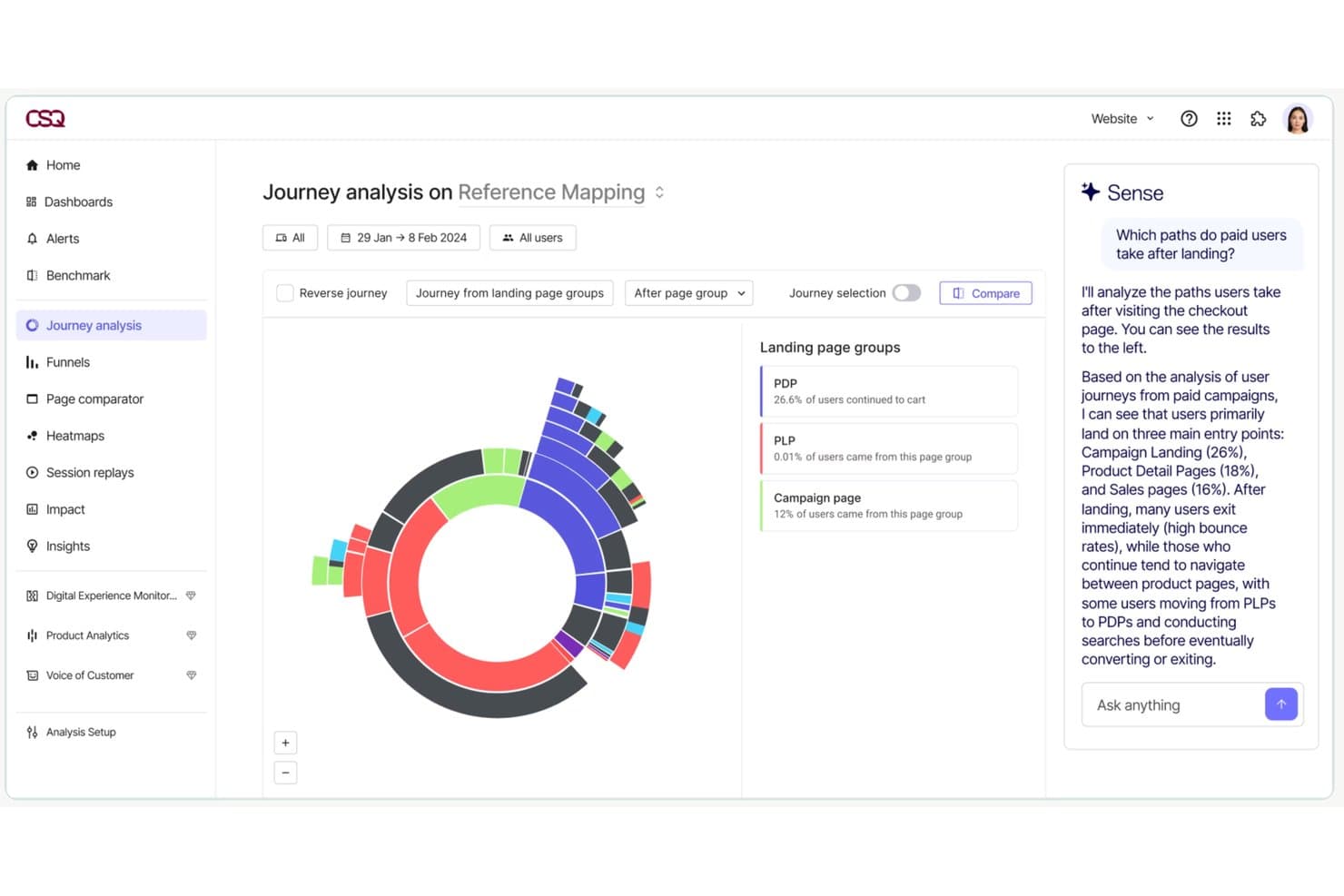
Contentsquare lets users analyze paid user journey paths with AI insights. Contentsquare is a digital and product experience intelligence platform that combines auto-capture behavioral analytics, session replay, heatmaps, journey analysis, in-app surveys, and product analytics into a single suite across web and mobile.
Who Is Contentsquare Best For?
Contentsquare is a strong fit for mid-market and enterprise product teams that need behavioral analytics, session replay, and journey analysis in one place rather than stitched across multiple tools.
Why I Picked Contentsquare
Contentsquare earns its spot on my shortlist because it's the only tool I've seen that genuinely unifies digital and product analytics without forcing you to stitch together separate platforms. I'm particularly impressed by Smart Capture, which auto-records every interaction retroactively, so my team can define new metrics against historical data without bugging engineering. Pair that with Impact Quantification, which ties specific friction points directly to revenue, and you have a clear way to justify roadmap calls with hard numbers.
Contentsquare Key Features
- Smart Capture auto-capture: Automatically records every user interaction across web and native mobile apps without manual event tagging or engineering work.
- In-app surveys: 40+ pre-built survey templates, an AI survey generator, and exit intent triggers let you collect user feedback directly within your product.
- Sense AI chat: A natural language interface that lets you query your analytics data and get plain-language answers without needing data expertise.
- Data Connect ETL export: A managed pipeline that exports Contentsquare behavioral data directly to Snowflake, AWS, or Azure for warehouse-level analysis.
Contentsquare Integrations
Contentsquare offers 100+ integrations, including Snowflake, AWS, Azure, Segment, mParticle, RudderStack, Optimizely, and VWO. Data Connect exports behavioral data to warehouses, while its open API and MCP Server support custom analytics workflows.
Pros and Cons
Pros:
- Combines analytics, session replay, and surveys
- Links behavioral data directly to revenue
- Auto-captures all web and app interactions
Cons:
- Session replay may show incomplete recordings
- Advanced analysis features require higher tiers
Learn more about Contentsquare:
Outro software de inteligência de produto
Eis algumas opções adicionais de software de inteligência de produto que não integraram a minha seleção, mas que vale a pena conhecer:
- 11Gainsight PXBest for B2B product adoption and CS alignment
- 12StatsigBest for experiment-driven product analytics
- 13KissmetricsBest for customer journey and funnel tracking
- 14GlassboxBest for enterprise digital journey friction analysis
- 15UXCamBest for mobile funnel drop-off to session replay
- 16UserpilotBest for analytics-to-in-app action in one workflow
- 17CleverTapBest for mobile-first businesses
- 18MoEngageGood for customer segmentation and engagement
- 19Adobe AnalyticsBest for marketing performance tracking
- 20KubitBest for warehouse-native product analytics
How I Evaluate Product Intelligence Software
I split my evaluation into two layers: the core capabilities—like funnel analysis and cohort segmentation—a tool must have, and the differentiators that set the best options apart.
Core Functionality (Table Stakes For This List)
When I'm selecting tools for my list, I rank each one on a scale from 0 (does not offer the functionality) to 5 (excels in this area) for each core functionality listed below. Then, I calculate the tool's total score into a percentage. Each tool needs to achieve a minimum total score of 65% to be considered for inclusion.
- Behavioral Event Tracking: I check whether a tool can capture user actions like button clicks, form submissions, and page views across web and mobile with minimal engineering lift.
- Funnel & Path Analysis: Multi-step funnels that show where users drop off—say, between adding an item to a cart and completing checkout—are what I evaluate here.
- Cohort & User Segmentation: I look for the ability to group users by behavior and attributes, such as comparing trial users who completed onboarding against those who didn't.
- Retention & Engagement Analytics: Tools should surface retention curves and stickiness metrics so you can answer questions like "are users coming back after their first week?"
- Session Replay or User-Level Insights: I evaluate whether the tool provides qualitative context, like watching a user struggle with a settings page, alongside quantitative data.
- Integrations & Data Pipeline: Compatibility with warehouses like Snowflake or BigQuery and CDPs like Segment matters here, along with CRM and marketing tool connectivity.
Once I have a list of tools that meet the criteria, I consider what sets each platform apart.
Differentiating Factors (What Sets Vendors Apart)
Here's how I compare and contrast different vendors:
Standout Features
AI-powered insights are a big differentiator—I look for tools that automatically flag unexpected drops in activation or retention without requiring manual dashboard exploration. Native A/B testing is another factor I weigh, since it lets product teams measure the impact of a new onboarding flow or pricing page directly within the analytics environment. I also evaluate feature flag integration, which ties release events to usage data so you can see exactly how a new feature affects engagement.
Beyond Features
Pricing model matters a lot here. Event-based pricing can spiral quickly as your product scales, so I evaluate whether a vendor's model stays predictable as your user base grows. Warehouse and data stack fit is equally important—I check whether a tool works natively with your existing warehouse or requires a separate data pipeline. I also consider data governance, especially role-based access controls and compliance certifications, since product data often contains sensitive user behavior that teams across the organization will access.
Como escolher software de inteligência de produto
É fácil perder-se em listas extensas de funcionalidades e estruturas de preços complexas. Para o ajudar a manter o foco enquanto percorre o seu processo específico de seleção de software, apresentamos uma lista de verificação com os fatores a ter em conta:
| Fator | O que considerar |
|---|---|
| FatorEscalabilidade | O que considerarO software consegue acompanhar o crescimento da sua equipa? Considere o crescimento futuro e se a ferramenta consegue lidar com um aumento de dados e utilizadores sem problemas de desempenho. |
| FatorIntegrações | O que considerarÉ compatível com as ferramentas que já utiliza? Verifique a compatibilidade com o seu CRM, as plataformas de análise e as plataformas de comunicação para evitar interrupções nos fluxos de trabalho. |
| FatorPersonalização | O que considerarPode adaptar o software às suas necessidades? Procure opções para ajustar painéis, relatórios e fluxos de trabalho de acordo com as preferências da sua equipa. |
| FatorFacilidade de utilização | O que considerarA ferramenta é fácil de utilizar? Avalie a curva de aprendizagem e se a sua equipa consegue adaptar-se rapidamente sem formação extensa. |
| FatorImplementação e integração inicial | O que considerarA configuração é simples? Considere o tempo e os recursos necessários para a implementação, incluindo a formação e o apoio durante a transição. |
| FatorCusto | O que considerarEnquadra-se no seu orçamento? Compare os planos de preços, esteja atento a custos ocultos e considere o valor das funcionalidades oferecidas em cada nível. |
| FatorMedidas de segurança | O que considerarOs seus dados e a sua privacidade estão protegidos? Procure encriptação, controlos de acesso dos utilizadores e conformidade com os regulamentos relevantes de proteção de dados. |
O que é o software de inteligência de produto?
O software de inteligência de produto (PI) é uma ferramenta que ajuda as empresas a recolher e analisar dados sobre a forma como os utilizadores interagem com os seus produtos. Os gestores de produto, profissionais de marketing e analistas de dados utilizam geralmente estas ferramentas para tomar decisões informadas e melhorar as ofertas de produtos. Funcionalidades como o acompanhamento do comportamento dos utilizadores, a análise de dados e os relatórios ajudam a compreender as necessidades dos clientes e a melhorar o desenvolvimento dos produtos. De um modo geral, estas ferramentas fornecem informações valiosas para promover o sucesso dos produtos e a satisfação dos clientes.
Funcionalidades
Ao selecionar software de inteligência de produto, procure as seguintes funcionalidades principais:
- Acompanhamento do comportamento dos utilizadores: Recolhe dados sobre a forma como os utilizadores interagem com o seu produto, ajudando a identificar funcionalidades populares e áreas a melhorar.
- Análise de dados: Fornece ferramentas para analisar os dados dos utilizadores e gerar informações que orientam as decisões e estratégias relativas ao produto.
- Relatórios: Disponibiliza relatórios personalizáveis para visualizar tendências nos dados e acompanhar o desempenho do produto ao longo do tempo.
- Segmentação do público: Permite categorizar os utilizadores com base no comportamento e nas características, para uma análise e um marketing direcionados.
- Análise preditiva: Utiliza dados históricos para prever tendências e comportamentos futuros dos utilizadores, contribuindo para uma tomada de decisões proativa.
- Capacidades de integração: Liga-se a outras ferramentas e plataformas para garantir um fluxo de dados contínuo e uma análise abrangente.
- Painéis personalizáveis: Permitem adaptar a interface para apresentar as métricas e informações mais relevantes para a sua equipa.
- Processamento de dados em tempo real: Fornece informações imediatas sobre as interações dos utilizadores, permitindo uma resposta mais rápida a tendências e problemas.
- Medidas de segurança: Asseguram a proteção dos dados através de encriptação e controlos de acesso, mantendo as informações dos utilizadores seguras.
- Tutoriais interativos do produto: Orientam os novos utilizadores na utilização das funcionalidades, melhorando a integração e a experiência do utilizador.
Vantagens
A implementação de software de inteligência de produto proporciona várias vantagens para a sua equipa e para a sua empresa. Eis algumas das que pode esperar:
- Melhoria da tomada de decisões: O acesso a uma análise detalhada dos dados ajuda a sua equipa a tomar decisões informadas sobre o produto, com base no comportamento real dos utilizadores.
- Melhor compreensão dos clientes: O acompanhamento do comportamento dos utilizadores fornece informações sobre as necessidades e preferências dos clientes, permitindo melhorias dos produtos mais bem direcionadas.
- Aumento da eficiência: Os relatórios automatizados poupam tempo ao fornecerem acesso rápido às principais métricas e aos indicadores de desempenho.
- Desenvolvimento proativo: A análise preditiva permite à sua equipa antecipar tendências e planear melhorias antes de surgirem problemas.
- Esforços de marketing direcionados: A segmentação do público permite estratégias de marketing mais precisas, através da identificação de grupos distintos de utilizadores.
- Melhor experiência do utilizador: Os tutoriais interativos do produto e as funcionalidades de integração melhoram a satisfação dos utilizadores, tornando o produto mais fácil de aprender e utilizar.
- Garantia da segurança dos dados: As medidas de segurança protegem os dados dos utilizadores, assegurando a conformidade com os regulamentos de privacidade e reforçando a confiança dos clientes.
Custos e preços
A seleção de software de inteligência de produto exige uma compreensão dos vários modelos e planos de preços disponíveis. Os custos variam consoante as funcionalidades, a dimensão da equipa, os complementos, entre outros fatores. A tabela abaixo resume os planos mais comuns, os respetivos preços médios e as funcionalidades normalmente incluídas nas soluções de software de inteligência de produto:
Tabela de comparação de planos de software de inteligência de produto
| Tipo de plano | Preço médio | Funcionalidades comuns |
|---|---|---|
| Tipo de planoPlano gratuito | Preço médio$0 | Funcionalidades comunsAnálise básica, acompanhamento limitado dos utilizadores e relatórios básicos. |
| Tipo de planoPlano pessoal | Preço médio$5-$25/utilizador/mês | Funcionalidades comunsAnálise avançada, painéis personalizados e apoio por e-mail. |
| Tipo de planoPlano empresarial | Preço médio$30-$60/utilizador/mês | Funcionalidades comunsSegmentação de utilizadores, capacidades de integração e apoio prioritário. |
| Tipo de planoPlano empresarial avançado | Preço médio$75-$150/utilizador/mês | Funcionalidades comunsAnálise preditiva, um gestor de conta dedicado e funcionalidades de segurança avançadas. |
Perguntas frequentes sobre software de inteligência de produto
Eis algumas respostas a perguntas comuns sobre software de inteligência de produto:
Como é que o software de inteligência de produto recolhe dados?
O software de inteligência de produto recolhe dados através de vários métodos, incluindo o acompanhamento das interações dos utilizadores no seu sítio Web ou aplicação, a integração com outras ferramentas, como CRM, e a importação de conjuntos de dados existentes. Utiliza cookies, o acompanhamento de eventos e ligações API para recolher informações. Terá de garantir que o seu software cumpre os regulamentos de privacidade de dados, como o RGPD, ao recolher dados dos utilizadores.
O software de inteligência de produto pode funcionar em várias equipas?
Sim, a maioria das ferramentas pode dar suporte simultaneamente às equipas de produto, marketing e apoio. Cada equipa pode utilizar painéis de controlo diferentes para se concentrar naquilo que lhe interessa. Os gestores de produto podem analisar a utilização das funcionalidades, enquanto as equipas de marketing se preocupam com as conversões. Pode definir níveis de acesso personalizados para evitar informação irrelevante.
Como é que as equipas de produto utilizam funis no software de inteligência de produto?
Os funis ajudam a medir a forma como os utilizadores percorrem fluxos importantes, como a integração inicial ou o pagamento. Pode descobrir onde os utilizadores abandonam o processo e testar alterações para melhorar essa etapa. As equipas de produto criam frequentemente funis tanto para utilizadores novos como para utilizadores recorrentes. Também pode dividi-los por segmento ou plataforma.
É necessária formação para utilizar software de inteligência de produto?
Sim, normalmente é necessária alguma formação para utilizar eficazmente o software de inteligência de produto. Embora muitas ferramentas sejam fáceis de utilizar, compreender todas as suas capacidades pode exigir tutoriais ou sessões de formação. Procure software que disponibilize recursos abrangentes de integração inicial, como vídeos, seminários online e documentação, para que a sua equipa possa familiarizar-se rapidamente com a ferramenta.