

As ferramentas de prototipagem com IA utilizam IA generativa para ajudar a criar, iterar e aperfeiçoar rapidamente protótipos de produtos digitais, desde a ideação inicial até ao lançamento final. Se está à procura das melhores ferramentas de prototipagem com IA, é provável que queira acelerar os ciclos de desenvolvimento de produtos, reduzir o trabalho manual e manter a sua equipa focada em decisões de elevado impacto, em vez de ficar a olhar para um painel vazio.
Escolher a ferramenta certa pode ajudar a colmatar a lacuna entre PRDs e protótipos funcionais, sem ficar atolado em tarefas repetitivas. Nesta lista, encontrará opções de confiança que se adequam a vários fluxos de trabalho, para que possa selecionar com confiança a melhor solução para o seu próximo projeto de aplicação web.
Why Trust Our Software Recommendations
6,700+
Reviews
20
Industry experts
16+
Evaluation factors
14
Years
Our team has been testing and reviewing software since 2012. As product managers ourselves, we know how difficult—and important—it is to choose the right software.
For this guide, we evaluated tools using hands-on testing and independent research, scoring tools using our selection criteria.
Our reviews reflect our human editorial judgment, not a sales pitch.
Expert reviewers:
- Andrew LumbySenior TPM
- Cristiano ValimSenior UI/UX Lead


Tabela comparativa de ferramentas de prototipagem com IA
Esta tabela comparativa resume os detalhes de preços das minhas principais escolhas de ferramentas de prototipagem com IA:
| Tool | Best For | Trial Info | Price | ||
|---|---|---|---|---|---|
| 1 | Best for multi-user whiteboarding sessions | Free plan + 14-day free trial + free demo available | From $8/user/month (billed annually) | Website | |
| 2 | Best for AI-generated multi-screen wireframe flows | Free plan available | From $9/user/month (billed annually) | Website | |
| 3 | Best for Figma-to-code with two-way sync | Free plan available | From $20/user/month (billed annually) | Website | |
| 4 | Best for prototyping using your live codebase | Free plan + free demo available | From $20/user/month | Website | |
| 5 | Best for code-based design iteration | Free plan available | From $8/month | Website | |
| 6 | Best for reference-based prototype generation | Free plan available | From $14/month | Website | |
| 7 | Best for handling large-scale, complex projects | Free plan available | From $18/month (billed annually) | Website | |
| 8 | Best for importing specs from project management tools | Free plan + free demo | From $21/month (billed annually) | Website | |
| 9 | Best with Figma design system integration | Free plan | From $16/month (billed annually) | Website | |
| 10 | Best for text-to-prototype with PM-focused AI tools | Free plan available | From $10/month (billed annually) | Website |


Avaliações de ferramentas de prototipagem com IA
Seguem-se os meus resumos detalhados das melhores ferramentas de prototipagem com IA que entraram na minha seleção. As minhas avaliações apresentam uma análise detalhada das funcionalidades, dos melhores casos de utilização e das integrações de cada ferramenta, para o ajudar a encontrar a melhor opção para si.
 1Best for multi-user whiteboarding sessions
Miro
- Free plan + 14-day free trial + free demo available
- From $8/user/month (billed annually)
Visit WebsiteCustomer Rating:4.8/5
Miro brings product planning, design, and team collaboration together in one shared workspace. Miro helps product, design, and cross-functional teams turn early ideas into visual plans, wireframes, and AI-generated prototypes in one shared workspace. Its infinite canvas, ready-made templates, and collaborative feedback tools make it useful for teams that need to brainstorm, map workflows, and validate product concepts before moving into full design or development.
Who Is Miro Best For?
Miro is a strong fit for product and design teams at mid-size to enterprise companies that need a shared space for cross-functional collaboration and prototyping.
Why I Picked Miro
I picked Miro because it helps product and design teams move from brainstorming to AI-generated prototypes without leaving the same shared canvas. Your team can add sticky notes, sketches, screenshots, and prototype screens in one workspace, which makes it easier to turn early ideas into testable product flows. I like how its real-time collaboration features, including live cursors, comments, and voting, support group prototyping sessions where everyone can give input quickly. Miro’s AI prototyping tools also help you generate and revise screens from prompts or board content, making it a good fit for teams that need to explore concepts before handing work off to design or development.
Miro Key Features
Some other features in Miro support faster prototype creation, testing, and design handoff:
- AI prototype generation: Create multi-screen prototypes from a text prompt, screenshot, URL, or existing board content.
- Interactive preview mode: Share clickable prototype previews so stakeholders can review flows without editing the main canvas.
- Prototyping component library: Build screens faster with pre-built UI components, including navigation bars, dialogs, calendars, and light or dark variants.
- Figma export: Copy completed Miro prototypes into Figma as SVGs while preserving the prototype’s layout structure.
Miro Integrations
Integrations include Jira, Confluence, Figma, Slack, Google Drive, Notion, Microsoft Teams, Zoom, Asana, and Azure DevOps.
Pros and Cons
Pros:
- Generates prototypes from prompts, screenshots, and board content
- Shared canvas supports live feedback during prototyping sessions
- Component library helps teams build clickable flows faster
Cons:
- Advanced AI prototyping requires the Prototypes add-on
- Not built for production-ready code generation workflows
 Best for AI-generated multi-screen wireframe flows
- Free plan available
- From $9/user/month (billed annually)
Visit WebsiteCustomer Rating:4.3/5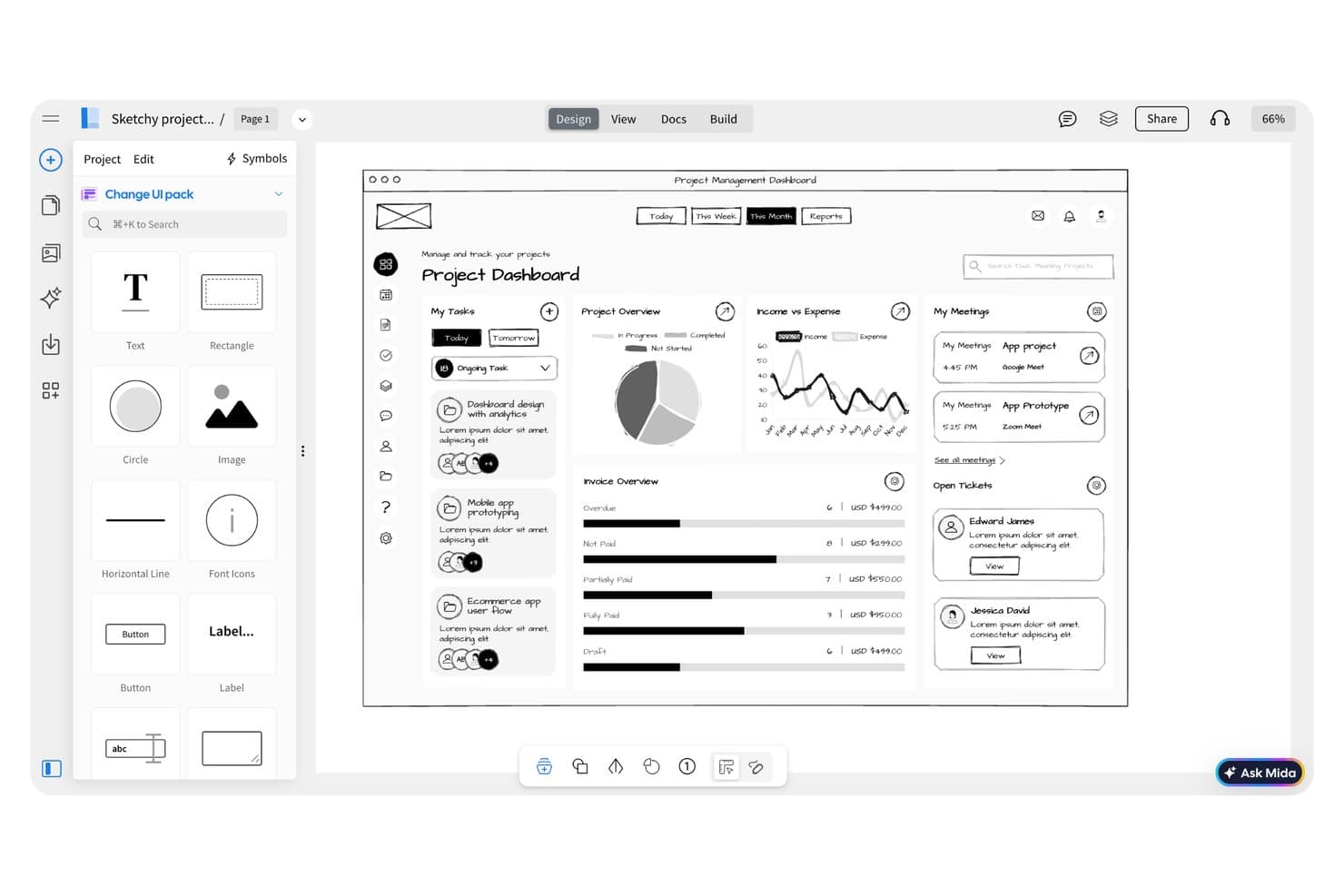
MockFlow lets users wireframe a project dashboard with UI components. MockFlow is a wireframing and prototyping tool that uses AI to generate multi-screen user flows, sitemaps, and low-fidelity mockups from text prompts.
Who Is MockFlow Best For?
MockFlow is a strong fit for UX designers and product teams who need to quickly generate multi-screen wireframe flows without building each screen from scratch.
Why I Picked MockFlow
MockFlow earns its spot on my shortlist because of how it handles multi-screen flow generation from a single text prompt. Instead of building screens one by one, I can describe a user journey and get a connected wireframe flow with navigation logic already mapped. The AI sitemap generator also gives me a structural starting point before any screen-level design begins.
MockFlow Key Features
- Component library: Access a built-in set of pre-made UI elements to drag and drop into wireframes without designing from scratch.
- Real-time collaboration: Invite team members to edit and comment on wireframes simultaneously within a shared workspace.
- Interactive prototyping: Link screens together with clickable hotspots to simulate user navigation flows for stakeholder review.
- Wireframe-to-specification export: Generate design specification documents directly from wireframes to hand off to developers.
MockFlow Integrations
MockFlow offers integrations with Slack, Microsoft Teams, Google Meet, Jira, Confluence, Trello, Google Drive, Google Docs, Microsoft 365, VS Code, Figma, Claude, and Cursor, plus API access for custom integrations.
Pros and Cons
Pros:
- Clickable hotspots support stakeholder walkthroughs
- AI sitemap clarifies product structure early
- Generates connected multi-screen flows from prompts
Cons:
- Generated flows still need manual refinement
- Low-fidelity output limits visual design exploration
Learn more about MockFlow: Best for Figma-to-code with two-way sync
- Free plan available
- From $20/user/month (billed annually)
Visit WebsiteCustomer Rating:4.2/5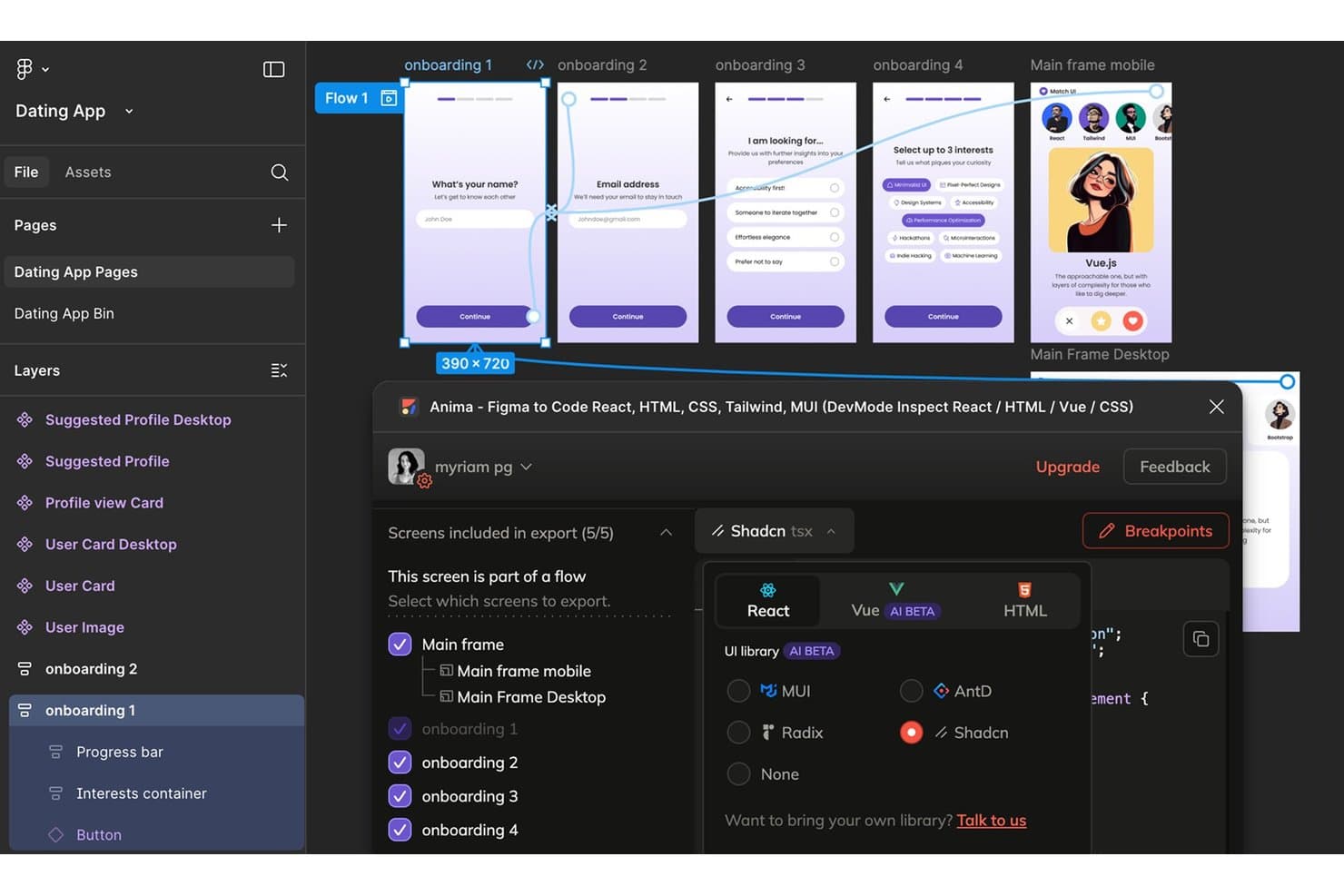
Anima exports multi-screen Figma flows as React, Vue, or HTML code. Anima is an AI prototyping tool that converts Figma designs into production-ready code, offering interactive prototyping, design-to-code generation, and two-way sync between design and development environments.
Who Is Anima Best For?
Anima is a strong fit for product teams and designers who work in Figma and need to hand off production-ready code to developers without losing design fidelity.
Why I Picked Anima
Anima earns its spot on my shortlist because of how cleanly it handles the gap between Figma designs and production code. I love that its two-way sync means design changes in Figma automatically reflect in the generated code, so developers aren't chasing outdated specs. The AI-powered code generation produces React, HTML, and CSS that's actually usable, not throwaway scaffolding.
Anima Key Features
- Interactive prototype builder: Create clickable, animated prototypes directly from your Figma designs without writing any code.
- Multi-framework code export: Export designs as React, HTML, or CSS code that developers can drop into existing projects.
- Component-level code inspection: Developers can inspect individual design components to view and copy the generated code for specific elements.
- Figma plugin integration: Run Anima directly inside Figma so you can generate prototypes and code without switching between tools.
Anima Integrations
Anima offers a native Figma plugin integration for creating prototypes and generating code within Figma.
Pros and Cons
Pros:
- Clickable prototypes from Figma designs
- React, HTML, and CSS exports
- Two-way sync keeps generated code current
Cons:
- Figma-centered workflow limits non-Figma teams
- Generated code may need developer cleanup
Learn more about Anima: Best for prototyping using your live codebase
- Free plan + free demo available
- From $20/user/month
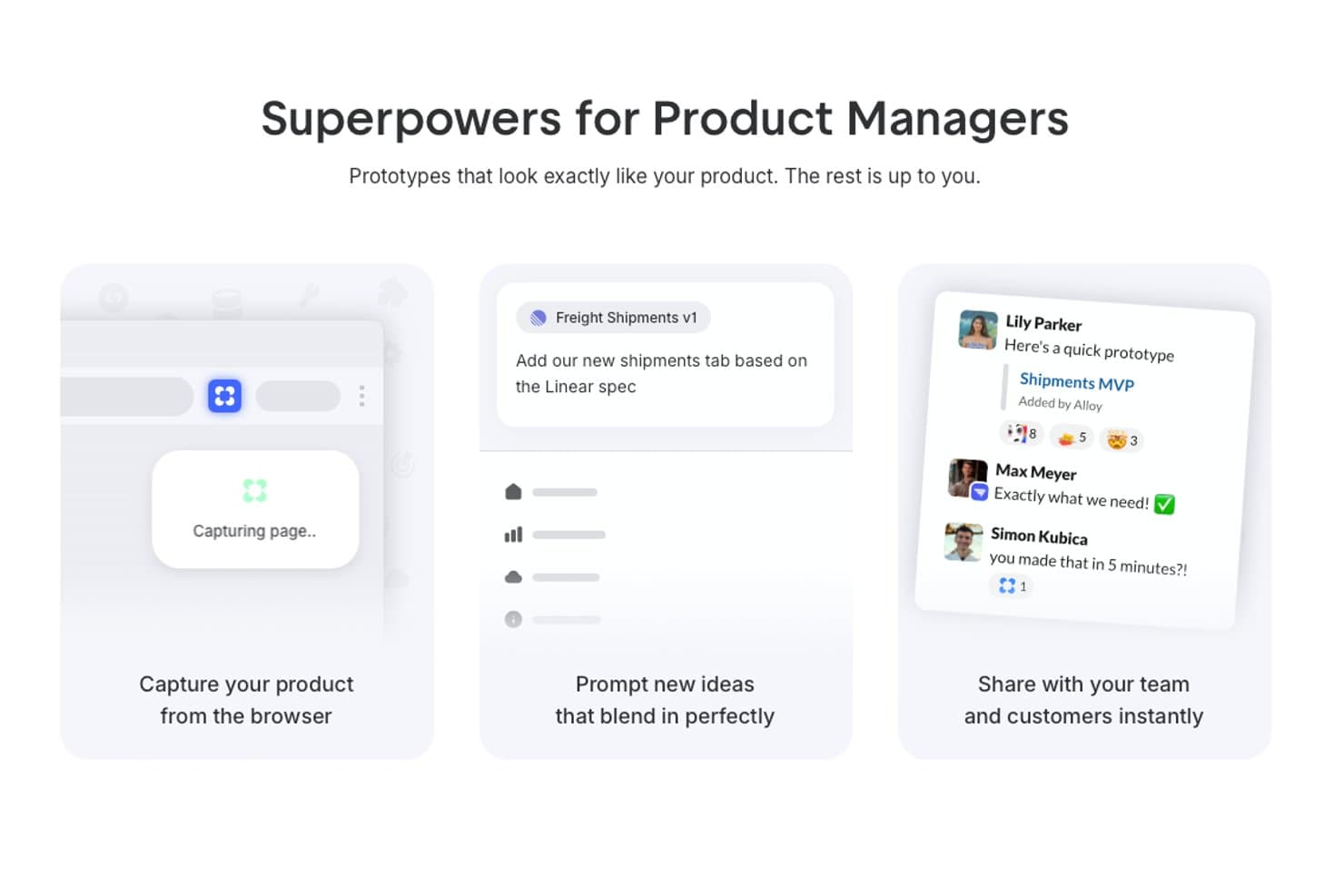
Alloy offers AI-powered prototyping features that let product managers capture their product from a browser, prompt new UI ideas, and share prototypes instantly with their team. Alloy is an AI-powered prototyping platform that lets you build, modify, and test interactive product prototypes directly on top of your actual codebase using conversational prompts.
Who Is Alloy Best For?
Product and UX teams at software companies who need to prototype directly with their existing application’s codebase.
Why I Picked Alloy
I picked Alloy as one of the best because I can prompt changes right inside my product’s live codebase and instantly generate interactive prototypes. My team is able to use our actual components and flows, not disconnected mockups, when prototyping new features.
Alloy Key Features
- Conversational AI editing: Make real-time design edits using text or voice prompts.
- Slack integration: Start or update prototypes directly from team Slack threads.
- Figma export: Export generated prototypes to Figma for further design work.
- Skills library: Save custom AI instructions as reusable actions for repetitive prototyping tasks.
Alloy Integrations
Alloy offers native integration with GitHub, Jira, Notion, Dovetail, Asana, Figma, ClickUp, Trello, Slack, and more. It also provides an API for custom integrations.
Pros and Cons
Pros:
- Allows real-time editing with voice or text
- Generates interactive, production-grade UI flows
- Uses your live codebase for prototyping
Cons:
- Not suited for legacy or non-React stacks
- Limited value for new, code-free prototypes
Learn more about Alloy: Best for code-based design iteration
- Free plan available
- From $8/month
Visit WebsiteCustomer Rating:5/5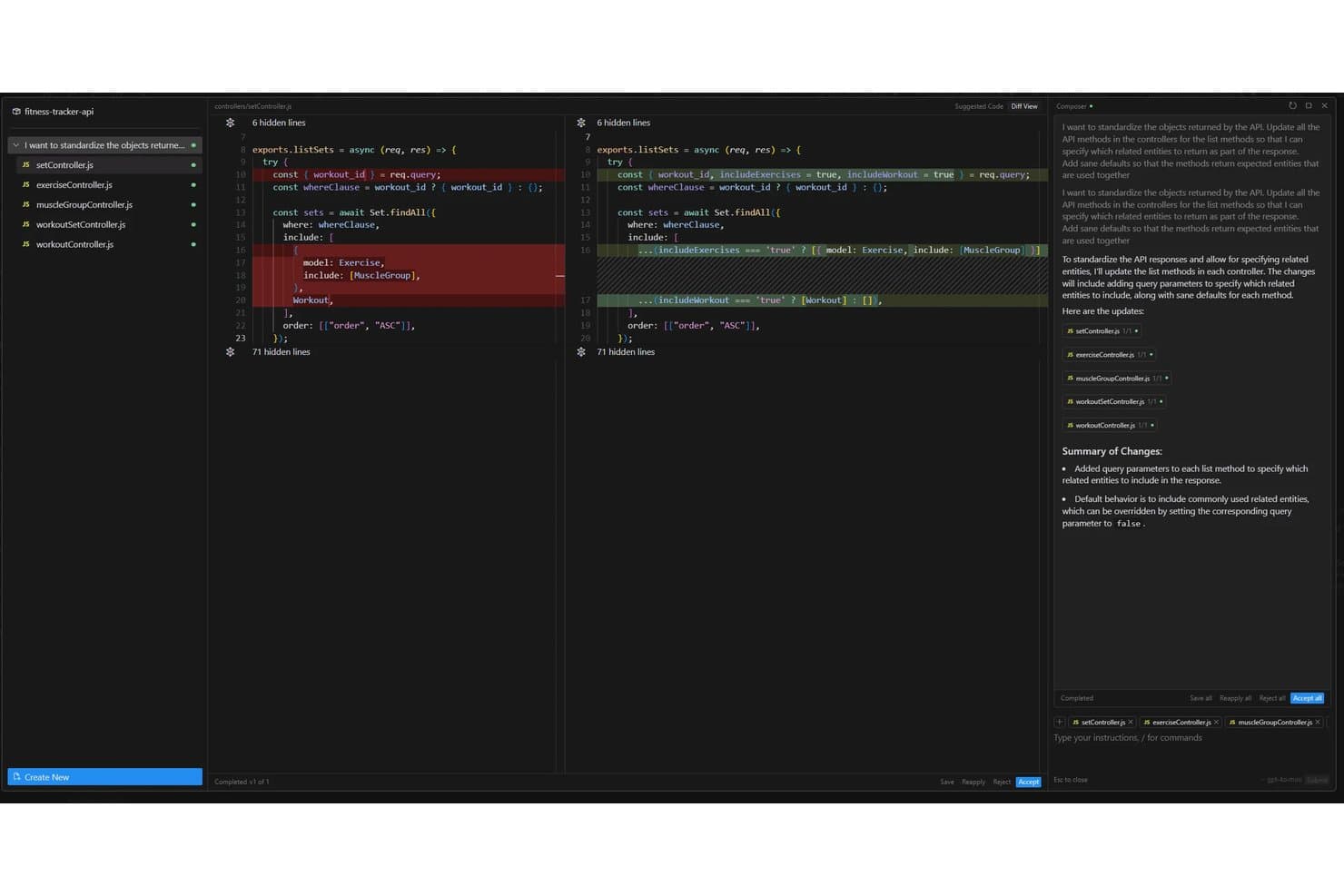
Cursor offers an AI-powered Composer feature that automatically refactors API controller methods across multiple files to standardize response objects with configurable query parameters. Cursor is an AI-powered code editor that lets you build and iterate on UI prototypes directly in code, using natural language prompts, an AI chat interface, and context-aware code generation.
Who Is Cursor Best For?
Cursor is a strong fit for product managers and developers who prototype directly in code and need AI-assisted iteration without switching between design and engineering tools.
Why I Picked Cursor
I picked Cursor as one of the best because it lets you prototype directly in a real codebase rather than faking it in a design tool. I love how its AI chat understands your project's full context, so when you say "make this sidebar collapsible," it generates code that actually fits your existing component structure. Its Composer feature lets you make sweeping, multi-file edits in one prompt, which means you can iterate on a live UI prototype without the usual back-and-forth between design and dev.
Cursor Key Features
- Inline code autocomplete: Cursor predicts and suggests your next line or block of code as you type, based on the surrounding context.
- @-symbol context referencing: You can tag specific files, docs, or web URLs directly in a prompt to give the AI precise context for generating prototype code.
- Terminal integration: A built-in terminal lets you run, test, and debug your prototype without leaving the editor.
- Multi-model AI support: Cursor lets you switch between leading AI models—including Claude and GPT-4o—depending on the task at hand.
Cursor Integrations
Native integrations are not clearly documented.
Pros and Cons
Pros:
- Multi-file changes accelerate interface iteration
- Context-aware edits fit existing component structures
- Prototypes run directly in real codebases
Cons:
- Generated changes still require technical review
- Requires comfort working directly in code
Learn more about Cursor: Best for reference-based prototype generation
- Free plan available
- From $14/month

UX Pilot creates prototypes from references so teams can shape ideas faster. UX Pilot is an AI-powered prototyping tool designed for UX professionals and product teams who want to accelerate early-stage design. It appeals to those who need to generate prototypes based on existing references or design inspiration. The platform helps teams quickly visualize ideas and iterate on concepts without starting from scratch.
Who Is UX Pilot Best For?
UX Pilot is a strong fit for UX designers and product teams at digital agencies or startups who want to generate prototypes using reference designs.
Why I Picked UX Pilot
What drew me to UX Pilot is its ability to generate prototypes directly from reference designs, which is especially valuable for teams that want to build on proven patterns or competitor examples. The tool lets you upload screenshots or URLs of existing products, then uses AI to create editable prototypes that mirror those references.
I find this approach useful for quickly iterating on familiar layouts or benchmarking against industry standards. For anyone who needs to translate inspiration into actionable prototypes without manual recreation, UX Pilot’s reference-based workflow is a clear advantage.
UX Pilot Key Features
Some other features that make UX Pilot stand out for AI prototyping include:
- AI-powered wireframe generation: Instantly create wireframes from text prompts describing your product or feature ideas.
- Multi-screen prototype support: Build and organize entire user flows with multiple connected screens in a single project.
- Component library: Access a built-in library of reusable UI components to speed up prototyping.
- Figma export: Export your prototypes directly to Figma for further design refinement or developer handoff.
UX Pilot Integrations
Integrations include Figma and GitHub.
Pros and Cons
Pros:
- Easy to prompt variations
- Good for UI brainstorming
- Fast AI wireframe creation
Cons:
- No direct dev code exports
- Requires good reference art
Learn more about UX Pilot: 7Best for handling large-scale, complex projects
Bolt
- Free plan available
- From $18/month (billed annually)

Bolt automates planning and tracks dependencies for large, complex projects. Bolt offers an AI-driven platform for teams managing complex product or project workflows. It’s designed for organizations that need to coordinate large-scale initiatives with multiple stakeholders and moving parts. Bolt helps users automate planning, visualize dependencies, and keep projects on track as they scale.
Who Is Bolt Best For?
Bolt is well suited for project managers and operations leads at mid-sized to large organizations running complex, multi-team projects.
Why I Picked Bolt
What drew me to Bolt is how it addresses the unique demands of large-scale, complex projects in AI prototyping. The platform’s AI-powered planning engine helps break down massive initiatives into manageable tasks, automatically mapping dependencies and timelines.
I also appreciate its visual project mapping, which makes it easier to spot bottlenecks and coordinate across multiple teams. These features make Bolt a strong choice for organizations that need to keep ambitious, multi-layered prototyping efforts organized and on track.
Bolt Key Features
Some other features that make Bolt valuable for AI prototyping teams include:
- Automated status reporting: The platform generates real-time progress updates for all stakeholders.
- Role-based permissions: Assign different access levels to team members based on their responsibilities.
- Template library: Access pre-built project templates tailored for various industries and workflows.
- Custom workflow automation: Set up automated triggers and actions to streamline repetitive project management tasks.
Bolt Integrations
Integrations include Figma and GitHub.
Pros and Cons
Pros:
- Great AI chat code editor
- Deployable AI prototypes
- Handles full-stack logic
Cons:
- Overwhelming for designers
- UI design is very basic
Learn more about Bolt: Best for importing specs from project management tools
- Free plan + free demo
- From $21/month (billed annually)
Visit WebsiteCustomer Rating:4.5/5
Lovable converts project specs into prototypes for faster design work. Lovable is an AI-powered prototyping tool designed for product teams and UX professionals who want to accelerate the transition from requirements to interactive prototypes. It stands out for its ability to turn detailed project specs into working prototypes with minimal manual effort. Teams looking to bridge the gap between planning and design may find Lovable especially useful.
Who Is Lovable Best For?
Lovable is a strong fit for product managers and UX teams at SaaS companies who need to quickly convert project management specs into interactive prototypes.
Why I Picked Lovable
What drew me to Lovable is how it directly addresses the challenge of moving specs from project management tools into actionable prototypes. Lovable lets you import requirements and user stories from platforms like Jira or Linear, then uses AI to generate interactive wireframes that reflect those specs.
I find this especially valuable for teams that want to reduce manual translation work and keep prototypes tightly aligned with evolving project documentation. This approach helps ensure that design and development stay in sync from the very start of a project.
Lovable Key Features
Some other features that stood out to me include:
- AI-powered UI component suggestions: The tool recommends relevant UI elements based on your imported specs and user flows.
- Real-time collaborative editing: Multiple team members can edit and comment on prototypes simultaneously within the platform.
- Version history and rollback: You can track changes to prototypes and revert to previous versions as needed.
- Export to Figma and code: Prototypes can be exported directly to Figma or as developer-ready code snippets for faster handoff.
Lovable Integrations
Integrations include Jira, Confluence, Notion, Linear, GitHub, GitLab, Slack, Shopify, Stripe, and Supabase.
Pros and Cons
Pros:
- Creates functional web apps
- Understands project context
- Fast full-stack generation
Cons:
- Subscription can be pricey
- Steep learning curve exists
Learn more about Lovable: Best with Figma design system integration
- Free plan
- From $16/month (billed annually)

Figma Make builds prototypes in Figma so design teams can move ideas faster. Figma Make brings AI-driven prototyping directly into the Figma ecosystem, making it a strong fit for design teams already using Figma for their workflows. Product designers and UX professionals can use it to quickly turn concepts into interactive prototypes without leaving their primary design environment. This tool helps teams reduce manual steps and maintain consistency across projects.
Who Is Figma Make Best For?
Figma Make is a strong choice for design teams and UX professionals working within organizations that already rely on Figma for collaborative product design.
Why I Picked Figma Make
I chose Figma Make because it brings AI-powered prototyping directly into the Figma design system, which is a major advantage for teams already invested in Figma’s ecosystem. The tool uses AI to generate interactive prototypes that automatically align with your existing design tokens, components, and libraries.
This means you can maintain brand consistency and design standards without extra manual work. I also appreciate how Figma Make lets you iterate on prototypes using the same assets and workflows your team already knows.
Figma Make Key Features
Some other features worth noting for teams considering Figma Make include:
- AI-powered user flow generation: Automatically creates user flows based on your project requirements and prompts.
- Real-time collaboration: Multiple team members can work on prototypes simultaneously within the same Figma file.
- Component suggestion engine: Recommends relevant components from your design system as you build out screens.
- Version history tracking: Keeps a detailed log of changes and iterations for easy review and rollback.
Figma Make Integrations
Integrations include Supabase, Figma Sites, Figma Design, FigJam, ProtoPie, Principle, Maze, Framer Web, Pendo, and Bubble.
Pros and Cons
Pros:
- Smooth designer workflows
- Real-time team collaboration
- Generates UI very quickly
Cons:
- Requires premium accounts
- Struggles with deep logic
Learn more about Figma Make: 10Best for text-to-prototype with PM-focused AI tools
Mockitt
- Free plan available
- From $10/month (billed annually)
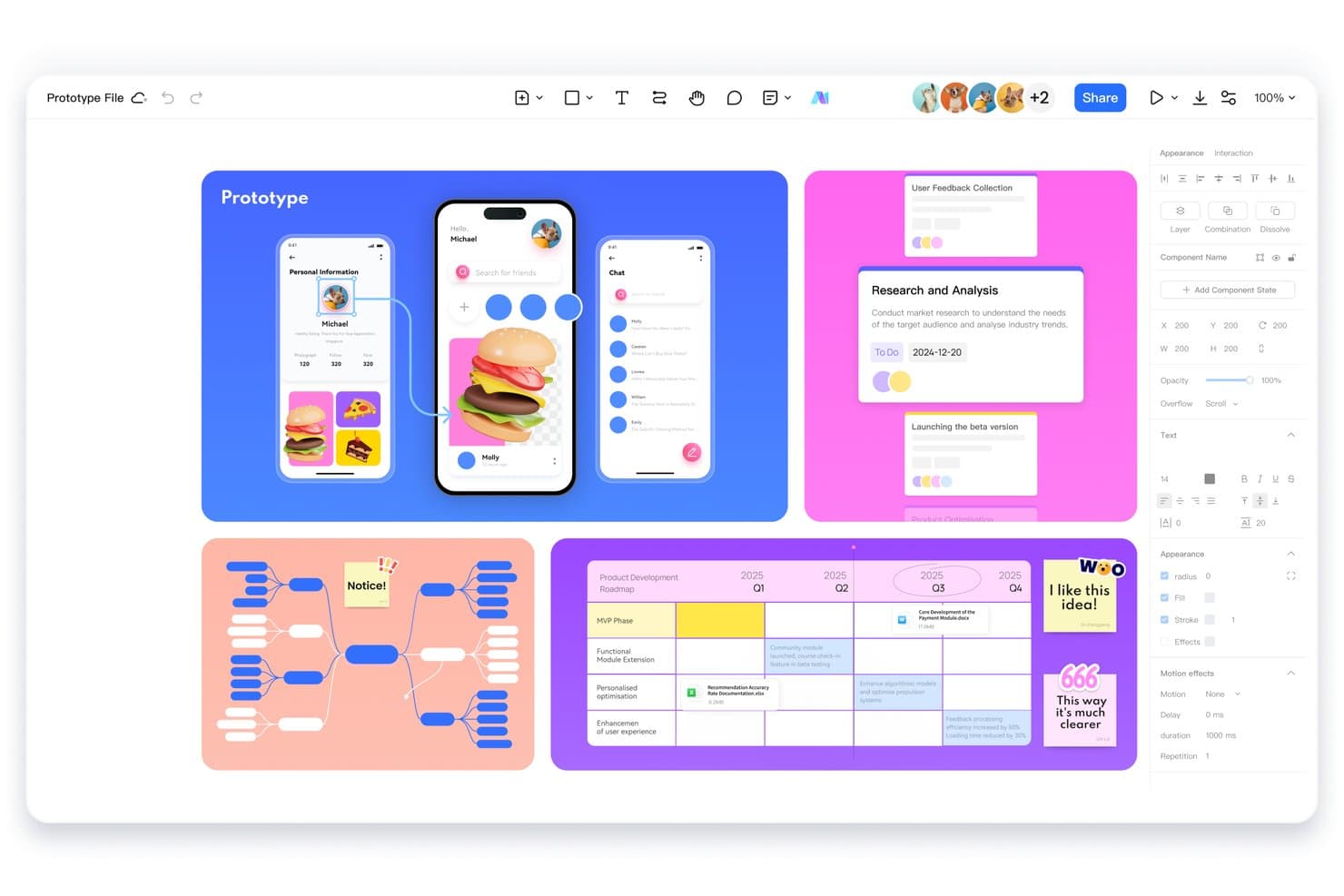
Mockitt lets users design prototypes, mind maps, and roadmaps in one workspace. Mockitt is an AI prototyping tool that lets you generate interactive prototypes from text prompts, alongside wireframing, user flow mapping, and product requirement drafting tools built for product managers.
Who Is Mockitt Best For?
Mockitt is a strong fit for product managers who want to go from idea to interactive prototype without handing off to a designer first.
Why I Picked Mockitt
I picked Mockitt as one of the best because it's built around a text-to-prototype workflow that product managers can actually drive themselves. Type a product brief or feature description, and Mockitt generates an interactive prototype directly from that input. I also like its AI-powered user flow mapping and product requirement drafting tools, which keep the entire discovery-to-prototype process in one place without pulling in a designer at every turn.
Mockitt Key Features
- Real-time collaboration: Multiple team members can edit and comment on prototypes simultaneously within a shared workspace.
- Interactive component library: A built-in library of pre-built UI components lets you drag and drop elements directly into your prototype canvas.
- Clickable prototype sharing: Generate a shareable link to your prototype so stakeholders can click through flows and leave feedback without needing an account.
- Version history: Mockitt tracks changes over time, letting you restore earlier versions of your prototype when needed.
Mockitt Integrations
Mockitt documents an OpenAI-powered ChatGPT integration for AI prototyping. It also supports importing Figma and Sketch files, though these are file imports rather than native integrations.
Pros and Cons
Pros:
- Stakeholders can review shared clickable prototypes
- PM tools connect briefs with flows
- Text prompts produce clickable prototypes quickly
Cons:
- AI output can miss product context
- Generated screens need manual refinement
Learn more about Mockitt:
Outras ferramentas de prototipagem com IA
Eis algumas opções adicionais de ferramentas de prototipagem com IA que não entraram na minha seleção, mas que ainda vale a pena conhecer:
- 11BananiBest for exporting prototypes to Figma or code
- 12RelumeFrom $18/month (billed annually)
- 13Magic PatternsBest for matching prototypes to existing design systems
- 14Tempo LabsBest for visual editing of React codebases
- 15FramerBest for interactive website mockups
- 16v0Best for GitHub and Vercel deploy workflows
How I Evaluate AI Prototyping Tools
To make this list, AI must support prototyping work, like generating screens from prompts and building multi-screen flows. From there, I evaluate three things. Core functionality carries most weight: linking screens into clickable flows and editing generated layouts. Then I consider standout features, like design system awareness, and beyond-feature fit with your team’s workflow.
Core Functionality (Table Stakes For This List)
When I'm selecting tools for my list, I score each one on a scale from 0 (does not offer the functionality) to 5 (excels in this area) for each core functionality listed below. I then convert the total into a percentage to help assess each tool's overall fit, with extra weight on any functionalities I’ve deemed essential.
- AI-Generated Design (Essential): I look for prompts, sketches, or existing assets to produce relevant screens and coherent flows, such as onboarding through account setup.
- Interactive Prototypes (Essential): Check whether teams can link screens into clickable, branching journeys to review checkout or onboarding paths with stakeholders.
- Editable Output: Assess whether generated layouts allow meaningful changes to hierarchy, copy, and components as requirements shift.
- Multi-Fidelity Support: I consider whether teams can move from rough wireframes to polished UI in one project as concepts gain validation.
- Design System Consistency: Look for reusable components, styles, and tokens that keep generated screens aligned with an existing product system.
- Export & Handoff: Check sharing, export, or handoff options that let designers and developers inspect flows and carry specs into implementation.
Once I have a list of tools that meet the criteria, I consider what sets each platform apart.
Differentiating Factors (What Sets Vendors Apart)
Here's how I compare and contrast different vendors:
Standout Features
I look for multimodal input support—tools that accept sketches, screenshots, or Figma files alongside text prompts let PMs prototype from whatever artifact they already have. Design system awareness matters just as much. When a tool references your existing tokens and component libraries, every generated screen stays on-brand without manual cleanup. I also evaluate built-in user testing tools, like native annotation or heatmap capture, since gathering stakeholder feedback inside the prototype removes handoff friction.
Beyond Features
I evaluate how quickly a tool gets you from idea to testable prototype within a single sprint. A PM preparing for a stakeholder review needs a clickable flow in hours, not days. I also check whether non-designers can realistically use the tool without training—if your APM can't generate and edit screens independently, adoption stalls. Data privacy matters too: I look at how vendors handle proprietary prompts and designs, especially for pre-launch concepts.
Como escolher ferramentas de prototipagem com IA
É fácil ficar atolado em longas listas de funcionalidades e estruturas de preços complexas. Para o ajudar a manter o foco enquanto percorre o seu processo único de seleção de software, eis uma lista de verificação dos fatores a ter em conta:
| Fator | O que considerar |
|---|---|
| FatorEscalabilidade | O que considerarA ferramenta irá acompanhar o crescimento da sua equipa? Tenha em conta os limites de utilizadores, os limites de projetos e as necessidades futuras. |
| FatorIntegrações | O que considerarEstabelece ligação nativa às suas ferramentas de design, código e colaboração? Verifique se existe suporte direto, não apenas APIs. |
| FatorPersonalização | O que considerarPode adaptar fluxos de trabalho, modelos ou resultados para se adequarem ao seu processo? Tenha cuidado com soluções rígidas e universais. |
| FatorFacilidade de utilização | O que considerarCom que rapidez podem os novos utilizadores tornar-se produtivos? Procure uma navegação intuitiva e requisitos mínimos de formação. |
| FatorImplementação e integração inicial | O que considerarQue recursos são necessários para começar? Avalie o apoio à migração, os materiais de formação e o tempo até ao primeiro protótipo. |
| FatorCusto | O que considerarOs escalões de preços são claros e previsíveis à medida que a utilização aumenta? Esteja atento a taxas ocultas ou suplementos dispendiosos. |
| FatorMedidas de segurança | O que considerarA ferramenta cumpre as suas normas de privacidade e segurança dos dados? Informe-se sobre encriptação, controlos de acesso e conformidade. |
| FatorDisponibilidade do apoio | O que considerarQue canais de apoio são disponibilizados e durante que horários? Considere se irá precisar de assistência em direto ou de recursos de autoatendimento. |
O que são ferramentas de prototipagem com IA?
As ferramentas de prototipagem com IA são plataformas de software baseadas em modelos avançados de IA que ajudam as equipas a conceber, criar e testar rapidamente protótipos interativos de produtos. Para elevar o design de produtos com IA, estas ferramentas são frequentemente utilizadas para automatizar tarefas como gerar código completo, criar interfaces de utilizador ou sugerir formas de otimizar esquemas, facilitando a experimentação de novas ideias por parte de utilizadores técnicos e não técnicos.
Permitem uma iteração, colaboração e validação mais rápidas dos conceitos em cenários do mundo real antes do início do desenvolvimento em grande escala.
Funcionalidades
Ao selecionar ferramentas de prototipagem com IA, procure as seguintes funcionalidades principais:
- Geração de código com IA: Cria automaticamente código para componentes da interface do utilizador ou lógica com base nos dados introduzidos pelo utilizador, poupando tempo e reduzindo a codificação manual.
- Interface de edição visual: Permite aos utilizadores conceber e modificar protótipos através de ferramentas de arrastar e largar ou de apontar e clicar, tornando a prototipagem acessível a pessoas que não são programadoras.
- Colaboração em tempo real: Permite que vários membros da equipa trabalhem simultaneamente no mesmo protótipo, facilitando o feedback e a iteração sem atrasos.
- Conversão de design em código: Traduz ficheiros de design ou maquetas diretamente em código funcional, estabelecendo uma ligação entre o design e o desenvolvimento.
- Integração de bibliotecas de componentes: Permite importar e reutilizar componentes de interface pré-criados, acelerando o processo de prototipagem e garantindo a consistência.
- Suporte para controlo de versões: Regista alterações, gere ramificações e permite reverter alterações, ajudando as equipas a gerir iterações e a colaborar em segurança.
- Pré-visualização e testes interativos: Disponibiliza pré-visualizações em direto dos protótipos com elementos interativos, para que os utilizadores possam testar fluxos e experiências de utilização antes do desenvolvimento.
- Integrações com ferramentas de terceiros: Liga-se a plataformas de design, código e gestão de projetos para simplificar os fluxos de trabalho e reduzir as transferências manuais.
- Gestão de variáveis de ambiente: Permite às equipas gerir e atualizar em segurança definições específicas do ambiente na ferramenta de prototipagem.
- Controlos de acesso baseados em funções: Permite aos administradores definir permissões para diferentes utilizadores, garantindo o nível de acesso adequado a cada membro da equipa.
Benefícios
A implementação de ferramentas de prototipagem com IA proporciona vários benefícios para a sua equipa e para a sua empresa. Eis alguns dos benefícios que pode esperar:
- Ciclos de iteração mais rápidos: A geração de código com IA e as funcionalidades de conversão de design em código permitem às equipas testar e aperfeiçoar rapidamente ideias sem codificação manual.
- Colaboração mais abrangente entre equipas: A edição em tempo real e as interfaces visuais permitem que tanto os membros técnicos como os não técnicos contribuam para os protótipos.
- Redução dos obstáculos ao desenvolvimento: Os fluxos de trabalho automatizados e as bibliotecas de componentes minimizam as tarefas repetitivas, libertando os programadores para trabalho de maior valor.
- Maior precisão do design: A conversão de design em código e as pré-visualizações interativas ajudam a garantir que os protótipos correspondem de perto aos requisitos do produto final.
- Transição simplificada para o desenvolvimento: O controlo de versões e as integrações com ferramentas de terceiros facilitam a transição dos protótipos para código pronto para produção.
- Segurança e controlo reforçados: O acesso baseado em funções e a gestão de variáveis de ambiente protegem dados sensíveis e preservam a integridade do projeto.
- Custos de prototipagem mais baixos: A automatização e os recursos reutilizáveis reduzem o tempo e os recursos necessários para criar e validar novos conceitos.
Custos e preços
A seleção de ferramentas de prototipagem com IA exige uma compreensão dos vários modelos de preços e planos disponíveis. Os custos variam consoante as funcionalidades, a dimensão da equipa, os complementos e outros fatores. A tabela abaixo resume os planos comuns, os respetivos preços médios e as funcionalidades normalmente incluídas nas soluções de ferramentas de prototipagem com IA:
Tabela de comparação de planos para ferramentas de prototipagem com IA
| Tipo de plano | Preço médio | Funcionalidades comuns |
|---|---|---|
| Tipo de planoPlano gratuito | Preço médio$0 | Funcionalidades comunsFerramentas básicas de prototipagem, funcionalidades de IA limitadas, acesso para um único utilizador e apoio da comunidade. |
| Tipo de planoPlano pessoal | Preço médio$12-$25/user/month | Funcionalidades comunsPrototipagem avançada, geração de código com IA, integrações limitadas e apoio por e-mail. |
| Tipo de planoPlano empresarial | Preço médio$30-$100/user/month | Funcionalidades comunsColaboração em equipa, edição em tempo real, controlo de versões, integrações alargadas e apoio prioritário. |
| Tipo de planoPlano para empresas | Preço médio$100+/user/month | Funcionalidades comunsIntegrações personalizadas, segurança avançada, acesso baseado em funções, integração inicial dedicada e apoio com garantia de SLA. |
Perguntas frequentes sobre ferramentas de prototipagem com IA
Eis algumas respostas a perguntas comuns sobre ferramentas de prototipagem com IA:
Os membros não técnicos da equipa podem utilizar ferramentas de prototipagem com IA?
Sim, a maioria das ferramentas de prototipagem com IA disponibiliza editores visuais e interfaces de arrastar e largar que facilitam a criação e modificação de protótipos por utilizadores não técnicos. Isto ajuda as equipas a colaborar entre funções e reduz a dependência dos programadores nas fases iniciais do trabalho de design.
Como é que as ferramentas de prototipagem com IA aceleram o processo de design?
As ferramentas de prototipagem com IA automatizam tarefas repetitivas, como a geração de código, a montagem da interface do utilizador e a conversão de design para código. Isto permite às equipas testar rapidamente ideias, iterar com base no feedback e passar do conceito para um protótipo interativo muito mais depressa do que através de métodos manuais.
As ferramentas de prototipagem com IA são seguras para projetos sensíveis?
Sim, muitas ferramentas de prototipagem com IA incluem medidas de segurança, como encriptação, controlos de acesso baseados em funções e conformidade com normas do setor. Consulte sempre a documentação de segurança de uma ferramenta para garantir que cumpre os requisitos da sua organização antes de partilhar dados sensíveis.
Que integrações devo procurar numa ferramenta de prototipagem com IA?
Procure integrações com as ferramentas de design, os repositórios de código e as plataformas de gestão de projetos que já utiliza. As ligações diretas ao Figma, GitHub, Jira ou Slack podem ajudar a simplificar o seu fluxo de trabalho e a reduzir as transferências manuais entre equipas.
As ferramentas de prototipagem com IA permitem a colaboração em tempo real?
Sim, a maioria das principais ferramentas de prototipagem com IA permite a colaboração em tempo real, possibilitando que vários utilizadores trabalhem simultaneamente no mesmo projeto. Esta funcionalidade é valiosa para equipas distribuídas e ciclos de design rápidos.