

Ao navegar pelo mundo do desenvolvimento de produtos, é provável que se depare com prazos apertados e a pressão para inovar. O software de prototipagem 3D pode ajudar a ultrapassar estes desafios, permitindo que a sua equipa visualize rapidamente as ideias e tome decisões informadas.
Com base na minha experiência, selecionar as ferramentas certas é crucial para os gestores de produto que pretendem melhorar a precisão do design e acelerar o desenvolvimento. Testei e analisei várias opções, concentrando-me no que é realmente importante para si.
Neste artigo, partilharei as minhas principais escolhas de software de prototipagem 3D, destacando as suas funcionalidades e vantagens únicas. Quer esteja a liderar uma pequena startup ou uma grande empresa, encontrará aqui algo adequado às suas necessidades.
Why Trust Our Software Recommendations
6,700+
Reviews
20
Industry experts
16+
Evaluation factors
14
Years
Our team has been testing and reviewing software since 2012. As product managers ourselves, we know how difficult—and important—it is to choose the right software.
For this guide, we evaluated tools using hands-on testing and independent research, scoring tools using our selection criteria.
Our reviews reflect our human editorial judgment, not a sales pitch.
Expert reviewers:
- Andrew LumbySenior TPM
- Cristiano ValimSenior UI/UX Lead


Tabela comparativa: software de prototipagem 3D
Esta tabela comparativa resume os detalhes de preços das minhas principais escolhas de software de prototipagem 3D.
| Tool | Best For | Trial Info | Price | ||
|---|---|---|---|---|---|
| 1 | Best for branching and merging design variants | Free plan available and up to 6-month free trial | From $1,500/user/year (billed annually) | Website | |
| 2 | Best for synchronous and parametric 3D modeling | 30-day free trial available | From $110/month | Website | |
| 3 | Best for perpetual-license parametric CAD | 30-day free trial available | Pricing available upon request | Website | |
| 4 | Best for zero-cost parametric CAD prototyping | Free plan available | From $0/month | Website | |
| 5 | Best for freeform NURBS and SubD surface modeling | 90-day free trial | From $995/user (one-time purchase) | Website | |
| 6 | Best for design-to-manufacturing CAD continuity | 14-day free trial | From $2,310/user/year (billed annually). | Website | |
| 7 | Best for aerospace and automotive-grade 3D design | Free demo available | From $7,229/user/year (billed annually) | Website | |
| 8 | Best for engineering-grade parametric CAD at scale | 14-day free trial | From $3,350/user/year (billed annually) | Website | |
| 9 | Best for integrated CAD, simulation, and CAM | Free demo + free trial available | From $2,820/user/year (billed annually) | Website | |
| 10 | Best for large-scale mechanical assembly design | 30-day free trial | From $320/month | Website |





Análise do melhor software de prototipagem 3D
Apresento abaixo os meus resumos detalhados do melhor software de prototipagem 3D que integrou a minha seleção. As minhas análises oferecem uma visão detalhada das principais funcionalidades, vantagens e desvantagens, integrações e casos de utilização ideais de cada ferramenta, para o ajudar a encontrar a melhor opção para si.
 Best for branching and merging design variants
- Free plan available and up to 6-month free trial
- From $1,500/user/year (billed annually)
Visit WebsiteCustomer Rating:4.5/5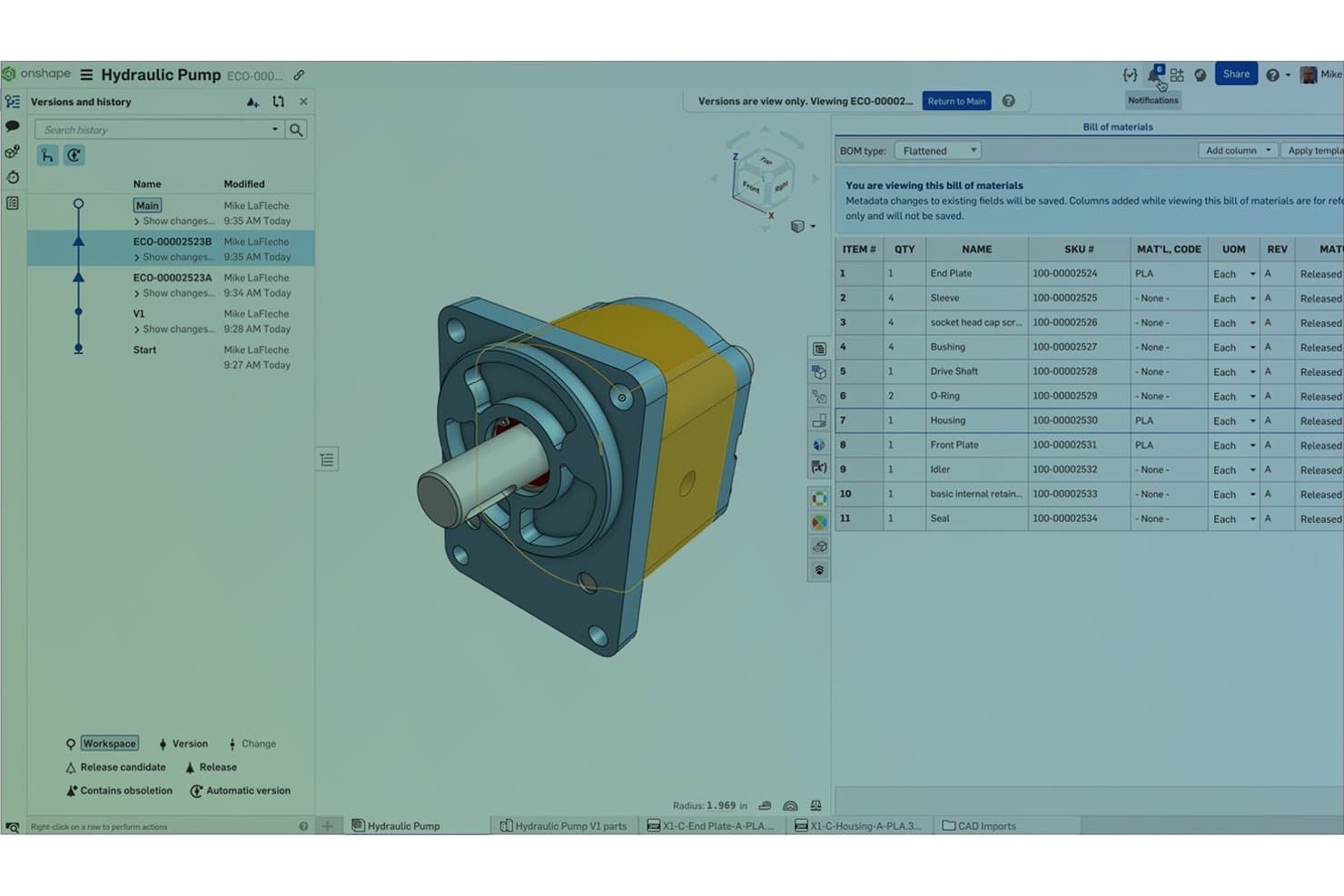
Onshape tracks part versions and BOM data for hydraulic pump assemblies. Onshape is a cloud-native 3D CAD and prototyping platform that covers parametric and surface modeling, assembly design, simulation, rendering, and CAM—all within a browser-based environment with built-in version control.
Who Is Onshape Best For?
Onshape suits mechanical engineers and hardware product teams who need to explore multiple design variants simultaneously without the overhead of file management.
Why I Picked Onshape
I've included Onshape in my top picks because its git-style branching and merging is genuinely unlike anything else in cloud CAD. I can spin up a branch to test a shell thickness change, keep the main design untouched, then preview and selectively merge only the geometry I want to keep. Paired with Configurations, one Part Studio can hold multiple variant inputs, and simulation results refresh automatically when I switch between them.
Onshape Key Features
- Real-time co-editing: Multiple team members can edit the same part or assembly simultaneously, with no file locking or version conflicts.
- Render Studio: Cloud-based photorealistic rendering powered by NVIDIA Iray, requiring no local graphics hardware to produce results.
- Assembly simulation: Linear static and modal analysis runs directly on assemblies, with mates automatically converted to simulation conditions.
- FeatureScript: A built-in scripting language that lets your team create custom features and automate repetitive modeling steps.
Onshape Integrations
Onshape offers native integrations with Altium Designer, Altium 365, Arena PLM, Slack, Google Drive, Dropbox, and OneDrive. Its App Store includes 30+ partner products, while REST API access and webhooks support custom integrations.
Pros and Cons
Pros:
- Real-time collaboration simplifies design reviews
- Configurations support rapid variant comparisons
- Branching preserves original design concepts
Cons:
- CAM toolpaths require manual regeneration after changes
- Internet access is required for modeling
Learn more about Onshape: Best for synchronous and parametric 3D modeling
- 30-day free trial available
- From $110/month
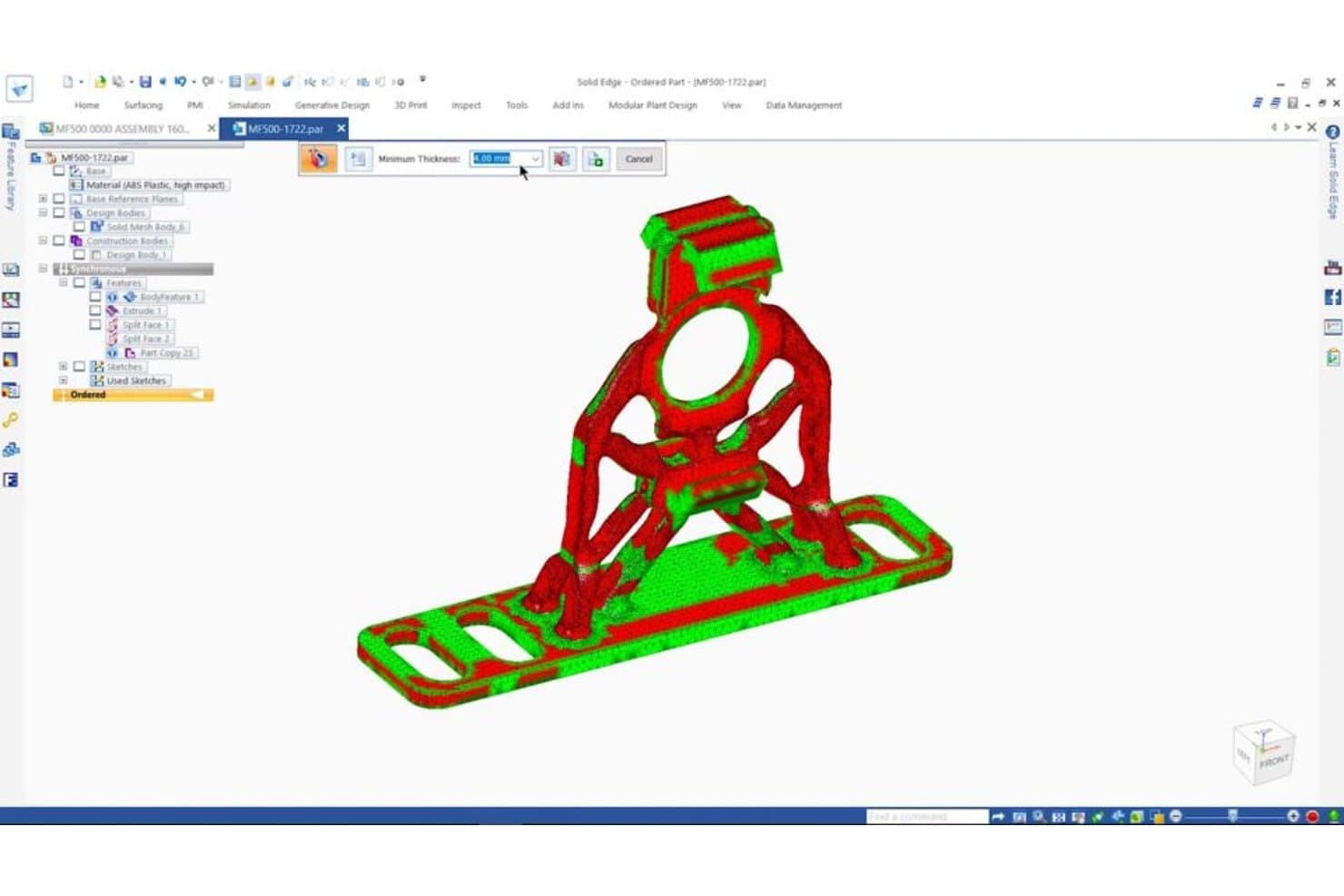
Solid Edge flags thin-wall issues on 3D parts before printing. Solid Edge is a professional 3D CAD platform from Siemens that combines parametric modeling, direct editing via synchronous technology, Sub-D freeform surfacing, simulation, generative design, and fabrication prep tools in a single environment.
Who Is Solid Edge Best For?
Solid Edge is a strong fit for mechanical engineers and product designers who need both parametric control and the flexibility to edit geometry without rebuilding their entire model history.
Why I Picked Solid Edge
Solid Edge earns its spot on my shortlist because its synchronous technology genuinely changes how you iterate on 3D models: you can push and pull geometry, edit imported CAD files, and change dimensions without triggering a full history-tree rebuild. I also love the built-in Sub-D modeling for freeform surfacing work, which lets you sculpt organic shapes and then transition directly into parametric control in the same session. Generative design is baked in too, so you can define load cases and material constraints and get optimized geometry without switching tools.
Solid Edge Key Features
- Convergent mesh modeling: Combine standard solid geometry and triangle-mesh models in the same environment without converting between formats.
- AI Magnetic Snap Assembly: Automatically detects the correct constraints when you place parts in an assembly, reducing manual setup time.
- Model-Based Definition (MBD): Add manufacturing annotations (PMI) directly to the 3D model and export universal 3D PDFs for downstream teams.
- 3D print service integration: Send designs to 3YOURMIND from within Solid Edge to compare real-time pricing and lead times across materials and print services.
Solid Edge Integrations
Solid Edge integrates with Teamcenter, Teamcenter X, Teamcenter Share, Solid Edge CAM Pro, Simcenter FloEFD, KeyShot, 3YOURMIND, and Microsoft 3D Builder. It also connects with Dropbox, OneDrive, Google Drive, and Box for file sharing.
Pros and Cons
Pros:
- Mesh workflows accommodate scanned prototype geometry
- Sub-D modeling supports organic product forms
- Synchronous edits accelerate prototype iterations
Cons:
- Advanced features require deeper CAD expertise
- Large assemblies can become sluggish
Learn more about Solid Edge: Best for perpetual-license parametric CAD
- 30-day free trial available
- Pricing available upon request
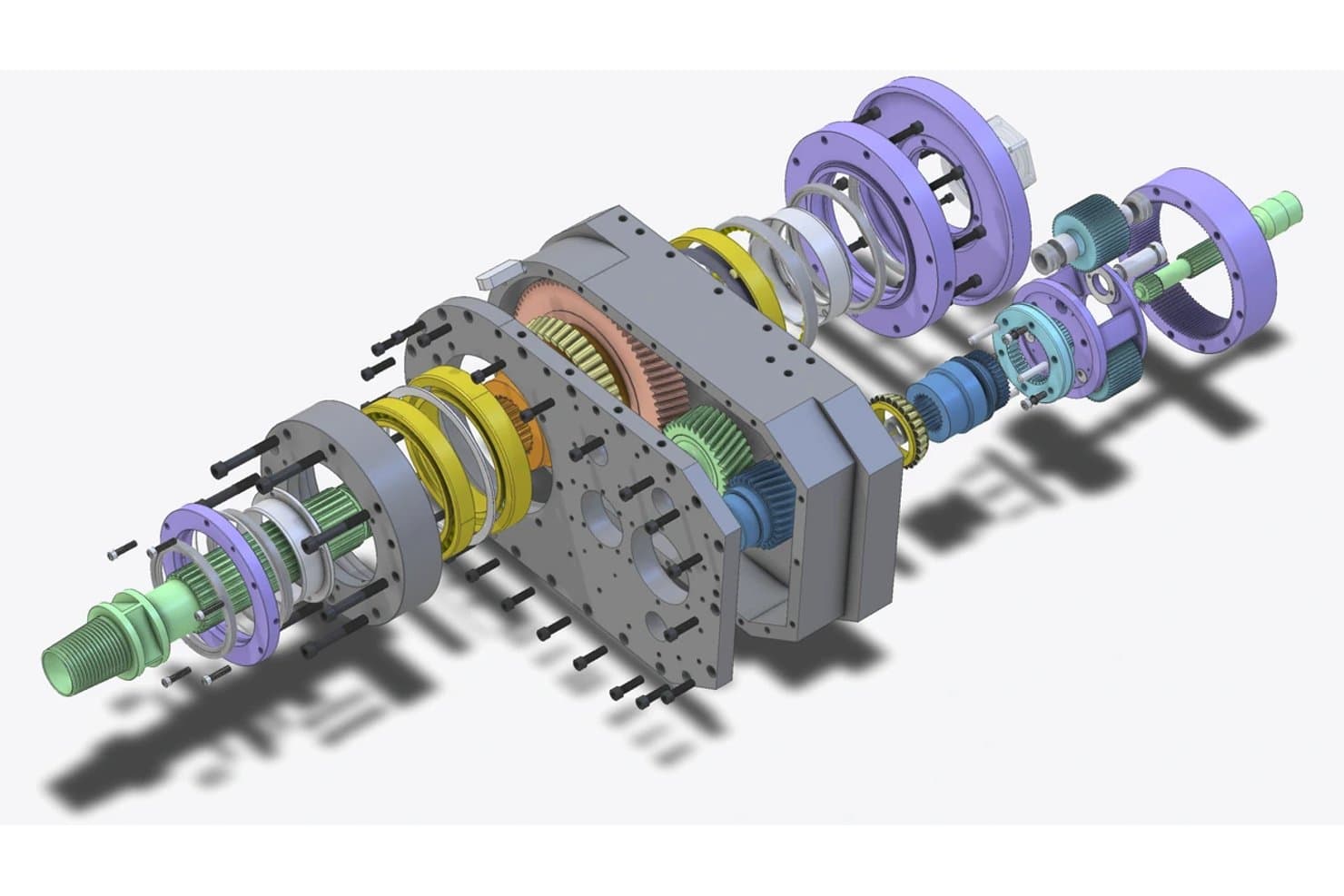
Alibre Design renders detailed exploded views of complex mechanical assemblies. Alibre Design is a Windows-based parametric CAD tool built around feature-based 3D modeling, sheet metal and weldments design, assembly constraints, and 2D technical drawing generation.
Who Is Alibre Design Best For?
Alibre Design is a strong fit for mechanical engineers and product designers who want professional-grade parametric CAD without recurring subscription costs.
Why I Picked Alibre Design
Alibre Design earns its spot on my shortlist because it's one of the few professional-grade parametric CAD tools you can own outright, with no subscription required. I particularly like the perpetual licensing model paired with a genuinely deep feature set: parametric history editing lets you update dimensions and watch the model rebuild in real time, and the dedicated sheet metal workspace generates instant flat patterns ready for laser or CNC export. For prototyping physical hardware, the assembly workspace with mechanical motion constraints and interference detection means you can validate fit and function before a single part is machined.
Alibre Design Key Features
- Weldments workspace: A dedicated environment for structural profile design, including a profile library, trim and extend tools, per-structure metadata, and automatic cutlists.
- Alibre Script: A Python scripting environment that automates modeling tasks, generates logic-driven geometry, and pulls data from Excel, CSV, or SQL sources.
- Interactive 3D PDF publishing: Exports designs as interactive 3D PDFs that let stakeholders rotate, pan, zoom, and view section cuts without needing CAD software installed.
- Wide proprietary CAD import: Reads files directly from SolidWorks, Inventor, Creo, CATIA, NX, and Rhino using the HOOPS translation suite.
Alibre Design Integrations
Alibre Design integrates with KeyShot, EZ-CAM, MeshCAM Pro, FEMdesigner AD, SimWise FEA/4D, SimWise Motion, and SimLab Composer. Its C++/.NET API and Alibre Script connect designs to Excel, CSV, and SQL for custom workflows.
Pros and Cons
Pros:
- Local files suit IP-sensitive design teams
- Assembly constraints validate fit before manufacturing
- Parametric edits support rapid prototype iterations
Cons:
- Limited freeform surfacing restricts industrial design work
- Native mesh workflows limit scan-based prototyping
Learn more about Alibre Design:
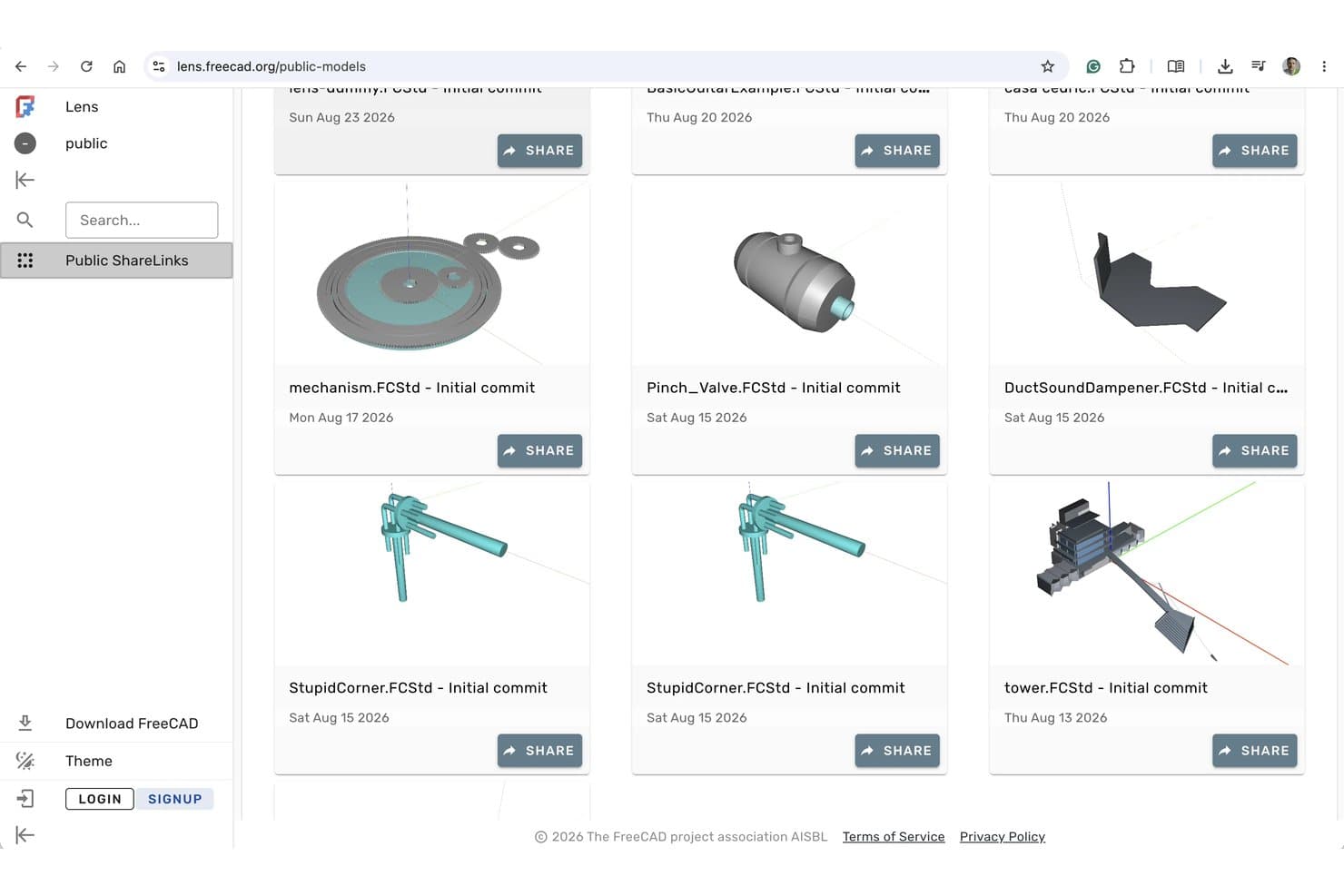
FreeCAD Lens lets users publicly share and browse 3D models online. FreeCAD is an open-source parametric 3D modeling tool that spans solid modeling, surfacing, assembly, CAM toolpath generation, FEM analysis, and 2D technical drawing across a modular workbench system.
Who Is FreeCAD Best For?
FreeCAD is a strong fit for product designers and mechanical engineers who need full parametric CAD capabilities without a licensing budget.
Why I Picked FreeCAD
FreeCAD earns its spot as one of the best on my shortlist because it gives you a full parametric CAD environment at zero cost, with no seat limits and no sign-up required. I love that the Part Design and Sketcher workbenches let you build constraint-driven solids and iterate through model history, so changing a wall thickness or hole diameter upstream recalculates the entire model. The built-in CAM workbench also generates real CNC toolpaths, and the Mesh workbench handles STL repair before you send files to a 3D printer.
FreeCAD Key Features
- FEM analysis workbench: Runs finite element analysis using CalculiX and Elmer solvers to validate structural, thermal, and electrostatic performance of your designs.
- TechDraw workbench: Generates 2D production drawings with shape validation and dimension formatting directly from your 3D models.
- VarSet property containers: Stores custom variables that drive parametric dimensions across your model, similar to spreadsheet-driven aliases.
- Addon Manager: Installs and updates community workbenches, macros, and rendering engines without leaving FreeCAD.
FreeCAD Integrations
FreeCAD doesn't have any native integrations. It connects with OpenSCAD, Gmsh, Netgen, CalculiX, Elmer, and external render engines through workbenches and add-ons, while Python scripting supports custom tools.
Pros and Cons
Pros:
- FEM validates structural and thermal behavior
- CAM and mesh tools support fabrication
- Parametric edits preserve design intent
Cons:
- Photorealistic previews require additional setup
- Large assemblies can suffer performance issues
Learn more about FreeCAD:- Best for freeform NURBS and SubD surface modeling
- 90-day free trial
- From $995/user (one-time purchase)
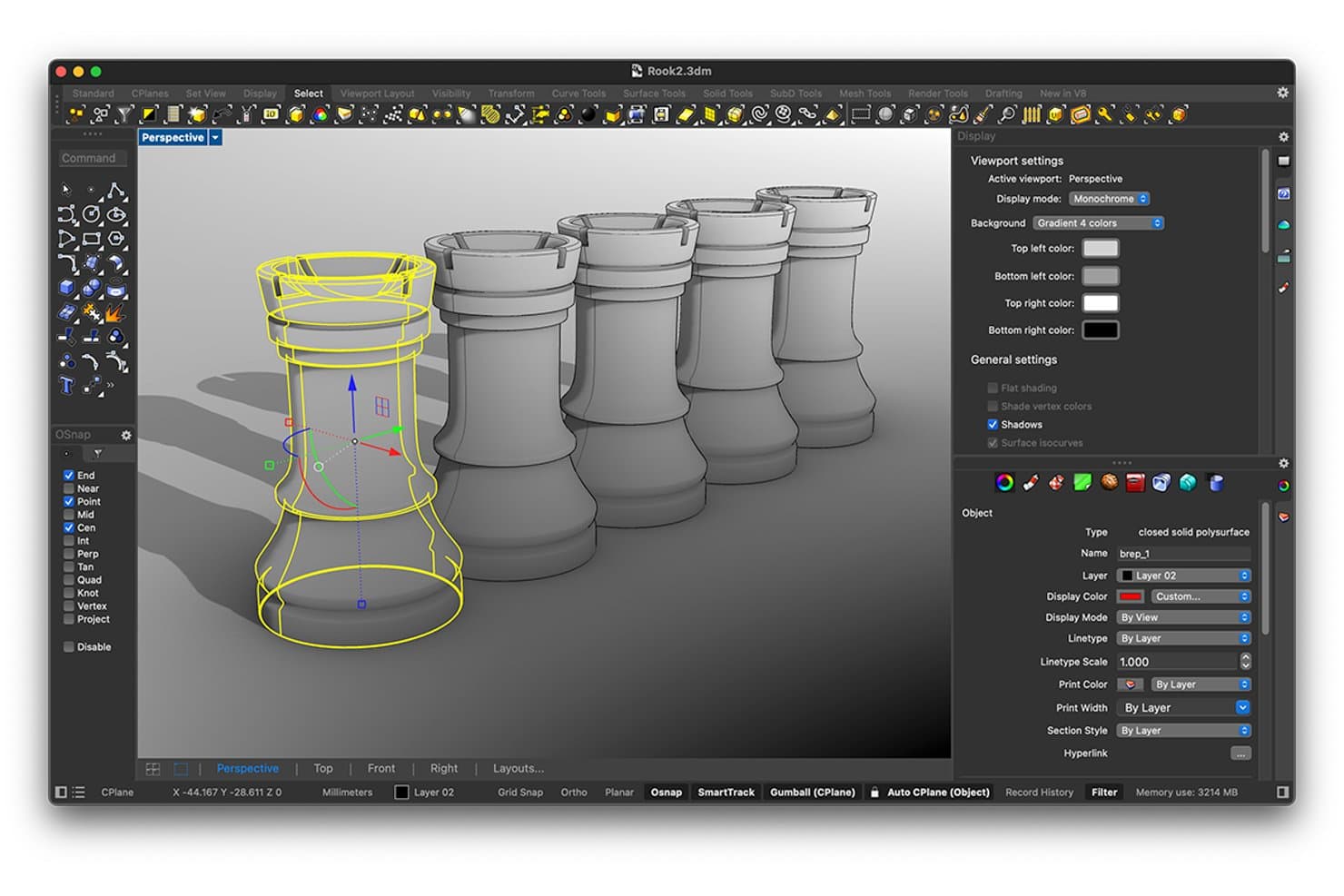
Rhinoceros lets users model and inspect 3D chess pieces with precision tools. Rhinoceros is a 3D modeling tool that supports NURBS, SubD, mesh, and solid geometry creation, alongside rendering, fabrication export, and parametric modeling through its built-in Grasshopper visual programming environment.
Who Is Rhinoceros Best For?
Rhinoceros is a strong fit for product and industrial designers who need precise control over complex organic surfaces and freeform geometry.
Why I Picked Rhinoceros
Rhinoceros earns its spot as one of the best on my shortlist because its NURBS and SubD modeling capabilities are genuinely unmatched for freeform surface work. I love how SubD Creases let you dial in fillet-like edges on organic forms without collapsing into hard geometry, and ShrinkWrap builds watertight meshes around even the messiest mixed geometry for 3D printing. Grasshopper, bundled at no extra cost, adds parametric and generative iteration that I've used to explore dozens of surface variations before committing to a single direction.
Rhinoceros Key Features
- Naked edge detection: Identifies open edges in your model that would break a watertight mesh before sending it to a 3D printer or CNC workflow.
- ShrinkWrap: Builds a watertight mesh around mixed geometry, including open meshes, NURBS, and SubD, specifically for fabrication-ready output.
- Rhino.Compute API: Exposes Rhino and Grasshopper as a stateless REST API, letting you run geometry processing on cloud or on-premise servers.
- Curvature and zebra stripe analysis: Visualizes surface continuity and smoothness across your model to catch blending issues before manufacturing.
Rhinoceros Integrations
Rhinoceros integrates with Autodesk Revit through Rhino.Inside.Revit, Autodesk BIM 360, and AutoCAD on Windows. It supports 40+ file formats and provides the Rhino.Compute REST API for custom geometry workflows.
Pros and Cons
Pros:
- ShrinkWrap creates watertight print meshes
- Grasshopper enables parametric concept variations
- NURBS handles organic product surfaces
Cons:
- Stakeholder review lacks cloud co-editing
- No native assembly mates or motion simulation
Learn more about Rhinoceros :  Best for design-to-manufacturing CAD continuity
- 14-day free trial
- From $2,310/user/year (billed annually).
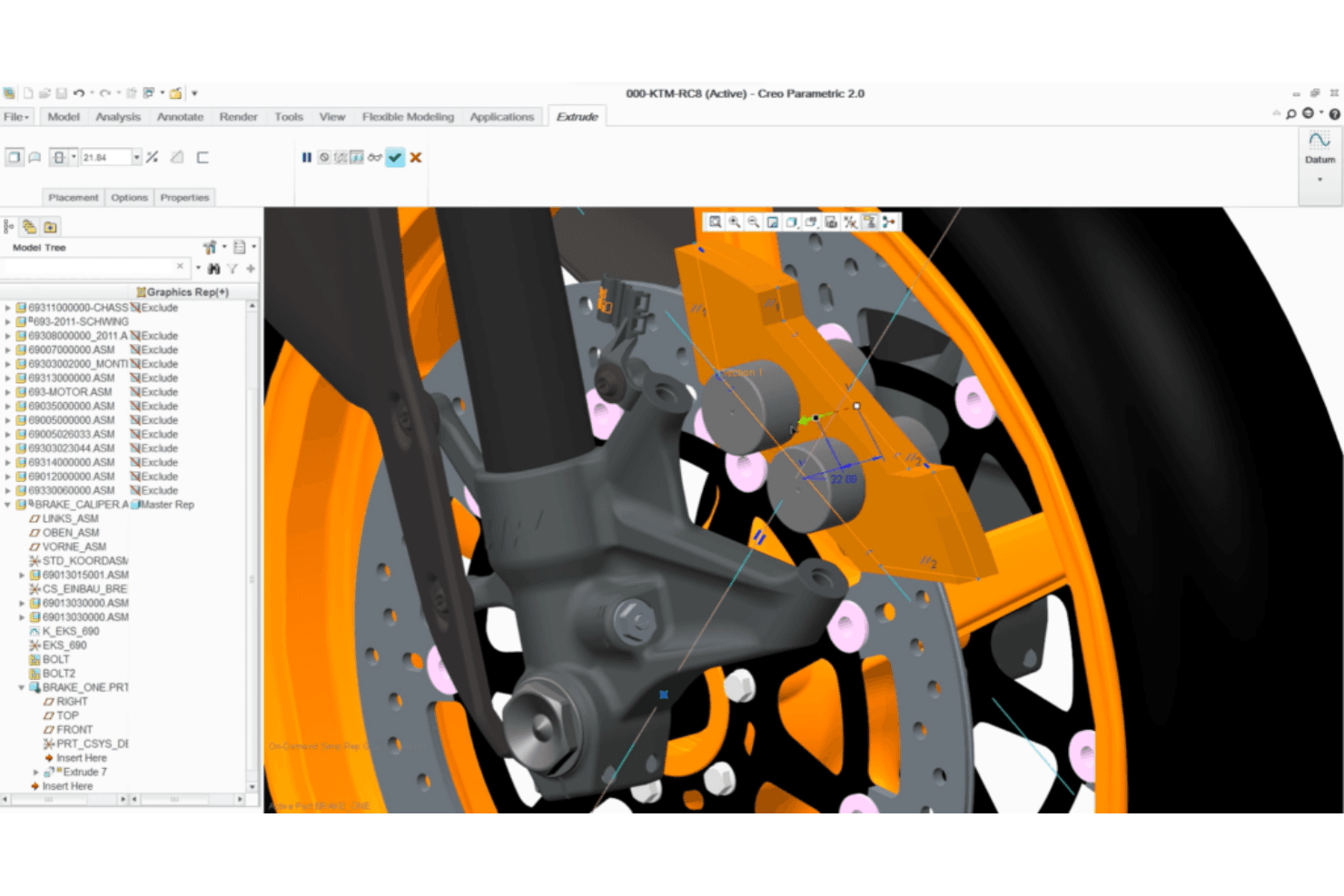
Creo Parametric enables detailed 3D brake caliper assembly modeling. Creo Parametric is a parametric 3D CAD platform that combines part and assembly modeling, surfacing, simulation, GD&T, and built-in CAM and additive manufacturing tools in a single associative environment.
Who Is Creo Parametric Best For?
Creo Parametric is the right fit for mechanical engineers and product designers who need a single environment to take a design from early modeling all the way through simulation, tolerancing, and manufacturing output.
Why I Picked Creo Parametric
Creo Parametric earns its spot on my shortlist because it's one of the few tools that carries a design all the way from early parametric modeling through simulation, GD&T tolerancing, and manufacturing output without ever leaving the environment. I particularly like that built-in CAM and the Additive Manufacturing Extension mean you can generate CNC toolpaths or export a lattice-optimized part to a 3MF file from the same model you prototyped in. The GD&T Advisor enforcing ASME and ISO standards inside the modeling environment is a feature I rarely see matched at this level.
Creo Parametric Key Features
- Creo Simulation Live: Delivers near-instant structural, thermal, and modal feedback using Ansys technology as you model, without leaving the design environment.
- Generative design (GTO and GDX): Automatically generates and compares optimized design options across materials and manufacturing processes, including machining, casting, and forging.
- Advanced assembly management: Supports top-down design, mechanism dynamics simulation under real loads, and interference and clearance checking for complex multi-part products.
- AR viewing: Lets you share and review designs at true scale through augmented reality, included in the base package.
Creo Parametric Integrations
Creo Parametric has native integrations with PTC Windchill PLM, PTC Mathcad Prime, Ansys, and Creo Unite connections for SOLIDWORKS, CATIA, Siemens NX, and Inventor.
Pros and Cons
Pros:
- Assembly checks expose fit issues early
- Parametric updates speed design iteration
- Production-grade tolerancing supports accurate prototypes
Cons:
- Paid extensions raise prototyping complexity
- Engineering-first workflows slow casual reviewers
Learn more about Creo Parametric: Best for aerospace and automotive-grade 3D design
- Free demo available
- From $7,229/user/year (billed annually)
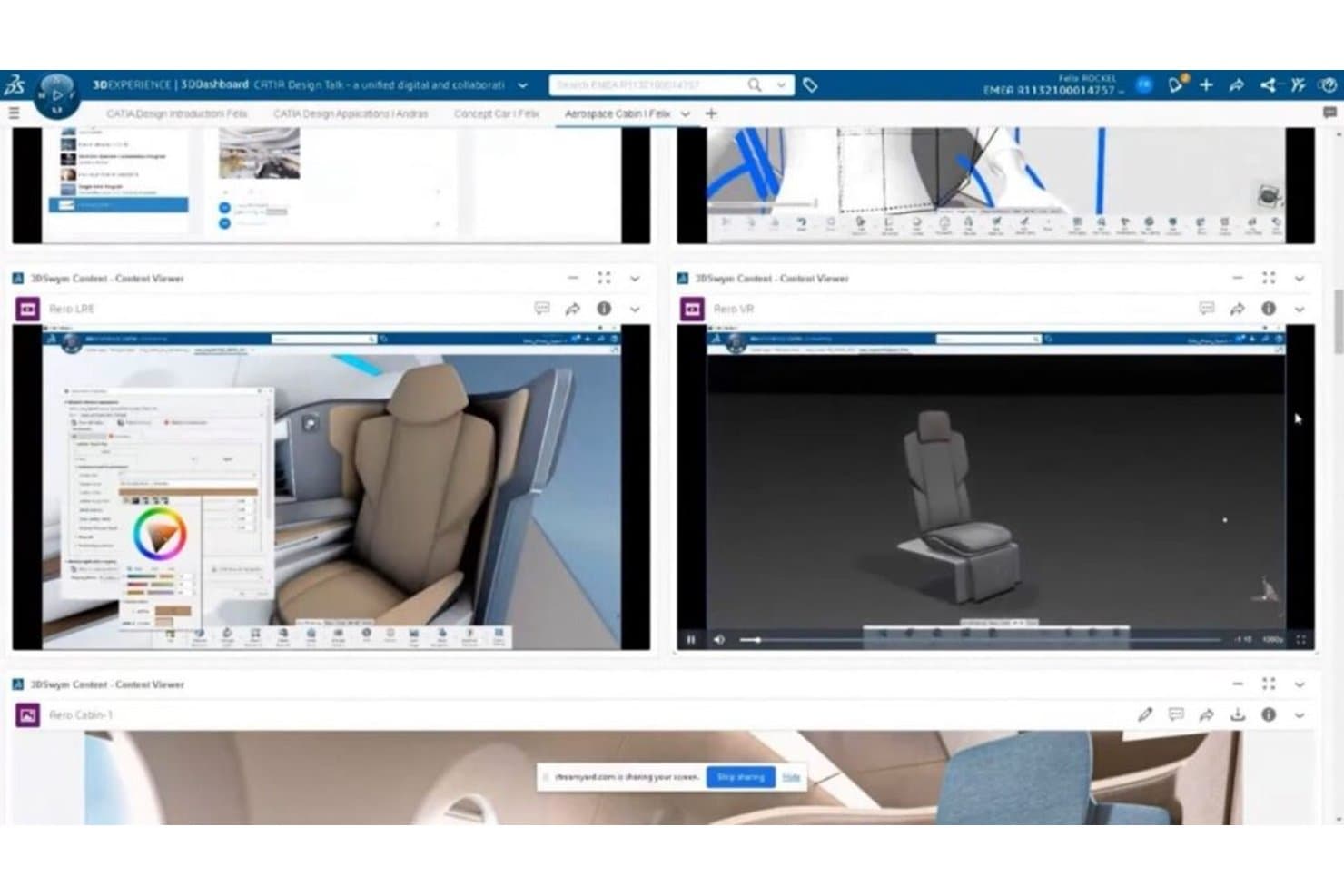
CATIA lets users design and review 3D cabin prototypes across multiple views. CATIA is a professional 3D CAD and prototyping platform from Dassault Systèmes that covers parametric solid modeling, Class-A surface design, assembly engineering, generative design, and simulation across both desktop and cloud environments.
Who Is CATIA Best For?
CATIA is the go-to choice for mechanical engineers and product designers in aerospace and automotive who need production-grade precision across the full design-to-manufacturing chain.
Why I Picked CATIA
CATIA earns its spot on my shortlist because no other tool I've tested comes close for aerospace and automotive-grade 3D design, particularly when Class-A surface quality is non-negotiable. I love how the parametric modeling core combines with CATIA's Class-A surfacing tools, letting engineers validate aerodynamic geometry with the kind of precision a whole-aircraft design demands. The AI-driven generative design roles, including Function Driven and Structural Generative, then let my team explore optimized concept parts directly from functional specs.
CATIA Key Features
- Assembly design: Create and manage complex multi-part assemblies with integrated bill-of-materials tracking and real-time clash detection.
- 3D tolerancing and annotation: Store model-based tolerances and annotations directly on the 3D model for production-ready documentation.
- AR/VR viewing roles: Review designs in virtual and mixed reality environments, including multi-user immersive collaboration sessions.
- Real-time cloud collaboration: Work concurrently with teammates on shared 3D models without file check-in or check-out workflows.
CATIA Integrations
CATIA offers native integrations with SIMULIA, DELMIA, ENOVIA, 3DEXCITE, CATIA Magic/Cameo, Dymola, Tuleap, and DraftSight. Its CAA C++ API, Knowledgeware automation, and partner ecosystem support custom integrations.
Pros and Cons
Pros:
- Large assemblies validate fit and motion
- Parametric histories accelerate design iterations
- Class-A surfaces support aerospace-grade prototypes
Cons:
- Complex interfaces slow first-time contributors
- Standard fabrication exports require additional roles
Learn more about CATIA:- 8Best for engineering-grade parametric CAD at scale
Creo
- 14-day free trial
- From $3,350/user/year (billed annually)
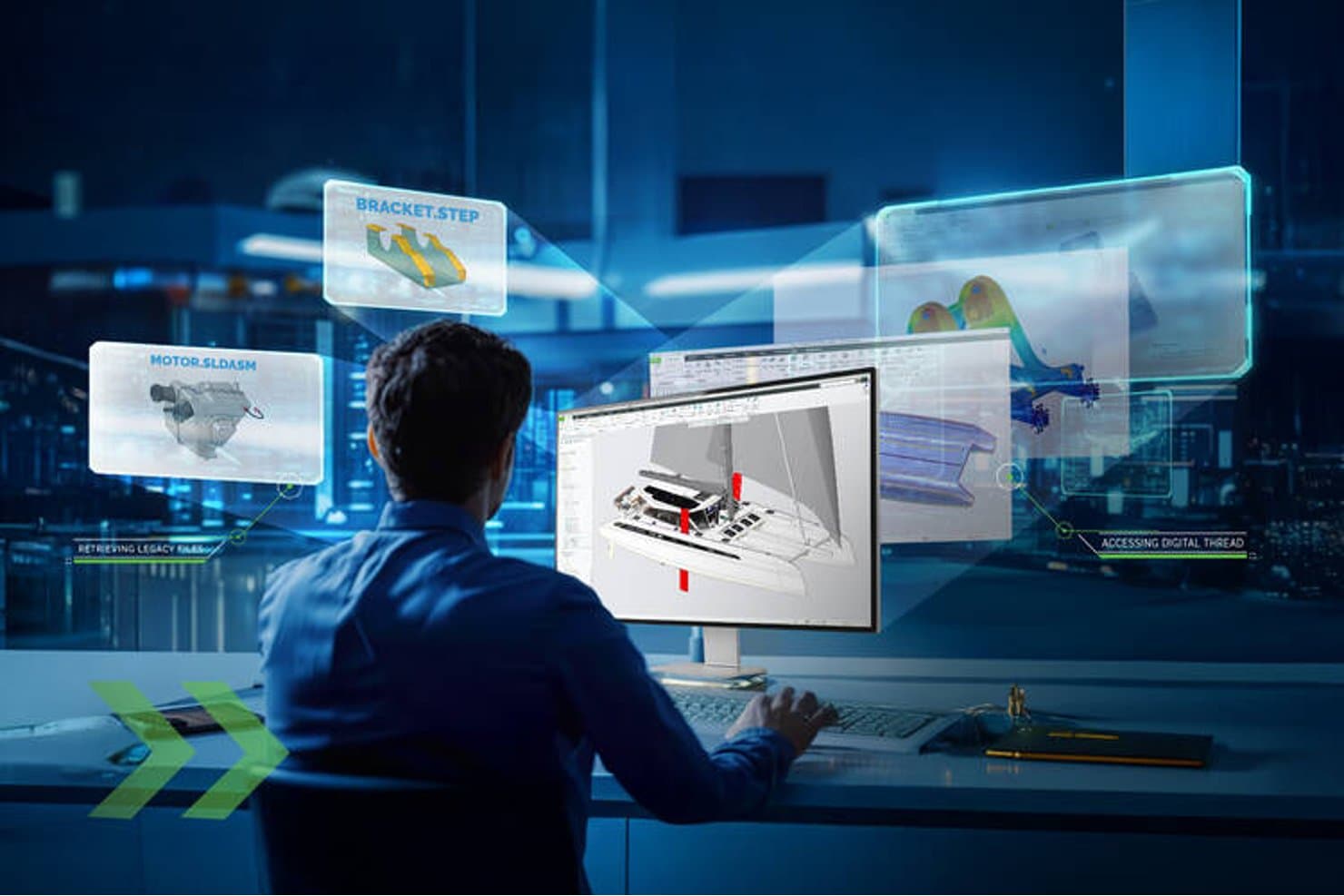
Creo lets users access legacy files and digital threads in 3D design. Creo is a parametric 3D CAD platform from PTC that covers part and assembly modeling, surfacing, sheet metal, simulation, generative design, and CAM in a single connected environment.
Who Is Creo Best For?
Creo is a strong fit for mechanical engineers and product designers who need production-grade parametric modeling, simulation, and CAM in a single environment.
Why I Picked Creo
Creo earns its spot on my shortlist because no other tool handles engineering-grade parametric CAD at scale quite like it does. I'm particularly impressed by how parametric history carries design changes through to simulation and CAM automatically, so when a tolerance shifts late in development, the whole model updates without manual rework. The Large Assembly Suite and 70% faster assembly retrieval in Creo 13 mean I can work confidently on complex multi-part products without the performance drag that kills momentum in other tools.
Creo Key Features
- Creo Simulation Live: Runs real-time structural, thermal, and modal analysis—powered by Ansys—directly inside your modeling environment.
- Model-Based Definition (MBD): Embeds GD&T, tolerances, and manufacturing information directly into the 3D model, replacing traditional 2D drawings.
- Additive Manufacturing Extension: Generates lattice structures, arranges the printer tray, and exports print-ready 3MF and STL files from within Creo.
- Creo Unite: Opens SOLIDWORKS, CATIA, Siemens NX, and Inventor files natively, without converting them first.
Creo Integrations
Creo has native integrations with Windchill, Ansys, Vuforia View, Vuforia Studio, and PTC Control Center, plus Creo Unite support for SOLIDWORKS, CATIA, Siemens NX, and Inventor files. Creo Toolkit provides an API for custom integrations.
Pros and Cons
Pros:
- Built-in GD&T supports production-ready precision
- Large assemblies remain workable at scale
- Parametric edits propagate through downstream manufacturing
Cons:
- Large models can trigger disruptive crashes
- Windows desktop deployment limits accessibility
Learn more about Creo:  Best for integrated CAD, simulation, and CAM
- Free demo + free trial available
- From $2,820/user/year (billed annually)
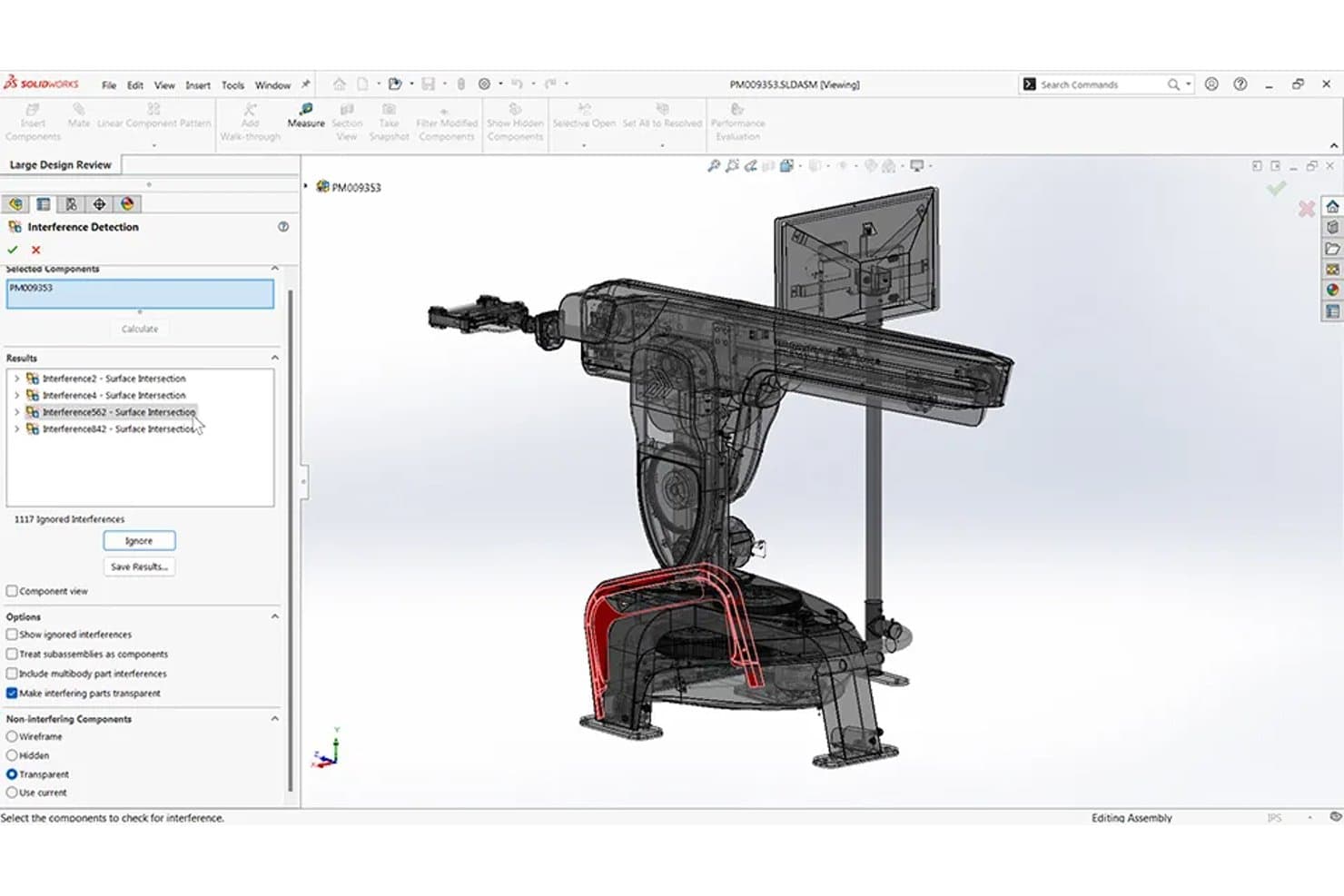
SolidWorks detects assembly interferences in 3D prototyping designs. SOLIDWORKS is a parametric 3D CAD platform that covers part and assembly modeling, simulation, CAM, and photorealistic rendering in a single environment.
Who Is SOLIDWORKS Best For?
SOLIDWORKS is a strong fit for mechanical engineers and product designers who need CAD, simulation, and CAM in one environment.
Why I Picked SolidWorks
SOLIDWORKS earns its spot on my shortlist because it's one of the few tools that keeps CAD, simulation, and CAM genuinely connected in a single environment. I love that Simulation ties directly to the parametric model, so running a stress or thermal analysis on a revised part doesn't require re-importing anything. The Topology Study is particularly useful for prototyping, since it generates lighter, load-optimized shapes automatically. Add SOLIDWORKS CAM with Tolerance-Based Machining, and you can move from a digital prototype straight to CNC-ready toolpaths without switching platforms.
SOLIDWORKS Key Features
- Configurations and design tables: Store multiple versions of a part or assembly in a single file, with an embedded spreadsheet driving each variant's dimensions and options.
- Cloud Services sharing: Share models via link so stakeholders can review and mark up designs in 3D directly in a browser, with no software install required.
- Interference detection: Automatically identifies clashes between components in assemblies and between bodies in multibody parts before physical prototyping.
- Large assembly support: Handles complex multi-part assemblies with Large Design Review mode, SmartMates, and motion analysis tools built in.
SOLIDWORKS Integrations
Integrations include the 3DEXPERIENCE platform, SOLIDWORKS PDM, DELMIAWorks, SOLIDWORKS Electrical, CircuitWorks, and ECAD tools through IDF, IDX, and PADS formats. The Solution Partner Program and SOLIDWORKS API support marketplace-based and custom integrations.
Pros and Cons
Pros:
- Native CAM prepares CNC-ready toolpaths
- Topology studies optimize prototypes for weight
- Parametric changes propagate across assemblies
Cons:
- 3DEXPERIENCE workflows can frustrate users
- Large assemblies demand high-end hardware
Learn more about SolidWorks: Best for large-scale mechanical assembly design
- 30-day free trial
- From $320/month
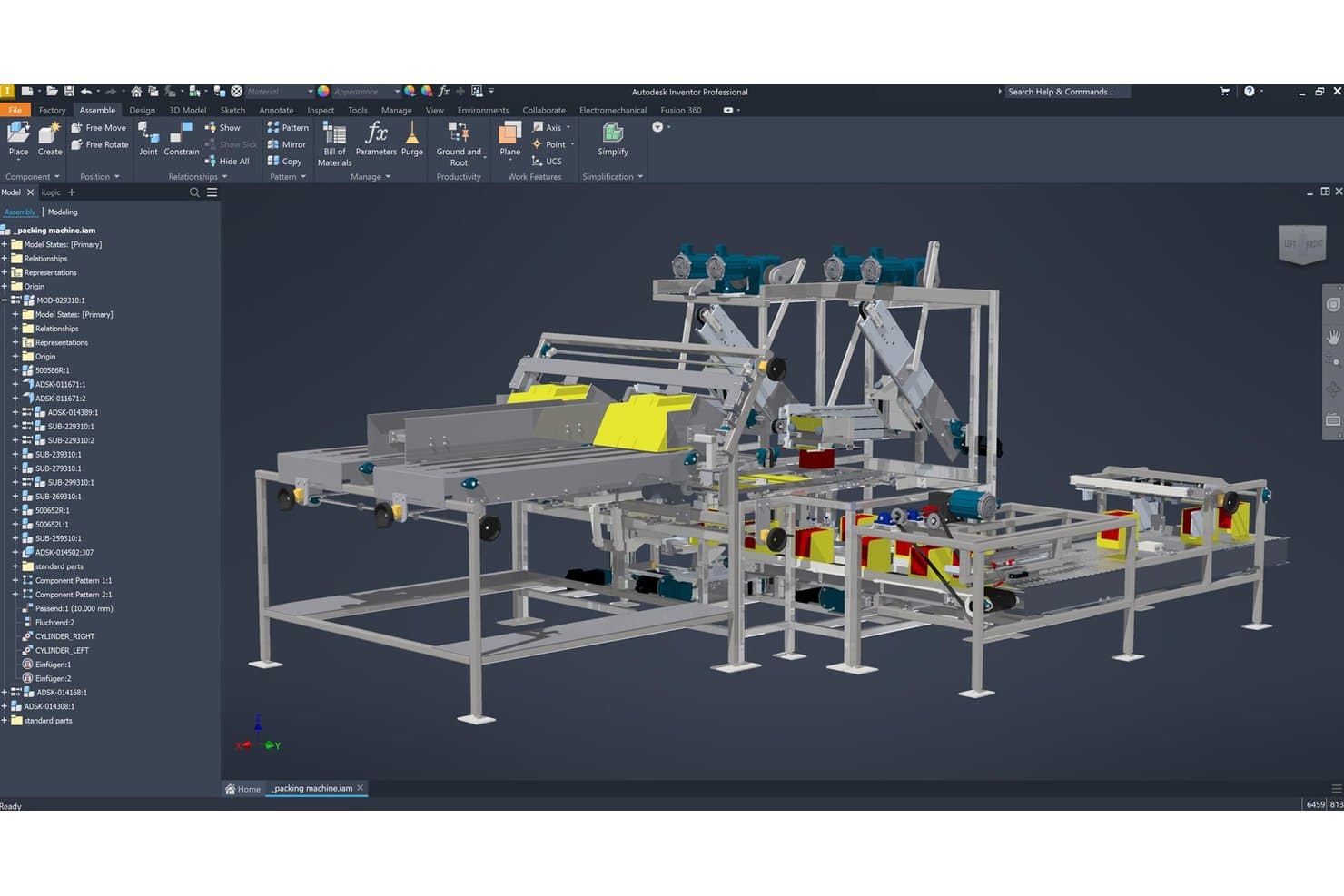
Autodesk Inventor lets users assemble complex 3D machine prototypes visually. Autodesk Inventor is a Windows-based mechanical CAD tool that combines parametric, direct, freeform, and rules-based modeling with large-scale assembly management, simulation, and manufacturing documentation.
Who Is Autodesk Inventor Best For?
Inventor is a strong fit for mechanical engineers and product designers working on complex, multi-component hardware products that require production-grade accuracy and large-scale assembly management.
Why I Picked Autodesk Inventor
Autodesk Inventor earns its spot on my list because no other tool I've tested handles large-scale mechanical assemblies with the same depth. I've worked with assemblies of thousands of parts where Inventor's relational constraints, interference checking, and Dynamic Simulation caught fit-and-function issues before a single prototype was built. I also rely on its Model-Based Definition toolset to embed production-grade tolerances directly on the 3D model, which keeps manufacturing documentation tightly connected to the design.
Autodesk Inventor Key Features
- iLogic rules-based automation: Build logic-driven design rules using a visual drag-and-drop interface to automate configuration and parameter changes across parts and assemblies.
- Dynamic Simulation: Evaluate motion, speed, and acceleration of assembly components to validate mechanical behavior before physical prototyping.
- Model-Based Definition (MBD): Embed 3D dimensions, annotations, and tolerances directly on the model to keep manufacturing documentation tied to the geometry.
- Shape Generator: Run topology optimization on parts to identify material that can be removed while maintaining structural performance under defined load conditions.
Autodesk Inventor Integrations
Autodesk Inventor has native integrations with Autodesk Fusion, AutoCAD, Revit, Vault, Inventor Nastran, and Inventor CAM, plus ECAD/MCAD workflows and STEP, JT, Parasolid, OBJ, and Solid Edge translators. Its API and iLogic support custom integrations.
Pros and Cons
Pros:
- Automates configurable designs through iLogic
- Embeds production tolerances in 3D models
- Handles assemblies with thousands of components
Cons:
- Offers no real-time collaborative co-editing
- Requires Windows and substantial workstation hardware
Learn more about Autodesk Inventor:
Outro software de prototipagem 3D
Eis algumas opções adicionais de software de prototipagem 3D que não integraram a minha seleção, mas que vale a pena conhecer:
How I Evaluate 3D Prototyping Software
I split my evaluation into three parts, giving the most weight to core tasks: creating accurate 3D models and iterating design versions.
Next, I consider standout features such as real-time model collaboration.
Finally, I weigh factors beyond features, including onboarding, support, and licensing value.
Core Functionality (Table Stakes For This List)
When I'm selecting tools for my list, I score each one on a scale from 0 (does not offer the functionality) to 5 (excels in this area) for each core functionality listed below. I then convert the total into a percentage to help assess each tool's overall fit, with extra weight on any functionalities I’ve deemed essential.
- 3D Model Creation (Essential): I assess whether tools support accurate solids or freeform shapes for a housing, bracket, or other product concept.
- Design Iteration (Essential): Look for editable history, parameters, or versions that let teams compare dimensions and revise a prototype without rebuilding it.
- Fabrication Export: Check for controlled STL or STEP export and whether geometry can move into 3D printing or CNC workflows.
- Dimensional Controls: I look for numeric dimensions, constraints, and tolerances that keep mating features aligned through revisions.
- Visual Preview: Assess shaded views, materials, or rendering that make form and finish clear during stakeholder reviews.
- Assembly Modeling: I consider how parts relate in assemblies, including fit, motion, and interference checks for multi-component prototypes.
Once I have a list of tools that meet the criteria, I consider what sets each platform apart.
Differentiating Factors (What Sets Vendors Apart)
Here's how I compare and contrast different vendors:
Standout Features
Cloud-based real-time collaboration is the first thing I check. When a mechanical engineer in one office and an industrial designer in another can co-edit the same assembly simultaneously, you avoid the version-conflict headaches that derail tight prototyping sprints. I also evaluate each tool's plugin and API ecosystem, since connecting your CAD environment to PLM, CAM, or supply chain platforms keeps prototype data flowing without manual file conversions. Generative design automation matters too—I look for tools that let you define constraints like target weight or material, then produce optimized geometry options your team can compare side by side during design reviews.
Beyond Features
I evaluate how each tool's licensing model scales when you need reviewers beyond the core design team—seat-based pricing adds up fast if product managers and engineers all need access. Integration compatibility with your existing PLM or CAM stack also matters, since manual STEP file conversions introduce dimensional errors during handoff. For teams working on proprietary hardware, I check whether the vendor offers cloud, on-premise, or hybrid deployment to address IP security requirements without sacrificing collaboration.
Como escolher software de prototipagem 3D
É fácil perder-se em listas extensas de funcionalidades e estruturas de preços complexas. Para o ajudar a manter o foco enquanto percorre o seu processo específico de seleção de software, eis uma lista de fatores a ter em conta:
| Fator | O que deve considerar |
|---|---|
| FatorEscalabilidade | O que deve considerarO software consegue acompanhar o crescimento da sua equipa? Verifique se suporta o número de utilizadores que prevê no futuro sem custos adicionais significativos ou problemas de desempenho. |
| FatorIntegrações | O que deve considerarÉ compatível com as ferramentas que já utiliza? Certifique-se de que o software pode integrar-se com CAD, PLM ou outros sistemas que utiliza, para evitar interrupções no fluxo de trabalho. |
| FatorPossibilidade de personalização | O que deve considerarPode adaptá-lo às suas necessidades? Procure modelos e interfaces personalizáveis que se adaptem aos fluxos de trabalho e às preferências específicas da sua equipa. |
| FatorFacilidade de utilização | O que deve considerarA interface é intuitiva para todos os membros da equipa? Dê prioridade a software com um design fácil de utilizar, que reduza a curva de aprendizagem e aumente a produtividade. |
| FatorImplementação e integração inicial | O que deve considerarQuanto tempo demorará até estar operacional? Avalie a disponibilidade de recursos de formação e o tempo necessário para integrar eficazmente a sua equipa. |
| FatorCusto | O que deve considerarDe que forma os preços se alinham com o seu orçamento? Compare o custo total de propriedade, incluindo eventuais taxas ocultas, e considere o valor que o software acrescenta às suas operações. |
| FatorMedidas de segurança | O que deve considerarOs seus designs estão protegidos? Certifique-se de que o software disponibiliza funcionalidades de segurança robustas, como encriptação e conformidade com os regulamentos de proteção de dados. |
O que é software de prototipagem 3D?
O software de prototipagem 3D é uma ferramenta utilizada para criar modelos digitais tridimensionais de produtos. Os designers, engenheiros e gestores de produto utilizam normalmente estas ferramentas para visualizar conceitos e aperfeiçoar designs antes da produção. As funcionalidades de modelação, simulação e colaboração ajudam a melhorar a precisão do design, reduzir erros e acelerar o desenvolvimento. No geral, estas ferramentas aumentam a eficiência e a eficácia do processo de design.
Funcionalidades
Ao selecionar um software de prototipagem 3D, procure as seguintes funcionalidades principais:
- Capacidades de modelação: Permitem aos utilizadores criar modelos 3D detalhados, proporcionando uma visualização clara do design.
- Ferramentas de simulação: Permitem testar modelos em diferentes condições, ajudando a identificar potenciais problemas numa fase inicial.
- Funcionalidades de colaboração: Facilitam o trabalho em equipa ao permitir que vários utilizadores trabalhem simultaneamente num design.
- Opções de integração: Ligam-se a ferramentas existentes, como sistemas CAD, para garantir um fluxo de trabalho contínuo.
- Modelos personalizáveis: Disponibilizam modelos pré-concebidos que podem ser adaptados às necessidades específicas de cada projeto, poupando tempo.
- Armazenamento na nuvem: Proporciona acesso remoto e seguro aos designs, garantindo que os membros da equipa podem aceder aos ficheiros a partir de qualquer lugar.
- Interface intuitiva: Garante que os utilizadores conseguem navegar facilmente pelo software, reduzindo a curva de aprendizagem.
- Medidas de segurança: Protegem dados de design sensíveis através de encriptação e do cumprimento dos regulamentos de proteção de dados.
- Tutoriais interativos sobre o produto: Ajudam os novos utilizadores a aprender rapidamente a utilizar o software através de tutoriais orientados.
- Capacidades de exportação: Permitem guardar modelos em vários formatos, facilitando a partilha com as partes interessadas.
Benefícios
A implementação de um software de prototipagem 3D proporciona vários benefícios à sua equipa e à sua empresa. Eis alguns dos benefícios que pode esperar:
- Maior precisão do design: As capacidades de modelação ajudam a criar designs precisos, reduzindo os erros no produto final.
- Ciclos de desenvolvimento mais rápidos: As ferramentas de simulação permitem testar e iterar rapidamente, acelerando o processo de design.
- Colaboração melhorada: As funcionalidades de colaboração permitem que os membros da equipa trabalhem em conjunto em tempo real, melhorando a comunicação.
- Poupança de custos: A identificação precoce de problemas de design através de simulações pode evitar erros dispendiosos na produção.
- Maior acessibilidade: O armazenamento na nuvem garante que os membros da equipa podem aceder e partilhar designs a partir de qualquer lugar, facilitando o trabalho remoto.
- Curva de aprendizagem simplificada: Uma interface intuitiva ajuda os novos utilizadores a familiarizarem-se rapidamente com o software, minimizando o tempo de inatividade.
- Segurança dos dados: As medidas de segurança protegem dados de design sensíveis, mantendo a confidencialidade e o cumprimento dos requisitos aplicáveis.
Custos & preços
A seleção de um software de prototipagem 3D requer uma compreensão dos vários modelos e planos de preços disponíveis. Os custos variam consoante as funcionalidades, o tamanho da equipa, os complementos e outros fatores. A tabela abaixo resume os planos mais comuns, os seus preços médios e as funcionalidades normalmente incluídas nas soluções de software de prototipagem 3D:
Tabela de comparação de planos de software de prototipagem 3D
| Tipo de plano | Preço médio | Funcionalidades comuns |
|---|---|---|
| Tipo de planoPlano gratuito | Preço médio$0 | Funcionalidades comunsCapacidades básicas de modelação, armazenamento limitado e apoio da comunidade. |
| Tipo de planoPlano pessoal | Preço médio$10-$30/utilizador/mês | Funcionalidades comunsFerramentas avançadas de modelação, armazenamento na nuvem e funcionalidades de colaboração limitadas. |
| Tipo de planoPlano empresarial | Preço médio$50-$100/utilizador/mês | Funcionalidades comunsFerramentas completas de modelação e simulação, colaboração em equipa e integrações. |
| Tipo de planoPlano empresarial de grande escala | Preço médio$150+/utilizador/mês | Funcionalidades comunsFuncionalidades personalizáveis, apoio dedicado, segurança avançada e análise de dados. |
Perguntas frequentes sobre software de prototipagem 3D
Eis algumas respostas a perguntas comuns sobre software de prototipagem 3D:
O software de prototipagem 3D pode ser utilizado num Mac?
Sim, muitas soluções de software de prototipagem 3D são compatíveis com Mac. Consulte sempre os requisitos do sistema antes de efetuar a compra, para garantir a compatibilidade com o seu Mac. Alguns softwares podem exigir configurações de hardware específicas, por isso, verifique se o seu Mac cumpre estes requisitos para evitar problemas de desempenho.
É necessário receber formação para utilizar software de prototipagem 3D?
Sim, é frequentemente necessária alguma formação para utilizar eficazmente software de prototipagem 3D. Muitos fornecedores disponibilizam tutoriais, webinars e documentação para ajudar a começar. Se é novo na modelação 3D, considere investir tempo na aprendizagem dos conceitos básicos para tirar o máximo partido do software e melhorar a sua produtividade.
Que setores beneficiam da utilização de software de prototipagem 3D?
Sim, setores como a arquitetura, o setor automóvel, a indústria aeroespacial e a eletrónica de consumo beneficiam muito do software de prototipagem 3D. Este ajuda estes setores a visualizar designs complexos, testar a funcionalidade dos produtos e efetuar os ajustes necessários antes da produção. Isto reduz os custos e melhora a qualidade do produto final. Se trabalha numa destas áreas, incorporar a prototipagem 3D pode melhorar o seu processo de design.