

Med så mange ulike verktøy for idémyldring tilgjengelig er det vanskelig å finne ut hvilket som passer for deg. Du vet at du ønsker et verktøy som kan hjelpe deg med å generere ideer og skape mer struktur i den kreative prosessen, men du må finne ut hvilket verktøy som er best. I dette innlegget hjelper jeg deg med å gjøre valget enkelt ved å dele mine anbefalinger om de beste verktøyene for idémyldring, slik at du kan fremme innovasjon og få fart på kreativiteten.
Why Trust Our Software Recommendations
6,700+
Reviews
20
Industry experts
16+
Evaluation factors
14
Years
Our team has been testing and reviewing software since 2012. As product managers ourselves, we know how difficult—and important—it is to choose the right software.
For this guide, we evaluated tools using hands-on testing and independent research, scoring tools using our selection criteria.
Our reviews reflect our human editorial judgment, not a sales pitch.
Expert reviewers:
- Andrew LumbySenior TPM
- Cristiano ValimSenior UI/UX Lead


Sammenligningstabell: Verktøy for idémyldring
Denne sammenligningstabellen oppsummerer grunnleggende informasjon om hvert av de beste verktøyene for idémyldring som jeg har valgt ut.
| Tool | Best For | Trial Info | Price | ||
|---|---|---|---|---|---|
| 1 | Best for importing data from spreadsheets | Free plan + 14-day free trial available | From $8/user/month (billed annually) | Website | |
| 2 | Best brainstorming tool for project planning with tasks | Free plan + 14-day free trial available | From $10/user/month (billed annually) | Website | |
| 3 | Best for structured team brainstorming with agile sync | Free version available | From $8/active user/month | Website | |
| 4 | Best for diagramming-led brainstorming workflows | Free plan available | From $5/month (billed annually) | Website | |
| 5 | Best for M365-embedded team ideation | Free plan + 30-day free trial available | From $9.99/month | Website | |
| 6 | Best for design-led teams using Figma | Free plan available | From $16/user/month | Website | |
| 7 | Best for structured workshop facilitation | Free plan available | From $24.90/month (billed annually) | Website | |
| 8 | Best for brainstorming with sticky notes | Free plan available | From $9/month (billed annually) | Website | |
| 9 | Best for AI-guided ideation with dev tool sync | 30-day free trial | From $8.33/user/month (billed annually) | Website | |
| 10 | Best for structured facilitation with AI clustering | Free plan available | From $9.99/user/month (billed annually) | Website |


Oversikt over de beste verktøyene for idémyldring
Her er en kort beskrivelse av hvert verktøy for idémyldring, med informasjon om leverandørens beste bruksområde, bemerkelsesverdige funksjoner samt fordeler og ulemper. Jeg har også inkludert skjermbilder for å gi deg et innblikk i brukergrensesnittet deres.
 1Best for importing data from spreadsheets
Miro
- Free plan + 14-day free trial available
- From $8/user/month (billed annually)
Visit WebsiteCustomer Rating:4.8/5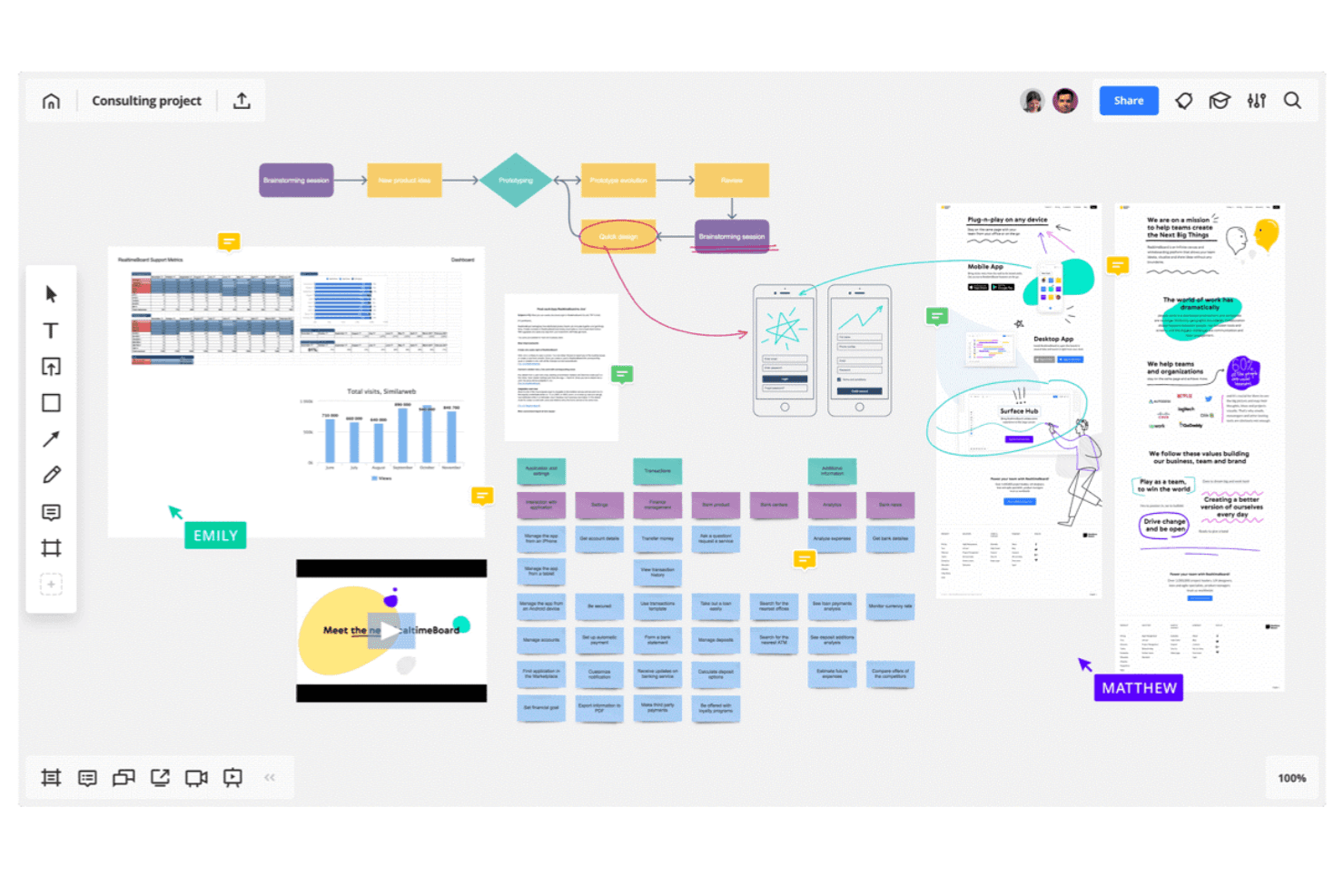
Miro allows you to map out complex workflows and systems. Miro is an infinite-canvas brainstorming and visual collaboration platform that combines sticky notes, mind maps, diagrams, flowcharts, spreadsheet import, AI-assisted clustering, and facilitation tools like voting, timers, and async Talktracks.
Who Is Miro Best For?
Miro is a strong fit for cross-functional teams—product managers, designers, and facilitators—who need to move ideas from raw input to structured plans without switching tools.
Why I Picked Miro
I picked Miro as one of the best because it's the only brainstorming tool I've used that lets you pull structured data directly from a spreadsheet onto an infinite canvas. Drop in a CSV and Miro converts rows into sticky notes or table elements you can cluster, tag, and rearrange in real time. From there, AI-assisted clustering groups related ideas automatically, and two-way sync with Jira or Asana moves prioritized items straight into your backlog without manual re-entry.
Miro Key Features
- Async Talktracks: Record a video walkthrough directly on a board so teammates can review and respond on their own time.
- AI Flows: Run multi-step AI workflows that convert raw board content into documents, diagrams, or summaries.
- Voting and anonymous voting: Run live voting sessions during workshops, with anonymous mode available to reduce groupthink.
- Miroverse community templates: Access thousands of community-built templates alongside Miro's native library to jumpstart any session.
Miro Integrations
Miro offers 250+ integrations, including Google Drive, Figma, Dropbox, Slack, Confluence, Jira, Asana, Linear, ClickUp, and Azure DevOps; Business supports two-way sync with the project management tools.
Pros and Cons
Pros:
- Talktracks support asynchronous workshop participation
- AI clusters themes from unstructured sticky notes
- Imports spreadsheet data onto the brainstorming canvas
Cons:
- AI usage is limited by monthly credits
- Large boards can become slow and laggy
 Best brainstorming tool for project planning with tasks
- Free plan + 14-day free trial available
- From $10/user/month (billed annually)
Visit WebsiteCustomer Rating:4.3/5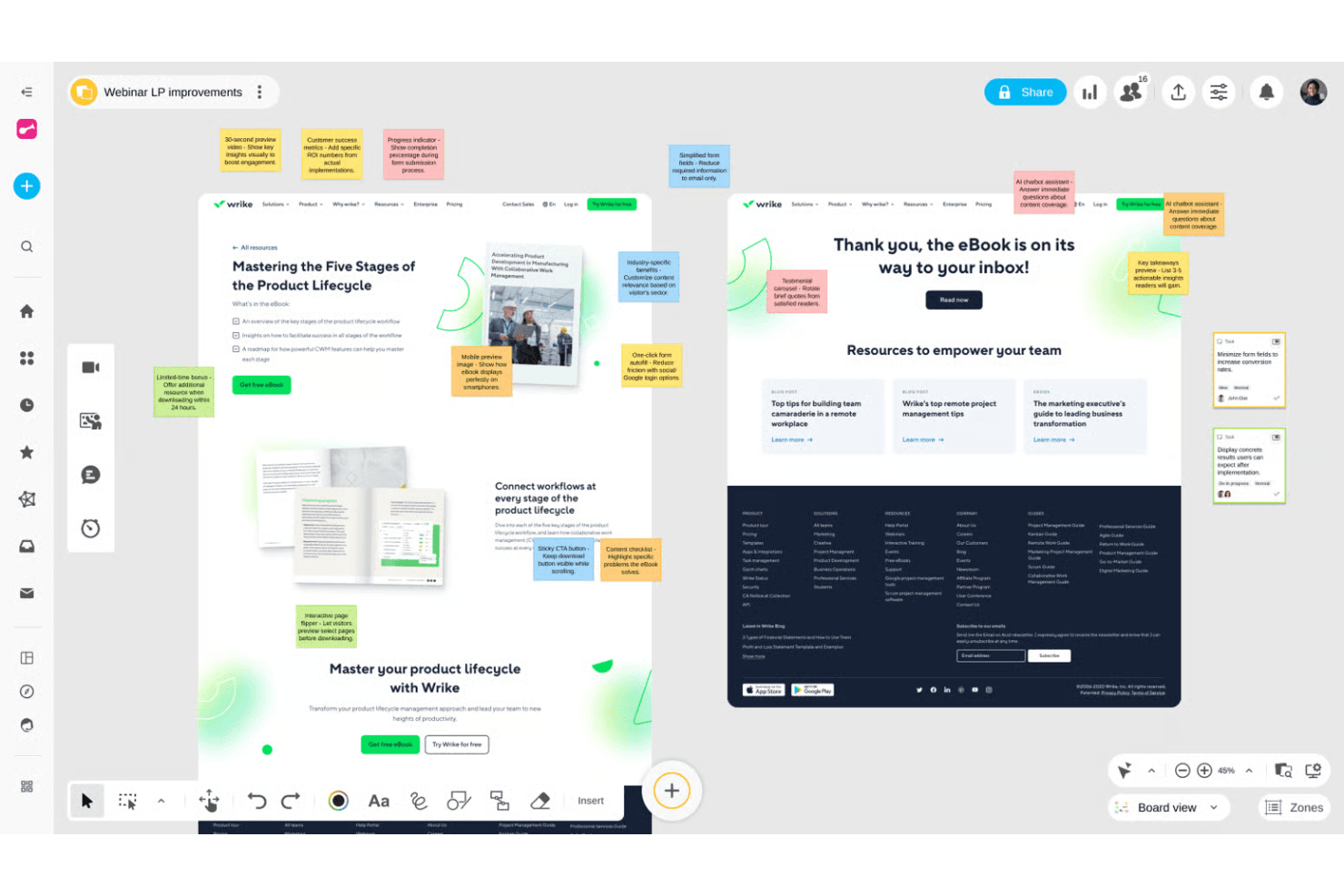
Wrike helps teams organize projects and connect ideas into workflows. Wrike is a project management platform that pairs an infinite collaborative whiteboard—with sticky notes, mind maps, and diagrams—with full project execution tools like Gantt charts, Kanban boards, and AI-powered task creation.
Who Is Wrike Best For?
Wrike is a good fit for product and project teams that want to move from whiteboard brainstorm to assigned tasks without switching tools.
Why I Picked Wrike
I picked Wrike as one of the best because it's the only tool on my list that turns a whiteboard brainstorm directly into a structured project. Wrike's AI reads your sticky notes and mind maps, then generates tasks, assigns them, and builds out Gantt charts or Kanban boards without any manual re-entry. I especially like that whiteboards attach to live projects, so the trail from idea to execution is always visible and nothing gets lost between sessions.
Wrike Key Features
- Whiteboard-to-task AI conversion: Wrike's AI reads sticky notes and mind maps on your whiteboard and generates structured tasks automatically.
- Guest collaboration via secure links: External participants can join whiteboard sessions without a Wrike account using customizable permission links.
- Polls and quizzes: Built-in voting tools let your team collect input and surface unbiased preferences during brainstorming sessions.
- Whiteboard-to-project attachment: Whiteboards link directly to live Wrike projects, keeping your ideation artifacts connected to active work.
Wrike Integrations
Wrike offers 400+ integrations, including Microsoft Teams, Zoom, Slack, Google, Dropbox, Jira, and GitHub. Whiteboards can open inside video calls, while Wrike Sync provides two-way connections with Jira and GitHub.
Pros and Cons
Pros:
- Guests join through secure links
- Whiteboards attach directly to projects
- Ideas become tasks without re-entry
Cons:
- Whiteboard operates as a separate add-on
- Limited facilitation controls for workshops
 Best for structured team brainstorming with agile sync
- Free version available
- From $8/active user/month
Visit WebsiteCustomer Rating:4.7/5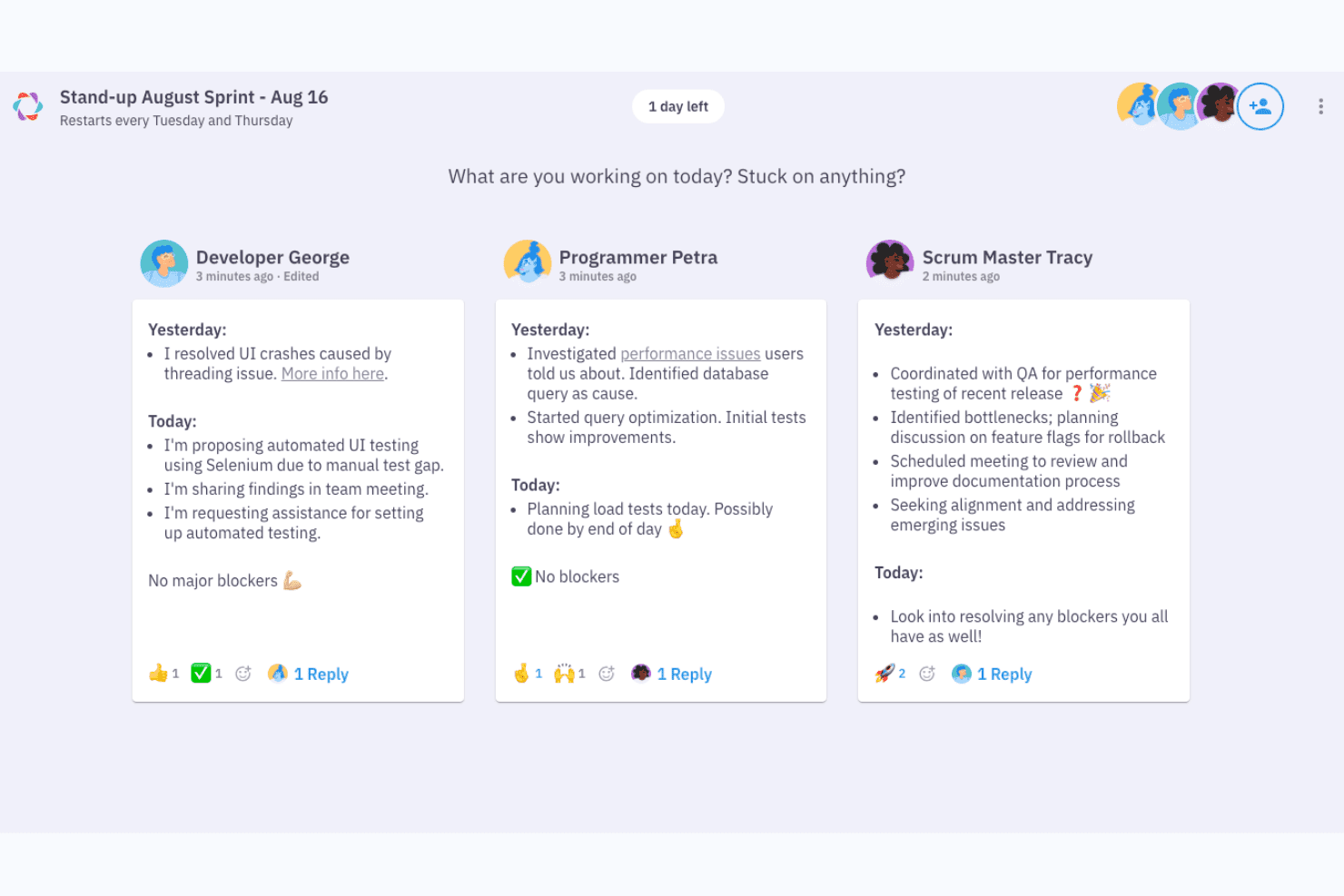
Parabol structures async standups with yesterday, today, and blockers. Parabol is an open-source agile meeting tool that structures brainstorming through a guided reflect-group-vote-discuss-tasks flow, with anonymous idea capture, drag-and-drop clustering, dot voting, and built-in retrospective and Sprint Poker templates.
Who Is Parabol Best For?
Parabol is a strong fit for agile teams and facilitators who need a structured, guided format to turn group input into decisions and action items.
Why I Picked Parabol
I picked Parabol as one of the best because it's the only tool on my list that turns brainstorming into a structured, guided ceremony rather than a free-for-all. I love how the reflect-group-vote-discuss-tasks flow keeps sessions moving, especially the anonymous reflection phase, which prevents louder voices from anchoring the room before quieter ideas surface. The AI-assisted group clustering is genuinely useful: hover over a card, see related reflections, and consolidate them in one click.
Parabol Key Features
- Anonymous reflection phase: Participants submit their ideas privately before anyone else can see them, preventing groupthink from shaping input early in the session.
- Sprint Poker estimation: Built-in Planning Poker uses Fibonacci and custom scales, with story points syncing directly back to Jira after the session.
- Async-ready meeting setup: Facilitators can open activities ahead of time with set deadlines, letting distributed teams contribute on their own schedule before a live session.
- Team Health check: A quick, anonymous pulse survey based on Google's Project Aristotle research tracks team sentiment across five categories and trends over time.
Parabol Integrations
Parabol lists seven integrations, including Jira, GitHub, GitLab, Slack, Mattermost, and Microsoft Teams. Enterprise adds support for Jira Data Center and self-managed GitLab.
Pros and Cons
Pros:
- Voting turns ideas into clear priorities
- Anonymous input reduces groupthink early
- Guided phases keep brainstorming focused
Cons:
- Agile templates limit open-ended innovation sessions
- No canvas for visual concept mapping
Learn more about Parabol: Best for diagramming-led brainstorming workflows
- Free plan available
- From $5/month (billed annually)
Visit WebsiteCustomer Rating:4.4/5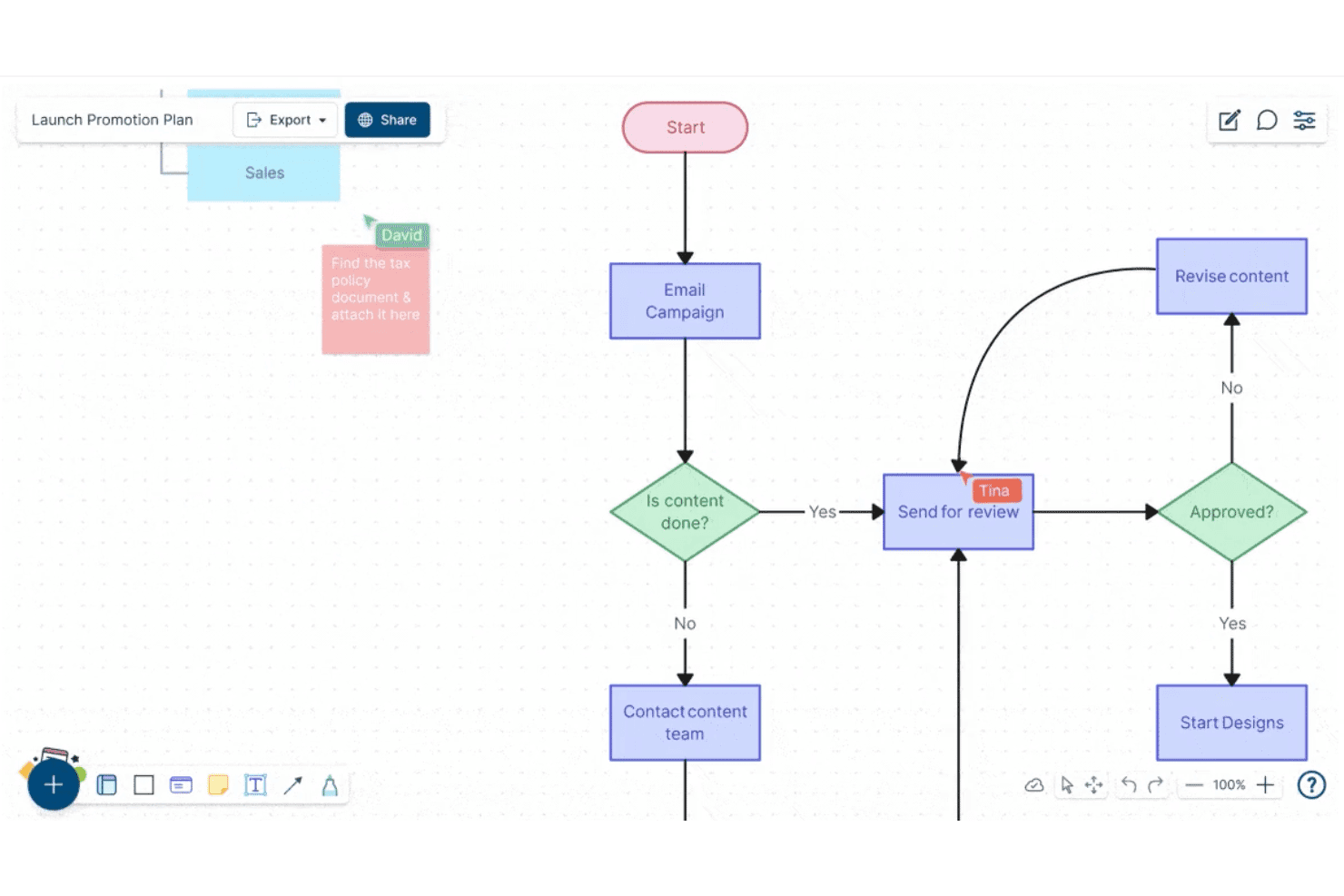
Creately lets users build and collaborate on flowcharts in real time. Creately is a visual collaboration and diagramming platform that combines an infinite canvas, sticky notes, freehand drawing, 70+ diagram types, 8,000+ templates, and real-time multi-user editing for brainstorming and structured planning workflows.
Who Is Creately Best For?
Creately is a strong fit for product managers, UX leads, and strategy teams who need to move fluidly between freeform ideation and structured diagramming without switching tools.
Why I Picked Creately
Creately earns its spot on my shortlist because it's one of the few tools that lets you move fluidly from a freeform sticky-note session directly into a structured diagram without leaving the canvas. I love that it ships with brainstorming-specific frameworks like Six Thinking Hats and Lotus diagrams alongside 8,000+ templates, so your team isn't starting from scratch. Timed, anonymous voting rounds out the ideation loop by letting groups converge on ideas without the usual groupthink pressure.
Creately Key Features
- Real-time multi-user editing: Multiple collaborators can edit the same canvas simultaneously, with visible cursors and spotlight or follow modes to keep everyone aligned.
- Timed, anonymous voting: Run voting sessions with a set time limit, with results appearing publicly or anonymously to help teams converge on ideas.
- Jira and Azure DevOps sync: Connect canvas items directly to Jira and Azure DevOps so ideas move into tracked work without leaving the tool.
- Presentation mode: Build slide decks directly from your canvas that update automatically as the board changes.
Creately Integrations
Creately offers integrations with Jira, GitHub, Azure DevOps, Google Sheets, Excel, Microsoft Teams, Slack, Google Drive, Confluence, and Zoom. It also provides an API for custom integrations and automation.
Pros and Cons
Pros:
- Timed anonymous voting supports fairer convergence
- Thousands of templates support varied workshops
- Diagramming turns ideas into structured workflows
Cons:
- Facilitation lacks private ideation controls
- Large boards can become sluggish
Learn more about Creately: Best for M365-embedded team ideation
- Free plan + 30-day free trial available
- From $9.99/month
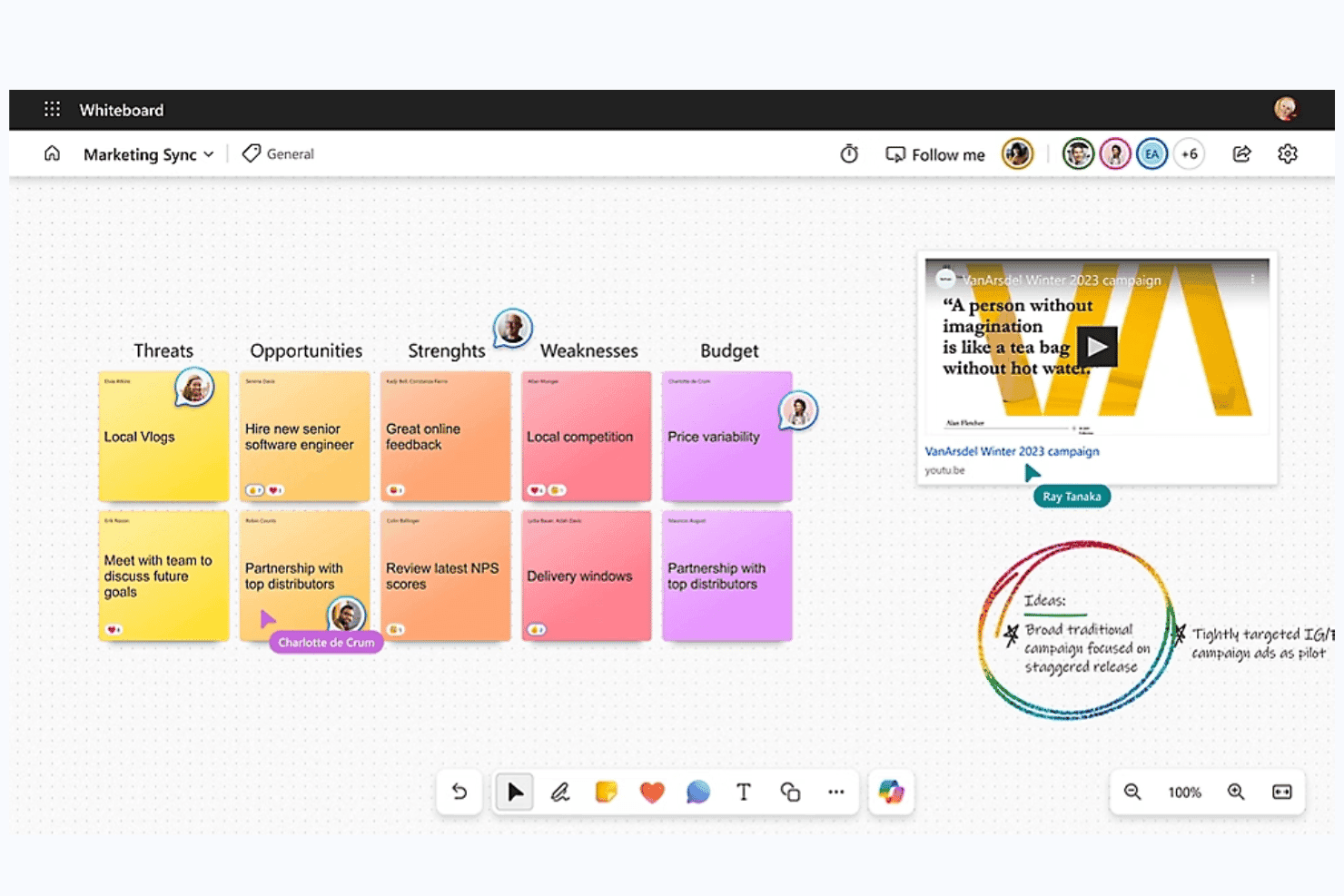
Microsoft Whiteboard is a digital whiteboard tool built into Microsoft 365 that offers a freeform collaborative canvas, sticky notes, smart inking, AI-assisted idea clustering and summarization via Copilot, and deep integration with Teams for real-time and async ideation sessions.
Who Is Microsoft Whiteboard Best For?
Microsoft Whiteboard is a natural fit for teams already working inside Microsoft 365, where pulling up a shared canvas in a Teams meeting requires zero extra setup or logins.
Why I Picked Microsoft Whiteboard
Microsoft Whiteboard earns its spot on my shortlist because it's the only brainstorming tool that lives natively inside Teams, meaning your team can open a shared canvas mid-meeting without switching apps or logging into anything new. I especially like Copilot's Categorize feature, which automatically groups sticky notes into color-coded clusters during live sessions, cutting the manual affinity-mapping work that usually eats up workshop time. The Summarize function then converts those clusters into an editable Loop document your team can act on immediately after the session wraps.
Microsoft Whiteboard Key Features
- Copilot Suggest: Generates a set of idea sticky notes directly on the canvas from a text prompt, giving teams a starting point when brainstorming stalls.
- Follow mode: Locks all participants' views to the facilitator's screen position as they navigate the canvas during live sessions.
- Async board access via OneDrive: Boards are stored in OneDrive for Business, so team members can contribute to a shared canvas before or after a meeting.
- Embedded Loop components: Teams can insert Microsoft Forms polls directly onto the canvas to collect structured input without leaving the board.
Microsoft Whiteboard Integrations
Microsoft Whiteboard offers native integrations across the Microsoft ecosystem, including Microsoft Teams, OneDrive for Business, Microsoft Loop, Microsoft Forms, Bing, and Microsoft Copilot. No third-party marketplace integrations or API are clearly documented.
Pros and Cons
Pros:
- Sticky notes support rich media capture
- Async boards support before-and-after-meeting input
- Copilot suggests, clusters, and summarizes ideas
Cons:
- Image-only export weakens action handoff
- No native dot voting or ranking
Learn more about Microsoft Whiteboard: Best for design-led teams using Figma
- Free plan available
- From $16/user/month
Visit WebsiteCustomer Rating:4.7/5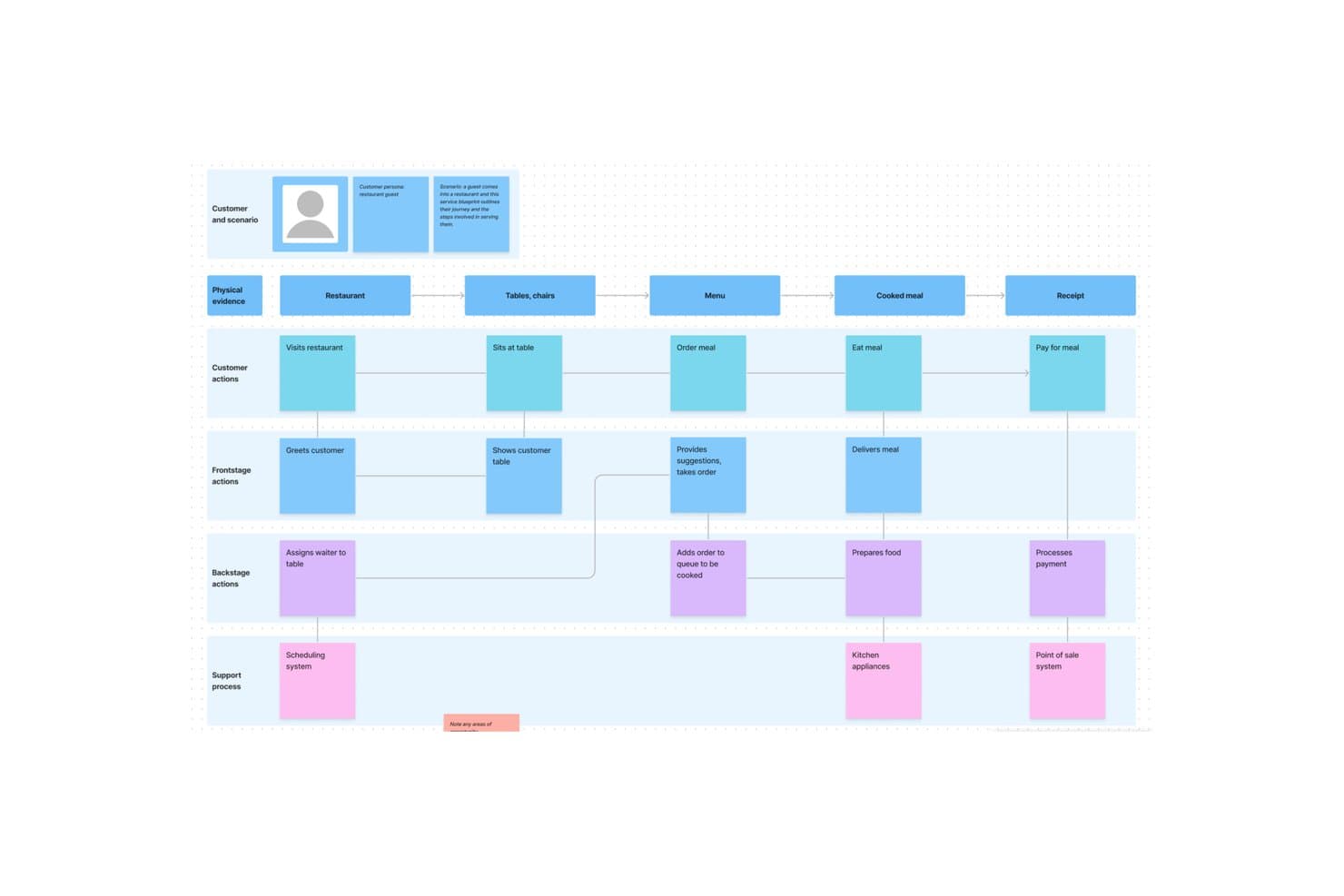
FigJam lets users map full service blueprints visually. FigJam is Figma's online whiteboard tool built for brainstorming, diagramming, and collaborative workshops, with sticky notes, AI-assisted clustering, 300+ templates, and live facilitation controls like spotlight mode, timers, and voting sessions.
Who Is FigJam Best For?
FigJam is a natural fit for cross-functional teams already working in Figma, where designers, PMs, and engineers share a single creative environment.
Why I Picked FigJam
FigJam earns its spot on my shortlist because it's built directly into the Figma ecosystem, making it the obvious brainstorming layer for teams that already live in Figma. I particularly like how AI-assisted sticky clustering lets you sort a chaotic ideation session into named themes and convert them into action items in one click. Spotlight mode is another feature I find genuinely useful: it pulls every participant's view to yours mid-session, so facilitation stays tight even across distributed teams.
FigJam Key Features
- 300+ ready-made templates: Choose from brainstorming frameworks, customer journey maps, retrospectives, roadmap reviews, and more—or build and save your own custom templates.
- Guest access: Anyone outside your organization can join a FigJam board for free for 24 hours without creating an account.
- Asana and Jira integrations: Convert ideas directly from a brainstorm session into trackable tasks in your project management tool.
- AI credit-based actions: Use AI to generate templates and visuals from a text prompt, with monthly credit allowances included on every paid plan.
FigJam Integrations
FigJam offers native integrations with Asana and Jira, helping teams turn brainstorm ideas into trackable tasks. Enterprise plans include API access for custom integrations across Figma workflows.
Pros and Cons
Pros:
- Spotlight keeps remote sessions coordinated
- 300-plus templates support varied workshops
- AI clusters sticky notes into themes
Cons:
- Research synthesis boards become muddy quickly
- Diagramming depth trails specialist whiteboards
Learn more about FigJam: Best for structured workshop facilitation
- Free plan available
- From $24.90/month (billed annually)
Visit WebsiteCustomer Rating:4.7/5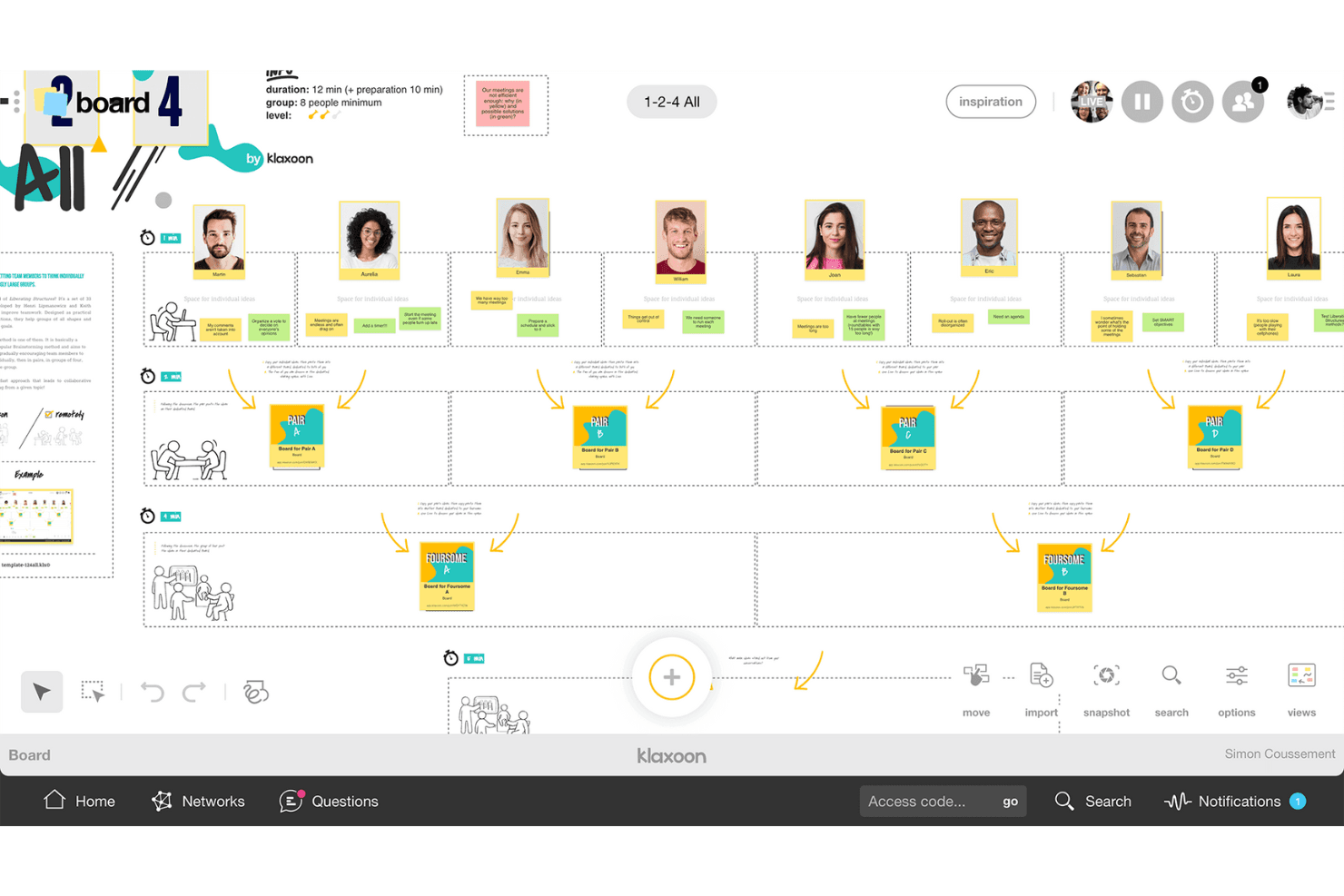
Klaxoon helps teams share ideas and organize discussions into actions. Klaxoon is a visual collaboration and workshop platform that combines an infinite whiteboard, structured facilitation controls, voting and prioritization tools, 200+ templates, and AI-assisted idea organization.
Who Is Klaxoon Best For?
Klaxoon is a strong fit for facilitators, consultants, and innovation teams who run structured workshops and need real-time facilitation controls alongside async collaboration tools.
Why I Picked Klaxoon
Klaxoon earns its spot on my list because no other tool I've tested matches its depth of live facilitation controls. I love how the Session feature lets you chain activities together—polls, quizzes, and boards—so a workshop flows like a proper agenda rather than a free-for-all. Sync Board is what really sets it apart: one click locks every participant's screen to the same canvas view, which I find invaluable when you need to walk a group through idea clustering or dot voting without losing anyone.
Klaxoon Key Features
- AI idea organization: Klaxoon's AI automatically sorts, summarizes, and translates ideas into 100+ languages directly on the board.
- Dot voting and polls: Participants can prioritize ideas using dot voting, likes, star ratings, word clouds, and live polls.
- Async missions: Missions and Adventures let contributors participate on their own schedule, keeping ideas flowing between live sessions.
- Wrike and Jira integration: Ideas on the board convert directly into Wrike tasks or Jira tickets, keeping discovery connected to delivery.
Klaxoon Integrations
Klaxoon offers a native Wrike integration and documented integrations with Jira, Confluence, Microsoft Teams, Google Workspace, OneDrive, Google Drive, Dropbox, and Zapier. Its API supports custom integrations.
Pros and Cons
Pros:
- AI groups and summarizes ideas automatically
- Multiple voting formats support quick prioritization
- Facilitator-led agendas keep workshops on track
Cons:
- Free participation limits restrict larger workshops
- Activity types take time to learn
Learn more about Klaxoon: Best for brainstorming with sticky notes
- Free plan available
- From $9/month (billed annually)
Visit WebsiteCustomer Rating:4.5/5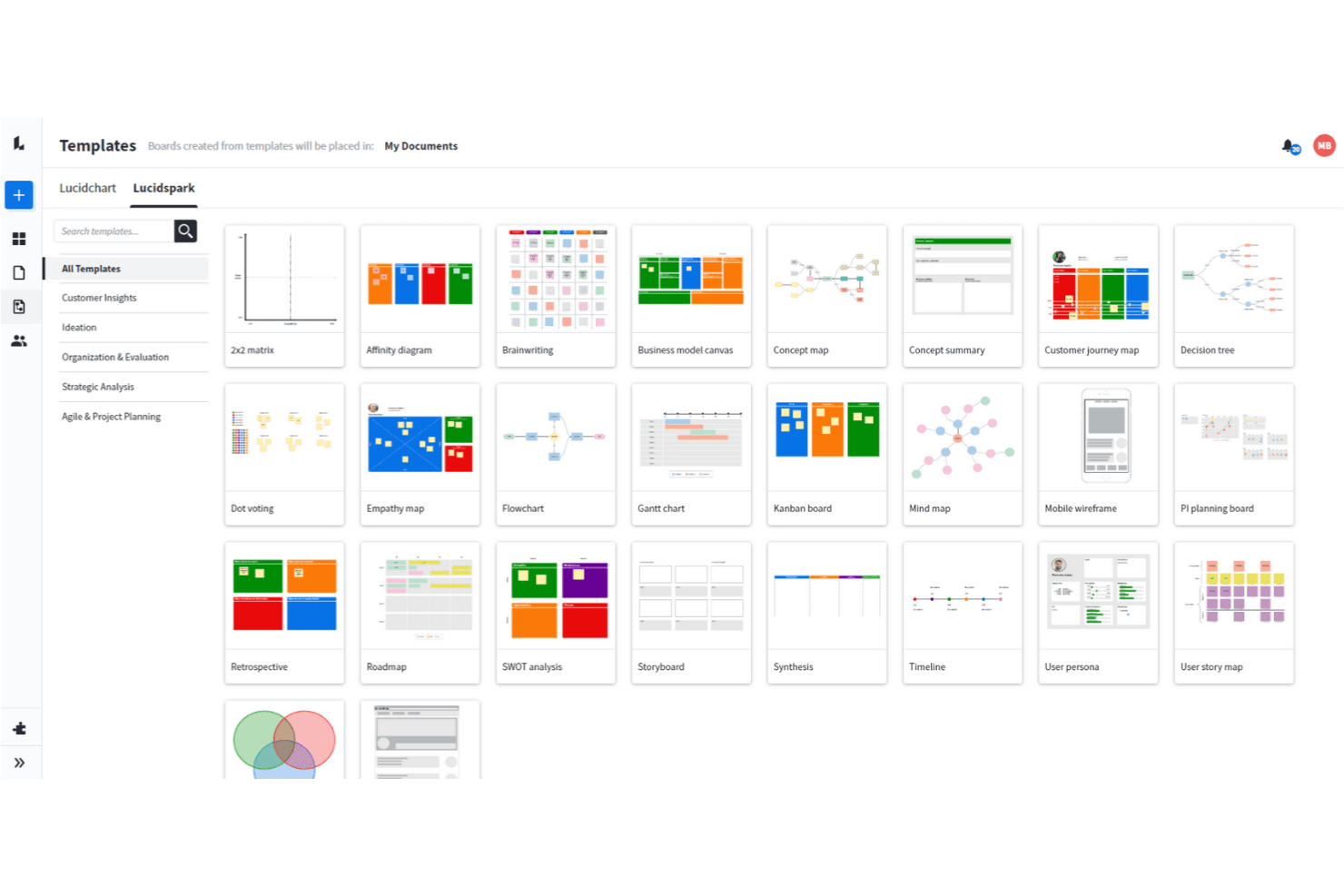
Lucidspark allows you to use a wide range of brainstorming techniques. Lucidspark is a visual collaboration and brainstorming tool built around an infinite canvas, offering sticky notes, mind maps, freehand drawing, AI-assisted ideation, voting sessions, and facilitation controls for live and async teamwork.
Who Is Lucidspark Best For?
Lucidspark is a great fit for facilitators, UX leads, and product managers who need to run structured brainstorming sessions and move ideas into execution without switching tools.
Why I Picked Lucidspark
Lucidspark earns its spot on my shortlist because sticky notes are genuinely central to how the tool works, not an afterthought. I love that private-mode brainstorming hides both note contents and authors until you're ready to reveal them, which keeps early ideas honest and avoids groupthink. From there, AI Magic Sort clusters those notes by theme automatically, so your team skips the tedious manual sorting and gets straight to discussing what matters.
Lucidspark Key Features
- Real-time collaborative canvas: An infinite shared canvas lets your whole team add, move, and edit ideas together live or asynchronously.
- Voting sessions: Team-tier voting lets facilitators run private or anonymous votes with time limits and live result tracking.
- Lucid Cards with Jira sync: Task-style cards connect directly to Jira and Azure DevOps, so ideas move into your backlog without leaving the board.
- Lucid AI idea generation: Prompt AI to generate ideas or build out an entire board, then summarize or cluster results by theme.
Lucidspark Integrations
Lucidspark offers 100+ marketplace integrations, including Jira, Azure DevOps, monday.com, Asana, Google Drive, Slack, Microsoft Teams, and Lucidchart. Team and Enterprise plans include a REST API for custom integrations.
Pros and Cons
Pros:
- Voting controls support group decisions
- AI clusters ideas by theme
- Sticky notes support private ideation
Cons:
- Canvas lacks native audio or video
- Free boards remain sharply limited
Learn more about Lucidspark: Best for AI-guided ideation with dev tool sync
- 30-day free trial
- From $8.33/user/month (billed annually)
Visit WebsiteCustomer Rating:4.4/5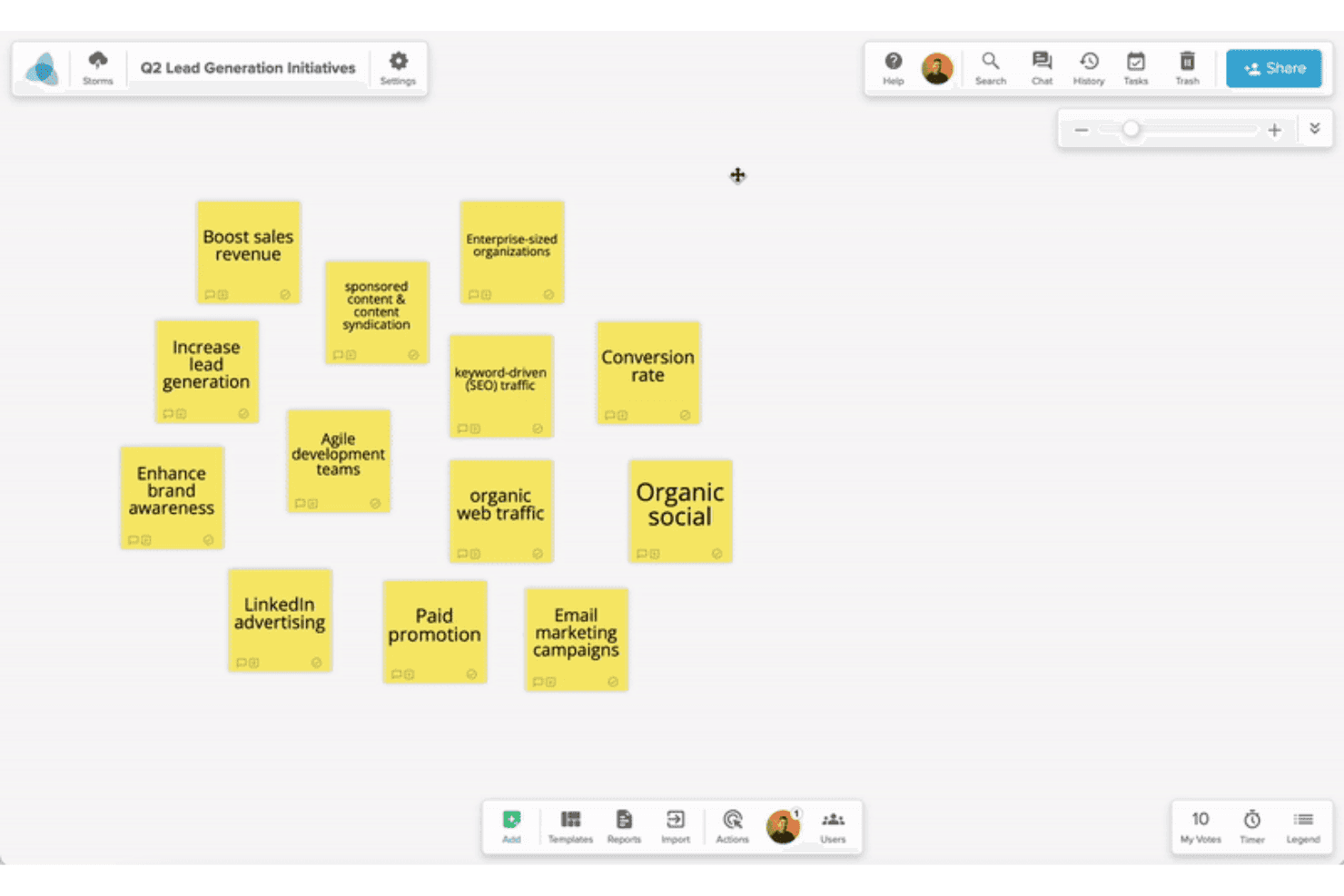
Stormboard helps teams capture and organize ideas into structured plans. Stormboard is a collaborative digital whiteboard built for structured brainstorming, offering AI-assisted idea generation, a large template library, real-time multi-user editing, and two-way sync with dev tools like Jira and Azure DevOps.
Who Is Stormboard Best For?
Stormboard is a strong fit for product and innovation teams that want AI-assisted ideation to flow directly into Jira, Rally, or Azure DevOps backlogs without manual handoffs.
Why I Picked Stormboard
I picked Stormboard as one of the best because StormAI is genuinely woven into the brainstorming process, not bolted on. It generates context-aware sticky notes per section, expands a single idea into five related ones, and clusters notes by theme or sentiment automatically. What pushes it further is the live two-way sync with Jira, Rally, and Azure DevOps, so ideas from a brainstorm session move directly into a sprint backlog without any manual re-entry.
Stormboard Key Features
- Substorms: Nest a full Storm inside a section of a parent Storm to break complex topics into focused, self-contained workspaces.
- Multiple sticky note types: Add text, image, video, freehand whiteboard, or index card notes to capture ideas in whatever format fits the moment.
- Built-in voting with exportable results: Collect votes directly on the board and export the results alongside word clouds and task data.
- Structured template library: Choose from hundreds of pre-built templates covering frameworks like SCAMPER, Affinity Diagram, and Abstraction Laddering.
Stormboard Integrations
Stormboard offers native two-way integrations with Jira, Rally, and Azure DevOps, plus Microsoft Office and Google Drive, Docs, Slides, and Sheets. It also connects with Microsoft Surface Hub and Azure OpenAI Service.
Pros and Cons
Pros:
- Multiple sticky note types support richer input
- Templates support structured discovery workshops
- StormAI expands and clusters brainstorm ideas
Cons:
- Live facilitation lacks video and spotlight tools
- Large sessions can experience board lag
Learn more about Stormboard: 10Best for structured facilitation with AI clustering
Mural
- Free plan available
- From $9.99/user/month (billed annually)
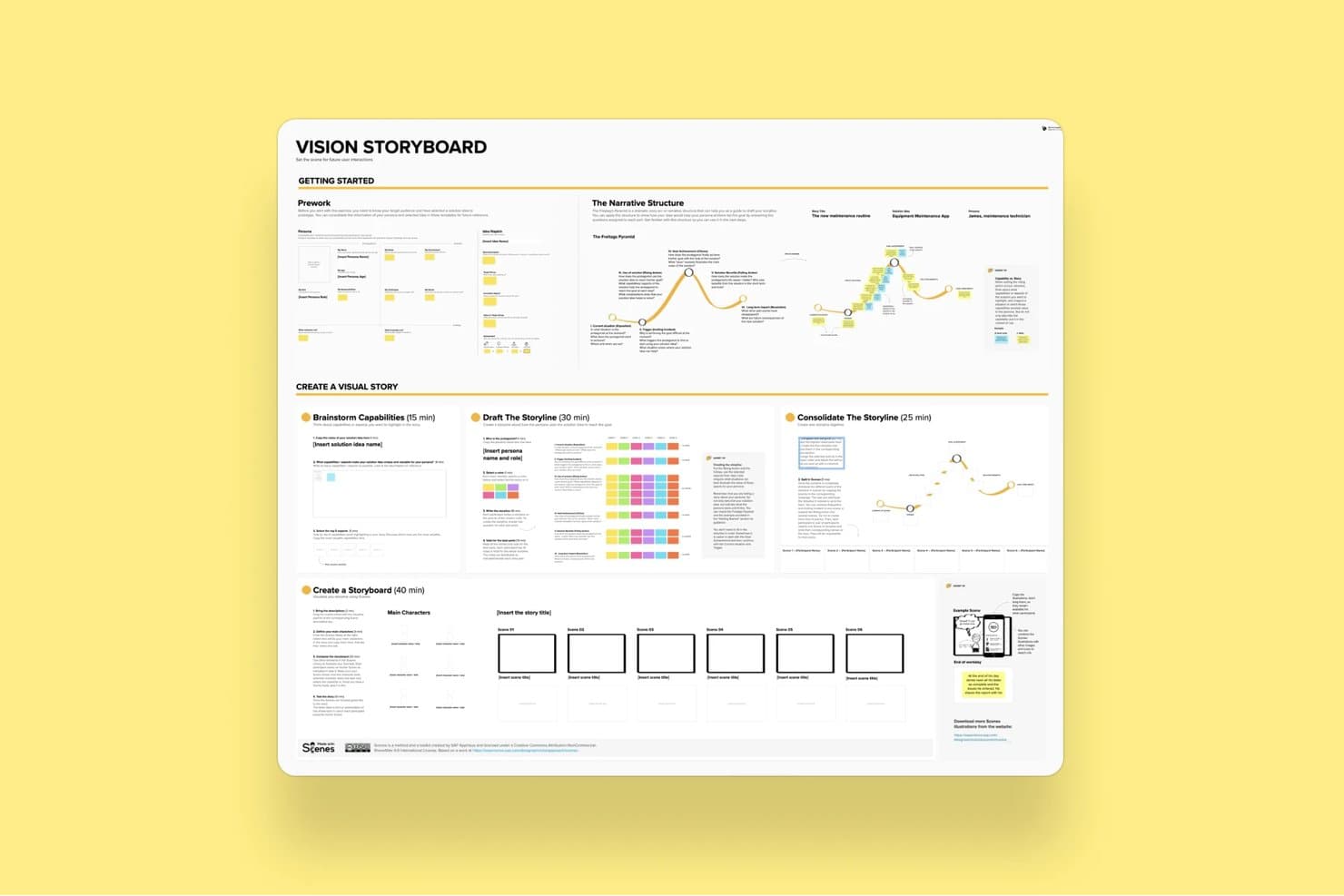
Mural's Vision Storyboard template guides users through building visual stories. Mural is a visual collaboration and brainstorming platform built around an infinite canvas, offering sticky notes, diagramming, AI-powered clustering, structured facilitation controls, and 250+ templates including LUMA design-thinking frameworks.
Who Is Mural Best For?
Mural is a strong fit for facilitators, consultants, and cross-functional teams who run structured workshops and need to move from raw ideas to organized outputs quickly.
Why I Picked Mural
Mural earns its spot on my shortlist because its AI Clustering feature genuinely changes how workshops end. Instead of manually grouping hundreds of sticky notes after a session, I can select them all and let Mural sort them into named thematic clusters, preview the results before committing, and then use the Summarize feature to pull key takeaways from each group. The full facilitation suite, including private mode to prevent groupthink and a step-by-step outline tool, means structured sessions stay on track from start to finish.
Mural Key Features
- Anonymous voting: Participants submit votes without seeing others' choices, keeping prioritization decisions free from social influence.
- Private mode: Hides each contributor's sticky notes from others during input phases, preventing groupthink before ideas are shared.
- Custom toolbar: Restricts which tools participants can access during a session, keeping the workspace focused on the task at hand.
- LUMA frameworks: A built-in set of design-thinking methods available on Business plans to guide teams through structured discovery and ideation activities.
Mural Integrations
Mural offers native integrations with Jira Cloud, Microsoft Teams, Zoom, Webex, Slack, Google Workspace, Adobe Creative Cloud Library, Butter, Azure Active Directory, Okta, and GitHub. It also provides an API for custom integrations.
Pros and Cons
Pros:
- Templates guide discovery and innovation workshops
- Facilitation controls support structured brainstorming sessions
- AI clustering organizes workshop output quickly
Cons:
- Large boards may respond slowly sometimes
- Interface changes can disrupt established workflows
Learn more about Mural:
Andre alternativer
Her er noen flere gode alternativer som ikke kom med på listen over de beste verktøyene for idémyldring:
- 11ConceptboardBest for live facilitation with built-in video chat
- 12IdeamapBest for multi-method voting on brainstormed ideas
- 13LucidchartBest for turning diagrams into data-linked visuals
- 14ClickUpBest for turning whiteboard ideas into tracked tasks
- 15WhimsicalBest for product builders who sketch and plan
- 16MindomoBest for brainstorming across web, desktop and mobile
- 17BluescapeBest for brainstorming in air-gapped environments
- 18Confluence WhiteboardsBest for ideation that feeds straight into Jira
How I Evaluate Brainstorming Tools
I split my evaluation into three parts. First—and most heavily weighted—I check whether a tool lets teams edit a shared canvas simultaneously and capture ideas fast using sticky notes or freeform elements. Then I look at standout features like AI-assisted ideation and facilitation controls. Finally, I consider onboarding simplicity and pricing value.
Core Functionality (Table Stakes for This List)
When I'm selecting tools for my list, I score each one on a scale from 0 (does not offer the functionality) to 5 (excels in this area) for each core functionality listed below. I then convert the total into a percentage to help assess each tool's overall fit, with extra weight on any functionalities I've deemed essential.
- Real-Time Collaboration (Essential): I check whether multiple teammates can add and move sticky notes on the same board simultaneously without lag or cursor conflicts.
- Idea Capture Elements (Essential): Tools should offer more than plain text—I look for sticky notes, shapes, cards, and freeform drawing that let people capture thoughts fast.
- Organization & Clustering: I evaluate how easily you can drag ideas into groups, tag them by theme, or draw connectors to map relationships during an affinity mapping session.
- Voting & Prioritization: Built-in dot-voting or ranking matters here. I look at whether facilitators can configure vote limits and whether results display clearly for the group.
- Templates & Frameworks: A solid library of ready-made formats—like mind maps, SWOT grids, or How Might We boards—saves real setup time. I also check if you can save custom templates.
- Session Facilitation Controls: I look for features like timers, reveal toggles, and participant-management options that let a facilitator guide a structured workshop from start to finish.
Once I have a list of tools that meet the criteria, I consider what sets each platform apart.
Differentiating Factors (What Sets Vendors Apart)
Here's how I compare and contrast different vendors:
Standout Features
AI-assisted ideation is the first thing I check. I look for tools where AI can auto-cluster sticky notes or generate starter prompts mid-session—helpful when a product discovery workshop stalls. Timer and facilitation controls matter just as much. A good reveal toggle keeps ideas hidden until everyone has contributed, which prevents anchoring bias in remote sprint planning. I also evaluate whether a tool supports async contributions, since distributed teams need persistent boards that stay usable across time zones without losing thread context.
Beyond Features
I look at how easily ideas move from a brainstorming board into execution. If your team has to manually copy sticky notes into Jira or Linear, you've already lost context. Tools with native export or two-way sync to PM platforms save that handoff. Adoption matters just as much—I check whether non-technical stakeholders like execs or designers can jump in without a tutorial. A tool nobody opens after the first workshop isn't worth the license. I also evaluate security controls, since early-stage feature ideas are sensitive IP that needs proper board-level permissions and SSO.
Slik velger du et verktøy for idémyldring
Det er lett å gå seg vill i lange funksjonslister og kompliserte prismodeller. For å hjelpe deg med å holde fokus mens du går gjennom den unike prosessen med å velge programvare, får du her en sjekkliste over faktorer du bør ha i bakhodet:
| Faktor | Hva du bør vurdere |
|---|---|
| FaktorSkalerbarhet | Hva du bør vurdereKan verktøyet vokse i takt med teamets størrelse og kompleksitet? Se etter begrensninger på antall brukere, treg ytelse ved store datamengder eller kostnader som øker kraftig når teamene vokser. |
| FaktorIntegrasjoner | Hva du bør vurdereKan det enkelt kobles til den eksisterende verktøystakken din, for eksempel Slack, Jira, Figma eller Trello? Manuelle omveier tar tid og ødelegger fremdriften. |
| FaktorTilpasningsmuligheter | Hva du bør vurdereKan du tilpasse maler, arbeidsflyter eller visninger slik at de passer med hvordan teamet ditt tenker og arbeider? Standardoppsett som skal passe for alle, gjør vanligvis arbeidet tregere. |
| FaktorBrukervennlighet | Hva du bør vurdereKan tverrfunksjonelle team komme i gang med lite forklaring? Hvis det tar flere timer å finne ut av verktøyet, kommer folk ikke til å bruke det – uansett hvor kraftig det er. |
| FaktorImplementering og innføring | Hva du bør vurdereHvor raskt kan du komme i gang? Se etter importverktøy, produktvisninger og veiledning i appen, slik at teamet kan bidra allerede i sin første økt. |
| FaktorKostnad | Hva du bør vurdereHva får du egentlig for prisen? Vær oppmerksom på betalingsmurer for samarbeidsfunksjoner eller høye priser per bruker som ikke samsvarer med behovet for bruk. |
| FaktorSikkerhetstiltak | Hva du bør vurdereStøtter det SSO, datakryptering og styring av brukerroller? Hvis du idémyldrer rundt produktideer eller immaterielle rettigheter, bør du ikke ta sjanser med svake sikkerhetsstandarder. |
| FaktorBehov for interne ressurser | Hva du bør vurdereVil noen måtte administrere maler, brukere eller integrasjoner fortløpende? Lette verktøy sparer tid, særlig for mindre team. |
Hva er verktøy for idémyldring?
Verktøy for idémyldring er digitale hjelpemidler som hjelper enkeltpersoner eller team med å generere ideer, organisere dem i grupper og vise forholdet mellom ideer eller emner. De tilhører samme programvaregruppe som digitale tavler eller verktøy for tankekart, og er utviklet for å stimulere kreativ tenkning og samarbeid i grupper. De tilbyr en rekke måter å visualisere ideer på ved hjelp av farger, symboler, tagger, klistrelapper og andre hjelpemidler, samt verktøy for samarbeid med andre teammedlemmer, inkludert @-meldinger og samtidig samskriving.
Verktøy for idémyldring hjelper grupper med å samarbeide om ideer, organisere oppgaver og styrke kreativiteten. De tilfører også orden til en tidligere papirbasert eller manuell prosess ved å digitalisere idémyldringen, slik at du alltid kan se tilbake på ideene dine for fremtidig bruk (i stedet for å se på et bilde av krusedullene dine på tavlen i møterommet til bedriften).
Funksjoner i verktøy for idémyldring
Når du velger verktøy for idémyldring, bør du se etter følgende viktige funksjoner:
- Samarbeid i sanntid: Gjør det mulig for flere brukere å bidra med ideer samtidig, noe som hjelper team med å holde seg samkjørte og produktive under økter i sanntid.
- Visuell idékartlegging: Lar brukere organisere tanker ved hjelp av diagrammer eller tankekart, noe som gjør det enklere å se sammenhenger og utvikle konsepter.
- Malbibliotek: Tilbyr ferdiglagde strukturer for vanlige formater for idémyldring, slik at team raskt kan komme i gang uten å måtte sette opp alt fra bunnen av.
- Verktøy for kommentarer og tilbakemeldinger: Gjør det mulig for teammedlemmer å legge igjen innspill direkte på ideer, noe som støtter diskusjon og videreutvikling.
- Avstemning eller prioritering: Gjør det mulig for team å rangere eller gi poeng til ideer for å fokusere på de mest lovende og ta beslutninger raskere.
- Eksportalternativer: Støtter lagring eller deling av økter i ulike formater, som PDF, PNG eller CSV, noe som gjør oppfølgingsarbeidet enklere.
- Tilgangskontroller: Lar administratorer styre hvem som kan se, redigere eller kommentere, slik at sensitive ideer beskyttes og orden opprettholdes i samarbeidsområder.
- Skybasert tilgang: Sikrer at teammedlemmer kan delta fra hvor som helst med internettforbindelse, og støtter modeller for fjernarbeid og hybridarbeid.
- Tavlefunksjonalitet: Tilbyr et fleksibelt område for fri tenkning, skissering eller diagramarbeid uten begrensninger.
- Støtte for integrasjoner: Kobler seg til verktøy som Slack, Trello eller Google Drive for å effektivisere arbeidsflyter og redusere behovet for å bytte kontekst.
Fordeler med programvare for idémyldring
Implementering av verktøy for idémyldring gir flere fordeler for teamet og virksomheten din. Her er noen av fordelene du kan se frem til:
- Raskere idégenerering: Innspill i sanntid og visuelle verktøy hjelper team med å komme opp med flere ideer på kortere tid.
- Bedre samkjøring i teamet: Delte arbeidsområder og kommentarer sørger for at alle har samme utgangspunkt og reduserer misforståelser.
- Mer organiserte økter: Maler og funksjoner for kartlegging gir idémyldringen struktur, slik at ideer ikke går tapt eller blir glemt.
- Enklere beslutningstaking: Avstemningsverktøy og prioriteringsfunksjoner hjelper team med raskt å identifisere de mest verdifulle ideene.
- Forbedret samarbeid på avstand: Skytilgang og integrasjoner gjør det enkelt for distribuerte team å delta og holde seg engasjert.
- Bedre oppfølging av ideer: Eksportalternativer og sammenkoblede arbeidsflyter hjelper med å gjøre grove ideer om til konkrete neste steg.
- Tydeligere dokumentasjon: Alle bidrag blir registrert automatisk, slik at du ikke trenger å stole på hukommelsen eller notater.
Kostnader og priser for verktøy for idémyldring
Valg av verktøy for idémyldring krever en forståelse av de ulike prismodellene og abonnementene som er tilgjengelige. Kostnadene varierer basert på funksjoner, teamstørrelse, tillegg og mer. Tabellen nedenfor oppsummerer vanlige abonnementer, gjennomsnittsprisene deres og typiske funksjoner som inngår i løsninger for verktøy for idémyldring:
Sammenligningstabell for abonnementer for verktøy for idémyldring
| Abonnementstype | Gjennomsnittspris | Vanlige funksjoner |
|---|---|---|
| AbonnementstypeGratisabonnement | Gjennomsnittspris$0 | Vanlige funksjonerGrunnleggende innsamling av ideer, begrenset antall maler, tilgang for én bruker og minimale eksportalternativer. |
| AbonnementstypePersonlig abonnement | Gjennomsnittspris$5–$15/bruker/måned | Vanlige funksjonerUbegrenset antall tavler, flere maler, skylagring og brukerstøtte via e-post. |
| AbonnementstypeBedriftsabonnement | Gjennomsnittspris$10–$25/bruker/måned | Vanlige funksjonerSamarbeid i team, redigering i sanntid, integrasjoner med tredjepartsapper og prioritert brukerstøtte. |
| AbonnementstypeVirksomhetsabonnement | Gjennomsnittspris$20–$40/bruker/måned | Vanlige funksjonerAvanserte administratorkontroller, SSO, revisjonslogger, dedikert introduksjon og tilpassede sikkerhetsinnstillinger. |
Vanlige spørsmål om idémyldring
På grunn av min omfattende erfaring med bruk av verktøy for idémyldring blir jeg ofte spurt om mer informasjon om dette temaet. Her er svar på de vanligste spørsmålene:
Hvordan støtter verktøy for idémyldring fjernteam?
Verktøy for idémyldring lar fjernteam dele ideer i sanntid, uansett hvor de befinner seg. Du kan bruke delte tavler, direkte redigering, kommentarer og videosamtaler for å samarbeide som om dere var i samme rom. Se etter verktøy med tilgang i skyen, automatisk lagring og kompatibilitet på tvers av enheter for å holde fremdriften oppe.
Hvorfor er idémyldring viktig?
Idémyldring er avgjørende for å fremme kreativitet, innovasjon og samarbeid om problemløsning. Det er en fantastisk måte for team å utvikle nye ideer på, ved å bruke utradisjonell tenkning til å utfordre antakelser.
Ved å involvere alle i inkluderende møter styrker det teammoralen, øker engasjementet og inspirerer til en ny måte å tenke på. Dette kan til syvende og sist føre til bedre beslutninger og mer effektive løsninger.
Hva er noen populære teknikker for idémyldring?
Det finnes mange ulike teknikker for idémyldring du kan bruke for å komme frem til nye ideer. Disse omfatter tankekart, SWOT-analyse, rask idéutvikling og skriftlig idémyldring. Andre populære alternativer er Seks tenkehatter og SCAMPER (erstatte, kombinere, tilpasse, endre, bruke på en annen måte, eliminere eller snu).
Den beste teknikken avhenger i stor grad av situasjonen og målene for idémyldringsøkten. Jeg anbefaler å kombinere ulike teknikker for å finne ut hva som fungerer best for deg.
Er idémyldring det samme som å lage tankekart?
Selv om de to konseptene henger sammen, er idémyldring ikke det samme som å lage tankekart. Idémyldring er et generelt begrep som gjelder det å utvikle et bredt spekter av nye ideer på en hvilken som helst fungerende måte.
Å lage tankekart beskriver derimot et visuelt verktøy eller en teknikk som hjelper team med å organisere tanker og ideer. Mens idémyldring altså fokuserer på å utvikle nye ideer, hjelper tankekartlegging deg med å organisere og visualisere disse ideene.
Hvordan håndterer man for mange ideer under en idémyldringsøkt?
Sett en tidsgrense for hver runde med idémyldring, og begrens hvor mange ideer hver person kan dele. Bruk avstemnings- eller poengfunksjoner for å snevre inn alternativene. Grupper lignende ideer sammen for å unngå gjentakelser, og ta eventuelt opp igjen ideer med lav prioritet senere.