

Det kan være krevende å håndtere et produkts livssyklus, særlig når du må balansere kundenes behov, markedstrender og teamdynamikk. Du kan fort bli overveldet av data og usikker på hvilken retning du bør velge. Det er her verktøy for produktoppdagelse kommer inn i bildet.
Disse verktøyene hjelper deg og teamet ditt med å samle innsikt, prioritere funksjoner og ta informerte beslutninger. Etter min erfaring reduserer de stresset ved å måtte gjette seg frem.
Jeg har testet og vurdert flere alternativer for å gi deg en objektiv og grundig undersøkt liste over de beste tilgjengelige verktøyene. I denne artikkelen finner du korte vurderinger, viktige funksjoner og informasjon om hva som gjør hvert verktøy unikt. La oss finne det rette verktøyet som kan hjelpe teamet ditt med å lykkes.
Why Trust Our Software Recommendations
6,700+
Reviews
20
Industry experts
16+
Evaluation factors
14
Years
Our team has been testing and reviewing software since 2012. As product managers ourselves, we know how difficult—and important—it is to choose the right software.
For this guide, we evaluated tools using hands-on testing and independent research, scoring tools using our selection criteria.
Our reviews reflect our human editorial judgment, not a sales pitch.
Expert reviewers:
- Andrew LumbySenior TPM
- Cristiano ValimSenior UI/UX Lead


Sammenligningstabell for verktøy for produktoppdagelse
Denne sammenligningstabellen oppsummerer prisdetaljene for mine utvalgte toppverktøy for produktoppdagelse:
| Tool | Best For | Trial Info | Price | ||
|---|---|---|---|---|---|
| 1 | Best for discovery-to-roadmap evidence traceability | Free demo available | Pricing upon request | Website | |
| 2 | Best for AI-driven feedback-to-roadmap workflows | Free plan available | Pricing upon request | Website | |
| 3 | Best for end-to-end feedback-to-roadmap traceability | Free plan available; 14-day free trial; free demo available | From $12/user/month (billed annually) | Website | |
| 4 | Best for OST-based continuous discovery | 7-day free trial | From $25/user/month | Website | |
| 5 | Best for AI-moderated interviews at scale | Free plan available | Pricing upon request | Website | |
| 6 | Best for visual brainstorming in product teams | Free plan + 14-day free trial available | From $8/user/month (billed annually) | Website | |
| 7 | Best for evidence-linked feature prioritization | Free demo available | Pricing upon request | Website | |
| 8 | Best for prioritization-driven feature decisions | Free demo available | Pricing upon request | Website | |
| 9 | Best for feedback-to-roadmap traceability | 14-day free trial + free demo available | Pricing upon request | Website | |
| 10 | Best for AI-driven continuous customer insight | Free plan + free demo available | Pricing upon request | Website |


Vurderinger av de beste verktøyene for produktoppdagelse
Nedenfor finner du mine detaljerte sammendrag av de beste verktøyene for produktoppdagelse som kom med på kortlisten. Vurderingene mine gir en detaljert gjennomgang av de viktigste funksjonene, fordeler & ulemper, integrasjoner og ideelle bruksområder for hvert verktøy, slik at du kan finne det beste alternativet for deg.
 Best for discovery-to-roadmap evidence traceability
- Free demo available
- Pricing upon request
Visit WebsiteCustomer Rating:4.4/5
ProductPlan's roadmap platform focuses on product development. ProductPlan is a dedicated roadmapping platform designed to facilitate strategic planning and visualization of product timelines. Its features enable users to establish clear product strategies and communicate them effectively, aligning with its strength in high-level strategic planning and visualization.
Why I Picked ProductPlan:
I selected ProductPlan due to its singular focus on providing a comprehensive strategic planning platform. Its ability to display complex product timelines visually makes it stand out among similar tools. Based on my comparison and judgment, ProductPlan serves as an optimal choice for teams that require efficient visualization of their product roadmaps and strategic planning.
Standout Features & Integrations:
ProductPlan's most useful features include roadmap creation, planning templates, goal setting and tracking, prioritization, and collaboration tools. Its integrations include popular platforms like Jira, Trello, Slack, and Microsoft Teams, among others, making it easy to incorporate into an existing workflow.
Pros and Cons
Pros:
- Efficient collaboration tools
- Strong integrations with popular project management tools
- Powerful visualization of product timelines
Cons:
- Higher pricing point compared to some competitors
- Lacks detailed project management features
- The user interface might take time to understand
Learn more about ProductPlan: Best for AI-driven feedback-to-roadmap workflows
- Free plan available
- Pricing upon request
Visit WebsiteCustomer Rating:5/5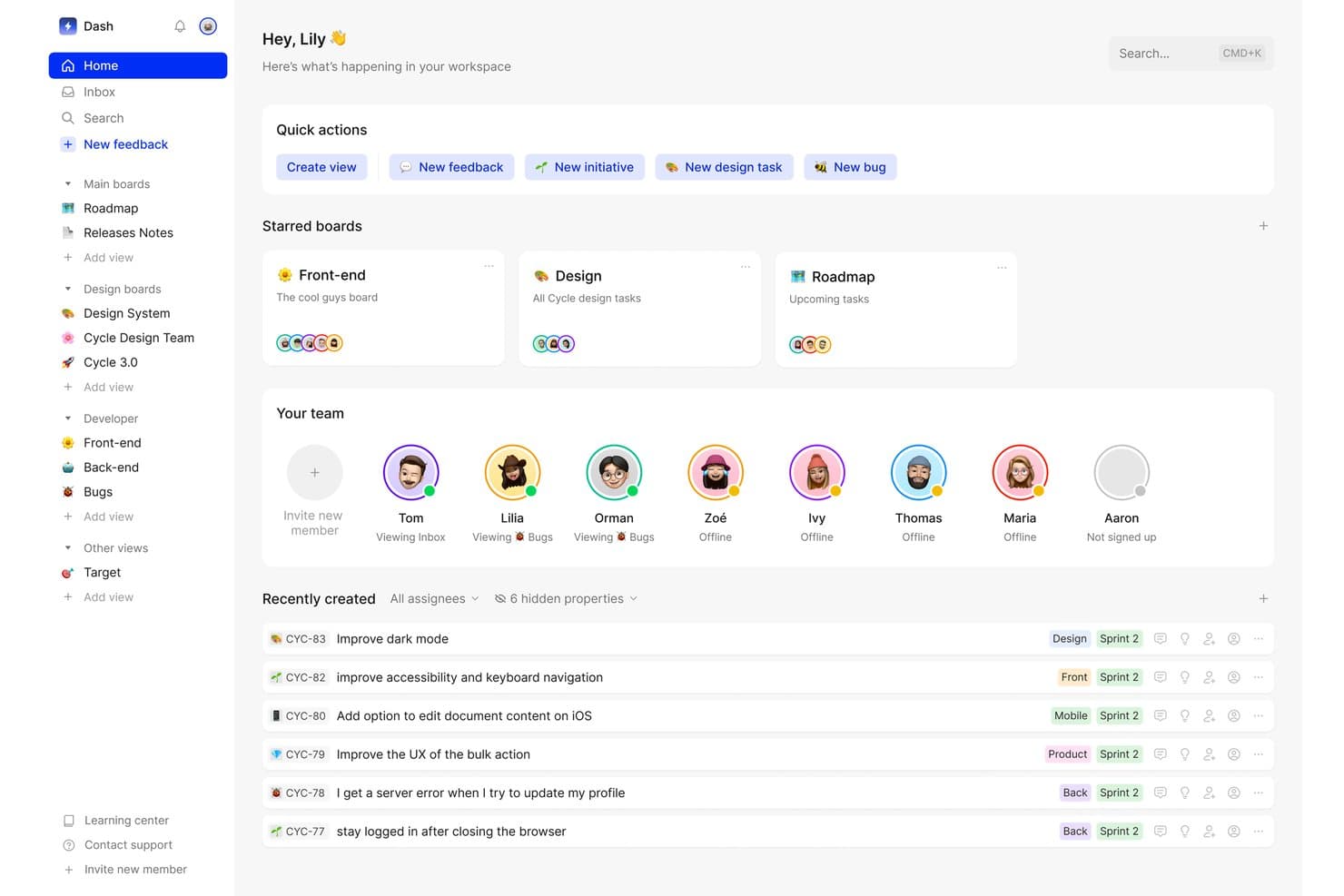
Cycle centralizes team tasks, feedback, and boards in one workspace. Cycle was a product discovery and feedback management platform that centralized multi-source customer feedback, generated AI-powered insights, and connected those insights to roadmap planning and release management.
Who Is Cycle Best For?
Cycle was a strong fit for product teams that needed to consolidate high-volume customer feedback from multiple channels and connect those insights directly to roadmap decisions.
Why I Picked Cycle
I've included Cycle in my top picks because it handles the full arc from raw customer signal to roadmap decision better than almost anything else I've seen. The @VoiceHunter agent automatically synthesizes interview notes and tags incoming feedback, while @LoopCloser notifies customers the moment their requested feature ships. What I find most compelling is how these AI agents turn what's usually a manual, scattered process into a continuous, largely automated workflow.
Cycle Key Features
- Multi-source feedback ingestion: Cycle automatically pulls customer feedback from Slack, Intercom, Zendesk, Gong, HubSpot, and meeting transcripts into a single hub.
- Cycle Ask NLP querying: An add-on that lets you search your entire feedback corpus using natural language questions to surface relevant customer signals on demand.
- Unlimited free Collaborator seats: Stakeholders like engineers, sales reps, and CS team members can join, comment, and submit feedback without taking up a paid seat.
- Release notes and changelog publishing: Teams can draft and publish AI-assisted release notes connected to a publicly hosted, custom-domain changelog.
Cycle Integrations
Cycle offered native integrations with Notion, Linear, GitHub, Figma, and Miro, plus integrations with Slack, Jira, Confluence, HubSpot, and Salesforce. It also provided a public API and Zapier connectivity.
Pros and Cons
Pros:
- Unlimited free collaborator seats support teamwork
- AI agents automate feedback synthesis workflow
- Excels at multi-source feedback aggregation
Cons:
- Lacks native hypothesis validation features
- No longer available as a standalone product
Learn more about Cycle: Best for end-to-end feedback-to-roadmap traceability
- Free plan available; 14-day free trial; free demo available
- From $12/user/month (billed annually)
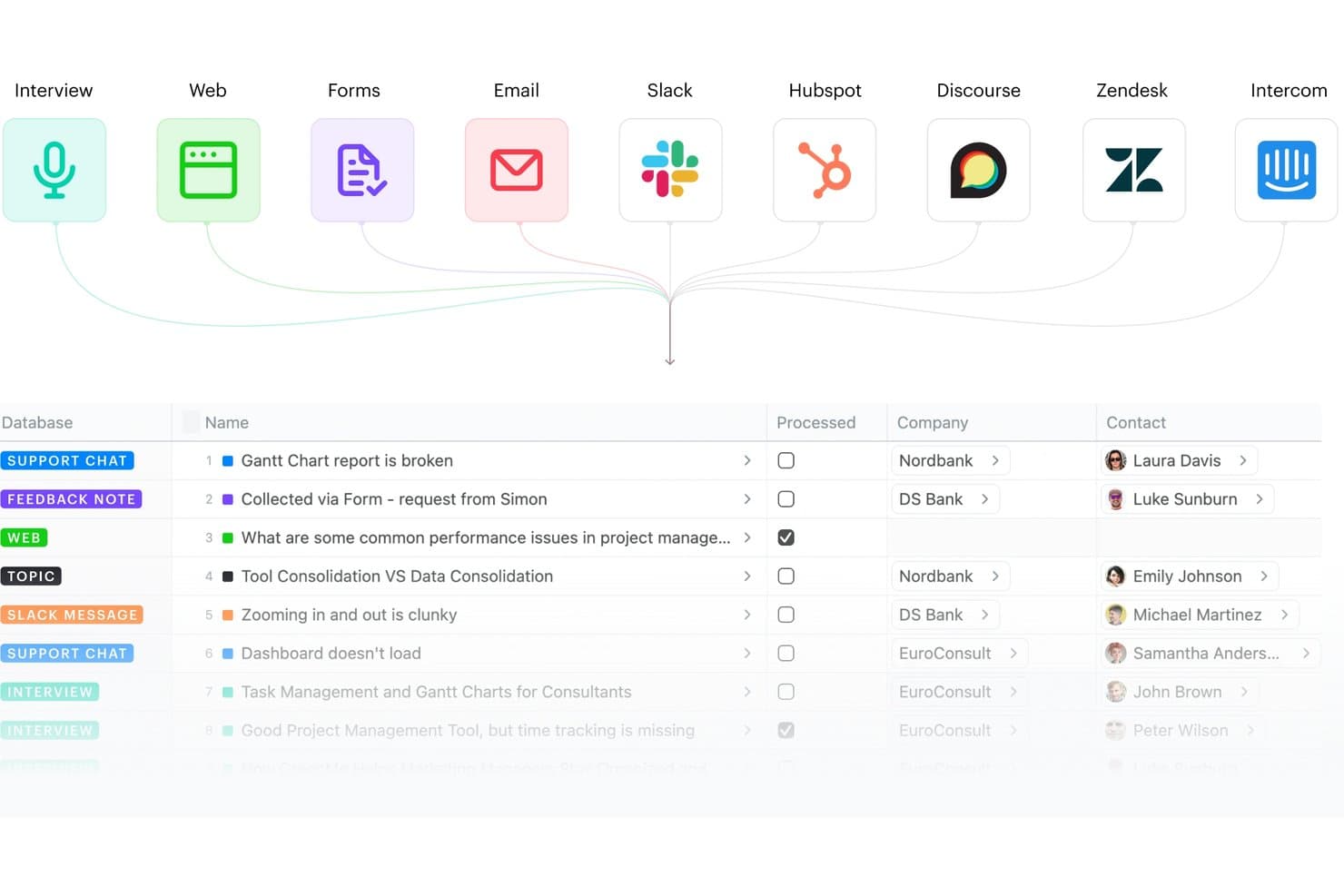
Fibery centralizes feedback from multiple sources into one database. Fibery is a modular product discovery and development platform that connects customer feedback aggregation, insight synthesis, opportunity mapping, and roadmap planning in a single relational workspace.
Who Is Fibery Best For?
Fibery fits product teams that want a single, deeply connected workspace to trace every insight from raw customer feedback all the way through to shipped features on the roadmap.
Why I Picked Fibery
Fibery earns its spot on my shortlist because of how tightly it connects raw customer feedback to shipped features, with no broken links in the chain. I love that its native Opportunity Solution Tree (built on Teresa Torres' framework) lets you map evidence directly to opportunities and solutions, so every roadmap item traces back to a real customer insight. Its AI-driven semantic clustering and Atomic Research template also mean my team can synthesize interview notes into tagged, linked facts rather than letting findings pile up in disconnected docs.
Fibery Key Features
- Feedback inbox: A centralized hub that collects and routes incoming feedback from sources like Intercom, Zendesk, Slack, HubSpot, and email into a single processing queue.
- AI-powered call transcription: Automatically transcribes recorded interviews and meetings, then generates summaries and extracts key notes without manual effort.
- Custom formula-based prioritization: Lets you build scoring models using any combination of feedback volume, customer segment, pain severity, and business impact tied to live CRM data.
- Public roadmaps and changelogs: Lets teams publish live, shareable roadmaps and product updates so stakeholders and customers can follow progress without needing a paid seat.
Fibery Integrations
Fibery offers native integrations with Intercom, Zendesk, HubSpot, Slack, Discourse, Jira, GitHub, GitLab, and Google Workspace. It also supports custom integrations through its API and Zapier.
Pros and Cons
Pros:
- AI clusters and summarizes research insights
- Highly flexible discovery and research templates
- Connects feedback directly to shipped features
Cons:
- Fewer specialized research integrations available
- No built-in user recruiting or surveys
Learn more about Fibery:
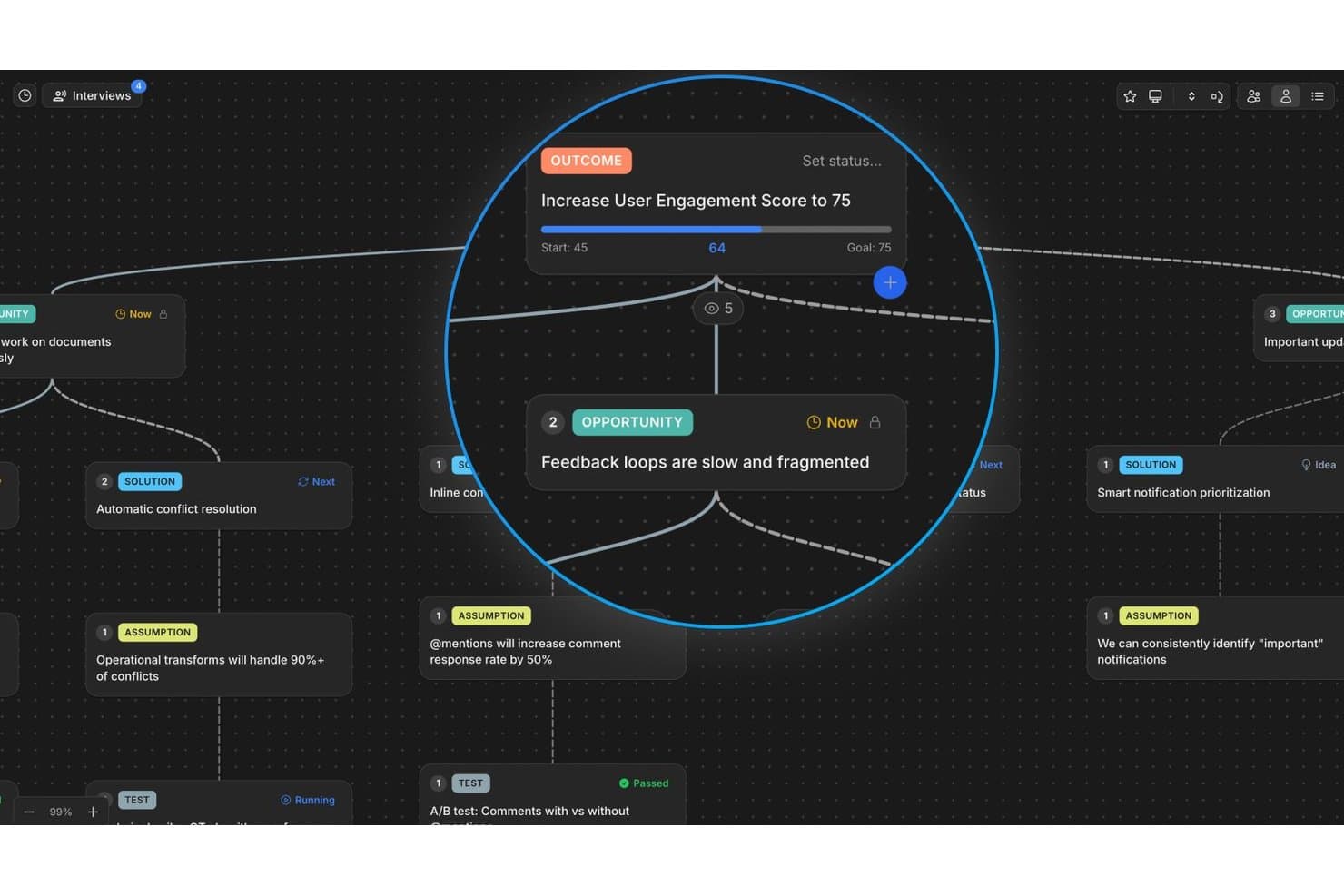
Vistaly maps opportunities and outcomes in a visual discovery tree. Vistaly is a product discovery platform built around the Opportunity Solution Tree framework, offering an interactive OST canvas, AI-powered interview synthesis, evidence traceability, and strategy mapping to connect discovery work to business outcomes.
Who Is Vistaly Best For?
Vistaly is a strong fit for product teams that have adopted—or are actively building—a continuous discovery practice around the Opportunity Solution Tree framework.
Why I Picked Vistaly
Vistaly earns its spot on my shortlist because it's the only product discovery tool built in formal partnership with Teresa Torres, the creator of the Opportunity Solution Tree framework. I picked it specifically for teams doing continuous discovery: you upload customer interviews in any of ~29 formats, and the AI synthesizes three or more into a fully structured OST with every opportunity card anchored to verbatim quotes. What I find most compelling is that the roadmap isn't a separate artifact—it's the OST itself, pivoted by card status.
Vistaly Key Features
- Strategy Space: Connect discovery opportunities directly to OKR and KPI trees, with live metric syncing from tools like PostHog, Amplitude, and Mixpanel.
- Mirror cards: Link a single opportunity or solution card to multiple outcomes, keeping evidence and status in sync across every instance.
- Assumption and Test cards: Log and structure hypotheses directly on the OST canvas using dedicated card types tied to specific solutions.
- Unlimited viewer seats: Give stakeholders, engineers, and executives read access to the full discovery tree without requiring editor licenses.
Vistaly Integrations
Vistaly offers native integrations with Jira, Linear, GitHub, Slack, Gong, and PostHog. It also provides a REST API, MCP access for Claude, ChatGPT, and Cursor, and Zapier.
Pros and Cons
Pros:
- Every card links to verbatim customer evidence
- Opportunity Solution Tree built with expert partnership
- AI turns interviews into structured OSTs
Cons:
- Lacks built-in participant recruiting features
- No native customer survey or test runner
Learn more about Vistaly: Best for AI-moderated interviews at scale
- Free plan available
- Pricing upon request
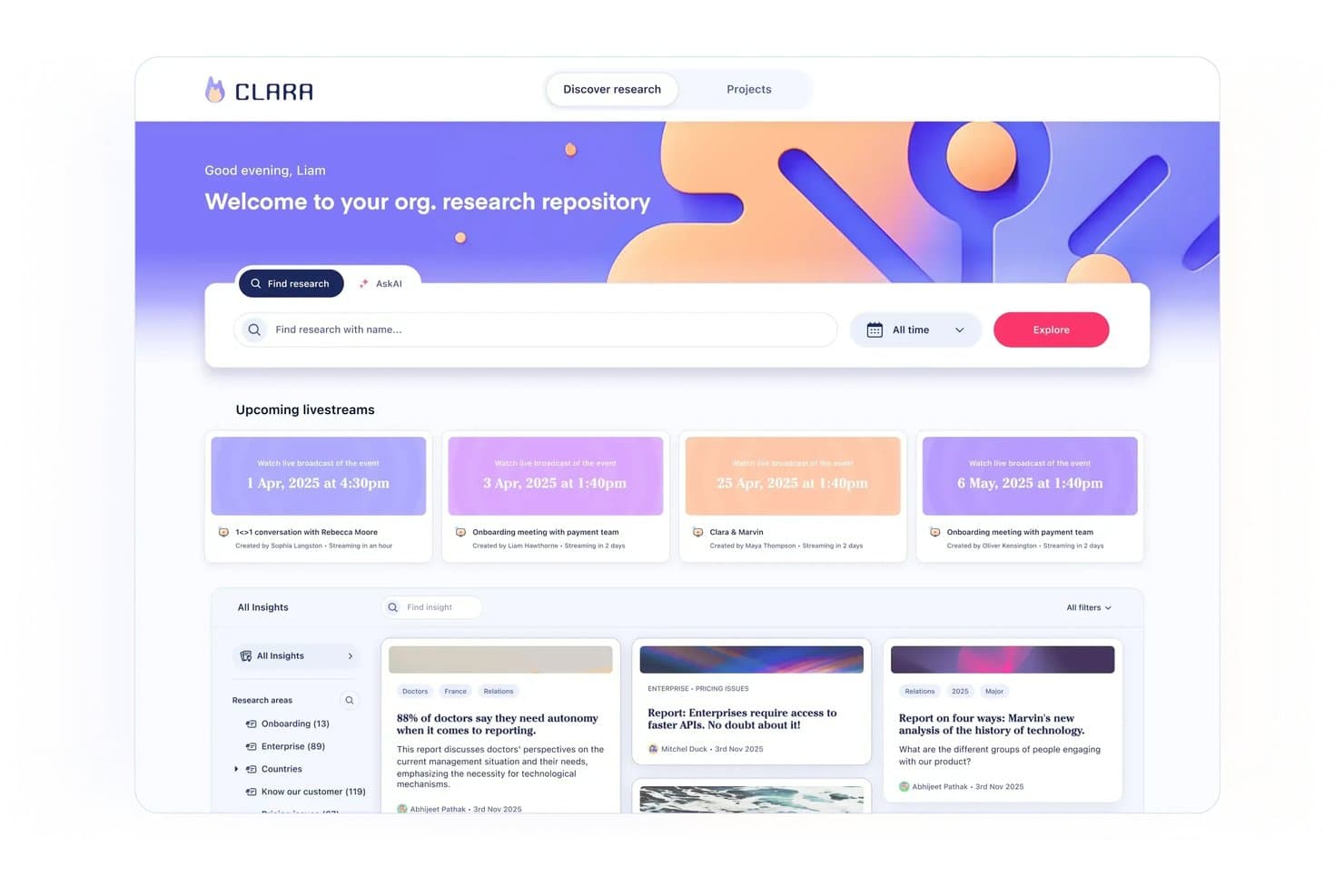
Marvin centralizes research insights and upcoming sessions in one hub. Marvin is an AI-native customer insights platform that centralizes qualitative research across interviews, support tickets, sales calls, and surveys, with built-in AI synthesis, moderated interviewing, and cross-project analysis.
Who Is Marvin Best For?
Marvin is a strong fit for UX research and product discovery teams that run high volumes of qualitative interviews and need AI to handle synthesis at scale.
Why I Picked Marvin
I picked Marvin as one of the best because it's the only tool on my list that lets you run hundreds of AI-moderated interviews simultaneously, without a researcher in the room. Its Live Intercept feature embeds a voice-to-voice AI interviewer directly inside your product, triggering real-time sessions with active users in 40+ languages. Pair that with Deep Research's hypothesis testing, and you can validate assumptions against your entire research corpus with cited, source-linked evidence.
Marvin Key Features
- Knowledge Hub: A centralized repository that ingests data from interviews, support tickets, sales calls, surveys, and reviews into one searchable system.
- Ask AI: A natural-language query tool that searches your entire research corpus and returns cited answers traceable to original source data.
- Research Digest newsletters: Auto-generated bi-weekly emails that surface curated research insights and send them directly to your team.
- Virtual Backroom: A live broadcast feature that lets stakeholders silently observe interviews in real time and collaborate via live chat.
Marvin Integrations
Marvin offers 30+ native integrations, including Notion, Jira, Confluence, Figma, Miro, Zoom, Google Meet, Gong, Zendesk, and Qualtrics. Its Import API supports custom integrations.
Pros and Cons
Pros:
- Delivers AI-cited insights traceable to sources
- Provides in-product voice-to-voice AI interviewing
- Runs hundreds of AI-moderated interviews simultaneously
Cons:
- Lacks native prioritization scoring frameworks
- No opportunity trees or solution mapping features
Learn more about Marvin: 6Best for visual brainstorming in product teams
Miro
- Free plan + 14-day free trial available
- From $8/user/month (billed annually)
Visit WebsiteCustomer Rating:4.8/5
Miro simplifies presenting plans and timeframes, ensuring adaptability to delays and client demands. Miro is an online visual collaboration platform that enables teams to work together in real-time. Its focus on interactive, visual collaboration makes it an excellent choice for product teams looking to brainstorm and ideate together, regardless of their geographical location.
Why I Picked Miro:
In my judgment, I chose Miro for its exceptional focus on real-time visual collaboration. The platform differentiates itself with an extensive set of drawing and diagramming tools, supporting a diverse array of brainstorming activities. This focus makes Miro the best choice for product teams who need to visualize ideas and engage in collaborative brainstorming.
Standout Features & Integrations:
Miro shines with features such as endless canvas, premade templates, real-time collaboration and commenting, and intuitive drawing tools. The platform integrates well with many other productivity tools, including Slack, Google Drive, Dropbox, and Microsoft Teams, making it easy to incorporate into existing workflows.
Pros and Cons
Pros:
- Real-time collaboration and commenting features enhance team cooperation
- Excellent integrations with commonly used productivity tools
- Offers a wide range of drawing and diagramming tools
Cons:
- Occasional lag issues reported during heavy usage
- More expensive than some competitors when billed annually
- Can be overwhelming for new users due to the vast number of features
 Best for evidence-linked feature prioritization
- Free demo available
- Pricing upon request
Visit WebsiteCustomer Rating:4.5/5
Productboard improves customer retention and innovation by identifying critical needs and delivering timely solutions. Productboard is a comprehensive product management tool designed to help product teams prioritize features, centralize product information, and craft compelling product roadmaps. Its user-centric approach makes it invaluable for teams dedicated to building products that meet real user needs.
Why I Picked Productboard:
I singled out Productboard for its strong emphasis on feature prioritization and roadmap visualization. It simplifies the usually complex process of determining what to build next and lays out a clear path to achieve it. The tool stands apart with its features like a user feedback portal and prioritization matrix.
Therefore, I find it "best for" product managers to aim to systematically prioritize features and lay out clear roadmaps.
Standout Features & Integrations:
Productboard shines with its features like a customer feedback repository, feature scoring system, and visually appealing roadmaps. Additionally, it offers persona and segmentation tools to cater to different user needs. As for integrations, Productboard smoothly collaborates with popular tools like Slack, Jira, Intercom, and Salesforce to streamline product management workflows.
Pros and Cons
Pros:
- Comprehensive integrations with other tools
- Robust feedback management system
- Excellent for feature prioritization and roadmap visualization
Cons:
- Limited options for custom fields in some plans
- Higher tiers are fairly pricey
- User interface can be a bit overwhelming initially
Learn more about Productboard: Best for prioritization-driven feature decisions
- Free demo available
- Pricing upon request
Visit WebsiteCustomer Rating:4.4/5
Maximize strategy, discovery, and execution using custom workflows with Airfocus. Airfocus is a product management tool that offers strategic planning and prioritization features. By using a unique scoring system and visualizations, it aids product teams in making informed decisions on feature prioritization, making it the ideal choice for product teams who need to strategically allocate resources and prioritize development tasks.
Why I Picked Airfocus:
In determining the best tools, I selected Airfocus due to its exceptional capacity for strategic decision-making. What makes Airfocus stand out is its proprietary prioritization system, which assists teams in understanding which features will offer the most value. This specific quality led me to view Airfocus as the best tool for prioritization in product feature development.
Standout Features & Integrations:
Airfocus provides robust features including a priority scoring system, a roadmap view for strategic planning, and a collaboration feature to include everyone in the decision-making process. It integrates with a number of other project management tools such as Jira, Trello, and Asana, making it a flexible addition to any product team's toolbox.
Pros and Cons
Pros:
- Allows for team-wide collaboration in feature prioritization
- Integrates well with other project management tools
- Unique priority scoring system supports strategic decision-making
Cons:
- Pricing may be on the higher end compared to other tools
- Has a bit of a learning curve, particularly for non-technical users
- Annual billing could be a barrier for some teams
 Best for feedback-to-roadmap traceability
- 14-day free trial + free demo available
- Pricing upon request
Visit WebsiteCustomer Rating:4.2/5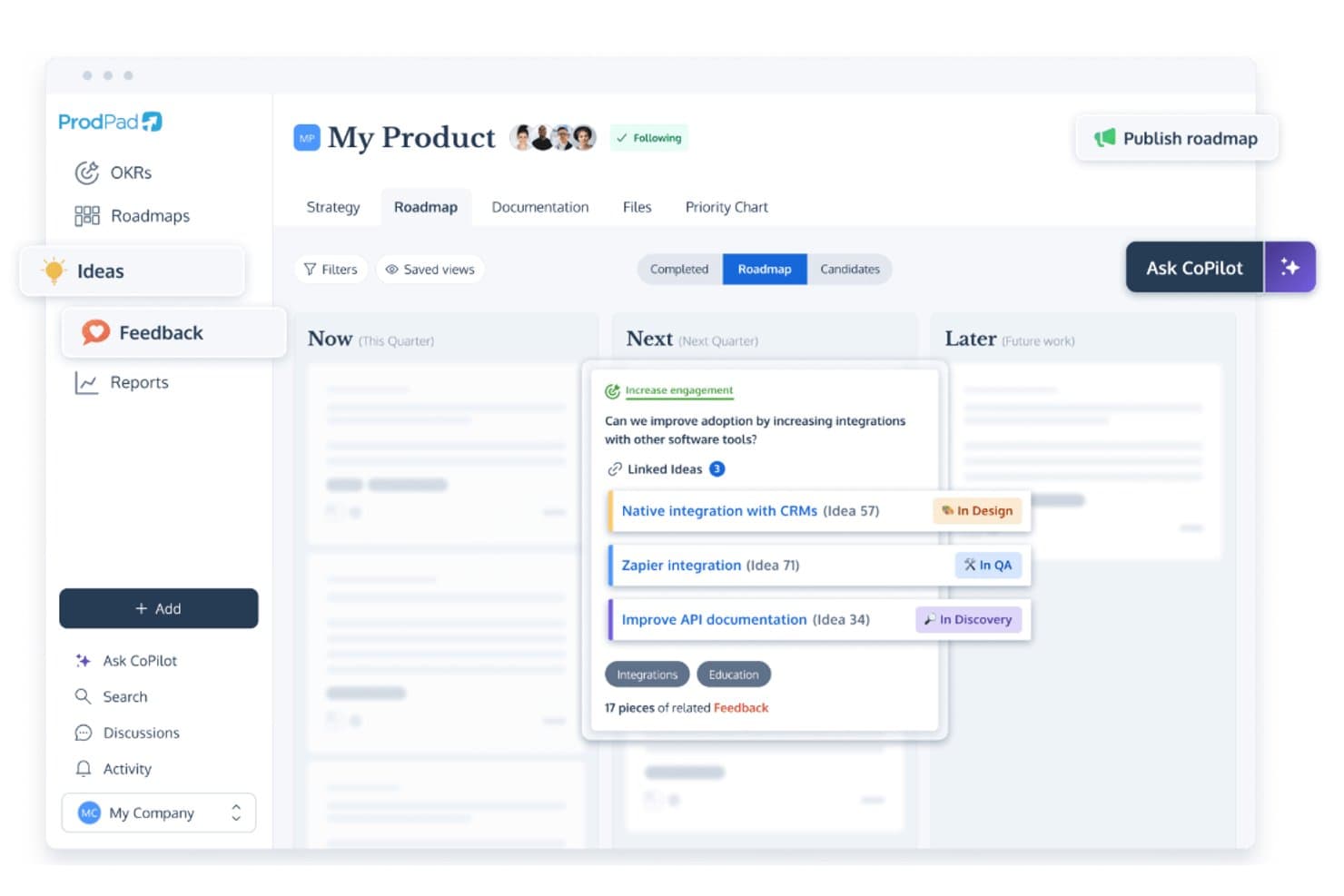
ProdPad links roadmap ideas to feedback and tracks development status. ProdPad is a product discovery and roadmapping platform built around feedback management, idea backlog organization, AI-assisted synthesis, and Now-Next-Later roadmapping.
Who Is ProdPad Best for?
ProdPad is a strong fit for product managers who need a clear, traceable link between customer feedback and roadmap decisions.
Why I Picked ProdPad
I picked ProdPad as one of the best because no other tool on this list makes the connection between raw customer feedback and roadmap decisions as traceable. Every piece of feedback links bidirectionally to the idea it influenced and the initiative it maps to, so you always know why something is on the roadmap. AI Signals surfaces recurring themes across your feedback corpus automatically, and CoPilot flags duplicate ideas in the backlog before they create noise.
ProdPad Key Features
- Now-Next-Later roadmap: A lean roadmap format organized by strategic time horizon rather than fixed dates, helping teams prioritize by outcome over output.
- Unlimited free reviewer seats: Any number of stakeholders—engineers, executives, sales, or CS—can access ProdPad as Reviewers at no added cost.
- CoPilot AI product coach: An embedded AI assistant that pressure-tests decisions, drafts specs and summaries, and generates measurable Key Results from broad strategic goals.
- Modular pricing: Teams can purchase only the modules they need—Roadmaps, Ideas, or Feedback—and add more as their discovery practice grows.
ProdPad Integrations
ProdPad offers native integrations with Jira, Azure DevOps, Linear, Salesforce, Intercom, Slack, Microsoft Teams, and Confluence. It also supports an API, webhooks, and Zapier for custom connectivity.
Pros and Cons
Pros:
- AI auto-detects feedback themes and duplicates
- Unlimited free reviewer seats for collaboration
- Feedback links directly to roadmap items
Cons:
- No native research interview repository
- No built-in surveys or testing tools
Learn more about ProdPad: 10Best for AI-driven continuous customer insight
Dovetail
- Free plan + free demo available
- Pricing upon request
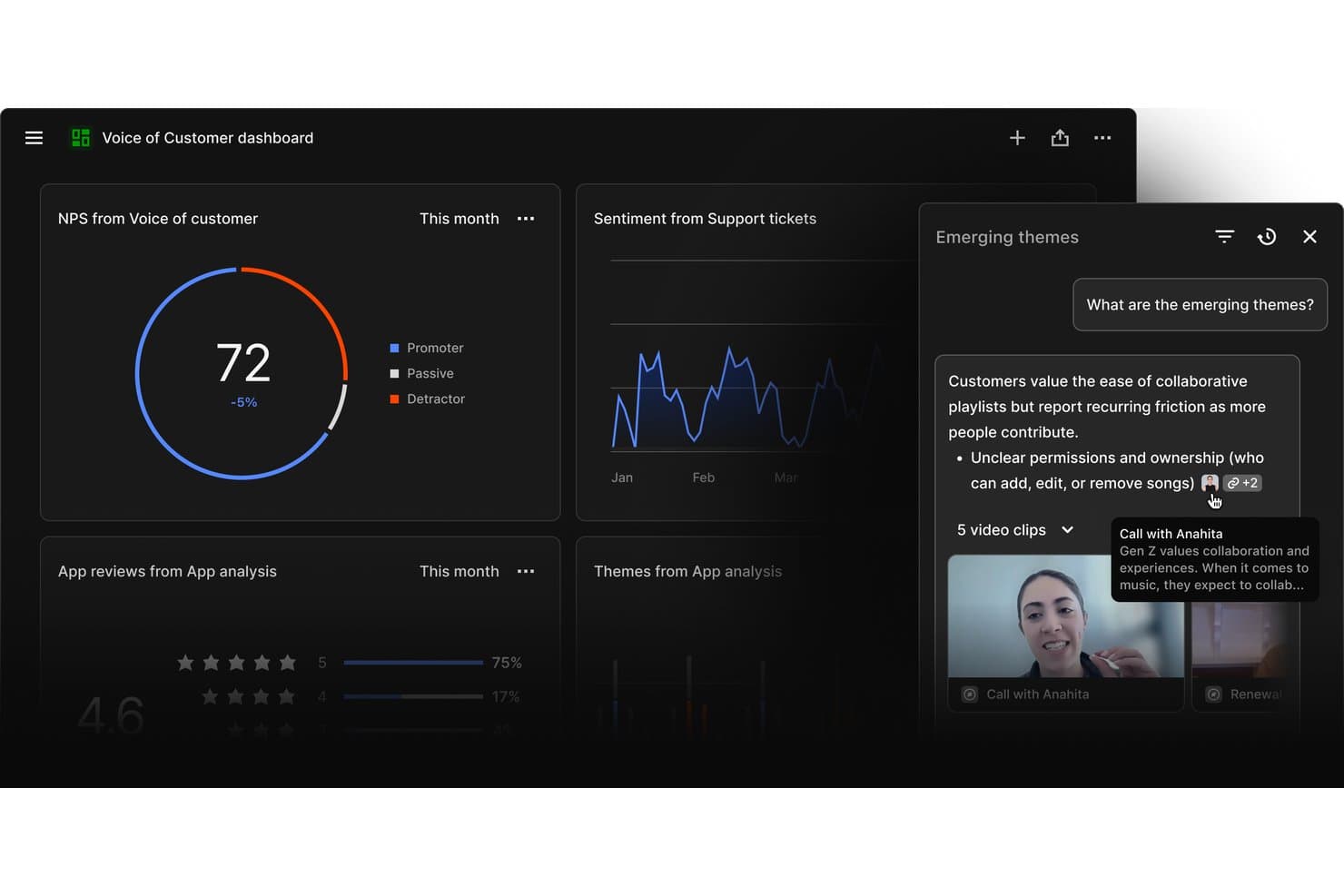
Dovetail surfaces emerging customer themes from mixed research sources. Dovetail is a customer intelligence platform that centralizes feedback from support tickets, sales calls, surveys, and app reviews, using AI to transcribe, cluster, and synthesize qualitative data into ranked, evidence-backed opportunities for product teams.
Who Is Dovetail Best For?
Dovetail is a strong fit for product and research teams at mid-to-large companies that need to turn high volumes of customer feedback into prioritized, evidence-backed opportunities across the full organization.
Why I Picked Dovetail
Dovetail earns its spot on my shortlist because its AI Channels 2.0 turns continuous feedback into ranked, revenue-weighted opportunities without any manual triage. I particularly like how it weights each opportunity by ARR impact using Salesforce enrichment, so I'm not just seeing what customers mention most often but what actually matters to the business. The Digital Twins feature lets me pressure-test assumptions against real customer conversations before a single line of code is written.
Dovetail Key Features
- AI Clustering: Automatically groups high-volume feedback into themes without requiring manual tagging, so your team can surface patterns at scale.
- Multi-language transcription: Auto-transcribes and translates customer interviews and calls across 75 languages with multi-speaker recognition built in.
- AI Agents: Configurable, no-code agents that monitor your customer data and push scheduled or triggered insight updates to Slack, Teams, or email.
- MCP Server: Connects Dovetail's insight layer directly to Claude, ChatGPT, and Microsoft Copilot, embedding customer evidence into your team's existing AI workflows.
Dovetail Integrations
Dovetail offers 38 native integrations, including Jira, Linear, Productboard, Figma Make, Slack, Microsoft Teams, Notion, Salesforce, Zendesk, and Gong. It also supports custom connections through its API, CLI, and MCP Server, plus Zapier.
Pros and Cons
Pros:
- Shares evidence-backed insights with stakeholders automatically
- Transcribes and synthesizes feedback in 75 languages
- AI ranks opportunities by revenue impact
Cons:
- No built-in RICE or MoSCoW scoring
- Cannot validate prototypes or run usability tests
Learn more about Dovetail:
Andre verktøy for produktoppdagelse
Her er noen flere alternativer for verktøy for produktoppdagelse som ikke kom med på kortlisten, men som likevel er verdt å se nærmere på:
- 11DragonboatBest for portfolio-led discovery prioritization
- 12Zeda.ioBest for revenue-linked feedback synthesis
- 13UserTestingBest for research-heavy usability validation
- 14AirtableBest for multi-framework feature prioritization
- 15HarvestrBest for revenue-linked feedback prioritization
- 16ZefiBest for AI-driven VoC to opportunity mapping
How I Evaluate Product Discovery Tools
I evaluate product discovery tools in two layers: baseline requirements like customer feedback synthesis, opportunity management, and idea validation, then the differentiators that separate strong tools from the rest.
Core Functionality (Table Stakes For This List)
When I'm selecting tools for my list, I rank each one on a scale from 0 (does not offer the functionality) to 5 (excels in this area) for each core functionality listed below. Then, I calculate the tool's total score into a percentage. Each tool needs to achieve a minimum total score of 65% to be considered for inclusion.
- Customer Feedback Aggregation: I check whether a tool can centralize qualitative and quantitative feedback from sources like customer interviews, surveys, support tickets, and sales calls so teams can work from a shared repository.
- Insight Synthesis & Tagging: I look for tools that can turn raw feedback into structured insights through tagging, clustering, thematic grouping, or other synthesis methods that help teams identify recurring patterns.
- Opportunity & Idea Management: I evaluate whether teams can capture, organize, and track product opportunities, hypotheses, and ideas discovered through research. Strong tools connect these opportunities back to the customer evidence and outcomes behind them.
- Hypothesis Validation Tools: I look at how the platform helps teams test product assumptions before committing to development, whether through surveys, prototype tests, customer interviews, experiments, or other validation methods.
- Prioritization Frameworks: I assess whether teams can rank opportunities using built-in scoring or prioritization models such as RICE, MoSCoW, or weighted scoring. I also look for flexibility in how criteria are configured and tied to user evidence and business impact.
- Discovery Collaboration & Sharing: Discovery work needs input from across product, design, and research. I look for shared workspaces, comments, stakeholder views, and other ways teams can review and act on discovery findings together.
Once I have a list of tools that meet this criteria, I consider what sets each platform apart.
Differentiating Factors (What Sets Vendors Apart)
Here's how I compare and contrast different vendors:
Standout Features
AI research synthesis is a major differentiator. Tools that can transcribe interviews, extract highlights, and surface recurring themes can reduce the manual work involved in analyzing customer research. I also look for opportunity solution trees that connect outcomes, opportunities, solutions, and experiments, as well as evidence linking that traces product decisions back to customer insights. Continuous interview recruiting can help teams maintain a regular research cadence, while roadmap and delivery integrations make it easier to move validated opportunities into tools like Jira or Linear without losing discovery context.
Beyond Features
Integration depth is one of the first things I evaluate. A discovery tool that connects to your CRM, support platform, research tools, and delivery stack means less manual work moving customer evidence between systems. I also consider how well a platform supports cross-functional teams and different levels of discovery maturity. Methodology alignment matters too, particularly for teams using approaches like Continuous Discovery Habits, Jobs-to-be-Done, Dual Track Agile, or Lean Startup. Finally, I consider security and onboarding factors like permissions, data privacy controls, templates, migration support, and training resources.
Slik velger du verktøy for produktoppdagelse
Det er lett å gå seg vill i lange funksjonslister og kompliserte prismodeller. For å hjelpe deg med å holde fokus mens du går gjennom din unike prosess for valg av programvare, får du her en sjekkliste over faktorer du bør ha i bakhodet:
| Faktor | Hva du bør vurdere |
|---|---|
| FaktorSkalerbarhet | Hva du bør vurdereKan verktøyet vokse sammen med teamet ditt? Vurder om det håndterer større datamengder og flere brukere uten ytelsesproblemer. Se etter tegn som brukerbegrensninger eller datagrenser. |
| FaktorIntegrasjoner | Hva du bør vurdereKan det kobles til verktøyene du allerede bruker? Sjekk om det integreres med CRM-systemet ditt, kommunikasjonsapper eller plattformer for dataanalyse. Unngå verktøy med begrensede API-er. |
| FaktorTilpasningsmuligheter | Hva du bør vurdereKan du tilpasse det til arbeidsflyten din? Se etter tilpassbare felt, oversikter og brukerroller. Unngå stive systemer som ikke tilpasser seg behovene dine. |
| FaktorBrukervennlighet | Hva du bør vurdereEr det intuitivt for teamet ditt? Test grensesnittet for enkel navigering og minimalt behov for opplæring. Unngå kompliserte oppsett som frustrerer brukerne. |
| FaktorImplementering og introduksjon | Hva du bør vurdereHvor lang tid tar det før du er i gang? Se etter rask konfigurering, opplæringsressurser og støtte under introduksjonen. Unngå lange implementeringstider som bremser fremdriften. |
| FaktorKostnad | Hva du bør vurderePasser det inn i budsjettet ditt? Sammenlign totalkostnaden med budsjettet ditt, inkludert skjulte gebyrer. Se etter fleksible prisplaner eller rabatter ved årlig betaling. |
| FaktorSikkerhetstiltak | Hva du bør vurdereEr dataene og personvernet ditt beskyttet? Sørg for at verktøyet følger sikkerhetsstandarder som kryptering og tilgangskontroller. Unngå verktøy med uklare sikkerhetspolicyer. |
Hva er verktøy for produktoppdagelse?
Verktøy for produktoppdagelse er programvareløsninger som hjelper team med å samle innsikt og prioritere produktfunksjoner. Produktledere, UX-designere og utviklingsteam bruker vanligvis disse verktøyene for å samkjøre kundebehov og forretningsmål. Funksjoner som innsamling av kundetilbakemeldinger, funksjonsprioritering og veikartlegging hjelper med beslutningstaking og samarbeid. Alt i alt gir disse verktøyene klarhet og retning for vellykket produktutvikling.
Funksjoner
Når du velger verktøy for produktoppdagelse, bør du se etter følgende viktige funksjoner:
- Innsamling av kundetilbakemeldinger: Samler inn brukerinnsikt for å informere produktbeslutninger og samkjøre dem med kundebehov.
- Funksjonsprioritering: Hjelper team med å rangere funksjoner basert på innvirkning, slik at de mest verdifulle funksjonene utvikles først.
- Veikartlegging: Visualiserer produktets utviklingsbane og hjelper team og interessenter med å forstå tidslinjer og prioriteringer.
- Integrasjonsmuligheter: Kobler seg til eksisterende verktøy som CRM- og kommunikasjonsapper, og sikrer sømløs dataflyt på tvers av plattformer.
- Tilpassbare dashbord: Lar brukere tilpasse visningen slik at de kan fokusere på relevante måleverdier og relevant informasjon.
- Samarbeidsverktøy: Tilrettelegger for kommunikasjon og samkjøring i teamet, slik at alle har samme forståelse.
- KI-drevet innsikt: Utnytter kunstig intelligens til å gi datadrevne anbefalinger og prognoser.
- Sikkerhetstiltak: Beskytter data med kryptering og tilgangskontroller, og sikrer personvern og samsvar.
- Interaktive produktomvisninger: Tilbyr veiledede gjennomganger som hjelper nye brukere med raskt å forstå og ta i bruk verktøyet.
- Analyse og rapportering: Gir detaljert innsikt i produktytelse og brukeradferd for bedre beslutningstaking.
Fordeler
Implementering av verktøy for produktoppdagelse gir flere fordeler for teamet og virksomheten din. Her er noen av fordelene du kan se frem til:
- Bedre beslutningstaking: Med kundetilbakemeldinger og datadrevet innsikt kan teamet ditt ta informerte valg om produktfunksjoner og prioriteringer.
- Forbedret samarbeid: Delte veikart og samarbeidsverktøy bidrar til å holde teamet samkjørt og arbeide mot felles mål.
- Økt effektivitet: Prioriteringsfunksjoner sikrer at teamet ditt fokuserer på de mest virkningsfulle oppgavene først, noe som sparer tid og ressurser.
- Forbedret kundetilfredshet: Ved å samkjøre produktutviklingen med brukernes behov leverer du produkter som treffer målgruppen bedre.
- Tydelig produktvisjon: Veikartlegging gir en visuell fremstilling av produktets fremtid og hjelper interessenter med å forstå retningen og tidslinjen.
- Redusert risiko: KI-drevet innsikt og analyse bidrar til å identifisere potensielle fallgruver tidlig, slik at teamet ditt kan håndtere dem proaktivt.
- Datasikkerhet: Med robuste sikkerhetstiltak forblir teamets og kundenes data beskyttet, noe som sikrer samsvar og tillit.
Kostnader og priser
Valg av verktøy for produktoppdagelse krever en forståelse av de ulike prismodellene og abonnementene som er tilgjengelige. Kostnadene varierer basert på funksjoner, teamstørrelse, tillegg og mer. Tabellen nedenfor oppsummerer vanlige abonnementer, gjennomsnittsprisene deres og typiske funksjoner som er inkludert i løsninger for verktøy for produktoppdagelse:
Sammenligningstabell for verktøy for produktoppdagelse
| Abonnementstype | Gjennomsnittspris | Vanlige funksjoner |
|---|---|---|
| AbonnementstypeGratisabonnement | Gjennomsnittspris$0 | Vanlige funksjonerGrunnleggende innsamling av tilbakemeldinger, begrenset funksjonsprioritering og enkel veikartlegging. |
| AbonnementstypePersonlig abonnement | Gjennomsnittspris$5-$25/bruker/måned | Vanlige funksjonerForbedrede verktøy for tilbakemeldinger, tilpassbare dashbord og integrasjoner med grunnleggende apper. |
| AbonnementstypeBedriftsabonnement | Gjennomsnittspris$30-$75/bruker/måned | Vanlige funksjonerAvansert analyse, samarbeidsverktøy for team og flere integrasjoner. |
| AbonnementstypeVirksomhetsabonnement | Gjennomsnittspris$80+/bruker/måned | Vanlige funksjonerFullt funksjonssett, dedikert brukerstøtte og avanserte sikkerhetstiltak. |
Vanlige spørsmål om verktøy for produktoppdagelse
Her er noen svar på vanlige spørsmål om verktøy for produktoppdagelse:
Hvordan samler team innsikt ved hjelp av verktøy for produktoppdagelse?
Team registrerer vanligvis brukerintervjuer, spørreundersøkelsesdata og mønstre i produktbruken på ett sted. Du kan merke innsikter, knytte dem til ideer og dele dem på tvers av team. Dette gjør oppdagelsesarbeidet synlig og knyttet til beslutningstaking. Det unngår også silooppdelt forskning.
Hvordan håndterer verktøy for produktoppdagelse administrasjon av idéetterslep?
Du kan opprette, merke og organisere ideer etter hvert som de kommer inn. Noen verktøy vurderer ideer basert på innvirkning, innsats eller samsvar med målene. Dette hjelper teamet med å unngå funksjonsoppblåsing og fokusere på det som betyr noe. Du kan gå tilbake til eldre ideer når konteksten endrer seg.
Støtter verktøy for produktoppdagelse smidig utvikling med to spor?
Ja, mange verktøy støtter at oppdagelse og levering skjer samtidig. De lar deg utforske og validere ideer mens teamet fortsetter å bygge. Du kan enkelt flytte ideer mellom oppdagelses- og leveransesporet, slik at begge innsatsområdene forblir samordnet.
Passer verktøy for produktoppdagelse for små team?
Ja, verktøy for produktoppdagelse passer for små team. Mange verktøy tilbyr skalerbare funksjoner som tilpasses teamets størrelse og behov. De tilbyr viktige funksjoner som innsamling av tilbakemeldinger og prioritering av funksjoner, og hjelper små team med å holde seg organiserte og fokuserte på målene sine uten overveldende kompleksitet.