

Med så mange ulike løsninger for tilbakemeldinger på design tilgjengelig, er det vanskelig å finne ut hvilken som passer for deg. Du vet at du ønsker å samle inn og implementere tilbakemeldinger mer effektivt, men må finne ut hvilket verktøy som er best. Jeg hjelper deg! I dette innlegget hjelper jeg deg med å gjøre valget enkelt ved å dele mine personlige erfaringer med bruk av dusinvis av ulike verktøy for tilbakemeldinger sammen med store designteam og prosjekter, samt mine anbefalinger av de beste verktøyene for tilbakemeldinger på design.
Dette verktøyet lar oss få tilbakemeldinger i sanntid, også ved hjelp av skjermopptak eller GIF-er for tydelighetens skyld. Og hvis du ønsker å bygge inn en tilbakemeldingsprosess på et aktivt nettsted, blir dette verktøyet et uunnværlig verktøy for tilbakemeldinger på nettsteder. Så la oss utforske de beste alternativene som finnes, skal vi vel?
Hva er et verktøy for tilbakemeldinger på design?
Verktøy for tilbakemeldinger på design er digitale plattformer som hjelper team med å samle inn, analysere og implementere tilbakemeldinger på designene sine. Hovedformålet med programvare for tilbakemeldinger på design er å gi informasjon til designprosessen og forbedre designresultatene ved å legge til rette for tilbakemeldingssløyfen. Mange av disse verktøyene har funksjoner som hjelper med innhenting av tilbakemeldinger, analyse og prioritering.
Hvorfor du kan stole på våre programvareanbefalinger
6,700+
Reviews
20
Industry experts
16+
Evaluation factors
14
Years
Teamet vårt har testet og anmeldt programvare siden 2012. Vi er selv produktledere, så vi vet hvor vanskelig og hvor viktig det er å velge riktig programvare.
I denne guiden har vi vurdert verktøyene gjennom praktisk testing og uavhengig research og gitt dem poeng ut fra våre utvelgelseskriterier.
Anmeldelsene våre bygger på vår egen redaksjonelle vurdering. De er ikke et salgsargument.
Ekspertanmeldere:
- Andrew LumbySenior TPM
- Cristiano ValimSenior UI/UX Lead


Sammenligningstabell for verktøy for designtilbakemeldinger
| Tool | Best For | Trial Info | Price | ||
|---|---|---|---|---|---|
| 1 | Best for live web and staging feedback with AI triage | Free plan available | From $9/user/month | Website | |
| 2 | Best for tracking visual design bugs and issues | Free trial available | From $50/month | Website | |
| 3 | Best for collaborative brainstorming and ideation | Free plan + 14-day free trial available | From $8/user/month (billed annually) | Website | |
| 4 | Best for automated version diffing | Free demo + 10-day free trial available | From $249/month | Website | |
| 5 | Best for structured multi-stage creative approvals | 30-day free trial + free plan + free demo available | From $199/month | Website | |
| 6 | Best for multi-format proofing with unlimited guests | Free trial + free demo available | From $12/month (billed annually) | Website | |
| 7 | Best for multi-format assets with no per-seat fees | 14-day free trial | From $99/month | Website | |
| 8 | Best for web design project management | Free plan + free demo available | From $35/user/month | Website | |
| 9 | Best for CPG and packaging label review cycles | 7-day free trial available | From $16/user/month (min. 3 users, billed annually) | Website | |
| 10 | Best for enterprise creative and marketing approvals | 14-day free trial + free plan + free demo available | From $199/month (billed annually) | Website |


De 10 beste oversiktene over verktøy for designtilbakemeldinger
 Best for live web and staging feedback with AI triage
- Free plan available
- From $9/user/month
Visit WebsiteCustomer Rating:4.8/5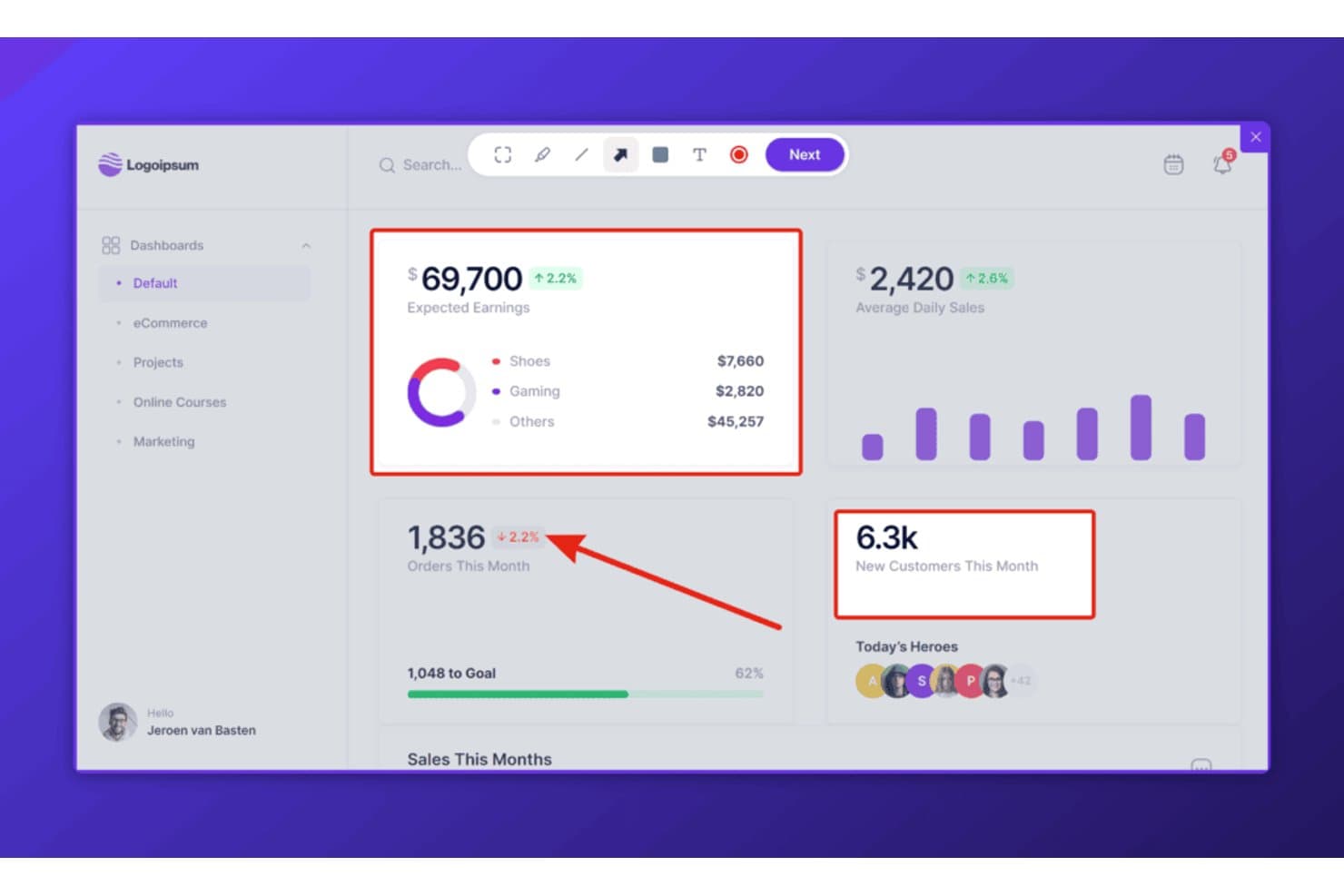
Userback lets users annotate screenshots directly on live dashboards. Userback is a web-based feedback tool that lets teams collect annotated screenshots, video recordings, and session replays directly on live websites, staging environments, and web apps.
Who Is Userback Best For?
Userback is a strong fit for product and engineering teams that need to collect and triage feedback directly on live websites, web apps, or staging environments.
Why I Picked Userback
I picked Userback as one of the best because it's purpose-built for collecting feedback directly on live websites and staging environments, which puts it in a category of its own. The embeddable widget and browser extension let reviewers pin annotated screenshots and record video with audio right on a deployed page, capturing console logs and browser metadata automatically alongside each submission. What really sets it apart is AI triage: Userback's AI Assist categorizes incoming feedback, detects recurring themes, and flags items needing a response, so nothing gets buried.
Userback Key Features
- Embeddable feedback widget: A JavaScript snippet you install on any live site or staging environment to let users submit annotated screenshots and video recordings directly from the page.
- Session replay: Records complete user sessions—capturing clicks, scrolling, rage clicks, and form inputs—for playback alongside submitted feedback items on Business plans and above.
- Two-way sync with dev tools: Connects to Jira, Linear, and ClickUp so that resolving an issue in either platform automatically updates its status in the other.
- Console log and metadata capture: Automatically attaches browser version, OS, screen resolution, URL, console logs, and network requests to every feedback submission for developer context.
Userback Integrations
Userback offers native integrations with Jira, Linear, ClickUp, GitHub, GitLab, Slack, and Microsoft Teams, plus REST API, webhooks, and Zapier support for custom connectivity.
Pros and Cons
Pros:
- AI triage surfaces recurring feedback themes
- Video feedback clarifies complex design issues
- Live website annotations with technical context
Cons:
- No side-by-side design version comparison
- No native Figma or Sketch workflows
Learn more about Userback: Best for tracking visual design bugs and issues
- Free trial available
- From $50/month
Visit WebsiteCustomer Rating:4.8/5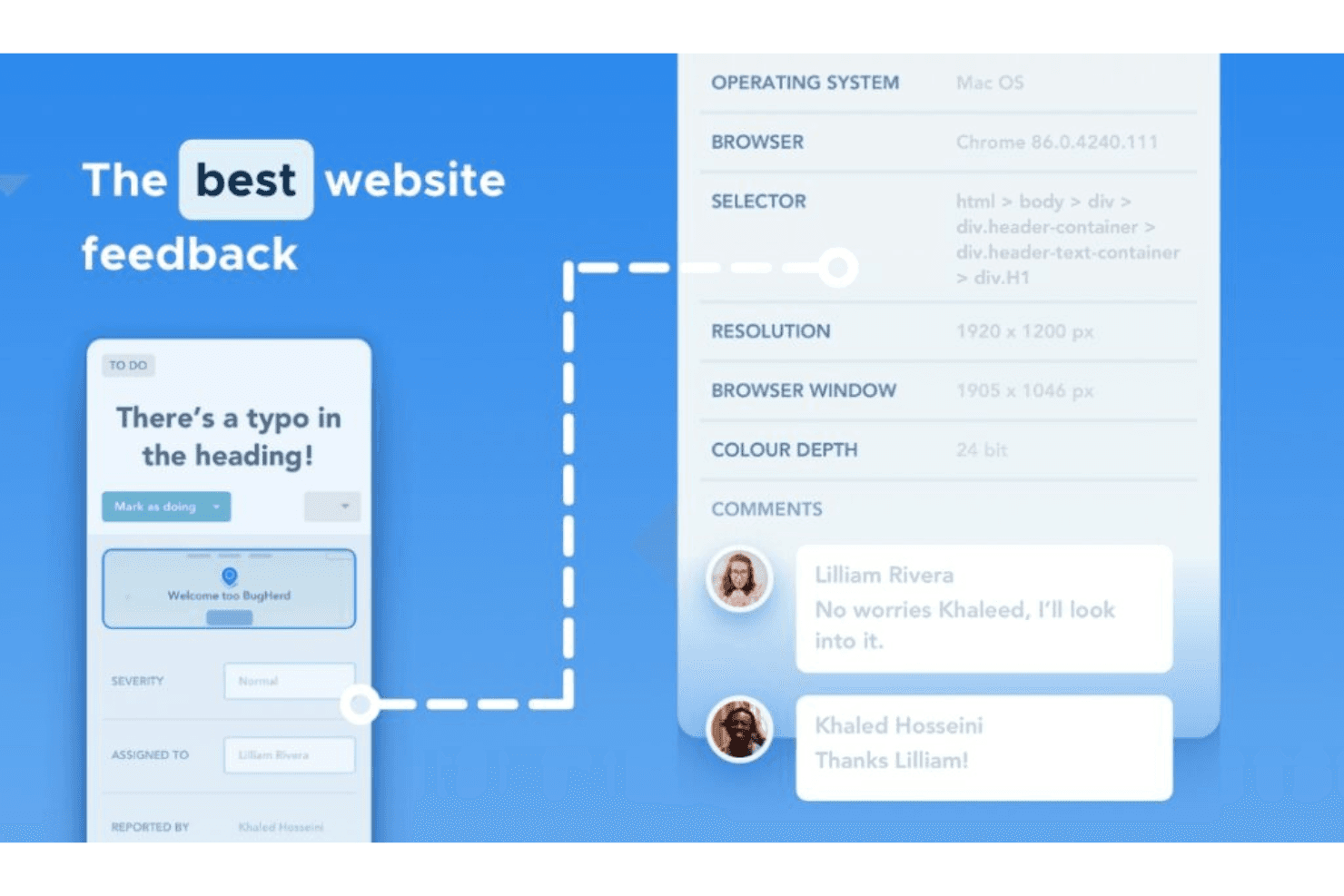
BugHerd provides technical information for bug resolution and handles feedback. BugHerd is a visual bug tracking and website feedback tool that lets teams pin comments directly on live sites, design files, images, and PDFs, with automatic screenshot and browser metadata capture on every submission.
Who Is BugHerd Best For?
BugHerd is a strong fit for product managers and UX/UI designers who need to collect and resolve pinned feedback on live websites or uploaded design files.
Why I Picked BugHerd
I've included BugHerd in my top picks because it's the strongest tool on this list for catching and resolving visual bugs on live websites. When a reviewer clicks a broken element, BugHerd pins the feedback directly to it and automatically captures a screenshot, browser, OS, and screen resolution, so developers get everything they need without a single back-and-forth. I also like its text-edit suggestion feature, which lets reviewers highlight copy on a live page and type a replacement directly, logging the original and proposed text as a task.
BugHerd Key Features
- Two-way PM tool sync: BugHerd connects natively with Jira, Asana, ClickUp, Monday.com, and Linear, syncing tasks, comments, and status in both directions.
- Video feedback recording: Reviewers can record up to one minute of screen and voice feedback, with OS and browser details attached automatically to each submission.
- Public feedback widget: A site-embedded widget lets visitors report issues directly on live pages, with optional email capture for follow-up.
- AI auto-tagging and duplicate detection: BugHerd's AI beta automatically tags incoming tasks and flags similar submissions to help teams spot duplicate reports before they pile up.
BugHerd Integrations
BugHerd offers 21+ native integrations, including Figma, Jira, Asana, ClickUp, Monday.com, Linear, Trello, and GitHub. It also supports custom connections through its REST API and webhooks, plus Zapier.
Pros and Cons
Pros:
- Supports video, image, PDF, and Figma feedback
- Captures screenshots and browser details automatically
- Pins feedback directly onto live websites
Cons:
- Imports Figma screens as static images
- Provides no design version comparison
Learn more about BugHerd: 3Best for collaborative brainstorming and ideation
Miro
- Free plan + 14-day free trial available
- From $8/user/month (billed annually)
Visit WebsiteCustomer Rating:4.8/5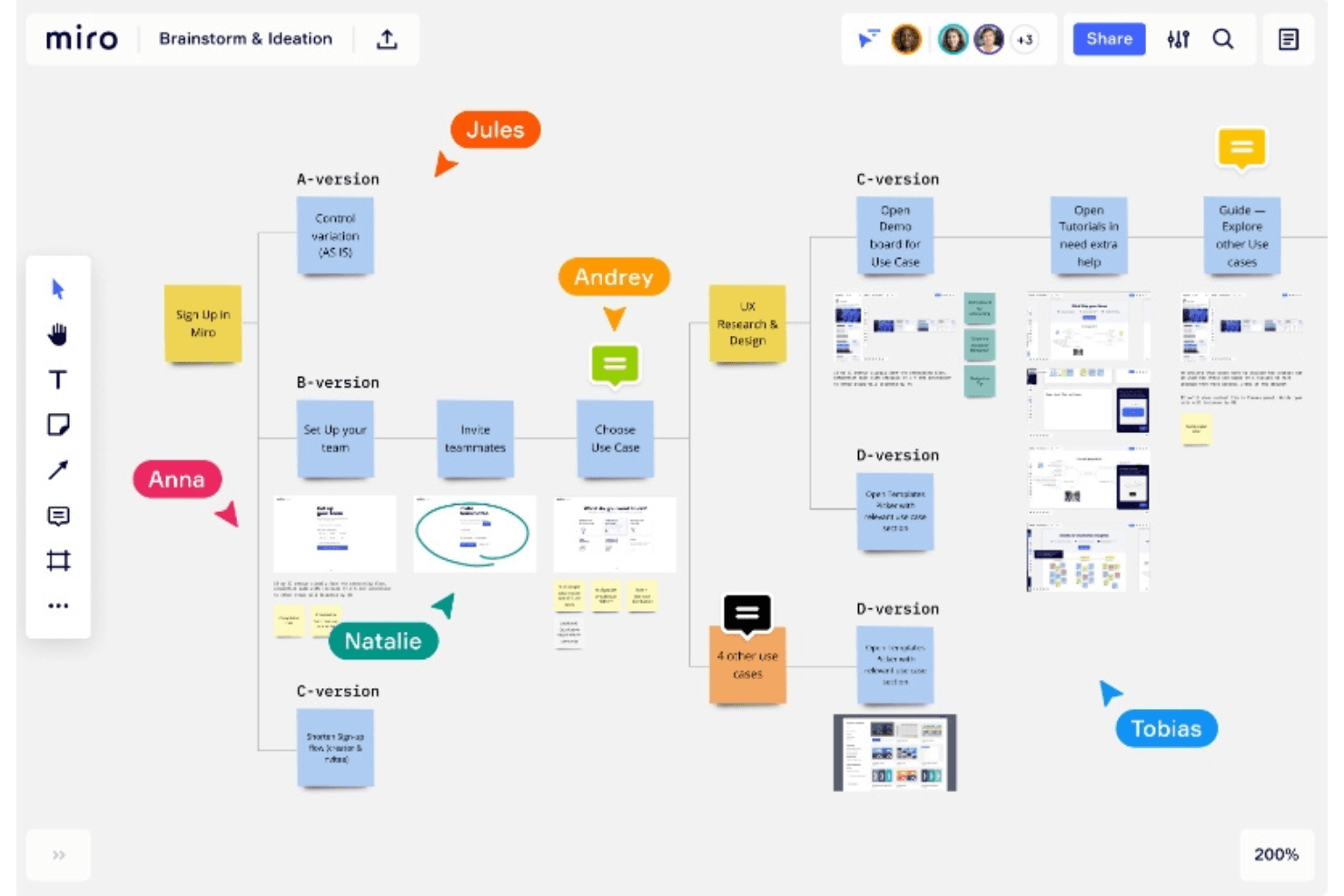
Brainstorm together and envision ideas at the speed of inspiration in Miro. Miro is a collaborative whiteboard platform that supports design feedback through pinned canvas comments, threaded discussions, AI-summarized review threads, and two-way integrations with tools like Jira, Asana, and Figma.
Who Is Miro Best For?
Miro works well for product managers and design directors who need to run cross-functional review cycles inside a tool their whole team already uses.
Why I Picked Miro
I've included Miro in my top picks because it's the tool I reach for when design feedback needs to happen inside the same space where the work is being shaped. The canvas lets teams place sticky notes and pinned comments directly on prototype screens, and Miro AI can summarize long comment threads and convert feedback into backlog items via Flows. When cross-functional stakeholders need to weigh in without a Figma license, Miro's visitor and guest access model keeps the conversation moving.
Miro Key Features
- Conversation summaries: Miro AI condenses long comment threads into short summaries using GPT-4.0, available on all plans.
- Guest access without paid seats: Invited guests on Business and above can view, comment, and mention teammates on private boards without using a paid seat.
- Two-way Jira sync: Jira Cards connect Miro boards to Jira Cloud, Server, and Data Center, syncing edits in both directions via webhooks.
- Board history and versioning: Boards are automatically saved every hour and at session end, with versions stored for 90 days and restorable as a separate board.
Miro Integrations
Miro offers 250+ integrations, including Figma, Adobe XD, Sketch, Jira, Asana, Azure DevOps, Linear, ClickUp, Trello, Slack, and Microsoft Teams. It also provides a REST API, SDKs, MCP server, and Zapier.
Pros and Cons
Pros:
- AI summarizes lengthy review threads
- External reviewers can join through links
- Pinned comments stay attached to visual assets
Cons:
- Comments lack assignees and due dates
- No live-website annotation or browser capture
 Best for automated version diffing
- Free demo + 10-day free trial available
- From $249/month
Visit WebsiteCustomer Rating:4.9/5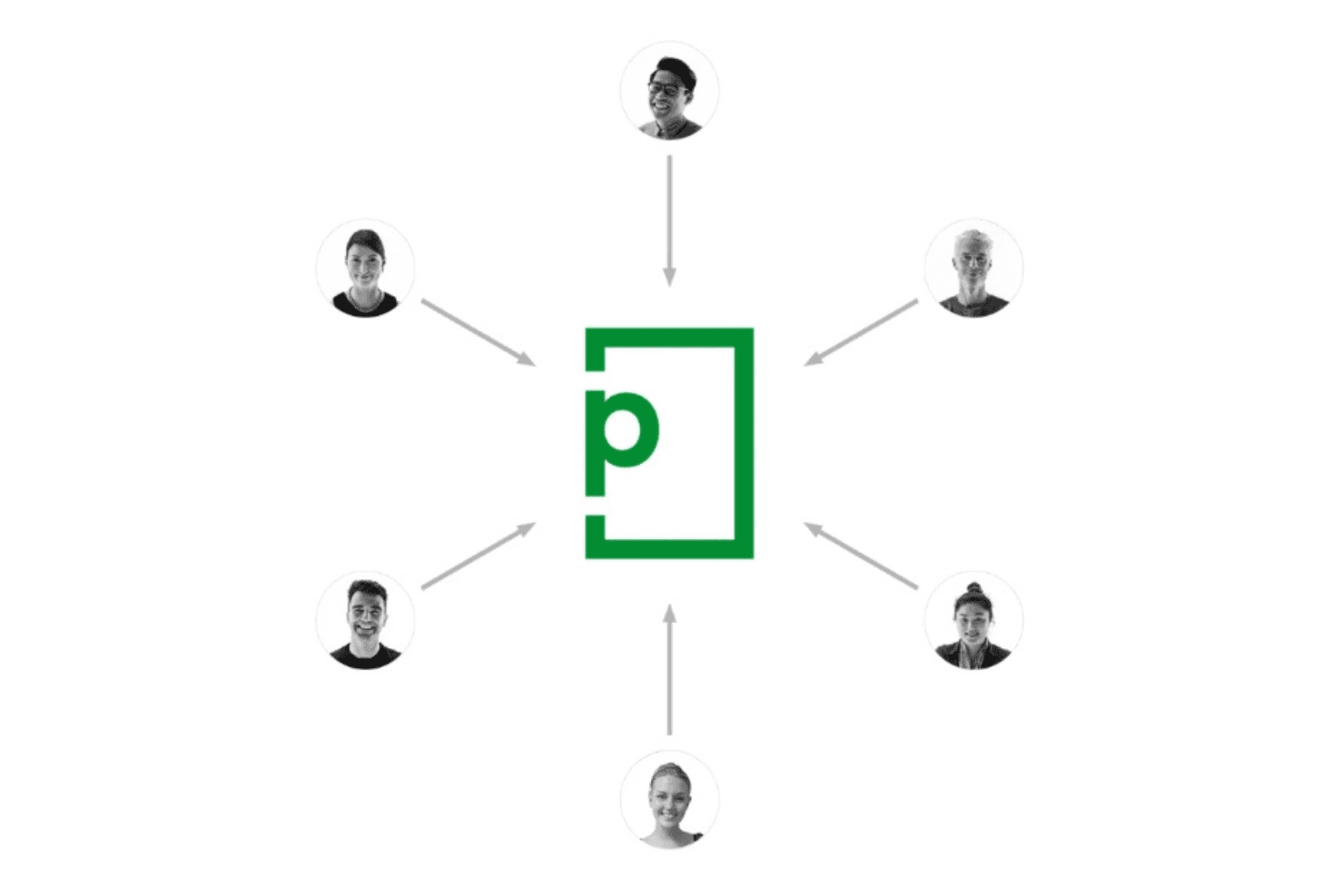
No more complex email trails and no more chasing feedback, PageProof streamlines it all. PageProof is an online proofing tool that lets teams annotate, review, and approve creative assets—including static files, live websites, Figma prototypes, HTML emails, video, and audio—within structured, multi-step approval workflows.
Who Is PageProof Best For?
PageProof is a strong fit for marketing and creative teams that manage high volumes of structured review cycles across multiple file types.
Why I Picked PageProof
PageProof earns its spot on my shortlist because of how well it handles version comparison specifically. Smart Compare automatically calculates visual differences between two versions, with a slider or quick-flick toggle and highlight overlays that make it easy to catch even subtle shifts. Smart Check goes further by surfacing hidden metadata changes like fonts, color profiles, and file dimensions during the compare. I've found that combination genuinely useful when reviewing multiple rounds of a campaign asset where small, hard-to-spot changes matter most.
PageProof Key Features
- Multi-format proof creation: Create proofs from static files, live website URLs, Figma prototype links, HTML emails, video, and audio—all within the same workspace.
- Structured multi-step workflows: Assign roles like owner, gatekeeper, and approver across sequential review steps, with decision thresholds and automated reminders at the proof level.
- Comment filtering and export: Filter comments by status, page, commenter, @mentions, keyword, and more, then export the full comment set to CSV.
- Design tool plugins: Review, reply to, and resolve comments directly inside Figma, Adobe InDesign, Photoshop, Illustrator, and other creative apps without leaving your design environment.
PageProof Integrations
PageProof offers native integrations with Figma, Adobe Creative Cloud, Canva, Jira, Asana, monday.com, ClickUp, Trello, Slack, and Microsoft Teams. Enterprise plans add webhooks, an advanced API, and an SDK; Zapier and Make are also supported.
Pros and Cons
Pros:
- Structured approvals preserve comment context
- Live website markup reflects rendered pages
- Automated version diffing catches subtle changes
Cons:
- Large documents can trigger occasional glitches
- Comment status lacks assignees and due dates
Learn more about PageProof: Best for structured multi-stage creative approvals
- 30-day free trial + free plan + free demo available
- From $199/month
Visit WebsiteCustomer Rating:4.7/5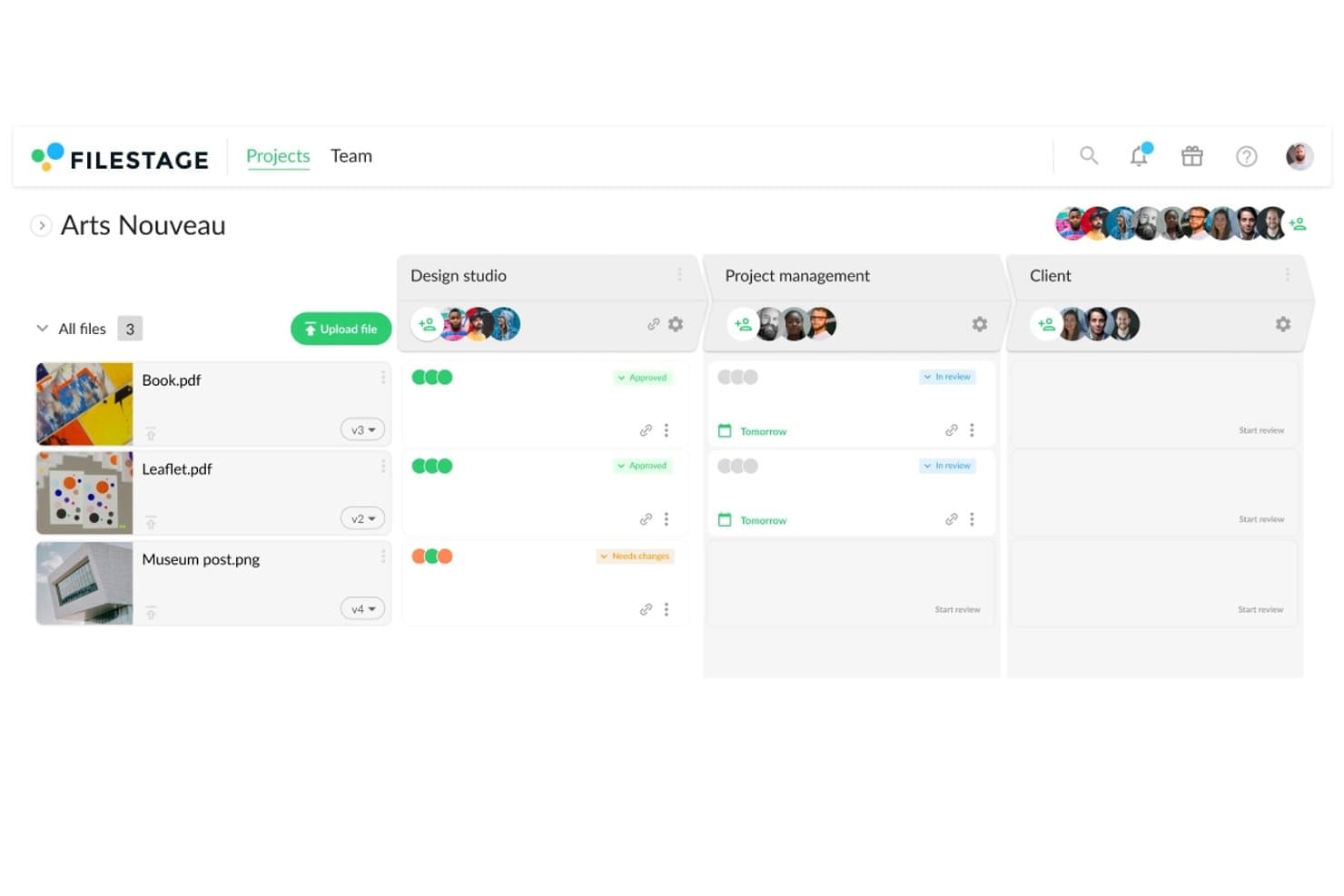
Filestage tracks design file approval status across reviewer groups. Filestage is an online proofing and creative review platform that supports pinned annotation, staged reviewer workflows, version comparison, and feedback consolidation across images, video, documents, and live websites.
Who Is Filestage Best For?
Filestage is a strong fit for creative and marketing teams that manage multi-stage approval workflows with external stakeholders, clients, or regulated reviewers.
Why I Picked Filestage
Filestage earns its spot on my shortlist because of how well it handles structured, multi-stage creative approvals. I love that you can build separate reviewer groups, so design goes to internal stakeholders first, then to legal, then to the client, each in sequence. Paired with staged review decisions and exportable PDF audit reports, every approval cycle is fully traceable.
Filestage Key Features
- Live website and prototype review: Import any URL to comment directly on a rendered live site or interactive prototype, with each comment automatically saving a screenshot, screen size, and browser details.
- Unlimited guest reviewers: External stakeholders can access and annotate files on any plan via a shared link, with no account required.
- Adobe plugin integrations: Native plugins for Premiere Pro, After Effects, InDesign, and Photoshop let creative teams send files to Filestage and sync feedback without leaving their tools.
- AI-powered Review Agents: Automated agents check files for grammar, compliance, forbidden terms, required logos, and barcodes on Business and Enterprise plans.
Filestage Integrations
Filestage offers native integrations with Adobe Premiere Pro, After Effects, InDesign, Photoshop, Google Drive, Dropbox, and monday.com. It also provides a Jira marketplace app, webhooks, a REST API on Business and higher, and Zapier.
Pros and Cons
Pros:
- Guests review without creating accounts
- Staged approvals separate design, legal, clients
- Pin comments to exact visual locations
Cons:
- No automatic image difference detection
- Resolved comments stay hidden from guests
Learn more about Filestage: Best for multi-format proofing with unlimited guests
- Free trial + free demo available
- From $12/month (billed annually)
Visit WebsiteCustomer Rating:4.7/5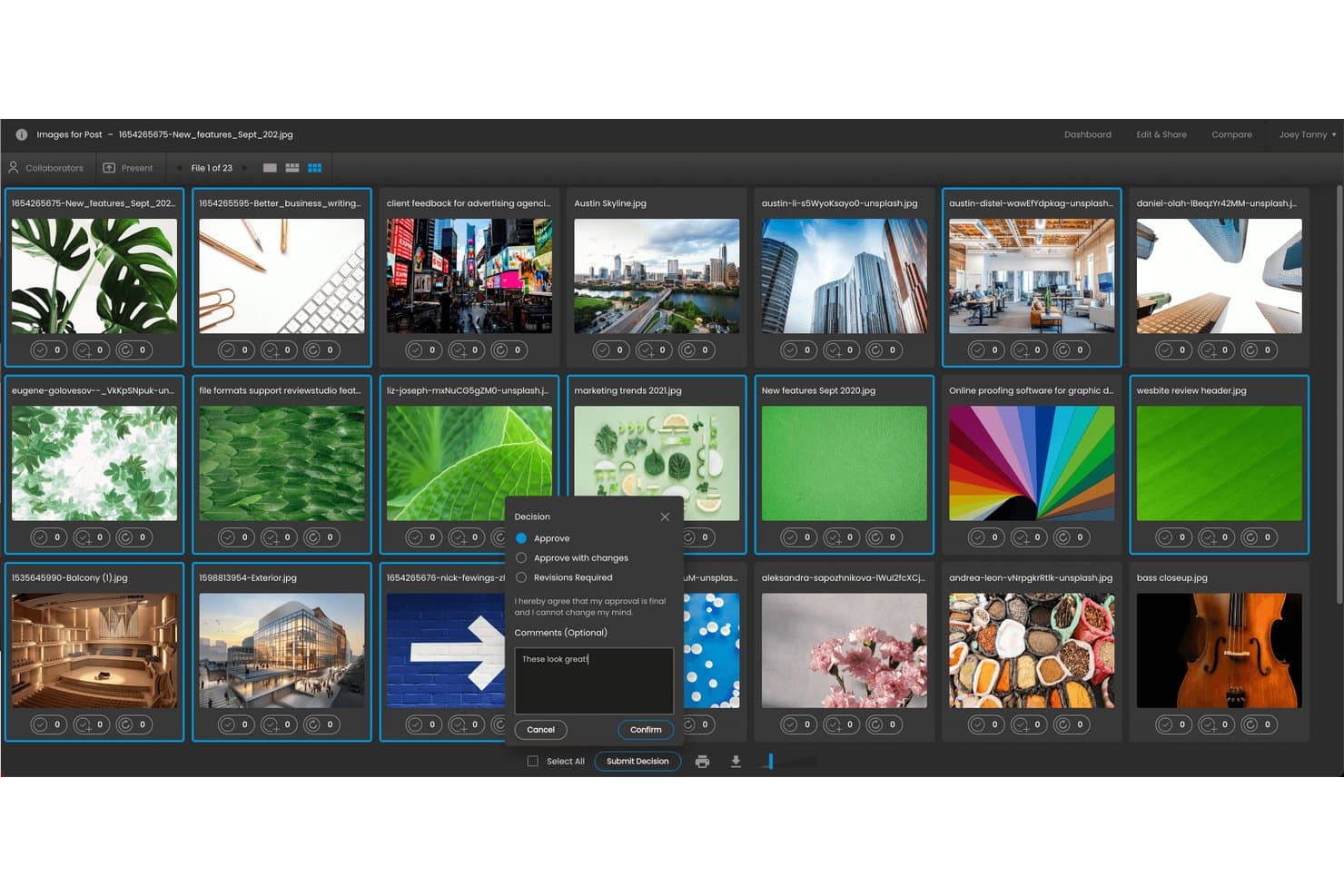
ReviewStudio lets users approve files and add comments in one step. ReviewStudio is an online proofing and design feedback tool that supports annotation, version comparison, and approval workflows across images, video, PDFs, audio, 3D files, and live websites.
Who Is ReviewStudio Best For?
ReviewStudio suits creative agencies and marketing teams that review a wide mix of file types—video, PDF, images, and live websites—with clients or external stakeholders who shouldn't need a paid account.
Why I Picked ReviewStudio
I picked ReviewStudio as one of the best because no other tool on my shortlist handles as many file types while keeping external reviewers completely free. I love how live website annotation works here: reviewers switch between Interact mode to click through a real page and Annotate mode to drop pinned comments, all through a live URL proxy. Pair that with unlimited guests on every plan, including the free tier, and client review rounds stop being a seat-counting headache.
ReviewStudio Key Features
- Side-by-side compare mode: View any two file versions simultaneously with synced pan, zoom, and video playback to spot differences across revisions.
- Automated diff highlighting: Toggle a diff overlay in compare mode to highlight pixel-level differences in red between two same-size files.
- Multi-stage approval workflows: Build branching workflows with per-stage deadlines, custom goals, and checklist requirements reviewers must complete before approving.
- PM tool integrations: Native connections to Asana, Monday.com, and Wrike sync review tasks and approvals directly into your existing project management setup.
ReviewStudio Integrations
ReviewStudio offers native integrations with Asana, monday.com, Wrike, and Kantata, plus an Adobe Photoshop plugin. It also supports Make, an API with webhooks, and Zapier.
Pros and Cons
Pros:
- Version diffing clarifies revision changes
- Live website markup captures interactive feedback
- Unlimited guests simplify external review rounds
Cons:
- Mobile canvas can feel glitchy
- Tasks lack an in-progress status
Learn more about ReviewStudio: Best for multi-format assets with no per-seat fees
- 14-day free trial
- From $99/month
Visit WebsiteCustomer Rating:4.3/5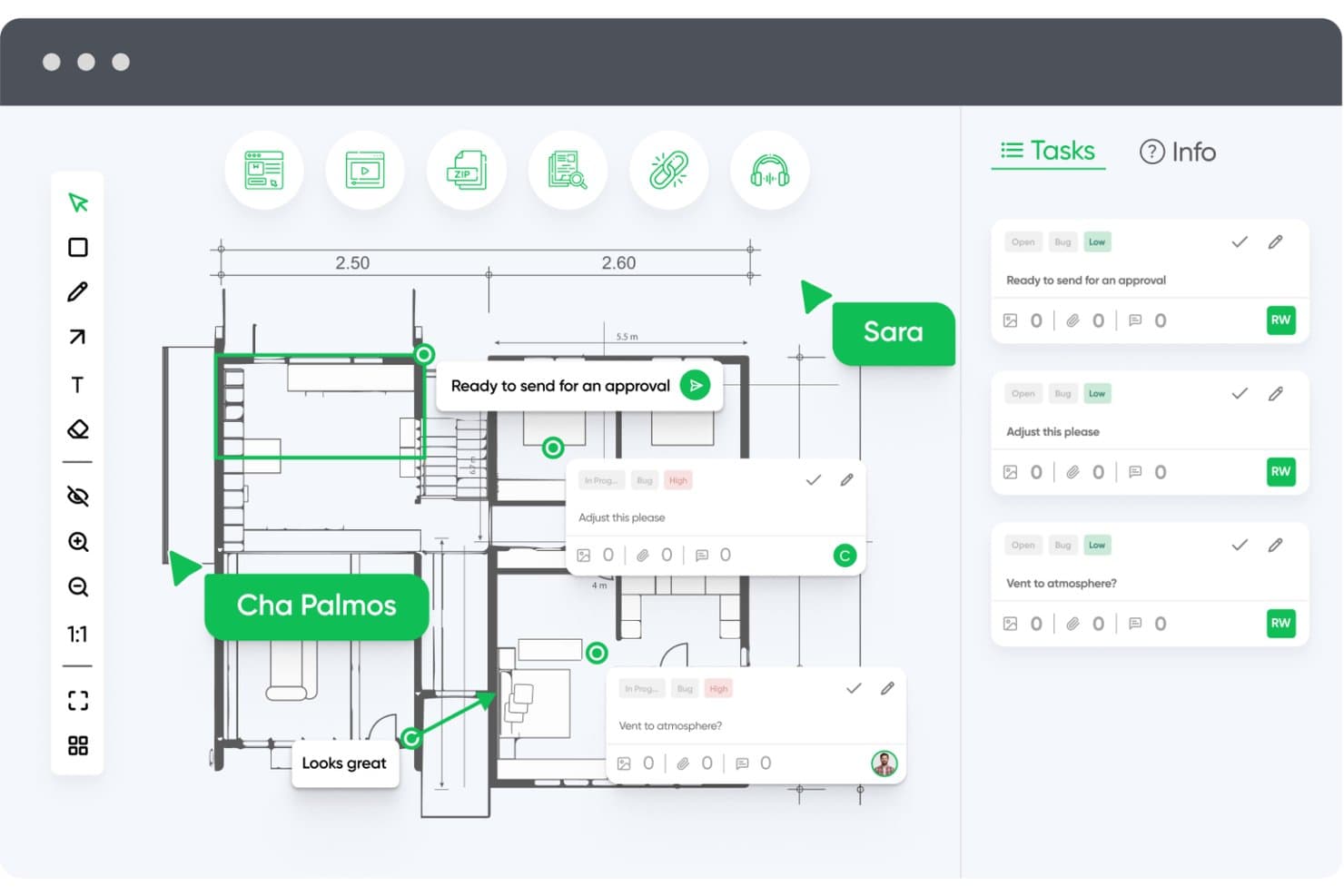
zipBoard lets users annotate floor plans and manage feedback tasks in one place. zipBoard is a visual markup and feedback tool that lets teams annotate live websites, PDFs, images, videos, and SCORM files—turning comments into trackable tasks with assignees, statuses, and Kanban views.
Who Is zipBoard Best For?
zipBoard suits product managers and creative directors who need to review multiple asset types—websites, PDFs, videos, and SCORM files—without paying per seat.
Why I Picked zipBoard
I picked zipBoard as one of the best because it's the only tool on my list that lets you review live websites, PDFs, videos, and SCORM files in one workspace without charging per seat. I especially like that guest reviewers can annotate directly on a live staging URL, leaving pinned comments with automatic browser and resolution metadata captured, without ever creating an account. Comments convert into assignable tasks with statuses, due dates, and a Kanban view, so nothing gets lost across asset types.
zipBoard Key Features
- Live website annotation: Paste any live or staging URL into zipBoard and leave pinned comments, draw shapes, and add markup directly on the page without exporting anything.
- Time-stamped video commenting: Reviewers can leave comments tied to specific moments in a video, keeping feedback precise and easy to act on.
- Device mode emulation: Switch between screen sizes within the review environment to annotate and test how designs look at different resolutions.
- Custom task statuses: Admins can create organization-level statuses beyond the defaults, with AI-suggested options tailored to your project type.
zipBoard Integrations
zipBoard offers integrations with Jira, Wrike, Slack, Microsoft Teams, Outlook, Procore, and LambdaTest. It also supports custom connections through its developer API and Zapier.
Pros and Cons
Pros:
- No-login reviewers simplify stakeholder feedback
- Live website annotations capture browser context
- Multi-format asset reviews in one workspace
Cons:
- Comment bubbles can obscure screen details
- Manual version comparisons lack visual diffs
Learn more about zipBoard: Best for web design project management
- Free plan + free demo available
- From $35/user/month
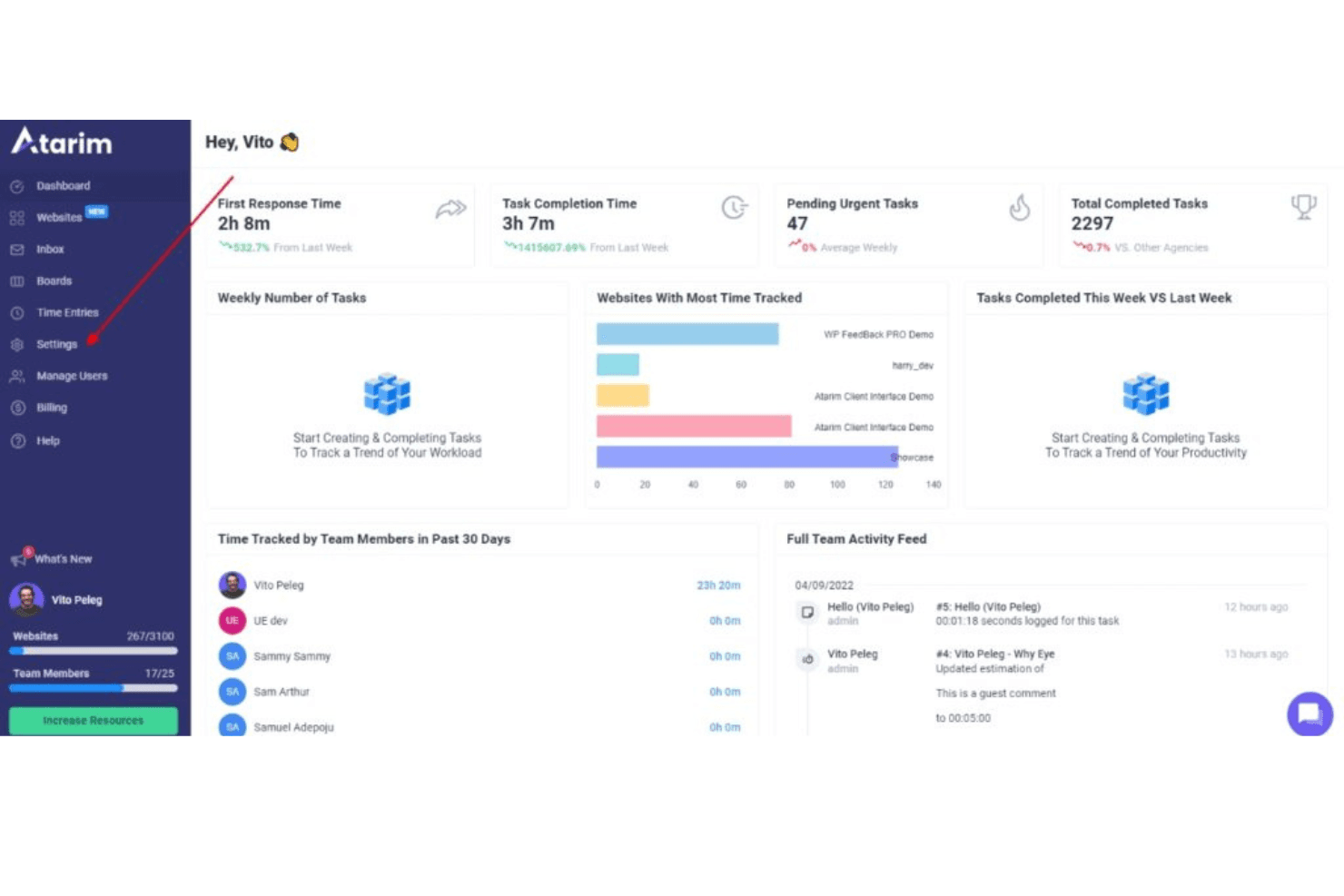
Here's the dashboard settings in Atarim. You can access the dashboard settings by clicking on the navigation bar. Atarim is a visual feedback and web design collaboration tool that lets teams and clients leave pinned comments on live websites, staging environments, design files, and PDFs, with built-in task tracking, approval workflows, and integrations with tools like Jira, Asana, and Figma.
Who Is Atarim Best For?
Atarim is a strong fit for web agencies managing client feedback across multiple live sites, staging environments, and WordPress builds.
Why I Picked Atarim
I picked Atarim as one of the best because it's the only tool I've used that lets you pin feedback directly onto a live website or staging environment, with every comment automatically creating a task with a screenshot attached. For web design project management specifically, that means no more copying feedback from emails into a tracker. I also like that it handles the full review cycle: tasks carry statuses, priorities, assignees, and due dates, and clients can formally approve individual pages with a recorded timestamp.
Atarim Key Features
- Guest commenting: Clients can leave pinned feedback using just a name and email, with no account or software install required.
- Responsive breakpoint review: Fixed desktop, tablet, and mobile views let you capture feedback at specific screen sizes, with the breakpoint recorded on each task.
- Figma plugin: Push frames and new design versions from Figma directly into Atarim, and carry existing Figma comments across into the task workflow.
- Two-way project management sync: Tasks sync bidirectionally with Asana, Jira, Trello, and Basecamp, so closing a task in one tool closes it in the other.
Atarim Integrations
Atarim offers native integrations with Figma, Asana, Jira, Trello, and Basecamp. It also supports Make, webhooks, a REST API, and Zapier for custom integrations.
Pros and Cons
Pros:
- Supports client approvals with recorded timestamps
- Converts comments into trackable tasks
- Pins feedback directly onto live websites
Cons:
- Guest reviewers receive no email notifications
- Version comparison lacks documented visual diffs
Learn more about Atarim: Best for CPG and packaging label review cycles
- 7-day free trial available
- From $16/user/month (min. 3 users, billed annually)
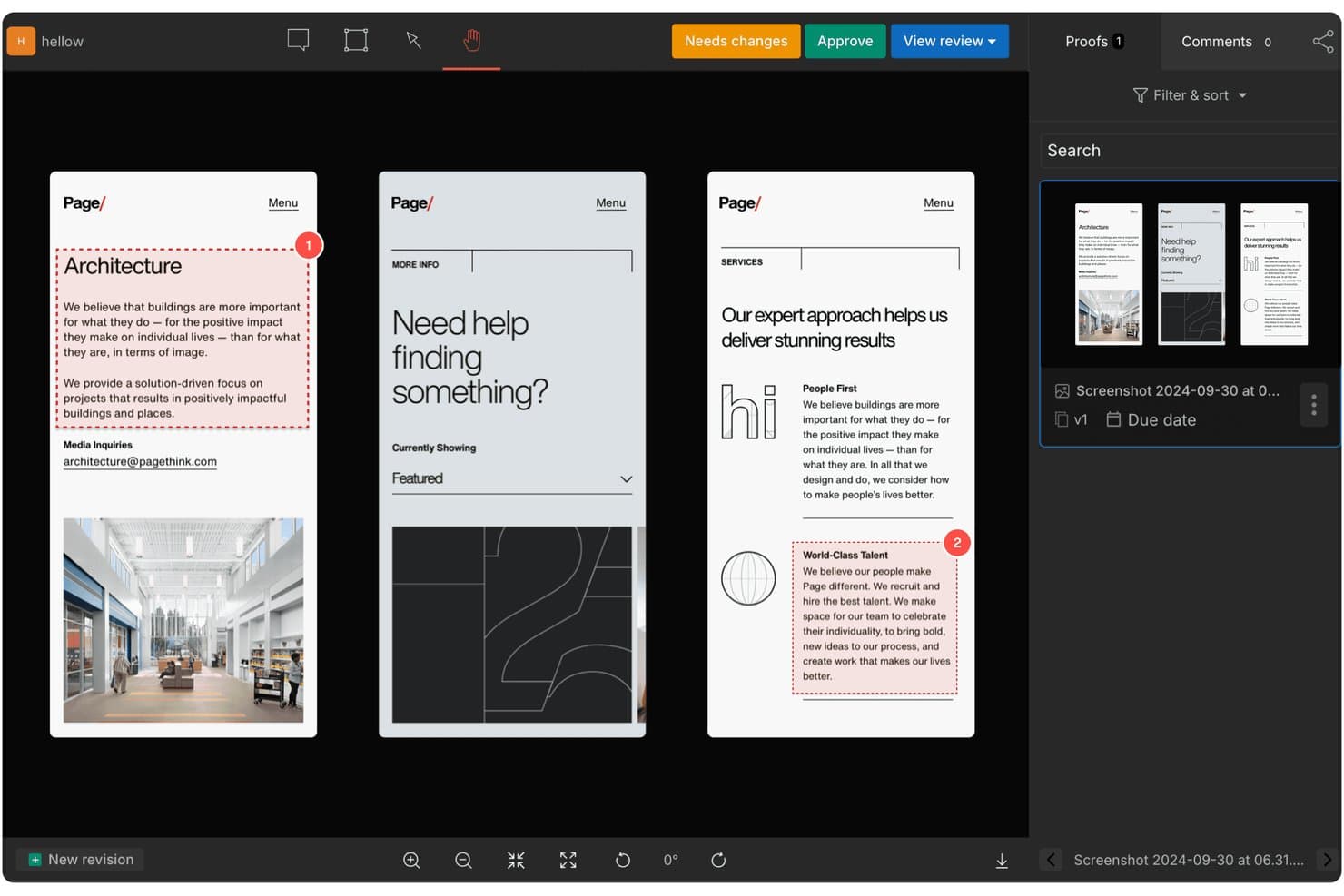
GoVisually lets users review and approve designs with numbered annotations. GoVisually is a design feedback and proofing tool that supports annotation on images, PDFs, and video, with version comparison, approval workflows, and AI-powered label compliance checks built for packaging and CPG review cycles.
Who Is GoVisually Best For?
GoVisually is a strong fit for packaging and CPG teams that need to manage label compliance, artwork approvals, and multi-stakeholder review cycles in one place.
Why I Picked GoVisually
GoVisually earns its spot on my shortlist because no other tool I've tested matches its depth for packaging label review cycles. I love that the AI compliance suite checks labels against 50+ regulatory frameworks, from FDA to EU and Brazil, automatically catching text, color, and layout changes before they become costly print errors. Pair that with Time Machine's full revision timeline and four compare modes including a color-highlighted Diff view, and you have a tool built for the exact high-stakes, multi-stakeholder approval loops CPG teams run every day.
GoVisually Key Features
- PDF text markup: Highlight, replace, or strike through text directly on PDFs so reviewers can call out exact copy changes without guesswork.
- Guest reviewer access: External stakeholders can comment and approve using just their name and email, with no account required.
- Bird's-eye dashboard: A proof-level overview displays every proof's status, due dates, and overdue items across your active projects in one view.
- Adobe Creative Cloud plugin: Designers can share files, view comment threads, and check approval status without leaving Photoshop, Illustrator, or InDesign.
GoVisually Integrations
GoVisually has three documented native integrations: Adobe Creative Cloud, Asana, and Slack. It also supports Zapier and offers an API for custom integrations.
Pros and Cons
Pros:
- External reviewers avoid account creation
- Four modes compare design revisions
- Specialized CPG label compliance checks
Cons:
- Individual comments lack assignees
- Website reviews require beta captures
Learn more about GoVisually: 10Best for enterprise creative and marketing approvals
Ziflow
- 14-day free trial + free plan + free demo available
- From $199/month (billed annually)
Visit WebsiteCustomer Rating:4.6/5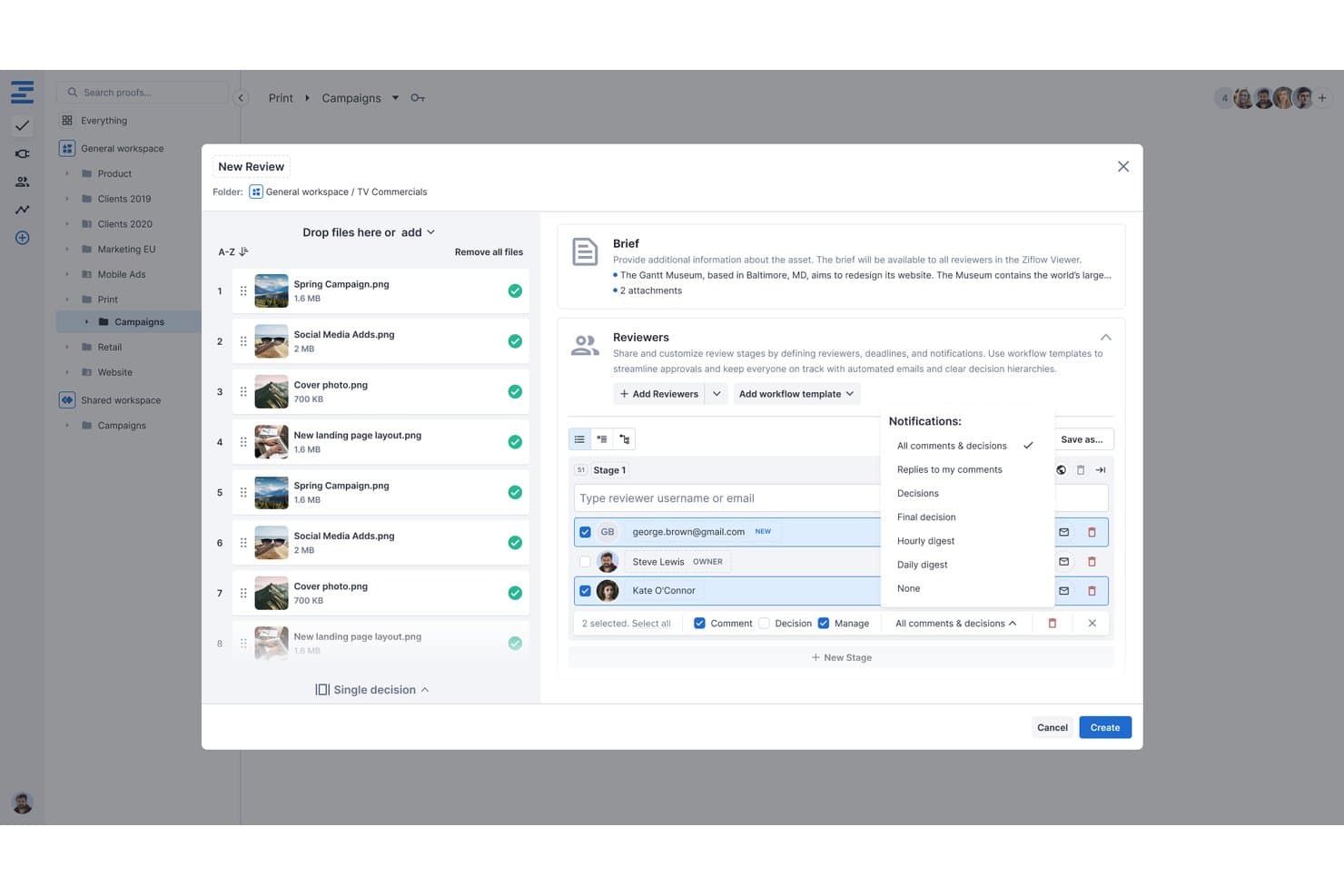
Ziflow lets users configure reviewers, notifications, and stages during proof creation. Ziflow is an online proofing platform built for creative and marketing teams that supports annotation, multi-stage approval workflows, version comparison, and live website review across images, video, audio, HTML5, and documents.
Who Is Ziflow Best For?
Ziflow is a strong fit for creative directors and marketing ops teams that manage high volumes of asset reviews across multiple stakeholders and approval stages.
Why I Picked Ziflow
Ziflow earns its spot as one of the best on my shortlist because it's purpose-built for the kind of high-volume, multi-stakeholder approval workflows that enterprise creative and marketing teams actually run. I love its multi-stage workflow engine, which lets you sequence or parallelize approval stages with gating, deadlines, and automated routing so nothing stalls in someone's inbox. Auto Compare is another standout: it highlights pixel-level differences between proof versions, catching text shifts and color changes across static assets and video without manual side-by-side squinting.
Ziflow Key Features
- Live website proofing: Reviewers can annotate directly on a live URL or a static snapshot, with proxy controls to manage how the site loads.
- Guest reviewer access: Unlimited external reviewers can view, comment, and approve proofs from an emailed link without needing a Ziflow account or paid seat.
- Multi-asset and campaign proofs: Multiple files, including images, video, audio, and HTML5, can be grouped into a single proof for consolidated feedback across a campaign.
- Comment labels and filters: Reviewers can tag comments with custom labels and filter threads by reviewer, stage, label, or status to keep feedback organized across large projects.
Ziflow Integrations
Ziflow documents integrations with Figma, Adobe Creative Cloud, Final Cut Pro X, Jira Cloud, Asana, monday.com, Dropbox, Google Drive, SharePoint, and Slack. It also offers a REST API, webhooks, intake forms, and Zapier.
Pros and Cons
Pros:
- Unlimited guest reviews avoid seat bottlenecks
- Multi-stage approvals keep campaigns moving
- Frame-level markup across diverse asset types
Cons:
- Resolved-only status obscures ongoing work
- Static Figma proofs miss prototype interactions
Learn more about Ziflow:
Andre verktøy for designtilbakemeldinger
Nedenfor finner du en liste over flere verktøy for designtilbakemeldinger som jeg vurderte, men som ikke kom med blant de ti beste. Det er absolutt verdt å ta en titt på dem.
- 11RuttlBest for annotating live sites across device sizes
- 12YbugBest for live-site bug reports routed to PM tools
- 13FigmaBest for scalable design systems
- 14Frame.ioBest for video and creative asset review cycles
- 15StreamWorkBest for approval workflows
- 16Marker.ioBest for live-site feedback routed to dev trackers
- 17PastelBest for client sign-off on live websites
- 18ZeplinGood for seamless designer-developer handoffs
- 19MarkUp.ioBest for multi-format feedback without seat limits
- 20WorkflowBest for client feedback without reviewer sign-ups
How I Evaluate Design Feedback Tools
I split my evaluation into three parts, with the most weight on core needs: pin comments to screens, centralize threads, and track resolution. Next, I look for differentiators such as live-site annotation. Finally, I consider support, onboarding, and pricing as review volume grows.
Core Functionality (Table Stakes For This List)
When I'm selecting tools for my list, I score each one on a scale from 0 (does not offer the functionality) to 5 (excels in this area) for each core functionality listed below. I then convert the total into a percentage to help assess each tool's overall fit, with extra weight on any functionalities I’ve deemed essential.
- Visual Annotations (Essential): I look for pinned comments on images, prototypes, and live pages, so a reviewer can flag the exact button, layout issue, or content detail.
- Centralized Feedback (Essential): I assess whether asset-specific threads stay searchable in one place, so a PM can find stakeholder comments without digging through email.
- Resolution Tracking: I check for clear open, in-progress, and resolved statuses, plus ownership, to follow a reported issue from review through handoff.
- Version Comparison: For a revised screen or asset, I look for side-by-side views or visual diffs that help reviewers identify what changed.
- Guest Review Access: I consider whether clients or executives can comment and reply through a share link without needing a full paid account.
- Workflow Integrations: I look for connections to design and project tools that let teams carry feedback into their existing review and delivery process.
Once I have a list of tools that meet the criteria, I consider what sets each platform apart.
Differentiating Factors (What Sets Vendors Apart)
Here's how I compare and contrast different vendors:
Standout Features
Live website annotation is the first thing I check. Pinning feedback on a rendered, interactive page catches layout and interaction issues that static screenshots miss entirely. I also look for AI-summarized feedback, which condenses long comment threads into actionable takeaways—useful when a PM needs to triage dozens of notes after a stakeholder review round. Finally, I evaluate mobile and responsive preview review so teams can annotate across breakpoints and flag responsive bugs before engineering picks up the work.
Beyond Features
I check whether feedback syncs bi-directionally with PM tools like Jira, Asana, or Linear, so resolved comments automatically create or close tasks without manual updates. Guest access controls matter just as much—external reviewers often see sensitive prototypes, and I look for link expiration, granular permissions, and SSO support. Finally, I evaluate how quickly infrequent reviewers can start commenting, since a steep learning curve means executives and clients simply won't leave feedback at all.
Vanlige spørsmål
Hva er fordelene ved å bruke et verktøy for designtilbakemeldinger?
Ved å bruke et verktøy for designtilbakemeldinger kan du forbedre produktiviteten og effektiviteten i designprosessen betydelig. Her er fem viktige fordeler:
\u003cul\u003e
\t\u003cli\u003e\u003cstrong\u003eBedre samarbeid:\u003c/strong\u003e Med disse verktøyene kan designere, utviklere og interessenter samarbeide i sanntid, noe som gjør designprosessen mer effektiv.\u003c/li\u003e
\t\u003cli\u003e\u003cstrong\u003eTydelig kommunikasjon:\u003c/strong\u003e De tilbyr en samlet plattform der tilbakemeldinger kan gis direkte på designene, noe som eliminerer misforståelser og gjør kommunikasjonen tydeligere.\u003c/li\u003e
\t\u003cli\u003e\u003cstrong\u003eEffektivisert arbeidsflyt:\u003c/strong\u003e Disse verktøyene har ofte funksjoner for prosjektstyring, slik at du kan følge med på fremdriften og administrere oppgaver effektivt.\u003c/li\u003e
\t\u003cli\u003e\u003cstrong\u003eInteraktiv prototyping:\u003c/strong\u003e Mange verktøy for designtilbakemeldinger tilbyr prototypingsfunksjoner, slik at du kan lage interaktive modeller av designet for testing og demonstrasjon.\u003c/li\u003e
\t\u003cli\u003e\u003cstrong\u003eEnkel overlevering:\u003c/strong\u003e De kan automatisk generere designspesifikasjoner og ressurser i et format som er enkelt for utviklere å arbeide med, noe som forenkler overgangen fra design til utvikling.\u003c/li\u003e
\u003c/ul\u003e
Hvor mye koster verktøy for designtilbakemeldinger?
Prisene på verktøy for designtilbakemeldinger varierer betydelig avhengig av funksjonene, størrelsen på teamet ditt og dine spesifikke behov.
Hva er de vanligste prismodellene for verktøy for designtilbakemeldinger?
Verktøy for designtilbakemeldinger følger vanligvis en abonnementsbasert prismodell. Det betyr at du betaler en fast avgift (månedlig eller årlig) for tilgang til verktøyet. Noen tilbyr en trinnvis prismodell der kostnaden øker med flere funksjoner eller brukere.
Hva er det typiske prisnivået for verktøy for designtilbakemeldinger?
Prisene kan variere fra gratis for svært enkle verktøy eller verktøy med et begrenset gratisnivå, til flere hundre dollar per måned for løsninger på bedriftsnivå. For små og mellomstore team kan du forvente å betale mellom $20 og $100 per bruker per måned.
Hvilke verktøy for designtilbakemeldinger er billigst og dyrest?
Blant verktøyene som er omtalt i denne listen, tilbyr UserGuiding og Conceptboard noen av de rimeligste abonnementene, med priser fra rundt $20/bruker/måned. I den øvre enden kan verktøy som UserZoom og UserTesting koste flere hundre dollar per måned, avhengig av pakke og antall brukere.
Finnes det gratis verktøy for designtilbakemeldinger?
Ja, noen verktøy som InVision og Framer tilbyr gratisabonnementer, men de er ofte ganske begrensede når det gjelder funksjoner og antall brukere. Disse gratisabonnementene kan være et godt utgangspunkt for enkeltpersoner eller små team med begrensede budsjetter. Når teamet vokser og behovene blir mer komplekse, kan det imidlertid bli nødvendig å vurdere et betalt abonnement.
Andre anmeldelser av tilbakemeldingsprogramvare
Oppsummering
Kort oppsummert vil riktig verktøy for designtilbakemeldinger for deg i stor grad avhenge av dine spesifikke behov, teamets størrelse og budsjettet. Fra sporing av visuelle designfeil med BugHerd, til korrekturlesing og gjennomgang på nett med PageProof, og interaktiv prototyping med InVision, finnes det et stort utvalg av verktøy, hvert med sine unike salgsargumenter og prismodeller.
Viktige punkter
- Definer behovene dine: Det er avgjørende å forstå teamets spesifikke behov og arbeidsprosesser når du skal velge riktig verktøy. Vurder hvilke kjernefunksjoner, nøkkelfunksjoner og aspekter ved brukervennlighet som er viktige for designprosessen din.
- Vurder prisen: Prismodellene for verktøy for designtilbakemeldinger kan variere betydelig. Når du vurderer budsjettet, bør du huske å se etter et verktøy som gir god valuta for pengene når det gjelder funksjoner og muligheter.
- Prøv og velg: De fleste verktøy tilbyr gratis prøveperioder eller gratisversjoner. Det kan være nyttig å teste ut noen før du tar en endelig beslutning. Dette lar deg vurdere hvor godt verktøyet passer med arbeidsflyten din, og hvor enkelt det er for teamet å komme i gang.