

Det finnes tilsynelatende utallige programvareløsninger for Kanban, så det kan være vanskelig å finne ut hvilken som passer best for deg. Du ønsker å få bedre oversikt over arbeidsprosesser, forbedre samarbeidet, redusere flaskehalser og gjøre arbeidsflyten mer effektiv totalt sett, men må finne ut hvilket verktøy som passer best. Jeg hjelper deg! I dette innlegget gjør jeg det enkelt ved å bruke erfaringen min med å lede store, komplekse produkter og bruke dusinvis av forskjellige verktøy for å gi deg denne kortlisten over de beste Kanban-verktøyene.
Hvorfor du kan stole på våre programvareanbefalinger
6,700+
Reviews
20
Industry experts
16+
Evaluation factors
14
Years
Teamet vårt har testet og anmeldt programvare siden 2012. Vi er selv produktledere, så vi vet hvor vanskelig og hvor viktig det er å velge riktig programvare.
I denne guiden har vi vurdert verktøyene gjennom praktisk testing og uavhengig research og gitt dem poeng ut fra våre utvelgelseskriterier.
Anmeldelsene våre bygger på vår egen redaksjonelle vurdering. De er ikke et salgsargument.
Ekspertanmeldere:
- Andrew LumbySenior TPM
- Cristiano ValimSenior UI/UX Lead


Sammenligningstabell for Kanban-verktøy
Denne sammenligningstabellen oppsummerer prisopplysningene for mine beste utvalgte Kanban-verktøy.
| Tool | Best For | Trial Info | Price | ||
|---|---|---|---|---|---|
| 1 | Best for its Agile reporting features | 15-day free trial | From $1/user/month (12 user minimum) | Website | |
| 2 | Best for customizable templates | Free plan available | From $9/month (billed annually) | Website | |
| 3 | Best for no-code app development | 30-day free trial | From $35/user/month (billed annually) | Website | |
| 4 | Best for cross-functional workflows | 14-day free trial | Pricing upon request | Website | |
| 5 | Best for tracking new feature development process | Free plan + 14-day free trial available | From $8/user/month (billed annually) | Website | |
| 6 | Best for built-in WIP limits and AI nudges | Free plan available | From $7/user/month (billed annually) | Website | |
| 7 | Best for linking dev workflows to board planning | Free plan + 14-day free trial + free demo available | From $8.50/user/month (billed annually) | Website | |
| 8 | Best for multi-board portfolio visibility | Free demo + 14-day free trial available | From $8/user/month (billed annually) | Website | |
| 9 | Best for enterprise-scale kanban portfolio planning | 30-day free trial + free demo available | Pricing upon request | Website | |
| 10 | Best for no-code automation on any board size | 14-day free trial | From $5/user/month (billed annually) | Website |


Gjennomgang av de beste Kanban-verktøyene
Nedenfor finner du mine detaljerte oppsummeringer av de beste Kanban-verktøyene som kom med på kortlisten. Anmeldelsene mine gir en detaljert gjennomgang av de viktigste funksjonene, fordelene og ulempene, integrasjonene og de ideelle bruksområdene for hvert verktøy, slik at du kan finne det som passer best for deg.
 Best for its Agile reporting features
- 15-day free trial
- From $1/user/month (12 user minimum)
Visit WebsiteCustomer Rating:4.1/5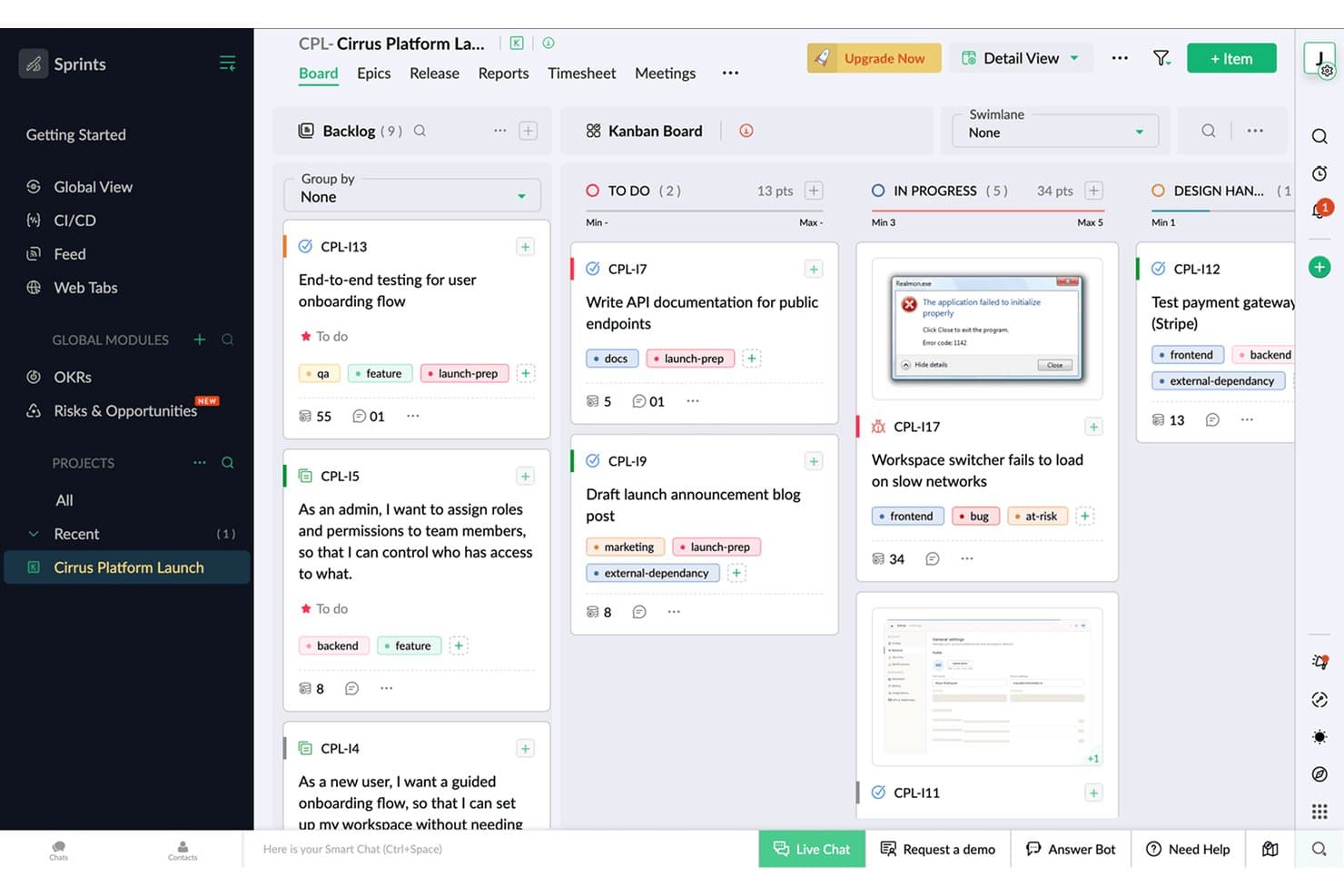
Zoho Sprints organizes tasks across Kanban columns with tags and points. Zoho Sprints is an Agile project management tool that supports Kanban, Scrum, and Scrumban workflows, with built-in backlog management, sprint planning, time tracking, and Agile reporting across burndown charts, velocity, and cumulative flow diagrams.
Who Is Zoho Sprints Best For?
Zoho Sprints is a strong fit for Scrum masters and product managers who need detailed Agile reporting alongside their day-to-day sprint and backlog work.
Why I Picked Zoho Sprints
Zoho Sprints earns its spot on my shortlist because of its Agile reporting depth, which goes well beyond what most Kanban tools offer. I'm talking burndown and burnup charts, velocity tracking, cumulative flow diagrams, and cycle time and lead time reports, all available on every plan. I also like that WIP limits are strictly enforced per column, not just suggested, so when a sprint column hits capacity, the board actually blocks new additions rather than quietly ignoring the limit.
Zoho Sprints Key Features
- Backlog and epic management: Organize work items into epics and a prioritized backlog, then pull them into sprints as your team's capacity allows.
- Swimlanes: Divide your Kanban board into horizontal lanes by team, work type, or any custom grouping to separate parallel workstreams visually.
- Built-in time tracking: Log hours directly on work items using a global timer, with timesheet approval workflows available for team leads.
- Client and vendor portals: Give external collaborators scoped access to projects without requiring a full user license.
Zoho Sprints Integrations
Zoho Sprints offers native integrations with GitLab, Bitbucket, Azure DevOps, Jenkins, Google apps, Microsoft 365, Zoho Cliq, Zoho Desk, Zoho Analytics, and Zendesk. It also supports REST API connections, webhooks, and Zapier.
Pros and Cons
Pros:
- Built-in time tracking connects effort to work
- Strict WIP limits protect team throughput
- Detailed Agile reporting supports product decisions
Cons:
- Multiple projects become confusing to manage
- Scrum terminology can confuse nontechnical stakeholders
Learn more about Zoho Sprints: Best for customizable templates
- Free plan available
- From $9/month (billed annually)
Visit WebsiteCustomer Rating:4.5/5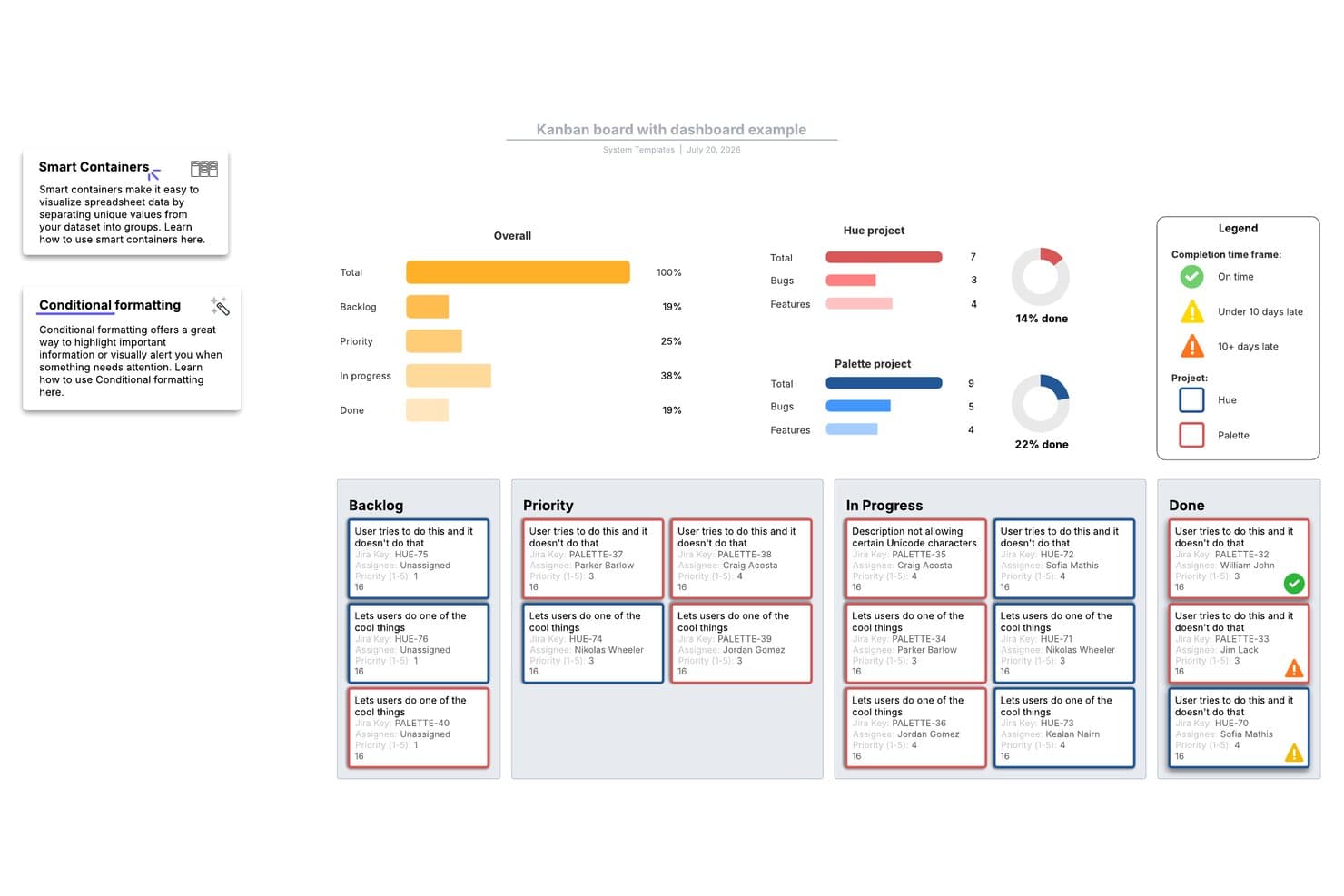
Lucidspark's Kanban board template tracks project progress across stages. Lucidspark is an infinite-canvas whiteboard tool that lets teams build kanban boards, manage tasks with Lucid Cards, and collaborate in real time using a large library of agile and project planning templates.
Who Is Lucidspark Best For?
Lucidspark suits cross-functional teams that run agile ceremonies—like sprint planning and retrospectives—and want a flexible, template-driven canvas to organize work visually.
Why I Picked Lucidspark
Lucidspark earns its spot on my shortlist because of its massive, customizable template library, which is genuinely unmatched for teams that run agile ceremonies on a visual canvas. I love that you can pull up a sprint planning, backlog refinement, or retrospective template and tailor every column and card layout to your team's exact workflow. The Agile board template, in particular, lets you sync Lucid Cards directly with Jira or Azure DevOps, so your canvas stays tied to real backlog data.
Lucidspark Key Features
- Real-time co-editing: Multiple team members can edit the same canvas simultaneously, with live cursors, in-app chat, and emoji reactions visible to all participants.
- Jira and Azure DevOps two-way sync: Lucid Cards connect directly to your existing backlog, keeping your visual board and dev tool in sync without manual updates.
- Voting and facilitation activities: Built-in voting sessions, timers, and private mode let teams run structured retrospectives and prioritization exercises on the canvas.
- Dynamic Tables: A canvas-native table object that lets you organize and view task data in a structured format alongside your boards and diagrams.
Lucidspark Integrations
Lucidspark offers native two-way integrations with Jira, Azure DevOps, and Smartsheet. It also supports Asana and provides an API for custom integrations.
Pros and Cons
Pros:
- Visual canvas supports cross-functional planning
- Strong facilitation tools support retrospectives
- Customizable agile templates fit varied workflows
Cons:
- Limited board analytics and alternate views
- No native WIP limits for throughput control
Learn more about Lucidspark: Best for no-code app development
- 30-day free trial
- From $35/user/month (billed annually)
Visit WebsiteCustomer Rating:4.4/5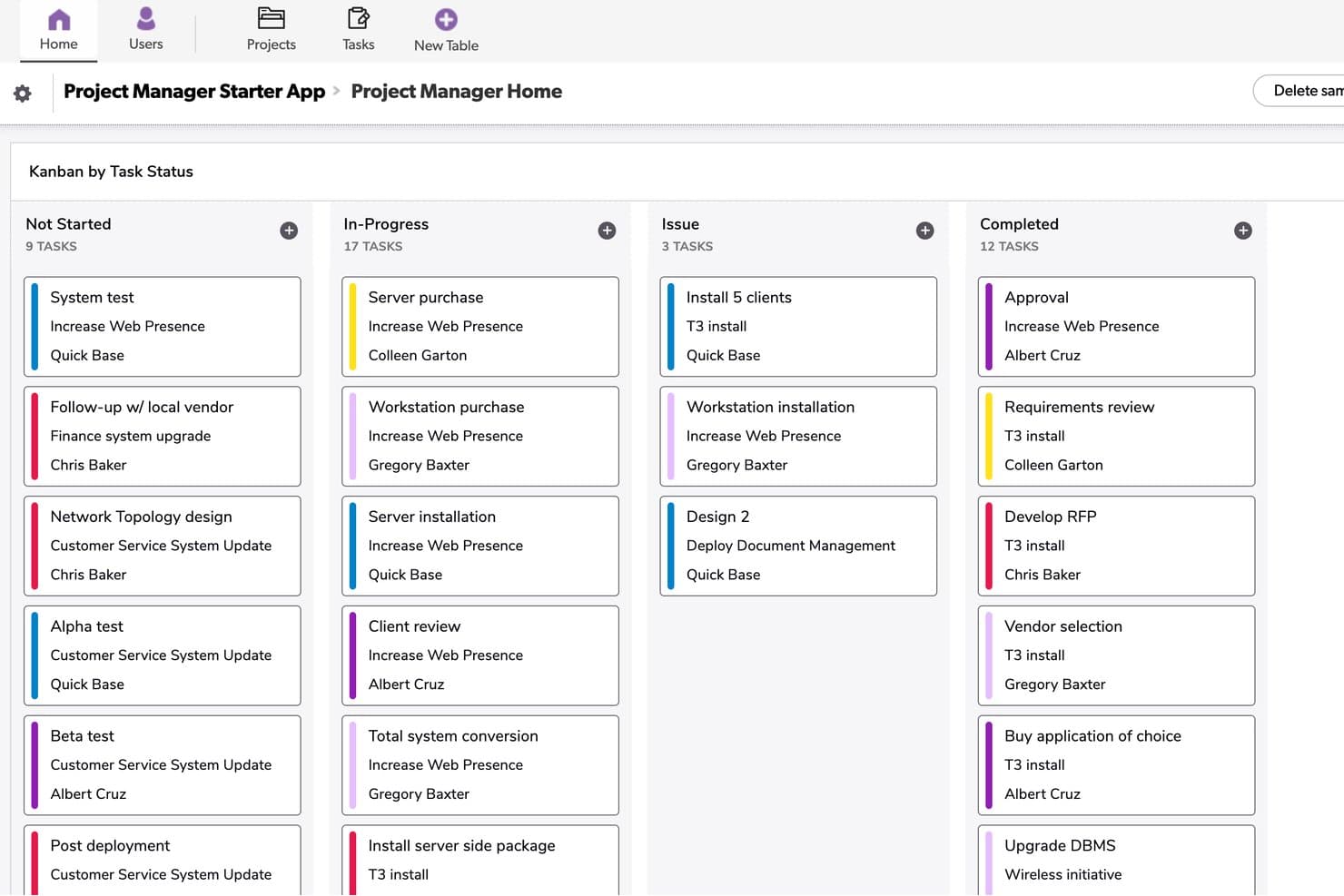
Quickbase organizes tasks by status across four Kanban columns. Quickbase is a no-code app-building platform that lets you create custom kanban boards, portfolio dashboards, Gantt charts, and automated workflows on top of your own data models.
Who Is Quickbase Best For?
Quickbase suits enterprise operations and project teams in industries like construction, manufacturing, and energy that need custom workflows built on their own data models.
Why I Picked Quickbase
I've included Quickbase in my top picks because it's the only tool on this list that lets you build a kanban board directly on top of a custom data model, which is a genuine differentiator for operations-heavy product teams. I like that you can pull records from linked tables into your board cards, so a card for a construction deliverable can surface budget fields, attached specs, and child task records all in one place. The cross-project portfolio dashboard is also something I rarely see this well-executed, letting you track status and dependencies across multiple workstreams without switching apps.
Quickbase Key Features
- Formula-based card coloring: Set card colors on your kanban board using custom formulas tied to field values, so you can visually flag priority, status, or risk at a glance.
- Role-based board visibility: Control which boards specific roles can see, or mark a board as personal so only you can access it.
- Linked child table records: Attach related child records directly to a card's form, letting you surface subtasks, dependencies, or supporting data without leaving the card.
- No-code automation builder (Pipelines): Build trigger-based workflow automations without writing code, including automations generated from plain-text descriptions using AI.
Quickbase Integrations
Quickbase offers native integrations with Salesforce, SAP, Oracle, and Microsoft Teams. It also provides RESTful and governance APIs for custom integrations, plus data-warehouse and on-premise connectivity on Enterprise.
Pros and Cons
Pros:
- Linked records keep supporting details accessible
- Portfolio dashboards connect multiple workstreams
- Custom boards fit complex product data
Cons:
- Board caps restrict high-volume workflows
- No native work-in-progress limits
Learn more about Quickbase: Best for cross-functional workflows
- 14-day free trial
- Pricing upon request
Visit WebsiteCustomer Rating:4.3/5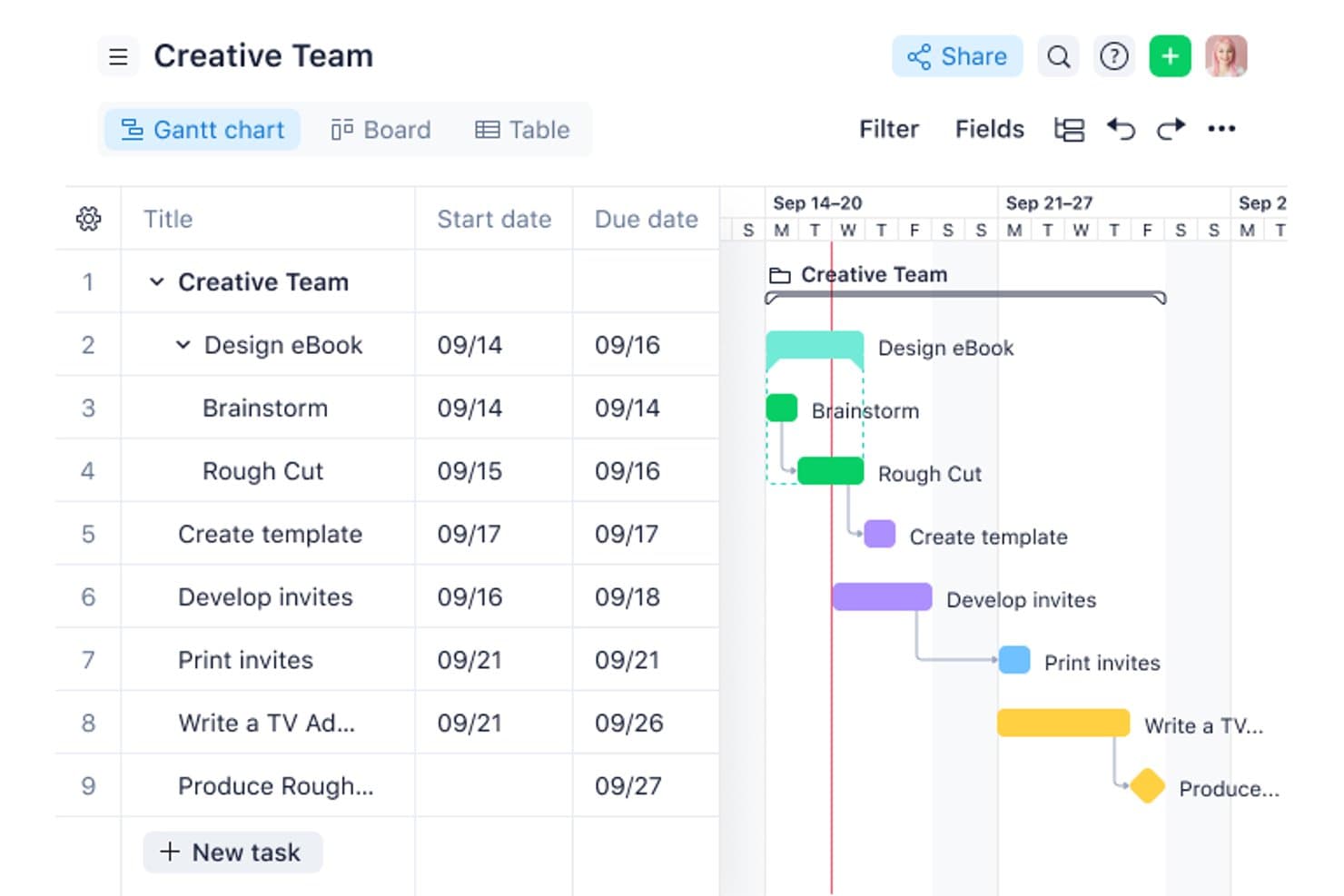
See the status of all your tasks with Wrike’s Kanban view. Wrike is a project management platform with a configurable Kanban board, 15+ synced views, no-code automation, AI-assisted collaboration, and cross-functional dashboards built to support multi-project and portfolio-level work.
Who Is Wrike Best For?
Wrike fits product managers and operations teams coordinating work across multiple departments, tools, and stakeholders at once.
Why I Picked Wrike
Wrike earns its spot on my shortlist because its board is built to handle the complexity of cross-functional work, not just single-team sprints. I love that you can toggle a board between individual tasks and portfolio-level views, so I can track a product launch across marketing, engineering, and ops without switching tools. Custom-field columns and swimlanes let me organize work by team, priority, or any other category that matters in the moment.
Wrike Key Features
- No-code automation builder: Create automation rules in plain language to auto-escalate at-risk tasks and route incoming work to the right queues.
- Request forms: Build intake forms that automatically assign submitted work to specific projects or team queues without manual triage.
- AI summaries on comments: Wrike Copilot condenses long comment threads on tasks into summaries, keeping you current without reading every reply.
- Portfolio-level board toggle: Switch the board view from individual tasks to program or portfolio level to track work across multiple projects at once.
Wrike Integrations
Wrike offers more than 400 integrations, including Jira, GitHub, GitLab, Bitbucket, Slack, Microsoft Teams, Google Workspace, Salesforce, Tableau, and Power BI. Wrike Sync provides two-way sync with 22+ apps, including Jira and GitHub.
Pros and Cons
Pros:
- Synced views connect planning with delivery
- Custom fields organize cross-functional workflow stages
- Portfolio-level boards support product roadmaps
Cons:
- Initial setup can burden smaller teams
- WIP limits lack confirmed enforcement
 5Best for tracking new feature development process
Miro
- Free plan + 14-day free trial available
- From $8/user/month (billed annually)
Visit WebsiteCustomer Rating:4.8/5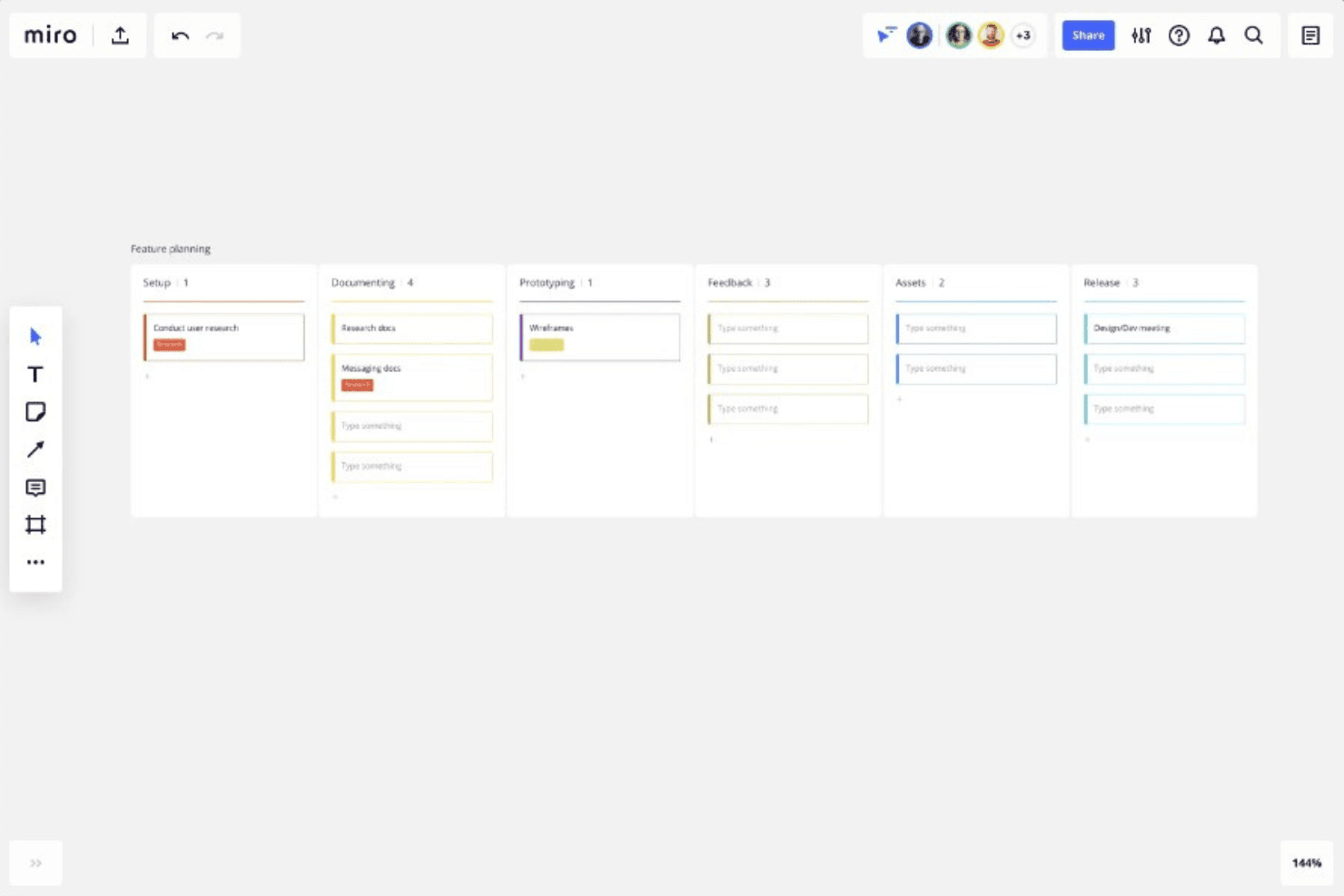
You can use Miro to track each phase of your product development, from setup through to prototyping, feedback, and eventually release. Miro is an infinite-canvas collaboration platform that brings Kanban boards together with roadmaps, diagrams, and prototypes in a single visual workspace.
Who Is Miro Best For?
Miro is a strong fit for product managers who need to connect Kanban boards directly to roadmaps, prototypes, and discovery work in a single visual space.
Why I Picked Miro
I picked Miro as one of the best because its infinite canvas lets a Kanban board sit directly alongside roadmaps, discovery docs, and prototypes, so you can track a new feature from the first sticky note to the final card in a single workspace. I love that Kanban, Timeline, and Table views all share the same underlying data, which means switching between sprint progress and a quarterly roadmap view takes one click rather than a context switch across tools.
Miro Key Features
- Synced cards: Drag a Kanban card onto the canvas to create a linked copy that updates in both directions when edited.
- Multiple board views: Switch between Kanban, Timeline, and Table views without duplicating data, so you can move from sprint progress to quarterly planning in one click.
- Jira card integration: Drag Jira cards directly into your Miro Kanban, convert cards to Jira issues, and get two-way sync on the Business plan.
- AI-generated Kanban structure: Use Miro AI to generate a Kanban layout from a prompt, with your existing board content used as context.
Miro Integrations
Miro advertises 250+ integrations, including Jira, Asana, Azure DevOps, Linear, ClickUp, Trello, Slack, Microsoft Teams, GitHub, and Zapier. Business adds two-way sync with Jira, Asana, Linear, ClickUp, and Azure DevOps.
Pros and Cons
Pros:
- Supports real-time cross-functional product collaboration
- Syncs Kanban, Timeline, and Table views
- Connects Kanban with roadmaps and prototypes
Cons:
- Lacks native subtasks and time tracking
- Provides no enforced work-in-progress limits
 Best for built-in WIP limits and AI nudges
- Free plan available
- From $7/user/month (billed annually)
Visit WebsiteCustomer Rating:4.6/5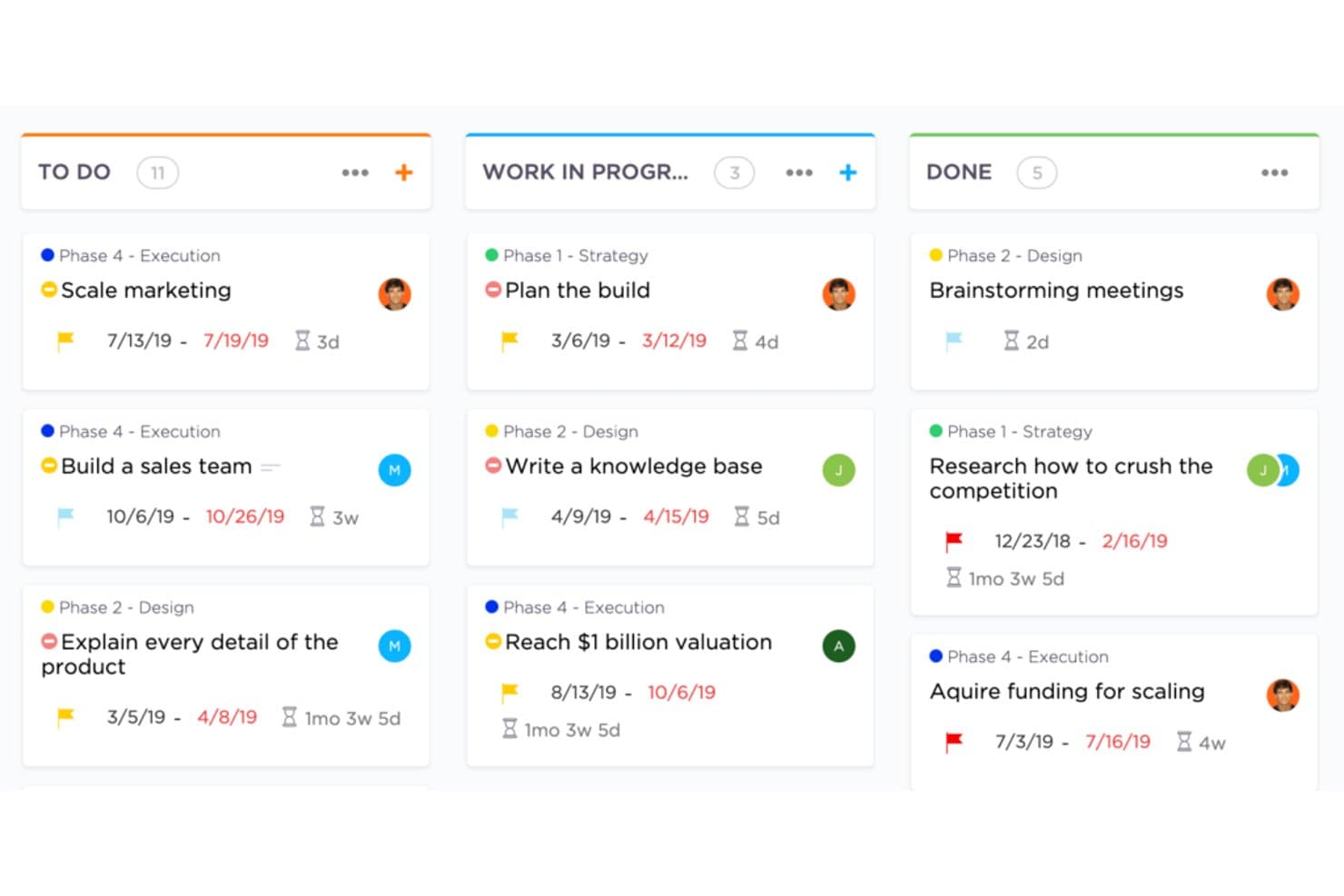
Create flexible Kanban boards in ClickUp. ClickUp is a work management platform with kanban board views, WIP limits, sprint management, multi-view task tracking, native time tracking, automations, and built-in AI tools.
Who Is ClickUp Best For?
ClickUp is a strong fit for product and engineering teams that want kanban, sprints, WIP limits, and portfolio tracking in a single workspace.
Why I Picked ClickUp
I picked ClickUp as one of the best because its native WIP limits go beyond a simple cap: when a column hits its limit, the board flags it visually, and ClickUp's AI Super Agents actively ping whoever owns the stalled cards. That kind of proactive enforcement is something I rarely see built in elsewhere. Sprint Points and sprint reporting round out the kanban workflow, so product teams can manage backlog, track velocity, and enforce throughput discipline without stitching together separate tools.
ClickUp Key Features
- Multiple synced views: Switch between List, Calendar, Gantt, Timeline, and Mind Map views without rebuilding your tasks—they all pull from the same data.
- Sprint management: Plan and track sprints with Sprint Points directly on the Free plan, with full sprint reporting available on Business.
- Native time tracking: Log time against tasks from within ClickUp, starting on the Unlimited plan, without a third-party integration.
- ClickUp Brain: Ask questions about your board—like which tasks are stalled or what's due soon—and get answers from the built-in AI assistant.
ClickUp Integrations
ClickUp offers native integrations with Slack, HubSpot, and Google Drive on Unlimited and higher. It supports webhooks and an Enterprise API for custom integrations.
Pros and Cons
Pros:
- AI nudges owners about stalled cards
- Synced views connect backlog and roadmaps
- Native WIP caps flag blocked columns
Cons:
- Large feature set slows initial setup
- Advanced controls sit behind higher plans
Learn more about ClickUp: Best for linking dev workflows to board planning
- Free plan + 14-day free trial + free demo available
- From $8.50/user/month (billed annually)
Visit WebsiteCustomer Rating:4.5/5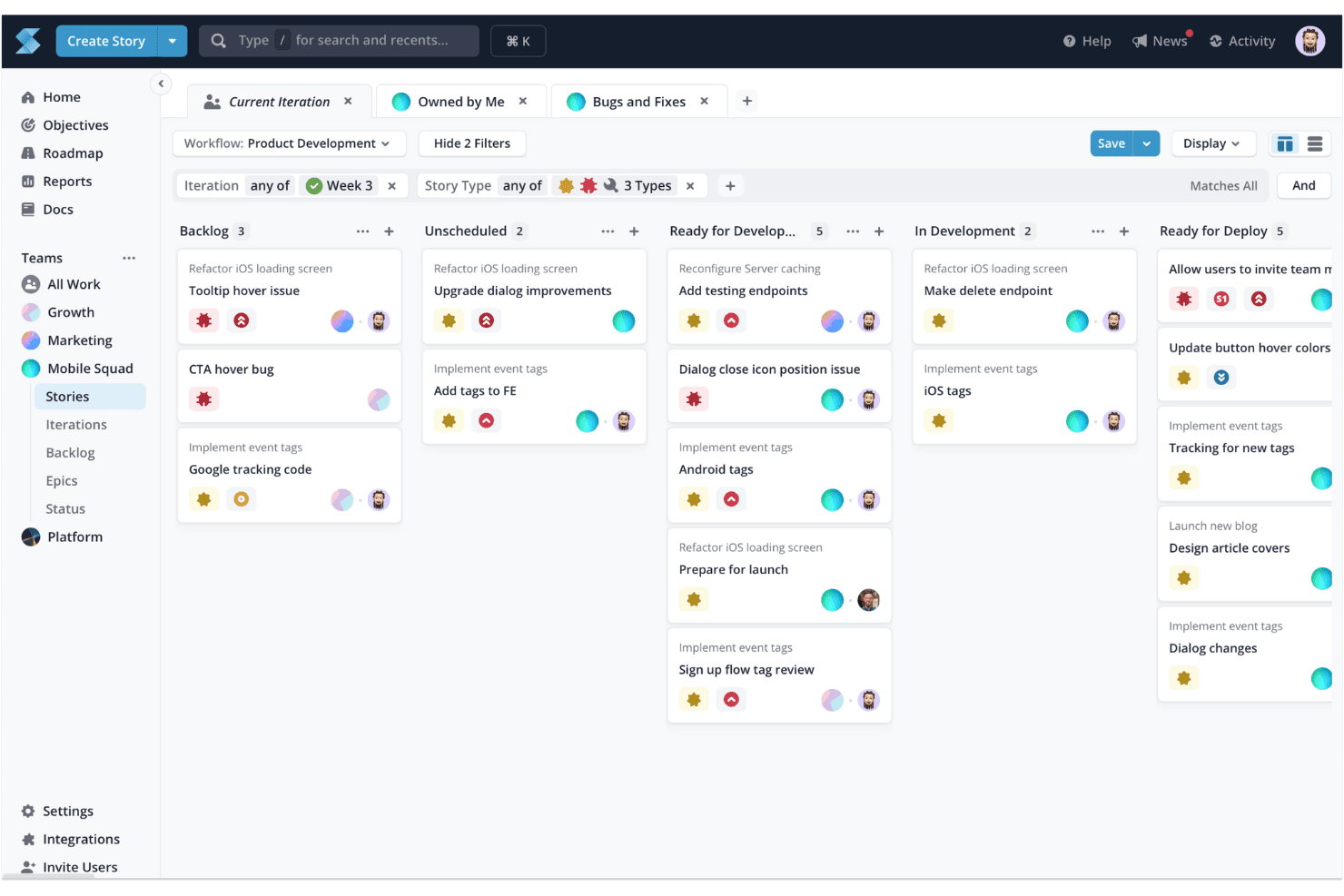
Shortcut's Kanban board helps you visualize and manage tasks, making it ideal for task tracking and optimizing workflow processes. Shortcut is a kanban-based project management tool for software teams that combines Stories, Epics, Objectives, and Timeline roadmaps with built-in Iterations, WIP limits, and code integrations across GitHub, GitLab, and Bitbucket.
Who Is Shortcut Best For?
Shortcut is a strong fit for software teams that want their kanban boards and dev workflows—pull requests, branches, commits—connected in one place.
Why I Picked Shortcut
I've included Shortcut in my top picks because it's the only tool on this list that directly connects kanban board states to code activity, which matters when you're managing a product backlog alongside an active engineering team. When a developer opens a pull request on GitHub, Shortcut can automatically move the linked Story to the right workflow state, so your board reflects reality without anyone updating it manually. I also like how Epics and Objectives layer on top of Stories, giving you a clear line from daily dev tasks up to strategic goals.
Shortcut Key Features
- Story hierarchy: Stories roll up into Epics, which connect to Objectives, giving you a clear line from individual tasks to strategic goals.
- Iterations: Built-in sprint-style cycles let you scope and time-box work without leaving the board.
- WIP limit warnings: Column headers turn red when a team hits its work-in-progress limit, flagging overloaded states at a glance.
- Timeline roadmap: A cross-team roadmap view shows Epic and Iteration health status alongside your board planning.
Shortcut Integrations
Shortcut offers 65+ documented integrations, including GitHub, GitLab, Bitbucket Cloud, Slack, Figma, Productboard, Airfocus, Roadmunk, and Google Sheets. It also provides a REST API v3, outgoing webhooks, and Zapier support for custom connectivity.
Pros and Cons
Pros:
- Advisory WIP limits expose overloaded columns
- Iterations support sprint-based product planning
- Objectives connect roadmaps with delivery work
Cons:
- No native time tracking for capacity planning
- Workspace-only permissions limit access control
Learn more about Shortcut: Best for multi-board portfolio visibility
- Free demo + 14-day free trial available
- From $8/user/month (billed annually)
Visit WebsiteCustomer Rating:3.9/5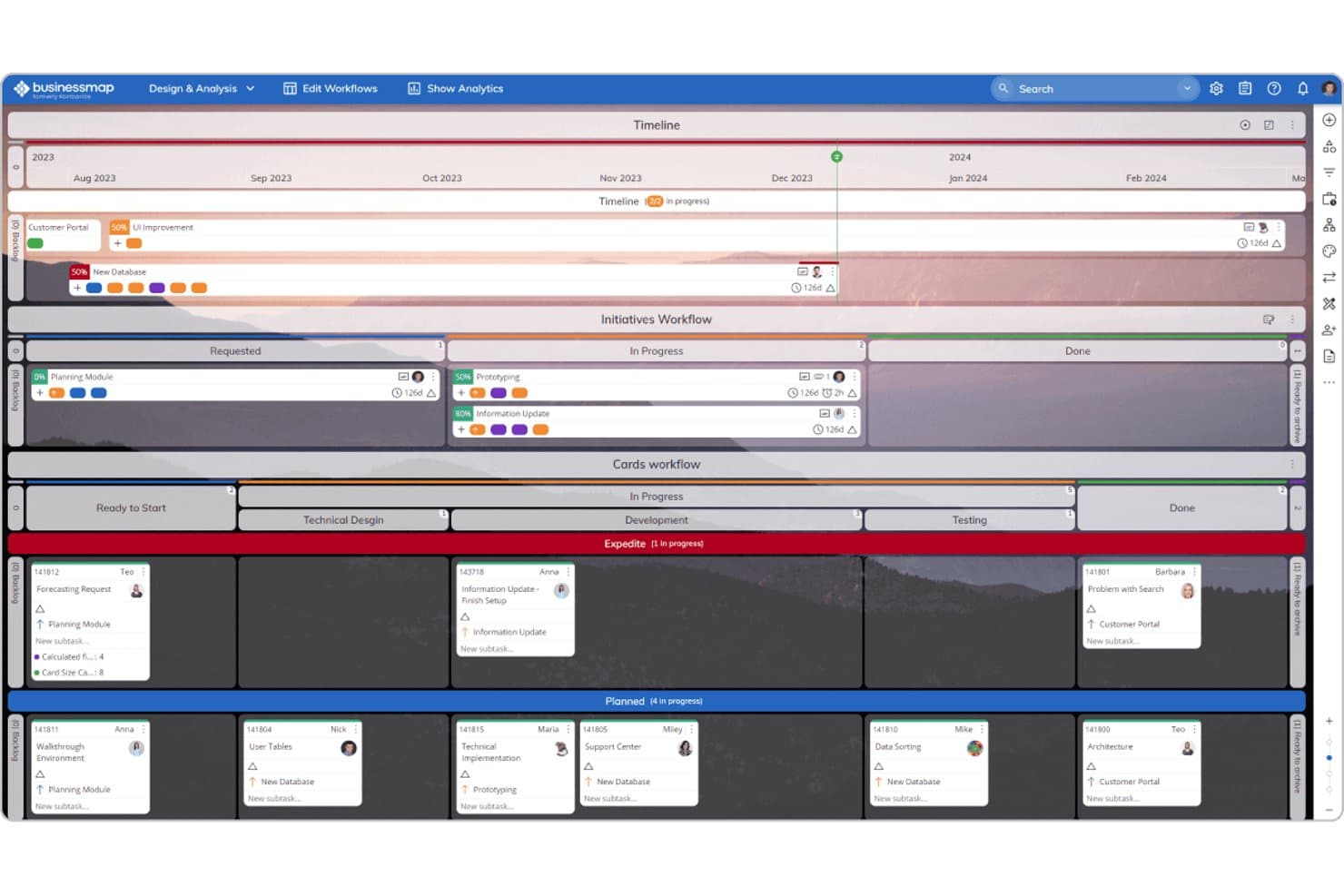
Businessmap combines Timeline, Kanban, and workflow views for product management. Businessmap is a project and portfolio management platform built around Kanban boards, offering multi-board workspaces, WIP limits, Gantt views, automation rules, and cross-board portfolio tracking.
Who Is Businessmap Best For?
Businessmap fits teams that need to connect individual task boards to a broader portfolio view—especially product and project managers overseeing multiple workstreams at once.
Why I Picked Businessmap
Businessmap earns its spot on my shortlist because of how well it connects individual task boards to a portfolio-level view—something most Kanban tools don't do without a workaround. I particularly like the Portfolio Workspaces feature, which links boards across teams so you can track cross-team dependencies in one place. The Initiatives Workflow also stands out: it auto-updates a parent epic as linked task cards move, so your high-level roadmap stays current without manual syncing.
Businessmap Key Features
- WIP limits by task size: Set work-in-progress limits based on task size rather than card count, giving your team a more accurate picture of actual workload.
- Cumulative flow diagram: Track how work moves through each stage over time with a built-in chart that surfaces bottlenecks and throughput patterns.
- Workflow designer: Build custom columns, sub-columns, and swimlanes using a no-code designer to match your team's exact process.
- Monte Carlo forecasting: Use statistical delivery date predictions—ranging from optimistic to pessimistic—based on your team's real historical data.
Businessmap Integrations
Businessmap offers documented integrations with Jira, GitLab, Bitbucket, Power BI, Tableau, Looker Studio, Okta, Azure AD, and OneLogin. It also supports Make, Microsoft Power Automate, and REST API connections, plus Zapier.
Pros and Cons
Pros:
- Initiatives connect epics with delivery tasks
- Size-based WIP limits clarify team capacity
- Cross-board portfolio visibility supports roadmap oversight
Cons:
- Extensive configuration slows initial adoption
- Multiple boards can complicate prioritization
Learn more about Businessmap: Best for enterprise-scale kanban portfolio planning
- 30-day free trial + free demo available
- Pricing upon request
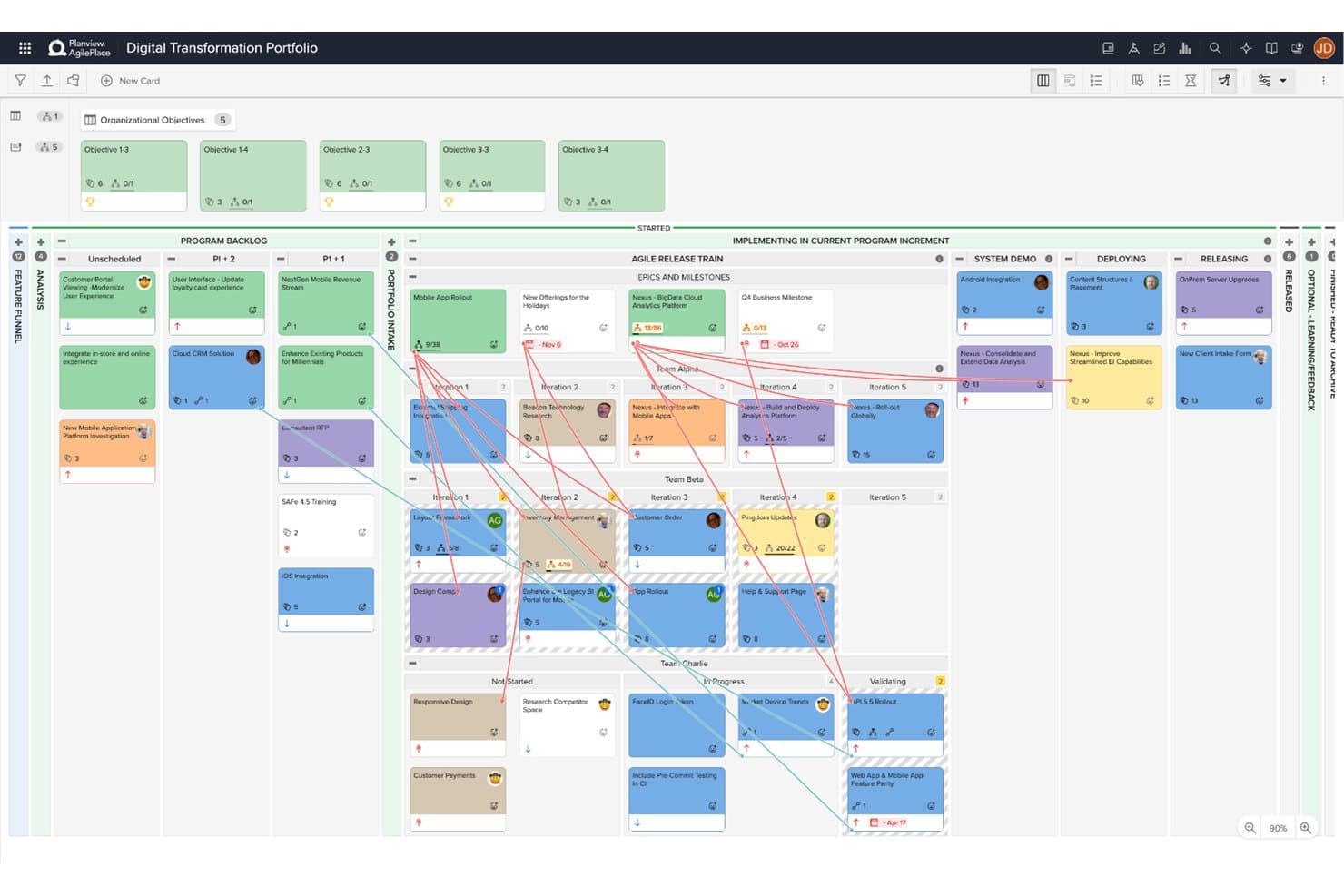
Planview AgilePlace visualizes portfolio work across teams and program increments. Planview AgilePlace is an enterprise kanban platform that combines visual board management, cross-board portfolio planning, WIP limit enforcement, flow analytics, and PI planning across teams of teams.
Who Is Planview AgilePlace Best For?
Planview AgilePlace is a strong fit for enterprise product and engineering teams coordinating work across multiple teams, boards, and program increments.
Why I Picked Planview AgilePlace
Planview AgilePlace earns its spot on my shortlist because it's built from the ground up for teams managing work across dozens of boards simultaneously. I particularly like the cross-board portfolio view, which rolls up parent-child card relationships so you can track epics and milestones across teams without losing sight of lane-level detail. The PI and quarter planning features are equally impressive, letting teams-of-teams coordinate dependencies and visualize blockers across program increments in one place.
Planview AgilePlace Key Features
- WIP limits: Set work-in-progress limits on lanes and individual users, with alerts on every limit breach and recorded override reasons.
- Flow analytics: Track cycle time, lead time, and cumulative flow diagrams to identify bottlenecks across your boards.
- Card scoring: Rank backlog items using custom scoring criteria to support prioritization decisions.
- AI assistant (Planview Anvi): Ask questions in natural language, surface risks, and get backlog curation suggestions directly within the tool.
Planview AgilePlace Integrations
Planview AgilePlace offers native integrations with Jira, Broadcom Rally, Microsoft Azure DevOps, digital.ai, and ServiceNow. It also provides an open API for connections to Power BI, Tableau, and other Planview products.
Pros and Cons
Pros:
- Flow metrics expose product delivery bottlenecks
- WIP enforcement records override reasons
- Cross-board portfolio planning connects team dependencies
Cons:
- Reporting needs more depth for some teams
- Interface feels dated to some reviewers
Learn more about Planview AgilePlace: 10Best for no-code automation on any board size
Trello
- 14-day free trial
- From $5/user/month (billed annually)
Visit WebsiteCustomer Rating:4.5/5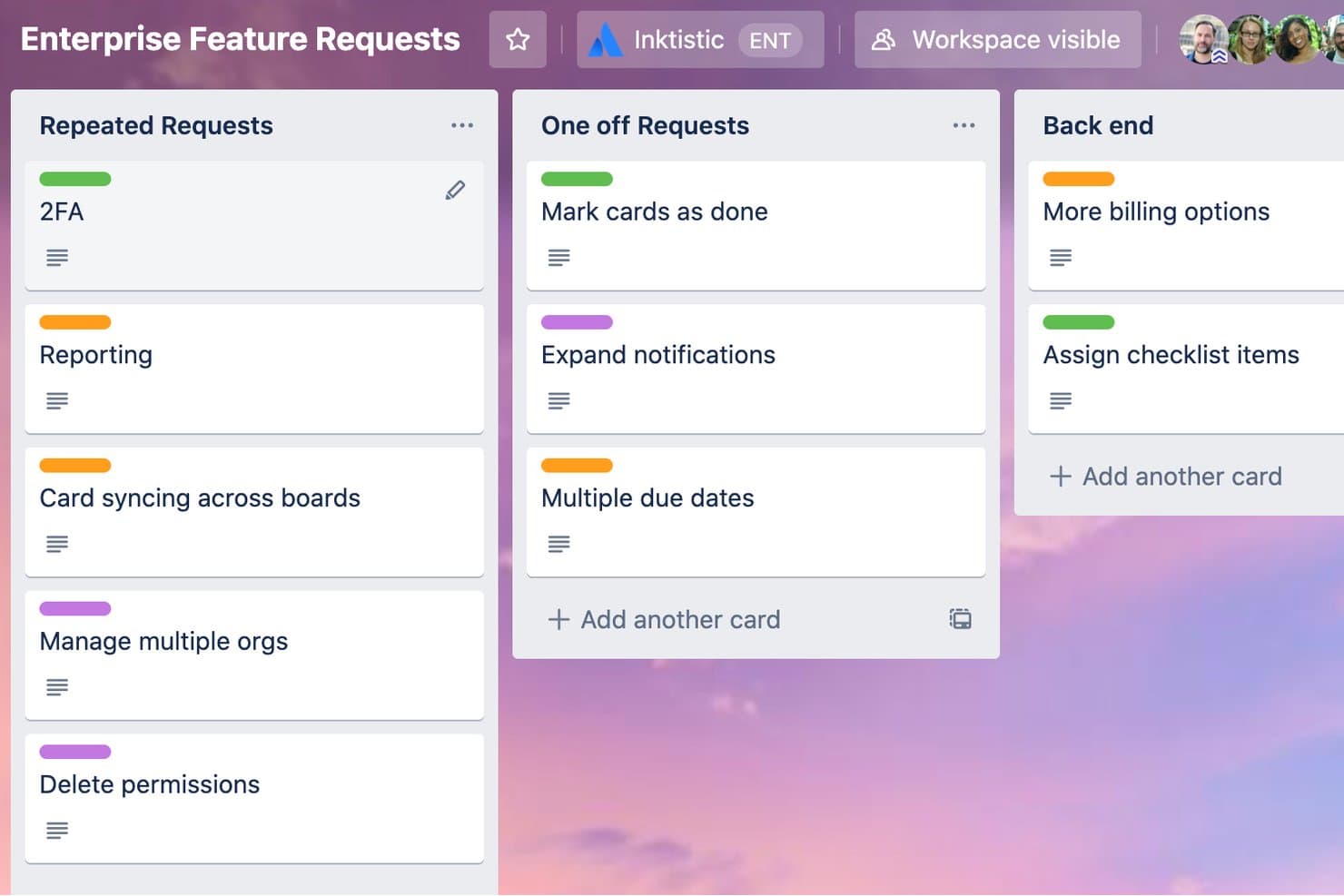
Trello organizes enterprise feature requests across labeled Kanban columns. Trello is a kanban-based project management tool built around boards, lists, and cards, with built-in no-code automation, 200+ Power-Up integrations, and cross-functional collaboration features like comments, assignees, and checklists.
Who Is Trello Best For?
Trello works well for small to mid-sized teams that want a simple, visual way to manage tasks without a steep learning curve or heavy setup.
Why I Picked Trello
I've included Trello in my top picks because its built-in Butler automation works across boards of any size without writing a single line of code. I particularly like how you can set rules to automatically move cards between lists, assign members, or apply due dates the moment a trigger fires. For product teams juggling backlog grooming and sprint handoffs, that automation removes a lot of repetitive manual work from the board.
Trello Key Features
- Custom fields: Add structured data to cards—like priority, status, or product area—to keep your backlog organized and consistent across the board.
- Card mirroring: Display a single card across multiple boards so cross-functional teams always see the same up-to-date task without duplication.
- AI-generated checklists and due dates: Let Trello draft task breakdowns and timelines from a card description, giving you a starting point for sprint planning.
- 200+ Power-Up integrations: Connect tools like Slack, Google Drive, and Salesforce directly to your boards to keep work centralized without switching tabs.
Trello Integrations
Trello supports 200+ integrations through Power-Ups, including Slack, Google Drive, and Salesforce. Power-Ups are unlimited per board, though some carry separate subscription fees.
Pros and Cons
Pros:
- Card mirroring aligns shared work
- Visual backlog-to-completion tracking
- No-code automation across boards
Cons:
- Complex portfolios become difficult to organize
- Native WIP limit controls absent
Andre Kanban-verktøy
Her er noen flere alternativer for Kanban-verktøy som ikke kom med på kortlisten min, men som likevel er verdt å undersøke:
- 11JiraBest for kanban with multi-team agile reporting
- 12FavroBest for built-in flow metrics across every board
- 13SmartsheetBest for spreadsheet-style kanban at scale
- 14AsanaBest for managing multiple workstreams across boards
- 15monday AI WorkspaceBest for cross-team backlog on one board
- 16Kanban ToolBest for Kanban purists needing on-site hosting
- 17Easy ProjectsBest for ops-heavy teams tracking time and budgets
- 18TeamhoodBest for customizable boards with flow metrics
- 19NotionBest for keeping docs and boards in one workspace
- 20Azure BoardsBest for dev-team kanban in Microsoft ecosystems
How I Evaluate Kanban Tools
I split my evaluation into three parts, with core functionality carrying the most weight: can the tool build boards that actually mirror how your team works, and does it enforce WIP limits with real visibility? Then I look at standout features like cross-board dependency tracking, and finally consider onboarding ease and pricing transparency.
Core Functionality (Table Stakes for This List)
When I'm selecting tools for my list, I score each one on a scale from 0 (does not offer the functionality) to 5 (excels in this area) for each core functionality listed below. I then convert the total into a percentage to help assess each tool's overall fit, with extra weight on any functionalities I've deemed essential.
- Visual Kanban Boards (Essential): I check whether boards scale beyond a single team—can you run separate boards for discovery, delivery, and ops without the layout falling apart?
- Drag-and-Drop Cards (Essential): Cards should update status the moment you move them, and I look for bulk drag support so reprioritizing a dozen items isn't a one-by-one chore.
- Work-in-Progress Limits: I evaluate whether WIP limits actually warn or block your team when a column is overloaded, not just display a number no one notices.
- Multiple Board Views: Teams need list, calendar, and timeline views that stay in sync with the board. I look for full data parity so switching views never means losing context.
- Workflow Customization: I check for configurable columns, swimlanes, and sub-stages—plus whether you can save custom workflows as templates to reuse across new product squads.
- Flow and Performance Reporting: Cycle time, lead time, and cumulative flow charts tell you where work stalls. I look for filtering by team or time period so you can spot bottlenecks early.
Once I have a list of tools that meet the criteria, I consider what sets each platform apart.
Differentiating Factors (What Sets Vendors Apart)
Here's how I compare and contrast different vendors:
Standout Features
I evaluate each tool's automation and rules engine first. A board that can auto-assign cards, trigger notifications, and move items between columns based on status changes saves hours of manual upkeep each sprint. I also check for cross-board dependency tracking, since product teams running parallel workstreams need to see how a blocked card on one board affects delivery on another. Finally, I look at native integrations with tools like Slack, GitHub, and Google Workspace to confirm data flows both ways without manual re-entry.
Beyond Features
I evaluate how well a tool scales from a single squad to an org-wide rollout, checking whether permission tiers and guest access keep up as teams multiply. Onboarding ease matters just as much—kanban adoption usually starts with one team and spreads organically, so guided templates and in-app walkthroughs shorten time-to-value. I also look at integration depth with dev and PM ecosystems, since two-way sync with tools like Jira or Slack determines whether your board stays the source of truth or drifts into a silo.
Slik velger du et Kanban-verktøy
Det er lett å gå seg vill i lange funksjonslister og komplekse prisstrukturer. For å hjelpe deg med å holde fokus mens du arbeider deg gjennom din unike prosess for valg av programvare, får du her en sjekkliste over faktorer du bør ha i mente:
| Faktor | Hva du bør vurdere |
|---|---|
| FaktorSkalerbarhet | Hva du bør vurdereKan verktøyet vokse sammen med teamet ditt? Tenk på fremtidige behov for flere brukere eller prosjekter. Se etter verktøy som tilbyr fleksible prisnivåer eller bedriftsalternativer. |
| FaktorIntegrasjoner | Hva du bør vurdereFungerer verktøyet med den eksisterende programvaren din? Se etter integrasjoner med viktige verktøy som Slack, Google Workspace eller Microsoft Office. Unngå verktøy som krever manuell overføring av data. |
| FaktorTilpasningsmuligheter | Hva du bør vurdereKan du tilpasse verktøyet til arbeidsflytene dine? Se etter alternativer for å tilpasse tavler, felt og varsler. Unngå rigide verktøy som ikke tilpasser seg prosessene dine. |
| FaktorBrukervennlighet | Hva du bør vurdereEr verktøyet brukervennlig for teamet ditt? Test grensesnittet med tanke på enkelhet og tydelighet. En bratt læringskurve kan hindre innføringen. |
| FaktorImplementering og oppstart | Hva du bør vurdereHvor raskt kan teamet ditt begynne å bruke verktøyet? Vurder hvor tilgjengelig opplæringsmateriell er, hvilken støtte som tilbys under oppsettet, og hvor enkelt det er å flytte data. |
| FaktorKostnad | Hva du bør vurderePasser verktøyet inn i budsjettet ditt? Sammenlign prisplaner og ta høyde for skjulte kostnader som tillegg eller brukerbegrensninger. Se etter et verktøy som gir god verdi uten å sprenge budsjettet. |
| FaktorSikkerhetstiltak | Hva du bør vurdereBeskytter verktøyet dataene dine? Sørg for at det har sterke sikkerhetsfunksjoner som kryptering og regelmessige sikkerhetskopier. Kontroller at det overholder regelverket for databeskyttelse. |
| FaktorTilgjengelig kundestøtte | Hva du bør vurdereFår du hjelp når du trenger det? Sjekk åpningstidene og de tilgjengelige kontaktkanalene for kundestøtte. Se etter kundestøttealternativer som chat eller telefon, spesielt hvis teamet ditt arbeider på tvers av ulike tidssoner. |
Trender innen Kanban-verktøy
Kanbanverktøy og -teknologi fortsetter å utvikle seg raskt, noe som gjenspeiler produktstyringsfagfolks økende behov for mer effektive måter å organisere, prioritere og følge opp oppgaver på – for ikke å nevne den fortsatte overgangen fra fossefallsmetodikk til smidige metoder. Derfor har flere viktige trender oppstått, og jeg tror de vil fortsette å påvirke kanbanverktøy og fagfolk innen produktstyring i fremtiden.
- Integrasjon med AI og maskinlæring: Kanbanverktøy tar i økende grad i bruk AI og maskinlæring for å automatisere prioritering av oppgaver og beregne når prosjekter blir ferdige. Denne funksjonaliteten forbedres over tid etter hvert som algoritmene lærer av teamets arbeidsmønstre, noe som gjør verktøyene smartere og bedre i stand til å forutsi og håndtere prosjektplaner.
- Bærekraftige og miljøvennlige funksjoner: Stadig flere kanbanverktøy innlemmer funksjoner som har som mål å fremme bærekraft i prosjektstyringspraksis. Dette omfatter sporing av karbonavtrykk for prosjekter og fremme av digital minimalisme for å redusere energiforbruket. Slike funksjoner imøtekommer den økende etterspørselen etter miljøbevisst forretningsdrift og gjenspeiler en bredere trend mot miljøansvar i teknologibransjen.
- Arbeidsområder for virtuell virkelighet (VR): Noen av de mest nyskapende funksjonene er innføringen av arbeidsområder for VR, som lar brukerne samhandle med kanban-tavlene sine i et tredimensjonalt virtuelt miljø. Denne uvanlige funksjonen imøtekommer behovet for mer oppslukende og engasjerende opplevelser innen prosjektstyring, særlig i kreative og designorienterte bransjer.
- Analyser av emosjonell intelligens: En annen nyskapende funksjon er integrasjon av analyser av emosjonell intelligens, som vurderer teamets moral og trivsel basert på samhandlingsmønstre og fullføringsgrad for oppgaver. Denne unike tilnærmingen har som mål å gi teamledere innsikt i teamenes velvære og fremhever det økende fokuset på psykisk helse på arbeidsplassen.
- Elementer fra spillifisering: Det blir stadig mer populært å innlemme elementer fra spillifisering i kanbanverktøy, med funksjoner som prestasjonsmerker, ledertavler og belønningssystemer. Disse elementene er utformet for å øke brukernes engasjement og motivasjon, slik at fullføring av oppgaver og sporing av prosjektfremdrift blir mer interaktivt og givende for teammedlemmene.
Disse trendene gjenspeiler de stadig skiftende behovene og utfordringene som fagfolk innen produktstyring møter. Etter hvert som kanbanverktøy fortsetter å fornye seg, er fokuset rettet mot å skape smartere, mer fleksible og mer samarbeidsorienterte miljøer som ikke bare øker produktiviteten, men også prioriterer teamenes velvære og engasjement.
Hva er et kanbanverktøy?
Kanban Tool er en plattform for prosjektstyring som lar deg sette oppgavene dine på digitale tavler for bedre oversikt og flyt. Prosjektledere, produktansvarlige og teammedlemmer bruker det til å organisere arbeidet, følge fremdriften og oppdage flaskehalser tidlig. Det hjelper deg med å holde alle oppdatert, prioritere det som er viktig, og sørge for at ingenting faller mellom stolene.
Funksjoner
Når du velger et kanbanverktøy, bør du se etter følgende nøkkelfunksjoner:
- Kanbantavler: Visualiser arbeidsflyter og håndter oppgaver effektivt, slik at teamene kan se fremdriften med et øyekast.
- Oppgavetildeling: Fordel oppgaver til teammedlemmer, slik at alle kjenner ansvarsområdene og tidsfristene sine.
- Fremdriftssporing: Følg med på fullføringen av oppgaver og prosjektstatusen for å holde teamene på rett spor og overholde tidsfristene.
- Tilpasningsmuligheter: Tilpass tavler og arbeidsflyter etter teamets spesifikke behov og prosesser.
- Integrasjoner: Koble til andre verktøy som Slack eller Google Workspace for å effektivisere arbeidet på tvers av plattformer.
- Automatiseringsfunksjoner: Automatiser gjentakende oppgaver for å spare tid og redusere manuelle feil.
- Rapporteringsverktøy: Generer innsikt og analyser for å evaluere teamets prestasjoner og prosjektresultater.
- Mobiltilgang: Håndter oppgaver på farten med mobilapper, slik at du får fleksibilitet og tilgjengelighet.
- Samarbeidsverktøy: Legg til rette for kommunikasjon og idéutveksling i teamet gjennom kommentarer og filvedlegg.
- Sikkerhetsfunksjoner: Beskytt dataene dine med kryptering og overholdelse av personvernregler.
Fordeler
Implementering av et kanbanverktøy gir flere fordeler for teamet og virksomheten din. Her er noen av fordelene du kan se frem til:
- Bedre organisering: Visualiser arbeidsflyter med kanban-tavler, slik at teamet ditt holder seg organisert og fokusert på oppgavene.
- Forbedret samarbeid: Bruk samarbeidsverktøy for å legge til rette for kommunikasjon og deling av ideer mellom teammedlemmene.
- Økt produktivitet: Automatiser repetitive oppgaver og følg fremdriften for å sikre at teamet ditt arbeider effektivt og overholder tidsfristene.
- Fleksibilitet: Tilpass arbeidsflyter slik at de passer teamets unike prosesser, og gjør det enkelt å tilpasse seg endringer.
- Bedre beslutningstaking: Få tilgang til rapporteringsverktøy som gir innsikt i teamets ytelse og prosjektresultater, slik at du kan ta velinformerte beslutninger.
- Tilgjengelighet: Administrer oppgaver hvor som helst med mobiltilgang, noe som gir fleksibilitet for teammedlemmer som arbeider eksternt eller er på farten.
- Datasikkerhet: Beskytt virksomhetens informasjon med sterke sikkerhetsfunksjoner, og sørg for samsvar med personvernregelverket.
Kostnader og priser
Ved valg av et kanbanverktøy må du ha en forståelse av de ulike prismodellene og abonnementene som er tilgjengelige. Kostnadene varierer basert på funksjoner, teamstørrelse, tillegg og mer. Tabellen nedenfor oppsummerer vanlige abonnementer, gjennomsnittsprisene deres og typiske funksjoner som inngår i kanbanverktøyløsninger:
Sammenligningstabell for kanbanverktøyabonnementer
| Abonnementstype | Gjennomsnittspris | Vanlige funksjoner |
|---|---|---|
| AbonnementstypeGratisabonnement | Gjennomsnittspris$0 | Vanlige funksjonerGrunnleggende kanban-tavler, begrenset oppgavehåndtering og grunnleggende samarbeidsverktøy. |
| AbonnementstypePersonlig abonnement | Gjennomsnittspris$5-$15/bruker/måned | Vanlige funksjonerTilpassbare tavler, oppgavetildeling, fremdriftssporing og mobiltilgang. |
| AbonnementstypeBedriftsabonnement | Gjennomsnittspris$15-$30/bruker/måned | Vanlige funksjonerAvansert rapportering, automatiseringsfunksjoner, integrasjoner med populære verktøy og forbedret sikkerhet. |
| AbonnementstypeVirksomhetsabonnement | Gjennomsnittspris$30-$60/bruker/måned | Vanlige funksjonerUbegrenset antall brukere, dedikert kundestøtte, tilpassbare arbeidsflyter og avansert analyse. |
Vanlige spørsmål om kanbanverktøy
Her er noen svar på vanlige spørsmål om kanbanverktøy:
Kan kanbanverktøy brukes av eksterne team?
Ja, kanbanverktøy er utmerkede for eksterne team. De gjør det mulig for teammedlemmer å samarbeide og følge fremdriften hvor som helst fra. Se etter verktøy med gode samarbeidsfunksjoner, mobiltilgang og integrasjoner med kommunikasjonsplattformer som Slack eller Microsoft Teams for å forbedre det eksterne samarbeidet.
Er det vanskelig å bytte fra et annet prosjektstyringsverktøy til et kanbanverktøy?
Det kan være enkelt å bytte til et kanbanverktøy hvis verktøyet tilbyr god støtte ved oppstart. Mange verktøy tilbyr maler, opplæringsvideoer og interaktive omvisninger for å gjøre overgangen enklere. Sørg for at det nye verktøyet kan importere data fra det forrige systemet, slik at forstyrrelsene blir minimale og prosjektene holdes på sporet.
Støtter kanbanverktøy smidig prosjektstyring?
Ja, mange kanbanverktøy støtter smidige metoder. De tilbyr funksjoner som håndtering av oppgavekø, sprinter og prioritering av oppgaver, som er avgjørende for smidige team. Hvis teamet ditt følger smidige arbeidsmetoder, bør du se etter verktøy som spesifikt nevner støtte for smidige rammeverk, slik at du kan være sikker på at de dekker behovene dine.
Hvilke utfordringer med datamigrering bør jeg forvente når jeg bytter til et nytt kanbanverktøy?
Du må kanskje tilordne de eksisterende kortene, kolonnene, vedleggene og brukertildelingene til formatet i det nye verktøyet – forvent noe manuelt oppryddingsarbeid, særlig hvis det gamle verktøyet brukte egendefinerte felt eller statuser. Gå gjennom import- og eksportformatene (CSV, JSON), slik at du kan ta med verdifull historikk i stedet for å starte helt på nytt. Sjekk også hvordan arkiverte oppgaver og sammenkoblede kort migreres, fordi manglende data kan svekke sporbarheten.
Hvordan kan jeg sikre god endringshåndtering når jeg tar i bruk et kanbanverktøy i hele organisasjonen?
Kommuniser «hvorfor» – vis teamene hvordan verktøyet vil gjøre arbeidet synlig og håndterbart, og at det ikke bare er enda et verktøy. Opprett en pilotgruppe som representerer ulike team, og samle inn tilbakemeldinger tidlig slik at du fanger opp reelle brukerbekymringer. Gi opplæring ikke bare i funksjonene, men også i arbeidsmåtene (for eksempel å oppdatere kort når statusen endres), slik at det nye verktøyet blir en del av måten folk arbeider på, og ikke bare et valgfritt tillegg.