

Det kan være krevende å navigere i UX-designverdenen, særlig når budsjettet er stramt. Du trenger verktøy som hjelper teamet ditt med å designe effektivt uten at det koster for mye. Det er her gratis UX-programvare kommer inn i bildet.
Gjennom min erfaring med å teste og anmelde programvare har jeg funnet ut at gratisløsninger kan dekke mange av behovene dine, fra prototyping til samarbeid. Disse verktøyene reduserer ulempene ved høye kostnader, samtidig som de tilbyr viktige funksjoner.
I denne artikkelen deler jeg mine beste valg for gratis UX-programvare. Jeg gir deg en objektiv og grundig gjennomgang, slik at du kan velge riktig verktøy for teamet ditt. Enten du driver en oppstartsbedrift eller en liten bedrift, finner du noe som passer for deg her.
Hvorfor du kan stole på våre programvareanbefalinger
6,700+
Reviews
20
Industry experts
16+
Evaluation factors
14
Years
Teamet vårt har testet og anmeldt programvare siden 2012. Vi er selv produktledere, så vi vet hvor vanskelig og hvor viktig det er å velge riktig programvare.
I denne guiden har vi vurdert verktøyene gjennom praktisk testing og uavhengig research og gitt dem poeng ut fra våre utvelgelseskriterier.
Anmeldelsene våre bygger på vår egen redaksjonelle vurdering. De er ikke et salgsargument.
Ekspertanmeldere:
- Andrew LumbySenior TPM
- Cristiano ValimSenior UI/UX Lead


Sammenligningstabell for gratis UX-programvare
Denne sammenligningstabellen oppsummerer prisopplysningene for mine beste utvalgte løsninger innen gratis UX-programvare:
| Tool | Best For | Trial Info | Price | ||
|---|---|---|---|---|---|
| 1 | Best for cross-functional UX workshops and flows | Free plan available | From $3/user/month | Website | |
| 2 | Best for AI sketch-to-prototype without coding | Free plan available | From $39/month (billed annually) | Website | |
| 3 | Best for non-designer wireframing and prototyping | Free plan available | From $24.90/user/month (billed annually) | Website | |
| 4 | Best for code-backed prototype depth | Free plan + 14-day free trial available | From $29/user/month (billed annually) | Website | |
| 5 | Best for non-designer wireframing with PM teams | Free plan available | From $9/user/month (billed annually) | Website | |
| 6 | Best for cross-functional design file access | Free plan available | From $3/user/month | Website | |
| 7 | Best for offline-first UI design on any OS | Free plan + free demo available | From $11.99/user/month (billed annually) | Website | |
| 8 | Best for open-source design-to-dev handoff | Free plan + 14-day free trial available | From $7/user/month | Website | |
| 9 | Best for high-fidelity functional prototyping | Free plan available | From $19/user/month | Website | |
| 10 | Best for all-in-one UI/UX prototyping | Free plan available | From $4/user/month | Website |


Anmeldelser av den beste gratis UX-programvaren
Nedenfor finner du mine detaljerte sammendrag av den beste gratis UX-programvaren som kom med i utvalget mitt. Anmeldelsene mine gir en grundig gjennomgang av de viktigste funksjonene, fordelene og ulempene, integrasjonene og ideelle bruksområdene for hvert verktøy, slik at du kan finne det beste alternativet for deg. Noen av disse verktøyene tilbyr en helt gratis versjon, mens andre tilbyr en gratis prøveperiode. Jeg har lagt til en merknad om hva som er gratis i hver anmeldelse.
 Best for cross-functional UX workshops and flows
- Free plan available
- From $3/user/month
Visit WebsiteCustomer Rating:4.7/5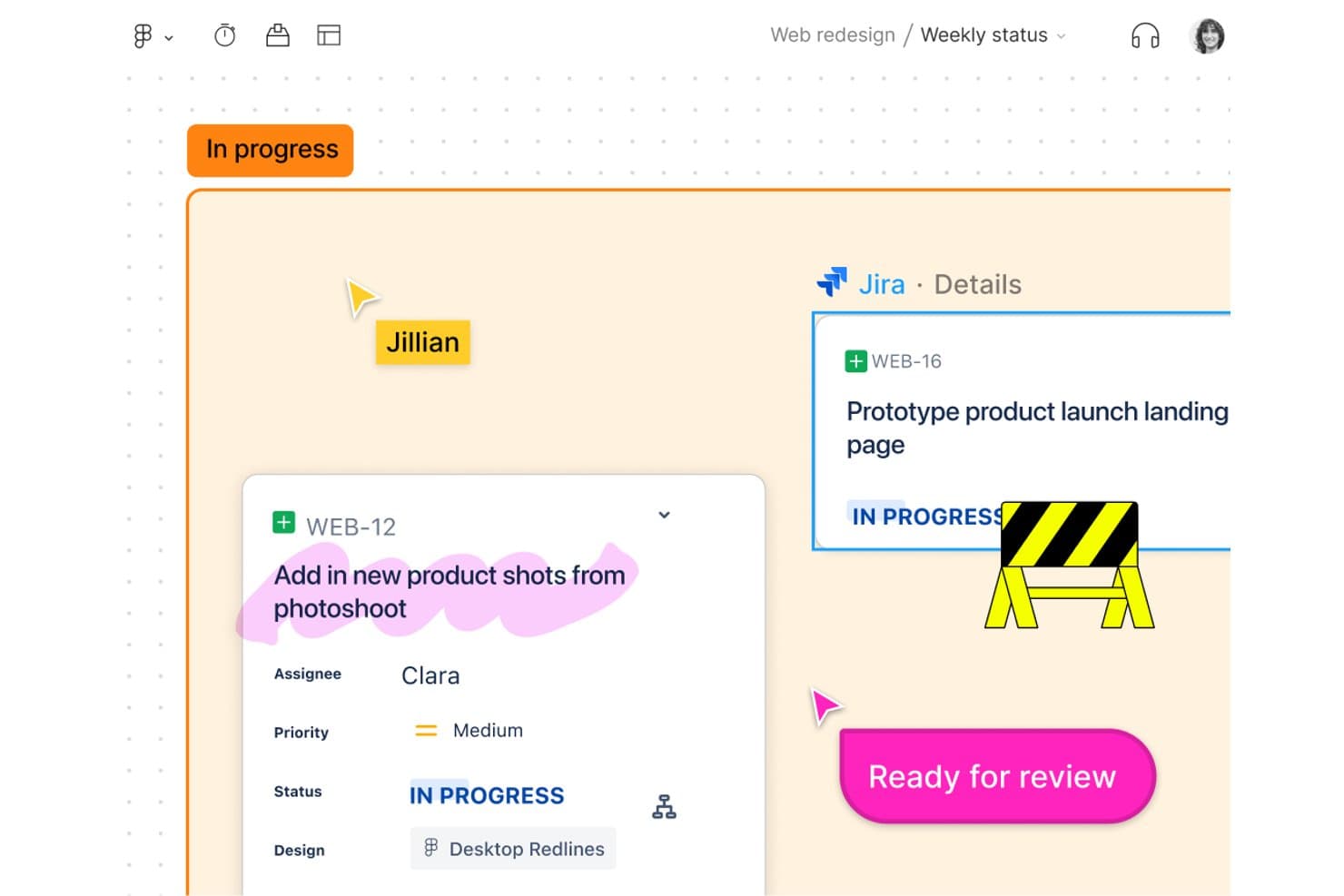
FigJam links Jira tasks directly to design boards for team tracking. FigJam is an online whiteboarding platform built for UX workshops and journey mapping, offering an infinite canvas, real-time collaboration tools, templates, and seamless integration with the Figma ecosystem.
Who Is FigJam Best For?
Product managers and cross-functional teams who need a simple, collaborative space for mapping user journeys, running workshops, and aligning on project flows.
Why I Picked FigJam
I picked FigJam as one of the best because cross-functional workshops and journey mapping are a breeze using its real-time multiplayer boards, voting sessions, and 300-plus ready-made templates. My team uses Open Sessions to invite clients and stakeholders without accounts, which keeps everyone engaged in the process from idea to flowchart.
FigJam Key Features
- Open Sessions guest access: Invite anyone to collaborate on a board for 24 hours without creating a Figma account.
- Integrated audio calls and Spotlight: Start live voice sessions and guide attention to a specific area on the canvas using the Spotlight tool.
- CSV table import and conversion: Bring in CSV data to create tables or quickly turn info into sticky notes.
- Figma Community widgets and plugins: Extend boards with interactive add-ons, voting tools, and custom widgets built by the Figma Community.
FigJam Integrations
FigJam offers native integrations with Asana and Jira, letting you create and manage tasks directly on your whiteboard. You can also extend boards using Figma Community widgets and plugins, and import content from tools like Miro, Mural, Lucid, and Google Jamboard.
What's Free?
FigJam offers a free-forever plan that includes up to 3 FigJam files, unlimited collaborators, and basic features for whiteboarding and teamwork. Some integrations, advanced widgets, and admin controls require a paid plan.
Pros and Cons
Pros:
- Real-time boards for cross-functional workshops
- Huge library of journey mapping templates
- Unlimited collaborators with no-login guest access
Cons:
- Capped to 3 active boards on free plan
- No native interactive prototyping features
Learn more about FigJam: Best for AI sketch-to-prototype without coding
- Free plan available
- From $39/month (billed annually)
Visit WebsiteCustomer Rating:4.6/5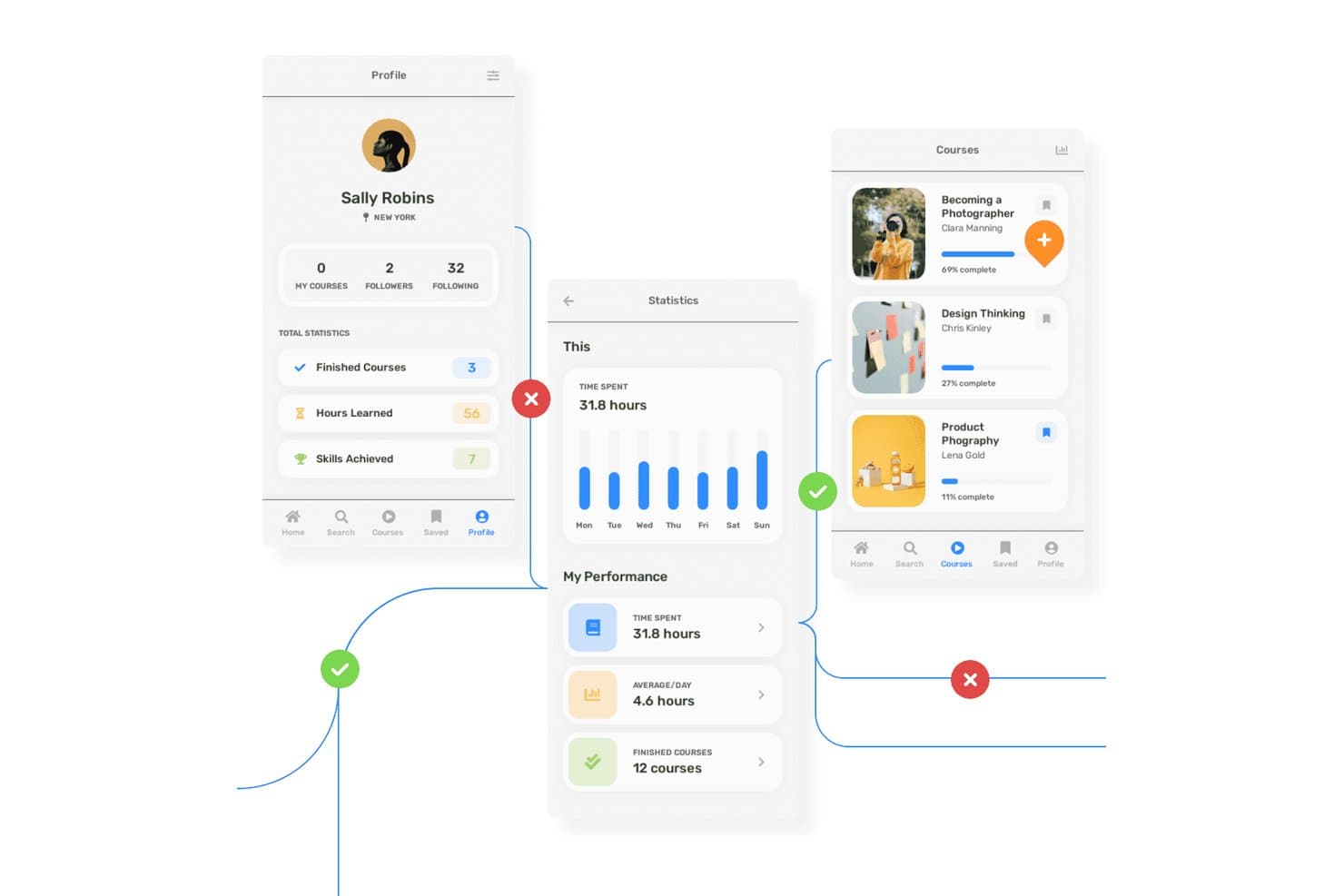
Uizard lets users prototype multi-screen learning app flows with annotations. Uizard is a browser-based UX design tool that lets you create wireframes, mockups, interactive prototypes, and AI-generated design concepts with real-time team collaboration.
Who Is Uizard Best For?
Uizard is a great match for product managers and teams who need quick, AI-powered prototypes to support stakeholder feedback and early validation without advanced design expertise.
Why I Picked Uizard
I picked Uizard because my team can turn hand-drawn sketches or app screenshots into interactive prototypes using its AI-powered scanners. The one-click wireframe and mockup toggle lets us jump rapidly from low- to high-fidelity designs, which is perfect for early user flows. I rely on its AI Autodesigner to generate multi-screen layouts from plain text, speeding up concept validation without coding.
Uizard Key Features
- Wireframe mode toggle: Instantly switch between wireframe and high-fidelity mockup views for any screen.
- Screenshot scanner: Turn existing app or website screenshots into editable prototypes using AI.
- Real-time multiplayer editing: Collaborate with your team live on the same project without version conflicts.
- AI attention heatmap: Visualize where users are likely to focus on your interface with an AI-generated heatmap.
Uizard Integrations
Uizard offers integrations with Figma via its community plugin, imports from Sketch and Adobe XD through PNG/JPG + AI conversion, and allows React/CSS code export on paid plans. No public API or native Zapier support is documented.
What's Free?
Uizard offers a free-forever plan with no time limit. The free plan supports up to 3 projects, 10 screens per project, and includes real-time collaboration, but it restricts some advanced AI features and exports.
Pros and Cons
Pros:
- Unlimited free viewers can comment on prototypes
- Instantly toggle between wireframe and mockup views
- AI converts sketches into clickable prototypes
Cons:
- Free export limited to low-resolution files
- Only AI-predicted heatmaps for usability feedback
Learn more about Uizard: Best for non-designer wireframing and prototyping
- Free plan available
- From $24.90/user/month (billed annually)
Visit WebsiteCustomer Rating:4.5/5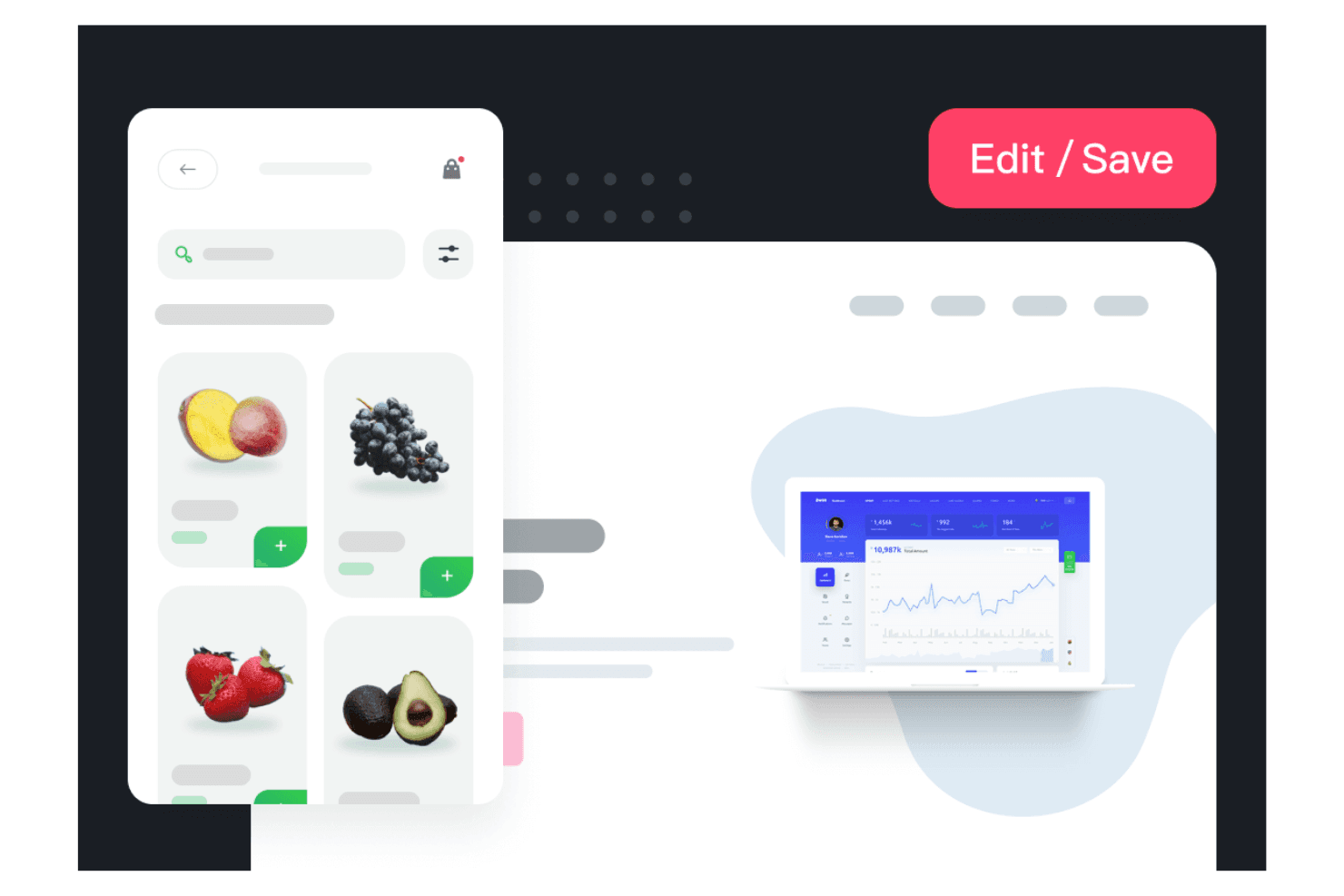
Mockplus allows your team to create visual designs quickly. Mockplus is a browser-based UX design platform offering wireframing, prototyping, UI design, and developer handoff tools across its RP, Cloud, and DT products, with real-time collaboration and large template libraries.
Who Is Mockplus Best For?
Teams looking for a browser-based platform to create and review wireframes or prototypes together with minimal design training or onboarding.
Why I Picked Mockplus
I picked Mockplus because I can quickly turn ideas into interactive wireframes and prototypes with ready-made templates, over 3,000 prebuilt components, and real-time collaboration. My teams use its free Team plan to co-design flows side by side without design experience or a steep onboarding.
Mockplus Key Features
- Real-time co-editing: Multiple team members can work together live on the same prototype without version conflicts.
- Component and asset libraries: Access over 3,000 built-in icons and components, plus shared reusable asset libraries for your projects.
- Third-party design imports: Import designs directly from Figma, Sketch, Adobe XD, and Axure to speed up onboarding and migration.
- Role-based access control: Set different permission levels and manage user access for collaboration within teams.
Mockplus Integrations
Mockplus offers native integrations with Figma, Sketch, Adobe XD, Photoshop, Axure, Slack, Jira, Confluence, and Lark. It connects directly to Mockplus Cloud for review and handoff workflows, supporting design imports and collaboration with these key tools.
What's Free?
Mockplus offers a free-forever Team plan that lets up to 10 users collaborate on 3 projects with unlimited reviewers. This plan includes real-time co-editing but limits the number of projects and some advanced features like role management and version history.
Pros and Cons
Pros:
- Fast turnaround from idea to prototype
- Over 3,000 prebuilt components and icons
- Real-time co-design for up to 10 users
Cons:
- Export options locked behind paid plans
- No usability testing features included
Learn more about Mockplus: Best for code-backed prototype depth
- Free plan + 14-day free trial available
- From $29/user/month (billed annually)
Visit WebsiteCustomer Rating:4.2/5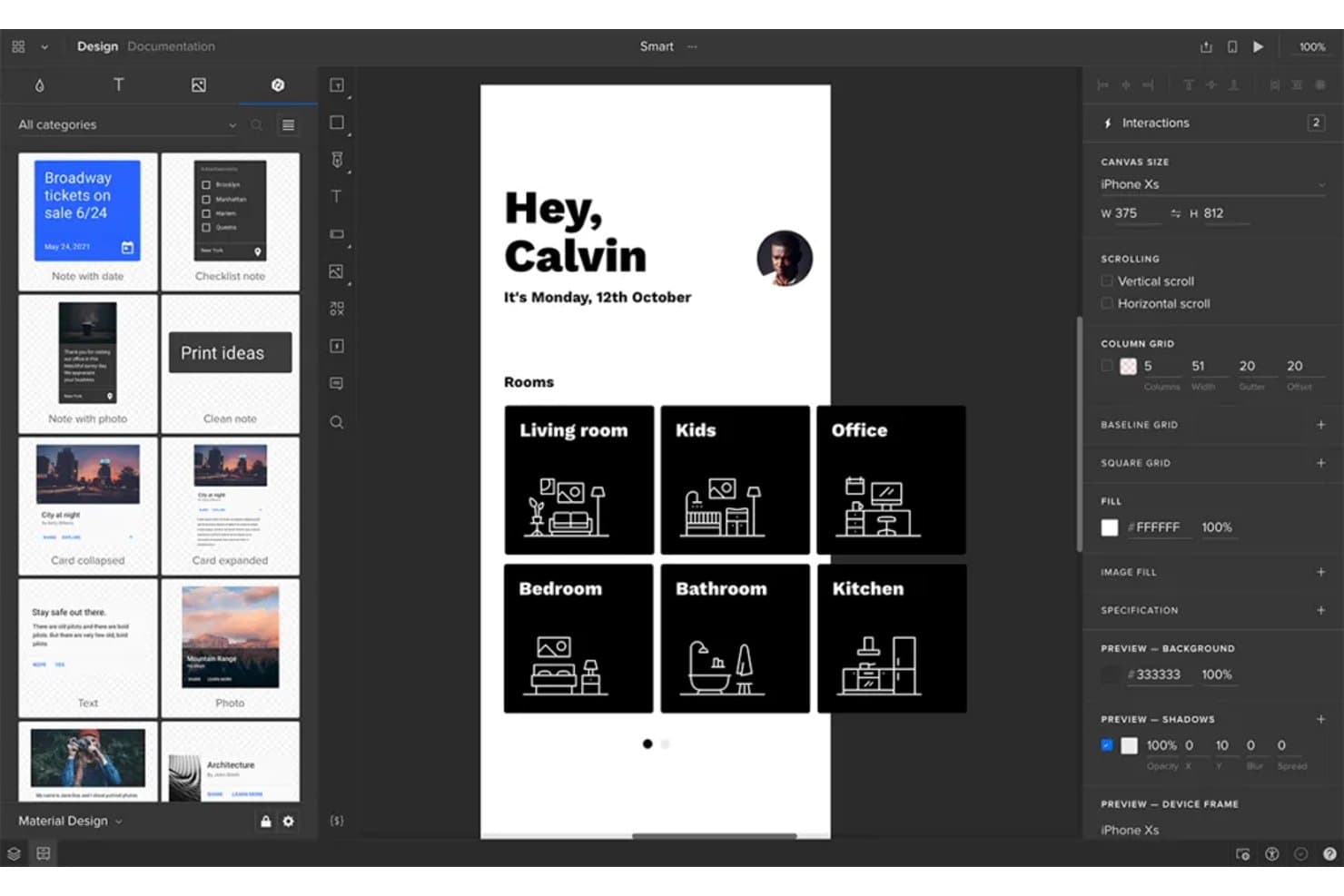
UXPin lets users prototype mobile app screens with real interactions. UXPin is a browser-based UX prototyping platform offering code-backed wireframes, interactive design with real states and components, and built-in collaboration tools.
Who Is UXPin Best For?
UXPin is a solid fit for UX/UI designers at product-focused teams who need advanced prototyping, code-backed components, and stakeholder-ready previews.
Why I Picked UXPin
I picked UXPin because I think its code-backed prototyping lets my team build near-production prototypes with real states, conditional logic, and advanced component libraries. We've been able to test complex user journeys, validate edge cases, and create rich interactive previews before writing a line of production code.
UXPin Key Features
- Real-time co-editing: Multiple team members can work simultaneously on the same design in the browser.
- Figma and Sketch import: Easily bring in design files from Figma or Sketch for rapid iteration.
- AI component creator: Generate code-backed layouts and UI elements from text prompts using built-in AI models.
- Mobile preview apps: Preview and test your prototypes live on iOS and Android devices as you design.
UXPin Integrations
UXPin offers integrations with Figma (via plugin), Sketch, Slack, Jira, and FullStory. It supports custom coded component imports through Git, npm, and Storybook on paid plans. Mirror apps support iOS and Android preview. An API is available for custom integrations.
What's Free?
UXPin offers a free-forever plan with limited features. The free plan typically restricts you to one prototype and fewer advanced features than paid tiers, so it’s best for trying out the platform or handling simple projects.
Pros and Cons
Pros:
- Enables free interactive previews on mobile devices
- Allows browser-based real-time design collaboration
- Builds high-fidelity, code-backed prototypes for free
Cons:
- Only two prototypes allowed on free tier
- Free plan restricts export and acceptance workflows
Learn more about UXPin: Best for non-designer wireframing with PM teams
- Free plan available
- From $9/user/month (billed annually)
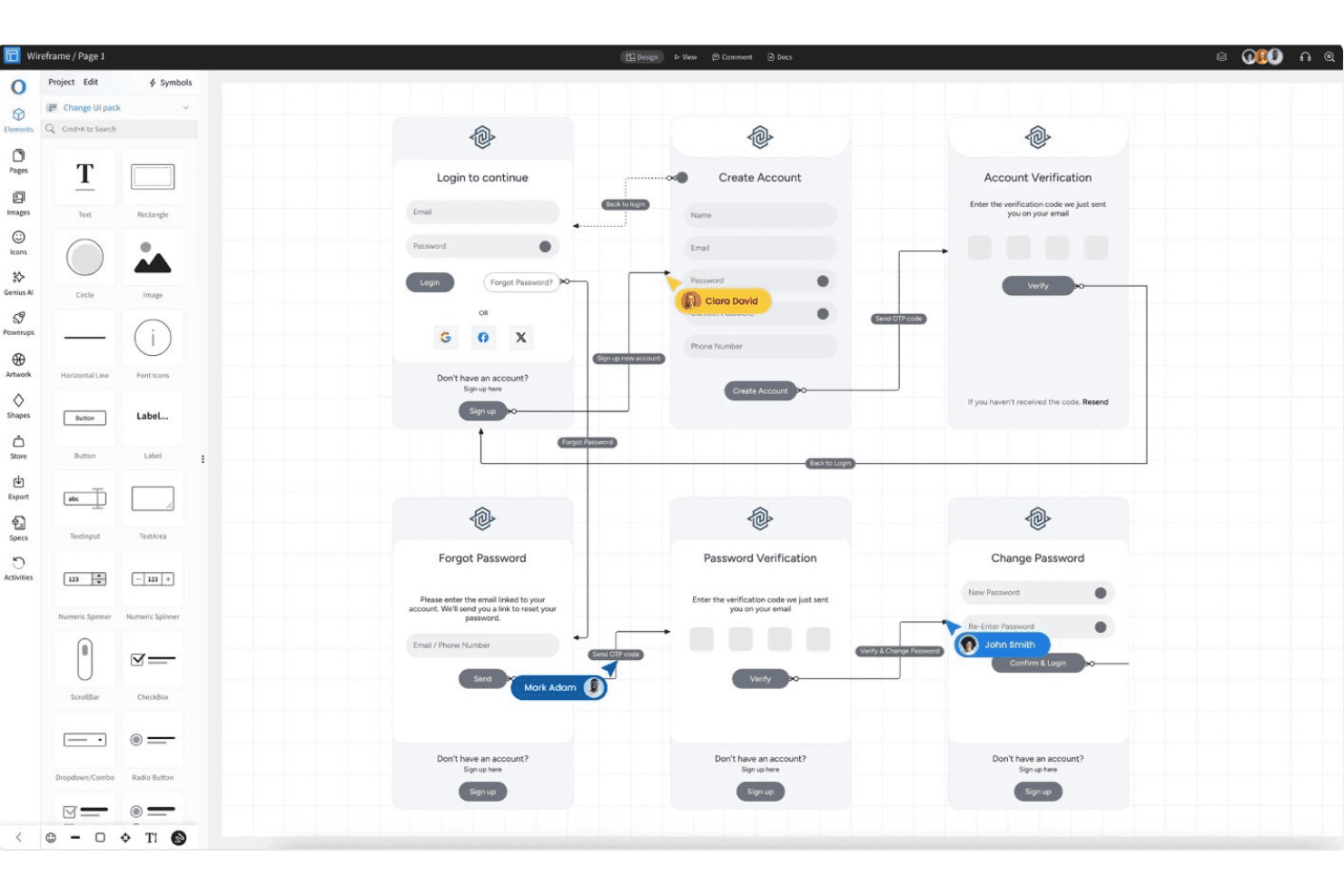
MockFlow aligns faster and maintains consistency for quick exporting. MockFlow is a browser-based UX design platform that focuses on fast wireframing, collaborative brainstorming, template-driven UI ideation, real-time feedback, and reusability through symbols and master pages.
Who Is MockFlow Best For?
MockFlow is a solid choice for product managers and non-designers at startups or nonprofits who need fast, collaborative wireframing and UI ideation.
Why I Picked MockFlow
I picked MockFlow because I appreciate how quickly I can build detailed wireframes using 1,000+ components, reusable symbols, and master pages. The template library and AI text-to-wireframe feature help my team brainstorm ideas fast. Presentation mode and multi-user review tools make it easy to align PMs and non-designers.
MockFlow Key Features
- Importable UI components: Upload and use developer-made components with Tailwind CSS support for more customized wireframes.
- AI design assistant: Use text-to-wireframe, screenshot-to-wireframe, and AI-generated UI elements to speed up initial concepts.
- Free reviewer seats: Invite up to five reviewers on the free plan without using up paid or editor seats.
- Cloud diagramming toolkits: Access built-in AWS, Azure, and Google Cloud architecture icons for technical diagram creation.
MockFlow Integrations
MockFlow offers native integrations with Slack, Microsoft Teams, Office 365, Google Drive, Trello, Atlassian Jira and Confluence, Notion, Fathom, Google Meet, and Figma (Max tier). It also supports API-based connections and AI assistants like Claude and ChatGPT.
What's Free?
MockFlow offers a free-forever plan that includes unlimited basic wireframes, one project, and up to five free reviewer seats. The free plan limits integrations and advanced features, so you’ll need to upgrade for more projects or editor seats.
Pros and Cons
Pros:
- Symbols and master pages support reuse
- Free reviewer seats aid cross-team feedback
- AI-powered text-to-wireframe speeds up drafting
Cons:
- Prototyping limited to basic on-screen actions
- Free plan prohibits commercial business use
Learn more about MockFlow: Best for cross-functional design file access
- Free plan available
- From $3/user/month
Visit WebsiteCustomer Rating:4.7/5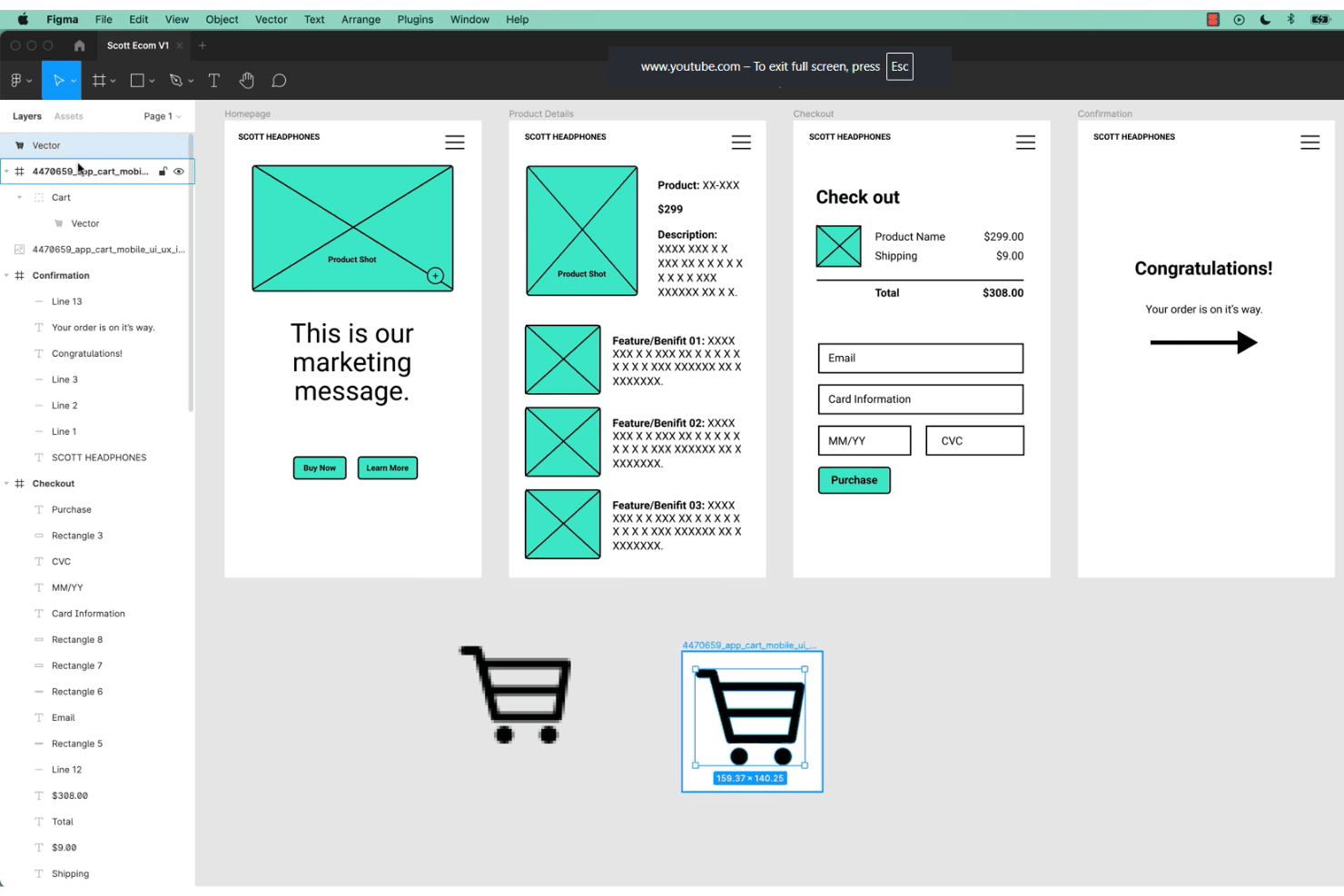
Figma allows teams to collaborate on UX design and prototyping in real time. Figma is a browser-based UX/UI design platform that combines professional-grade vector editing, no-code prototyping, real-time collaboration, and reusable component systems for creating and sharing interface designs.
Who Is Figma Best For?
Cross-functional teams that need browser-based UI design and real-time collaboration without seat limits for viewers or stakeholders.
Why I Picked Figma
Figma earns its spot as one of my top picks because I rely on its browser-based collaboration to let product teams, designers, and stakeholders edit and review interface designs together—no app install or seat limit for viewers. The real-time multiplayer canvas, live feedback, and unlimited free viewers make design file access genuinely cross-functional.
Figma Key Features
- Component variants: Support multiple visual states and interactions within a single component to simplify file management.
- Interactive prototyping: Build clickable prototypes with triggers, animated transitions, and real device frame previews, all within the design file.
- FigJam whiteboard: Collaborate on research synthesis, journey maps, and user flows using a dedicated digital whiteboard tool.
- Community resource hub: Access thousands of free UI kits, templates, and plugins contributed by the Figma user community.
Figma Integrations
Figma offers over 40 integrations, including Slack, Jira, GitHub, Notion, Google Workspace, Microsoft Teams, Maze, UXtweak, UserTesting, Asana, and Trello. It also provides an open REST API and a plugin marketplace for custom and third-party integrations.
What's Free?
Figma offers a free-forever Starter plan that lets you design unlimited files with up to two editors and unlimited viewers. Some advanced features, like team libraries and audio conversations, are restricted to paid plans.
Pros and Cons
Pros:
- Extensive free library of UI templates
- Unlimited free viewers with comment permissions
- Real-time multiplayer editing for all users
Cons:
- No built-in usability testing features
- Free plan limits co-edited team files
 Best for offline-first UI design on any OS
- Free plan + free demo available
- From $11.99/user/month (billed annually)
Visit WebsiteCustomer Rating:4.4/5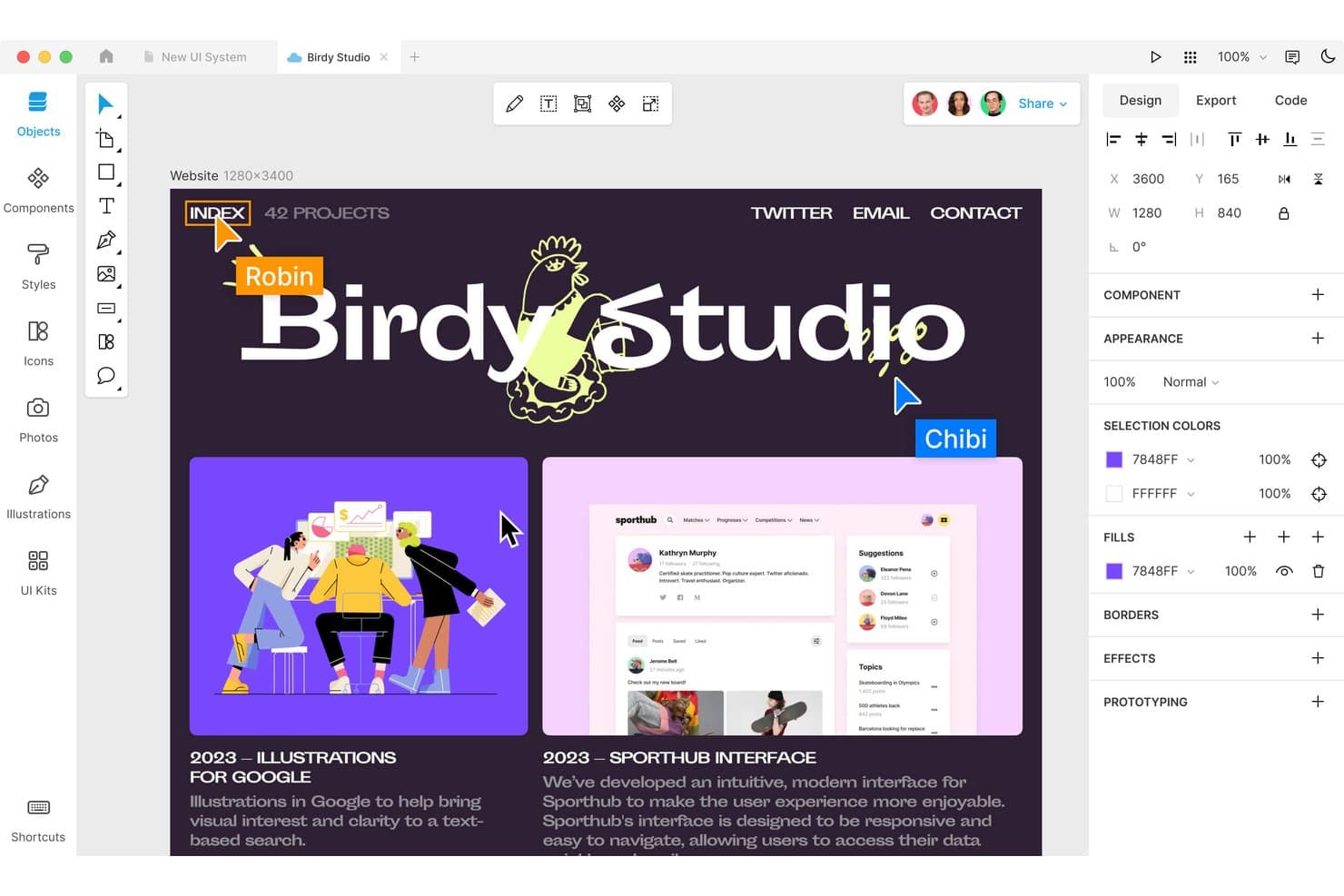
Lunacy lets users design and collaborate on web layouts in real time. Lunacy is a cross-platform UI and UX design tool that offers a full-featured vector canvas, prototyping, reusable components, and real-time collaboration, all in a desktop application with cloud document support.
Who Is Lunacy Best For?
Freelance designers and teams who want a free, offline UI design tool that works on Windows, macOS, and Linux desktops.
Why I Picked Lunacy
I picked Lunacy because I rely on its offline-first workflow that runs natively on Windows, macOS, and Linux. The built-in 1.5M-asset library and AI tools speed up UI design without needing an internet connection. I can prototype interactions, build reusable components, and export developer handoff assets from a single, fast desktop app.
Lunacy Key Features
- Frame-based prototyping: Set up interactive flows with hotspots, triggers, and animated transitions in your designs.
- Built-in asset library: Access over 1.5 million icons, illustrations, and photos directly within the editor.
- Component editor: Create, nest, and manage reusable design components with variants and overrides.
- Export code preview: Instantly generate and view CSS, XAML, JSON, or SVG code for selected design elements.
Lunacy Integrations
Lunacy supports Sketch file compatibility for open/edit/save workflows, Figma file import, and export to Adobe XD via Sketch files. It offers integration with Avocode, Zeplin, Abstract, and Simpli, plus a developer API and a local plugin framework for custom automation.
What's Free?
Lunacy offers a free-forever plan with core design, prototyping, and asset library features for unlimited users. The free version includes desktop access, but some advanced collaboration tools and extra cloud storage require a paid upgrade.
Pros and Cons
Pros:
- Full-featured vector design and prototyping
- Huge built-in asset library with AI tools
- Runs offline on Windows, macOS, and Linux
Cons:
- No built-in usability testing or analytics
- No browser-based editor for editing
Learn more about Lunacy: Best for open-source design-to-dev handoff
- Free plan + 14-day free trial available
- From $7/user/month
Visit WebsiteCustomer Rating:4.5/5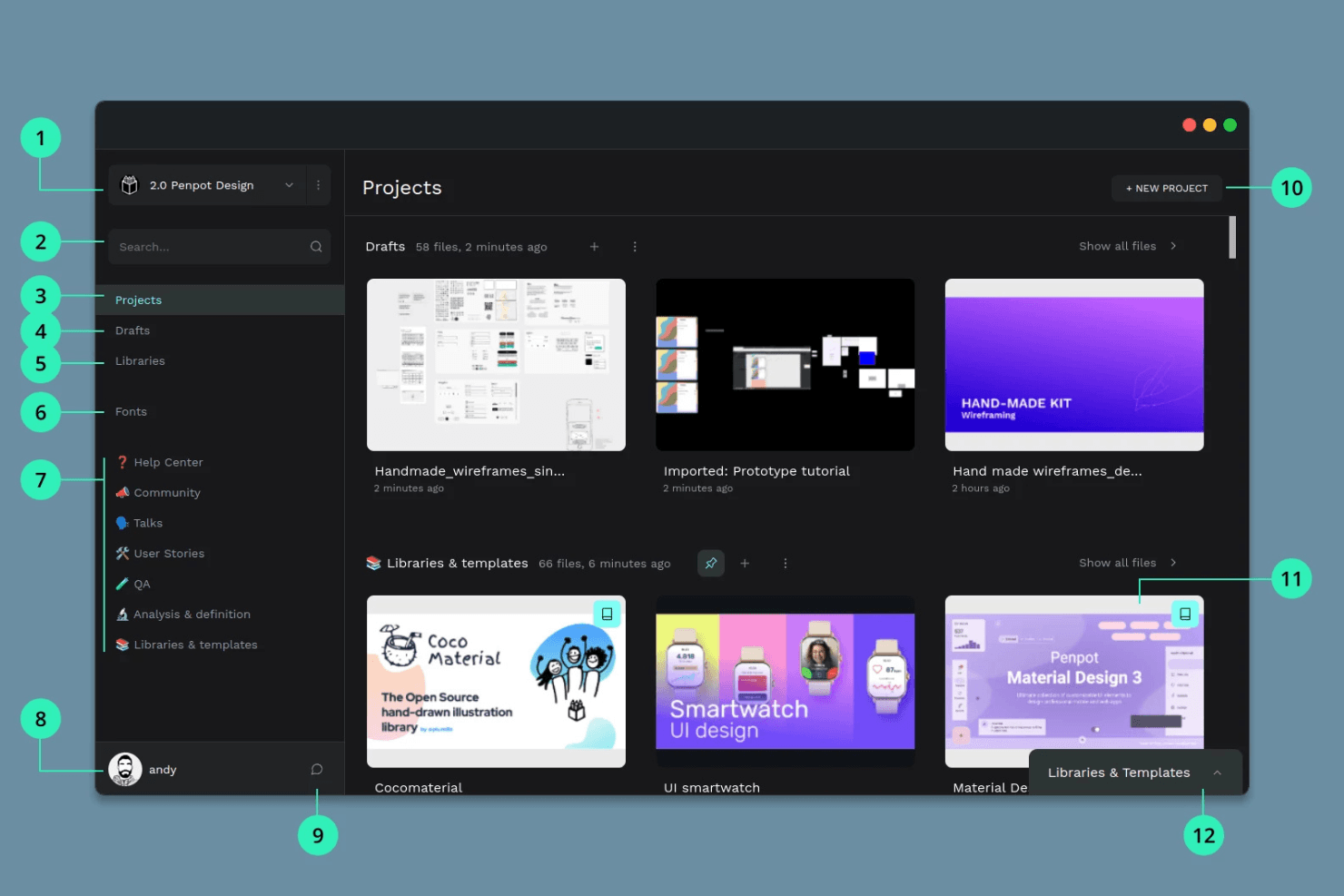
Penpot provides open-source collaboration for teams using various systems. Penpot is a browser-based open-source UX and UI design platform for creating wireframes, interactive prototypes, reusable components, and design systems with real-time team collaboration and developer handoff tools.
Who Is Penpot Best For?
UX and product teams who need open-source design, prototyping, and developer handoff tools without vendor lock-in.
Why I Picked Penpot
I picked Penpot as one of the best because its open-source platform combines a browser-based vector canvas with real CSS Flex/Grid layout tools. I like that my team can prototype flows with interactive triggers and share presentation links for developer handoff, all while keeping files fully portable thanks to an open standard format.
Penpot Key Features
- Real-time multiplayer editing: Multiple users can edit the same file together for live collaboration.
- Component variants: Build reusable components with multiple variants to accelerate design workflows.
- Native CSS Flex and Grid layouts: Apply real CSS layout models without code to mirror production-ready UI structure.
- Inspect mode for developer handoff: Developers can view and copy CSS, HTML, and SVG code plus measurements without a paid seat.
Penpot Integrations
Penpot supports 125+ marketplace integrations through Penpot Hub, including Iconify, Feather Icons, Lucide Icons, Locofy Lightning (for code export to React, Vue, Angular, and GitHub/VS Code sync), and Miro. It also offers an open API, outbound webhooks, and supports custom DesignOps workflows.
What's Free?
Penpot offers a free-forever plan with unlimited users, unlimited files, and full access to design and prototyping features. The free plan also includes real-time collaboration and developer handoff tools without restrictions, though advanced workspace controls are only in paid tiers.
Pros and Cons
Pros:
- Multiplayer editing and developer inspect mode
- Native CSS Flex and Grid layout tools
- Fully open source with self-hosting option
Cons:
- Performance lags with complex or large files
- No built-in usability testing tools
Learn more about Penpot: Best for high-fidelity functional prototyping
- Free plan available
- From $19/user/month
Visit WebsiteCustomer Rating:4.2/5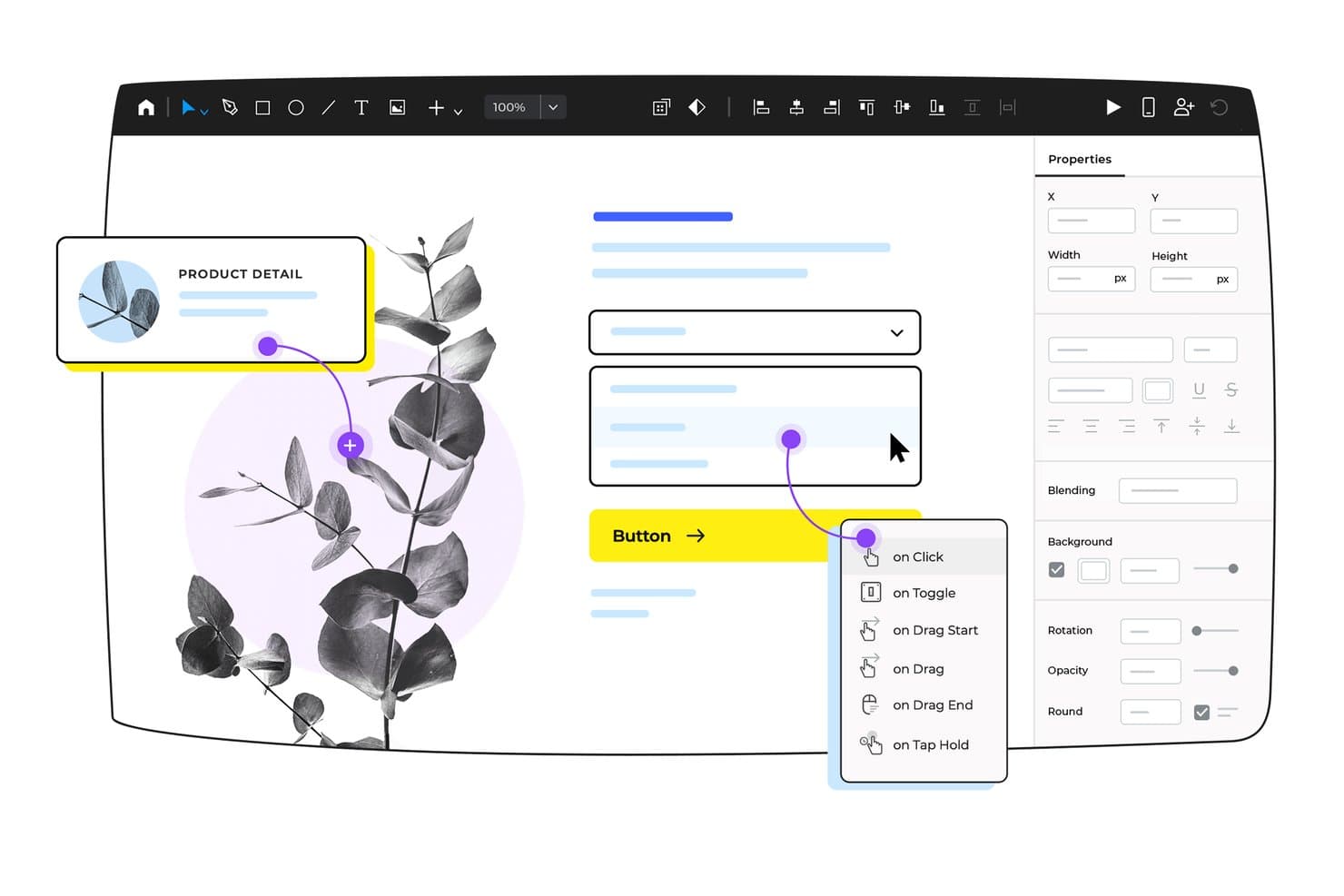
Justinmind lets users add interactive triggers to UI elements visually. Justinmind is a desktop UX design and prototyping platform for teams who need vector drawing tools, interactive components, data-driven forms, and advanced user flow mapping in a dedicated app built for high-fidelity web and mobile interface work.
Who Is Justinmind Best For?
Product teams and designers who need detailed, functional prototypes to validate and document high-fidelity user flows in a dedicated desktop app.
Why I Picked Justinmind
I included Justinmind because I get near-production fidelity when prototyping advanced user flows, full logic, and dynamic data. I’ve built prototypes using its 4,000+ UI components, drag-and-drop conditions, and real-data forms to validate requirements before handing work to engineering. My team can map out entire flows and simulate real app functionality with just one tool.
Justinmind Key Features
- Large UI component library: Choose from over 4,000 ready-made widgets for web, iOS, and Android interfaces.
- Design templates collection: Access pre-built templates for mobile apps, dashboards, and interactive components.
- Data-driven prototyping: Import .csv files to create realistic data grids and forms for clickable prototypes.
- Developer handoff mode: Inspect CSS styles, export assets, and generate specification documents for handoff.
Justinmind Integrations
Justinmind offers native integrations with Figma, Sketch, Adobe XD, Adobe Photoshop, Jira, Confluence, Azure DevOps, UserTesting, and UserZoom. It also provides an API and SDK for custom integrations and plugin development.
What's Free?
Justinmind offers a free-forever plan with basic prototyping features. You’ll need a paid plan to access developer handoff, advanced integrations, and full collaboration tools.
Pros and Cons
Pros:
- Unlimited screens and viewers on free plan
- Large library of web and mobile templates
- Near-production fidelity with complex interactions
Cons:
- No HTML export or advanced logic free
- Free tier capped at one project
Learn more about Justinmind:
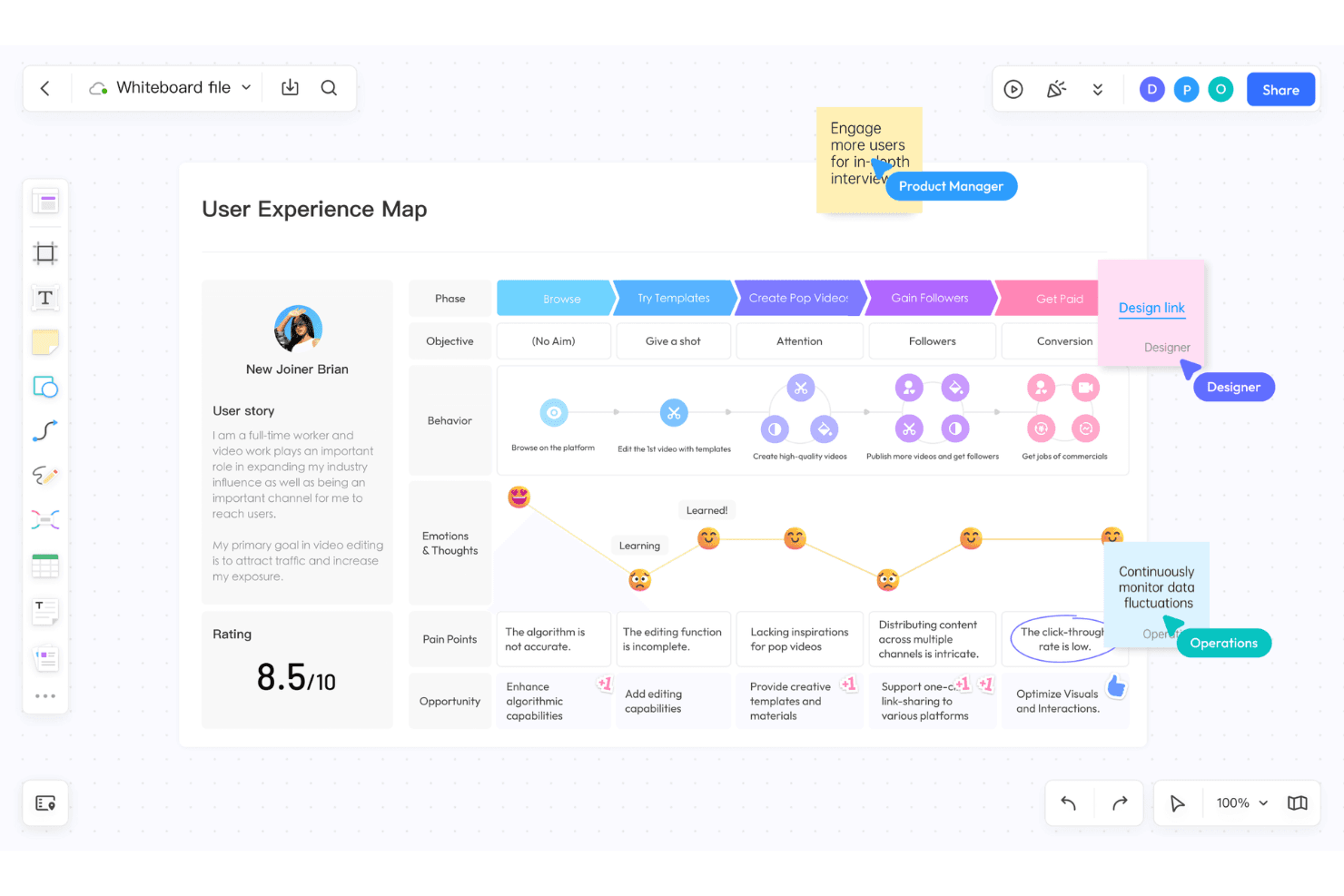
Pixso integrates UI/UX design, digital whiteboards, and AI elements. Pixso is a browser-based UX/UI design platform that unifies vector editing, prototyping, collaborative whiteboarding, component libraries, and developer handoff in one space.
Who Is Pixso Best For?
Pixso is a strong fit for cross-functional product teams and UX/UI designers who want browser-based prototyping and whiteboarding in one tool.
Why I Picked Pixso
I picked Pixso because my team can handle UI design, prototyping, and discovery workshops in one browser workspace. I like using its whiteboard for user journeys alongside the design canvas, then turning flows into interactive prototypes with animations, overlays, and variables ready for developer handoff.
Pixso Key Features
- Whiteboard module: Offers an infinite canvas for brainstorming, mind maps, and user journey mapping.
- Real-time multiplayer editing: Lets teams co-edit designs at the same time with cursor presence and comments.
- Component and style libraries: Enables creation, management, and update of shared reusable design elements.
- Figma, Sketch, and XD import: Supports direct file imports for easy migration from other design platforms.
Pixso Integrations
Pixso supports imports from Figma, Sketch, Adobe XD, Axure, and SVG files, with asset export to PDF, PNG, JPG, and SVG. It features a plugin marketplace with tools for code export and design utilities but does not document native integrations with external SaaS tools.
What's Free?
Pixso offers a free-forever plan that lets you create unlimited files and projects with up to 3 team members. The free plan does not include advanced management features or support for larger teams, but it’s well suited for trying out the platform and handling small design projects.
Pros and Cons
Pros:
- Real-time multiplayer cursor editing
- Built-in whiteboard for discovery workshops
- Imports Figma, Sketch, and XD files
Cons:
- File limit restricts free team projects
- No dedicated usability testing features
Learn more about Pixso:
Annen gratis UX-programvare
Her er noen flere alternativer innen UX-programvare som også tilbyr gratis abonnementer eller prøveperioder. Selv om disse verktøyene ikke kom med i utvalget mitt, er de likevel verdt å undersøke:
- 11MiroBest for cross-functional UX design reviews
- 12FramerBest for design-to-publish without handoff
- 13MarvelBest for prototyping to dev handoff in one link
- 14WhimsicalBest for lo-fi flows with unlimited free guests
- 15VisilyBest for AI-driven wireframes without design skills
- 16MoqupsBest for all-in-one wireframes and online mockups
How I Evaluate Free UX Software
First, I define what counts as free. A tool qualifies only if it offers a long-term free plan—not just a trial—since UX software supports ongoing design and testing work, not one-time projects. From there, I split evaluation into two layers: the core functionality a tool must have to make the list, and the differentiating factors that separate one option from another.
Core Functionality (Table Stakes For This List)
In addition to my free offer requirements, I also use a scoring system to select tools for my list. Here's how it works:
When I'm selecting tools for my list, I rank each one on a scale from 0 (does not offer the functionality) to 5 (excels in this area) for each core functionality listed below. I then calculate the tool's total score into a percentage, and use that to help me assess its overall fit for the list.
- Prototyping tools: I check whether you can link screens with clickable hotspots and add transitions that simulate a real user flow, not just static slides.
- Design canvas: The workspace needs to support shapes, text, images, and layout controls so you can move from rough wireframes to polished mockups in one place.
- Collaboration features: I look for commenting, shared editing, or review links that let product managers and developers give feedback without creating a separate account.
- Component reusability: Reusable buttons, nav bars, and form fields that update across every screen when you edit the source save hours during iteration cycles.
- Usability testing support: I evaluate whether the tool lets you share a prototype link and collect structured feedback, click data, or task completion results from real users.
- Export and handoff: Developers need shareable links or downloadable assets with enough detail to build from, so I check for spec views, asset export, and code snippets.
Once I have a list of tools that meet the criteria, I consider what sets each platform apart.
Differentiating Factors (What Sets Vendors Apart)
Here's how I compare and contrast different vendors:
Standout Features
I look for built-in feedback widgets that let stakeholders pin comments directly on a prototype screen. This cuts out the back-and-forth of screenshots in chat threads during sprint reviews. Multiplayer cursors matter just as much—when a PM and engineer can co-edit a file live, alignment happens in minutes instead of async cycles. I also evaluate each tool's community template library, since free wireframe kits and journey map starters help teams skip blank-canvas paralysis and move straight into validation.
Beyond Features
I check how easily non-designers can navigate the tool without training. A PM should open a shared link, leave feedback, and exit in minutes—not sit through onboarding videos. Free plans also cap active files or editors, so I evaluate whether a growing team will hit those limits mid-sprint. Finally, I look at export options. Tools like Figma and Penpot let you download assets or raw files, which protects your work if you later switch platforms or lose access to a free account.
Slik velger du gratis UX-programvare
Komplekse funksjonslister og prismodeller kan gjøre det vanskelig å finne ut hva du egentlig får med gratis UX-programvare. For å hjelpe deg med å holde fokus mens du går gjennom prosessen med å velge programvare, er det noen faktorer du bør ha i bakhodet:
| Faktor | Hva du bør vurdere |
|---|---|
| FaktorOmfanget av gratistilbudet | Hva du bør vurdereUndersøk hva som er inkludert i gratisabonnementet. Dekker det viktige funksjoner som trådskisser og prototyping, eller er disse låst bak betalingsmurer? |
| FaktorSkalerbarhet | Hva du bør vurdereVurder om verktøyet kan vokse sammen med teamet ditt. Vil det støtte flere brukere og prosjekter etter hvert som behovene dine øker? |
| FaktorIntegrasjoner | Hva du bør vurdereBekreft at programvaren kan integreres med verktøy teamet ditt allerede bruker, for eksempel Slack, Atlassian Jira eller Google Drive, for å organisere arbeidsflytene. |
| FaktorBrukervennlighet | Hva du bør vurdereSe etter et intuitivt grensesnitt som reduserer læringskurven, slik at teamet ditt raskt kan begynne å designe uten omfattende opplæring. |
| FaktorSamarbeid | Hva du bør vurdereVurder verktøyets samarbeidsfunksjoner. Kan teammedlemmene arbeide samtidig og gi tilbakemeldinger i sanntid på prosjekter? |
| FaktorTilpasning | Hva du bør vurdereFinn ut om programvaren gjør det mulig å tilpasse maler og komponenter etter teamets unike designbehov. |
| FaktorBrukerstøtte | Hva du bør vurdereUndersøk hvilke alternativer for kundestøtte som er tilgjengelige, for eksempel chat i sanntid, e-post eller forum, slik at teamet får hjelp når det oppstår problemer. |
| FaktorSikkerhet | Hva du bør vurdereKontroller at verktøyet oppfyller organisasjonens krav til datasikkerhet, særlig hvis det håndterer sensitiv prosjektinformasjon. |
Hva er gratis UX-programvare?
UX-programvare er en type verktøy utviklet for å hjelpe designere og utviklere med å skape brukeropplevelser gjennom trådskisser, prototyping og designsamarbeid. Vanligvis omfatter gratis tilbud grunnleggende versjoner av disse verktøyene med begrensede funksjoner eller prøveperioder. Fagpersoner som UI/UX-designere, produktledere og utviklere bruker disse verktøyene til å forbedre designprosesser og øke brukertilfredsheten. Funksjoner som samarbeid i sanntid, intuitive grensesnitt og integrasjon med andre verktøy støtter effektive designarbeidsflyter og teamsamarbeid.
Funksjoner
La oss se nærmere på funksjonene som vanligvis finnes i UX-programvare, og hvilke som vanligvis er inkludert i gratis- og betalingsabonnementer.
Vanlige funksjoner i gratis UX-programvare
- Verktøy for trådskisser: Gjør det mulig for brukere å lage grunnleggende oppsett og strukturer for designene sine, slik at brukergrensesnittet blir enklere å visualisere.
- Dra-og-slipp-grensesnitt: Forenkler designprosessen ved å gjøre det enkelt å plassere og justere elementer uten programmering.
- Malbibliotek: Tilbyr forhåndsdesignede maler som gir prosjekter en rask start og sparer tid på å sette opp designet.
- Samarbeid i sanntid: Gjør det mulig for teammedlemmer å arbeide sammen på prosjekter samtidig, noe som forbedrer kommunikasjon og effektivitet.
- Grunnleggende prototyping: Gjør det mulig for brukere å lage enkle interaktive prototyper for å teste brukerflyter og innhente tilbakemeldinger.
- Eksportalternativer: Gjør det mulig for brukere å lagre og dele design i ulike formater for videreutvikling eller presentasjon.
Vanlige funksjoner i betalt UX-programvare
- Avansert prototyping: Tilbyr mer komplekse interaksjoner og animasjoner for å lage prototyper med høy detaljgrad som etterligner sluttprodukter tett.
- Tilpassbare komponenter: Gjør det mulig for brukere å opprette og endre designelementer slik at de passer til spesifikke prosjektbehov, noe som gir fleksibilitet.
- Versjonskontroll: Tilbyr et system for å spore endringer og administrere ulike designversjoner, slik at konsistens og orden opprettholdes.
- Verktøy for brukertesting: Gjør det mulig å innhente tilbakemeldinger fra brukere gjennom integrerte testfunksjoner for å forbedre designvalideringen.
- Analyse og rapportering: Gir innsikt i designets ytelse og brukeratferd, og bidrar til datadrevne beslutninger.
- Integrasjon med eksterne verktøy: Støtter helhetlige arbeidsflyter ved å koble til annen programvare, for eksempel verktøy for prosjektstyring eller kommunikasjon.
Fordeler
Implementering av gratis UX-programvare gir flere fordeler for teamet og virksomheten din. Her er noen av fordelene du kan se frem til:
- Kostnadsbesparelser: Gratisabonnementer gir teamet tilgang til viktige designverktøy uten økonomiske forpliktelser, noe som reduserer kostnadene.
- Økt samarbeid: Funksjoner for samarbeid i sanntid hjelper teamet med å arbeide effektivt sammen, også når dere jobber eksternt.
- Rask prototyping: Grunnleggende prototypeverktøy gjør det mulig å lage interaktive design raskt, noe som bidrar til å fremskynde utviklingsprosessen.
- Tilgjengelighet: Skybaserte løsninger lar teamet få tilgang til designprosjekter hvor som helst, og støtter fleksible arbeidsordninger.
- Brukervennlighet: Intuitive grensesnitt og dra-og-slipp-funksjonalitet forenkler designprosessen og gjør den tilgjengelig for personer som ikke er designere.
- Ressursoptimalisering: Ferdiglagde maler og komponenter sparer tid og arbeid, slik at teamet kan fokusere på kreativitet og innovasjon.
Kostnader & priser
Jeg forstår at du kom til denne artikkelen på jakt etter de beste UX-programvarealternativene som er tilgjengelige gratis. Ettersom gratisabonnementer bare tilbyr begrensede funksjoner, er det imidlertid stor sjanse for at du må oppgradere abonnementet ditt senere.
Tabellen nedenfor oppsummerer vanlige abonnementer, gjennomsnittsprisene deres og typiske funksjoner som er inkludert i UX-programvareløsninger:
Sammenligningstabell for abonnementer i UX-programvare
| Plantype | Gjennomsnittspris | Vanlige funksjoner |
|---|---|---|
| PlantypeGratisplan | Gjennomsnittspris$0 | Vanlige funksjonerGrunnleggende verktøy for trådskisser, dra-og-slipp-grensesnitt, begrensede maler, grunnleggende prototyping og samarbeid i sanntid. |
| PlantypePersonlig plan | Gjennomsnittspris$4-$10/user/month | Vanlige funksjonerAlle gratisfunksjoner, flere maler, oppgraderte prototypingsalternativer, begrensede integrasjoner og eksportalternativer. |
| PlantypeForretningsplan | Gjennomsnittspris$10-$30/user/month | Vanlige funksjonerAlle funksjonene i den personlige planen, avansert prototyping, tilpasset merkevarebygging, verktøy for teamsamarbeid og flere integrasjoner. |
| PlantypePlan for store virksomheter | Gjennomsnittspris$24+/user/month | Vanlige funksjonerAlle funksjonene i forretningsplanen, prioritert brukerstøtte, avansert sikkerhet, tilpasset analyse og dedikert kontoadministrasjon. |
Vanlige spørsmål om gratis UX-programvare
\u003cspan style=\u0022font-weight: 400;\u0022\u003eHer er noen svar på vanlige spørsmål om gratis UX-programvare:\u003c/span\u003e
Hvordan sikres prosjektdata i gratis UX-verktøy nå?
\u003cspan style=\u0022font-weight: 400;\u0022\u003eDe fleste gratis UX-plattformer bruker nettskyhosting, så begynn med å gjennomgå personvernerklæringen, sikkerhetssertifiseringene og opplysningene om hvor dataene lagres. Bekreft om prosjektene krypteres under overføring og når de er lagret, og hvem som har tilgang til lagrede filer. Bruk arbeidsområdebaserte roller og enkel pålogging der det er tilgjengelig, og deaktiver offentlige lenker for sensitivt arbeid. Eksporter sikkerhetskopier regelmessig, slett ubrukte prosjekter og bekreft at kontrakter eller taushetserklæringer dekker eventuelle designelementer som deles gjennom disse verktøyene på nettet.\u003c/span\u003e
Hva skjer hvis teamet vårt plutselig vokser ut av en gratis UX-plan?
\u003cspan style=\u0022font-weight: 400;\u0022\u003eNår teamet vokser ut av en gratis UX-plan, bør dere først gjennomgå bruksgrensene, for eksempel antall aktive prosjekter, fillagring, redaktører og gjester. Kartlegg hvilke avanserte funksjoner dere faktisk trenger, for eksempel designsystemer, tillatelser eller integrasjoner. Sammenlign deretter oppgraderingsnivåene med veikartet og prognosene for bemanningen. Før dere oppgraderer, bør dere rydde opp i gamle filer og bli enige om interne navngivningsregler, slik at overgangen oppleves som en planlagt systemoppgradering i stedet for en rotete og forhastet reaksjon på at dere har nådd absolutte grenser.\u003c/span\u003e
Kan jeg kombinere flere gratis UX-verktøy i én arbeidsflyt?
\u003cspan style=\u0022font-weight: 400;\u0022\u003eJa, det er vanlig å kombinere flere gratis UX-verktøy, men det er nyttig å gi hvert verktøy en tydelig oppgave. Bruk for eksempel én plattform til trådskisser med lav detaljgrad, en annen til interaktive prototyper og en tredje til lagring av UX-undersøkelser eller tilbakemeldinger. Definer hva som er den autoritative kilden for de endelige designene, dokumenter trinnene for overlevering til utviklere og planlegg regelmessig opprydding, slik at ressurser ikke blir spredt på tvers av overlappende arbeidsområder og personlige kontoer etter hvert som prosjektene vokser.\u003c/span\u003e
Hvordan kan ikke-designere lære gratis UX-verktøy raskt?
\u003cspan style=\u0022font-weight: 400;\u0022\u003eBegynn med ett gratis UX-verktøy og lag et enkelt og realistisk øvingsprosjekt, for eksempel ved å redesigne et skjema teamet allerede bruker. Del korte interne Loom-videoer eller skjermbilder som viser viktige handlinger: å legge til rammer, koble sammen skjermer, legge igjen kommentarer og eksportere filer. Sett ikke-designere sammen med en UX-partner for ukentlige gjennomganger, og feir små seire. En tydelig ordliste og en sjekkliste som kan brukes som hurtigreferanse, vil redusere terskelen og gi dem større trygghet i bruken av designprogramvare.\u003c/span\u003e
Hvilke måltall viser at gratis UX-verktøy forbedrer produkter?
\u003cspan style=\u0022font-weight: 400;\u0022\u003eSe utover designernes tilfredshet og følg med på målbare resultater. Overvåk hvor lang tid det tar å gjennomgå prototyper, antall iterasjoner før interessentene godkjenner arbeidet, og feil knyttet til UX-problemer etter lansering. Sammenlign fullføringsgraden for oppgaver og antallet henvendelser til brukerstøtten før og etter at verktøyene ble tatt i bruk. Dere kan også undersøke brukere og interne team om tydelighet og brukervennlighet, og deretter knytte resultatene til forretningsmåltall som konvertering, brukereretensjon og funksjonsadopsjon på tvers av sprinter og lanseringer.\u003c/span\u003e
Kan gratis UX-verktøy fungere godt med dårlig internettforbindelse?
\u003cspan style=\u0022font-weight: 400;\u0022\u003eGratis UX-verktøy er vanligvis nettskybaserte, så en svak internettforbindelse påvirker først og fremst samarbeid og synkronisering av store filer. Test hver plattform på den tilkoblingen dere vanligvis bruker, ved å laste inn store prosjekter, eksportere ressurser og delta i kommentarer eller arbeidsmøter i sanntid. Oppfordre kolleger til å lukke apper som bruker mye båndbredde under designøkter, og ha notater eller skisser som kan brukes uten nett, klare. Som sikkerhetskopi kan dere sette opp planlagte synkroniseringstidspunkter hjemmefra eller fra kontorfellesskap med bedre forbindelse under kritiske lanseringer.\u003c/span\u003e