

Gratis programvare for idéhåndtering lar teamet ditt samle inn, organisere og videreutvikle ideer uten kostnader på forhånd – enten gjennom en gratisplan eller en gratis prøveperiode. Hvis du leter etter måter å oppmuntre til innovasjon, samle inn tilbakemeldinger eller forenkle idémyldring på, kan det å finne riktig gratisverktøy hjelpe deg med å teste løsninger før du forplikter deg. I denne listen finner du pålitelige plattformer som støtter innsamling av ideer og samarbeid, slik at du kan velge det som passer best for teamets behov og budsjett i 2026.
Why Trust Our Software Recommendations
6,700+
Reviews
20
Industry experts
16+
Evaluation factors
14
Years
Our team has been testing and reviewing software since 2012. As product managers ourselves, we know how difficult—and important—it is to choose the right software.
For this guide, we evaluated tools using hands-on testing and independent research, scoring tools using our selection criteria.
Our reviews reflect our human editorial judgment, not a sales pitch.
Expert reviewers:
- Andrew LumbySenior TPM
- Cristiano ValimSenior UI/UX Lead


Sammenligningstabell for gratis programvare for idéhåndtering
Nedenfor finner du mine detaljerte sammendrag av den beste gratis programvaren for idéhåndtering som kom med på kortlisten min.
| Tool | Best For | Trial Info | Price | ||
|---|---|---|---|---|---|
| 1 | Best for multi-channel idea capture | Free plan available | From $7/user/month | Website | |
| 2 | Best for PM-led idea-to-delivery tracking | Free plan available | From $8.48/user/month | Website | |
| 3 | Best for turning whiteboard ideas into tracked tasks | Free plan + 14-day free trial + free demo available | From $7/user/month (billed annually) | Website | |
| 4 | Best for building idea workflows in one workspace | Free plan + free demo available | From $10/user/month (billed annually) | Website | |
| 5 | Best for product feedback management | Free plan + free demo + free trial available | From $19/month (billed annually) | Website | |
| 6 | Best for collaborative ideation mapping | Free plan + 14-day free trial available | From $8/user/month (billed annually) | Website | |
| 7 | Best for kanban-based idea tracking on a free plan | 14-day free trial | From $5/user/month (billed annually) | Website | |
| 8 | Best for custom-formula idea prioritization | Free plan available; 14-day free trial; free demo available | From $12/user/month (billed annually) | Website | |
| 9 | Best for open-source feature voting boards | Free plan available | From $25/month | Website | |
| 10 | Best for idea-to-roadmap tracking on a free plan | Free plan available | From $29/month | Website |


Anmeldelser av gratis programvare for idéhåndtering
Nedenfor finner du mine detaljerte sammendrag av den beste gratis programvaren for idéhåndtering som kom med på kortlisten min. Anmeldelsene mine gir en detaljert gjennomgang av funksjonene, de beste bruksområdene og prisene for hver plattform, slik at du kan finne den som passer best for deg.
 Best for multi-channel idea capture
- Free plan available
- From $7/user/month
Visit WebsiteCustomer Rating:4.7/5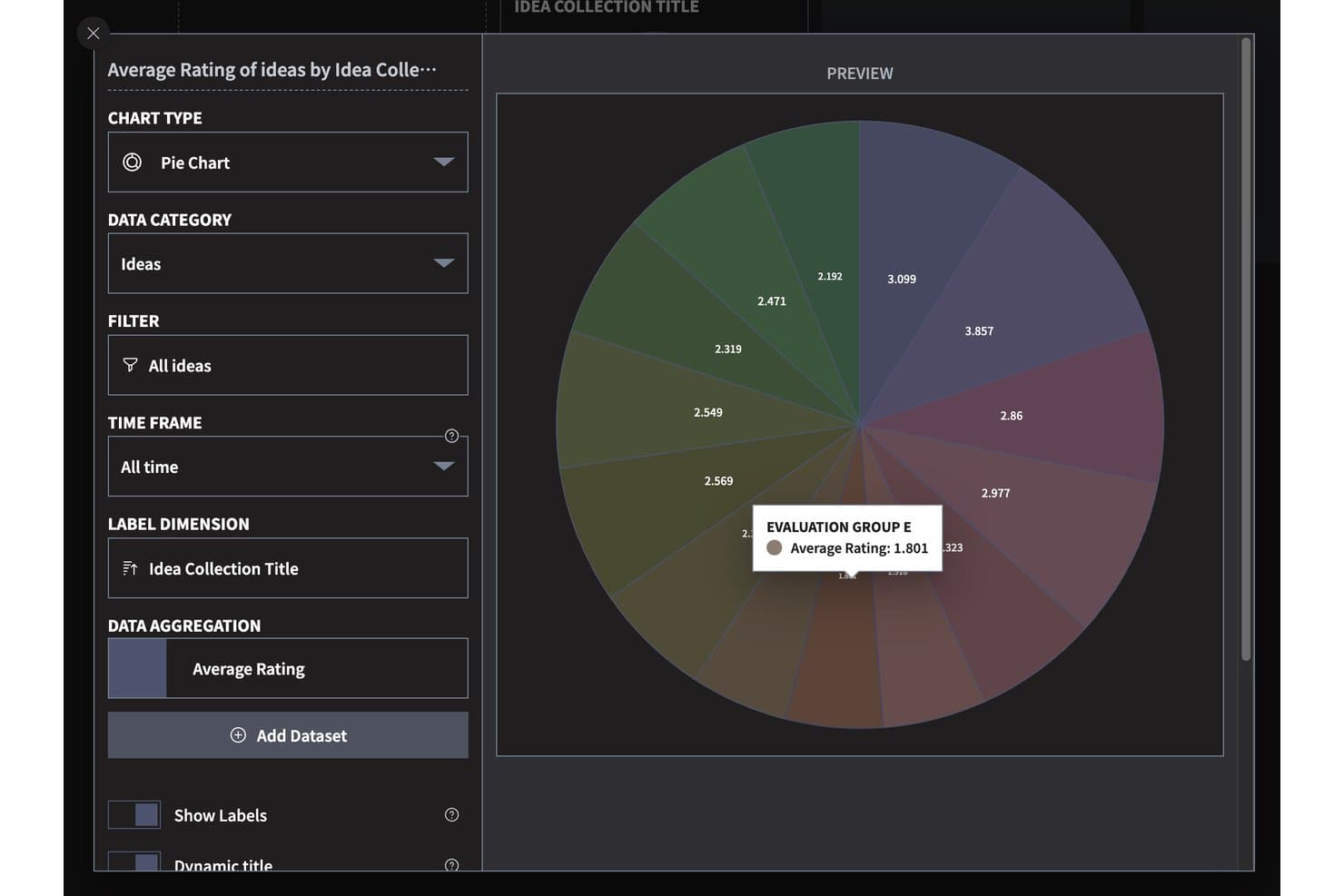
Ideanote visualizes idea ratings across collections with a pie chart. Ideanote is free idea management software with custom submission forms, idea collections, voting and scoring, configurable workflows, AI-assisted organization, and multiple views for reviewing submissions.
Who Is Ideanote Best For?
Product managers and innovation teams that need to gather ideas from employees and customers and evaluate submissions through structured workflows will find Ideanote a good fit.
Why I Picked Ideanote
I picked Ideanote for multi-channel idea capture because I can collect input through custom forms, embedded widgets, shareable links, and anonymous or no-signup submissions. Its free plan gives a small team up to 10 users, 250 ideas, and five collections. I can then sort submissions with tags and AI-assisted clustering.
Ideanote Key Features
- Threaded comments: Discuss ideas with attachments, , likes, and translations.
- Idea templates: Choose from 100+ ready-made templates or save your own.
- Duplicate detection: Use AI to identify, merge, or link similar ideas.
- Reporting: Review engagement, trends, ROI, KPI targets, and pipeline funnels.
Ideanote Integrations
Ideanote lists integrations with Microsoft Teams, Power Automate, Power BI, webhooks, and Splunk; integration access appears limited to the top tier. It also offers a public REST API and Zapier.
What’s Free?
Ideanote offers a free-forever plan for up to 10 users, 250 ideas, and five collections. Integrations appear limited to the top tier.
Pros and Cons
Pros:
- AI clustering helps group related submissions
- Reviewers praise flexible feedback widgets
- Multiple anonymous and no-signup submission paths
Cons:
- External guests count toward user cap
- Free plan stops at 250 ideas
Learn more about Ideanote: 2Best for PM-led idea-to-delivery tracking
Jira
- Free plan available
- From $8.48/user/month
Visit WebsiteCustomer Rating:4.4/5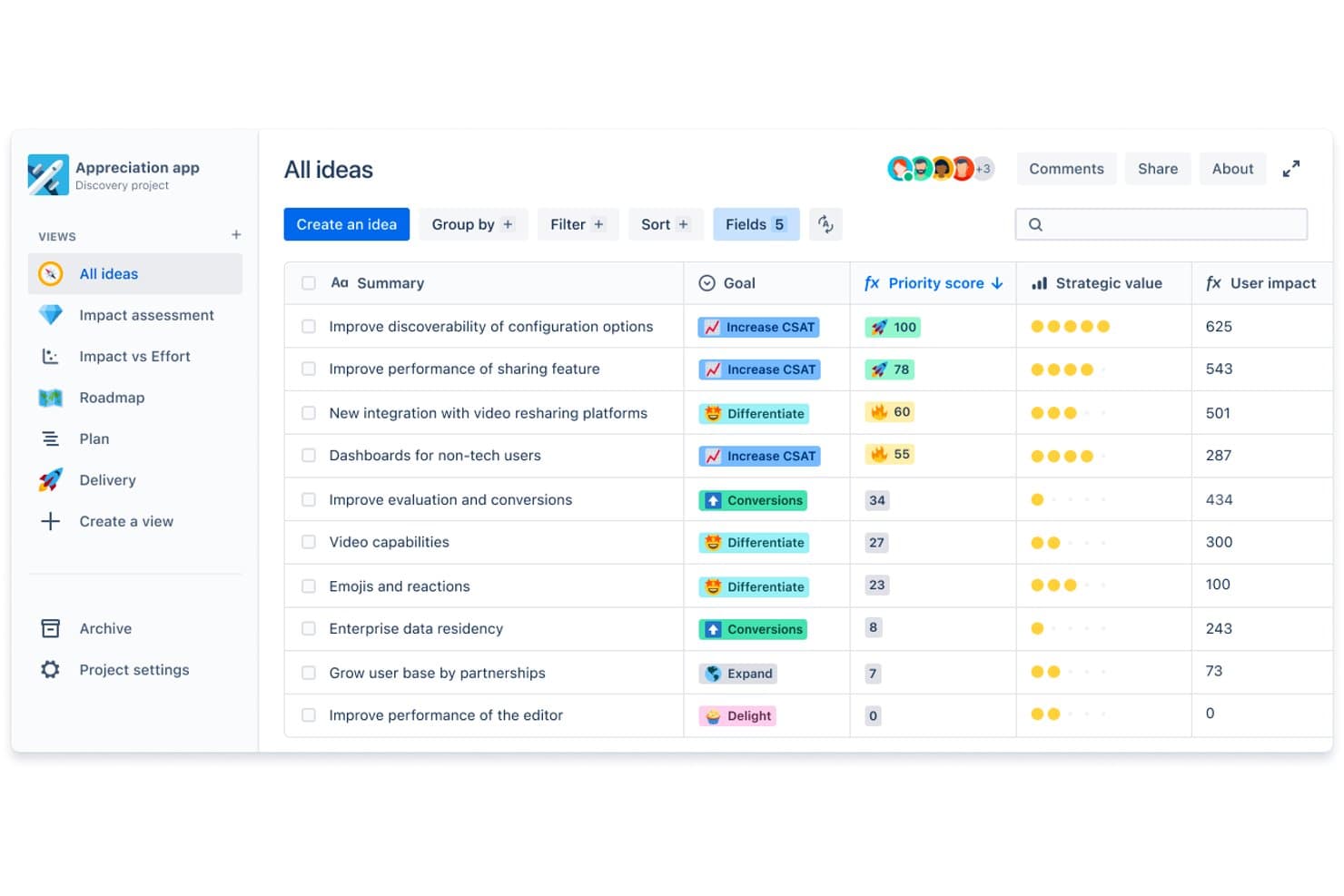
Jira lets users prioritize ideas by score, goal, and strategic value. Jira’s free plan supports idea management through an issue-tracking platform with work-item capture, backlog organization, prioritization, boards, and configurable workflows.
Who Is Jira Best For?
Jira is a good fit for product managers who need PM-led idea-to-delivery tracking across discovery priorities and engineering work.
Why I Picked Jira
I picked Jira, best for PM-led idea-to-delivery tracking, because its free plan lets my team capture ideas as issues, prioritize them in a backlog, and move approved work through configurable workflows on boards. When customer feedback points to a product change, I can track its priority and delivery status as it moves from discovery into engineering.
Jira Key Features
- Custom fields: Add fields to idea records for details such as customer segment or opportunity area.
- Labels: Tag ideas with searchable terms to group related submissions.
- Dashboards: Build configurable views with gadgets that summarize project data.
- Automation rules: Set rule-based actions that respond to events such as an issue being created.
Jira Integrations
Jira offers 3,000+ Marketplace apps, including Slack, Microsoft Teams, GitHub, and Confluence, to connect idea tracking with team discussions and delivery work. Jira also provides APIs for custom integrations.
What’s Free?
Jira has a free-forever Cloud plan for up to 10 users, with 2 GB of storage, 150 automation steps monthly, and 100 emails daily per site. All users are admins, and permissions and space- or work-item-level settings require a paid plan.
Pros and Cons
Pros:
- Approved ideas follow configurable delivery workflows
- Custom fields capture customer and opportunity context
- Ideas move from backlog into sprint planning
Cons:
- Free plan lacks granular permissions
- Workflow setup adds overhead for small teams
 Best for turning whiteboard ideas into tracked tasks
- Free plan + 14-day free trial + free demo available
- From $7/user/month (billed annually)
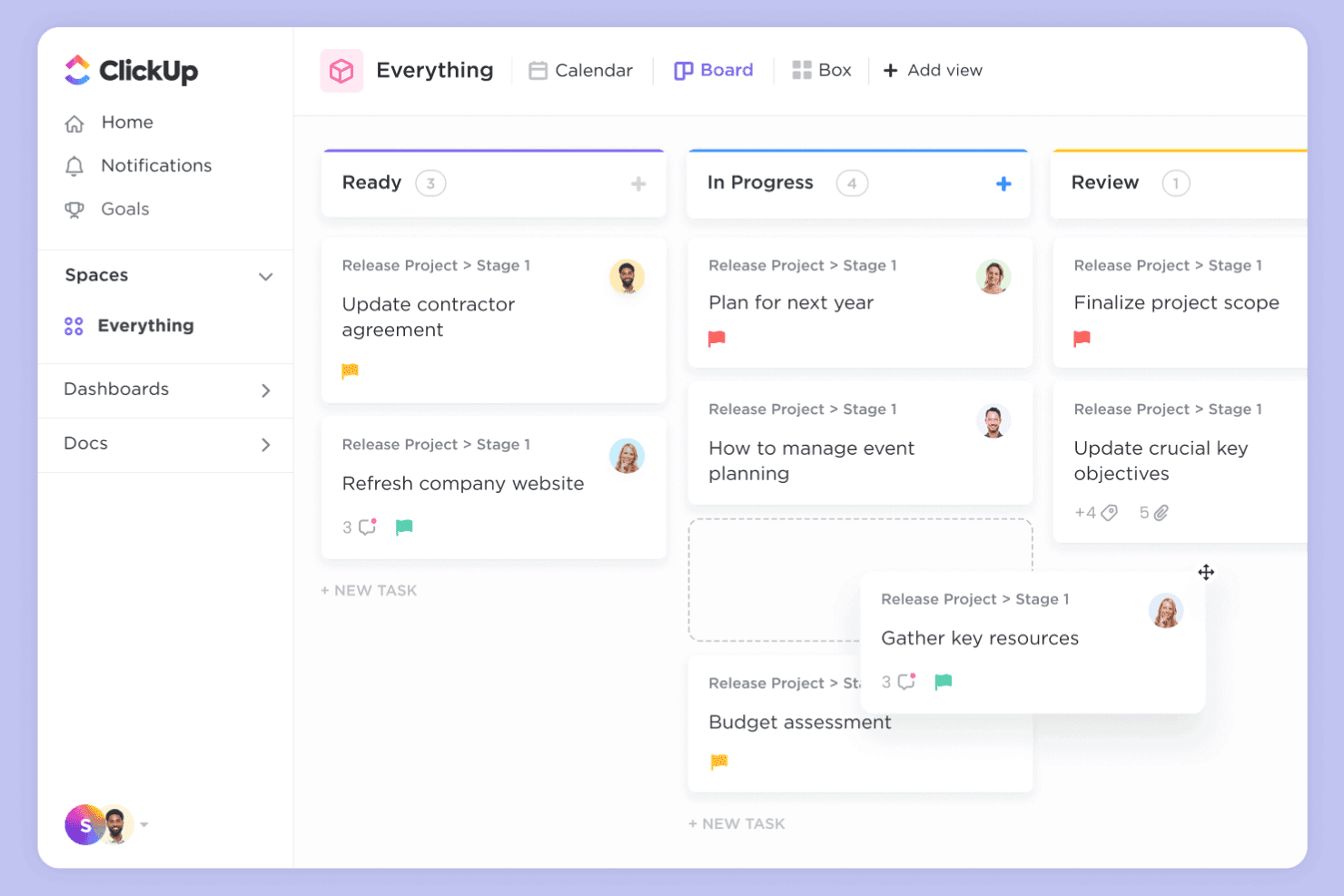
ClickUp combines whiteboards and tasks for idea-to-execution workflows. ClickUp is a work management platform with a free plan for idea management, combining collaborative Whiteboards and Docs with task lists, custom fields, and workflow views.
Who Is ClickUp Best For?
Product managers coordinating discovery across design and engineering can use ClickUp to capture proposals and assign follow-up work.
Why I Picked ClickUp
I picked ClickUp because it’s best for turning whiteboard ideas into tracked tasks. I use Whiteboards to map feature proposals, then create assigned tasks in lists and add custom fields for impact or ownership. Workflow views help me track each idea from review through delivery.
ClickUp Key Features
- Docs: Draft and organize product briefs, research notes, and decision records.
- Comments: Discuss ideas directly on relevant records and reply in threads.
- Forms: Collect structured idea submissions through customizable forms.
- Integrations: Connect ClickUp with tools such as Slack and GitHub.
ClickUp Integrations
ClickUp integrations include Slack and GitHub, which can connect idea discussions and development work to your workflow.
What's Free?
ClickUp’s Free Forever plan has no time limit and includes unlimited tasks and members. It limits you to three Whiteboards and 60 MB of storage.
Pros and Cons
Pros:
- Free plan includes unlimited tasks and members
- Forms collect structured idea submissions
- Whiteboard ideas become assigned tasks
Cons:
- Free plan includes only 60 MB storage
- Free plan limits teams to three Whiteboards
Learn more about ClickUp: Best for building idea workflows in one workspace
- Free plan + free demo available
- From $10/user/month (billed annually)
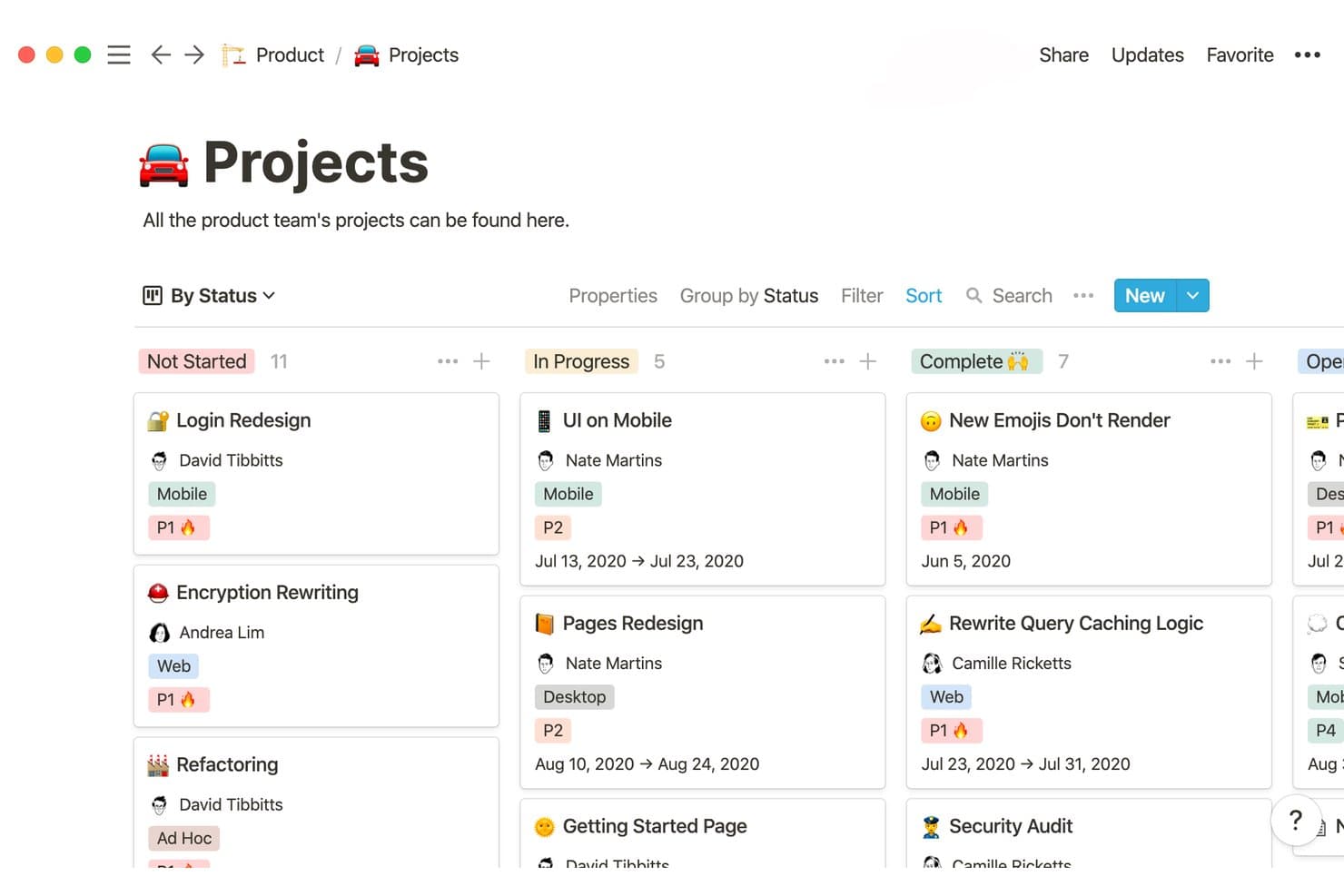
Notion organizes product projects by status in a visual board view. Notion is a workspace with a free plan for idea management, combining collaborative pages, databases, templates, and comments to capture and organize product concepts.
Who Is Notion Best For?
Product teams that want to refine early concepts alongside research, planning documents, and team discussions in a flexible workspace.
Why I Picked Notion
I picked Notion for building idea workflows in one workspace because its pages and databases let my team capture concepts, organize them, and connect them with research and planning documents. We use templates to give submissions a consistent structure and comments to discuss ideas alongside the relevant context. Its free plan supports this kind of shared idea management.
Notion Key Features
- Form view: Collect idea submissions through a form linked to a database.
- Board view: Display ideas as cards grouped by a selected property.
- Filters and sorts: Narrow idea lists and arrange records by selected properties.
- Workspace search: Find ideas and related information across your workspace.
Notion Integrations
Notion’s Slack integration lets you send messages to idea databases and receive workspace notifications. Its Connections directory lists Google Drive and GitHub connections, and the public API supports custom integrations.
What's Free?
Notion has a free-forever plan, with unlimited pages and blocks for one person. Workspaces with multiple members have block limits, and the plan caps file uploads at 5 MB each and external guests at 10.
Pros and Cons
Pros:
- Board views group concepts by status
- Ideas connect directly with research pages
- Forms standardize idea submissions
Cons:
- Shared workspaces face free-plan block limits
- No native idea voting or scoring
Learn more about Notion: Best for product feedback management
- Free plan + free demo + free trial available
- From $19/month (billed annually)
Visit WebsiteCustomer Rating:4.2/5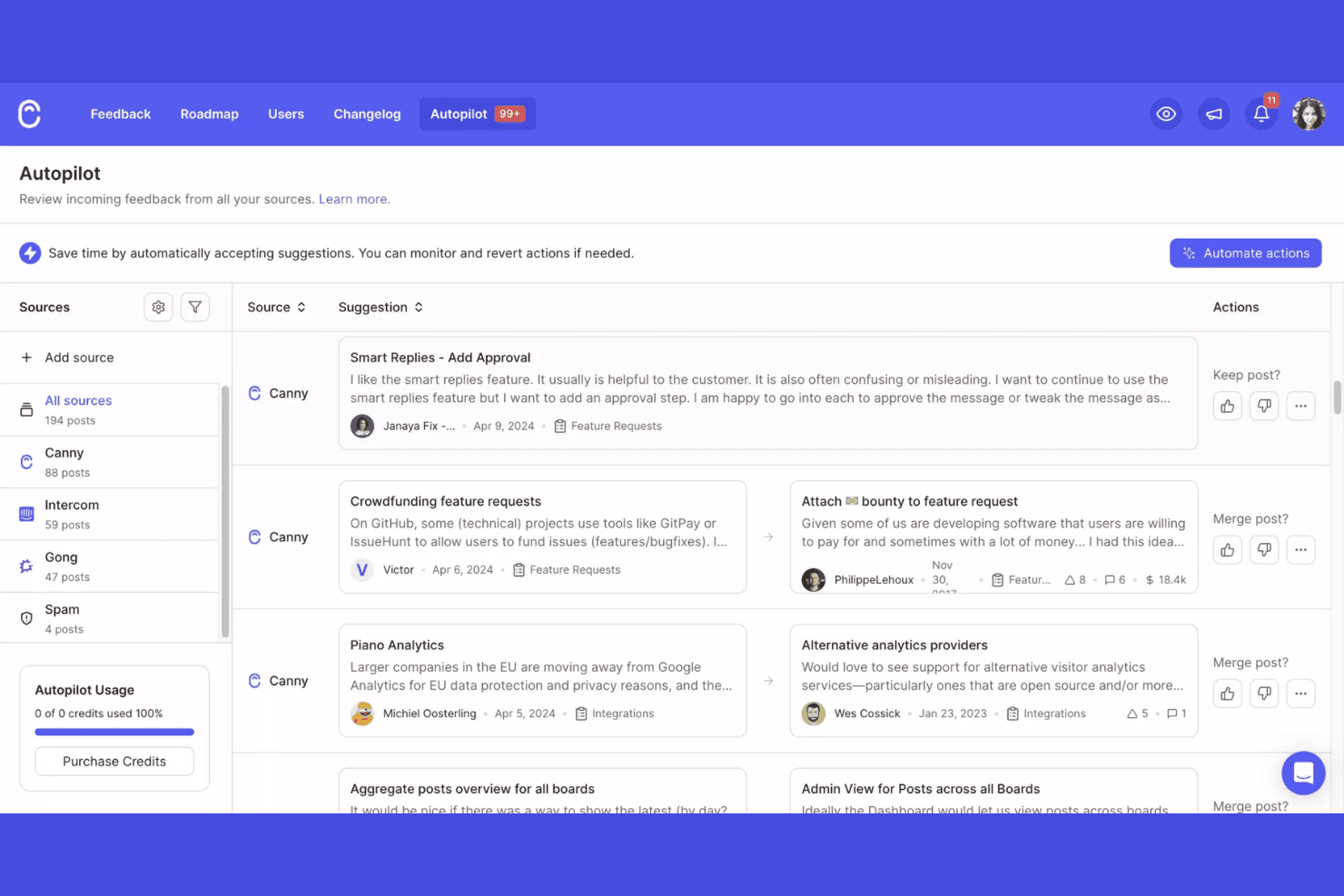
Canny collects, tracks, and prioritizes product feedback. Canny is a free idea management platform where teams collect customer suggestions, organize feature requests, gather votes, and manage product roadmaps.
Who Is Canny Best For?
Canny suits product management teams that need a dedicated system for collecting and prioritizing customer feedback.
Why I Picked Canny
I rate Canny as “Best for product feedback management” because it connects customer requests with prioritization. Public feedback boards let users submit and vote on ideas, while status updates show whether requests are under review, planned, or shipped. When customers ask for the same workflow change, I use votes and request records to assess demand before shaping the roadmap.
Canny Key Features
- Internal comments: Discuss ideas privately with your team on each post.
- User segmentation: Filter feedback by groups such as paying customers.
- Product changelog: Publish updates and format entries with rich text and images.
- Integrations: Collect feedback from tools such as Slack, Jira, and Intercom.
Canny Integrations
Canny integrates with Slack, Jira, and Intercom to collect customer feedback from tools your team already uses.
What’s Free?
Canny has a free-forever plan, limited to 25 tracked users and five Owner or Manager admins, with unlimited Contributors. It restricts integrations to Feedback and Notifications and excludes changelog emails and custom domains.
Pros and Cons
Pros:
- Unlimited contributors can submit feedback
- Status updates show roadmap progress
- Public boards capture and rank requests
Cons:
- Custom domains and changelog emails are excluded
- Free plan tracks only 25 users
Learn more about Canny: 6Best for collaborative ideation mapping
Miro
- Free plan + 14-day free trial available
- From $8/user/month (billed annually)
Visit WebsiteCustomer Rating:4.8/5
Miro enables visual brainstorming and real-time team collaboration. If you’re looking for a visual-first way to capture, organize, and develop ideas, Miro is worth considering. The platform is especially useful for distributed teams, product managers, and facilitators who want to brainstorm and map out concepts together in real time. Miro’s infinite canvas and collaborative features help teams turn scattered thoughts into actionable plans.
Who Is Miro Best For?
Miro is a strong fit for distributed teams and facilitators who need a visual platform for collaborative brainstorming and idea management.
Why I Picked Miro
I picked Miro because its visual collaboration capabilities make it uniquely suited for distributed teams managing ideas together. The infinite canvas lets teams map out ideas, group feedback, and build workflows in a way that’s easy to follow during remote sessions. I appreciate how features like sticky notes, voting, and real-time co-editing help teams quickly capture and prioritize input from anywhere. These strengths directly support the needs of teams looking for a flexible, visual approach to idea management.
Miro Key Features
Some other features in Miro that stand out for idea management teams include:
- Template library: Access a wide range of pre-built templates for brainstorming, mind mapping, and agile workflows.
- Commenting and tagging: Add comments and tags directly to ideas or objects on the board for context and easy organization.
- Presentation mode: Share boards in a guided, slide-like format to walk stakeholders through ideas and plans.
- Version history: Track changes and restore previous versions of boards to manage evolving ideas over time.
Miro Integrations
Integrations include Microsoft 365, Google Workspace, Atlassian, ServiceNow, GitHub Copilot, OpenAI Codex, Replit, Gemini CLI, Claude Code, Cursor, and more.
What's Free?
Miro offers a free-forever plan with unlimited team members and access to 3 editable boards per workspace. The free plan includes core integrations, 5,000+ templates, and basic export options, but advanced features and unlimited boards require a paid plan.
Pros and Cons
Pros:
- Version history for tracking idea evolution
- Built-in voting and prioritization tools
- Infinite canvas for unlimited idea mapping
Cons:
- Occasional lag with complex or crowded boards
- Export options are restricted on free tier
 Best for kanban-based idea tracking on a free plan
- 14-day free trial
- From $5/user/month (billed annually)
Visit WebsiteCustomer Rating:4.5/5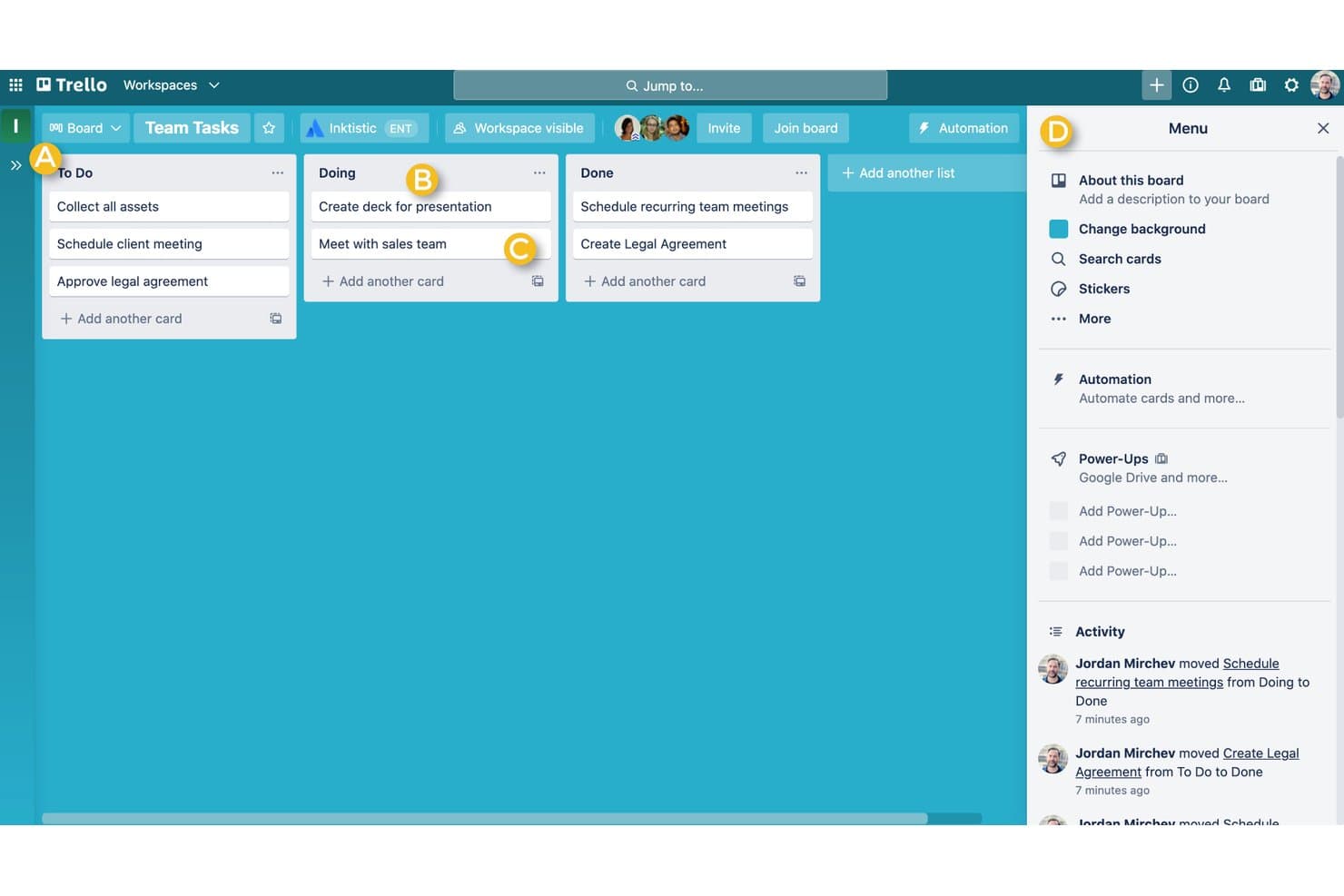
Trello offers a Kanban-style board with To Do, Doing, and Done columns to help individuals manage tasks visually. Trello is a visual work management platform that can serve as free idea management software, with boards, lists, cards, labels, comments, and attachments for capturing and organizing ideas.
Who Is Trello Best For?
Product teams that want to capture and sort early-stage ideas visually before deciding which ones deserve discovery or delivery work.
Why I Picked Trello
I picked Trello because it fits the USP: Best for kanban-based idea tracking on a free plan. I use lists for idea intake, triage, and approved concepts, then move cards as discovery progresses. Labels help my team group proposals by customer segment or opportunity area.
Trello Key Features
- Card comments: Add discussion and updates directly to an idea card.
- File attachments: Attach supporting documents and images to cards.
- Checklists: Break an idea’s review into trackable checklist items.
- Due dates: Add dates to cards for review or follow-up.
Trello Integrations
Trello offers 200+ integrations through Power-Ups, including Slack, Google Drive, and Jira for idea discussions, supporting files, and handoffs. Its REST API supports custom integrations.
What’s Free?
Trello offers a free-forever plan with unlimited cards and Power-Ups, but each Workspace is limited to 10 collaborators and 10 open boards. File attachments are limited to 10 MB each.
Pros and Cons
Pros:
- Checklists structure lightweight concept reviews
- Cards keep feedback beside each proposal
- Kanban stages make idea triage visible
Cons:
- Workspace caps constrain larger contributor groups
- Cards offer limited portfolio-level idea scoring
 Best for custom-formula idea prioritization
- Free plan available; 14-day free trial; free demo available
- From $12/user/month (billed annually)
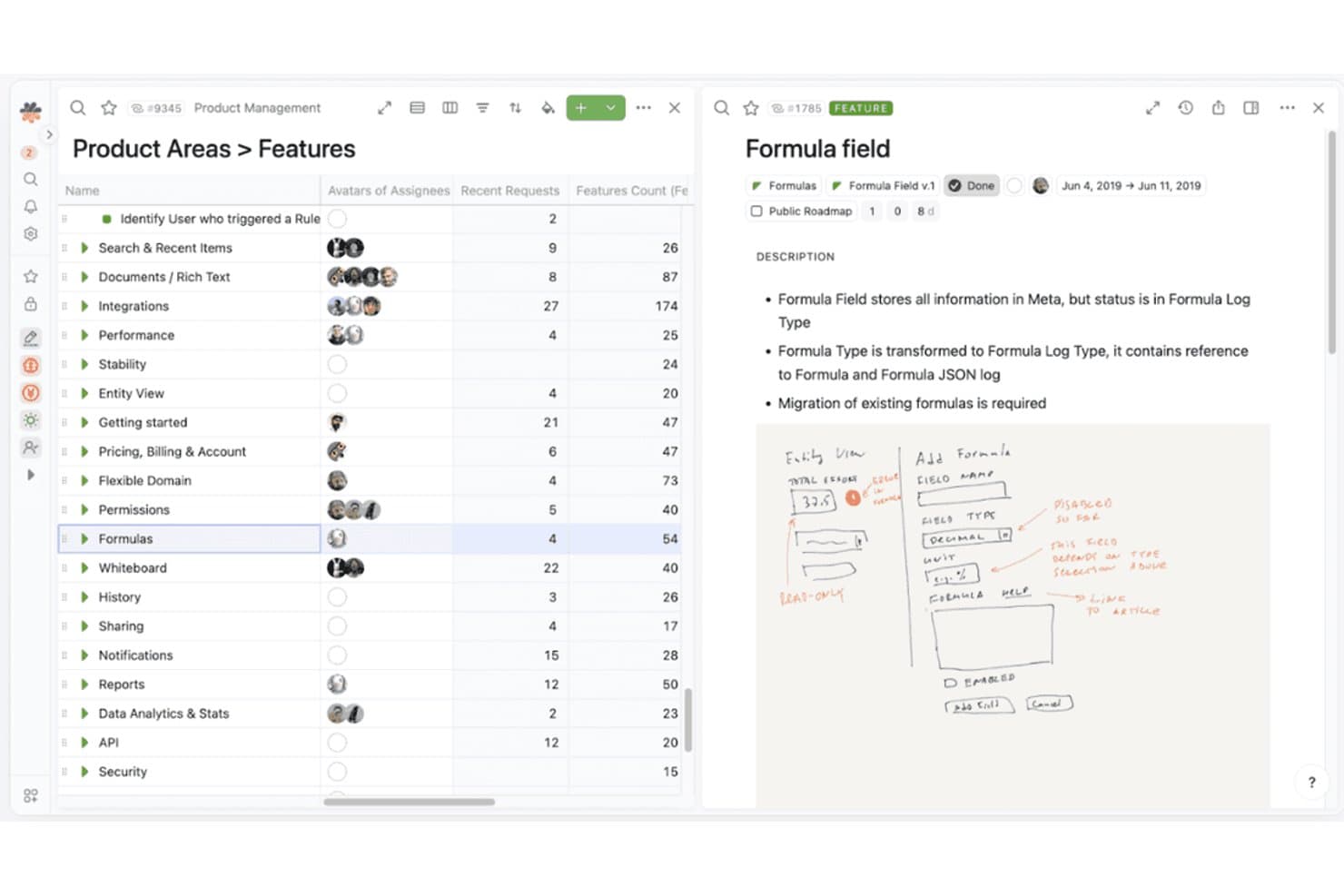
Fibery organizes product features with detailed metadata and visual notes. Fibery is a free-plan idea management platform where product teams capture and organize ideas in customizable databases, link them to feedback and initiatives, and manage evaluation with configurable views and workflows.
Who Is Fibery Best For?
Product teams that want to tailor idea scoring to their own criteria are a good fit for Fibery’s custom-formula idea prioritization.
Why I Picked Fibery
I picked Fibery because its custom-formula idea prioritization lets teams score ideas against their own product criteria. I use customizable databases to link ideas with customer feedback and initiatives, then apply formulas to compare proposals against signals such as customer value or strategic fit. Configurable views help teams review those scores alongside the ideas they’re evaluating.
Fibery Key Features
- Workflow automation: Trigger actions when an idea’s fields or status change.
- Collaborative docs: Draft and edit product documents with your team.
- Integrations: Connect Fibery with external tools such as Slack and GitHub.
- API access: Use the API to connect Fibery with custom applications.
Fibery Integrations
Fibery offers integrations with Slack and GitHub, plus an API for custom integrations.
What's Free?
Fibery offers a $0 Free plan, and every workspace gets a 14-day Pro trial before choosing Free or a paid plan. The Free plan allows up to 10 users and 10 guests, 10 databases, 1 GB of storage, and 250 monthly automation runs.
Pros and Cons
Pros:
- Configurable views compare proposals and scores
- Links ideas to customer feedback and initiatives
- Custom formulas score ideas against team criteria
Cons:
- Scoring requires teams to define formulas
- Free plan limits database and automation capacity
Learn more about Fibery:
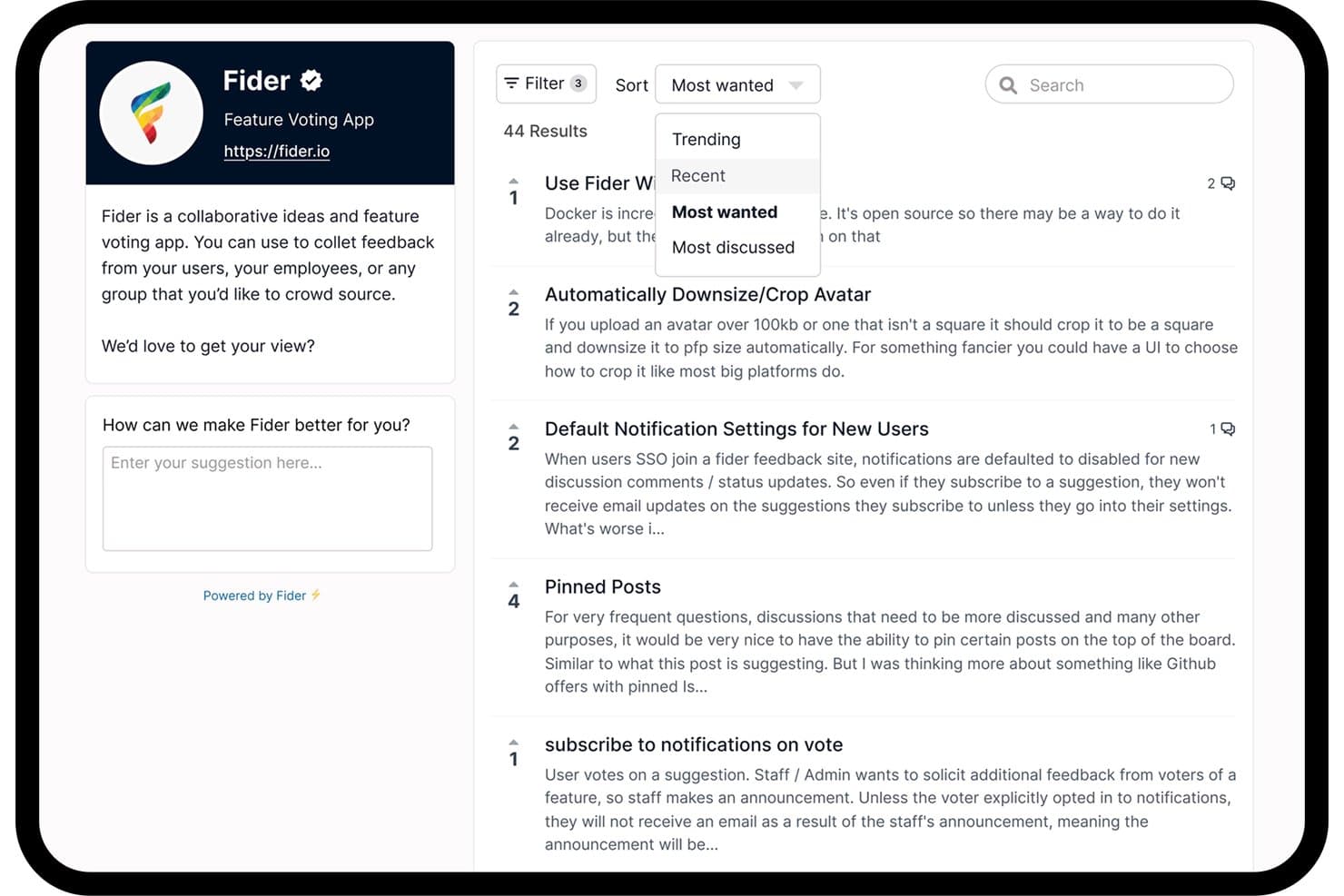
Fider lets users sort and filter community feature requests by popularity. Fider is a free idea management platform with customer-facing feedback portals for submitting product suggestions, discussing ideas, and voting on requests.
Who Is Fider Best For?
For product teams gathering customer input, Fider is Best for open-source feature voting boards.
Why I Picked Fider
I picked Fider for open-source feature voting boards because its customer-facing portal lets users submit product suggestions, discuss ideas, and vote on requests. I like how those discussions and votes help me spot recurring customer needs before shaping the roadmap.
Fider Key Features
- Board customization: Set a board title, welcome message, and branding options.
- Tags: Apply tags to feedback items, including private tags for internal organization.
- Multiple languages: Configure the board to support multiple languages.
- API access: Connect Fider with internal systems through its API.
Fider Integrations
Native integrations are not clearly documented. Fider supports custom integrations through its API.
What’s Free?
Fider offers a free-forever plan with unlimited customers and members, plus feedback discussions and votes. The plan has a fair-use limit of 250 feedback items; Pro costs $25 per month and removes that limit.
Pros and Cons
Pros:
- Free plan supports unlimited customers and members
- Customers can discuss and vote on ideas
- Open-source feature voting boards
Cons:
- Focuses on feedback rather than end-to-end idea workflows
- Free plan caps feedback at 250 items
Learn more about Fider:
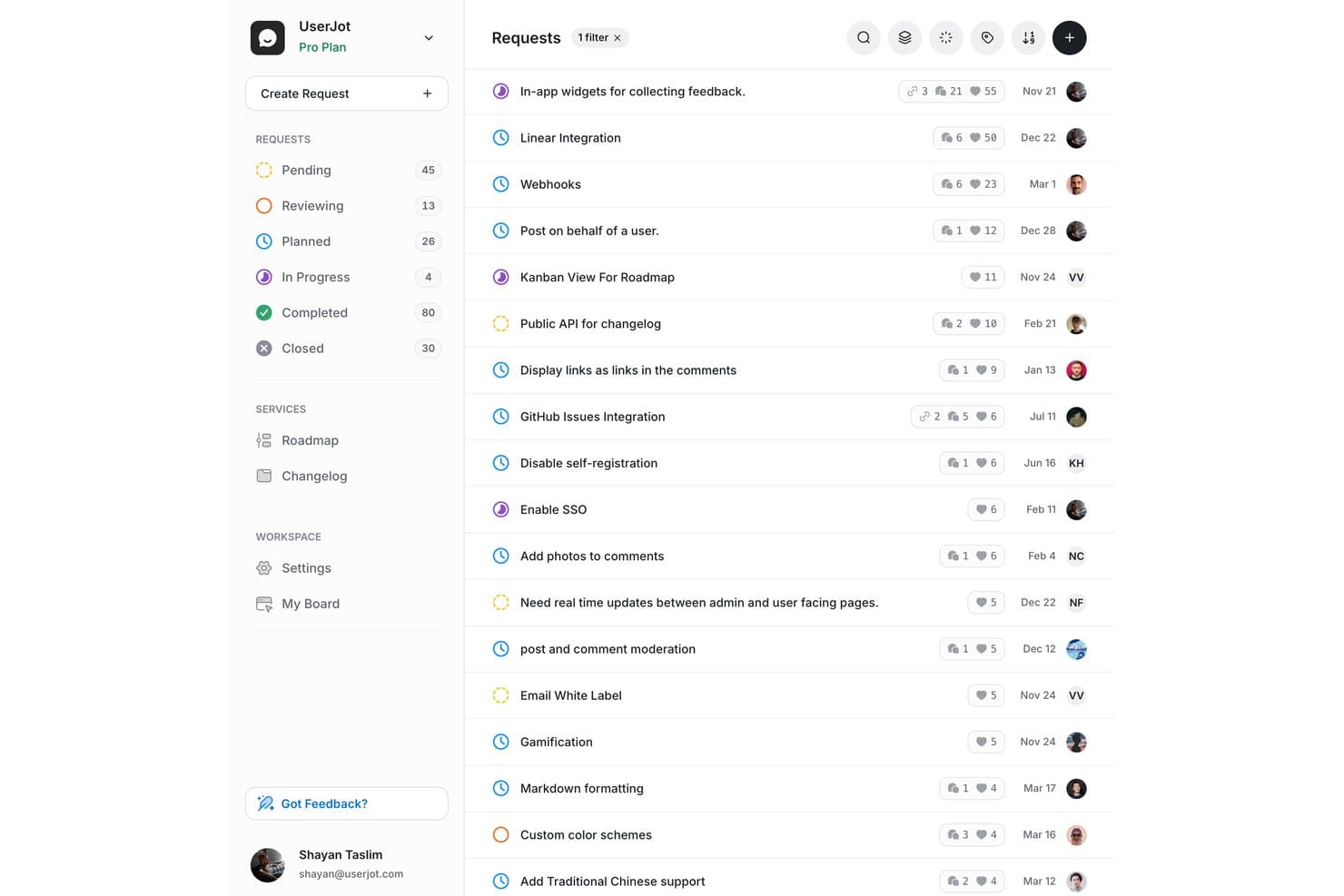
UserJot lets users track and prioritize feature requests by status and votes. UserJot is idea management software with feedback boards for feature requests, user voting, a public roadmap, and changelog publishing.
Who Is UserJot Best For?
UserJot suits small product teams that want customers to submit and vote on feature requests through a public feedback board.
Why I Picked UserJot
I picked UserJot as “Best for idea-to-roadmap tracking on a free plan” because it links customer requests to product decisions. Its feedback boards collect feature ideas, and voting helps surface demand before teams add selected requests to a public roadmap. Changelog publishing then shares shipped updates with customers.
UserJot Key Features
- Duplicate detection: Identify similar requests to reduce repeat submissions.
- Auto-tagging: Automatically label incoming feedback posts.
- Email-to-post: Turn emailed feedback into board posts.
- Canny import: Import boards, posts, votes, comments, and changelog entries.
UserJot Integrations
UserJot integrations include Slack and Discord, with one integration on Starter and unlimited integrations on Professional. The REST API and remote MCP server are available on paid plans for custom connections.
What’s Free?
UserJot’s free plan is free forever, with unlimited users and posts, two feedback boards, three admin roles, a public roadmap, and a public changelog. Integrations aren’t included on the free plan.
Pros and Cons
Pros:
- Changelog helps share shipped updates with customers
- Public roadmap included at no cost
- Unlimited users and posts on the free plan
Cons:
- Growing feedback programs may require board consolidation
- Two-board limit may restrict topic separation
Learn more about UserJot:
Annen gratis programvare for idéhåndtering
Her er noen andre alternativer for gratis programvare for idéhåndtering som ikke kom med på kortlisten min, men som likevel er verdt å undersøke:
- 11Ducalis.ioBest for scoring and prioritizing feedback requests
- 12FeaturevoteBest for no-login customer feature voting
- 13FeaturebaseBest for closing the feedback loop with a changelog
- 14SupahubBest for startups collecting unlimited user votes free
- 15Aha! IdeasBest for scorecard-driven idea prioritization
- 16SleekplanBest for solo founders shipping a free feedback portal
- 17WishKitBest for in-app feature voting on Apple platforms
How I Evaluate Free Idea Management Software
First, I define what counts as free. For idea management software, that means a free-forever plan, not a trial, with multiple users and ongoing idea capture. From there, I split my evaluation into three parts: core functionality, which carries the most weight, like collecting ideas and tracking statuses; standout features, like public roadmaps; and what a tool offers beyond its feature set, like its upgrade path.
Core Functionality (Table Stakes For This List)
In addition to my free plan requirements, I use a scoring system to select tools for my list. I score each one on a scale from 0 (does not offer the functionality) to 5 (excels in this area) for each core functionality listed below, based on what's available on the free plan. I then convert the total into a percentage to help assess each tool's overall fit, with extra weight on any functionalities I've deemed essential.
- Idea Submission & Collection (Essential): I look for a shared repository where teams can submit, categorize, and revisit ideas from discovery sessions or customer conversations.
- Voting & Feedback: I check whether users can vote, comment, or react to requests, giving teams visible signals about recurring needs and support.
- Idea Prioritization: I assess sorting or scoring options that help compare ideas by votes, impact, effort, urgency, or strategic fit.
- Status Tracking: I look for clear stages such as new, reviewing, planned, and completed, so teams can follow an idea toward delivery.
- Collaboration Access: I check whether multiple users can submit, discuss, and review ideas together on the free plan.
Once I have a list of tools that meet the criteria, I consider what sets each platform apart.
Differentiating Factors (What Sets Vendors Apart)
Here's how I compare and contrast different vendors:
Standout Features
I look for idea merging and deduplication, since a backlog full of near-identical requests makes prioritization unreliable. Tools like Frill and Nolt handle this well, letting you consolidate votes and context into one thread. I also check for automated status notifications that close the feedback loop without manual follow-up. When a submitted idea moves to "planned," the original requester should know. Public roadmap sharing matters too—publishing validated ideas as a customer-facing roadmap turns your backlog into a transparency tool.
Beyond Features
I check whether free plans let external users—customers or prospects—submit and vote on ideas without requiring paid seats, since crowdsourcing feedback loses its value if participation is gated. Data portability matters too: I look for CSV or API export of ideas, votes, and statuses so teams aren't locked in if they outgrow a tool. I also evaluate how each free tier connects to existing workflows through integrations with tools like Jira, Slack, or Trello, which saves teams from manually copying ideas into sprint planning.
Slik velger du gratis programvare for idéhåndtering
Det er lett å gå seg vill i lange funksjonslister og kompliserte prisstrukturer. For å hjelpe deg med å holde fokus mens du går gjennom den unike prosessen din for valg av programvare, får du her en sjekkliste over faktorer du bør ha i bakhodet:
| Faktor | Hva du bør vurdere |
|---|---|
| FaktorSkalerbarhet | Hva du bør vurdereVil verktøyet støtte teamets størrelse og vekst? Sjekk brukergrenser, begrensninger på innsendinger og muligheter for oppgradering. |
| FaktorIntegrasjoner | Hva du bør vurdereKan det kobles til de eksisterende verktøyene dine (for eksempel Slack, Jira og e-post)? Bekreft hvilke integrasjoner som er tilgjengelige i gratisplanen. |
| FaktorTilpasningsmuligheter | Hva du bør vurdereKan du tilpasse arbeidsflyter, skjemaer og merkevareprofil etter behovene dine? Enkelte gratisplaner begrenser tilpasningsmulighetene. |
| FaktorBrukervennlighet | Hva du bør vurdereEr grensesnittet intuitivt for alle brukere? Test med en liten gruppe for å avdekke problemer før utrulling. |
| FaktorImplementering og opplæring | Hva du bør vurdereHvor raskt kan teamet ditt komme i gang? Se etter veiledet oppsett, maler og tilgjengelige opplæringsressurser. |
| FaktorKostnad | Hva du bør vurdereHva skjer etter gratisplanen? Se gjennom oppgraderingspriser, skjulte gebyrer og hvilke funksjoner som er låst bak betalingsmurer. |
| FaktorSikkerhetstiltak | Hva du bør vurdereTilbyr verktøyet grunnleggende databeskyttelse, brukertillatelser og personvernkontroller? Vurder risikoen ved håndtering av sensitive ideer. |
| FaktorTilgjengelig kundestøtte | Hva du bør vurdereHvilke støttekanaler er åpne for gratisbrukere? Enkelte leverandører begrenser direkte chat eller e-poststøtte til betalingsplaner. |
Hva er gratis programvare for idéhåndtering?
Gratis programvare for idéhåndtering er et digitalt verktøy som lar team samle inn, organisere og vurdere innovative ideer og produktideer uten kostnader på forhånd. Disse plattformene for innovasjonshåndtering støtter idégenerering, avstemning og statussøk, noe som gjør dem nyttige for produktutvikling og kontinuerlig forbedring. De fleste verktøy tilbyr en gratisversjon med brukervennlig, skybasert tilgang, samt grunnleggende funksjoner for teamarbeid og samarbeid. De overlapper ofte med prosjektstyringsprogramvare og prosjektstyringsverktøy, og hjelper team med å bruke en strukturert metodikk for å omsette ideer til handling.
Funksjoner
La oss gå gjennom funksjonene som vanligvis finnes i programvare for idéhåndtering, og hvilke som vanligvis er inkludert i gratis- kontra betalingsplaner.
Funksjoner i programvare for idéhåndtering som vanligvis er gratis
- Innsending av idéer: Gjør det mulig for brukere å sende inn nye idéer via et enkelt skjema eller en portal, slik at det blir lett å samle innspill fra teammedlemmer eller interessenter.
- Stemmegivning eller likemarkering: Gjør det mulig for brukere å stemme opp eller like idéer, slik at team raskt kan identifisere populære forslag og prioritere det som betyr mest.
- Enkel kommentering: Lar brukere legge til kommentarer eller tilbakemeldinger på innsendte idéer, og legger til rette for diskusjon og avklaringer i plattformen.
- Kategorisering av idéer: Tilbyr enkle tagger eller kategorier for å organisere idéer, slik at det blir enklere å filtrere og søke etter relevante forslag.
- Statussporing: Tilbyr enkle statusetiketter (som «Til vurdering» eller «Implementert»), slik at brukere kan se fremdriften for idéene sine.
- Brukeradministrasjon: Støtter å legge til og administrere et begrenset antall brukere, slik at små team kan samarbeide uten ekstra kostnader.
- Enkle varsler: Sender e-postvarsler eller varsler i appen når idéer sendes inn, oppdateres eller kommenteres, slik at deltakerne holdes informert.
- Enkel rapportering: Inkluderer grunnleggende eksport- eller sammendragsrapporter for å få oversikt over idéaktivitet og engasjement.
Funksjoner i programvare for idéhåndtering som vanligvis er betalingsbelagte
- Avansert arbeidsflytautomatisering: Automatiserer flertrinnsprosesser for gjennomgang, godkjenning og videresending, reduserer manuelt arbeid og sørger for at idéene beveger seg effektivt gjennom vurderingsfasene.
- Tilpasset merkevarebygging: Gjør det mulig for organisasjoner å tilpasse utseendet og brukeropplevelsen i idéportalen fullt ut, inkludert logoer, farger og domenenavn, for en merkevaretilpasset opplevelse.
- Integrasjon med eksterne verktøy: Kobler plattformen til andre forretningssystemer, som prosjektstyrings-, CRM- eller kommunikasjonsverktøy, for smidig dataflyt.
- Detaljerte tillatelser: Gir detaljert kontroll over brukerroller og tilgang, og støtter komplekse teamstrukturer og håndtering av sensitiv informasjon.
- Analysedashbord: Leverer avanserte visualiseringer og analyser for å følge utviklingen i idéer, deltakelsesgrad og innovasjonsresultater over tid.
- Tilpassede felt og skjemaer: Gjør det mulig å opprette skreddersydde innsendingsskjemaer med tilpassede felt for å samle inn spesifikk informasjon som er relevant for organisasjonen din.
- Flerspråklig støtte: Støtter flere språk, noe som gjør det enklere for globale team å delta og samarbeide.
- Moderering og spamkontroll: Inkluderer verktøy for å gjennomgå, filtrere og håndtere upassende eller dupliserte innsendelser for å opprettholde kvaliteten.
- API-tilgang: Tilbyr API-endepunkter for tilpassede integrasjoner og dataeksport, og støtter avanserte arbeidsflyter og rapporteringsbehov.
- Dedikert brukerstøtte: Tilbyr prioritert eller dedikert kundestøtte, inkludert hjelp med oppstart og feilsøking for bedriftsbrukere.
Fordeler
Implementering av gratis programvare for idéhåndtering gir flere fordeler for teamet og virksomheten din. Her er noen av fordelene du kan se frem til:
- Lavere terskel for å komme i gang: Gratisplaner gjør det mulig for team å begynne å samle inn og organisere idéer uten budsjettgodkjenning eller forhåndsinvestering.
- Sentralisert innsamling av idéer: Alle forslag og tilbakemeldinger samles på ett sted, noe som gjør det enklere å gjennomgå, prioritere og handle ut fra innspillene.
- Bedre teamengasjement: Funksjoner for stemmegivning, kommentering og statussporing oppmuntrer til deltakelse og holder alle informert om fremdriften for idéene.
- Raskere beslutningstaking: Innebygd kategorisering og enkel rapportering hjelper team med raskt å identifisere idéer med stort potensial og føre dem videre.
- Tilgjengelig samarbeid: Brukeradministrasjon og varsler gjør det mulig for selv små eller distribuerte team å bidra og holde seg oppdatert.
- Risikofri utprøving: Team kan teste ulike arbeidsflyter og prosesser før de forplikter seg til en betalingsløsning eller skalerer opp.
- Forenklet oppstart: Enkle grensesnitt og grunnleggende ressurser for oppstart hjelper team med å komme i gang og raskt realisere verdien.
Kostnader og priser
Jeg forstår at du kom til denne artikkelen på jakt etter de beste alternativene for idébehandlingsprogramvare som er tilgjengelige gratis. Siden gratisabonnementer imidlertid bare tilbyr begrensede funksjoner, er det en god sjanse for at du må oppgradere abonnementet ditt i fremtiden.
Tabellen nedenfor oppsummerer vanlige abonnementer, gjennomsnittsprisene deres og typiske funksjoner som er inkludert i idébehandlingsprogramvare:
Sammenligningstabell for abonnementer på idébehandlingsprogramvare
| Abonnementstype | Gjennomsnittspris | Vanlige funksjoner |
|---|---|---|
| AbonnementstypeGratisabonnement | Gjennomsnittspris$0 | Vanlige funksjonerGrunnleggende innsending av idéer, avstemning, kommentering, enkel kategorisering, begrenset antall brukere og grunnleggende varsler. |
| AbonnementstypePersonlig abonnement | Gjennomsnittspris$5–$15/bruker/måned | Vanlige funksjonerAlle funksjonene i gratisabonnementet, flere brukerplasser, forbedret rapportering, egendefinerte felt og begrensede integrasjoner. |
| AbonnementstypeBedriftsabonnement | Gjennomsnittspris$15–$40/bruker/måned | Vanlige funksjonerAvansert automatisering av arbeidsflyter, analysedashbord, egendefinert merkevarebygging, flere integrasjoner og prioritert brukerstøtte. |
| AbonnementstypeStorbedriftsabonnement | Gjennomsnittspris$40–$80/bruker/måned | Vanlige funksjonerAlle bedriftsfunksjoner, detaljerte tillatelser, API-tilgang, dedikert implementeringsstøtte, avansert sikkerhet og støtte for flere språk. |
Vanlige spørsmål om gratis idébehandlingsprogramvare
Her er noen svar på vanlige spørsmål om gratis idébehandlingsprogramvare:
Kan gratis idébehandlingsprogramvare håndtere store team?
Nei, de fleste gratisabonnementer har begrensninger på antall brukere eller innsendinger, noe som gjør dem best egnet for små team eller pilotprosjekter. Hvis du trenger å støtte en stor organisasjon, må du sannsynligvis oppgradere til et betalt abonnement.
Finnes det skjulte kostnader med gratis idébehandlingsprogramvare?
Ja, noen leverandører begrenser viktige funksjoner, integrasjoner eller brukerstøtte til betalte abonnementer. Gå alltid gjennom begrensningene i gratisabonnementet, og se etter oppfordringer til oppgradering eller bruksgrenser før du bestemmer deg.
Kan jeg migrere dataene mine hvis jeg oppgraderer fra et gratis til et betalt abonnement?
Ja, de fleste leverandører lar deg beholde dataene og innstillingene dine når du oppgraderer. Det er imidlertid viktig å bekrefte migreringsalternativene og eventuelle begrensninger for dataeksport hos leverandøren du har valgt.
Er dataene mine sikre i gratis idébehandlingsprogramvare?
Datasikkerheten varierer fra leverandør til leverandør. Gratisabonnementer kan tilby grunnleggende beskyttelse, men avanserte sikkerhetsfunksjoner som SSO, kryptering eller revisjonslogger er vanligvis forbeholdt betalte nivåer.
Hva skjer hvis jeg vokser ut av gratisabonnementet?
Du kan vanligvis oppgradere til et betalt abonnement for å få tilgang til flere funksjoner, brukere eller mer lagringsplass. Gå gjennom oppgraderingsmulighetene og prisene på forhånd for å unngå avbrudd når behovene dine endrer seg.