

Gestire il ciclo di vita di un prodotto può essere complicato, soprattutto quando devi destreggiarti tra le esigenze dei clienti, le tendenze del mercato e le dinamiche del team. Potresti sentirti sopraffatto dalla quantità di dati e non sapere quale sia la direzione giusta. È qui che entrano in gioco gli strumenti per la scoperta dei prodotti.
Questi strumenti aiutano te e il tuo team a raccogliere informazioni, stabilire la priorità delle funzionalità e prendere decisioni informate. Nella mia esperienza, alleviano lo stress legato alle supposizioni.
Ho testato e recensito diverse opzioni per offrirti un elenco imparziale e basato su una ricerca approfondita dei migliori strumenti disponibili. In questo articolo troverai recensioni concise, funzionalità principali e gli elementi che distinguono ciascuno strumento. Troviamo lo strumento giusto per aiutare il tuo team ad avere successo.
Perché fidarsi dei nostri consigli sui software
6,700+
Reviews
20
Industry experts
16+
Evaluation factors
14
Years
Il nostro team testa e recensisce software dal 2012. In quanto product manager noi stessi, sappiamo quanto sia difficile — e importante — scegliere il software giusto.
Per questa guida, abbiamo valutato gli strumenti attraverso test pratici e ricerche indipendenti, assegnando un punteggio agli strumenti in base ai nostri criteri di selezione.
Le nostre recensioni riflettono il nostro giudizio editoriale umano, non un discorso di vendita.
Revisori esperti:
- Andrew LumbySenior TPM
- Cristiano ValimSenior UI/UX Lead


Tabella comparativa degli strumenti per la scoperta dei prodotti
Questa tabella comparativa riassume i dettagli sui prezzi degli strumenti per la scoperta dei prodotti che ho selezionato:
| Tool | Best For | Trial Info | Price | ||
|---|---|---|---|---|---|
| 1 | Ideale per la tracciabilità delle evidenze dalla fase di scoperta alla roadmap | Demo gratuita disponibile | Prezzi disponibili su richiesta | Website | |
| 2 | Ideale per flussi di lavoro dal feedback alla roadmap basati sull'intelligenza artificiale | Piano gratuito disponibile | Prezzi su richiesta | Website | |
| 3 | Ideale per la tracciabilità completa dal feedback alla roadmap | Piano gratuito + demo gratuita disponibile | A partire da $12/utente/mese (con fatturazione annuale) | Website | |
| 4 | Ideale per la scoperta continua basata su OST | Prova gratuita di 7 giorni | A partire da $25/utente/mese | Website | |
| 5 | Ideale per interviste moderate dall'IA su larga scala | Piano gratuito disponibile | Prezzi su richiesta | Website | |
| 6 | Ideale per il brainstorming visivo nei team di prodotto | Prova gratuita di 14 giorni + piano gratuito disponibile | A partire da $8/utente/mese (con fatturazione annuale) | Website | |
| 7 | Ideale per la definizione delle priorità delle funzionalità basata su dati documentati | Prova gratuita di 14 giorni + piano gratuito + demo gratuita disponibili | A partire da $19/creatore/mese (con fatturazione annuale) | Website | |
| 8 | Ideale per decisioni sulle funzionalità basate sulla definizione delle priorità | Dimostrazione gratuita disponibile | Prezzi su richiesta | Website | |
| 9 | Ideale per la tracciabilità dal feedback alla roadmap | Prova gratuita di 14 giorni + demo gratuita disponibile | A partire da $36/mese (con fatturazione annuale) | Website | |
| 10 | Ideale per l'insight continuo sui clienti basato sull'IA | Piano gratuito + demo gratuita disponibile | Prezzi su richiesta | Website |


Recensioni dei migliori strumenti per la scoperta dei prodotti
Di seguito trovi i miei riepiloghi dettagliati dei migliori strumenti per la scoperta dei prodotti inclusi nella mia selezione ristretta. Le mie recensioni offrono un’analisi dettagliata delle funzionalità principali, dei pro e dei contro, delle integrazioni e dei casi d’uso ideali di ciascuno strumento, per aiutarti a trovare quello più adatto a te.
 Ideale per la tracciabilità delle evidenze dalla fase di scoperta alla roadmap
- Demo gratuita disponibile
- Prezzi disponibili su richiesta
Visit WebsiteCustomer Rating:4.4/5
La piattaforma di roadmap di ProductPlan si concentra sullo sviluppo dei prodotti. ProductPlan è una piattaforma dedicata alla creazione di roadmap, progettata per facilitare la pianificazione strategica e la visualizzazione delle tempistiche dei prodotti. Le sue funzionalità consentono agli utenti di definire strategie di prodotto chiare e comunicarle efficacemente, in linea con la sua specializzazione nella pianificazione strategica e nella visualizzazione di alto livello.
Perché ho scelto ProductPlan:
Ho selezionato ProductPlan per la sua attenzione esclusiva alla fornitura di una piattaforma completa per la pianificazione strategica. La sua capacità di rappresentare visivamente tempistiche di prodotto complesse lo distingue da strumenti simili. Sulla base del mio confronto e della mia valutazione, ProductPlan rappresenta una scelta ottimale per i team che necessitano di una visualizzazione efficiente delle proprie roadmap di prodotto e della pianificazione strategica.
Funzionalità e integrazioni principali:
Le funzionalità più utili di ProductPlan includono la creazione di roadmap, modelli di pianificazione, definizione e monitoraggio degli obiettivi, assegnazione delle priorità e strumenti di collaborazione. Le sue integrazioni includono piattaforme popolari come Jira, Trello, Slack e Microsoft Teams, tra le altre, rendendo semplice la sua integrazione in un flusso di lavoro esistente.
Pros and Cons
Pros:
- Potente visualizzazione delle tempistiche dei prodotti
- Integrazioni solide con strumenti popolari di gestione dei progetti
- Strumenti di collaborazione efficienti
Cons:
- L'interfaccia utente potrebbe richiedere del tempo per essere compresa
- Mancanza di funzionalità dettagliate per la gestione dei progetti
- Prezzo più elevato rispetto ad alcuni concorrenti
Learn more about ProductPlan: Ideale per flussi di lavoro dal feedback alla roadmap basati sull'intelligenza artificiale
- Piano gratuito disponibile
- Prezzi su richiesta
Visit WebsiteCustomer Rating:5/5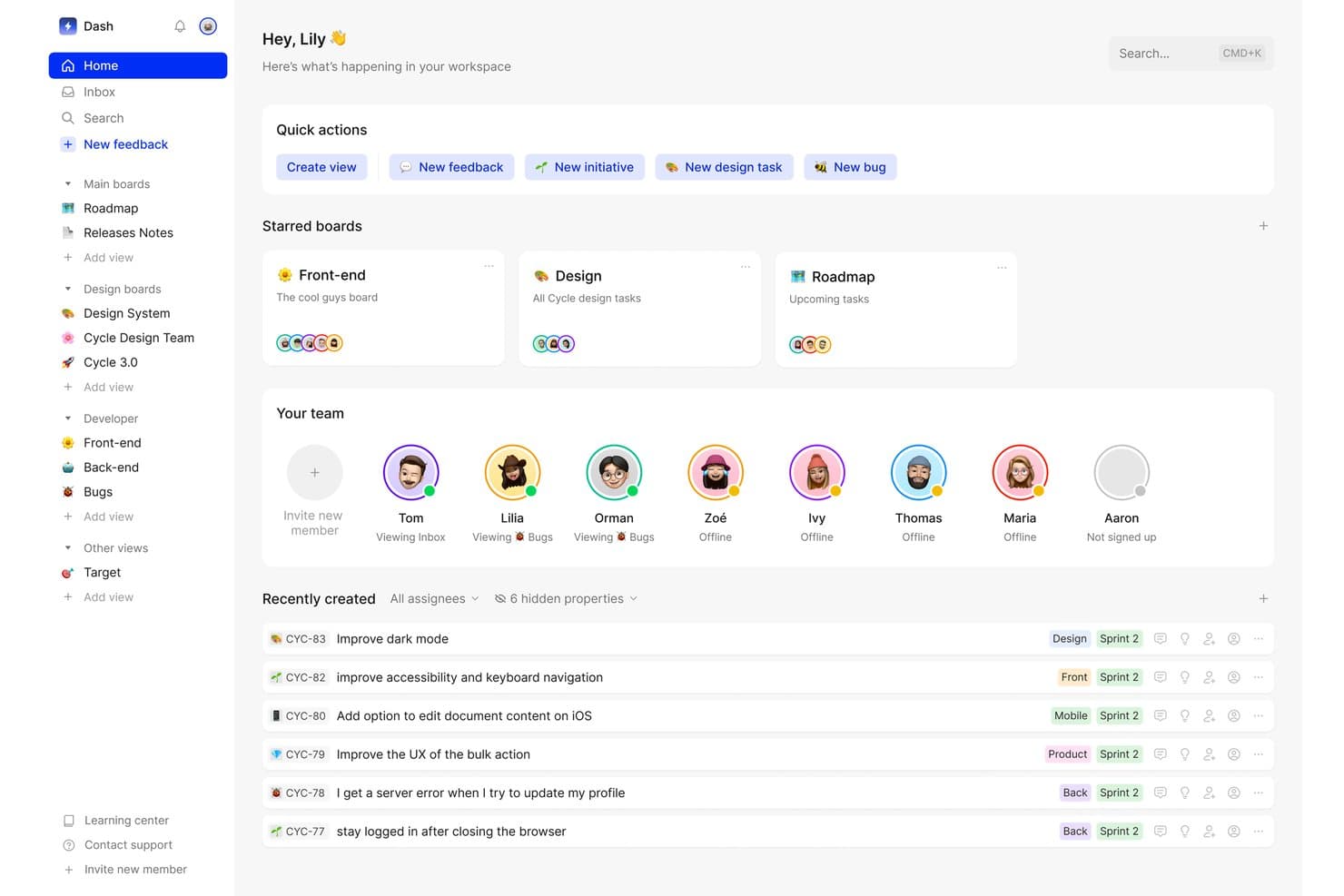
Cycle centralizza le attività del team, i feedback e le bacheche in un unico spazio di lavoro. Cycle era una piattaforma per la scoperta dei prodotti e la gestione dei feedback che centralizzava i feedback dei clienti provenienti da più fonti, generava insight basati sull'intelligenza artificiale e collegava tali insight alla pianificazione della roadmap e alla gestione dei rilasci.
Per chi è più adatto Cycle?
Cycle era particolarmente adatto ai team di prodotto che dovevano consolidare grandi volumi di feedback dei clienti provenienti da più canali e collegare direttamente tali insight alle decisioni sulla roadmap.
Perché ho scelto Cycle
Ho incluso Cycle tra le mie scelte migliori perché gestisce l'intero percorso, dal segnale grezzo del cliente alla decisione sulla roadmap, meglio di quasi qualsiasi altro strumento che abbia visto. L'agente @VoiceHunter sintetizza automaticamente le note delle interviste e assegna tag ai feedback in arrivo, mentre @LoopCloser informa i clienti nel momento stesso in cui la funzionalità richiesta viene rilasciata. Ciò che trovo più interessante è il modo in cui questi agenti di intelligenza artificiale trasformano un processo solitamente manuale e frammentato in un flusso di lavoro continuo e in gran parte automatizzato.
Funzionalità principali di Cycle
- Acquisizione dei feedback da più fonti: Cycle importa automaticamente i feedback dei clienti da Slack, Intercom, Zendesk, Gong, HubSpot e dalle trascrizioni delle riunioni in un unico hub.
- Ricerche in linguaggio naturale con Cycle Ask: Un componente aggiuntivo che consente di cercare nell'intero corpus dei feedback utilizzando domande in linguaggio naturale, per individuare su richiesta i segnali rilevanti dei clienti.
- Postazioni Collaborator gratuite illimitate: Gli stakeholder, come ingegneri, rappresentanti commerciali e membri del team CS, possono partecipare, commentare e inviare feedback senza occupare una postazione a pagamento.
- Pubblicazione delle note di rilascio e del registro delle modifiche: I team possono redigere e pubblicare note di rilascio assistite dall'intelligenza artificiale, collegate a un registro delle modifiche ospitato pubblicamente su un dominio personalizzato.
Integrazioni di Cycle
Cycle offriva integrazioni native con Notion, Linear, GitHub, Figma e Miro, oltre a integrazioni con Slack, Jira, Confluence, HubSpot e Salesforce. Forniva inoltre un'API pubblica e la connettività con Zapier.
Pros and Cons
Pros:
- Eccelle nell'aggregazione dei feedback provenienti da più fonti
- Gli agenti di intelligenza artificiale automatizzano il flusso di lavoro di sintesi dei feedback
- Le postazioni Collaborator gratuite illimitate favoriscono il lavoro di squadra
Cons:
- Non è più disponibile come prodotto indipendente
- Non dispone di funzionalità native per la validazione delle ipotesi
Learn more about Cycle: Ideale per la tracciabilità completa dal feedback alla roadmap
- Piano gratuito + demo gratuita disponibile
- A partire da $12/utente/mese (con fatturazione annuale)
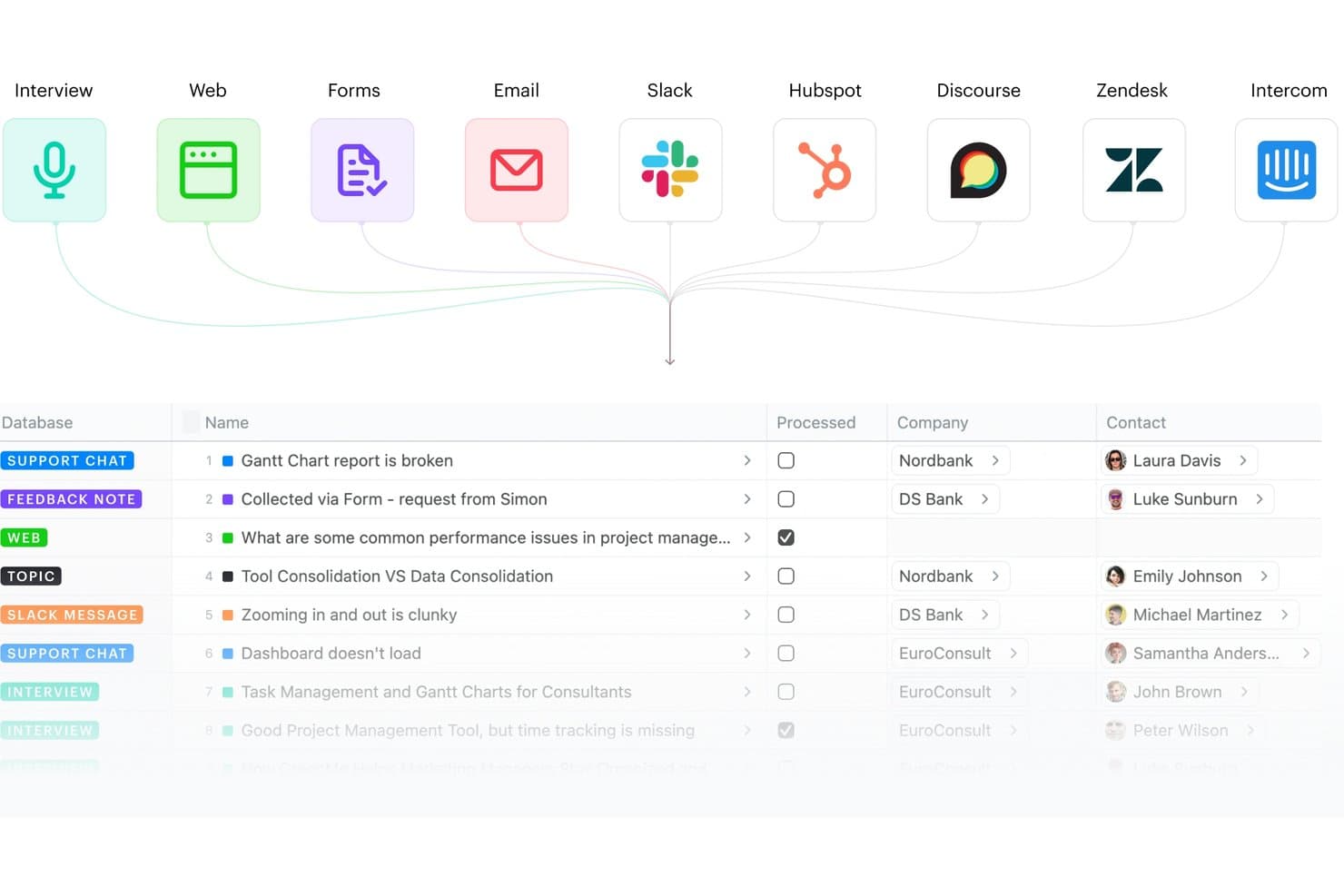
Fibery centralizza i feedback provenienti da più fonti in un unico database. Fibery è una piattaforma modulare per la scoperta e lo sviluppo dei prodotti che collega l'aggregazione dei feedback dei clienti, la sintesi degli insight, la mappatura delle opportunità e la pianificazione della roadmap in un unico spazio di lavoro relazionale.
Per chi è più adatto Fibery?
Fibery è adatto ai team di prodotto che desiderano uno spazio di lavoro unico e profondamente interconnesso per seguire ogni insight, dal feedback grezzo dei clienti fino alle funzionalità rilasciate nella roadmap.
Perché ho scelto Fibery
Fibery è entrato nella mia rosa di strumenti preferiti grazie alla stretta connessione tra il feedback grezzo dei clienti e le funzionalità rilasciate, senza interruzioni nella catena. Apprezzo particolarmente il fatto che il suo albero nativo delle opportunità e delle soluzioni (basato sul framework di Teresa Torres) permetta di collegare direttamente le evidenze alle opportunità e alle soluzioni, così ogni elemento della roadmap può essere ricondotto a un insight reale dei clienti. Il clustering semantico basato sull'intelligenza artificiale e il modello di ricerca atomica fanno inoltre sì che il mio team possa sintetizzare le note delle interviste in fatti classificati e collegati, invece di lasciare che i risultati si accumulino in documenti non connessi.
Caratteristiche principali di Fibery
- Casella di posta dei feedback: Un hub centralizzato che raccoglie e indirizza i feedback in arrivo da fonti come Intercom, Zendesk, Slack, HubSpot ed e-mail verso un'unica coda di elaborazione.
- Trascrizione delle chiamate basata sull'intelligenza artificiale: Trascrive automaticamente le interviste e le riunioni registrate, quindi genera riepiloghi ed estrae le note principali senza interventi manuali.
- Definizione delle priorità basata su formule personalizzate: Permette di creare modelli di valutazione utilizzando qualsiasi combinazione di volume dei feedback, segmento di clientela, gravità del problema e impatto aziendale collegata ai dati CRM in tempo reale.
- Roadmap e registri delle modifiche pubblici: Permette ai team di pubblicare roadmap e aggiornamenti del prodotto condivisibili e aggiornati in tempo reale, così stakeholder e clienti possono seguire i progressi senza dover acquistare un posto a pagamento.
Integrazioni di Fibery
Fibery offre integrazioni native con Intercom, Zendesk, HubSpot, Slack, Discourse, Jira, GitHub, GitLab e Google Workspace. Supporta inoltre integrazioni personalizzate tramite la sua API e Zapier.
Pros and Cons
Pros:
- Collega direttamente i feedback alle funzionalità rilasciate
- Modelli di scoperta e ricerca altamente flessibili
- Raggruppa e sintetizza gli insight della ricerca con l'intelligenza artificiale
Cons:
- Non include funzionalità integrate per il reclutamento degli utenti o i sondaggi
- Sono disponibili meno integrazioni specializzate per la ricerca
Learn more about Fibery: Ideale per la scoperta continua basata su OST
- Prova gratuita di 7 giorni
- A partire da $25/utente/mese
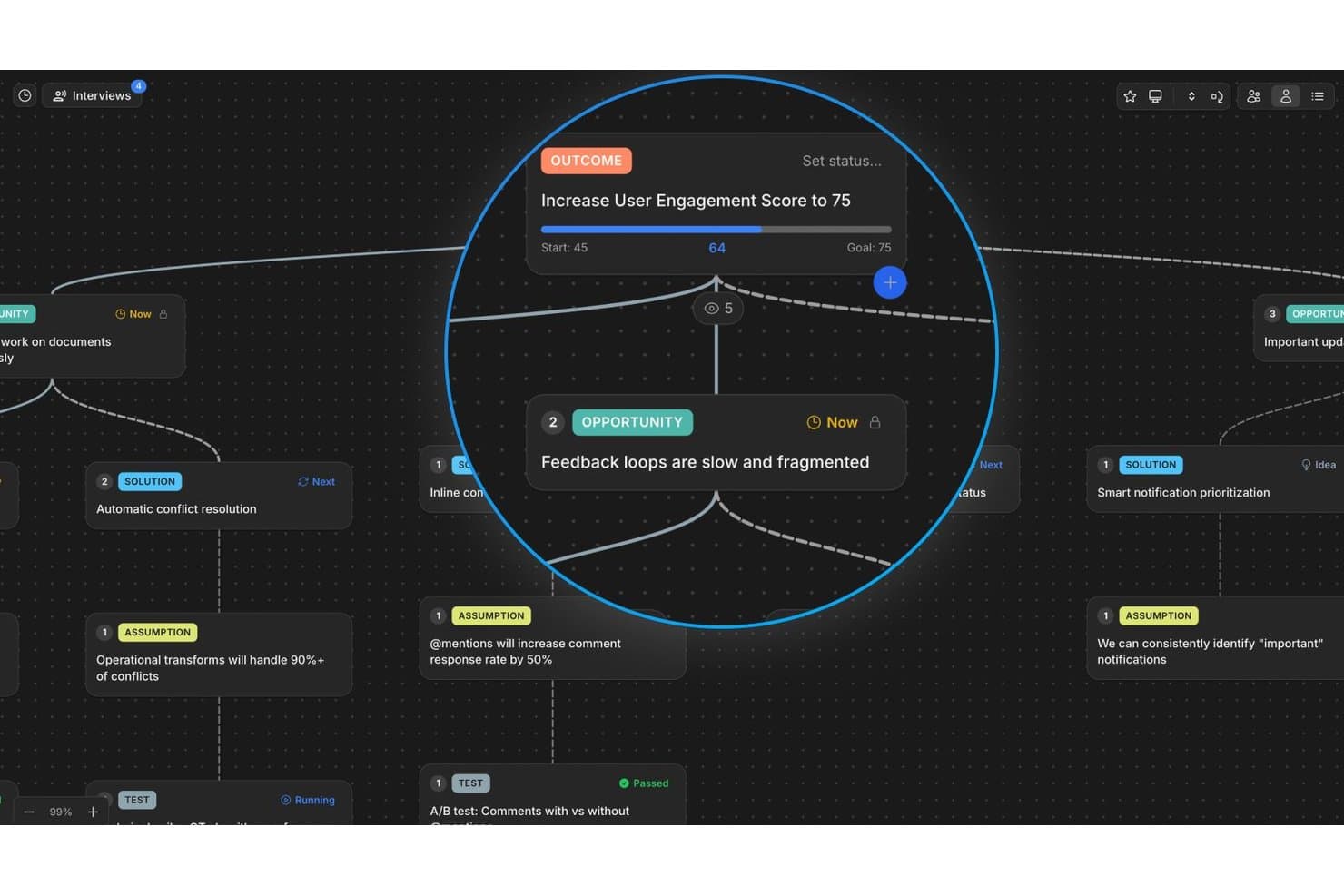
Vistaly mappa opportunità e risultati in un albero visivo di scoperta. Vistaly è una piattaforma per la scoperta dei prodotti basata sul framework dell'albero delle opportunità e delle soluzioni (OST), che offre una tela OST interattiva, la sintesi delle interviste basata sull'IA, la tracciabilità delle evidenze e la mappatura della strategia per collegare il lavoro di scoperta ai risultati aziendali.
Per chi è più adatto Vistaly?
Vistaly è particolarmente adatto ai team di prodotto che hanno adottato, o stanno costruendo attivamente, una pratica di scoperta continua basata sul framework dell'albero delle opportunità e delle soluzioni.
Perché ho scelto Vistaly
Vistaly è entrato nella mia lista ristretta perché è l'unico strumento per la scoperta dei prodotti sviluppato in collaborazione ufficiale con Teresa Torres, la creatrice del framework dell'albero delle opportunità e delle soluzioni. L'ho scelto appositamente per i team che svolgono attività di scoperta continua: si caricano le interviste ai clienti in uno dei circa 29 formati disponibili e l'IA ne sintetizza tre o più in un albero OST completamente strutturato, con ogni scheda opportunità collegata a citazioni testuali. Ciò che trovo più interessante è che il piano di sviluppo non è un elemento separato: è l'OST stesso, organizzato in base allo stato delle schede.
Funzionalità principali di Vistaly
- Spazio della strategia: Collega direttamente le opportunità di scoperta agli alberi di OKR e KPI, con sincronizzazione in tempo reale delle metriche da strumenti come PostHog, Amplitude e Mixpanel.
- Schede speculari: Collega una singola scheda opportunità o soluzione a più risultati, mantenendo sincronizzati evidenze e stato in ogni istanza.
- Schede Ipotesi e Test: Registra e struttura le ipotesi direttamente sulla tela OST utilizzando tipi di scheda dedicati, collegati a soluzioni specifiche.
- Posti illimitati per visualizzatori: Consente a parti interessate, ingegneri e dirigenti di accedere in lettura all'intero albero di scoperta senza richiedere licenze editor.
Integrazioni di Vistaly
Vistaly offre integrazioni native con Jira, Linear, GitHub, Slack, Gong e PostHog. Fornisce inoltre un'API REST, accesso MCP per Claude, ChatGPT e Cursor, oltre a Zapier.
Pros and Cons
Pros:
- L'IA trasforma le interviste in OST strutturati
- Albero delle opportunità e delle soluzioni sviluppato in collaborazione con esperti
- Ogni scheda rimanda a prove testuali dei clienti
Cons:
- Nessun sistema nativo per sondaggi o test con i clienti
- Non dispone di funzionalità integrate per il reclutamento dei partecipanti
Learn more about Vistaly: Ideale per interviste moderate dall'IA su larga scala
- Piano gratuito disponibile
- Prezzi su richiesta
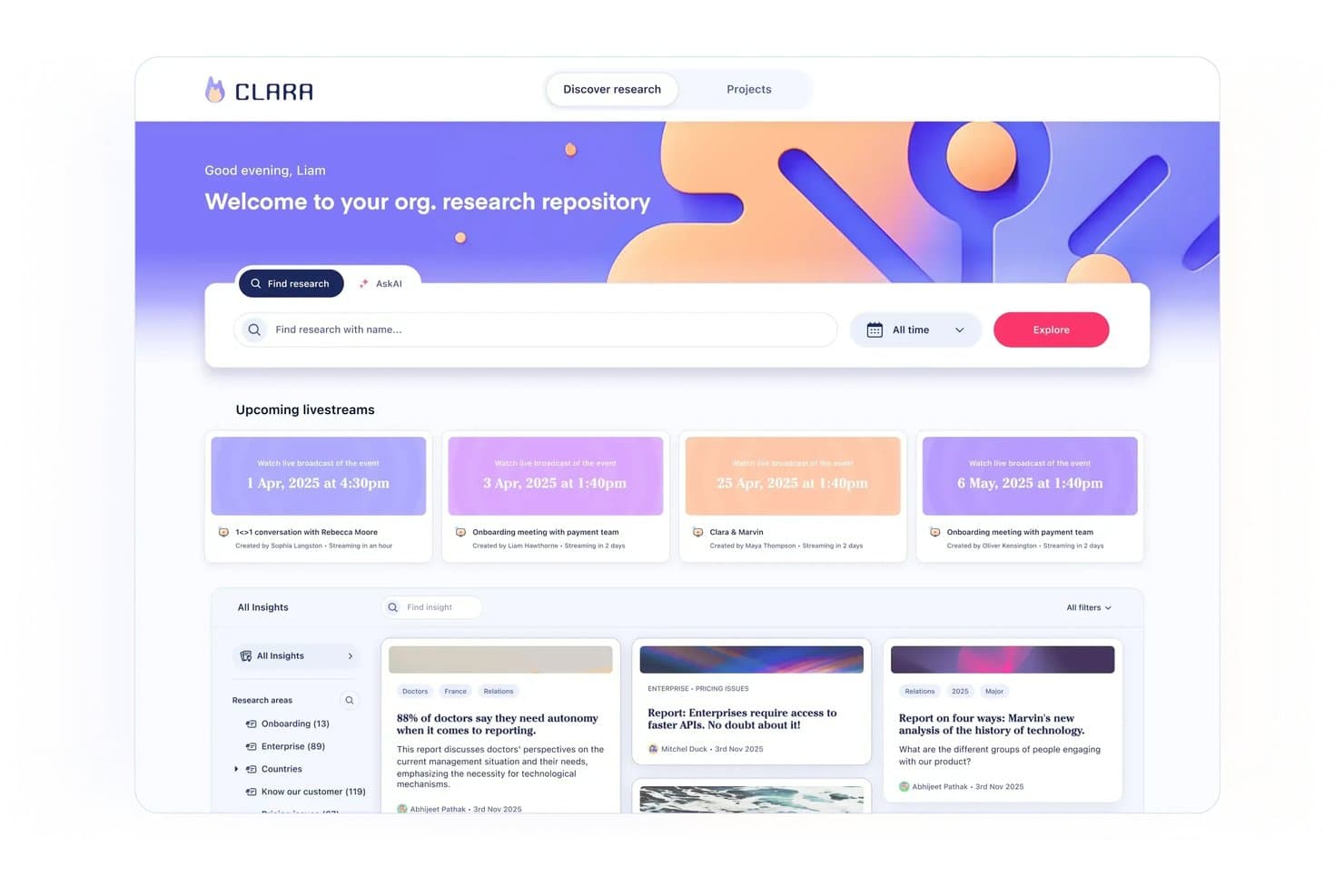
Marvin centralizza i risultati della ricerca e le prossime sessioni in un unico hub. Marvin è una piattaforma di analisi delle conoscenze sui clienti nativa dell'IA che centralizza la ricerca qualitativa proveniente da interviste, richieste di assistenza, chiamate commerciali e sondaggi, con sintesi tramite IA integrata, interviste moderate e analisi tra diversi progetti.
Per chi è più adatto Marvin?
Marvin è particolarmente adatto ai team di ricerca UX e di scoperta del prodotto che conducono un elevato numero di interviste qualitative e hanno bisogno dell'IA per gestire la sintesi su larga scala.
Perché ho scelto Marvin
Ho scelto Marvin come uno dei migliori perché è l'unico strumento del mio elenco che consente di condurre simultaneamente centinaia di interviste moderate dall'IA, senza la presenza di un ricercatore. La funzionalità Intercettazione dal vivo integra un intervistatore IA vocale direttamente nel prodotto, avviando sessioni in tempo reale con utenti attivi in oltre 40 lingue. Abbinandola alla Ricerca approfondita per testare le ipotesi, puoi convalidare le tue supposizioni rispetto all'intero corpus di ricerca, utilizzando prove citate e collegate alle fonti.
Funzionalità principali di Marvin
- Hub delle conoscenze: Un archivio centralizzato che importa dati da interviste, richieste di assistenza, chiamate commerciali, sondaggi e recensioni in un unico sistema ricercabile.
- Chiedi all'IA: Uno strumento di interrogazione in linguaggio naturale che cerca nell'intero corpus di ricerca e restituisce risposte corredate da citazioni, riconducibili ai dati della fonte originale.
- Bollettino riepilogativo della ricerca: Email generate automaticamente ogni due settimane che mettono in evidenza risultati di ricerca selezionati e li inviano direttamente al tuo team.
- Retrobottega virtuale: Una funzionalità di trasmissione dal vivo che consente agli stakeholder di osservare silenziosamente le interviste in tempo reale e collaborare tramite chat dal vivo.
Integrazioni di Marvin
Marvin offre oltre 30 integrazioni native, tra cui Notion, Jira, Confluence, Figma, Miro, Zoom, Google Meet, Gong, Zendesk e Qualtrics. La sua API di importazione supporta integrazioni personalizzate.
Pros and Cons
Pros:
- Conduce simultaneamente centinaia di interviste moderate dall'IA
- Offre interviste vocali condotte dall'IA direttamente nel prodotto
- Fornisce risultati citati dall'IA e riconducibili alle fonti
Cons:
- Non offre alberi delle opportunità né funzionalità di mappatura delle soluzioni
- Non dispone di framework nativi per la valutazione delle priorità
Learn more about Marvin: 6Ideale per il brainstorming visivo nei team di prodotto
Miro
- Prova gratuita di 14 giorni + piano gratuito disponibile
- A partire da $8/utente/mese (con fatturazione annuale)
Visit WebsiteCustomer Rating:4.8/5
Miro semplifica la presentazione di piani e tempistiche, garantendo adattabilità a ritardi e richieste dei clienti. Miro è una piattaforma online di collaborazione visiva che consente ai team di lavorare insieme in tempo reale. La sua attenzione alla collaborazione interattiva e visiva la rende una scelta eccellente per i team di prodotto che desiderano fare brainstorming e sviluppare idee insieme, indipendentemente dalla loro posizione geografica.
Perché ho scelto Miro:
A mio giudizio, ho scelto Miro per la sua eccezionale attenzione alla collaborazione visiva in tempo reale. La piattaforma si distingue per l'ampia gamma di strumenti di disegno e creazione di diagrammi, che supportano una vasta gamma di attività di brainstorming. Questa attenzione rende Miro la scelta migliore per i team di prodotto che hanno bisogno di visualizzare le idee e partecipare a sessioni di brainstorming collaborative.
Caratteristiche e integrazioni principali:
Miro eccelle grazie a funzionalità come la tela infinita, i modelli predefiniti, la collaborazione e i commenti in tempo reale e gli strumenti di disegno intuitivi. La piattaforma si integra bene con molti altri strumenti di produttività, tra cui Slack, Google Drive, Dropbox e Microsoft Teams, rendendo semplice incorporarla nei flussi di lavoro esistenti.
Pros and Cons
Pros:
- Offre un'ampia gamma di strumenti di disegno e creazione di diagrammi
- Eccellenti integrazioni con gli strumenti di produttività più utilizzati
- Le funzionalità di collaborazione e commenti in tempo reale migliorano la cooperazione del team
Cons:
- Può risultare complesso per i nuovi utenti a causa dell'enorme numero di funzionalità
- Più costoso di alcuni concorrenti con fatturazione annuale
- Occasionali problemi di rallentamento segnalati durante l'uso intensivo
 Ideale per la definizione delle priorità delle funzionalità basata su dati documentati
- Prova gratuita di 14 giorni + piano gratuito + demo gratuita disponibili
- A partire da $19/creatore/mese (con fatturazione annuale)
Visit WebsiteCustomer Rating:4.5/5
Productboard migliora la fidelizzazione dei clienti e l'innovazione identificando le esigenze critiche e fornendo soluzioni tempestive. Productboard è uno strumento completo di gestione dei prodotti progettato per aiutare i team di prodotto a stabilire la priorità delle funzionalità, centralizzare le informazioni sui prodotti e creare roadmap di prodotto efficaci. Il suo approccio incentrato sull'utente lo rende prezioso per i team impegnati nella creazione di prodotti che soddisfano le esigenze reali degli utenti.
Perché ho scelto Productboard:
Ho scelto Productboard per la sua forte attenzione alla definizione delle priorità delle funzionalità e alla visualizzazione delle roadmap. Semplifica il processo solitamente complesso di determinare cosa sviluppare successivamente e definisce un percorso chiaro per raggiungere l'obiettivo. Lo strumento si distingue per funzionalità come un portale per il feedback degli utenti e una matrice di prioritizzazione.
Pertanto, lo ritengo 'ideale per' i responsabili di prodotto che desiderano stabilire sistematicamente la priorità delle funzionalità e definire roadmap chiare.
Funzionalità e integrazioni principali:
Productboard si distingue per funzionalità come un archivio dei feedback dei clienti, un sistema di valutazione delle funzionalità e roadmap visivamente accattivanti. Inoltre, offre strumenti per la creazione di profili utente e la segmentazione, per soddisfare le diverse esigenze degli utenti. Per quanto riguarda le integrazioni, Productboard collabora perfettamente con strumenti popolari come Slack, Jira, Intercom e Salesforce, ottimizzando i flussi di lavoro della gestione dei prodotti.
Pros and Cons
Pros:
- Eccellente per la definizione delle priorità delle funzionalità e la visualizzazione delle roadmap
- Solido sistema di gestione dei feedback
- Integrazioni complete con altri strumenti
Cons:
- L'interfaccia utente può risultare inizialmente un po' complessa
- I piani di livello superiore sono piuttosto costosi
- Opzioni limitate per i campi personalizzati in alcuni piani
Learn more about Productboard: Ideale per decisioni sulle funzionalità basate sulla definizione delle priorità
- Dimostrazione gratuita disponibile
- Prezzi su richiesta
Visit WebsiteCustomer Rating:4.4/5
Massimizza la strategia, la scoperta e l'esecuzione utilizzando flussi di lavoro personalizzati con Airfocus. Airfocus è uno strumento per la gestione dei prodotti che offre funzionalità di pianificazione strategica e definizione delle priorità. Grazie a un sistema di valutazione e a visualizzazioni unici, aiuta le squadre di prodotto a prendere decisioni informate sulla definizione delle priorità delle funzionalità, rendendolo la scelta ideale per le squadre di prodotto che devono allocare strategicamente le risorse e stabilire le priorità delle attività di sviluppo.
Perché ho scelto Airfocus:
Nel determinare i migliori strumenti, ho selezionato Airfocus per la sua eccezionale capacità di supportare il processo decisionale strategico. Ciò che distingue Airfocus è il suo sistema proprietario per la definizione delle priorità, che aiuta le squadre a comprendere quali funzionalità offriranno il maggior valore. Questa caratteristica specifica mi ha portato a considerare Airfocus lo strumento migliore per definire le priorità nello sviluppo delle funzionalità di prodotto.
Caratteristiche e integrazioni di spicco:
Airfocus offre funzionalità avanzate, tra cui un sistema di valutazione delle priorità, una visualizzazione del piano d'azione per la pianificazione strategica e una funzione di collaborazione per coinvolgere tutti nel processo decisionale. Si integra con numerosi altri strumenti di gestione dei progetti, come Jira, Trello e Asana, diventando un'aggiunta flessibile al kit di strumenti di qualsiasi squadra di prodotto.
Pros and Cons
Pros:
- Il sistema esclusivo di valutazione delle priorità supporta il processo decisionale strategico
- Si integra bene con altri strumenti di gestione dei progetti
- Consente la collaborazione dell'intera squadra nella definizione delle priorità delle funzionalità
Cons:
- La fatturazione annuale potrebbe rappresentare un ostacolo per alcune squadre
- Presenta una certa curva di apprendimento, in particolare per gli utenti non tecnici
- Il prezzo potrebbe essere più elevato rispetto ad altri strumenti
 Ideale per la tracciabilità dal feedback alla roadmap
- Prova gratuita di 14 giorni + demo gratuita disponibile
- A partire da $36/mese (con fatturazione annuale)
Visit WebsiteCustomer Rating:4.2/5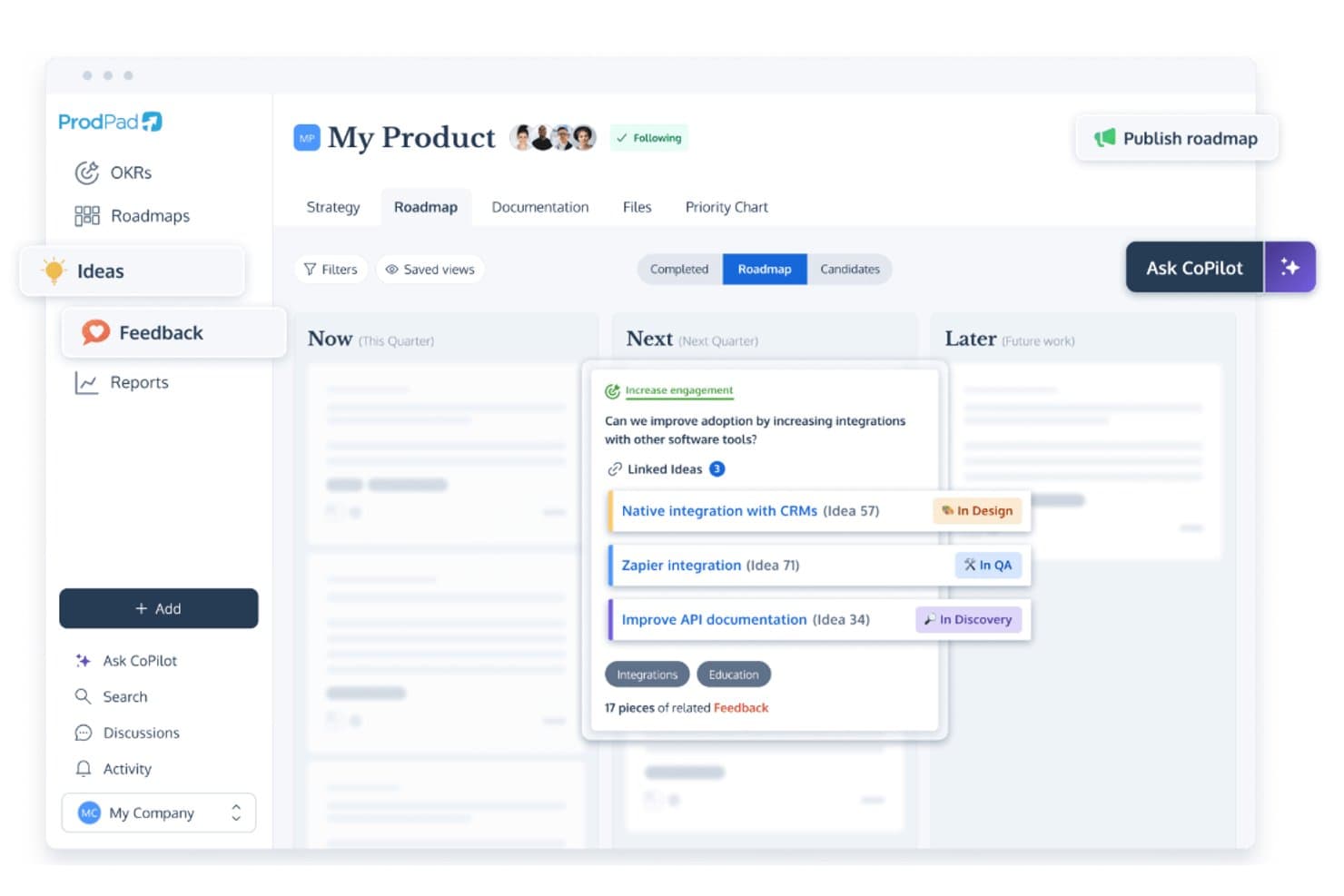
ProdPad collega le idee della roadmap ai feedback e monitora lo stato dello sviluppo. ProdPad è una piattaforma per la scoperta dei prodotti e la creazione di roadmap, basata sulla gestione dei feedback, sull'organizzazione del backlog delle idee, sulla sintesi assistita dall'IA e sulla creazione di roadmap Now-Next-Later.
Per chi è più adatto ProdPad?
ProdPad è particolarmente adatto ai product manager che hanno bisogno di un collegamento chiaro e tracciabile tra i feedback dei clienti e le decisioni relative alla roadmap.
Perché ho scelto ProdPad
Ho scelto ProdPad come uno dei migliori perché nessun altro strumento di questo elenco rende il collegamento tra i feedback grezzi dei clienti e le decisioni relative alla roadmap altrettanto tracciabile. Ogni feedback è collegato bidirezionalmente all'idea che ha influenzato e all'iniziativa a cui corrisponde, così sai sempre perché qualcosa si trova nella roadmap. AI Signals individua automaticamente i temi ricorrenti all'interno dell'insieme dei feedback, mentre CoPilot segnala le idee duplicate nel backlog prima che generino confusione.
Funzionalità principali di ProdPad
- Roadmap Now-Next-Later: Un formato di roadmap essenziale, organizzato in base all'orizzonte temporale strategico anziché a date fisse, che aiuta i team a stabilire le priorità in base ai risultati invece che alle attività.
- Posti revisore gratuiti illimitati: Un numero qualsiasi di stakeholder—ingegneri, dirigenti, addetti alle vendite o responsabili del successo dei clienti—può accedere a ProdPad come Revisore senza costi aggiuntivi.
- CoPilot, il coach di prodotto basato sull'IA: Un assistente IA integrato che mette alla prova le decisioni, prepara specifiche e riepiloghi e genera Risultati chiave misurabili a partire da obiettivi strategici generali.
- Prezzi modulari: I team possono acquistare solo i moduli di cui hanno bisogno—Roadmap, Idee o Feedback—e aggiungerne altri man mano che la loro attività di scoperta cresce.
Integrazioni di ProdPad
ProdPad offre integrazioni native con Jira, Azure DevOps, Linear, Salesforce, Intercom, Slack, Microsoft Teams e Confluence. Supporta inoltre un'API, webhook e Zapier per connessioni personalizzate.
Pros and Cons
Pros:
- I feedback si collegano direttamente agli elementi della roadmap
- Posti revisore gratuiti illimitati per la collaborazione
- L'IA rileva automaticamente i temi e i duplicati nei feedback
Cons:
- Nessuno strumento integrato per sondaggi o test
- Nessun repository nativo per le interviste di ricerca
Learn more about ProdPad: 10Ideale per l'insight continuo sui clienti basato sull'IA
Dovetail
- Piano gratuito + demo gratuita disponibile
- Prezzi su richiesta
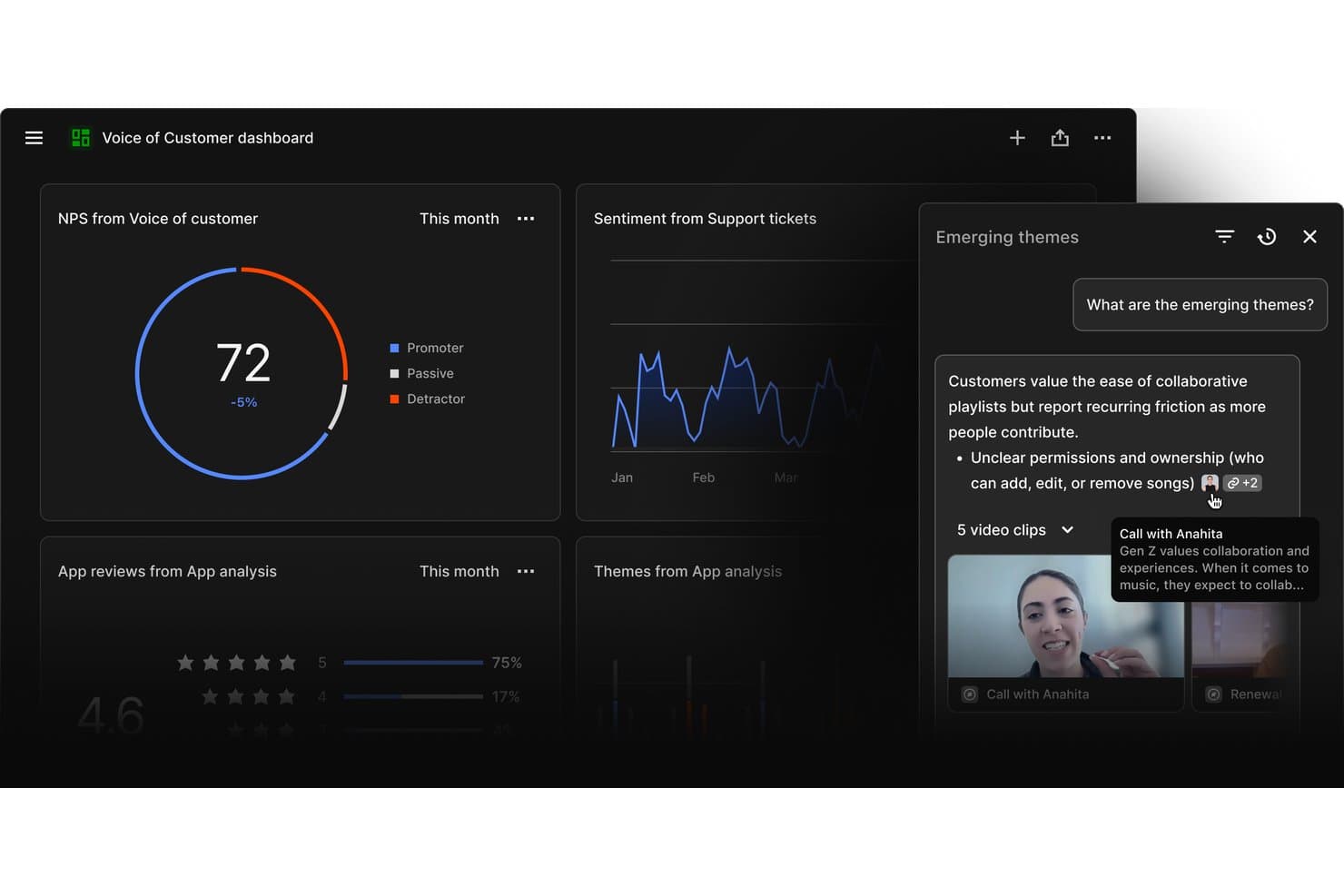
Dovetail mette in evidenza i temi emergenti dei clienti provenienti da fonti di ricerca eterogenee. Dovetail è una piattaforma di intelligence sui clienti che centralizza i feedback provenienti da ticket di supporto, chiamate commerciali, sondaggi e recensioni delle app, utilizzando l'IA per trascrivere, raggruppare e sintetizzare i dati qualitativi in opportunità classificate e supportate da prove per i team di prodotto.
Per chi è più indicato Dovetail?
Dovetail è particolarmente adatto ai team di prodotto e ricerca di aziende di medie e grandi dimensioni che devono trasformare grandi volumi di feedback dei clienti in opportunità prioritarie e supportate da prove in tutta l'organizzazione.
Perché ho scelto Dovetail
Dovetail si è guadagnato un posto nella mia rosa dei candidati perché i suoi Canali IA 2.0 trasformano il feedback continuo in opportunità classificate e ponderate in base ai ricavi, senza alcun triage manuale. Mi piace particolarmente il modo in cui pondera ogni opportunità in base all'impatto sull'ARR utilizzando l'arricchimento di Salesforce, così non vedo soltanto ciò di cui i clienti parlano più spesso, ma ciò che conta davvero per l'azienda. La funzionalità Gemelli digitali mi permette di mettere alla prova le ipotesi rispetto alle conversazioni reali con i clienti prima ancora che venga scritta una singola riga di codice.
Funzionalità principali di Dovetail
- Raggruppamento tramite IA: Raggruppa automaticamente i feedback ad alto volume in temi senza richiedere l'assegnazione manuale di tag, consentendo al team di individuare schemi su larga scala.
- Trascrizione multilingue: Trascrive e traduce automaticamente interviste e chiamate con i clienti in 75 lingue, con riconoscimento integrato di più interlocutori.
- Agenti IA: Agenti configurabili senza codice che monitorano i dati dei clienti e inviano aggiornamenti programmati o attivati da eventi su Slack, Teams o via e-mail.
- Server MCP: Collega direttamente il livello di insight di Dovetail a Claude, ChatGPT e Microsoft Copilot, integrando le evidenze sui clienti nei flussi di lavoro IA già esistenti del team.
Integrazioni di Dovetail
Dovetail offre 38 integrazioni native, tra cui Jira, Linear, Productboard, Figma Make, Slack, Microsoft Teams, Notion, Salesforce, Zendesk e Gong. Supporta inoltre connessioni personalizzate tramite API, CLI e Server MCP, oltre a Zapier.
Pros and Cons
Pros:
- L'IA classifica le opportunità in base all'impatto sui ricavi
- Trascrive e sintetizza i feedback in 75 lingue
- Condivide automaticamente insight supportati da prove con gli stakeholder
Cons:
- Non consente di convalidare prototipi o eseguire test di usabilità
- Nessun sistema di valutazione RICE o MoSCoW integrato
Learn more about Dovetail:
Altri strumenti per la scoperta dei prodotti
Ecco alcune opzioni aggiuntive di strumenti per la scoperta dei prodotti che non sono entrate nella mia selezione ristretta, ma che vale comunque la pena valutare:
- 11DragonboatIdeale per la definizione delle priorità dell'esplorazione guidata dal portafoglio
- 12Zeda.ioIdeale per la sintesi dei riscontri collegata ai ricavi
- 13UserTestingIdeale per la validazione dell'usabilità basata sulla ricerca
- 14AirtableIdeale per la definizione delle priorità delle funzionalità in più framework
- 15HarvestrIdeale per dare priorità ai feedback collegati ai ricavi
- 16ZefiIdeale per la mappatura dalla VoC basata sull'IA alle opportunità
Come valuto gli strumenti per la scoperta del prodotto
Valuto gli strumenti per la scoperta del prodotto su due livelli: requisiti di base come la sintesi dei feedback dei clienti, la gestione delle opportunità e la convalida delle idee, quindi i fattori distintivi che separano gli strumenti più efficaci dagli altri.
Funzionalità fondamentali (Requisiti minimi per questo elenco)
Quando seleziono gli strumenti per il mio elenco, assegno a ciascuno un punteggio su una scala da 0 (non offre la funzionalità) a 5 (eccelle in questo ambito) per ogni funzionalità fondamentale elencata di seguito. Quindi, calcolo il punteggio totale dello strumento e lo converto in una percentuale. Ogni strumento deve raggiungere un punteggio totale minimo del 65% per essere preso in considerazione.
- Aggregazione dei feedback dei clienti: Verifico se uno strumento è in grado di centralizzare i feedback qualitativi e quantitativi provenienti da fonti come interviste ai clienti, sondaggi, ticket di supporto e chiamate commerciali, così che i team possano lavorare a partire da un repository condiviso.
- Sintesi e applicazione di tag agli insight: Cerco strumenti in grado di trasformare i feedback grezzi in insight strutturati attraverso tag, raggruppamento, organizzazione tematica o altri metodi di sintesi che aiutino i team a individuare schemi ricorrenti.
- Gestione delle opportunità e delle idee: Valuto se i team possono acquisire, organizzare e monitorare le opportunità di prodotto, le ipotesi e le idee emerse dalla ricerca. Gli strumenti più efficaci collegano queste opportunità alle evidenze dei clienti e ai risultati che le supportano.
- Strumenti di convalida delle ipotesi: Esamino in che modo la piattaforma aiuta i team a testare le ipotesi sul prodotto prima di impegnarsi nello sviluppo, tramite sondaggi, test di prototipi, interviste ai clienti, esperimenti o altri metodi di convalida.
- Modelli di prioritizzazione: Valuto se i team possono classificare le opportunità utilizzando modelli di punteggio o di prioritizzazione integrati, come RICE, MoSCoW o il punteggio ponderato. Cerco inoltre flessibilità nella configurazione dei criteri e nel loro collegamento alle evidenze degli utenti e all'impatto aziendale.
- Collaborazione e condivisione nella discovery: Il lavoro di discovery richiede contributi da prodotto, design e ricerca. Cerco spazi di lavoro condivisi, commenti, visualizzazioni per gli stakeholder e altri strumenti che consentano ai team di esaminare e utilizzare insieme i risultati della discovery.
Una volta ottenuto un elenco di strumenti che soddisfano questo criterio, valuto ciò che distingue ciascuna piattaforma.
Fattori distintivi (Ciò che differenzia i fornitori)
Ecco come confronto i diversi fornitori:
Funzionalità distintive
La sintesi della ricerca tramite l'intelligenza artificiale è un importante fattore distintivo. Gli strumenti in grado di trascrivere le interviste, estrarre gli elementi salienti e individuare i temi ricorrenti possono ridurre il lavoro manuale necessario per analizzare la ricerca sui clienti. Cerco inoltre alberi delle opportunità e delle soluzioni che colleghino risultati, opportunità, soluzioni ed esperimenti, oltre a collegamenti alle evidenze che consentano di ricondurre le decisioni di prodotto agli insight dei clienti. Il reclutamento continuo per le interviste può aiutare i team a mantenere una cadenza regolare di ricerca, mentre le integrazioni con roadmap e strumenti di sviluppo facilitano il trasferimento delle opportunità convalidate in strumenti come Jira o Linear senza perdere il contesto della discovery.
Oltre le funzionalità
La profondità delle integrazioni è uno dei primi aspetti che valuto. Uno strumento di discovery che si collega al CRM, alla piattaforma di supporto, agli strumenti di ricerca e all'insieme di strumenti per lo sviluppo riduce il lavoro manuale necessario per trasferire le evidenze dei clienti tra i sistemi. Considero inoltre quanto bene una piattaforma supporti i team interfunzionali e diversi livelli di maturità nella discovery. Anche l'allineamento metodologico è importante, in particolare per i team che utilizzano approcci come Continuous Discovery Habits, Jobs-to-be-Done, Dual Track Agile o Lean Startup. Infine, valuto aspetti legati alla sicurezza e all'onboarding, come autorizzazioni, controlli sulla privacy dei dati, modelli, supporto alla migrazione e risorse per la formazione.
Come scegliere gli strumenti per la scoperta dei prodotti
È facile perdersi in lunghi elenchi di funzionalità e strutture tariffarie complesse. Per aiutarti a rimanere concentrato mentre affronti il tuo specifico processo di selezione del software, ecco una lista di controllo dei fattori da tenere a mente:
| Fattore | Cosa considerare |
|---|---|
| FattoreScalabilità | Cosa considerareLo strumento può crescere insieme al tuo team? Verifica se gestisce volumi di dati maggiori e più utenti senza problemi di prestazioni. Cerca indicatori come limiti al numero di utenti o limiti ai dati. |
| FattoreIntegrazioni | Cosa considerareSi collega agli strumenti che già utilizzi? Controlla se si integra con il tuo CRM, le app di comunicazione o le piattaforme di analisi dei dati. Evita gli strumenti con API limitate. |
| FattorePersonalizzazione | Cosa considerarePuoi adattarlo al tuo flusso di lavoro? Cerca campi, cruscotti e ruoli utente personalizzabili. Evita i sistemi rigidi che non si adattano alle tue esigenze. |
| FattoreFacilità d'uso | Cosa considerareÈ intuitivo per il tuo team? Prova l'interfaccia per verificare che la navigazione sia semplice e che siano necessarie poche attività di formazione. Evita configurazioni complesse che frustrano gli utenti. |
| FattoreImplementazione e inserimento | Cosa considerareQuanto tempo serve per essere operativi? Verifica la disponibilità di una configurazione rapida, risorse di formazione e assistenza durante l'inserimento. Evita tempi di distribuzione lunghi che rallentano i progressi. |
| FattoreCosto | Cosa considerareRientra nel tuo budget? Confronta il costo totale con il tuo budget, comprese le commissioni nascoste. Cerca piani tariffari flessibili o sconti per i pagamenti annuali. |
| FattoreMisure di sicurezza | Cosa considerareI tuoi dati e la tua privacy sono protetti? Assicurati che lo strumento sia conforme agli standard di sicurezza, come la crittografia e i controlli degli accessi. Evita gli strumenti con politiche di sicurezza poco chiare. |
Cosa sono gli strumenti per la scoperta del prodotto?
Gli strumenti per la scoperta del prodotto sono soluzioni software che aiutano i team a raccogliere informazioni e a stabilire la priorità delle funzionalità del prodotto. I responsabili di prodotto, i designer UX e i team di sviluppo utilizzano generalmente questi strumenti per allinearsi alle esigenze dei clienti e agli obiettivi aziendali. Funzionalità come la raccolta dei feedback dei clienti, la definizione delle priorità delle funzionalità e la pianificazione della roadmap aiutano a prendere decisioni e a collaborare. Nel complesso, questi strumenti forniscono chiarezza e orientamento per uno sviluppo del prodotto efficace.
Funzionalità
Quando selezioni gli strumenti per la scoperta del prodotto, presta attenzione alle seguenti funzionalità chiave:
- Raccolta dei feedback dei clienti: raccoglie informazioni dagli utenti per orientare le decisioni sul prodotto e allinearsi alle esigenze dei clienti.
- Definizione delle priorità delle funzionalità: aiuta i team a classificare le funzionalità in base al loro impatto, garantendo che quelle più importanti vengano sviluppate per prime.
- Pianificazione della roadmap: visualizza il percorso di sviluppo del prodotto, aiutando i team e le parti interessate a comprendere tempistiche e priorità.
- Capacità di integrazione: si collega agli strumenti esistenti, come CRM e app di comunicazione, garantendo un flusso di dati senza interruzioni tra le piattaforme.
- Dashboard personalizzabili: consentono agli utenti di adattare la propria visualizzazione per concentrarsi sulle metriche e sulle informazioni rilevanti.
- Strumenti di collaborazione: facilitano la comunicazione e l'allineamento del team, garantendo che tutti siano sulla stessa lunghezza d'onda.
- Informazioni basate sull'intelligenza artificiale: sfruttano l'intelligenza artificiale per fornire raccomandazioni e previsioni basate sui dati.
- Misure di sicurezza: proteggono i dati tramite crittografia e controlli degli accessi, garantendo la privacy degli utenti e la conformità normativa.
- Tour interattivi del prodotto: offrono guide dettagliate per aiutare i nuovi utenti a comprendere e utilizzare rapidamente lo strumento.
- Analisi e report: forniscono informazioni dettagliate sulle prestazioni del prodotto e sul comportamento degli utenti per prendere decisioni consapevoli.
Vantaggi
L'implementazione di strumenti per la scoperta del prodotto offre diversi vantaggi al tuo team e alla tua azienda. Ecco alcuni dei vantaggi che puoi aspettarti:
- Migliore processo decisionale: grazie ai feedback dei clienti e alle informazioni basate sui dati, il tuo team può prendere decisioni consapevoli sulle funzionalità e sulle priorità del prodotto.
- Collaborazione potenziata: roadmap condivise e strumenti di collaborazione aiutano a mantenere il team allineato e a lavorare verso obiettivi comuni.
- Maggiore efficienza: le funzionalità di definizione delle priorità garantiscono che il tuo team si concentri prima sulle attività di maggiore impatto, risparmiando tempo e risorse.
- Maggiore soddisfazione dei clienti: allineando lo sviluppo del prodotto alle esigenze degli utenti, realizzi prodotti che rispondono meglio alle aspettative del tuo pubblico.
- Visione chiara del prodotto: la pianificazione della roadmap offre una rappresentazione visiva del futuro del prodotto, aiutando le parti interessate a comprenderne la direzione e le tempistiche.
- Riduzione dei rischi: le informazioni basate sull'intelligenza artificiale e le analisi aiutano a identificare tempestivamente le possibili criticità, consentendo al tuo team di affrontarle in modo proattivo.
- Sicurezza dei dati: grazie a solide misure di sicurezza, i dati del tuo team e dei tuoi clienti rimangono protetti, garantendo conformità e fiducia.
Costi e prezzi
La selezione degli strumenti per la scoperta del prodotto richiede la comprensione dei diversi modelli di prezzo e dei piani disponibili. I costi variano in base alle funzionalità, alle dimensioni del team, ai componenti aggiuntivi e ad altri fattori. La tabella seguente riassume i piani più comuni, i relativi prezzi medi e le funzionalità generalmente incluse nelle soluzioni di strumenti per la scoperta del prodotto:
Tabella comparativa dei piani per gli strumenti di scoperta del prodotto
| Tipo di piano | Prezzo medio | Funzionalità comuni |
|---|---|---|
| Tipo di pianoPiano gratuito | Prezzo medio$0 | Funzionalità comuniRaccolta di feedback di base, definizione limitata delle priorità delle funzionalità e pianificazione semplice della roadmap. |
| Tipo di pianoPiano personale | Prezzo medio$5-$25/utente/mese | Funzionalità comuniStrumenti di feedback avanzati, dashboard personalizzabili e integrazioni con app di base. |
| Tipo di pianoPiano aziendale | Prezzo medio$30-$75/utente/mese | Funzionalità comuniAnalisi avanzate, strumenti di collaborazione del team e integrazioni multiple. |
| Tipo di pianoPiano aziendale | Prezzo medio$80+/utente/mese | Funzionalità comuniSet completo di funzionalità, assistenza dedicata e misure di sicurezza avanzate. |
Domande frequenti sugli strumenti di esplorazione del prodotto
Ecco alcune risposte alle domande comuni sugli strumenti di esplorazione del prodotto:
In che modo i team acquisiscono informazioni utilizzando gli strumenti di esplorazione del prodotto?
Di solito, i team registrano in un unico posto le interviste agli utenti, i dati dei sondaggi e i modelli di utilizzo del prodotto. È possibile aggiungere tag alle informazioni, collegarle alle idee e condividerle tra i team. Questo mantiene visibile il lavoro di esplorazione e lo collega al processo decisionale. Inoltre, evita che la ricerca rimanga confinata in silos.
In che modo gli strumenti di esplorazione del prodotto gestiscono l'elenco delle idee?
È possibile creare, aggiungere tag e organizzare le idee man mano che arrivano. Alcuni strumenti assegnano un punteggio alle idee in base all’impatto, allo sforzo o all’allineamento con gli obiettivi. Questo aiuta il team a evitare l’eccessiva proliferazione delle funzionalità e a concentrarsi su ciò che conta. È possibile riprendere le idee più vecchie quando il contesto cambia.
Gli strumenti di esplorazione del prodotto supportano l'approccio agile a doppio binario?
Sì, molti strumenti supportano lo svolgimento simultaneo delle attività di esplorazione e di realizzazione. Consentono di esplorare e convalidare le idee mentre il team continua a svilupparle. È possibile spostare facilmente le idee tra i percorsi di esplorazione e di realizzazione, mantenendo allineati entrambi gli sforzi.
Gli strumenti di esplorazione del prodotto sono adatti ai team piccoli?
Sì, gli strumenti di esplorazione del prodotto sono adatti ai team piccoli. Molti strumenti offrono funzionalità scalabili che si adattano alle dimensioni e alle esigenze del team. Forniscono funzionalità essenziali come la raccolta dei feedback e la definizione delle priorità delle funzionalità, aiutando i team piccoli a rimanere organizzati e concentrati sui propri obiettivi senza una complessità eccessiva.