

Il software per la riproduzione delle sessioni registra le sessioni degli utenti reali sul tuo sito web, così puoi vedere dove le persone fanno clic, scorrono, rimangono bloccate o abbandonano. È uno dei modi più rapidi per identificare i problemi di UX, eseguire il debug e migliorare le conversioni, senza andare a tentativi.
Molti dei migliori strumenti offrono piani gratuiti validi, ma non tutti meritano il tuo tempo. Ho esaminato e testato le principali opzioni gratuite e basate su periodi di prova per aiutarti a trovare strumenti che forniscano effettivamente informazioni utili senza dover pagare in anticipo. Questo elenco elimina il superfluo e mostra cosa è davvero utilizzabile senza costi.
Analizziamo le scelte migliori che possono fare la differenza per il tuo team.
Perché fidarsi dei nostri consigli sui software
6,700+
Reviews
20
Industry experts
16+
Evaluation factors
14
Years
Il nostro team testa e recensisce software dal 2012. In quanto product manager noi stessi, sappiamo quanto sia difficile — e importante — scegliere il software giusto.
Per questa guida, abbiamo valutato gli strumenti attraverso test pratici e ricerche indipendenti, assegnando un punteggio agli strumenti in base ai nostri criteri di selezione.
Le nostre recensioni riflettono il nostro giudizio editoriale umano, non un discorso di vendita.
Revisori esperti:
- Andrew LumbySenior TPM
- Cristiano ValimSenior UI/UX Lead


Riepilogo dei migliori software gratuiti per la riproduzione delle sessioni
Sebbene tutti i software per la riproduzione delle sessioni presenti nel mio elenco offrano piani gratuiti, e la maggior parte disponga di piani gratuiti permanenti, sono disponibili anche piani a pagamento qualora desiderassi effettuare un upgrade. Ecco i costi base di ciascun piano a pagamento per gli strumenti inclusi nella mia selezione
| Tool | Best For | Trial Info | Price | ||
|---|---|---|---|---|---|
| 1 | Ideale per la riproduzione contestuale delle sessioni utente | Piano gratuito + demo gratuita + prova gratuita di 14 giorni disponibile | Da $26 al mese (fatturato annualmente) | Website | |
| 2 | Ideale per rilevare le frizioni UX senza cookie | Piano gratuito + prova gratuita di 30 giorni disponibile | A partire da $2.99/mese | Website | |
| 3 | Dostępny plan bezpłatny + bezpłatny 30-dniowy okres próbny | Od $2.99/miesiąc | Website | ||
| 4 | Ideale per l'analisi dei dati comportamentali | Piano gratuito + demo gratuita disponibile | Prezzi su richiesta | Website | |
| 5 | Ideale per i team di prodotto che necessitano di percorsi utente retroattivi | Piano gratuito disponibile | Prezzo su richiesta | Website | |
| 6 | Ideale per il filtraggio delle sessioni basato sul comportamento | Prova gratuita di 14 giorni disponibile | I piani partono da $65/mese | Website | |
| 7 | Ideale per le mappe di calore del tracciamento oculare nei piani gratuiti | Piano gratuito disponibile | A partire da $33/mese (fatturato annualmente) | Website | |
| 8 | Ideale per la riproduzione open source e autogestita | Piano gratuito + demo gratuita disponibile | A partire da $0.005/registrazione | Website | |
| 9 | Ideale per eseguire il debug delle sessioni associate ai flag delle funzionalità | Piano gratuito + prova gratuita disponibili | A partire da $50/mese | Website | |
| 10 | Ideale per la riproduzione open source ospitata autonomamente | Piano gratuito + prova gratuita di 7 giorni disponibile | A partire da $5.95/1000 sessioni/mese | Website |


Recensioni dei migliori software gratuiti per la riproduzione delle sessioni
Di seguito sono riportati i miei riepiloghi dettagliati dei migliori strumenti software gratuiti per la riproduzione delle sessioni inclusi nella mia selezione. Le mie recensioni offrono uno sguardo approfondito alle funzionalità principali, ai vantaggi & svantaggi, alle integrazioni e ai casi d’uso ideali di ciascuno strumento, per aiutarti a trovare quello più adatto a te. Sebbene la maggior parte di questi strumenti offra una versione completamente gratuita, altri propongono un periodo di prova gratuito. In ciascuna recensione ho aggiunto una nota su ciò che è gratuito
 Ideale per la riproduzione contestuale delle sessioni utente
- Piano gratuito + demo gratuita + prova gratuita di 14 giorni disponibile
- Da $26 al mese (fatturato annualmente)
Visit WebsiteCustomer Rating:4.6/5This rating combines scores from multiple user review sites to reflect overall customer sentiment about the product.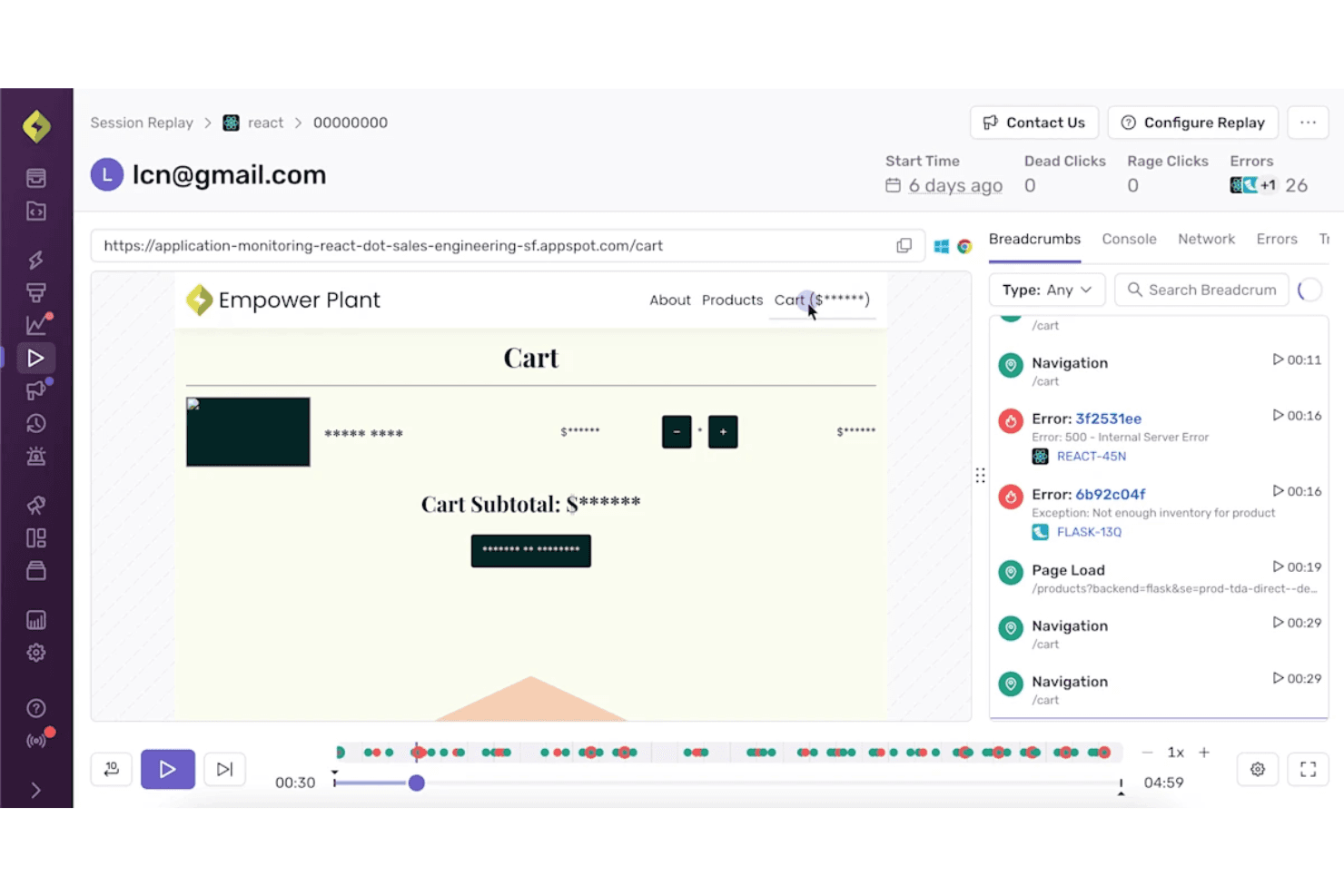
Sentry combina la riproduzione delle sessioni con i dettagli degli errori per un contesto di debug più chiaro. Sentry è una piattaforma gratuita di riproduzione delle sessioni per il debug da parte degli sviluppatori, che ricostruisce le sessioni web e mobile collegando la riproduzione agli errori, alle tracce, ai log della console, alle richieste di rete e ai segnali di clic ripetuti o clic senza effetto.
Per chi è più adatto Sentry?
Sentry è adatto ai team di prodotto guidati dagli sviluppatori che collegano le riproduzioni delle sessioni agli errori, alle tracce, ai log e ai segnali di clic ripetuti durante l'analisi dei bug.
Perché ho scelto Sentry
Ho scelto Sentry per la riproduzione contestuale delle sessioni utente perché collega direttamente le riproduzioni basate sul DOM agli errori, alle tracce, ai log della console e alle richieste di rete. Utilizzo i segnali dei clic ripetuti e dei clic senza effetto per individuare rapidamente le interazioni non funzionanti, quindi passo da un problema al momento esatto della sessione. Il suo piano gratuito supporta il debug mirato con 50 riproduzioni al mese.
Funzionalità principali di Sentry
- Riproduzione delle app mobili: Acquisisce le sessioni su app iOS, Android, React Native e Flutter.
- Ricerca delle sessioni: Filtra le riproduzioni per browser, dispositivo, URL, versione, utente e tag personalizzati.
- Mascheramento della privacy: Maschera testo, immagini e pressioni dei tasti prima che i dati della riproduzione lascino il browser.
- Conservazione delle riproduzioni: Conserva le riproduzioni del piano gratuito per 30 giorni.
Integrazioni di Sentry
Sentry offre integrazioni con Jira, GitHub, GitLab, Linear, Slack, Microsoft Teams, Datadog, Splunk, Grafana e Segment, oltre a SDK per framework web, mobili e server.
Cosa è gratuito?
Sentry offre un piano gratuito per sempre anziché una prova a tempo limitato. Include 50 riproduzioni di sessione al mese, con le riproduzioni del piano gratuito conservate per 30 giorni.
Pros and Cons
Pros:
- Le riproduzioni collegate agli errori velocizzano la diagnosi dei bug
- I clic ripetuti e i clic senza effetto mettono in evidenza le interazioni non funzionanti
- Il mascheramento predefinito protegge i dati degli utenti riprodotti
Cons:
- Il volume limitato delle riproduzioni indebolisce il monitoraggio continuo
- Nessun imbuto o mappa di calore per l'analisi dell'esperienza utente
Learn more about Sentry: Ideale per rilevare le frizioni UX senza cookie
- Piano gratuito + prova gratuita di 30 giorni disponibile
- A partire da $2.99/mese
Visit WebsiteCustomer Rating:4.7/5This rating combines scores from multiple user review sites to reflect overall customer sentiment about the product.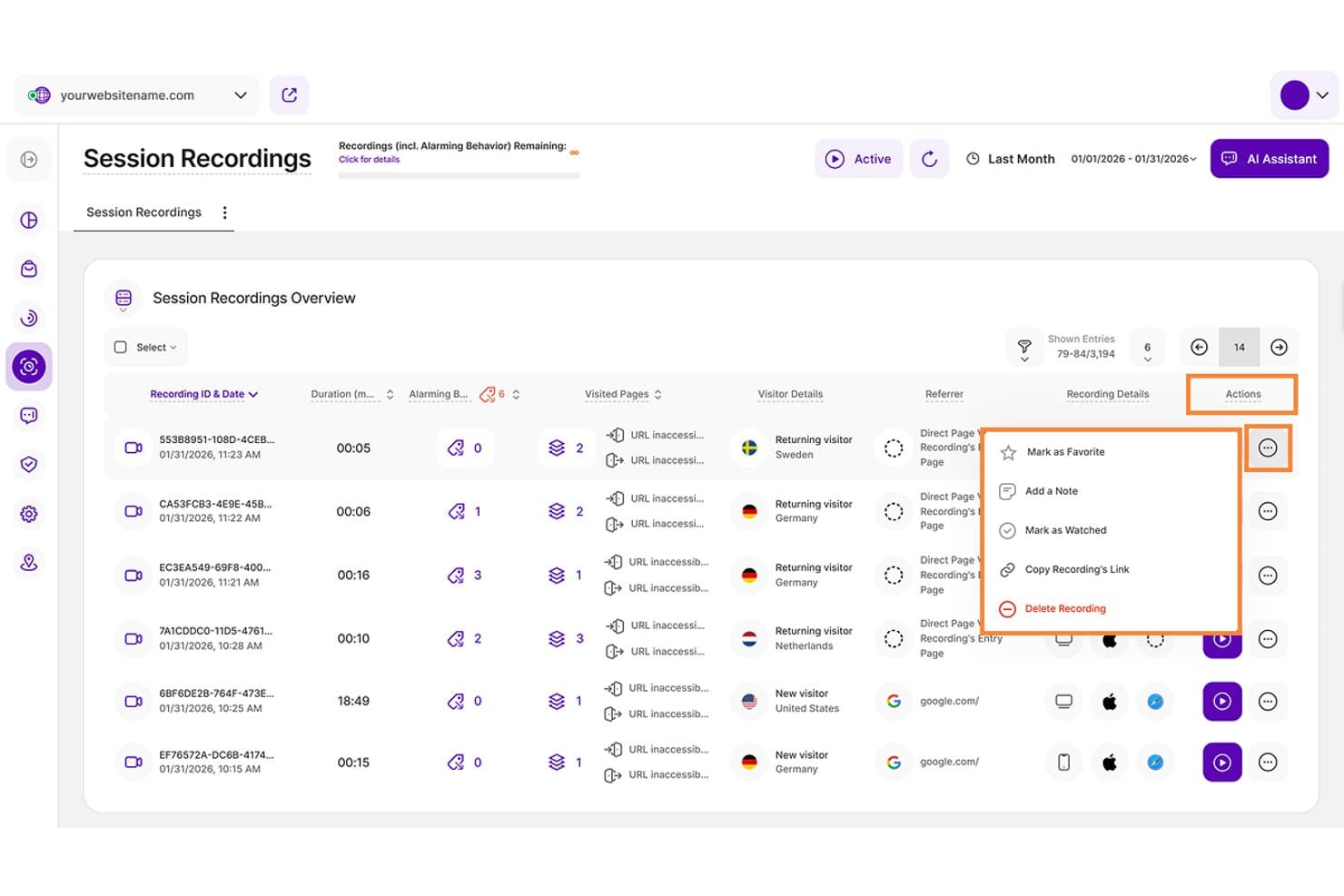
TWIPLA consente agli utenti di gestire le registrazioni delle sessioni con azioni come note e preferiti. TWIPLA è una piattaforma gratuita per la riproduzione delle sessioni e l'analisi web, con riproduzioni dettagliate, sequenze temporali degli eventi, filtri sovrapposti, rilevamento dei segnali di frizione, mappe di calore, canalizzazioni e monitoraggio incentrato sulla privacy.
Per chi è più adatto TWIPLA?
Product manager, designer UX e piccoli team che necessitano di un'analisi della riproduzione incentrata sulla privacy e del rilevamento senza cookie delle frizioni UX.
Perché ho scelto TWIPLA
Ho scelto TWIPLA come miglior software gratuito per la riproduzione delle sessioni perché il suo monitoraggio senza cookie supporta l'analisi UX incentrata sulla privacy. Sei segnali automatici di frizione, inclusi i clic rabbiosi e i clic a vuoto, compaiono direttamente nelle sequenze temporali delle riproduzioni, mentre i filtri sovrapposti isolano gli abbandoni della canalizzazione e i modelli relativi ai dispositivi. Il suo piano Gratis per sempre include 25 registrazioni in totale, quindi è adatto a indagini mirate piuttosto che al monitoraggio continuo ad alto volume.
Caratteristiche principali di TWIPLA
- Controlli di riproduzione: Salta i periodi di inattività e rivedi le sessioni a velocità fino a 8x.
- Regole di registrazione: Registra URL selezionati, sessioni attive o visite superiori a una durata minima.
- Mappe di calore: Crea mappe dei clic, dei movimenti e dello scorrimento per desktop, tablet e dispositivi mobili.
- Condivisione delle sessioni: Copia i link delle registrazioni e aggiungi note, preferiti o stati di visualizzazione.
Integrazioni di TWIPLA
TWIPLA offre integrazioni dal marketplace tramite Wix App Market e Weebly App Center, oltre a un plugin per WordPress. Supporta anche Google Tag Manager, TYPO3, Smartstore, Drupal, Joomla! e October CMS, con chiavi API per le integrazioni personalizzate.
Cosa è gratuito?
TWIPLA offre un piano Gratis per sempre con 25 registrazioni in totale. Fornisce anche una prova gratuita di 30 giorni, mentre l'analisi continua delle riproduzioni oltre il limite di registrazioni richiede un piano a pagamento.
Pros and Cons
Pros:
- I segnali automatici di frizione segnalano i clic rabbiosi
- Le sequenze temporali dettagliate consentono di passare direttamente alle azioni degli utenti
- Il monitoraggio senza cookie supporta l'analisi UX incentrata sulla privacy
Cons:
- La capacità di registrazione gratuita limita il monitoraggio continuo
- Alcuni contenuti iframe sfuggono alla cattura della riproduzione
Learn more about TWIPLA:
- Dostępny plan bezpłatny + bezpłatny 30-dniowy okres próbny
- Od $2.99/miesiąc
Visit WebsiteCustomer Rating:4.5/5This rating combines scores from multiple user review sites to reflect overall customer sentiment about the product.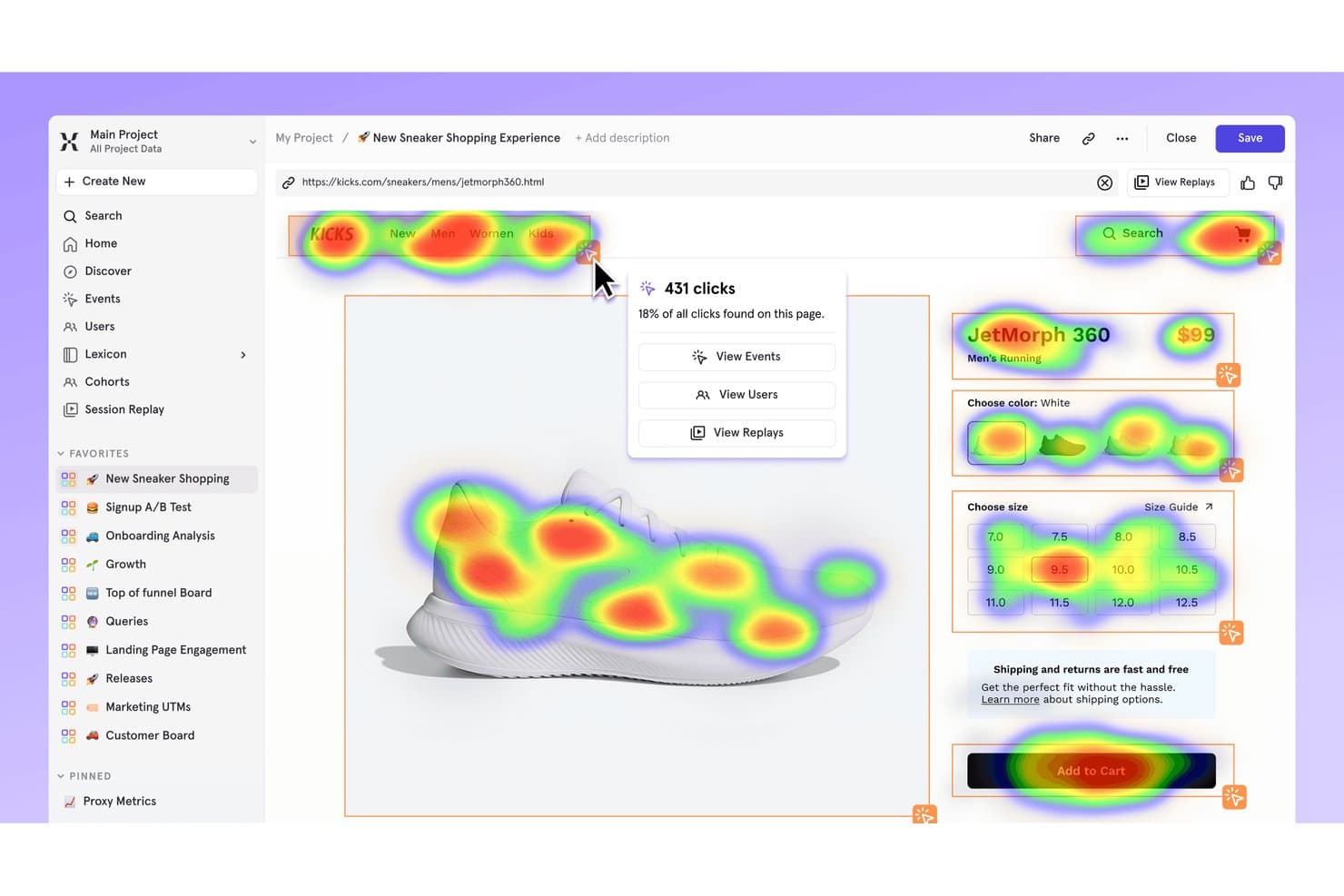
TWIPLA pozwala użytkownikom zarządzać nagraniami sesji za pomocą takich działań jak dodawanie notatek i oznaczanie ulubionych. TWIPLA to bezpłatna platforma do odtwarzania sesji i analityki internetowej ze szczegółowym odtwarzaniem, osiami czasu zdarzeń, filtrami warstwowymi, wykrywaniem sygnałów problemów, mapami cieplnymi, lejkami i śledzeniem ukierunkowanym na ochronę prywatności.
Dla kogo TWIPLA jest najlepszym wyborem?
Menedżerowie produktu, projektanci UX i małe zespoły, które potrzebują ukierunkowanej na ochronę prywatności analizy odtworzeń oraz bezplikowego wykrywania problemów UX.
Dlaczego wybrałem TWIPLA
Wybrałem TWIPLA jako najlepsze bezpłatne oprogramowanie do odtwarzania sesji, ponieważ jego bezplikowe śledzenie umożliwia analizę UX ukierunkowaną na ochronę prywatności. Sześć automatycznych sygnałów problemów, w tym wściekłe kliknięcia i martwe kliknięcia, pojawia się bezpośrednio na osiach czasu odtworzeń, a filtry warstwowe pozwalają wyodrębnić rezygnacje z lejka i wzorce dotyczące urządzeń. Plan Darmowy na zawsze obejmuje 25 nagrań łącznie, dlatego nadaje się do ukierunkowanych analiz, a nie do stałego monitorowania na dużą skalę.
Najważniejsze funkcje TWIPLA
- Sterowanie odtwarzaniem: Pomijaj okresy bezczynności i przeglądaj sesje z prędkością do 8x.
- Reguły nagrywania: Nagrywaj wybrane adresy URL, aktywne sesje lub wizyty trwające dłużej niż określone minimum.
- Mapy cieplne: Twórz mapy kliknięć, ruchu i przewijania dla komputerów, tabletów i urządzeń mobilnych.
- Udostępnianie sesji: Kopiuj linki do nagrań oraz dodawaj notatki, oznaczenia ulubionych lub statusy obejrzenia.
Integracje TWIPLA
TWIPLA oferuje integracje z marketplace'ami za pośrednictwem Wix App Market i Weebly App Center, a także wtyczkę do WordPressa. Obsługuje również Google Tag Manager, TYPO3, Smartstore, Drupal, Joomla! i October CMS, a do niestandardowych integracji udostępnia klucze API.
Co jest bezpłatne?
TWIPLA oferuje plan Darmowy na zawsze z 25 nagraniami łącznie. Udostępnia również bezpłatny 30-dniowy okres próbny, natomiast dalsza analiza odtworzeń po przekroczeniu limitu nagrań wymaga płatnego planu.
Pros and Cons
Pros:
- Automatyczne sygnały problemów wskazują wściekłe kliknięcia
- Szczegółowe osie czasu pozwalają przejść bezpośrednio do działań użytkowników
- Bezplikowe śledzenie wspiera analizę UX ukierunkowaną na ochronę prywatności
Cons:
- Ograniczona liczba bezpłatnych nagrań utrudnia stałe monitorowanie
- Niektóre treści iframe nie są rejestrowane podczas odtwarzania
 Ideale per l'analisi dei dati comportamentali
- Piano gratuito + demo gratuita disponibile
- Prezzi su richiesta
Visit WebsiteCustomer Rating:4.5/5This rating combines scores from multiple user review sites to reflect overall customer sentiment about the product.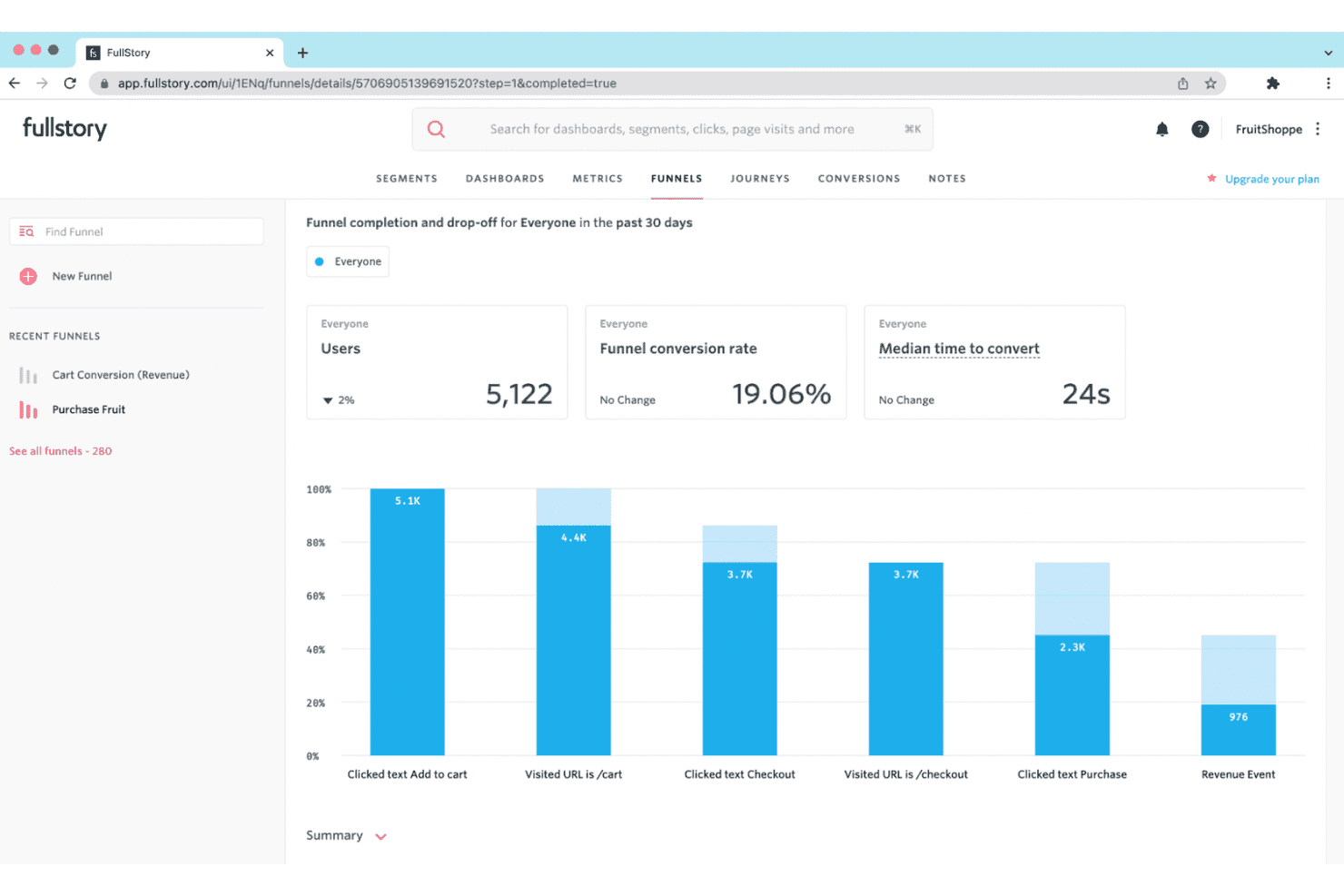
Fullstory offre riproduzioni delle sessioni e informazioni sul comportamento per aiutare le aziende a migliorare le esperienze digitali. Fullstory è una piattaforma gratuita per la riproduzione delle sessioni con acquisizione automatica senza tag, filtri di ricerca delle sessioni, mappe di clic e scorrimento, rilevamento dei segnali di frustrazione e strumenti di debug della console e della rete.
Per chi è più adatto Fullstory?
Fullstory è adatto ai product manager e ai designer UX che devono diagnosticare problemi di usabilità attraverso riproduzioni delle sessioni, mappe di calore e segnali comportamentali.
Perché ho scelto Fullstory
Ho scelto Fullstory perché la sua analisi dei dati comportamentali collega le prove delle sessioni alla frustrazione degli utenti. Utilizzo OmniSearch per isolare clic ripetuti, clic inefficaci e problemi di velocità delle pagine, quindi analizzo le mappe di clic e scorrimento per individuare i punti di attrito. Gli Strumenti per sviluppatori collegano inoltre i clic che generano errori alle attività della console e della rete, aiutandomi a ricondurre i problemi di usabilità alla loro causa tecnica.
Funzionalità principali di Fullstory
- Acquisizione automatica senza tag: acquisisce le interazioni web senza applicare manualmente tag agli eventi.
- Controlli della riproduzione: consentono di regolare la velocità di riproduzione, saltare i periodi di inattività e filtrare gli elenchi degli eventi.
- Mascheramento della privacy: maschera per impostazione predefinita le password, i dati di pagamento e le informazioni personali.
- Condivisione con gli ospiti: crea link alle riproduzioni per gli utenti esterni senza utilizzare licenze del team.
Integrazioni di Fullstory
Fullstory offre integrazioni con Slack, Segment, Jira, Adobe Analytics e Google Tag Manager. Fornisce inoltre un'API aperta, webhook, esportazione dei dati e API per il consenso e l'identità, per consentire collegamenti personalizzati.
Cosa è gratuito?
FullstoryFree è un piano gratuito anziché una prova a tempo limitato e non richiede una carta di credito. Include fino a 30.000 sessioni mensili, 12 mesi di conservazione dei dati e 10 utenti, ma esclude funzionalità avanzate come dashboard, webhook e StoryAI.
Pros and Cons
Pros:
- I segnali dettagliati di frustrazione fanno emergere attriti nascosti
- I registri della console e della rete aiutano a diagnosticare i bug
- Le mappe di calore rivelano il comportamento di clic e scorrimento
Cons:
- L'acquisizione si interrompe dopo il limite mensile di sessioni
- I dati gratuiti possono essere utilizzati per l'addestramento dell'IA
Learn more about Fullstory: Ideale per i team di prodotto che necessitano di percorsi utente retroattivi
- Piano gratuito disponibile
- Prezzo su richiesta
Visit WebsiteCustomer Rating:4.5/5This rating combines scores from multiple user review sites to reflect overall customer sentiment about the product.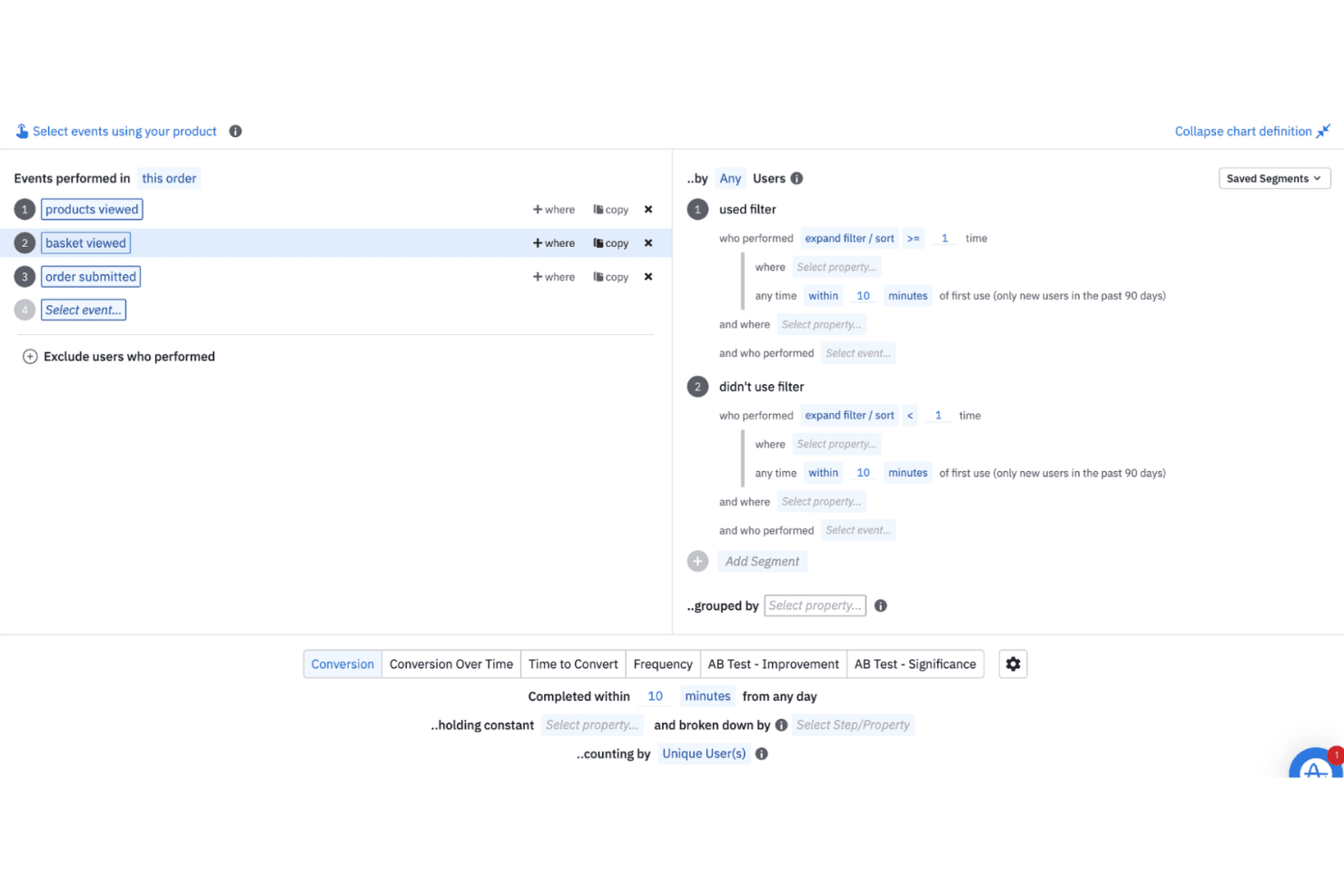
Amplitude aiuta i team ad analizzare il comportamento degli utenti in tempo reale e storico per guidare le decisioni sul prodotto. Amplitude è una piattaforma software gratuita per la riproduzione delle sessioni, con registrazione web e mobile, sequenze temporali degli eventi, visualizzazioni di canalizzazione e percorso, ricerca delle riproduzioni, rilevamento dei clic ripetuti e registri della console e della rete.
Per chi è più indicato Amplitude?
Responsabili di prodotto e professionisti del marketing digitale che devono collegare le riproduzioni delle sessioni alle canalizzazioni, ai percorsi, agli esperimenti e ai dati sul comportamento degli utenti.
Perché ho scelto Amplitude
Ho scelto Amplitude perché collega direttamente le riproduzioni delle sessioni alle canalizzazioni e ai percorsi. Posso aprire le registrazioni relative a un calo delle conversioni, quindi utilizzare le sequenze temporali degli eventi, la ricerca delle riproduzioni e il rilevamento dei clic ripetuti per individuare gli ostacoli. Il piano gratuito include 10.000 riproduzioni al mese, rendendo pratica l'analisi continua del prodotto.
Caratteristiche principali di Amplitude
- Registri della console e della rete: esamina i messaggi JavaScript, le richieste non riuscite e l'attività API accanto alle riproduzioni.
- Riproduzione delle app mobili: acquisisce le sessioni dalle applicazioni iOS, Android, React Native e Flutter.
- Mascheramento della privacy: maschera per impostazione predefinita i campi di testo, gli input, le password, le carte, i numeri di telefono e gli indirizzi email.
- Salto dei periodi di inattività: supera i periodi di inattività con i controlli di riproduzione e la velocità di riproduzione regolabile.
Integrazioni di Amplitude
Amplitude elenca oltre 159 integrazioni, tra cui Segment, Snowflake, BigQuery, Slack, Optimizely, LaunchDarkly e HubSpot. Gli SDK, Google Tag Manager e l'API di ricerca delle riproduzioni supportano dati personalizzati e flussi di lavoro per le riproduzioni.
Cosa è gratuito?
Amplitude offre un piano gratuito per sempre senza richiedere una carta di credito. Include fino a 10.000 riproduzioni delle sessioni e 2 milioni di eventi al mese, con un mese di conservazione delle riproduzioni e un numero illimitato di postazioni.
Pros and Cons
Pros:
- Collega direttamente le riproduzioni alle canalizzazioni e ai percorsi
- Mostra gli errori della console e della rete accanto alle riproduzioni
- Supporta app web, iOS, Android e multipiattaforma
Cons:
- Le riproduzioni scadono dopo un mese
- Richiede la strumentazione SDK prima di registrare le sessioni
Learn more about Amplitude: Ideale per il filtraggio delle sessioni basato sul comportamento
- Prova gratuita di 14 giorni disponibile
- I piani partono da $65/mese
Visit WebsiteCustomer Rating:4.6/5This rating combines scores from multiple user review sites to reflect overall customer sentiment about the product.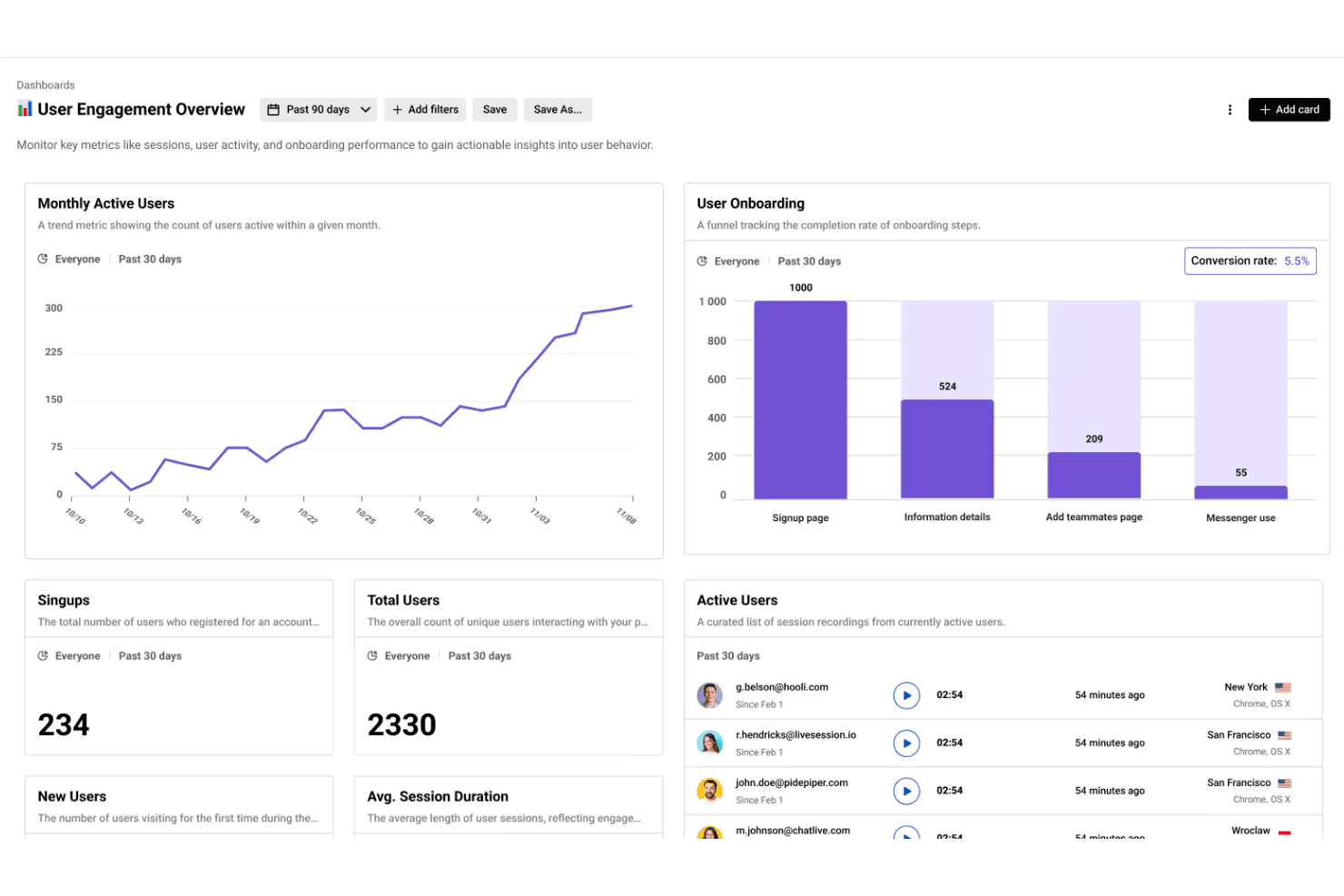
LiveSession combina le riproduzioni delle sessioni con l'analisi per aiutare i team a monitorare i KPI e aumentare il coinvolgimento degli utenti. LiveSession è una piattaforma di riproduzione delle sessioni e analisi del prodotto che combina registrazioni del mouse, dei clic e dello scorrimento con mappe di calore, funnel, segmenti, filtri e rilevamento dei clic di rabbia e dei clic di errore.
Per chi è più adatto LiveSession?
LiveSession è adatto ai product manager e ai progettisti UX di piccoli team che hanno bisogno di filtri basati sul comportamento per diagnosticare i punti di attrito nelle esperienze web.
Perché ho scelto LiveSession
Ho scelto LiveSession perché il filtro delle sessioni basato sul comportamento mi aiuta a individuare i punti di attrito senza guardare le registrazioni in modo casuale. Posso combinare i termini di ricerca, salvare segmenti riutilizzabili e usare la Modalità Ispezione per trovare i clic su specifici elementi CSS. Anche l'esploratore degli eventi collega i clic di rabbia e i clic di errore alle riproduzioni in cui gli utenti hanno incontrato difficoltà.
Funzionalità principali di LiveSession
- Mappe di calore: Visualizza l'attività dei clic e l'intensità delle interazioni per URL.
- Analisi dei funnel: Monitora il progresso degli utenti attraverso un unico flusso di conversione definito.
- Backup delle risorse: Conserva gli stili e i caratteri delle riproduzioni dopo l'eliminazione dei file originali.
- Mascheramento degli input sensibili: Anonimizza automaticamente le password e i dati delle carte.
Integrazioni di LiveSession
LiveSession documenta 26 integrazioni, tra cui Google Analytics, Segment, Mixpanel, Sentry, Bugsnag, Intercom, Zendesk, Slack, Google Tag Manager e Zapier. La sua API REST è disponibile con il piano Pro e i piani superiori per le integrazioni personalizzate.
Cosa offre il piano gratuito?
LiveSession offre un piano gratuito permanente con riproduzione delle sessioni, mappe di calore, funnel, filtri e segmenti. Include 1.000 sessioni al mese, un mese di conservazione dei dati, tre membri del team e due siti web o progetti; le sessioni che superano il limite mensile non vengono registrate. È disponibile anche una prova del piano Pro di 14 giorni senza carta di credito.
Pros and Cons
Pros:
- Il filtraggio basato sul comportamento restringe rapidamente le analisi delle riproduzioni
- I clic di rabbia e i clic di errore evidenziano i punti di attrito
- Le mappe di calore completano le riproduzioni del mouse e dello scorrimento
Cons:
- La riproduzione nativa delle app mobili non è ancora disponibile
- La diagnostica per sviluppatori non include il contesto della console e della rete
Learn more about LiveSession: Ideale per le mappe di calore del tracciamento oculare nei piani gratuiti
- Piano gratuito disponibile
- A partire da $33/mese (fatturato annualmente)
Visit WebsiteCustomer Rating:4.1/5This rating combines scores from multiple user review sites to reflect overall customer sentiment about the product.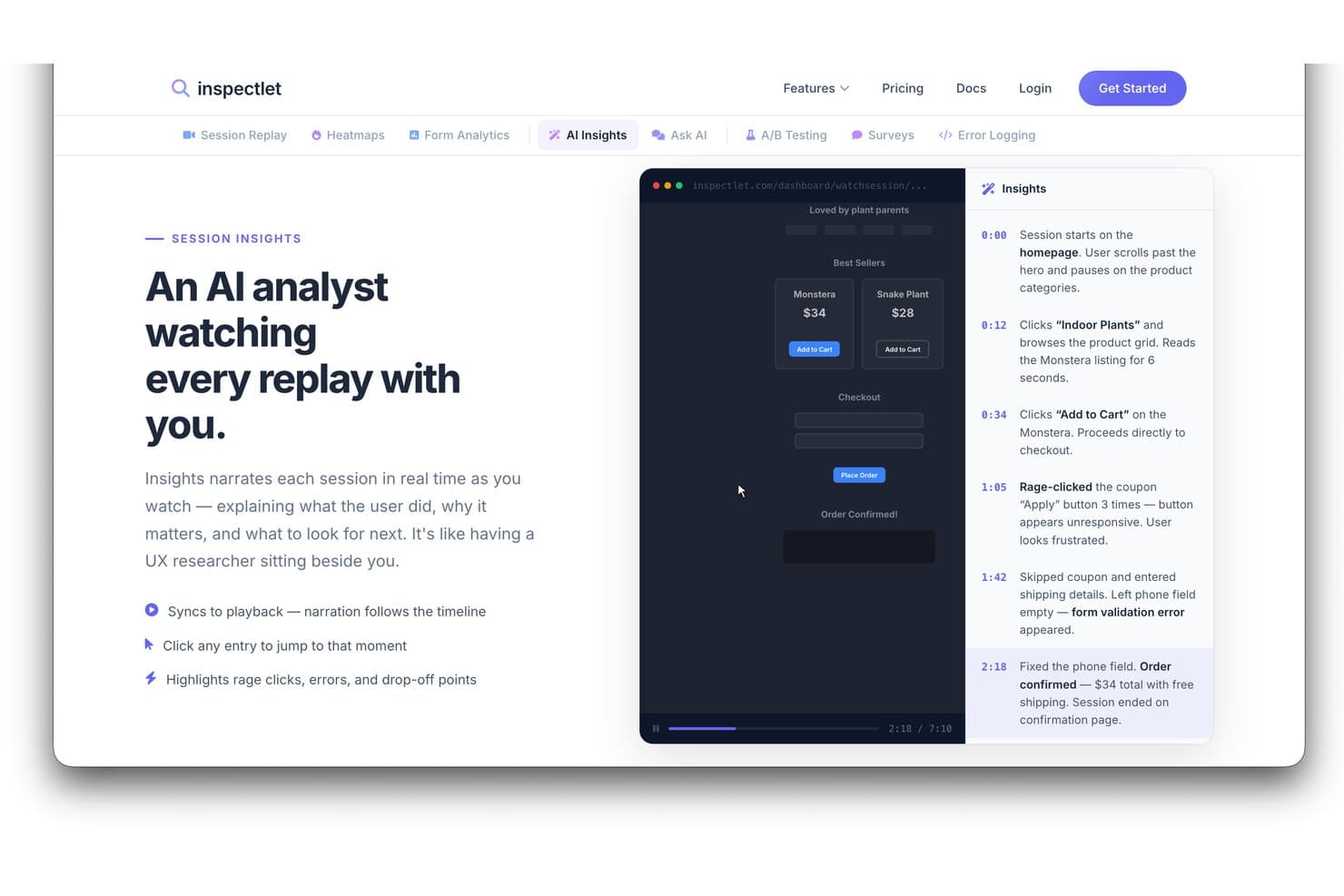
Gli Approfondimenti IA di Inspectlet raccontano le riproduzioni delle sessioni con eventi associati a timestamp. Inspectlet è un software gratuito per la riproduzione delle sessioni che combina registrazioni dei visitatori, mappe di calore, analisi delle sessioni tramite IA, rilevamento degli errori e dei clic furiosi, filtraggio e test A/B per siti web e applicazioni a pagina singola.
Per chi è più adatto Inspectlet?
Inspectlet è adatto ai responsabili di prodotto e ai designer dell'esperienza utente (UX) che hanno bisogno della riproduzione gratuita delle sessioni con mappe di calore per il tracciamento oculare, così da diagnosticare i problemi di usabilità web.
Perché ho scelto Inspectlet
Ho scelto Inspectlet come soluzione migliore per le mappe di calore del tracciamento oculare nei piani gratuiti perché il suo piano gratuito mappa il movimento del mouse sulle pagine attive. Uso i punti dei clic e le mappe della profondità di scorrimento per capire se i visitatori notano le CTA principali o abbandonano presto. Il rilevamento dei clic furiosi e degli errori JavaScript, collegato alla riproduzione, permette poi di associare gli elementi di attrito visivo alle sessioni che richiedono un'indagine.
Funzionalità principali di Inspectlet
- Cronologia della sessione: Esamina clic, navigazione ed eventi della pagina in sequenza.
- Filtraggio delle sessioni: Combina filtri relativi a visitatori, origine, dispositivo, pagina e conversione.
- Test A/B: Crea esperimenti con un editor visuale e calcoli della significatività.
- Mascheramento dei dati sensibili: Esclude le password e i campi selezionati dalle registrazioni.
Integrazioni di Inspectlet
Inspectlet documenta integrazioni o opzioni di configurazione per Google Tag Manager, WordPress, Shopify, HubSpot, Convert.com, Slack e webhook. L'accesso API è disponibile a partire dal piano Growth per le integrazioni personalizzate.
Cosa è gratuito?
Inspectlet offre un piano gratuito per sempre, senza carta di credito né limite di tempo, che copre fino a 2.500 sessioni registrate al mese su tre siti web. Include la riproduzione delle sessioni, le mappe di calore e i test A/B, ma conserva i dati per un mese e interrompe la registrazione di nuove sessioni al raggiungimento del limite mensile.
Pros and Cons
Pros:
- Le mappe di calore del tracciamento oculare chiariscono l'attenzione visiva
- I clic furiosi rimandano direttamente alle riproduzioni
- I recensori apprezzano il filtraggio di sessioni specifiche
Cons:
- La conservazione prevista dal piano gratuito limita i confronti storici
- L'accesso per un singolo utente limita la revisione da parte del team
Learn more about Inspectlet: Ideale per la riproduzione open source e autogestita
- Piano gratuito + demo gratuita disponibile
- A partire da $0.005/registrazione
Visit WebsiteCustomer Rating:4.5/5This rating combines scores from multiple user review sites to reflect overall customer sentiment about the product.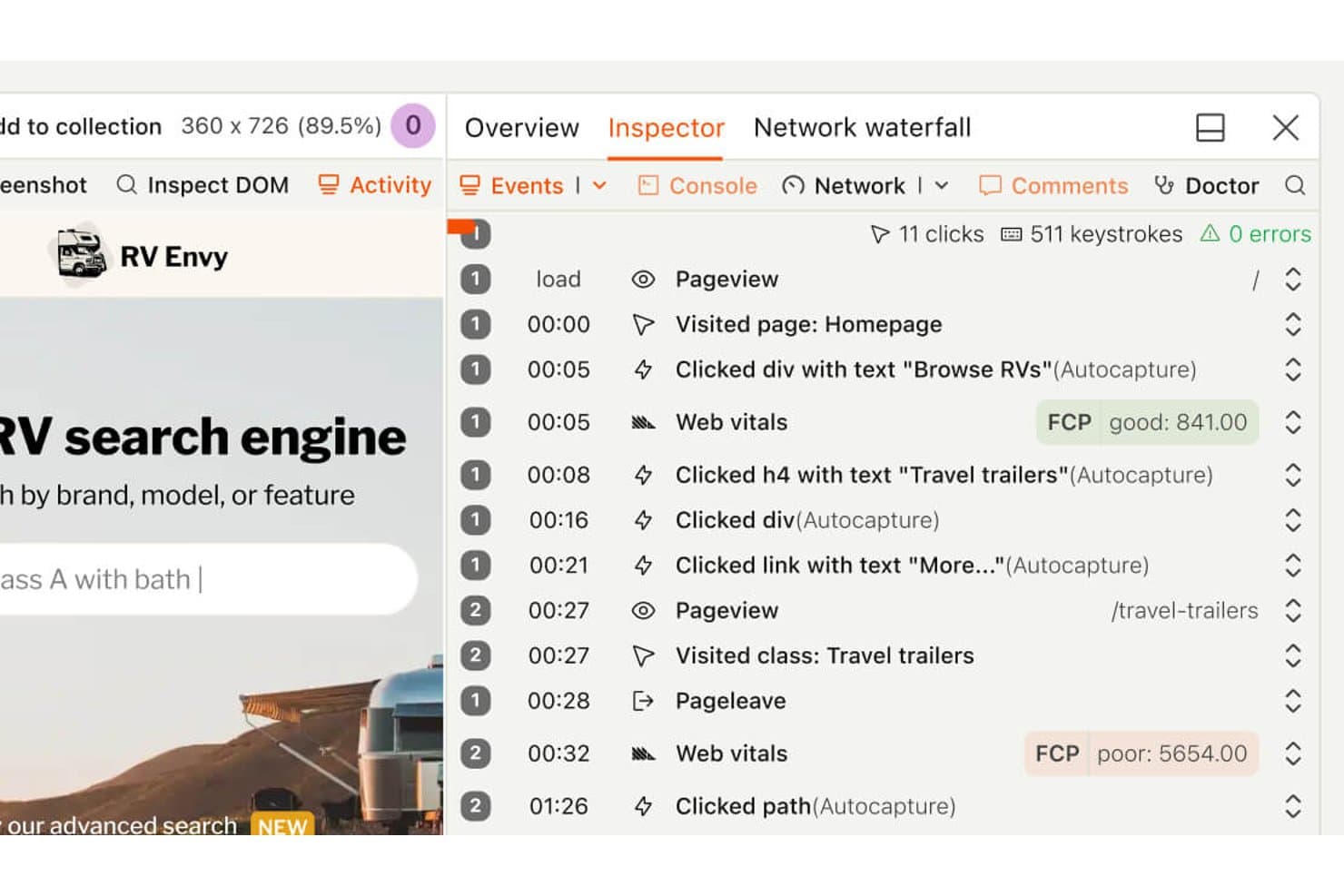
La sequenza temporale della riproduzione della sessione di PostHog mostra i clic degli utenti e le visite alle pagine. PostHog è un software gratuito per la riproduzione delle sessioni che combina la riproduzione in stile DVR, mappe di calore, analisi dei funnel, flag delle funzionalità, esperimenti, monitoraggio degli errori e registri sincronizzati della console e della rete nelle app web e mobili.
Per chi è più adatto PostHog?
PostHog è adatto ai team di prodotto e ingegneria che necessitano della riproduzione delle sessioni open source e autogestita, insieme a funnel, esperimenti e monitoraggio degli errori.
Perché ho scelto PostHog
Ho scelto PostHog perché la sua riproduzione open source e autogestita funziona con licenza MIT, offrendo ai team il controllo sul proprio stack di analisi. Posso abbinare la riproduzione in stile DVR ai registri sincronizzati della console, ai grafici a cascata della rete e a un esploratore del DOM per analizzare i bug. I collegamenti tra funnel e riproduzioni mostrano anche dove gli utenti abbandonano i flussi chiave del prodotto.
Funzionalità principali di PostHog
- Mappe di calore: Crea mappe di calore, mappe dello scorrimento e mappe dei clic per un massimo di tre URL.
- Segnali di frustrazione: Trova le sessioni con clic ripetuti, clic senza effetto o eccezioni.
- Riproduzione su dispositivi mobili: Acquisisci sessioni da app iOS, Android, React Native e Flutter.
- Riepiloghi delle sessioni basati sull'IA: Chiedi a PostHog AI di trovare, guardare e riepilogare le registrazioni.
Integrazioni di PostHog
PostHog si integra con Intercom e Crisp per i collegamenti alle riproduzioni, oltre che con più di 50 destinazioni CDP, tra cui Slack, Salesforce, HubSpot e PagerDuty. Fornisce inoltre un'API e un server MCP per flussi di lavoro personalizzati.
Cosa è gratuito?
Il piano gratuito di PostHog dura indefinitamente, senza bisogno di una carta di credito e senza scadenza del periodo di prova, e include 5.000 registrazioni web o 2.500 registrazioni mobili al mese. Supporta un numero illimitato di membri del team, ma limita l'utente a un solo progetto e a un mese di conservazione delle registrazioni; le quote di registrazione inutilizzate non vengono trasferite al mese successivo.
Pros and Cons
Pros:
- L'autogestione open source favorisce il controllo delle analisi
- I registri sincronizzati della console e della rete facilitano il debug
- I collegamenti ai funnel associano gli abbandoni alle registrazioni
Cons:
- Le mappe di calore coprono solo tre URL di pagina
- Il testo generico delle pagine richiede il mascheramento manuale
Learn more about PostHog: Ideale per eseguire il debug delle sessioni associate ai flag delle funzionalità
- Piano gratuito + prova gratuita disponibili
- A partire da $50/mese
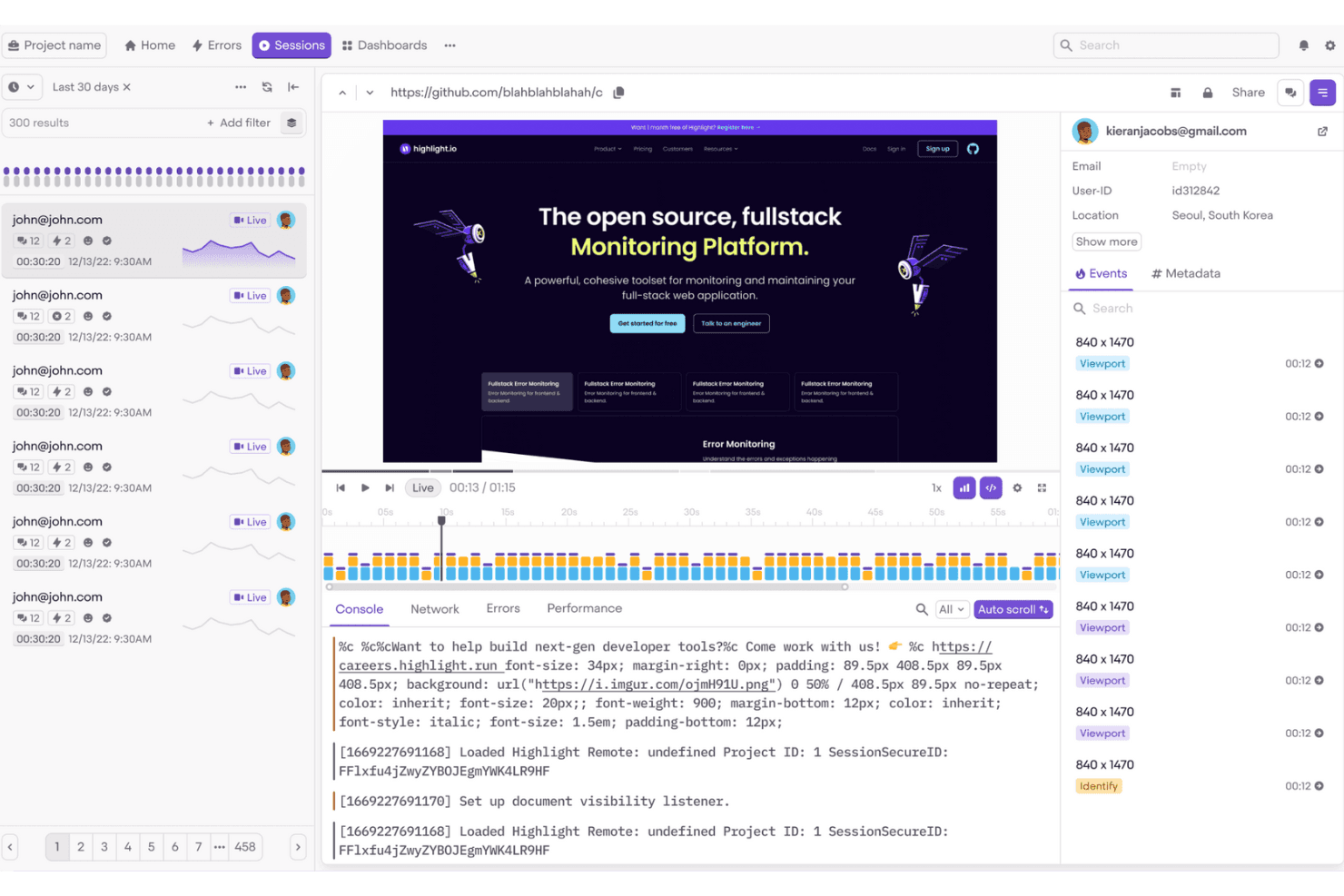
Highlight.io aiuta i team di sviluppo front-end a monitorare ed eseguire facilmente il debug delle sessioni degli utenti. Highlight è un software per la riproduzione delle sessioni e l'osservabilità, ora offerto tramite LaunchDarkly, con riproduzione web e mobile, ricerca flessibile delle sessioni, log della console e della rete, rilevamento degli errori e dei clic frustrati e contesto dei flag delle funzionalità.
Per chi è più adatto Highlight?
Highlight è adatto ai team di prodotto che collaborano con gli sviluppatori e hanno bisogno di eseguire il debug delle sessioni degli utenti insieme ai flag delle funzionalità, agli errori e al contesto dei rilasci.
Perché ho scelto Highlight
Ho scelto Highlight perché è ideale per eseguire il debug delle sessioni associate ai flag delle funzionalità. Posso confrontare le sessioni riprodotte in base ai flag visualizzati dagli utenti, quindi esaminare i log della console e della rete insieme agli errori o ai clic frustrati. Questo semplifica la verifica dell'eventuale impatto negativo di una modifica al design contrassegnata da un flag prima di ampliarne la distribuzione.
Funzionalità principali di Highlight
- Ricerca flessibile delle sessioni: Filtra le sessioni per identità, dispositivo, posizione, URL, clic e proprietà personalizzate degli eventi.
- Mascheramento della privacy: Nascondi testo, immagini, campi dei moduli e dati sensibili prima della raccolta.
- Supporto alla riproduzione mobile: Registra sessioni da app Android, iOS, Flutter e React Native.
- Mappe di calore: Visualizza clic, tocchi e attività di scorrimento con mappe codificate a colori.
Integrazioni di Highlight
Highlight offre un'integrazione nativa con Jira Cloud e collega Vega a GitHub e Slack. Supporta inoltre OpenTelemetry e un server MCP per flussi di lavoro personalizzati di osservabilità.
Che cosa è gratuito?
Highlight offre un piano gratuito, quindi puoi utilizzarlo senza una prova a tempo limitato. I prezzi dei piani a pagamento sono disponibili su richiesta, ma qui non sono indicati i limiti specifici del piano gratuito.
Pros and Cons
Pros:
- Esegue il debug delle sessioni insieme ai flag delle funzionalità
- Cerca le sessioni in base a un contesto dettagliato dell'utente
- Collega le riproduzioni agli errori e ai log
Cons:
- Richiede una configurazione dell'SDK guidata dagli sviluppatori
- La registrazione gratuita si interrompe al raggiungimento del limite mensile
Learn more about Highlight: Ideale per la riproduzione open source ospitata autonomamente
- Piano gratuito + prova gratuita di 7 giorni disponibile
- A partire da $5.95/1000 sessioni/mese
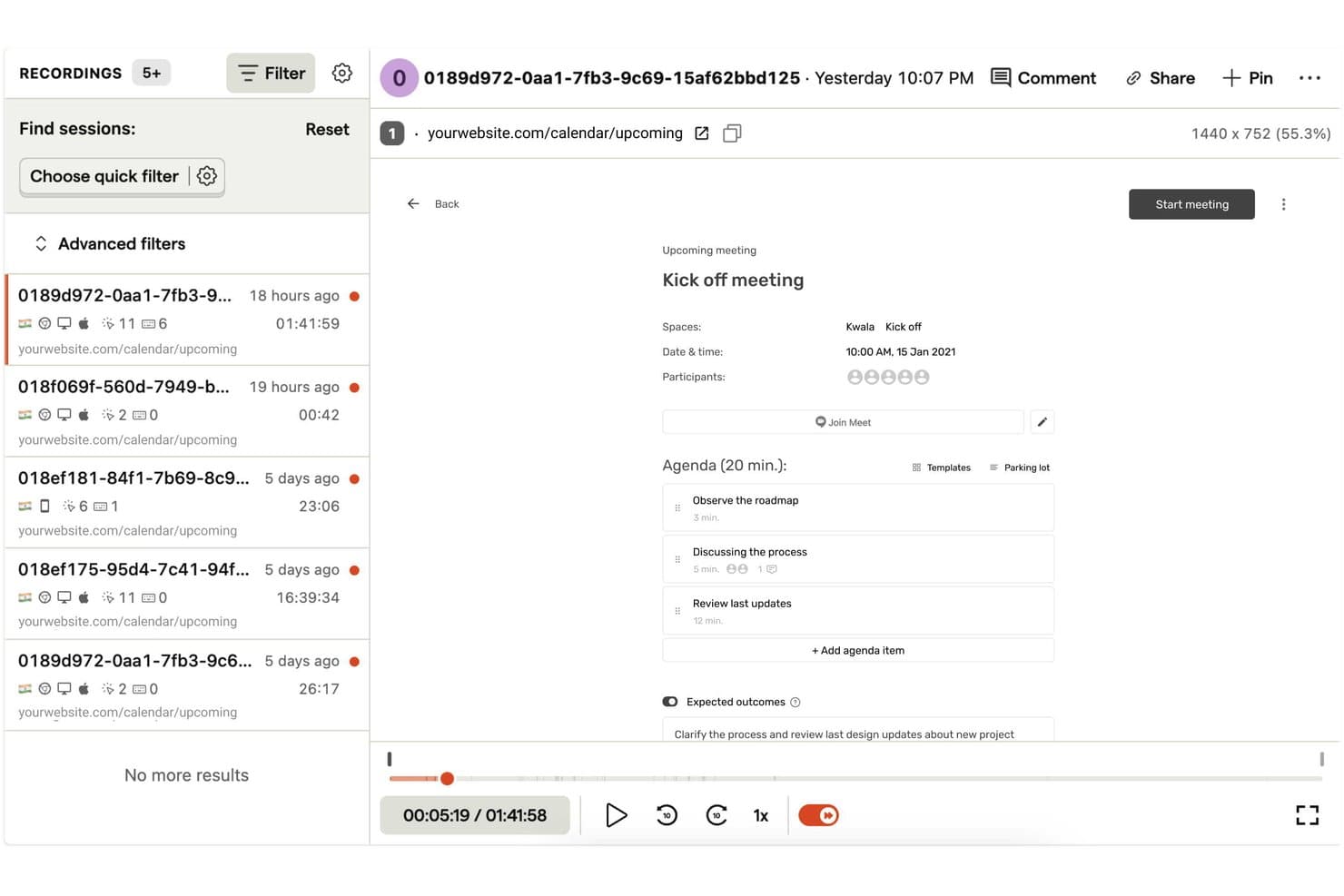
OpenReplay consente agli utenti di riprodurre e filtrare facilmente le sessioni utente registrate. OpenReplay è una piattaforma per la riproduzione delle sessioni con registrazioni web e mobile fedeli al pixel, log della console e della rete sincronizzati, mappe di calore, monitoraggio degli errori, analisi del prodotto e ricerca nelle riproduzioni.
Per chi è più adatto OpenReplay?
Team di prodotto e UX con supporto DevOps che necessitano di una riproduzione personalizzabile e ospitata autonomamente, oltre al pieno controllo sui dati degli utenti.
Perché ho scelto OpenReplay
Ho scelto OpenReplay perché la sua edizione open source, ospitata autonomamente e gratuita, consente al mio team di controllare i dati delle riproduzioni e la personalizzazione. Possiamo analizzare i clic ripetuti, gli errori e i clic a vuoto tramite OmniSearch, quindi esaminare i log della console e della rete sincronizzati. Questo ci aiuta a diagnosticare un errore durante il checkout senza inviare i dati dei clienti a un elaboratore di terze parti.
Funzionalità principali di OpenReplay
- Sessioni con più schede: Riunisce l'attività tra le schede del browser in un unico percorso dell'utente.
- Mappe di calore: Rappresenta visivamente i clic, i movimenti del mouse e i punti critici dei clic ripetuti.
- Riproduzione delle app mobili: Supporta gli SDK per iOS, Android, React Native e Flutter.
- Momenti salienti delle sessioni: Permette di ritagliare momenti delle riproduzioni con note, tag e link condivisibili.
Integrazioni di OpenReplay
OpenReplay offre integrazioni con Sentry, Datadog, Jira, GitHub, Slack, Google Tag Manager, Redux, Vuex, Pinia e Apollo. La sua API REST supporta connessioni personalizzate per sessioni, utenti, eventi e dati in tempo reale.
Cosa è gratuito?
L'edizione open source di OpenReplay è gratuita per sempre quando viene ospitata sulla propria infrastruttura. È destinata alle applicazioni con poco traffico e la gestione dell'hosting, dell'archiviazione, della scalabilità e del supporto è affidata alla community.
Pros and Cons
Pros:
- L'hosting autonomo gratuito mantiene il pieno controllo sui dati
- La diagnostica approfondita collega le riproduzioni al contesto tecnico
- La conservazione regolabile di 180 giorni supporta analisi più lunghe
Cons:
- L'hosting autonomo richiede una manutenzione DevOps continua
- L'edizione gratuita è destinata alle applicazioni con poco traffico
Learn more about OpenReplay:
Altri software gratuiti per la riproduzione delle sessioni
Ecco alcune ulteriori opzioni di software per la riproduzione delle sessioni che offrono anch’esse piani o periodi di prova gratuiti. Sebbene questi strumenti non siano stati inclusi nella mia selezione, vale comunque la pena dare loro un’occhiata:
- 11FullSessionIdeale per la riproduzione gratuita delle sessioni mobile e web
- 12Microsoft ClarityLa soluzione migliore per la riproduzione illimitata delle sessioni
- 13Hotjar (by Contentsquare)Ideale per mappe di calore, sondaggi e riproduzione sessioni in un unico strumento
- 14UXCamIdeale per la riproduzione gratuita delle sessioni delle app mobili
- 15Lucky OrangeIdeale per la chat dal vivo attivata dai clic furiosi
- 16MouseflowIdeale per l'abbandono dei moduli e la riproduzione a livello di campo
- 17LogRocketIdeale per il debug a livello di sviluppo nella riproduzione delle sessioni
- 18StatsigIdeale per le riproduzioni filtrate in base all'esposizione all'esperimento
- 19ContentsquareIdeale per aziende che necessitano di prove conformi al GDPR
Come valuto i software gratuiti per la riproduzione delle sessioni
Per prima cosa, definisco cosa si intende per gratuito. Un piano gratuito permanente deve offrire registrazioni continuative significative e un periodo di conservazione utilizzabile, non una versione di prova. Dopodiché, suddivido la mia valutazione in tre parti: funzionalità fondamentali, che hanno il peso maggiore, come la riproduzione delle sessioni e il filtraggio delle registrazioni; funzionalità distintive, come la generazione di mappe di calore; e aspetti che vanno oltre l'insieme delle funzionalità, come il percorso di passaggio a un piano superiore.
Funzionalità fondamentali (requisiti minimi per questo elenco)
Oltre ai requisiti per il mio piano gratuito, utilizzo un sistema di punteggio per selezionare gli strumenti da includere nel mio elenco. Assegno a ciascuno un punteggio su una scala da 0 (non offre la funzionalità) a 5 (eccelle in quest'area) per ogni funzionalità fondamentale elencata di seguito, in base a ciò che è disponibile nel piano gratuito. Converto quindi il totale in una percentuale per aiutare a valutare l'idoneità complessiva di ciascuno strumento, dando un peso aggiuntivo a tutte le funzionalità che ho ritenuto essenziali.
- Registrazione delle sessioni (essenziale): cerco una riproduzione affidabile che mostri le azioni degli utenti, i cambiamenti delle pagine e i controlli standard per esaminare i problemi di usabilità.
- Quota di registrazione gratuita (essenziale): valuto se la disponibilità consente revisioni continuative, come il controllo settimanale delle sessioni di registrazione.
- Filtraggio delle sessioni: i filtri combinati per pagina, dispositivo, data o azione dell'utente dovrebbero individuare rapidamente le registrazioni pertinenti.
- Monitoraggio dei clic e dello scorrimento: verifico la presenza di clic chiari, profondità dello scorrimento e movimento del puntatore quando esamino la navigazione o il comportamento nei moduli.
- Rilevamento degli errori e dei clic frenetici: cerco indicatori relativi a clic frenetici, clic senza effetto ed errori JavaScript che segnalino possibili punti di attrito.
- Conservazione dei dati: il piano gratuito dovrebbe conservare le registrazioni abbastanza a lungo da confrontare le sessioni nell'arco di un ciclo di revisione del prodotto.
Una volta ottenuto un elenco di strumenti che soddisfano i criteri, considero ciò che distingue ciascuna piattaforma.
Fattori distintivi (ciò che differenzia i fornitori)
Ecco come confronto i diversi fornitori:
Funzionalità distintive
Cerco piani gratuiti che generino automaticamente mappe di calore dei clic e dello scorrimento a partire dalle sessioni registrate. Le mappe di calore mostrano il comportamento aggregato a colpo d'occhio, il che è più rapido che scorrere singolarmente le riproduzioni quando si convalida una modifica al layout. Anche i link condivisibili alle riproduzioni sono importanti. Quando individuo un flusso di pagamento poco chiaro, devo poter inserire un link in Slack per il mio ingegnere, non pianificare una condivisione dello schermo. Strumenti come Hotjar e Microsoft Clarity gestiscono bene questo aspetto nei loro livelli gratuiti. Verifico inoltre se i log della console e della rete compaiono direttamente nella cronologia della riproduzione, poiché ciò mi consente di segnalare un errore JS insieme all'azione esatta dell'utente che lo ha attivato.
Oltre le funzionalità
Verifico se i piani gratuiti includono il mascheramento predefinito delle informazioni personali identificabili (PII), poiché i team di prodotto che esaminano sessioni con campi di inserimento o pagine dell'account hanno bisogno di questa protezione senza dover effettuare un upgrade. Anche la gestione della privacy dei dati è importante nel livello gratuito: strumenti come PostHog e Microsoft Clarity gestiscono il mascheramento immediatamente. Valuto inoltre i limiti relativi agli utenti e le opzioni di condivisione, perché un responsabile di prodotto che non può coinvolgere un designer o un ingegnere senza incontrare un paywall perde metà del valore della riproduzione delle sessioni. Infine, considero l'impegno necessario per l'installazione: una configurazione con un singolo frammento di codice consente di iniziare a registrare in pochi minuti, mentre l'integrazione basata in larga parte su SDK può bloccare un team snello per giorni.
Come scegliere un software gratuito per la riproduzione delle sessioni
Gli elenchi complessi di funzionalità e le strutture dei prezzi possono rendere difficile capire cosa si ottiene realmente da un software gratuito per la riproduzione delle sessioni. Per aiutarti a rimanere concentrato mentre valuti le opzioni durante il processo di selezione del software, ecco alcuni fattori da tenere a mente:
| Fattore | Cosa considerare |
| Ambito dell'offerta gratuita | Verifica cosa è incluso nel piano gratuito, come i limiti delle sessioni, le funzionalità e l'accesso degli utenti. Assicurati che soddisfi le tue esigenze di base senza dover effettuare subito un upgrade. |
| Scalabilità | Valuta se lo strumento può crescere insieme al tuo team. Cerca piani flessibili in grado di gestire nel tempo l'aumento del traffico e delle esigenze degli utenti. |
| Integrazioni | Assicurati che sia compatibile con gli strumenti che già utilizzi. Cerca integrazioni con piattaforme come Google Analytics, sistemi CRM e strumenti di marketing. |
| Semplicità d'uso | Valuta l'interfaccia utente e la navigazione. Uno strumento facile da configurare e utilizzare farà risparmiare tempo al tuo team e ridurrà la curva di apprendimento. |
| Conformità alla privacy | Verifica che lo strumento sia conforme alle normative sulla protezione dei dati come il GDPR. Questo è fondamentale per proteggere i dati degli utenti e mantenere la fiducia. |
| Profondità delle funzionalità | Valuta l'ampiezza delle funzionalità offerte, come mappe di calore, riproduzioni delle sessioni e segmentazione degli utenti. Un maggior numero di funzionalità fornisce informazioni più approfondite sul comportamento degli utenti. |
| Assistenza clienti | Cerca opzioni di assistenza rapide e disponibili, come la chat dal vivo o l'e-mail. Un'assistenza affidabile aiuta a risolvere rapidamente i problemi e mantiene il tuo team produttivo. |
Che cos'è il software gratuito per la riproduzione delle sessioni?
Il software per la riproduzione delle sessioni è uno strumento che registra le interazioni degli utenti sui siti web o nelle app, fornendo informazioni sul comportamento degli utenti. Questi strumenti offrono spesso piani o periodi di prova gratuiti con funzionalità limitate o limiti di utilizzo. I product manager, i designer UX e gli esperti di marketing li utilizzano generalmente per migliorare l'esperienza utente e ottimizzare i tassi di conversione. Le mappe di calore, le registrazioni delle sessioni e l'analisi dei percorsi degli utenti aiutano i team a comprendere il comportamento degli utenti e a individuare le aree da migliorare.
Funzionalità del software gratuito per la riproduzione delle sessioni
Esaminiamo le funzionalità comunemente presenti nei software per la riproduzione delle sessioni e quali sono generalmente incluse nei piani gratuiti rispetto a quelli a pagamento.
Funzionalità generalmente gratuite del software per la riproduzione delle sessioni
- Registrazioni delle sessioni: Acquisisci le interazioni degli utenti sul tuo sito per comprenderne il comportamento e individuare eventuali problemi.
- Mappe di calore: Visualizza dove gli utenti fanno clic e scorrono per ottimizzare il layout e i contenuti della pagina.
- Analisi dei percorsi degli utenti: Monitora il percorso seguito dagli utenti sul tuo sito per individuare i punti di abbandono.
- Analisi di base: Ottieni informazioni sul comportamento degli utenti attraverso metriche e dati semplici.
- Strumenti per il feedback: Raccogli direttamente le opinioni degli utenti per migliorare l'esperienza complessiva.
Funzionalità generalmente a pagamento del software per la riproduzione delle sessioni
- Segmentazione avanzata: Filtra i dati delle sessioni in base ai dati demografici o al comportamento degli utenti per ottenere informazioni più approfondite.
- Test A/B: Prova versioni diverse del tuo sito per vedere quale offre prestazioni migliori per gli utenti.
- Monitoraggio in tempo reale: Osserva le interazioni degli utenti mentre avvengono per risolvere rapidamente i problemi.
- Dashboard personalizzabili: Adatta le visualizzazioni dei dati per concentrarti sulle metriche più rilevanti per i tuoi obiettivi.
- Strumenti per la conformità alla privacy: Assicurati che la raccolta dei dati sia conforme a normative come il GDPR e il CCPA.
Vantaggi del software gratuito per la riproduzione delle sessioni
L'implementazione di un software gratuito per la riproduzione delle sessioni offre diversi vantaggi al tuo team e alla tua azienda. Eccone alcuni che puoi aspettarti:
- Analisi conveniente: Ottieni informazioni sul comportamento degli utenti senza spendere denaro, una soluzione ideale per startup e piccole imprese.
- Informazioni sul comportamento degli utenti: Comprendi come gli utenti interagiscono con il tuo sito attraverso le registrazioni delle sessioni e le mappe di calore, aiutandoti a individuare le aree problematiche.
- Esperienza utente migliorata: Utilizza gli strumenti per il feedback per raccogliere le opinioni degli utenti e apportare le modifiche necessarie a migliorare l'esperienza complessiva.
- Decisioni basate sui dati: Sfrutta le analisi di base per prendere decisioni e ottimizzare le prestazioni del sito web sulla base dei dati reali degli utenti.
- Configurazione rapida: Molti strumenti gratuiti offrono un'installazione e una configurazione semplici, consentendo al tuo team di iniziare rapidamente ad analizzare il comportamento degli utenti.
- Nessun impegno a lungo termine: Prova funzionalità e vantaggi senza essere vincolato da un contratto, mantenendo la flessibilità necessaria per esplorare diverse opzioni.
- Conformità alla privacy: Alcuni strumenti gratuiti includono funzionalità di base per la privacy che aiutano a garantire una gestione responsabile dei dati degli utenti.
Costi e prezzi del software gratuito per la riproduzione delle sessioni
Mi rendo conto che sei arrivato a questo articolo cercando le migliori opzioni di software per la riproduzione delle sessioni disponibili gratuitamente. Tuttavia, poiché i piani gratuiti offrono solo funzionalità limitate, è molto probabile che in futuro dovrai passare a un piano superiore.
La tabella seguente riassume i piani comuni, i relativi prezzi medi e le funzionalità tipicamente incluse nelle soluzioni software per la riproduzione delle sessioni:
Tabella di confronto dei piani per i software di riproduzione delle sessioni
| Tipo di piano | Prezzo medio | Funzionalità comuni |
| Piano gratuito | $0 | Registrazioni delle sessioni, analisi di base, mappe di calore, strumenti per i commenti degli utenti e spazio di archiviazione dei dati limitato. |
| Piano personale | $5-$25/utente/ mese | Analisi avanzate, segmentazione degli utenti, maggiore spazio di archiviazione dei dati e assistenza clienti prioritaria. |
| Piano aziendale | $50-$100/utente /mese | Pannelli di controllo personalizzabili, monitoraggio in tempo reale, test A/B e strumenti avanzati per la conformità alla privacy. |
| Piano per grandi aziende | $150+/utente/ mese | Accesso a tutte le funzionalità, gestione dedicata dell'account, integrazioni personalizzate e assistenza completa. |
Domande frequenti sul software gratuito per la riproduzione delle sessioni
Ecco alcune risposte alle domande comuni sul software gratuito per la riproduzione delle sessioni:
Perché dovresti utilizzare le riproduzioni delle sessioni nella ricerca degli utenti per le app mobili?
Le riproduzioni delle sessioni forniscono informazioni preziose sulle interazioni degli utenti all’interno della tua app. Aiutano il tuo team a identificare rapidamente i problemi ed eseguire il debug più velocemente, migliorando l’esperienza utente a ogni visita. Questi dati sono fondamentali per perfezionare il design e le funzionalità delle app mobili e soddisfare le aspettative degli utenti.
Qual è lo scopo principale della riproduzione delle sessioni?
Lo scopo principale della riproduzione delle sessioni è comprendere il comportamento degli utenti e identificare i punti in cui il percorso dell’utente viene interrotto. Questi dati aiutano a creare flussi utente che soddisfino le aspettative dei clienti e migliorino le prestazioni complessive del sito.
Come funziona la riproduzione delle sessioni di Datadog?
La riproduzione delle sessioni di Datadog registra ogni modifica al DOM, come gli input degli utenti, come evento. Successivamente concatena questi eventi in una rappresentazione visiva di ogni sessione utente, consentendoti di vedere esattamente ciò che gli utenti sperimentano sul tuo sito.
Qual è la frequenza di campionamento per la riproduzione delle sessioni di Datadog?
La frequenza di campionamento nella configurazione della riproduzione delle sessioni di Datadog varia da 0.0 a 100.0. Determina la percentuale di sessioni registrate: 0 significa nessuna riproduzione, mentre 100 significa che sono incluse tutte le sessioni. Regola questo valore per controllare il volume dei dati.
In che modo le riproduzioni delle sessioni aiutano a migliorare i percorsi dei clienti?
Le riproduzioni delle sessioni evidenziano le aree in cui gli utenti incontrano difficoltà, aiutandoti a individuare e risolvere i problemi. Comprendendo questi punti critici, il tuo team può prendere decisioni basate sui dati per rendere più fluido il percorso del cliente e migliorarne la soddisfazione.
I dati delle riproduzioni delle sessioni possono essere utilizzati per il debug?
Sì, i dati delle riproduzioni delle sessioni sono estremamente utili per il debug. Guardando le riproduzioni, gli sviluppatori possono vedere esattamente dove si verificano gli errori nel percorso dell’utente, consentendo di identificare e risolvere i problemi più rapidamente.
Qual è il prossimo passo?
Non dimenticare di iscriverti alla nostra newsletter per ricevere altre risorse e guide sulla gestione dei prodotti, oltre agli ultimi podcast, alle interviste e ad altri approfondimenti dei leader e degli esperti del settore.