

Orientarsi nel mondo del design UX può essere scoraggiante, soprattutto quando il budget è limitato. Hai bisogno di strumenti che aiutino il tuo team a progettare in modo efficace senza spendere una fortuna. È qui che entra in gioco il software UX gratuito.
In base alla mia esperienza nel testare e recensire software, ho constatato che le soluzioni gratuite possono soddisfare molte delle tue esigenze, dalla prototipazione alla collaborazione. Questi strumenti alleviano il peso dei costi elevati offrendo comunque funzionalità essenziali.
In questo articolo condividerò le mie migliori scelte di software UX gratuito. Ti offrirò una recensione imparziale e approfondita, così potrai scegliere lo strumento giusto per il tuo team. Che tu gestisca una startup o una piccola impresa, qui troverai qualcosa che fa al caso tuo.
Perché fidarsi dei nostri consigli sui software
6,700+
Reviews
20
Industry experts
16+
Evaluation factors
14
Years
Il nostro team testa e recensisce software dal 2012. In quanto product manager noi stessi, sappiamo quanto sia difficile — e importante — scegliere il software giusto.
Per questa guida, abbiamo valutato gli strumenti attraverso test pratici e ricerche indipendenti, assegnando un punteggio agli strumenti in base ai nostri criteri di selezione.
Le nostre recensioni riflettono il nostro giudizio editoriale umano, non un discorso di vendita.
Revisori esperti:
- Andrew LumbySenior TPM
- Cristiano ValimSenior UI/UX Lead


Tabella di confronto dei software UX gratuiti
Questa tabella di confronto riassume i dettagli dei prezzi delle mie migliori selezioni di software UX gratuiti:
| Tool | Best For | Trial Info | Price | ||
|---|---|---|---|---|---|
| 1 | Ideale per workshop UX e flussi interfunzionali | Piano gratuito disponibile | A partire da $16/utente/mese | Website | |
| 2 | Ideale per trasformare schizzi in prototipi senza scrivere codice grazie all'IA | Piano gratuito disponibile | A partire da $12/utente/mese (con fatturazione annuale) | Website | |
| 3 | Ideale per la creazione di wireframe e prototipi da parte di non progettisti | Piano gratuito disponibile | Da $12.45/utente/mese (fatturato annualmente) | Website | |
| 4 | Ideale per prototipi avanzati basati sul codice | Prova gratuita di 14 giorni e piano gratuito disponibili | A partire da $49/mese (con fatturazione annuale) | Website | |
| 5 | Ideale per creare wireframe senza designer insieme ai team di responsabili di prodotto | Piano gratuito disponibile | A partire da $14/mese (con fatturazione annuale) | Website | |
| 6 | Ideale per l'accesso ai file di progettazione da parte di team interfunzionali | Piano gratuito disponibile | Da $16/utente/mese (con fatturazione annuale) | Website | |
| 7 | Ideale per la progettazione di UI offline su qualsiasi sistema operativo | Piano gratuito disponibile | A partire da $4.99/utente/mese | Website | |
| 8 | Ideale per il passaggio dalla progettazione allo sviluppo con strumenti open source | Piano gratuito e prova gratuita di 14 giorni disponibili | A partire da $7/utente/mese | Website | |
| 9 | Ideale per la prototipazione funzionale ad alta fedeltà | Piano gratuito disponibile | A partire da $19/utente/mese | Website | |
| 10 | Ideale per la prototipazione UI/UX tutto-in-uno | Piano gratuito disponibile | A partire da $12/utente/mese | Website |


Recensioni dei migliori software UX gratuiti
Di seguito trovi i miei riepiloghi dettagliati dei migliori software UX gratuiti inclusi nel mio elenco. Le mie recensioni offrono uno sguardo approfondito alle funzionalità principali, ai pro e ai contro, alle integrazioni e ai casi d’uso ideali di ogni strumento, per aiutarti a trovare quello più adatto a te. Sebbene alcuni di questi strumenti offrano una versione completamente gratuita, altri offrono un periodo di prova gratuito. In ogni recensione ho aggiunto una nota su ciò che è gratuito.
 Ideale per workshop UX e flussi interfunzionali
- Piano gratuito disponibile
- A partire da $16/utente/mese
Visit WebsiteCustomer Rating:4.7/5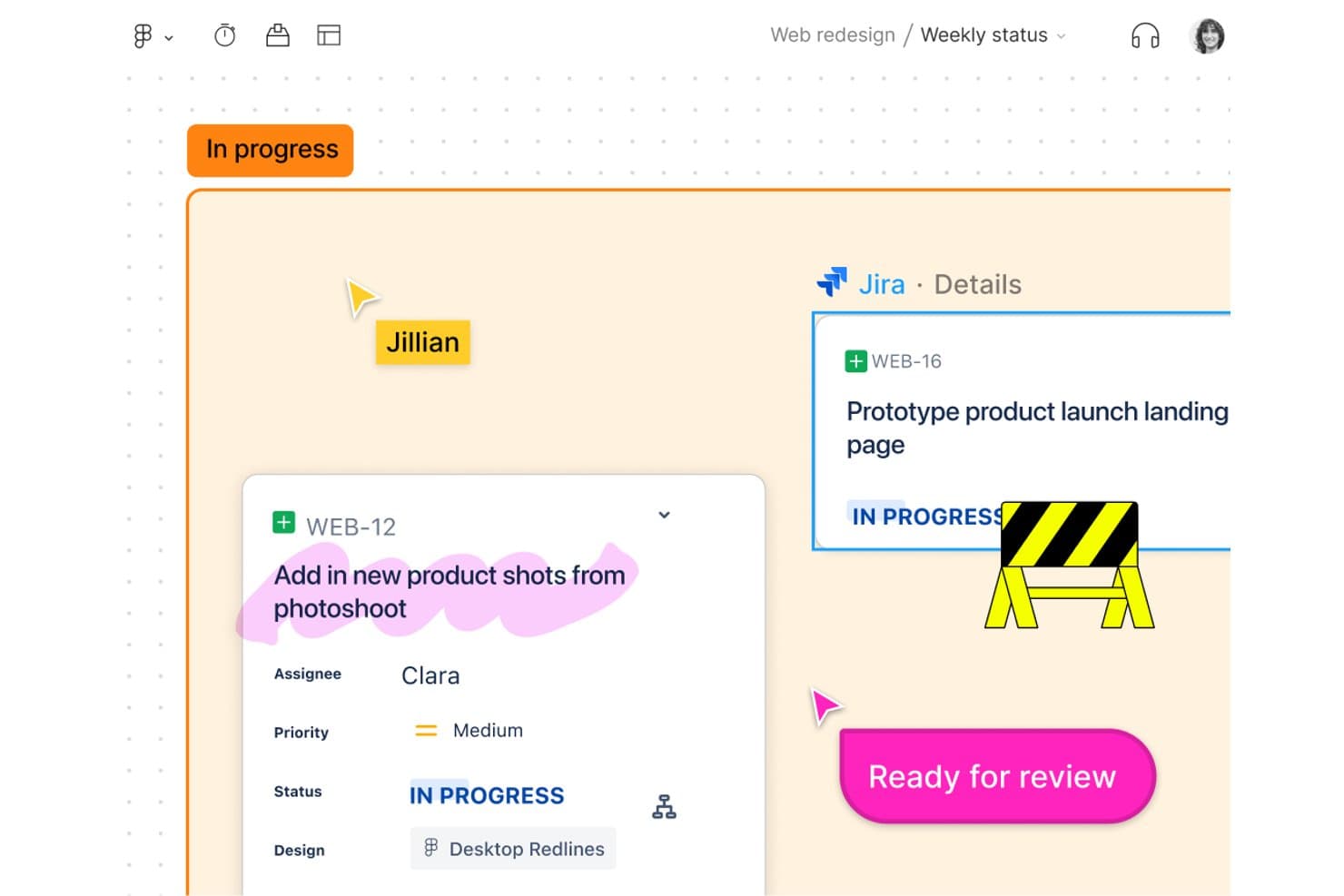
FigJam collega direttamente le attività Jira alle lavagne di progettazione per il monitoraggio del team. FigJam è una piattaforma online per la lavagna collaborativa progettata per workshop UX e mappatura dei percorsi, che offre una tela infinita, strumenti di collaborazione in tempo reale, modelli e un'integrazione perfetta con l'ecosistema Figma.
Per chi è più adatto FigJam?
Responsabili di prodotto e team interfunzionali che hanno bisogno di uno spazio semplice e collaborativo per mappare i percorsi degli utenti, organizzare workshop e allinearsi sui flussi di progetto.
Perché ho scelto FigJam
Ho scelto FigJam come uno dei migliori strumenti perché i workshop interfunzionali e la mappatura dei percorsi diventano semplicissimi grazie alle sue lavagne collaborative in tempo reale, alle sessioni di votazione e agli oltre 300 modelli pronti all'uso. Il mio team utilizza Open Sessions per invitare clienti e parti interessate senza account, mantenendo tutti coinvolti nel processo, dall'idea al diagramma di flusso.
Funzionalità principali di FigJam
- Accesso degli ospiti con Open Sessions: Invita chiunque a collaborare su una lavagna per 24 ore senza creare un account Figma.
- Chiamate audio integrate e Spotlight: Avvia sessioni vocali dal vivo e guida l'attenzione verso un'area specifica della tela utilizzando lo strumento Spotlight.
- Importazione e conversione di tabelle CSV: Importa dati CSV per creare tabelle o trasformare rapidamente le informazioni in note adesive.
- Widget e plugin della community di Figma: Estendi le lavagne con componenti aggiuntivi interattivi, strumenti di votazione e widget personalizzati creati dalla community di Figma.
Integrazioni di FigJam
FigJam offre integrazioni native con Asana e Jira, consentendo di creare e gestire attività direttamente sulla lavagna. Puoi anche estendere le lavagne utilizzando widget e plugin della community di Figma e importare contenuti da strumenti come Miro, Mural, Lucid e Google Jamboard.
Cosa è gratuito?
FigJam offre un piano gratuito senza scadenza che include fino a 3 file FigJam, collaboratori illimitati e funzionalità di base per la lavagna collaborativa e il lavoro di squadra. Alcune integrazioni, i widget avanzati e i controlli amministrativi richiedono un piano a pagamento.
Pros and Cons
Pros:
- Collaboratori illimitati con accesso ospite senza effettuare il login
- Ampia raccolta di modelli per la mappatura dei percorsi
- Lavagne in tempo reale per workshop interfunzionali
Cons:
- Nessuna funzionalità nativa per la prototipazione interattiva
- Limitato a 3 lavagne attive nel piano gratuito
Learn more about FigJam: Ideale per trasformare schizzi in prototipi senza scrivere codice grazie all'IA
- Piano gratuito disponibile
- A partire da $12/utente/mese (con fatturazione annuale)
Visit WebsiteCustomer Rating:4.6/5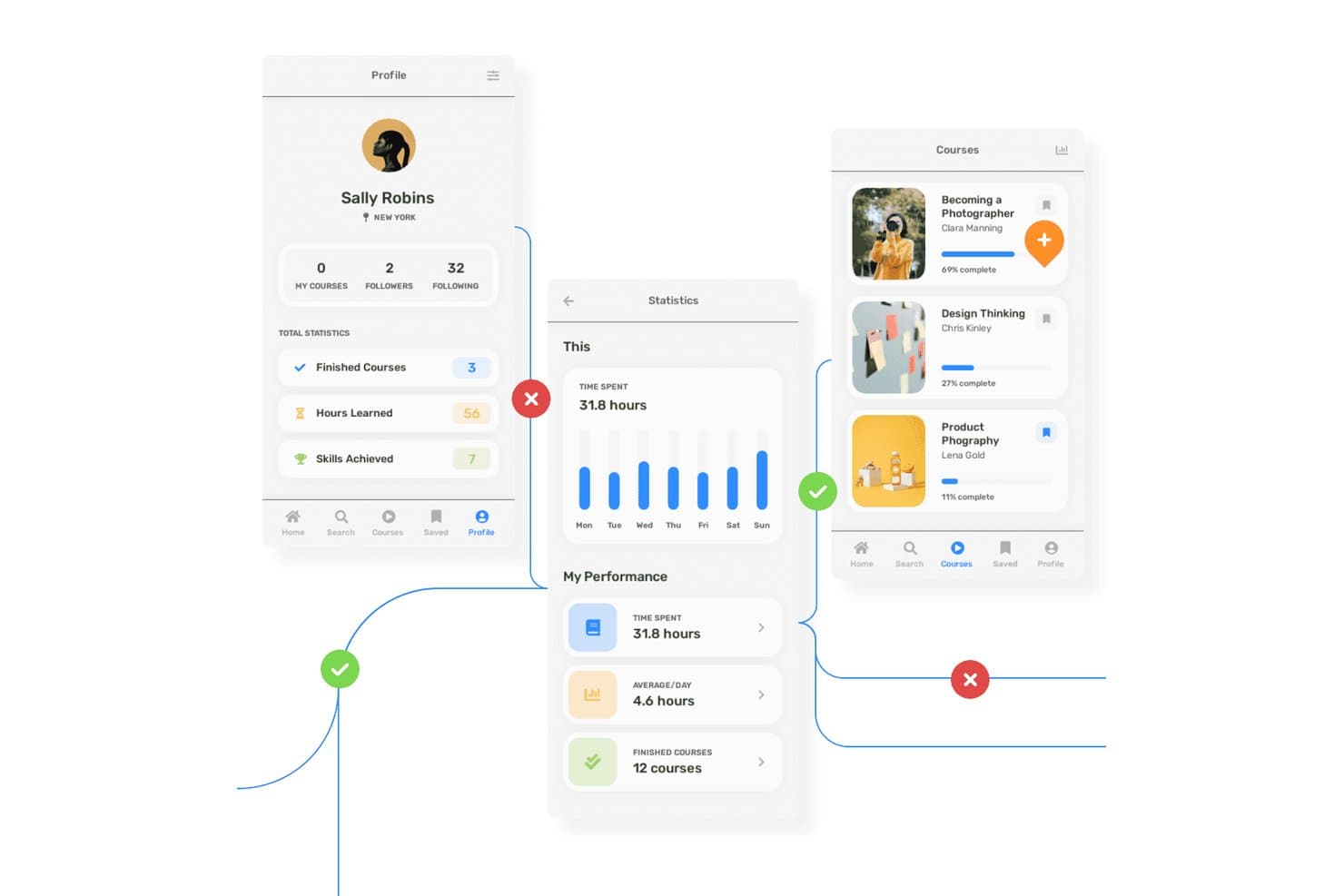
Uizard consente agli utenti di creare prototipi di flussi per app di apprendimento con più schermate e annotazioni. Uizard è uno strumento di progettazione UX basato su browser che consente di creare schemi strutturali, modelli visivi, prototipi interattivi e concetti di progettazione generati dall'IA, con collaborazione del team in tempo reale.
Per chi è più adatto Uizard?
Uizard è ideale per responsabili di prodotto e team che hanno bisogno di prototipi rapidi basati sull'IA per supportare il feedback delle parti interessate e la validazione iniziale, senza competenze avanzate di progettazione.
Perché ho scelto Uizard
Ho scelto Uizard perché il mio team può trasformare schizzi disegnati a mano o schermate di app in prototipi interattivi utilizzando i suoi strumenti di scansione basati sull'IA. Il selettore con un clic tra schema strutturale e modello visivo ci consente di passare rapidamente da una progettazione a bassa fedeltà a una progettazione ad alta fedeltà, il che è perfetto per i flussi utente iniziali. Mi affido al suo Autodesigner basato sull'IA per generare disposizioni con più schermate a partire da testo semplice, accelerando la validazione dei concetti senza scrivere codice.
Funzionalità principali di Uizard
- Selettore della modalità schema strutturale: Passa istantaneamente dalla visualizzazione dello schema strutturale a quella del modello visivo ad alta fedeltà per qualsiasi schermata.
- Strumento di scansione delle schermate: Trasforma le schermate esistenti di app o siti web in prototipi modificabili utilizzando l'IA.
- Modifica collaborativa in tempo reale: Collabora dal vivo con il tuo team sullo stesso progetto senza conflitti tra versioni.
- Mappa di calore dell'attenzione basata sull'IA: Visualizza le aree dell'interfaccia su cui è probabile che gli utenti si concentrino con una mappa di calore generata dall'IA.
Integrazioni di Uizard
Uizard offre integrazioni con Figma tramite la sua estensione della community, importa da Sketch e Adobe XD attraverso la conversione di PNG/JPG con l'IA e consente l'esportazione di codice React/CSS nei piani a pagamento. Non è documentato alcun supporto per API pubbliche o per Zapier nativo.
Cosa è gratuito?
Uizard offre un piano gratuito permanente senza limiti di tempo. Il piano gratuito supporta fino a 3 progetti, 10 schermate per progetto e include la collaborazione in tempo reale, ma limita alcune funzionalità avanzate dell'IA e le esportazioni.
Pros and Cons
Pros:
- L'IA trasforma gli schizzi in prototipi interattivi
- Passaggio istantaneo tra le visualizzazioni dello schema strutturale e del modello visivo
- I visualizzatori gratuiti illimitati possono commentare i prototipi
Cons:
- Solo mappe di calore predette dall'IA per il feedback sull'usabilità
- L'esportazione gratuita è limitata ai file a bassa risoluzione
Learn more about Uizard: Ideale per la creazione di wireframe e prototipi da parte di non progettisti
- Piano gratuito disponibile
- Da $12.45/utente/mese (fatturato annualmente)
Visit WebsiteCustomer Rating:4.5/5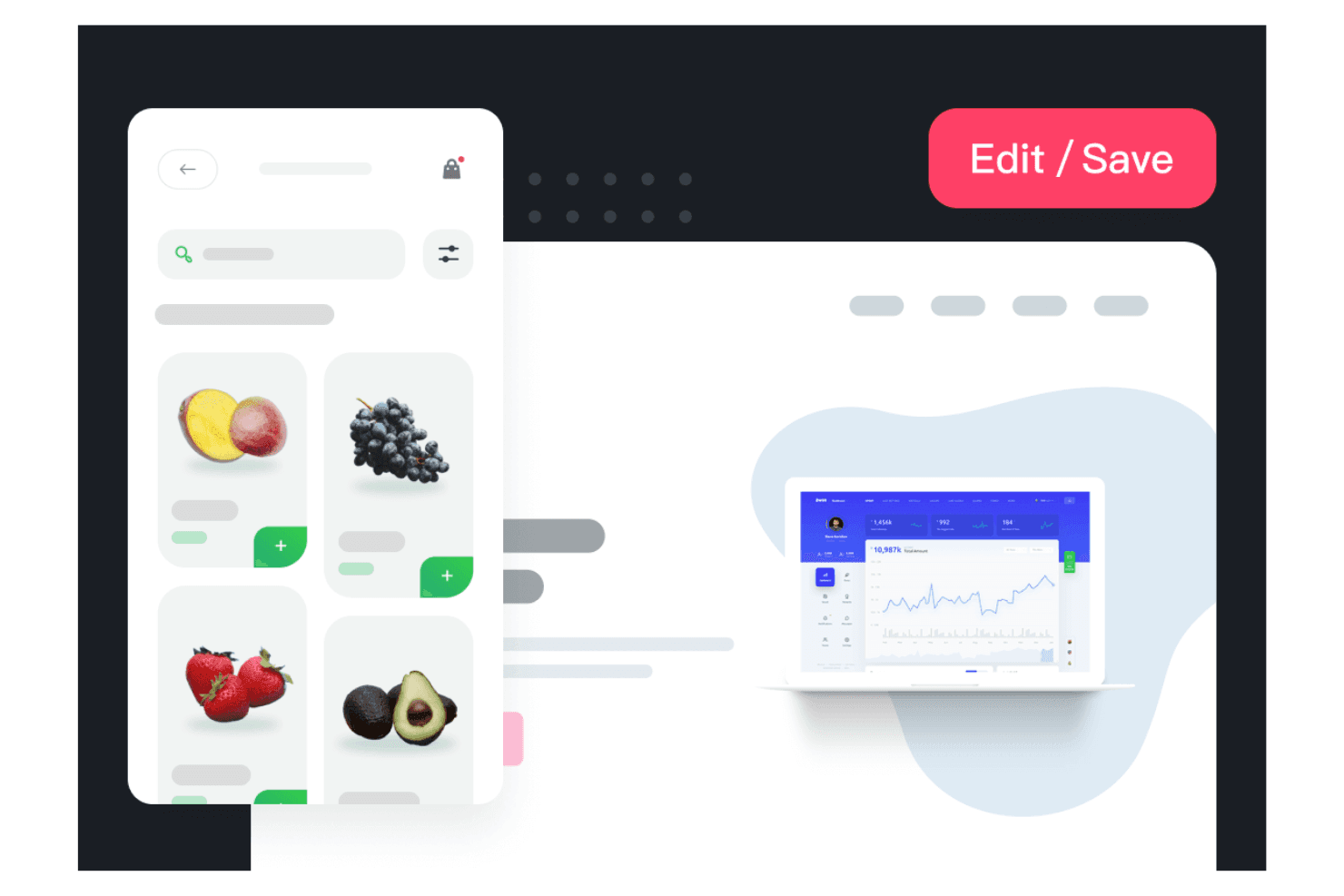
Mockplus consente al tuo team di creare rapidamente progetti visivi. Mockplus è una piattaforma di progettazione UX basata su browser che offre strumenti per la creazione di wireframe, la prototipazione, la progettazione dell'interfaccia utente e il passaggio agli sviluppatori attraverso i suoi prodotti RP, Cloud e DT, con collaborazione in tempo reale e ampie librerie di modelli.
Per chi è più adatto Mockplus?
Team alla ricerca di una piattaforma basata su browser per creare e revisionare wireframe o prototipi insieme, con una formazione o un onboarding minimo sulla progettazione.
Perché ho scelto Mockplus
Ho scelto Mockplus perché posso trasformare rapidamente le idee in wireframe e prototipi interattivi grazie a modelli pronti all'uso, oltre 3.000 componenti predefiniti e alla collaborazione in tempo reale. I miei team utilizzano il piano Team gratuito per progettare insieme i flussi fianco a fianco, senza esperienza di progettazione né un onboarding complesso.
Funzionalità principali di Mockplus
- Modifica collaborativa in tempo reale: Più membri del team possono lavorare insieme in diretta sullo stesso prototipo senza conflitti tra versioni.
- Librerie di componenti e risorse: Accedi a oltre 3.000 icone e componenti integrati, oltre a librerie condivise di risorse riutilizzabili per i tuoi progetti.
- Importazione di progetti di terze parti: Importa direttamente i progetti da Figma, Sketch, Adobe XD e Axure per velocizzare l'onboarding e la migrazione.
- Controllo degli accessi basato sui ruoli: Imposta diversi livelli di autorizzazione e gestisci l'accesso degli utenti per la collaborazione all'interno dei team.
Integrazioni di Mockplus
Mockplus offre integrazioni native con Figma, Sketch, Adobe XD, Photoshop, Axure, Slack, Jira, Confluence e Lark. Si connette direttamente a Mockplus Cloud per i flussi di revisione e passaggio agli sviluppatori, supportando l'importazione dei progetti e la collaborazione con questi strumenti principali.
Cosa è gratuito?
Mockplus offre un piano Team gratuito per sempre che consente a un massimo di 10 utenti di collaborare su 3 progetti con revisori illimitati. Questo piano include la modifica collaborativa in tempo reale, ma limita il numero di progetti e alcune funzionalità avanzate, come la gestione dei ruoli e la cronologia delle versioni.
Pros and Cons
Pros:
- Progettazione collaborativa in tempo reale per un massimo di 10 utenti
- Oltre 3.000 componenti e icone predefiniti
- Passaggio rapido dall'idea al prototipo
Cons:
- Non include funzionalità per i test di usabilità
- Le opzioni di esportazione sono disponibili solo nei piani a pagamento
Learn more about Mockplus: Ideale per prototipi avanzati basati sul codice
- Prova gratuita di 14 giorni e piano gratuito disponibili
- A partire da $49/mese (con fatturazione annuale)
Visit WebsiteCustomer Rating:4.2/5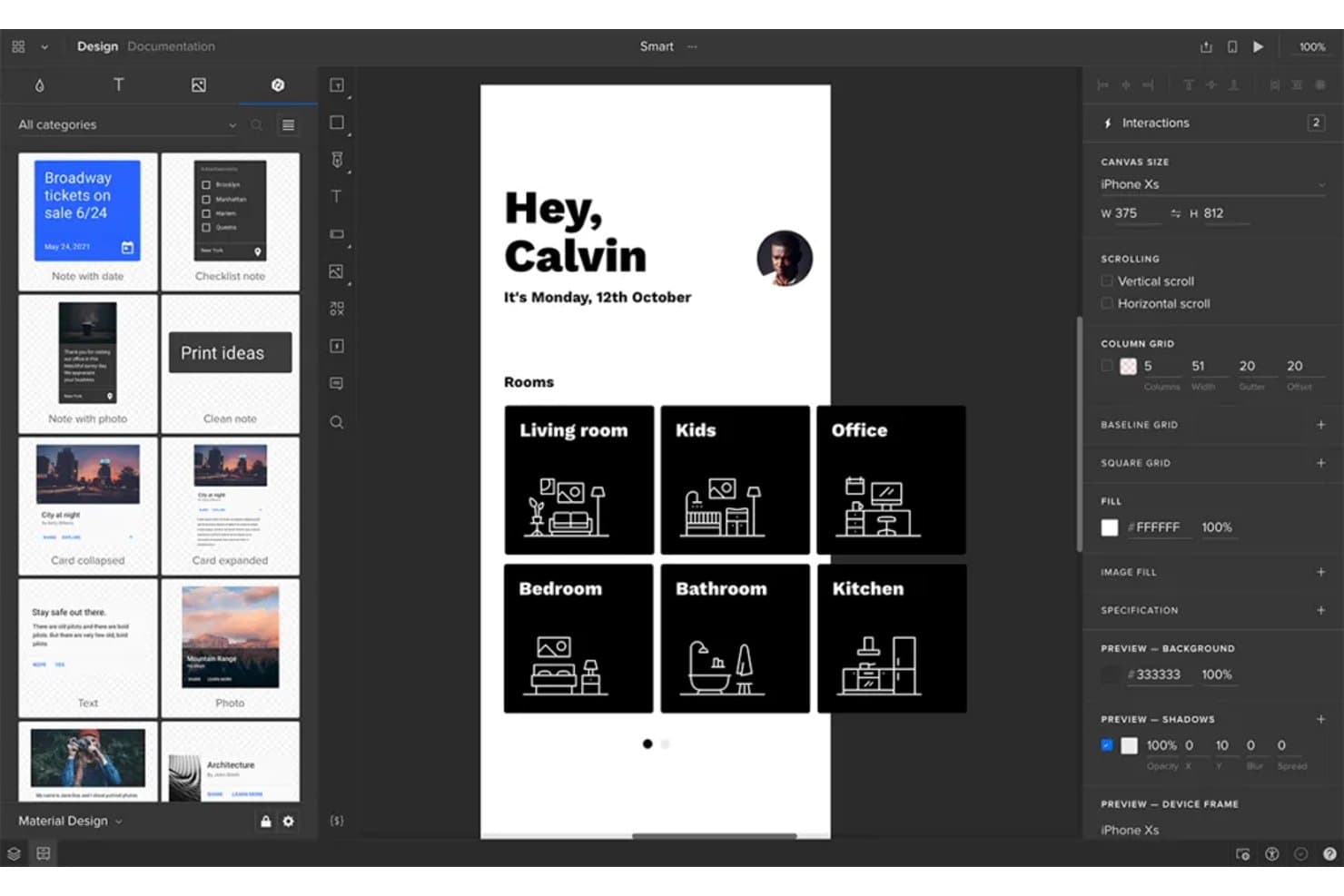
UXPin consente agli utenti di creare prototipi di schermate di app mobili con interazioni reali. UXPin è una piattaforma di prototipazione UX basata sul browser che offre schemi grafici supportati dal codice, progettazione interattiva con stati e componenti reali e strumenti di collaborazione integrati.
Per chi è più adatto UXPin?
UXPin è una scelta valida per i designer UX/UI di team focalizzati sui prodotti che necessitano di prototipazione avanzata, componenti supportati dal codice e anteprime pronte per i portatori di interesse.
Perché ho scelto UXPin
Ho scelto UXPin perché ritengo che la sua prototipazione supportata dal codice permetta al mio team di creare prototipi quasi pronti per la produzione, con stati reali, logica condizionale e librerie di componenti avanzate. Siamo riusciti a testare percorsi utente complessi, convalidare casi limite e creare anteprime interattive complete prima di scrivere una sola riga di codice di produzione.
Caratteristiche principali di UXPin
- Modifica collaborativa in tempo reale: Più membri del team possono lavorare contemporaneamente sullo stesso progetto nel browser.
- Importazione da Figma e Sketch: Importa facilmente i file di progettazione da Figma o Sketch per iterare rapidamente.
- Creatore di componenti con IA: Genera impaginazioni supportate dal codice ed elementi dell'interfaccia utente da richieste testuali utilizzando i modelli di IA integrati.
- App di anteprima mobile: Visualizza in anteprima e testa i tuoi prototipi dal vivo sui dispositivi iOS e Android durante la progettazione.
Integrazioni di UXPin
UXPin offre integrazioni con Figma (tramite plugin), Sketch, Slack, Jira e FullStory. Supporta l'importazione di componenti codificati personalizzati tramite Git, npm e Storybook nei piani a pagamento. Le app Mirror supportano l'anteprima su iOS e Android. È disponibile un'API per le integrazioni personalizzate.
Cosa è gratuito?
UXPin offre un piano gratuito senza scadenza con funzionalità limitate. Il piano gratuito in genere consente di utilizzare un solo prototipo e offre meno funzionalità avanzate rispetto ai livelli a pagamento, quindi è ideale per provare la piattaforma o gestire progetti semplici.
Pros and Cons
Pros:
- Crea prototipi ad alta fedeltà supportati dal codice gratuitamente
- Permette la collaborazione alla progettazione in tempo reale basata sul browser
- Consente anteprime interattive gratuite sui dispositivi mobili
Cons:
- Il piano gratuito limita i flussi di esportazione e di approvazione
- Consente solo due prototipi nel livello gratuito
Learn more about UXPin: Ideale per creare wireframe senza designer insieme ai team di responsabili di prodotto
- Piano gratuito disponibile
- A partire da $14/mese (con fatturazione annuale)
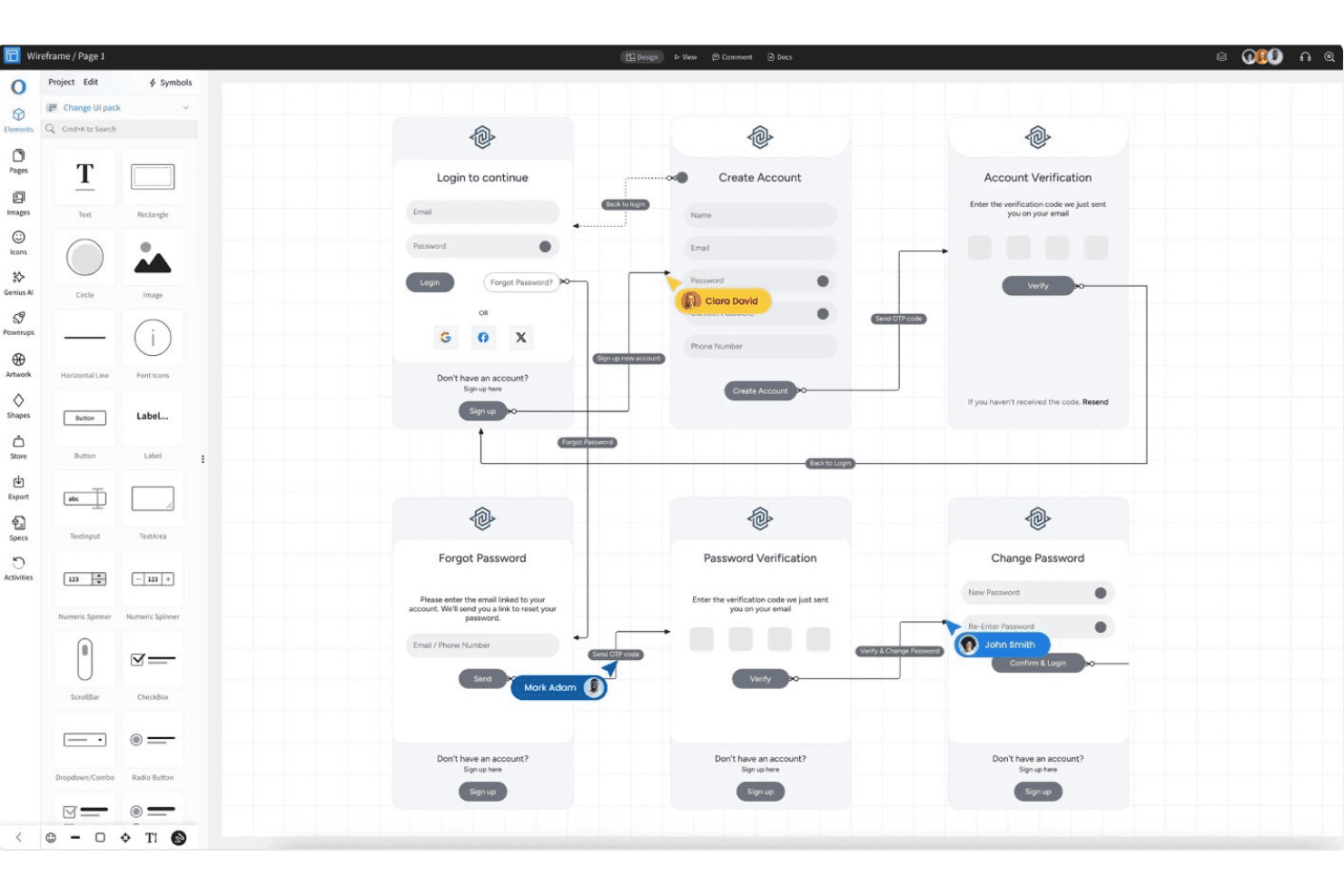
MockFlow consente di allinearsi più rapidamente e mantenere la coerenza durante le esportazioni rapide. MockFlow è una piattaforma di progettazione UX basata su browser, incentrata sulla creazione rapida di wireframe, sul brainstorming collaborativo, sull'ideazione dell'interfaccia utente basata su modelli, sul feedback in tempo reale e sulla riutilizzabilità tramite simboli e pagine master.
Per chi è più adatto MockFlow?
MockFlow è una scelta valida per responsabili di prodotto e professionisti non specializzati in design di startup o organizzazioni non profit che hanno bisogno di creare rapidamente wireframe e idee per l'interfaccia utente in modo collaborativo.
Perché ho scelto MockFlow
Ho scelto MockFlow perché apprezzo la rapidità con cui posso creare wireframe dettagliati utilizzando oltre 1.000 componenti, simboli riutilizzabili e pagine master. La libreria di modelli e la funzionalità IA che trasforma il testo in wireframe aiutano il mio team a sviluppare rapidamente nuove idee. La modalità di presentazione e gli strumenti di revisione multiutente facilitano l'allineamento tra responsabili di prodotto e professionisti non specializzati in design.
Funzionalità principali di MockFlow
- Componenti dell'interfaccia utente importabili: Carica e utilizza componenti creati dagli sviluppatori con supporto per Tailwind CSS, per wireframe più personalizzati.
- Assistente di progettazione IA: Utilizza le funzioni di conversione da testo a wireframe, da screenshot a wireframe e gli elementi dell'interfaccia utente generati dall'IA per velocizzare i concept iniziali.
- Posti gratuiti per i revisori: Invita fino a cinque revisori nel piano gratuito senza utilizzare posti a pagamento o posti per gli editor.
- Kit di strumenti per diagrammi cloud: Accedi alle icone integrate delle architetture AWS, Azure e Google Cloud per creare diagrammi tecnici.
Integrazioni di MockFlow
MockFlow offre integrazioni native con Slack, Microsoft Teams, Office 365, Google Drive, Trello, Atlassian Jira e Confluence, Notion, Fathom, Google Meet e Figma (livello Max). Supporta inoltre connessioni basate su API e assistenti IA come Claude e ChatGPT.
Cosa include il piano gratuito?
MockFlow offre un piano gratuito permanente che include wireframe di base illimitati, un progetto e fino a cinque posti gratuiti per i revisori. Il piano gratuito limita le integrazioni e le funzionalità avanzate, quindi dovrai effettuare l'upgrade per ottenere più progetti o posti per gli editor.
Pros and Cons
Pros:
- La conversione del testo in wireframe basata sull'IA velocizza la stesura
- I posti gratuiti per i revisori facilitano il feedback tra i team
- Il supporto per simboli e pagine master favorisce il riutilizzo
Cons:
- Il piano gratuito vieta l'uso commerciale aziendale
- La prototipazione è limitata alle azioni di base sullo schermo
Learn more about MockFlow: Ideale per l'accesso ai file di progettazione da parte di team interfunzionali
- Piano gratuito disponibile
- Da $16/utente/mese (con fatturazione annuale)
Visit WebsiteCustomer Rating:4.7/5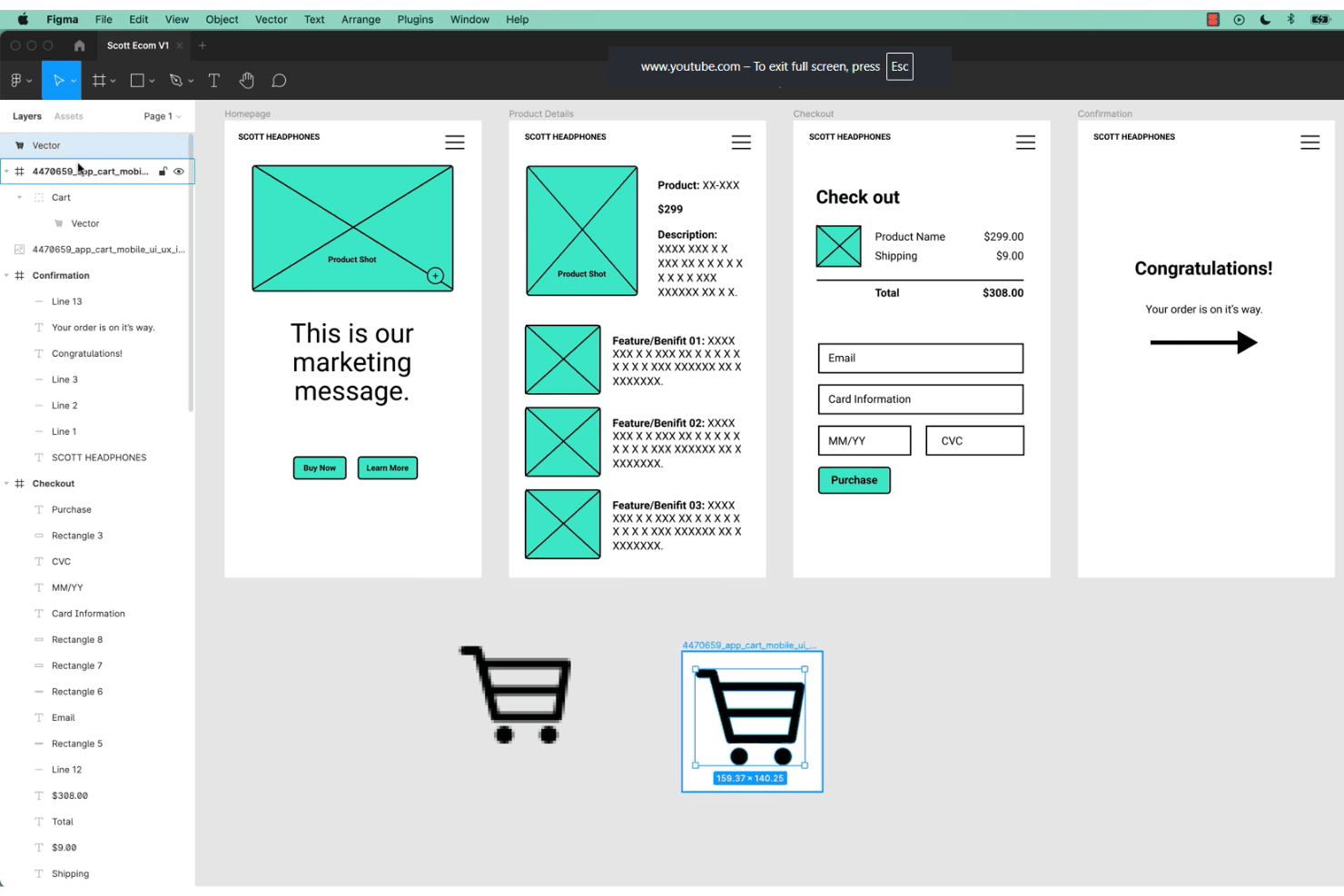
Figma consente ai team di collaborare alla progettazione UX e alla prototipazione in tempo reale. Figma è una piattaforma di progettazione UX/UI basata sul browser che combina modifica vettoriale di livello professionale, prototipazione senza codice, collaborazione in tempo reale e sistemi di componenti riutilizzabili per creare e condividere progetti di interfacce.
Per chi è più adatto Figma?
Team interfunzionali che hanno bisogno di progettare interfacce utente tramite browser e collaborare in tempo reale senza limiti di postazioni per visualizzatori o parti interessate.
Perché ho scelto Figma
Figma si è guadagnato un posto tra le mie scelte principali perché mi affido alla sua collaborazione basata sul browser per permettere a team di prodotto, designer e parti interessate di modificare e rivedere insieme i progetti delle interfacce, senza installare applicazioni e senza limiti di postazioni per i visualizzatori. La tela multiplayer in tempo reale, i feedback dal vivo e i visualizzatori gratuiti illimitati rendono l'accesso ai file di progettazione realmente interfunzionale.
Caratteristiche principali di Figma
- Varianti dei componenti: Supportano più stati visivi e interazioni all'interno di un singolo componente per semplificare la gestione dei file.
- Prototipazione interattiva: Crea prototipi cliccabili con attivatori, transizioni animate e anteprime in cornici di dispositivi reali, tutto all'interno del file di progettazione.
- Lavagna FigJam: Collabora alla sintesi della ricerca, alle mappe dei percorsi e ai flussi degli utenti utilizzando uno strumento dedicato di lavagna digitale.
- Centro risorse della community: Accedi a migliaia di kit UI gratuiti, modelli e plug-in forniti dalla community di utenti di Figma.
Integrazioni di Figma
Figma offre oltre 40 integrazioni, tra cui Slack, Jira, GitHub, Notion, Google Workspace, Microsoft Teams, Maze, UXtweak, UserTesting, Asana e Trello. Fornisce inoltre un'API REST aperta e un marketplace di plug-in per integrazioni personalizzate e di terze parti.
Cosa è gratuito?
Figma offre un piano Starter gratuito per sempre che consente di progettare file illimitati con un massimo di due editor e visualizzatori illimitati. Alcune funzionalità avanzate, come le librerie del team e le conversazioni audio, sono disponibili solo nei piani a pagamento.
Pros and Cons
Pros:
- Modifica multiplayer in tempo reale per tutti gli utenti
- Visualizzatori gratuiti illimitati con autorizzazioni per i commenti
- Ampia libreria gratuita di modelli per interfacce utente
Cons:
- Il piano gratuito limita i file dei team modificabili da più persone
- Nessuna funzionalità integrata per i test di usabilità
 Ideale per la progettazione di UI offline su qualsiasi sistema operativo
- Piano gratuito disponibile
- A partire da $4.99/utente/mese
Visit WebsiteCustomer Rating:4.4/5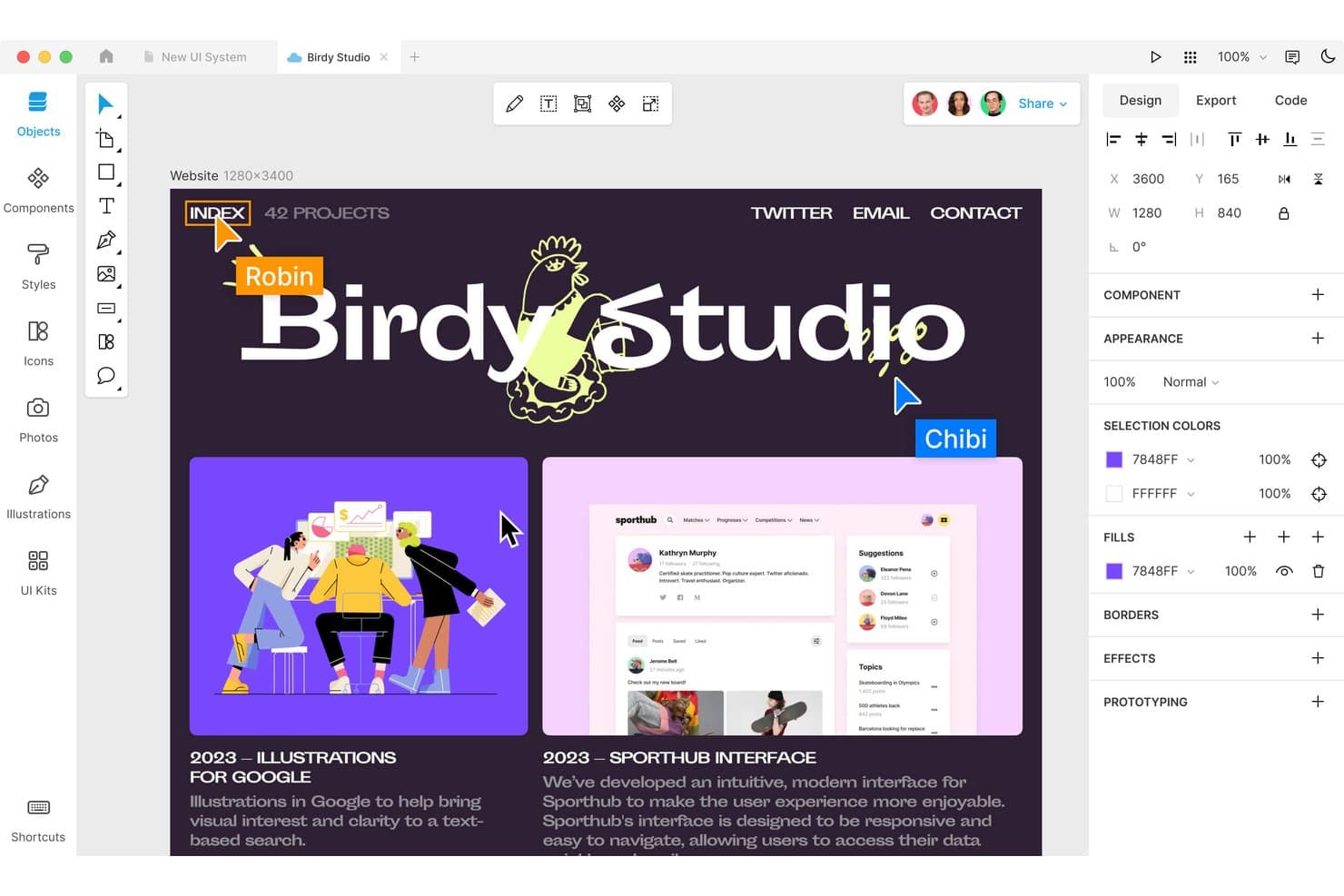
Lunacy consente agli utenti di progettare e collaborare in tempo reale sui layout web. Lunacy è uno strumento multipiattaforma per la progettazione di UI e UX che offre una tela vettoriale completa, prototipazione, componenti riutilizzabili e collaborazione in tempo reale, tutto in un'applicazione desktop con supporto per documenti cloud.
Per chi è più adatto Lunacy?
Designer freelance e team che desiderano uno strumento gratuito per la progettazione di UI offline, compatibile con i desktop Windows, macOS e Linux.
Perché ho scelto Lunacy
Ho scelto Lunacy perché mi affido al suo flusso di lavoro basato innanzitutto sull'uso offline, che funziona nativamente su Windows, macOS e Linux. La libreria integrata con 1,5 milioni di risorse e gli strumenti di intelligenza artificiale velocizzano la progettazione delle UI senza bisogno di una connessione Internet. Posso prototipare interazioni, creare componenti riutilizzabili ed esportare risorse per il passaggio allo sviluppo da un'unica applicazione desktop veloce.
Funzionalità principali di Lunacy
- Prototipazione basata su frame: Configura flussi interattivi con hotspot, trigger e transizioni animate nei tuoi progetti.
- Libreria di risorse integrata: Accedi a oltre 1,5 milioni di icone, illustrazioni e foto direttamente nell'editor.
- Editor di componenti: Crea, annida e gestisci componenti di design riutilizzabili con varianti e sostituzioni.
- Anteprima del codice esportato: Genera e visualizza istantaneamente il codice CSS, XAML, JSON o SVG per gli elementi di design selezionati.
Integrazioni di Lunacy
Lunacy supporta la compatibilità con i file Sketch per i flussi di apertura, modifica e salvataggio, l'importazione di file Figma e l'esportazione in Adobe XD tramite file Sketch. Offre l'integrazione con Avocode, Zeplin, Abstract e Simpli, oltre a un'API per sviluppatori e un framework locale per plugin destinato all'automazione personalizzata.
Cosa è gratuito?
Lunacy offre un piano gratuito per sempre con funzionalità essenziali di progettazione, prototipazione e libreria di risorse per un numero illimitato di utenti. La versione gratuita include l'accesso desktop, ma alcuni strumenti avanzati di collaborazione e spazio di archiviazione cloud aggiuntivo richiedono un upgrade a pagamento.
Pros and Cons
Pros:
- Funziona offline su Windows, macOS e Linux
- Enorme libreria di risorse integrata con strumenti di intelligenza artificiale
- Progettazione vettoriale e prototipazione complete
Cons:
- Nessun editor basato su browser per le modifiche
- Nessuno strumento integrato per i test di usabilità o l'analisi
Learn more about Lunacy: Ideale per il passaggio dalla progettazione allo sviluppo con strumenti open source
- Piano gratuito e prova gratuita di 14 giorni disponibili
- A partire da $7/utente/mese
Visit WebsiteCustomer Rating:4.5/5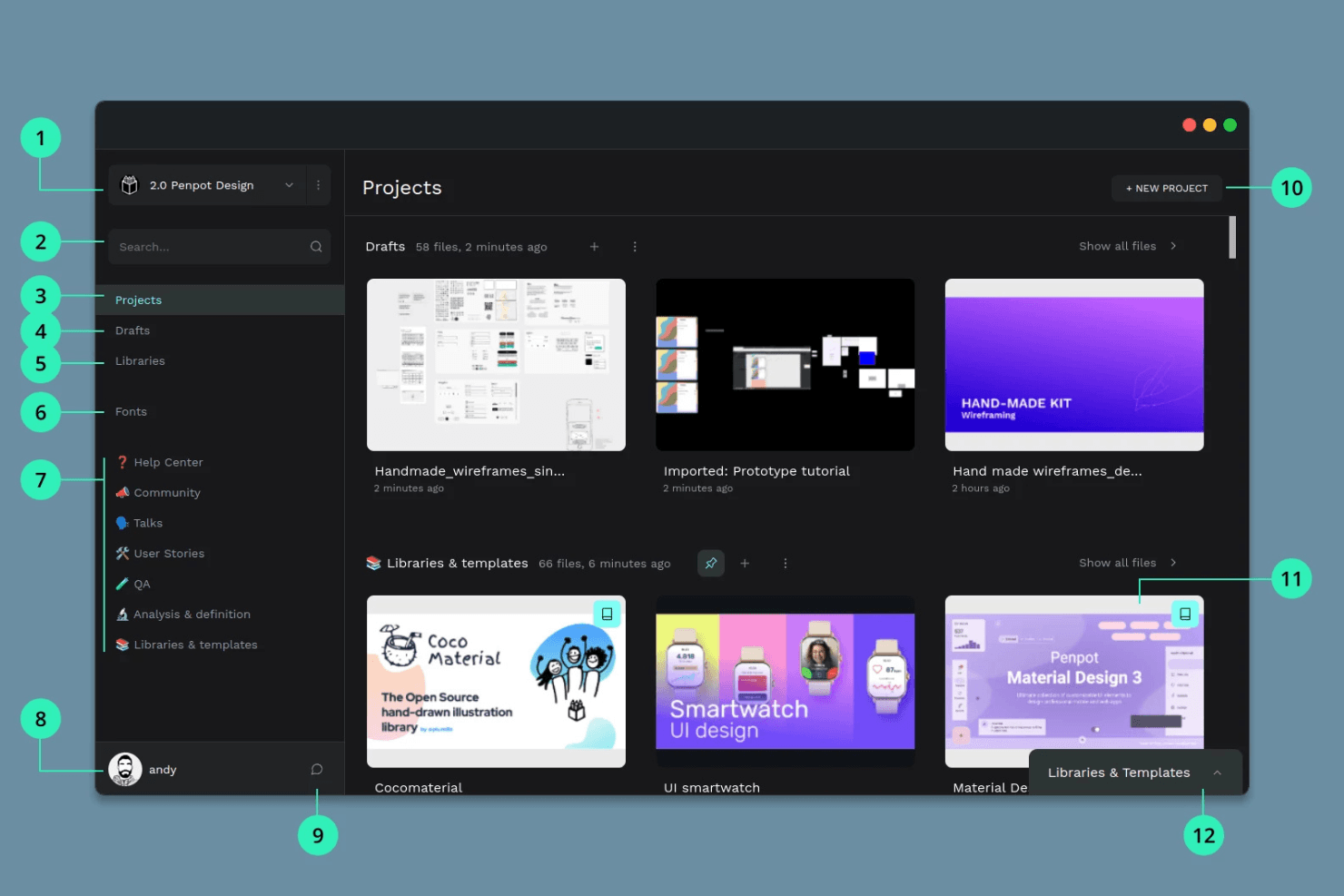
Penpot offre collaborazione open source ai team che utilizzano sistemi diversi. Penpot è una piattaforma open source di progettazione UX e UI basata su browser, per creare wireframe, prototipi interattivi, componenti riutilizzabili e sistemi di progettazione, con collaborazione in tempo reale tra i team e strumenti per il passaggio del lavoro agli sviluppatori.
Per chi è più adatto Penpot?
Team UX e di prodotto che necessitano di strumenti open source per la progettazione, la prototipazione e il passaggio del lavoro agli sviluppatori, senza vincoli nei confronti di un fornitore.
Perché ho scelto Penpot
Ho scelto Penpot come una delle migliori soluzioni perché la sua piattaforma open source combina una tela vettoriale basata su browser con veri strumenti di layout CSS Flex/Grid. Mi piace che il mio team possa prototipare i flussi con trigger interattivi e condividere link di presentazione per il passaggio del lavoro agli sviluppatori, mantenendo al contempo i file completamente portabili grazie a un formato basato su uno standard aperto.
Funzionalità principali di Penpot
- Modifica collaborativa in tempo reale: Più utenti possono modificare insieme lo stesso file per collaborare in diretta.
- Varianti dei componenti: Crea componenti riutilizzabili con più varianti per accelerare i flussi di progettazione.
- Layout CSS Flex e Grid nativi: Applica veri modelli di layout CSS senza codice per rispecchiare la struttura dell'interfaccia pronta per la produzione.
- Modalità di ispezione per il passaggio del lavoro agli sviluppatori: Gli sviluppatori possono visualizzare e copiare il codice CSS, HTML e SVG, oltre alle misurazioni, senza dover acquistare una licenza.
Integrazioni di Penpot
Penpot supporta oltre 125 integrazioni del marketplace tramite Penpot Hub, tra cui Iconify, Feather Icons, Lucide Icons, Locofy Lightning (per l'esportazione del codice in React, Vue e Angular e la sincronizzazione con GitHub/VS Code) e Miro. Offre inoltre un'API aperta e webhook in uscita e supporta flussi di lavoro DesignOps personalizzati.
Cosa è gratuito?
Penpot offre un piano gratuito permanente con utenti illimitati, file illimitati e accesso completo alle funzionalità di progettazione e prototipazione. Il piano gratuito include anche la collaborazione in tempo reale e gli strumenti per il passaggio del lavoro agli sviluppatori senza restrizioni, anche se i controlli avanzati dell'area di lavoro sono disponibili solo nei piani a pagamento.
Pros and Cons
Pros:
- Completamente open source con opzione di hosting autonomo
- Strumenti di layout CSS Flex e Grid nativi
- Modifica collaborativa e modalità di ispezione per gli sviluppatori
Cons:
- Nessuno strumento integrato per i test di usabilità
- Le prestazioni rallentano con file complessi o di grandi dimensioni
Learn more about Penpot: Ideale per la prototipazione funzionale ad alta fedeltà
- Piano gratuito disponibile
- A partire da $19/utente/mese
Visit WebsiteCustomer Rating:4.2/5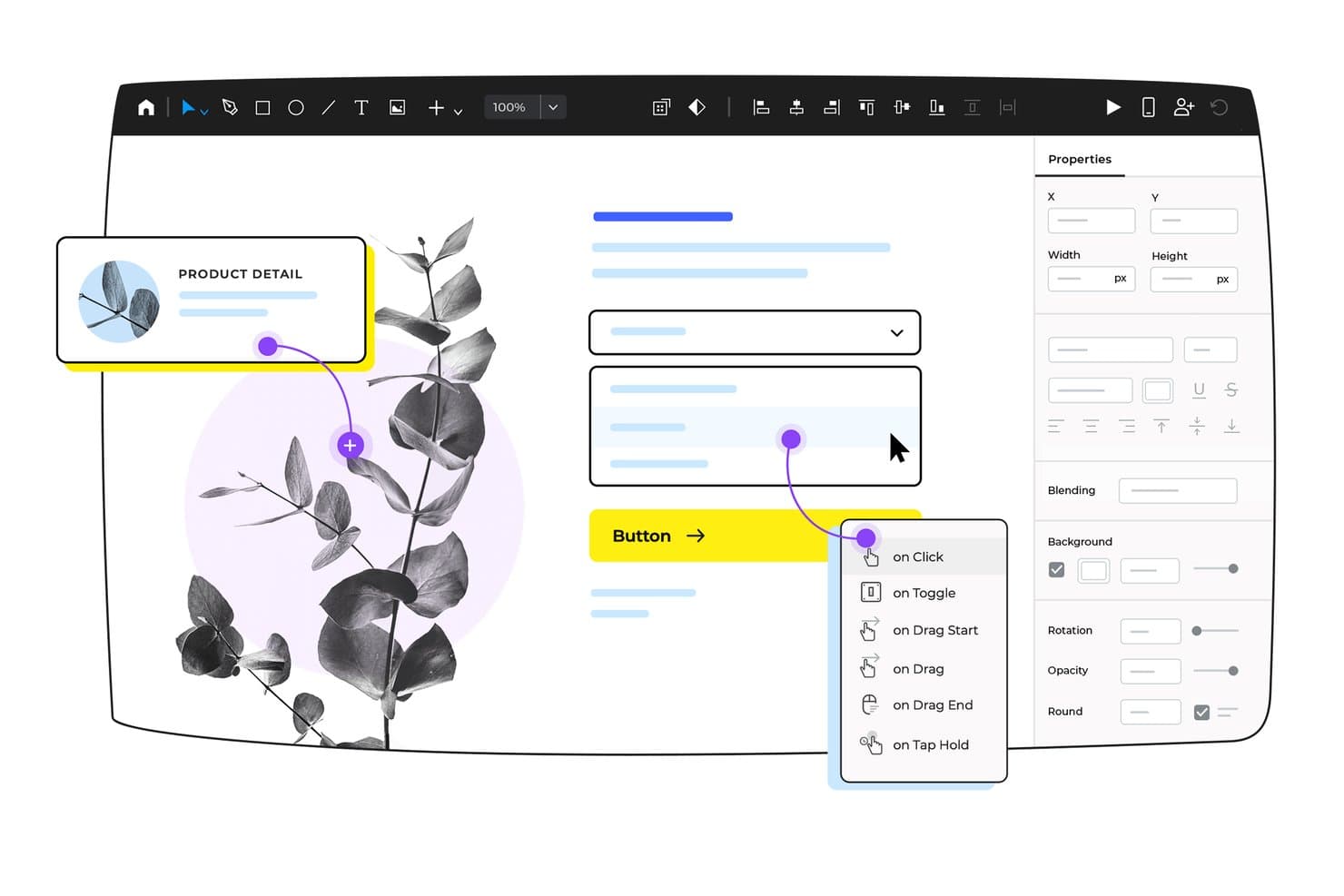
Justinmind consente agli utenti di aggiungere visivamente trigger interattivi agli elementi dell'interfaccia utente. Justinmind è una piattaforma desktop per la progettazione UX e la prototipazione destinata ai team che necessitano di strumenti di disegno vettoriale, componenti interattivi, moduli basati sui dati e mappatura avanzata dei flussi utente in un'applicazione dedicata alla realizzazione di interfacce web e mobili ad alta fedeltà.
Per chi è più adatto Justinmind?
Team di prodotto e designer che necessitano di prototipi dettagliati e funzionali per convalidare e documentare flussi utente ad alta fedeltà in un'applicazione desktop dedicata.
Perché ho scelto Justinmind
Ho incluso Justinmind perché durante la prototipazione di flussi utente avanzati, logiche complete e dati dinamici ottengo una fedeltà prossima a quella di un prodotto pronto per la produzione. Ho creato prototipi utilizzando i suoi oltre 4.000 componenti dell'interfaccia utente, condizioni con trascinamento e rilascio e moduli basati su dati reali per convalidare i requisiti prima di consegnare il lavoro al team di sviluppo. Il mio team può mappare interi flussi e simulare le funzionalità reali di un'applicazione con un solo strumento.
Funzionalità principali di Justinmind
- Ampia libreria di componenti dell'interfaccia utente: scegli tra oltre 4.000 widget pronti all'uso per interfacce web, iOS e Android.
- Raccolta di modelli di progettazione: accedi a modelli predefiniti per applicazioni mobili, dashboard e componenti interattivi.
- Prototipazione basata sui dati: importa file .csv per creare griglie di dati e moduli realistici per prototipi cliccabili.
- Modalità di consegna agli sviluppatori: analizza gli stili CSS, esporta risorse e genera documenti di specifica per la consegna.
Integrazioni di Justinmind
Justinmind offre integrazioni native con Figma, Sketch, Adobe XD, Adobe Photoshop, Jira, Confluence, Azure DevOps, UserTesting e UserZoom. Fornisce inoltre un'API e un SDK per integrazioni personalizzate e lo sviluppo di plugin.
Cosa è gratuito?
Justinmind offre un piano gratuito senza scadenza con funzionalità di prototipazione di base. Per accedere alla consegna agli sviluppatori, alle integrazioni avanzate e agli strumenti completi di collaborazione è necessario un piano a pagamento.
Pros and Cons
Pros:
- Fedeltà prossima a quella di un prodotto pronto per la produzione con interazioni complesse
- Ampia libreria di modelli web e mobili
- Schermate e visualizzatori illimitati nel piano gratuito
Cons:
- Il livello gratuito è limitato a un solo progetto
- Nessuna esportazione HTML o logica avanzata nel piano gratuito
Learn more about Justinmind: 10Ideale per la prototipazione UI/UX tutto-in-uno
Pixso
- Piano gratuito disponibile
- A partire da $12/utente/mese
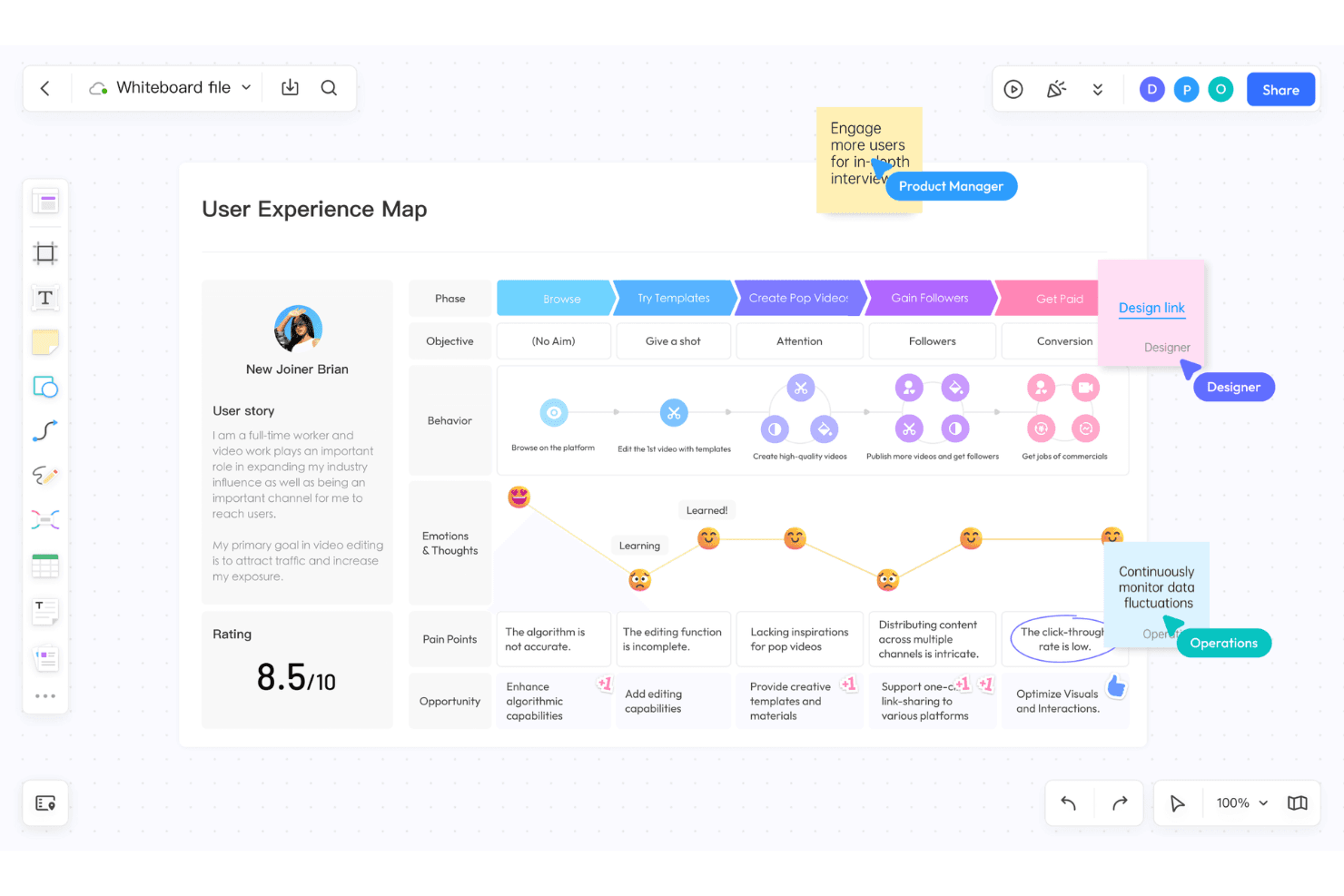
Pixso integra la progettazione UI/UX, le lavagne digitali e gli elementi di intelligenza artificiale. Pixso è una piattaforma di progettazione UX/UI basata sul browser che riunisce in un unico spazio la modifica vettoriale, la prototipazione, la lavagna collaborativa, le librerie di componenti e il passaggio di consegne agli sviluppatori.
Per chi è più adatto Pixso?
Pixso è ideale per i team di prodotto interfunzionali e i designer UX/UI che desiderano disporre di prototipazione e lavagna digitale basate sul browser in un unico strumento.
Perché ho scelto Pixso
Ho scelto Pixso perché il mio team può gestire la progettazione dell'interfaccia, la prototipazione e i workshop di ricerca in un unico spazio di lavoro nel browser. Mi piace usare la sua lavagna per i percorsi degli utenti insieme alla tela di progettazione, per poi trasformare i flussi in prototipi interattivi con animazioni, sovrapposizioni e variabili pronti per il passaggio di consegne agli sviluppatori.
Funzionalità principali di Pixso
- Modulo lavagna: Offre una tela infinita per brainstorming, mappe mentali e mappatura dei percorsi degli utenti.
- Modifica multiplayer in tempo reale: Consente ai team di modificare insieme i progetti, con presenza dei cursori e commenti.
- Librerie di componenti e stili: Permette di creare, gestire e aggiornare elementi di progettazione condivisi e riutilizzabili.
- Importazione da Figma, Sketch e XD: Supporta l'importazione diretta dei file per facilitare la migrazione da altre piattaforme di progettazione.
Integrazioni di Pixso
Pixso supporta l'importazione da Figma, Sketch, Adobe XD, Axure e file SVG, con esportazione delle risorse in PDF, PNG, JPG e SVG. Include un marketplace di plugin con strumenti per l'esportazione del codice e utilità di progettazione, ma non documenta integrazioni native con strumenti SaaS esterni.
Cosa include il piano gratuito?
Pixso offre un piano gratuito senza scadenza che consente di creare file e progetti illimitati con un massimo di 3 membri del team. Il piano gratuito non include funzionalità avanzate di gestione né il supporto per team più numerosi, ma è adatto per provare la piattaforma e gestire piccoli progetti di progettazione.
Pros and Cons
Pros:
- Importazione di file Figma, Sketch e XD
- Lavagna integrata per workshop di ricerca
- Modifica dei cursori multiplayer in tempo reale
Cons:
- Nessuna funzionalità dedicata ai test di usabilità
- Il limite sui file restringe i progetti dei team nel piano gratuito
Learn more about Pixso:
Altri software UX gratuiti
Ecco alcune altre opzioni di software UX che offrono piani o periodi di prova gratuiti. Sebbene questi strumenti non siano stati inclusi nel mio elenco, vale comunque la pena provarli:
- 11MiroIdeale per revisioni interfunzionali della progettazione UX
- 12FramerIdeale per passare dalla progettazione alla pubblicazione senza trasferimenti di consegne
- 13MarvelIdeale per il passaggio dalla prototipazione allo sviluppo tramite un unico link
- 14WhimsicalIdeale per flussi lo-fi con ospiti gratuiti illimitati
- 15VisilyIdeale per wireframe basati sull'IA senza competenze di progettazione
- 16MoqupsIdeale per wireframe e mockup online tutto-in-uno
Come valuto i software UX gratuiti
Per prima cosa, definisco che cosa si intende per gratuito. Uno strumento è idoneo solo se offre un piano gratuito a lungo termine, non solo una versione di prova, poiché il software UX supporta attività continue di progettazione e test, non progetti una tantum. Da qui, suddivido la valutazione in due livelli: le funzionalità essenziali che uno strumento deve avere per essere incluso nell'elenco e i fattori distintivi che differenziano un'opzione dall'altra.
Funzionalità essenziali (requisiti di base per questo elenco)
Oltre ai requisiti relativi alla mia offerta gratuita, utilizzo anche un sistema di punteggio per selezionare gli strumenti da includere nell'elenco. Ecco come funziona:
Quando seleziono gli strumenti per il mio elenco, assegno a ciascuno un punteggio su una scala da 0 (non offre la funzionalità) a 5 (eccelle in quest'area) per ogni funzionalità essenziale elencata di seguito. Calcolo quindi il punteggio totale dello strumento in percentuale e lo utilizzo per valutarne l'idoneità complessiva per l'elenco.
- Strumenti di prototipazione: verifico se è possibile collegare le schermate con aree sensibili cliccabili e aggiungere transizioni che simulano un flusso utente reale, non solo diapositive statiche.
- Area di lavoro per la progettazione: l'area di lavoro deve supportare forme, testo, immagini e controlli di layout, così da consentire il passaggio da wireframe preliminari a mockup rifiniti in un unico ambiente.
- Funzionalità di collaborazione: cerco commenti, modifica condivisa o link di revisione che consentano a product manager e sviluppatori di fornire feedback senza creare un account separato.
- Riutilizzabilità dei componenti: pulsanti, barre di navigazione e campi modulo riutilizzabili che si aggiornano in ogni schermata quando si modifica l'origine fanno risparmiare ore durante i cicli di iterazione.
- Supporto ai test di usabilità: valuto se lo strumento consente di condividere un link al prototipo e raccogliere feedback strutturati, dati sui clic o risultati relativi al completamento delle attività da utenti reali.
- Esportazione e passaggio allo sviluppo: gli sviluppatori hanno bisogno di link condivisibili o risorse scaricabili con dettagli sufficienti per la realizzazione, quindi verifico la presenza di visualizzazioni delle specifiche, esportazione delle risorse e frammenti di codice.
Una volta ottenuto un elenco di strumenti che soddisfano i criteri, considero ciò che distingue ciascuna piattaforma.
Fattori distintivi (ciò che differenzia i fornitori)
Ecco come confronto i diversi fornitori:
Funzionalità distintive
Cerco widget di feedback integrati che consentano agli stakeholder di appuntare commenti direttamente sulla schermata di un prototipo. Questo elimina il continuo scambio di screenshot nelle conversazioni in chat durante le revisioni degli sprint. Anche i cursori collaborativi sono altrettanto importanti: quando un PM e un ingegnere possono modificare insieme un file in tempo reale, l'allineamento avviene in pochi minuti invece che attraverso cicli asincroni. Valuto inoltre la libreria di modelli della community di ciascuno strumento, poiché i kit gratuiti per wireframe e i modelli iniziali per le mappe del percorso aiutano i team a superare la difficoltà di iniziare con una tela vuota e a passare direttamente alla validazione.
Oltre le funzionalità
Verifico quanto facilmente i non designer possano utilizzare lo strumento senza formazione. Un PM dovrebbe poter aprire un link condiviso, lasciare un feedback e uscire in pochi minuti, non assistere a video introduttivi. I piani gratuiti limitano inoltre il numero di file o editor attivi, quindi valuto se un team in crescita raggiungerà tali limiti nel bel mezzo di uno sprint. Infine, esamino le opzioni di esportazione. Strumenti come Figma e Penpot consentono di scaricare risorse o file non elaborati, proteggendo il lavoro nel caso in cui si passi in seguito a un'altra piattaforma o si perda l'accesso a un account gratuito.
Come scegliere un software UX gratuito
Gli elenchi complessi di funzionalità e le strutture dei prezzi possono rendere difficile capire cosa si ottiene realmente da un software UX gratuito. Per aiutarti a rimanere concentrato mentre valuti le diverse opzioni, ecco alcuni fattori da tenere presenti:
| Fattore | Cosa considerare |
|---|---|
| FattoreAmbito dell’offerta gratuita | Cosa considerareControlla cosa è incluso nel piano gratuito. Comprende funzionalità essenziali come la creazione di wireframe e la prototipazione oppure sono bloccate da paywall? |
| FattoreScalabilità | Cosa considerareValuta se lo strumento può crescere insieme al tuo team. Supporterà un numero maggiore di utenti e progetti con l’espandersi delle tue esigenze? |
| FattoreIntegrazioni | Cosa considerareVerifica che il software si integri con gli strumenti già utilizzati dal tuo team, come Slack, Atlassian Jira o Google Drive, per organizzare i flussi di lavoro. |
| FattoreSemplicità d’uso | Cosa considerareCerca un’interfaccia intuitiva che riduca al minimo la curva di apprendimento, consentendo al tuo team di iniziare rapidamente a progettare senza una formazione approfondita. |
| FattoreCollaborazione | Cosa considerareValuta le funzionalità di collaborazione dello strumento. I membri del team possono lavorare contemporaneamente e fornire feedback in tempo reale sui progetti? |
| FattorePersonalizzazione | Cosa considerareDetermina se il software consente di personalizzare modelli e componenti per adattarli alle esigenze di design specifiche del tuo team. |
| FattoreAssistenza | Cosa considerareControlla la disponibilità di opzioni di assistenza clienti, come chat dal vivo, e-mail o forum, per supportare il tuo team quando si verificano problemi. |
| FattoreSicurezza | Cosa considerareVerifica che lo strumento soddisfi i requisiti di sicurezza dei dati della tua organizzazione, soprattutto se gestisci informazioni sensibili sui progetti. |
Che cos’è un software UX gratuito?
Il software UX è un tipo di strumento progettato per aiutare progettisti e sviluppatori a creare esperienze utente attraverso schemi preliminari, prototipazione e collaborazione alla progettazione. In genere, le offerte gratuite includono versioni di base di questi strumenti con funzionalità limitate o periodi di prova. Professionisti come progettisti UI/UX, responsabili di prodotto e sviluppatori utilizzano questi strumenti per migliorare i processi di progettazione e aumentare la soddisfazione degli utenti. Funzionalità come la collaborazione in tempo reale, le interfacce intuitive e l'integrazione con altri strumenti supportano flussi di lavoro di progettazione efficienti e la collaborazione tra team.
Funzionalità
Esaminiamo le funzionalità comunemente presenti nei software UX e quali sono generalmente incluse nei piani gratuiti rispetto a quelli a pagamento.
Funzionalità tipiche dei software UX gratuiti
- Strumenti per gli schemi preliminari: consentono agli utenti di creare strutture e layout di base per i propri progetti, aiutando a visualizzare l'interfaccia utente.
- Interfaccia con trascinamento: semplifica il processo di progettazione consentendo di posizionare e modificare facilmente gli elementi senza scrivere codice.
- Libreria di modelli: fornisce modelli predefiniti per avviare rapidamente i progetti e risparmiare tempo nella configurazione della progettazione.
- Collaborazione in tempo reale: consente ai membri del team di lavorare contemporaneamente sugli stessi progetti, migliorando la comunicazione e l'efficienza.
- Prototipazione di base: consente agli utenti di creare semplici prototipi interattivi per testare i flussi utente e raccogliere riscontri.
- Opzioni di esportazione: consentono agli utenti di salvare e condividere i progetti in vari formati per lo sviluppo o la presentazione successivi.
Funzionalità tipiche dei software UX a pagamento
- Prototipazione avanzata: offre interazioni e animazioni più complesse per creare prototipi ad alta fedeltà che riproducono fedelmente i prodotti finali.
- Componenti personalizzabili: consentono agli utenti di creare e modificare gli elementi di progettazione in base alle esigenze specifiche del progetto, offrendo flessibilità.
- Controllo delle versioni: fornisce un sistema per monitorare le modifiche e gestire diverse iterazioni del progetto, mantenendo coerenza e organizzazione.
- Strumenti per i test utente: consentono di raccogliere riscontri dagli utenti attraverso funzionalità di test integrate, migliorando la validazione della progettazione.
- Analisi e report: offrono una visione delle prestazioni della progettazione e del comportamento degli utenti, favorendo decisioni basate sui dati.
- Integrazione con strumenti esterni: supporta flussi di lavoro completi collegandosi ad altri software, come strumenti per la gestione dei progetti o la comunicazione.
Vantaggi
L'implementazione di un software UX gratuito offre diversi vantaggi al tuo team e alla tua azienda. Ecco alcuni dei benefici che puoi aspettarti:
- Risparmio sui costi: i piani gratuiti consentono al tuo team di accedere agli strumenti di progettazione essenziali senza impegno finanziario, riducendo le spese.
- Maggiore collaborazione: le funzionalità di collaborazione in tempo reale aiutano il tuo team a lavorare insieme in modo efficiente, anche da remoto.
- Prototipazione rapida: gli strumenti di prototipazione di base consentono di creare rapidamente progetti interattivi, contribuendo ad accelerare il processo di sviluppo.
- Accessibilità: le soluzioni basate sul cloud permettono al tuo team di accedere ai progetti di progettazione da qualsiasi luogo, supportando modalità di lavoro flessibili.
- Facilità d'uso: le interfacce intuitive e la funzionalità di trascinamento semplificano il processo di progettazione, rendendolo accessibile anche ai non progettisti.
- Ottimizzazione delle risorse: i modelli e i componenti predefiniti fanno risparmiare tempo e fatica, consentendo al tuo team di concentrarsi sulla creatività e sull'innovazione.
Costi e prezzi
Capisco che tu sia arrivato a questo articolo cercando le migliori opzioni di software UX disponibili gratuitamente. Tuttavia, poiché i piani gratuiti offrono solo funzionalità limitate, è molto probabile che in futuro dovrai passare a un piano superiore.
La tabella seguente riassume i piani più comuni, i relativi prezzi medi e le funzionalità generalmente incluse nelle soluzioni software UX:
Tabella di confronto dei piani per i software UX
| Tipo di piano | Prezzo medio | Funzionalità comuni |
|---|---|---|
| Tipo di pianoPiano gratuito | Prezzo medio$0 | Funzionalità comuniStrumenti di base per la creazione di wireframe, interfaccia con trascinamento, modelli limitati, prototipazione di base e collaborazione in tempo reale. |
| Tipo di pianoPiano personale | Prezzo medio$4-$10/user/month | Funzionalità comuniTutte le funzionalità gratuite, modelli aggiuntivi, opzioni di prototipazione avanzate, integrazioni limitate e opzioni di esportazione. |
| Tipo di pianoPiano aziendale | Prezzo medio$10-$30/user/month | Funzionalità comuniTutte le funzionalità del piano personale, prototipazione avanzata, identità del marchio personalizzata, strumenti di collaborazione del team e più integrazioni. |
| Tipo di pianoPiano per grandi aziende | Prezzo medio$24+/user/month | Funzionalità comuniTutte le funzionalità del piano aziendale, assistenza prioritaria, sicurezza avanzata, analisi personalizzate e gestione dedicata del profilo. |
Domande frequenti sul software UX gratuito
Ecco alcune risposte alle domande comuni sul software UX gratuito:
Come vengono protetti oggi i dati dei progetti negli strumenti UX gratuiti?
La maggior parte delle piattaforme UX gratuite utilizza l’hosting nel cloud, quindi inizia esaminando la loro informativa sulla privacy, le certificazioni di sicurezza e i dettagli sulla residenza dei dati. Verifica se i progetti sono crittografati durante il trasferimento e a riposo e chi può accedere ai file archiviati. Utilizza i ruoli dell’area di lavoro, l’accesso singolo quando disponibile e disabilita i link pubblici per i lavori sensibili. Esporta regolarmente copie di backup, elimina i progetti inutilizzati e verifica che i contratti o gli NDA coprano tutti gli elementi di progettazione condivisi online tramite questi strumenti.
Cosa succede se il nostro team supera improvvisamente i limiti di un piano UX gratuito?
Quando il team supera i limiti di un piano UX gratuito, esamina innanzitutto i limiti di utilizzo, come progetti attivi, spazio di archiviazione dei file, editor e ospiti. Individua le funzionalità avanzate di cui hai realmente bisogno, come sistemi di progettazione, autorizzazioni o integrazioni. Poi confronta i livelli di aggiornamento con la roadmap e le previsioni sull’organico. Prima di effettuare l’aggiornamento, elimina i vecchi file e concorda regole interne per la denominazione, così la transizione sembrerà un aggiornamento intenzionale del sistema anziché una risposta disordinata e affrettata al raggiungimento di limiti rigidi.
Posso combinare diversi strumenti UX gratuiti in un unico flusso di lavoro?
Sì, combinare diversi strumenti UX gratuiti è comune, ma è utile assegnare a ciascuno uno scopo preciso. Ad esempio, utilizza una piattaforma per i wireframe a bassa fedeltà, un’altra per i prototipi interattivi e una terza per archiviare le ricerche UX o le bacheche di feedback. Definisci la fonte di verità per i design finali, documenta i passaggi di consegna agli sviluppatori e pianifica una gestione periodica, così gli elementi non si frammenteranno tra aree di lavoro sovrapposte e account personali man mano che i progetti crescono.
Come possono imparare rapidamente gli strumenti UX gratuiti le persone che non si occupano di design?
Inizia con un unico strumento UX gratuito e crea un progetto di esercitazione semplice e realistico, ad esempio la riprogettazione di un modulo già utilizzato dal team. Condividi brevi video Loom interni o schermate che mostrino le azioni principali: aggiungere frame, collegare schermate, lasciare commenti ed esportare file. Affianca alle persone che non si occupano di design un collega esperto di UX per revisioni settimanali e celebra i piccoli successi. Un glossario chiaro e una lista di controllo rapida ridurranno il senso di intimidazione e aumenteranno la loro sicurezza nell’uso dei software di progettazione.
Quali metriche mostrano che gli strumenti UX gratuiti migliorano i prodotti?
Guarda oltre la soddisfazione dei designer e monitora risultati misurabili. Controlla la durata del ciclo di revisione dei prototipi, il numero di iterazioni prima dell’approvazione delle parti interessate e i bug correlati a problemi UX dopo il rilascio. Confronta i tassi di completamento delle attività e i ticket di assistenza prima e dopo l’adozione degli strumenti. Puoi anche intervistare gli utenti e i team interni sulla chiarezza e l’usabilità, quindi collegare questi punteggi a metriche aziendali come conversione, fidelizzazione e adozione delle funzionalità tra cicli di sviluppo e rilasci.
Gli strumenti UX gratuiti funzionano bene con una connessione Internet debole?
Gli strumenti UX gratuiti sono generalmente basati sul cloud, quindi una connessione Internet debole ostacola soprattutto la collaborazione e la sincronizzazione dei file di grandi dimensioni. Prova ogni piattaforma con la connessione abituale caricando progetti pesanti, esportando elementi e partecipando a commenti o sessioni collaborative dal vivo. Invita i membri del team a chiudere le applicazioni che consumano molta banda durante le sessioni di progettazione e tieni pronti appunti o schizzi offline. Come soluzione di backup, pianifica sessioni di sincronizzazione da casa o da spazi di coworking con una connettività più forte durante i lanci critici.