

Il software gratuito per la gestione delle idee consente al tuo team di raccogliere, organizzare e sviluppare idee senza costi iniziali, attraverso un piano gratuito o una prova gratuita. Se stai cercando modi per incoraggiare l'innovazione, raccogliere feedback o semplificare il brainstorming, trovare lo strumento gratuito giusto può aiutarti a testare le soluzioni prima di prendere un impegno. In questo elenco troverai piattaforme affidabili che supportano la raccolta e la collaborazione sulle idee, così potrai scegliere quella più adatta alle esigenze e al budget del tuo team nel 2026.
Perché fidarsi dei nostri consigli sui software
6,700+
Reviews
20
Industry experts
16+
Evaluation factors
14
Years
Il nostro team testa e recensisce software dal 2012. In quanto product manager noi stessi, sappiamo quanto sia difficile — e importante — scegliere il software giusto.
Per questa guida, abbiamo valutato gli strumenti attraverso test pratici e ricerche indipendenti, assegnando un punteggio agli strumenti in base ai nostri criteri di selezione.
Le nostre recensioni riflettono il nostro giudizio editoriale umano, non un discorso di vendita.
Revisori esperti:
- Andrew LumbySenior TPM
- Cristiano ValimSenior UI/UX Lead


Tabella comparativa dei software gratuiti per la gestione delle idee
Di seguito trovi le mie sintesi dettagliate dei migliori software gratuiti per la gestione delle idee inclusi nel mio elenco.
| Tool | Best For | Trial Info | Price | ||
|---|---|---|---|---|---|
| 1 | Ideale per la raccolta di idee su più canali | Piano gratuito disponibile | A partire da $7/utente/mese | Website | |
| 2 | Ideale per monitorare le idee dalla concezione alla consegna sotto la guida del PM | Piano gratuito + prova gratuita di 14 giorni disponibile | A partire da $8.48/utente/mese | Website | |
| 3 | Ideale per organizzare le idee sulle lavagne | Piano gratuito + prova gratuita di 14 giorni + dimostrazione gratuita disponibile | A partire da $7/utente/mese (con fatturazione annuale) | Website | |
| 4 | Ideale per la gestione dei feedback sui prodotti | Piano gratuito + demo gratuita + prova gratuita disponibili | A partire da $19/mese (fatturato annualmente) | Website | |
| 5 | Ideale per la mappatura collaborativa delle idee | Piano gratuito + prova gratuita di 14 giorni disponibile | A partire da $8/utente/mese (fatturato annualmente) | Website | |
| 6 | Ideale per il monitoraggio delle idee basato su kanban con un piano gratuito | Prova gratuita di 14 giorni | Da $5/utente/mese (con fatturazione annuale) | Website | |
| 7 | Ideale per la prioritizzazione delle idee con formule personalizzate | Prova gratuita di 14 giorni | A partire da $12/utente/mese (con fatturazione annuale) | Website | |
| 8 | Ideale per bacheche open source per la votazione delle funzionalità | Piano gratuito disponibile | A partire da $25/mese | Website | |
| 9 | Piano gratuito disponibile | A partire da $29/mese | Website | ||
| 10 | Piano gratuito disponibile | Da $10/utente/mese | Website |


Recensioni dei software gratuiti per la gestione delle idee
Di seguito trovi le mie sintesi dettagliate dei migliori software gratuiti per la gestione delle idee inclusi nel mio elenco. Le mie recensioni offrono una panoramica dettagliata delle funzionalità, dei casi d’uso migliori e dei prezzi di ogni piattaforma, per aiutarti a trovare quella più adatta a te.
 Ideale per la raccolta di idee su più canali
- Piano gratuito disponibile
- A partire da $7/utente/mese
Visit WebsiteCustomer Rating:4.7/5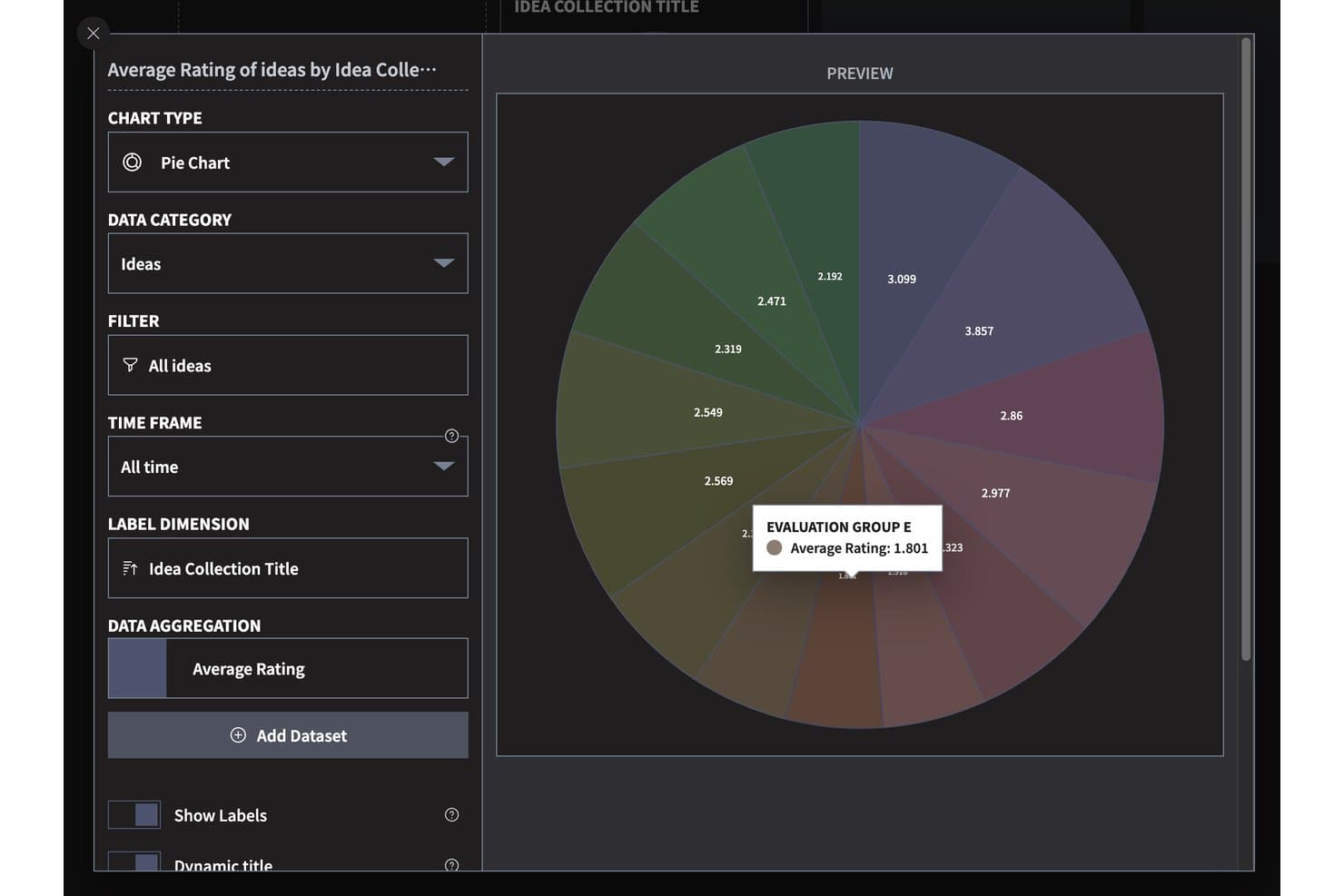
Ideanote visualizza le valutazioni delle idee nelle raccolte con un grafico a torta. Ideanote è un software gratuito per la gestione delle idee con moduli personalizzati per l'invio, raccolte di idee, votazione e valutazione, flussi di lavoro configurabili, organizzazione assistita dall'IA e diverse visualizzazioni per esaminare gli invii.
A chi è più adatto Ideanote?
I responsabili di prodotto e i team di innovazione che devono raccogliere idee da dipendenti e clienti e valutare gli invii attraverso flussi di lavoro strutturati troveranno Ideanote adatto alle loro esigenze.
Perché ho scelto Ideanote
Ho scelto Ideanote per la raccolta di idee su più canali perché posso raccogliere contributi tramite moduli personalizzati, widget incorporabili, link condivisibili e invii anonimi o senza registrazione. Il piano gratuito offre a un piccolo team fino a 10 utenti, 250 idee e cinque raccolte. Posso quindi ordinare gli invii con tag e raggruppamento assistito dall'IA.
Funzionalità principali di Ideanote
- Commenti organizzati in discussioni: Discuti delle idee con allegati, Mi piace e traduzioni.
- Modelli di idee: Scegli tra oltre 100 modelli pronti all'uso o salva i tuoi.
- Rilevamento dei duplicati: Usa l'IA per identificare, unire o collegare idee simili.
- Reportistica: Esamina il coinvolgimento, le tendenze, il ROI, gli obiettivi KPI e gli imbuti della pipeline.
Integrazioni di Ideanote
Ideanote elenca integrazioni con Microsoft Teams, Power Automate, Power BI, webhook e Splunk; l'accesso alle integrazioni sembra limitato al livello più alto. Offre anche un'API REST pubblica e Zapier.
Cosa è gratuito?
Ideanote offre un piano gratuito per sempre per un massimo di 10 utenti, 250 idee e cinque raccolte. Le integrazioni sembrano limitate al livello più alto.
Pros and Cons
Pros:
- Molteplici modalità di invio anonimo e senza registrazione
- I revisori apprezzano i widget flessibili per i feedback
- Il raggruppamento tramite IA aiuta a organizzare gli invii correlati
Cons:
- Il piano gratuito si ferma a 250 idee
- Gli ospiti esterni vengono conteggiati nel limite di utenti
Learn more about Ideanote: 2Ideale per monitorare le idee dalla concezione alla consegna sotto la guida del PM
Jira
- Piano gratuito + prova gratuita di 14 giorni disponibile
- A partire da $8.48/utente/mese
Visit WebsiteCustomer Rating:4.4/5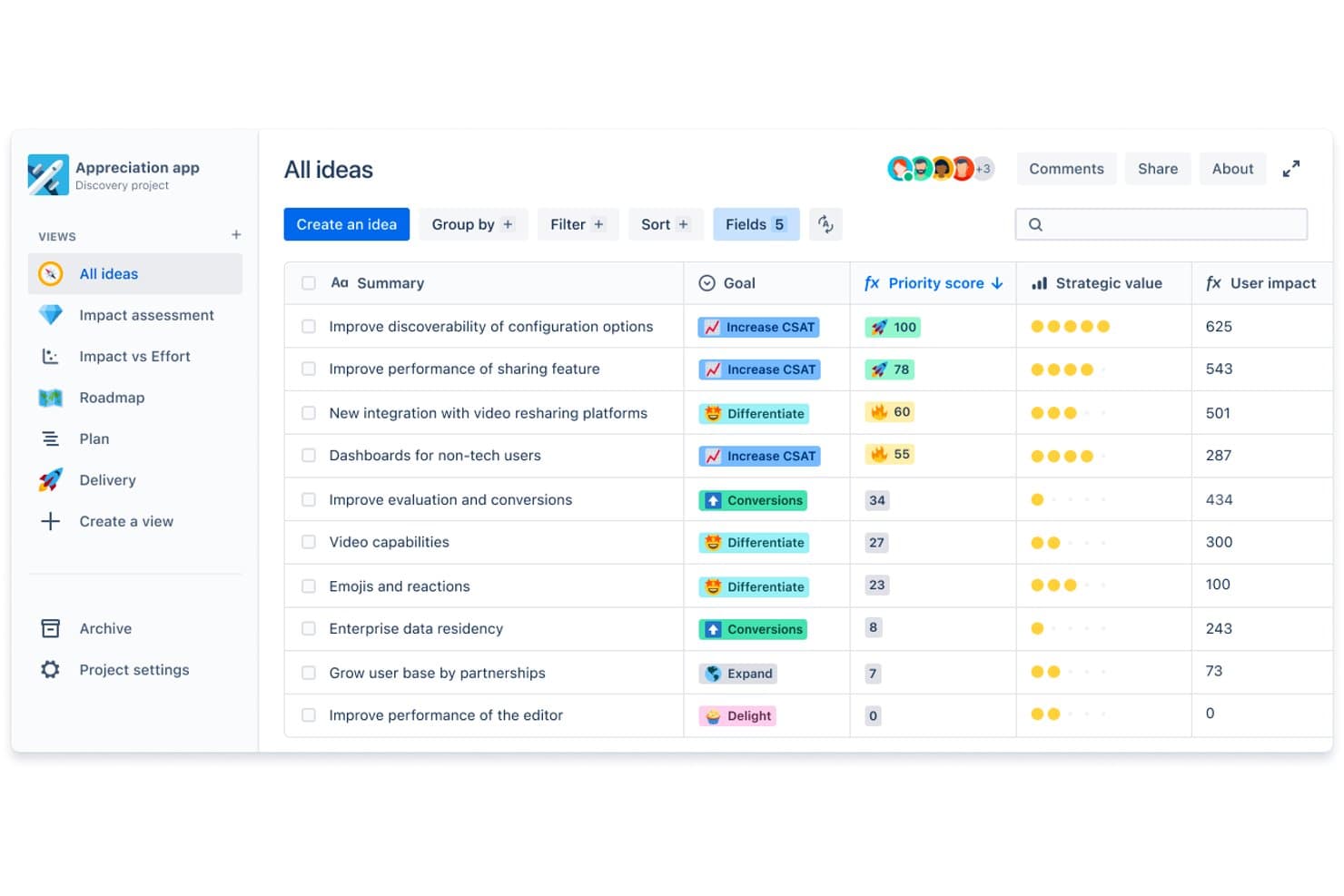
Jira consente agli utenti di definire la priorità delle idee in base al punteggio, all'obiettivo e al valore strategico. Il piano gratuito di Jira supporta la gestione delle idee tramite una piattaforma di monitoraggio delle attività, con acquisizione degli elementi di lavoro, organizzazione del backlog, definizione delle priorità, bacheche e flussi di lavoro configurabili.
Per chi è più adatto Jira?
Jira è una buona soluzione per i responsabili di prodotto che necessitano di monitorare le idee dalla concezione alla consegna, sotto la guida del PM, tra le priorità della fase di scoperta e il lavoro di ingegneria.
Perché ho scelto Jira
Ho scelto Jira, la soluzione migliore per monitorare le idee dalla concezione alla consegna sotto la guida del PM, perché il suo piano gratuito consente al mio team di acquisire le idee come attività, definire le priorità in un backlog e far avanzare il lavoro approvato attraverso flussi di lavoro configurabili sulle bacheche. Quando il feedback dei clienti indica una modifica al prodotto, posso monitorarne la priorità e lo stato di consegna mentre passa dalla fase di scoperta all'ingegneria.
Funzionalità principali di Jira
- Campi personalizzati: Aggiungi campi ai record delle idee per dettagli come il segmento di clientela o l'area di opportunità.
- Etichette: Contrassegna le idee con termini ricercabili per raggruppare le proposte correlate.
- Dashboard: Crea viste configurabili con gadget che riepilogano i dati del progetto.
- Regole di automazione: Imposta azioni basate su regole che rispondono a eventi come la creazione di un'attività.
Integrazioni di Jira
Jira offre oltre 3.000 app del Marketplace, tra cui Slack, Microsoft Teams, GitHub e Confluence, per collegare il monitoraggio delle idee alle discussioni del team e al lavoro di consegna. Jira offre anche API per integrazioni personalizzate.
Cosa è gratuito?
Jira dispone di un piano Cloud gratuito per sempre per un massimo di 10 utenti, con 2 GB di spazio di archiviazione, 150 passaggi di automazione al mese e 100 e-mail al giorno per sito. Tutti gli utenti sono amministratori e le autorizzazioni e le impostazioni a livello di spazio o di elemento di lavoro richiedono un piano a pagamento.
Pros and Cons
Pros:
- Le idee passano dal backlog alla pianificazione degli sprint
- I campi personalizzati acquisiscono il contesto relativo ai clienti e alle opportunità
- Le idee approvate seguono flussi di lavoro di consegna configurabili
Cons:
- La configurazione dei flussi di lavoro comporta un sovraccarico per i team piccoli
- Il piano gratuito non offre autorizzazioni granulari
 Ideale per organizzare le idee sulle lavagne
- Piano gratuito + prova gratuita di 14 giorni + dimostrazione gratuita disponibile
- A partire da $7/utente/mese (con fatturazione annuale)
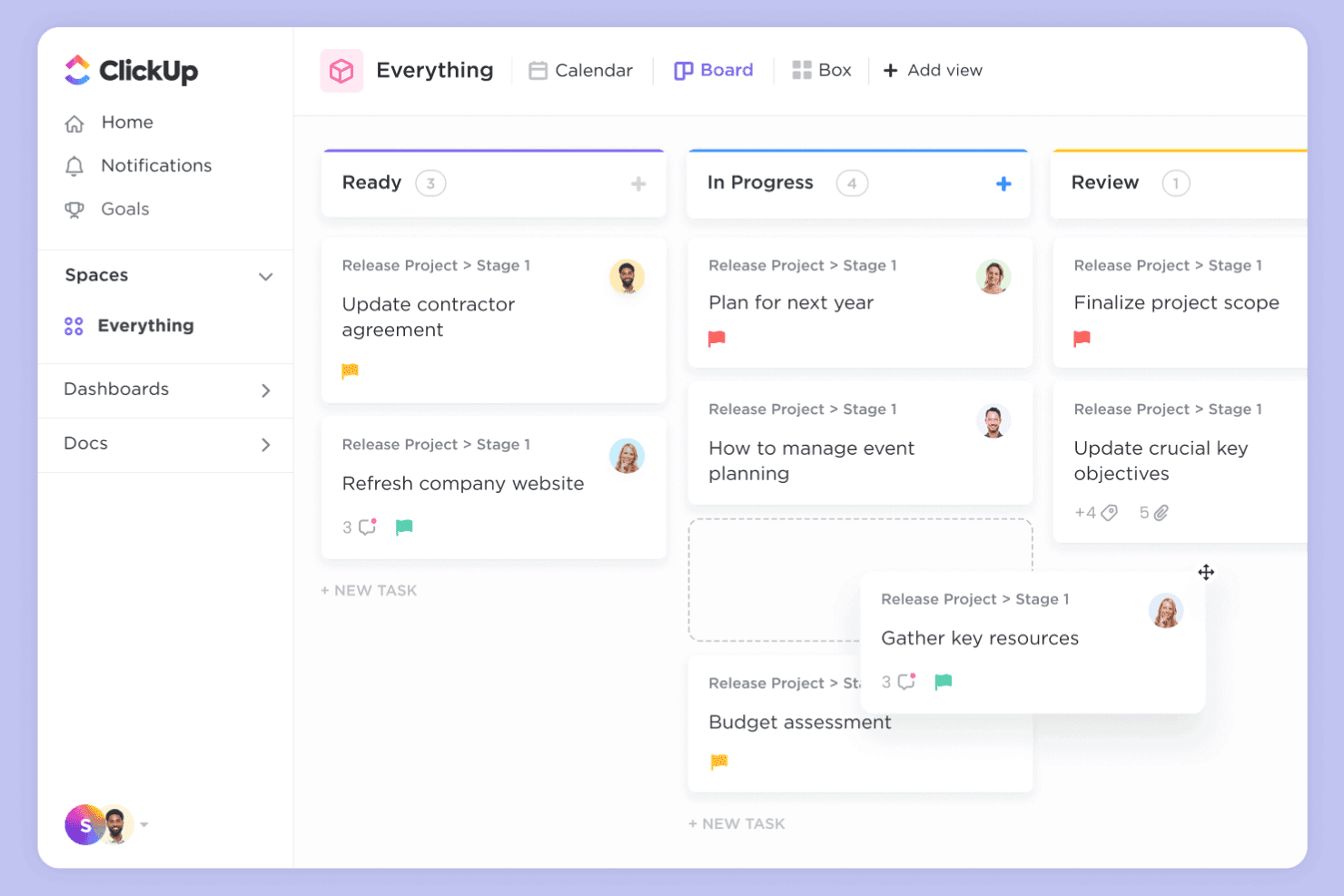
ClickUp combina lavagne e attività per flussi di lavoro che trasformano le idee in risultati concreti. ClickUp è una piattaforma di gestione del lavoro con un piano gratuito per la gestione delle idee, che combina lavagne collaborative e documenti con elenchi di attività, campi personalizzati e viste del flusso di lavoro.
Per chi è più indicato ClickUp?
I responsabili di prodotto che coordinano la fase esplorativa tra progettazione e ingegneria possono usare ClickUp per raccogliere proposte e assegnare attività successive.
Perché ho scelto ClickUp
Ho scelto ClickUp perché è ideale per trasformare le idee delle lavagne in attività monitorabili. Uso le lavagne per mappare le proposte relative alle funzionalità, poi creo attività assegnate negli elenchi e aggiungo campi personalizzati per l'impatto o la responsabilità. Le viste del flusso di lavoro mi aiutano a monitorare ogni idea dalla revisione alla consegna.
Funzionalità principali di ClickUp
- Documenti: Redigi e organizza documenti di sintesi del prodotto, note di ricerca e registri delle decisioni.
- Commenti: Discuti le idee direttamente nelle voci pertinenti e rispondi nelle conversazioni.
- Moduli: Raccogli proposte di idee strutturate tramite moduli personalizzabili.
- Integrazioni: Collega ClickUp a strumenti come Slack e GitHub.
Integrazioni di ClickUp
Le integrazioni di ClickUp includono Slack e GitHub, che possono collegare le discussioni sulle idee e il lavoro di sviluppo al tuo flusso di lavoro.
Cosa è gratuito?
Il piano gratuito per sempre di ClickUp non ha limiti di tempo e include attività e membri illimitati. Limita l'utilizzo a tre lavagne e 60 MB di spazio di archiviazione.
Pros and Cons
Pros:
- Le idee delle lavagne diventano attività assegnate
- I moduli raccolgono proposte di idee strutturate
- Il piano gratuito include attività e membri illimitati
Cons:
- Il piano gratuito limita le squadre a tre lavagne
- Il piano gratuito include solo 60 MB di spazio di archiviazione
Learn more about ClickUp: Ideale per la gestione dei feedback sui prodotti
- Piano gratuito + demo gratuita + prova gratuita disponibili
- A partire da $19/mese (fatturato annualmente)
Visit WebsiteCustomer Rating:4.2/5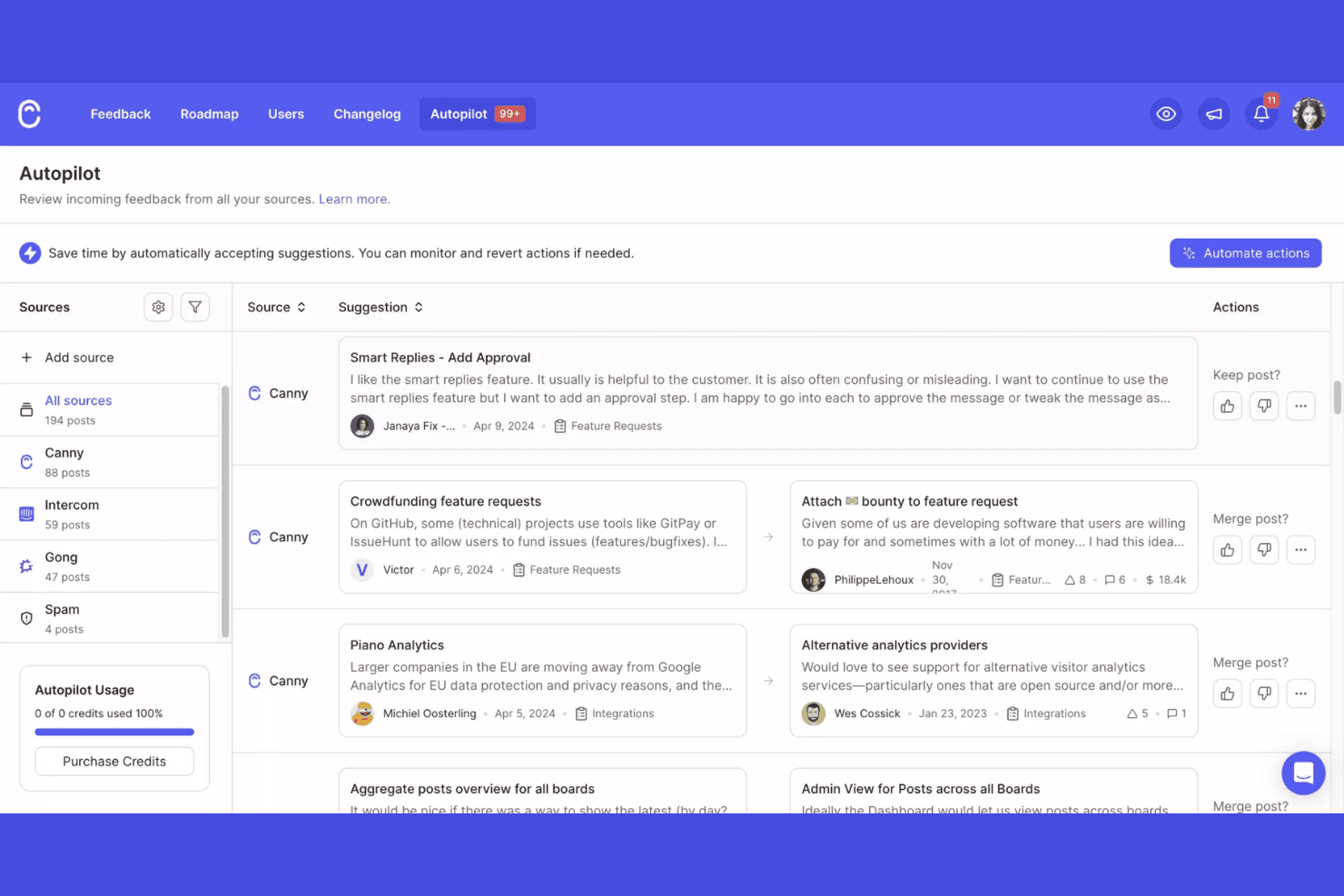
Canny raccoglie, monitora e definisce le priorità dei feedback sui prodotti. Canny è una piattaforma gratuita per la gestione delle idee, dove i team raccolgono suggerimenti dei clienti, organizzano richieste di funzionalità, raccolgono voti e gestiscono le roadmap dei prodotti.
Per chi è più adatto Canny?
Canny è adatto ai team di gestione del prodotto che necessitano di un sistema dedicato per raccogliere e definire le priorità dei feedback dei clienti.
Perché ho scelto Canny
Considero Canny la soluzione “migliore per la gestione dei feedback sui prodotti” perché collega le richieste dei clienti alla definizione delle priorità. Le bacheche pubbliche dei feedback consentono agli utenti di inviare e votare le idee, mentre gli aggiornamenti di stato mostrano se le richieste sono in fase di revisione, pianificate o già implementate. Quando i clienti chiedono la stessa modifica al flusso di lavoro, utilizzo i voti e i dati delle richieste per valutare la domanda prima di definire la roadmap.
Funzionalità principali di Canny
- Commenti interni: Discuti privatamente le idee con il tuo team in ogni pubblicazione.
- Segmentazione degli utenti: Filtra i feedback per gruppi, come i clienti paganti.
- Registro delle modifiche del prodotto: Pubblica aggiornamenti e formatta le voci con testo avanzato e immagini.
- Integrazioni: Raccogli feedback da strumenti come Slack, Jira e Intercom.
Integrazioni di Canny
Canny si integra con Slack, Jira e Intercom per raccogliere i feedback dei clienti dagli strumenti che il tuo team utilizza già.
Cosa è incluso gratuitamente?
Canny offre un piano gratuito a tempo indeterminato, limitato a 25 utenti monitorati e a cinque amministratori con ruolo di Proprietario o Gestore, con Collaboratori illimitati. Il piano limita le integrazioni a Feedback e Notifiche ed esclude le email del registro delle modifiche e i domini personalizzati.
Pros and Cons
Pros:
- Le bacheche pubbliche raccolgono e classificano le richieste
- Gli aggiornamenti di stato mostrano i progressi della roadmap
- I collaboratori illimitati possono inviare feedback
Cons:
- Il piano gratuito monitora solo 25 utenti
- I domini personalizzati e le email del registro delle modifiche sono esclusi
Learn more about Canny: 5Ideale per la mappatura collaborativa delle idee
Miro
- Piano gratuito + prova gratuita di 14 giorni disponibile
- A partire da $8/utente/mese (fatturato annualmente)
Visit WebsiteCustomer Rating:4.8/5
Miro consente la generazione visiva di idee e la collaborazione della squadra in tempo reale. Se cerchi un modo visivo per acquisire, organizzare e sviluppare idee, vale la pena prendere in considerazione Miro. La piattaforma è particolarmente utile per le squadre distribuite, i responsabili di prodotto e i facilitatori che vogliono generare idee e delineare concetti insieme in tempo reale. La lavagna infinita di Miro e le funzionalità collaborative aiutano le squadre a trasformare pensieri sparsi in piani operativi.
Per chi è più adatto Miro?
Miro è particolarmente adatto alle squadre distribuite e ai facilitatori che hanno bisogno di una piattaforma visiva per la generazione collaborativa di idee e la gestione delle idee.
Perché ho scelto Miro
Ho scelto Miro perché le sue funzionalità di collaborazione visiva lo rendono particolarmente adatto alle squadre distribuite che gestiscono idee insieme. La lavagna infinita consente alle squadre di delineare le idee, raggruppare i riscontri e creare flussi di lavoro in un modo facile da seguire durante le sessioni da remoto. Apprezzo il modo in cui funzionalità come le note adesive, le votazioni e la modifica collaborativa in tempo reale aiutano le squadre ad acquisire e dare priorità rapidamente ai contributi provenienti da qualsiasi luogo. Questi punti di forza rispondono direttamente alle esigenze delle squadre che cercano un approccio flessibile e visivo alla gestione delle idee.
Funzionalità principali di Miro
Tra le altre funzionalità di Miro che si distinguono per le squadre che gestiscono le idee ci sono:
- Libreria di modelli: Accedi a un'ampia gamma di modelli predefiniti per la generazione di idee, le mappe mentali e i flussi di lavoro agili.
- Commenti ed etichette: Aggiungi commenti ed etichette direttamente alle idee o agli oggetti sulla lavagna per fornire contesto e organizzare facilmente i contenuti.
- Modalità presentazione: Condividi le lavagne in un formato guidato simile a una presentazione per accompagnare le parti interessate attraverso idee e piani.
- Cronologia delle versioni: Tieni traccia delle modifiche e ripristina le versioni precedenti delle lavagne per gestire l'evoluzione delle idee nel tempo.
Integrazioni di Miro
Le integrazioni includono Microsoft 365, Google Workspace, Atlassian, ServiceNow, GitHub Copilot, OpenAI Codex, Replit, Gemini CLI, Claude Code, Cursor e altro.
Cosa è gratuito?
Miro offre un piano gratuito senza scadenza con membri della squadra illimitati e accesso a 3 lavagne modificabili per area di lavoro. Il piano gratuito include le integrazioni principali, oltre 5.000 modelli e opzioni di esportazione di base, ma le funzionalità avanzate e le lavagne illimitate richiedono un piano a pagamento.
Pros and Cons
Pros:
- Lavagna infinita per una mappatura illimitata delle idee
- Strumenti integrati per la votazione e la definizione delle priorità
- Cronologia delle versioni per monitorare l'evoluzione delle idee
Cons:
- Le opzioni di esportazione sono limitate nel piano gratuito
- Rallentamenti occasionali con lavagne complesse o affollate
 Ideale per il monitoraggio delle idee basato su kanban con un piano gratuito
- Prova gratuita di 14 giorni
- Da $5/utente/mese (con fatturazione annuale)
Visit WebsiteCustomer Rating:4.5/5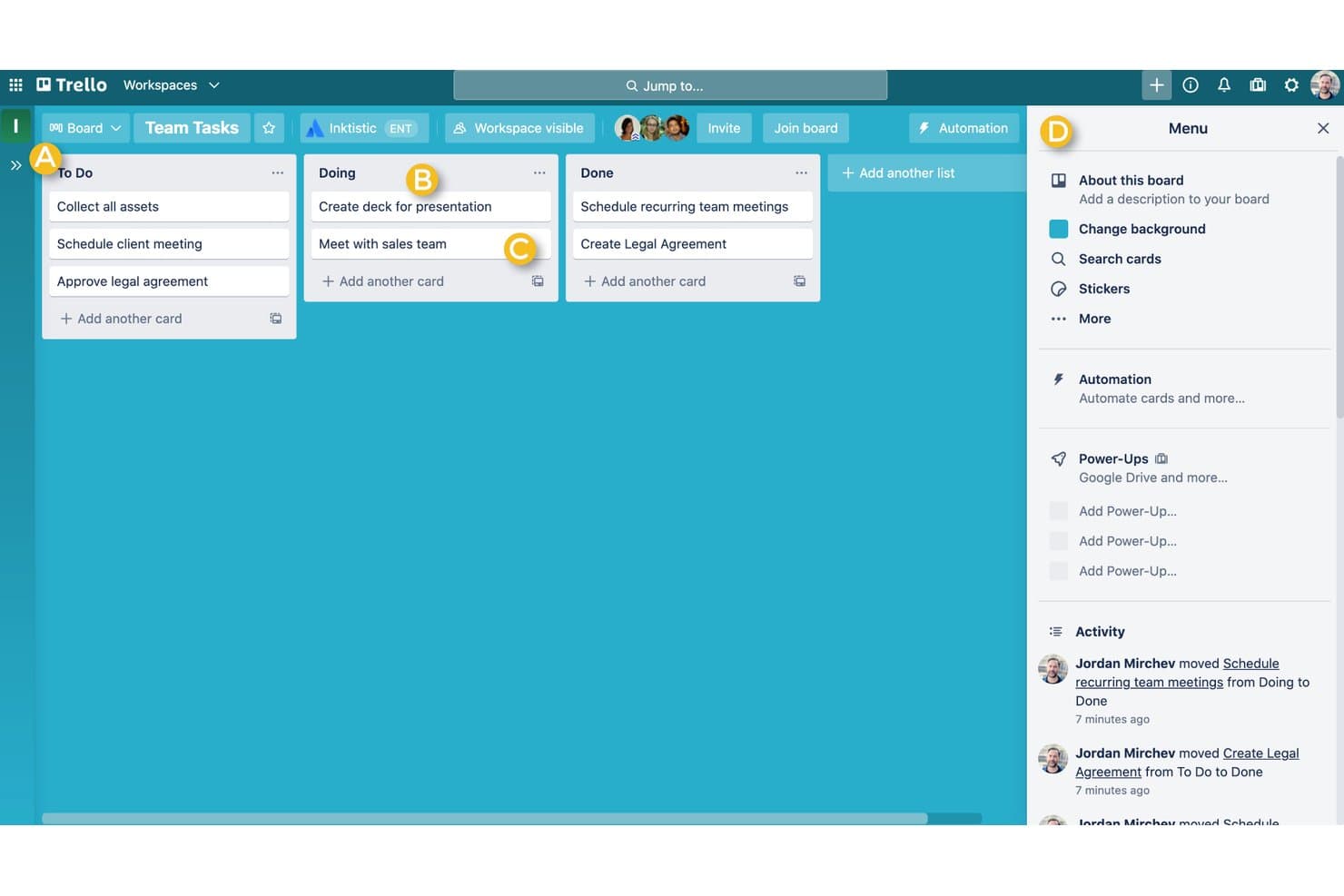
Trello offre una bacheca in stile Kanban con colonne Da fare, In corso e Completato per aiutare gli utenti a gestire visivamente le attività. Trello è una piattaforma visiva per la gestione del lavoro che può fungere da software gratuito per la gestione delle idee, con bacheche, elenchi, schede, etichette, commenti e allegati per acquisire e organizzare le idee.
A chi è più adatto Trello?
I team di prodotto che vogliono acquisire e ordinare visivamente le idee nelle fasi iniziali prima di decidere quali meritano attività di esplorazione o sviluppo.
Perché ho scelto Trello
Ho scelto Trello perché risponde all'USP: ideale per il monitoraggio delle idee basato su kanban con un piano gratuito. Uso gli elenchi per la raccolta delle idee, la valutazione preliminare e i concetti approvati, quindi sposto le schede man mano che procede l'esplorazione. Le etichette aiutano il mio team a raggruppare le proposte per segmento di clientela o area di opportunità.
Funzionalità principali di Trello
- Commenti sulle schede: Aggiungi discussioni e aggiornamenti direttamente a una scheda idea.
- Allegati di file: Allega documenti e immagini di supporto alle schede.
- Liste di controllo: Suddividi la revisione di un'idea in elementi monitorabili della lista di controllo.
- Date di scadenza: Aggiungi date alle schede per la revisione o le attività successive.
Integrazioni di Trello
Trello offre oltre 200 integrazioni tramite Power-Ups, tra cui Slack, Google Drive e Jira, per le discussioni sulle idee, i file di supporto e i passaggi di consegne. La sua API REST supporta integrazioni personalizzate.
Cosa è gratuito?
Trello offre un piano gratuito permanente con schede e Power-Ups illimitati, ma ogni area di lavoro è limitata a 10 collaboratori e 10 bacheche aperte. Gli allegati di file sono limitati a 10 MB ciascuno.
Pros and Cons
Pros:
- Le fasi Kanban rendono visibile la valutazione preliminare delle idee
- Le schede mantengono i feedback accanto a ogni proposta
- Le liste di controllo strutturano le revisioni leggere dei concetti
Cons:
- Le schede offrono funzionalità limitate di valutazione delle idee a livello di portafoglio
- I limiti dell'area di lavoro vincolano i gruppi più numerosi di collaboratori
 Ideale per la prioritizzazione delle idee con formule personalizzate
- Prova gratuita di 14 giorni
- A partire da $12/utente/mese (con fatturazione annuale)
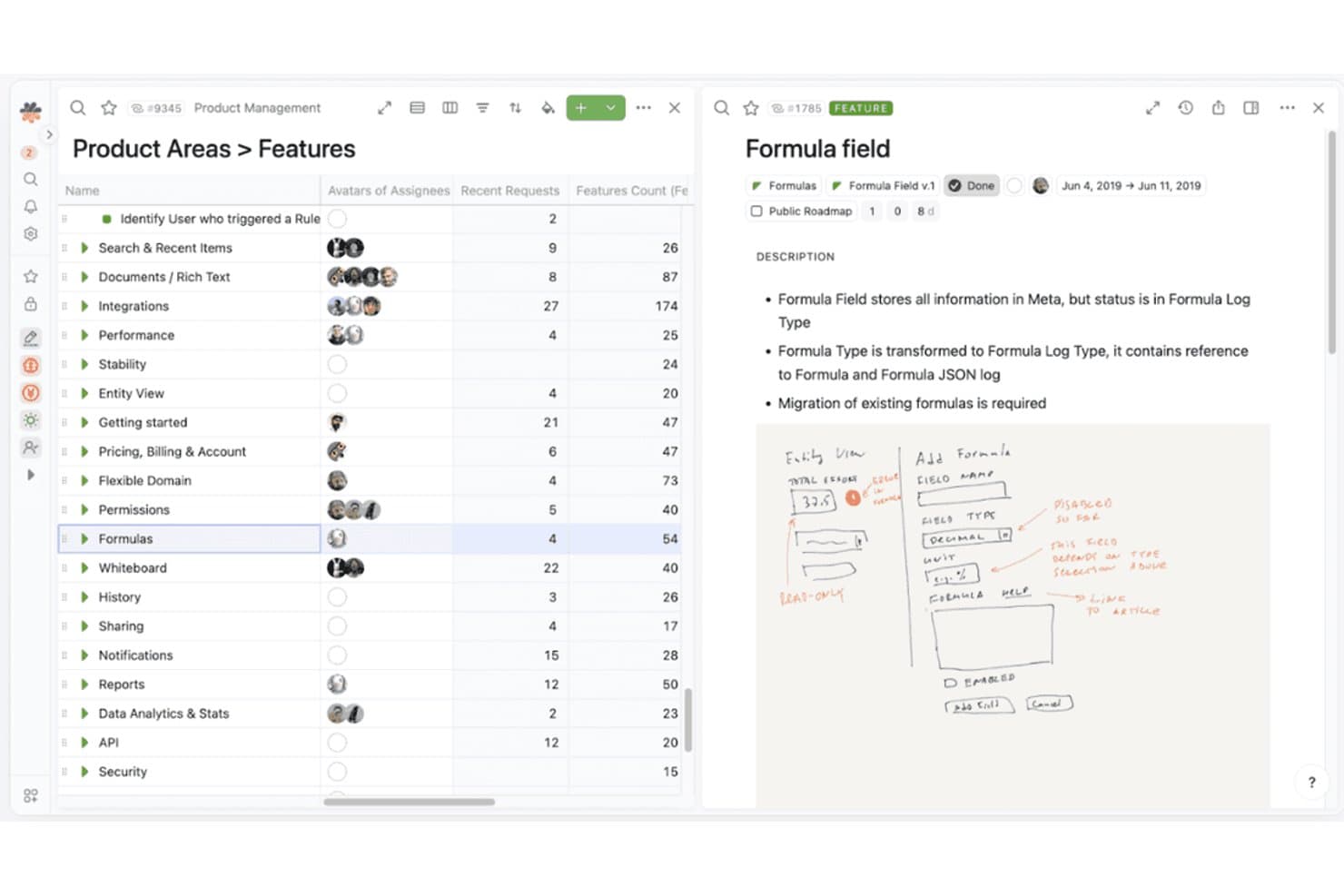
Fibery organizza le funzionalità dei prodotti con metadati dettagliati e note visive. Fibery è una piattaforma per la gestione delle idee con piano gratuito, in cui i team di prodotto acquisiscono e organizzano le idee in database personalizzabili, le collegano ai feedback e alle iniziative e ne gestiscono la valutazione con viste e flussi di lavoro configurabili.
Per chi è più adatto Fibery?
I team di prodotto che vogliono adattare il punteggio delle idee ai propri criteri sono ideali per la prioritizzazione delle idee con formule personalizzate di Fibery.
Perché ho scelto Fibery
Ho scelto Fibery perché la sua prioritizzazione delle idee con formule personalizzate consente ai team di assegnare un punteggio alle idee in base ai propri criteri di prodotto. Utilizzo database personalizzabili per collegare le idee ai feedback dei clienti e alle iniziative, quindi applico formule per confrontare le proposte in base a indicatori come il valore per il cliente o l'allineamento strategico. Le viste configurabili aiutano i team a esaminare questi punteggi insieme alle idee che stanno valutando.
Caratteristiche principali di Fibery
- Automazione dei flussi di lavoro: Attiva azioni quando i campi o lo stato di un'idea cambiano.
- Documenti collaborativi: Redigi e modifica i documenti di prodotto con il tuo team.
- Integrazioni: Collega Fibery a strumenti esterni come Slack e GitHub.
- Accesso API: Utilizza l'API per collegare Fibery ad applicazioni personalizzate.
Integrazioni di Fibery
Fibery offre integrazioni con Slack e GitHub, oltre a un'API per integrazioni personalizzate.
Cosa è gratuito?
Fibery offre un piano Free da $0 e ogni spazio di lavoro riceve una prova del piano Pro di 14 giorni prima di scegliere il piano Free o un piano a pagamento. Il piano Free consente fino a 10 utenti e 10 ospiti, 10 database, 1 GB di spazio di archiviazione e 250 esecuzioni mensili delle automazioni.
Pros and Cons
Pros:
- Le formule personalizzate assegnano un punteggio alle idee in base ai criteri del team
- Collega le idee ai feedback dei clienti e alle iniziative
- Le viste configurabili confrontano proposte e punteggi
Cons:
- Il piano Free limita la capacità dei database e delle automazioni
- Per assegnare i punteggi, i team devono definire le formule
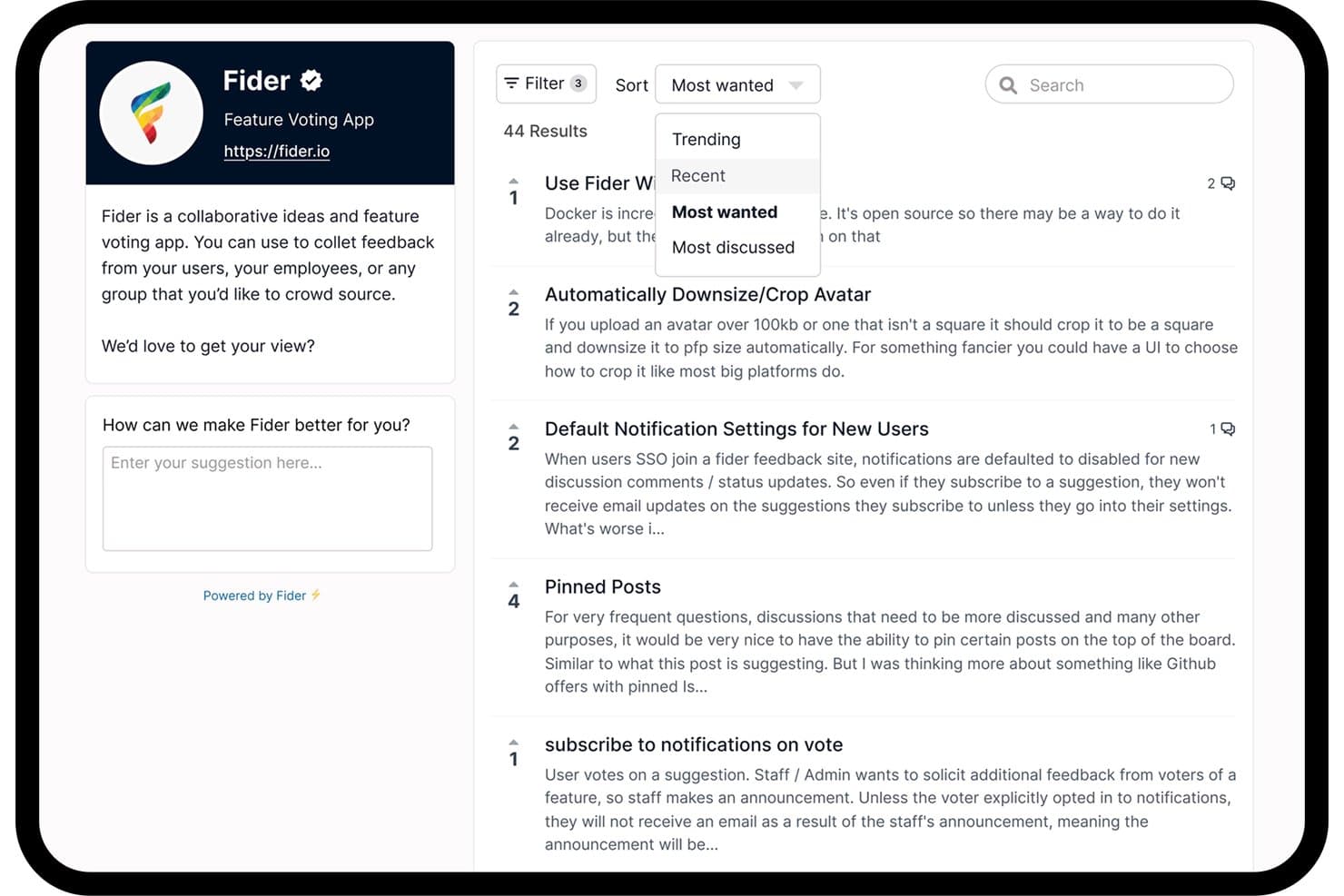
Learn more about Fibery: Ideale per bacheche open source per la votazione delle funzionalità
- Piano gratuito disponibile
- A partire da $25/mese
 Learn more about Fider:
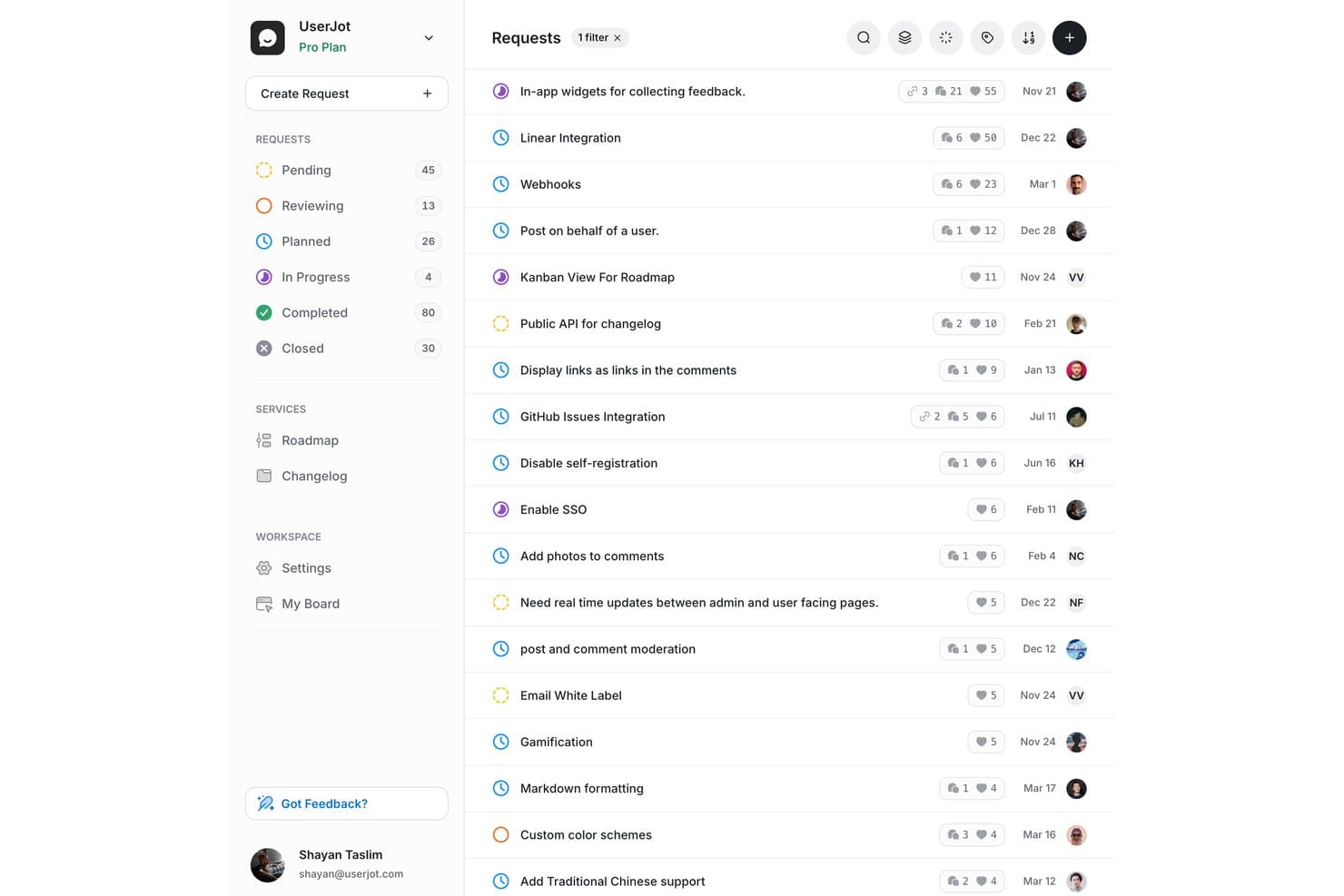
UserJot consente agli utenti di monitorare e dare priorità alle richieste di funzionalità in base allo stato e al numero di voti. UserJot è un software per la gestione delle idee con bacheche di feedback per richieste di funzionalità, votazioni degli utenti, una roadmap pubblica e la pubblicazione dei changelog.
Per chi è più adatto UserJot?
UserJot è adatto ai piccoli team di prodotto che vogliono consentire ai clienti di inviare e votare le richieste di funzionalità tramite una bacheca pubblica per i feedback.
Perché ho scelto UserJot
Ho scelto UserJot come “Il migliore per il monitoraggio delle idee fino alla roadmap con un piano gratuito” perché collega le richieste dei clienti alle decisioni sul prodotto. Le sue bacheche di feedback raccolgono le idee sulle funzionalità e le votazioni aiutano a individuare la domanda prima che i team aggiungano le richieste selezionate a una roadmap pubblica. La pubblicazione del changelog consente poi di condividere con i clienti gli aggiornamenti rilasciati.
Funzionalità principali di UserJot
- Rilevamento dei duplicati: Identifica le richieste simili per ridurre gli invii ripetuti.
- Assegnazione automatica dei tag: Assegna automaticamente un'etichetta ai post di feedback ricevuti.
- Da e-mail a post: Trasforma i feedback inviati tramite e-mail in post della bacheca.
- Importazione da Canny: Importa bacheche, post, voti, commenti e voci del changelog.
Integrazioni di UserJot
Le integrazioni di UserJot includono Slack e Discord, con un'integrazione nel piano Starter e integrazioni illimitate nel piano Professional. L'API REST e il server MCP remoto sono disponibili nei piani a pagamento per connessioni personalizzate.
Cosa è gratuito?
Il piano gratuito di UserJot è gratuito per sempre e include utenti e post illimitati, due bacheche di feedback, tre ruoli di amministratore, una roadmap pubblica e un changelog pubblico. Le integrazioni non sono incluse nel piano gratuito.
Pros and Cons
Pros:
- Utenti e post illimitati nel piano gratuito
- Roadmap pubblica inclusa senza costi
- Il changelog aiuta a condividere con i clienti gli aggiornamenti rilasciati
Cons:
- Il limite di due bacheche potrebbe restringere la separazione degli argomenti
- I programmi di feedback in crescita potrebbero richiedere il consolidamento delle bacheche
Learn more about UserJot:
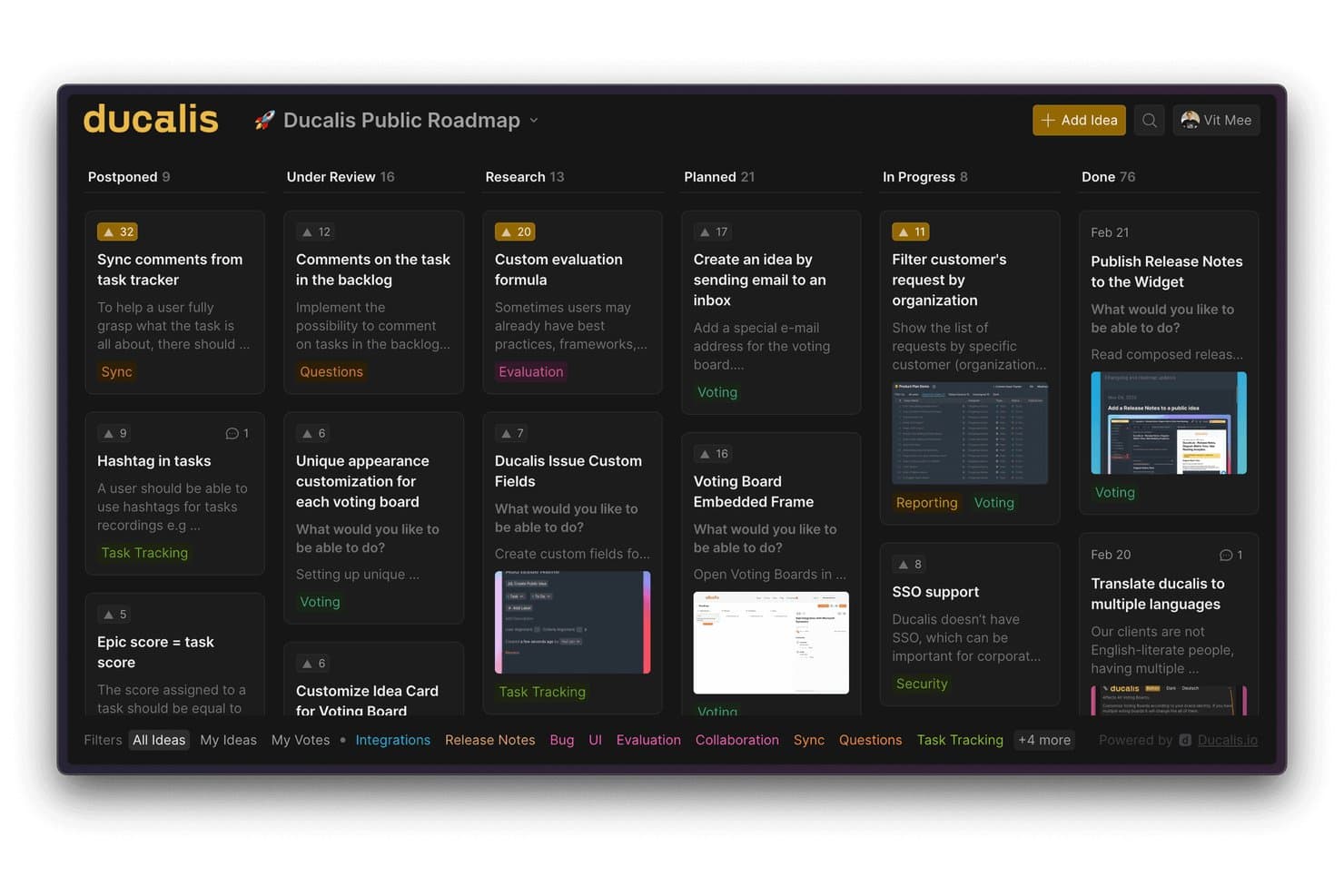
Ducalis.io organizza le idee in una bacheca visiva del piano di sviluppo in stile kanban. Ducalis.io è una piattaforma gratuita per la gestione delle idee che consente di raccogliere i riscontri dei clienti, organizzare le richieste di funzionalità e gestire bacheche pubbliche di riscontri con votazioni e discussioni.
Per chi è più adatto Ducalis.io?
I responsabili di prodotto che devono confrontare i riscontri dei clienti e stabilire la priorità delle richieste di funzionalità nelle decisioni relative al piano di sviluppo sono adatti a Ducalis.io.
Perché ho scelto Ducalis.io
Ho scelto Ducalis.io perché offre alle richieste di riscontri uno spazio nel processo di definizione delle priorità, in linea con il suo obiettivo: essere ideale per assegnare punteggi e stabilire la priorità delle richieste di riscontri. Le bacheche pubbliche di riscontri consentono ai clienti di votare e discutere le richieste di funzionalità, fornendo ai responsabili di prodotto dati da confrontare prima di prendere decisioni sul piano di sviluppo.
Funzionalità principali di Ducalis.io
- Accesso privato alle bacheche: Limita l'accesso alle bacheche di riscontri agli utenti invitati o ai domini email approvati.
- Integrazioni con i sistemi di gestione delle attività: Collega Asana, GitHub, Jira, Linear o Trello.
- Sincronizzazione automatica degli stati: Aggiorna le idee collegate quando cambiano gli stati delle attività nei sistemi di gestione connessi.
- Piani di sviluppo incorporabili: Mostra il lavoro suddiviso per stati personalizzabili sul tuo sito web o prodotto.
Integrazioni di Ducalis.io
Ducalis.io si integra con Asana, GitHub, Jira, Linear e Trello. Sincronizza automaticamente le idee collegate quando cambiano gli stati delle attività nei sistemi di gestione connessi.
Cosa è gratuito?
Ducalis.io offre un piano gratuito senza limiti di tempo né obbligo di carta di credito. Include utenti dell'account illimitati con ruoli riservati agli amministratori e fino a 500 iscritti.
Pros and Cons
Pros:
- Assegna punteggi e stabilisce la priorità delle richieste di riscontri dei clienti
- Gli elettori possono discutere e sostenere le idee
- Il piano gratuito non ha limiti di tempo
Cons:
- I ruoli degli account gratuiti sono riservati agli amministratori
- Le bacheche di riscontri si concentrano sulle richieste di funzionalità
Learn more about Ducalis.io:
Altri software gratuiti per la gestione delle idee
Ecco alcune ulteriori opzioni di software gratuiti per la gestione delle idee che non sono state incluse nel mio elenco, ma che vale comunque la pena prendere in considerazione:
- 11FeaturevoteIl migliore per consentire ai clienti di votare le funzionalità senza effettuare l'accesso
- 12FeaturebaseIdeale per completare il ciclo dei riscontri con un registro delle modifiche
- 13SupahubIdeale per startup che raccolgono gratuitamente voti illimitati dagli utenti
- 14Aha! IdeasIdeale per dare priorità alle idee sulla base di schede di valutazione
- 15
- 16WishKitIdeale per votare le funzionalità direttamente nelle app sulle piattaforme Apple
Come valuto i software gratuiti per la gestione delle idee
Per prima cosa, definisco che cosa si intende per gratuito. Per i software di gestione delle idee, significa un piano gratuito permanente, non una versione di prova, con più utenti e acquisizione continua delle idee. Da qui, divido la mia valutazione in tre parti: funzionalità fondamentali, che hanno il peso maggiore, come la raccolta delle idee e il monitoraggio degli stati; caratteristiche distintive, come le tabelle di marcia pubbliche; e ciò che uno strumento offre oltre al proprio insieme di funzionalità, come il percorso di upgrade.
Funzionalità fondamentali (requisiti minimi per questo elenco)
Oltre ai requisiti relativi al piano gratuito, utilizzo un sistema di punteggio per selezionare gli strumenti da inserire nel mio elenco. Assegno a ciascuno un punteggio su una scala da 0 (non offre la funzionalità) a 5 (eccelle in quest'area) per ogni funzionalità fondamentale elencata di seguito, in base a ciò che è disponibile nel piano gratuito. Converto quindi il totale in una percentuale per contribuire a valutare l'idoneità complessiva di ciascuno strumento, attribuendo un peso aggiuntivo alle funzionalità che ho ritenuto essenziali.
- Invio e raccolta delle idee (essenziale): cerco un archivio condiviso in cui i team possano inviare, categorizzare e riesaminare le idee emerse dalle sessioni di ideazione o dalle conversazioni con i clienti.
- Votazione e feedback: verifico se gli utenti possono votare, commentare o reagire alle richieste, fornendo ai team segnali visibili sulle esigenze ricorrenti e sul loro livello di supporto.
- Definizione delle priorità delle idee: valuto le opzioni di ordinamento o di assegnazione dei punteggi che aiutano a confrontare le idee in base a voti, impatto, impegno, urgenza o allineamento strategico.
- Monitoraggio dello stato: cerco fasi chiare come nuova, in valutazione, pianificata e completata, così che i team possano seguire un'idea fino alla sua realizzazione.
- Accesso alla collaborazione: verifico se più utenti possono inviare, discutere e riesaminare insieme le idee nel piano gratuito.
Una volta ottenuto un elenco di strumenti che soddisfano i criteri, considero ciò che distingue ciascuna piattaforma.
Fattori distintivi (ciò che differenzia i fornitori)
Ecco come confronto e distinguo i diversi fornitori:
Caratteristiche distintive
Cerco funzionalità per unire e deduplicare le idee, perché un arretrato pieno di richieste quasi identiche rende inaffidabile la definizione delle priorità. Strumenti come Frill e Nolt gestiscono bene questo aspetto, consentendo di consolidare voti e contesto in un'unica discussione. Verifico anche la presenza di notifiche automatiche sullo stato, che chiudono il ciclo di feedback senza bisogno di follow-up manuali. Quando un'idea inviata passa allo stato "pianificata", il richiedente originale dovrebbe esserne informato. Anche la condivisione di una tabella di marcia pubblica è importante: pubblicare le idee convalidate in una tabella di marcia rivolta ai clienti trasforma l'arretrato in uno strumento di trasparenza.
Oltre le funzionalità
Verifico se i piani gratuiti consentono agli utenti esterni—clienti o potenziali clienti—di inviare idee e votarle senza richiedere licenze a pagamento, poiché il feedback raccolto dalla comunità perde valore se la partecipazione è soggetta a limitazioni. Anche la portabilità dei dati è importante: cerco l'esportazione tramite CSV o API di idee, voti e stati, così che i team non siano vincolati a uno strumento se le loro esigenze crescono oltre le sue possibilità. Valuto inoltre come ciascun livello gratuito si collega ai flussi di lavoro esistenti attraverso integrazioni con strumenti come Jira, Slack o Trello, evitando ai team di dover copiare manualmente le idee nella pianificazione degli sprint.
Come scegliere un software gratuito per la gestione delle idee
È facile perdersi tra lunghi elenchi di funzionalità e strutture tariffarie complesse. Per aiutarti a rimanere concentrato mentre affronti il tuo processo di scelta del software, ecco un elenco di fattori da tenere a mente:
| Fattore | Cosa considerare |
|---|---|
| FattoreScalabilità | Cosa considerareLo strumento supporterà le dimensioni e la crescita del tuo team? Verifica i limiti degli utenti, i limiti per gli invii e le possibilità di passaggio a un piano superiore. |
| FattoreIntegrazioni | Cosa considerareSi collega agli strumenti che già utilizzi, ad esempio Slack, Jira o la posta elettronica? Verifica le integrazioni native incluse nel piano gratuito. |
| FattorePersonalizzazione | Cosa considerarePuoi adattare flussi di lavoro, moduli e identità visiva alle tue esigenze? Alcuni piani gratuiti limitano le opzioni di personalizzazione. |
| FattoreFacilità d'uso | Cosa considerareL'interfaccia è intuitiva per tutti gli utenti? Esegui un test con un piccolo gruppo per individuare eventuali difficoltà prima della distribuzione. |
| FattoreImplementazione e introduzione | Cosa considerareCon quale rapidità può iniziare il tuo team? Cerca configurazioni guidate, modelli e risorse di formazione disponibili. |
| FattoreCosto | Cosa considerareCosa succede dopo il piano gratuito? Esamina i prezzi per il passaggio a un piano superiore, i costi nascosti e le funzionalità bloccate dietro un pagamento. |
| FattoreMisure di sicurezza | Cosa considerareLo strumento offre protezione di base dei dati, autorizzazioni degli utenti e controlli sulla privacy? Valuta i rischi quando gestisci idee sensibili. |
| FattoreDisponibilità dell'assistenza | Cosa considerareQuali canali di assistenza sono disponibili per gli utenti del piano gratuito? Alcuni fornitori limitano l'assistenza tramite chat dal vivo o posta elettronica ai piani a pagamento. |
Che cos'è un software gratuito per la gestione delle idee?
Il software gratuito per la gestione delle idee è uno strumento digitale che consente ai team di raccogliere, organizzare e valutare idee innovative e idee di prodotto senza costi iniziali. Queste piattaforme di gestione dell'innovazione supportano la generazione delle idee, le votazioni e il monitoraggio dello stato, risultando utili per lo sviluppo dei prodotti e il miglioramento continuo. La maggior parte degli strumenti offre una versione gratuita con accesso intuitivo basato sul cloud, oltre a funzionalità di base per il lavoro di squadra e la collaborazione. Spesso si sovrappongono ai software e agli strumenti di gestione dei progetti, aiutando i team ad applicare una metodologia strutturata per trasformare le idee in azioni.
Funzionalità
Esaminiamo le funzionalità comunemente presenti nei software di gestione delle idee e quali sono solitamente incluse nei piani gratuiti rispetto a quelli a pagamento.
Funzionalità tipiche dei software gratuiti di gestione delle idee
- Invio di idee: consente agli utenti di inviare nuove idee tramite un semplice modulo o portale, facilitando la raccolta dei contributi dei membri del team o delle parti interessate.
- Votazione o apprezzamento: consente agli utenti di votare positivamente o apprezzare le idee, aiutando i team a identificare rapidamente i suggerimenti più popolari e a stabilire le priorità.
- Commenti di base: permette agli utenti di aggiungere commenti o feedback alle idee inviate, favorendo la discussione e i chiarimenti all'interno della piattaforma.
- Categorizzazione delle idee: fornisce tag o categorie di base per organizzare le idee, facilitando il filtraggio e la ricerca dei suggerimenti pertinenti.
- Monitoraggio dello stato: offre semplici etichette di stato (come “In esame” o “Implementata”) in modo che gli utenti possano vedere i progressi delle proprie idee.
- Gestione degli utenti: supporta l'aggiunta e la gestione di un numero limitato di utenti, consentendo ai piccoli team di collaborare senza costi aggiuntivi.
- Notifiche di base: invia avvisi tramite e-mail o nell'app quando le idee vengono inviate, aggiornate o commentate, mantenendo informati i partecipanti.
- Reportistica semplice: include report di riepilogo o esportazioni di base per esaminare a colpo d'occhio l'attività e il coinvolgimento relativi alle idee.
Funzionalità tipiche dei software a pagamento di gestione delle idee
- Automazione avanzata dei flussi di lavoro: automatizza i processi di revisione, approvazione e instradamento in più fasi, riducendo il lavoro manuale e garantendo che le idee avanzino in modo efficiente attraverso le fasi di valutazione.
- Branding personalizzato: consente alle organizzazioni di personalizzare completamente l'aspetto e lo stile del portale delle idee, inclusi loghi, colori e nomi di dominio, per offrire un'esperienza in linea con il proprio marchio.
- Integrazione con strumenti esterni: collega la piattaforma ad altri sistemi aziendali, come strumenti di gestione dei progetti, CRM o comunicazione, per garantire un flusso fluido dei dati.
- Autorizzazioni granulari: offre un controllo dettagliato sui ruoli e sugli accessi degli utenti, supportando strutture di team complesse e la gestione di informazioni sensibili.
- Dashboard analitiche: fornisce visualizzazioni e analisi avanzate per monitorare nel tempo le tendenze delle idee, i tassi di partecipazione e i risultati dell'innovazione.
- Campi e moduli personalizzati: consente di creare moduli di invio su misura con campi personalizzati per raccogliere informazioni specifiche rilevanti per la propria organizzazione.
- Supporto multilingue: supporta più lingue, facilitando la partecipazione e la collaborazione dei team internazionali.
- Moderazione e controllo dello spam: include strumenti per esaminare, filtrare e gestire gli invii inappropriati o duplicati, mantenendo un'elevata qualità.
- Accesso API: offre endpoint API per integrazioni personalizzate ed esportazioni di dati, supportando flussi di lavoro e necessità di reportistica avanzati.
- Assistenza dedicata: fornisce un'assistenza clienti prioritaria o dedicata, inclusi supporto all'onboarding e risoluzione dei problemi per gli utenti aziendali.
Vantaggi
L'implementazione di un software gratuito di gestione delle idee offre diversi vantaggi al team e all'azienda. Ecco alcuni dei vantaggi che puoi aspettarti:
- Minori barriere all'ingresso: i piani gratuiti consentono ai team di iniziare a raccogliere e organizzare le idee senza dover ottenere l'approvazione del budget o effettuare investimenti iniziali.
- Raccolta centralizzata delle idee: tutti i suggerimenti e i feedback vengono raccolti in un unico luogo, facilitando l'esame, la definizione delle priorità e l'azione sui contributi ricevuti.
- Maggiore coinvolgimento del team: le funzionalità di votazione, commento e monitoraggio dello stato incoraggiano la partecipazione e tengono tutti informati sui progressi delle idee.
- Processo decisionale più rapido: la categorizzazione integrata e la reportistica di base aiutano i team a identificare rapidamente le idee con il maggiore potenziale e a portarle avanti.
- Collaborazione accessibile: la gestione degli utenti e le notifiche consentono anche ai team piccoli o distribuiti di contribuire e rimanere aggiornati.
- Sperimentazione senza rischi: i team possono testare diversi flussi di lavoro e processi prima di impegnarsi in una soluzione a pagamento o di espandere le proprie attività.
- Onboarding semplificato: interfacce semplici e risorse di onboarding di base aiutano i team a iniziare e a ottenere rapidamente valore.
Costi e prezzi
Mi rendo conto che sei arrivato a questo articolo cercando le migliori opzioni di software per la gestione delle idee disponibili gratuitamente. Tuttavia, poiché i piani gratuiti offrono solo funzionalità limitate, è molto probabile che in futuro dovrai passare a un piano superiore.
La tabella seguente riassume i piani più comuni, i relativi prezzi medi e le funzionalità generalmente incluse nei software per la gestione delle idee:
Tabella comparativa dei piani per i software di gestione delle idee
| Tipo di piano | Prezzo medio | Funzionalità comuni |
|---|---|---|
| Tipo di pianoPiano gratuito | Prezzo medio$0 | Funzionalità comuniInvio di idee di base, votazione, commenti, categorizzazione semplice, numero limitato di utenti e notifiche di base. |
| Tipo di pianoPiano personale | Prezzo medio$5–$15/utente/mese | Funzionalità comuniTutte le funzionalità gratuite, più postazioni utente, reportistica migliorata, campi personalizzati e integrazioni limitate. |
| Tipo di pianoPiano aziendale | Prezzo medio$15–$40/utente/mese | Funzionalità comuniAutomazione avanzata dei flussi di lavoro, pannelli di analisi, personalizzazione del marchio, più integrazioni e assistenza prioritaria. |
| Tipo di pianoPiano per grandi imprese | Prezzo medio$40–$80/utente/mese | Funzionalità comuniTutte le funzionalità aziendali, autorizzazioni granulari, accesso API, avvio dedicato, sicurezza avanzata e supporto multilingue. |
Domande frequenti sui software gratuiti per la gestione delle idee
Ecco alcune risposte alle domande comuni sui software gratuiti per la gestione delle idee:
I software gratuiti per la gestione delle idee possono gestire team numerosi?
No, la maggior parte dei piani gratuiti presenta limiti relativi al numero di utenti o di invii, che li rendono più adatti a piccoli team o progetti pilota. Se devi supportare un’organizzazione di grandi dimensioni, probabilmente dovrai passare a un piano a pagamento.
I software gratuiti per la gestione delle idee comportano costi nascosti?
Sì, alcuni fornitori limitano le funzionalità principali, le integrazioni o l’assistenza ai piani a pagamento. Esamina sempre i limiti del piano gratuito e verifica la presenza di richieste di passaggio a un piano superiore o limiti di utilizzo prima di procedere.
Posso migrare i miei dati se passo da un piano gratuito a uno a pagamento?
Sì, la maggior parte dei fornitori consente di mantenere dati e impostazioni durante il passaggio a un piano superiore. Tuttavia, è importante verificare con il fornitore scelto le opzioni di migrazione e le eventuali limitazioni all’esportazione dei dati.
I miei dati sono al sicuro sui software gratuiti per la gestione delle idee?
La sicurezza dei dati varia in base al fornitore. I piani gratuiti possono offrire protezioni di base, ma le funzionalità di sicurezza avanzate come SSO, crittografia o registri di controllo sono generalmente riservate ai piani a pagamento.
Cosa succede se il piano gratuito non è più sufficiente per le mie esigenze?
Di solito puoi passare a un piano a pagamento per sbloccare più funzionalità, utenti o spazio di archiviazione. Esamina in anticipo le opzioni per passare a un piano superiore e i prezzi per evitare interruzioni quando le tue esigenze cambiano.