

Orientarsi nell'analisi dei prodotti può diventare complicato, soprattutto se Mixpanel non soddisfa più le esigenze del tuo team SaaS. Forse ora lavori con obiettivi diversi, hai bisogno di funzionalità che supportino meglio il tuo flusso di lavoro o vuoi una piattaforma più in linea con i requisiti del tuo settore.
In base alla mia esperienza, trovare lo strumento giusto può fare una grande differenza nella comprensione del comportamento degli utenti e nel favorire il successo del prodotto. Questo vale soprattutto per le startup, dove piccoli cambiamenti nell'esperienza utente possono avere un impatto sproporzionato sulla crescita. Per questo ho testato e recensito in modo indipendente diverse alternative a Mixpanel, per aiutarti a prendere una decisione informata.
In questo articolo condividerò le mie migliori scelte, evidenziando i vantaggi specifici di ogni strumento e il modo in cui possono aiutarti ad affrontare le tue sfide. Che tu stia cercando una maggiore privacy dei dati, informazioni in tempo reale o analisi specializzate, qui troverai uno strumento di analisi dei prodotti adatto alle tue esigenze.
Che cos'è Mixpanel?
Mixpanel è un software di analisi dei prodotti che ti aiuta a comprendere il comportamento degli utenti e a migliorare le decisioni relative al prodotto. Viene comunemente utilizzato da responsabili di prodotto, responsabili del marketing e analisti dei dati che hanno bisogno di informazioni su come gli utenti interagiscono con i loro prodotti.
Funzionalità come la segmentazione degli utenti, i funnel di conversione e il monitoraggio della fidelizzazione aiutano a comprendere i modelli di comportamento degli utenti, ottimizzare il coinvolgimento e migliorare i tassi di fidelizzazione. Nel complesso, Mixpanel offre informazioni preziose per aiutare il tuo team a prendere decisioni basate sui dati e a migliorare l'esperienza degli utenti.
Tabella di confronto delle alternative a Mixpanel
Questa tabella di confronto riassume i dettagli dei prezzi delle mie migliori alternative a Mixpanel:
| Tool | Best For | Trial Info | Price | ||
|---|---|---|---|---|---|
| 1 | Ideale per la progettazione continua del prodotto su larga scala | Demo gratuita disponibile | Prezzi su richiesta | Website | |
| 2 | Ideale per le analisi dell'esperienza digitale | Piano gratuito + demo gratuita disponibili | Prezzi su richiesta | Website | |
| 3 | Ideale per l'analisi dei prodotti basata sull'IA | Piano gratuito disponibile | Prezzi su richiesta | Website | |
| 4 | Ideale per il valore del coinvolgimento dei clienti | Prova gratuita di 30 giorni + demo gratuita disponibile | Da $85/mese | Website | |
| 5 | Ideale per il monitoraggio dell'adozione del prodotto | Piano gratuito + prova gratuita di 30 giorni + demo gratuita disponibile | Prezzi su richiesta | Website | |
| 6 | Ideale per l'analisi non lineare dei percorsi dei clienti | Dimostrazione gratuita + prova gratuita di 30 giorni disponibile | Da $999/mese | Website | |
| 7 | Ideale per l'analisi dei percorsi di conversione non lineari | Demo gratuita disponibile | Prezzi su richiesta | Website | |
| 8 | Ideale per l'acquisizione automatica senza un piano di monitoraggio | Piano gratuito disponibile | Prezzi su richiesta | Website | |
| 9 | Ideale per il monitoraggio dei ricavi collegato al comportamento | Prova gratuita di 7 giorni + demo gratuita disponibile | A partire da $99/mese | Website | |
| 10 | Ideale per l'analisi orientata agli sviluppatori | Piano gratuito + demo gratuita disponibile | Prezzi su richiesta | Website |


Perché fidarsi dei nostri consigli sui software
6,700+
Reviews
20
Industry experts
16+
Evaluation factors
14
Years
Il nostro team testa e recensisce software dal 2012. In quanto product manager noi stessi, sappiamo quanto sia difficile — e importante — scegliere il software giusto.
Per questa guida, abbiamo valutato gli strumenti attraverso test pratici e ricerche indipendenti, assegnando un punteggio agli strumenti in base ai nostri criteri di selezione.
Le nostre recensioni riflettono il nostro giudizio editoriale umano, non un discorso di vendita.
Revisori esperti:
- Andrew LumbySenior TPM
- Cristiano ValimSenior UI/UX Lead


Recensioni delle migliori alternative a Mixpanel
Di seguito trovi i miei riepiloghi dettagliati delle migliori alternative a Mixpanel incluse nella mia selezione. Le mie recensioni offrono uno sguardo approfondito sulle funzionalità principali, sui pro e contro, sulle integrazioni e sui casi d’uso ideali di ogni strumento, per aiutarti a trovare quello più adatto a te.
 Ideale per la progettazione continua del prodotto su larga scala
- Demo gratuita disponibile
- Prezzi su richiesta
Visit WebsiteCustomer Rating:4.7/5This rating combines scores from multiple user review sites to reflect overall customer sentiment about the product.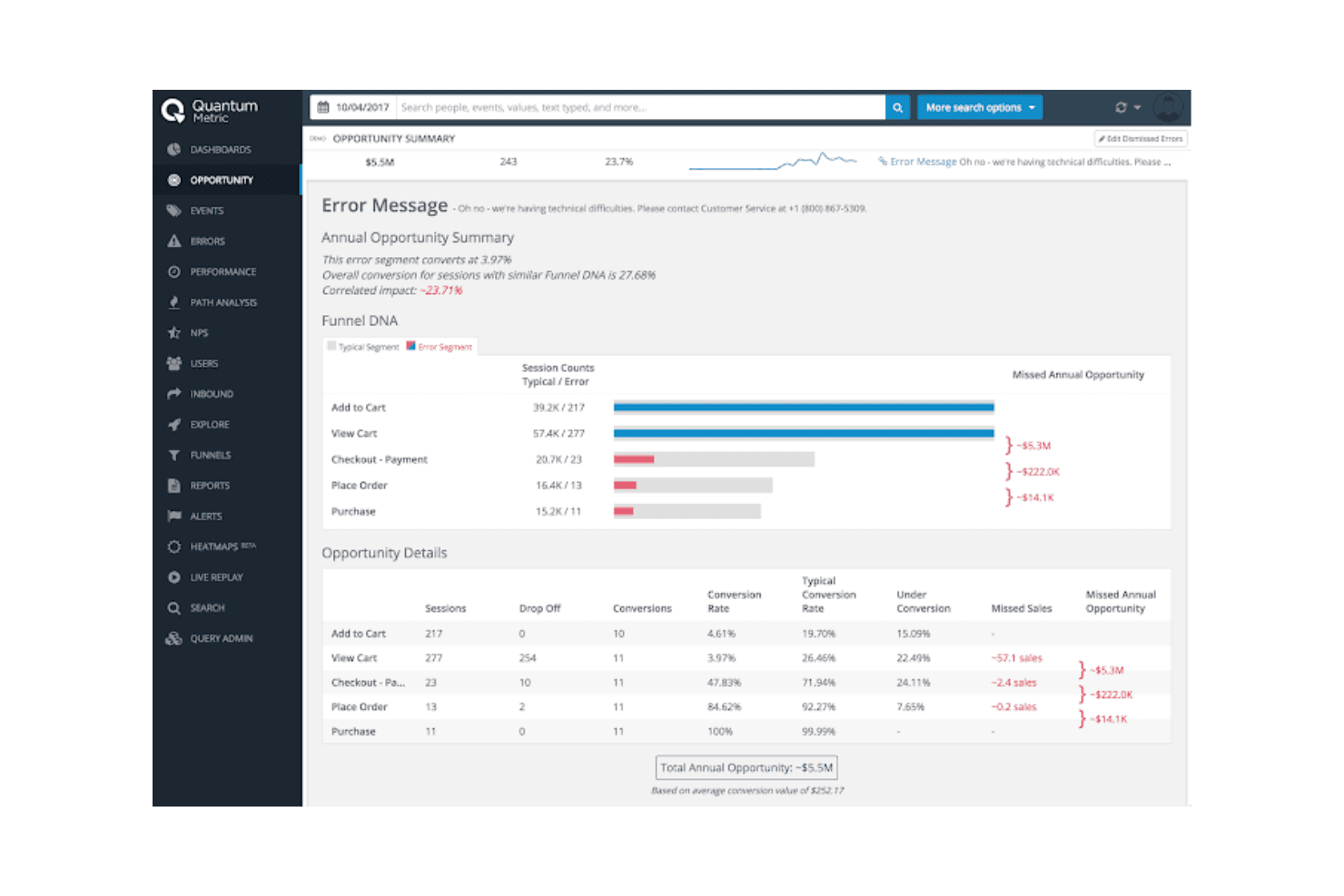
Quantum Metric offre informazioni sul comportamento degli utenti per migliorare le prestazioni digitali Quantum Metric è una piattaforma di analisi dei prodotti per i team di prodotto, UX e digitali che combina dati comportamentali e informazioni sull'esperienza per identificare gli ostacoli, comprendere i percorsi dei clienti e guidare i miglioramenti del prodotto.
Per chi è più indicato Quantum Metric?
I team di prodotto e UX che gestiscono esperienze digitali complesse possono utilizzare Quantum Metric per collegare i dati comportamentali alle informazioni sull'esperienza e guidare miglioramenti continui del prodotto.
Perché Quantum Metric è una buona alternativa a Mixpanel
Ho scelto Quantum Metric perché il mio team utilizza i suoi dati comportamentali e le informazioni sull'esperienza per individuare gli ostacoli nei percorsi digitali complessi. Mi piace il fatto che possiamo collegare il comportamento dei clienti ai segnali UX e poi stabilire le priorità per i miglioramenti del prodotto in base ai punti in cui gli utenti incontrano difficoltà. Questo supporta la progettazione continua del prodotto su larga scala, invece di revisioni analitiche isolate.
Funzionalità principali di Quantum Metric
- Raccolta automatica: Raccoglie più di 300 punti dati nelle esperienze web, mobili e su chiosco.
- Prestazioni delle pagine: Misura l'impatto delle pagine lente sulle esperienze digitali.
- Dashboard: Organizza gli indicatori analitici e dell'esperienza in visualizzazioni configurabili.
- Monitoraggio e avvisi: Segnala i cambiamenti nel comportamento aggregato e nei segnali di frustrazione.
Integrazioni di Quantum Metric
Quantum Metric documenta le integrazioni ufficiali con i partner AB Tasty, Split, ServiceNow, Qualtrics, Salesforce Service Cloud, Looker, Slack, Optimizely, Tealium e Adobe Analytics. La sua integrazione con Optimizely utilizza l'API di Quantum Metric, mentre il supporto a Zapier e un'API generale per le integrazioni personalizzate non sono documentati chiaramente.
Pros and Cons
Pros:
- Raccoglie automaticamente i comportamenti web, mobili e su chiosco
- Collega i segnali di frustrazione ai percorsi dei clienti
- Collega la velocità delle pagine agli ostacoli nell'esperienza
Cons:
- I flussi di lavoro per l'analisi del prodotto risultano meno centrali
- Una maggiore profondità dei dati sull'esperienza aumenta il carico di revisione
Learn more about Quantum Metric: Ideale per le analisi dell'esperienza digitale
- Piano gratuito + demo gratuita disponibili
- Prezzi su richiesta
Visit WebsiteCustomer Rating:4.5/5This rating combines scores from multiple user review sites to reflect overall customer sentiment about the product.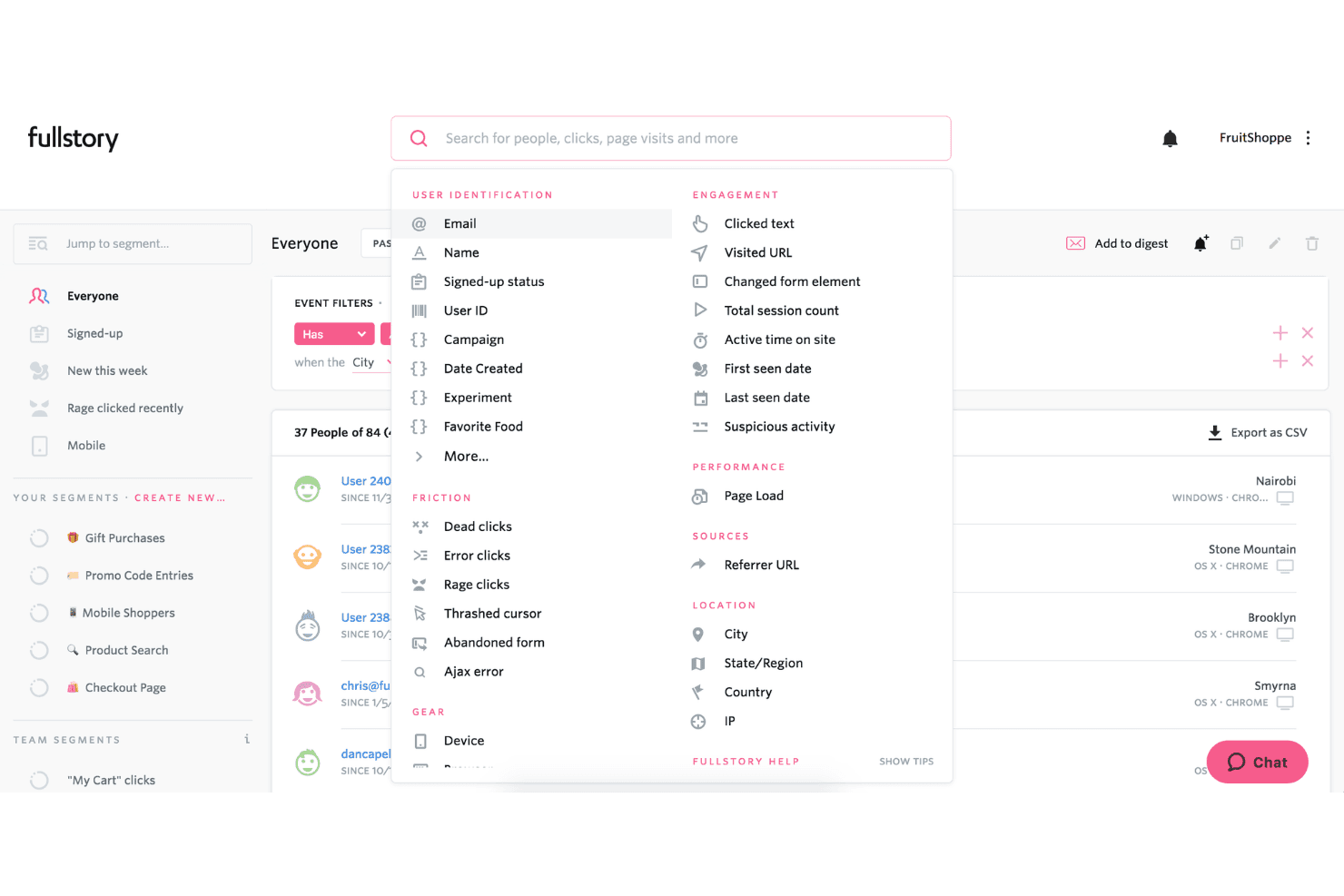
FullStory consente agli utenti di filtrare e segmentare gli utenti in base al comportamento, alla posizione e ai segnali di frustrazione. Fullstory è una piattaforma di analisi dei prodotti per i team di prodotto, UX e digitali che combina i dati sul comportamento degli utenti con la riproduzione delle sessioni per individuare gli ostacoli, convalidare le decisioni sul prodotto e migliorare i percorsi dei clienti.
Per chi è più adatto Fullstory?
Team di prodotto, UX e digitali che devono diagnosticare gli ostacoli degli utenti su siti web e applicazioni.
Perché Fullstory è una buona alternativa a Mixpanel
Ho scelto Fullstory per ottenere informazioni sull'esperienza digitale, perché la riproduzione delle sessioni e le mappe di calore mostrano dove gli utenti incontrano difficoltà in un prodotto. Utilizzo segnali di frustrazione, come i clic ripetuti e i clic inattivi, per analizzare gli abbandoni e convalidare le modifiche alla UX. La sua analisi dei percorsi collega questi comportamenti a specifici punti di conversione.
Funzionalità principali di Fullstory
- Acquisizione automatica degli eventi: Raccoglie le interazioni degli utenti senza dover contrassegnare manualmente ogni evento.
- Analisi dei percorsi di conversione: Misura l'avanzamento e l'abbandono nelle fasi di conversione definite.
- Segmentazione del pubblico: Filtra i dati comportamentali in base agli attributi degli utenti, agli eventi e alle proprietà.
- Integrazioni dei dati: Collega i dati di analisi del prodotto ad altri strumenti aziendali.
Integrazioni di Fullstory
Fullstory supporta integrazioni con Salesforce, Intercom, Segment, Tealium, BigQuery, Optimizely, Adobe Experience Platform, Braze e Workato, oltre a Zapier. Offre inoltre webhook e API per browser e server per le integrazioni personalizzate.
Pros and Cons
Pros:
- Le riproduzioni delle sessioni rivelano specifici ostacoli alla conversione
- L'acquisizione automatica riduce la necessità di strumentazione manuale degli eventi
- I segnali di frustrazione evidenziano i clic ripetuti e i clic inattivi
Cons:
- Il mascheramento dei dati personali richiede un'implementazione attenta
- L'analisi del prodotto sembra meno granulare rispetto a Mixpanel
Learn more about Fullstory: Ideale per l'analisi dei prodotti basata sull'IA
- Piano gratuito disponibile
- Prezzi su richiesta
Visit WebsiteCustomer Rating:4.5/5This rating combines scores from multiple user review sites to reflect overall customer sentiment about the product.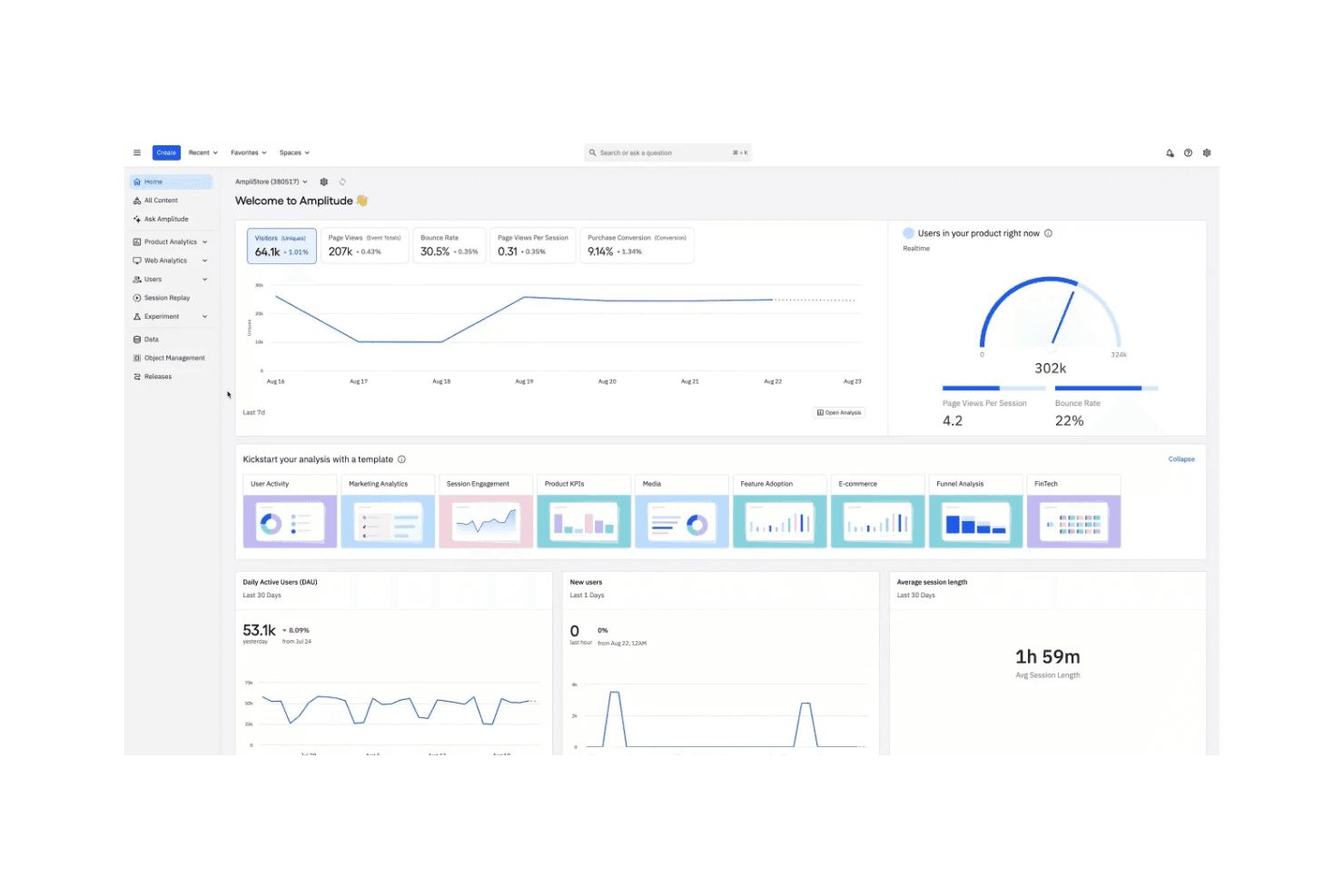
Amplitude aiuta i team a comprendere il comportamento degli utenti e a migliorare i prodotti digitali Amplitude è una piattaforma di analisi dei prodotti per i team di prodotto che devono comprendere il comportamento degli utenti, identificare gli ostacoli all'adozione e migliorare i percorsi dei clienti attraverso decisioni basate sui dati.
Per chi è più adatto Amplitude?
I team di prodotto delle aziende digitali in crescita possono utilizzare Amplitude per ottenere insight basati sull'IA, sperimentare sui prodotti e prendere decisioni informate dai dati.
Perché Amplitude è una valida alternativa a Mixpanel
Ho scelto Amplitude perché è ideale per l'analisi dei prodotti basata sull'IA. Utilizzo le sue coorti comportamentali, Journeys e Session Replay per collegare le tendenze delle conversioni ad azioni specifiche degli utenti. I suoi insight basati sull'IA aiutano il mio team a esaminare i punti di abbandono, identificare gli ostacoli all'adozione e decidere quali esperimenti sul prodotto meritano attenzione.
Funzionalità principali di Amplitude
- Analisi dei funnel: misura le conversioni e gli abbandoni tra gli eventi del prodotto.
- Analisi della fidelizzazione: monitora se gli utenti tornano dopo aver raggiunto determinate tappe.
- Dashboard personalizzate: combina i grafici in report di prodotto condivisibili.
- Governance dei dati: gestisce definizioni degli eventi, proprietà e piani di tracciamento.
Integrazioni di Amplitude
Amplitude offre integrazioni documentate con Segment, Salesforce, HubSpot, Intercom, Braze, Google Analytics 4, Snowflake, BigQuery, Optimizely e Jira. Fornisce inoltre SDK, API HTTP e Batch e API REST per l'acquisizione personalizzata dei dati, le query di analisi e la gestione programmatica.
Pros and Cons
Pros:
- L'IA mette in evidenza le tendenze comportamentali da analizzare
- Journeys collega i cambiamenti nelle conversioni alle azioni degli utenti
- Session Replay aggiunge contesto agli abbandoni del funnel
Cons:
- Le analisi avanzate richiedono una governance attenta degli eventi
- L'interfaccia può risultare complessa per i nuovi analisti
Learn more about Amplitude: Ideale per il valore del coinvolgimento dei clienti
- Prova gratuita di 30 giorni + demo gratuita disponibile
- Da $85/mese
Visit WebsiteCustomer Rating:4.5/5This rating combines scores from multiple user review sites to reflect overall customer sentiment about the product.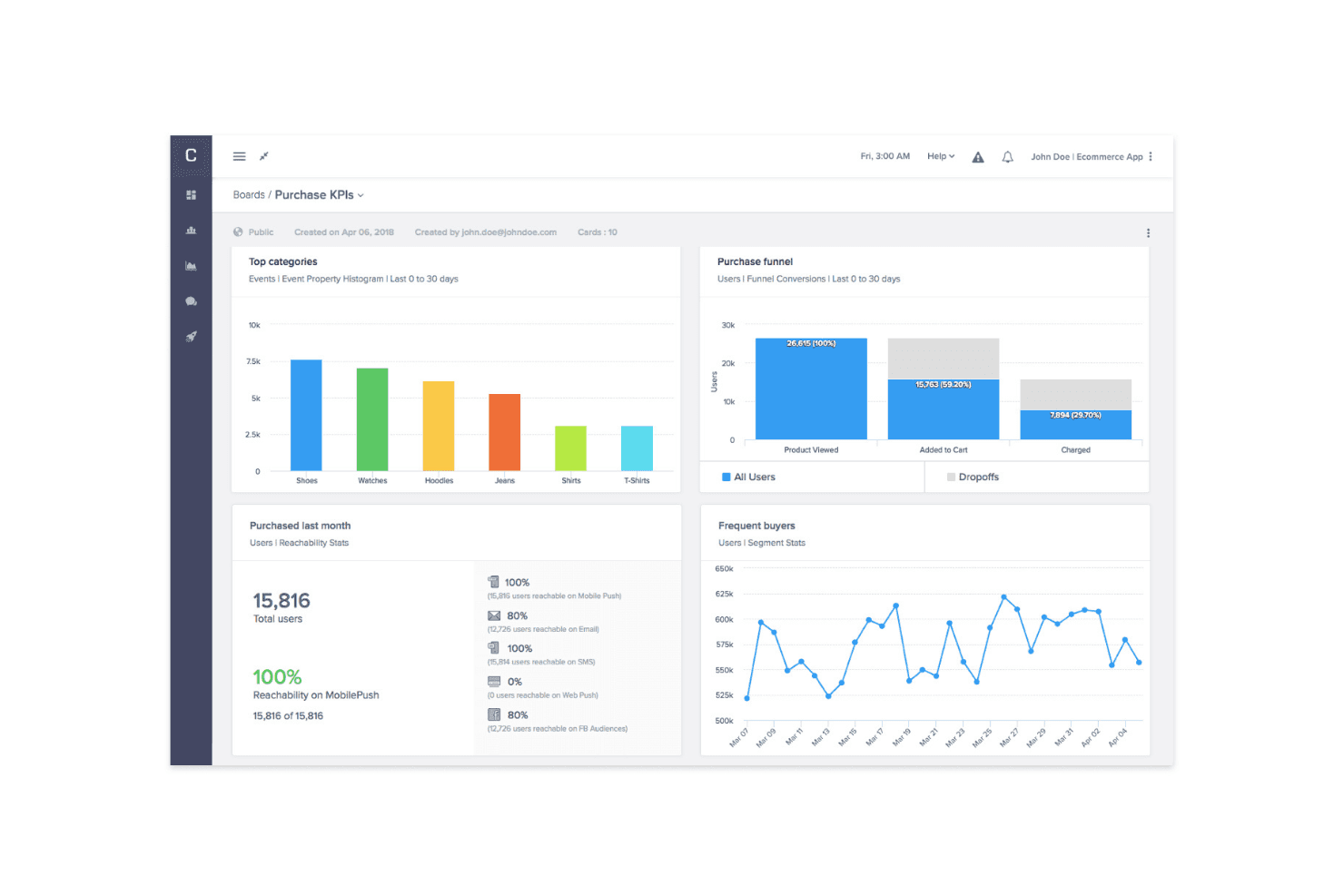
Gli strumenti di analisi e messaggistica di CleverTap migliorano il coinvolgimento e la fidelizzazione CleverTap è una piattaforma di coinvolgimento dei clienti per i team di prodotto, marketing e crescita che combina analisi comportamentale, segmentazione e personalizzazione per migliorare la fidelizzazione nei prodotti mobili e digitali.
Per chi è più adatto CleverTap?
CleverTap è adatto ai team di crescita e di prodotto delle aziende che danno priorità al mobile e necessitano di segmentazione comportamentale e coinvolgimento personalizzato dei clienti.
Perché CleverTap è una valida alternativa a Mixpanel
Ho scelto CleverTap perché collega l'analisi del prodotto al valore del coinvolgimento dei clienti. Utilizzo l'analisi comportamentale e la segmentazione in tempo reale per identificare gli utenti che abbandonano il processo di onboarding, quindi personalizzo i messaggi in-app, le notifiche push o i percorsi via email. Questo aiuta i team di prodotto a trasformare i modelli di utilizzo in esperimenti di fidelizzazione e azioni mirate.
Funzionalità principali di CleverTap
- Analisi dei funnel: monitora le conversioni nelle fasi di registrazione, onboarding e acquisto.
- Analisi delle coorti: confronta la fidelizzazione e il comportamento tra gruppi di utenti nel tempo.
- Dashboard personalizzate: monitora metriche di prodotto selezionate in viste di reportistica configurabili.
- API di esportazione dei dati: invia i dati di CleverTap a strumenti esterni di analisi e reportistica.
Integrazioni di CleverTap
CleverTap dispone di un'integrazione nativa con il CRM Salesforce e di integrazioni documentate con Shopify, Segment, AppsFlyer OneLink, Amazon SES, SendGrid, Postmark, Mandrill, Gmail e Google Apps, oltre a Zapier. Fornisce inoltre API REST per integrazioni personalizzate.
Pros and Cons
Pros:
- Collega l'analisi comportamentale all'orchestrazione delle campagne
- Messaggistica efficace per la fidelizzazione e il ciclo di vita degli utenti mobile
- Offre una segmentazione dettagliata per percorsi mirati
Cons:
- Il supporto per le applicazioni web rimane limitato
- L'interfaccia può risultare complessa per i nuovi utenti
Learn more about CleverTap: Ideale per il monitoraggio dell'adozione del prodotto
- Piano gratuito + prova gratuita di 30 giorni + demo gratuita disponibile
- Prezzi su richiesta
Visit WebsiteCustomer Rating:4.4/5This rating combines scores from multiple user review sites to reflect overall customer sentiment about the product.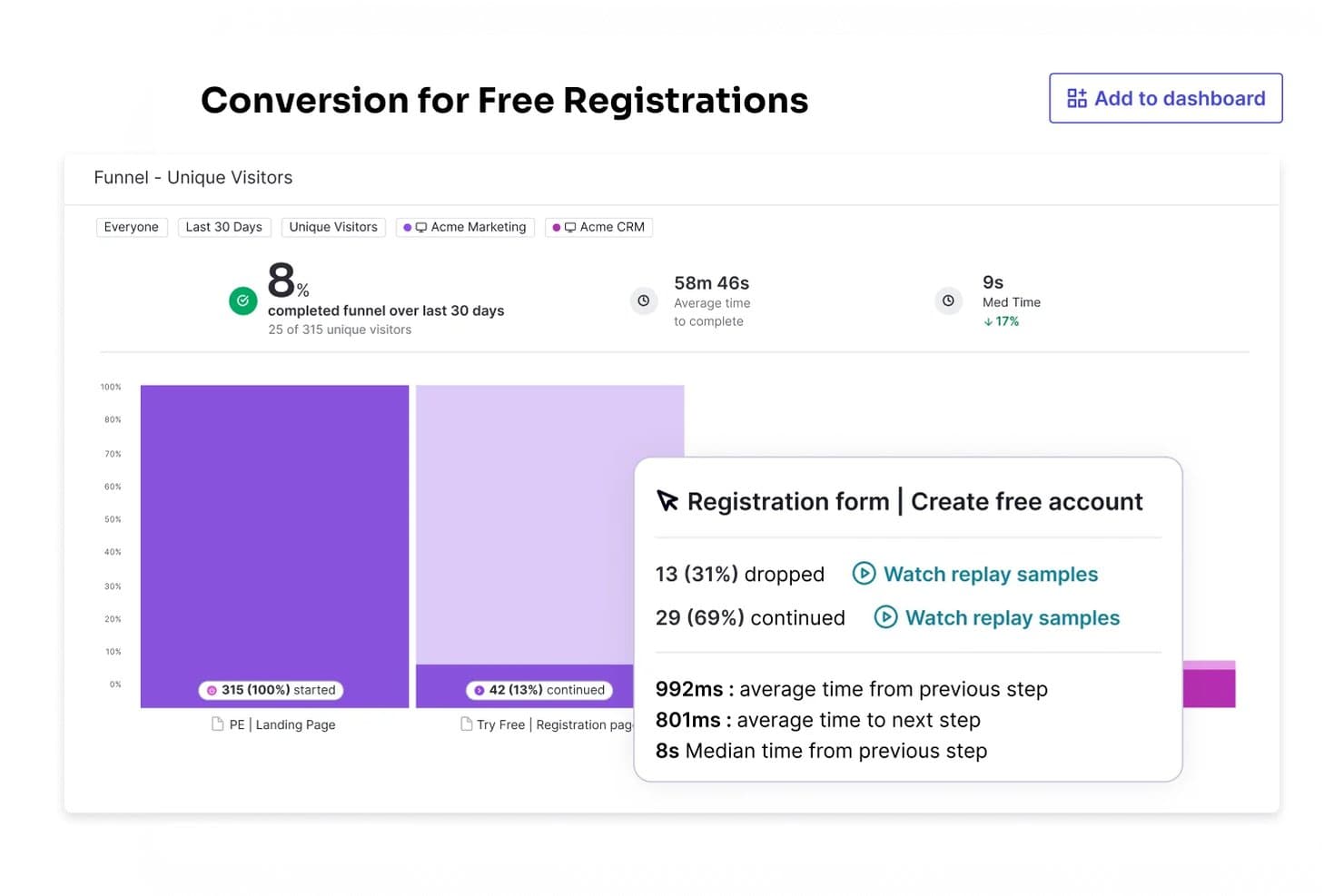
Pendo monitora i tassi di conversione del funnel per identificare i punti di abbandono. Pendo è una piattaforma per l'esperienza del prodotto destinata ai team di prodotto, che combina analisi del prodotto, guide all'interno dell'app e feedback per aiutare le aziende SaaS a comprendere il comportamento degli utenti e migliorare l'adozione.
Per chi è più adatto Pendo?
Pendo è adatto ai team di prodotto delle aziende SaaS che devono misurare l'adozione delle funzionalità e guidare gli utenti verso il valore del prodotto.
Perché Pendo è una buona alternativa a Mixpanel
Ho scelto Pendo perché consente di collegare il monitoraggio dell'adozione del prodotto alle azioni concrete. I suoi report sull'utilizzo delle funzionalità mostrano dove gli utenti abbandonano il percorso, mentre le guide all'interno dell'app si rivolgono a questi utenti con messaggi contestuali. Utilizzo l'analisi dei percorsi e della fidelizzazione per verificare se le guide spingono i clienti verso flussi di lavoro di valore.
Funzionalità principali di Pendo
- Riproduzione delle sessioni: Esamina le sessioni utente registrate per analizzare le interazioni con il prodotto.
- Sondaggi NPS: Raccogli le risposte al Net Promoter Score direttamente nell'app dagli utenti.
- Esploratore dei dati: Crea report personalizzati a partire dai dati sull'utilizzo del prodotto.
- Integrazioni: Collega Pendo a strumenti come Salesforce e Slack.
Integrazioni di Pendo
Pendo offre integrazioni con Salesforce, Slack, HubSpot, Intercom, Jira, Marketo e Okta tramite il suo marketplace delle integrazioni. Fornisce inoltre un'API, webhook e Zapier per integrazioni personalizzate e collegamenti ai flussi di lavoro.
Pros and Cons
Pros:
- Collega l'analisi dell'adozione alle guide all'interno dell'app
- I dati retroattivi riducono la necessità di pianificare gli eventi in anticipo
- Combina riproduzione delle sessioni, sondaggi e analisi
Cons:
- Una configurazione complessa può compromettere l'accuratezza dei report
- I sondaggi omettono diversi tipi di domande utili
Learn more about Pendo: Ideale per l'analisi non lineare dei percorsi dei clienti
- Dimostrazione gratuita + prova gratuita di 30 giorni disponibile
- Da $999/mese
Visit WebsiteCustomer Rating:4.4/5This rating combines scores from multiple user review sites to reflect overall customer sentiment about the product.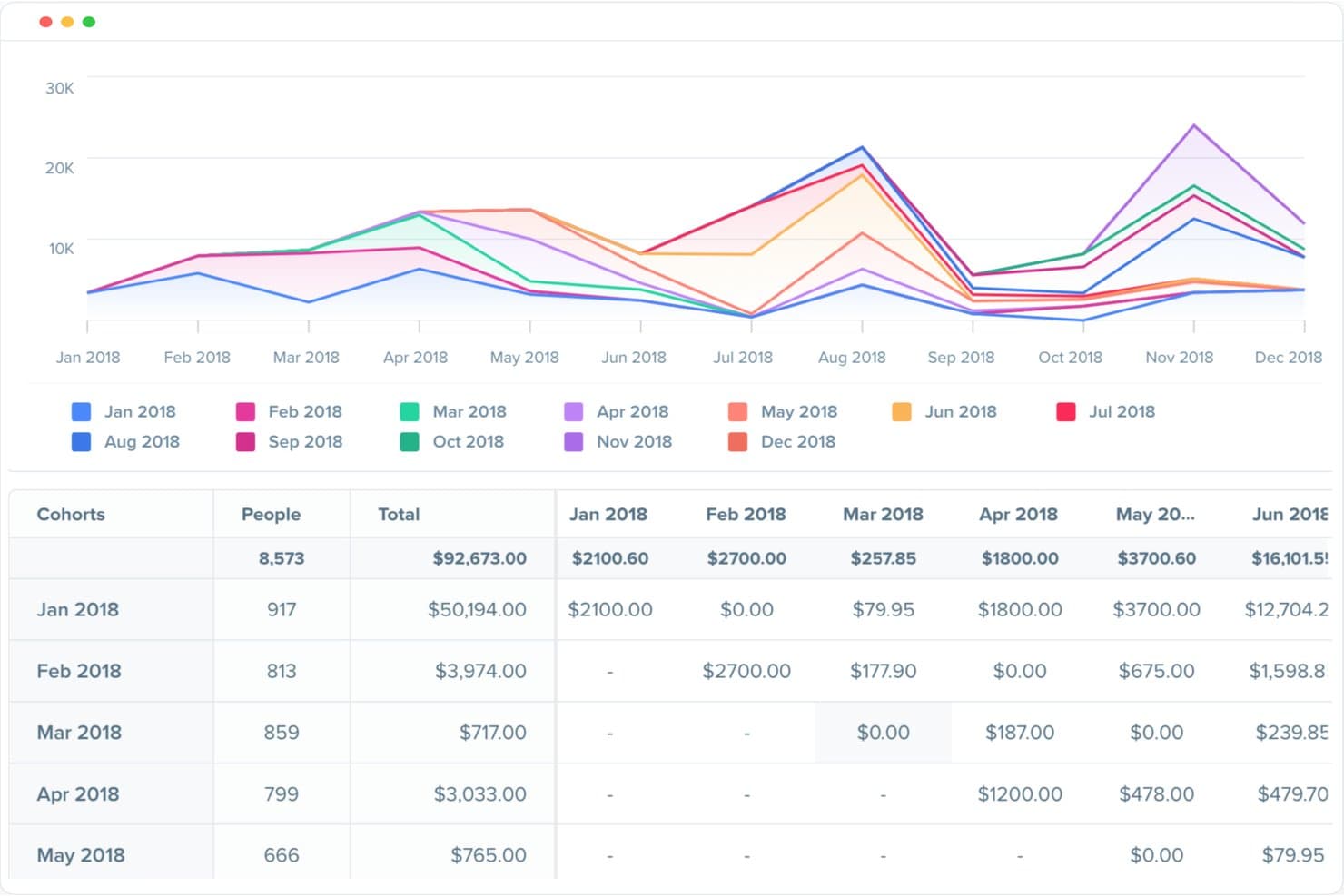
Woopra monitora l'andamento dei ricavi tra le coorti di clienti nel tempo. Woopra è una piattaforma di analisi dei prodotti per i team SaaS e digitali che collega il comportamento dei clienti tra i diversi punti di contatto, aiutando i responsabili di prodotto a comprendere l'adozione, individuare gli ostacoli e migliorare la fidelizzazione.
Per chi è più adatto Woopra?
Responsabili di prodotto e team di crescita che devono analizzare i percorsi dei clienti tra diversi canali, i percorsi comportamentali e i modelli di fidelizzazione nei prodotti SaaS o digitali.
Perché Woopra è una buona alternativa a Mixpanel
Ho scelto Woopra perché la sua analisi non lineare dei percorsi dei clienti segue i numerosi itinerari che gli utenti intraprendono all'interno di un prodotto. Utilizzo i rapporti sui percorsi per confrontare gli itinerari verso l'attivazione, la conversione o l'abbandono, invece di costringere il comportamento all'interno di un'unica canalizzazione. L'analisi della fidelizzazione e delle coorti mostra poi quali percorsi portano a un utilizzo duraturo del prodotto.
Funzionalità principali di Woopra
- Analisi in tempo reale: Monitora gli eventi del prodotto in arrivo nel momento in cui si verificano.
- Monitoraggio personalizzato degli eventi: Definisci e monitora le azioni degli utenti nel tuo prodotto.
- Profili dei clienti: Visualizza l'attività dei singoli utenti e i dettagli dei loro account.
- Integrazioni: Collega Woopra a strumenti come Salesforce e Segment.
Integrazioni di Woopra
Woopra supporta le integrazioni con Salesforce e Segment per collegare i dati dei clienti tra i sistemi del prodotto e aziendali.
Pros and Cons
Pros:
- I rapporti sui percorsi mostrano itinerari oltre le canalizzazioni lineari
- I profili individuali collegano gli eventi al contesto del cliente
- Le visualizzazioni della fidelizzazione confrontano il comportamento a lungo termine per coorte
Cons:
- Il caricamento del pannello di controllo può rallentare con set di dati di grandi dimensioni
- Alcuni rapporti richiedono una configurazione aggiuntiva degli eventi
Learn more about Woopra: Ideale per l'analisi dei percorsi di conversione non lineari
- Demo gratuita disponibile
- Prezzi su richiesta
Visit WebsiteCustomer Rating:4.4/5This rating combines scores from multiple user review sites to reflect overall customer sentiment about the product.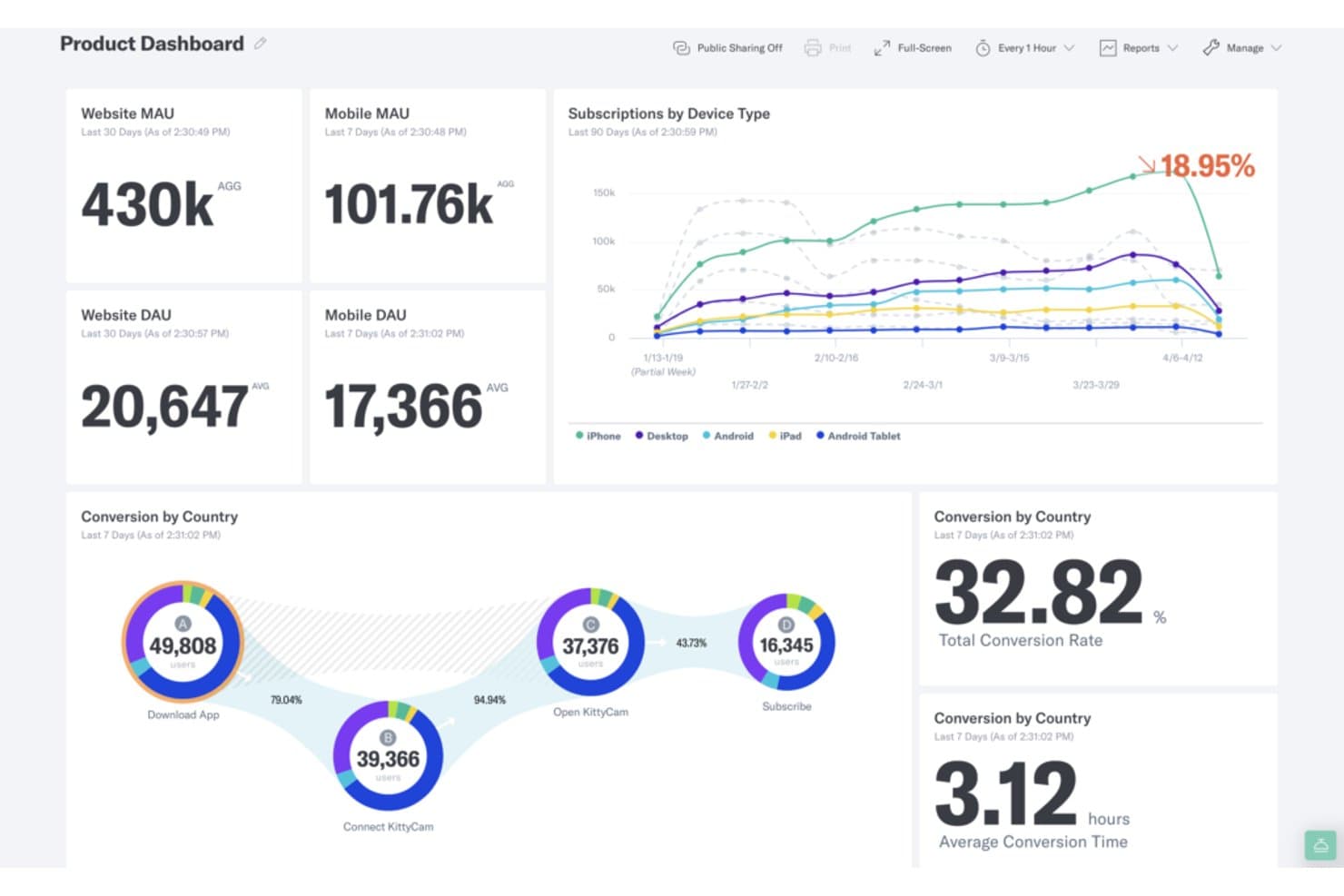
Indicative monitora MAU, DAU, abbonamenti e conversioni del percorso di conversione in un'unica dashboard. Indicative è una piattaforma di analisi dei prodotti per i team di prodotto, crescita e dati che devono comprendere il comportamento dei clienti, identificare i punti di abbandono e migliorare le esperienze lungo percorsi utente complessi.
Per chi è più adatto Indicative?
Indicative è adatto ai team di prodotto e crescita che analizzano percorsi cliente complessi con molteplici itinerari, canali e punti di conversione.
Perché Indicative è una buona alternativa a Mixpanel
Ho scelto Indicative perché gestisce l'analisi dei percorsi di conversione non lineari meglio degli strumenti basati su sequenze di passaggi fisse. I suoi report sui percorsi mostrano gli itinerari seguiti dagli utenti prima della conversione, mentre le coorti comportamentali aiutano a confrontare i clienti che raggiungono lo stesso risultato attraverso percorsi diversi. Il mio team può utilizzarlo per analizzare i percorsi di onboarding, gli acquisti ripetuti e i punti di abbandono imprevisti.
Funzionalità principali di Indicative
- Connessione al magazzino dati: Collega Indicative direttamente al tuo magazzino dati esistente.
- Dashboard personalizzate: Organizza gli elementi KPI e le visualizzazioni in dashboard con funzionalità di trascinamento.
- Report programmati: Invia le dashboard come report PDF a intervalli selezionati.
- Dashboard pubbliche: Condividi analisi incorporate con persone esterne a Indicative.
Integrazioni di Indicative
Indicative si collega direttamente a origini dati tra cui Snowflake, Google BigQuery, Amazon Redshift e Amazon S3. Fornisce inoltre SDK e un'API per trasmettere eventi da siti web, app mobili o server, oltre a integrazioni con partner per ulteriori origini dati.
Pros and Cons
Pros:
- Mappa i percorsi non lineari dei clienti
- Crea report senza query SQL
- Offre opzioni di visualizzazione chiare
Cons:
- L'analisi delle coorti deve essere migliorata
- Gli aggiornamenti della dashboard possono essere poco frequenti
Learn more about Indicative: Ideale per l'acquisizione automatica senza un piano di monitoraggio
- Piano gratuito disponibile
- Prezzi su richiesta
Visit WebsiteCustomer Rating:4.3/5This rating combines scores from multiple user review sites to reflect overall customer sentiment about the product.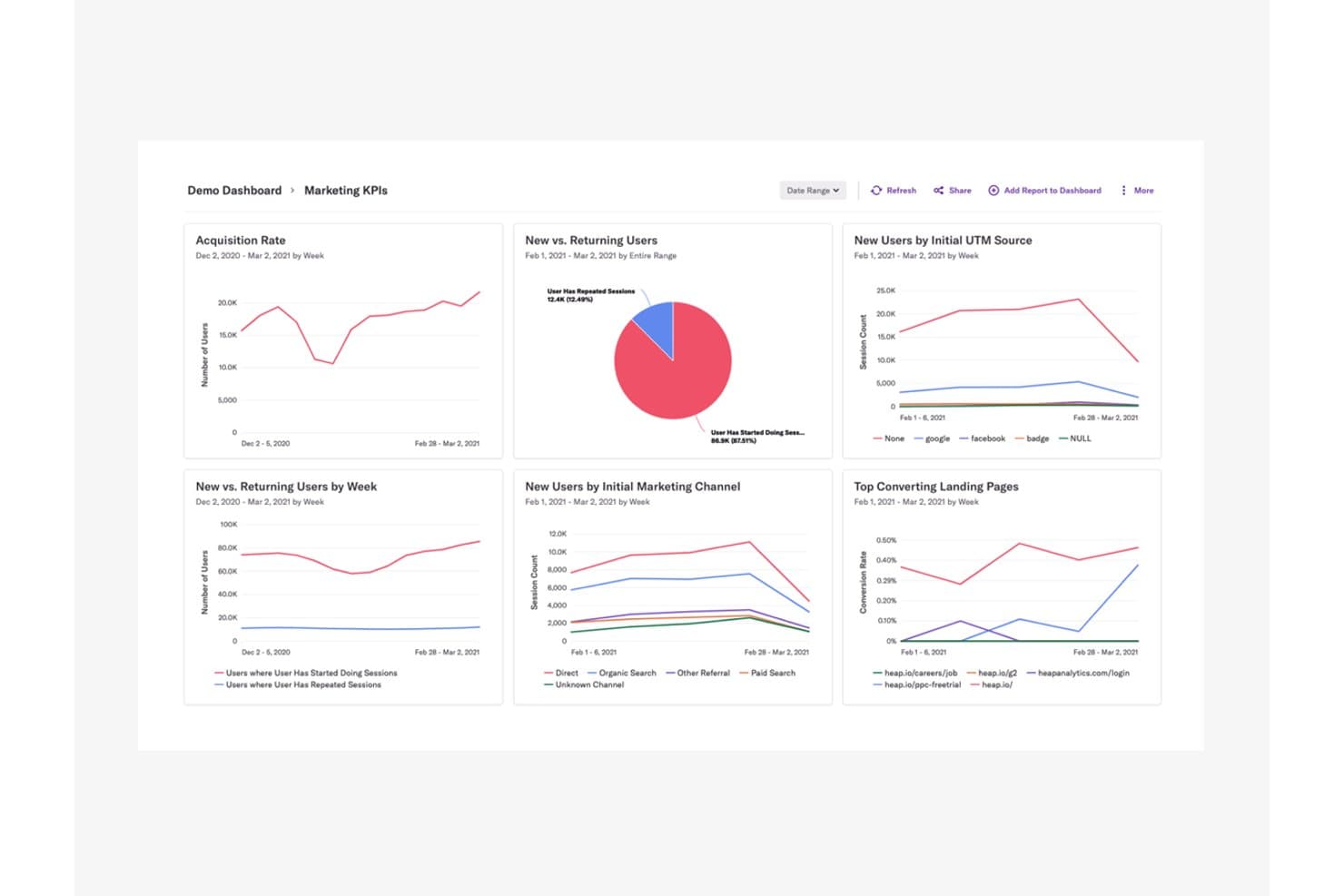
Heap centralizza i KPI di marketing in un unico pannello di controllo di analisi. Heap è una piattaforma di analisi dei prodotti per i team di prodotto, UX e crescita che rivela il comportamento degli utenti, evidenzia gli ostacoli nell'esperienza e supporta decisioni migliori sulla roadmap dei prodotti digitali.
Per chi è più adatto Heap (by Contentsquare)?
Heap è adatto ai team di prodotto e UX che devono studiare il comportamento digitale senza definire in anticipo un piano di monitoraggio degli eventi.
Perché Heap (by Contentsquare) è una buona alternativa a Mixpanel
Ho scelto Heap (by Contentsquare) perché è ideale per l'acquisizione automatica senza un piano di monitoraggio. Utilizzo l'acquisizione automatica degli eventi e l'analisi retroattiva per analizzare gli abbandoni durante la registrazione o l'adozione delle funzionalità anche a posteriori. La riproduzione delle sessioni aiuta poi il mio team a collegare i modelli comportamentali all'esperienza utente che li sottende.
Funzionalità principali di Heap (by Contentsquare)
- Analisi del percorso di conversione: Confronta i tassi di conversione tra fasi definite.
- Analisi dei percorsi: Esplora le sequenze che gli utenti seguono all'interno del prodotto.
- Segmentazione degli utenti: Crea coorti a partire da attributi comportamentali e dell'account.
- Pannello di controllo: Monitora le metriche del prodotto in report visivi condivisibili.
Integrazioni di Heap (by Contentsquare)
Heap documenta le integrazioni native con Salesforce, Intercom, Marketo, Iterable e Snowflake tramite Heap Connect, oltre a un'integrazione con l'SDK di Contentsquare per sincronizzare i dati mobili. La sua API supporta il monitoraggio personalizzato degli eventi e la gestione dell'identità degli utenti.
Pros and Cons
Pros:
- L'acquisizione automatica evita la pianificazione iniziale degli eventi
- Le definizioni retroattive degli eventi consentono di recuperare domande non previste
- La riproduzione delle sessioni collega gli ostacoli al comportamento
Cons:
- Le analisi avanzate richiedono tempo per essere apprese
- La riproduzione delle sessioni e le mappe di calore richiedono componenti aggiuntivi separati
Learn more about Heap (by Contentsquare): Ideale per il monitoraggio dei ricavi collegato al comportamento
- Prova gratuita di 7 giorni + demo gratuita disponibile
- A partire da $99/mese
Visit WebsiteCustomer Rating:4.1/5This rating combines scores from multiple user review sites to reflect overall customer sentiment about the product.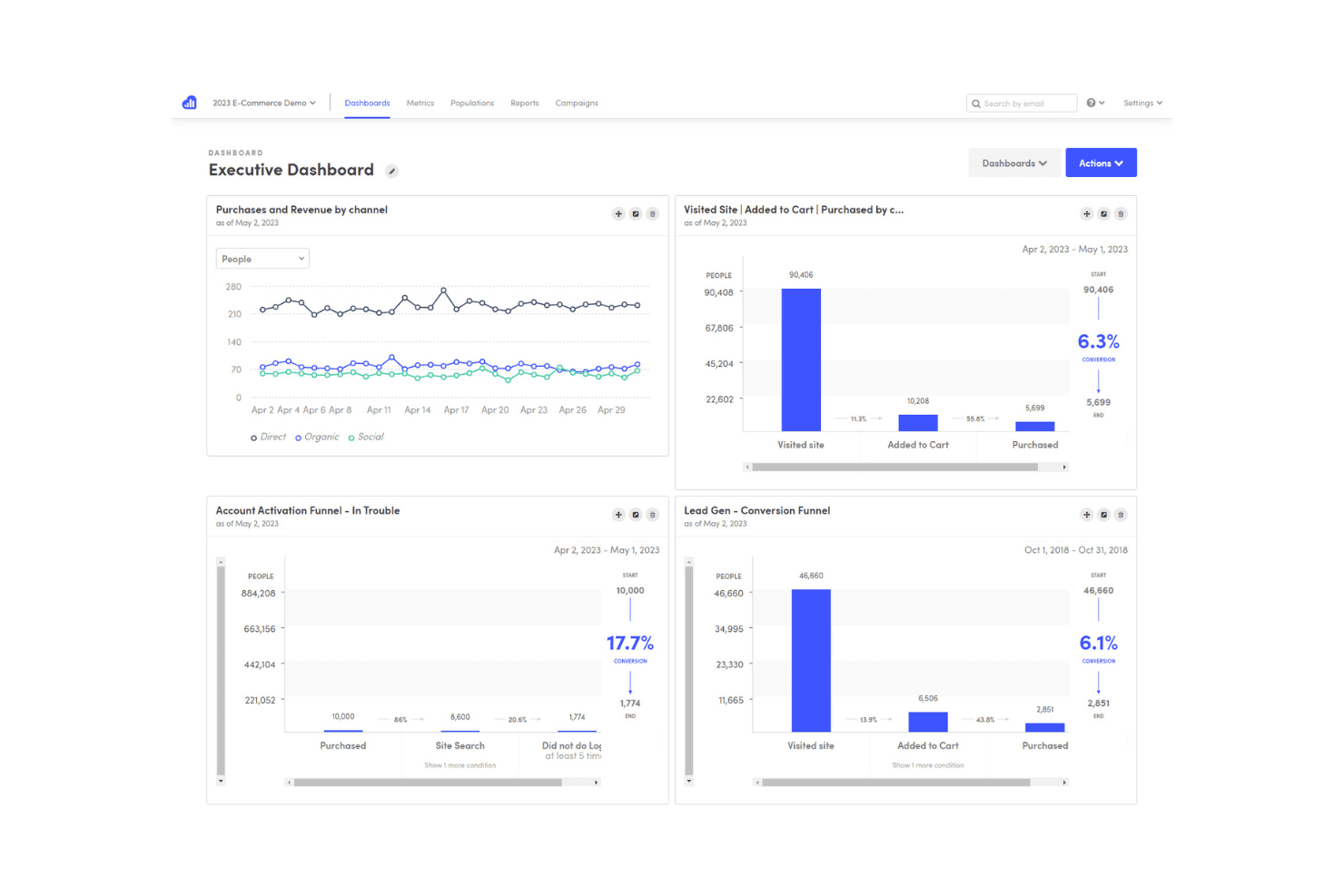
Kissmetrics monitora il comportamento degli utenti per contribuire a ottimizzare il marketing e le conversioni Kissmetrics è una piattaforma di analisi dei prodotti per i team SaaS e di e-commerce che collega il comportamento dei clienti ai risultati di conversione, fidelizzazione e ricavi, per guidare decisioni migliori sul prodotto.
Per chi è più adatto Kissmetrics?
Kissmetrics è adatto ai team di prodotto SaaS e di e-commerce che hanno bisogno di collegare il comportamento degli utenti alle conversioni, alla fidelizzazione e ai ricavi.
Perché Kissmetrics è una valida alternativa a Mixpanel
Considero Kissmetrics un'ottima soluzione perché collega direttamente il comportamento degli utenti del prodotto ai risultati sui ricavi. Utilizzo il monitoraggio a livello di cliente, i report sui funnel e l'analisi delle coorti per capire quali azioni portano ad acquisti, upgrade o abbandono. Ad esempio, un team SaaS può confrontare i ricavi degli utenti che adottano una funzionalità, mentre un team di e-commerce può ricondurre gli acquisti ripetuti a percorsi specifici.
Funzionalità principali di Kissmetrics
- Report sui percorsi: Mappano le azioni che gli utenti compiono prima o dopo un evento.
- Report sui test A/B: Confrontano i risultati degli esperimenti tra gruppi di utenti selezionati.
- Segmentazione comportamentale: Filtra i report in base ad azioni, proprietà o attributi.
- Monitoraggio degli eventi: Registra le interazioni con il prodotto come eventi personalizzabili.
Integrazioni di Kissmetrics
Kissmetrics offre oltre 30 integrazioni native, tra cui Salesforce, HubSpot, Marketo, Mailchimp, Shopify, WooCommerce, Magento, Recurly, Optimizely e Segment, e si connette a Zapier. Fornisce inoltre un'API REST per integrazioni personalizzate, importazioni ed esportazioni di dati, webhook e flussi di lavoro per la reportistica.
Pros and Cons
Pros:
- Collega direttamente i comportamenti ai risultati sui ricavi
- Confronti dettagliati tra coorti supportano l'analisi della fidelizzazione
- I report sui percorsi rivelano i tragitti intorno agli eventi chiave
Cons:
- Le opzioni dei pannelli di controllo e i report programmati sembrano limitati
- Le analisi più ampie possono diventare lente e complicate
Learn more about Kissmetrics: 10Ideale per l'analisi orientata agli sviluppatori
PostHog
- Piano gratuito + demo gratuita disponibile
- Prezzi su richiesta
Visit WebsiteCustomer Rating:4.5/5This rating combines scores from multiple user review sites to reflect overall customer sentiment about the product.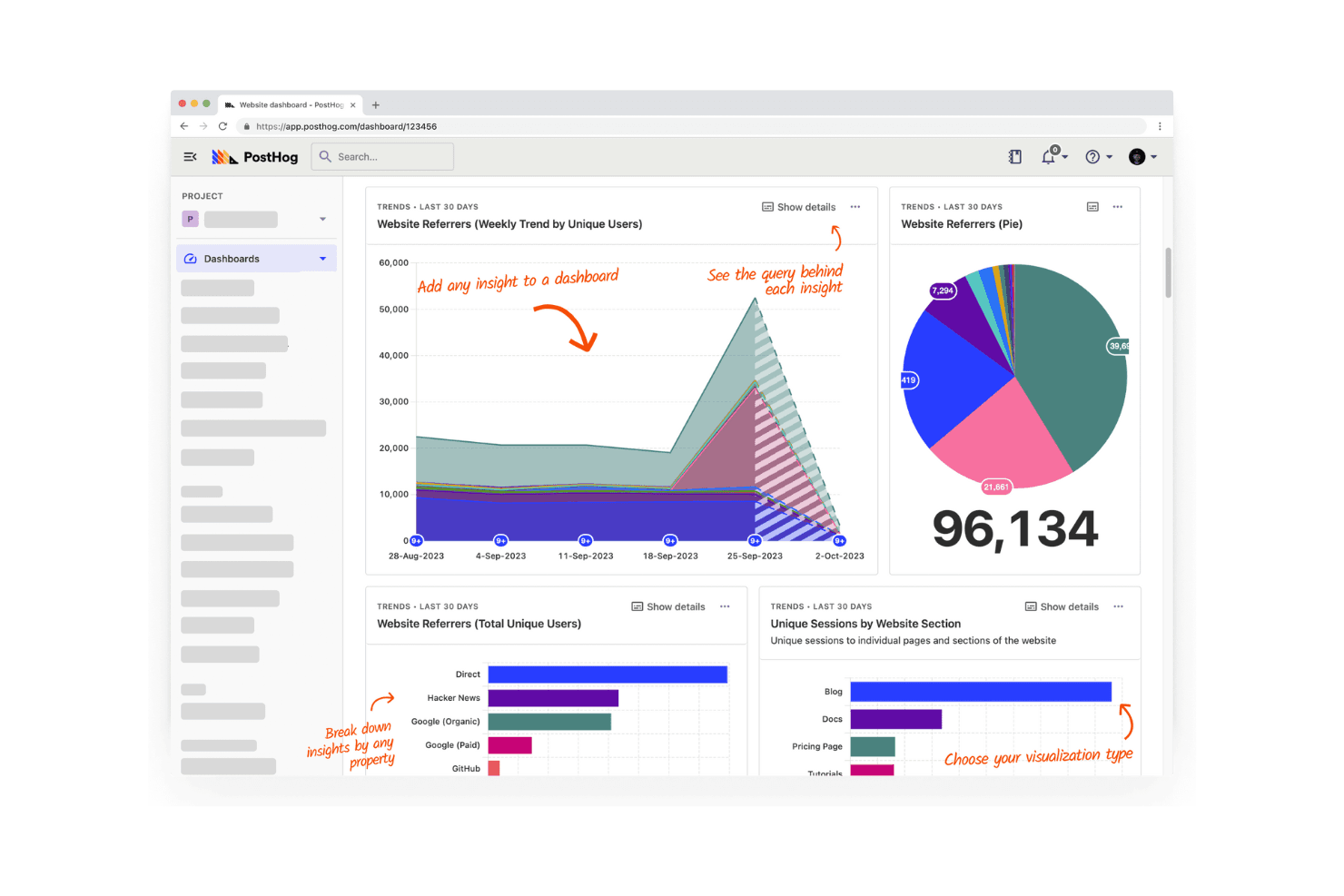
PostHog monitora e analizza il comportamento degli utenti nelle applicazioni web e mobile. PostHog è una piattaforma di analisi dei prodotti per i team software che riunisce in un unico spazio i dati sul comportamento degli utenti, i flag delle funzionalità, gli approfondimenti sulle sessioni e la sperimentazione, aiutando i product manager a collegare il lavoro tecnico ai risultati per i clienti.
Per chi è più indicato PostHog?
PostHog è adatto ai team di prodotto e ingegneria delle aziende software che hanno bisogno di analisi, flag delle funzionalità, approfondimenti sulle sessioni e sperimentazione in un unico spazio.
Perché PostHog è una buona alternativa a Mixpanel
Considero PostHog un'opzione eccellente per l'analisi orientata agli sviluppatori. Utilizzo le sue funzionalità di analisi dei prodotti, gli approfondimenti sulle sessioni e i flag delle funzionalità per collegare i dati degli eventi ai rilasci e al comportamento degli utenti. Il mio team può testare un nuovo flusso di onboarding, esaminare le registrazioni e ripristinare una funzionalità da un unico spazio di lavoro orientato agli sviluppatori.
Funzionalità principali di PostHog
- Analisi dei funnel: Misura la conversione attraverso fasi definite dall'utente.
- Gestione delle coorti: Raggruppa gli utenti in base a caratteristiche o comportamenti condivisi.
- Percorsi degli utenti: Visualizza i percorsi attraverso il tuo prodotto.
- Sondaggi all'interno del prodotto: Raccogli feedback con questionari mirati.
Integrazioni di PostHog
PostHog offre decine di destinazioni preconfigurate, tra cui Slack, Customer.io, Zendesk e Zapier. Supporta inoltre i webhook e un'API per le integrazioni personalizzate.
Pros and Cons
Pros:
- Strumentazione degli eventi orientata agli sviluppatori
- I flag delle funzionalità collegano le analisi ai rilasci
- La riproduzione delle sessioni facilita il debug comportamentale
Cons:
- La modellazione dei dati richiede una configurazione tecnica
- I team non tecnici potrebbero aver bisogno di supporto durante l'onboarding
Learn more about PostHog:
Altre alternative a Mixpanel
Ecco alcune alternative aggiuntive a Mixpanel che non sono entrate nella mia selezione, ma che vale comunque la pena prendere in considerazione:
- 11Adobe AnalyticsIdeale per l'analisi avanzata dell'attribuzione
- 12StatsigIdeale per la sperimentazione delle funzionalità
- 13Google AnalyticsIdeale per ottenere informazioni sui clienti a costo zero
- 14LogRocketIdeale per abbinare la riproduzione delle sessioni all'analisi del percorso di conversione
- 15Gainsight PXIdeale per l'analisi del successo dei clienti B2B
- 16OpenPanelIdeale per privacy open-source
- 17mitzuIdeale per l'analisi dei prodotti nativa del data warehouse
Come valuto le alternative a Mixpanel
Divido la mia valutazione in tre parti. Inizio dalle funzionalità principali: verifico che uno strumento possa acquisire eventi personalizzati e creare funnel di fidelizzazione in più passaggi, poiché questi aspetti hanno il peso maggiore. Poi analizzo le funzionalità distintive, come la riproduzione delle sessioni, e infine considero il modello di prezzi e il supporto all'onboarding.
Funzionalità principali (requisiti fondamentali per questo elenco)
Quando seleziono gli strumenti per il mio elenco, assegno a ciascuno un punteggio su una scala da 0 (non offre la funzionalità) a 5 (eccelle in quest'area) per ogni funzionalità principale indicata di seguito. Converto quindi il totale in una percentuale per aiutare a valutare l'idoneità complessiva di ciascuno strumento, attribuendo un peso maggiore alle funzionalità che ho considerato essenziali.
- Tracciamento basato sugli eventi (essenziale): cerco eventi personalizzati, proprietà e unificazione delle identità tra sessioni web e mobile, come registrazione, attivazione e azioni di abbonamento.
- Analisi dei funnel e della fidelizzazione (essenziale): valuto funnel in più passaggi, visualizzazioni degli abbandoni e fidelizzazione delle coorti per percorsi come onboarding, checkout o adozione delle funzionalità.
- Segmentazione e raggruppamento in coorti: cerco coorti salvate che combinino filtri relativi a eventi, profili e account, riutilizzabili dai team per l'analisi e l'attivazione.
- Dashboard e reportistica: verifico se i team possono creare, condividere e programmare dashboard per monitorare attivazione, fidelizzazione e conversione senza esportazioni manuali ripetute.
- Integrazione ed esportazione dei dati: valuto le connessioni con data warehouse, CRM e strumenti di marketing, oltre alle opzioni API o di esportazione per unire i dati sul prodotto con i record aziendali.
- Generatore di query self-service: gli utenti non tecnici dovrebbero poter rispondere a domande ad hoc usando una logica basata su selezioni, ad esempio confrontando la fidelizzazione per piano o fonte di acquisizione.
Una volta ottenuto un elenco di strumenti che soddisfano i criteri, considero ciò che distingue ciascuna piattaforma.
Fattori distintivi (ciò che differenzia i fornitori)
Ecco come confronto e differenzio i vari fornitori:
Funzionalità distintive
La riproduzione delle sessioni è la prima cosa che verifico, perché combina i dati sul percorso dei clic con registrazioni effettive dello schermo. Quando un funnel mostra un abbandono del 40% al checkout, la riproduzione permette di osservare perché gli utenti abbandonano. Valuto inoltre se uno strumento offre flag delle funzionalità collegati alle sue analisi, poiché gestire i rilasci e misurarne l'impatto in un unico luogo elimina la necessità di uno strumento separato per la sperimentazione. Anche l'acquisizione automatica è importante: strumenti come PostHog e Heap registrano automaticamente le interazioni, velocizzando la strumentazione per i team snelli.
Oltre le funzionalità
Il modello di prezzi è molto importante in questo caso. La fatturazione basata sull'utilizzo e sul volume di eventi può far aumentare i costi da un giorno all'altro dopo un lancio di successo, quindi verifico se uno strumento offre livelli di prezzo prevedibili o limiti massimi. Valuto inoltre l'integrazione con l'ecosistema: le connessioni native a data warehouse come Snowflake o a CDP come Segment determinano la facilità con cui uno strumento si integra nello stack esistente senza creare pipeline di dati duplicate. Infine, gli strumenti di migrazione da Mixpanel, come la mappatura degli eventi e l'importazione dei dati storici, influiscono direttamente sulla rapidità con cui il team può effettuare il passaggio senza perdere mesi di metriche di riferimento.
Perché cercare un'alternativa a Mixpanel?
Sebbene Mixpanel sia una buona scelta per l'analisi dei prodotti, esistono diversi motivi per cui alcuni utenti cercano soluzioni alternative. Potresti cercare un'alternativa a Mixpanel perché…
- Hai bisogno di opzioni di prezzo più flessibili
- Il tuo team richiede un processo di inserimento più semplice
- Dai priorità alle normative sulla privacy dei dati
- Vuoi una migliore integrazione con gli strumenti esistenti
- La tua azienda necessita di funzionalità più avanzate
- Hai bisogno del supporto per volumi di dati maggiori
Se ti riconosci in una di queste situazioni, sei nel posto giusto. La mia lista contiene diverse opzioni di software per l'analisi dei prodotti più adatte ai team che affrontano queste sfide con Mixpanel e cercano soluzioni alternative.
Funzionalità
Ecco alcune delle funzionalità principali di Mixpanel, per aiutarti a mettere a confronto ciò che offrono le soluzioni alternative:
- Monitoraggio degli eventi: Acquisisci e analizza le interazioni degli utenti con metodi di monitoraggio automatico e manuale per comprendere il comportamento degli utenti.
- Segmentazione degli utenti: Identifica e raggruppa gli utenti in base ai comportamenti e ai dati demografici per analisi e attività di marketing mirate.
- Analisi delle coorti: Analizza la fidelizzazione e il coinvolgimento degli utenti nel tempo per comprendere come i diversi gruppi interagiscono con il tuo prodotto.
- Analisi dei funnel: Visualizza e ottimizza i percorsi di conversione degli utenti per migliorare l'efficienza del percorso dell'utente.
- Report sulla fidelizzazione: Monitora la capacità di fidelizzare gli utenti nel tempo e identifica i fattori che contribuiscono alla fidelizzazione degli utenti.
- Analisi in tempo reale: Accedi a dati aggiornati al minuto per prendere decisioni rapide e informate per il tuo team.
- Pannelli di controllo personalizzati: Crea pannelli di controllo personalizzati per visualizzare i dati più rilevanti per le esigenze del tuo team.
- Integrazioni: Collegati a piattaforme come Shopify e Stripe per una gestione completa dei dati.
- Sicurezza e privacy: Implementa controlli degli accessi e misure di protezione dei dati per garantire la sicurezza dei dati degli utenti.
- Analisi dei testi tramite IA: Utilizza l'IA per ordinare e categorizzare i dati testuali, migliorando le tue capacità di analisi dei dati.