

10 migliori alternative a Ignition recensite nel 2026

10 Migliori alternative a Ignition - selezione


Gestire le attività di marketing del prodotto può essere difficile, soprattutto se gli strumenti che utilizzi attualmente non soddisfano le tue esigenze. Potresti scoprire che Ignition non è più la soluzione ideale per la tua squadra. Forse non dispone di alcune funzionalità specifiche o magari non si adatta bene alla crescita della tua azienda.
Nella mia esperienza, trovare il software giusto può fare una grande differenza nell'efficienza con cui tu e la tua squadra lavorate. Per questo ho testato e recensito in modo indipendente diverse alternative a Ignition.
In questo articolo condividerò le mie migliori scelte tra le alternative a Ignition, concentrandomi sulle loro funzionalità distintive e sul modo in cui affrontano i problemi più comuni. Troverai una recensione imparziale e basata su una ricerca approfondita che ti aiuterà a prendere la decisione migliore per la tua azienda.
Che cos'è Ignition?
Ignition è un software per il marketing del prodotto progettato per aiutare le squadre a gestire e mettere in pratica le strategie di commercializzazione. Viene utilizzato comunemente da responsabili di prodotto, squadre di marketing e responsabili della strategia aziendale che devono allineare i lanci dei prodotti e i piani di marketing. Funzionalità come gli strumenti di collaborazione, il monitoraggio delle analisi e la gestione delle campagne aiutano a organizzare le attività della squadra e a rimanere aggiornati sulle tendenze del mercato. Nel complesso, Ignition offre valore migliorando la capacità della squadra di pianificare e realizzare lanci di prodotto di successo.
Perché Fidarsi delle Nostre Recensioni Software
Testiamo e recensiamo software per il product management dal 2020. Come product manager sappiamo quanto sia fondamentale e difficile fare la scelta giusta in termini di software. Investiamo in una ricerca approfondita per aiutare il nostro pubblico a prendere decisioni migliori sugli acquisti di software. Abbiamo testato oltre 2.000 strumenti per diversi casi d’uso e scritto più di 1.000 recensioni approfondite.Scopri come assicuriamo la trasparenza & la nostra metodologia di recensione software.
Riepilogo delle migliori alternative a Ignition
Questa tabella comparativa riassume i dettagli dei prezzi delle mie principali alternative a Ignition, per aiutarti a trovare quella più adatta al tuo budget e alle esigenze della tua azienda
| Tool | Best For | Trial Info | Price | ||
|---|---|---|---|---|---|
| 1 | Ideale per la collaborazione interattiva sulle proposte | Prova gratuita di 14 giorni | Da $13/utente/mese (fatturazione annuale) | Website | |
| 2 | Ideale per proposte personalizzabili | Prova gratuita di 14 giorni | Da $19/utente/mese (fatturazione annuale) | Website | |
| 3 | Ideale per gestire RFP con l’IA | Demo gratuita disponibile | Prezzo su richiesta | Website | |
| 4 | Ideale per portali clienti personalizzabili | Prova gratuita di 14 giorni | Da $39/mese | Website | |
| 5 | Ideale per strumenti finanziari dettagliati | Prova gratuita di 30 giorni | Da $30/mese | Website | |
| 6 | Ideale per la gestione di attività nel settore creativo | Prova gratuita di 7 giorni disponibile | Da $19/utente/mese (fatturazione annuale) | Website | |
| 7 | Ideale per la fatturazione gratuita | Gratuito | Gratuito | Website | |
| 8 | Ideale per la creazione rapida di documenti | Prova gratuita di 14 giorni | Da $19/utente/mese (fatturazione annuale) | Website | |
| 9 | Ideale per l'automazione senza codice | Piano gratuito disponibile | Da $19,99/mese (fatturato annualmente) | Website | |
| 10 | Ideale per agenzie con servizi prodotti | 14 giorni di prova gratuita | Da $59/mese per due utenti | Website |
Testiamo e recensiamo software per la gestione dei prodotti dal 2020. Essendo noi stessi responsabili di prodotto, sappiamo quanto sia fondamentale e difficile prendere la decisione giusta quando si sceglie un software. Investiamo in ricerche approfondite per aiutare il nostro pubblico a prendere decisioni migliori sull'acquisto di software.
Abbiamo testato più di 2.000 strumenti per diversi casi d'uso della gestione dei prodotti e scritto oltre 1.000 recensioni complete di software. Scopri come garantiamo la nostra trasparenza & consulta la nostra metodologia di revisione dei software.
Recensioni delle migliori alternative a Ignition
Di seguito trovi i miei riepiloghi dettagliati delle migliori alternative a Ignition che sono entrate nella mia selezione. Le mie recensioni offrono uno sguardo approfondito sulle funzionalità principali, sui vantaggi e svantaggi, sulle integrazioni e sui casi d’uso ideali di ogni strumento, per aiutarti a trovare quello più adatto a te e alla tua squadra.

Ideale per la collaborazione interattiva sulle proposte

Better Proposals è un software per la creazione di proposte pensato per le aziende che desiderano creare e inviare proposte professionali in modo rapido. È utilizzato principalmente da team di vendita e liberi professionisti che necessitano di un software collaborativo per negoziare i termini con i clienti e concludere accordi in modo efficiente.
Perché è una buona alternativa a Ignition: Better Proposals consente la collaborazione in tempo reale, che può rappresentare un vantaggio significativo rispetto a Ignition. Con funzionalità come chat dal vivo e analisi delle proposte, puoi coinvolgere i clienti direttamente all'interno della proposta. Inoltre, avrai a disposizione modelli personalizzabili che ti aiutano a mantenere la coerenza tra i tuoi documenti. Queste caratteristiche rendono più semplice il lavoro di squadra e permettono di rispondere tempestivamente alle esigenze dei clienti.
Funzionalità principali e integrazioni:
Funzionalità includono la firma digitale, che velocizza il processo di approvazione, integrazioni di pagamento che consentono ai clienti di pagare direttamente dalla proposta, e una dashboard di analisi dettagliata che offre informazioni sulle interazioni con i clienti. Puoi anche beneficiare della funzione di monitoraggio delle proposte che ti avvisa quando una proposta viene aperta.
Integrazioni includono Stripe, PayPal, Salesforce, HubSpot, Xero, QuickBooks, Zapier, FreshBooks, Trello e Slack.
Pros and Cons
Pros:
- Modelli personalizzabili
- Analisi delle proposte
- Funzionalità di firma digitale
Cons:
- Opzioni di reportistica di base
- Personalizzazione dei modelli limitata

Ideale per proposte personalizzabili

Proposify è un software per la creazione di proposte, pensato per i team di vendita e marketing che desiderano creare, monitorare e gestire proposte in modo efficiente. Offre strumenti per l'automazione dei documenti e le firme elettroniche, facilitando una chiusura delle trattative più rapida.
Perché è una buona alternativa a Ignition: Proposify consente di personalizzare le proposte, offrendo una flessibilità che Ignition potrebbe non fornire. Con funzionalità come preventivi interattivi e una libreria centralizzata di contenuti, aiuta a ridurre i colli di bottiglia nei flussi di lavoro. Puoi anche migliorare la precisione estraendo i dati direttamente dal tuo CRM. Queste capacità lo rendono ideale per i team che cercano soluzioni di proposta su misura.
Funzionalità e integrazioni distintive:
Funzionalità includono una libreria centralizzata di contenuti per accedere facilmente ai materiali delle proposte, modelli personalizzabili per diversi settori e una funzione di preventivo interattivo che aumenta il coinvolgimento dei clienti. Puoi inoltre usufruire della firma elettronica di Proposify, che accelera il processo di firma, e dei suoi strumenti di analisi che offrono approfondimenti sulle prestazioni delle proposte.
Integrazioni includono Salesforce, HubSpot, QuickBooks, Stripe, Pipedrive, Zoho CRM, Slack, Trello, Asana e Zapier.
Pros and Cons
Pros:
- Modelli personalizzabili
- Libreria centralizzata di contenuti
- Preventivi interattivi
Cons:
- Accesso offline limitato
- Funzionalità di reportistica basilari

Ideale per gestire RFP con l’IA
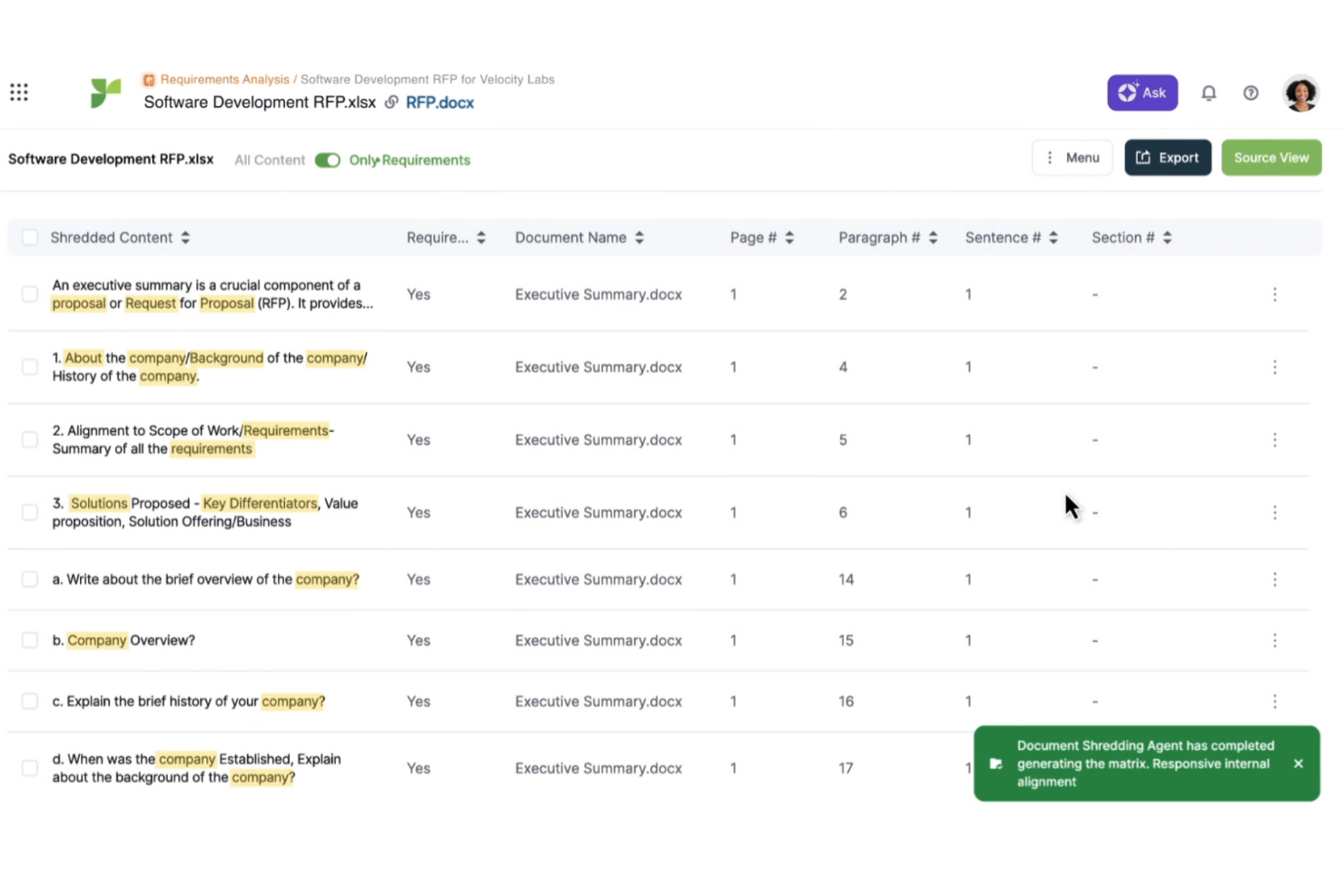
Responsive (precedentemente Rfp.io) è un software di gestione delle proposte progettato per organizzare il processo di risposta a RFP, RFI e questionari di sicurezza. È utilizzato principalmente da team di vendita e di preparazione delle proposte che hanno bisogno di un modo efficiente per gestire documentazione complessa.
Perché è una buona alternativa a Ignition: Responsive offre funzionalità basate sull’intelligenza artificiale che migliorano la gestione degli RFP. Puoi automatizzare le risposte a domande comuni, risparmiando tempo e riducendo gli errori. Gli strumenti di collaborazione del software consentono inoltre al tuo team di lavorare insieme sui documenti. Queste caratteristiche lo rendono un’ottima opzione per i team che desiderano migliorare i flussi di lavoro delle proposte e la precisione delle risposte.
Funzionalità e integrazioni peculiari:
Funzionalità includono una libreria di contenuti centralizzata per archiviare e riutilizzare i contenuti delle proposte, analisi avanzate per monitorare i tassi di successo delle proposte e flussi di lavoro automatizzati per semplificare i processi di approvazione dei documenti. Puoi anche utilizzare i suoi modelli personalizzabili per mantenere la coerenza tra tutte le tue proposte.
Integrazioni includono Salesforce, Microsoft Dynamics 365, Slack, Microsoft Teams, SharePoint, Box, Dropbox, Google Drive, OneDrive e Okta.
Pros and Cons
Pros:
- Automazione delle risposte basata sull’IA
- Libreria di contenuti centralizzata
- Analisi avanzate
Cons:
- Leggera curva di apprendimento
- Funzionalità di reportistica di base

Assembly
Ideale per portali clienti personalizzabili
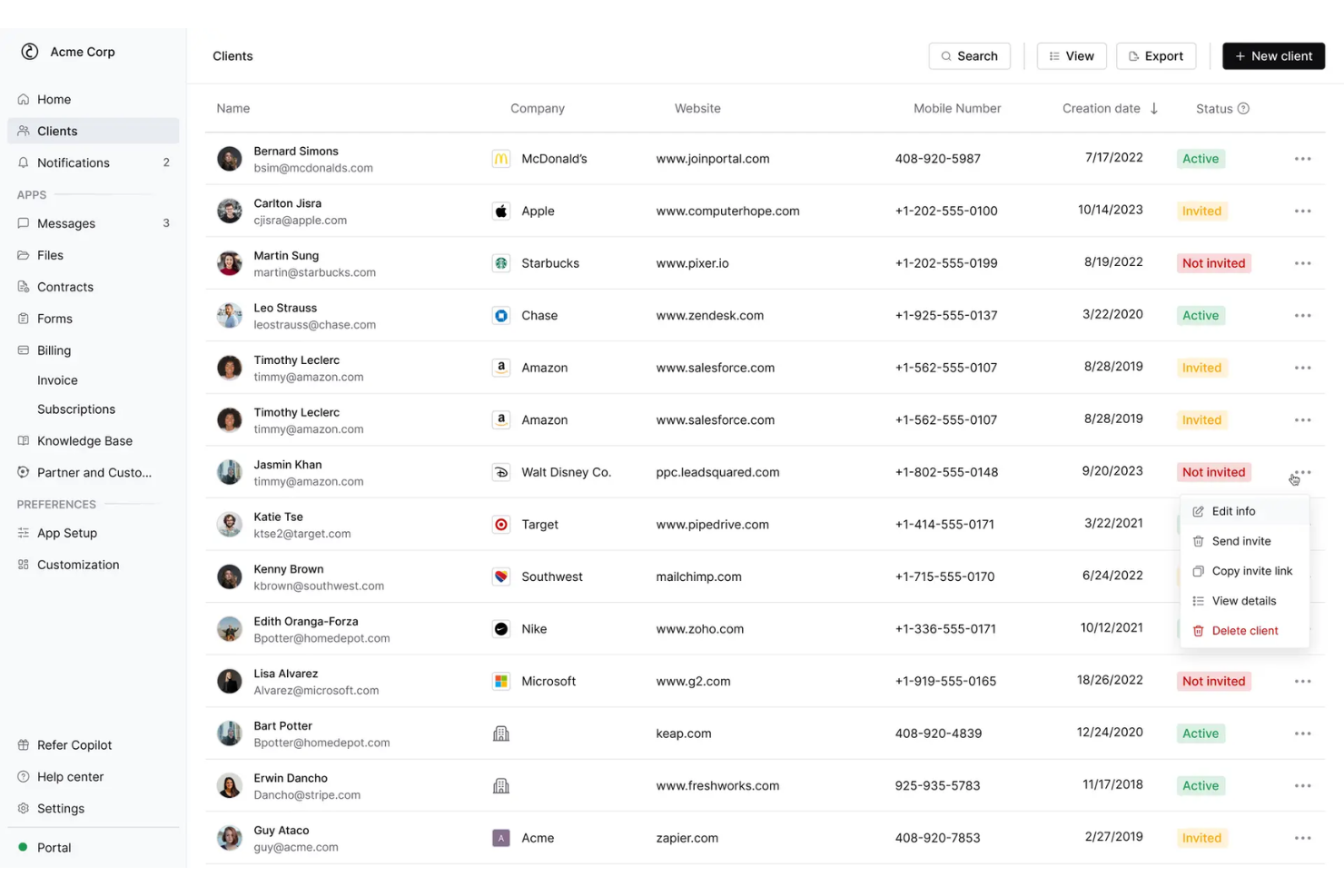
Copilot è un software di gestione clienti pensato per aziende che desiderano migliorare le interazioni con i propri clienti tramite portali personalizzati. È utilizzato da team che necessitano di ottimizzare la comunicazione e la gestione dei progetti con i loro clienti.
Perché è una buona alternativa a Ignition: Copilot offre portali clienti personalizzabili, garantendo un'esperienza su misura che Ignition potrebbe non offrire. Puoi adattare l'interfaccia alla tua brand identity, assicurando coerenza in tutte le interazioni con i clienti. Il software include anche funzioni come messaggistica sicura e condivisione di file, che aiutano a mantenere linee di comunicazione chiare. Queste capacità lo rendono una scelta forte per le aziende che vogliono rafforzare le relazioni con i clienti.
Funzionalità di spicco e integrazioni:
Funzionalità includono strumenti di gestione delle attività per organizzare in modo efficiente i progetti dei clienti, un sistema di fatturazione che semplifica la creazione di fatture e i pagamenti, e una funzione di rilevazione delle ore lavorate per garantire una fatturazione precisa. Puoi inoltre utilizzare l'analisi dati del software per ottenere insight sul coinvolgimento dei clienti e sulle prestazioni dei progetti.
Integrazioni disponibili con Stripe, QuickBooks, Google Drive, Dropbox, Slack, Zoom, PayPal, HubSpot, Asana e Trello.
Pros and Cons
Pros:
- Portali clienti personalizzabili
- Funzione di messaggistica sicura
- Opzioni di interfaccia personalizzate
Cons:
- Funzionalità avanzate limitate
- Scalabilità limitata per grandi aziende

Ideale per strumenti finanziari dettagliati
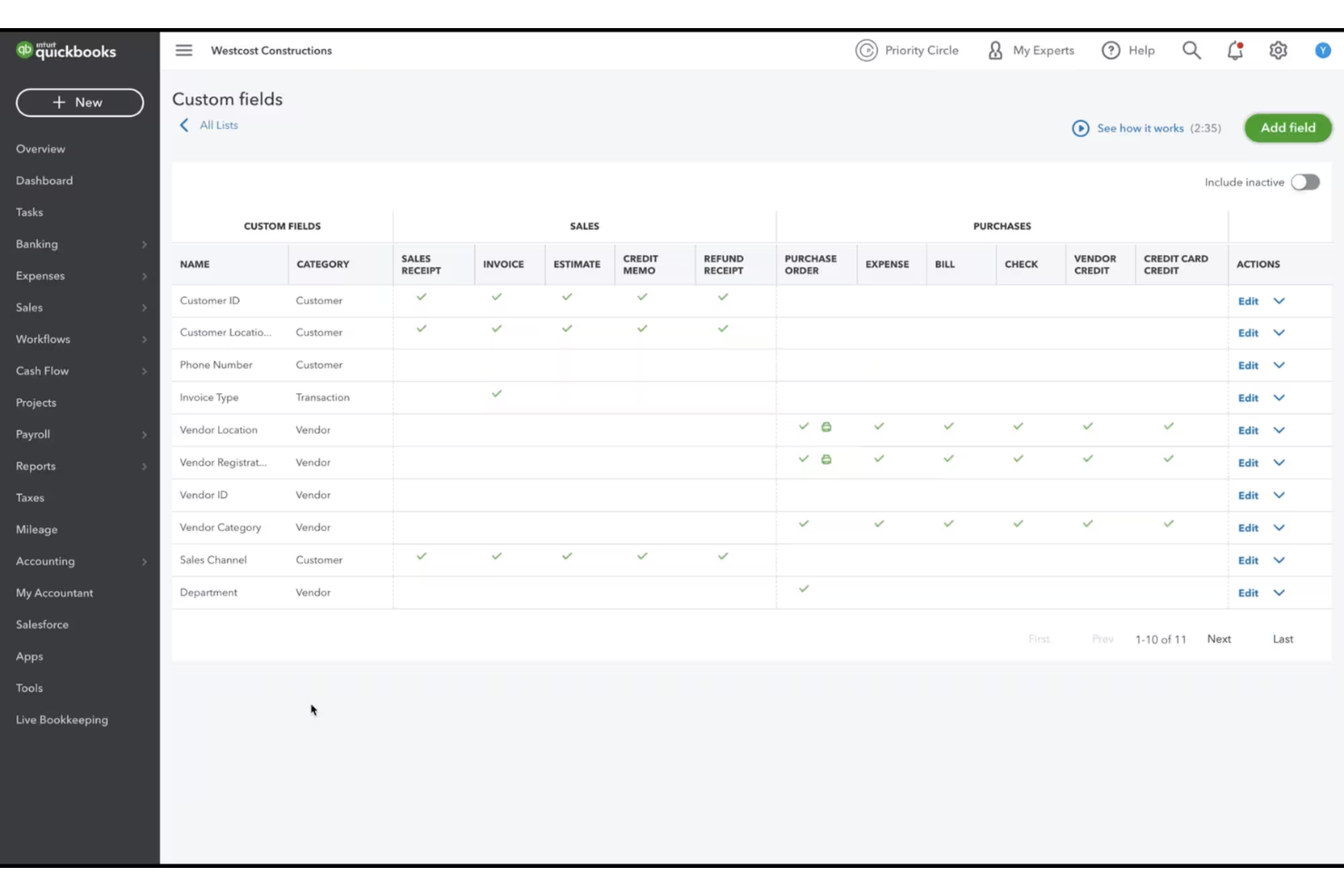
QuickBooks è un software di contabilità progettato per le piccole e medie imprese, per gestire le loro operazioni finanziarie. È utilizzato da titolari d'azienda e contabili che hanno bisogno di gestire fatturazione, paghe e monitoraggio delle spese in modo efficiente.
Perché è una valida alternativa a Ignition: QuickBooks offre strumenti finanziari completi che Ignition non fornisce, rendendolo ideale per le aziende focalizzate sulla contabilità. Puoi gestire le paghe e tenere traccia delle spese con facilità, garantendo registrazioni finanziarie accurate. Il suo sistema di fatturazione ti aiuta a ricevere i pagamenti più rapidamente automatizzando i processi di emissione delle fatture. Queste caratteristiche lo rendono una scelta solida per le imprese che necessitano di una gestione finanziaria dettagliata.
Funzionalità e integrazioni principali:
Funzionalità includono il monitoraggio dell'inventario per gestire i livelli di stock, strumenti per il calcolo delle tasse che semplificano la dichiarazione fiscale e la gestione del flusso di cassa per mantenere in equilibrio le tue finanze. Puoi anche utilizzare la funzionalità di gestione dei progetti per supervisionare il lavoro del tuo team e allocare le risorse in modo efficiente.
Integrazioni includono PayPal, Shopify, Square, TSheets, HubSpot, Expensify, BILL, Salesforce, Amazon e Stripe.
Pros and Cons
Pros:
- Fatturazione automatizzata
- Monitoraggio dettagliato delle spese
- Gestione dell'inventario
Cons:
- Leggera curva di apprendimento
- Opzioni di personalizzazione limitate

Bonsai
Ideale per la gestione di attività nel settore creativo

Bonsai è un software di gestione dei progetti pensato per freelance e piccole imprese nel settore creativo, che aiuta a gestire in modo efficiente contratti, proposte e fatture. È pensato per creativi come designer, scrittori e fotografi che hanno bisogno di un modo semplice per occuparsi delle attività aziendali.
Perché è una buona alternativa a Ignition: Bonsai offre funzionalità come gestione delle attività, monitoraggio del tempo e delle spese, che aiutano i creativi a gestire facilmente progetti e finanze. A differenza di Ignition, Bonsai è progettato specificamente per freelance, risultando così più adatto a esigenze individuali e di piccoli team. La sua interfaccia intuitiva e i modelli predefiniti semplificano le attività amministrative, permettendoti di concentrarti sul lavoro creativo. Queste caratteristiche rispondono alle esigenze dei professionisti creativi che cercano una soluzione specifica per il settore.
Funzionalità principali & integrazioni:
Funzionalità includono modelli personalizzabili per contratti e proposte, promemoria di fatturazione automatizzati e monitoraggio integrato del tempo per tenere i tuoi progetti nei tempi previsti. Puoi gestire tutta la tua attività da freelance da un'unica piattaforma, riducendo la necessità di utilizzare più strumenti. Il software offre anche funzioni di collaborazione sui progetti per mantenere sincronizzati te e i tuoi clienti.
Integrazioni includono QuickBooks, Zapier, Google Calendar, Slack, Trello, Asana, Dropbox, Stripe, PayPal e Google Drive.
Pros and Cons
Pros:
- Adatto ai freelance
- Gestione semplice dei contratti
- Fatturazione automatizzata
Cons:
- Scalabilità limitata per grandi team
- Funzionalità di reportistica basilari

Ideale per la fatturazione gratuita
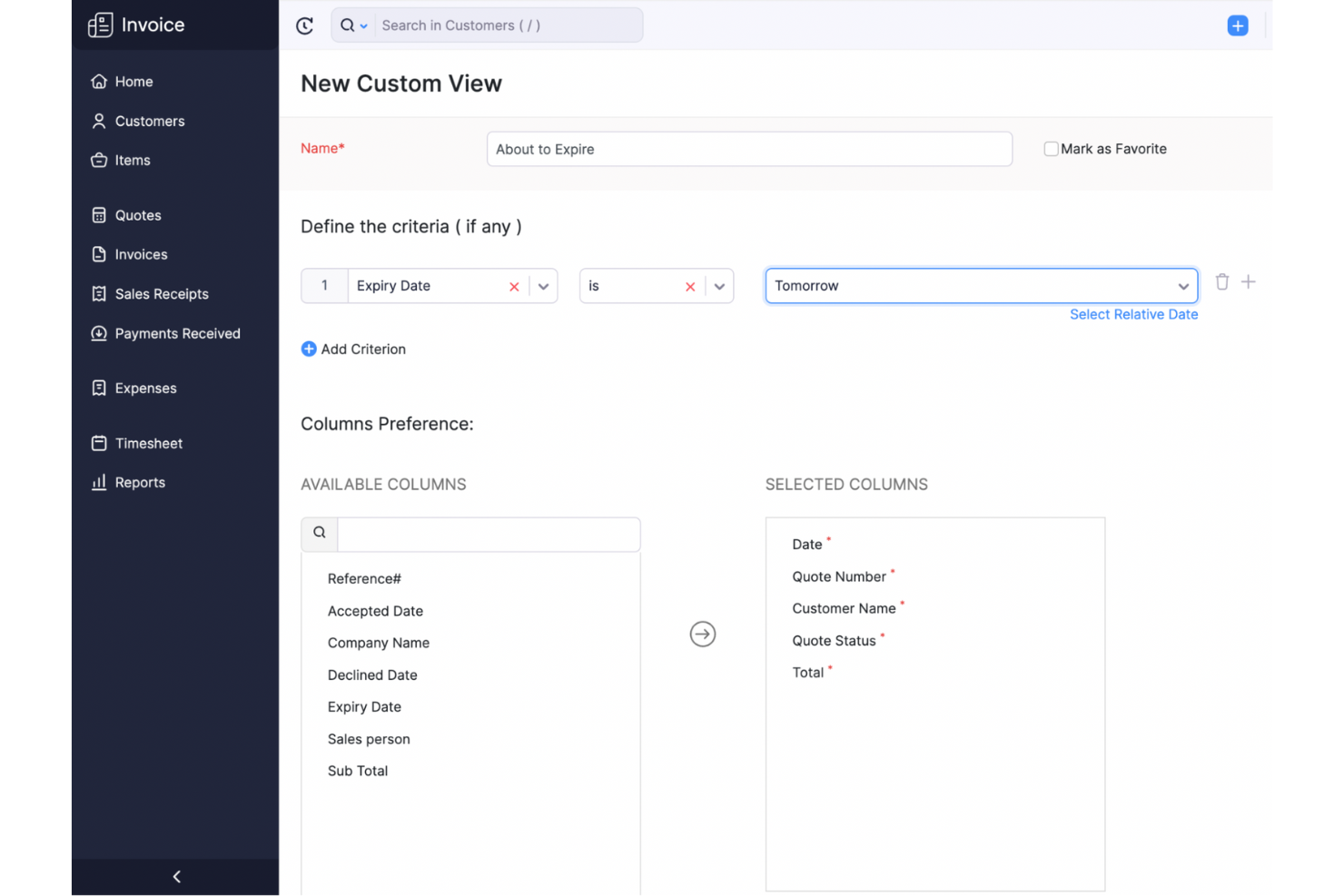
Zoho Invoice è un software di fatturazione progettato per piccole imprese e liberi professionisti che devono gestire in modo efficace i loro processi di fatturazione. Aiuta a creare fatture, tracciare le spese e gestire i pagamenti dei clienti.
Perché è una valida alternativa a Ignition: Zoho Invoice offre servizi di fatturazione gratuiti che Ignition non prevede, rendendolo ideale per le aziende attente al budget. Puoi personalizzare le fatture in modo che rispecchino il tuo brand, garantendo un aspetto professionale. Il software fornisce anche il monitoraggio delle spese, aiutandoti a tenere sotto controllo le finanze aziendali. Queste caratteristiche lo rendono una scelta interessante per chi cerca soluzioni di fatturazione efficienti senza costi.
Funzionalità principali & integrazioni:
Funzionalità includono promemoria automatici di pagamento che ti aiutano a ridurre i ritardi nei pagamenti, supporto multivaluta per le aziende che operano a livello internazionale e strumenti di reportistica dettagliati per offrirti una panoramica della salute finanziaria della tua attività. Puoi anche utilizzare la funzione di monitoraggio del tempo per garantire una fatturazione accurata ai tuoi clienti.
Integrazioni includono PayPal, Stripe, Square, G Suite, Dropbox, Slack, Zoho CRM, Zoho Projects, Zoho Books e Zapier.
Pros and Cons
Pros:
- Modelli di fattura personalizzabili
- Supporto multivaluta
- Promemoria automatici di pagamento
Cons:
- Funzionalità avanzate limitate
- Gestione inventario di base

PandaDoc
Ideale per la creazione rapida di documenti
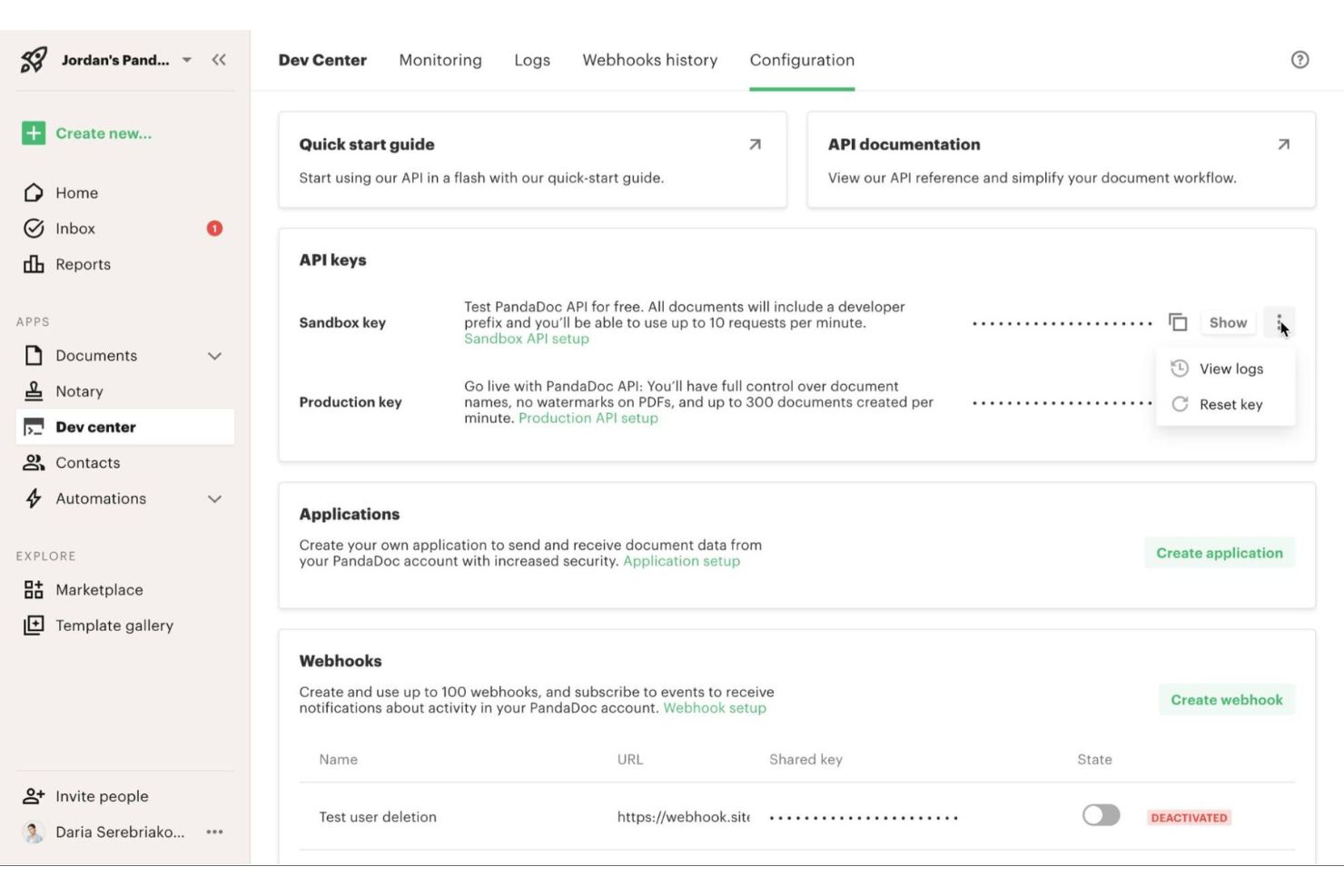
PandaDoc è un software di automazione documentale pensato per i team di vendita e le aziende che desiderano creare, inviare e monitorare documenti in modo efficiente. È utilizzato da professionisti che vogliono ottimizzare il flusso di lavoro documentale, tra cui proposte, preventivi e contratti.
Perché è una buona alternativa a Ignition: PandaDoc offre una creazione rapida di documenti grazie alla sua libreria di modelli intuitiva, che può risultare più efficiente rispetto alle soluzioni di Ignition. Puoi utilizzare l’editor drag-and-drop per personalizzare rapidamente i documenti. Le notifiche in tempo reale ti aiutano a rimanere aggiornato sullo stato dei documenti, garantendo un follow-up tempestivo con i clienti. Queste funzionalità lo rendono una scelta ideale per i team che danno priorità a velocità ed efficienza nella gestione dei documenti.
Funzionalità e integrazioni principali:
Funzionalità includono un editor documenti drag-and-drop che semplifica la personalizzazione, una funzionalità di firma elettronica integrata per approvazioni rapide e strumenti di analisi che forniscono informazioni sulle prestazioni dei documenti. Puoi inoltre utilizzare la sua libreria di contenuti per archiviare e riutilizzare gli elementi documentali più comuni, risparmiando tempo nei progetti futuri.
Integrazioni includono Salesforce, HubSpot, Zoho CRM, Pipedrive, QuickBooks, Xero, Microsoft Dynamics 365, Slack, Zapier e Stripe.
Pros and Cons
Pros:
- Creazione rapida di documenti
- Modelli intuitivi
- Notifiche in tempo reale
Cons:
- Funzionalità di reportistica di base
- Può essere complesso per i nuovi utenti

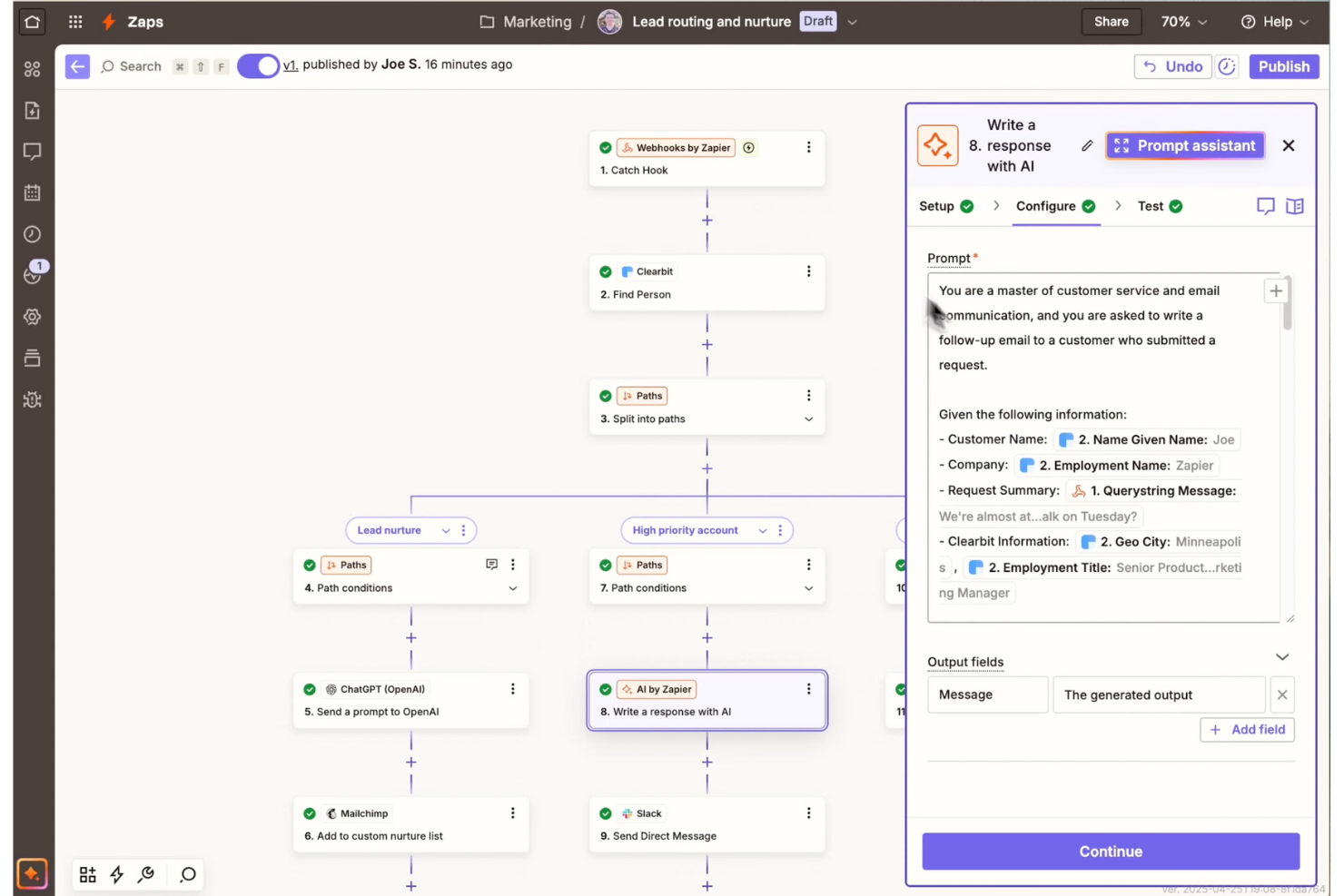
Zapier è uno strumento di automazione progettato per collegare diverse app e automatizzare i flussi di lavoro senza la necessità di scrivere codice. È utilizzato da aziende e privati che desiderano risparmiare tempo automatizzando attività ripetitive su varie applicazioni.
Perché è una buona alternativa a Ignition: Zapier offre automazione senza codice, consentendo di configurare flussi di lavoro automatizzati tra le app, una funzionalità che Ignition potrebbe non offrire. Puoi automatizzare attività ripetitive, liberando il tempo del tuo team per progetti più importanti. La sua interfaccia intuitiva lo rende accessibile anche a chi non ha un background tecnico. Queste caratteristiche lo rendono un'ottima scelta per le aziende che desiderano aumentare la produttività senza la necessità di integrazioni complesse.
Caratteristiche e integrazioni distintive:
Caratteristiche comprendono un'interfaccia intuitiva drag-and-drop per creare flussi di lavoro automatizzati, un'ampia compatibilità con diverse app per collegare vari strumenti e trigger personalizzabili che avviano azioni in base a eventi specifici. Puoi anche trarre vantaggio dai suoi flussi di lavoro multi-step, che permettono automazioni complesse.
Integrazioni includono Google Sheets, Slack, Mailchimp, Trello, Asana, Salesforce, Shopify, HubSpot, QuickBooks e Dropbox.
Pros and Cons
Pros:
- Nessuna competenza tecnica richiesta
- Ampia compatibilità con le app
- Trigger di automazione personalizzabili
Cons:
- Funzionalità avanzate limitate
- Le attività complesse possono richiedere soluzioni alternative

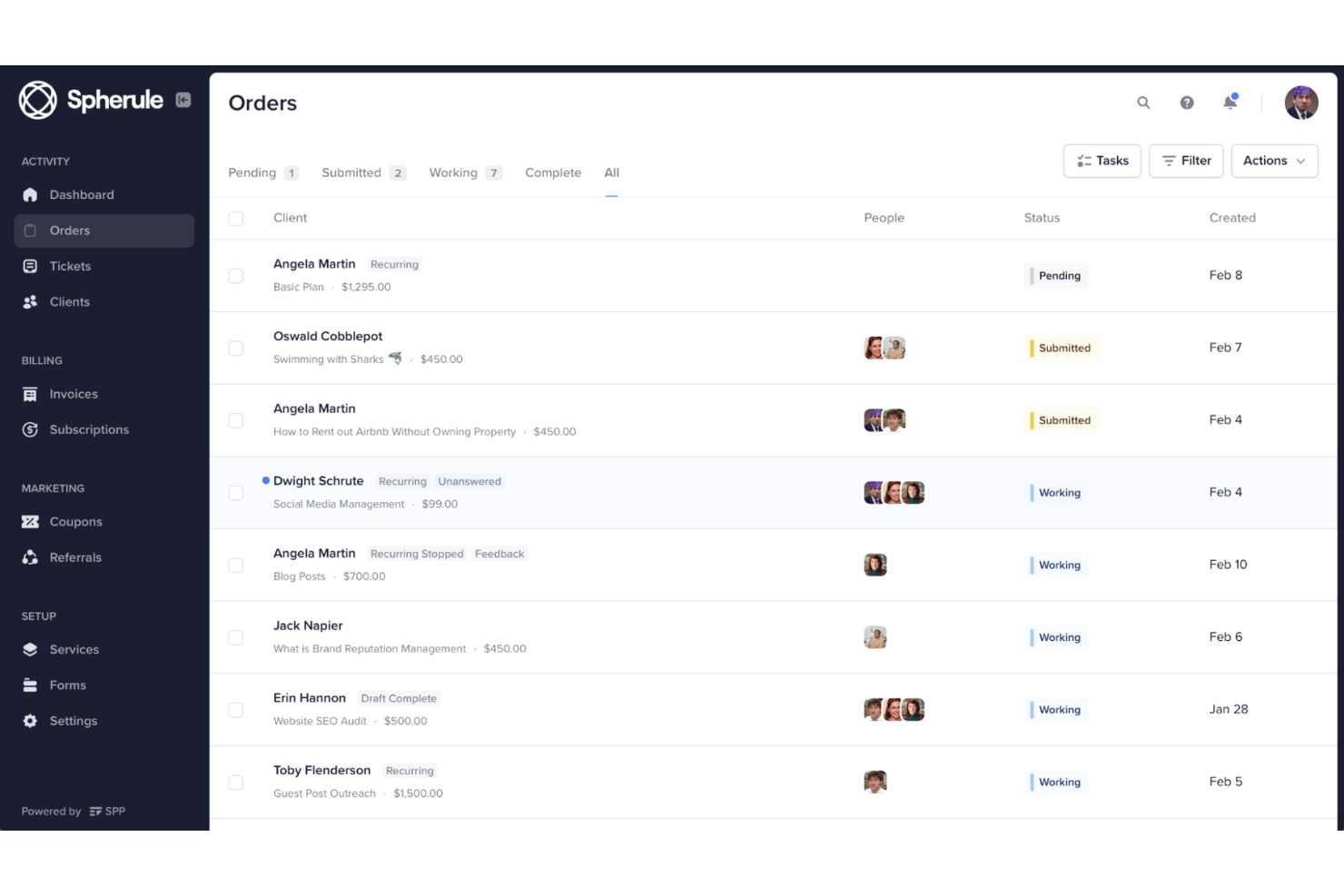
Service Provider Pro è un software di gestione clienti e fatturazione pensato per le agenzie digitali che offrono servizi prodotti. È ideato per i titolari di agenzie e i loro team, per semplificare la gestione di clienti, progetti e pagamenti.
Perché è una valida alternativa a Ignition: Service Provider Pro offre funzionalità come portali clienti e fatturazione automatizzata, che forniscono un'esperienza personalizzata che Ignition potrebbe non offrire. Puoi gestire più clienti facilmente grazie ai suoi strumenti di gestione dei progetti. Le capacità CRM integrate ti aiutano a tenere traccia delle interazioni con i clienti e dello stato dei progetti. Queste funzionalità sono ideali per le agenzie che vogliono semplificare le operazioni e rafforzare le relazioni con i clienti.
Funzionalità principali & integrazioni:
Le funzionalità includono portali clienti white-label che permettono di personalizzare l'esperienza del cliente, fatturazione automatica per risparmiare tempo sulla contabilità, e una dashboard centralizzata per la gestione di tutti i progetti. Puoi anche utilizzare i suoi strumenti di gestione delle attività per assegnare e monitorare i lavori in modo efficiente, aiutando il team a rimanere organizzato.
Le integrazioni includono Stripe, PayPal, Zapier, Slack, QuickBooks, Google Drive, Dropbox, Trello, Asana e Xero.
Pros and Cons
Pros:
- Portali clienti white-label
- Fatturazione automatizzata
- Funzionalità CRM integrate
Cons:
- Opzioni di personalizzazione limitate
- Scalabilità limitata per le grandi imprese
Altre alternative a Ignition
Ecco alcune ulteriori alternative a Ignition che non sono entrate nella mia selezione, ma che vale comunque la pena valutare:
- Bidsketch
Ideale per l'analisi delle proposte
- Moxie
Ideale per la gestione dei freelance
- GoProposal
Ideale per proposte di prezzo


Come valuto le alternative a Ignition
Divido la mia valutazione in due livelli: le funzionalità di base, come la pubblicazione delle note di rilascio e il coordinamento dei lanci di prodotto, e gli elementi distintivi che differenziano uno strumento dall'altro.
Funzionalità fondamentali (requisiti essenziali per questo elenco)
Quando seleziono gli strumenti da includere nel mio elenco, assegno a ciascuno un punteggio su una scala da 0 (non offre la funzionalità) a 5 (eccelle in quest'area) per ogni funzionalità fondamentale indicata di seguito. Poi calcolo il punteggio totale dello strumento in percentuale. Ogni strumento deve raggiungere un punteggio totale minimo del 65% per essere preso in considerazione.
- Comunicazioni sulle versioni: valuto come ogni strumento gestisce la creazione e la distribuzione di note di rilascio, registri delle modifiche e annunci di lancio attraverso canali come e-mail, widget nell'app e web.
- Gestione dei piani di sviluppo: lo strumento dovrebbe offrire visualizzazioni grafiche dei piani di sviluppo che i product manager possano condividere con la leadership o con parti interessate esterne per allinearsi su cosa verrà rilasciato e quando.
- Coordinamento dell'ingresso sul mercato: valuto se la piattaforma supporta flussi di lavoro strutturati per i lanci, con assegnazione delle attività, tempistiche e gestione delle risorse tra i team di prodotto, marketing e vendite.
- Raccolta dei feedback dei clienti: ogni strumento dovrebbe aggregare i feedback provenienti da più fonti e consentire ai team di taggare, categorizzare e collegare gli insight agli elementi del piano di sviluppo per la definizione delle priorità.
- Ecosistema di integrazioni: verifico la presenza di connessioni native con strumenti come Jira, Slack, Salesforce e HubSpot, oltre all'accesso tramite API o webhook per flussi di lavoro personalizzati.
- Collaborazione tra le parti interessate: in questo caso sono importanti gli spazi di lavoro condivisi con autorizzazioni basate sui ruoli, soprattutto quando i PMM e i responsabili delle vendite devono avere accesso senza modificare le priorità del piano di sviluppo.
Una volta ottenuto un elenco di strumenti che soddisfano questi criteri, valuto ciò che distingue ciascuna piattaforma.
Fattori distintivi (ciò che differenzia i fornitori)
Ecco come confronto i diversi fornitori:
Funzionalità di spicco
La generazione di contenuti basata sull'IA è un importante elemento distintivo. Gli strumenti che redigono automaticamente note di rilascio o brief di lancio a partire dai dati del prodotto fanno risparmiare ai PMM ore di scrittura ripetitiva a ogni ciclo di rilascio. Cerco anche dashboard di analisi dei lanci che colleghino direttamente le metriche di adozione e coinvolgimento delle funzionalità a lanci specifici, così che i team possano misurare quali iniziative stanno ottenendo risultati. È importante anche un centro dedicato all'abilitazione delle vendite, soprattutto per i team che devono distribuire schede di confronto e informazioni sulla concorrenza ai rappresentanti proprio quando un lancio diventa operativo.
Oltre le funzionalità
La struttura dei prezzi è importante quando si passa da Ignition. Valuto se gli strumenti applicano un costo per postazione, per spazio di lavoro o in base al livello di funzionalità, poiché un team PMM di cinque persone ha esigenze di costo molto diverse rispetto a un'organizzazione di prodotto aziendale. Anche le dimensioni del team e l'adeguatezza al contesto aziendale giocano un ruolo. Alcune piattaforme servono bene i product marketer singoli, ma mostrano dei limiti quando sono necessari il coordinamento dell'ingresso sul mercato per più prodotti o più marchi. Anche il tempo necessario per ottenere valore è un fattore che considero. I modelli predefiniti per i lanci e il supporto alla migrazione possono fare la differenza tra la pubblicazione del primo lancio in pochi giorni o in diverse settimane.
Perché cercare un'alternativa a Ignition?
Sebbene Ignition sia una soluzione software valida per la gestione delle proposte e dei rapporti con i clienti, sono diversi i motivi per cui i professionisti valutano delle alternative. Potresti prendere in considerazione un cambiamento perché:
- Hai bisogno di un maggiore controllo sul tuo modello di tariffazione
- Stai cercando strumenti con un supporto più solido per API e integrazioni
- Il tuo processo di onboarding sta diventando più complesso man mano che il team cresce
- Vuoi funzionalità più avanzate di analisi e reportistica
- Operi in più lingue o regioni
- Sei una piccola impresa o un libero professionista alla ricerca di un'opzione più conveniente
Una nota sulle integrazioni: molti team utilizzano Ignition insieme a Excel, sistemi di contabilità o CRM per supportare il processo di vendita, ma le integrazioni possono essere limitate a seconda del tuo stack tecnologico. Se questo rappresenta un problema, diverse alternative presentate sopra offrono opzioni più flessibili e moderne per ampliare le tue attività migliorando al contempo l'esperienza utente.
Funzionalità principali di Ignition
Ecco una panoramica di ciò che offre Ignition, così puoi confrontarne le funzionalità con quelle di altri strumenti:
- Gestione delle attività – Assegna e monitora le attività utilizzando tag e commenti organizzati in thread per la collaborazione.
- Visualizzazione dei progetti – Organizza il lavoro con bacheche Kanban, viste della sequenza temporale, elenchi e dashboard.
- Monitoraggio degli OKR – Allinea i team con obiettivi e risultati chiave, supportati da metriche delle prestazioni.
- Documentazione dei lanci – Redigi e organizza i documenti strategici, con risorse incorporate e controllo delle versioni.
- Gestione delle risorse digitali e dei documenti – Archivia i file, gestisci le approvazioni e aggiungi tag per recuperarli facilmente.
- Automazione basata sull'intelligenza artificiale – Genera approfondimenti, testi di marketing e piani di progetto utilizzando l'intelligenza artificiale.
- Modelli e logica dei flussi di lavoro – Utilizza modelli predefiniti e flussi di lavoro condizionali per aumentare l'efficienza.
- Intelligence competitiva – Automatizza le revisioni delle vittorie e delle sconfitte, le schede comparative e i sondaggi sul feedback dei clienti.
- Pianificazione di prodotti e funzionalità – Gestisci le roadmap, raccogli idee e pubblica le note di rilascio.
Quali sono i prossimi passi?
Non dimenticare di iscriverti alla nostra newsletter per ricevere ulteriori risorse e guide sulla gestione dei prodotti, oltre agli ultimi podcast, alle interviste e ad altri approfondimenti di leader ed esperti del settore.