

Il software per la creazione di wireframe aiuta i team UX e di prodotto a creare layout a bassa fedeltà che definiscono la struttura, i contenuti e il flusso utente di un sito web o di un'app, senza perdersi nei dettagli del design visivo. È la fase progettuale del design in cui velocità e chiarezza sono fondamentali.
Sei qui perché hai fatto le tue ricerche o hai usato Balsamiq abbastanza a lungo da sapere che è uno strumento valido per la creazione di wireframe. È rapido, facile da imparare e ottimo per i mockup in stile schizzo. Tuttavia, potresti iniziare a sentirne i limiti.
Forse desideri maggiore interattività, funzionalità di prototipazione più avanzate o collaborazione in tempo reale con il tuo team. Oppure ti sei scontrato con la difficoltà di dover creare design ad alta fedeltà o trasferire più agevolmente il lavoro agli sviluppatori. In ogni caso, sei pronto a scoprire cos'altro offre il mercato e noi siamo qui per aiutarti a prendere una decisione consapevole.
Abbiamo testato e recensito in modo indipendente un'ampia gamma di strumenti per la creazione di wireframe, da Balsamiq ai suoi concorrenti più avanzati e specializzati. Questa guida elimina il rumore di fondo per aiutarti a:
- Trovare gli strumenti più adatti al tuo flusso di lavoro
- Superare specifici problemi che Balsamiq non risolve
- Valutare consapevolmente i compromessi in base a funzionalità, facilità d'uso e prezzo
Entriamo nel vivo.
Che cos'è Balsamiq?
Balsamiq è uno strumento per la creazione di wireframe che ti aiuta a realizzare rapidamente mockup a bassa fedeltà dei tuoi design. Viene comunemente utilizzato da designer UX, product manager e sviluppatori che hanno bisogno di visualizzare e perfezionare i concetti di design. Gli elementi trascinabili, i componenti dell'interfaccia utente predefiniti e un'interfaccia semplice aiutano a creare e condividere rapidamente i wireframe. Nel complesso, Balsamiq offre un modo diretto per trasformare le idee in formati visivi che il tuo team può comprendere e discutere facilmente.
Perché fidarsi dei nostri consigli sui software
6,700+
Reviews
20
Industry experts
16+
Evaluation factors
14
Years
Il nostro team testa e recensisce software dal 2012. In quanto product manager noi stessi, sappiamo quanto sia difficile — e importante — scegliere il software giusto.
Per questa guida, abbiamo valutato gli strumenti attraverso test pratici e ricerche indipendenti, assegnando un punteggio agli strumenti in base ai nostri criteri di selezione.
Le nostre recensioni riflettono il nostro giudizio editoriale umano, non un discorso di vendita.
Revisori esperti:
- Andrew LumbySenior TPM
- Cristiano ValimSenior UI/UX Lead


Tabella di confronto: alternative a Balsamiq
Questa tabella di confronto riassume i dettagli sui prezzi delle mie migliori alternative a Balsamiq.
| Tool | Best For | Trial Info | Price | ||
|---|---|---|---|---|---|
| 1 | Ideale per mappe mentali collegate agli schemi preliminari | Piano gratuito disponibile | A partire da $10/utente/mese (con fatturazione annuale) | Website | |
| 2 | Ideale per chi non è designer e deve creare wireframe con l'intelligenza artificiale | Piano gratuito disponibile | A partire da $14/editor/mese | Website | |
| 3 | Ideale per strumenti di progettazione per macOS | Prova gratuita di 30 giorni | A partire da $12/redattore/mese (fatturati annualmente) | Website | |
| 4 | Ideale per la prototipazione interattiva senza codice | Piano gratuito disponibile | A partire da $29/utente/mese (con fatturazione annuale) | Website | |
| 5 | Ideale per creare diagrammi senza una connessione Internet | Utilizzabile gratuitamente | Utilizzabile gratuitamente | Website | |
| 6 | Ideale per schemi che possono evolvere fino alla consegna completa | Piano gratuito disponibile | A partire da $3/utente/mese | Website | |
| 7 | Ideale per le annotazioni delle specifiche e il passaggio di consegne agli sviluppatori | Piano gratuito disponibile | A partire da $24.90/utente/mese (fatturato annualmente) | Website | |
| 8 | Ideale per pianificare l'interfaccia utente tra schermate e flussi | Piano gratuito disponibile | A partire da $14/utente/mese (fatturato annualmente) | Website | |
| 9 | Ideale per la prototipazione con componenti di codice reali | Prova gratuita di 14 giorni | A partire da $29/utente/mese (fatturato annualmente) | Website | |
| 10 | Ideale per prototipi ad alta fedeltà | Piano gratuito disponibile | A partire da $19/utente/mese | Website |


Testiamo e recensiamo software per la gestione dei prodotti dal 2020. In quanto designer UX, sappiamo quanto sia fondamentale e difficile prendere la decisione giusta quando si sceglie un software. Investiamo in ricerche approfondite per aiutare il nostro pubblico a prendere decisioni migliori per l'acquisto di software.
Abbiamo testato più di 2.000 strumenti per diversi casi d'uso nella gestione dei prodotti e scritto oltre 1.000 recensioni complete di software. Scopri come manteniamo la trasparenza e consulta la nostra metodologia di recensione del software.
Recensioni delle migliori alternative a Balsamiq
Di seguito sono riportati i miei riepiloghi dettagliati delle migliori alternative a Balsamiq incluse nella mia selezione. Le mie recensioni offrono uno sguardo approfondito alle funzionalità principali, ai pro e contro, alle integrazioni e ai casi d’uso ideali di ogni strumento, per aiutarti a trovare quello più adatto a te
 Ideale per mappe mentali collegate agli schemi preliminari
- Piano gratuito disponibile
- A partire da $10/utente/mese (con fatturazione annuale)
Visit WebsiteCustomer Rating:4.6/5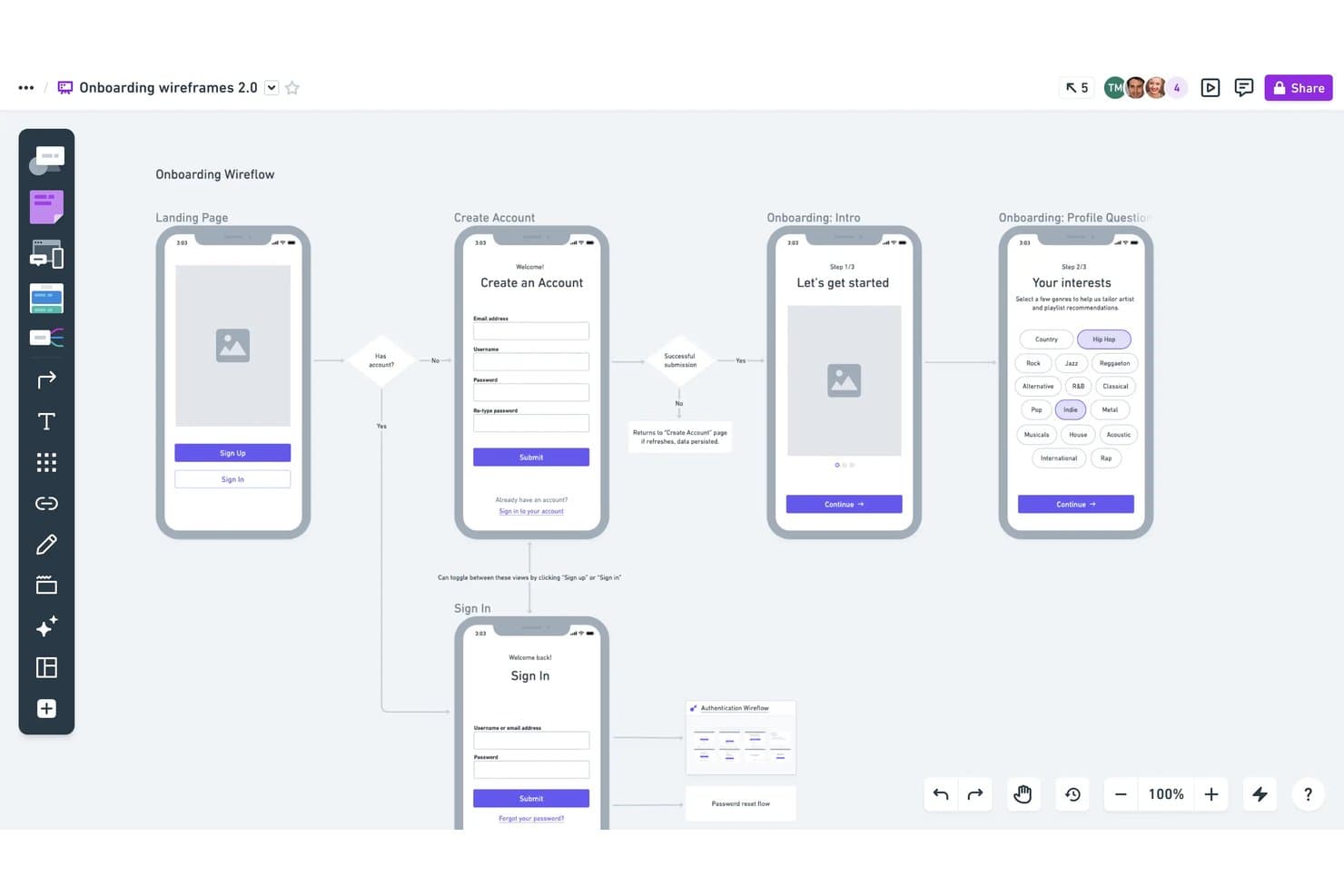
Whimsical consente agli utenti di creare flussi di schemi preliminari annotati con la logica. Whimsical è uno spazio di lavoro visivo per responsabili di prodotto, progettisti e fondatori che devono creare schemi preliminari, mappare i flussi degli utenti e allineare i team sulle prime idee di prodotto.
Per chi è più adatto Whimsical?
Whimsical è adatto ai team di prodotto distribuiti che hanno bisogno di uno spazio condiviso per la creazione collaborativa di mappe mentali e la raccolta visiva di idee.
Perché Whimsical è una buona alternativa a Balsamiq
Ho scelto Whimsical perché è ideale per la creazione di mappe mentali durante le prime fasi della scoperta del prodotto. Utilizzo le sue mappe ramificate e i nodi comprimibili per collegare i problemi dei clienti, le ipotesi e le idee per le funzionalità prima di abbozzare gli schemi dell'interfaccia. La modifica condivisa consente al mio team di trasformare queste mappe in flussi dell'interfaccia durante lo stesso laboratorio.
Funzionalità principali di Whimsical
- Modelli di schemi preliminari: Inizia i progetti con strutture predefinite per schermate e flussi di prodotto comuni.
- Libreria di componenti dell'interfaccia: Aggiungi pulsanti, campi di input, schede, menu e altri elementi dell'interfaccia.
- Caricamento di immagini: Inserisci immagini direttamente negli schemi preliminari per ottenere riferimenti visivi realistici.
- Esportazione delle bacheche: Scarica le bacheche come file PDF, PNG o SVG per condividerle.
Integrazioni di Whimsical
Whimsical supporta le integrazioni con Jira, Confluence, Google Docs, ClickUp, Asana, Notion, Slack, GitHub, Linear e Canva. Offre inoltre un'API beta per le integrazioni personalizzate.
Pros and Cons
Pros:
- Le mappe mentali ramificate collegano la fase di scoperta ai flussi
- I modelli di schemi preliminari accelerano l'esplorazione iniziale dell'interfaccia
- I cursori in tempo reale favoriscono la collaborazione mirata durante i laboratori
Cons:
- Troppo basilare per specifiche dettagliate dell'interfaccia
- Le sessioni di pianificazione più ampie possono risultare limitate dallo spazio della tela
Learn more about Whimsical: Ideale per chi non è designer e deve creare wireframe con l'intelligenza artificiale
- Piano gratuito disponibile
- A partire da $14/editor/mese
Visit WebsiteCustomer Rating:4.8/5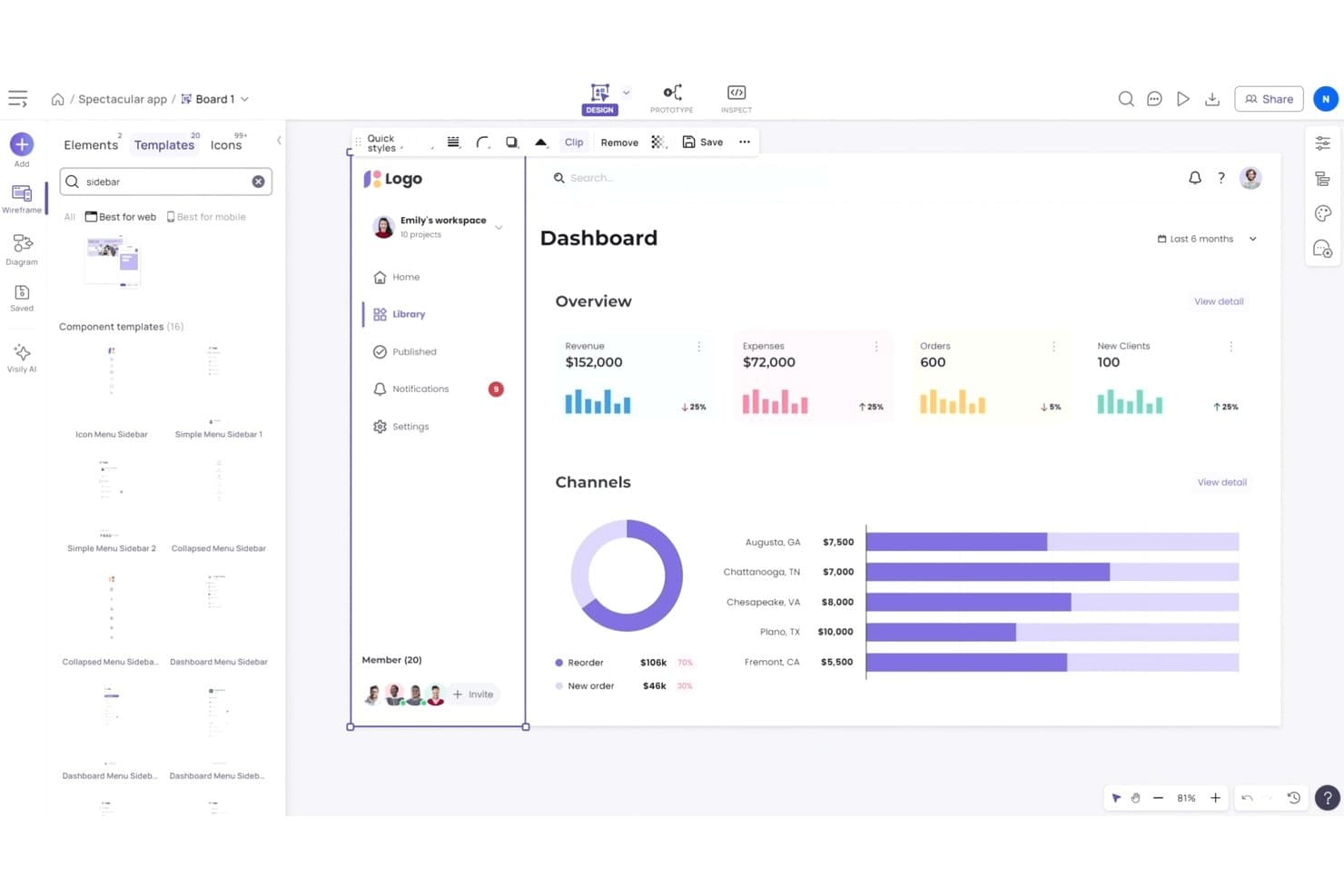
Visily offre modelli pronti all'uso per interfacce utente con barra laterale e dashboard. Visily è una piattaforma di wireframing basata sull'intelligenza artificiale per product manager, fondatori e team aziendali che devono trasformare le idee in concetti di prodotto chiari senza competenze avanzate di progettazione.
Per chi è più adatto Visily?
Visily è adatto a product manager e fondatori che devono trasformare le prime idee di prodotto in wireframe generati dall'intelligenza artificiale senza competenze di progettazione.
Perché Visily è una valida alternativa a Balsamiq
Ho scelto Visily perché è ideale per chi non è designer e deve creare wireframe con l'intelligenza artificiale. Utilizzo prompt testuali per creare le schermate iniziali, poi perfeziono i layout con il suo assistente di progettazione basato sull'intelligenza artificiale. La conversione da screenshot a progetto aiuta inoltre il mio team a trasformare riferimenti di prodotti esistenti in wireframe modificabili per la fase iniziale di analisi.
Funzionalità principali di Visily
- Libreria di componenti dell'interfaccia utente: aggiungi elementi dell'interfaccia modificabili da una libreria riutilizzabile.
- Modelli di wireframe: avvia i progetti con modelli predefiniti per le schermate di prodotto più comuni.
- Prototipazione interattiva: collega le schermate per mappare i flussi utente e simulare la navigazione.
- Collaborazione in team: invita i membri del team a esaminare i progetti e lasciare commenti.
Integrazioni di Visily
Visily offre integrazioni ufficiali con Slack e Figma, oltre a un'app Jira tramite Atlassian Marketplace. Supporta inoltre connessioni MCP con Claude Code, Codex, Cursor, Gemini CLI, Antigravity, Kiro, ChatGPT e Lovable.
Pros and Cons
Pros:
- I prompt testuali producono rapidamente wireframe ad alta fedeltà
- Gli screenshot diventano punti di partenza modificabili
- I prototipi interattivi rendono più chiari i feedback degli stakeholder
Cons:
- Le modifiche apportate dall'intelligenza artificiale possono rigenerare intere schermate
- La logica dei diagrammi può generare flussi inaffidabili
Learn more about Visily: Ideale per strumenti di progettazione per macOS
- Prova gratuita di 30 giorni
- A partire da $12/redattore/mese (fatturati annualmente)
Visit WebsiteCustomer Rating:4.5/5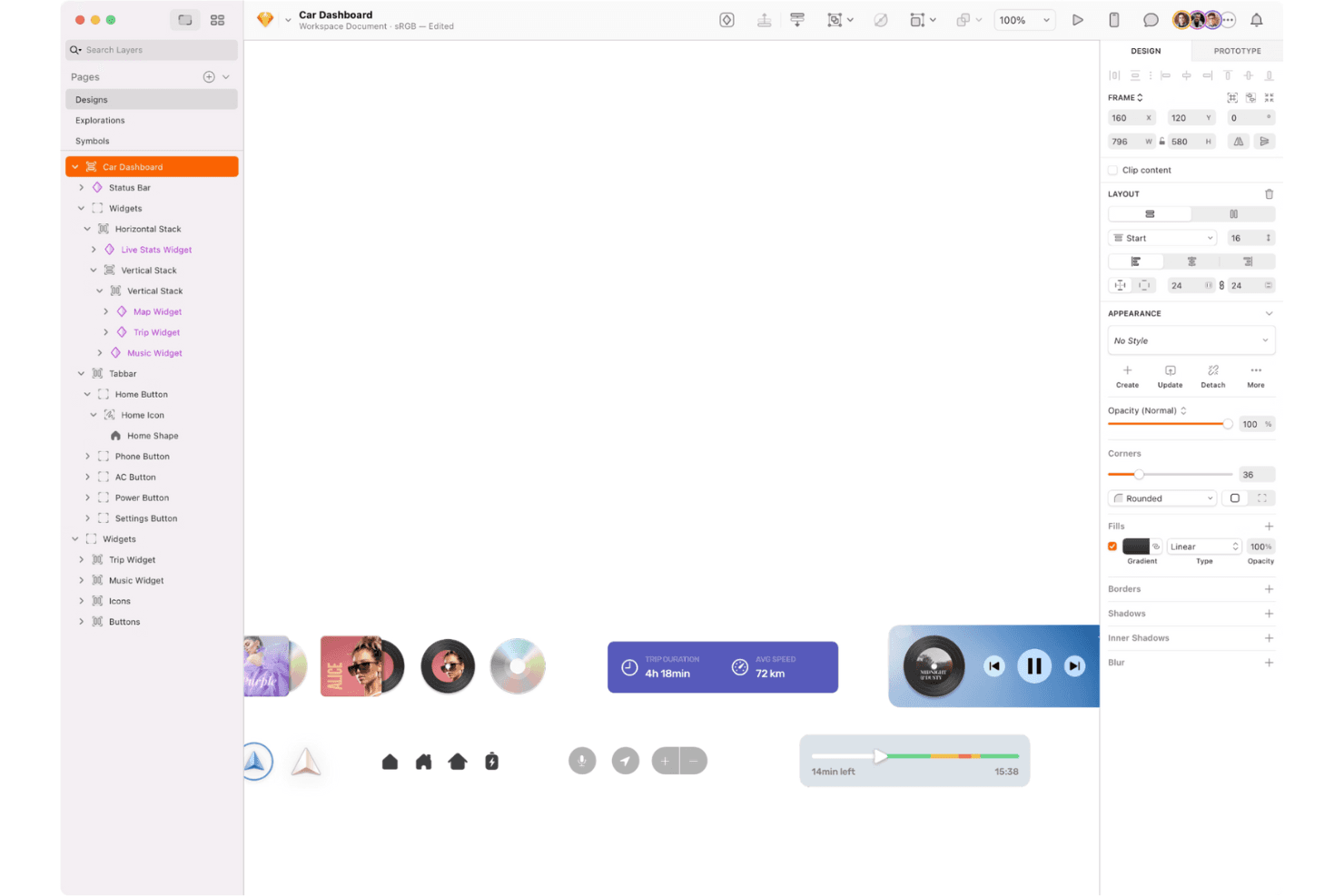
Sketch è un kit di strumenti di progettazione per macOS dedicato alla modifica vettoriale, ai layout e alla prototipazione interattiva. Sketch è una piattaforma di progettazione dell'interfaccia utente e creazione di wireframe basata innanzitutto su macOS, pensata per i team di prodotto che devono trasformare i primi concetti in interfacce curate, allineare gli stakeholder e mantenere sistemi di progettazione coerenti.
Per chi è più adatto Sketch?
Sketch è adatto ai team di progettazione di prodotto basati su macOS che creano interfacce, wireframe, prototipi e sistemi di progettazione condivisi.
Perché Sketch è una buona alternativa a Balsamiq
Ho scelto Sketch perché il suo posizionamento come strumento di progettazione per macOS si adatta ai team che passano dai wireframe a schermate di prodotto curate. Utilizzo i simboli e le librerie condivise per mantenere coerenti la navigazione, i moduli e i modelli ricorrenti dell'interfaccia nei vari flussi. I suoi strumenti di prototipazione consentono al mio team di collegare queste schermate e testare percorsi utente realistici prima dello sviluppo.
Funzionalità principali di Sketch
- Tavole da disegno: Crea tele separate per schermate, dimensioni dei dispositivi e flussi utente.
- Modifica vettoriale: Disegna e modifica gli elementi dell'interfaccia con tracciati e forme precise.
- Stili di testo: Salva impostazioni tipografiche riutilizzabili per titoli, etichette e testo del corpo.
- Layout intelligente: Imposta regole di ridimensionamento che adattano i livelli quando cambia il contenuto.
Integrazioni di Sketch
Sketch offre componenti aggiuntivi e integrazioni con Slack, Notion, Jira, Zeplin, ProtoPie, Overflow, Frontify e Google Sheets. Fornisce inoltre un'API JavaScript ufficialmente supportata e una specifica del formato dei file per le integrazioni personalizzate.
Pros and Cons
Pros:
- I flussi di lavoro nativi per macOS sono rapidi e curati
- I simboli riutilizzabili mantengono coerenti i modelli dell'interfaccia
- La modifica vettoriale supporta schermate curate e pronte per la consegna
Cons:
- La modifica dei progetti solo su Mac limita la flessibilità della piattaforma
- Le interfacce curate richiedono più tempo rispetto ai wireframe rapidi
 Ideale per la prototipazione interattiva senza codice
- Piano gratuito disponibile
- A partire da $29/utente/mese (con fatturazione annuale)
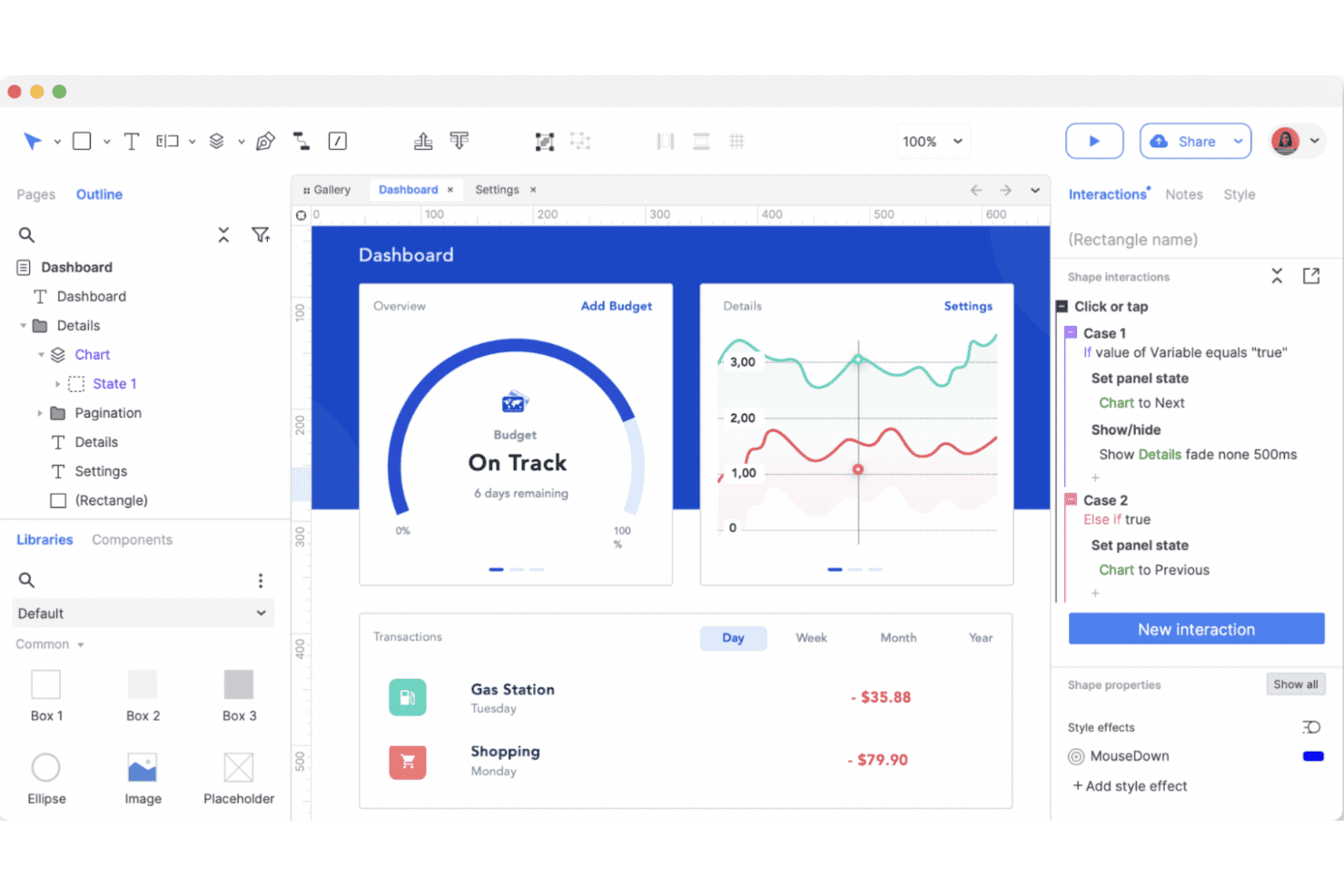
Axure RP è uno strumento di prototipazione per creare progetti interattivi e flussi utente complessi. Axure RP è una piattaforma per la creazione di wireframe e prototipi destinata a responsabili di prodotto, progettisti UX e team aziendali che devono chiarire requisiti complessi, testare flussi di lavoro e allineare gli stakeholder prima dello sviluppo.
Per chi è più indicato Axure RP?
I responsabili di prodotto e i progettisti UX delle organizzazioni di medie e grandi dimensioni possono usare Axure RP per modellare interazioni complesse prima dello sviluppo.
Perché Axure RP è una buona alternativa a Balsamiq
Ho scelto Axure RP perché è progettato per la progettazione UX dinamica. Uso pannelli dinamici, logica condizionale e variabili per creare prototipi di flussi di lavoro ramificati, stati di convalida e pannelli di controllo personalizzati senza scrivere codice destinato alla produzione. Questo consente al mio team di testare interazioni realistiche prima che il reparto tecnico si impegni nell'implementazione.
Funzionalità principali di Axure RP
- Viste adattive: Crea layout che si adattano a diverse dimensioni dello schermo e dispositivi.
- Librerie di componenti: Aggiungi elementi dell'interfaccia riutilizzabili da librerie integrate o personalizzate.
- Note di pagina: Documenta requisiti, decisioni e dettagli di implementazione accanto ai progetti.
- Progetti di team: Gestisci file condivisi e monitora le modifiche nei progetti di progettazione collaborativi.
Integrazioni di Axure RP
Axure RP offre integrazioni e componenti aggiuntivi ufficiali per Jira, Confluence, Slack, Microsoft Teams, Figma, Sketch e Adobe XD. I collegamenti con Jira e Confluence utilizzano app dell'Atlassian Marketplace, mentre Slack e Microsoft Teams forniscono notifiche sulle attività di Axure Cloud; Figma, Sketch e Adobe XD supportano l'importazione dei progetti.
Pros and Cons
Pros:
- La logica condizionale modella flussi di lavoro realistici
- Le viste adattive supportano prototipi reattivi
- La documentazione rimane accanto alle decisioni di progettazione
Cons:
- Le interazioni avanzate richiedono una configurazione aggiuntiva
- I progetti di grandi dimensioni possono diventare difficili da gestire
Learn more about Axure RP : Ideale per creare diagrammi senza una connessione Internet
- Utilizzabile gratuitamente
- Utilizzabile gratuitamente
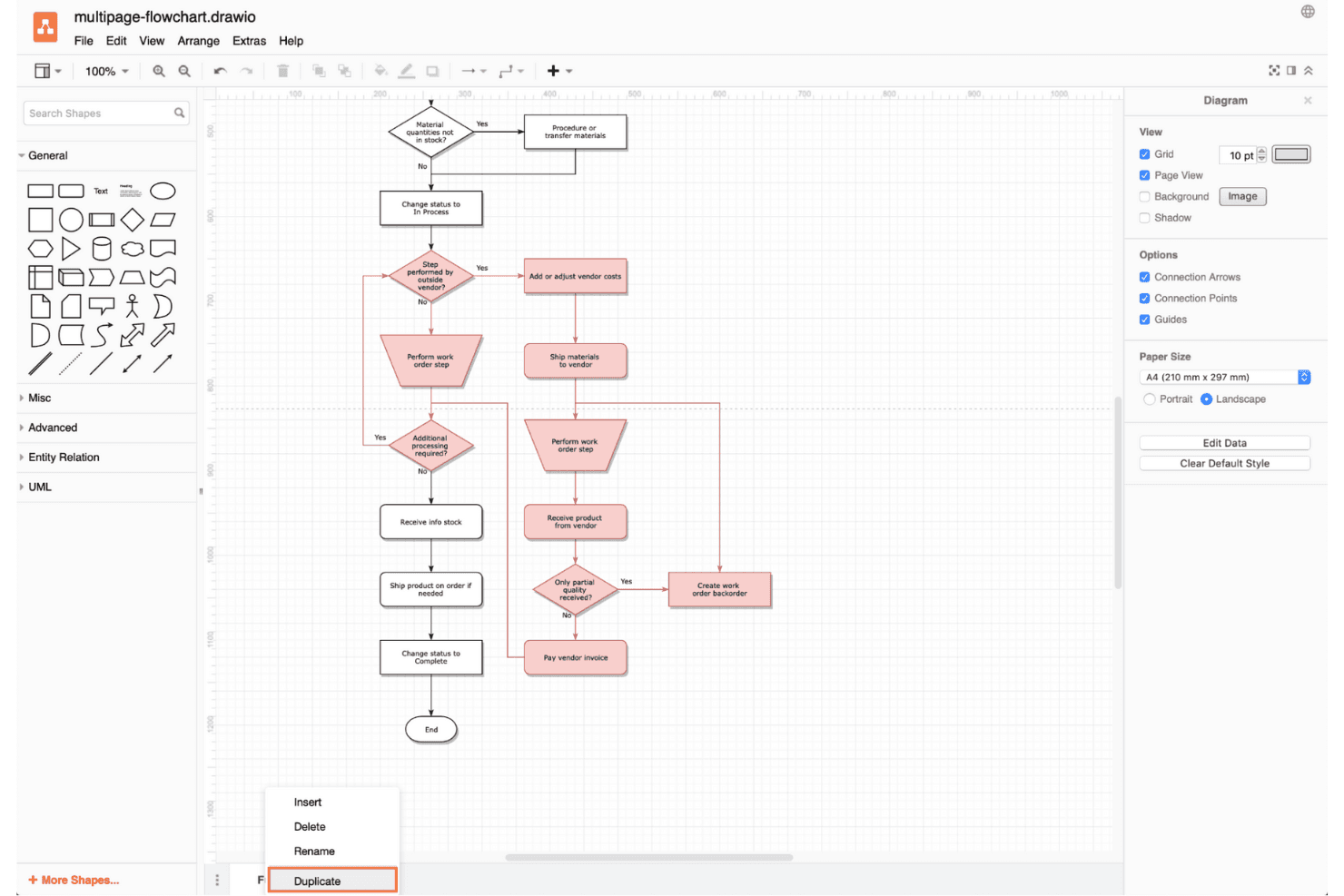
Draw.io è uno strumento flessibile per la creazione di diagrammi, utile per creare diagrammi di flusso e visualizzare idee complesse offline. draw.io è uno strumento flessibile per la creazione di diagrammi e wireframe destinato ai team di prodotto che devono mappare i flussi degli utenti, abbozzare interfacce e allineare gli stakeholder senza adottare una suite di progettazione dedicata.
Per chi è più adatto draw.io?
draw.io è adatto a responsabili di prodotto, analisti e ingegneri che devono creare e modificare diagrammi localmente senza affidarsi a un ambiente di lavoro cloud.
Perché draw.io è una buona alternativa a Balsamiq
Ho scelto draw.io perché la sua funzionalità di creazione di diagrammi offline supporta il lavoro sui wireframe senza richiedere un ambiente di lavoro cloud. Utilizzo le sue librerie di forme per l'interfaccia utente e i connettori per mappare schermate, flussi degli utenti e relazioni di sistema localmente. L'app desktop consente inoltre al mio team di salvare i diagrammi come file modificabili per la revisione e il controllo delle versioni.
Caratteristiche principali di draw.io
- Livelli: Organizza gli elementi dei wireframe in livelli separati e gestibili.
- Modelli: Inizia i progetti con layout predefiniti per wireframe e diagrammi di flusso.
- Collegamenti ipertestuali: Collega le forme a schermate, pagine o risorse esterne.
- Formati di esportazione: Salva i wireframe come file PNG, SVG, PDF o immagine.
Integrazioni di draw.io
draw.io supporta le integrazioni con Google Drive, GitHub, GitLab, Microsoft OneDrive, SharePoint, Microsoft 365, Notion e le app di Google Workspace, tra cui Google Docs, Sheets e Slides. Le app di Atlassian Marketplace integrano inoltre draw.io con Confluence e Jira, mentre ulteriori integrazioni di terze parti supportano piattaforme come VS Code, MediaWiki, Nextcloud e Wiki.js.
Pros and Cons
Pros:
- Supporta la creazione di diagrammi offline e l'archiviazione locale dei file
- Collega i wireframe a diagrammi di sistema più ampi
- Esporta i progetti come file vettoriali modificabili
Cons:
- L'interfaccia risulta complessa per i wireframe semplici
- Non offre un flusso di lavoro a bassa fedeltà focalizzato come Balsamiq
Learn more about draw.io: Ideale per schemi che possono evolvere fino alla consegna completa
- Piano gratuito disponibile
- A partire da $3/utente/mese
Visit WebsiteCustomer Rating:4.7/5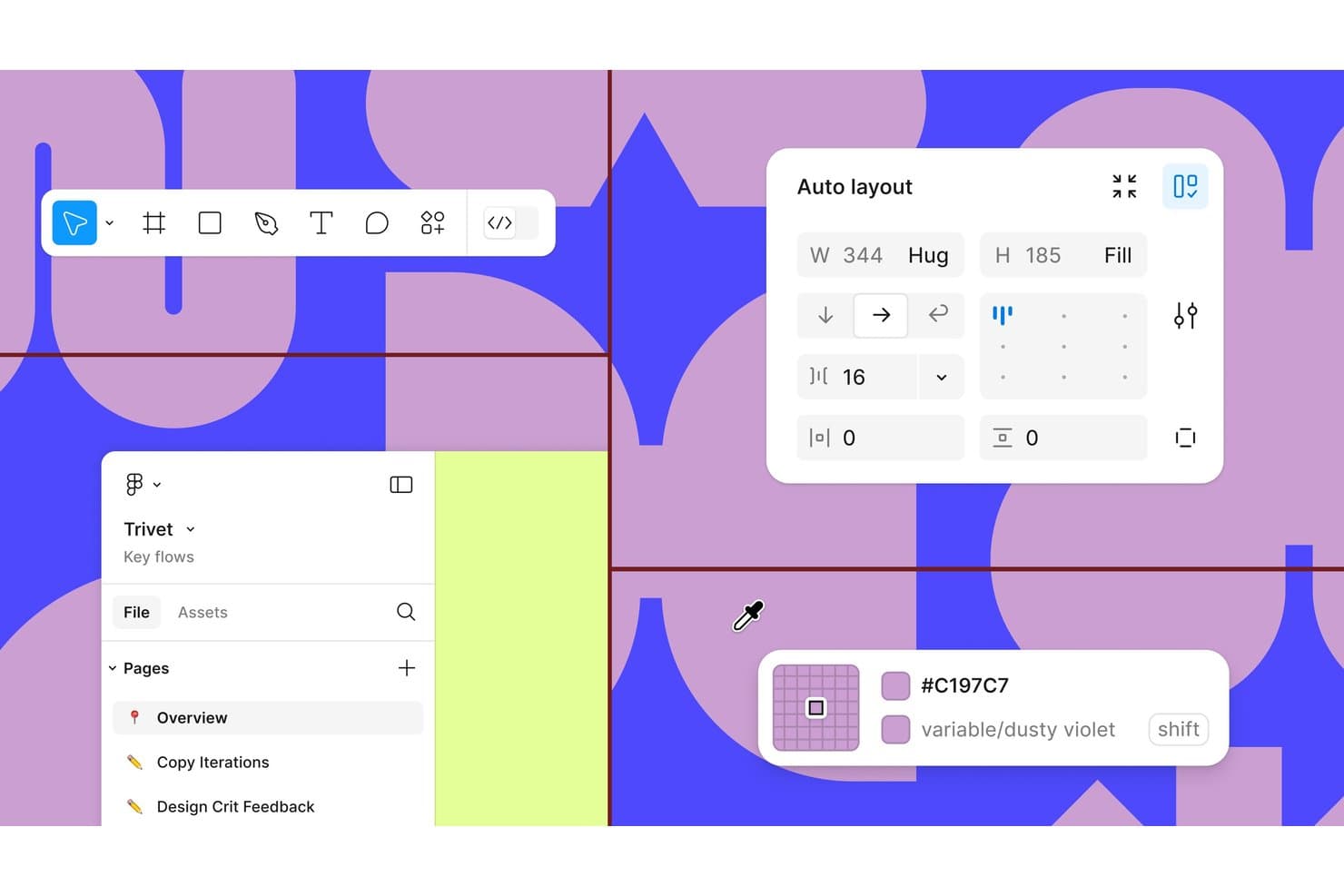
Figma offre il layout automatico, variabili di colore e un'organizzazione dei progetti su più pagine. Figma è una piattaforma collaborativa per la progettazione UX destinata a product manager, designer e ingegneri che devono trasformare le idee in prototipi, allinearsi sulle interfacce e risolvere i feedback prima dello sviluppo.
Per chi è più adatto Figma?
Figma è adatto ai team di prodotto distribuiti che hanno bisogno di file di progettazione condivisi, feedback in tempo reale e passaggi di consegne senza installare software desktop.
Perché Figma è una delle migliori alternative a Balsamiq
Ho scelto Figma perché la sua progettazione basata sul browser supporta la modifica collaborativa in tempo reale, i commenti e i file di progettazione condivisi. Utilizzo prototipi interattivi per testare i flussi utente, quindi consegno le schermate approvate agli ingegneri tramite Dev Mode. Questo lo rende pratico quando un'alternativa a Balsamiq richiede una collaborazione più stretta tra scoperta, progettazione e distribuzione.
Funzionalità principali di Figma
- Layout automatico: Organizza progetti che si adattano ai contenuti in continua evoluzione.
- Componenti e varianti: Crea elementi dell'interfaccia riutilizzabili con più stati.
- Variabili: Definisci valori riutilizzabili per colori, spaziature e modalità.
- Plugin: Aggiungi strumenti per controlli di accessibilità, contenuti e flussi di lavoro.
Integrazioni di Figma
Il catalogo ufficiale delle integrazioni di Figma include Jira, Slack, Microsoft Teams, Google Workspace, Notion, Asana, Linear, Trello, Maze, Zeplin e Zapier. Figma offre anche un'API per le integrazioni personalizzate.
Pros and Cons
Pros:
- La modifica collaborativa multiutente basata sul browser supporta le revisioni in tempo reale
- I prototipi interattivi testano i flussi prima dell'ingegnerizzazione
- Componenti e variabili supportano interfacce scalabili
Cons:
- La complessità dell'interfaccia può rendere più difficili gli schemi rapidi
- I file di grandi dimensioni possono risultare talvolta poco reattivi
 Ideale per le annotazioni delle specifiche e il passaggio di consegne agli sviluppatori
- Piano gratuito disponibile
- A partire da $24.90/utente/mese (fatturato annualmente)
Visit WebsiteCustomer Rating:4.5/5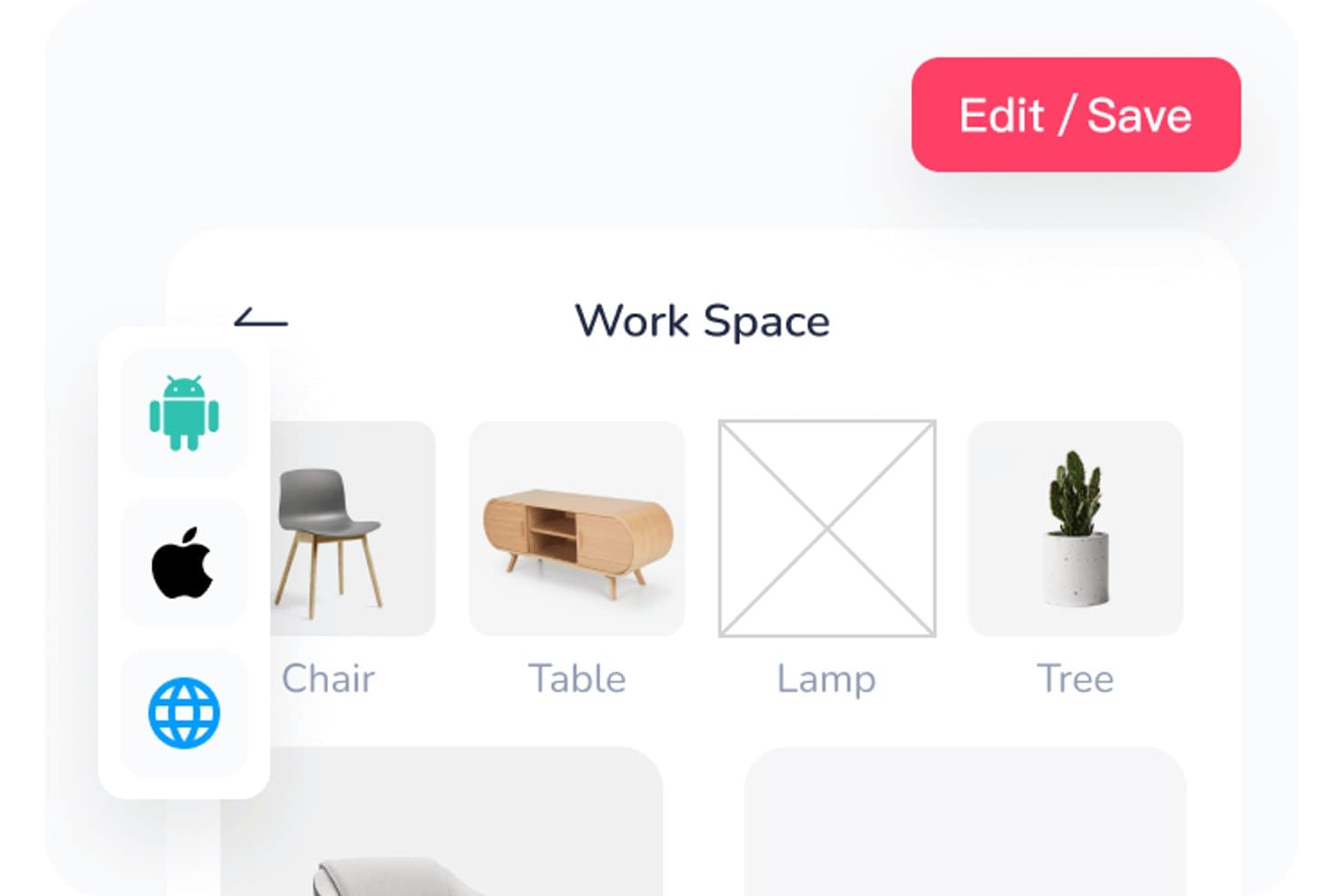
Mockplus consente agli utenti di organizzare le risorse dell'area di lavoro in una griglia visiva. Mockplus è una piattaforma di prototipazione senza codice per product manager, designer e team che devono trasformare le idee in concetti di prodotto interattivi, testare i flussi utente e allineare gli stakeholder prima dello sviluppo.
Per chi è più adatto Mockplus?
Mockplus è adatto a product manager e designer UX che devono convalidare rapidamente i flussi utente prima dello sviluppo.
Perché Mockplus è una buona alternativa a Balsamiq
Ho scelto Mockplus perché utilizzo i suoi prototipi interattivi per testare flussi utente completi prima dello sviluppo. I componenti riutilizzabili e le librerie condivise aiutano il mio team a creare rapidamente schermate coerenti, mentre transizioni e interazioni evidenziano problemi di navigazione che i wireframe statici di Balsamiq possono non rilevare. È adatto alla convalida rapida di dashboard, app mobili e percorsi di onboarding.
Funzionalità principali di Mockplus
- Strumenti di modifica vettoriale: crea forme personalizzate con gli strumenti penna, matita, Bézier e Boolean.
- Importazione di file Axure: importa direttamente i file Axure in Mockplus.
- Anteprima su più dispositivi: visualizza l'anteprima dei prototipi su smartphone, tablet e schermi desktop.
- Cronologia delle revisioni: esamina e ripristina le versioni precedenti dei prototipi.
Integrazioni di Mockplus
Mockplus RP si integra con Mockplus Cloud per la collaborazione online, l'ispezione dei progetti e il passaggio di consegne agli sviluppatori. Tramite Mockplus Cloud, i team possono collegare i flussi di lavoro a Figma, Sketch, Axure, Adobe XD, Photoshop, Slack, Jira, Confluence e Lark.
Pros and Cons
Pros:
- Le transizioni interattive consentono di testare flussi utente completi
- I componenti riutilizzabili velocizzano la creazione ripetuta delle schermate
- Le anteprime su più dispositivi supportano la convalida specifica per dispositivo
Cons:
- Il comportamento reattivo richiede ulteriore lavoro manuale
- I prototipi complessi diventano difficili da gestire
Learn more about Mockplus: Ideale per pianificare l'interfaccia utente tra schermate e flussi
- Piano gratuito disponibile
- A partire da $14/utente/mese (fatturato annualmente)
Visit WebsiteCustomer Rating:4.3/5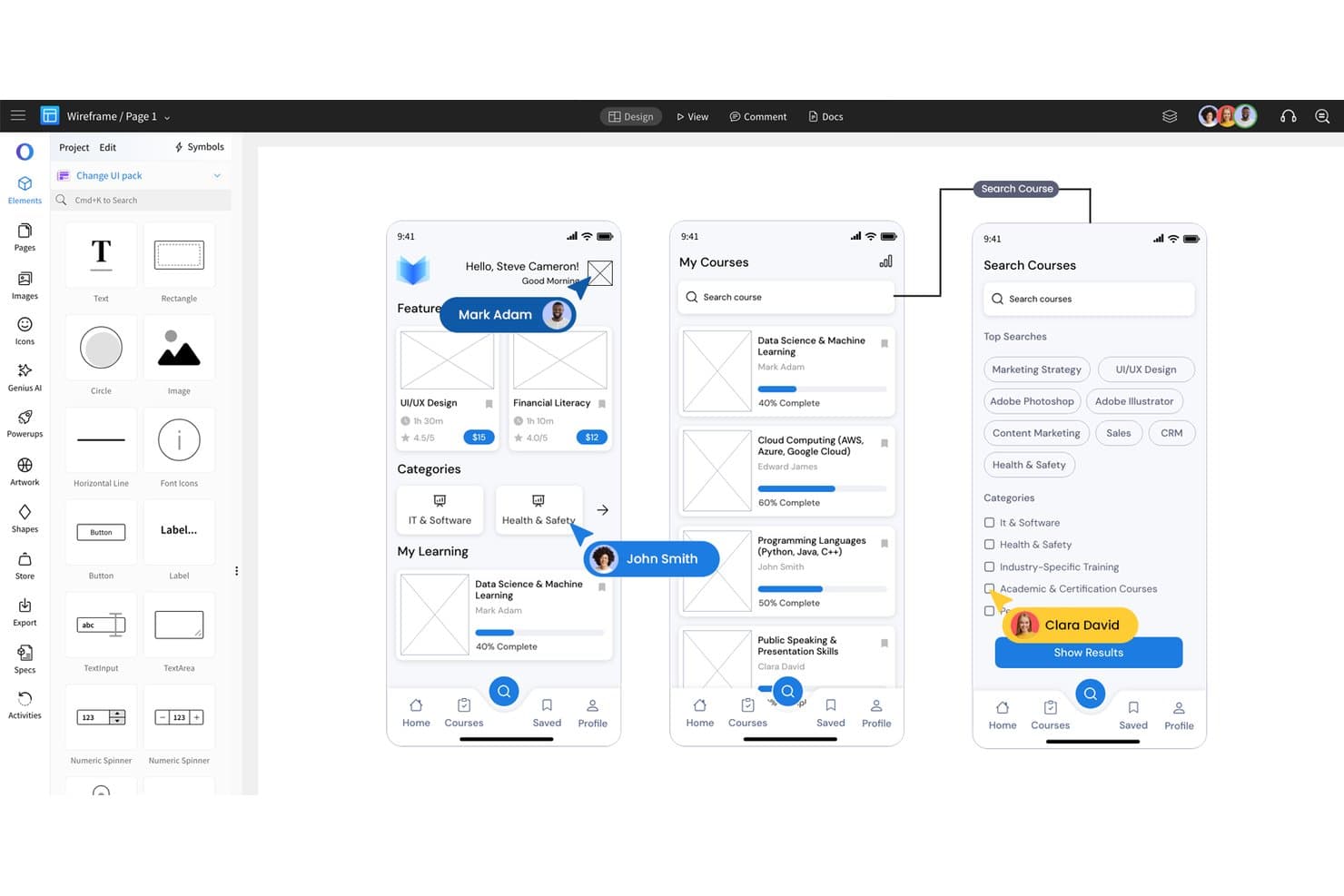
MockFlow consente agli utenti di progettare wireframe di applicazioni mobili con elementi dell'interfaccia utente trascinabili. MockFlow è una piattaforma di progettazione dell'interfaccia utente per product manager, designer e team che devono trasformare le idee iniziali in wireframe, prototipi e requisiti di prodotto più chiari.
Per chi è più adatto MockFlow?
Product manager e team UX che devono mappare i flussi degli utenti, abbozzare le interfacce e allineare gli stakeholder prima dell'inizio dello sviluppo.
Perché MockFlow è una buona alternativa a Balsamiq
Ho scelto MockFlow perché lo uso per trasformare le idee iniziali di prodotto in interfacce utente strutturate. I suoi strumenti per wireframe e prototipazione aiutano il mio team a mappare i flussi degli utenti, testare le sequenze delle schermate e chiarire i requisiti di prodotto prima dello sviluppo. Uso inoltre questi materiali per allineare gli stakeholder di prodotto, design e sviluppo sull'esperienza prevista.
Funzionalità principali di MockFlow
- Raccolte di componenti per l'interfaccia utente: Scegli tra elementi pronti all'uso per siti web, applicazioni web e applicazioni mobili.
- Modifica collaborativa in tempo reale: Modifica contemporaneamente lo stesso progetto con i membri del team.
- Commenti: Aggiungi feedback direttamente ad aree specifiche del progetto.
- Cronologia delle versioni: Esamina le versioni precedenti del progetto e ripristina il lavoro precedente.
Integrazioni di MockFlow
MockFlow offre integrazioni native con Slack, Microsoft Teams, Microsoft Word tramite Microsoft 365, Google Drive, Atlassian Jira e Atlassian Confluence. Supporta inoltre un Power-Up di Trello per aggiungere i progetti MockFlow ai flussi di lavoro di Trello.
Pros and Cons
Pros:
- Le ampie raccolte di componenti per l'interfaccia utente velocizzano la creazione dei wireframe
- La modifica collaborativa in tempo reale supporta i workshop con gli stakeholder
- La cronologia delle versioni semplifica le revisioni dei progetti
Cons:
- I prototipi avanzati richiedono strumenti più specializzati
- I progetti di grandi dimensioni possono rendere difficile la navigazione
Learn more about MockFlow: Ideale per la prototipazione con componenti di codice reali
- Prova gratuita di 14 giorni
- A partire da $29/utente/mese (fatturato annualmente)
Visit WebsiteCustomer Rating:4.2/5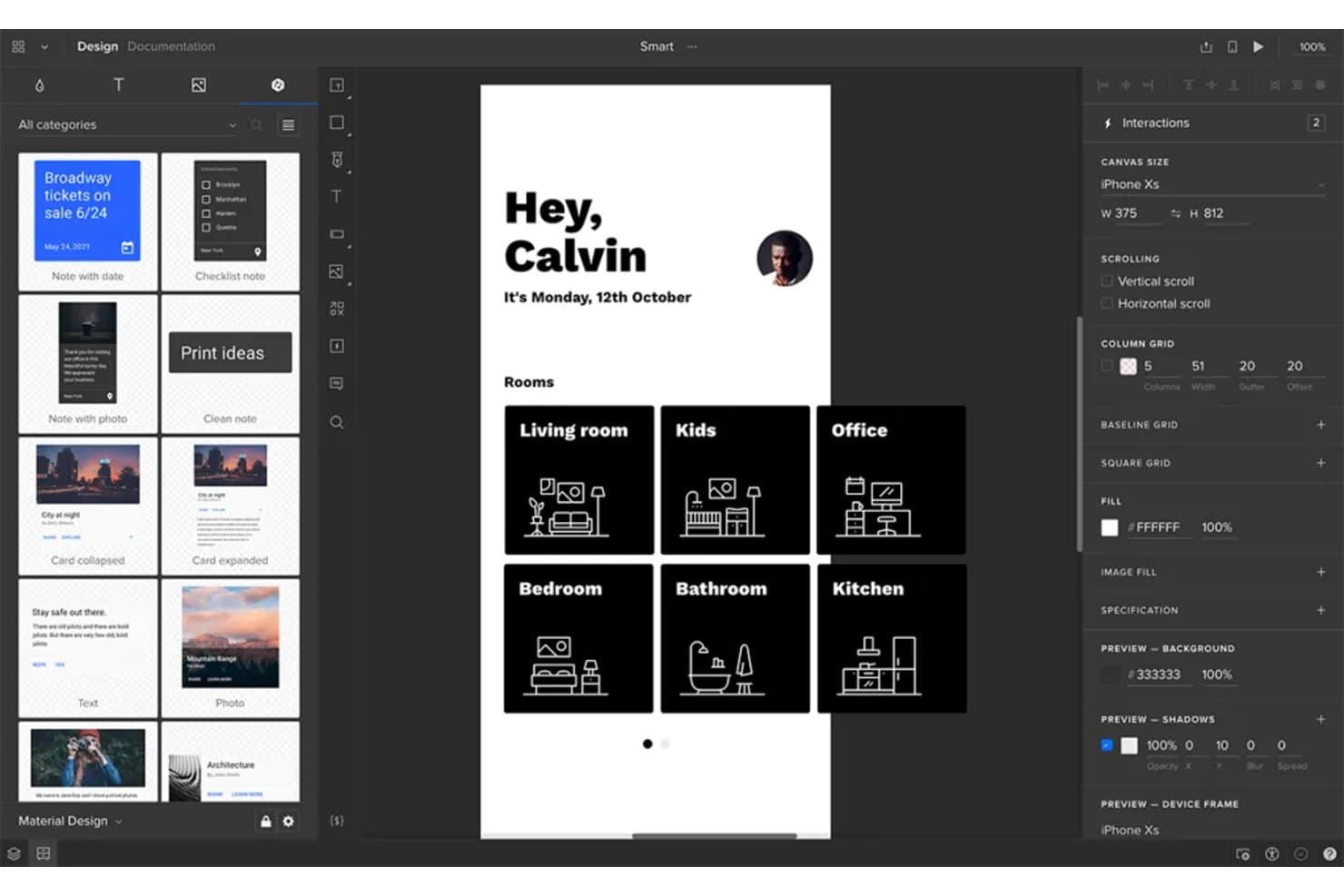
UXPin consente agli utenti di progettare e prototipare in modo interattivo le schermate di app mobili. UXPin è una piattaforma di progettazione UX e prototipazione per team di prodotto che hanno bisogno di interfacce realistiche e testabili per allineare gli stakeholder, convalidare le idee e ridurre le rilavorazioni prima dello sviluppo.
Per chi è più adatto UXPin?
UXPin è adatto ai product designer e agli ingegneri front-end che devono creare prototipi di interfacce con componenti di codice riutilizzabili e simili a quelli di produzione.
Perché UXPin è una buona alternativa a Balsamiq
Ho scelto UXPin perché supporta la prototipazione con componenti di codice reali, non solo con modelli visivi. Utilizzo le sue librerie di componenti riutilizzabili, gli stati e le interazioni per testare interfacce simili a quelle di produzione prima dello sviluppo. Questo aiuta il mio team a convalidare flussi complessi, come la configurazione di un account o il pagamento, con prototipi che si comportano in modo più simile al prodotto finito.
Funzionalità principali di UXPin
- Layout reattivi : Imposta i punti di interruzione e visualizza in anteprima i design su schermi di diverse dimensioni.
- Variabili : Definisci valori riutilizzabili per testo, colori e proprietà dei componenti.
- Logica condizionale : Configura regole se-allora per il comportamento dinamico dei prototipi.
- Collaborazione di team : Aggiungi commenti e revisiona i design all'interno di progetti condivisi.
Integrazioni di UXPin
UXPin elenca integrazioni con Storybook, Git, Jira, Slack, FullStory, Figma, Sketch, Adobe Fonts e Google Fonts. Le integrazioni con Storybook e Git consentono ai team di importare in UXPin componenti basati sul codice, mentre Jira e Slack supportano la collaborazione e il passaggio di consegne.
Pros and Cons
Pros:
- I prototipi si comportano come interfacce di produzione
- I componenti di codice reali riducono l'ambiguità nel passaggio di consegne
- Variabili e logica supportano flussi complessi
Cons:
- Richiede più configurazione rispetto alle rapide bozze schematiche di Balsamiq
- Le funzionalità avanzate possono risultare eccessive nelle prime fasi dell'ideazione
Learn more about UXPin: Ideale per prototipi ad alta fedeltà
- Piano gratuito disponibile
- A partire da $19/utente/mese
Visit WebsiteCustomer Rating:4.2/5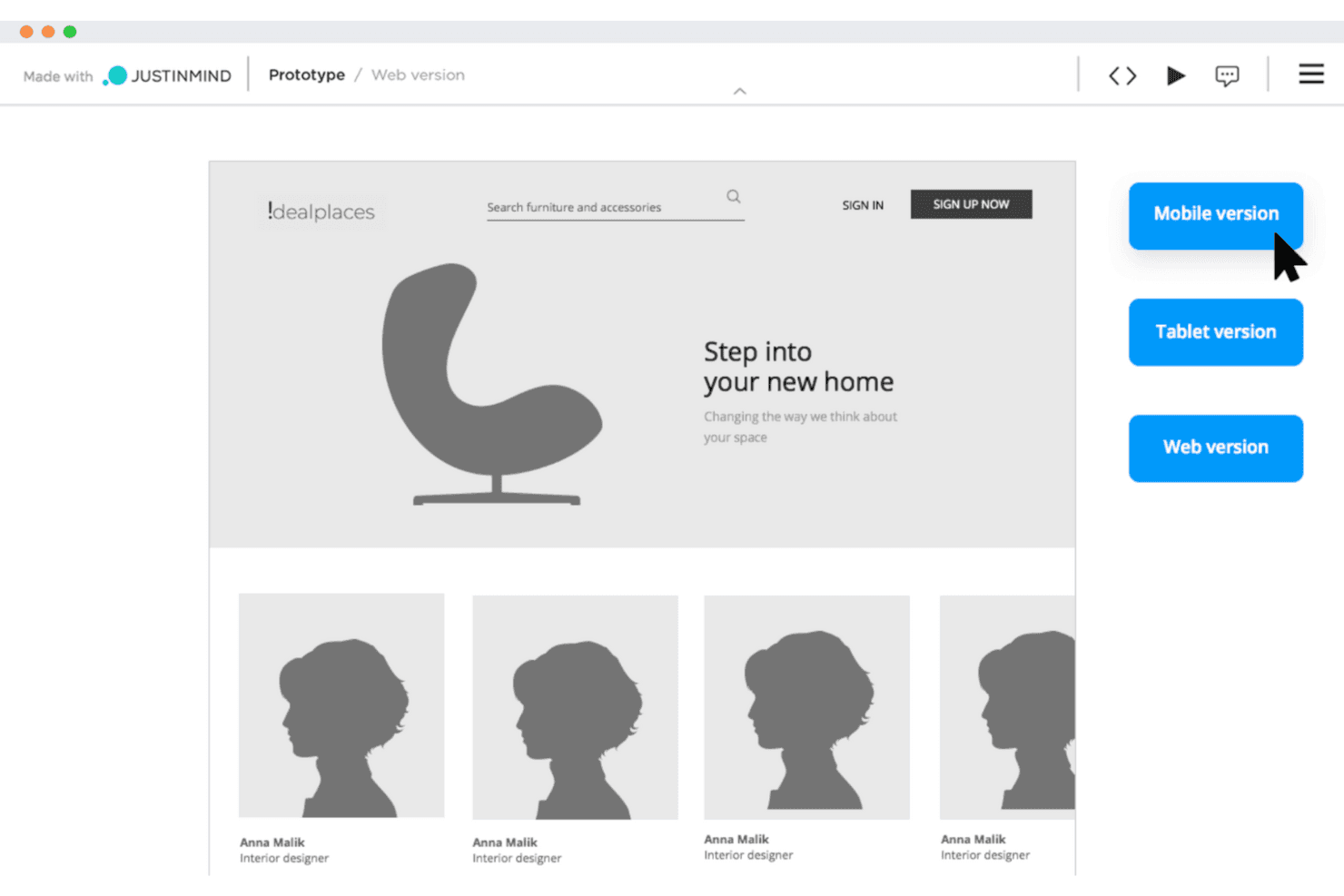
Justinmind consente ai team UX di creare wireframe interattivi per testare i progetti in fase iniziale. Justinmind è una piattaforma per la progettazione UX e la prototipazione destinata ai team di prodotto che devono convalidare flussi di lavoro web o mobili complessi, allineare gli stakeholder e ridurre le rielaborazioni prima dello sviluppo.
Per chi è più adatto Justinmind?
Designer UX e product manager che hanno bisogno di prototipi realistici e interattivi per testare esperienze web e mobili dettagliate prima dello sviluppo.
Perché Justinmind è una buona alternativa a Balsamiq
Ho scelto Justinmind perché supporta prototipi ad alta fedeltà che rispecchiano da vicino prodotti web e mobili finiti. Utilizzo moduli interattivi, pannelli dinamici, logica condizionale ed elenchi basati sui dati per testare flussi in più passaggi, come la procedura di onboarding o il checkout. Questo aiuta il mio team a convalidare comportamenti dettagliati prima dell'inizio del lavoro di sviluppo.
Funzionalità principali di Justinmind
- Librerie UI: Inizia i progetti con risorse e modelli di interfaccia riutilizzabili.
- Schermate master: Applica layout condivisi a più schermate del prototipo.
- Commenti: Raccogli e organizza il feedback degli stakeholder all'interno dei progetti.
- Controllo delle versioni: Salva e rivedi le versioni precedenti dei prototipi.
Integrazioni di Justinmind
Justinmind offre un'integrazione nativa con Atlassian Jira, oltre a integrazioni e plugin ufficiali per Sketch, Adobe Creative Cloud, Figma, Confluence e Microsoft Azure DevOps. Le sue API e il suo SDK supportano plugin personalizzati, deliverable e integrazioni con strumenti interni.
Pros and Cons
Pros:
- Simula flussi condizionali senza codice di produzione
- Testa moduli, elenchi e stati basati sui dati
- Le schermate master riutilizzabili riducono le rielaborazioni dei prototipi
Cons:
- È eccessivo per la creazione rapida di wireframe
- I prototipi di grandi dimensioni possono diventare difficili da gestire
Learn more about Justinmind:
Altre alternative a Balsamiq
Ecco alcune alternative aggiuntive a Balsamiq che non sono entrate nella mia selezione, ma che vale comunque la pena prendere in considerazione:
- 11MiroIdeale per fare ideazione e creare schemi strutturali insieme
- 12FramerIdeale per pubblicare prototipi web interattivi
- 13InvisionIdeale per la creazione di wireframe interfunzionali su un'unica tela
- 14FluidUIIdeale per costruire e testare prototipi velocemente
- 15MoqupsIdeale per uno strumento di progettazione tutto-in-uno
Come valuto le alternative a Balsamiq
Divido la mia valutazione in tre parti. Innanzitutto, la funzionalità principale: qualsiasi alternativa deve consentire di creare wireframe multi-schermata e collegarli in flussi navigabili e cliccabili: questo è l’aspetto con il peso maggiore. In secondo luogo, cerco funzionalità distintive come la creazione assistita di wireframe tramite IA o le modalità di consegna agli sviluppatori. Infine, considero la semplicità della procedura iniziale e la trasparenza dei prezzi.
Funzionalità principali (requisiti fondamentali per questo elenco)
Quando seleziono gli strumenti per il mio elenco, assegno a ciascuno un punteggio su una scala da 0 (non offre la funzionalità) a 5 (eccelle in quest’area) per ogni funzionalità principale elencata di seguito. Converto quindi il totale in una percentuale per contribuire a valutare l’idoneità complessiva di ogni strumento, attribuendo un peso aggiuntivo alle funzionalità che ho ritenuto essenziali.
- Strumenti per wireframe (essenziale): valuto layout multi-schermata, segnaposto, griglie ed elementi riutilizzabili per rappresentare i primi concetti di prodotto.
- Prototipazione (essenziale): cerco schermate collegate, percorsi di navigazione, sovrapposizioni e stati che supportino test realistici dei flussi utente.
- Libreria di componenti dell’interfaccia: verifico la presenza di pulsanti, moduli, menu, icone e modelli personalizzabili che supportino una progettazione coerente dell’interfaccia.
- Collaborazione in tempo reale: valuto la modifica condivisa, i commenti e i flussi di revisione per le discussioni tra prodotto, design, ingegneria e parti interessate.
- Esportazione e condivisione: cerco collegamenti condivisibili, formati di esportazione comuni e opzioni di consegna per revisioni e implementazione.
- Cronologia delle versioni: verifico se i team possono ripristinare progetti precedenti, confrontare le iterazioni e recuperare le modifiche durante una rapida fase di scoperta del prodotto.
Una volta ottenuto un elenco di strumenti che soddisfano i criteri, considero ciò che distingue ogni piattaforma.
Fattori distintivi (ciò che differenzia i fornitori)
Ecco come confronto e metto in contrapposizione i diversi fornitori:
Funzionalità distintive
Cerco funzionalità di creazione assistita di wireframe tramite IA che trasformino un prompt testuale in un layout utilizzabile. Questo è importante quando un PM deve esplorare tre varianti del processo di onboarding prima di una revisione con una parte interessata e ha un’ora di tempo per farlo. Valuto anche le modalità di consegna agli sviluppatori: strumenti come Figma e Zeplin offrono viste delle specifiche dedicate, con spaziature, token di colore e risorse esportabili che riducono lo scambio continuo con gli ingegneri. Le annotazioni dei requisiti sono altrettanto importanti; verifico se è possibile allegare i criteri di accettazione direttamente a un elemento del wireframe invece di mantenere un documento separato con le specifiche.
Oltre le funzionalità
Valuto la rapidità con cui un PM può passare dalla registrazione a un wireframe condivisibile. Strumenti come Whimsical e Miro offrono una procedura iniziale guidata che rende operativi i non designer in pochi minuti, mentre altri presuppongono una precedente esperienza di progettazione. Anche la trasparenza dei prezzi è importante: verifico se i piani gratuiti consentono ai piccoli team di valutare l’idoneità prima di impegnarsi e se i costi per utente rimangono ragionevoli con la crescita del team. Considero inoltre il livello di integrazione con strumenti come Jira o Confluence, poiché incorporare un prototipo cliccabile direttamente in un ticket dello sprint riduce i cambi di contesto durante la definizione del backlog.
Perché cercare un'alternativa a Balsamiq?
Sebbene Balsamiq sia una buona scelta tra gli strumenti per la creazione di wireframe, ci sono diversi motivi per cui alcuni utenti cercano soluzioni alternative. Potresti cercare un'alternativa a Balsamiq perché…
- Hai bisogno di funzionalità di prototipazione più interattive
- Il tuo team ha bisogno di strumenti per la collaborazione in tempo reale
- Desideri uno strumento che supporti progetti ad alta fedeltà
- Hai bisogno di una soluzione con funzionalità offline
- Il tuo team utilizza dispositivi non supportati da Balsamiq
- Desideri più opzioni di personalizzazione per i tuoi progetti
Se ti riconosci in una di queste situazioni, sei nel posto giusto. Il mio elenco contiene diverse opzioni di strumenti per la creazione di wireframe più adatte ai team che affrontano queste difficoltà con Balsamiq e cercano soluzioni alternative.
Funzionalità principali di Balsamiq
Balsamiq offre strumenti essenziali per la progettazione iniziale dei prodotti e delle interfacce utente, rappresentando una scelta affidabile per i team che sviluppano concept di design web o sperimentano nuove idee. Ecco cosa puoi aspettarti:
- Interfaccia drag-and-drop: crea rapidamente wireframe trascinando gli elementi dalla libreria dell'interfaccia utente nell'area di lavoro. È l'ideale per sviluppare rapidamente le idee nel tuo spazio di progettazione.
- Libreria di controlli dell'interfaccia utente: accedi a un'ampia gamma di componenti già pronti, conformi ai modelli comuni dei sistemi di progettazione, che ti aiutano a mantenere la coerenza tra i progetti.
- Funzionalità di disegno rapido: usa semplici scorciatoie da tastiera per abbozzare layout e interazioni in modo efficiente durante le fasi iniziali della progettazione.
- Progettazione a bassa fedeltà: concentrati sulla struttura e sulle funzionalità anziché sulla rifinitura. L'aspetto disegnato a mano incoraggia iterazioni rapide e una comunicazione chiara durante le anteprime.
- Strumenti di collaborazione: condividi i wireframe con i membri del team o con gli stakeholder per raccogliere suggerimenti e modificare i tuoi progetti sulla base dei feedback in tempo reale.
- Opzioni di esportazione: salva i wireframe in formati come PNG o PDF oppure usali come riferimento visivo quando trasferisci il layout in HTML.
Balsamiq è particolarmente utile per i designer che apprezzano la chiarezza e la velocità durante lo sviluppo iniziale dei concept, soprattutto nella pianificazione di progetti di interfacce utente e di design web.