

Las prioridades, siempre las prioridades: ese es el desafío constante de cualquier responsable de producto y la razón por la que el software de priorización de productos es tan importante en el día a día. Con tan solo unas horas disponibles al día, una hoja de ruta bien organizada y una priorización de tareas totalmente clara son el combustible que mantiene a un equipo de producto funcionando con una productividad óptima.
Por eso he puesto mi propia experiencia en priorización y gestión de equipos al servicio de un análisis y una evaluación rigurosos de las mejores herramientas de priorización de productos, para que tú no tengas que hacerlo.
¿Qué es el software de priorización de productos?
El software de priorización de productos es una herramienta especializada diseñada para facilitar el proceso de toma de decisiones dentro de los equipos de desarrollo de productos. Ayuda a identificar y clasificar tareas o funcionalidades según factores como la alineación estratégica, el impacto en los clientes y la viabilidad, garantizando que el equipo se centre en los proyectos más valiosos y de mayor impacto.
Normalmente, el software de priorización de productos ofrece funciones como mecanismos de puntuación, integración de comentarios de los usuarios y herramientas de colaboración. Estas funciones permiten a los equipos asignar valores cuantitativos a distintos criterios, lo que ayuda a evaluar y comparar objetivamente varios elementos de la hoja de ruta del producto teniendo en cuenta las aportaciones de los usuarios.
Por qué confiar en nuestras recomendaciones de software
6,700+
Reviews
20
Industry experts
16+
Evaluation factors
14
Years
Nuestro equipo lleva probando y evaluando software desde 2012. Como gestores de producto, sabemos lo difícil —y lo importante— que es elegir el software adecuado.
Para esta guía, evaluamos las herramientas mediante pruebas prácticas e investigación independiente, puntuando las herramientas según nuestros criterios de selección.
Nuestras reseñas reflejan nuestro criterio editorial humano, no un discurso de ventas.
Revisores expertos:
 Hannah ClarkSenior TPM
- Cristiano ValimSenior UI/UX Lead

Tabla comparativa de software de priorización de productos
La tabla siguiente compara los detalles de precios de mis principales selecciones de software de priorización de productos.
| Tool | Best For | Trial Info | Price | ||
|---|---|---|---|---|---|
| 1 | Ideal para obtener información basada en los clientes | Demostración gratuita disponible | Precios bajo solicitud | Website | |
| 2 | Ideal para priorizar funciones impulsadas por los usuarios | Plan gratuito disponible | Desde $29/mes (facturado anualmente) | Website | |
| 3 | La mejor opción para obtener inteligencia del cliente impulsada por IA | Demostración gratuita disponible | Precios bajo solicitud | Website | |
| 4 | La mejor opción para puntuar funcionalidades mediante fórmulas | Demostración gratuita + prueba de 30 días disponible | Desde $59/usuario/mes (facturado anualmente) | Website | |
| 5 | Ideal para identificar las tareas adecuadas mediante gráficos | Prueba gratuita de 14 días + demostración gratuita disponible | Desde $44/puesto/mes (facturado anualmente) | Website | |
| 6 | Ideal para planificar hojas de ruta a partir de comentarios vinculados a los ingresos | Demostración gratuita disponible | Precios bajo solicitud | Website | |
| 7 | Ideal para priorizar funcionalidades basándose en comentarios | Demostración gratuita disponible | Precio bajo solicitud | Website | |
| 8 | Plataforma modular de gestión de productos que permite planificar el trabajo y priorizar funcionalidades en función de los comentarios de los clientes. | Demostración gratuita disponible | Precios bajo petición | Website | |
| 9 | Ideal para la priorización inclusiva evaluada por el equipo | Prueba gratuita de 14 días + demostración gratuita disponible | Desde $19/usuario/mes (facturado anualmente) | Website | |
| 10 | La mejor opción para hojas de ruta de cartera con enlaces a comentarios | Prueba gratuita de 14 días | Desde $19/usuario/mes (facturado anualmente) | Website |


Descripción general de los 10 mejores programas de priorización de productos
Aquí tienes una breve descripción de cada plataforma de priorización de productos, con el objetivo de mostrar el caso de uso más adecuado de cada herramienta, algunas funciones destacadas y capturas de pantalla que ofrecen una visión general de la interfaz de usuario.
 Ideal para obtener información basada en los clientes
- Demostración gratuita disponible
- Precios bajo solicitud
Visit WebsiteCustomer Rating:4.8/5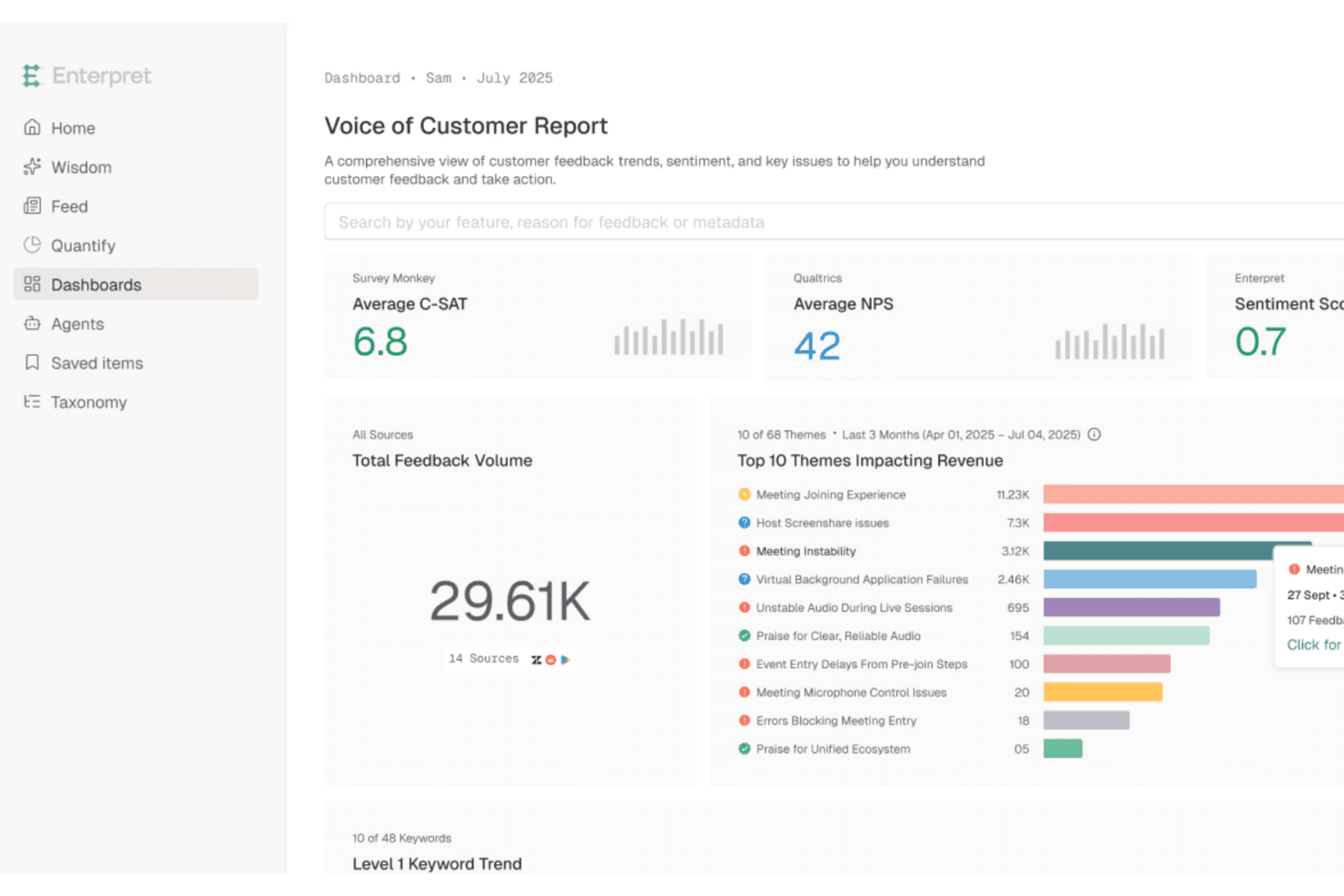
Enterpret clasifica las funciones más solicitadas por los clientes mediante información unificada de opiniones Enterpret es una plataforma de inteligencia de opiniones de clientes que agrega información de tickets de soporte, llamadas de ventas, encuestas, reseñas y datos de producto, y luego utiliza IA para categorizar temas y vincularlos con señales de impacto empresarial como la pérdida de clientes, la retención y los ingresos.
¿Para quién es más adecuado Enterpret?
Enterpret es una opción excelente para equipos de producto de empresas medianas y grandes que necesitan cuantificar las opiniones de los clientes a escala antes de decidir qué desarrollar a continuación.
Por qué elegí Enterpret
He incluido Enterpret entre mis opciones principales porque hace algo que la mayoría de las herramientas de priorización no hacen: te indica exactamente cuánto impacto empresarial hay detrás de cada opinión de cliente. Su Taxonomía Adaptativa utiliza IA para clasificar las opiniones recibidas en temas y subtemas en tickets de soporte, llamadas de ventas, encuestas y reseñas, y luego vincula esos temas con señales como la pérdida de clientes y los ingresos. Esto significa que puedes ver no solo qué están solicitando los clientes, sino también cuánto te está costando ignorarlo.
Características principales de Enterpret
- Taxonomía adaptativa: La IA categoriza automáticamente las opiniones recibidas en temas y subtemas que se actualizan a medida que llegan nuevas opiniones.
- Gráfico de contexto del cliente: Vincula los registros de opiniones con funciones específicas del producto, segmentos de clientes y resultados como la pérdida de clientes y la adopción.
- Medición del impacto empresarial: Realiza un seguimiento de métricas como la retención, el CSAT y los ingresos antes y después de una corrección o lanzamiento para mostrar qué cambió.
- Perspectivas de IA de Enterpret: Te permite consultar todo tu conjunto de datos de opiniones en lenguaje natural para obtener respuestas específicas rápidamente.
Integraciones de Enterpret
Enterpret se integra con Jira Software Cloud, Linear, Salesforce, HubSpot, Zendesk, Intercom y Slack. También admite webhooks y cargas de archivos CSV para fuentes de opiniones personalizadas.
Pros and Cons
Pros:
- Centraliza las opiniones para obtener señales de demanda más claras
- Vincula las solicitudes con los ingresos y la pérdida de clientes
- La IA identifica temas en las conversaciones con los clientes
Cons:
- No incluye marcos integrados de puntuación o priorización
- No ofrece vistas de planificación de hojas de ruta ni de listas de tareas pendientes
Learn more about Enterpret: Ideal para priorizar funciones impulsadas por los usuarios
- Plan gratuito disponible
- Desde $29/mes (facturado anualmente)
Visit WebsiteCustomer Rating:4.8/5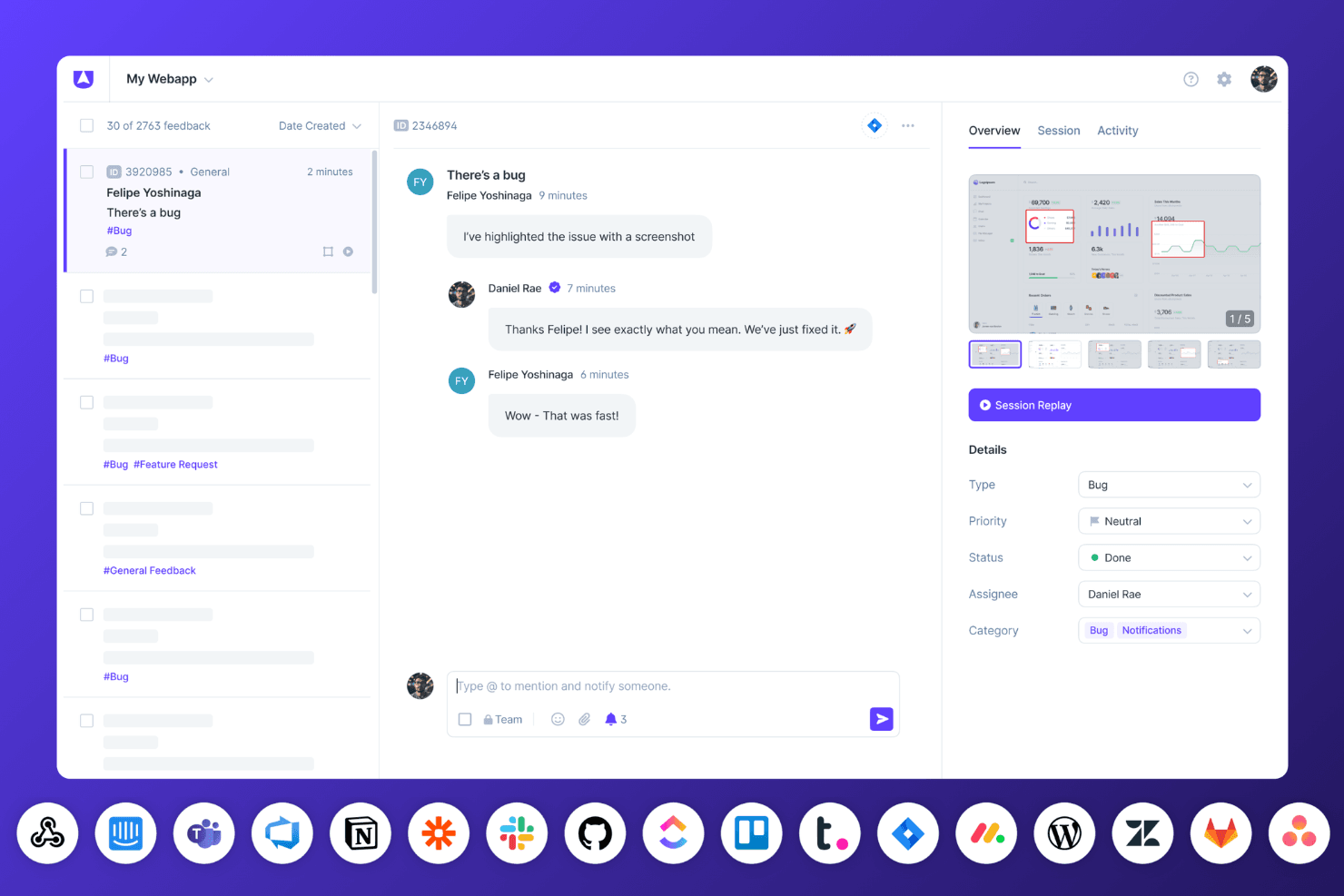
El panel de seguimiento de errores de Userback muestra repeticiones de sesiones, conversaciones del equipo y actualizaciones de estado en tiempo real con integraciones conectadas. Userback es una plataforma de comentarios de clientes que centraliza las solicitudes de funciones, las votaciones de usuarios, las repeticiones de sesiones y las encuestas en una hoja de ruta pública vinculada directamente con lo que los usuarios solicitaron.
¿Para quién es más adecuado Userback?
Userback es una opción excelente para los equipos de producto que quieren que las votaciones de clientes y las repeticiones de sesiones impulsen lo que se desarrolla a continuación.
Por qué elegí Userback
Elegí Userback como una de las mejores opciones porque cierra el ciclo entre lo que solicitan los usuarios y lo que realmente se desarrolla. Me encanta que el Portal de funciones permita a los clientes enviar solicitudes, votar y hacer un seguimiento de sus ideas a través de una hoja de ruta pública vinculada directamente con esos datos de votación. Si a esto le sumamos la repetición de sesiones vinculada a informes de comentarios individuales, obtenemos una visión excepcionalmente fundamentada de qué solicitudes reflejan problemas reales.
Características principales de Userback
- Información basada en IA sobre los comentarios: Analiza los comentarios recibidos para detectar patrones y sentimientos, y mostrar qué es lo que más les importa a los usuarios.
- Repetición de sesiones vinculada a los comentarios: Registra las sesiones de los usuarios y las vincula directamente a informes de comentarios individuales para proporcionar contexto adicional.
- Sincronización bidireccional con Jira, Linear y ClickUp: Mantiene sincronizados automáticamente los comentarios y los tickets de desarrollo entre las distintas herramientas.
- Reglas de enrutamiento: Dirige automáticamente los errores, las solicitudes de funciones y los comentarios generales al proyecto o la integración adecuados.
Integraciones de Userback
Userback ofrece integraciones nativas con Jira, Linear, ClickUp, Asana, Azure DevOps, GitHub, GitLab, Monday.com, Trello y Wrike, con sincronización bidireccional para Jira, Linear y ClickUp. La API REST y los webhooks están disponibles en el plan Business Plus y los superiores; también es compatible con Zapier.
Pros and Cons
Pros:
- Las votaciones de los clientes informan directamente las prioridades de funciones
- Las repeticiones de sesiones revelan los problemas reales de los usuarios
- Los comentarios incluyen capturas de pantalla, registros y grabaciones
Cons:
- No incluye marcos de puntuación RICE ni ponderada
- La hoja de ruta pública carece de vistas de priorización basadas en cronogramas
Learn more about Userback: La mejor opción para obtener inteligencia del cliente impulsada por IA
- Demostración gratuita disponible
- Precios bajo solicitud
Visit WebsiteCustomer Rating:4.8/5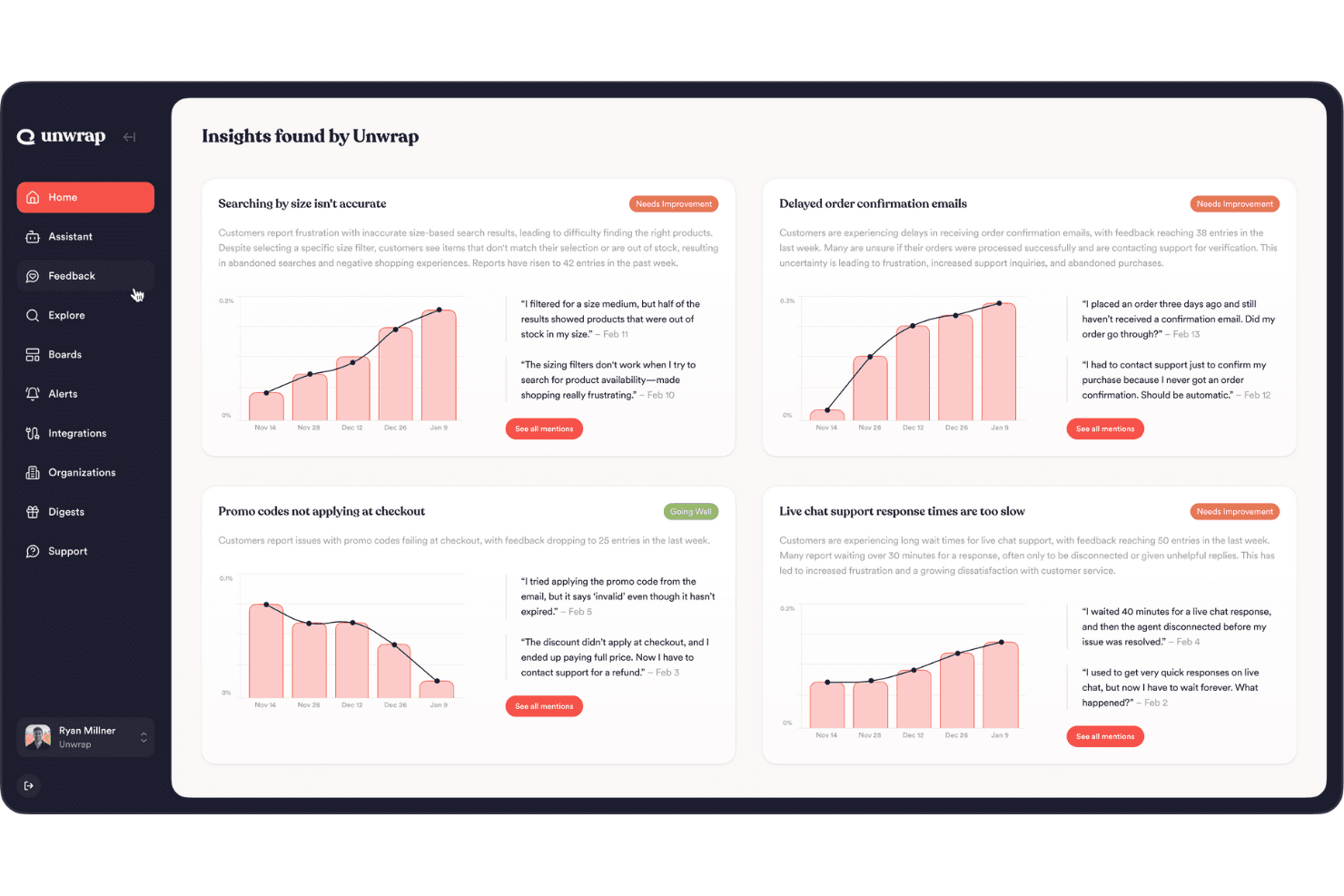
Unwrap ofrece análisis automatizado de comentarios para obtener información eficiente sobre los clientes. Unwrap es una plataforma de voz del cliente impulsada por IA que agrega comentarios de miles de fuentes, etiqueta automáticamente los temas según su significado y muestra los problemas en tendencia para ayudar a los equipos de producto a comprender qué es lo que más quieren los clientes.
¿Para quién es más adecuado Unwrap?
Unwrap es una opción muy adecuada para responsables de operaciones de producto y gestores de producto de empresas medianas o grandes que necesitan dar sentido a grandes volúmenes de comentarios de clientes antes de decidir qué desarrollar a continuación.
Por qué elegí Unwrap
He incluido Unwrap entre mis principales opciones porque es la herramienta más sólida de esta lista para convertir los comentarios sin procesar de los clientes en una imagen clara de qué desarrollar a continuación. Su Etiquetador automático agrupa los comentarios según su significado en más de 3.000 fuentes, de modo que, en lugar de revisar manualmente tickets de soporte y reseñas, obtienes temas clasificados por frecuencia y tasa de crecimiento. También me gusta cómo las Alertas señalan automáticamente los problemas emergentes, como detectar un aumento interanual del triple en un error específico antes incluso de que tu equipo se dé cuenta.
Características principales de Unwrap
- Etiquetador automático: Agrupa los comentarios recibidos según su significado en más de 3.000 fuentes, eliminando la necesidad de crear o mantener manualmente taxonomías de etiquetas.
- Alertas: Envía notificaciones proactivas cuando un problema nuevo es tendencia o cuando un problema conocido se está acelerando, para que tu equipo pueda responder antes de que se agrave.
- Acciones vinculadas: Conecta directamente los temas de los comentarios con elementos de trabajo en Jira o Asana, lo que te permite hacer un seguimiento de cómo cambia la percepción de los clientes después del lanzamiento de una función.
- Suite de investigación: Un módulo integrado de recopilación de comentarios para obtener aportaciones directas de los clientes junto con datos agregados de fuentes externas.
Integraciones de Unwrap
Unwrap se integra con Jira y Asana mediante Acciones vinculadas, conectando los temas de los comentarios de los clientes con elementos de trabajo. También proporciona acceso a la API para integraciones personalizadas y se conecta con más de 3.000 fuentes de comentarios.
Pros and Cons
Pros:
- La IA agrupa los comentarios no estructurados según su significado
- Las alertas muestran de forma proactiva los problemas emergentes de los clientes
- Los paneles compartidos permiten un amplio acceso de las partes interesadas
Cons:
- No ofrece marcos estructurados de priorización
- No ofrece vistas de hoja de ruta ni de trabajos pendientes
Learn more about Unwrap: 4La mejor opción para puntuar funcionalidades mediante fórmulas
Aha!
- Demostración gratuita + prueba de 30 días disponible
- Desde $59/usuario/mes (facturado anualmente)
Visit WebsiteCustomer Rating:4.6/5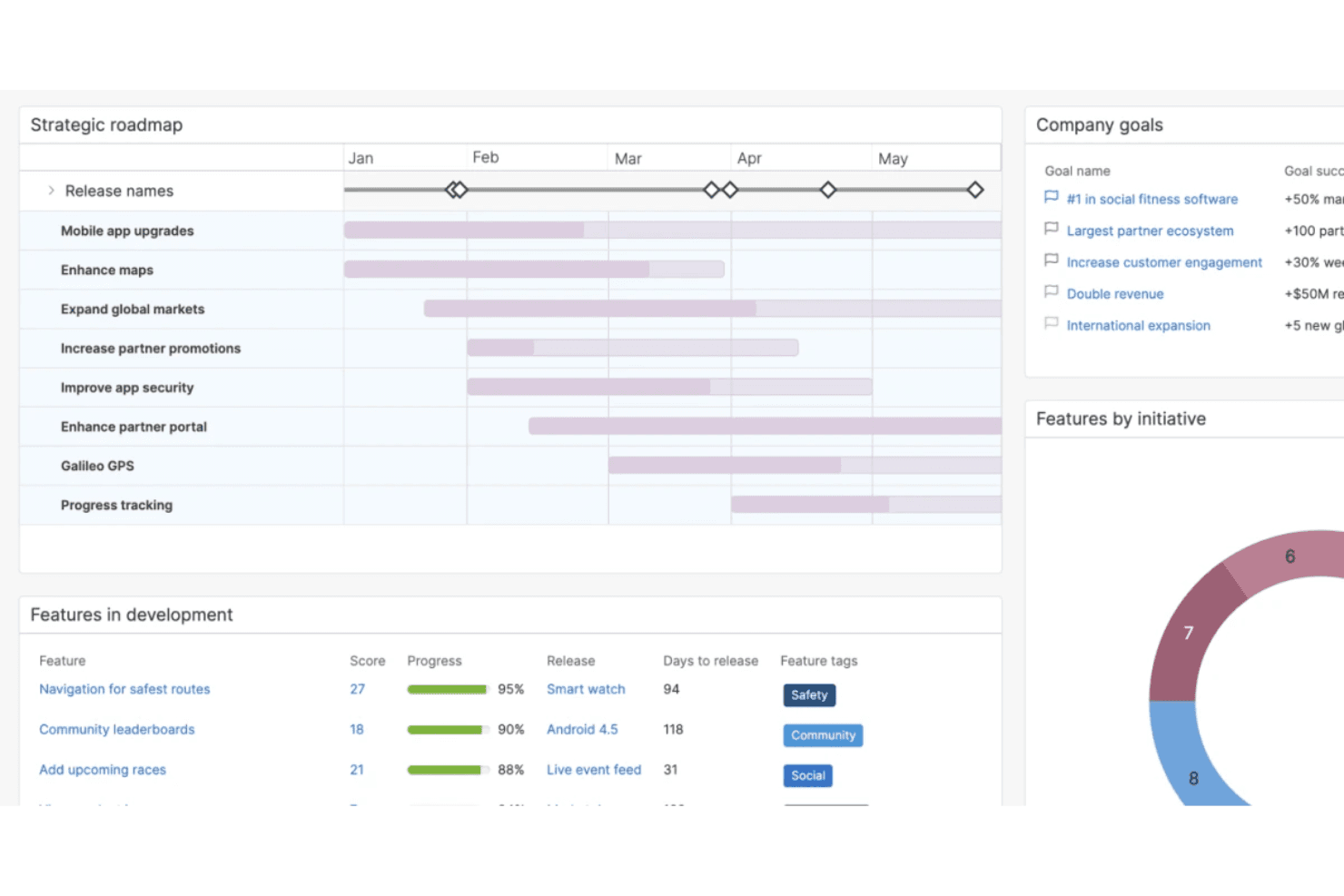
Aha! facilita la creación de una estrategia, el establecimiento de objetivos y la priorización de las decisiones sobre tu producto. ¡Aha! es una plataforma de hojas de ruta de productos y priorización que combina tarjetas de puntuación personalizadas, portales de ideas, visualización de hojas de ruta, gestión de listas de pendientes e integraciones con herramientas de entrega en una única suite.
¿Para quién es más adecuado Aha!?
Aha! es una opción ideal para equipos de producto que necesitan incorporar fórmulas de puntuación personalizadas —como RICE o modelos de valor/esfuerzo— directamente en su flujo de trabajo de priorización.
Por qué elegí Aha!
Elegí Aha! como una de las mejores opciones porque su motor de tarjetas de puntuación permite crear fórmulas desde cero, no solo ajustar una plantilla predeterminada. Puedes escribir ecuaciones avanzadas utilizando la lógica de RICE o de valor/esfuerzo, añadir lógica condicional
if()y aplicar esas tarjetas de puntuación simultáneamente a funcionalidades, iniciativas e ideas. Me gusta especialmente que el editor de fórmulas valide la sintaxis en tiempo real, para que puedas detectar los errores antes de que distorsionen silenciosamente tus resultados de priorización.Principales funciones de Aha!
- Portal de ideas: Un portal con la marca de tu empresa y habilitado para votaciones, donde los clientes envían y votan ideas que puedes convertir directamente en funcionalidades de tu hoja de ruta.
- Sincronización bidireccional con Jira y Azure DevOps: Los cambios realizados en Aha! o en tu herramienta de entrega actualizan automáticamente ambos lados, manteniendo alineadas las prioridades de la hoja de ruta y el trabajo de desarrollo.
- Zonas inteligentes de la pizarra: Al colocar un registro en una zona definida de una pizarra, sus campos de la hoja de ruta se actualizan en tiempo real, lo que permite a los equipos debatir visualmente las ventajas y desventajas.
- Análisis de temas mediante IA de los comentarios: Agrupa automáticamente las ideas y los comentarios recibidos en temas para que puedas detectar patrones en las aportaciones de los clientes sin etiquetarlos manualmente.
Integraciones de Aha!
Aha! ofrece más de 40 integraciones, incluidas Jira, Azure DevOps, Salesforce, Zendesk, Slack, Power BI y Google Analytics. Su API permite crear integraciones personalizadas, mientras que los valores de las tarjetas de puntuación pueden asignarse a campos equivalentes en las herramientas conectadas.
Pros and Cons
Pros:
- Las fórmulas personalizadas permiten puntuar con RICE y según el valor y el esfuerzo
- Los votos de los clientes se conectan directamente con las decisiones de la hoja de ruta
- Las vistas para las partes interesadas aclaran las ventajas y desventajas entre funcionalidades en competencia
Cons:
- Los cambios en las puntuaciones pueden borrar los datos históricos de las métricas
- Los informes personalizados requieren tiempo para configurarse
Learn more about Aha!: Ideal para identificar las tareas adecuadas mediante gráficos
- Prueba gratuita de 14 días + demostración gratuita disponible
- Desde $44/puesto/mes (facturado anualmente)
Visit WebsiteCustomer Rating:4.2/5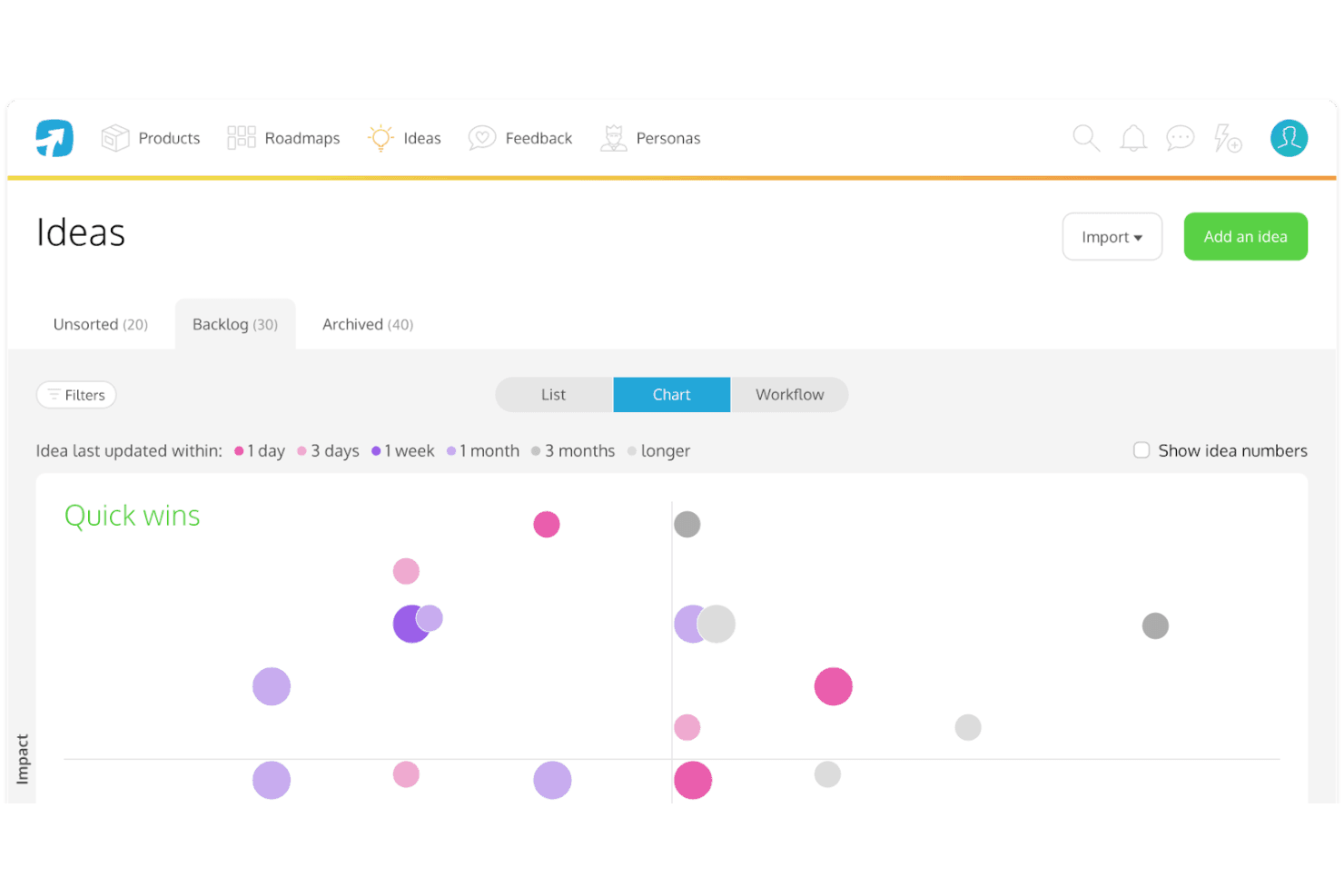
El gráfico de “impacto frente a esfuerzo” de ProdPad te ayuda a encontrar las funciones de producto adecuadas en las que centrarte. ProdPad es una plataforma de priorización y elaboración de hojas de ruta de productos que conecta los comentarios de los clientes, las ideas y los OKR mediante la puntuación de impacto frente a esfuerzo, hojas de ruta Ahora–Después–Más adelante y análisis de comentarios asistido por IA.
¿Para quién es más adecuado ProdPad?
ProdPad es una opción excelente para gerentes de producto y responsables de producto que necesitan conectar los comentarios de los clientes, los OKR y las decisiones de la hoja de ruta en un solo lugar.
Por qué elegí ProdPad
ProdPad se gana un lugar en mi lista de favoritos porque sus gráficos de impacto frente a esfuerzo hacen que sea realmente fácil ver qué ideas merecen atención en este momento. Me encanta que cada idea esté vinculada directamente a los OKR y a los comentarios de los clientes, por lo que no tienes que adivinar las prioridades. La función Señales de IA identifica automáticamente los temas emergentes en grandes volúmenes de comentarios, lo que significa que los datos de tus gráficos reflejan lo que realmente les importa a los clientes, no solo lo que hace más ruido.
Funciones principales de ProdPad
- Hoja de ruta Ahora–Después–Más adelante: Un formato estructurado de hoja de ruta que organiza las iniciativas por horizonte temporal sin obligarte a utilizar fechas fijas ni vistas de cronograma.
- Señales de IA: Una función de IA que identifica automáticamente temas emergentes en grandes volúmenes de comentarios de clientes para detectar patrones que, de otro modo, podrías pasar por alto.
- Puestos ilimitados y gratuitos para revisores: Cualquier persona de tu organización puede unirse como revisor sin coste, lo que le permite enviar ideas, añadir comentarios y comentar el trabajo existente.
- Sincronización bidireccional con Jira y Azure DevOps: Los cambios realizados en ProdPad se reflejan en tus herramientas de entrega y viceversa, manteniendo la estrategia y la ejecución alineadas sin actualizaciones manuales.
Integraciones de ProdPad
ProdPad ofrece integraciones nativas con Jira, Azure DevOps, GitHub, Linear, Slack, Microsoft Teams, Salesforce e Intercom. También admite conexiones personalizadas mediante su API y Zapier.
Pros and Cons
Pros:
- Conecta comentarios, ideas y OKR
- Los gráficos de impacto frente a esfuerzo aclaran las ventajas y desventajas
- La IA identifica temas en los comentarios
Cons:
- No incluye marcos RICE o WSJF confirmados
- No ofrece vistas de cronograma para la planificación con fechas
Learn more about ProdPad: Ideal para planificar hojas de ruta a partir de comentarios vinculados a los ingresos
- Demostración gratuita disponible
- Precios bajo solicitud
Visit WebsiteCustomer Rating:4.8/5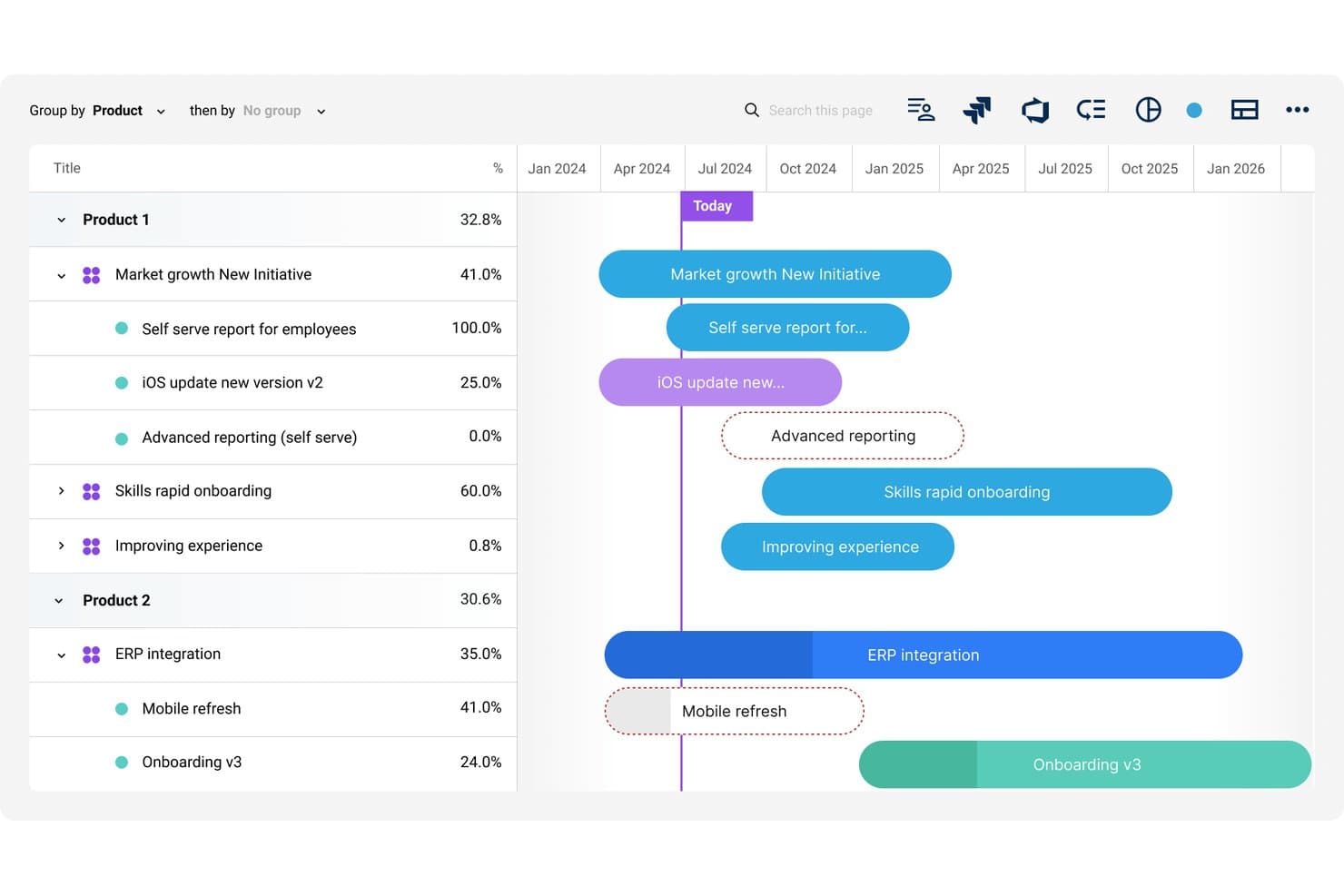
Dragonboat visualiza hojas de ruta de varios productos con seguimiento del progreso mediante una línea de tiempo. Dragonboat es una plataforma de cartera de productos que conecta la estrategia, los comentarios de los clientes y las hojas de ruta mediante la priorización asistida por IA, la planificación de escenarios y las integraciones bidireccionales con herramientas de entrega.
¿Para quién es más adecuado Dragonboat?
Dragonboat es una opción excelente para equipos de producto de empresas medianas y grandes que necesitan conectar directamente los comentarios de los clientes y los datos de ingresos con las decisiones de la hoja de ruta en varias líneas de productos.
Por qué elegí Dragonboat
Elegí Dragonboat como una de las mejores opciones porque es la única herramienta que he visto que vincula directamente los comentarios de los clientes con los datos de ingresos antes de que cualquier elemento llegue a la hoja de ruta. La aplicación Intake recopila solicitudes de Salesforce, Zendesk y Slack, y luego añade el contexto de ingresos del CRM para que puedas ver exactamente qué clientes y qué tamaños de acuerdos están detrás de cada solicitud de funcionalidad. Si a esto le sumas el modelado de escenarios asistido por IA de Planner, puedes ejecutar comparaciones hipotéticas entre iniciativas competidoras antes de comprometerte con un único plan.
Características principales de Dragonboat
- Vistas de la hoja de ruta de toda la cartera: Organiza apuestas estratégicas, iniciativas y funcionalidades en una única hoja de ruta de cartera, con presentaciones específicas para cada audiencia y diferentes partes interesadas.
- Etiquetado de comentarios mediante IA: Etiqueta, clasifica y resume automáticamente grandes volúmenes de comentarios entrantes en temas para que tu equipo pueda actuar más rápido sobre los patrones identificados.
- Planificación de escenarios hipotéticos: Crea y compara planes de cartera alternativos en paralelo sin sobrescribir tu plan de referencia actual.
- Sincronización bidireccional con herramientas de entrega: Envía contexto estratégico, como OKR y prioridades, a Jira y ADO, mientras que las actualizaciones de estado y alcance se transmiten automáticamente de vuelta.
Integraciones de Dragonboat
Dragonboat admite más de 200 integraciones, incluida la sincronización bidireccional con Jira, Azure DevOps y Rally, además de Salesforce, Zendesk, Slack, Microsoft Teams, UserVoice y Pendo Listen. También ofrece una API y un conector MCP para conexiones personalizadas.
Pros and Cons
Pros:
- Los datos de ingresos mejoran la priorización de funcionalidades
- La IA compara escenarios de cartera competidores
- Las hojas de ruta de la cartera alinean las prioridades de las partes interesadas
Cons:
- Los marcos de puntuación integrados siguen sin estar claros
- La estructura empresarial puede resultar abrumadora para equipos pequeños
Learn more about Dragonboat: Ideal para priorizar funcionalidades basándose en comentarios
- Demostración gratuita disponible
- Precio bajo solicitud
Visit WebsiteCustomer Rating:4.5/5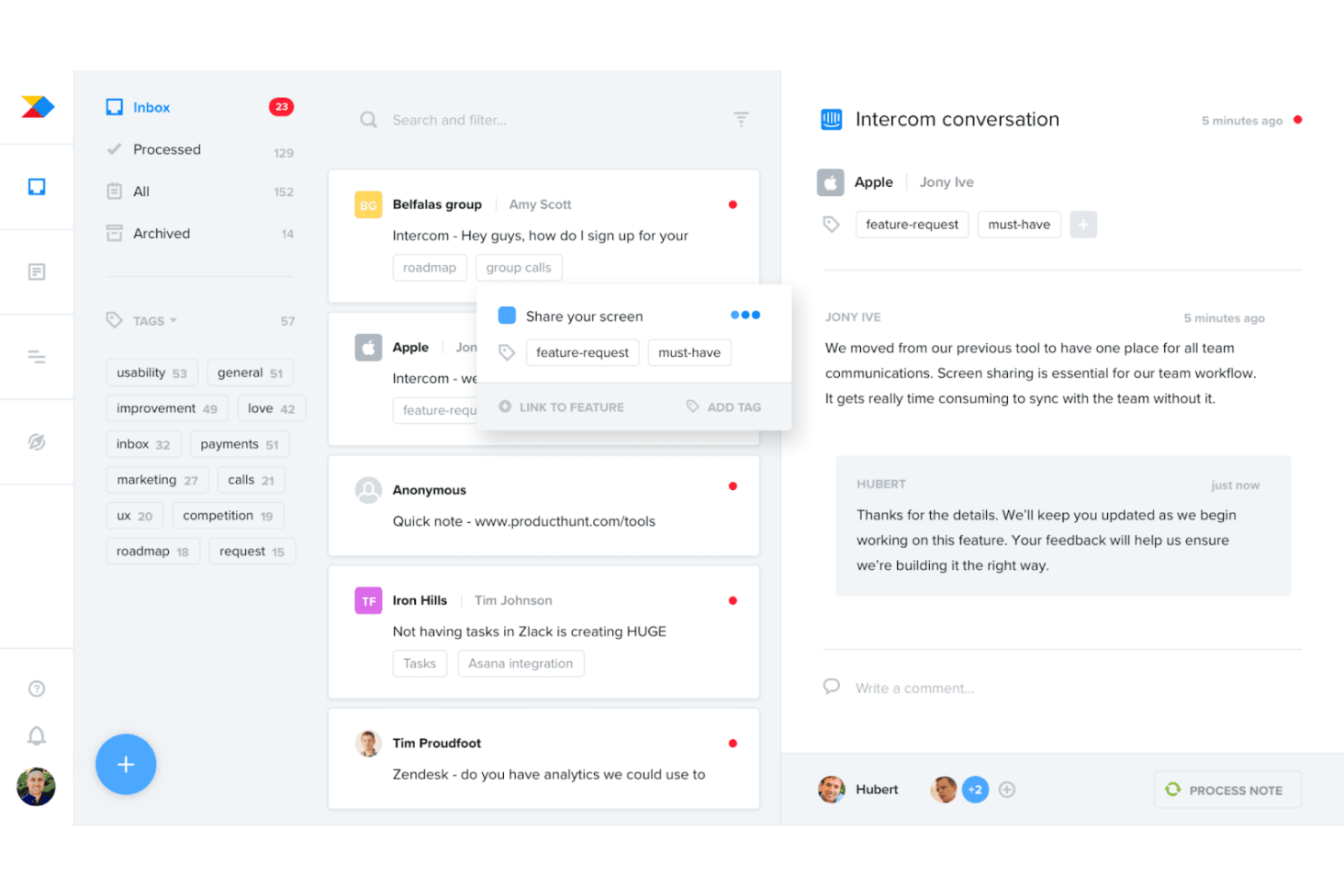
Productboard te ayuda a recopilar y consolidar los comentarios de los clientes para comprender a tus usuarios e identificar patrones. Productboard es una plataforma de priorización de productos y hojas de ruta que centraliza los comentarios de los clientes procedentes de más de 25 fuentes, los vincula directamente con las funcionalidades y utiliza fórmulas de puntuación personalizables para ayudar a los equipos de producto a decidir qué desarrollar a continuación.
¿Para quién es más adecuado Productboard?
Productboard es una excelente opción para los responsables de producto y los directores de producto que necesitan vincular directamente los comentarios de los clientes con la priorización de funcionalidades y las decisiones sobre la hoja de ruta.
Por qué elegí Productboard
Productboard ocupa un lugar en mi lista de favoritos porque es la única herramienta que he utilizado que trata los comentarios de los clientes como el aporte directo para la priorización, no como algo secundario. Recopila comentarios de más de 25 fuentes, como Zendesk, Gong e Intercom, y vincula cada percepción directamente con las funcionalidades que se están puntuando. Me gusta especialmente la puntuación de las necesidades de los clientes, que permite ver la intensidad de la demanda por segmento y consultar las citas reales de los usuarios que sustentan cada puntuación.
Funciones principales de Productboard
- Vista de cartera con OKR: Una única vista muestra los objetivos, las iniciativas y las funcionalidades de toda la cartera, con seguimiento del progreso y los riesgos en una línea de tiempo.
- Segmentos dinámicos de clientes: Permite dividir los comentarios y las puntuaciones por segmento de usuarios para ver qué funcionalidades son más importantes para grupos de clientes específicos.
- Portal para clientes: Un portal público donde los clientes pueden validar ideas y consultar lo que se ha lanzado, manteniendo a los usuarios involucrados en el proceso de descubrimiento.
- Sincronización bidireccional con Jira y Azure DevOps: Permite enviar funcionalidades a las herramientas de ingeniería y recuperar las actualizaciones de estado en Productboard, manteniendo alineadas la estrategia y la ejecución.
Integraciones de Productboard
Productboard ofrece más de 25 integraciones nativas, incluidas Jira, Azure DevOps, Zendesk, Intercom, Slack, Microsoft Teams, Gong, G2, Amplitude y Mixpanel. También proporciona API 2.0 y Zapier para conexiones personalizadas.
Pros and Cons
Pros:
- Vincula directamente los comentarios de los clientes con las puntuaciones de las funcionalidades
- Segmenta la demanda por tipo de cliente
- Actualiza automáticamente las hojas de ruta de las partes interesadas
Cons:
- No incluye marcos de priorización predefinidos
- Las carteras grandes pueden resultar difíciles de navegar
Learn more about Productboard: Plataforma modular de gestión de productos que permite planificar el trabajo y priorizar funcionalidades en función de los comentarios de los clientes.
- Demostración gratuita disponible
- Precios bajo petición
Visit WebsiteCustomer Rating:4.4/5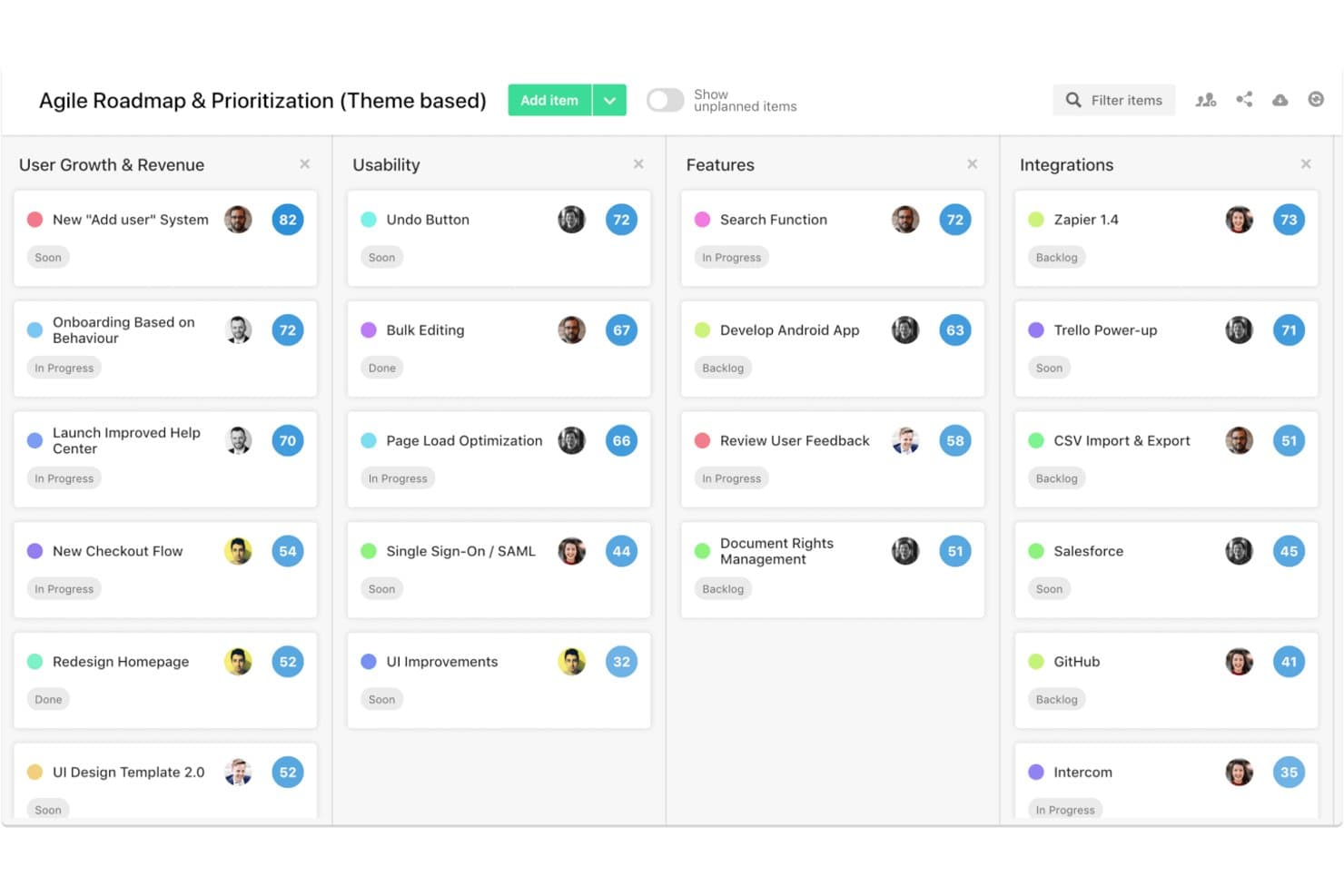
airfocus es una plataforma de priorización de productos que combina marcos de puntuación personalizables, hojas de ruta con múltiples vistas, portales de comentarios de clientes y herramientas colaborativas de puntuación grupal como Priority Poker.
¿Para quién es más adecuado airfocus?
airfocus funciona bien para equipos de producto de organizaciones medianas y grandes que necesitan alinear a múltiples partes interesadas en torno a las prioridades mediante métodos de puntuación estructurados y basados en datos.
Por qué elegí airfocus
He incluido airfocus entre mis principales opciones porque Priority Poker es una de las herramientas de puntuación grupal más prácticas que he visto en esta categoría. Permite que las partes interesadas puntúen los elementos de forma independiente, pone de manifiesto las discrepancias en los datos y registra cómo llegó el grupo a una decisión final. Si a esto le sumamos los portales de votación de clientes y una puntuación de información que incorpora directamente el volumen real de comentarios al proceso de priorización, obtenemos una herramienta que convierte las opiniones de los clientes en un elemento fundamental del proceso de puntuación.
Características principales de airfocus
- Aplicación de puntuación de prioridades: Puntúa los elementos según criterios estratégicos agrupados en factores ponderados para crear un proceso de puntuación estructurado y repetible.
- Fórmulas de priorización personalizadas: Define tu propia lógica de puntuación mediante campos personalizados y generadores de fórmulas para adaptarla al marco específico de tu equipo.
- Portales de comentarios de clientes con marca personalizada: Crea portales protegidos con contraseña donde los clientes puedan enviar, votar y reaccionar a ideas de funcionalidades.
- Hojas de ruta con múltiples vistas: Cambia entre las vistas de tablero, cronología, Gantt, tabla, gráfico, lista y documento para presentar las prioridades a cualquier audiencia.
Integraciones de airfocus
airfocus ofrece integraciones con Jira Cloud, Azure DevOps Cloud, Trello, Asana, Linear, GitHub, Intercom, Zendesk, Slack y Microsoft Teams. También admite la sincronización bidireccional con herramientas de entrega, una API abierta, webhooks y Zapier.
Pros and Cons
Pros:
- La votación de los clientes influye en las puntuaciones de priorización
- Priority Poker pone de manifiesto las discrepancias en la puntuación de las partes interesadas
- Los marcos personalizados se adaptan a estrategias de producto complejas
Cons:
- Las funciones empresariales limitan la síntesis automatizada de comentarios
- El enfoque en las hojas de ruta supera la profundidad de ejecución
 Ideal para la priorización inclusiva evaluada por el equipo
- Prueba gratuita de 14 días + demostración gratuita disponible
- Desde $19/usuario/mes (facturado anualmente)
Visit WebsiteCustomer Rating:4.4/5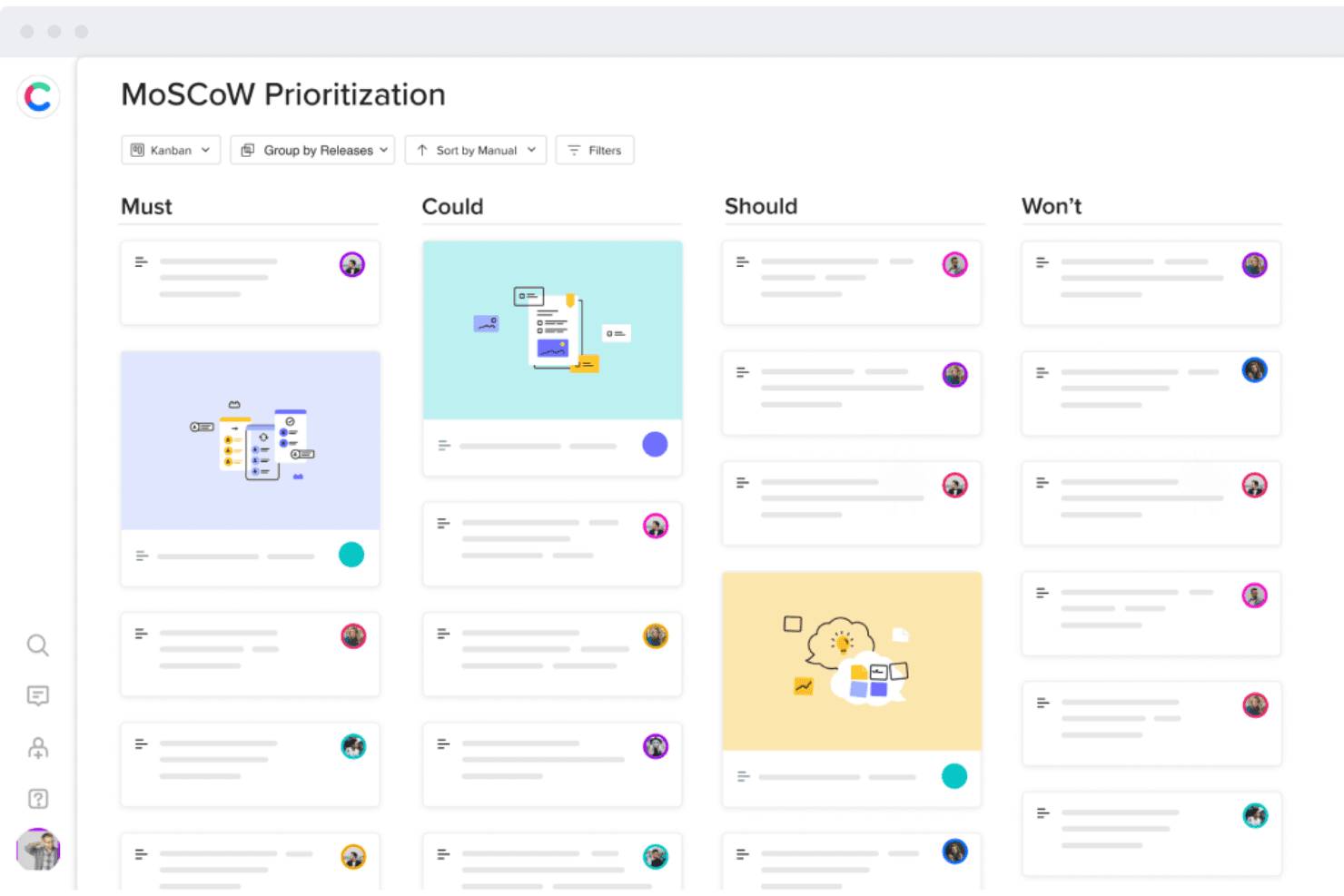
Craft.io te ayuda a priorizar funcionalidades según el método MoSCoW o la puntuación RICE. Craft.io es una plataforma de gestión de productos que combina la priorización basada en múltiples marcos, la visualización de hojas de ruta, la gestión de listas de tareas pendientes y la evaluación colaborativa por parte de las partes interesadas durante todo el ciclo de vida del producto.
¿Para quién es más adecuado Craft.io?
Craft.io es una opción sólida para equipos de producto de empresas medianas y grandes que necesitan una priorización estructurada entre múltiples partes interesadas y líneas de productos.
Por qué elegí Craft.io
He incluido Craft.io entre mis principales opciones porque su modelo de priorización inclusivo es realmente diferente al de la mayoría de las herramientas que he utilizado. En lugar de que una sola persona puntúe las funcionalidades de forma aislada, Craft.io permite que cada grupo de partes interesadas envíe sus propias puntuaciones ponderadas, de modo que tanto un vicepresidente de Producto como un responsable de ingeniería pueden contribuir sin anularse mutuamente. Si a esto le sumamos los marcos RICE, MoSCoW y WSJF integrados, junto con un creador de fórmulas personalizadas, se obtiene un proceso estructurado y gestionado por el equipo para decidir qué es lo que más desean realmente los clientes.
Características principales de Craft.io
- Tipos de vista de la hoja de ruta: Cinco vistas distintas de la hoja de ruta —Tabla, Cronología, Kanban, Carriles y Lanzamiento— te permiten adaptar la forma de presentar las prioridades a diferentes audiencias.
- Portal de comentarios: Un centro centralizado donde las partes interesadas pueden enviar ideas de productos, votar por ellas y consultar su estado, vinculadas directamente a elementos de la lista de tareas pendientes.
- Jerarquía de datos: Una jerarquía de elementos de varios niveles (hasta cuatro niveles en el plan empresarial) te permite organizar iniciativas, funcionalidades y tareas en un formato estructurado y anidado.
- Integraciones con herramientas de entrega: La sincronización bidireccional con Jira, Azure DevOps, GitHub, GitLab y Linear mantiene la hoja de ruta de tu producto conectada con los flujos de trabajo de ingeniería.
Integraciones de Craft.io
Craft.io se integra con Jira, Azure DevOps, GitHub, GitLab, Linear, Zendesk, Figma, Slack y Microsoft Teams. Los planes empresariales incluyen una API para integraciones personalizadas, y también está disponible Zapier.
Pros and Cons
Pros:
- La priorización evaluada por el equipo alinea a las partes interesadas
- Varios marcos respaldan decisiones objetivas entre alternativas
- Las hojas de ruta comunican las prioridades a diferentes audiencias
Cons:
- Las capacidades avanzadas requieren complementos de pago
- Los usuarios informan de problemas de sincronización y dificultades de navegación
Learn more about Craft.io: La mejor opción para hojas de ruta de cartera con enlaces a comentarios
- Prueba gratuita de 14 días
- Desde $19/usuario/mes (facturado anualmente)
Visit WebsiteCustomer Rating:4/5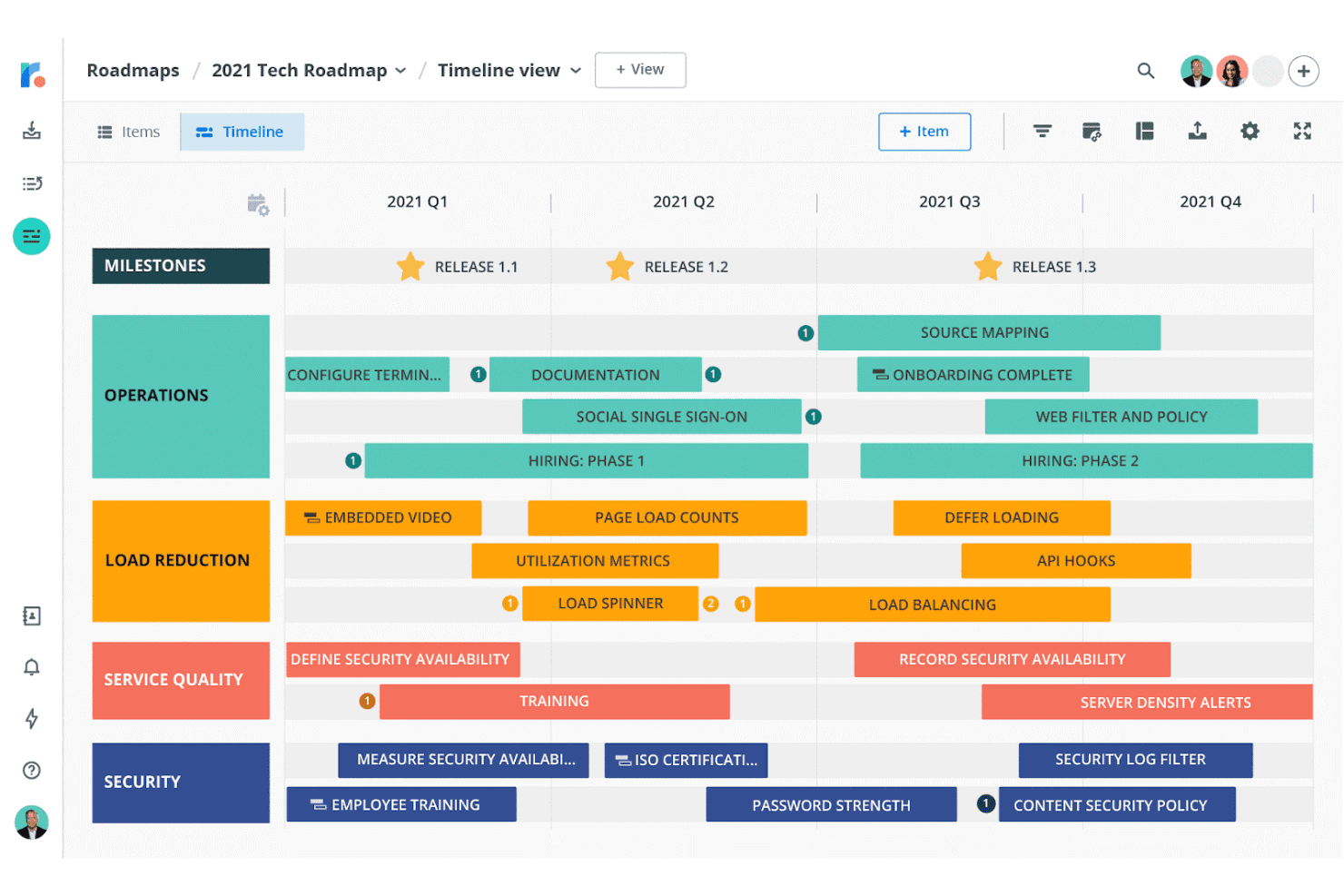
Roadmunk ofrece plantillas basadas en los modelos RICE y Kano para ayudarte a priorizar ideas. El software de elaboración de hojas de ruta de Tempo es una plataforma de elaboración de hojas de ruta y priorización de productos que combina una bandeja de entrada de comentarios de clientes, un gestor de ideas con puntuación RICE y de valor frente a esfuerzo integradas, y hojas de ruta con múltiples vistas que se consolidan en cronogramas a nivel de cartera.
¿Para quién es más adecuado el software de elaboración de hojas de ruta de Tempo?
El software de elaboración de hojas de ruta de Tempo es una opción excelente para gestores de producto y responsables de producto que necesitan conectar los comentarios de los clientes directamente con hojas de ruta priorizadas en varios equipos.
Por qué elegí el software de elaboración de hojas de ruta de Tempo
Elegí el software de elaboración de hojas de ruta de Tempo porque es una de las pocas herramientas que permite seguir el recorrido de un comentario de cliente desde su envío hasta una idea puntuada y clasificada, y posteriormente hasta una hoja de ruta de cartera publicada. Me gusta cómo la bandeja de entrada de comentarios se conecta directamente con el Gestor de ideas, donde puedes aplicar la puntuación RICE o de valor frente a esfuerzo y consolidar las hojas de ruta individuales de los equipos en una única vista de cartera. Esa trazabilidad integral es lo que le otorga el primer puesto para hojas de ruta de cartera con enlaces a comentarios.
Características principales del software de elaboración de hojas de ruta de Tempo
- Matriz de puntuación de valor frente a esfuerzo: Una vista de matriz interactiva representa visualmente tus ideas para que puedas detectar de un vistazo los elementos de alto valor y bajo esfuerzo.
- Sincronización bidireccional con Jira y Azure DevOps: Los cambios realizados en Jira o Azure DevOps se reflejan en tu hoja de ruta, manteniendo la entrega y la estrategia alineadas sin actualizaciones manuales.
- Portales de comentarios de clientes: Los portales personalizables permiten a los clientes enviar comentarios directamente, que después puedes etiquetar según su origen y vincular a ideas específicas de tu cartera de pendientes.
- Visualización ilimitada para las partes interesadas: Cualquier persona sin una licencia de pago puede seguir viendo hojas de ruta compartidas o exportadas, por lo que puedes incluir a tantos revisores como necesites sin costes adicionales.
Integraciones del software de elaboración de hojas de ruta de Tempo
El software de elaboración de hojas de ruta de Tempo ofrece 9 integraciones documentadas, entre ellas Jira, Azure DevOps, Trello, Asana, Monday.com, Pivotal Tracker, Shortcut, GitHub y GitLab. Su API admite integraciones personalizadas, mientras que la sincronización bidireccional con Jira y Azure DevOps está disponible en determinados planes.
Pros and Cons
Pros:
- Los comentarios enlazan las ideas con la cartera de pendientes puntuada
- Marcos RICE y de valor frente a esfuerzo integrados
- Varias vistas de hojas de ruta facilitan la alineación de las partes interesadas
Cons:
- La jerarquía más profunda de iniciativas sigue siendo limitada
- No ofrece comparación de escenarios ni priorización mediante IA
Learn more about Tempo Roadmapping Software:
Otras opciones
Aquí tienes algunas opciones más que no entraron en la lista principal, pero que merece la pena tener en cuenta.
- 11CannyIdeal para fórmulas de puntuación personalizadas
- 12StoriesOnBoardIdeal para la priorización de funcionalidades basada en mapas de historias
- 13ProductPlanIdeal para priorizar hojas de ruta con investigación mediante IA
- 14PendoLa mejor opción para la votación de funciones por parte de clientes vinculada a los ingresos
- 15PlanviewIdeal para la priorización de carteras empresariales a gran escala
- 16Jira Product DiscoveryLa mejor opción para priorizar funcionalidades conectadas con Jira
- 17Ducalis.ioIdeal para la puntuación basada en roles y la alineación de los votantes
Cómo evalúo el software de priorización de productos
Mi evaluación se divide en tres partes: funcionalidad principal (con el mayor peso), donde compruebo si una herramienta puede puntuar y clasificar iniciativas utilizando marcos estructurados y generar hojas de ruta visuales que se puedan compartir; características destacadas, como el modelado de escenarios hipotéticos; y factores ajenos a las funcionalidades, como la asistencia durante la incorporación y la adecuación del modelo de precios para equipos multifuncionales.
Funcionalidad principal (requisitos básicos para esta lista)
Al seleccionar herramientas para mi lista, puntúo cada una en una escala de 0 (no ofrece la funcionalidad) a 5 (sobresale en esta área) para cada funcionalidad principal que se indica a continuación. Después convierto el total en un porcentaje para ayudar a evaluar la adecuación general de cada herramienta, con un peso adicional para cualquier funcionalidad que haya considerado esencial.
- Marcos de priorización (esencial): Compruebo si una herramienta admite RICE, la puntuación ponderada o matrices de valor frente a esfuerzo con criterios personalizables y pesos editables.
- Visualización de hojas de ruta (esencial): Cada herramienta debe producir hojas de ruta que se puedan compartir y filtrar, y que pueda adaptar para ejecutivos, responsables de ingeniería o equipos de atención al cliente.
- Agregación de comentarios y aportaciones: Busco herramientas que permitan vincular directamente las solicitudes de clientes o las aportaciones del equipo de ventas con las iniciativas, de modo que la puntuación refleje señales reales de demanda.
- Gestión de iniciativas y acumulación de trabajo: Una acumulación de trabajo bien estructurada, con jerarquías, campos personalizados y acciones masivas, es importante cuando se gestionan cientos de ideas de funcionalidades.
- Colaboración multifuncional: Evalúo si las partes interesadas pueden votar, puntuar o comentar dentro de la herramienta, en lugar de depender de conversaciones por canales alternativos.
- Integración con herramientas de entrega: La sincronización bidireccional con plataformas como Jira o Azure DevOps mantiene las decisiones de prioridad conectadas con la ejecución a nivel de sprint sin necesidad de actualizaciones manuales.
Una vez que tengo una lista de herramientas que cumplen los criterios, considero qué distingue a cada plataforma.
Factores diferenciadores (lo que distingue a los proveedores)
Así es como comparo y contrasto diferentes proveedores:
Características destacadas
El modelado de escenarios hipotéticos es la primera característica que compruebo. Antes de fijar las prioridades de un trimestre, quiero retirar una iniciativa del alcance y ver cómo eso modifica los plazos y las puntuaciones del resto. Los portales de votación de clientes también son importantes porque sustituyen las solicitudes anecdóticas por señales de demanda cuantificables vinculadas directamente a iniciativas puntuadas. Busco campos de estimación de ingresos e impacto que permitan asociar cifras proyectadas de retención o ahorro de costes a cada elemento, proporcionando a los equipos de finanzas y liderazgo un lenguaje común para conversar sobre las compensaciones.
Más allá de las funcionalidades
El modelo de precios es muy importante en este caso. Las licencias por usuario se encarecen rápidamente cuando invitas a responsables de ingeniería, diseñadores y representantes de ventas a aportar su opinión sobre las prioridades. Compruebo si una herramienta ofrece niveles para lectores o comentaristas, de modo que no tengas que pagar el precio completo por las partes interesadas que solo necesitan votar o revisar las puntuaciones. La asistencia durante la incorporación es el otro factor que evalúo detenidamente. Una herramienta con plantillas integradas de RICE o WSJF y una configuración guiada ahorra semanas en comparación con otra que te deja en un espacio de trabajo vacío.
Cómo elegí el mejor software de priorización de productos
¿Qué busco al seleccionar el mejor sistema de priorización de productos? Este es un resumen de mis criterios de evaluación:
Interfaz de usuario (UI)
Lanzar nuevas funcionalidades es difícil, pero las herramientas que utilizas para hacerlo no deberían serlo. Busco soluciones que tengan una interfaz de usuario clara, para que los miembros de tu equipo puedan encontrar fácilmente las funciones adecuadas y volver a centrarse en lo que más importa: crear un producto excelente.
Facilidad de uso
Todas las herramientas de priorización que he seleccionado pertenecen a una de estas dos categorías: están diseñadas específicamente para equipos de producto o son altamente personalizables, lo que permite crear una solución personalizada adaptada a tus necesidades. Son fáciles de usar y deberían facilitar enormemente el proceso de priorización.
Integraciones
He elegido herramientas que se integran con todas las plataformas populares de desarrollo de productos y creación de prototipos, para que puedas incorporarlas a tu ecosistema de software.
Precios
He seleccionado herramientas que te ayudan a planificar y priorizar nuevas funcionalidades de principio a fin, independientemente del método de priorización, para que puedas sacar el máximo partido a tu inversión.
¿Cuáles son las características clave del software de priorización de productos?
Estas son algunas de las características más importantes que debes tener en cuenta al seleccionar una solución de priorización de funcionalidades.
- Planificación de proyectos y flujos de trabajo: No puedes priorizar las tareas si no las planificas primero. El software debe permitirte planificar tus proyectos y flujos de trabajo con facilidad.
- Seguimiento de tareas: Los gestores de proyectos deben estar siempre al tanto de las tareas para poder identificar los cuellos de botella y asignar los recursos adecuados con los que superar posibles obstáculos.
- Comunicación y colaboración: El trabajo en equipo te ayuda a priorizar las tareas y entregarlas dentro de los plazos. La aplicación debe permitir que los miembros de tu equipo se comuniquen y colaboren para completar las tareas.
- Personalización: El alcance y el flujo de trabajo de los proyectos de tu equipo pueden variar. La solución debe ayudarte a personalizar tu enfoque mediante la creación de subtareas y dependencias, y permitirte crear plantillas para ahorrar tiempo en proyectos similares futuros.
- Listas de tareas pendientes: Organizar tus entregables te ayuda a priorizar tus iniciativas. La herramienta debe permitirte crear listas de tareas pendientes de versiones, sprints y productos para que puedas establecer expectativas y alcanzar tus objetivos de producto.
¿Por qué necesitas un esquema de priorización?
Como dijo Steve Cochran, director de tecnología de ConnectWise:
En la mayoría de las empresas, tienes una línea de partida y un objetivo final, con varios pasos intermedios. Sin un esquema de priorización, es casi imposible completar esos pasos y alcanzar el objetivo final a tiempo y sin problemas. En lugar de priorizar los proyectos según la rapidez con la que puedas iniciarlos, organiza tus equipos de acuerdo con las necesidades reales de la empresa para evitar centrarte únicamente en elementos a corto plazo. Asegúrate de que el esquema de prioridades esté claramente definido y sea visible para todos; de lo contrario, corres el riesgo de optimizar de forma subóptima tus recursos en función de las misiones individuales de los productos, desviando tu hoja de ruta general en el proceso.
Lanza mejores funcionalidades con herramientas de priorización de productos
El software de priorización de productos te ayuda a lanzar funcionalidades que entusiasman a tus clientes y aumentan el valor de tu empresa. Obtén más información sobre los marcos de priorización de funcionalidades, cómo priorizar las funcionalidades de un producto y cuál es el mejor. Aprenderás sobre puntuaciones de priorización como el modelo de puntuación ponderada, el póker de prioridades, el método MoSCoW, la puntuación RICE, la matriz de valor frente a esfuerzo y otros marcos de priorización de productos.
Listas de herramientas relacionadas:
- Software de indicadores de funcionalidades
- Software de comentarios de usuarios
- Software de hojas de ruta de productos
Suscríbete al boletín para gestores de producto para recibir directamente en tu bandeja de entrada consejos sobre cómo lanzar productos increíbles.