

Las mejores herramientas de gestión de productos con IA respaldan los flujos de trabajo mediante la automatización de las actualizaciones de la lista de tareas pendientes, la identificación de información sobre los usuarios y la alineación de los equipos en torno a prioridades claras. Estas herramientas resuelven obstáculos reales, como la documentación duplicada, los plazos incumplidos y la comunicación dispersa.
Después de revisar y probar docenas de plataformas, he identificado las principales opciones que realmente mejoran la toma de decisiones y la colaboración. En la guía que aparece a continuación, desglosaré las características más destacadas de cada herramienta y mostraré cómo pueden encajar en tu flujo de trabajo de gestión de productos, tanto si necesitas análisis más sólidos como una planificación de productos más fluida o una coordinación de equipos más eficiente.
Por qué confiar en nuestras recomendaciones de software
6,700+
Reviews
20
Industry experts
16+
Evaluation factors
14
Years
Nuestro equipo lleva probando y evaluando software desde 2012. Como gestores de producto, sabemos lo difícil —y lo importante— que es elegir el software adecuado.
Para esta guía, evaluamos las herramientas mediante pruebas prácticas e investigación independiente, puntuando las herramientas según nuestros criterios de selección.
Nuestras reseñas reflejan nuestro criterio editorial humano, no un discurso de ventas.
Revisores expertos:
 Hannah ClarkSenior TPM
- Cristiano ValimSenior UI/UX Lead

Tabla comparativa de herramientas de gestión de productos con IA
Esta tabla comparativa resume los detalles de precios de mi selección de las mejores herramientas de gestión de productos con IA.
| Tool | Best For | Trial Info | Price | ||
|---|---|---|---|---|---|
| 1 | Ideal para la síntesis de feedback omnicanal con IA | Demo gratuita disponible | Precio a consultar | Website | |
| 2 | Ideal para flujos de trabajo de productos personalizables | Plan gratuito disponible | Desde $9/usuario/mes (facturado anualmente) | Website | |
| 3 | Ideal para la gestión del ciclo de vida de los proyectos | Plan gratuito + prueba gratuita de 14 días + demostración gratuita disponible | Desde $10/usuario/mes (facturado anualmente) | Website | |
| 4 | Ideal para análisis del comportamiento | Plan gratuito disponible | Precio bajo consulta | Website | |
| 5 | Ideal para rastrear temas desde VoC hasta la hoja de ruta | Demostración gratuita disponible | Desde $25,000/año (facturado anualmente) | Website | |
| 6 | Ideal para la ideación visual y el mapeo de las partes interesadas | Plan gratuito disponible | Desde $8/usuario/mes (facturado anualmente) | Website | |
| 7 | Ideal para la priorización de carteras con varios equipos | Demostración gratuita disponible | Precios bajo petición | Website | |
| 8 | Ideal para los comentarios de los usuarios | Demostración gratuita disponible | Precio bajo solicitud | Website | |
| 9 | Ideal para predecir el abandono y las ventas adicionales teniendo en cuenta los ingresos | Plan gratuito + prueba gratuita de 30 días + demostración gratuita disponible | Precios disponibles previa solicitud | Website | |
| 10 | La mejor opción para puntuar el impacto desde el cliente hasta la hoja de ruta | Plan gratuito + demostración gratuita disponible | Precio bajo solicitud | Website |


Análisis de las mejores herramientas de gestión de productos con IA
A continuación encontrarás mis resúmenes detallados de las mejores herramientas de gestión de productos con IA que han llegado a mi selección. Mis análisis ofrecen una visión detallada de las características principales, ventajas y desventajas, integraciones y casos de uso ideales de cada herramienta para ayudarte a encontrar la mejor opción para ti y tu equipo.
 Ideal para la síntesis de feedback omnicanal con IA
- Demo gratuita disponible
- Precio a consultar
Visit WebsiteCustomer Rating:4.8/5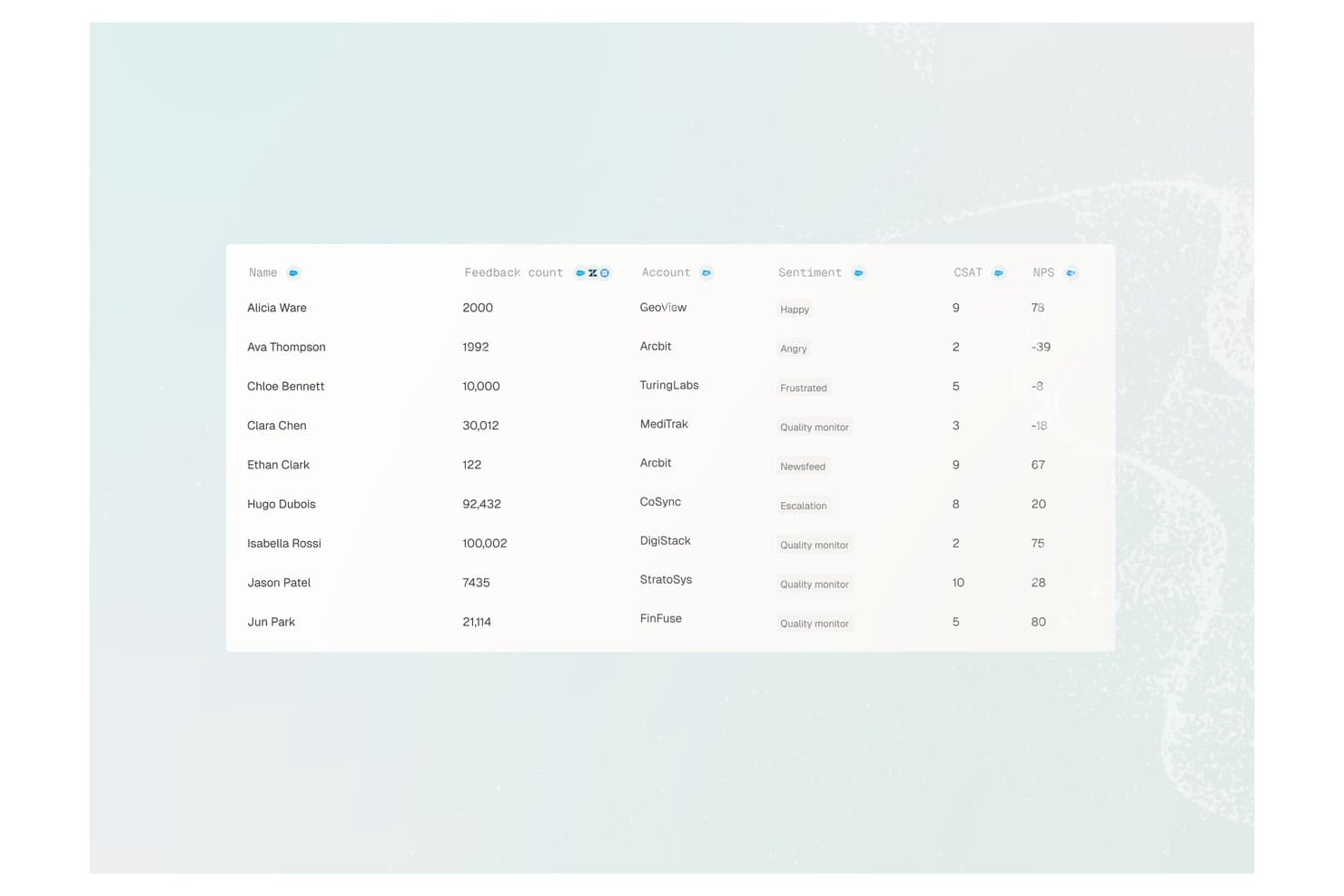
Enterpret ofrece una tabla de análisis de comentarios de clientes que muestra nombres de usuarios, número de comentarios, nombres de cuentas, etiquetas de sentimiento, puntuaciones CSAT y valores NPS. Enterpret es una plataforma de inteligencia del cliente que utiliza IA para recopilar, clasificar y analizar comentarios de más de 50 canales —incluidos tickets de soporte, reseñas, llamadas y comunidades— y convertirlos en conocimientos estructurados y buscables sobre el producto.
¿Para Quién es Mejor Enterpret?
Enterpret es ideal para equipos de producto de medianas y grandes empresas que procesan altos volúmenes de feedback de clientes a través de múltiples canales cada mes.
Por Qué Elegí Enterpret
Elegí Enterpret como uno de los mejores porque su Taxonomía Adaptativa clasifica automáticamente el feedback entrante de más de 50 fuentes sin necesidad de etiquetado manual. También me encanta el Customer Context Graph, que vincula cada tema a cuentas específicas y peso en ingresos, así mi equipo sabe qué señales de feedback realmente impulsan la retención. El MCP Server me permite consultar todo ese contexto estructurado directamente desde Claude o Cursor.
Características Clave de Enterpret
- Paneles impulsados por IA: Paneles de control personalizables y buscables que muestran temas de feedback e información sobre el sentimiento desde todos los canales conectados.
- Alertas automatizadas: Notificaciones en tiempo real señalan cambios en el sentimiento del cliente o nuevos temas emergentes en las fuentes de comentarios.
- Integración con almacenes de datos: Conectores nativos te permiten sincronizar datos estructurados de feedback con plataformas como Snowflake para análisis.
- Integraciones con flujos de trabajo: Envía información sintetizada de clientes directamente a Jira, Slack y otras herramientas de gestión de productos.
Integraciones de Enterpret
Enterpret ofrece integraciones nativas con Zendesk, Intercom, Salesforce, Gong, Slack, Qualtrics, Linear, Jira, Google Play Store y la Apple App Store. Hay una API disponible para integraciones personalizadas.
Pros and Cons
Pros:
- La taxonomía adaptativa clasifica el feedback automáticamente, sin esfuerzo manual
- Los análisis ponderados por ingresos vinculan el feedback con el impacto en el negocio
- Sintetiza feedback de más de 50 canales a la vez
Cons:
- La configuración inicial de la taxonomía requiere un tiempo de configuración significativo
- Funciones incorporadas de gestión de flujos de trabajo de producto limitadas
Learn more about Enterpret: Ideal para flujos de trabajo de productos personalizables
- Plan gratuito disponible
- Desde $9/usuario/mes (facturado anualmente)
Visit WebsiteCustomer Rating:4.6/5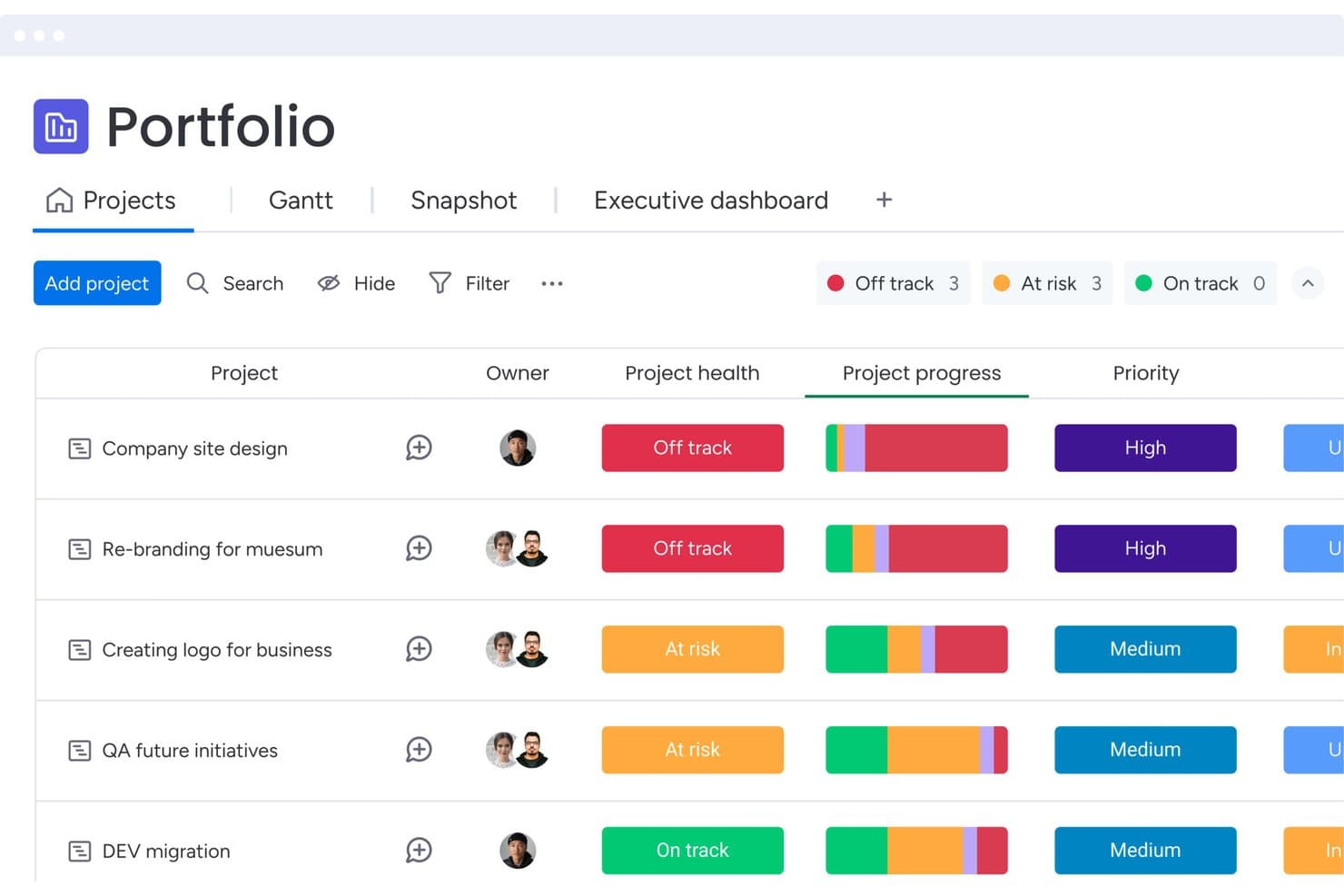
monday AI Workspace supervisa el estado y la prioridad de los proyectos en distintas carteras. monday AI Workspace es una plataforma de gestión del trabajo que reúne la generación de contenido asistida por IA, la automatización de flujos de trabajo personalizables, las consultas en lenguaje natural mediante Sidekick y la agregación de comentarios en distintos tableros, todo dentro de un único entorno conectado de gestión de productos y proyectos.
¿Para quién es más adecuado monday AI Workspace?
monday AI Workspace es adecuado para equipos de productos multifuncionales que necesitan un espacio de trabajo altamente configurable para gestionar listas de tareas pendientes, comentarios y la redacción de PRD sin tener que cambiar de herramienta.
Por qué elegí monday AI Workspace
He incluido monday AI Workspace entre mis principales opciones porque es una de las pocas plataformas de gestión del trabajo que te permite crear un flujo de trabajo de producto adaptado al proceso exacto de tu equipo, en lugar de obligarlo a ajustarse a una estructura fija. Me gusta especialmente cómo los bloques de IA pueden etiquetar automáticamente y asignar una puntuación de sentimiento a las solicitudes de funcionalidades entrantes directamente en tu tablero de comentarios, de modo que tu lista de tareas pendientes refleje las señales de los clientes sin una fase de clasificación manual. Si a esto le añades la redacción de documentos de Sidekick para los PRD y los resúmenes de los sprints, obtienes una sólida capa de generación de contenido para el trabajo de entrega.
Características principales de monday AI Workspace
- Generador de agentes personalizados: Crea tus propios agentes de IA con activadores, fuentes de conocimiento y lógica de acciones configurables para automatizar los flujos de trabajo de los equipos de productos.
- Tomador de notas de reuniones con IA: Captura y resume automáticamente las notas de las reuniones, manteniendo documentadas las decisiones y tareas de acción de tu equipo sin esfuerzo manual.
- Integración con MCP: Conecta asistentes de IA externos como Claude, ChatGPT y Gemini directamente con tus datos de monday.com para realizar consultas en distintos tableros.
- Agente de notas de la versión: Redacta automáticamente notas de la versión para los equipos de ingeniería y productos basándose en los elementos de trabajo completados.
Integraciones de monday AI Workspace
monday AI Workspace admite más de 850 integraciones y aplicaciones, incluidas GitHub, Jira, Figma, Zendesk, Salesforce, Slack y Google Calendar. También ofrece API y SDK abiertos para integraciones personalizadas, además de conectividad MCP con Claude, ChatGPT, Gemini y otros asistentes de IA.
Pros and Cons
Pros:
- Los flujos de trabajo personalizables se adaptan a diversos procesos de productos
- La redacción de PRD agiliza el trabajo de especificación
- La IA consciente de los permisos facilita una colaboración controlada
Cons:
- La priorización mediante IA requiere marcos de puntuación manual
- Sidekick puede interpretar incorrectamente los tableros más grandes
Learn more about monday AI Workspace: Ideal para la gestión del ciclo de vida de los proyectos
- Plan gratuito + prueba gratuita de 14 días + demostración gratuita disponible
- Desde $10/usuario/mes (facturado anualmente)
Visit WebsiteCustomer Rating:4.3/5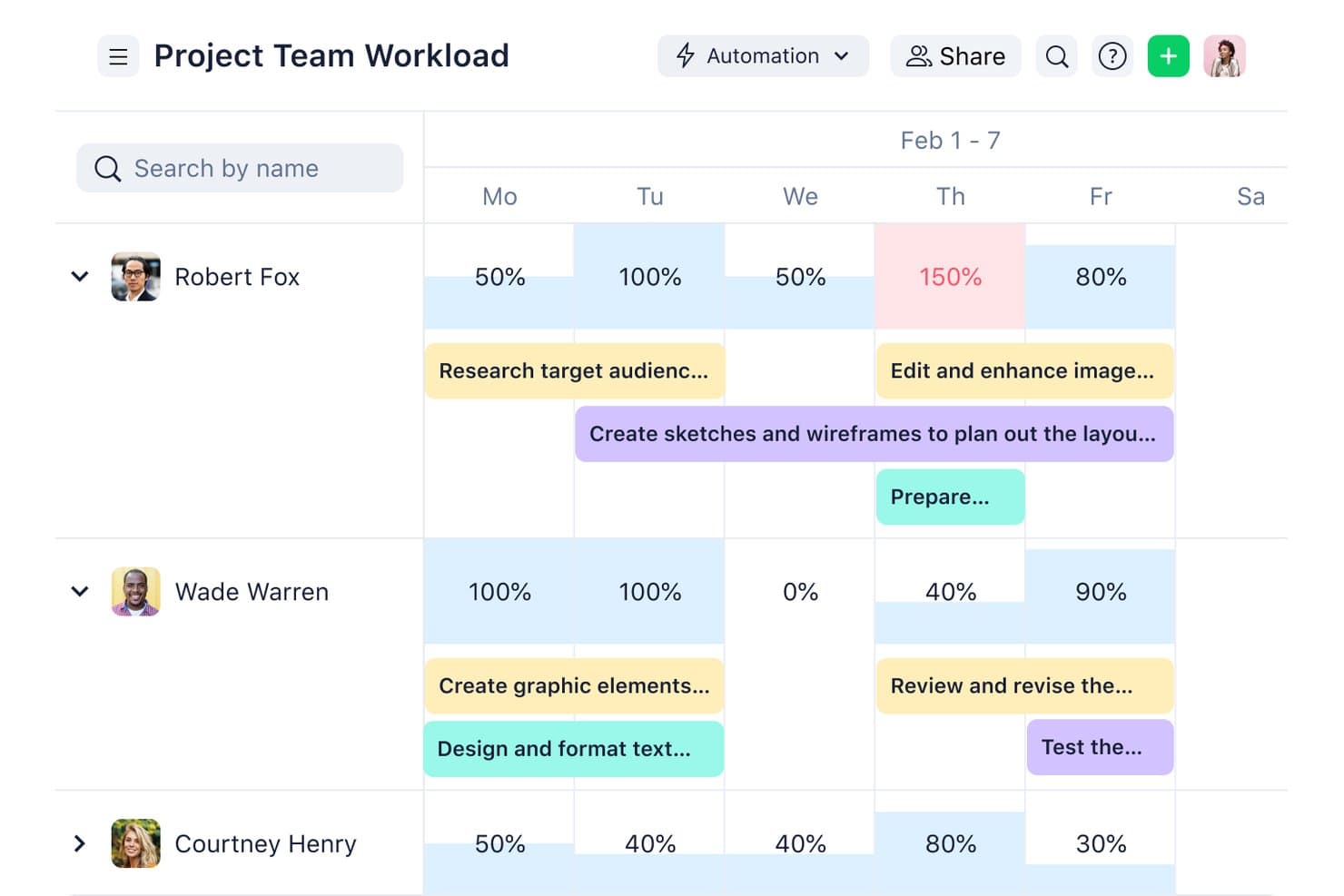
Wrike visualiza los porcentajes de carga de trabajo del equipo en una línea temporal semanal. Wrike es una plataforma de gestión del trabajo que abarca la recepción de proyectos, la planificación, la entrega ágil y en cascada, la gestión de recursos y los informes de cartera, con IA integrada para automatizar la clasificación de tareas, señalar riesgos y resumir el trabajo entre equipos.
¿Para quién es más adecuado Wrike?
Wrike es una opción excelente para equipos multifuncionales que gestionan carteras de proyectos complejas y necesitan flujos de trabajo de entrega estructurados, visibilidad de los recursos y supervisión de proyectos asistida por IA.
Por qué elegí Wrike
He incluido Wrike entre mis principales opciones porque cubre todo el ciclo de vida de los proyectos en un solo lugar, desde la recepción y la planificación hasta la entrega, la gestión de recursos y los informes de cartera. Me gusta especialmente cómo los agentes de IA gestionan automáticamente la clasificación de tareas y la validación de solicitudes, reduciendo la carga manual que ralentiza los ciclos de lanzamiento. Wrike Copilot añade señalización de riesgos en tiempo real y supervisión de hitos en todos los proyectos activos, para que nada se pase por alto cuando gestionas varias iniciativas de productos a la vez.
Características principales de Wrike
- Agentes de IA: Agentes sin código que gestionan la validación de solicitudes, la clasificación de tareas y la asignación automática sin intervención manual.
- Servidor MCP de Wrike: Conecta asistentes de IA externos, como Claude y ChatGPT, con datos activos de Wrike mediante consultas en lenguaje sencillo.
- Constructor de automatizaciones en lenguaje natural: Describe un flujo de trabajo en lenguaje sencillo y Wrike genera la regla de automatización, el formulario o el proceso.
- Informes de cartera: Paneles entre proyectos que muestran la carga de recursos, el seguimiento del presupuesto y el estado de los hitos en las iniciativas activas.
Integraciones de Wrike
Wrike ofrece más de 400 conectores prediseñados, incluidos Jira, GitHub, Zendesk, Salesforce, HubSpot, Tableau, Power BI, Slack, Microsoft Teams y Google Workspace. También proporciona una API abierta y conexiones mediante el servidor MCP para ChatGPT, Claude, Gemini y Microsoft Copilot.
Pros and Cons
Pros:
- Cubre todo el ciclo de vida de la entrega de proyectos
- Resume el trabajo y señala los riesgos de entrega
- Proporciona visibilidad de los recursos y los hitos a nivel de cartera
Cons:
- No sintetiza los comentarios de los clientes
- Carece de marcos de priorización de productos basados en IA
 Ideal para análisis del comportamiento
- Plan gratuito disponible
- Precio bajo consulta
Visit WebsiteCustomer Rating:4.5/5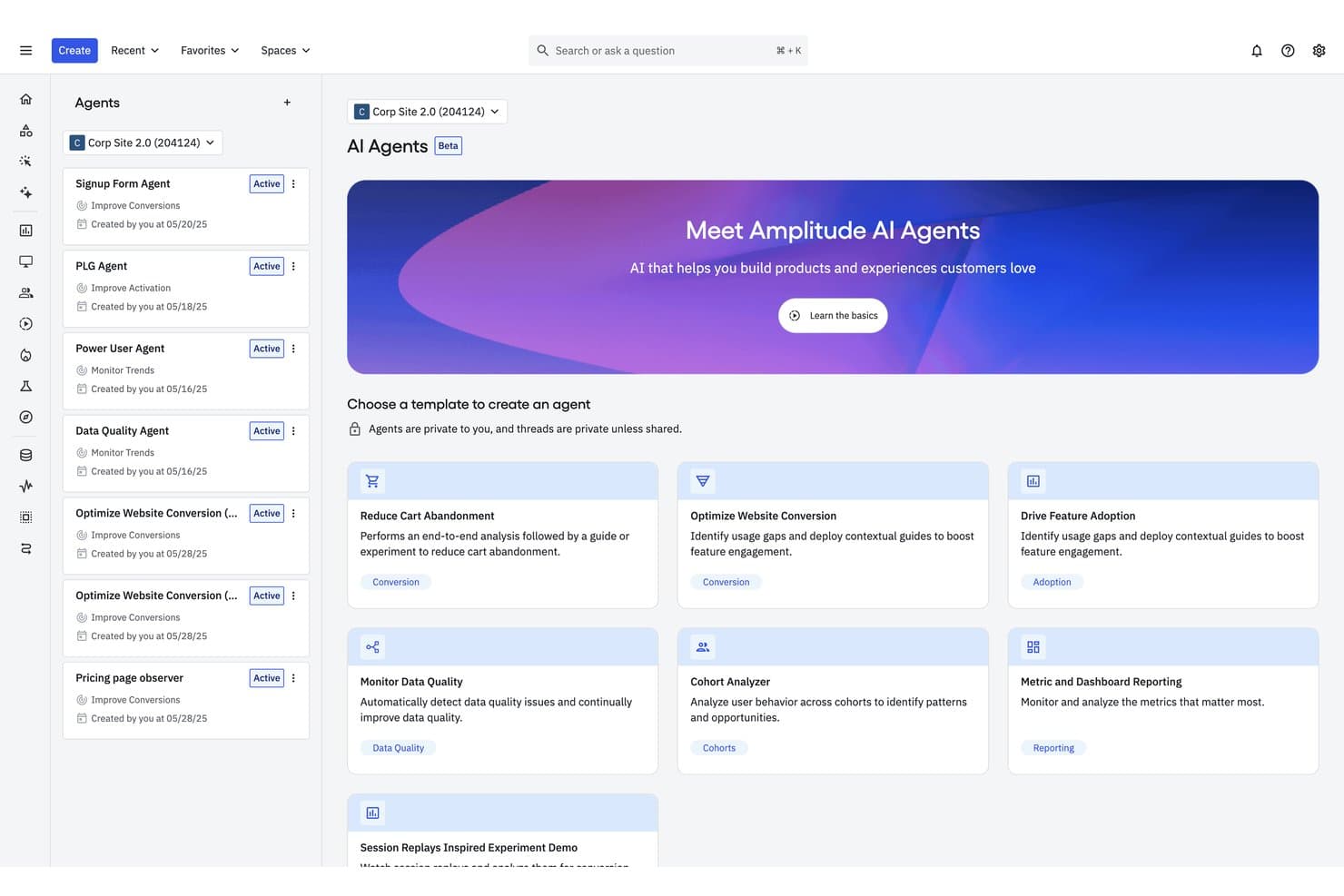
Los agentes de IA de Amplitude ayudan a los equipos a automatizar las tareas de análisis de productos. Amplitude es una plataforma de análisis del comportamiento que combina la síntesis de información basada en IA, consultas en lenguaje natural, agregación automatizada de comentarios y herramientas de IA agéntica para redactar PRD e investigar métricas de producto.
¿Para quién es más adecuado Amplitude?
Amplitude es una opción excelente para analistas de producto y gerentes de producto de aplicaciones de consumo medianas y grandes que necesitan unificar los datos de comportamiento y los comentarios de los clientes en un solo lugar.
Por qué elegí Amplitude
Amplitude ocupa un lugar en mi lista de favoritos porque ninguna otra herramienta conecta lo que los usuarios dicen con lo que realmente hacen con tanta precisión. Me encanta cómo los comentarios de IA incorporan datos sin procesar de más de 15 fuentes, como Zendesk, G2 y Reddit, y luego vinculan automáticamente esos grupos de comentarios con cohortes de comportamiento y reproducciones de sesiones. El agente global lleva esto un paso más allá, ya que me permite hacer preguntas en lenguaje sencillo sobre los datos de uso, los experimentos y los comentarios para obtener una explicación de la causa raíz, no solo un gráfico.
Funciones principales de Amplitude
- Agente de reproducción de sesiones: Revisa automáticamente grandes conjuntos de sesiones de usuarios, identifica puntos de fricción y estima su posible impacto en los ingresos.
- Integración con el servidor MCP: Conecta los datos de Amplitude con herramientas externas de IA como Claude, Cursor, ChatGPT y Notion para que todo el equipo pueda consultar información sin abandonar su flujo de trabajo.
- Cohortes predictivas: Utiliza un modelo basado en transformadores para pronosticar la probabilidad de que usuarios individuales realicen una acción específica en un plazo de 7, 30, 60 o 90 días.
- Agentes personalizados: Permite configurar agentes de IA diseñados para objetivos específicos, con sus propias instrucciones y programaciones para ejecutar análisis recurrentes automáticamente.
Integraciones de Amplitude
Amplitude ofrece más de 159 integraciones, entre ellas Slack, Notion, Atlassian, Linear, GitHub, Sentry, Claude, Cursor, ChatGPT y muchas más. Su servidor MCP y sus API permiten crear integraciones personalizadas y realizar consultas mediante herramientas de IA compatibles.
Pros and Cons
Pros:
- Conecta los temas de los comentarios con el comportamiento de los usuarios
- Genera PRD a partir de evidencia de los clientes
- Explica la información con trazabilidad de las fuentes
Cons:
- No ofrece puntuación de hojas de ruta de forma nativa
- El análisis predictivo favorece los casos de uso de marketing
Learn more about Amplitude: Ideal para rastrear temas desde VoC hasta la hoja de ruta
- Demostración gratuita disponible
- Desde $25,000/año (facturado anualmente)
Visit WebsiteCustomer Rating:4.8/5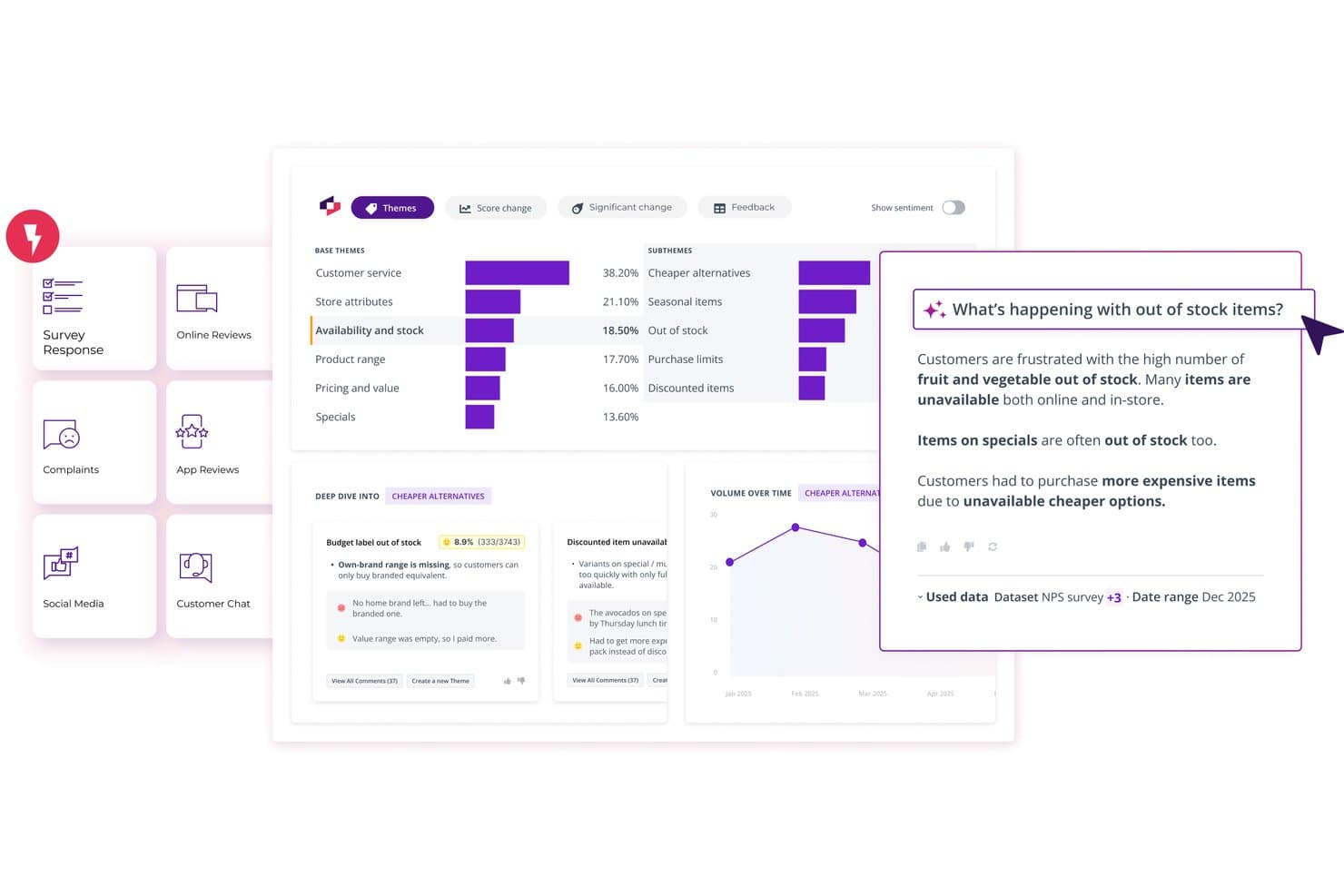
Thematic muestra información útil de los comentarios de los clientes impulsada por IA y organizada por tema. Thematic es una plataforma de inteligencia del cliente que agrega comentarios de encuestas, tickets de soporte, transcripciones de llamadas y reseñas, y luego utiliza IA para identificar y clasificar temas según su impacto empresarial.
¿Para quién es ideal Thematic?
Thematic es una excelente opción para equipos empresariales de experiencia del cliente e inteligencia que necesitan vincular directamente los temas de los comentarios de los clientes con las decisiones de la hoja de ruta.
Por qué elegí Thematic
He incluido Thematic entre mis principales opciones porque ofrece el camino más claro desde los comentarios brutos de los clientes hasta una decisión de hoja de ruta justificable. Su agente de tematización identifica problemas desde abajo hacia arriba a partir del lenguaje real de los clientes, y el análisis de impacto clasifica esos temas según el NPS, el CSAT o los ingresos en riesgo, en lugar de basarse en el volumen bruto de menciones. Me encanta que cada tema se vincule con los comentarios originales, de modo que, cuando una parte interesada cuestiona una decisión de priorización, la evidencia está a un solo clic.
Funciones principales de Thematic
- Respuestas basadas en agentes: Haz preguntas en lenguaje natural sobre los datos de tus clientes y obtén respuestas citadas y estructuradas en varias secciones, extraídas directamente de los comentarios de origen.
- Lentes: Visualiza y compara temas en múltiples conjuntos de datos—encuestas, reseñas y transcripciones de llamadas—en un único panel unificado.
- Puntuación de ingresos en riesgo: Asigna una cifra estimada en dólares a cada tema de comentarios según la probabilidad de abandono y los datos de valor del cliente.
- Servidor MCP: Conecta los datos de temas y tendencias de Thematic con herramientas de IA como Claude o ChatGPT para que puedas consultar información útil desde tu flujo de trabajo existente.
Integraciones de Thematic
Thematic ofrece integraciones nativas con Salesforce, Zendesk, Intercom, Qualtrics, SurveyMonkey, Snowflake, BigQuery, Google Sheets, Power BI y Tableau. También admite conexiones mediante API, sFTP, CSV y Excel para flujos de trabajo de datos personalizados.
Pros and Cons
Pros:
- Los temas rastreables se vinculan directamente con los comentarios
- Las puntuaciones de impacto priorizan los temas más allá del volumen de menciones
- Las respuestas basadas en agentes permiten realizar investigaciones en lenguaje natural con citas
Cons:
- No redacta PRD ni historias de usuario
- El mantenimiento de los temas todavía requiere revisión humana
Learn more about Thematic: 6Ideal para la ideación visual y el mapeo de las partes interesadas
Miro
- Plan gratuito disponible
- Desde $8/usuario/mes (facturado anualmente)
Visit WebsiteCustomer Rating:4.8/5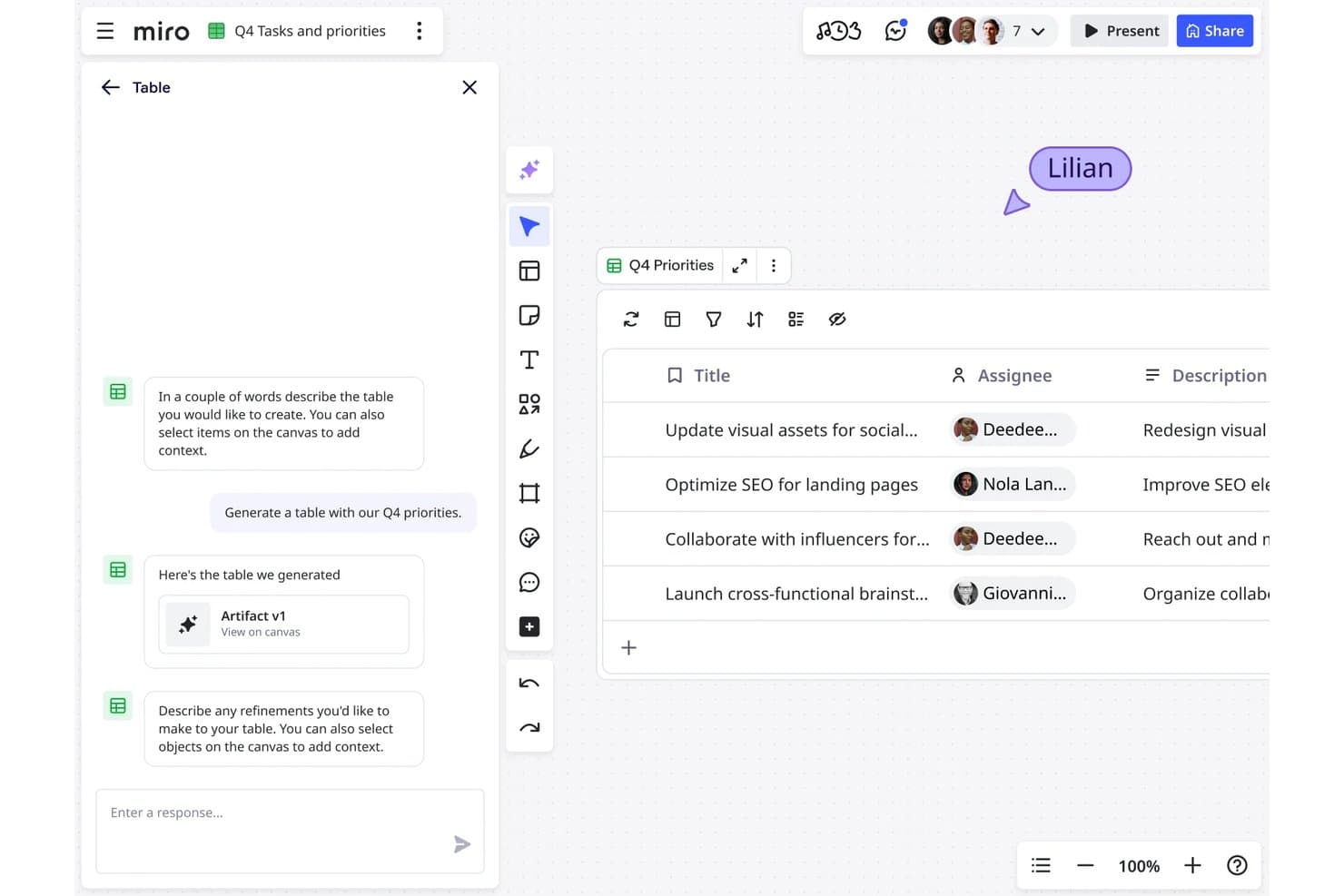
Miro permite a los usuarios generar al instante tablas de tareas con IA y responsables asignados. Miro es un espacio de trabajo colaborativo de innovación con IA que combina un lienzo infinito con herramientas para la ideación visual, la síntesis de investigaciones, la generación de contenido y la planificación de productos durante todo el ciclo de desarrollo.
¿Para quién es mejor Miro?
Miro es ideal para equipos de producto multifuncionales que dependen en gran medida de la colaboración visual para llevar a cabo juntos sesiones de descubrimiento, síntesis y alineación con las partes interesadas.
Por qué elegí Miro
Miro ocupa un lugar en mi lista de favoritos porque ninguna otra herramienta iguala su capacidad para convertir el desordenado trabajo de descubrimiento en claridad visual compartida en todo un equipo multifuncional. Me encanta cómo el manual de síntesis de investigaciones agrupa automáticamente las transcripciones de entrevistas, las respuestas de encuestas y los comentarios en temas, con cada hallazgo vinculado a su fuente original. Los Sidekicks personalizados, como el Estratega de hojas de ruta integrado, permiten consultar todo el lienzo en lenguaje sencillo y generar matrices de priorización, perfiles de usuario o resúmenes de hojas de ruta justo donde ya están trabajando las partes interesadas.
Funciones principales de Miro
- Flujos de IA: Flujos de trabajo colaborativos de IA de varios pasos que permiten a los equipos crear procesos desde entrevistas con clientes hasta planes de sprints, o desde sesiones de lluvia de ideas hasta documentos de requisitos de producto, con indicaciones editables y modelos intercambiables en cada paso.
- Especificaciones de Miro: Convierte documentos de requisitos de producto, prototipos y diagramas en especificaciones técnicas y RFC, sincronizándose bidireccionalmente con herramientas de programación como Cursor, Windsurf y Claude Code mediante MCP.
- Agregación de comentarios mediante Miro Insights: Importa automáticamente comentarios de fuentes como Intercom, Zendesk, Gong, Salesforce y Slack, y después los etiqueta y agrupa mediante IA.
- Controles de gobernanza de IA: Los administradores pueden restringir las funciones de IA por usuario, establecer filtros de moderación, bloquear datos confidenciales en las indicaciones y revisar un registro de auditoría de la actividad de IA en todo el espacio de trabajo.
Integraciones de Miro
Miro ofrece más de 250 integraciones del Marketplace, incluidas Jira, Asana, Linear, ClickUp, Azure DevOps, Slack, Salesforce y HubSpot. También proporciona API, SDK, conectores y un servidor MCP para integraciones personalizadas.
Pros and Cons
Pros:
- La ideación visual alinea a las partes interesadas multifuncionales
- La síntesis de comentarios conserva la trazabilidad de las fuentes
- Los flujos de trabajo colaborativos de IA permiten un perfeccionamiento compartido
Cons:
- La priorización mediante IA carece de una puntuación configurable
- Los tableros grandes pueden volverse desordenados
 Ideal para la priorización de carteras con varios equipos
- Demostración gratuita disponible
- Precios bajo petición
Visit WebsiteCustomer Rating:4.4/5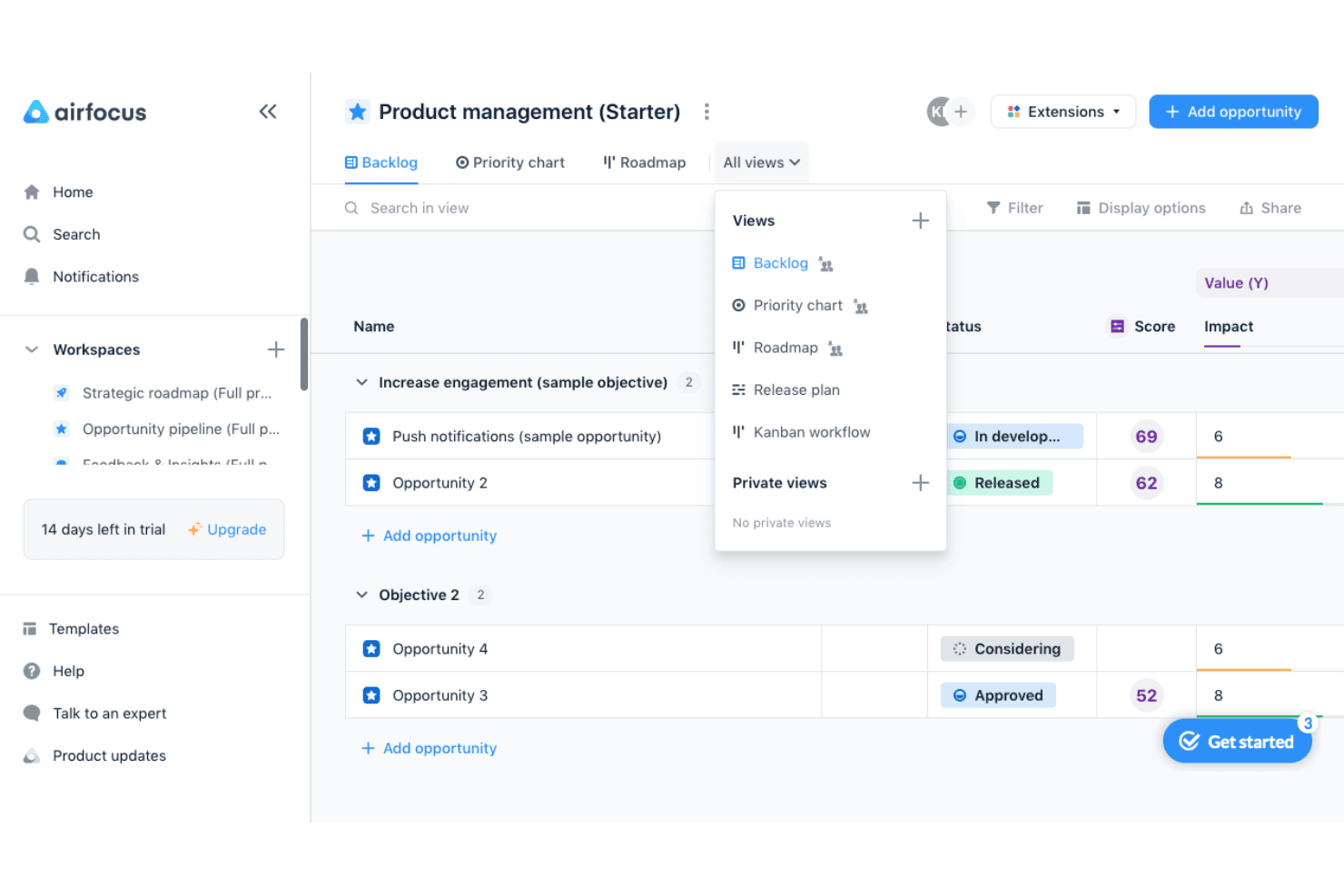
airfocus ayuda a los equipos de producto a priorizar oportunidades y alternar entre las vistas de acumulación de trabajo, gráfico de prioridades, hoja de ruta, plan de lanzamientos y Kanban. airfocus es una plataforma de gestión de productos impulsada por IA diseñada para organizaciones con múltiples equipos, que combina la gestión de carteras, la agregación de comentarios, marcos de priorización configurables y una capa de análisis de IA que sintetiza los datos de los clientes de distintos canales.
¿Para quién es más adecuado airfocus?
airfocus es una opción muy adecuada para responsables de producto y líderes de operaciones de producto que gestionan varios equipos y necesitan un único lugar para alinear prioridades, agregar comentarios e informar sobre el progreso de la cartera.
Por qué elegí airfocus
airfocus ocupa un lugar en mi lista de opciones principales porque su agente de análisis hace algo que no he visto hacer tan bien a muchas herramientas: analiza todos los canales de comentarios que recopilas, desde tickets de Zendesk hasta transcripciones de llamadas, y vincula cada análisis sintetizado con su fuente original. Esa trazabilidad es importante cuando gestionas varios equipos, porque puedes mostrar a las partes interesadas por qué cambió una prioridad. También me gusta que el agente de airfocus responda preguntas directas de priorización, como qué oportunidades abordar en el primer trimestre según los OKR y las puntuaciones de comentarios actuales, en lugar de limitarse a mostrar datos sin procesar y dejar que tú los interpretes.
Funciones principales de airfocus
- Póker de prioridades: Las partes interesadas puntúan los elementos de forma independiente y asíncrona, y los valores atípicos se marcan automáticamente para debatirlos.
- Comandos de barra para generar contenido: Genera documentos de requisitos del producto, historias de usuario, planteamientos de problemas y notas de lanzamiento directamente dentro de las descripciones de los elementos.
- Autocompletado mediante IA: Etiqueta y dirige automáticamente los comentarios entrantes a los campos, etiquetas y responsables de equipo correctos en todo tu espacio de trabajo.
- Servidor MCP: Conecta airfocus con herramientas externas de IA como Claude, ChatGPT y Cursor, y les proporciona acceso de lectura y escritura a tus datos de producto, controlado mediante permisos.
Integraciones de airfocus
airfocus ofrece integraciones nativas con Jira, Azure DevOps, Linear, Zendesk, Salesforce, Intercom, Slack y Microsoft Teams, además de un servidor MCP con permisos controlados para Claude y ChatGPT. También es compatible con Zapier.
Pros and Cons
Pros:
- Los análisis trazables conectan los temas con sus fuentes
- La puntuación personalizada permite tomar decisiones de priorización más matizadas
- El Póker de prioridades mejora la alineación de las partes interesadas
Cons:
- No ofrece previsiones predictivas para las decisiones sobre la hoja de ruta
- La configuración de la automatización puede resultar compleja
 Ideal para los comentarios de los usuarios
- Demostración gratuita disponible
- Precio bajo solicitud
Visit WebsiteCustomer Rating:4.5/5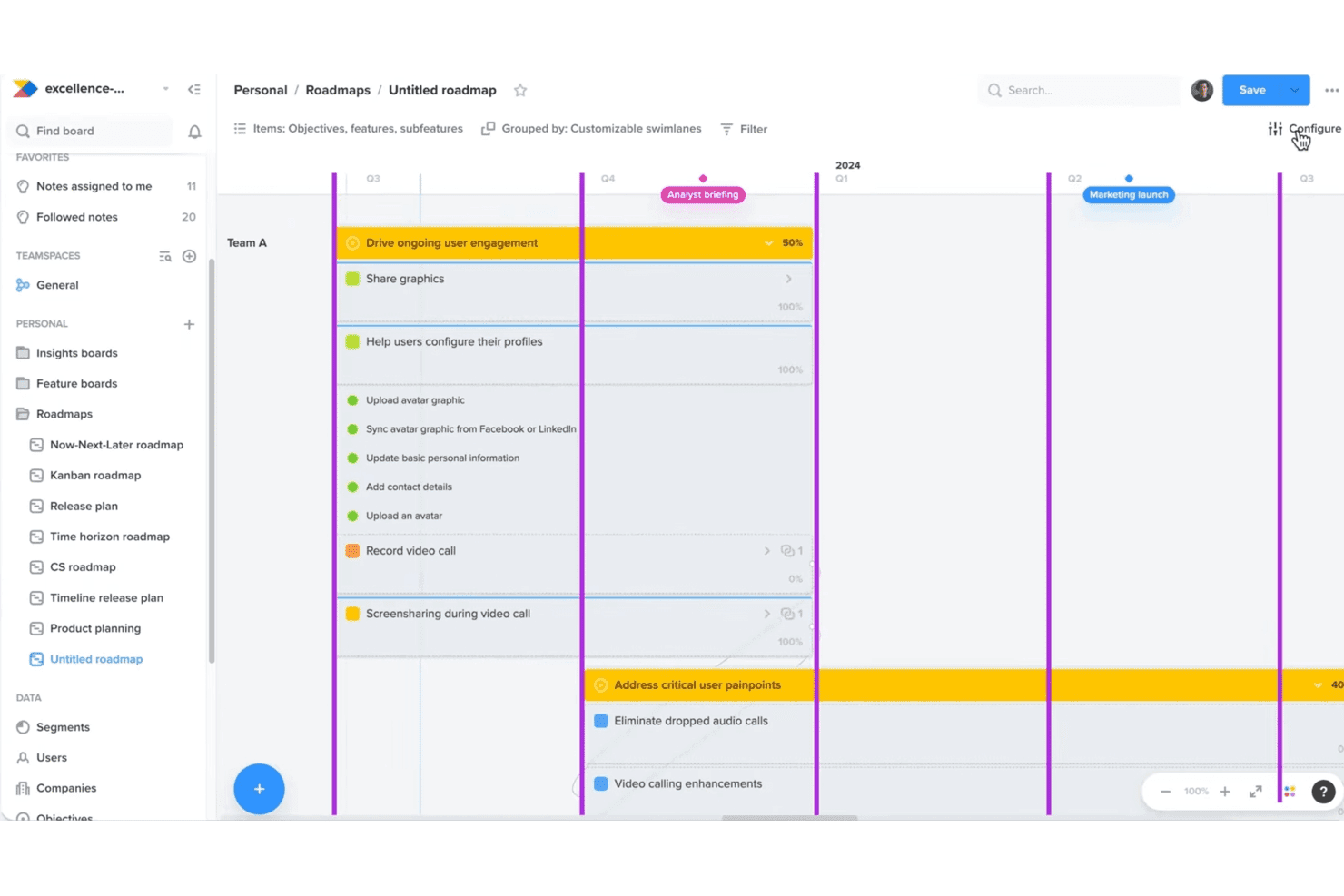
Productboard ayuda a los equipos a alinear las hojas de ruta con las necesidades y los objetivos de los clientes. Productboard es un sistema de gestión de productos basado en IA agéntica y construido en torno a su agente de IA Spark, que combina la agregación de comentarios, la síntesis de insights, la puntuación de prioridades y la redacción de especificaciones asistida por IA en una sola plataforma.
¿Para quién es más adecuado Productboard?
Productboard es una opción excelente para los equipos de producto que consideran los comentarios de los clientes su principal fuente de información para tomar decisiones sobre la hoja de ruta.
Por qué elegí Productboard
Productboard merece estar en mi lista de favoritos porque ninguna otra herramienta que haya probado hace tanto con los comentarios sin procesar de los clientes como Spark. Extrae señales de Zendesk, Gong, Intercom y las reseñas de las tiendas de aplicaciones, y luego las agrupa en oportunidades clasificadas según la evidencia, redactadas como enunciados de problemas y no simplemente como solicitudes de funciones. También me gusta que cada resultado enlace con las notas de origen, de modo que puedo rastrear exactamente qué clientes impulsaron una decisión de priorización.
Características principales de Productboard
- Redacción de especificaciones con Spark: Redacta PRD y resúmenes de producto mediante una conversación guiada, utilizando tu estrategia, tus perfiles de usuario, la evidencia de los clientes y la base de código conectada.
- Conectores MCP: Consulta datos activos de herramientas como Amplitude, Linear, Slack, Pendo y GitHub directamente dentro del panel de chat de Productboard.
- Fórmulas de priorización personalizables: Crea tus propios marcos de puntuación RICE, ICE, WSJF o Valor/Esfuerzo mediante campos y factores personalizados.
- Medición del impacto posterior al lanzamiento: Compara las funciones publicadas con las métricas de éxito definidas a los 7, 14 y 30 días, con análisis de adopción a nivel de segmento y recomendaciones sobre los siguientes pasos.
Integraciones de Productboard
Productboard ofrece más de 25 integraciones nativas, incluidas Zendesk, Intercom, Gong, Slack, Microsoft Teams, Jira, Azure DevOps, Amplitude, Mixpanel y GitHub. También admite una API REST pública, un servidor MCP y Zapier.
Pros and Cons
Pros:
- Los comentarios se convierten en enunciados de problemas clasificados según la evidencia
- Las especificaciones conservan puntos de evidencia de clientes rastreables
- La puntuación personalizada admite diversos marcos de priorización
Cons:
- Las hojas de ruta de cartera pueden verse afectadas al aumentar la escala
- El historial de cambios puede complicar la navegación
Learn more about Productboard: Ideal para predecir el abandono y las ventas adicionales teniendo en cuenta los ingresos
- Plan gratuito + prueba gratuita de 30 días + demostración gratuita disponible
- Precios disponibles previa solicitud
Visit WebsiteCustomer Rating:4.4/5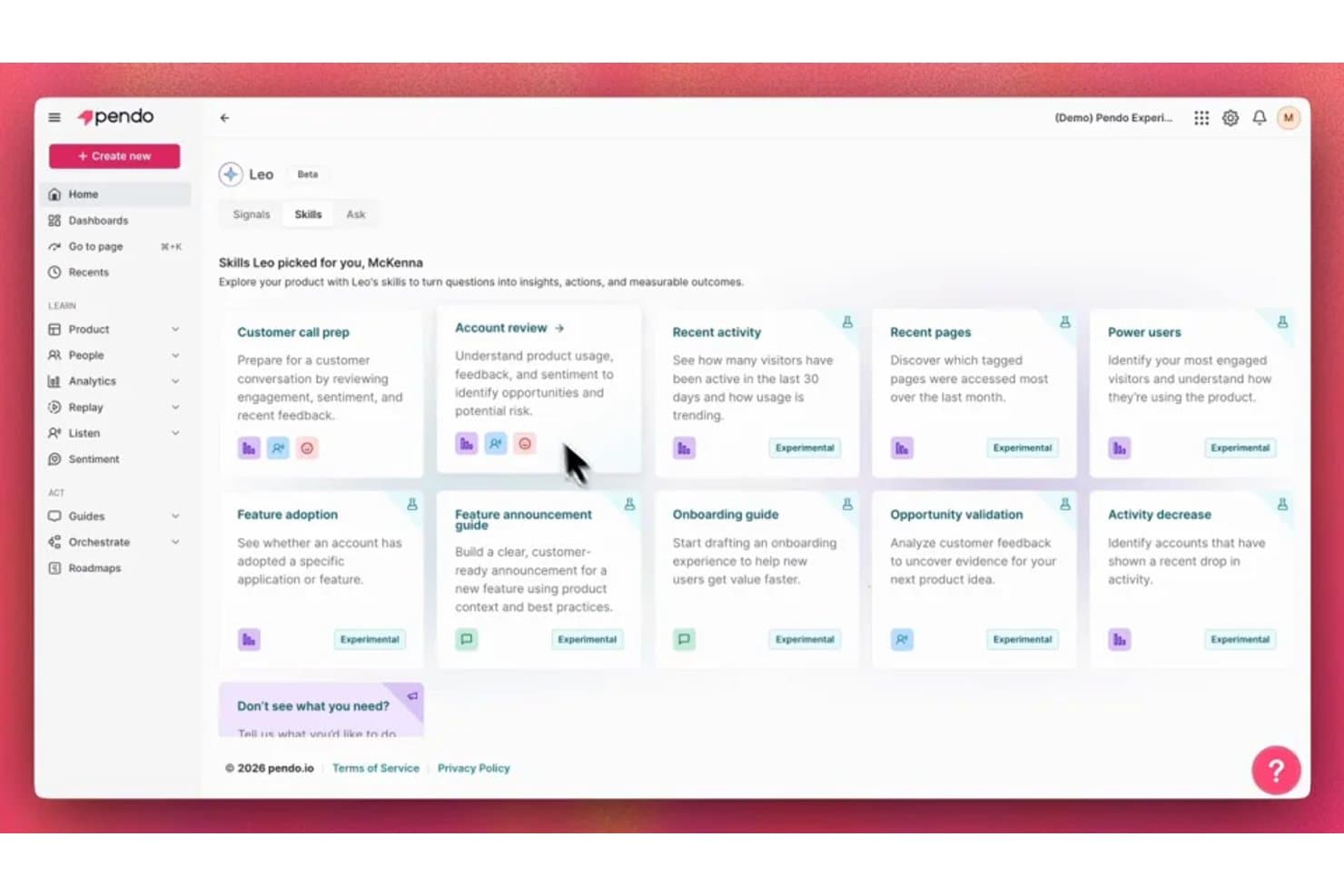
La IA Leo de Pendo muestra habilidades personalizadas para convertir las preguntas sobre el producto en información útil. Pendo es una plataforma de análisis y descubrimiento de productos impulsada por IA que combina el seguimiento del comportamiento dentro de la aplicación, la agregación de comentarios, la síntesis de información basada en NLP, la predicción del abandono y las ventas adicionales, y un asistente de IA (Leo) para consultar datos de uso en toda la cartera de productos.
¿Para quién es mejor Pendo?
Pendo es una opción ideal para responsables de producto y líderes de operaciones de producto en empresas SaaS del mercado medio y empresariales que necesitan vincular directamente el uso de las funcionalidades y los comentarios de los clientes con el riesgo para los ingresos.
Por qué elegí Pendo
Elegí Pendo como una de las mejores opciones porque ninguna otra herramienta de esta lista vincula los comentarios de los clientes directamente con los ingresos recurrentes anuales y el riesgo de abandono como lo hace Pendo. Su módulo Predict vuelve a entrenar continuamente los modelos de abandono y ventas adicionales con datos activos de uso del producto y del CRM, y señala las cuentas en riesgo con motivos explicados en lugar de puntuaciones opacas. También me encanta cómo la pestaña Topics de Listen clasifica los temas de los comentarios según los ingresos, para que puedas ver qué error o solicitud de funcionalidad afecta a la mayor cantidad de ingresos recurrentes anuales en riesgo antes de priorizar nada.
Características clave de Pendo
- Agente de comentarios Listen: Responde preguntas sobre el producto con resúmenes de temas generados por IA y vincula cada información con citas de las fuentes, el contexto de la cuenta y las reproducciones de sesiones.
- Señales de Leo: Supervisa de forma proactiva el uso y la retención, y te alerta sobre cambios como una adopción inesperada de funcionalidades o cuentas que dejan de mostrar actividad, sin necesidad de crear informes manualmente.
- Consultas en lenguaje natural mediante MCP: Te permite consultar los análisis, embudos y comentarios de Pendo desde Claude, ChatGPT o Cursor a través de un servidor MCP publicado.
- Generador de guías con IA: Genera guías dentro de la aplicación y secuencias de información sobre herramientas a partir de descripciones en lenguaje sencillo, sin necesidad de la intervención de los equipos de diseño o ingeniería.
Integraciones de Pendo
Pendo incluye 51 integraciones, entre ellas Jira, Salesforce, Zendesk, Gong, Snowflake, Slack, Claude, ChatGPT y Cursor mediante MCP. También ofrece una API y Zapier para establecer conexiones personalizadas.
Pros and Cons
Pros:
- Los comentarios clasificados según los ingresos ponen de manifiesto los ingresos recurrentes anuales en riesgo
- Las puntuaciones de abandono explicables orientan las intervenciones en las cuentas
- Leo responde preguntas sobre el uso en lenguaje sencillo
Cons:
- La priorización de la hoja de ruta todavía depende de una puntuación manual
- No permite redactar documentos de requisitos ni especificaciones de forma nativa
Learn more about Pendo: 10La mejor opción para puntuar el impacto desde el cliente hasta la hoja de ruta
DevRev
- Plan gratuito + demostración gratuita disponible
- Precio bajo solicitud
Visit WebsiteCustomer Rating:4.5/5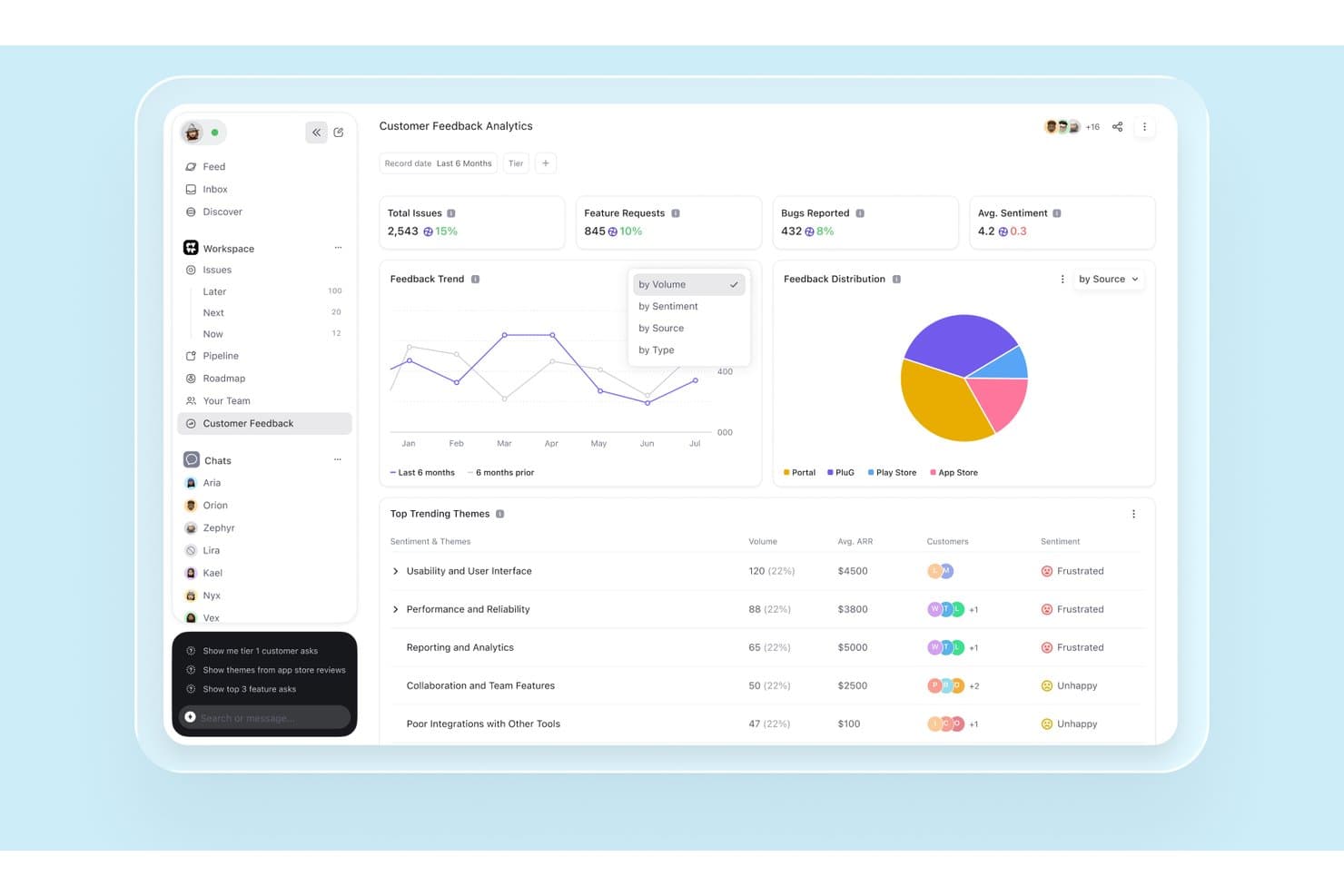
DevRev muestra tendencias de comentarios de clientes y análisis de sentimiento impulsados por IA. DevRev es una plataforma de gráficos de conocimiento de IA que unifica tickets de soporte, datos de CRM, análisis de sesiones y trabajo de ingeniería para respaldar la síntesis de comentarios de clientes, la priorización basada en el impacto y la planificación de la hoja de ruta del producto.
¿Para quién es más adecuado DevRev?
DevRev es adecuado para equipos de operaciones de producto de empresas medianas y grandes que necesitan conectar directamente el volumen de tickets de soporte con la priorización de la hoja de ruta.
Por qué elegí DevRev
He incluido DevRev entre mis principales opciones porque su sistema de puntuación de impacto hace algo que no he visto lograr a muchas herramientas: crea una puntuación actualizada para cada mejora de la hoja de ruta utilizando simultáneamente los ingresos de oportunidades vinculadas, los ingresos recurrentes anuales y el estado de abandono de las cuentas, y el volumen de tickets. Esto significa que, si 40 cuentas empresariales presentan tickets sobre el mismo punto de fricción, esa señal aparece directamente en la vista de priorización, en lugar de quedar enterrada en una hoja de cálculo. También me gusta cómo la cadena completa de trazabilidad va del ticket a la mejora y de esta al lanzamiento, con notificación automática al cliente cuando se publica la funcionalidad.
Funciones principales de DevRev
- Agrupación de tickets mediante IA: Agrupa tickets de soporte similares para identificar posibles mejoras del producto y clasificar los problemas según su impacto en los clientes.
- Trazabilidad de la voz del cliente: Vincula cada ticket con una mejora y, después, con un lanzamiento, con notificación automática al cliente cuando se publica la funcionalidad.
- Análisis conversacional (Text2SQL): Permite formular preguntas en lenguaje natural que se traducen a SQL y se ejecutan en el gráfico de conocimiento unificado para obtener respuestas auditables.
- Puntuación del sentimiento de las cuentas en tiempo real: Puntúa cada interacción con el cliente, consolida el sentimiento a nivel de cuenta y dirige las cuentas en riesgo a flujos de trabajo de alertas.
Integraciones de DevRev
DevRev ofrece conectores de un solo clic para Slack, Notion, Jira Cloud, Google Drive y Calendar, Microsoft Teams, OneDrive y SharePoint, además de más de 100 integraciones del mercado, incluidas Salesforce, HubSpot, ServiceNow y Jira Service Management. También hay API y conectores personalizados disponibles.
Pros and Cons
Pros:
- Vincula el volumen de tickets con el impacto en la hoja de ruta
- Conecta los ingresos de los clientes con las prioridades de funcionalidades
- Las respuestas citadas abarcan datos de soporte y de producto
Cons:
- No incluye un generador específico de PRD o especificaciones
- No ofrece puntuación RICE o ICE configurable
Learn more about DevRev:
Otras herramientas de gestión de productos con IA
Aquí tienes algunas opciones adicionales de herramientas de gestión de productos con IA que no llegaron a mi selección, pero que merece la pena conocer:
- 11ClaudeEl mejor para PRD redactados por IA con fuentes citadas
- 12BuildBetterLa mejor opción para sintetizar comentarios respaldados por pruebas
- 13Aha!Ideal para rastrear de extremo a extremo desde el descubrimiento hasta la hoja de ruta
- 14Craft.ioIdeal para PRD redactados por IA mediante descubrimiento guiado
- 15NotionIdeal para la alineación entre equipos
- 16CannyIdeal para la trazabilidad de los comentarios vinculada a los ingresos
- 17LinearIdeal para flujos de trabajo de voz del cliente trazables
- 18GleapIdeal para la puntuación de la cartera de pedidos ponderada por ingresos
Cómo evalúo las herramientas de gestión de productos con IA
Para elaborar esta lista, la IA de una herramienta debe ser capaz de gestionar trabajo real de producto, como redactar PRD o agrupar comentarios. A partir de ahí, evalúo tres aspectos. La funcionalidad principal tiene el mayor peso, como agregar comentarios y consultar datos de producto. Después analizo las características destacadas, como las recomendaciones de IA explicables, y lo que ofrece una herramienta más allá de su conjunto de funcionalidades, como la privacidad y la seguridad de los datos.
Funcionalidad principal (requisitos esenciales para esta lista)
Al seleccionar herramientas para mi lista, puntúo cada una en una escala de 0 (no ofrece la funcionalidad) a 5 (sobresale en esta área) para cada una de las funcionalidades principales que se indican a continuación. Después convierto el total en un porcentaje para ayudar a evaluar la adecuación general de cada herramienta, con un peso adicional para las funcionalidades que he considerado esenciales.
- Síntesis de información (esencial): Evalúo hasta qué punto la IA convierte los comentarios, la investigación y los datos de uso en temas que orientan las decisiones de la hoja de ruta.
- Priorización mediante IA (esencial): Busco clasificaciones explicables que sopesen el impacto en los clientes, el esfuerzo, el riesgo y los objetivos empresariales en las distintas iniciativas.
- Generación de contenido: Evalúo borradores de PRD, historias de usuario, especificaciones y notas de lanzamiento que reflejen el contexto del producto y requieran una edición limitada.
- Consultas en lenguaje natural: Compruebo si los equipos pueden hacer preguntas sobre comentarios, análisis y documentación sin crear informes complejos.
- Análisis predictivo: Busco previsiones que relacionen señales como la adopción o el riesgo de abandono con el impacto de las funcionalidades y las decisiones de la hoja de ruta.
- Agregación de comentarios: Evalúo cómo la IA recopila, etiqueta y agrupa aportaciones de fuentes como tickets de soporte, entrevistas y encuestas.
Una vez que tengo una lista de herramientas que cumplen los criterios, considero qué distingue a cada plataforma.
Factores diferenciadores (lo que distingue a los proveedores)
Así es como comparo y contrasto distintos proveedores:
Características destacadas
Para mí, lo más importante es la trazabilidad de la voz del cliente. Compruebo si una herramienta vincula cada funcionalidad priorizada con el comentario original, el fragmento de entrevista o el ticket de soporte que la originó. Ese registro de auditoría es lo que proporciona a las partes interesadas confianza en las decisiones de la hoja de ruta. Las recomendaciones de IA explicables van de la mano con esto. Cuando una herramienta muestra por qué asignó una puntuación más alta a una iniciativa que a otra, mi equipo puede cuestionar o respaldar la clasificación en lugar de confiar en una caja negra. También evalúo los marcos de puntuación personalizables, ya que una startup que utiliza ICE y una empresa que usa RICE ponderado necesitan modelos diferentes dentro de la misma plataforma.
Más allá de las funcionalidades
La privacidad de los datos es importante porque estas herramientas incorporan tickets de soporte, transcripciones de entrevistas y registros de uso. Compruebo el cumplimiento de SOC 2, la preparación para el RGPD y si el proveedor permite excluir los datos del entrenamiento de modelos de IA. También evalúo hasta qué punto una herramienta se conecta con el conjunto de herramientas existente —Jira, Salesforce, Intercom—, ya que las importaciones unidireccionales generan trabajo manual que ralentiza a los equipos. Busco integraciones bidireccionales en tiempo real.
Cómo elegir herramientas de gestión de productos con IA
Es fácil perderse entre largas listas de funciones y complejas estructuras de precios. Para ayudarte a mantener la concentración mientras avanzas en tu proceso de selección de software, aquí tienes una lista de factores que debes tener en cuenta:
| Factor | Qué debes tener en cuenta |
|---|---|
| FactorEscalabilidad | Qué debes tener en cuenta¿Puede la herramienta crecer junto con tu equipo? Comprueba si puede gestionar más usuarios, proyectos y datos a medida que aumentan tus necesidades. |
| FactorIntegraciones | Qué debes tener en cuenta¿Se conecta con las herramientas que ya utilizas? Comprueba la compatibilidad con tu conjunto de tecnologías actual para evitar silos de datos y soluciones manuales. |
| FactorPersonalización | Qué debes tener en cuenta¿Puedes adaptar la herramienta a tu flujo de trabajo? Busca opciones para personalizar paneles, informes y ajustes según los procesos de tu equipo. |
| FactorFacilidad de uso | Qué debes tener en cuenta¿Es la herramienta intuitiva para tu equipo? Una interfaz complicada puede ralentizar la adopción; busca simplicidad y claridad en la navegación y el diseño. |
| FactorImplementación e incorporación | Qué debes tener en cuenta¿Con qué rapidez puedes empezar? Evalúa la disponibilidad de tutoriales, asistencia y recursos que ayuden a tu equipo a ponerse en marcha rápidamente. |
| FactorCoste | Qué debes tener en cuenta¿Cómo encaja el precio en tu presupuesto? Considera tanto los costes iniciales como los recurrentes, y compáralos con el valor y las funciones que ofrece cada plan. |
| FactorMedidas de seguridad | Qué debes tener en cuenta¿Están protegidos tus datos y tu privacidad? Comprueba la existencia de cifrado, estándares de cumplimiento y controles de acceso de usuarios para proteger tu información. |
| FactorDisponibilidad de asistencia | Qué debes tener en cuenta¿Qué opciones de asistencia hay disponibles? Ten en cuenta el horario, los canales y la capacidad de respuesta del servicio de asistencia para asegurarte de recibir ayuda cuando la necesites. |
¿Qué son las herramientas de gestión de productos con IA?
Las herramientas de gestión de productos con IA son soluciones de software que ayudan a los equipos de producto a planificar, desarrollar y entregar productos de forma más eficiente mediante el uso de inteligencia artificial. Los gestores de producto, diseñadores y desarrolladores suelen utilizar estas herramientas para mejorar la colaboración, la toma de decisiones y la integración de los comentarios de los usuarios.
Funciones como el análisis de datos, la gestión automatizada de tareas y la recopilación de comentarios de los usuarios ayudan a agilizar los flujos de trabajo, mejorar la calidad de los productos y coordinar los esfuerzos del equipo. En general, estas herramientas aportan un valor significativo al optimizar el proceso de gestión de productos y conseguir mejores resultados.
Funciones de las herramientas de gestión de productos con IA
Al seleccionar herramientas de gestión de productos con IA, presta atención a las siguientes funciones clave:
- Planificación de la hoja de ruta del producto: Ayuda a los equipos a planificar y visualizar los plazos de desarrollo del producto, garantizando la coordinación entre todas las partes interesadas.
- Recopilación de comentarios de los usuarios: Recopila información de los usuarios para orientar las mejoras del producto y priorizar las funciones.
- Análisis de datos: Proporciona información sobre el comportamiento de los usuarios y el rendimiento del producto, lo que facilita la toma de decisiones basada en datos.
- Gestión automatizada de tareas: Facilita los flujos de trabajo de los proyectos mediante la automatización de tareas rutinarias y la priorización de actividades según los plazos.
- Colaboración en tiempo real: Permite a los miembros del equipo trabajar juntos simultáneamente, mejorando la comunicación y la productividad.
- Paneles personalizables: Permite a los usuarios adaptar su vista para centrarse en las métricas y la información más relevantes.
- Información basada en IA: Utiliza la inteligencia artificial para ofrecer análisis predictivos y recomendaciones para las estrategias de producto.
- Capacidades de integración: Se conecta con otras herramientas de tu conjunto tecnológico, reduciendo los silos de datos y la introducción manual de datos.
- Medidas de seguridad: Protege los datos confidenciales mediante el cifrado y el cumplimiento de las normas del sector.
- Recursos de incorporación: Ofrece tutoriales, plantillas y asistencia para ayudar a los equipos a adoptar rápidamente la herramienta y aprovechar sus ventajas.
Ventajas de las herramientas de gestión de productos con IA
La implementación de herramientas de gestión de productos con IA puede aportar varias ventajas a tu equipo y a tu empresa. Estas son algunas de las que puedes esperar:
- Mejor toma de decisiones: El análisis de datos y la información basada en IA ayudan a tu equipo a tomar decisiones fundamentadas al proporcionar datos claros y útiles.
- Colaboración mejorada: Las funciones de colaboración en tiempo real permiten a los miembros del equipo trabajar juntos de forma eficiente, mejorando la comunicación y la productividad.
- Mayor eficiencia: La gestión automatizada de tareas reduce el trabajo manual, lo que permite a tu equipo centrarse en las tareas prioritarias y mejorar el flujo de trabajo general.
- Mejor comprensión de los usuarios: La recopilación de comentarios de los usuarios proporciona una visión más profunda de las necesidades de los clientes, ayudándote a adaptar los productos de forma más eficaz a sus preferencias.
- Flujos de trabajo personalizables: Los paneles y las funciones personalizables permiten a tu equipo adaptar la herramienta a las necesidades específicas del proyecto, mejorando la flexibilidad.
- Iteraciones de producto más rápidas: El acceso rápido a los datos y a los comentarios de los usuarios permite realizar pruebas e iteraciones rápidas, acelerando el ciclo de desarrollo.
- Seguridad de los datos: Las medidas de seguridad garantizan la protección de la información confidencial, lo que permite a tu equipo trabajar con tranquilidad.
Costes y precios de las herramientas de gestión de productos con IA
La selección de herramientas de gestión de productos con IA requiere comprender los distintos modelos de precios y planes disponibles. Los costes varían en función de las funciones, el tamaño del equipo, los complementos y otros factores. La tabla siguiente resume los planes habituales, sus precios medios y las funciones que suelen incluir las soluciones de herramientas de gestión de productos con IA:
Tabla comparativa de planes para herramientas de gestión de productos con IA
| Tipo de plan | Precio medio | Funciones habituales |
|---|---|---|
| Tipo de planPlan gratuito | Precio medio$0 | Funciones habitualesAnálisis básicos, comentarios de usuarios limitados y asistencia estándar. |
| Tipo de planPlan personal | Precio medio$5-$25/user/month | Funciones habitualesPaneles personalizables, gestión de tareas e integraciones básicas. |
| Tipo de planPlan empresarial | Precio medio$30-$60/user/month | Funciones habitualesAnálisis avanzados, colaboración en tiempo real y funciones de seguridad mejoradas. |
| Tipo de planPlan corporativo | Precio medio$80-$150/user/month | Funciones habitualesPersonalización completa, asistencia específica y amplias capacidades de integración. |
Preguntas frecuentes sobre herramientas de gestión de productos con IA
Estas son algunas respuestas a preguntas frecuentes sobre herramientas de gestión de productos con IA:
¿Cómo pueden las herramientas de gestión de productos con IA mejorar la colaboración del equipo?
Las herramientas de gestión de productos con IA mejoran la colaboración al proporcionar actualizaciones en tiempo real y espacios de trabajo compartidos, lo que permite que tu equipo trabaje conjuntamente de forma eficiente. Estas herramientas suelen incluir funciones como hojas de ruta colaborativas y canales de comunicación, que ayudan a mantener a todos alineados e informados sobre el progreso y los cambios del proyecto.
¿Qué debo tener en cuenta al integrar herramientas de gestión de productos con IA con los sistemas existentes?
Al integrar herramientas de gestión de productos con IA con tus sistemas existentes, asegúrate de que sean compatibles con tu pila tecnológica actual para evitar silos de datos. Comprueba si la herramienta admite API o integraciones prediseñadas con software como Jira, Slack o Salesforce para facilitar un flujo de datos fluido entre las plataformas.
¿Cómo ayudan las herramientas de gestión de productos con IA a priorizar funcionalidades?
Estas herramientas ayudan a priorizar funcionalidades mediante el análisis de los comentarios de los usuarios, los objetivos empresariales y las tendencias del mercado. Suelen incluir matrices de priorización o sistemas de puntuación que permiten a tu equipo evaluar y clasificar las funcionalidades según su importancia estratégica, la demanda de los usuarios y el impacto potencial.
¿Son adecuadas las herramientas de gestión de productos con IA para los equipos de desarrollo Agile?
Sí, las herramientas de gestión de productos con IA son muy adecuadas para los equipos Agile, ya que ofrecen funciones como planificación de sprints, gestión del backlog y tableros Kanban. Estas herramientas favorecen el desarrollo iterativo al proporcionar información y comentarios en tiempo real, lo que permite a tu equipo adaptarse rápidamente a los requisitos cambiantes.
¿Qué medidas de seguridad debo buscar en las herramientas de gestión de productos con IA?
Busca herramientas que ofrezcan cifrado, controles de acceso y cumplimiento de estándares del sector como GDPR o SOC 2. Asegurarte de que la herramienta cuenta con medidas de seguridad sólidas protege tus datos confidenciales y minimiza el riesgo de filtraciones o accesos no autorizados.
¿Cómo pueden las herramientas de gestión de productos con IA respaldar la toma de decisiones basada en datos?
Las herramientas de gestión de productos con IA respaldan las decisiones basadas en datos al proporcionar análisis e información sobre el comportamiento de los usuarios, el rendimiento de las funcionalidades y las tendencias del mercado. Estas herramientas ayudan a tu equipo a identificar oportunidades de mejora y a tomar decisiones fundamentadas basadas en datos en tiempo real y análisis predictivos.