

Las mejores herramientas de roadmap online te ayudan a construir, compartir y actualizar roadmaps de producto en tiempo real, para que los equipos permanezcan alineados incluso cuando cambian las prioridades. Sin ellas, los roadmaps suelen estar en diapositivas estáticas o hojas de cálculo obsoletas que causan malentendidos y descarrilan la planificación.
He probado más de 25 herramientas de roadmap y sé cuáles ofrecen vistas flexibles, funciones colaborativas e integraciones que los equipos de producto realmente utilizan.
En esta guía, encontrarás plataformas que facilitan la visualización de la estrategia, el ajuste de los plazos y mantener a todos en la misma página, desde la dirección hasta los equipos de entrega.
Por qué confiar en nuestras recomendaciones de software
6,700+
Reviews
20
Industry experts
16+
Evaluation factors
14
Years
Nuestro equipo lleva probando y evaluando software desde 2012. Como gestores de producto, sabemos lo difícil —y lo importante— que es elegir el software adecuado.
Para esta guía, evaluamos las herramientas mediante pruebas prácticas e investigación independiente, puntuando las herramientas según nuestros criterios de selección.
Nuestras reseñas reflejan nuestro criterio editorial humano, no un discurso de ventas.
 Hannah ClarkSenior TPM
- Cristiano ValimSenior UI/UX Lead
Resumen de las Mejores Herramientas de Roadmap Online
| Tool | Best For | Trial Info | Price | ||
|---|---|---|---|---|---|
| 1 | Ideal para mapear flujos de trabajo de productos | Plan gratuito disponible | Desde $8/miembro/mes (facturado anualmente) | Website | |
| 2 | La mejor opción para portales de hojas de ruta personalizados y basados en la audiencia | Prueba gratuita de 30 días + plan gratuito disponible | Desde $1.10/usuario/mes | Website | |
| 3 | Ideal para espacios de trabajo personalizables | Plan gratuito + demostración gratuita disponible | Desde $7/usuario/mes (facturado anualmente) | Website | |
| 4 | Ideal para la creación flexible de hojas de ruta | Demo gratuita disponible | Precio a consultar | Website | |
| 5 | La mejor con planificación OKR | Prueba gratuita de 14 días + demo gratuita disponible | Desde $36/mes (facturado anualmente) | Website | |
| 6 | Ideal para centralizar los comentarios sobre el producto | Prueba gratuita de 14 días + plan gratuito + demo gratis disponible | Desde $19/maker/mes (facturado anualmente) | Website | |
| 7 | Lo mejor para escalabilidad y flexibilidad | Demo gratuita disponible | Precio disponible bajo petición | Website | |
| 8 | La mejor solución integral de gestión de productos | Prueba gratuita de 14 días + demo gratuita disponible | Desde $19/usuario/mes (facturado anualmente) | Website | |
| 9 | Ideal para crear hojas de ruta para presentaciones | Prueba gratuita de 14 días | Desde $19/usuario/mes (facturado anualmente) | Website | |
| 10 | Mejor para equipos de desarrollo ágiles | Prueba gratuita de 7 días + plan gratuito | Desde $7.75/usuario/mes | Website |


Resumen de las 10 Mejores Herramientas de Roadmap Online
Aquí están mis resúmenes de las 10 mejores herramientas de roadmap online que he seleccionado para destacar. He incluido el mejor caso de uso de cada plataforma, funcionalidades destacadas, integraciones y ventajas y desventajas. También añadí una captura de pantalla de la interfaz para que te hagas una idea de las diferentes herramientas.
 1Ideal para mapear flujos de trabajo de productos
Miro
- Plan gratuito disponible
- Desde $8/miembro/mes (facturado anualmente)
Visit WebsiteRating:4.8/5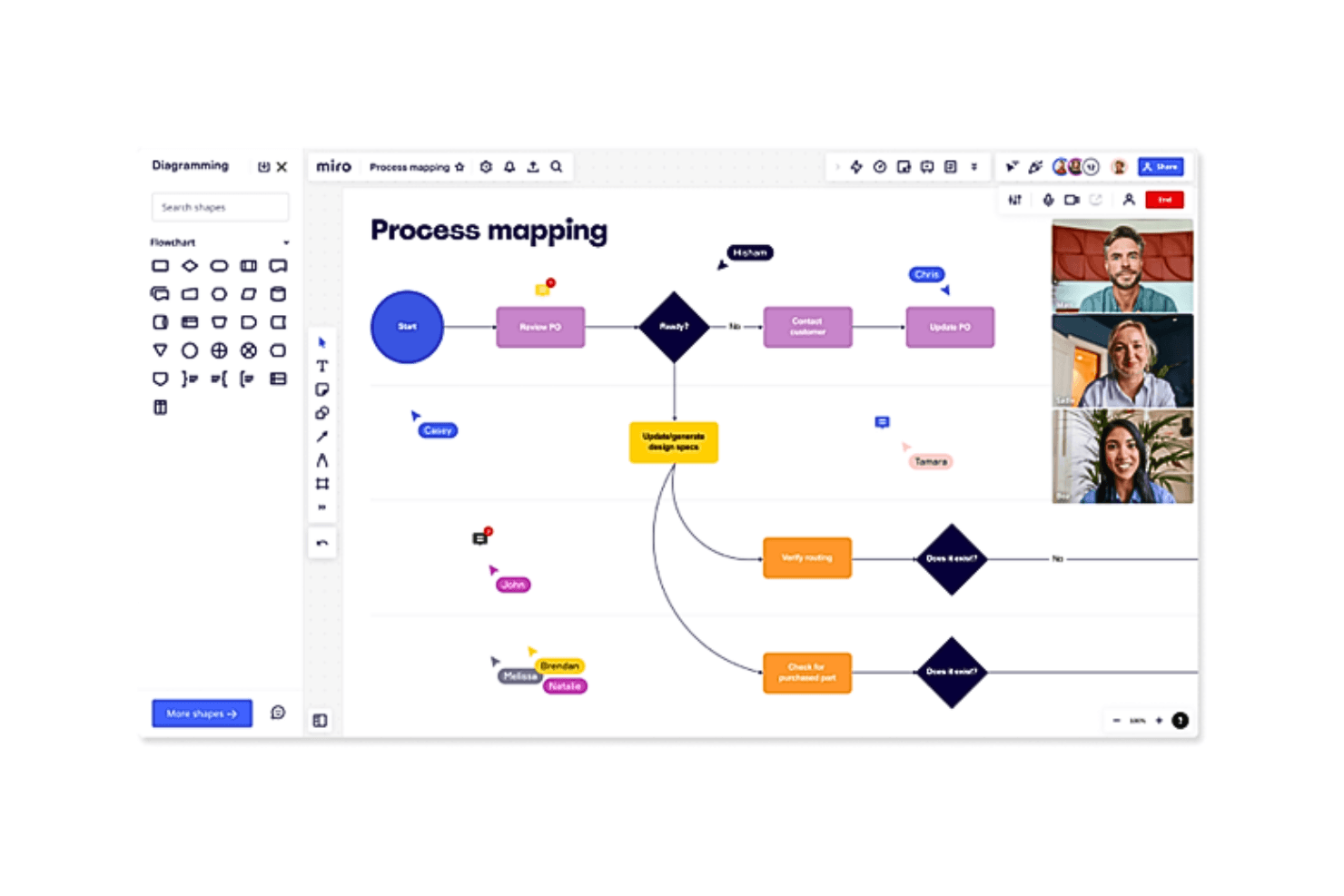
Describe tanto la hoja de ruta de tu producto como los principales procesos y flujos de desarrollo en el mismo sistema Miro permite a tu equipo visualizar y ejecutar la visión de tu producto con su herramienta de hojas de ruta en línea, perfecta para industrias como la gestión de productos, ingeniería y diseño. Ofrece un lienzo inteligente y plantillas personalizables, lo que te permite crear hojas de ruta estructuradas que se adaptan a necesidades y estrategias cambiantes. Al integrarse perfectamente con plataformas como Jira y Azure DevOps, Miro garantiza la colaboración en tiempo real y mantiene a todos alineados, abordando los desafíos de la gestión de cronogramas y responsabilidades entre equipos.
Por qué elegí Miro
Elegí Miro por su capacidad única para mapear eficientemente los flujos de trabajo de desarrollo de productos. Su lienzo inteligente, equipado con capacidades de IA, permite a tu equipo crear hojas de ruta dinámicas que pueden adaptarse a cambios en la estrategia y los plazos. La integración de Miro con herramientas populares como Jira y Azure DevOps mejora tu flujo de trabajo proporcionando actualizaciones en tiempo real y una gestión de tareas fluida. Estas características hacen que Miro sea una herramienta invaluable para los gestores de productos que buscan optimizar sus procesos y mejorar la colaboración del equipo.
Características clave de Miro
Además de sus sólidas capacidades de desarrollo de productos, también encontré que Miro ofrece una variedad de funciones que se adaptan a diferentes necesidades de proyecto.
- Plantillas personalizables: Miro ofrece más de 7.000 plantillas que te permiten configurar y adaptar rápidamente tus hojas de ruta a los requisitos específicos de cada proyecto.
- Colaboración en tiempo real: Esta función facilita la comunicación instantánea y el trabajo en equipo entre equipos distribuidos, asegurando que todos estén informados y alineados.
- Recorridos en vídeo: Miro admite recorridos en vídeo para compartir ideas y actualizaciones, mejorando la comprensión y la implicación del equipo.
- Integración con MS Teams y Confluence: Insertar hojas de ruta dinámicas en estas plataformas garantiza que todos los implicados tengan acceso a la información más actualizada del proyecto.
Integraciones de Miro
Las integraciones incluyen Jira, Azure DevOps, Microsoft Teams, Confluence, Slack, Google Drive, Dropbox, Trello, Asana y Monday.com.
Pros and Cons
Pros:
- La integración con videoconferencias mejora el trabajo remoto en equipo.
- Las funciones impulsadas por IA aumentan la productividad y la participación.
- Los amplios recursos de incorporación simplifican la configuración inicial.
Cons:
- Algunos usuarios desean un soporte al cliente más personalizado.
- Carece de funciones avanzadas de hojas de ruta.
 La mejor opción para portales de hojas de ruta personalizados y basados en la audiencia
- Prueba gratuita de 30 días + plan gratuito disponible
- Desde $1.10/usuario/mes
Visit WebsiteRating:0.0/5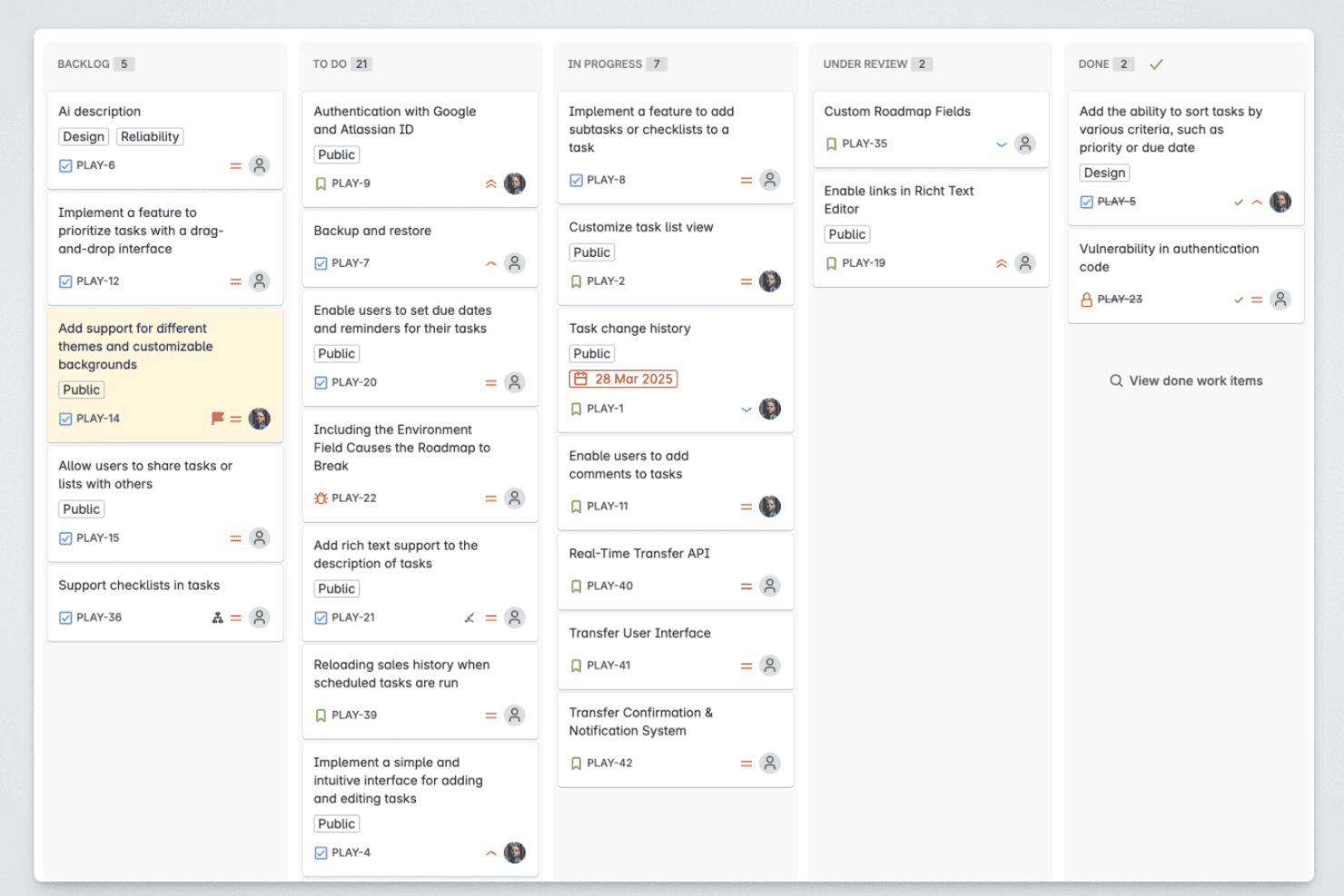
Released permite a los responsables de producto organizar los elementos de la hoja de ruta en las etapas de trabajo pendiente, en curso, en revisión y completado. Released es una herramienta de hojas de ruta nativa de Jira que permite a los equipos de producto publicar hojas de ruta activas, recopilar comentarios de clientes y generar notas de lanzamiento impulsadas por AI directamente a partir de sus datos de Jira.
¿Para quién es más adecuada Released?
Released es una opción excelente para los responsables de producto de equipos que utilizan Jira Cloud y necesitan comunicar el progreso de la hoja de ruta y las actualizaciones del producto a audiencias externas, como clientes y socios.
Por qué elegí Released
He incluido Released entre mis principales opciones porque sus portales de hojas de ruta específicos para cada audiencia se diferencian realmente de lo que ofrecen la mayoría de las herramientas de hojas de ruta. Puedo publicar un portal para clientes que muestre temas generales, otro para ejecutivos con todos los detalles de la cronología y un tercero para ventas, todos ellos alimentados en tiempo real por los mismos datos de Jira sin actualizaciones manuales. Los controles de acceso detallados me permiten hacer que cada vista sea pública, esté protegida con contraseña o sea solo por invitación, así que nunca comparto más de lo que pretendo con una audiencia determinada.
Características principales de Released
- Asignación de jerarquías nativa de Jira: Asigna automáticamente iniciativas, épicas e historias directamente desde los campos y las estructuras de Jira.
- Recopilación de comentarios de clientes: Permite a los usuarios enviar ideas y votar por funcionalidades a través de un portal de comentarios personalizado vinculado a elementos de Jira.
- Notas de lanzamiento generadas por AI: Redacta notas de lanzamiento a partir de tickets de Jira completados, con plantillas personalizables y ajustes de tono de marca.
- Publicación en Slack y Confluence: Publica actualizaciones del producto y cambios en la hoja de ruta en canales de Slack y páginas de Confluence en tiempo real.
Integraciones de Released
Released ofrece integraciones nativas con Jira Cloud, Jira Product Discovery, Slack y Confluence.
Pros and Cons
Pros:
- Portales específicos para cada audiencia para compartir con partes interesadas externas
- Notas de lanzamiento generadas por AI a partir de datos de Jira
- Votación de comentarios de clientes integrada en la hoja de ruta
Cons:
- Solo funciona con Jira Cloud
- Opciones limitadas de vistas de la hoja de ruta disponibles
Learn more about Released: Ideal para espacios de trabajo personalizables
- Plan gratuito + demostración gratuita disponible
- Desde $7/usuario/mes (facturado anualmente)
Visit WebsiteRating:4.6/5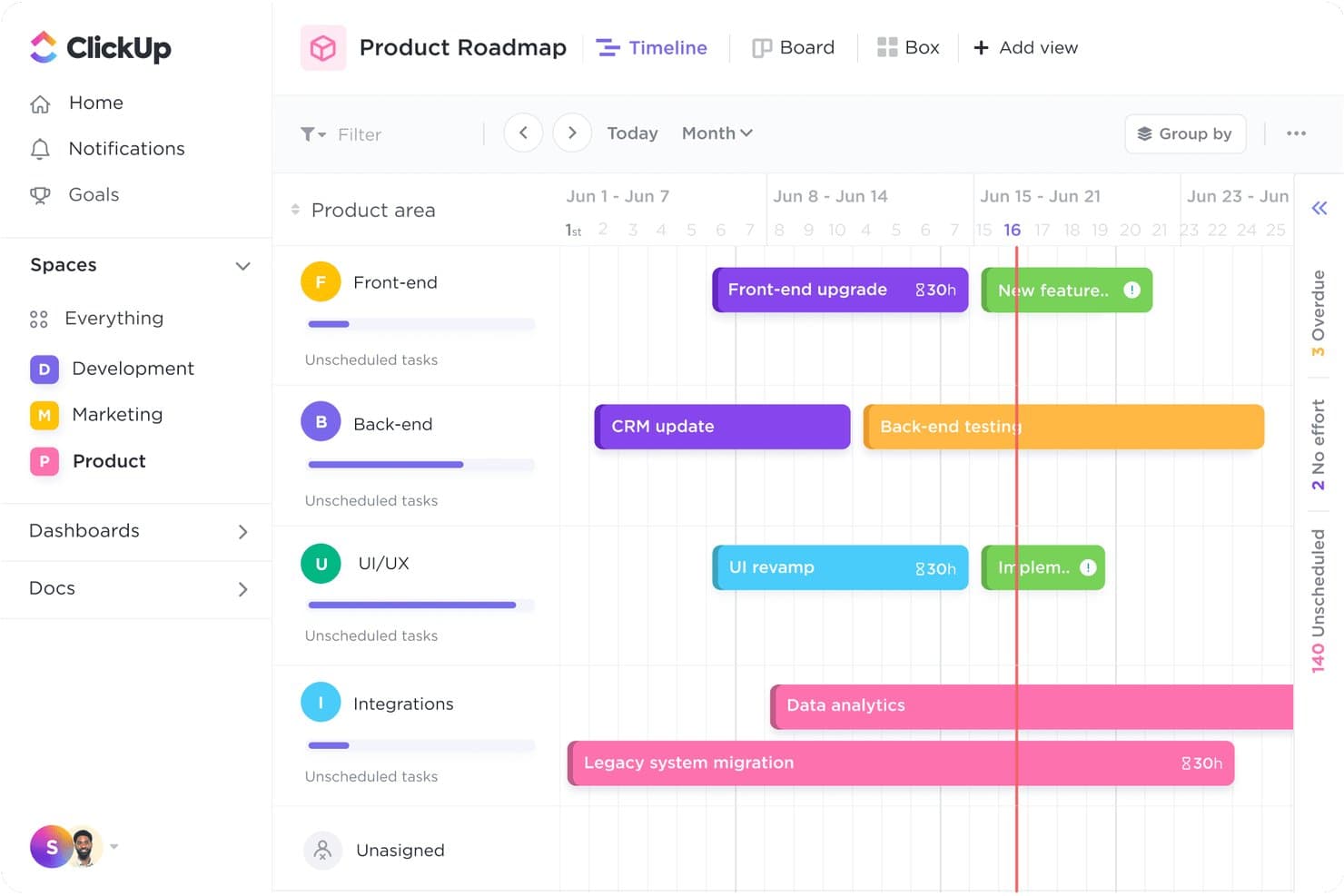
La vista de Línea de tiempo de ClickUp muestra las tareas de las distintas áreas del producto por semana. ClickUp es una plataforma de gestión del trabajo que permite a los equipos crear hojas de ruta de productos mediante vistas de Gantt y Línea de tiempo, campos y estados personalizados, marcos de priorización y más de 15 diseños de vista en un único espacio de trabajo conectado.
¿Para quién es más adecuado ClickUp?
ClickUp es una opción excelente para equipos de producto multifuncionales que necesitan gestionar hojas de ruta, tareas, documentos y objetivos en un único espacio de trabajo configurable.
Por qué elegí ClickUp
He incluido ClickUp entre mis principales opciones porque ninguna otra herramienta de esta lista permite adaptar un espacio de trabajo de hojas de ruta de forma tan completa para ajustarlo a la manera en que realmente trabaja tu equipo. Con más de 15 vistas, tipos de tarea personalizados y una plantilla de hoja de ruta de producto que incluye campos prediseñados de Impacto, Esfuerzo y Confianza, puedes crear una hoja de ruta trimestral que refleje tu proceso real de priorización. También me gusta que las dependencias de Gantt reprogramen automáticamente las tareas posteriores cuando arrastras un elemento, lo que mantiene precisos los cronogramas multifuncionales sin necesidad de correcciones manuales.
Funciones principales de ClickUp
- Seguimiento de objetivos y OKR: Vincula tareas y proyectos directamente con objetivos, y el progreso se actualiza automáticamente a medida que se completa el trabajo.
- Asistente de IA ClickUp Brain: Consulta tu espacio de trabajo en lenguaje sencillo para encontrar dependencias bloqueadas, tareas en riesgo y responsables con exceso de trabajo.
- Vista de pizarra: Colabora visualmente en un lienzo compartido donde las formas y las notas adhesivas se pueden convertir en tareas.
- Chat integrado: Comunícate con tus compañeros directamente dentro de ClickUp sin cambiar a otra herramienta de mensajería.
Integraciones de ClickUp
ClickUp ofrece más de 200 integraciones, incluidas Jira, GitHub, GitLab, Bitbucket, Slack, Figma, Intercom, Zendesk y Google Calendar. También proporciona una API pública y conectividad con Zapier para flujos de trabajo personalizados.
Pros and Cons
Pros:
- Los campos personalizados reflejan tu marco de priorización
- Las dependencias de Gantt reprograman el trabajo posterior de la hoja de ruta
- Más de quince vistas se adaptan a distintos grupos de interés
Cons:
- No hay un portal específico de hojas de ruta orientado a clientes
- La interfaz recargada puede ocultar las prioridades de la hoja de ruta
Learn more about ClickUp: Ideal para la creación flexible de hojas de ruta
- Demo gratuita disponible
- Precio a consultar
Visit WebsiteRating:4.4/5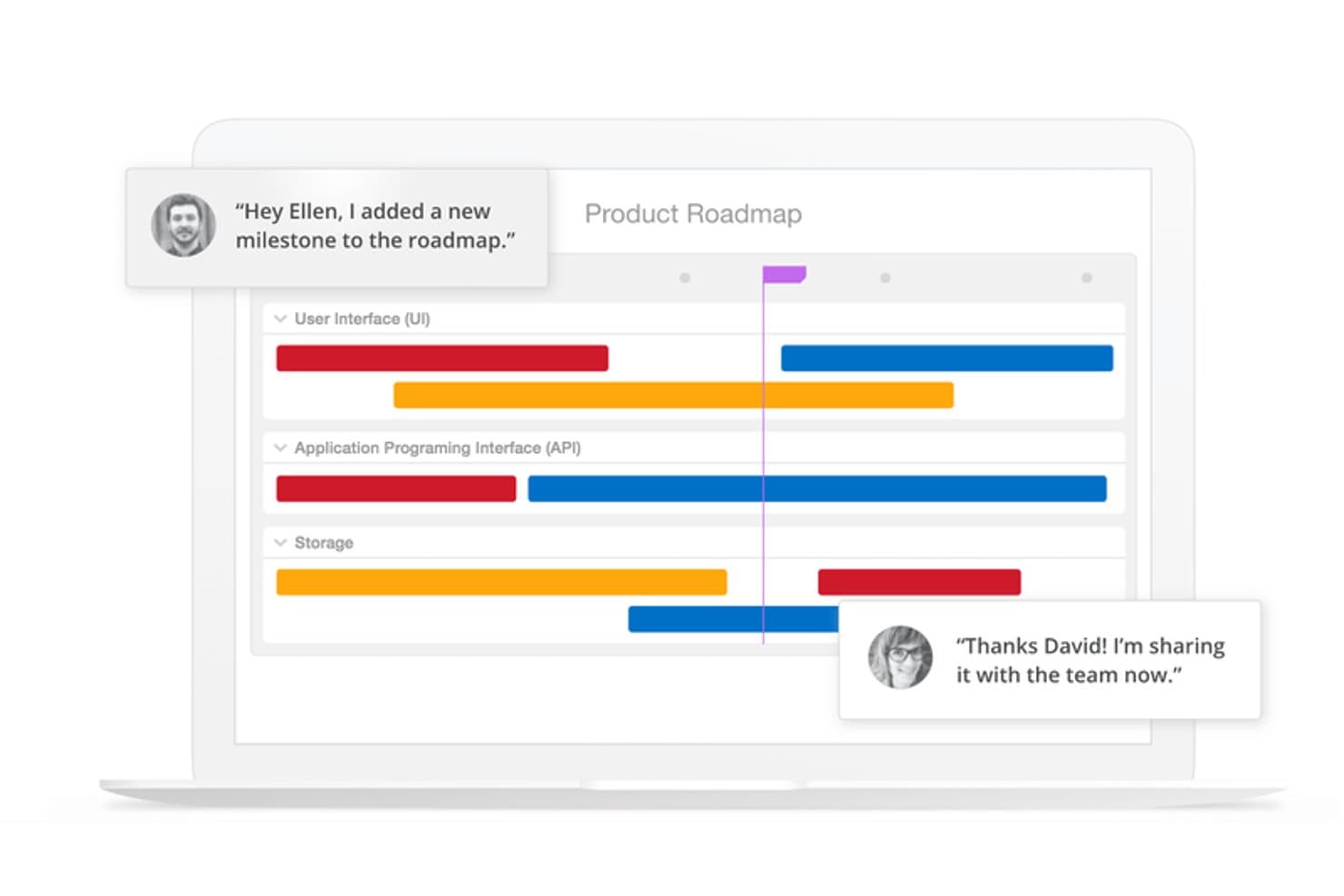
La interfaz de arrastrar y soltar de la plataforma es fácil de usar y sus características de alta seguridad mantienen tus datos bien protegidos. ProductPlan funciona como una herramienta dinámica de hoja de ruta en línea diseñada para equipos que buscan optimizar la gestión de productos y la planificación estratégica. Resulta especialmente atractiva para los gerentes de producto y equipos en sectores impulsados por la tecnología que necesitan una representación clara y visual de su estrategia y hoja de ruta de productos. Al ofrecer funciones como vistas de hoja de ruta flexibles e integraciones con herramientas populares, ProductPlan ayuda a abordar el desafío de alinear los esfuerzos del equipo con los objetivos de la empresa.
Por qué elegí ProductPlan
Elegí ProductPlan porque sobresale en proporcionar una única fuente de verdad para las iniciativas estratégicas de tu equipo. Su función de creación de hojas de ruta flexibles permite comunicar fácilmente la estrategia de producto entre los diferentes interesados. Además, la integración de la plataforma con herramientas como Slack y Jira asegura que tu equipo se mantenga alineado e informado. La funcionalidad de arrastrar y soltar simplifica aún más el proceso, permitiéndote centrarte más en la ejecución que en la planificación.
Características clave de ProductPlan
Además de sus capacidades para crear hojas de ruta, ProductPlan ofrece varias otras funciones que mejoran su utilidad como herramienta de hoja de ruta en línea.
- Validación de oportunidades: Esta funcionalidad ayuda a tu equipo a evaluar y priorizar oportunidades potenciales de manera efectiva.
- Vistas de portafolio: Puedes gestionar varias hojas de ruta y obtener información sobre cómo diferentes proyectos se alinean con los objetivos de tu empresa.
- Captura y priorización de ideas: La plataforma facilita la captura y priorización de ideas, asegurando que se persigan los conceptos más valiosos.
- Soporte ilimitado: Con acceso a soporte al cliente ilimitado, tu equipo puede resolver problemas rápidamente y mantener los proyectos en marcha.
Integraciones de ProductPlan
Las integraciones incluyen Slack, Microsoft Teams, Jira, Trello, GitHub, Confluence, Azure DevOps, Google Workspace y Aha! También se dispone de una API para integraciones personalizadas.
Pros and Cons
Pros:
- Sesiones de formación semanales incluidas en todos los planes
- Los resúmenes de la hoja de ruta muestran cómo cambian los planes a lo largo del tiempo
- Herramientas de comunicación y colaboración para equipos
Cons:
- Las integraciones están limitadas según el nivel de precio
- La vista de portafolio no está disponible en el plan básico
Learn more about ProductPlan: La mejor con planificación OKR
- Prueba gratuita de 14 días + demo gratuita disponible
- Desde $36/mes (facturado anualmente)
Visit WebsiteRating:4.2/5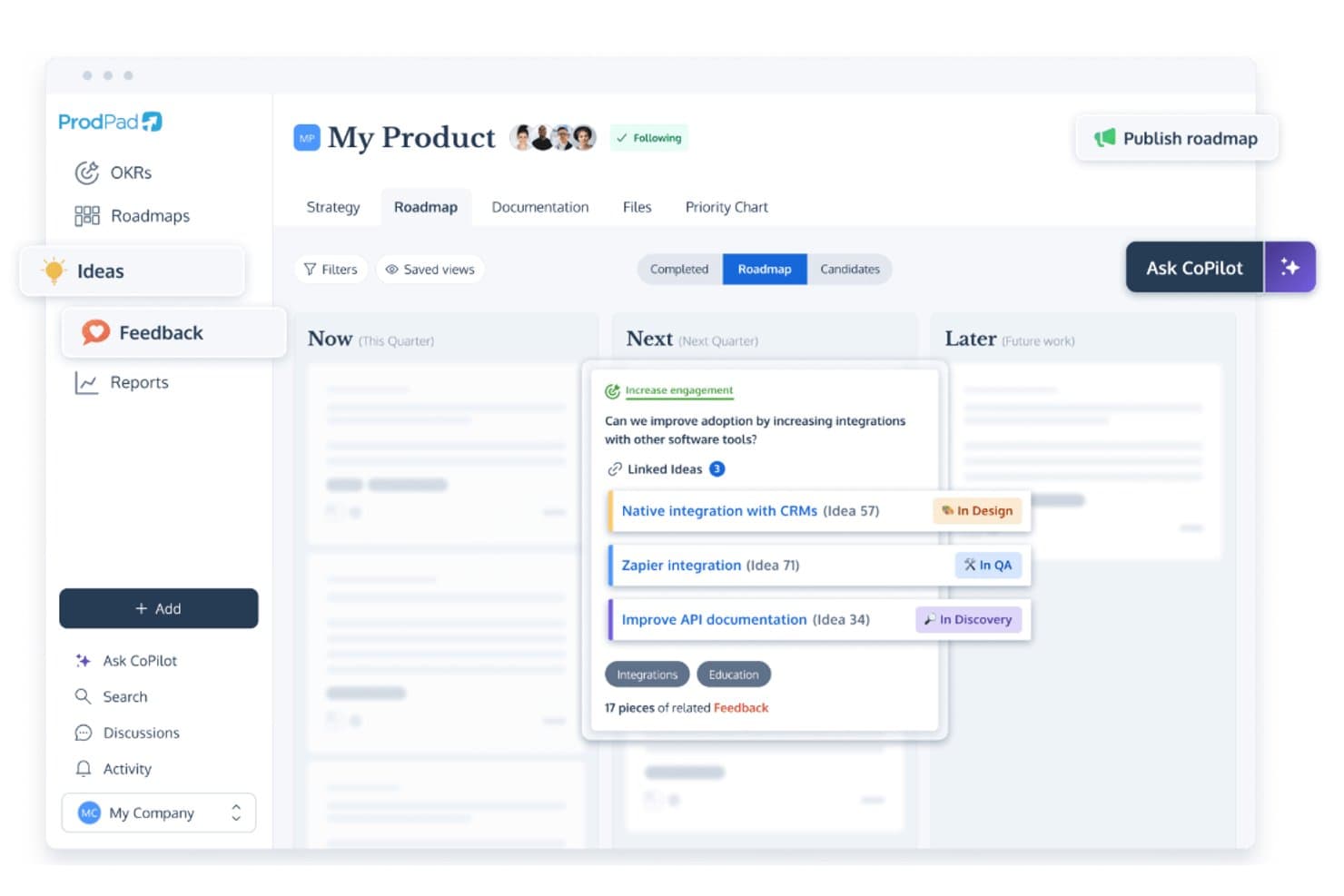
La herramienta de planificación de hojas de ruta en línea de ProdPad permite a los equipos priorizar funciones mientras ven en perspectiva las próximas incorporaciones de características. ProdPad permite a tu equipo crear hojas de ruta de producto dinámicas y estratégicas, por lo que es una opción ideal para los responsables de producto y equipos que buscan alinear sus objetivos y resultados. Al centrarse en una planificación de hoja de ruta ágil e integrarse perfectamente con herramientas como Jira y Slack, ProdPad mejora la colaboración y asegura que todos los miembros del equipo estén alineados. Ya sea que estés gestionando ideas, recopilando comentarios o definiendo objetivos estratégicos, ProdPad te ayuda a optimizar estos procesos y mantener a tu equipo alineado con hojas de ruta claras y accionables.
Por qué elegí ProdPad
Elegí ProdPad por su exclusiva integración de la planificación de Objetivos y Resultados Clave (OKR) dentro de su herramienta de hoja de ruta, lo que resulta especialmente beneficioso para los equipos que buscan alinear sus metas estratégicas con tareas concretas. El formato ágil de hoja de ruta de ProdPad te permite visualizar claramente tus prioridades estratégicas, mientras que su AI CoPilot asiste en la definición de resultados clave medibles, garantizando que tu equipo se mantenga enfocado y motivado. Además, la capacidad de la plataforma para personalizar la publicación de hojas de ruta te permite compartir vistas relevantes con las partes interesadas, aumentando la transparencia y la responsabilidad. Estas características hacen que ProdPad sea una opción destacada para los equipos que priorizan la alineación estratégica y la gestión de objetivos.
Funciones clave de ProdPad
Además de sus capacidades de planificación OKR, ProdPad ofrece varias otras funciones que aumentan su valor como herramienta de hoja de ruta en línea.
- Gestión de ideas: Captura y prioriza ideas de tu equipo y partes interesadas, asegurando que los mejores conceptos se transformen en planes accionables.
- Gestión de comentarios: Recoge y gestiona comentarios de usuarios y partes interesadas para fundamentar tus decisiones de producto y ajustes en la hoja de ruta.
- AI CoPilot: Utiliza información basada en IA para generar y perfeccionar iniciativas en la hoja de ruta, apoyando la planificación y ejecución estratégica.
- Gestión de portafolio: Supervisa múltiples productos y proyectos desde una sola plataforma, lo que permite una gestión integral de tu suite de productos.
Integraciones de ProdPad
Las integraciones incluyen Jira, Slack, GitHub, Trello, Salesforce, Azure DevOps, Google Workspace, Microsoft Teams, Confluence y Pivotal Tracker.
Pros and Cons
Pros:
- Ideas impulsadas por IA para generar y perfeccionar iniciativas.
- Gestión efectiva de ideas para capturar y desarrollar conceptos.
- Planificación OKR integral y publicación flexible de la hoja de ruta para la alineación estratégica.
Cons:
- Carece de funciones detalladas de gestión de recursos.
- Capacidades limitadas de informes avanzados para análisis en profundidad.
Learn more about ProdPad: Ideal para centralizar los comentarios sobre el producto
- Prueba gratuita de 14 días + plan gratuito + demo gratis disponible
- Desde $19/maker/mes (facturado anualmente)
Visit WebsiteRating:4.5/5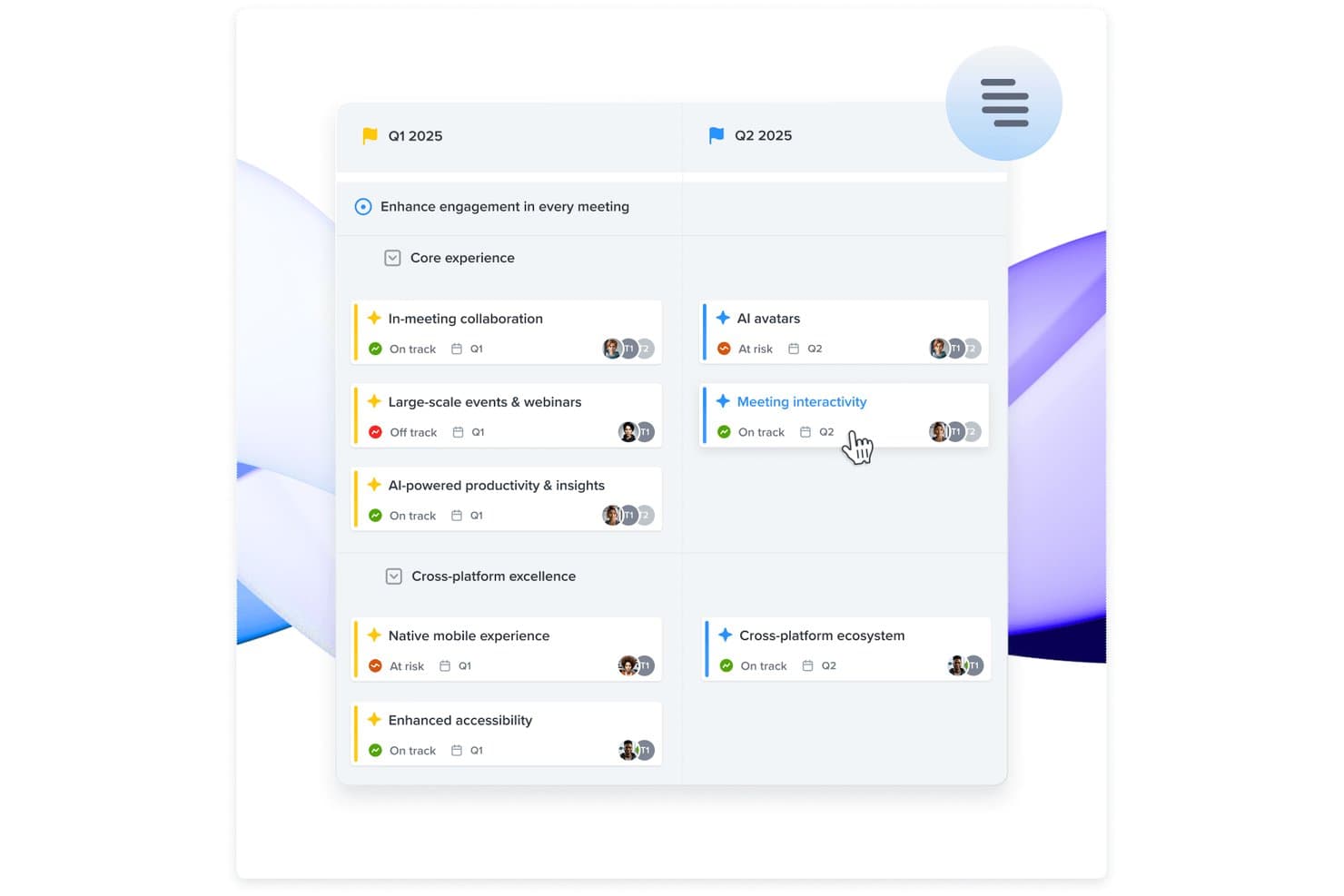
Recoge, analiza y agrupa la retroalimentación de los usuarios para entender temas recurrentes y convertir las sugerencias en iniciativas que tu equipo puede priorizar. Para los equipos de producto que buscan una herramienta de hoja de ruta en línea que no solo facilite la planificación sino que también garantice la alineación con las necesidades del cliente, Productboard destaca como una opción atractiva. Permite a equipos de distintos sectores priorizar funcionalidades basándose en información de los usuarios, resultando especialmente interesante para gerentes de producto y responsables de decisiones que valoran los enfoques basados en datos. Al centralizar los comentarios y transformarlos en hojas de ruta accionables, Productboard responde al desafío de alinear el desarrollo del producto con las expectativas de los usuarios, mejorando tu capacidad para entregar productos que realmente resuenen con tu público.
Por Qué Elegí Productboard
Elegí Productboard por su capacidad única para centralizar los comentarios sobre el producto, lo cual es fundamental para una herramienta eficaz de hoja de ruta en línea. Con funciones como el Tablero de Insights, puedes recopilar y organizar retroalimentación de usuarios provenientes de diversas fuentes, asegurando que no se pierdan datos valiosos. Además, la Matriz de Priorización te ayuda a visualizar qué características se alinean con los objetivos estratégicos y las necesidades de los usuarios, brindando claridad sobre en qué enfocarse a continuación. Estas funcionalidades abordan directamente el reto de tomar decisiones informadas, asegurando que tu hoja de ruta no sea solo un plan, sino un reflejo de la verdadera demanda de los usuarios.
Características Principales de Productboard
Además de su capacidad de centralización de comentarios, Productboard ofrece otras funciones valiosas:
- Hojas de Ruta con Línea de Tiempo: Esta función te permite planificar visualmente con una visión clara del calendario, ayudando a tu equipo a mantenerse alineado con los objetivos y plazos.
- Priorización de Funcionalidades: Usa esta herramienta para clasificar funcionalidades según las necesidades de los usuarios y objetivos estratégicos, asegurando que tu equipo se enfoque en los desarrollos más impactantes.
- Portal para Comentarios de Usuarios: Comparte las funcionalidades planeadas o recientemente lanzadas con los usuarios y recopila sus comentarios para guiar futuras iteraciones.
- Integración con Herramientas de Desarrollo: Envía funcionalidades priorizadas fácilmente a herramientas populares de planificación de desarrollo como Jira y Trello, conservando los flujos de trabajo existentes.
Integraciones de Productboard
Las integraciones incluyen Jira, Trello, Azure DevOps, GitHub, Pivotal Tracker, Intercom, Zendesk, Slack, Salesforce y Google Analytics.
Pros and Cons
Pros:
- Facilita la colaboración entre departamentos para una planificación cohesionada.
- Soporte al cliente ágil y experto.
- Prioriza las ideas de los usuarios junto con las solicitudes de funcionalidades para una toma de decisiones informada.
Cons:
- No permite notas o anotaciones en las líneas de tiempo y el sistema de notificaciones carece de actualizaciones sobre el estado de los insights.
- Las capacidades limitadas de exportación restringen las opciones para compartir datos.
Learn more about Productboard: Lo mejor para escalabilidad y flexibilidad
- Demo gratuita disponible
- Precio disponible bajo petición
Visit WebsiteRating:4.4/5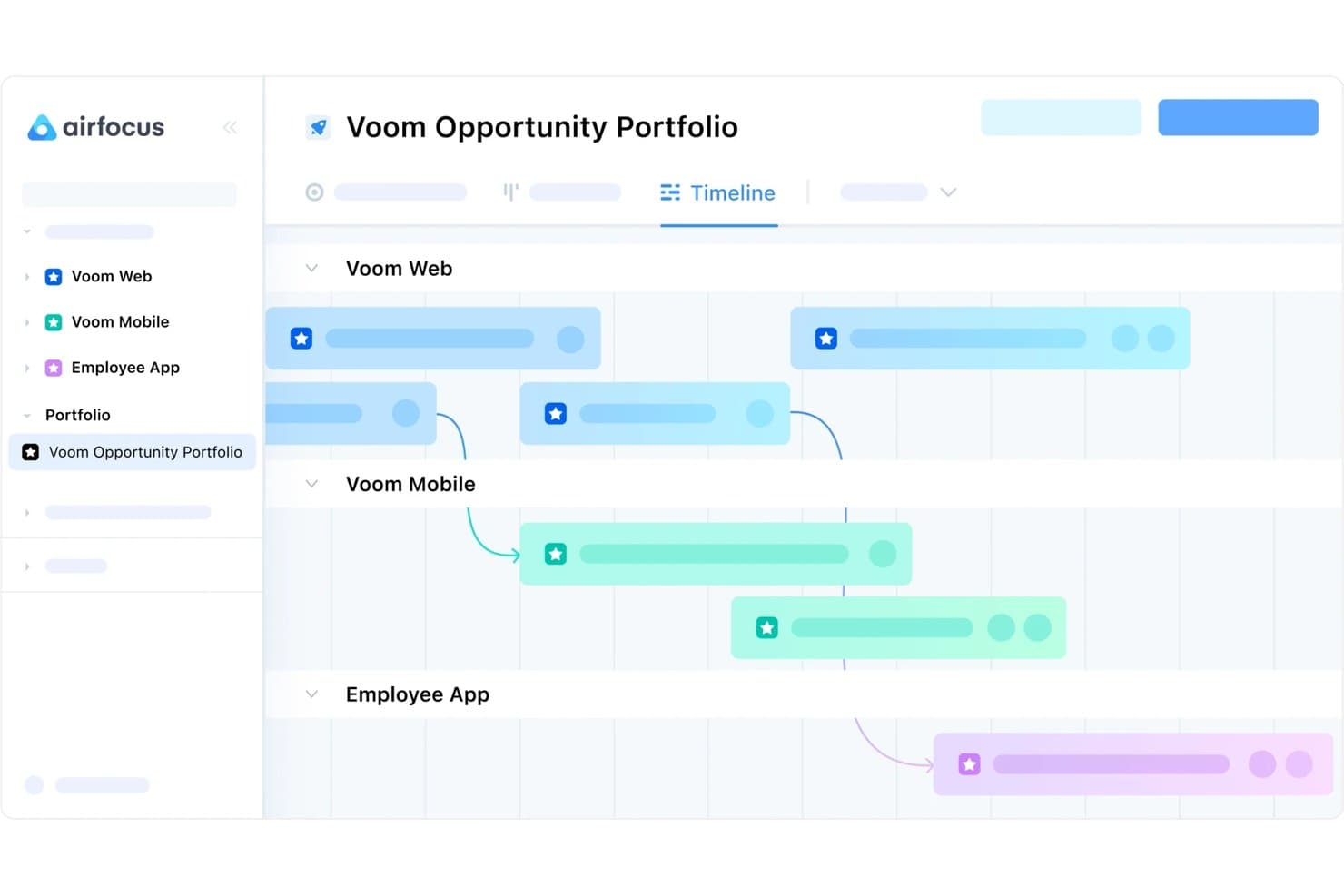
El software ofrece herramientas de gestión de backlog, priorización, gestión de comentarios y creación de hojas de ruta. Airfocus es una plataforma de gestión de productos con herramientas de creación de hojas de ruta, retroalimentación de usuarios y estrategia, que te ayuda a llevar tu producto desde el concepto hasta la entrega.
Por qué elegí Airfocus: Esta plataforma ofrece un conjunto de funciones sólidas para gestionar el desarrollo de productos de principio a fin. Pero lo que la hizo destacar en mi lista es su exclusiva capacidad de escalabilidad. Puedes comenzar a utilizar el software solo con sus plantillas predefinidas y luego construir una solución modular y personalizada a medida que creces.
Cada funcionalidad es su propia aplicación y puedes seleccionarlas como complementos. Esto te permite crear una solución a medida que ofrece exactamente las funciones que necesitas, sin extras que queden en desuso. Los complementos incluyen calificaciones de prioridad, gestión de información, formularios personalizados, portales y más.
Funciones destacadas e integraciones de Airfocus
Una característica destacada a resaltar es el componente de gestión de retroalimentación. Puedes recopilar comentarios de usuarios mediante formularios personalizados, además de centralizar la retroalimentación proveniente de otros canales como correo electrónico, chat y tickets de soporte al cliente. Los comentarios pueden vincularse a ideas, oportunidades y características dentro de la plataforma para informar sobre cómo construir tu producto. También puedes aprovechar la información de clientes durante la priorización.
Integraciones incluyen Jira, Trello, Asana, Azure DevOps, Microsoft Planner, GitHub, Webhooks, Intercom, Salesforce, Slack, Microsoft Teams y más. También puedes conectar una cuenta de Zapier para desbloquear integraciones adicionales.
Pros and Cons
Pros:
- Solución modular exclusivamente escalable
- Adecuado para desarrollo de productos a pequeña y gran escala
- Gestión de retroalimentación de clientes incluida
Cons:
- Implica una curva de aprendizaje
- La configuración e implementación puede ser engorrosa
 La mejor solución integral de gestión de productos
- Prueba gratuita de 14 días + demo gratuita disponible
- Desde $19/usuario/mes (facturado anualmente)
Visit WebsiteRating:4.4/5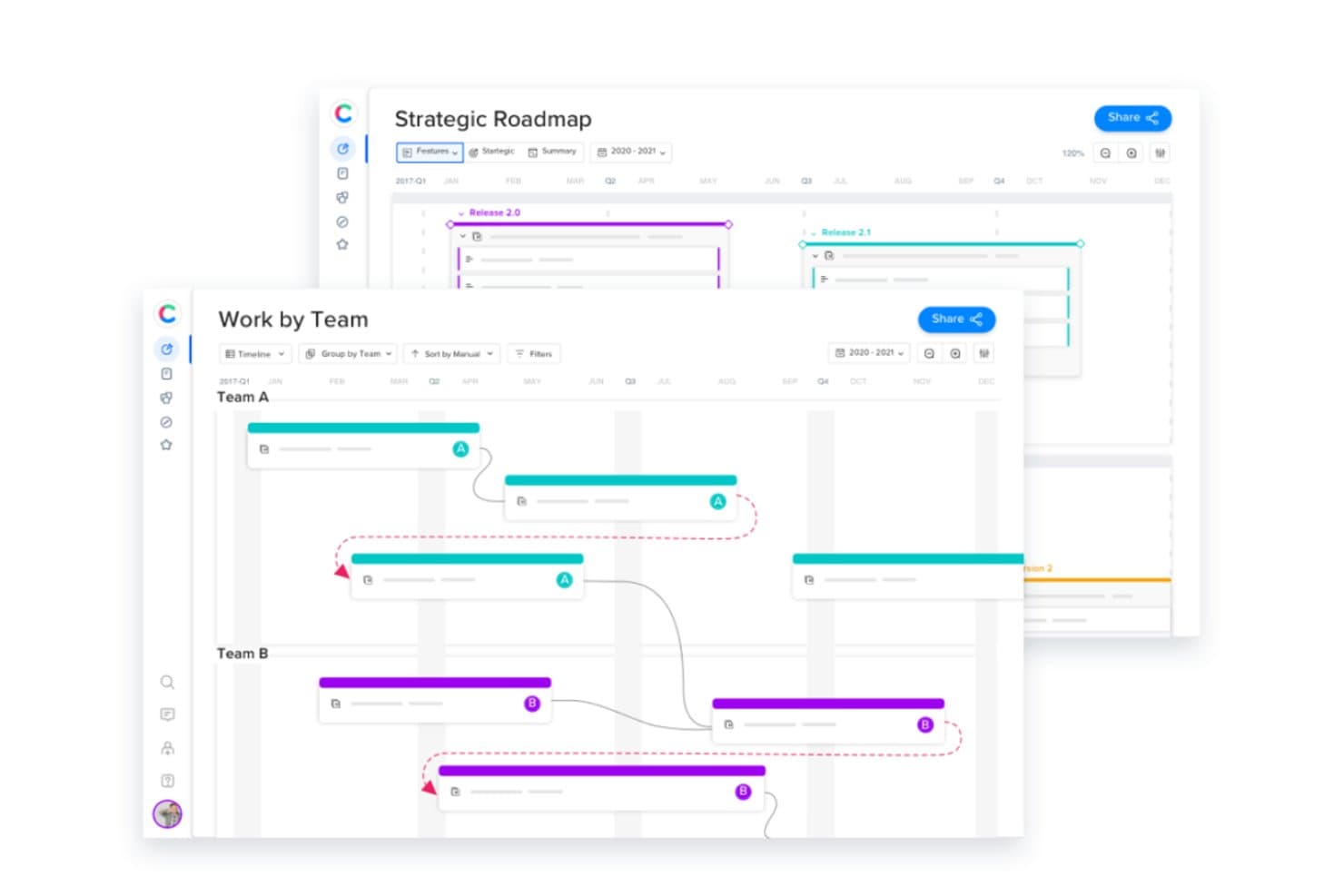
Puedes construir tus hojas de ruta de producto, planificar tu estrategia de producto, gestionar tus recursos y recopilar la retroalimentación de los usuarios, todo en la misma plataforma. Craft.io es una plataforma integral de gestión de productos que puede encargarse de la creación de hojas de ruta, el desarrollo de estrategias, la recopilación de comentarios de usuarios y mucho más.
Por qué elegí Craft.io: Este software va más allá de la simple planeación de hojas de ruta para incorporar diversas herramientas de gestión de productos. Puedes delinear tanto tus hojas de ruta del producto como tus estrategias. También cuenta con herramientas como seguimiento de tiempo y planificación de capacidad para gestionar eficazmente tus recursos.
La herramienta de creación de hojas de ruta en sí misma viene con varias opciones de vista personalizadas y una interfaz intuitiva de arrastrar y soltar para construir tu hoja de ruta. Si tienes múltiples productos o servicios, también puedes beneficiarte de las capacidades de gestión de portafolios que ofrece el plan empresarial.
Funciones destacadas e integraciones de Craft.io
Una función destacada de esta plataforma es su sistema de gestión de comentarios. Puedes recopilar comentarios tanto de usuarios internos como externos, y luego hacerles seguimiento, clasificarlos y gestionarlos en la plataforma. El generador de formularios te permite recolectar fácilmente la retroalimentación de manera estructurada y consistente, y analizarla con la misma eficacia. Los comentarios de tus usuarios pueden entonces usarse para planificar y priorizar nuevas características, productos y servicios.
Integraciones incluyen Jira, GitHub, GitLab, Azure DevOps, Confluence, Okta, PivotalTracker, Figma, Google Workspace, InVision y Miro, entre otras.
Pros and Cons
Pros:
- Espacios de trabajo ilimitados en planes pro y empresariales
- Cumplimiento de alto nivel en seguridad de datos
- Mejores prácticas integradas en varias funciones del producto
Cons:
- Estrategia y comentarios no incluidos en el plan inicial
- Personalización limitada en planes de menor costo
Learn more about Craft.io: Ideal para crear hojas de ruta para presentaciones
- Prueba gratuita de 14 días
- Desde $19/usuario/mes (facturado anualmente)
Visit WebsiteRating:4.0/5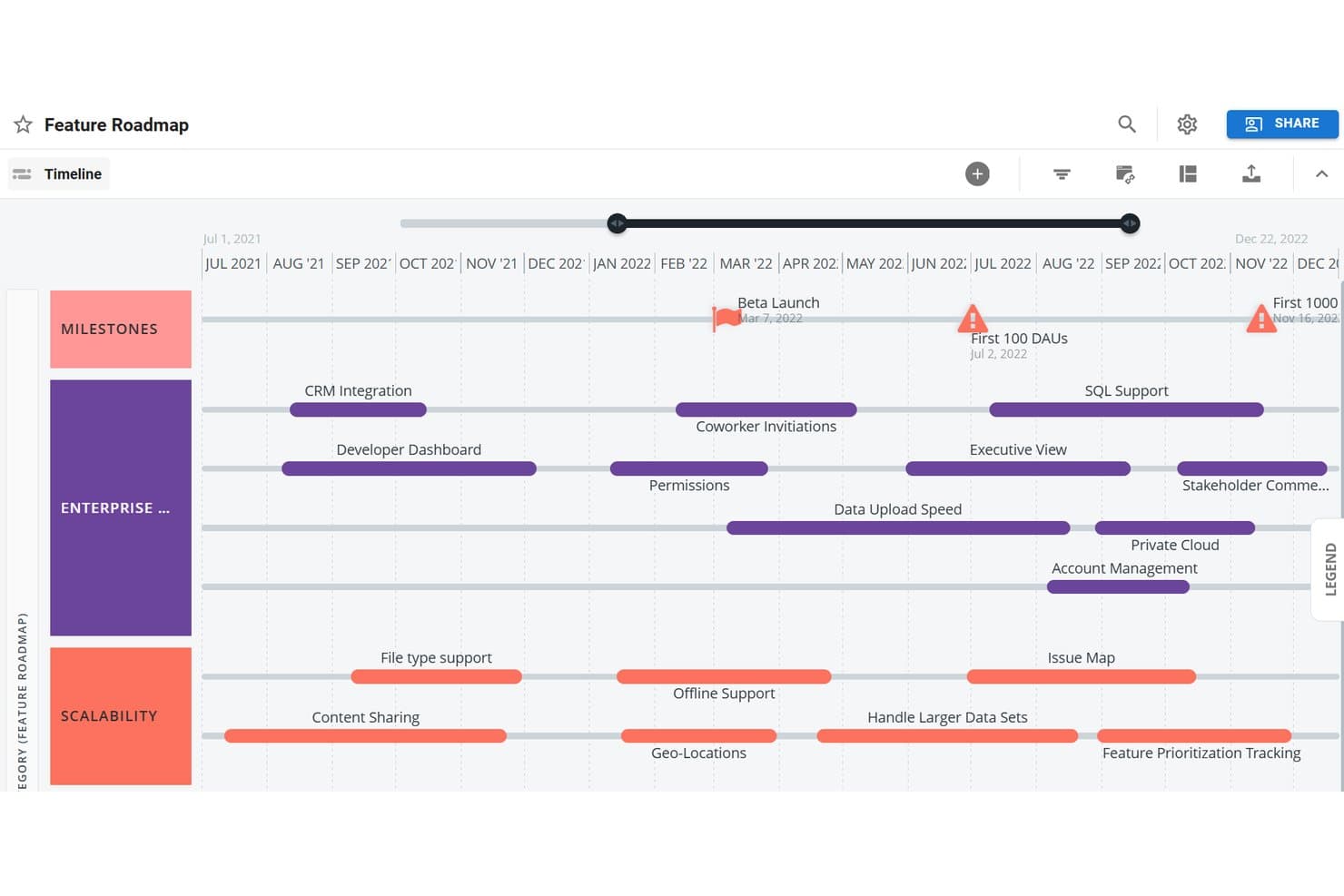
La interfaz fácil de usar te permite construir hojas de ruta de producto claras y completas rápidamente para presentarlas a los interesados. Roadmunk es una herramienta de planificación de hojas de ruta diseñada para ayudarte a crear mapas de ruta listos para presentaciones de manera rápida.
Por qué elegí Roadmunk: Añadí esta plataforma a mi lista para quienes necesitan presentar una hoja de ruta a sus interesados lo antes posible. Este software es ideal para crear rápidamente una hoja de ruta visualmente atractiva y sencilla. Puedes elegir una vista de línea de tiempo o de carriles, y crear varias hojas de ruta usando los mismos datos. Las hojas de ruta que creas en la plataforma se pueden exportar como URL, PNG o archivos HTML para compartir fácilmente. También hay múltiples plantillas disponibles para ayudarte a agilizar la creación de tus hojas de ruta.
Características destacadas e integraciones de Roadmunk
Una característica destacada es, sin duda, el centro de plantillas del software. Hay docenas de plantillas de hojas de ruta para elegir, que cubren necesidades tecnológicas, empresariales y de producto. Las plantillas están totalmente accesibles durante la prueba gratuita de la plataforma. Esto es útil para quienes quieran probarla o necesiten crear rápidamente una hoja de ruta para una presentación. Las plantillas se pueden personalizar usando tu conjunto de datos, y puedes asignar recursos y definir hitos según tus necesidades.
Integraciones incluyen Jira, Azure DevOps y Trello. También hay una API disponible para crear integraciones personalizadas.
Pros and Cons
Pros:
- Mucho contenido de autoayuda y soporte
- Configuración rápida y navegación sencilla
- Fácil de compartir en varios formatos
Cons:
- Las integraciones están limitadas en los planes más básicos
- Cuotas adicionales por algunos complementos
Learn more about Tempo Roadmapping Software: Mejor para equipos de desarrollo ágiles
- Prueba gratuita de 7 días + plan gratuito
- Desde $7.75/usuario/mes
Visit WebsiteRating:0.0/5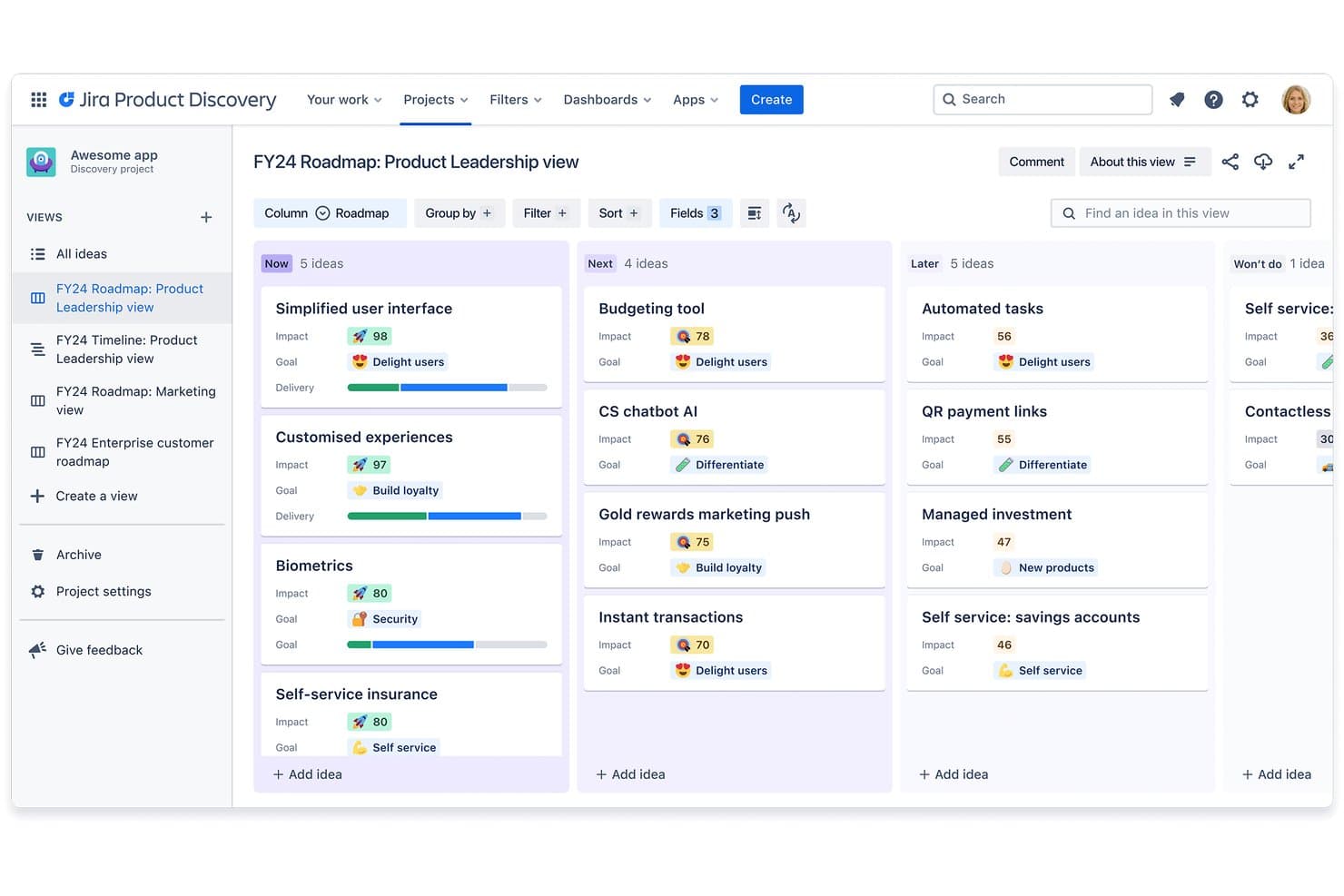
El software ofrece múltiples vistas para tus hojas de ruta y planes de producto, y está diseñado en base a metodologías ágiles. Jira es un software de gestión de productos comprobado que proporciona a los desarrolladores un sistema para rastrear, organizar y priorizar tareas.
Por qué elegí Jira: Elegí esta plataforma para mi lista por el nivel de detalle y la flexibilidad que ofrece. Puedes crear hojas de ruta de productos personalizadas basadas en cronogramas en el software, y también hay disponibles plantillas de Kanban y Scrum. Los productos pueden descomponerse en partes más pequeñas que se pueden categorizar como historias, incidencias y tareas. Las tareas pueden asignarse directamente desde la vista de la hoja de ruta, lo que ayuda a mantener a todos alineados sobre las responsabilidades y la propiedad. Toda la plataforma está construida en torno a una metodología ágil y te ayuda a seguir el progreso y cambiar prioridades según sea necesario.
Características destacadas e integraciones de Jira Software
Características destacadas incluyen las capacidades de seguimiento y personalización del software. El seguimiento te ayuda a monitorear el progreso de tu producto durante todo el desarrollo. Todas las tareas asociadas a una incidencia concreta se siguen, y puedes usar la herramienta de informes para obtener una visión actualizada del progreso de tu equipo. Las herramientas de gestión de tareas y hojas de ruta son altamente personalizables, al igual que las vistas. Puedes seleccionar entre varias vistas disponibles para obtener una visión general del plan de producto desde la perspectiva que sea más adecuada en ese momento.
Integraciones incluyen Adobe, Dropbox, Figma, Google Workspace, InVision, Microsoft, Miro, Slack, Zendesk, Zoom y más.
Pros and Cons
Pros:
- Altamente personalizable y detallado
- Gestión de recursos incorporada
- Funciona bien con otros productos de Atlassian (Confluence, Trello, Bitbucket, etc.)
Cons:
- El enlace entre historias y tareas podría mejorarse
- No permite edición masiva ni scripting
Learn more about JIRA by Atlassian:
Cuándo Usar una Herramienta de Roadmap Online
Una herramienta de roadmap online proporciona a tu equipo una visión única y siempre actualizada de lo que se está construyendo, por qué y cuándo, para que no tengas que perseguir actualizaciones entre hilos de Slack y presentaciones desactualizadas. Si alguno de los siguientes escenarios te resulta familiar, probablemente sea hora de sumar una a tu stack:
- Tu roadmap está repartido en cinco lugares diferentes: Tienes una versión en Notion, otra en una presentación y una tercera que alguien exportó a una hoja de cálculo. Una herramienta de roadmap centraliza todo para que los stakeholders siempre consulten una única fuente de verdad.
- Recibes comentarios de Ventas y Soporte y no tienes una forma clara de mostrar los compromisos: Una herramienta de roadmap te permite vincular las solicitudes a la estrategia y así puedes defender tus decisiones de priorización sin un debate eterno en Slack.
- En cada sprint, ingeniería pregunta por qué algo está en el roadmap: Estás volviendo a explicar el contexto en vez de construir. Un roadmap compartido con objetivos vinculados elimina esas preguntas antes de que empiece la daily.
- Te estás preparando para una reunión de directorio y las diapositivas ya están desactualizadas: Una herramienta de roadmap online te permite mostrar una vista en tiempo real para que lo que vea el equipo directivo coincida con lo que tu equipo realmente está trabajando.
- Estás administrando múltiples líneas de producto en diferentes zonas horarias: Una sola herramienta online con edición en tiempo real mantiene a los equipos distribuidos alineados, sin necesidad de una reunión semanal solo para ponerse al día.
Otras Opciones de Herramientas de Roadmap Online
Aquí tienes una lista de las herramientas que no llegaron al top pero que aún así valen la pena considerar:
- 11TargetprocessIdeal para la gestión estratégica de portafolios
- 12HyggerLa mejor para la priorización de tareas
Cómo evalúo las herramientas de hojas de ruta en línea
Divido mi evaluación en tres partes, y la funcionalidad principal tiene el mayor peso. Compruebo si una herramienta puede crear cronogramas visuales y permitirte reprogramar elementos arrastrándolos. A partir de ahí, reviso funciones destacadas como la vinculación de objetivos u OKR, y después considero la calidad de la incorporación y la relación calidad-precio.
Funcionalidad principal (requisitos esenciales para esta lista)
Al seleccionar herramientas para mi lista, puntúo cada una en una escala de 0 (no ofrece la funcionalidad) a 5 (sobresale en esta área) para cada una de las funcionalidades principales que se indican a continuación. Después convierto el total en un porcentaje para ayudar a evaluar la adecuación general de cada herramienta, con un peso adicional para las funcionalidades que he considerado esenciales.
- Creación visual de hojas de ruta (esencial): Compruebo si puedes crear planes basados en cronogramas con agrupaciones personalizadas, intervalos de fechas y jerarquías de elementos que se correspondan con ciclos de lanzamiento reales.
- Edición mediante arrastrar y soltar (esencial): Reprogramar una funcionalidad arrastrándola a un nuevo trimestre debería actualizar las fechas y las dependencias al instante, sin obligarte a volver a un formulario.
- Compartición y publicación: Busco enlaces activos, contenido incrustado y opciones de exportación que te permitan adaptar lo que ve el equipo directivo frente a lo que ve un consejo asesor de clientes.
- Marcos de priorización: Herramientas como Productboard y Airfocus ofrecen modelos de puntuación integrados. Evalúo si puedes ponderar criterios como el valor para el cliente frente al esfuerzo.
- Múltiples vistas y diseños: Un cronograma es adecuado para las revisiones ejecutivas, pero una vista kanban o de carriles funciona mejor para la planificación de sprints. Compruebo con qué facilidad puedes cambiar entre ellas.
- Colaboración en tiempo real: Busco coedición en directo, comentarios insertados y notificaciones para que un equipo distribuido pueda actualizar la misma hoja de ruta sin sobrescribir el trabajo de los demás.
Una vez que tengo una lista de herramientas que cumplen los criterios, considero qué distingue a cada plataforma.
Factores diferenciadores (lo que distingue a los proveedores)
Así es como comparo y contrasto distintos proveedores:
Funciones destacadas
Busco herramientas que vinculen los elementos de la hoja de ruta con los OKR u objetivos de la empresa, para que puedas mostrar exactamente cómo una funcionalidad se relaciona con un objetivo estratégico durante la planificación trimestral. La integración de comentarios de los clientes es igual de importante: evalúo si una herramienta permite etiquetar las solicitudes entrantes y rastrearlas hasta elementos específicos de la hoja de ruta, lo que mantiene la priorización basada en las necesidades reales de los usuarios. También compruebo si ofrece portales específicos que den a los clientes o socios visibilidad sobre el progreso de la hoja de ruta sin exponer las prioridades ni los cronogramas internos.
Más allá de las funciones
Evalúo hasta qué punto cada herramienta se integra con plataformas de desarrollo como Jira o Azure DevOps, ya que la sincronización bidireccional es lo que mantiene actualizada tu hoja de ruta sin tener que volver a introducir los datos manualmente. La calidad de la incorporación es igual de importante: busco flujos de configuración guiada y plantillas que ayuden a los equipos multifuncionales a adoptar la herramienta sin una curva de aprendizaje pronunciada. También considero si el modelo de licencias escala de forma justa, especialmente los precios basados en usuarios con permiso de visualización frente a los costes por puesto a medida que crece tu audiencia de partes interesadas.
¿Qué es una Herramienta de Roadmap Online?
Una herramienta de roadmap online es una plataforma web que se utiliza para crear, gestionar y compartir roadmaps visuales con el fin de que los equipos planifiquen y comuniquen de manera efectiva sus objetivos estratégicos y cronogramas de proyectos. Algunas de las funcionalidades que lo hacen posible son múltiples visualizaciones de línea de tiempo, seguimiento de hitos, funciones colaborativas, integración con herramientas de gestión de proyectos, y la capacidad de personalizar y compartir los roadmaps.
Estas herramientas ofrecen un entorno dinámico y colaborativo para que los equipos delineen y comuniquen planes estratégicos, alineen a los interesados en los plazos y hagan el seguimiento del progreso en tiempo real.
Preguntas frecuentes sobre herramientas de hojas de ruta online
¿Aún tienes preguntas sobre la planificación de productos y las herramientas online que lo facilitan? Aquí he respondido algunas preguntas comunes sobre el tema para ti.
¿Cómo ayudan las herramientas de hojas de ruta online a la colaboración entre equipos de producto y partes interesadas?
Las herramientas de hojas de ruta online facilitan la colaboración centralizando actualizaciones, comentarios y retroalimentación. Puedes compartir la misma hoja de ruta visual con tu equipo y partes interesadas, asignar tareas y seguir el progreso en tiempo real. Las notificaciones integradas y las opciones de permisos mantienen a todos alineados y aseguran que solo las personas adecuadas puedan realizar cambios.
¿Qué integraciones debo buscar en una herramienta de hoja de ruta online?
Busca herramientas de hoja de ruta que se integren con plataformas de gestión de proyectos como Jira, Trello o Asana, y herramientas de comunicación como Slack o Microsoft Teams. Las integraciones con plataformas de análisis, almacenamiento de archivos y sistemas de control de versiones también pueden ayudar a tu equipo a mantener todo sincronizado y evitar actualizaciones manuales.
¿Qué tan seguras son las herramientas de hojas de ruta online para compartir planes de producto sensibles?
La mayoría de las herramientas de hojas de ruta online ofrecen una fuerte seguridad con cifrado, acceso basado en roles y autenticación de usuarios. Debes buscar cumplimiento con SOC 2, soporte SSO y configuraciones detalladas de permisos para que tu información sensible de producto esté protegida. Revisa siempre la documentación de seguridad del proveedor antes de compartir planes confidenciales.
¿Puedo personalizar las plantillas de hojas de ruta en estas herramientas para que se ajusten a mi flujo de trabajo?
Sí, la mayoría de las herramientas de hojas de ruta online permiten personalizar plantillas, diseños y campos para adaptarse al proceso de tu equipo. Por lo general, puedes añadir hitos personalizados, establecer diferentes vistas (como cronograma, swimlane o Kanban), y usar diferentes colores para mayor claridad. Esto te ayuda a adaptar la herramienta a la forma en que tu equipo trabaja mejor.
¿Cuál es la mejor manera de conseguir el apoyo de las partes interesadas al adoptar una nueva herramienta de hoja de ruta?
Comienza involucrando a las partes interesadas desde el principio en el proceso de selección y recopilando sus opiniones sobre necesidades y puntos débiles. Muestra cómo la nueva herramienta facilitará las actualizaciones, la comunicación y los informes para todos. Ofrece demostraciones prácticas y capacitaciones sencillas para que las partes interesadas se sientan cómodas y vean un valor inmediato.
¿Qué sigue?
¡Así que ahora espero que tengas una mejor idea de las herramientas de hojas de ruta online disponibles para ti! Recuerda, no existe un único mejor software para hojas de ruta de producto. Pero hay muchísimas opciones y vale la pena investigar cuál será la que cubra tus necesidades de manera más efectiva. Con la información expuesta en este artículo, ¡deberías tener lo necesario para encontrar la mejor herramienta de hoja de ruta para tu equipo!
¿Quieres mantenerte al día con el contenido más reciente de The CPO Club? ¡Suscríbete a nuestra lista de correo del boletín!