

Gestionar proyectos puede ser difícil, especialmente cuando tus herramientas actuales no cumplen su función. Como responsable de producto, te enfrentas a una presión constante para mantener todo encaminado y, aunque puede ser una excelente herramienta para casos de uso específicos, a veces Asana simplemente no se adapta a tus necesidades.
Puede que estés trabajando con proyectos complejos o que necesites mejores funciones de personalización o colaboración. Sea cual sea el caso, encontrar la herramienta adecuada puede marcar la diferencia para tu equipo.
He probado y analizado varias opciones, y estoy aquí para compartir información imparcial sobre las mejores alternativas a Asana. Encontrarás soluciones prácticas adaptadas a tus desafíos específicos. Estas son mis principales recomendaciones de software.
¿Qué es Asana?
Asana es una herramienta principal de gestión de productos diseñada para ayudar a los equipos a organizar, supervisar y gestionar su trabajo. La utilizan habitualmente responsables de proyectos, líderes de equipo y profesionales del desarrollo de productos que necesitan mantener los proyectos dentro del plazo previsto y garantizar la colaboración. Las funciones de asignación de tareas, seguimiento de plazos y visualización de proyectos, como los calendarios y los tableros Kanban, ayudan a gestionar los flujos de trabajo y mejorar la eficiencia del equipo. En general, Asana simplifica la gestión de proyectos al ofrecer una visión clara de las tareas y el progreso.
Por qué confiar en nuestras recomendaciones de software
6,700+
Reviews
20
Industry experts
16+
Evaluation factors
14
Years
Nuestro equipo lleva probando y evaluando software desde 2012. Como gestores de producto, sabemos lo difícil —y lo importante— que es elegir el software adecuado.
Para esta guía, evaluamos las herramientas mediante pruebas prácticas e investigación independiente, puntuando las herramientas según nuestros criterios de selección.
Nuestras reseñas reflejan nuestro criterio editorial humano, no un discurso de ventas.
Revisores expertos:
 Hannah ClarkSenior TPM
- Cristiano ValimSenior UI/UX Lead

Tabla comparativa: alternativas a Asana
Esta tabla comparativa resume los detalles de precios de mis principales selecciones de alternativas a Asana.
| Tool | Best For | Trial Info | Price | ||
|---|---|---|---|---|---|
| 1 | La mejor opción para el control del tiempo integrado | Plan gratuito + prueba gratuita de 15 días + demostración gratuita disponible | Desde $4/usuario/mes (facturado anualmente) | Website | |
| 2 | Ideal para flujos de trabajo de proyectos personalizables | Plan gratuito + prueba de 14 días + demostración disponible | Desde $10/usuario/mes (facturado anualmente) | Website | |
| 3 | Ideal para el seguimiento de proyectos de equipos de desarrollo | Plan gratuito + prueba gratuita disponible | Desde $7.91/usuario/mes | Website | |
| 4 | Ideal para el seguimiento del trabajo entre equipos asistido por IA | Plan gratuito disponible | Desde $11/usuario/mes | Website | |
| 5 | Ideal para la planificación de proyectos con estilo de hoja de cálculo | Prueba gratuita de 30 días + demostración disponible | Desde $9/usuario/mes (facturado anualmente) | Website | |
| 6 | La mejor opción para una personalización de tareas profundamente jerarquizada | Plan gratuito + demostración gratuita disponible | Desde $10/usuario/mes | Website | |
| 7 | Mejor por sus precios de tarifa fija para equipos | Plan gratuito + prueba gratuita de 14 días disponible | Desde $10/user/month (facturado anualmente) | Website | |
| 8 | La mejor para la productividad y el análisis de objetivos | Plan gratuito + prueba de 14 días + demostración disponible | Desde $5/usuario/mes | Website | |
| 9 | Ideal para equipos de agencias y de entrega a clientes | Plan gratuito + prueba gratuita de 14 días + demostración gratuita disponible | Desde $9.99/user/month (facturado anualmente) | Website | |
| 10 | Ideal para agencias que gestionan proyectos de clientes | Plan gratuito + prueba gratuita de 14 días + demostración gratuita disponible | Desde $9.99/usuario/mes (facturado anualmente) | Website |


Análisis de las mejores alternativas a Asana
A continuación, encontrarás mis resúmenes detallados de las mejores alternativas a Asana que llegaron a mi lista. Mis análisis ofrecen una visión detallada de las funciones principales, las ventajas y desventajas, las integraciones y los casos de uso ideales de cada herramienta para ayudarte a encontrar la mejor opción para ti.
 La mejor opción para el control del tiempo integrado
- Plan gratuito + prueba gratuita de 15 días + demostración gratuita disponible
- Desde $4/usuario/mes (facturado anualmente)
Visit WebsiteCustomer Rating:4.3/5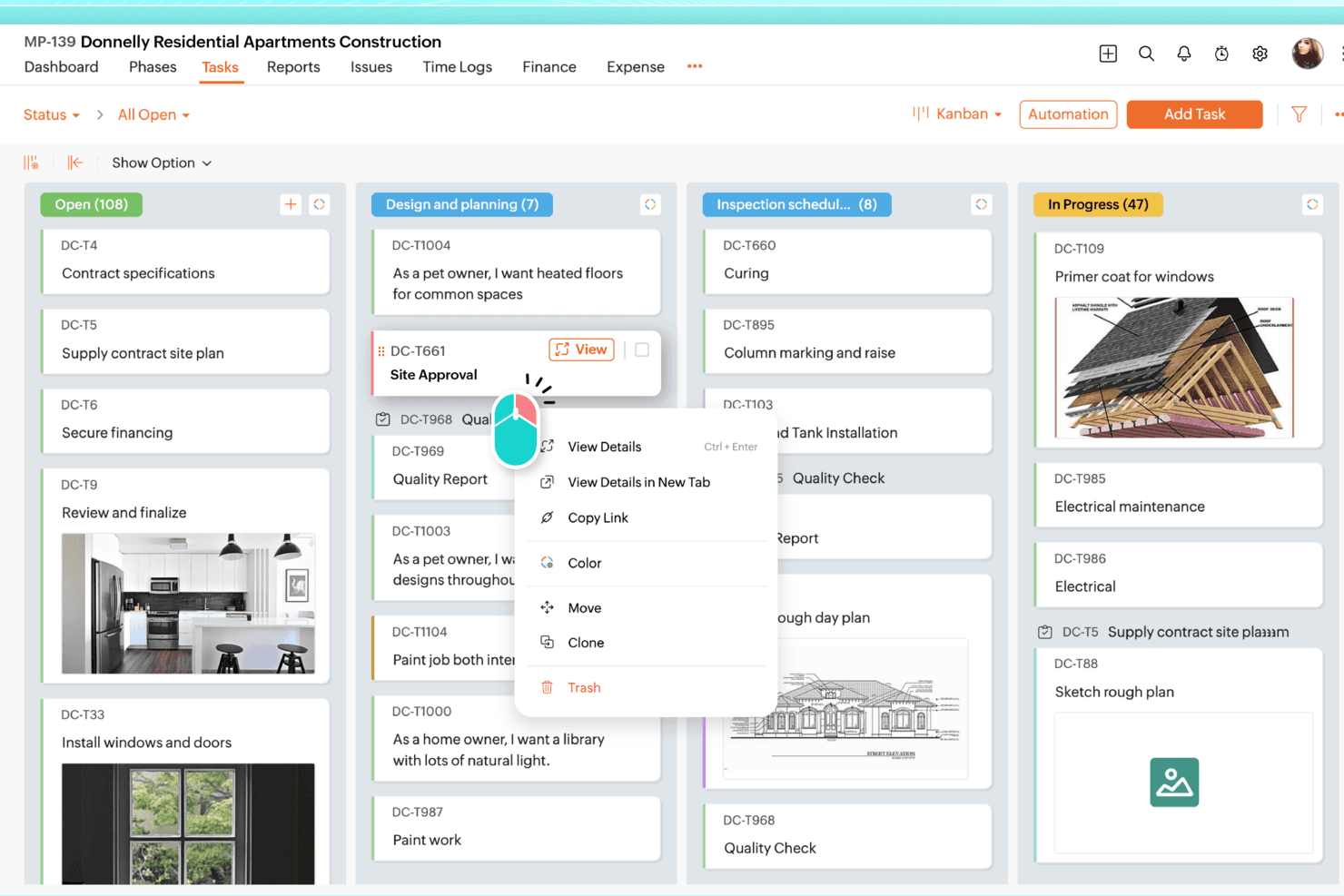
Zoho Projects organiza visualmente las tareas en columnas personalizables de un tablero Kanban. Zoho Projects es una herramienta de gestión de proyectos con todas las funciones que se adapta a los responsables de proyectos y a los equipos de operaciones que necesitan gráficos de Gantt, seguimiento de dependencias, gestión de presupuestos y control del tiempo integrados en una única plataforma asequible.
¿Para quién es más adecuado Zoho Projects?
Zoho Projects es una opción excelente para responsables de proyectos y equipos de operaciones que necesitan herramientas tradicionales de gestión de proyectos—gráficos de Gantt, presupuestos y control del tiempo—sin pagar precios del nivel de Asana.
Por qué elegí Zoho Projects
Elegí Zoho Projects como una de las mejores opciones porque su control del tiempo integrado va mucho más allá de un temporizador básico. Los temporizadores a nivel de tarea se incorporan directamente a las hojas de horas, donde las horas se marcan como facturables o no facturables y pasan por flujos de trabajo de aprobación antes de sincronizarse con Zoho Invoice o Zoho Books para la facturación. También valoro los informes de horas planificadas frente a las reales y la gestión del valor ganado, que permiten detectar desviaciones presupuestarias antes de que se conviertan en un problema real.
Funciones principales de Zoho Projects
- Automatización de flujos de trabajo mediante planos: Un editor de arrastrar y soltar que asigna cambios de estado de las tareas, reglas de asignación, actualizaciones de campos y alertas por correo electrónico a flujos de trabajo estructurados y repetibles.
- Gráfico de Gantt con seguimiento de dependencias: Visualiza los plazos de los proyectos y establece los cuatro tipos de dependencias—fin a inicio, inicio a inicio, fin a fin e inicio a fin—en todos los proyectos del nivel empresarial.
- Panel de control de cartera: Una vista entre proyectos que muestra el estado, la responsabilidad y la salud del presupuesto, junto con las horas planificadas frente a las reales y el porcentaje completado de cada proyecto.
- Informe de gestión de la carga de trabajo: Un informe integrado que muestra la capacidad de cada miembro del equipo como libre, ocupado o sobrecargado, teniendo en cuenta automáticamente el tiempo libre aprobado.
Integraciones de Zoho Projects
Zoho Projects ofrece integraciones nativas con Google Calendar, Microsoft Teams, Slack, GitHub, GitLab, Dropbox, Box, Zendesk y las aplicaciones de Zoho. También admite más de 50 integraciones del mercado de aplicaciones, Zapier, webhooks, funciones personalizadas y un servidor MCP.
Pros and Cons
Pros:
- Los temporizadores integrados alimentan hojas de horas facturables
- Las dependencias de Gantt permiten la planificación de proyectos tradicional
- Los informes de presupuesto y valor ganado muestran las desviaciones
Cons:
- Las pantallas recargadas ralentizan la navegación por los proyectos
- La migración desde Asana requiere asistencia especializada
Learn more about Zoho Projects: Ideal para flujos de trabajo de proyectos personalizables
- Plan gratuito + prueba de 14 días + demostración disponible
- Desde $10/usuario/mes (facturado anualmente)
Visit WebsiteCustomer Rating:4.3/5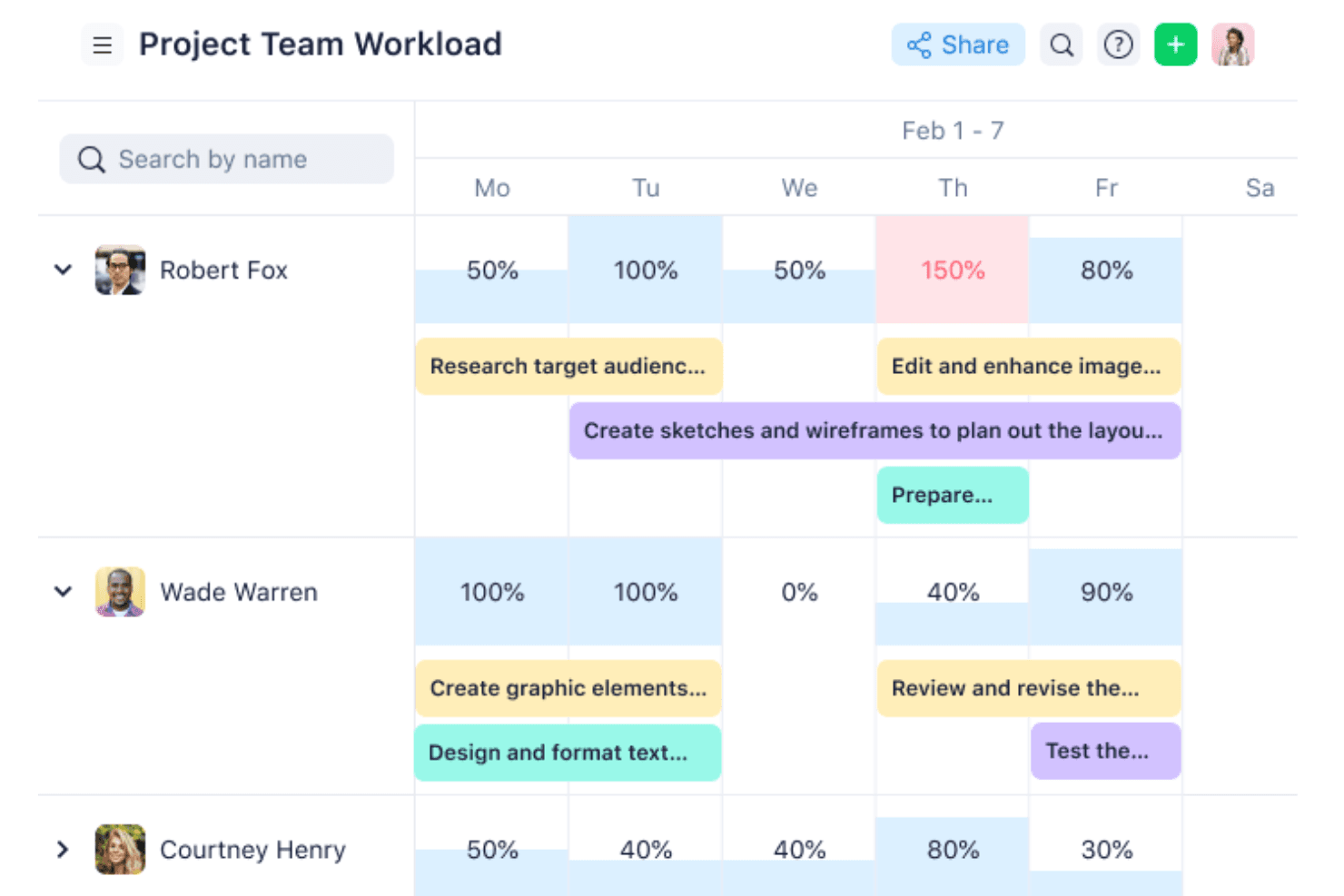
Wrike visualiza la carga de trabajo del equipo y las asignaciones de tareas a lo largo de la semana. Wrike es una plataforma de gestión de proyectos y trabajo diseñada para equipos que necesitan una personalización profunda de los flujos de trabajo, ya que ofrece una jerarquía flexible, visibilidad interfuncional y herramientas de planificación que se adaptan desde equipos pequeños hasta carteras empresariales.
¿Para quién es más adecuado Wrike?
Wrike es una opción excelente para equipos medianos y empresariales que necesitan configurar los flujos de trabajo según sus propios procesos, en lugar de adaptarse a una estructura rígida.
Por qué elegí Wrike
Wrike ocupa un lugar en mi lista de opciones principales por la amplitud con la que permite personalizar los flujos de trabajo sin tocar una sola línea de código. Me gustan especialmente los tipos de elementos personalizados, que permiten modelar la terminología exacta de tu equipo, como crear una jerarquía de iniciativa > épica > historia > tarea, en lugar de obligarlo a encajar todo en las categorías genéricas de 'tareas' y 'proyectos'. Si a esto le añadimos el etiquetado cruzado, un elemento puede existir simultáneamente en varios espacios, de modo que nada queda aislado.
Características principales de Wrike
- Diagrama de Gantt con dependencias: Una vista de línea de tiempo interactiva que permite establecer secuencias de tareas, definir hitos y arrastrar y soltar fechas de vencimiento para ajustar la programación.
- Reservas de recursos y gráficos de carga de trabajo: Asigna personas o roles específicos a proyectos y visualiza la capacidad individual para reequilibrar las asignaciones antes de que se formen cuellos de botella.
- Formularios de solicitud dinámicos: Formularios de entrada configurables que generan automáticamente tareas o proyectos a partir de los envíos, dirigiendo el trabajo al flujo de trabajo adecuado sin configuración manual.
- Más de 400 integraciones nativas prediseñadas: Conecta Wrike con herramientas de todo tu conjunto tecnológico —incluidos Jira, Slack, Salesforce y GitHub— mediante integraciones nativas, una API REST abierta o Wrike Integrate.
Integraciones de Wrike
Wrike ofrece más de 400 integraciones nativas prediseñadas, incluidas Jira, GitHub, Slack, Salesforce, Google Workspace, Microsoft Teams y HubSpot. También proporciona una API REST abierta y Wrike Integrate para automatizaciones personalizadas entre aplicaciones.
Pros and Cons
Pros:
- Los tipos de elementos personalizados se adaptan a las jerarquías de productos
- El etiquetado cruzado mantiene visibles las iniciativas en todos los espacios
- Las dependencias de Gantt aclaran la secuencia de entregas
Cons:
- Los flujos de trabajo complejos pueden abrumar a los nuevos miembros del equipo
- No ofrece capacidades nativas de facturación ni cobro
 3Ideal para el seguimiento de proyectos de equipos de desarrollo
Jira
- Plan gratuito + prueba gratuita disponible
- Desde $7.91/usuario/mes
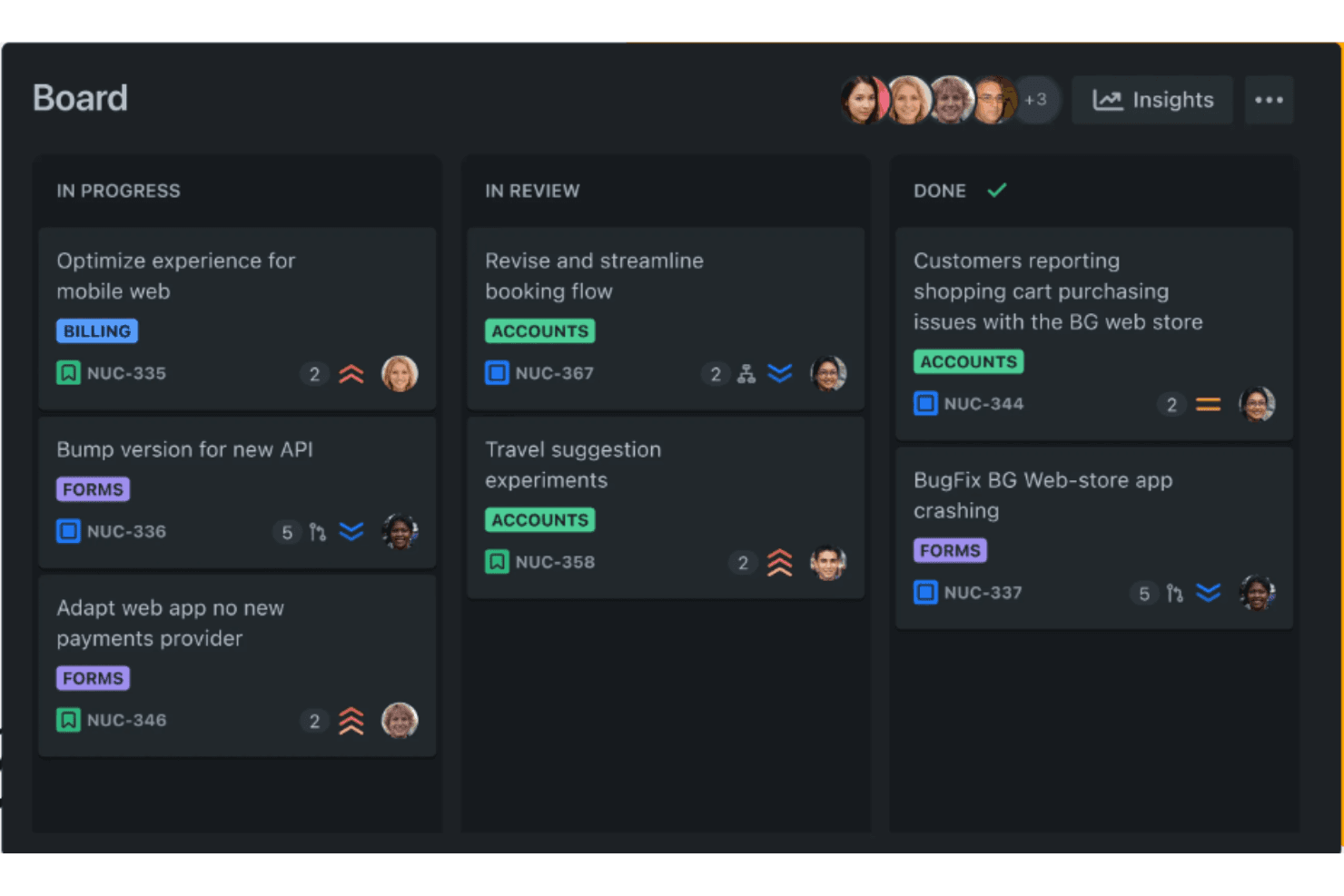
La vista de tablero de Jira organiza visualmente las tareas según sus etapas de progreso. Jira es una plataforma de seguimiento de proyectos e incidencias de Atlassian que ofrece a los equipos relacionados con el desarrollo una personalización profunda de los flujos de trabajo, una jerarquía flexible e integraciones nativas con herramientas como GitHub y Bitbucket.
¿Para quién es más adecuado Jira?
Jira es una opción ideal para equipos técnicos y organizaciones relacionadas con el desarrollo que necesitan una personalización profunda de los flujos de trabajo, una jerarquía flexible e integración nativa con herramientas como GitHub y Bitbucket.
Por qué elegí Jira
Elegí Jira como una de las mejores opciones porque está diseñado desde cero para el seguimiento de proyectos de equipos de desarrollo, con una jerarquía flexible (Iniciativa > Épica > Historia > Subtarea) que se adapta directamente a la forma en que los equipos de ingeniería entregan su trabajo. Me encanta que la integración nativa con GitHub muestre ramas, confirmaciones y solicitudes de incorporación de cambios directamente en los elementos de trabajo, para que nada se pierda entre el gestor de proyectos y la base de código. El mapeo de dependencias entre equipos y la planificación de capacidad en Jira Plans completan la propuesta para quienes gestionan varios equipos de desarrollo a la vez.
Características principales de Jira
- Personalización flexible de los flujos de trabajo: Crea flujos de trabajo personalizados con estados, transiciones y campos únicos para cada tipo de proyecto que gestione tu equipo.
- Creador de reglas de automatización sin código: Configura reglas de tipo si-entonces en tareas, proyectos y herramientas conectadas como Slack y GitHub sin escribir código.
- Informes y paneles ágiles: Accede a gráficos de trabajo pendiente, informes de tiempo de ciclo y paneles personalizables para supervisar el estado de las entregas en los sprints.
- Importador nativo de Asana: Migra tareas, subtareas, responsables, fechas de vencimiento, comentarios y campos personalizados directamente desde Asana mediante una conexión OAuth.
Integraciones de Jira
Jira ofrece integraciones nativas con GitHub, Bitbucket, Slack, Microsoft Teams, Figma, Gmail, Confluence y Loom. También admite más de 3.000 integraciones de Marketplace y API completas para conexiones personalizadas.
Pros and Cons
Pros:
- Las jerarquías personalizadas representan el trabajo de ingeniería
- Vistas de cronograma, calendario y trabajo pendiente
- Planificación de capacidad y dependencias entre equipos
Cons:
- La configuración del flujo de trabajo puede abrumar a los equipos nuevos
- Los equipos no técnicos pueden considerar engorrosa la navegación
Learn more about Jira: Ideal para el seguimiento del trabajo entre equipos asistido por IA
- Plan gratuito disponible
- Desde $11/usuario/mes
Visit WebsiteCustomer Rating:4.6/5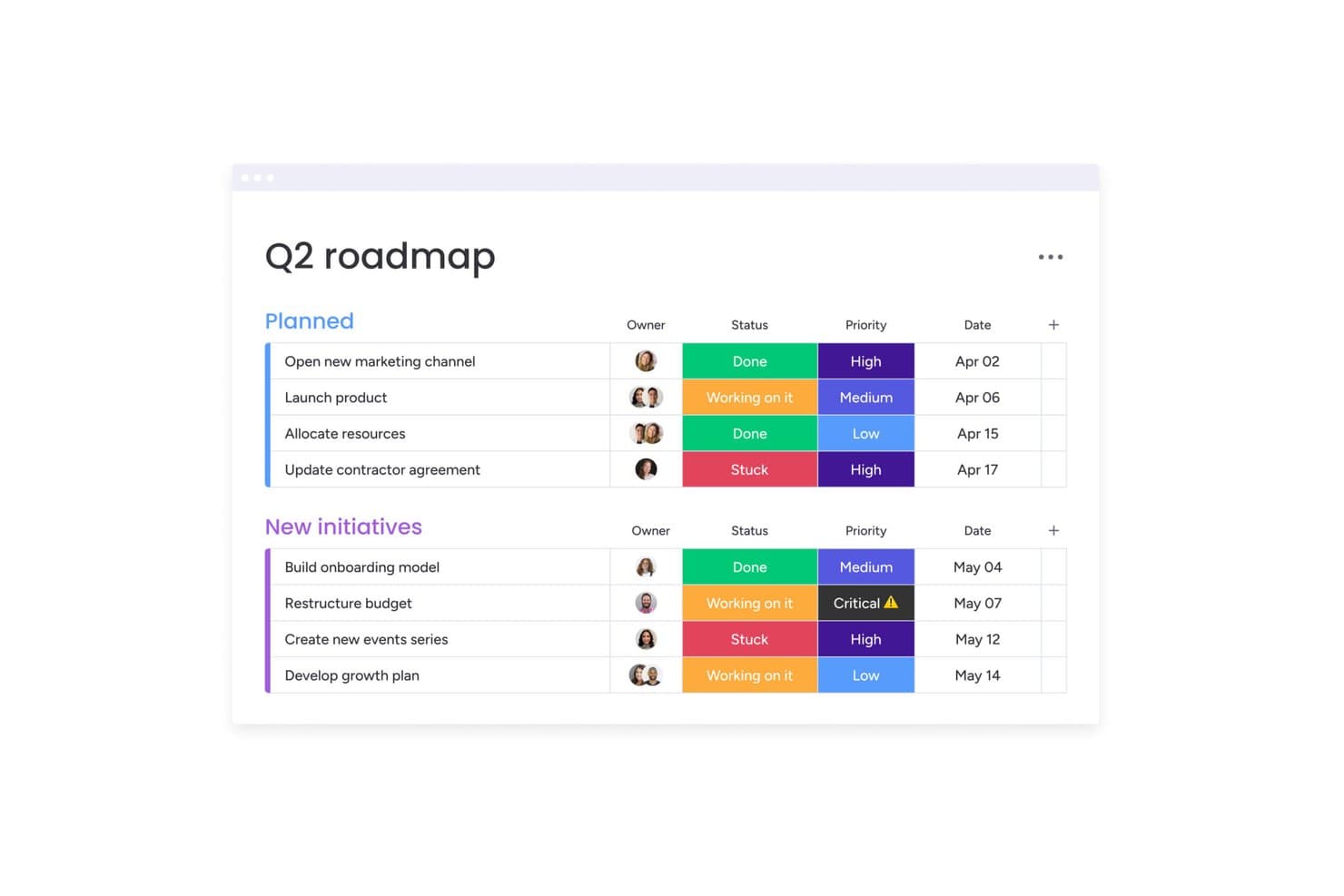
monday AI Workspace organiza los hitos por estado, prioridad y fecha. monday AI Workspace es una plataforma visual de gestión del trabajo que permite a los equipos multifuncionales planificar, supervisar y automatizar proyectos entre departamentos, lo que la convierte en una opción ideal para gerentes de operaciones y líderes de equipo que necesitan flexibilidad sin una configuración compleja.
¿Para quién es más adecuada monday AI Workspace?
monday AI Workspace es una opción ideal para gerentes de operaciones y líderes de equipos multifuncionales que necesitan un espacio de trabajo visual y flexible que pueda ampliarse entre departamentos sin una configuración informática compleja.
Por qué elegí monday AI Workspace
Elegí monday AI Workspace porque es una de las pocas alternativas a Asana que utiliza activamente la IA para gestionar las dependencias entre equipos, no solo para mostrarlas. Me gustan especialmente las alertas de riesgos de IA, que señalan los conflictos entre dependencias antes de que perjudiquen un ciclo de trabajo, y las sugerencias de recursos asistidas por IA, que recomiendan a quién asignar una tarea según la carga de trabajo. Cuando mi equipo ejecuta iniciativas paralelas en producto, diseño e ingeniería, los paneles de varios tableros reúnen todo en una vista activa sin actualizaciones manuales.
Características principales de monday AI Workspace
- Creador de automatizaciones sin código: Configura reglas de «si ocurre esto, entonces haz aquello» para asignar tareas automáticamente, activar notificaciones y mover elementos entre tableros sin escribir código.
- WorkForms: Crea formularios personalizados de recepción que envíen las solicitudes directamente a tus tableros, manteniendo las peticiones y aprobaciones en un solo lugar.
- Visualizadores gratuitos ilimitados: Todos los planes de pago te permiten añadir un número ilimitado de partes interesadas con acceso de solo lectura sin coste adicional, de modo que cualquiera que necesite visibilidad no requiere una licencia de pago.
- Múltiples vistas de tablero: Cambia entre las vistas de Kanban, cronograma, Gantt, calendario y carga de trabajo en el mismo tablero para adaptarte a la forma en que tu equipo concibe el trabajo.
Integraciones de monday AI Workspace
monday AI Workspace ofrece más de 850 integraciones, incluidas Asana, Jira Cloud, GitHub, GitLab, Slack, Microsoft Teams, Google Calendar y Google Drive. Su API y SDK admiten aplicaciones e integraciones personalizadas.
Pros and Cons
Pros:
- La IA señala los riesgos de dependencia entre proyectos
- Los paneles visuales unifican el estado de los proyectos entre equipos
- WorkForms dirige las solicitudes de productos a los tableros
Cons:
- Las importaciones desde Asana omiten los campos personalizados y los comentarios
- Las herramientas de dependencias y carga de trabajo requieren planes superiores
Learn more about monday AI Workspace: Ideal para la planificación de proyectos con estilo de hoja de cálculo
- Prueba gratuita de 30 días + demostración disponible
- Desde $9/usuario/mes (facturado anualmente)
Visit WebsiteCustomer Rating:4.4/5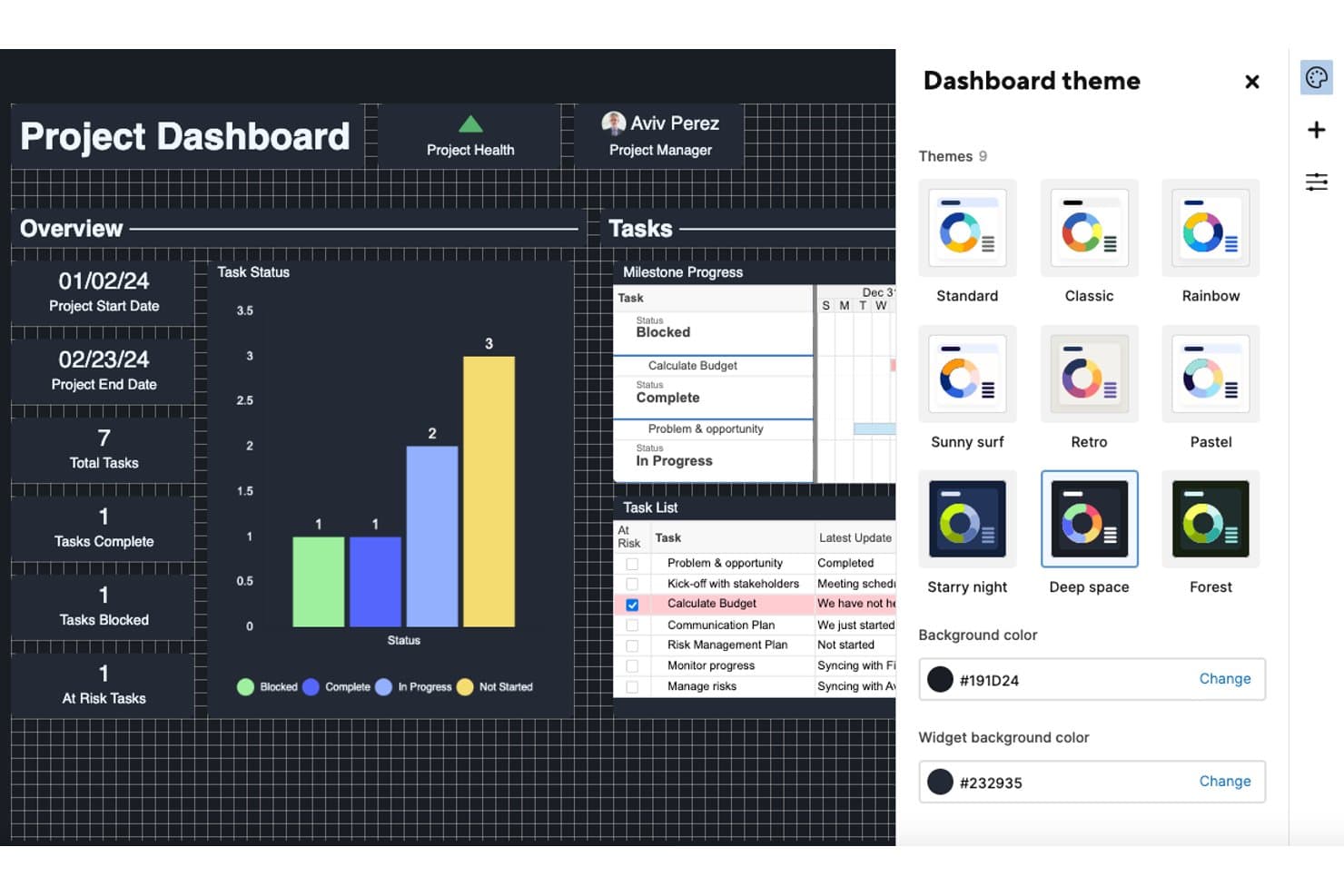
Smartsheet permite a los usuarios personalizar los paneles con nueve temas de color. Smartsheet es una plataforma de gestión del trabajo con estilo de hoja de cálculo que resulta atractiva para los gerentes de proyectos y los equipos de operaciones que necesitan herramientas de planificación detalladas, como diagramas de Gantt, dependencias de tareas e informes entre proyectos.
¿Para quién es más adecuado Smartsheet?
Smartsheet es una excelente opción para los gerentes de proyectos y los equipos de operaciones que necesitan una planificación detallada y centrada en los datos, con diagramas de Gantt, dependencias de tareas e informes entre proyectos.
Por qué elegí Smartsheet
Elegí Smartsheet como una de las mejores opciones porque incorpora una planificación de proyectos genuina con estilo de hoja de cálculo en una herramienta de gestión del trabajo, algo que Asana no puede igualar. Confío en funciones como los diagramas de Gantt con seguimiento de la ruta crítica, las dependencias de tareas y las líneas base a nivel de fila para gestionar cronogramas de entrega complejos sin salir de la cuadrícula. Cuando gestiono un proyecto con subtareas jerarquizadas y seguimiento de hitos, la estructura de filas principales y secundarias de Smartsheet mantiene todo organizado de una manera natural para quienes vienen de Excel.
Características principales de Smartsheet
- Automatización de flujos de trabajo: Crea flujos de trabajo condicionales sin código y de varios pasos, con automatizaciones ilimitadas en los planes Business y superiores.
- Asientos gratuitos para colaboradores e invitados: Invita a colaboradores externos y clientes a ver, comentar y gestionar archivos adjuntos sin pagar por un asiento.
- Sincronización bidireccional con Jira: Conecta Smartsheet con Jira mediante un conector bidireccional que mantiene la jerarquía Historia > Tarea > Subtarea como filas principales y secundarias.
- Informes y paneles entre hojas: Extrae datos de varias hojas en un único informe y muestra métricas en tiempo real en paneles interactivos.
Integraciones de Smartsheet
Smartsheet ofrece integraciones con Google Workspace, Microsoft 365, Slack, Microsoft Teams, Salesforce, Power BI y Jira mediante su conector premium. También proporciona una API para desarrolladores y es compatible con Zapier.
Pros and Cons
Pros:
- Las dependencias y líneas base de Gantt permiten gestionar planes complejos
- Los paneles conectan datos en tiempo real entre las hojas
- Compatibilidad con colaboradores gratuitos para la colaboración con clientes
Cons:
- La migración desde Asana requiere una limpieza sustancial de los archivos CSV
- Los costes de renovación pueden aumentar considerablemente
Learn more about Smartsheet: La mejor opción para una personalización de tareas profundamente jerarquizada
- Plan gratuito + demostración gratuita disponible
- Desde $10/usuario/mes
Visit WebsiteCustomer Rating:4.6/5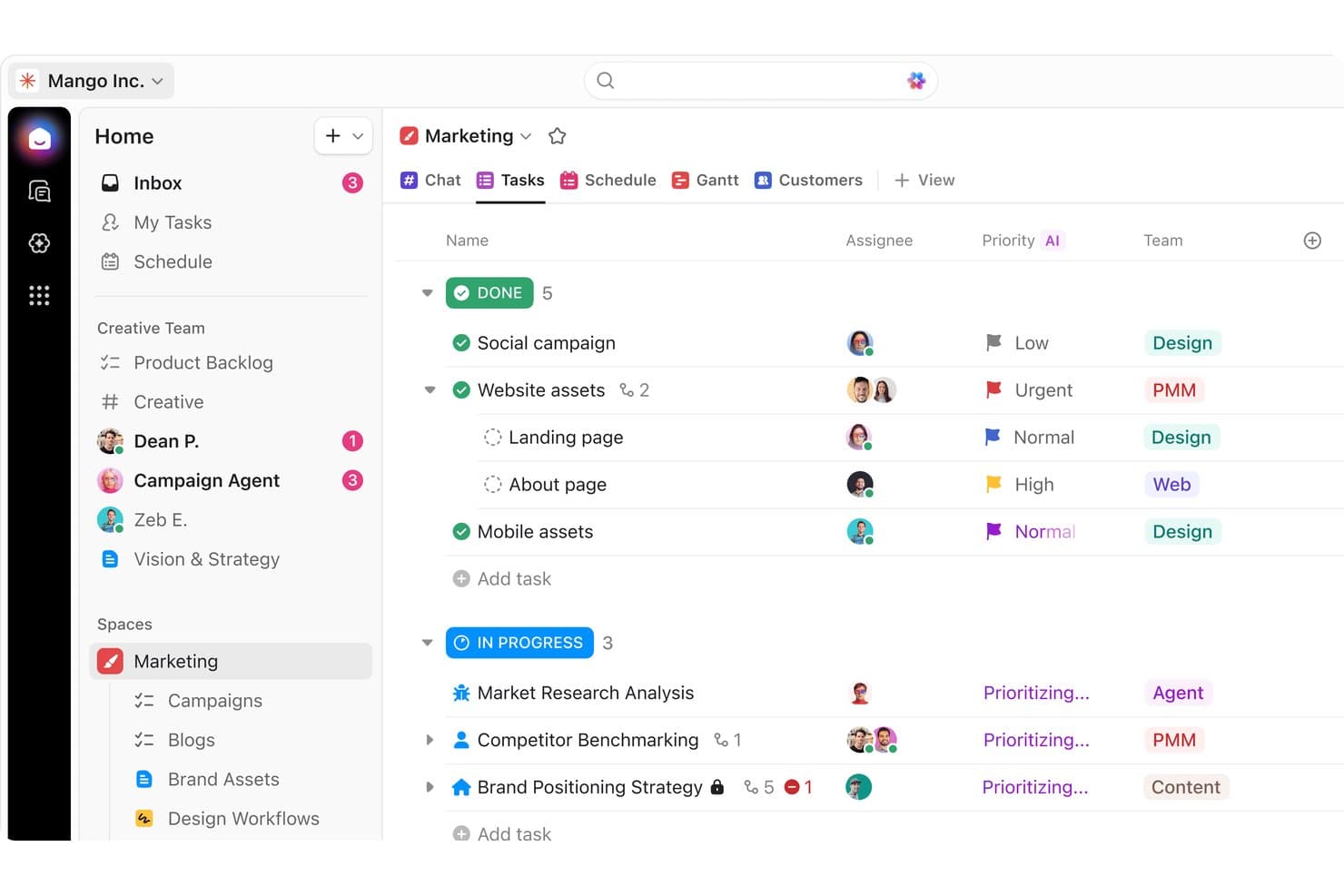
ClickUp organiza las tareas de marketing por estado, prioridad y equipo. ClickUp es una plataforma de gestión del trabajo todo en uno que reúne tareas, documentos, objetivos y chat de equipo en un único espacio de trabajo, lo que la convierte en una opción sólida para equipos multifuncionales que necesitan una gran flexibilidad en los flujos de trabajo sin tener que alternar entre varias herramientas.
¿Para quién es más adecuado ClickUp?
ClickUp es una opción sólida para equipos multifuncionales que necesitan gestionar tareas, documentos y comunicación en un solo lugar sin adoptar varias herramientas.
Por qué elegí ClickUp
Elegí ClickUp como una de las mejores opciones porque la profundidad de personalización de las tareas realmente la distingue. Puedo crear tareas con estados personalizados, varios responsables y los cuatro tipos de dependencias, y después anidar subtareas en una jerarquía de seis niveles para reflejar exactamente cómo estructura el trabajo mi equipo. Me gusta especialmente cómo la vista de Gantt lo integra todo, reprogramando automáticamente las tareas dependientes cuando cambia una fecha límite y mostrando la ruta crítica para que nada se retrase sin que nos demos cuenta.
Funciones principales de ClickUp
- Seguimiento nativo de objetivos: Vincula los objetivos directamente a tareas o sprints y permite que ClickUp calcule el progreso automáticamente, con objetivos establecidos como valores numéricos, basados en tareas o de verdadero/falso.
- Chat integrado: Crea canales, envía mensajes directos e inicia videollamadas sin salir de la plataforma, con resúmenes generados por AI para ponerse al día sobre las conversaciones que te hayas perdido.
- Creador de automatizaciones de flujos de trabajo: Configura automatizaciones basadas en activadores mediante indicaciones en lenguaje sencillo a través de AI Builder, con acciones como asignar tareas automáticamente, enviar correos electrónicos o activar webhooks.
- Formularios personalizados: Crea formularios para informes de errores, comentarios de clientes o solicitudes de registro que generen tareas automáticamente al enviarse.
Integraciones de ClickUp
ClickUp ofrece integraciones nativas con Slack, Jira, GitHub, HubSpot, Google Calendar, Microsoft Teams y Zendesk. También admite una API abierta, webhooks y Zapier para conexiones personalizadas.
Pros and Cons
Pros:
- Las jerarquías de tareas anidadas reflejan el trabajo del producto
- Las dependencias de Gantt reprograman el trabajo vinculado
- Los objetivos conectan las tareas de entrega con los resultados
Cons:
- Las pantallas densas hacen que los flujos de trabajo sencillos parezcan desordenados
- La aplicación móvil va por detrás de la versión de escritorio para el trabajo de proyectos
Learn more about ClickUp: Mejor por sus precios de tarifa fija para equipos
- Plan gratuito + prueba gratuita de 14 días disponible
- Desde $10/user/month (facturado anualmente)
Visit WebsiteCustomer Rating:4.6/5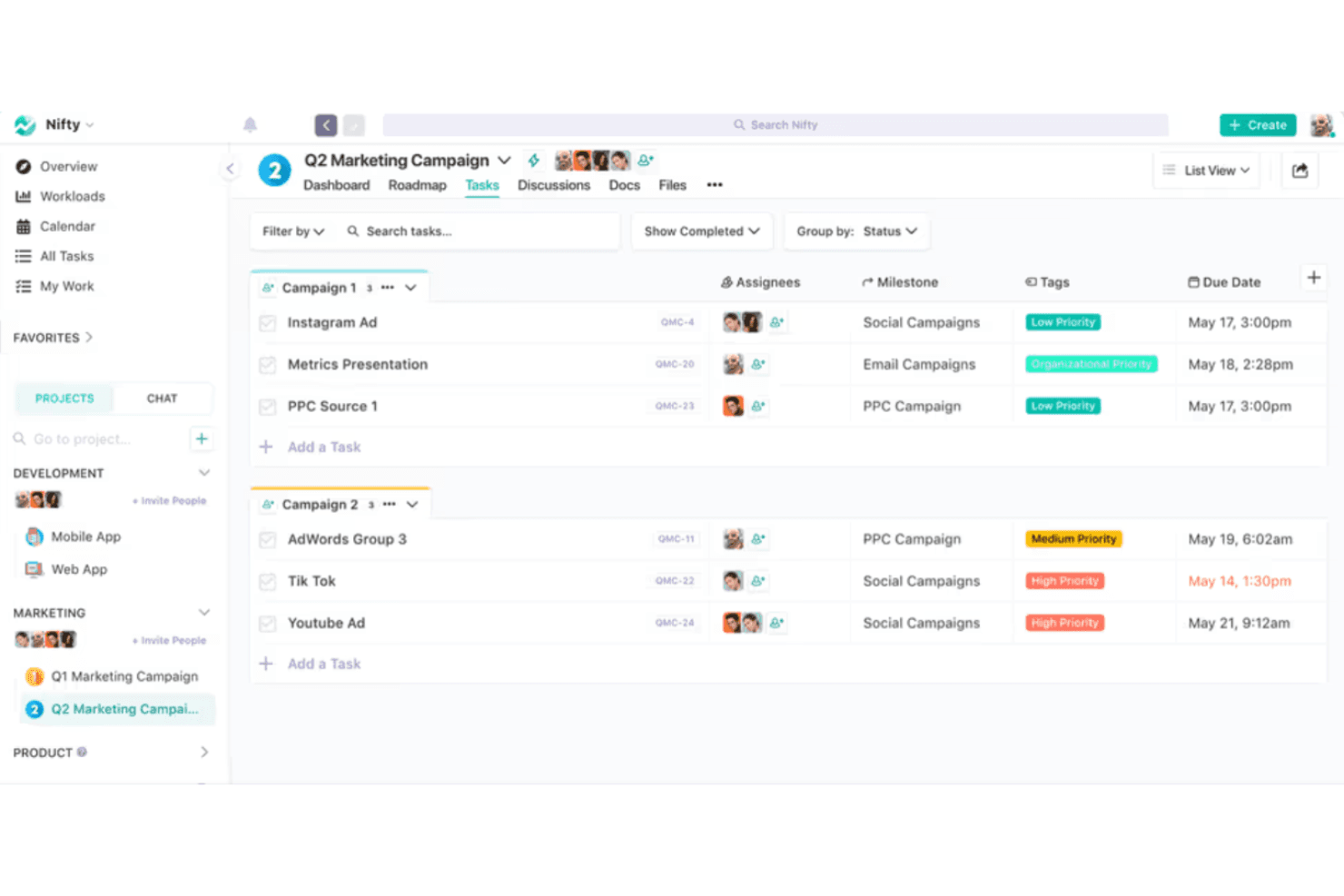
Nifty organiza las tareas de marketing por campaña con etiquetas de prioridad y fechas de vencimiento. Nifty es un espacio de trabajo de gestión de proyectos todo en uno que reúne tareas, documentos, chat, objetivos e informes para equipos que necesitan visibilidad a nivel de cartera sin tener que alternar entre varias herramientas.
¿Para quién es mejor Nifty?
Nifty es una excelente opción para equipos en crecimiento que quieren un único espacio de trabajo para tareas, documentos y chat sin pagar tarifas por usuario a medida que aumenta el número de empleados.
Por qué elegí Nifty
Nifty ocupa un lugar en mi lista de finalistas porque sus precios de tarifa fija para equipos son realmente poco habituales en esta categoría. Cuando tu equipo alcanza las siete personas o más, pagas una tarifa mensual fija en lugar de ver cómo los costes se multiplican por usuario. Aprecio especialmente que este modelo incluya invitados ilimitados en la mayoría de los planes de pago, por lo que puedo incorporar a clientes o colaboradores externos sin generar cargos adicionales. La visibilidad a nivel de cartera en todos los proyectos es lo que termina de convencerme.
Funciones principales de Nifty
- Seguimiento de objetivos nativo: Establece objetivos que obtengan automáticamente el progreso de tareas, listas, campos personalizados o tiempo registrado en varios proyectos.
- Sincronización bidireccional con herramientas de desarrollo: Conecta GitHub o Jira para que los commits, las solicitudes de incorporación de cambios y las actualizaciones de tareas se reflejen en ambas herramientas sin actualizaciones manuales.
- Creador de automatizaciones de flujos de trabajo: Crea reglas de varios pasos basadas en condiciones si/entonces, con activadores, condiciones y acciones personalizados para avanzar el trabajo automáticamente.
- Seguimiento integrado del tiempo y el presupuesto: Registra las horas directamente en las tareas y controla el gasto de los proyectos sin necesitar una herramienta de seguimiento independiente.
Integraciones de Nifty
Nifty ofrece integraciones nativas con Slack, GitHub, GitLab, Jira, Google Drive, Google Calendar, Microsoft 365, Zoom, Figma y Miro. También admite Zapier y una API abierta para integraciones personalizadas.
Pros and Cons
Pros:
- Las tareas, los documentos y el chat comparten un único espacio de trabajo
- Las carteras muestran el progreso en todos los proyectos
- El importador de Asana conserva las tareas y los comentarios
Cons:
- Los evaluadores informan de que las notificaciones de tareas no son fiables
- La aplicación móvil está por detrás de la experiencia web
Learn more about Nifty: 8La mejor para la productividad y el análisis de objetivos
Hive
- Plan gratuito + prueba de 14 días + demostración disponible
- Desde $5/usuario/mes
Visit WebsiteCustomer Rating:4.5/5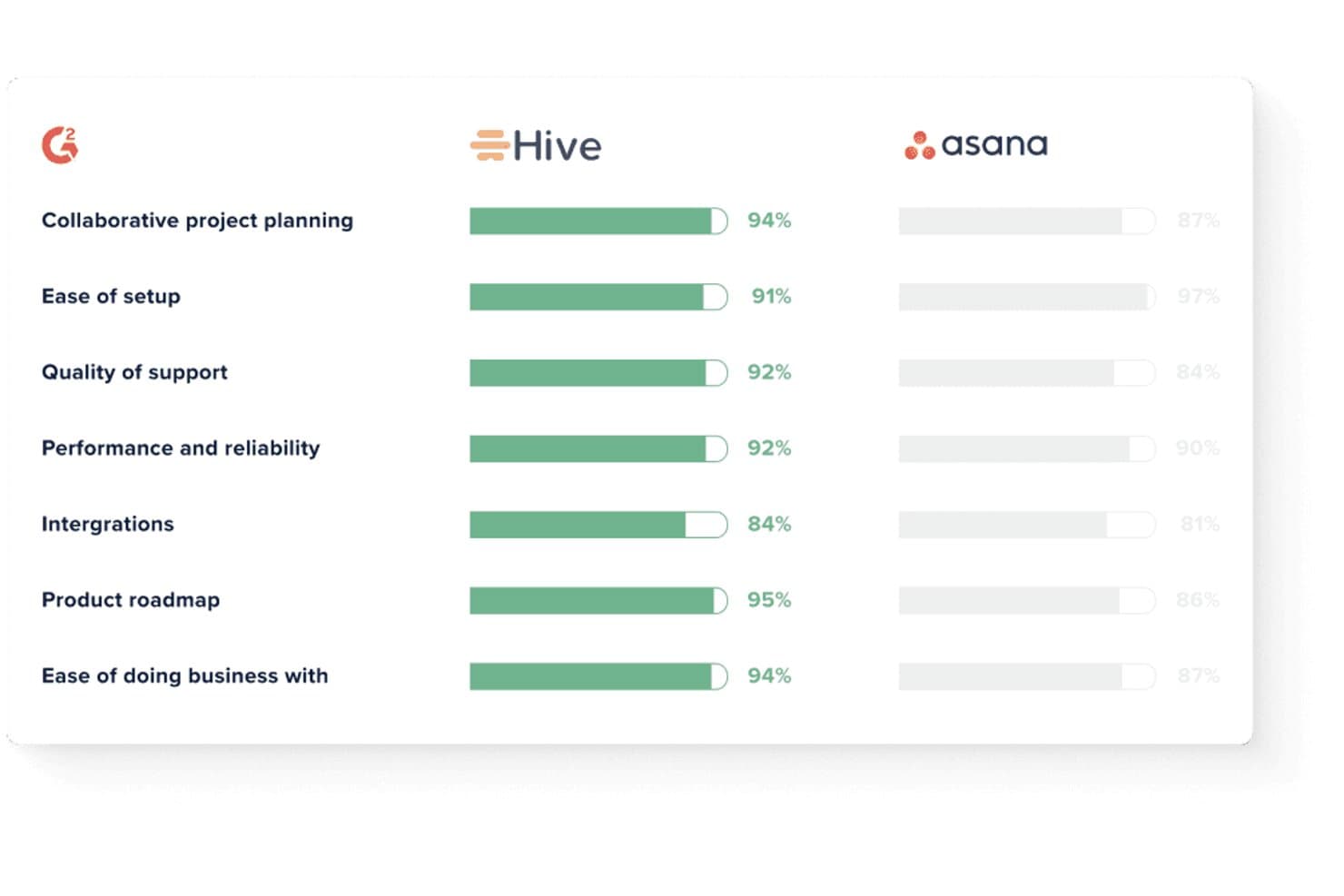
Hive supera a Asana en las principales métricas de satisfacción de G2. Hive es una plataforma de gestión del trabajo que consolida tareas, chat, correo electrónico, seguimiento de objetivos y paneles en un solo lugar, lo que la convierte en una excelente opción para gerentes de proyectos y equipos de operaciones que quieren usar menos herramientas sin sacrificar la visibilidad.
¿Para quién es mejor Hive?
Hive funciona bien para gerentes de proyectos y equipos de operaciones que necesitan seguimiento de objetivos e informes integrados sin tener que combinar herramientas independientes.
Por qué elegí Hive
Elegí Hive como una de las mejores opciones porque su seguimiento de objetivos y sus paneles de análisis integrados ofrecen a los gerentes de proyectos un nivel de visibilidad que la mayoría de las alternativas a Asana omiten por completo. Me gusta especialmente cómo los objetivos se vinculan directamente con la finalización de tareas, los objetivos numéricos o incluso las métricas de CRM extraídas de HubSpot o Salesforce, de modo que el progreso siempre se basa en datos reales. Los resúmenes de paneles generados por IA señalan si los proyectos están encaminados, en riesgo o bloqueados, sin necesidad de realizar informes manuales.
Características principales de Hive
- Chat nativo: Envía mensajes, comparte archivos y debate sobre tareas directamente dentro de Hive sin cambiar a una herramienta de mensajería independiente.
- Generador de automatización de flujos de trabajo: Crea automatizaciones de varios pasos y sin código activadas por cambios en el estado de las tareas, modificaciones de fechas límite o eventos de creación de proyectos.
- Sincronización bidireccional con Jira: Mantén sincronizadas en tiempo real las tareas de Hive y las incidencias de Jira, incluidos títulos, asignados, estados, subtareas y fechas límite.
- Hive Mail: Conecta Gmail o Outlook para convertir hilos de correo electrónico en tareas y redactar respuestas sin salir de la plataforma.
Integraciones de Hive
Hive cuenta con integraciones nativas con Jira, GitHub, Slack, Microsoft Teams, Zoom, Google Drive, Dropbox, Microsoft OneDrive, Box y QuickBooks. También admite más de 1.000 integraciones mediante Zapier y ofrece una API para integraciones personalizadas.
Pros and Cons
Pros:
- Los objetivos conectan las tareas con resultados medibles
- Los paneles de IA señalan el progreso de los proyectos en riesgo
- Las dependencias de Gantt permiten una planificación detallada del calendario
Cons:
- La configuración de los flujos de trabajo puede requerir formación del personal
- Las notificaciones móviles pueden ser poco fiables
Learn more about Hive: Ideal para equipos de agencias y de entrega a clientes
- Plan gratuito + prueba gratuita de 14 días + demostración gratuita disponible
- Desde $9.99/user/month (facturado anualmente)
Visit WebsiteCustomer Rating:4.4/5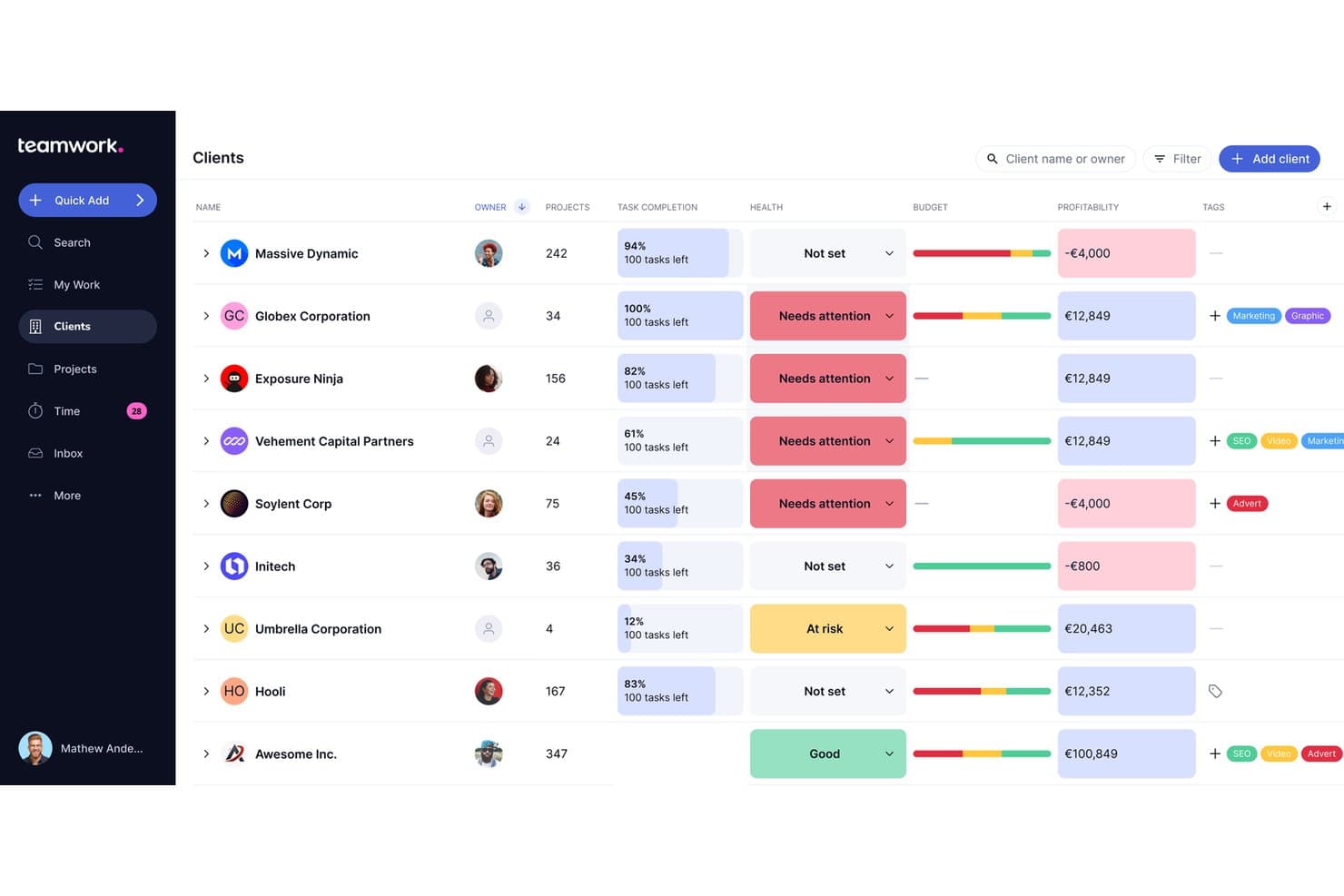
Teamwork.com permite a los usuarios supervisar el estado del cliente, el presupuesto y la rentabilidad en una sola vista. Teamwork.com es una plataforma de gestión de proyectos creada para agencias y equipos que trabajan directamente con clientes, que reúne en un solo lugar la gestión de tareas, el seguimiento del tiempo, la elaboración de presupuestos y los informes de rentabilidad.
¿Para quién es más adecuado Teamwork.com?
Teamwork.com es una opción ideal para agencias y equipos de servicios para clientes que necesitan gestionar la entrega, registrar el tiempo facturable y supervisar la rentabilidad de los proyectos en un solo lugar.
Por qué elegí Teamwork.com
Teamwork.com ocupa un lugar en mi lista de favoritos porque está diseñado desde cero para el trabajo de agencias y la entrega a clientes, de una forma que Asana simplemente no ofrece. Me encanta que la elaboración nativa de presupuestos, el seguimiento del tiempo facturable y los informes de rentabilidad estén junto a la gestión de tareas, de modo que puedo ver si un proyecto para un cliente realmente genera beneficios sin cambiar de herramienta. El modelo de cuentas gratuitas para clientes también es un verdadero diferenciador: un número ilimitado de clientes puede revisar hitos y materiales para aprobación sin necesitar una licencia de pago.
Características principales de Teamwork.com
- Diagrama de Gantt con ruta crítica: Visualiza las dependencias entre tareas y señala automáticamente qué tareas retrasarían todo el proyecto si se demoran.
- Formularios de solicitud: Convierte directamente las solicitudes de clientes o del equipo en tareas, con enrutamiento inteligente disponible en los planes de nivel superior.
- Planificación de carga de trabajo y capacidad: Consulta la disponibilidad del equipo, programa recursos según su función o habilidad y ejecuta escenarios hipotéticos para evitar la sobreasignación.
- Paneles de cartera: Supervisa varios proyectos desde un único panel general, con filtros por estado, situación, responsable y campos personalizados.
Integraciones de Teamwork.com
Teamwork.com ofrece más de 150 integraciones, incluidas Slack, Microsoft Teams, Google Drive, Dropbox, Xero, QuickBooks, HubSpot, Salesforce, NetSuite y Unito para la sincronización bidireccional con Jira y GitHub. La API y los ganchos web permiten establecer conexiones personalizadas.
Pros and Cons
Pros:
- Los portales para clientes ofrecen una visibilidad clara a los clientes
- El tiempo facturable y la rentabilidad comparten el contexto del proyecto
- Las rutas de Gantt aclaran las dependencias de entrega
Cons:
- La navegación puede resultar abarrotada entre las distintas vistas
- Los equipos de producto echan de menos el seguimiento nativo de OKR
Learn more about Teamwork.com: 10Ideal para agencias que gestionan proyectos de clientes
Teamwork
- Plan gratuito + prueba gratuita de 14 días + demostración gratuita disponible
- Desde $9.99/usuario/mes (facturado anualmente)
Visit WebsiteCustomer Rating:4.5/5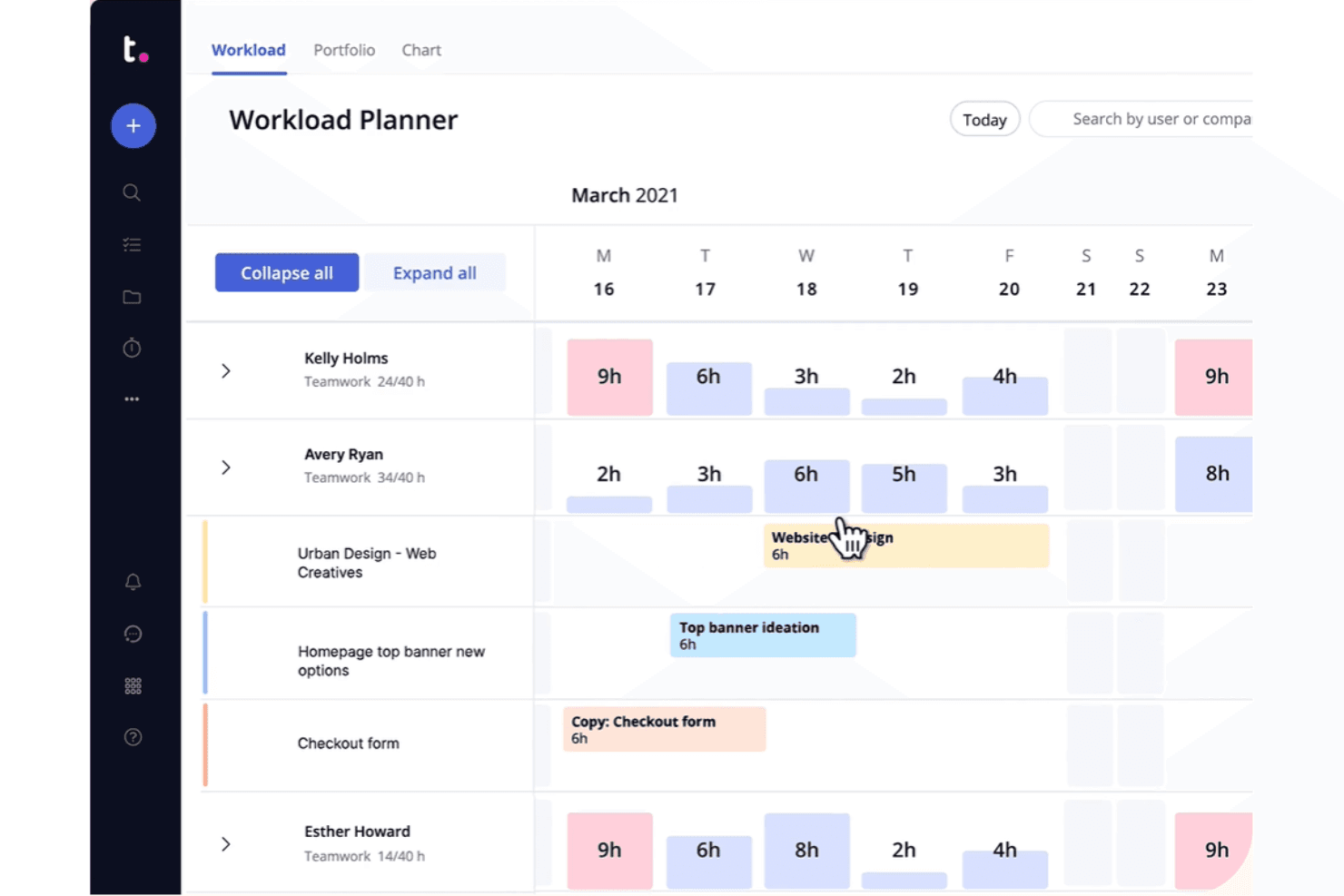
Teamwork representa visualmente las cargas de trabajo del equipo y las asignaciones de tareas en un calendario semanal. Teamwork es una plataforma de gestión de proyectos diseñada para agencias y equipos que prestan servicios a clientes, ya que combina la gestión de tareas, el seguimiento del tiempo, los presupuestos, la facturación y los portales para clientes en un solo lugar.
¿Para quién es más adecuado Teamwork?
Teamwork está diseñado para agencias y equipos que prestan servicios a clientes y necesitan gestionar la ejecución de proyectos, el seguimiento del tiempo y la facturación a clientes en un solo lugar.
Por qué elegí Teamwork
Elegí Teamwork como una de las mejores opciones porque es la única herramienta de esta lista creada desde cero para el trabajo de agencias con clientes, en lugar de haber sido adaptada para ello. Me encanta que puedas ofrecer a los clientes un portal personalizado con la marca de la empresa para revisar y aprobar entregables, sin que tengan que acceder en ningún momento a tu espacio de trabajo interno. Los presupuestos de tiempo, los contratos de servicios recurrentes y la facturación integrados permiten a mi equipo realizar un seguimiento de las horas facturables y generar facturas directamente a partir del tiempo registrado, algo que ningún plan de Asana ofrece.
Características principales de Teamwork
- Varios asignados por tarea: Asigna a más de un miembro del equipo a una sola tarea para realizar un seguimiento de la responsabilidad compartida sin soluciones alternativas.
- Tableros de cartera: Consulta el estado y el progreso de todos los proyectos activos en un solo lugar, con activadores de automatización a nivel de cartera.
- Planificador de carga de trabajo: Consulta en tiempo real la capacidad de cada miembro del equipo y ajusta las asignaciones para equilibrar la carga de trabajo entre proyectos.
- Importador nativo de Asana: Migra directamente desde Asana personas, proyectos, tareas, subtareas, asignados, fechas de vencimiento, comentarios y archivos en cuestión de minutos.
Integraciones de Teamwork
Teamwork ofrece más de 150 integraciones, incluidas Slack, Microsoft Teams, Google Calendar, Outlook Calendar, HubSpot, QuickBooks Online, Jira mediante SoftSync y GitHub mediante Unito. También proporciona una API y es compatible con Zapier.
Pros and Cons
Pros:
- Los portales para clientes mantienen las aprobaciones fuera de los espacios de trabajo internos
- El tiempo registrado se refleja en los presupuestos y las facturas de los clientes
- Varios asignados aclaran la responsabilidad compartida de las tareas
Cons:
- La navegación y las vistas pueden resultar confusas
- Las importaciones desde Asana omiten las dependencias y los campos personalizados
Learn more about Teamwork:
Otras alternativas a Asana
Estas son algunas alternativas adicionales a Asana que no llegaron a mi lista, pero que aun así merece la pena conocer:
- 11CeloxisIdeal para la supervisión de carteras a nivel empresarial
- 12GoodDayIdeal para migraciones de bajo coste desde Asana
- 13RavetreeIdeal para aprobaciones de proyectos de cara al cliente
- 14AirtableIdeal para crear flujos de trabajo personalizados sin código
- 15NotionIdeal para documentos, wikis y tareas en un mismo espacio de trabajo
- 16Aha!Ideal para vincular tareas con la estrategia del producto
- 17LinearIdeal para el seguimiento de incidencias y hojas de ruta del equipo de desarrollo
- 18TrelloIdeal para tableros Kanban con automatización integrada
Cómo evalúo las alternativas a Asana
Divido mi evaluación en tres partes, y la funcionalidad principal tiene el mayor peso: una herramienta debe organizar las tareas en distintos proyectos y mostrar el trabajo en más de una vista. Después, busco el seguimiento nativo de objetivos o la visibilidad a nivel de cartera como características diferenciadoras. Por último, considero la asistencia para la migración y el coste total de propiedad.
Funcionalidad principal (criterios básicos para esta lista)
Al seleccionar las herramientas para mi lista, puntúo cada una en una escala de 0 (no ofrece la funcionalidad) a 5 (sobresale en esta área) para cada funcionalidad principal que se indica a continuación. Después convierto el total en un porcentaje para ayudar a evaluar la adecuación general de cada herramienta, con un peso adicional para cualquier funcionalidad que haya considerado esencial.
- Gestión de tareas y proyectos (esencial): Busco una asignación clara de las tareas, fechas de vencimiento, subtareas y dependencias para realizar el seguimiento del trabajo en lanzamientos de productos u otros proyectos con varios equipos.
- Vistas del trabajo (esencial): Compruebo que haya vistas sincronizadas, como listas, tableros, calendarios y cronogramas, para que los equipos puedan planificar el trabajo en el formato que más les convenga.
- Automatización de flujos de trabajo: Evalúo si los equipos pueden establecer reglas para acciones recurrentes, como asignar una tarea cuando cambia su estado.
- Colaboración en equipo: Busco comentarios, intercambio de archivos y menciones vinculados al trabajo, para mantener las conversaciones del proyecto conectadas con las tareas.
- Informes y progreso: Evalúo los paneles para comprobar el estado del proyecto, la carga de trabajo y el progreso hacia los objetivos, con el fin de ayudar a los equipos a detectar riesgos de entrega.
- Integraciones con terceros: Compruebo que haya conexiones con herramientas habituales de comunicación, almacenamiento y calendario que se integren en los flujos de trabajo existentes del equipo.
Una vez que tengo una lista de herramientas que cumplen los criterios, considero qué distingue a cada plataforma.
Factores diferenciadores (lo que distingue a los proveedores)
Así es como comparo y contrasto los distintos proveedores:
Características destacadas
Busco un seguimiento nativo de objetivos que vincule las tareas diarias con los OKR, de modo que un responsable de producto pueda rastrear un elemento del sprint hasta un objetivo trimestral sin cambiar de herramienta. La sincronización bidireccional con las herramientas de desarrollo es igual de importante: cuando las actualizaciones de Jira o GitHub se reflejan en tiempo real en la herramienta de planificación, los equipos de producto e ingeniería evitan reuniones duplicadas sobre el estado. También evalúo la visibilidad a nivel de cartera, que permite a un vicepresidente consolidar varias hojas de ruta en una única vista ejecutiva para detectar conflictos de recursos entre distintas líneas de productos.
Más allá de las características
Evalúo primero la asistencia para la migración: la fidelidad de la importación de tareas, campos personalizados y archivos adjuntos determina si tu equipo realmente adopta la nueva herramienta o vuelve discretamente a las hojas de cálculo. El coste total de propiedad es igual de importante, ya que el precio por usuario puede dispararse al añadir colaboradores interfuncionales que solo necesitan acceso de visualización. También compruebo cómo escala cada plataforma desde un único equipo de producto hasta una organización con varias carteras sin fragmentar los informes ni obligar a reestructurar de forma disruptiva el espacio de trabajo.
¿Por qué buscar una alternativa a Asana?
Aunque Asana es una buena opción para la gestión de productos, hay varios motivos por los que algunos usuarios buscan soluciones alternativas. Puede que estés buscando una alternativa a Asana por cualquiera de las siguientes razones.
- Necesitas más opciones de personalización
- Tu equipo necesita herramientas avanzadas de generación de informes
- La interfaz de usuario te parece complicada
- Consideras que carece de integración con aplicaciones específicas
- Buscas planes de precios más asequibles
- Tu equipo está creciendo y necesita una mejor escalabilidad
- Necesitas cumplir normativas específicas sobre datos
Si alguna de estas situaciones te resulta familiar, has llegado al lugar adecuado. Mi lista incluye varias opciones principales de gestión de productos más adecuadas para equipos que se enfrentan a estos desafíos con Asana y buscan soluciones alternativas.
Características principales de Asana
Estas son algunas de las características clave de Asana, para ayudarte a contrastar y comparar lo que ofrecen las soluciones alternativas:
- Gestión de tareas: Te permite crear, asignar y realizar un seguimiento de las tareas para mantener tus proyectos organizados.
- Líneas de tiempo de proyectos: Ayuda a visualizar los calendarios y las fechas límite de los proyectos, garantizando que tu equipo mantenga el rumbo.
- Tableros y calendarios: Proporciona herramientas visuales para la planificación y gestión de proyectos, facilitando la organización de tu equipo.
- Actualizaciones en tiempo real: Mantiene informado a tu equipo mediante notificaciones instantáneas, mejorando la colaboración y la responsabilidad.
- Portafolios: Te permite organizar proyectos por cuenta o equipo, lo que resulta útil para gestionar numerosos proyectos de forma eficiente.
- Asana Intelligence: Ofrece información y sugerencias basadas en inteligencia artificial para mejorar los resultados de los proyectos y ahorrar tiempo.
- Herramientas de colaboración: Facilita la comunicación mediante tablones de mensajes y archivos adjuntos dentro de las tareas.
- Vista de Gantt: Ayuda a crear proyectos, establecer dependencias y visualizar líneas de tiempo mediante una interfaz de arrastrar y soltar.
- Función de revisión: Convierte los comentarios en subtareas, ayudando a los equipos a gestionar la producción de contenidos de forma eficiente.
- Campos personalizados: Te permite adaptar los detalles del proyecto para ajustarlos a las necesidades específicas de tu flujo de trabajo.