

Bu kadar farklı oturum tekrarı çözümü mevcutken, hangisinin sizin için doğru olduğunu belirlemek zor olabilir. Kullanıcı davranışı hakkında derinlemesine içgörüler elde etmek, kullanılabilirlik sorunlarını tespit etmek ve dönüşüm oranlarını iyileştirmek için bunlardan yararlanmak istediğinizi biliyorsunuz; ancak bu iş için hangi aracın en iyi olduğunu bulmanız gerekiyor. Yardımcı olabilirim! Bu yazıda, farklı araçları büyük ekipler ve çeşitli ürünlerle kullanarak edindiğim kişisel deneyimlerimi paylaşacak ve en iyi oturum tekrarı yazılımı seçimlerimi sunarak karar vermenizi kolaylaştıracağım.
Why Trust Our Software Recommendations
6,700+
Reviews
20
Industry experts
16+
Evaluation factors
14
Years
Our team has been testing and reviewing software since 2012. As product managers ourselves, we know how difficult—and important—it is to choose the right software.
For this guide, we evaluated tools using hands-on testing and independent research, scoring tools using our selection criteria.
Our reviews reflect our human editorial judgment, not a sales pitch.
Expert reviewers:
- Andrew LumbySenior TPM
- Cristiano ValimSenior UI/UX Lead


Oturum Tekrarı Yazılımı Karşılaştırma Tablosu
Bu karşılaştırma tablosu, en iyi oturum tekrarı yazılımı seçimlerimin fiyatlandırma ayrıntılarını özetlemektedir:
Score legend (out of 5)
- Excellent4.5–5
- Good4–4.4
- Average3–3.9
- Below average2–2.9
- Poor1–1.9
Sorted by: Default
| Tool | Starting Price | Website | |||||||
|---|---|---|---|---|---|---|---|---|---|
Best for integrating replay and error monitoring | Not rated | 4 | Not rated | Not rated | 4 | 4 | 2 | $26/month Free plan + 14-day trial + free demo available | Website |
Best for friction-score-led session prioritization | 3.8 out of 5 | 4 | 4 | 3 | 5 | 4 | 3 | $25/month Free plan available | Website |
Watch dynamic heatmaps in real-time | 3.5 out of 5 | 4 | 4 | 3 | 3 | 3 | 4 | $32/month 7-day free trial + free plan available | Website |
Best for revenue-impact journey and funnel analysis | 3.8 out of 5 | 4 | 2 | 5 | 4 | 4 | 4 | Pricing upon request Free demo available | Website |
Best for bundled A/B testing with heatmap replay | 3.7 out of 5 | 3 | 5 | 3 | 4 | 3 | 4 | $29/month 30-day free trial available | Website |
Best for quantifying revenue impact of user friction | 4.5 out of 5 | 5 | 4 | 5 | 4 | 4 | 5 | Pricing upon request Free demo available | Website |
Make every visitor interaction on your site searchable | 4.0 out of 5 | 4 | 3 | 4 | 4 | 5 | 4 | Pricing upon request Free plan available | Website |
Best for AI-driven mobile session friction analysis | 4.2 out of 5 | 5 | 3 | 4 | 5 | 5 | 3 | Pricing upon request Free demo + 14-day free trial available | Website |
Organize session replays based on detected issues | 4.0 out of 5 | 5 | 2 | 4 | 4 | 5 | 4 | $15/month Free plan available | Website |
Best for AI-driven issue detection and triage | 4.2 out of 5 | 5 | 4 | 4 | 4 | 4 | 4 | $176/month 14-day free trial + free plan available | Website |


En İyi Oturum Tekrarı Yazılımı İncelemeleri
Aşağıda kısa listeme giren en iyi oturum tekrarı yazılımlarının ayrıntılı özetlerini bulabilirsiniz. İncelemelerim, sizin için en uygun aracı bulmanıza yardımcı olmak amacıyla her aracın temel özelliklerine, artılarına ve eksilerine, entegrasyonlarına ve ideal kullanım alanlarına ayrıntılı bir bakış sunuyor.
 Best for integrating replay and error monitoring
- Free plan + 14-day trial + free demo available
- From $26/month (billed annually)
Visit WebsiteCustomer Rating:4.5/5
Sentry shows session replays to help teams trace errors through real user actions. For teams seeking to enhance their application’s user experience, Sentry offers a versatile solution that combines session replay functionalities with error tracking and performance monitoring. It's an ideal choice for developers and enterprises looking to gain actionable insights into user interactions on web and mobile applications. By providing a visual reproduction of user sessions, Sentry helps identify the root cause of issues without requiring manual reproduction or customer support intervention.
Why I Picked Sentry
I picked Sentry for its unique ability to integrate session replay with error monitoring, giving you a comprehensive view of user interactions and application performance. Session Replay provides video-like reproductions of user sessions, allowing you to see when and where errors occur, which is crucial for debugging complex issues. Additionally, Sentry's privacy controls protect sensitive user data while still providing detailed insights into application performance. This combination of features makes it a compelling choice for developers who need to quickly diagnose and resolve issues.
Sentry Key Features
In addition to its robust session replay capabilities, Sentry offers:
- Breadcrumbs: Tracks events leading up to an error, providing context for debugging.
- Performance Monitoring: Measures application performance to identify bottlenecks and optimize user experience.
- Error Tracking: Automatically captures and alerts you to new errors, with detailed stack traces for quick resolution.
- Integration with Development Tools: Seamlessly connects with tools like GitHub and Slack to streamline your workflow.
Sentry Integrations
Integrations include GitHub, Slack, Jira, Bitbucket, GitLab, Trello, Azure DevOps, Vercel, Netlify, and Datadog.
Pros and Cons
Pros:
- Strong error tracking with clear stack traces
- Performance monitoring for front-end and back-end applications
- Detailed event timelines make debugging faster
Cons:
- Can generate large amounts of data at scale
- Less focused on qualitative UX research features
Learn more about Sentry: Best for friction-score-led session prioritization
- Free plan available
- From $25/month
Visit WebsiteCustomer Rating:4.7/5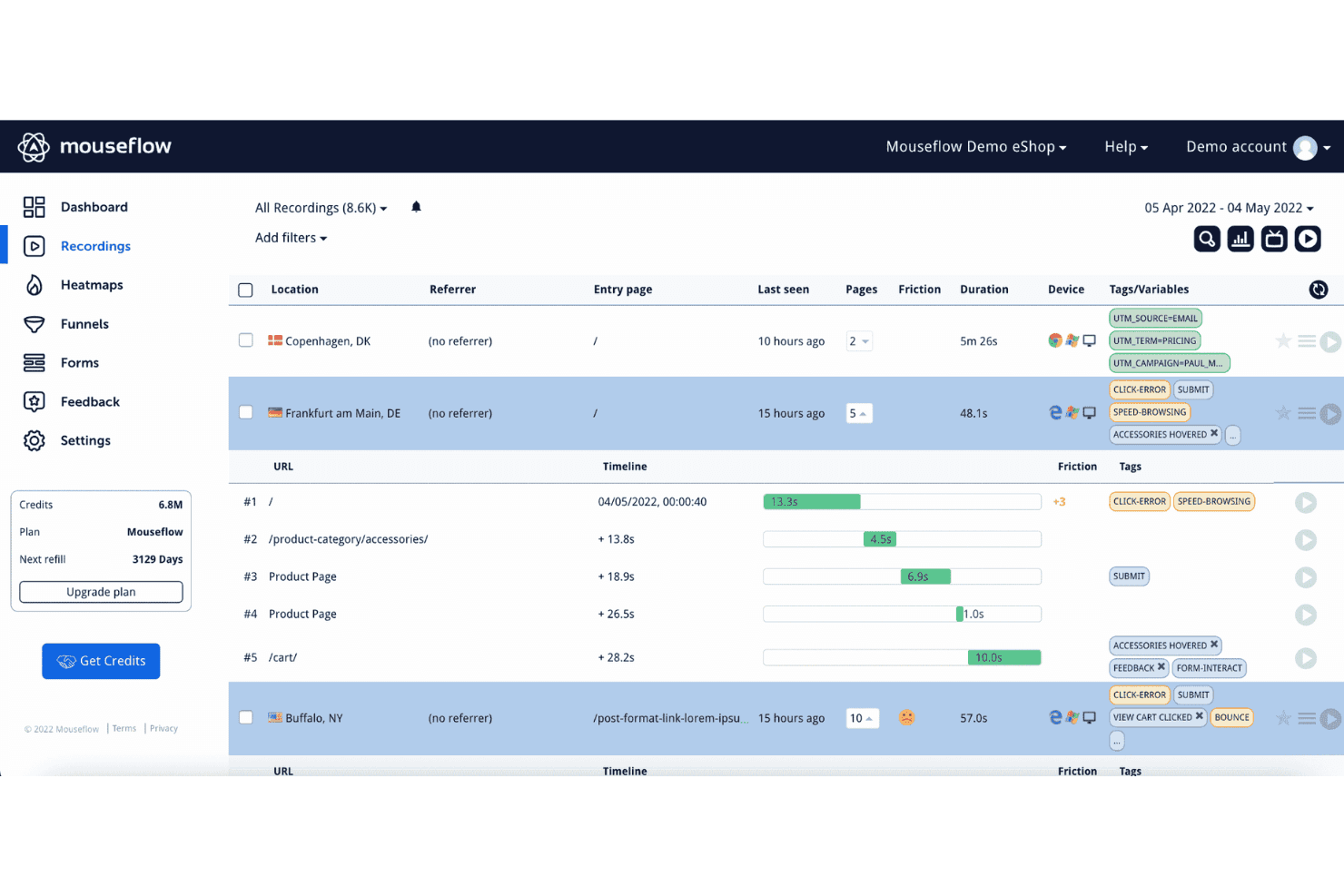
Mouseflow's session recordings feature helps users identify pain points and areas of friction by observing actual user behavior. Mouseflow is a session replay and behavioral analytics platform that captures user recordings, heatmaps, funnels, journey analytics, and form analytics alongside automatic friction signal detection.
Who Is Mouseflow Best For?
Mouseflow is a strong fit for product and UX teams who need to quickly pinpoint where users are getting stuck, without manually sifting through hours of session recordings.
Why I Picked Mouseflow
Mouseflow earns its spot on my shortlist because of how it handles friction detection automatically. Every session gets a Friction Score built from rage clicks, dead clicks, JavaScript errors, and bounces, so I can sort recordings by frustration level instead of watching them at random. The Friction Map then overlays those hotspots directly onto my pages, making it easy to see exactly where users are struggling without digging through individual replays.
Mouseflow Key Features
- Heatmap types: Mouseflow offers seven heatmap types—click, scroll, geo, attention, movement, friction, and interactive—so you can analyze user behavior across multiple dimensions on a single page.
- Form analytics: Tracks where users hesitate, drop off, or abandon forms, giving you field-level visibility into form completion patterns.
- Mina AI segmentation: Lets you pull session segments using plain-English questions, so you can find specific user groups without manually building filters.
- Built-in surveys: Includes NPS and branching survey logic that links responses directly to session recordings for added behavioral context.
Mouseflow Integrations
Mouseflow lists 42 integrations, including Google Analytics, Adobe Analytics, Google Tag Manager, AB Tasty, Salesforce, Slack, and Microsoft Teams. It also offers an open REST API, extended API add-on, data export, and an MCP server for custom connectivity.
Pros and Cons
Pros:
- Heatmaps, funnels, and replays share context
- Friction maps reveal page-level problem areas
- Friction scores prioritize frustrated sessions
Cons:
- Filtering and replay clarity need improvement
- Native mobile app coverage remains limited
Learn more about Mouseflow: Watch dynamic heatmaps in real-time
- 7-day free trial + free plan available
- From $32/month (billed annually)
Visit WebsiteCustomer Rating:4.7/5
Create unlimited dashboards to follow vital marketing campaign metrics or specific traffic sources. Lucky Orange is a session replay and behavior analytics tool that combines session recordings, dynamic heatmaps, conversion funnels, form analytics, and AI-driven insights in one platform.
Who Is Lucky Orange Best For?
Lucky Orange is a strong fit for ecommerce and marketing teams that need to connect session behavior directly to conversion drop-offs and revenue impact.
Why I Picked Lucky Orange
I picked Lucky Orange as one of the best because its dynamic heatmaps update in real time, so I can watch exactly where visitors are clicking and dropping off as it happens, not hours later. Pair that with Discovery AI, which lets me query sessions in plain English and get instant heatmap analysis with prioritized friction points, and I can move from a question to a fix without digging through raw data. Form Analytics adds field-level drop-off visibility, so I can see precisely which input is killing conversions and jump straight to the recordings behind it.
Lucky Orange Key Features
- Live visitor view: Watch individual visitors navigate your site in real time, without waiting for a session to end before reviewing it.
- Form analytics: See field-level drop-off rates and time-on-field data, then jump directly to recordings of visitors who abandoned a specific input.
- Conversion funnels: Track step-by-step drop-off across key user flows, with one-click access to recordings at each funnel stage.
- Behavioral segmentation filters: Narrow recordings and heatmaps by device, traffic source, UTM campaign, or frustration signal before you start watching.
Lucky Orange Integrations
Lucky Orange offers integrations with Shopify, BigCommerce, Magento, HubSpot, Google Analytics 4, Google Tag Manager, Optimizely, and Zapier. It also provides browser JavaScript and Node.js libraries for custom integrations.
Pros and Cons
Pros:
- Form analytics exposes field-level conversion drop-offs
- AI prioritizes friction points for product teams
- Real-time heatmaps reveal changing user behavior
Cons:
- Missing debugging timelines limits engineering investigations
- Website-only tracking excludes native mobile experiences
Learn more about Lucky Orange: Best for revenue-impact journey and funnel analysis
- Free demo available
- Pricing upon request
Visit WebsiteCustomer Rating:4.7/5
Observe, visualize, and elevate your customer’s experience with the Augmented Journey Map. Glassbox is a session replay and digital experience platform that captures 100% of user interactions without manual tagging, combining session replay, journey mapping, funnel analysis, struggle detection, and interaction maps across web and mobile.
Who Is Glassbox Best For?
Glassbox is a strong fit for enterprise product and analytics teams in regulated industries—like financial services and healthcare—that need to tie user behavior directly to revenue impact.
Why I Picked Glassbox
I picked Glassbox as one of the best because its Augmented Journey Map and Funnel Studio both surface revenue impact metrics directly alongside session replays, so you can see not just where users drop off but what that drop-off is actually costing. I love that funnels work retroactively on historical data without any tagging, which means you can investigate a drop you noticed last quarter without having instrumented it in advance. The proprietary Struggle Score then ranks problem pages by severity, giving you a clear, business-grounded case for what to fix first.
Glassbox Key Features
- Tagless session capture: Glassbox records 100% of user interactions automatically, with no manual tagging required, so historical sessions are always available for analysis.
- GIA AI session search: An AI assistant lets you find and summarize sessions using natural-language queries, reducing manual review time.
- Struggle Score: A proprietary scoring model ranks pages and screens by friction severity, helping you prioritize fixes by business impact.
- Native mobile SDK: Supports iOS, Android, React Native, Flutter, and more, with crash replication and cross-platform journey tracking built in.
Glassbox Integrations
Glassbox offers documented integrations with Jira, Slack, Firebase, Google Analytics, Adobe Analytics, Qualtrics, Optimizely, and VWO. Its open API supports custom connections to other product and analytics tools.
Pros and Cons
Pros:
- Struggle scoring prioritizes high-impact friction
- Full capture preserves untagged historical behavior
- Retroactive funnels connect drop-offs to revenue
Cons:
- Report creation requires onboarding time
- Query responses can feel slow
Learn more about Glassbox: Best for bundled A/B testing with heatmap replay
- 30-day free trial available
- From $29/month
Visit WebsiteCustomer Rating:4.3/5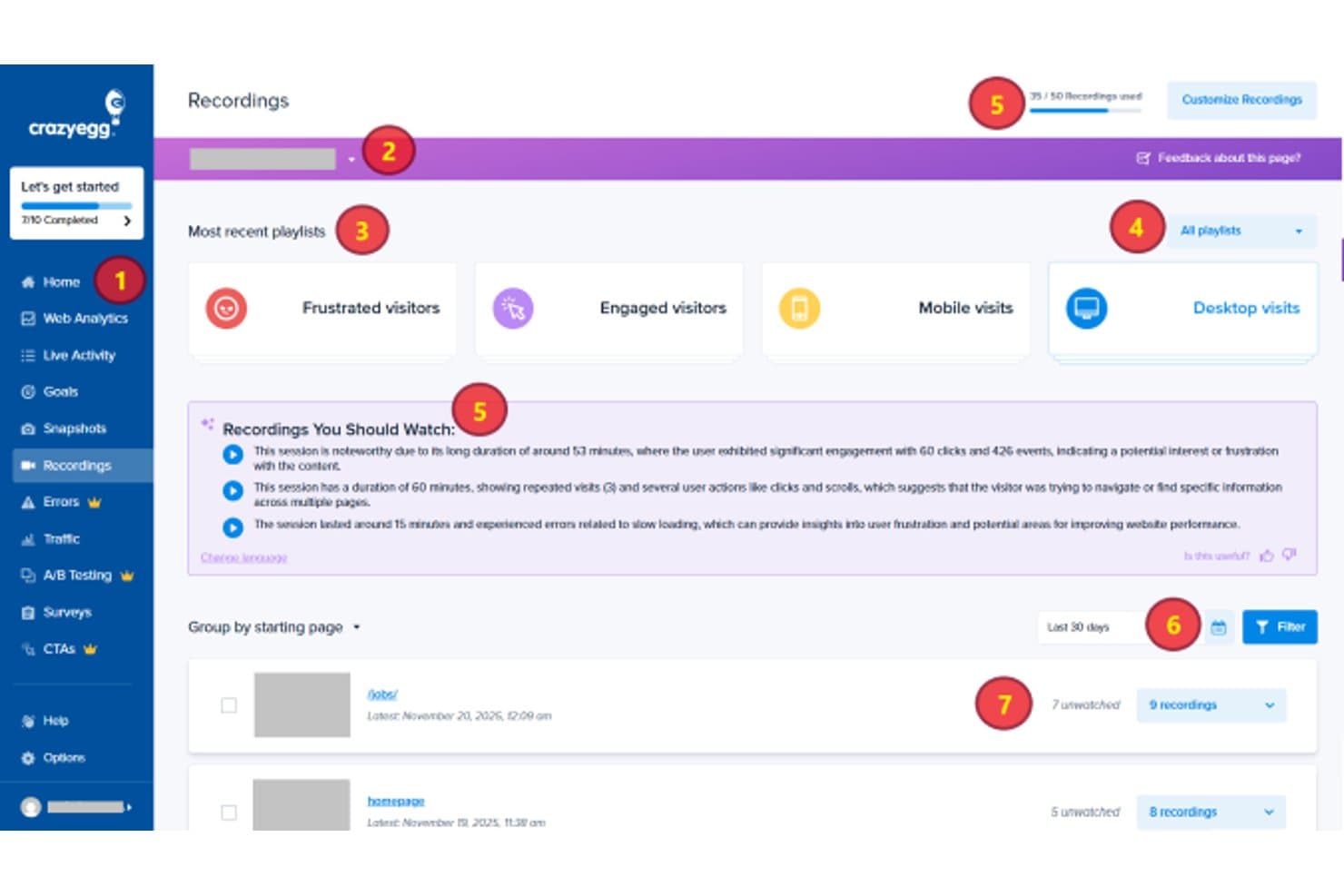
Crazy Egg organizes session recordings by playlist and starting page for review. Crazy Egg is a session replay and behavioral analytics tool that combines heatmaps, click tracking, scroll maps, session recordings, A/B testing, and conversion funnels in a single platform.
Who Is Crazy Egg Best For?
Crazy Egg is a strong fit for CRO marketers and product managers who want heatmaps, session replay, and A/B testing in one tool without juggling multiple subscriptions.
Why I Picked Crazy Egg
I've included Crazy Egg in my top picks because it's the only tool on this list that pairs session replay directly with built-in A/B testing, letting you watch how users behave and then run experiments on the same platform without switching tools. I love that each A/B test variant gets its own heatmap, so you can see exactly why one version outperformed another. The Frictionmap, which surfaces rage clicks, dead clicks, and error clicks visually on the page, makes it fast to spot where users are struggling before you decide what to test.
Crazy Egg Key Features
- Retroactive funnel analysis: Multi-step funnels recalculate automatically on historical data when you change steps, so you don't lose past insights.
- JavaScript error tracking: Automatically detects JS errors and links each one to its associated session recording, including the raw stack trace and device details.
- AI session summaries: Surfaces the most relevant recordings and generates plain-language summaries of usage patterns and UX issues across sessions and heatmaps.
- Confetti maps: Breaks down individual clicks by 17+ metrics—including traffic source, UTM parameters, and device—directly on the page.
Crazy Egg Integrations
Crazy Egg offers integrations with Google Analytics 4, Google Tag Manager, Segment, Shopify, WordPress, and other CMS platforms. Its API supports custom server-side conversion tracking, while an MCP connector enables access through AI assistants.
Pros and Cons
Pros:
- Error sessions connect bugs to behavior
- Variant-level replay supports experiment decisions
- Heatmaps expose product friction visually
Cons:
- No native mobile app session capture
- Low recording caps limit discovery coverage
Learn more about Crazy Egg: Best for quantifying revenue impact of user friction
- Free demo available
- Pricing upon request
Visit WebsiteCustomer Rating:4.7/5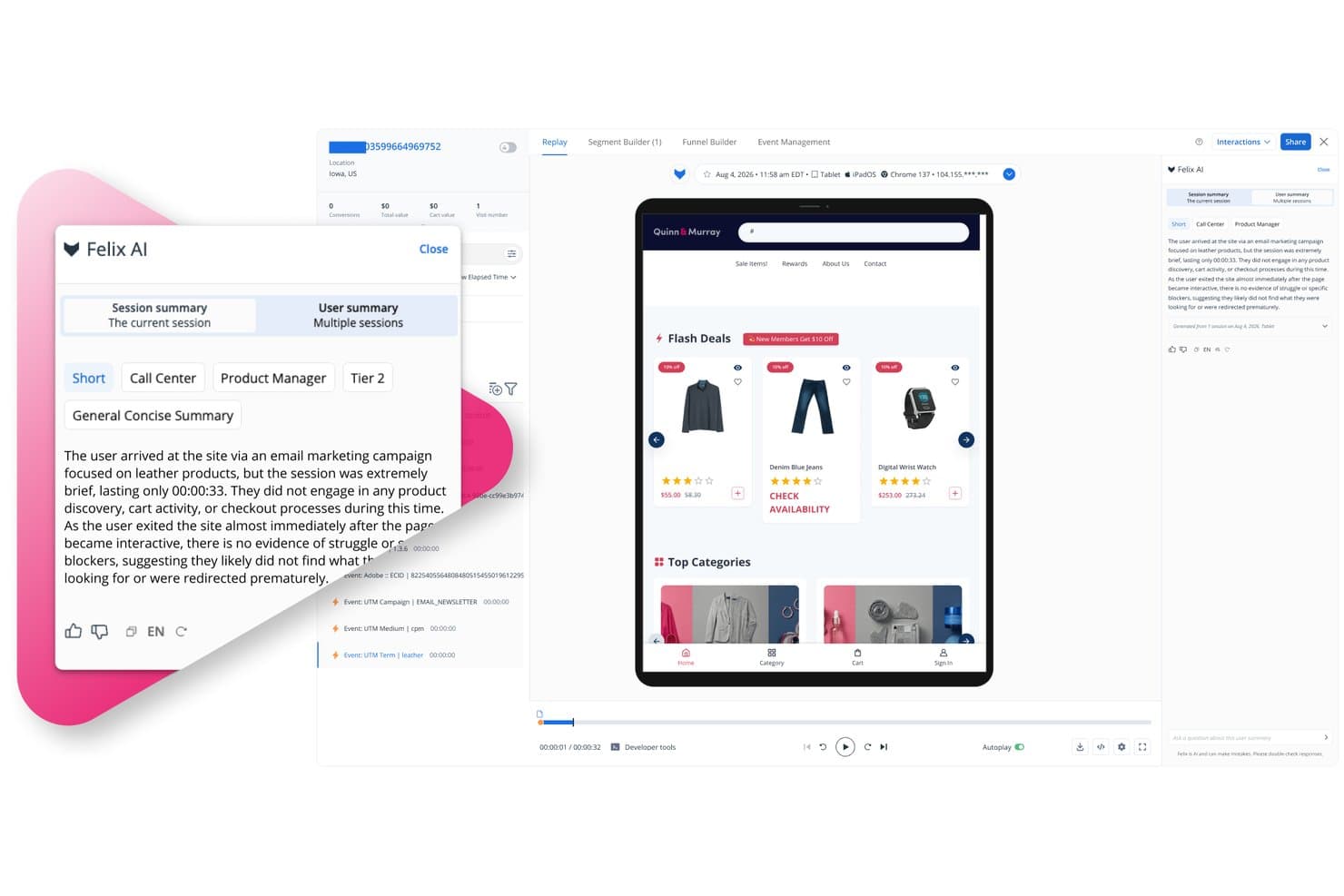
Quantum Metric's Felix AI summarizes session replays for product managers. Quantum Metric is a session replay and digital analytics platform that captures user behavior across web and native mobile, combining high-fidelity session recording, heatmaps, journey mapping, behavioral segmentation, and AI-powered analysis in one connected system.
Who Is Quantum Metric Best For?
Quantum Metric is a strong fit for enterprise product and digital teams that need to tie user friction directly to revenue impact.
Why I Picked Quantum Metric
Quantum Metric earns its spot on my shortlist because it's the only tool I've seen that automatically puts a revenue number next to a friction point. Its Opportunity Analysis surfaces rage clicks and drop-offs and then quantifies what those issues cost, so I'm not guessing at prioritization. Journeys maps real user paths across web and native mobile in real time, and I can drill straight from a drop-off step into the session replay that caused it.
Quantum Metric Key Features
- Felix AI session summaries: Generative AI automatically summarizes individual sessions and user journeys, surfacing friction points, errors, and user intent in plain language.
- Behavioral segment builder: Nested segments built from event attributes, audience attributes, and step sequences apply across the entire platform, including funnels and journey maps.
- Console and network diagnostics pane: A technical panel runs alongside every session replay, giving engineers the context they need to reproduce bugs with full network-level detail.
- Experience alerts: Automated monitoring watches aggregate behavior and frustration signals, sending proactive alerts through Slack, email, and other channels when KPIs shift.
Quantum Metric Integrations
Quantum Metric offers integrations with Optimizely, Split, Slack, Jira, ServiceNow, Qualtrics, Looker, Tealium, and Adobe Experience Platform/CJA. A REST API supports custom integrations, including access to AI-generated session summaries.
Pros and Cons
Pros:
- Adds network diagnostics beside every replay
- Links journey drop-offs to session replays
- Quantifies revenue lost to friction
Cons:
- Some AI analyses have usage limits
- Segment searches can return incomplete results
Learn more about Quantum Metric: Make every visitor interaction on your site searchable
- Free plan available
- Pricing upon request
Visit WebsiteCustomer Rating:4.5/5
Calculate your most significant opportunities to enhance your user’s experience. Fullstory is a digital experience analytics platform that combines session replay, heatmaps, funnel analysis, journey mapping, and behavioral segmentation with tagless autocapture and AI-powered session summaries.
Who Is Fullstory Best For?
Fullstory is a strong fit for product teams at mid-market and enterprise companies that need to connect qualitative session data to quantitative funnel and revenue metrics in one place.
Why I Picked Fullstory
Fullstory earns its spot on my shortlist because tagless autocapture means every click, scroll, and rage click is recorded automatically, with no manual event tagging required. I love that this retroactive data history lets you go back and analyze behavior from before you knew what questions to ask. Pairing that with session replay linked directly to funnel drop-off points means I can see exactly where users abandon a flow and watch the session that proves it.
Fullstory Key Features
- Tagless autocapture: Automatically collects every click, scroll, and interaction without any manual event tagging or instrumentation setup.
- Journey maps: Visualizes the full paths users take through your product, including unexpected routes and drop-off points.
- Sentiment signals: Detects frustration indicators like rage clicks and surfaces them alongside their estimated revenue impact.
- Privacy-by-default masking: Renders sensitive fields as wireframes in replay so you see interaction context without exposing user data.
Fullstory Integrations
Fullstory offers integrations with Segment, Adobe Analytics, and Google Tag Manager, plus data warehouses and cloud storage through Fullstory Anywhere: Warehouse. Webhooks, Data Export, Element API, FS.Identity API, and Consent API support custom connectivity.
Pros and Cons
Pros:
- Privacy masking preserves interaction context
- Replay links funnel drop-offs to sessions
- Retroactive behavior history reduces instrumentation gaps
Cons:
- Event tracking trails replay capabilities
- Reviewing many sessions becomes time-intensive
Learn more about Fullstory: Best for AI-driven mobile session friction analysis
- Free demo + 14-day free trial available
- Pricing upon request
Visit WebsiteCustomer Rating:4.6/5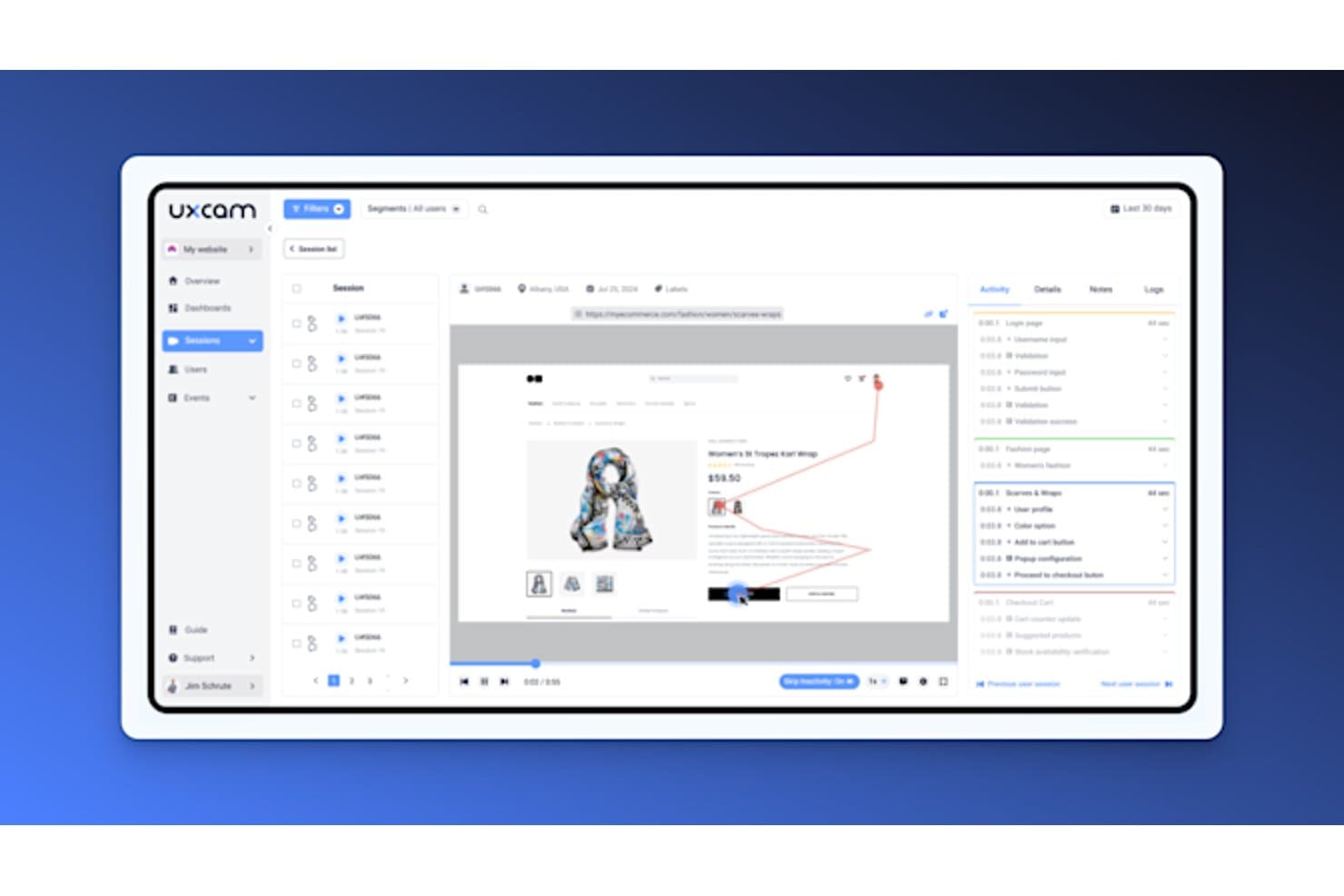
UXCam lets users replay sessions with detailed activity timelines. UXCam is a mobile-first product analytics and session replay platform that combines gesture-level session recording, heatmaps, funnel analysis, and AI-driven friction detection across iOS, Android, and hybrid app frameworks.
Who Is UXCam Best For?
UXCam is a strong fit for mobile product teams that need gesture-level behavioral data to diagnose friction in iOS and Android apps.
Why I Picked UXCam
I picked UXCam as one of the best because its AI analyst, Tara, does something I haven't seen other tools pull off as well: it watches sessions autonomously, surfaces friction patterns like rage taps and dead taps, and ranks them by impact so you're not manually scrubbing through recordings. I also love how funnel drop-offs link directly to the sessions where users abandoned, making it genuinely fast to go from "where are users leaving?" to watching exactly what happened.
UXCam Key Features
- Session replay timeline markers: The replay timeline automatically tags rage taps, UI freezes, and custom events so you can jump straight to the moments that matter.
- Activity tab: A chronological list of screens, gestures, and events shows time spent per screen, with one-click navigation to any point in the session.
- On-device privacy masking: AI text occlusion, blur, and overlay tools process sensitive content directly on the device before any data is transmitted.
- Issue analytics dashboard: Crashes, UI freezes, and handled exceptions are automatically captured and tracked per release with alert monitoring.
UXCam Integrations
UXCam has four documented integrations: Firebase Crashlytics, Salesforce, Zendesk, and Intercom. These connect session context with crash reports and support workflows, though the integration set is smaller than many broader product analytics platforms.
Pros and Cons
Pros:
- On-device masking protects sensitive user data
- Funnel drop-offs link directly to replays
- Tara AI prioritizes mobile friction patterns
Cons:
- Web analysis remains secondary to mobile apps
- Filtering and search frustrate some reviewers
Learn more about UXCam: Organize session replays based on detected issues
- Free plan available
- From $15/month (billed annually)
Visit WebsiteCustomer Rating:4.5/5
A drag-and-drop interface allows anyone to create customizable, real-time dashboards quickly. Datadog is a session replay and real user monitoring tool that captures high-fidelity user sessions across web and mobile, with built-in frustration signal detection, AI-powered summaries, funnel analysis, and full-stack performance tracing.
Who Is Datadog Best For?
Datadog is a strong fit for product and engineering teams that need session replays tied directly to backend errors, performance traces, and technical root causes.
Why I Picked Datadog
I've included Datadog in my top picks because it organizes session replays around detected issues, which means I'm not hunting for problems manually. When a frustration signal fires, like a rage click or an error click, I can jump straight to that moment in the timeline. AI summaries also surface user intent and friction before I even press play, and Smart Chapters break sessions into journey stages so I can go directly to checkout or cart review without scrubbing through the full recording.
Datadog Key Features
- Console and network timelines: Datadog links session replays directly to network failures, error logs, and APM distributed traces so you can trace UX friction to a backend root cause.
- Frustration signals dashboard: A prebuilt, cloneable dashboard tracks rage clicks, dead clicks, and error clicks across your product, with timeline markers that let you jump to the exact moment.
- Session-to-ticket workflow: You can add timestamped comments to any replay, tag teammates, and share links directly to Jira, Slack, or Confluence.
- Configurable session sampling rate: The
sessionReplaySampleRatesetting lets you control what share of sessions gets recorded, so you can manage data volume and cost without losing visibility.
Datadog Integrations
Datadog has native integrations across its platform, including RUM, Product Analytics, Error Tracking, APM, and Logs. Teams can share replay links through Jira, Slack, and Confluence, while the wider Datadog platform lists more than 1,000 integrations.
Pros and Cons
Pros:
- Strong privacy controls protect user data
- AI summaries speed replay review
- Connects friction to backend root causes
Cons:
- Heatmap segmentation remains comparatively limited
- Engineering focus can overwhelm product teams
Learn more about Datadog: Best for AI-driven issue detection and triage
- 14-day free trial + free plan available
- From $176/month (billed annually)

Divide bugs more effectively according to the number of users impacted by them. LogRocket is a session replay platform that pairs DOM-based session recording with product analytics, error monitoring, and AI-driven issue detection to give product teams a unified view of user behavior and frontend performance.
Who Is LogRocket Best For?
LogRocket is a strong fit for product and engineering teams that need to connect real user behavior directly to frontend bugs and performance issues.
Why I Picked LogRocket
I've included LogRocket in my top picks because its Galileo AI doesn't just flag bugs—it ranks issues by severity across real sessions, so I can immediately see which friction points are hurting the most users rather than triaging manually. I also love how the Issues view surfaces rage clicks, dead clicks, and frustration signals in one place, with linked session replays attached. When a release breaks something, Galileo catches the anomaly and surfaces it before anyone files a ticket.
LogRocket Key Features
- Console and network timeline sync: LogRocket syncs console logs, network requests, and JavaScript errors directly with session playback so you can pinpoint exactly what broke and when.
- Conversion funnels with linked replays: Funnel analysis connects drop-off data to the actual sessions behind it, letting you watch what happened at each step.
- 50+ behavioral filters and session playlists: Filter sessions by user ID, URL, custom events, or performance conditions, then save filtered sets as reusable playlists.
- Ticketing integrations: Push issues directly to Jira, Linear, GitHub, or Trello with session context attached, so engineers get everything they need to reproduce a bug.
LogRocket Integrations
LogRocket offers hundreds of integrations, including Jira, Linear, GitHub, Sentry, Datadog, Amplitude, Segment, LaunchDarkly, Zendesk, and Intercom. It also provides API and MCP access for custom workflows.
Pros and Cons
Pros:
- Funnels reveal drop-offs alongside actual sessions
- Replays connect behavior with technical context
- AI-ranked issue triage prioritizes user-impacting problems
Cons:
- Mobile friction detection trails web coverage
- Engineering-focused interface may challenge analysts
Learn more about LogRocket:
Diğer Oturum Tekrarı Yazılımları
Kısa listeme giremeyen ancak yine de göz atmaya değer bazı ek oturum tekrarı yazılımı seçenekleri şunlardır:
- 11Heap (by Contentsquare)Best for linking funnel drop-offs to session replays
- 12PostHogBest for one-tool hypothesis testing and replay
- 13MixpanelBest for linking analytics data to session replays
- 14PendoBest for replay within a full product analytics suite
- 15Zoho PagesenseBest for privacy-first session replays
- 16OpenReplayBest for self-hosted session replay with data control
- 17ContentsquareBest for tag-free capture with AI session summaries
- 18Microsoft ClarityBest for free, unlimited session replay at scale
How I Evaluate Session Replay Software
My evaluation splits into three parts: core functionality (capturing and playing back real sessions, plus filtering sessions by behavior or attributes) carries the most weight, followed by standout features like AI session summarization, then practical factors like pricing and compliance posture.
Core Functionality (Table Stakes For This List)
When I'm selecting tools for my list, I score each one on a scale from 0 (does not offer the functionality) to 5 (excels in this area) for each core functionality listed below. I then convert the total into a percentage to help assess each tool's overall fit, with extra weight on any functionalities I've deemed essential.
- Session Recording (Essential): I check playback fidelity across browsers and devices, plus controls like variable speed and skip-to-event navigation.
- Behavioral Segmentation (Essential): Filtering by layered conditions like rage clicks on a specific page during a date range separates useful tools from basic ones.
- Rage and Error Click Detection: I look for automatic flagging of friction signals like dead clicks and rage clicks, with enough context to prioritize fixes.
- Heatmap Visualization: Good heatmaps let you compare click, scroll, and movement patterns across segments or device types on the same page.
- Funnel and Journey Analysis: I evaluate whether you can jump from a funnel drop-off point directly into a relevant session to understand the "why."
- Privacy and Data Masking: Configurable masking rules that cover sensitive fields by default matter here, along with granular controls for specific elements.
Once I have a list of tools that meet the criteria, I consider what sets each platform apart.
Differentiating Factors (What Sets Vendors Apart)
Here's how I compare and contrast different vendors:
Standout Features
AI session summarization saves hours of manual review by flagging notable moments automatically—I check whether summaries actually surface friction points or just rehash page titles. Session-to-ticket workflows matter just as much; tools like PostHog and LogRocket let you attach a recording directly to a Jira or Linear ticket, which keeps bug reports grounded in real user behavior instead of screenshots. I also evaluate whether a vendor bundles product analytics like feature flags or A/B testing alongside replay, since that lets PMs validate hypotheses without juggling separate tools.
Beyond Features
Pricing models vary widely—some vendors charge per session, others by monthly tracked users—so I check how overage costs and data retention windows align with realistic traffic patterns before committing. Compliance posture matters just as much, especially for teams handling regulated data; I look for clear data residency options and built-in consent management rather than bolted-on workarounds. I also evaluate how each tool fits an existing stack, since native integrations with platforms like Amplitude or Zendesk reduce redundant tagging and keep behavioral context in one place.
Oturum Tekrarı Yazılımı Nasıl Seçilir?
Uzun özellik listeleri ve karmaşık fiyatlandırma yapılarına kendinizi kaptırmanız kolaydır. Size özgü yazılım seçme sürecinde ilerlerken odağınızı korumanıza yardımcı olmak için aklınızda bulundurmanız gereken faktörlerin bir kontrol listesi aşağıda yer alıyor:
| Faktör | Dikkat Edilmesi Gerekenler |
|---|---|
| FaktörÖlçeklenebilirlik | Dikkat Edilmesi GerekenlerYazılım ekibiniz ve işletmenizin ihtiyaçlarıyla birlikte büyüyebilir mi? Yavaşlamadan artan trafiği ve veri miktarını işleyip işleyemeyeceğini değerlendirin. |
| FaktörEntegrasyonlar | Dikkat Edilmesi GerekenlerCRM, analiz veya CMS gibi mevcut araçlarınıza bağlanabiliyor mu? İş akışlarında kesintileri önlemek için hâlihazırda kullandığınız sistemleri destekleyip desteklemediğini kontrol edin. |
| FaktörÖzelleştirilebilirlik | Dikkat Edilmesi GerekenlerYazılımı belirli süreçlerinize ve ihtiyaçlarınıza uyacak şekilde uyarlayabilir misiniz? Kontrol panellerini, raporları ve kullanıcı izinlerini özelleştirme seçenekleri arayın. |
| FaktörKullanım kolaylığı | Dikkat Edilmesi GerekenlerArayüz sezgisel ve kullanıcı dostu mu? Ekibinizin kapsamlı bir eğitim veya zorlu bir öğrenme süreci olmadan aracı hızla benimseyebilmesini sağlayın. |
| FaktörUygulama ve işe alıştırma | Dikkat Edilmesi GerekenlerÇalışmaya başlamak için ne kadar zaman ve çaba gerekecek? Eğitimler, kılavuzlar ve işe alıştırma oturumları gibi destek materyallerinin bulunabilirliğini değerlendirin. |
| FaktörMaliyet | Dikkat Edilmesi GerekenlerFiyatlandırma şeffaf mı ve bütçeniz dahilinde mi? Gizli ücretler veya ek özellikler için alınan ilave bedeller de dahil olmak üzere toplam sahip olma maliyetini göz önünde bulundurun. |
| FaktörGüvenlik önlemleri | Dikkat Edilmesi GerekenlerSektör güvenlik standartlarına uyuyor ve hassas verileri koruyor mu? Şifreleme, düzenli güvenlik denetimleri ve düzenlemelere uyumluluk sunup sunmadığını doğrulayın. |
| FaktörDestek bulunabilirliği | Dikkat Edilmesi GerekenlerSorunlar ortaya çıktığında hangi destek seçenekleri mevcut? Gerektiğinde yardımcı olacak 7/24 destek, canlı sohbet ve özel müşteri yöneticileri olup olmadığını kontrol edin. |
Oturum Tekrarı Yazılımı Nedir?
Oturum yeniden oynatma yazılımı, bir web sitesindeki veya uygulamadaki kullanıcı etkileşimlerini kaydeden ve yeniden oynatan bir araçtır. Ürün yöneticileri, kullanıcı deneyimi tasarımcıları ve pazarlamacılar gibi profesyoneller tarafından kullanıcı davranışını anlamak ve dijital deneyimleri iyileştirmek için kullanılır. Isı haritaları, oturum kayıtları ve kullanıcı yolu analizi; sorunların belirlenmesine ve kullanıcı yolculuklarının optimize edilmesine yardımcı olur. Genel olarak bu araçlar, kullanıcı deneyimini geliştirmek ve etkileşimi artırmak için değerli içgörüler sağlar.
Özellikler
Oturum yeniden oynatma yazılımı seçerken aşağıdaki temel özelliklere dikkat edin:
- Oturum kayıtları: Davranışlarını anlamak ve sorunları belirlemek için kullanıcı etkileşimlerini kaydedin ve yeniden oynatın.
- Isı haritaları: İlgi alanlarını ve olası sorunları görmek için kullanıcıların sitenizde nerelere tıkladığını ve kaydırdığını görselleştirin.
- Kullanıcı yolu analizi: Gezinmeyi optimize etmek ve kullanıcı akışını iyileştirmek için kullanıcıların web sitenizde izlediği yolu takip edin.
- Gerçek zamanlı izleme: Sorunlara hızlıca yanıt vermek ve müşteri desteğini iyileştirmek için kullanıcı etkileşimlerini gerçekleştiği anda gözlemleyin.
- Dönüşüm hunileri: Kullanıcıların dönüşüm gerçekleştirmeden önce attığı adımları analiz ederek kullanıcı kaybı noktalarını belirleyin ve dönüşüm oranlarını artırın.
- Zorluk tespiti: Kullanılabilirlik sorunlarını hızlıca ele almak için kullanıcıların yaşadığı hayal kırıklıklarını ve hataları otomatik olarak belirleyin.
- Özelleştirilebilir panolar: Arayüzü, ekibiniz için en önemli temel metrikleri ve içgörüleri gösterecek şekilde uyarlayın.
- Gelişmiş filtreleme: Belirli kullanıcı gruplarına ve davranışlarına odaklanmak için oturum verilerini çeşitli ölçütlere göre segmentlere ayırın.
- Uyumluluk takibi: Veri toplama uygulamalarını izleyip yöneterek veri gizliliğini sağlayın ve GDPR gibi düzenlemelere uyun.
- Entegrasyon olanakları: Veri akışını kolaylaştırmak ve işlevselliği geliştirmek için CRM ve analiz platformları gibi mevcut araçlara bağlanın.
Avantajlar
Oturum yeniden oynatma yazılımını uygulamak, ekibiniz ve işletmeniz için çeşitli avantajlar sağlar. Yararlanabileceğiniz avantajlardan bazıları şunlardır:
- Geliştirilmiş kullanıcı deneyimi: Oturum kayıtlarını ve ısı haritalarını analiz ederek sorunlu noktaları belirleyebilir ve kullanıcı yolculuğunu geliştirebilirsiniz.
- Artan dönüşüm oranları: Dönüşüm hunileri sayesinde kullanıcıların nerede ayrıldığını belirleyebilir ve dönüşümleri artırmak için değişiklikler yapabilirsiniz.
- Sorunların hızlı tespiti: Gerçek zamanlı izleme ve zorluk tespiti, sorunları daha fazla kullanıcıyı etkilemeden önce fark edip çözmenize yardımcı olur.
- Veriye dayalı kararlar: Özelleştirilebilir panolar ve gelişmiş filtreleme, stratejik seçimleri ve optimizasyonları yönlendiren içgörüler sağlar.
- Geliştirilmiş uyumluluk: Uyumluluk takibi, işletmenizi ve kullanıcılarınızı koruyarak veri toplama uygulamalarınızın gizlilik düzenlemelerine uygun olmasını sağlar.
- Daha iyi müşteri desteği: Destek ekipleri, kullanıcı oturumlarını yeniden oynatarak sorunları anlayabilir ve daha doğru yardım sağlayabilir.
- Kolaylaştırılmış iş akışları: Entegrasyon olanakları, oturum verilerini diğer araçlara bağlamanıza olanak tanıyarak verimliliği ve iş birliğini artırır.
Maliyetler ve Fiyatlandırma
Oturum yeniden oynatma yazılımı seçmek, mevcut çeşitli fiyatlandırma modellerinin ve planların anlaşılmasını gerektirir. Maliyetler özelliklere, ekip büyüklüğüne, eklentilere ve daha fazlasına göre değişir. Yazılım için peşin bir maliyet ödemeden başlamak istediğinizde ücretsiz oturum yeniden oynatma yazılımı da kullanılabilir. Aşağıdaki tablo, oturum yeniden oynatma yazılımı çözümlerinde yaygın planları, ortalama fiyatlarını ve genellikle sunulan özellikleri özetlemektedir:
Oturum Yeniden Oynatma Yazılımı için Plan Karşılaştırma Tablosu
| Plan Türü | Ortalama Fiyat | Yaygın Özellikler |
|---|---|---|
| Plan TürüÜcretsiz Plan | Ortalama Fiyat$0 | Yaygın ÖzelliklerTemel oturum kayıtları, sınırlı ısı haritaları ve kısıtlı veri depolama. |
| Plan TürüKişisel Plan | Ortalama Fiyat$5-$25/kullanıcı/ay | Yaygın ÖzelliklerOturum kayıtları, ısı haritaları ve temel kullanıcı yolu analizi. |
| Plan Türüİşletme Planı | Ortalama Fiyat$50-$150/kullanıcı/ay | Yaygın ÖzelliklerGelişmiş ısı haritaları, dönüşüm hunileri, gerçek zamanlı izleme ve uyumluluk takibi. |
| Plan TürüKurumsal Plan | Ortalama Fiyat$200-$500/kullanıcı/ay | Yaygın ÖzelliklerGelişmiş filtreleme, özel panolar, özel destek ve kapsamlı entegrasyonlar dahil olmak üzere tüm özellik seti. |
Oturum Tekrarı Yazılımı SSS
Oturum tekrarı yazılımıyla ilgili sık sorulan soruların bazı yanıtları:
Oturum tekrarı yazılımı web sitesi performansını nasıl etkiler?
Oturum tekrarı yazılımı düzgün yönetilmezse web sitesi performansını etkileyebilir. Çok miktarda veri toplar ve araç performans için optimize edilmemişse sitenizi yavaşlatabilir. Yazılımın verimli veri toplama yöntemleri kullandığından ve örnekleme ya da kayıt sürelerini sınırlama gibi veri yükünü yönetmeye yönelik seçenekler sunduğundan emin olun. En iyi hızı korumak için web sitenizin performansını düzenli olarak izleyin ve ayarları gerektiğinde düzenleyin.
Oturum tekrarı yazılımı gizlilik düzenlemelerine uygun mudur?
Evet, birçok oturum tekrarı aracı GDPR ve CCPA gibi gizlilik düzenlemelerine uygun olacak şekilde tasarlanmıştır. Bu araçlar genellikle hassas verileri kayıtlarda maskeleme veya hariç tutma özellikleri sunar. Ancak bu ayarları doğru şekilde yapılandırmak ve kullanıcıları veri toplama uygulamaları hakkında bilgilendirmek sizin sorumluluğunuzdadır. Uygulamanızın düzenleyici standartları karşıladığından emin olmak için yazılımın uyumluluk özelliklerini her zaman inceleyin ve hukuk uzmanlarına danışın.
Oturum tekrarı yazılımını kullanmak için ne düzeyde teknik uzmanlık gerekir?
Gerekli teknik uzmanlık düzeyi araca göre değişir. Bazıları kullanıcı dostudur ve teknik bilgisi olmayan kullanıcılar için tasarlanmıştır; diğerleri ise kurulum ve yapılandırma için belirli bir teknik bilgi gerektirebilir. Başlamanıza yardımcı olmak için eğitimler ve destek gibi kapsamlı başlangıç kaynakları sunan yazılımları tercih edin. Ekibinizin teknik becerilerini değerlendirin ve teknoloji konusundaki rahatlık düzeyinize uygun bir araç seçin.