

Çevrim içi beyin fırtınası araçları, nerede çalışıyor olursanız olun ekibinizin gerçek zamanlı olarak fikirler üretmesine, düzenlemesine ve paylaşmasına yardımcı olan dijital platformlardır. Grup olarak fikir üretme sürecini daha yapılandırılmış, yaratıcı veya kapsayıcı hâle getirmenin yollarını arıyorsanız doğru araç ölçülebilir bir fark yaratabilir. Bu kadar çok seçenek mevcutken özellikleri, entegrasyonları ve kullanım alanlarını karşılaştırırken kaybolmak kolaydır. Bu liste, ekibinizin iş akışına, iş birliği tarzına ve iş hedeflerine uygun çevrim içi beyin fırtınası araçlarını hızlıca belirlemenize yardımcı olur; böylece fikirlerden eyleme güvenle geçebilirsiniz.
Why Trust Our Software Recommendations
6,700+
Reviews
20
Industry experts
16+
Evaluation factors
14
Years
Our team has been testing and reviewing software since 2012. As product managers ourselves, we know how difficult—and important—it is to choose the right software.
For this guide, we evaluated tools using hands-on testing and independent research, scoring tools using our selection criteria.
Our reviews reflect our human editorial judgment, not a sales pitch.
Expert reviewers:
- Andrew LumbySenior TPM
- Cristiano ValimSenior UI/UX Lead


Çevrim İçi Beyin Fırtınası Araçları Karşılaştırma Tablosu
Bu karşılaştırma tablosu, en iyi çevrim içi beyin fırtınası aracı seçimlerim için fiyatlandırma ayrıntılarını özetlemektedir:
Score legend (out of 5)
- Excellent4.5–5
- Good4–4.4
- Average3–3.9
- Below average2–2.9
- Poor1–1.9
Sorted by: Default
| Tool | Starting Price | Website | |||||||||||
|---|---|---|---|---|---|---|---|---|---|---|---|---|---|
Best for template-led visual idea capture | Not rated | 5 | 3 | 2 | 1 | 3 | 4 | Not rated | Not rated | Not rated | Not rated | $144/user/year Free trial + free plan available | Website |
Best for design-focused collaboration | Not rated | 4 | 4 | 3 | 2 | 3 | 4 | Not rated | Not rated | Not rated | Not rated | $3/user/month Free plan available | Website |
Best for ideation that feeds a product roadmap | Not rated | Not rated | Not rated | 2 | Not rated | Not rated | 4 | 3 | 3 | 4 | 3 | $9/user/month 30-day free trial | Website |
Best for AI-grouped sticky note synthesis | Not rated | 5 | 4 | 2 | 2 | 4 | 4 | Not rated | Not rated | Not rated | Not rated | $8/user/month Free plan + 30-day free trial available | Website |
Best for brainstorm-to-report data export | Not rated | 4 | 5 | 2 | 3 | 4 | 3 | Not rated | Not rated | Not rated | Not rated | Pricing upon request Free plan + 30-day trial + free demo available | Website |
Best for remote agile project planning | Not rated | 5 | 4 | 5 | 2 | 4 | 5 | Not rated | Not rated | Not rated | Not rated | $9.99/user/month Free plan available | Website |
Best for regulated-sector whiteboard sessions | Not rated | 4 | 3 | 4 | 3 | 2 | 4 | Not rated | Not rated | Not rated | Not rated | €5/user/month Free plan + 30-day trial available | Website |
Best for cross-functional team workshops | Not rated | 5 | 4 | 4 | 3 | 4 | 5 | Not rated | Not rated | Not rated | Not rated | $8/user/month Free plan + 14-day trial available | Book Demo |
Best for workshop-to-backlog handoff | Not rated | 4 | 4 | 4 | 3 | 4 | 4 | Not rated | Not rated | Not rated | Not rated | $24.90/user/month Free plan + trial + demo available | Website |
Best for visualizing complex workflows | Not rated | 5 | 4 | 4 | 4 | 4 | 4 | Not rated | Not rated | Not rated | Not rated | $9/user/month Free plan + 7-day trial + demo available | Website |


Çevrim İçi Beyin Fırtınası Araçları İncelemeleri
Aşağıda, kısa listeme giren çevrim içi beyin fırtınası araçlarının ayrıntılı özetlerini bulabilirsiniz. İncelemelerim, sizin için en uygun olanı bulmanıza yardımcı olmak amacıyla her platformun özelliklerine, en iyi kullanım alanlarına ve entegrasyonlarına ayrıntılı bir bakış sunmaktadır.
 Best for template-led visual idea capture
- Free trial + free plan available
- From $144/user/year (billed annually)
Visit WebsiteCustomer Rating:4.6/5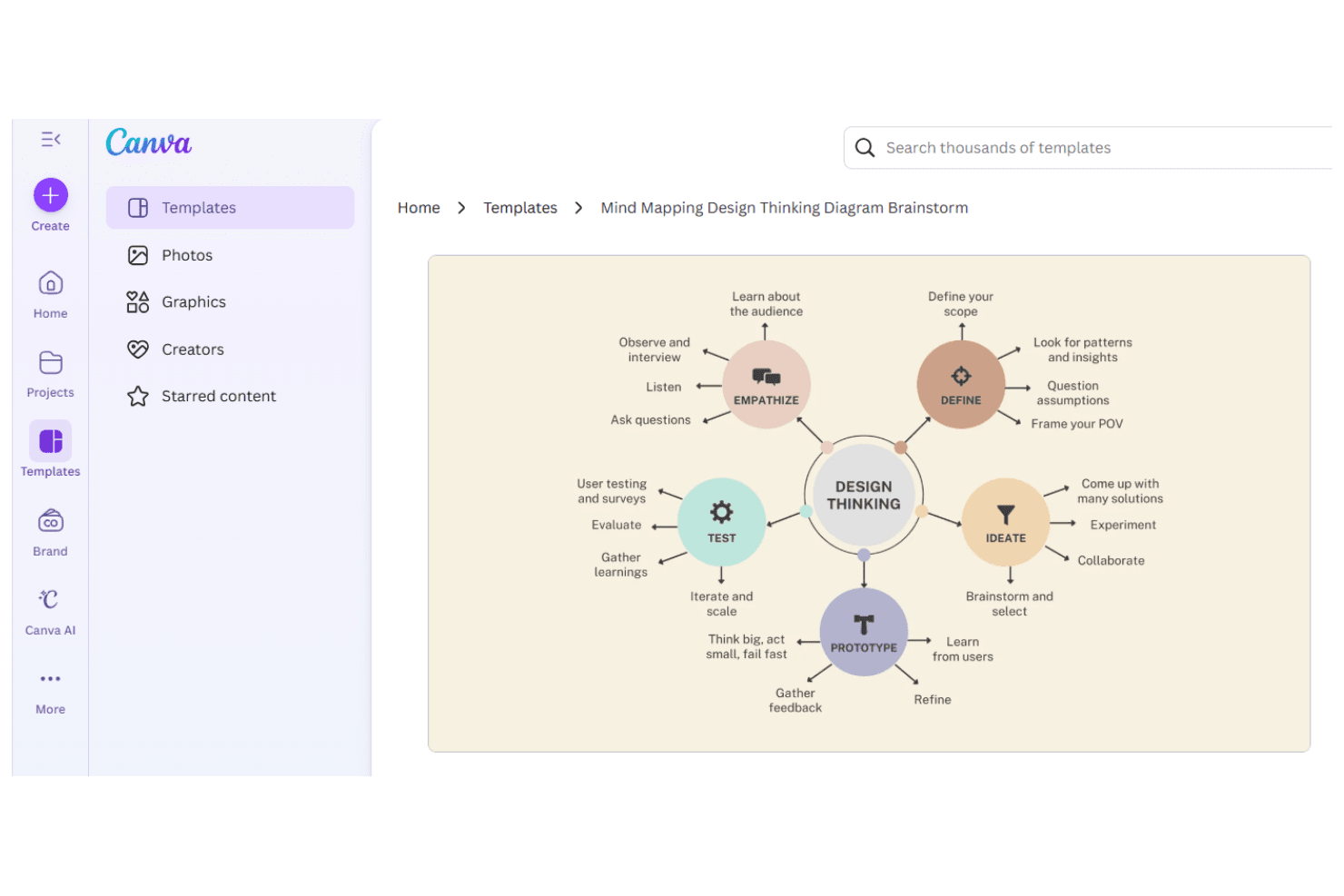
Canva creates visual content for teams and individuals across industries. Canva is a visual design platform that pairs a drag-and-drop editor with an extensive library of templates, whiteboards, and mind map layouts purpose-built for capturing and organizing ideas collaboratively.
Who Is Canva Best For?
Canva is a strong fit for product teams and cross-functional collaborators who think visually and want to turn early ideas into structured, shareable artifacts without starting from scratch.
Why I Picked Canva
Canva earns its spot on my shortlist because its template library does a lot of the heavy lifting when a brainstorming session needs structure fast. I particularly like the ready-made mind map and whiteboard layouts, which give teams a visual scaffold to drop ideas into without wrestling with blank-canvas paralysis. The drag-and-drop editor makes it easy to rearrange, label, and group concepts in real time during a session.
Canva Key Features
- Real-time multiplayer editing: Multiple team members can work on the same canvas simultaneously, making live brainstorming sessions more interactive.
- AI image and text generation: Canva's built-in AI tools let you generate visuals and written content directly within your brainstorm canvas.
- Comments and reactions: Teammates can leave threaded comments and emoji reactions on specific elements to give contextual feedback without disrupting the layout.
- Presentation mode: Convert your brainstorm board into a shareable presentation without leaving the platform.
Canva Integrations
Canva’s Apps Marketplace offers hundreds of apps, including Slack, Microsoft Teams, Asana, Monday.com, and Google Workspace. It also supports custom app development through the Canva Apps SDK.
Pros and Cons
Pros:
- Brainstorms can become shareable presentations
- Live co-editing keeps ideas visible
- Ready-made mind maps give sessions structure
Cons:
- Large boards can get harder to scan
- Complex boards can slow editing
Learn more about Canva: Best for design-focused collaboration
- Free plan available
- From $3/user/month
Visit WebsiteCustomer Rating:4.7/5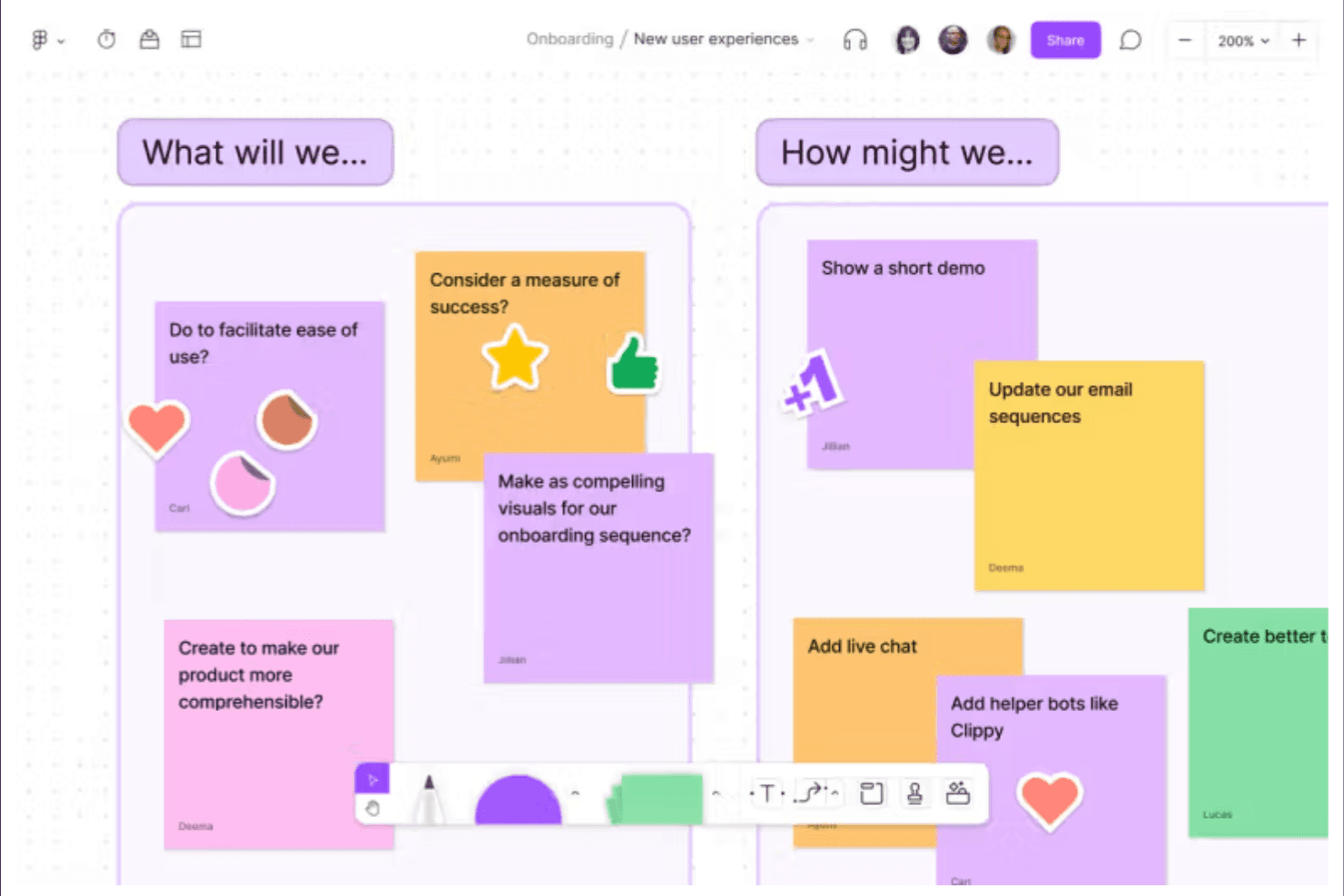
FigJam enables design and product teams to brainstorm, plan, and diagram together. FigJam is a collaborative online whiteboard tool from Figma that brings together sticky notes, mind maps, voting widgets, and drawing tools in a shared canvas built around design workflows.
Who Is FigJam Best For?
FigJam is a natural fit for product and design teams who already live in Figma and want their brainstorming sessions to connect directly to their design workflow.
Why I Picked FigJam
FigJam earns its spot on my shortlist because it's built from the ground up for design-adjacent collaboration, not just adapted for it. I love how FigJam boards connect directly to Figma files, so when a brainstorm produces a direction worth pursuing, my team can move it into an actual design without losing context. The voting widgets and cursor chat features make live ideation sessions feel genuinely interactive rather than passive.
FigJam Key Features
- FigJam AI: Automatically generates diagrams, mind maps, and summaries from prompts so your team can move from idea to structure faster.
- Template library: Offers hundreds of pre-built brainstorming and planning templates, including retrospectives, flowcharts, and journey maps.
- Stamp and reaction tools: Let participants express quick reactions or approvals directly on the canvas during live sessions.
- Widget integrations: Embed third-party widgets like polls, timers, and Jira cards directly into your board without leaving FigJam.
FigJam Integrations
FigJam supports widget integrations including Jira cards, polls, and timers, and connects directly with Figma files.
Pros and Cons
Pros:
- Templates support structured retrospectives and journey maps
- Live voting keeps ideation participatory
- Visual canvas suits product design workshops
Cons:
- Facilitation tools trail specialist whiteboards
- Large boards can become hard to navigate
Learn more about FigJam: 3Best for ideation that feeds a product roadmap
Aha!
- 30-day free trial
- From $9/user/month
Visit WebsiteCustomer Rating:4.6/5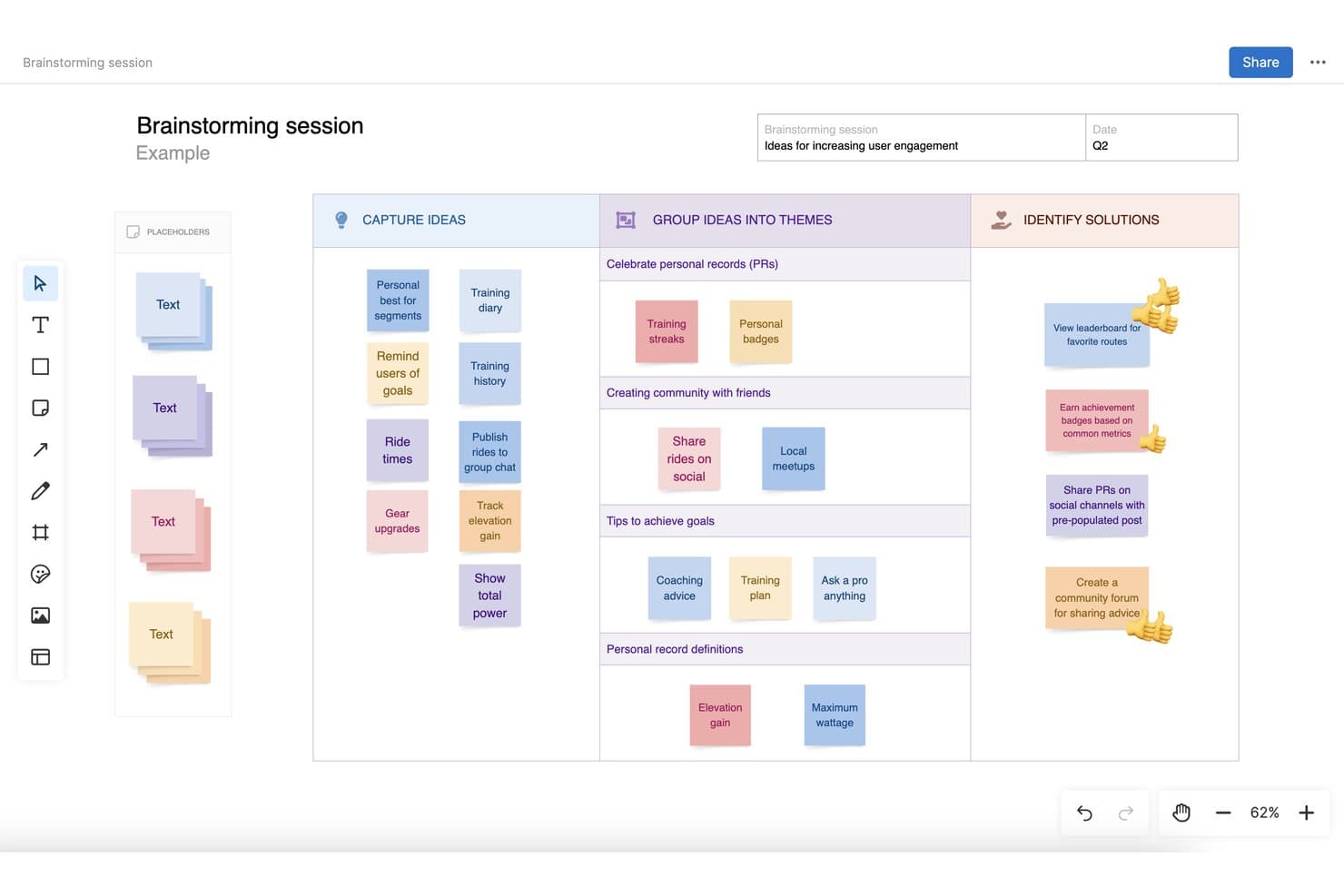
Aha! lets users capture, group, and identify solutions in brainstorming sessions. Aha! Whiteboards is a collaborative whiteboard tool built for product teams, offering an infinite canvas, 100+ templates, AI-powered wireframes, real-time co-editing, and direct conversion of whiteboard content into product roadmap records.
Who Is Aha! Best For?
Aha! Whiteboards is a strong fit for product managers who want to move ideas directly from a shared canvas into a structured product roadmap.
Why I Picked Aha!
I picked Aha! as one of the best because it's the only brainstorming tool where ideas don't just live on a canvas—they become actual roadmap records. You can sketch a flow, run a voting session with your team using planning poker or audience voting, and then convert those whiteboard shapes directly into Aha! Roadmaps items without copying anything by hand. For product teams who brainstorm with delivery in mind, that direct pipeline from ideation to structured planning is genuinely useful.
Aha! Key Features
- Real-time co-editing: Multiple users can navigate and edit the same whiteboard simultaneously, with presence avatars showing who's active.
- 100+ templates: Pre-built templates covering a range of ideation formats, each with best practices and an example to guide sessions.
- Infinite canvas with frames: The whiteboard expands as you add content, with titled frames you can navigate, pan, and zoom between.
- Inline comments and emoji reactions: Team members can leave threaded comments on specific objects and react to sticky notes with emoji, with reaction counts visible to all.
Aha! Integrations
Aha! Whiteboards offers native integrations with Aha! Roadmaps, Jira, and Azure DevOps. Aha! provides REST and JavaScript APIs for custom integrations, though Whiteboards-specific API resources aren't documented.
Pros and Cons
Pros:
- Live collaboration includes voting and reaction counts
- Expanding canvas organizes ideas into navigable frames
- More than 100 templates include examples
Cons:
- No documented whiteboard export or idea clustering
- Timer lacks agenda and participant controls
Learn more about Aha!: Best for AI-grouped sticky note synthesis
- Free plan + 30-day free trial available
- From $8/user/month
Visit WebsiteCustomer Rating:4.4/5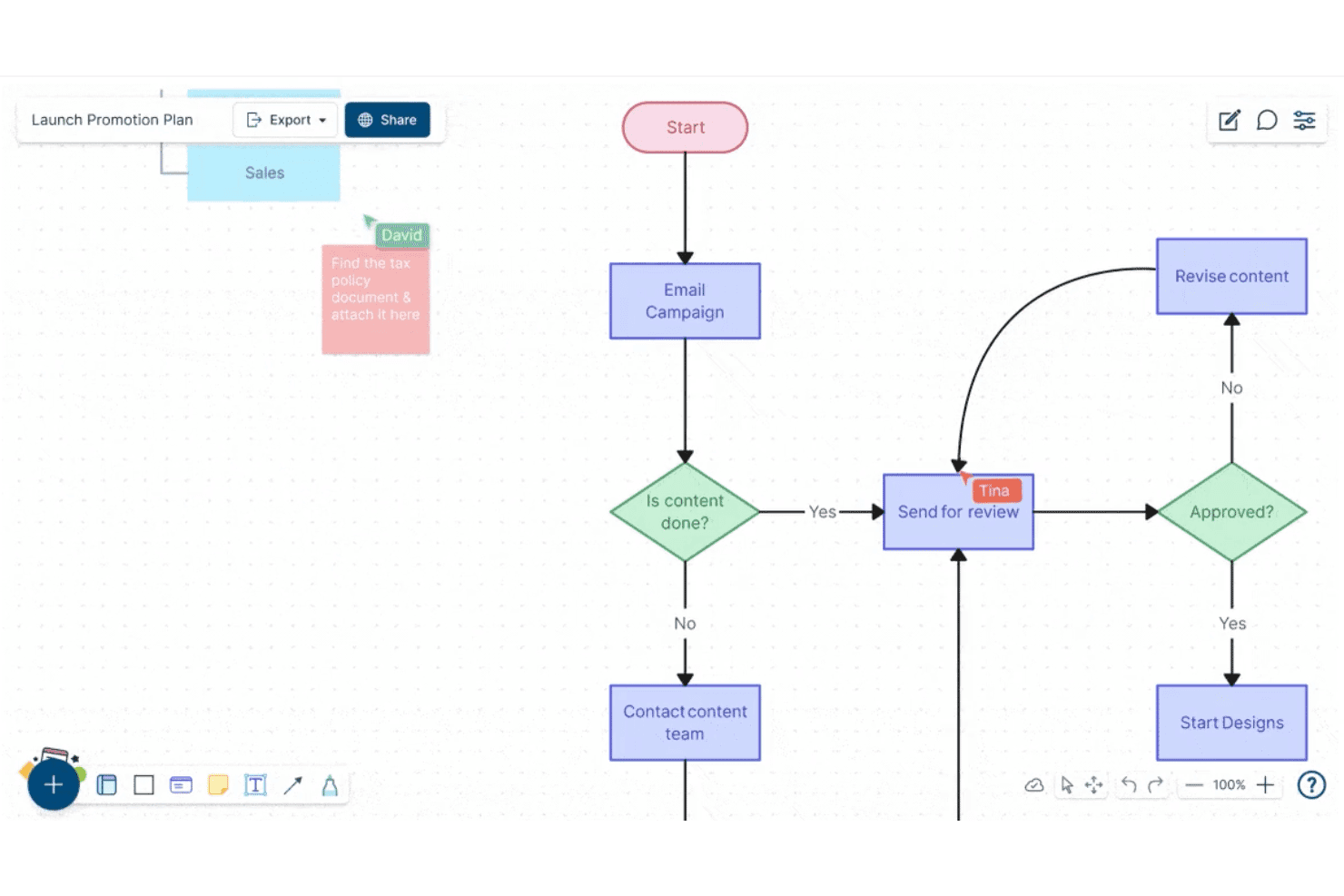
Creately lets users build and collaborate on flowcharts in real time. Creately is a visual collaboration and brainstorming platform that combines infinite canvases, sticky notes, mind maps, and AI-powered synthesis tools to help teams capture, organize, and structure ideas together.
Who Is Creately Best For?
Creately suits cross-functional teams that need to move quickly from raw brainstorming to organized, actionable insights without manually sorting through piles of sticky notes.
Why I Picked Creately
I've included Creately in my top picks because its AI-grouped sticky note synthesis genuinely changes how a brainstorm ends. After a session, Creately's AI clusters your sticky notes into themed groups automatically, so you're not spending an hour manually sorting "improve onboarding" next to "reduce churn" next to "fix the signup flow." I also love that the infinite canvas supports mind maps and diagrams in the same workspace, so raw ideas can evolve into structured frameworks without switching tools.
Creately Key Features
- Real-time multiplayer editing: Multiple team members can edit the same canvas simultaneously, with live cursors showing who's working where.
- Pre-built brainstorming templates: Creately offers ready-made templates for frameworks like SWOT, fishbone diagrams, and brainwriting sessions.
- Database-linked shapes: Objects on the canvas can store structured data fields, letting you attach metadata directly to brainstorm elements.
- Presentation mode: Teams can walk stakeholders through a canvas as a slideshow without leaving the workspace.
Creately Integrations
Creately offers documented integrations with Google Drive, Slack, Confluence, and Microsoft Teams. Zapier and Microsoft OneDrive are listed as coming soon.
Pros and Cons
Pros:
- Canvas turns ideas into mind maps
- Live cursors support simultaneous brainstorming
- AI groups sticky notes into themes
Cons:
- Large canvases can become visually crowded
- AI clusters may need manual review
Learn more about Creately: Best for brainstorm-to-report data export
- Free plan + 30-day trial + free demo available
- Pricing upon request
Visit WebsiteCustomer Rating:4.3/5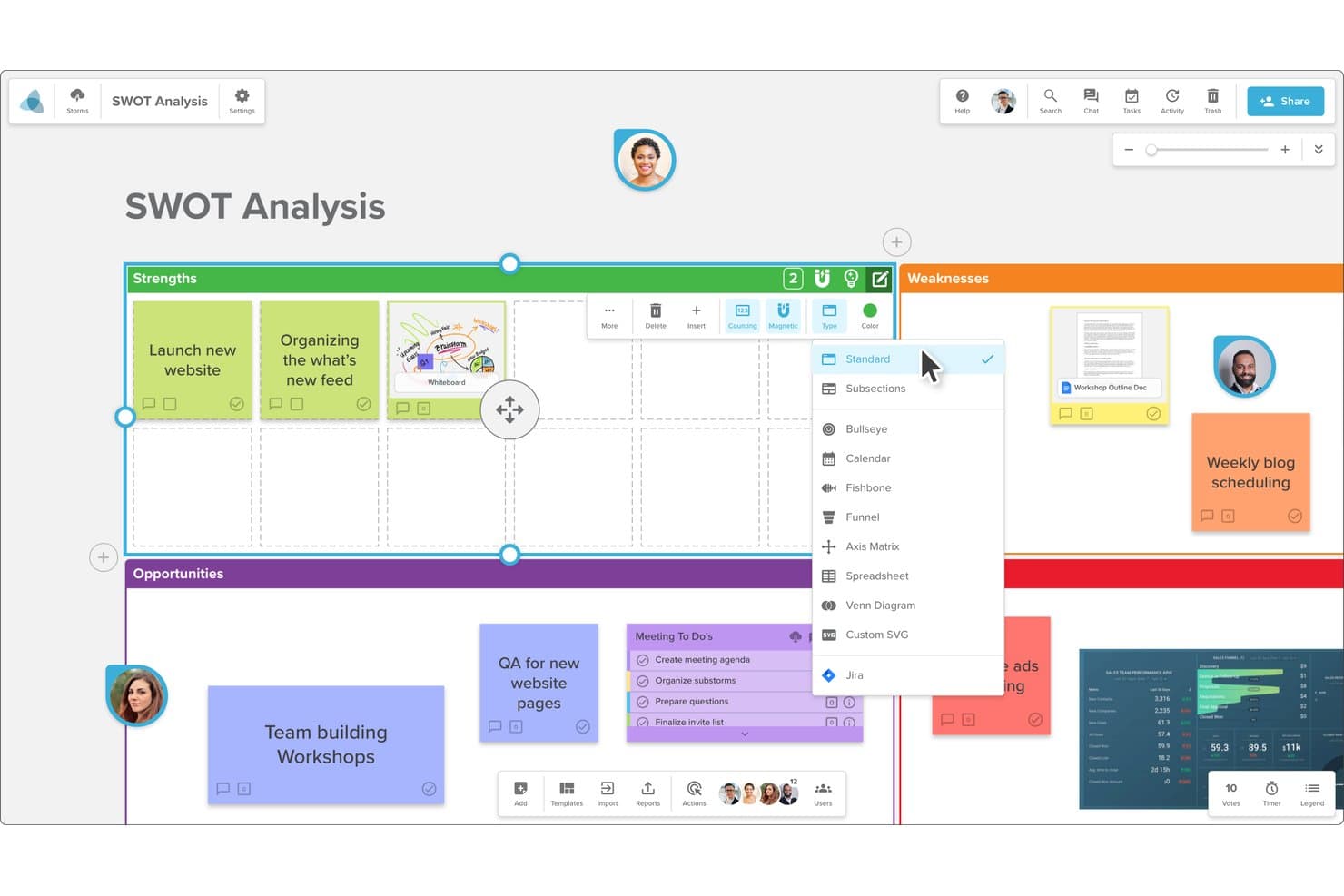
Stormboard lets users switch board layouts like Fishbone or Funnel. Stormboard is an online brainstorming and digital whiteboard tool that lets teams capture ideas on sticky notes, organize them into structured frameworks, and convert session output into shareable reports and presentations.
Who Is Stormboard Best For?
Stormboard suits teams that need to turn brainstorming sessions into structured, shareable reports without manual reformatting afterward.
Why I Picked Stormboard
Stormboard earns its spot on my shortlist because it closes the loop between brainstorming and deliverable output in a way most whiteboard tools don't. I love that every sticky note, comment, and vote in a session feeds directly into auto-generated reports you can export as Word documents, PDFs, or presentations. That means when my team wraps a discovery sprint, we're not manually reformatting raw ideas into stakeholder-ready documents. The Storm Report feature alone saves real hours.
Stormboard Key Features
- Sticky note canvas: Add, move, and group digital sticky notes across an open canvas to capture and organize ideas in real time.
- Voting and ranking tools: Team members can vote on ideas directly within a session to surface top priorities without leaving the board.
- Pre-built storm templates: Choose from a library of structured templates for common sessions like SWOT analyses, retrospectives, and sprint planning.
- Multi-board workspaces: Organize related brainstorming sessions into shared workspaces so teams can manage ongoing projects across multiple boards.
Stormboard Integrations
Stormboard offers documented integrations with Microsoft Teams, Google Drive, Jira, Rally, Azure DevOps, Webex, Zoom, Slack, Dropbox, and Box. It also supports custom integrations through its API and connects with 1,000+ apps through Zapier.
Pros and Cons
Pros:
- Structured templates support repeatable discovery sessions
- Built-in voting surfaces team priorities fast
- Turns brainstorms into exportable stakeholder reports
Cons:
- Sticky note color choices feel limited
- Users describe the interface as dated
Learn more about Stormboard: Best for remote agile project planning
- Free plan available
- From $9.99/user/month (billed annually)
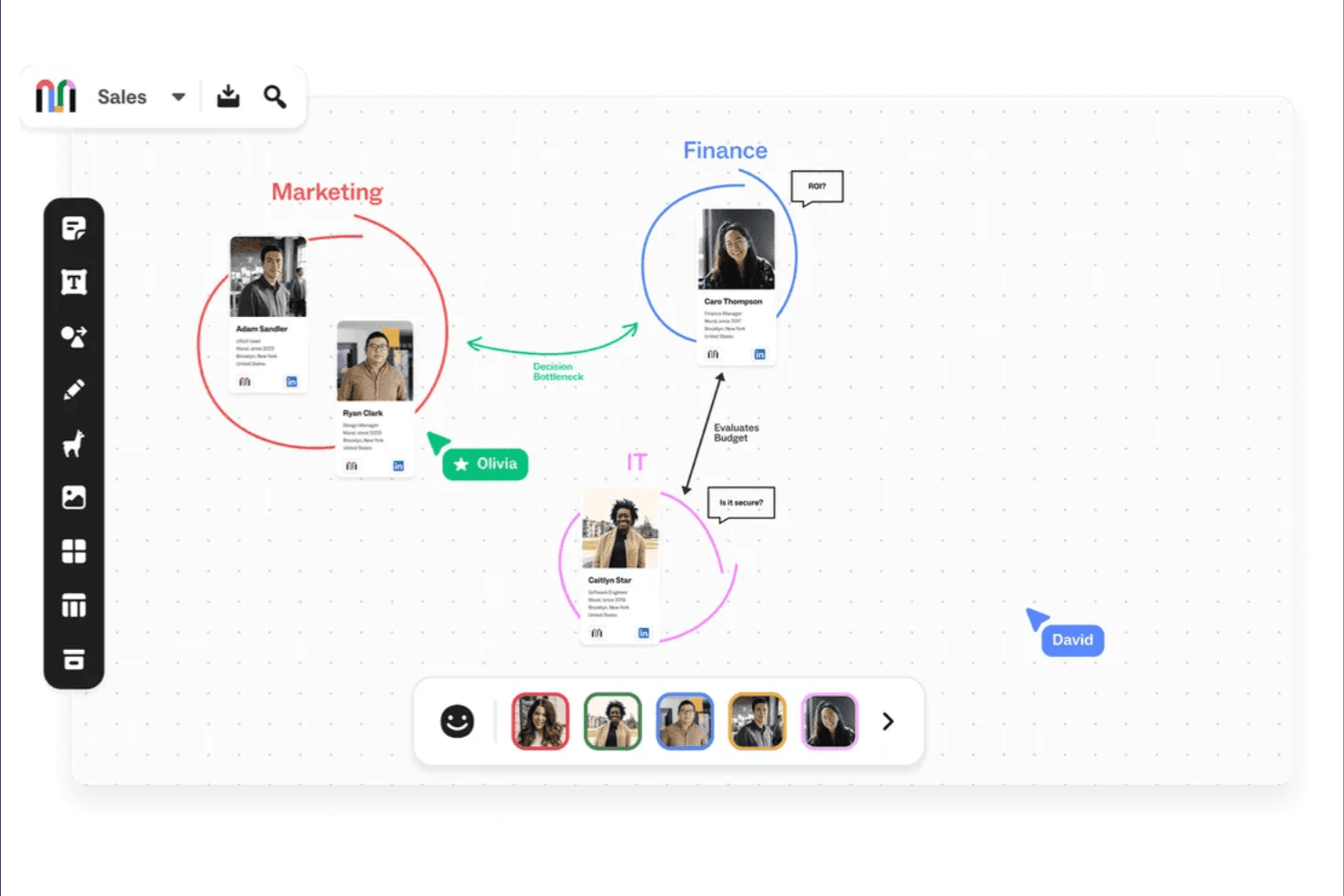
Mural supports visual collaboration for brainstorming, planning, and organizing. Mural is a visual collaboration platform built around infinite digital whiteboards, offering sticky notes, templates, mind mapping, and structured facilitation tools designed for distributed teams.
Who Is Mural Best For?
Mural is a strong fit for distributed agile teams that need a shared visual space for sprint planning, retrospectives, and backlog grooming.
Why I Picked Mural
Mural earns its spot on my shortlist because its facilitation features are purpose-built for agile ceremonies run across time zones. I especially like how Mural's pre-built sprint retrospective and planning poker templates give distributed teams a structured starting point rather than a blank canvas. Its timer and voting tools keep async brainstorming sessions on track, which I find essential when you're coordinating across multiple time zones without a facilitator in the room.
Mural Key Features
- Infinite canvas: An unlimited digital whiteboard where teams can sketch, diagram, and organize ideas without spatial constraints.
- Guest access: Invite external stakeholders or clients to collaborate on a mural without requiring them to create an account.
- Summon: A facilitation feature that moves all participants' views to a specific area of the canvas simultaneously.
- Private mode: Lets participants add sticky notes or ideas without others seeing their input until the facilitator reveals all responses.
Mural Integrations
Mural lists 47 integrations, including Microsoft Teams, Asana, Jira, Azure DevOps, Confluence, Figma, Slack, Zoom, Google Workspace, and Salesforce. It also supports custom integrations through the Mural API and Zapier.
Pros and Cons
Pros:
- Summon and timers guide remote facilitation
- Private mode supports independent idea generation
- Templates structure sprint planning and retrospectives
Cons:
- Facilitated sessions need advance board preparation
- Large canvases can become visually crowded
Learn more about Mural: Best for regulated-sector whiteboard sessions
- Free plan + 30-day trial available
- From €5/user/month
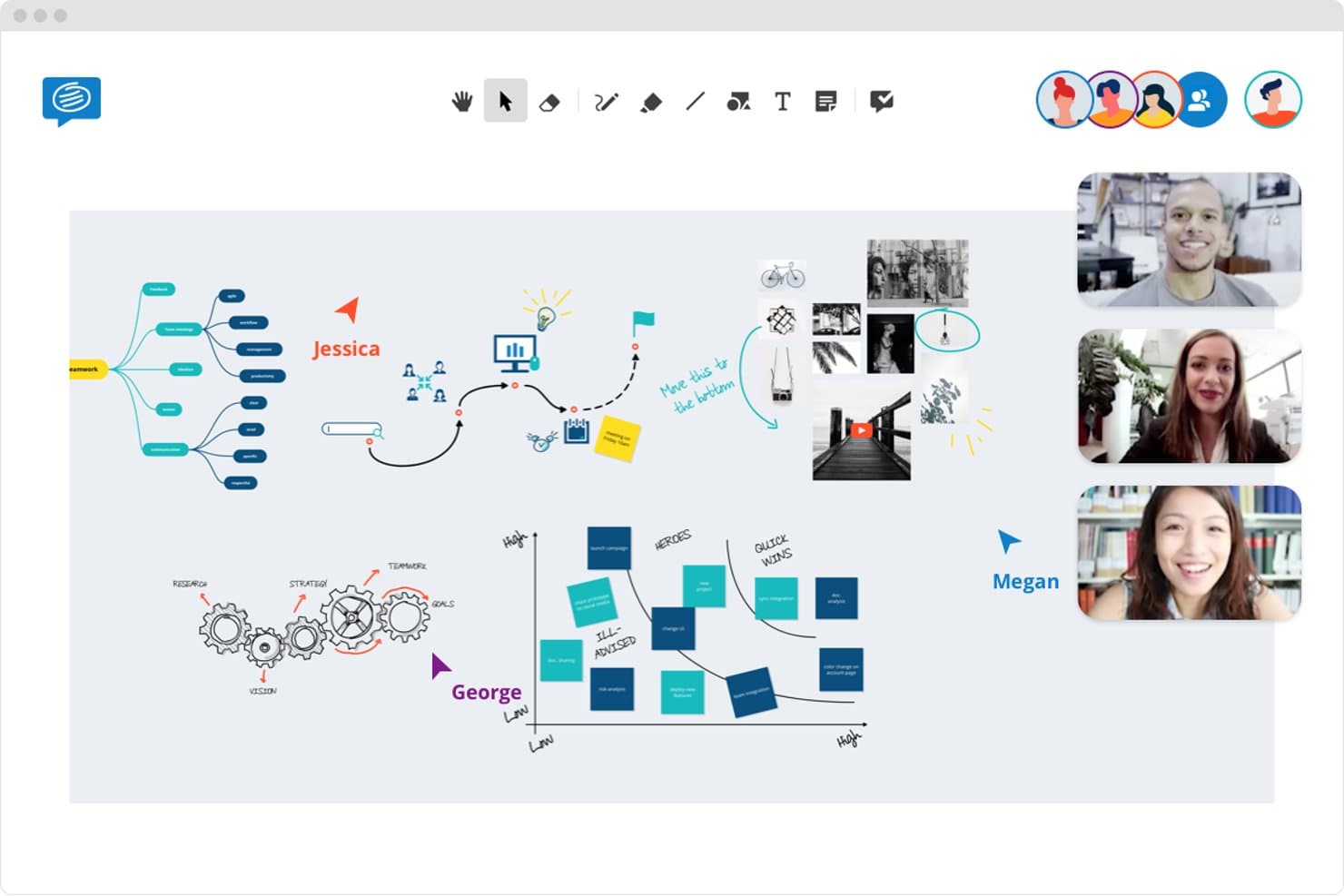
Conceptboard lets teams brainstorm together in real time on a shared whiteboard. Conceptboard is an online whiteboard tool built for visual collaboration, offering infinite canvas workspaces, real-time co-editing, structured templates, and advanced security controls suited to compliance-heavy environments.
Who Is Conceptboard Best For?
Conceptboard is a strong fit for teams in healthcare, finance, or government where data privacy and compliance requirements shape every tool decision.
Why I Picked Conceptboard
Conceptboard earns its spot on my shortlist because it's one of the few whiteboard tools built with compliance genuinely in mind, not bolted on as an afterthought. I like that it offers data residency options and granular access controls, which matter when you're running brainstorming sessions in healthcare or finance where information governance isn't optional. Its audit logs and permission-based sharing let teams collaborate on an infinite canvas without exposing sensitive data to the wrong eyes.
Conceptboard Key Features
- Infinite canvas: A boundless workspace where teams can freely add sticky notes, images, drawings, and documents without spatial limits.
- Pre-built templates: A library of ready-to-use brainstorming and planning templates, including mind maps, flowcharts, and retrospectives.
- Real-time cursor tracking: Live visibility of each participant's cursor and edits during collaborative sessions.
- Comment and annotation tools: Inline commenting and markup tools that let team members leave contextual feedback directly on canvas elements.
Conceptboard Integrations
Conceptboard offers integrations with Azure, Jira, Microsoft Teams, Webex, and Confluence, connecting brainstorming boards with planning, meetings, and documentation workflows. Availability varies by plan or deployment.
Pros and Cons
Pros:
- Granular permissions suit sensitive sessions
- Templates and comments support structured brainstorms
- Real-time co-editing suits workshops
Cons:
- Stylus drawing and PDF uploads feel clunky
- Large boards can feel slow to load
Learn more about Conceptboard: 8Best for cross-functional team workshops
Miro
- Free plan + 14-day trial available
- From $8/user/month (billed annually)
Visit WebsiteCustomer Rating:4.8/5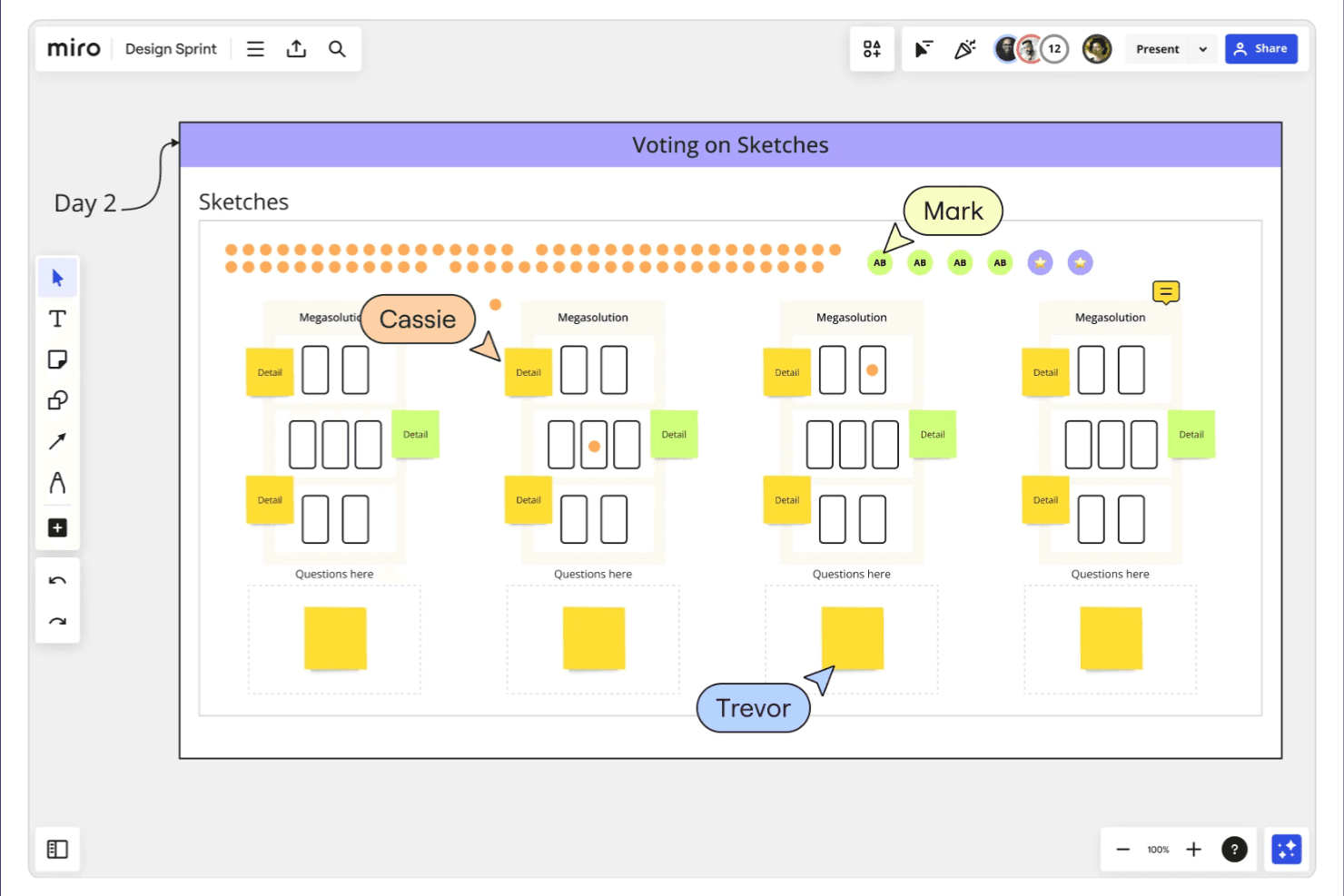
Miro supports remote teamwork through whiteboarding, planning, and ideation. Miro is a visual collaboration and online brainstorming platform built around an infinite canvas, offering sticky notes, mind maps, flowcharts, voting tools, and real-time whiteboarding.
Who Is Miro Best For?
Miro works well for cross-functional teams that need a shared visual space to run workshops, map workflows, and align stakeholders across disciplines.
Why I Picked Miro
Miro earns its spot on my shortlist because it's genuinely built for the kind of cross-functional workshops where product, design, and engineering need to think together in real time. I love how the infinite canvas keeps a full workshop session intact, from the initial sticky note dump to affinity mapping and dot-voting, without switching tools. Miro's facilitation features, like timed voting and pre-built workshop templates, make it easy to run structured sessions with distributed teams.
Miro Key Features
- Infinite canvas: A shared, scalable workspace where teams can add, move, and organize content without running out of space.
- Pre-built templates: A library of ready-to-use frameworks for retrospectives, user story mapping, and other structured sessions.
- Smart drawing: A freehand drawing tool that automatically converts rough sketches into clean shapes and diagrams.
- Asynchronous commenting: Team members can leave threaded comments and reactions directly on canvas elements, outside of live sessions.
Miro Integrations
Miro offers 160+ integrations, including Jira, Asana, Slack, Microsoft Teams, Zoom, Confluence, Notion, GitHub, and Azure DevOps. Its Developer Platform provides SDKs and APIs for custom integrations.
Pros and Cons
Pros:
- Built-in voting helps prioritize brainstormed ideas
- Live cursors support simultaneous team ideation
- Infinite canvas keeps workshop artifacts together
Cons:
- Crowded boards become difficult to navigate
- Large boards can lag with many editors
 Best for workshop-to-backlog handoff
- Free plan + trial + demo available
- From $24.90/user/month (billed annually)
Visit WebsiteCustomer Rating:4.7/5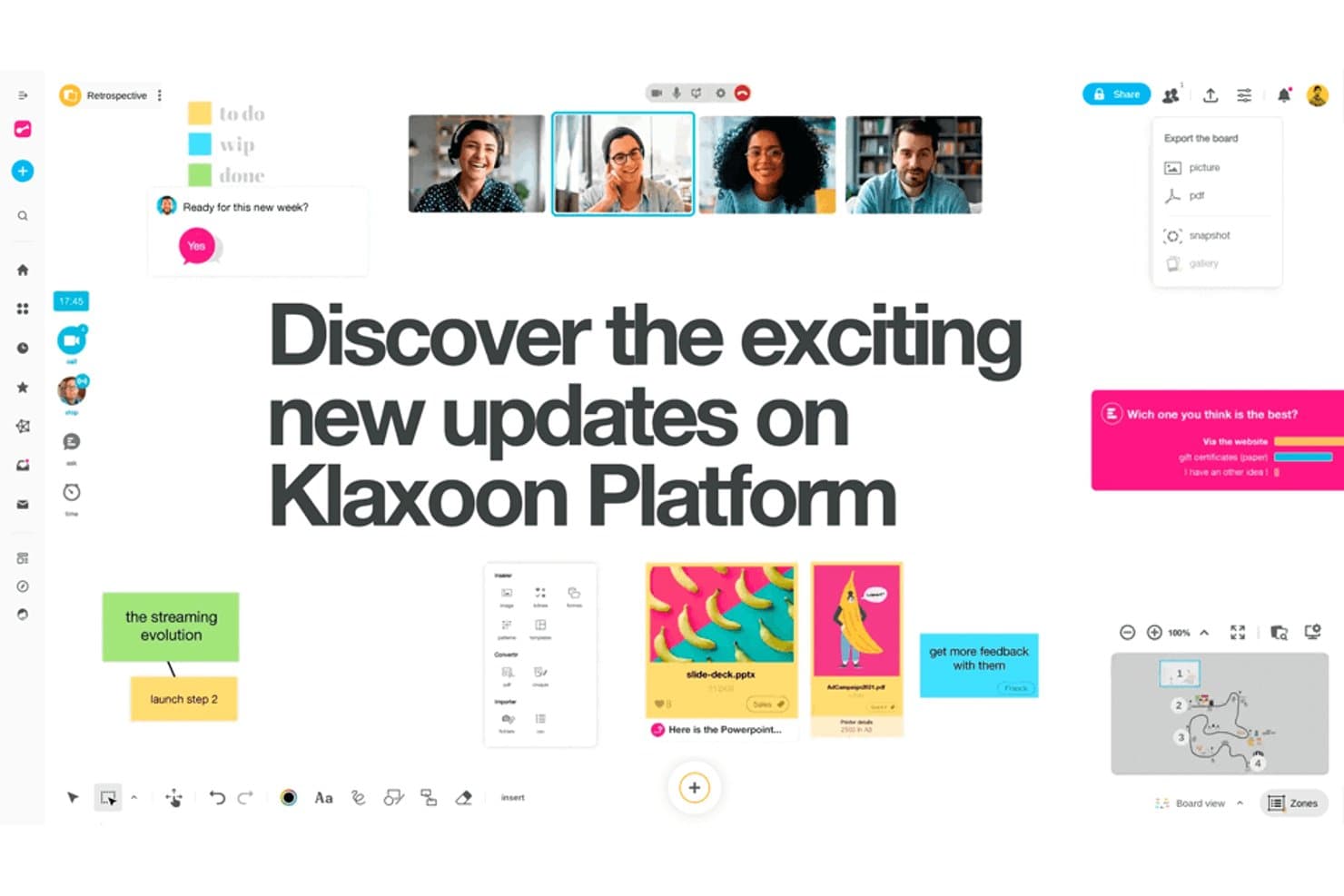
Klaxoon supports real-time collaboration with boards, polls, and video. Klaxoon is a visual collaboration and brainstorming platform that combines interactive boards, templates, surveys, and structured workshop formats into a single workspace for product and cross-functional teams.
Who Is Klaxoon Best For?
Klaxoon is a great fit for product teams that run structured workshops and need a clear path from facilitated sessions to actionable backlog items.
Why I Picked Klaxoon
Klaxoon earns its spot on my shortlist because it closes the gap between brainstorming and execution better than most tools I've used. I love how its Board format lets teams capture ideas during a workshop and then convert them directly into structured action items without switching contexts. The built-in activity templates (like SWOT or retrospectives) keep sessions focused, so the output is already organized when it's time to build your backlog.
Klaxoon Key Features
- Real-time polling and quizzes: Run live polls and quizzes during sessions to gather instant team input and surface group consensus quickly.
- Visual Board canvas: A freeform digital canvas where participants can post sticky notes, images, and links to map out ideas together.
- Pre-built workshop templates: A library of ready-to-use templates for formats like retrospectives, SWOT analyses, and ideation sessions.
- Meeting recap and export: Automatically generate session summaries and export board content to share with stakeholders after a session ends.
Klaxoon Integrations
Klaxoon offers native integrations with Jira, Wrike, Microsoft Teams, Google Workspace, Microsoft OneDrive, Google Drive, Dropbox, Confluence, and Moodle. It also supports custom integrations through its API and connects with 1,000+ apps via Zapier.
Pros and Cons
Pros:
- Polls surface consensus during live sessions
- Templates keep ideation sessions focused
- Turns workshop ideas into backlog actions
Cons:
- Freeform canvases can become cluttered
- Board-to-backlog handoff may need cleanup
Learn more about Klaxoon: Best for visualizing complex workflows
- Free plan + 7-day trial + demo available
- From $9/user/month (billed annually)
Visit WebsiteCustomer Rating:4.5/5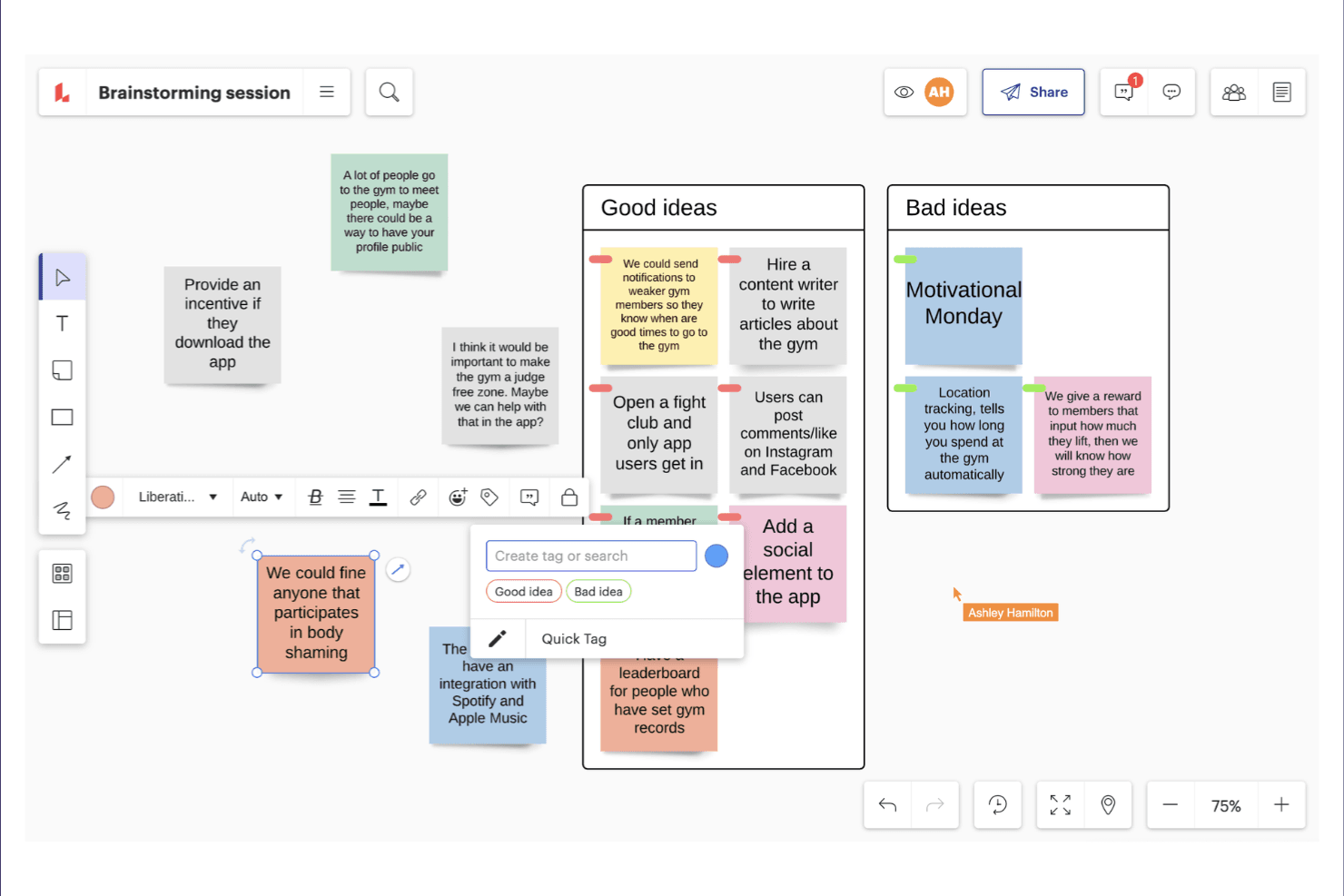
Lucidspark enables real-time whiteboarding for brainstorming and team planning. Lucidspark is an online whiteboard and brainstorming tool that combines freeform ideation with structured diagramming, mind mapping, and visual collaboration features.
Who Is Lucidspark Best For?
Lucidspark suits cross-functional product teams that need to move from messy brainstorming sessions into structured, visual workflows without switching tools.
Why I Picked Lucidspark
Lucidspark earns its spot on my shortlist because it bridges the gap between open brainstorming and structured process mapping in a single canvas. I love how its swimlane templates let my team sketch out a messy idea and immediately reshape it into a cross-functional workflow diagram without starting over. The built-in voting and grouping tools also help us move from scattered sticky notes to prioritized, visual structures fast.
Lucidspark Key Features
- AI-powered idea clustering: Lucidspark automatically groups related sticky notes and ideas into categories using AI, saving you the time of sorting manually.
- Freehand drawing canvas: A freeform drawing layer lets you sketch diagrams, annotate content, or map ideas by hand directly on the canvas.
- Timer and facilitation tools: Built-in session timers and facilitator controls help you run structured brainstorming workshops with distributed teams.
- Lucidchart integration: Native integration with Lucidchart lets you convert whiteboard content directly into detailed, shareable diagrams without rebuilding from scratch.
Lucidspark Integrations
Lucidspark has native integrations with Google Workspace, Microsoft 365, Slack, and Jira. Google Workspace support includes Drive, Docs, Sheets, Slides, Calendar, and Meet.
Pros and Cons
Pros:
- Freehand sketching supports flexible workshop exploration
- AI clustering and voting help prioritize ideas
- Swimlane templates turn ideas into workflows
Cons:
- Whiteboard focus limits detailed task execution
- Complex canvases can become visually crowded
Learn more about Lucidspark:
Diğer Çevrim İçi Beyin Fırtınası Araçları
Kısa listeme girmeyen ancak yine de göz atmaya değer bazı ek çevrim içi beyin fırtınası aracı seçenekleri şunlardır:
- 11ZoomBest for real-time video collaboration
- 12LucidchartBest for diagram-based ideation
- 13MindMeisterBest for mind map-led team brainstorming
- 14WhimsicalBest for PM and UX team visual ideation
- 15IdeanoteBest for structured innovation management
- 16MentimeterBest for live audience participation
- 17Microsoft WhiteboardBest for Microsoft 365 integration
- 18PadletBest for facilitated open-submission sessions
- 19IdeamapBest for AI-powered idea generation
- 20Canva WhiteboardBest for ideation within a design workflow
How I Evaluate Online Brainstorming Tools
I split my evaluation into three parts, giving the most weight to core functions: capture and group ideas on a shared canvas, then vote on priorities. Next, I consider differentiators such as AI idea clustering. Finally, I weigh factors beyond features, including facilitator onboarding and guest-friendly pricing.
Core Functionality (Table Stakes For This List)
When I'm selecting tools for my list, I score each one on a scale from 0 (does not offer the functionality) to 5 (excels in this area) for each core functionality listed below. I then convert the total into a percentage to help assess each tool's overall fit, with extra weight on any functionalities I’ve deemed essential.
- Collaborative Canvas (Essential): I look for smooth, simultaneous editing with visible cursors, so distributed teams can add and arrange ideas during a live workshop.
- Idea Capture (Essential): I check whether sticky notes or cards make it easy to record, color-code, and group suggestions such as customer pain points.
- Voting and Prioritization: I assess whether participants can vote on ideas and review results to guide decisions about discovery or roadmap priorities.
- Ideation Templates: I look for useful formats such as mind maps and affinity diagrams that give sessions structure without dictating their outcomes.
- Facilitation Controls: I consider how hosts manage access, focus, and timing when guiding a retrospective or design sprint with varied participants.
- Output Handoff: I check whether teams can export or share organized workshop results for reports, backlogs, or follow-up planning.
Once I have a list of tools that meet the criteria, I consider what sets each platform apart.
Differentiating Factors (What Sets Vendors Apart)
Here's how I compare and contrast different vendors:
Standout Features
AI idea clustering is the feature I evaluate most closely. After a 20-person discovery workshop, manually grouping dozens of sticky notes burns time and invites bias. I check whether a tool's AI can surface themes and label clusters accurately enough to jumpstart synthesis. Asynchronous contribution mode matters just as much for distributed teams. I look for whether teammates in different time zones can add ideas, vote, and react outside a live session without losing context. Built-in timers and agenda builders round out my focus. Pre-sequenced activity stages with visible countdowns keep workshops on pace, which removes the need for a separate facilitation app.
Beyond Features
I check whether workshop outputs can flow into tools like Jira or Notion without manual re-entry, since ideas that stall after a session rarely reach the backlog. Pricing models matter too—per-seat licensing can spike costs when you invite cross-functional guests to a single workshop. I also evaluate facilitator onboarding resources, because a confusing interface will derail a live session with non-technical stakeholders faster than any missing feature.
Çevrim İçi Beyin Fırtınası Araçları Nasıl Seçilir?
Uzun özellik listeleri ve karmaşık fiyatlandırma yapıları içinde kaybolmak kolaydır. Kendinize özgü yazılım seçimi sürecinizde ilerlerken odağınızı korumanıza yardımcı olmak için göz önünde bulundurmanız gereken faktörleri içeren bir kontrol listesi hazırladık:
| Faktör | Göz önünde bulundurulması gerekenler |
|---|---|
| FaktörÖlçeklenebilirlik | Göz önünde bulundurulması gerekenlerBüyüdükçe araç ekip büyüklüğünüzü destekleyecek mi? Daha büyük gruplar için kullanıcı sınırlarını, çalışma alanı kotalarını ve fiyat artışlarını kontrol edin. |
| FaktörEntegrasyonlar | Göz önünde bulundurulması gerekenlerMevcut araçlarınıza (ör. Slack, proje yönetimi, dosya depolama) bağlanıyor mu? Eksik entegrasyonlar iş akışı siloları oluşturabilir. |
| FaktörÖzelleştirilebilirlik | Göz önünde bulundurulması gerekenlerŞablonları, iş akışlarını veya izinleri ekibinizin beyin fırtınası tarzına ve süreçlerine uyacak şekilde uyarlayabilir misiniz? |
| FaktörKullanım kolaylığı | Göz önünde bulundurulması gerekenlerTeknik becerisi ne olursa olsun tüm ekip üyeleri eğitim almadan veya zorlanmadan katılabilecek mi? |
| FaktörUygulama ve işe alıştırma | Göz önünde bulundurulması gerekenlerEkibinizi çalışır duruma getirmeniz ne kadar sürecek? Açık kurulum adımlarına, geçiş desteğine ve işe alıştırma kaynaklarına sahip araçları tercih edin. |
| FaktörMaliyet | Göz önünde bulundurulması gerekenlerKullanım arttıkça bütçenizi etkileyebilecek gizli ücretler, zorunlu yükseltmeler veya kullanıcı başına ücretler var mı? |
| FaktörGüvenlik önlemleri | Göz önünde bulundurulması gerekenlerAraç şifreleme, erişim denetimleri ve kuruluşunuzun veri politikalarına uygunluk sunuyor mu? |
| FaktörDestek erişilebilirliği | Göz önünde bulundurulması gerekenlerHangi destek kanalları sunuluyor ve bunlar ekibinizin çalışma saatlerinde mi yoksa yalnızca belirli bölgelerde mi kullanılabiliyor? |
Çevrim İçi Beyin Fırtınası Araçları Nedir?
Çevrim içi beyin fırtınası araçları, bireylerin veya ekiplerin sanal bir ortamda iş birliği yaparak fikirler üretmesini, kaydetmesini ve düzenlemesini sağlayan dijital platformlardır. Bu araçlar hem gerçek zamanlı hem de eş zamanlı olmayan katılımı destekleyerek kullanıcıların herhangi bir konumdan katkıda bulunmasına olanak tanır. Genellikle fikirleri kategorilere ayırma, tartışma ve paylaşma özellikleri içerir; bu da yapılandırılmış beyin fırtınası oturumlarını kolaylaştırmayı ve kavramların zaman içindeki gelişimini takip etmeyi kolaylaştırır.
Özellikler
Çevrim içi beyin fırtınası araçlarını seçerken aşağıdaki temel özelliklere dikkat edin:
- Gerçek zamanlı iş birliği: Birden fazla kullanıcı aynı anda fikir ve geri bildirim paylaşabilir; bu da konumdan bağımsız olarak birlikte beyin fırtınası yapmayı kolaylaştırır.
- Fikirleri düzenleme: Fikirleri gruplamaya, etiketlemeye veya kategorilere ayırmaya yönelik araçlar, ekiplerin oturumlar sırasında ve sonrasında katkıları sıralamasına ve önceliklendirmesine yardımcı olur.
- Şablon kitaplığı: Zihin haritalama veya SWOT analizi gibi farklı beyin fırtınası yöntemleri için hazır şablonlar yapı sağlar ve kurulum süresinden tasarruf ettirir.
- Oylama ve önceliklendirme: Ekip üyelerinin fikirleri oylamasına veya sıralamasına olanak tanıyan yerleşik mekanizmalar, karar alma sürecini destekler ve en umut vadeden fikirleri öne çıkarır.
- Dosya ve medya ekleri: Belgelerin, görsellerin veya bağlantıların yüklenebilmesi, kullanıcıların fikirlerine bağlam ve destekleyici materyaller eklemesine olanak tanır.
- Oturumu dışa aktarma ve paylaşma: Beyin fırtınası sonuçlarını PDF, CSV gibi biçimlere aktarma veya diğer araçlarla doğrudan entegrasyon seçenekleri, sonuçların paylaşılmasını kolaylaştırır.
- Yorum yapma ve tartışma: Konu dizili yorumlar veya sohbet özellikleri, belirli fikirler hakkında daha kapsamlı tartışma ve açıklama yapılmasını sağlar.
- Erişim denetimleri ve izinler: Oturumları kimlerin görüntüleyebileceğini, düzenleyebileceğini veya yönetebileceğini belirlemeye yönelik ayarlar, gizliliğin korunmasına ve hassas beyin fırtınası konuları üzerindeki kontrolün sürdürülmesine yardımcı olur.
- Arama ve filtreleme: Arama çubukları ve filtreler, kullanıcıların büyük beyin fırtınası oturumları içinde belirli fikirleri veya temaları hızla bulmasını sağlar.
- Verimlilik araçlarıyla entegrasyon: Proje yönetimi, iletişim veya dokümantasyon platformlarıyla doğrudan bağlantılar, ekiplerin manuel kopyalama yapmadan fikir geliştirme aşamasından uygulamaya geçmesine yardımcı olur.
Faydalar
Çevrim içi beyin fırtınası araçlarını uygulamak, ekibiniz ve işletmeniz için çeşitli faydalar sağlar. Yararlanabileceğiniz birkaç fayda şunlardır:
- Artan katılım: Ekip üyeleri her yerden ve her zaman fikir paylaşabilir; bu da hem gerçek zamanlı hem de eş zamanlı olmayan iş birliğini destekler.
- Daha iyi fikir düzenleme: Etiketleme, kategorilere ayırma ve arama gibi özellikler, bir oturumdan sonra fikirleri sıralamayı, önceliklendirmeyi ve yeniden gözden geçirmeyi kolaylaştırır.
- Daha hızlı karar alma: Yerleşik oylama ve önceliklendirme araçları, ekiplerin en umut vadeden fikirleri hızla belirlemesine ve ilerlemesine yardımcı olur.
- Geliştirilmiş dokümantasyon: Otomatik kaydetme ve dışa aktarma seçenekleri, tüm fikirlerin ve tartışmaların kaydedilmesini ve daha sonra kolayca paylaşılmasını veya bunlara başvurulmasını sağlar.
- Gelişmiş yaratıcılık: Şablonlara, görsel araçlara ve yapay zekâ destekli önerilere erişim, yeni bakış açıları ortaya çıkarabilir ve daha çeşitli düşünmeyi teşvik edebilir.
- Entegrasyonlar: Proje yönetimi ve iletişim platformlarıyla doğrudan bağlantılar, ekiplerin manuel aktarım yapmadan fikirleri uygulanabilir görevlere dönüştürmesine yardımcı olur.
- Daha fazla şeffaflık: Oturum geçmişi, yorum yapma ve erişim denetimleri; katkıların ve kararların net bir kaydını sunarak hesap verebilirliği ve uygulama sürecinin takip edilmesini destekler.
Maliyetler ve Fiyatlandırma
Çevrim içi beyin fırtınası araçlarını seçmek, mevcut çeşitli fiyatlandırma modellerinin ve planların anlaşılmasını gerektirir. Maliyetler özelliklere, ekip büyüklüğüne, eklentilere ve diğer unsurlara göre değişir. Aşağıdaki tablo, çevrim içi beyin fırtınası aracı çözümlerinde yaygın planları, ortalama fiyatlarını ve genellikle sunulan özellikleri özetlemektedir:
Çevrim İçi Beyin Fırtınası Araçları İçin Plan Karşılaştırma Tablosu
| Plan Türü | Ortalama Fiyat | Yaygın Özellikler |
|---|---|---|
| Plan TürüÜcretsiz Plan | Ortalama Fiyat$0 | Yaygın ÖzelliklerTemel beyin fırtınası oturumları, sınırlı sayıda ortak çalışan, temel şablonlar ve temel dışa aktarma seçenekleri. |
| Plan TürüKişisel Plan | Ortalama Fiyat$5-$15/kullanıcı/ay | Yaygın ÖzelliklerSınırsız oturum, geliştirilmiş şablonlar, dosya ekleri, öncelikli destek ve temel entegrasyonlar. |
| Plan Türüİşletme Planı | Ortalama Fiyat$15-$30/kullanıcı/ay | Yaygın ÖzelliklerEkip iş birliği araçları, gelişmiş entegrasyonlar, oylama özellikleri, yönetici denetimleri ve analizler. |
| Plan TürüKurumsal Plan | Ortalama Fiyat$30-$50/kullanıcı/ay | Yaygın ÖzelliklerÖzel güvenlik, özel destek, gelişmiş izinler, uyumluluk özellikleri ve işe alıştırma hizmetleri. |
Çevrim İçi Beyin Fırtınası Araçları Hakkında SSS
Çevrim içi beyin fırtınası araçları hakkında sık sorulan bazı soruların yanıtları burada:
Çevrim içi beyin fırtınası araçları hem gerçek zamanlı hem de eşzamansız iş birliğini destekleyebilir mi?
Evet, çoğu beyin fırtınası yazılımı hem gerçek zamanlı hem de eşzamansız iş birliğini destekler. Bu esneklik, uzaktan çalışan bir ekibin üyelerinin canlı oturumlar sırasında en iyi fikirlerine katkıda bulunmasına veya daha sonra görüşlerini eklemesine olanak tanır ve sanal beyin fırtınasını farklı saat dilimlerindeki dağınık katılımcılar için erişilebilir kılar.
Ayrıca, bireylerin düşüncelerini grupla paylaşmadan önce bağımsız olarak yazdığı beyin yazımı gibi yapılandırılmış eşzamansız beyin fırtınası tekniklerinin kullanılmasına da olanak sağlar.
Hassas iş görüşmeleri için çevrim içi beyin fırtınası araçları ne kadar güvenlidir?
Güvenlik platforma göre değişir, ancak birçok grup beyin fırtınası aracı şifreleme, erişim denetimleri ve uyumluluk özellikleri sunar. Hassas bilgileri paylaşmadan önce her zaman bir aracın güvenlik belgelerini inceleyin ve kuruluşunuzun veri koruma gereksinimlerini karşıladığından emin olun; şirketinizin özel fikirlerini korumak için güvenli olmayan elektronik tablolar veya paylaşılan belgeler kullanmaktan kaçının.
Çevrim içi beyin fırtınası araçlarında ne tür entegrasyonlar aramalıyım?
Proje yönetimi, iletişim, dijital not alma ve dosya depolama platformlarıyla entegrasyonları arayın. Yaygın örnekler arasında Slack, Microsoft Teams, Trello veya Google Drive bağlantıları bulunur. Bu bağlantılar, iş akışlarını basitleştirmeye ve oturum sona erdikten sonra ivmeyi kaybetmeden harika fikirleri eyleme dönüştürmeye yardımcı olur.
Ücretsiz planlarda katılımcı veya oturum sayısına ilişkin sınırlamalar var mı?
Evet, ücretsiz planlar genellikle katılımcı, oturum veya kullanılabilir özellik sayısını sınırlar. Bu kısıtlamaları anlamak ve ekibinizin büyüklüğü ya da kullanım amacınız için yükseltme gerekip gerekmediğini belirlemek üzere her aracın fiyatlandırma sayfasını inceleyin.
Çevrim içi beyin fırtınası araçları fikirleri önceliklendirmeye nasıl yardımcı olur?
Birçok araç, ekip üyelerinin fikirleri değerlendirmesine ve önceliklendirmesine olanak tanıyan oylama, sıralama veya puanlama özellikleri içerir. Bu mekanizmalar, ister geleneksel fikir üretme yöntemlerini ister sorunlara tersten bakarak çözüm bulmayı sağlayan tersine beyin fırtınası gibi alışılmadık yöntemleri kullanıyor olun, dikkati en umut verici kavramlara yoğunlaştırmaya ve daha yapılandırılmış karar alma süreçlerini desteklemeye yardımcı olur.