

Ücretsiz beyin fırtınası araçları, fikirleri tek kuruş ödemeden yakalamanıza, düzenlemenize ve geliştirmenize olanak tanıyan dijital platformlardır; bu da onları ücretsiz bir plan veya deneme sürümüyle erişilebilir kılar. Ekibinizin yaratıcılığını artırmanın akıllı ve düşük maliyetli yollarını arıyorsanız bu araçlar maliyeti ve karmaşıklığı ortadan kaldırır.
Bu kadar çok seçenek varken gerçek iş ortamlarında iş birliği yapmanıza, düşüncelerinizi haritalandırmanıza veya görüş toplamanıza gerçekten hangilerinin yardımcı olduğunu bilmek zordur. Bu rehber, gerçek değer sunan en iyi ücretsiz beyin fırtınası seçeneklerini ayrıntılı olarak ele alır; böylece büyük fikirleri gerçek çözümlere dönüştürmeye odaklanabilirsiniz.
Why Trust Our Software Recommendations
6,700+
Reviews
20
Industry experts
16+
Evaluation factors
14
Years
Our team has been testing and reviewing software since 2012. As product managers ourselves, we know how difficult—and important—it is to choose the right software.
For this guide, we evaluated tools using hands-on testing and independent research, scoring tools using our selection criteria.
Our reviews reflect our human editorial judgment, not a sales pitch.
Expert reviewers:
- Andrew LumbySenior TPM
- Cristiano ValimSenior UI/UX Lead


Karşılaştırma Tablosu: Ücretsiz Beyin Fırtınası Araçları
Bu karşılaştırma tablosu, ücretsiz beyin fırtınası aracı seçimlerimin fiyatlandırma ayrıntılarını özetlemektedir.
Score legend (out of 5)
- Excellent4.5–5
- Good4–4.4
- Average3–3.9
- Below average2–2.9
- Poor1–1.9
Sorted by: Default
| Tool | Starting Price | Website | |||||||
|---|---|---|---|---|---|---|---|---|---|
Best for whiteboarding within a Figma workflow | 4.2 out of 5 | 4 | 5 | 5 | 5 | 3 | 3 | $3/user/month Free plan available | Website |
Best for turning whiteboard ideas into tracked tasks | 4.0 out of 5 | 4 | 5 | 5 | 4 | 4 | 2 | $12/user/month Free plan + free trial + free demo available | Website |
Best for brainstorming with built-in timers and voting | 4.3 out of 5 | 4 | 4 | 5 | 4 | 5 | 4 | $10/user/month Free plan available | Website |
Best for free facilitation in remote workshops | 4.2 out of 5 | 3 | 4 | 5 | 4 | 4 | 5 | $9.99/user/month Free plan + demo available | Website |
Best for education-focused group brainstorming | 4.0 out of 5 | 4 | 5 | 3 | 4 | 4 | 4 | $11.61/month Free plan available | Website |
Best for diagramming with cloud storage sync | 4.0 out of 5 | 5 | 4 | 5 | 5 | 4 | 1 | Pricing upon request Free plan available | Website |
Best for EU-hosted visual collaboration | 3.8 out of 5 | 4 | 4 | 4 | 4 | 4 | 3 | €5/user/month Free plan + 30-day trial available | Website |
Best for design-native team brainstorming | 4.2 out of 5 | 4 | 5 | 5 | 4 | 4 | 3 | Free plan available Free plan available | Website |
Best for mapping ideas into project tasks | 3.7 out of 5 | 4 | 4 | 4 | 4 | 4 | 2 | Pricing upon request 15-day free trial + free plan available | Website |
Best for infinite canvas collaboration | 4.0 out of 5 | 3 | 5 | 5 | 4 | 5 | 2 | $8/user/month Free plan + 14-day trial available | Book Demo |




Ücretsiz Beyin Fırtınası Araçları İncelemeleri
Kısa listeme giren ücretsiz beyin fırtınası araçlarının ayrıntılı özetlerini aşağıda bulabilirsiniz. İncelemelerim, sizin için en iyi aracı bulmanıza yardımcı olmak amacıyla her aracın özelliklerine, en uygun kullanım alanlarına ve fiyatlandırmasına ayrıntılı bir bakış sunmaktadır.
 Best for whiteboarding within a Figma workflow
- Free plan available
- From $3/user/month
Visit WebsiteCustomer Rating:4.7/5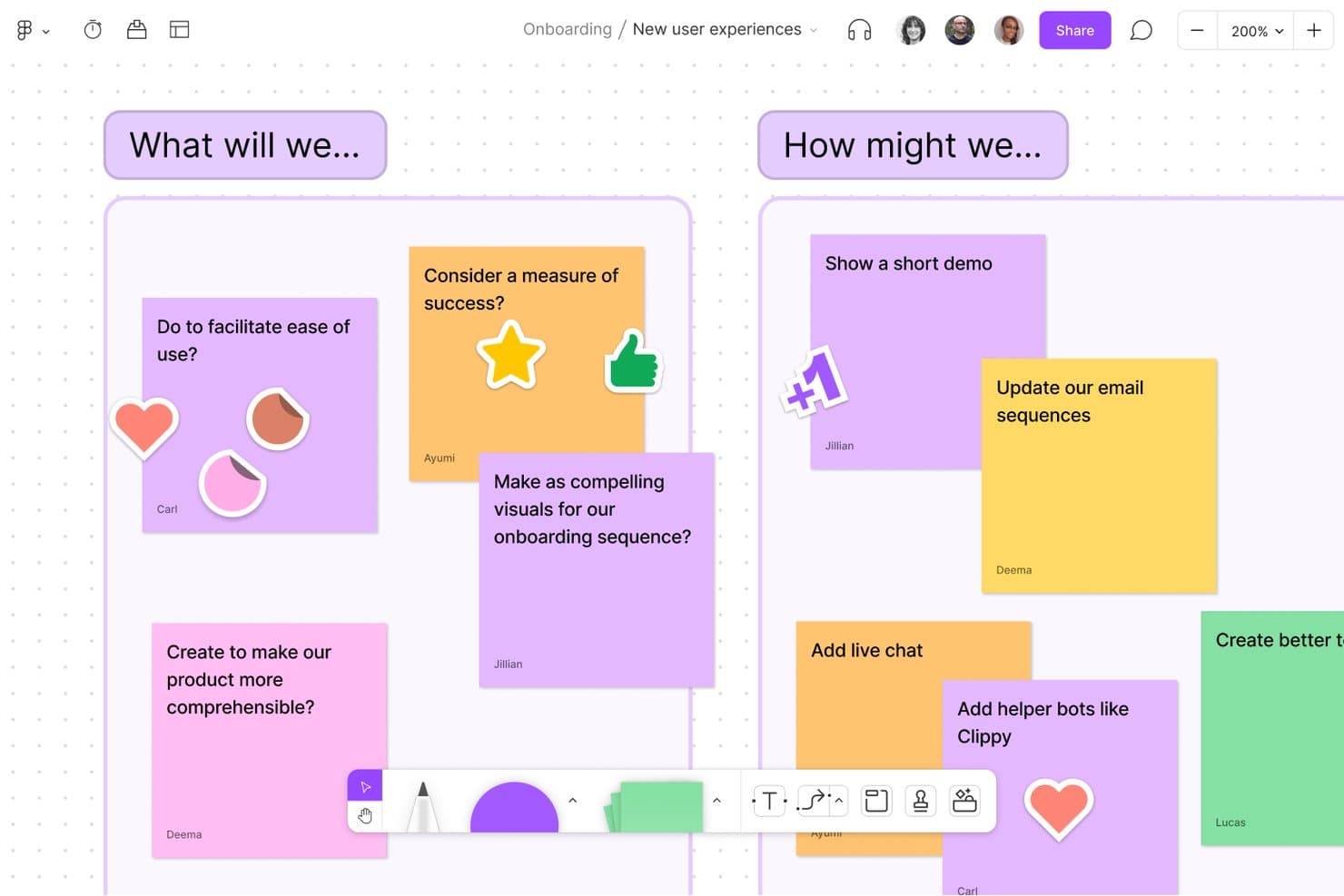
FigJam lets teams brainstorm ideas together using sticky notes and boards. FigJam is a collaborative online whiteboard for brainstorming, diagramming, and workshops, with an infinite canvas, sticky notes, templates, real-time editing, Figma integration, and AI-powered idea sorting and summaries.
Who Is FigJam Best For?
Product managers and UX teams will find FigJam useful for workshops, product discovery, journey mapping, and roadmap discussions within a Figma workflow.
Why I Picked FigJam
I picked FigJam because it’s best for whiteboarding within a Figma workflow. I use its infinite canvas, roadmap and customer journey templates, and Figma copy-paste support to move from discovery workshops into product design. AI Sort and Summarize then turn scattered sticky notes into themes and next steps.
FigJam Key Features
- Live collaboration: Multiple users can edit with live cursors, cursor chat, comments, and audio calls.
- Idea capture tools: Add stickies, shapes, connectors, text, drawings, tables, code blocks, GIFs, and stamps.
- Session timer: Run shared countdowns for workshops, exercises, and timed brainstorming activities.
- Board exports: Export boards as PNG, JPG, PDF, or CSV files, or copy content into Figma Design.
FigJam Integrations
FigJam offers integrations with Jira, Asana, GitHub, Slack, Microsoft Teams, Google Calendar, and Figma Design. It also supports board imports from Miro, Mural, Lucid, and Google Jamboard.
What's Free?
FigJam has a free Starter plan rather than a time-limited trial. You can collaborate with unlimited users on up to three files, with a three-page limit per file; viewers can access shared files without these editing limits.
Pros and Cons
Pros:
- Built-in timer supports structured brainstorming sessions
- Infinite canvas supports complex workshop layouts
- AI sorts stickies into actionable themes
Cons:
- Large boards can experience performance lag
- Free collaboration is limited to three files
Learn more about FigJam: Best for turning whiteboard ideas into tracked tasks
- Free plan + free trial + free demo available
- From $12/user/month
Visit WebsiteCustomer Rating:4.7/5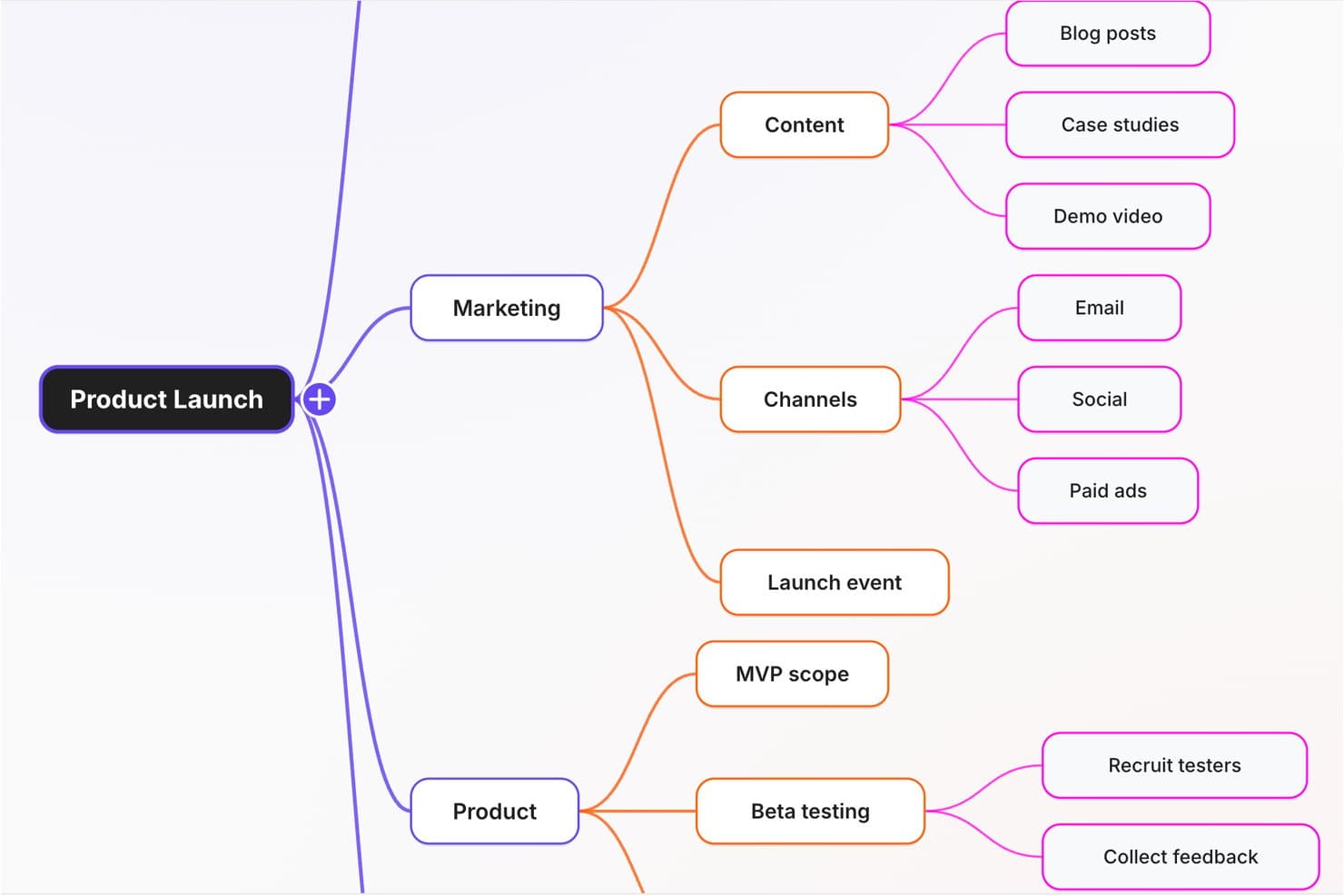
ClickUp's mind map organizes product launch ideas into branches. ClickUp is a brainstorming and visual collaboration tool with whiteboards, sticky notes, mind maps, flowcharts, live co-editing, embedded Docs, and task conversion within a project management workspace.
Who Is ClickUp Best For?
ClickUp suits product managers and startup founders who want to turn visual ideas into assigned tasks, due dates, and executable plans.
Why I Picked ClickUp
I picked ClickUp because it’s built for turning whiteboard ideas into tracked tasks. I can convert sticky notes, shapes, or text into tasks with assignees and due dates, then place live tasks and Docs beside the original concepts. Live cursors, comments, and @mentions keep product discovery connected to execution.
ClickUp Key Features
- Presentation mode: Guide viewers through board frames without exporting slides.
- Export formats: Save boards as PNG, JPEG, SVG, WEBP, or PDF files.
- Whiteboard templates: Create, save, apply, and update reusable board layouts.
- AI diagram generation: Generate editable flowcharts and process maps from prompts.
ClickUp Integrations
ClickUp lists integrations with Miro, Figma, Slack, Microsoft Teams, Google Drive, Zoom, GitHub, and Zapier. An API and webhooks support custom connections.
What's Free?
ClickUp offers a free-forever plan with unlimited tasks and free plan members. It includes 60 MB of storage, one Form, five active Automations, and 100 Automation actions per month, while advanced features and higher usage limits require a paid plan.
Pros and Cons
Pros:
- Supports rich visual idea capture
- Embeds live Docs and tasks
- Converts sticky notes into assigned tasks
Cons:
- No built-in voting or timers
- Free boards remain public
Learn more about ClickUp: Best for brainstorming with built-in timers and voting
- Free plan available
- From $10/user/month (billed annually)
Visit WebsiteCustomer Rating:4.6/5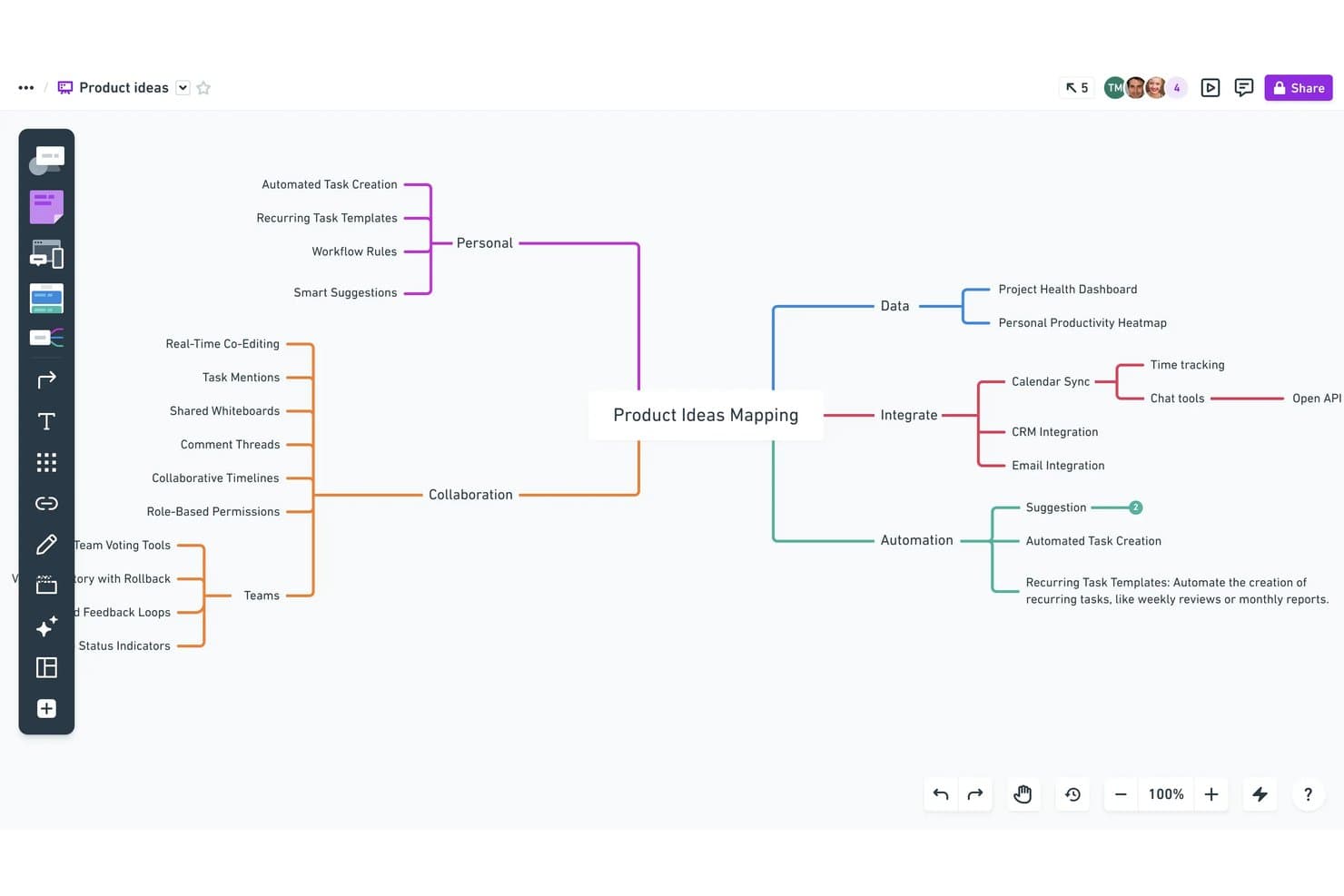
Whimsical lets users map product ideas visually with mind maps. Whimsical is a visual brainstorming and whiteboard tool with an infinite canvas for sticky notes, mind maps, flowcharts, wireframes, diagrams, collaborative documents, and AI-assisted idea organization.
Who Is Whimsical Best For?
Product managers and UX teams that need visual brainstorming with built-in timers, voting, diagrams, and wireframes.
Why I Picked Whimsical
I picked Whimsical for its “Best for brainstorming with built-in timers and voting” setup. I use the four-stage Brainstorming Workshop template to move from problem statements to solo ideas, grouping, and voting. During live sessions, the timer sets focused rounds while editor voting ranks sticky notes for the next product discovery step.
Whimsical Key Features
- Wireframe components: Build product screens with drag-and-drop interface elements.
- Project management integrations: Connect Whimsical with Jira, Linear, GitHub, and Slack.
- AI agent: Generate mind maps, flowcharts, wireframes, and docs from prompts.
- Board imports: Import work from Miro, FigJam, Mural, Visio, and Lucidspark.
Whimsical Integrations
Whimsical integrates with Jira, Linear, GitHub, Slack, Notion, and Google Docs, with embeds for Asana, ClickUp, Monday, and Trello. A beta API supports custom integrations.
What's Free?
Whimsical offers a free-forever plan with unlimited boards, workspace members, teams, guests, and viewers. It limits you to 50 board objects and 50 document blocks per month, adds watermarks to exports, provides seven-day version history, and includes 10 one-time AI credits.
Pros and Cons
Pros:
- Infinite canvas combines notes and diagrams
- Voting helps teams prioritize ideas quickly
- Built-in timers structure focused brainstorming rounds
Cons:
- Watermarked exports reduce presentation readiness
- Free plan limits monthly board objects
Learn more about Whimsical: Best for free facilitation in remote workshops
- Free plan + demo available
- From $9.99/user/month (billed annually)
Visit WebsiteCustomer Rating:4.6/5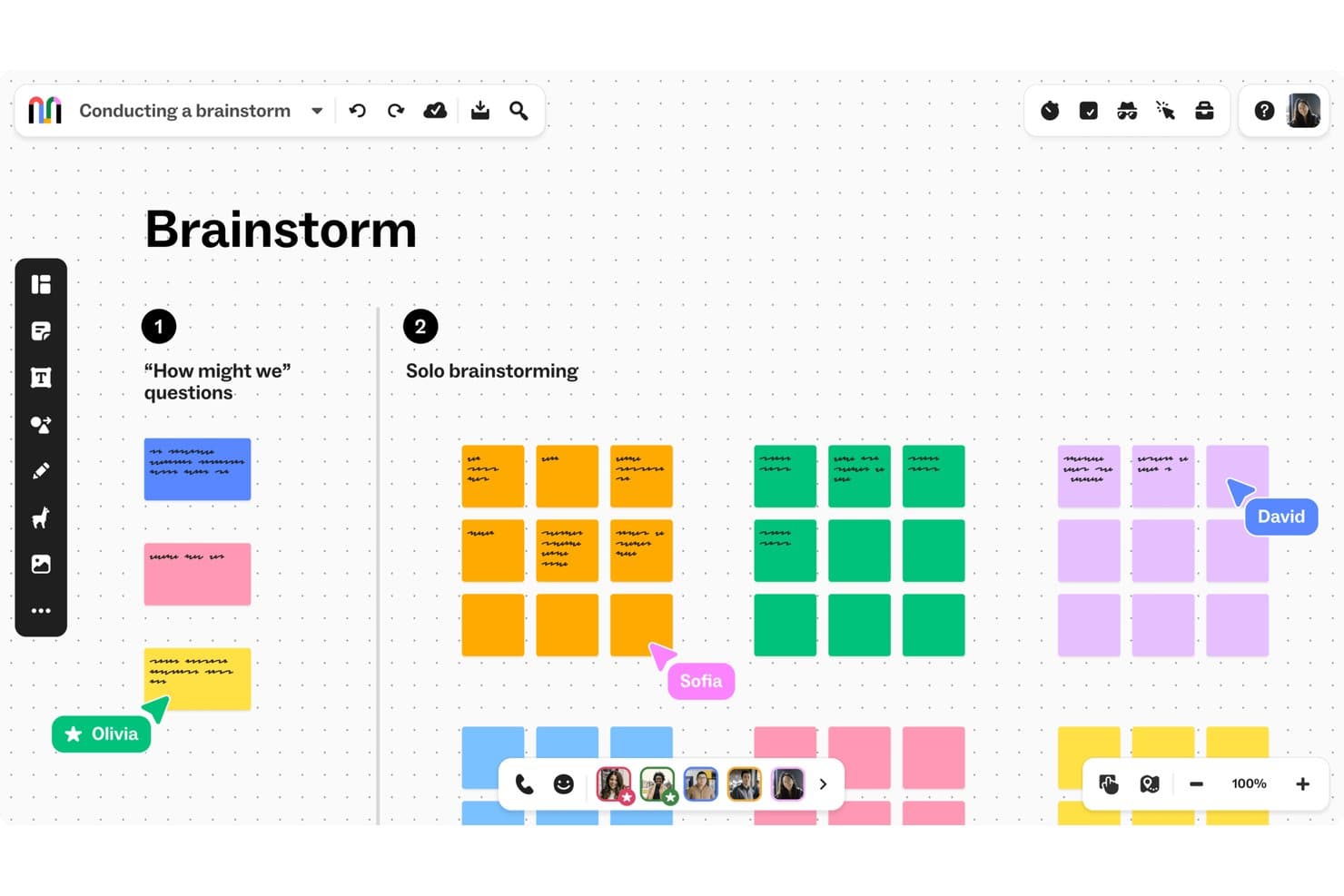
Mural lets teams brainstorm collaboratively using color-coded sticky notes. Mural is a visual brainstorming platform with an infinite canvas, sticky notes, mind maps, templates, real-time collaboration, workshop facilitation tools, and integrations with Jira, Asana, Linear, Figma, and Microsoft Teams.
Who Is Mural Best For?
Product managers and educators running structured remote workshops will value Mural’s free facilitation tools, templates, and unlimited members.
Why I Picked Mural
I picked Mural because it’s best for free facilitation in remote workshops. I use its timer, anonymous voting, and private mode to guide brainstorming without groupthink or lost momentum. Its outline and summon tools keep participants aligned during structured exercises, while sticky-note clustering turns raw ideas into themes for product discovery.
Mural Key Features
- Infinite canvas: Create visual boards with flexible, resizable workspaces.
- Mind maps: Build connected idea structures from a central concept.
- Project integrations: Connect Mural with Jira, Asana, Linear, and Figma.
- Content exports: Download murals as PDFs, PNGs, PowerPoint files, HTML, or CSV.
Mural Integrations
Mural offers native integrations with Jira, Asana, Linear, Figma, Microsoft Teams, Zoom, Google Workspace, Slack, and Confluence. It also supports Zapier and provides a public API for custom integrations.
What's Free?
Mural offers a free-forever plan with unlimited members, visitors, murals, and core collaboration features. You can edit only the three most recently created murals, while visitors have view-only access and private rooms aren’t available.
Pros and Cons
Pros:
- Unlimited members support large workshops
- Sticky-note clustering turns ideas into themes
- Free facilitation tools reduce workshop friction
Cons:
- Free murals lack private rooms
- Only three murals remain editable
Learn more about Mural: Best for education-focused group brainstorming
- Free plan available
- From $11.61/month
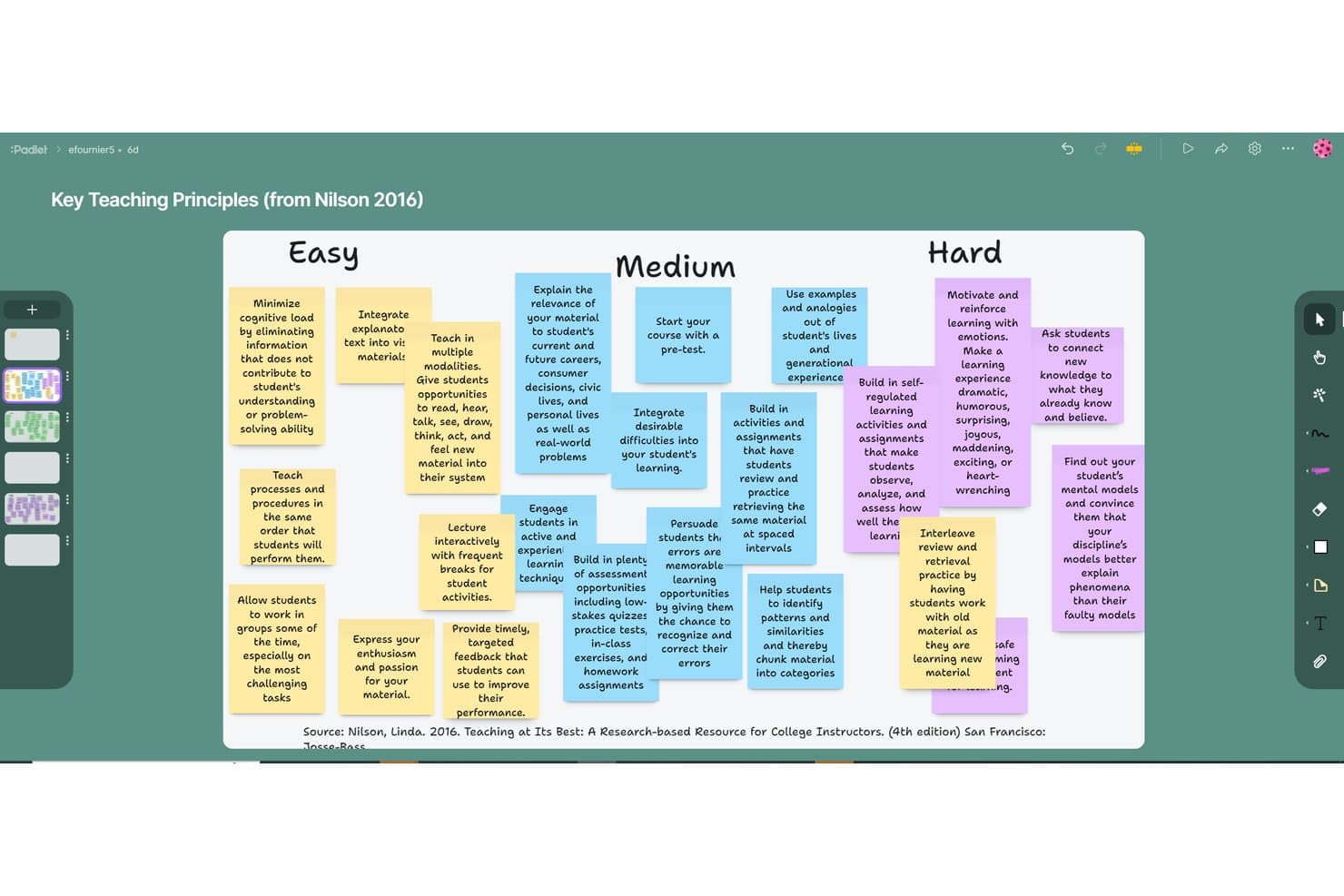
Padlet organizes brainstorming ideas into Easy, Medium, and Hard columns. Padlet is a visual brainstorming and collaboration tool with post-based boards and card-based Sandboxes for capturing text, media, drawings, polls, connectors, reactions, moderation, and presentation-style sessions.
Who Is Padlet Best For?
Padlet suits educators and students who need visual, collaborative brainstorming with anonymous input, media-rich posts, and classroom-friendly facilitation.
Why I Picked Padlet
I picked Padlet as one of the best free brainstorming tools because it’s best for education-focused group brainstorming. I use its boards and Sandboxes for anonymous idea sharing, visual grouping, and media-rich contributions. Breakout rooms, moderation, reactions, and slideshow mode help me facilitate structured classroom sessions.
Padlet Key Features
- Multiple board formats: Switch between Wall, Columns, Grid, Timeline, Table, Freeform, and Map layouts.
- Board exports: Download boards as PNG, PDF, CSV, Excel files, or ZIP archives.
- AI Recipes: Generate discussion boards, lesson plans, rubrics, and custom brainstorming boards from prompts.
- Mobile apps: Access boards and Sandboxes through iOS, Android, Mac, PC, and Chromebook apps.
Padlet Integrations
Padlet offers native integrations with Google Classroom, Google Drive, Canvas, Moodle, Blackboard, Schoology, Microsoft Teams, and Brightspace on education plans. It also supports API access on Platinum and Zapier.
What's Free?
Padlet offers a free-forever plan with no credit card required. It includes up to three active padlets, one user account, 20MB uploads, two-minute video recordings, and five-minute audio recordings, but excludes API access, LMS integrations, analytics, and user management.
Pros and Cons
Pros:
- Offers moderation, reactions, and breakout rooms
- Captures text, media, drawings, and polls
- Supports anonymous, real-time group brainstorming
Cons:
- Few workflows target product teams specifically
- Free Sandbox limits sessions to 20 cards
Learn more about Padlet: Best for diagramming with cloud storage sync
- Free plan available
- Pricing upon request
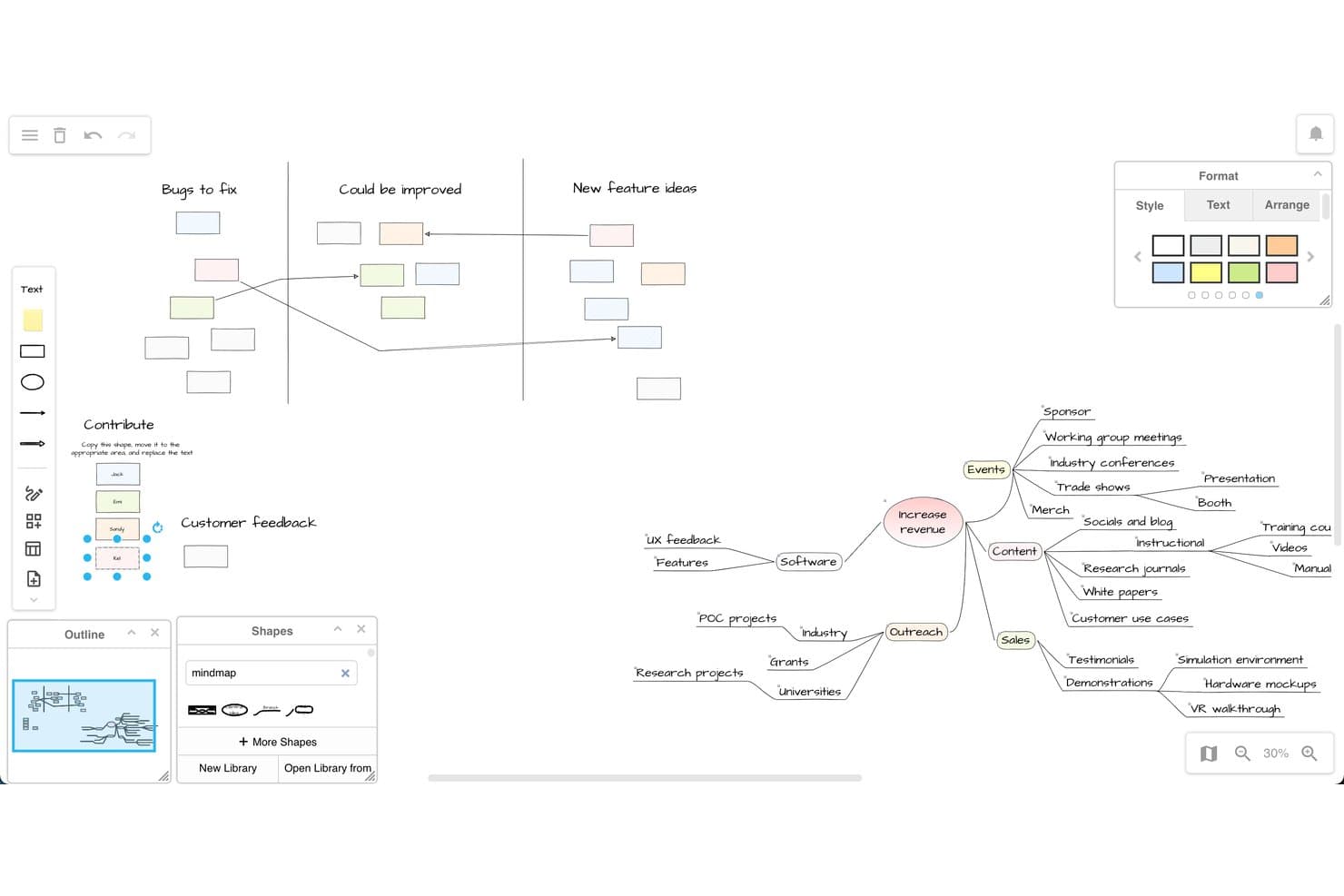
draw.io supports brainstorming with mind maps and whiteboard layouts. draw.io is a free diagramming and brainstorming tool with an infinite canvas, Sketch whiteboard theme, sticky notes, templates, connectors, and real-time co-editing.
Who Is draw.io Best For?
Educators, students, and product teams that need free, structured brainstorming with cloud-synced diagrams and flexible export options.
Why I Picked draw.io
I picked draw.io because it is Best for diagramming with cloud storage sync. I use its Sketch theme, infinite canvas, sticky notes, layers, and connectors to turn rough ideas into structured maps. Real-time cursors through Google Drive, OneDrive, Confluence, or Nextcloud support shared product discovery sessions.
draw.io Key Features
- Diagram templates: Use roadmap, Kanban, Gantt, story map, and business model canvas templates.
- Freehand drawing: Add sketches, images, screenshots, clip art, and links to the workspace.
- AI diagram generation: Create diagrams from text prompts or attached files.
- Multi-format export: Export editable diagrams as PNG, SVG, PDF, HTML, JSON, or XML.
draw.io Integrations
draw.io integrates with Google Drive, Microsoft OneDrive, SharePoint, Nextcloud, GitHub, GitLab, and Notion. Confluence and Jira connectivity is available through Marketplace apps, while Dropbox supports storage but not real-time editing.
What's Free?
draw.io is free forever, with no account or credit card required for the web app. You can create, edit, and share diagrams without user limits, but storage and collaboration depend on the connected service, such as Google Drive, OneDrive, SharePoint, or Confluence.
Pros and Cons
Pros:
- Templates bridge ideation and planning
- Editable exports preserve brainstorm context
- Unlimited canvas supports structured idea mapping
Cons:
- No built-in voting or timers
- Diagram-first interface can overwhelm brainstormers
Learn more about draw.io: Best for EU-hosted visual collaboration
- Free plan + 30-day trial available
- From €5/user/month
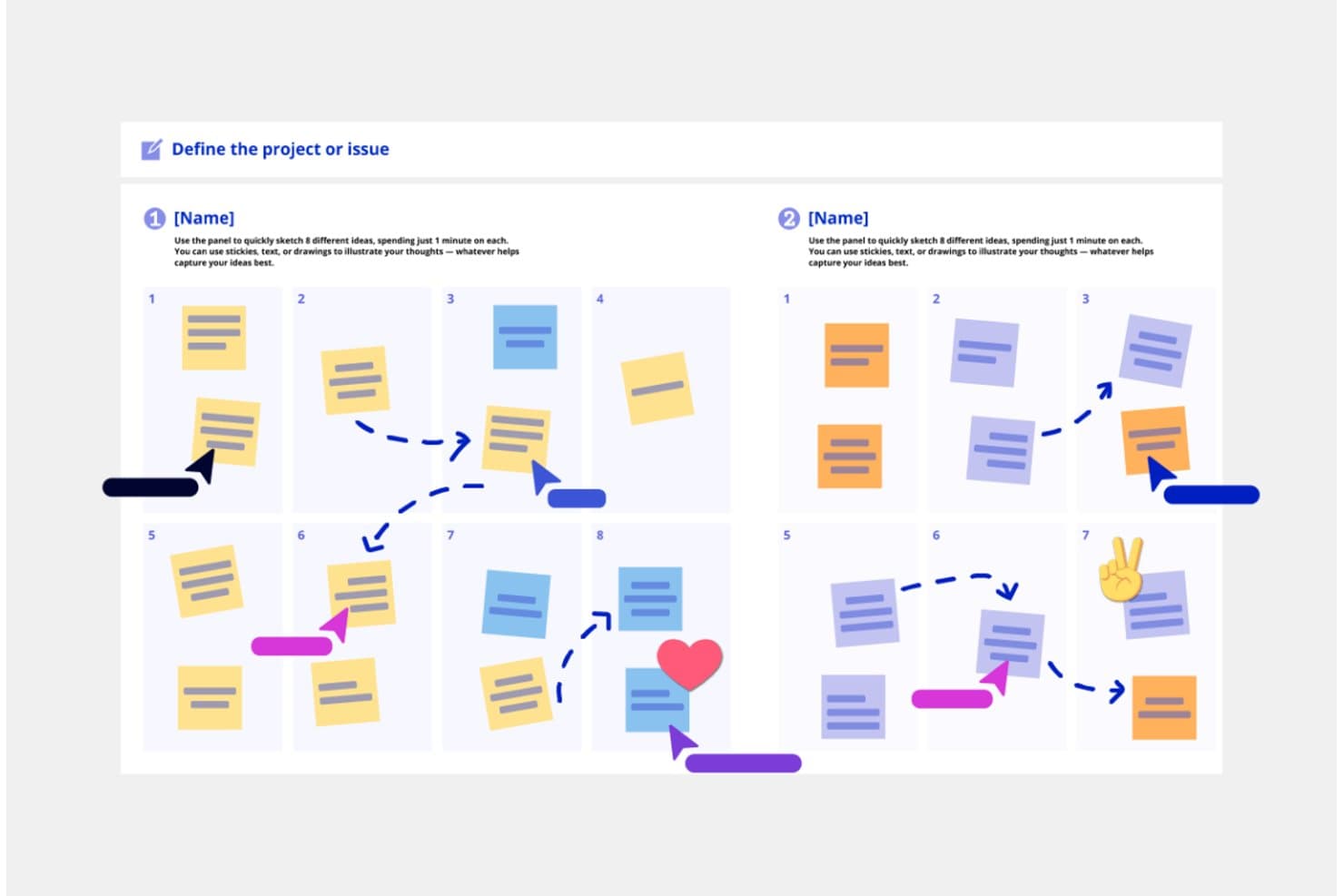
Conceptboard's Crazy Eights template lets teams brainstorm ideas collaboratively. Conceptboard is a browser-based brainstorming whiteboard with an infinite canvas, sticky notes, multimedia, templates, real-time collaboration, visual organization, and task conversion for product planning.
Who Is Conceptboard Best For?
Conceptboard suits product and UX teams seeking EU-hosted visual collaboration for privacy-conscious brainstorming and early task planning.
Why I Picked Conceptboard
I picked Conceptboard because its German hosting and GDPR-focused security suit privacy-conscious brainstorming. I use its infinite canvas, Smart Sections, and customer journey templates to organize research without losing context. Sticky notes can become tasks, helping me move validated ideas toward Kanban or Gantt planning while keeping collaboration EU-hosted.
Conceptboard Key Features
- Real-time co-editing: See participant cursors and presence while teams work together.
- Voting widget: Run dot or approve/reject votes with configurable vote limits.
- Multimedia embeds: Add videos, audio, web pages, iFrames, PDFs, and GIFs.
- Link-based guest access: Invite unlimited readers or reviewers without requiring accounts.
Conceptboard Integrations
Conceptboard offers nine documented integrations, including Jira, Azure DevOps, Microsoft Teams, Webex, Confluence, Google Drive, Dropbox, Box, and OneDrive. Jira and Azure DevOps support two-way task syncing on paid plans.
What's Free?
Conceptboard has a free-forever plan, plus a 30-day trial of its paid team features.
It allows unlimited link guests as readers or reviewers, with three active boards, 100 objects per board, 10 MB uploads, and limited integrations.Pros and Cons
Pros:
- Smart Sections preserve context on infinite canvases
- Unlimited link guests support review sessions
- German hosting supports privacy-conscious teams
Cons:
- No native mobile app for field workshops
- Free tier restricts boards and objects
Learn more about Conceptboard: Best for design-native team brainstorming
- Free plan available
- Free plan available
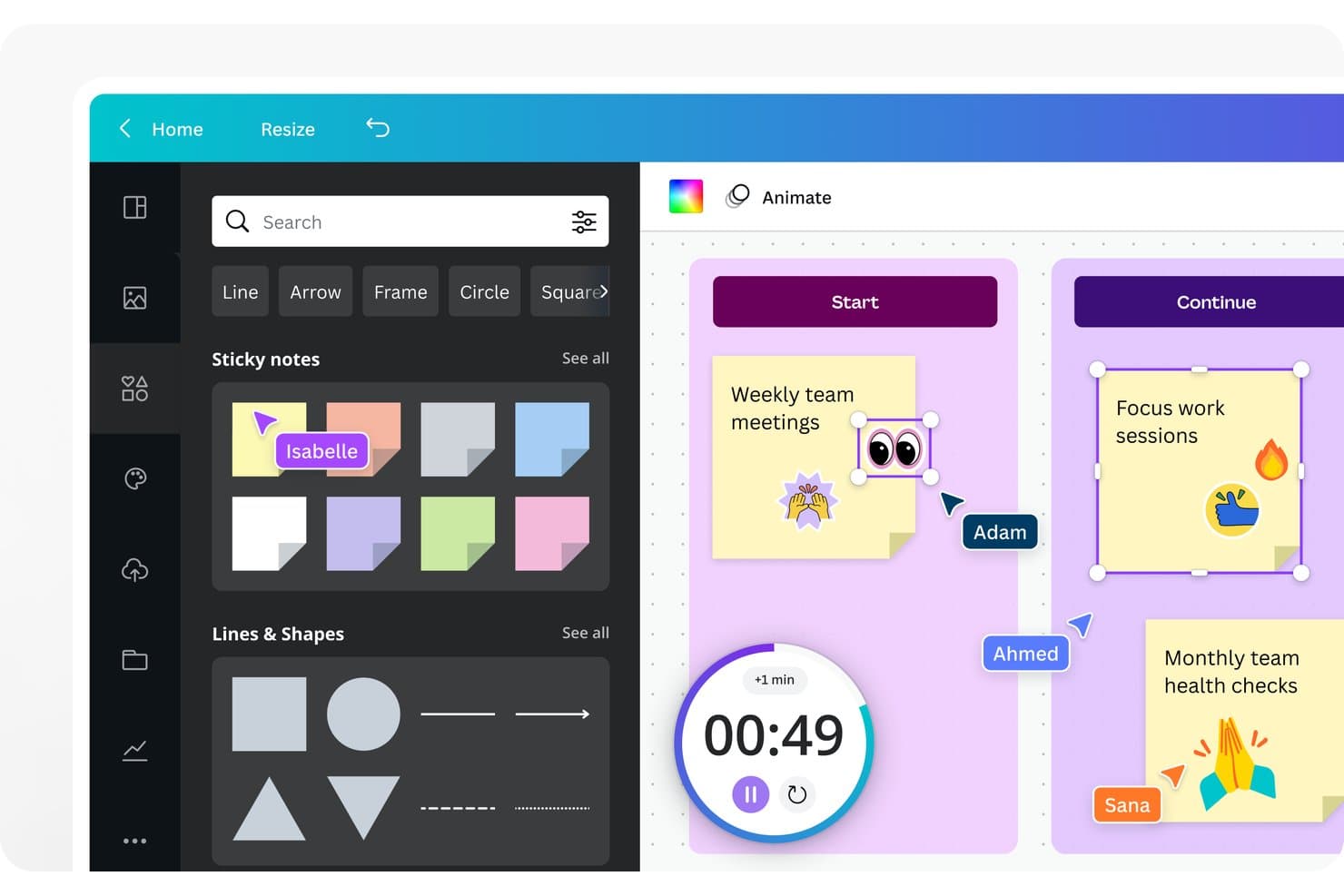
Canva Whiteboard lets users brainstorm with sticky notes and real-time collaboration. Canva Whiteboard is a visual brainstorming tool within Canva’s Visual Suite, combining an infinite canvas, sticky notes, templates, diagrams, real-time collaboration, and AI-assisted idea sorting and summaries.
Who Is Canva Whiteboard Best For?
Canva Whiteboard suits product managers and UX teams that want design-native team brainstorming with templates, visual assets, and real-time collaboration.
Why I Picked Canva Whiteboard
I picked Canva Whiteboard because it’s best for design-native team brainstorming, especially when ideas need visual context. I use its infinite canvas, journey map templates, and empathy maps to frame discovery discussions. AI sorting and summaries then turn scattered sticky notes into themes my team can carry into product planning.
Canva Whiteboard Key Features
- Sticky notes: Add colored notes, author names, and reactions to capture input.
- Session timer: Run timed activities with music and sound cues on desktop.
- Diagram connectors: Link shapes with lines and arrows that adjust automatically.
- Export options: Download boards as PDF, JPG, PNG, or SVG files.
Canva Whiteboard Integrations
Canva has native integrations with Slack, Microsoft Teams, Jira, Confluence, Asana, Monday.com, and SharePoint. Marketplace apps and custom integrations are available through Canva’s Apps SDK and Connect APIs on Business and Enterprise.
What's Free?
Canva Whiteboard is free forever, with unlimited boards and real-time collaboration. The free Canva plan limits access to premium templates, assets, and some AI features, while advanced team and admin capabilities require a paid plan.
Pros and Cons
Pros:
- Free collaboration includes useful facilitation basics
- Design assets enrich product discovery workshops
- Infinite canvases support expansive visual ideation
Cons:
- Mobile editing omits timer and advanced tools
- Large boards can trigger performance slowdowns
Learn more about Canva Whiteboard: Best for mapping ideas into project tasks
- 15-day free trial + free plan available
- Pricing upon request
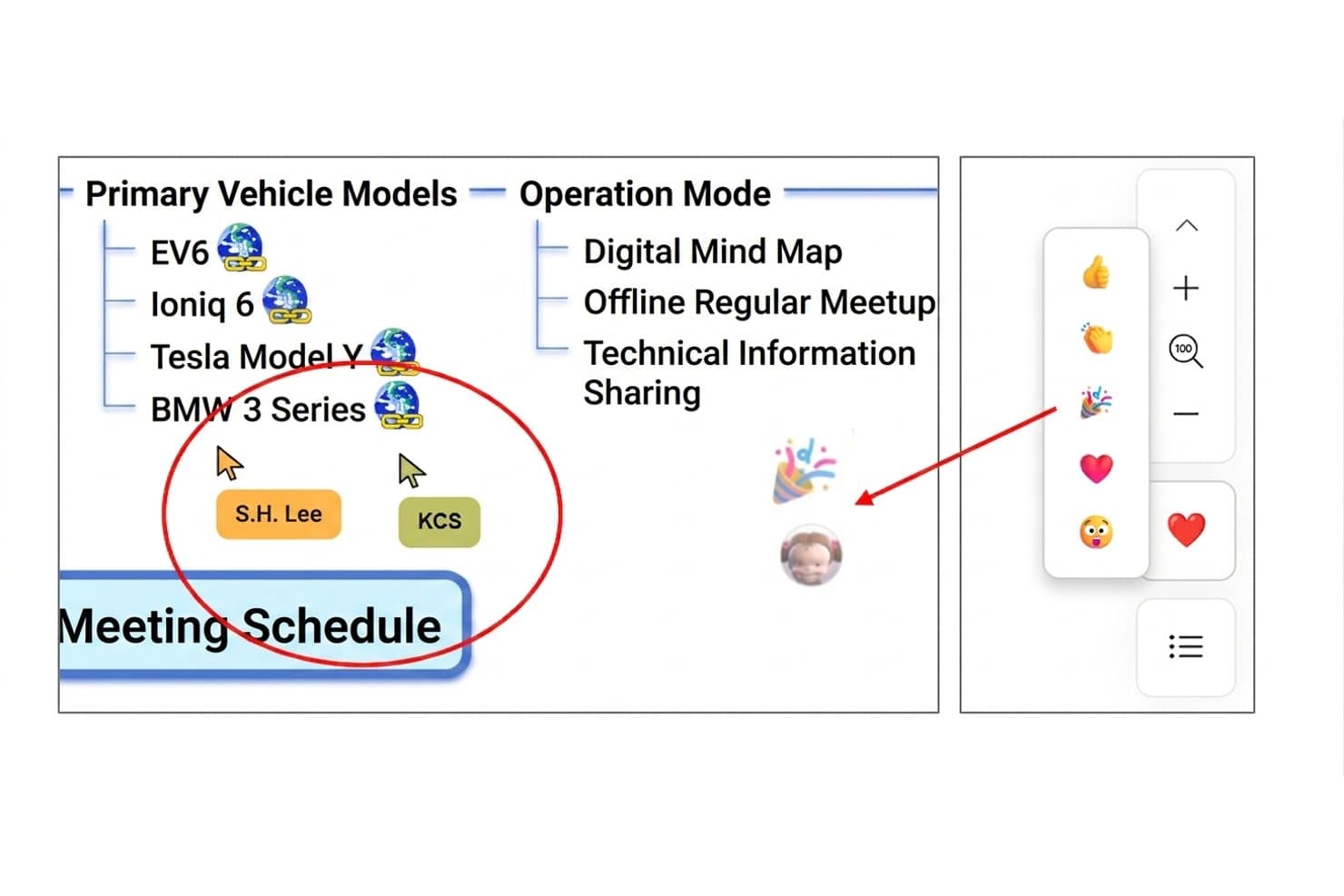
MindMapper lets users collaborate in real time on shared mind maps. MindMapper is a free brainstorming and mind-mapping tool with linked Mind Map, Outline, Kanban, and Gantt views, plus AI ideation, real-time collaboration, multilingual translation, and Microsoft Office exports.
Who Is MindMapper Best For?
Product managers who need to turn early ideas into structured roadmaps, tasks, and Gantt plans.
Why I Picked MindMapper
I picked MindMapper because it turns brainstorming into project tasks without leaving the same map. I use its Mind Map, Outline, Kanban, and Gantt views to move from product ideas to assigned work and delivery dates. AI Assist can generate ideas, categorize branches, and identify gaps, while real-time translation supports multilingual collaboration.
MindMapper Key Features
- Rich media notes: Add hyperlinks, YouTube embeds, audio notes, and rich text.
- Mapping directions: Choose from 30 desktop layouts, including fishbone and timeline.
- Brainstorming templates: Start with SWOT, root-cause analysis, or attribute-listing templates.
- Microsoft Office exports: Export maps to Word, PowerPoint, Excel, OneNote, and Project.
MindMapper Integrations
MindMapper integrates with Google Calendar and Google Drive and supports Microsoft Office connectivity across Word, PowerPoint, Excel, OneNote, Project, and Outlook Tasks. It doesn’t document native integrations with Jira, Asana, Slack, or Zapier.
What's Free?
MindMapper offers a free plan and a 15-day free trial. The free offering includes brainstorming and mind-mapping features, while advanced capabilities and integrations may depend on your plan.
Pros and Cons
Pros:
- Offers rich media for idea capture
- Supports multilingual real-time collaboration
- Links brainstorming directly to project tasks
Cons:
- Lacks timers and anonymous brainstorming input
- Free tier limits ongoing map creation
Learn more about MindMapper: 10Best for infinite canvas collaboration
Miro
- Free plan + 14-day trial available
- From $8/user/month (billed annually)
Visit WebsiteCustomer Rating:4.8/5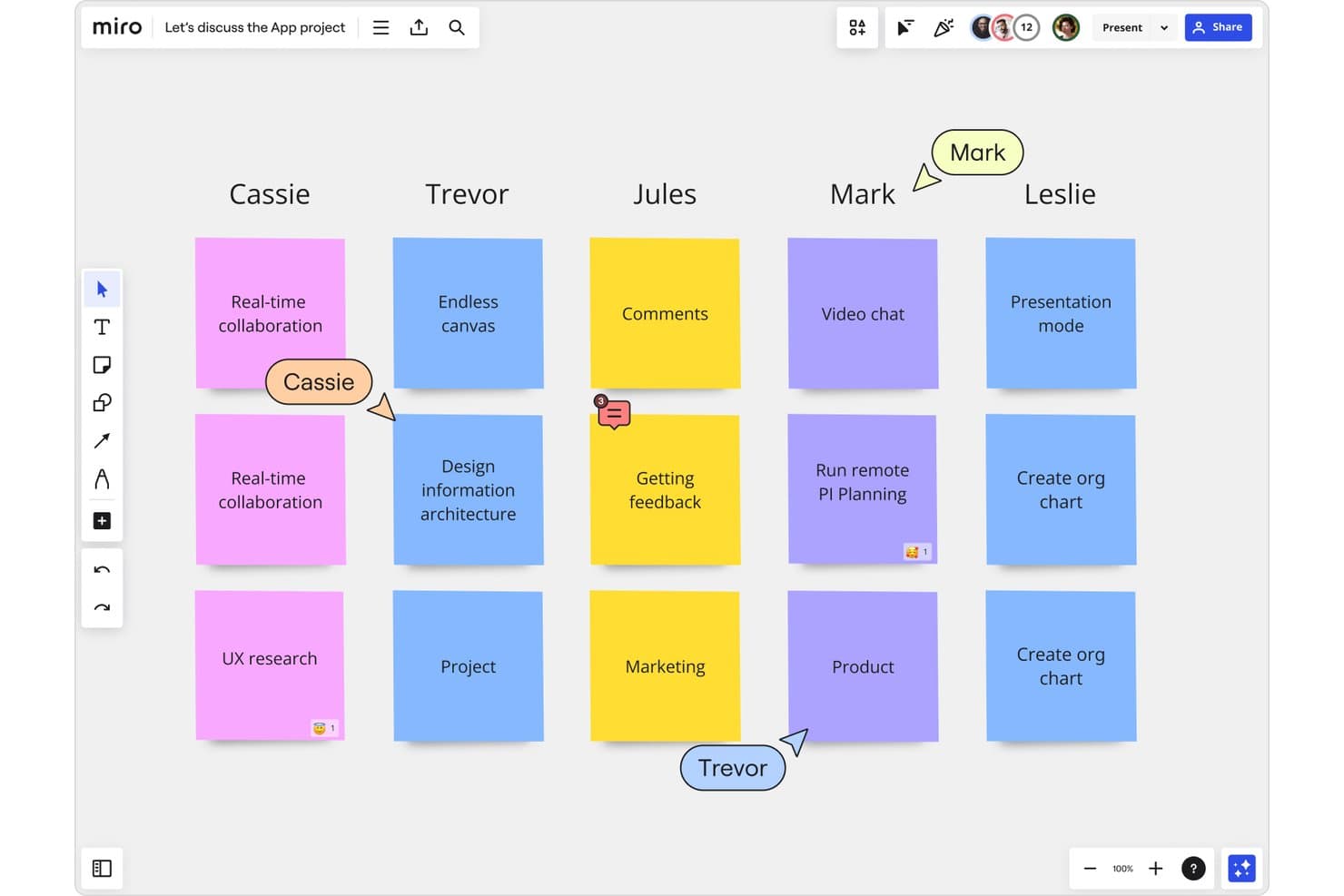
Miro lets users brainstorm collaboratively with sticky notes in real time. Miro is a visual brainstorming platform with an infinite canvas, sticky notes, diagrams, templates, AI clustering, real-time collaboration, and integrations for organizing ideas, research, and product concepts.
Who Is Miro Best For?
Product managers and UX teams that need to explore customer problems, map product concepts, and align distributed stakeholders on one shared canvas.
Why I Picked Miro
I picked Miro because its infinite canvas collaboration supports real-time brainstorming without forcing ideas into a rigid format. My team can combine sticky notes, diagrams, images, and Docs, then use AI to cluster themes and summarize patterns. Live cursors, comments, and Talktrack also help remote teams turn exploratory workshops into shared product insights.
Miro Key Features
- Kanban and Timelines: Organize ideas into lightweight workflows and product planning views.
- Pen and handwriting support: Draw with Apple Pencil or Surface Pen and convert handwritten notes into editable content.
- 250+ integrations: Connect boards with tools including Google Workspace, Slack, Zoom, Jira, and Confluence.
- Miro Lite: Create no-sign-up whiteboards that support link sharing and PDF or JPG exports.
Miro Integrations
Miro offers 250+ integrations, including Google Workspace, Slack, Zoom, Jira, and Confluence, plus Microsoft 365 and Atlassian connections. Its developer platform provides APIs and SDKs for custom integrations.
What's Free?
Miro’s Free plan is free forever and supports unlimited team members and boards. However, only the three most recent boards remain editable, while older boards become view-only, and guest or visitor access isn’t available.
Pros and Cons
Pros:
- AI clusters and summarizes sticky notes
- Real-time cursors clarify collaborative brainstorming
- Infinite canvas supports flexible idea mapping
Cons:
- Facilitation tools require a paid plan
- Free boards become view-only after three
Diğer Ücretsiz Beyin Fırtınası Araçları
Kısa listeme giremeyen ancak yine de göz atmaya değer bazı ek ücretsiz beyin fırtınası aracı seçeneklerini aşağıda bulabilirsiniz:
- 11KlaxoonBest for large-group live brainstorming sessions
- 12LucidsparkBest for integrating with Lucidchart diagrams
- 13StormboardBest for agile team brainstorming with PM tool sync
- 14WejeBest for organizing ideas with sticky notes
- 15MindomoBest for switching between mind maps and outlines
- 16MilanoteBest for visual brainstorming with mixed media
- 17EdrawMindBest for exporting mind maps to multiple formats
- 18Microsoft WhiteboardBest for brainstorming inside Microsoft Teams
- 19ExcalidrawBest for no-login real-time canvas collaboration
How I Evaluate Free Brainstorming Tools
First, I define what counts as free. A brainstorming tool qualifies with a free-forever plan or a 7–14-day trial that includes full canvas and collaboration access. From there, I split my evaluation into three parts: core functionality, which carries the most weight, like arranging ideas visually and co-editing live; standout features, like AI idea generation; and what a tool offers beyond its feature set, like free-tier collaborator limits.
Core Functionality (Table Stakes For This List)
In addition to my free plan requirements, I use a scoring system to select tools for my list. I score each one on a scale from 0 (does not offer the functionality) to 5 (excels in this area) for each core functionality listed below, based on what's available on the free plan. I then convert the total into a percentage to help assess each tool's overall fit, with extra weight on any functionalities I've deemed essential.
- Visual Canvas (Essential): I look for flexible space to map customer problems, feature ideas, and rough workflows with notes, shapes, and images.
- Real-Time Collaboration (Essential): Check whether teammates can add and move ideas together on a shared board during a discovery session.
- Idea Capture: See whether teams can express ideas with notes, text, shapes, images, and links rather than relying on plain text.
- Organization & Grouping: I assess how easily teams can cluster related ideas with colors, tags, or connectors before prioritizing themes.
- Session Facilitation: For a remote workshop, I look for practical aids such as comments, timers, voting, or presentation modes.
- Export & Sharing: Check whether a team can share a board by link or export its outputs for planning and follow-up.
Once I have a list of tools that meet the criteria, I consider what sets each platform apart.
Differentiating Factors (What Sets Vendors Apart)
Here's how I compare and contrast different vendors:
Standout Features
Anonymous input modes matter most to me. When a retro or discovery session lets participants post ideas without names attached, you get more honest signal and less groupthink. I also check for built-in timers and agenda frames, since they let facilitators keep a timeboxed workshop moving without toggling to a separate app. Cross-board linking is another differentiator I evaluate—tools like Miro and FigJam handle this differently, but the ability to connect a feature brainstorm canvas to a broader journey map keeps context intact as ideas mature.
Beyond Features
I check how many editors a free plan allows, since capped seats can block a full cross-functional workshop before it starts. Template libraries matter too—tools like Miro and FigJam offer community-contributed templates that let you run a pre-built affinity map or sprint retro without designing a board from scratch. I also evaluate whether a tool connects to Jira, Asana, or Slack so prioritized ideas move into a backlog without manual re-entry.
Ücretsiz Beyin Fırtınası Araçları Nasıl Seçilir?
Uzun özellik listeleri ve karmaşık fiyatlandırma yapıları içinde kaybolmak kolaydır. Kendinize özgü yazılım seçim sürecinizde ilerlerken odağınızı korumanıza yardımcı olmak için göz önünde bulundurmanız gereken faktörleri aşağıda bir kontrol listesi hâlinde bulabilirsiniz:
| Faktör | Nelere Dikkat Edilmeli? |
|---|---|
| FaktörÖlçeklenebilirlik | Nelere Dikkat Edilmeli?Araç, ekibinizin büyüklüğü ve proje hacmiyle birlikte gelişecek mi? Pano, kullanıcı veya harita sınırlarını kontrol edin. |
| FaktörEntegrasyonlar | Nelere Dikkat Edilmeli?Araç, tercih ettiğiniz platformlara (Slack, Google Drive, proje yönetimi uygulamaları) yerel olarak bağlanıyor mu? Entegrasyon kapsamını ve kurulum kolaylığını değerlendirin. |
| FaktörÖzelleştirilebilirlik | Nelere Dikkat Edilmeli?Yerleşimleri, iş akışlarını veya şablonları beyin fırtınası tarzınıza ya da kurum içi süreçlerinize uyacak şekilde uyarlayabiliyor musunuz? |
| FaktörKullanım kolaylığı | Nelere Dikkat Edilmeli?Yeni kullanıcılar çalışmaya ne kadar hızlı başlayabilir? Arayüzün anlaşılır olduğunu, öğrenme kaynaklarını ve kullanıcıların başlangıç sürecindeki zorluklarla ilgili geri bildirimlerini test edin. |
| FaktörUygulama ve başlangıç süreci | Nelere Dikkat Edilmeli?Aracı kullanıma sunmak için ne kadar zaman ve teknik beceri gerekiyor? Ekipler için başlangıç kılavuzları, eğitimler veya geçiş araçları mevcut mu? |
| FaktörMaliyet | Nelere Dikkat Edilmeli?Ücretsiz plana aslında neler dâhil? Gelecekte yükseltme yapmanızı gerektirebilecek dışa aktarma, iş birliği yapan kullanıcılar veya bulut kayıtlarıyla ilgili gizli kısıtlamalara dikkat edin. |
| FaktörGüvenlik önlemleri | Nelere Dikkat Edilmeli?Verileriniz ve fikirleriniz, sektörünüz ve kuruluşunuz için uygun şifreleme, erişim denetimleri veya uyumluluk önlemleriyle korunuyor mu? |
| FaktörDestek bulunabilirliği | Nelere Dikkat Edilmeli?Teknik sorunlarla karşılaştığınızda zamanında yardım alabiliyor musunuz? Ekibiniz için karar vermeden önce destek kanallarını (sohbet, e-posta, belgeler) değerlendirin. |
Ücretsiz Beyin Fırtınası Araçları Nedir?
Ücretsiz beyin fırtınası araçları, bireylerin veya ekiplerin fikirleri herhangi bir ücret ödemeden üretmesine, düzenlemesine ve görselleştirmesine olanak tanıyan dijital platformlardır. Bu araçlar genellikle gerçek zamanlı iş birliği, zihin haritalama, not alma ve fikirleri dışa aktarma özelliklerini içerir.
Grup yaratıcılığını, uzaktan fikir üretimini ve stratejik planlamayı desteklerler; bunların tümünü kullanıma sunulma önündeki engelleri en aza indirerek gerçekleştirirler. Ücretsiz sürümlerin çoğu, ücretli planlara kıyasla kullanım veya özellik sınırlamalarıyla birlikte gelir.
Özellikler
Beyin fırtınası araçlarında yaygın olarak bulunan özellikleri ve bunlardan hangilerinin genellikle ücretsiz veya ücretli planlara dahil edildiğini inceleyelim.
Genellikle Ücretsiz Beyin Fırtınası Araçlarının Özellikleri
- Sınırsız fikir yakalama: Sanal bir beyaz tahta veya çalışma alanında sınırsız sayıda fikri ya da notu hızlıca yazıp toplamanıza olanak tanır.
- Temel iş birliği: Birden fazla kullanıcının aynı beyin fırtınası oturumunu gerçek zamanlı olarak görüntülemesine ve katkıda bulunmasına olanak tanıyarak ortak fikir üretimini destekler.
- Sürükleyip bırakarak düzenleme: Kullanıcıların basit sürükleyip bırakma hareketleriyle fikirleri yeniden düzenlemesine veya görsel olarak gruplandırmasına olanak tanıyarak oturumları etkileşimli ve sezgisel hâle getirir.
- Zihin haritalama: Kavramlar ve fikirler arasındaki ilişkileri görsel olarak düzenlemeye yardımcı olan basit zihin haritaları oluşturma araçları sunar.
- Şablon kitaplığı: Beyin fırtınası oturumlarını başlatmak ve yapılandırmak için SWOT analizi veya akış şemaları gibi önceden hazırlanmış şablonlara erişim sunar.
- Yorum yapma veya yapışkan notlar: Katılımcıların bir oturum sırasında yorum bırakmasına ya da geri bildirim veya öneriler içeren dijital yapışkan notlar eklemesine olanak tanır.
- Görüntü veya PDF olarak dışa aktarma: Çalışmaların ileride başvurmak üzere korunmasını sağlayarak beyin fırtınası panolarını görüntü veya PDF dosyaları olarak kaydetmenize ve paylaşmanıza olanak tanır.
- Temel arama: Kullanıcıların beyin fırtınası oturumları veya panoları genelinde fikirleri ya da anahtar kelimeleri hızlıca bulmasını sağlar.
- Renk kodlama: Daha iyi bir düzen ve görsel netlik sağlamak amacıyla fikirlere, notlara veya kategorilere renk atanmasına olanak tanır.
Genellikle Ücretli Beyin Fırtınası Araçlarının Özellikleri
- Gelişmiş dışa aktarma biçimleri: Beyin fırtınası çalışmalarının Word, Excel ve PowerPoint gibi biçimlere aktarılmasını veya daha kapsamlı iş akışları için diğer yazılımlarla entegrasyonunu destekler.
- Üçüncü taraf araçlarla entegrasyon: Kolay veri aktarımını destekleyerek proje yönetimi, dosya depolama veya iletişim platformlarına bağlantı kurulmasını sağlar.
- Kullanıcı rolleri ve izinleri: Farklı erişim düzeyleri ve düzenleme hakları atanmasına olanak tanıyarak daha büyük veya hassas beyin fırtınası oturumlarının yönetilmesini kolaylaştırır.
- Sunum modu: Beyin fırtınası çalışmanızı doğrudan araç üzerinden paydaşlar veya ekip değerlendirmeleri için bir sunuma dönüştürme özelliği sunar.
- Görev atama ve izleme: Kullanıcıların eylem maddeleri oluşturmasına veya oturum sırasında üretilen fikirlerden katılımcılara görevler atamasına olanak tanır.
- Fikir oylama veya önceliklendirme: En iyi çözümleri hızlıca belirlemek amacıyla fikirleri oylamaya, sıralamaya veya puanlamaya yönelik araçlar sunar.
- Yapay zekâ destekli öneriler: İlgili fikirler öneren, benzer kavramları gruplandıran veya dalları otomatik olarak oluşturan yapay zekâ özellikleri sunar.
- Özel marka kimliği: Kuruluşların daha profesyonel ve markalı bir çalışma alanı için kendi logolarını ve temalarını eklemesine olanak tanır.
- Sınırsız pano veya oturum: Kullanıcıların aynı anda oluşturabileceği veya kaydedebileceği beyin fırtınası alanlarının sayısına getirilen sınırı kaldırır.
- Analiz ve raporlama: Katılım, popüler temalar veya beyin fırtınasının etkililiği hakkında veriler ya da içgörüler sunarak ekiplerin oturumları analiz etmesine ve optimize etmesine yardımcı olur.
Faydalar
Ücretsiz beyin fırtınası araçlarını uygulamak, ekibiniz ve işletmeniz için çeşitli faydalar sağlar. Yararlanmayı bekleyebileceğiniz birkaç fayda şunlardır:
- Sıfır maliyetli denemeler: Yeni dijital beyin fırtınası tekniklerini ve platformlarını herhangi bir taahhüt veya ön yatırım olmadan deneyin.
- Gerçek zamanlı ekip iş birliği: Ekiplerin paylaşılan panoları ve canlı oturumları kullanarak her yerden aynı anda fikir katkısında bulunmasını sağlayarak yaratıcılığı artırın.
- Erişilebilir fikir düzenleme: Fikir gruplandırmayı basitleştirmek ve karmaşık projeleri yapılandırmayı kolaylaştırmak için zihin haritalarını, renk kodlamasını ve sürükle ve bırak özelliklerini kullanın.
- Hızlı başlangıç için şablonlar: SWOT analizi, akış şemaları ve diğer yaygın fikir geliştirme çerçeveleri için hazır şablonlarla oturumlara hızla başlayın.
- Görsel netlik ve etkileşim: Görsel araçlar ve birden fazla düzen seçeneğiyle beyin fırtınası oturumlarını daha ilgi çekici ve takip edilmesi daha kolay hâle getirin.
- Çıktıları dışa aktarma ve paylaşma: Ekip içgörülerini ve kararlarını gelecekteki projeler için koruyarak beyin fırtınası panolarını kolay paylaşım için görüntü veya PDF olarak kaydedin.
- İnovasyonun önündeki engelleri azaltma: İşletmenizin daha sık, açık uçlu fikir geliştirme ve problem çözmeyi teşvik edebilmesi için teknik ve bütçeyle ilgili engelleri ortadan kaldırın.
Maliyetler ve Fiyatlandırma
Bu makaleye, ücretsiz olarak kullanılabilen en iyi beyin fırtınası aracı seçeneklerini aradığınız için geldiğinizi biliyorum. Ancak ücretsiz planlar yalnızca sınırlı özellikler sunduğundan, gelecekte planınızı yükseltmeniz gerekme ihtimali oldukça yüksektir.
Aşağıdaki tabloda yaygın planlar, bunların ortalama fiyatları ve beyin fırtınası araçlarında genellikle sunulan özellikler özetlenmektedir:
Beyin Fırtınası Araçları için Plan Karşılaştırma Tablosu
| Plan Türü | Ortalama Fiyat | Yaygın Özellikler |
|---|---|---|
| Plan TürüÜcretsiz Plan | Ortalama Fiyat$0 | Yaygın ÖzelliklerTemel zihin haritalama, sınırlı sayıda pano veya harita, gerçek zamanlı iş birliği, temel şablonlara erişim ve temel dışa aktarma seçenekleri. |
| Plan TürüKişisel Plan | Ortalama Fiyat$5-$10/kullanıcı/ay | Yaygın ÖzelliklerSınırsız pano, gelişmiş dışa aktarma seçenekleri, özel şablonlar, kişisel not düzenleme ve öncelikli destek. |
| Plan Türüİşletme Planı | Ortalama Fiyat$10-$25/kullanıcı/ay | Yaygın ÖzelliklerEkip yönetimi, gelişmiş entegrasyonlar, kullanıcı rolleri ve izinleri, görev atama ve sınırsız paylaşım. |
| Plan TürüKurumsal Plan | Ortalama Fiyat$20-$40/kullanıcı/ay | Yaygın ÖzelliklerÖzel markalama, SSO ve güvenlik denetimleri, özel hesap yönetimi, API erişimi ve uyumluluk sertifikaları. |
Ücretsiz Beyin Fırtınası Araçları SSS
Ücretsiz beyin fırtınası araçları hakkında sık sorulan bazı soruların yanıtları aşağıdadır:
Ücretsiz beyin fırtınası araçları iş kullanımı için güvenli midir?
Evet, birçok ücretsiz beyin fırtınası aracı, şifrelenmiş bağlantılar ve erişim denetimleri gibi temel güvenlik özellikleri sunar. Ancak, özellikle en iyi fikirlerinizi korumaya çalışırken kuruluşunuzun güvenlik standartlarıyla uyumlu olduğundan emin olmak için her sağlayıcının gizlilik politikasını, veri depolama konumlarını ve erişim ayarlarını incelemelisiniz.
Ücretsiz beyin fırtınası araçlarını kullanarak kuruluşumun dışındaki kişilerle iş birliği yapabilir miyim?
Evet, çoğu ücretsiz beyin fırtınası aracı bir bağlantı paylaşarak veya konuk erişimi tanıyarak dışarıdan iş birliği yapacağınız kişileri davet etmenize olanak tanır. Bu iş birliği araçları fikirleri sınırlar arasında paylaşmayı kolaylaştırsa da bazı platformlar iş birliği yapan kişi sayısını sınırlayabilir veya gelişmiş paylaşım özelliklerini ücretli planlarla kısıtlayabilir.
Ücretsiz beyin fırtınası aracı planlarının tipik sınırlamaları nelerdir?
Ücretsiz planlar genellikle aynı anda sahip olabileceğiniz pano, zihin haritası veya iş birliği yapan kişi sayısını sınırlar. Ayrıca dışa aktarma biçimlerini, entegrasyonları ve oylama, analiz veya özel markalama gibi gelişmiş özelliklere erişimi kısıtlayabilirler.
Örneğin, ücretsiz bir zihin haritası oluşturucu temel bir fikir geliştirme sürecinin haritasını çıkarmanıza veya hızlı bir tersine beyin fırtınası oturumu gerçekleştirmenize olanak tanıyabilir, ancak premium zihin haritalama yazılımlarında bulunan gelişmiş biçimlendirme seçeneklerini kullanmanızı engelleyebilir. Ayrıca panoları kurum içi vikilere yerleştirme veya doğrudan sosyal medyada paylaşma olanağı gibi özellikler de genellikle ödeme duvarının arkasında tutulur.
Ücretli bir plana geçersem içeriğimi taşıyabilir miyim?
Evet, çoğu durumda ücretli bir plana geçtiğinizde içeriğiniz erişilebilir ve aktarılabilir olmaya devam eder. Sanal beyin fırtınası merkezinizi dönüştürürken mevcut kavramlarınız ve projeleriniz olduğu gibi kalmalı; önceki çalışmalarınızı kaybetmeden ek özelliklerin kilidini açabilirsiniz.
Ücretsiz beyin fırtınası araçları mobil cihazlarda çalışır mı?
Evet, çoğu ücretsiz beyin fırtınası aracı web tabanlı erişim sunar ve birçoğunun iOS ve Android için özel mobil uygulamaları vardır. Fikir üretmeye yönelik bazı gelişmiş özelliklerin yalnızca masaüstünde kullanılabildiğini görebilirsiniz, ancak temel işlevler genellikle mobil cihazlarda çalışır. Bu sayede ekibiniz hareket hâlindeyken bir grup beyin fırtınası oturumu sırasında tutarlı ekip çalışmasını sürdürebilir.