

Piyasada çok sayıda farklı ürün istihbaratı çözümü bulunduğundan, hangisinin sizin için doğru olduğunu belirlemek zor olabilir. Kullanıcı davranışlarını izlemek, manuel veri toplamayı kolaylaştırmak, içgörülere daha verimli şekilde ulaşmak ve karar alma süreçlerinizi öngörücü analizlerle destekleyen rakipleriniz hakkında ayrıntılı içgörülere erişmek istediğinizi biliyorsunuz; ancak hangi aracın en iyi olduğunu belirlemeniz gerekiyor. Ben size yardımcı olabilirim! Bu yazıda, büyük ekipler ve karmaşık ürünlerle çalışırken onlarca farklı istihbarat aracını kullanma konusundaki kişisel deneyimlerimi paylaşarak seçiminizi kolaylaştıracağım ve en iyi ürün istihbaratı yazılımlarını sunacağım.
Why Trust Our Software Recommendations
6,700+
Reviews
20
Industry experts
16+
Evaluation factors
14
Years
Our team has been testing and reviewing software since 2012. As product managers ourselves, we know how difficult—and important—it is to choose the right software.
For this guide, we evaluated tools using hands-on testing and independent research, scoring tools using our selection criteria.
Our reviews reflect our human editorial judgment, not a sales pitch.
Expert reviewers:
- Andrew LumbySenior TPM
- Cristiano ValimSenior UI/UX Lead


Karşılaştırma Tablosu: Ürün İstihbaratı Yazılımları
Bu karşılaştırma tablosu, en iyi ürün istihbaratı yazılımı seçimlerimin fiyatlandırma ayrıntılarını özetlemektedir.
Score legend (out of 5)
- Excellent4.5–5
- Good4–4.4
- Average3–3.9
- Below average2–2.9
- Poor1–1.9
Sorted by: Default
| Tool | Starting Price | Website | |||||||
|---|---|---|---|---|---|---|---|---|---|
Best for connecting feedback to product outcomes | Not rated | Not rated | Not rated | 2 | 5 | Not rated | 2 | Pricing upon request Free demo available | Website |
Best for session replay with AI-driven insight | 4.7 out of 5 | 5 | 5 | 4 | 5 | 4 | 5 | Pricing upon request Free plan + demo available | Website |
Best for capturing all user interactions automatically | 4.7 out of 5 | 5 | 5 | 4 | 5 | 4 | 5 | Pricing upon request Free plan + free demo available | Website |
Best for open-source product analytics | 4.7 out of 5 | 5 | 5 | 4 | 4 | 5 | 5 | $250/month Free plan available | Website |
Best for visualizing user interactions | 4.5 out of 5 | 5 | 5 | 4 | 5 | 3 | 5 | $176/month 14-day free trial + free plan available | Website |
Best for AI-driven revenue impact prioritization | 4.8 out of 5 | 5 | 5 | 5 | 5 | 4 | 5 | Pricing upon request Free demo available | Website |
Best for product and user behavior analytics | 5.0 out of 5 | 5 | 5 | 5 | 5 | 5 | 5 | Pricing upon request Free plan + free demo available | Website |
Best for in-app user interaction tracking | 4.7 out of 5 | 5 | 5 | 5 | 4 | 5 | 4 | Pricing upon request Free plan + 30-day free trial + free demo available | Website |
Best for real-time data analytics | 5.0 out of 5 | 5 | 5 | 5 | 5 | 5 | 5 | $140/month Free plan available | Website |
Best for unified digital and product analytics | 4.7 out of 5 | 5 | 5 | 4 | 5 | 4 | 5 | €49/month Free plan + 15-day free trial + free demo available | Website |


En İyi Ürün İstihbaratı Yazılımı İncelemeleri
Aşağıda, kısa listeme giren en iyi ürün istihbaratı yazılımlarının ayrıntılı özetlerini bulabilirsiniz. İncelemelerim, sizin için en iyi seçeneği bulmanıza yardımcı olmak amacıyla her aracın temel özelliklerine, artılarına ve eksilerine, entegrasyonlarına ve ideal kullanım alanlarına ayrıntılı bir bakış sunmaktadır.
 Best for connecting feedback to product outcomes
- Free demo available
- Pricing upon request
Visit WebsiteCustomer Rating:4.8/5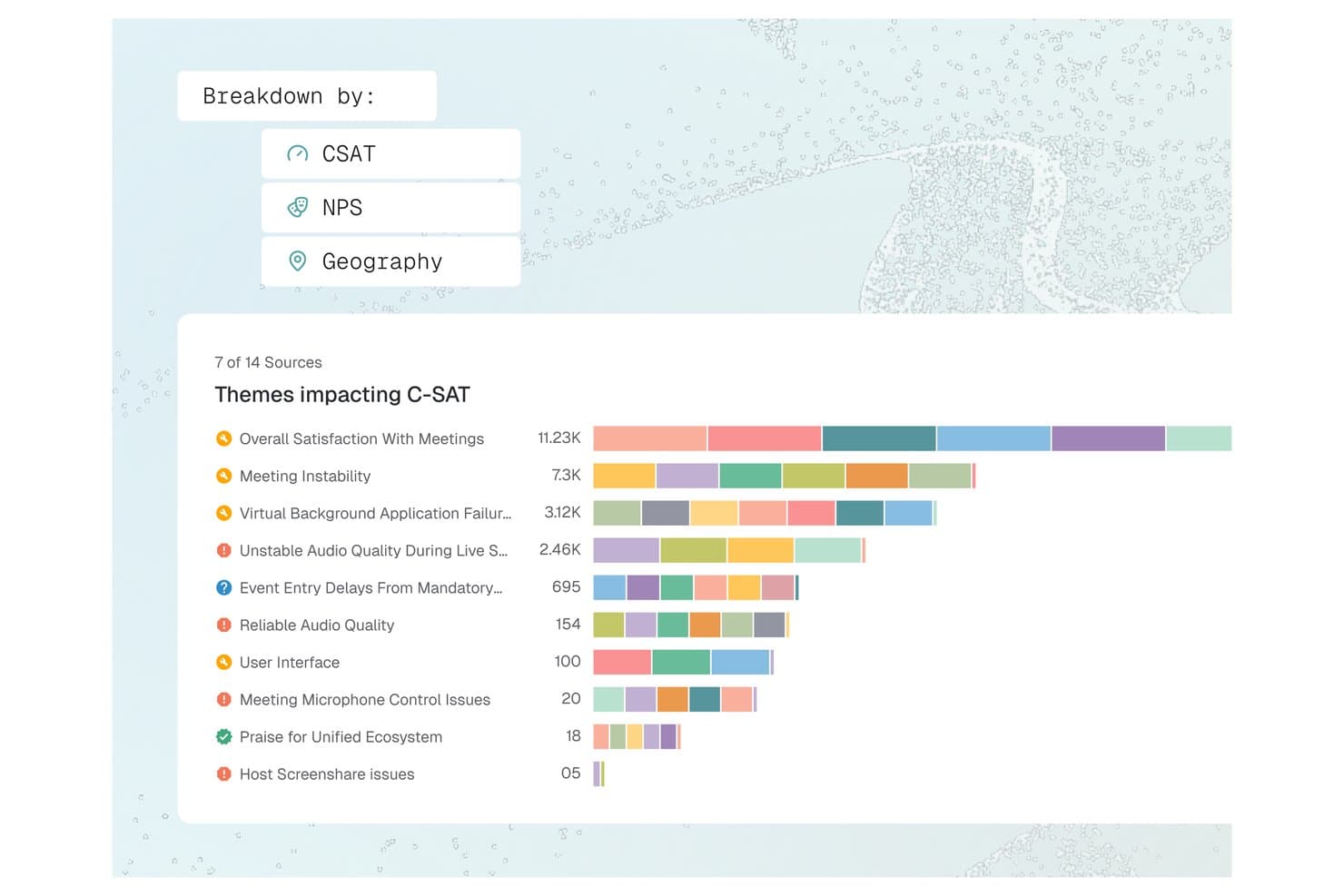
Enterpret offers a C-SAT theme breakdown dashboard that visualizes feedback topics like Meeting Instability and Audio Quality by volume across multiple sources. Enterpret is a customer feedback intelligence platform that unifies support tickets, call recordings, surveys, and social signals into AI-analyzed, structured product insights via an adaptive taxonomy and customer context graph.
Who Is Enterpret Best For?
Enterpret suits product managers and CX leaders at mid-market to enterprise B2B SaaS companies that receive high volumes of customer feedback across multiple channels each month.
Why I Picked Enterpret
Enterpret earns its spot because of how it connects feedback to real product context. The Customer Context Graph links each feedback record to account details, usage patterns, and deal status, so I'm reading complaints in the context of who's actually churning. Wisdom, Enterpret's AI query layer, lets me ask questions like "what are power users saying about onboarding?" and get summaries backed by actual feedback examples, not just aggregated tags.
Enterpret Key Features
- Adaptive taxonomy: Lets you automatically classify unstructured feedback into dynamic, customizable themes using AI-driven tagging.
- Multi-source feedback integrations: Connects and unifies feedback from support tools, surveys, reviews, call recordings, and social channels.
- Data enrichment: Enriches each feedback record with user, account, and product context from connected systems.
- Close-the-loop workflows: Assigns feedback-based tasks to product and engineering teams through workflow integrations like Jira and Slack.
Enterpret Integrations
Enterpret offers native integrations with Zendesk, Intercom, Salesforce, Gong, Slack, Qualtrics, Linear, Jira, Google Play Store, and the Apple App Store. An API is available for custom integrations.
Pros and Cons
Pros:
- Surfaces trends across high-volume feedback data
- Links customer feedback directly to product metrics
- AI taxonomy adapts automatically to feedback
Cons:
- Reporting depth limited without technical configuration
- Initial taxonomy setup demands significant time
Learn more about Enterpret: Best for session replay with AI-driven insight
- Free plan + demo available
- Pricing upon request
Visit WebsiteCustomer Rating:4.5/5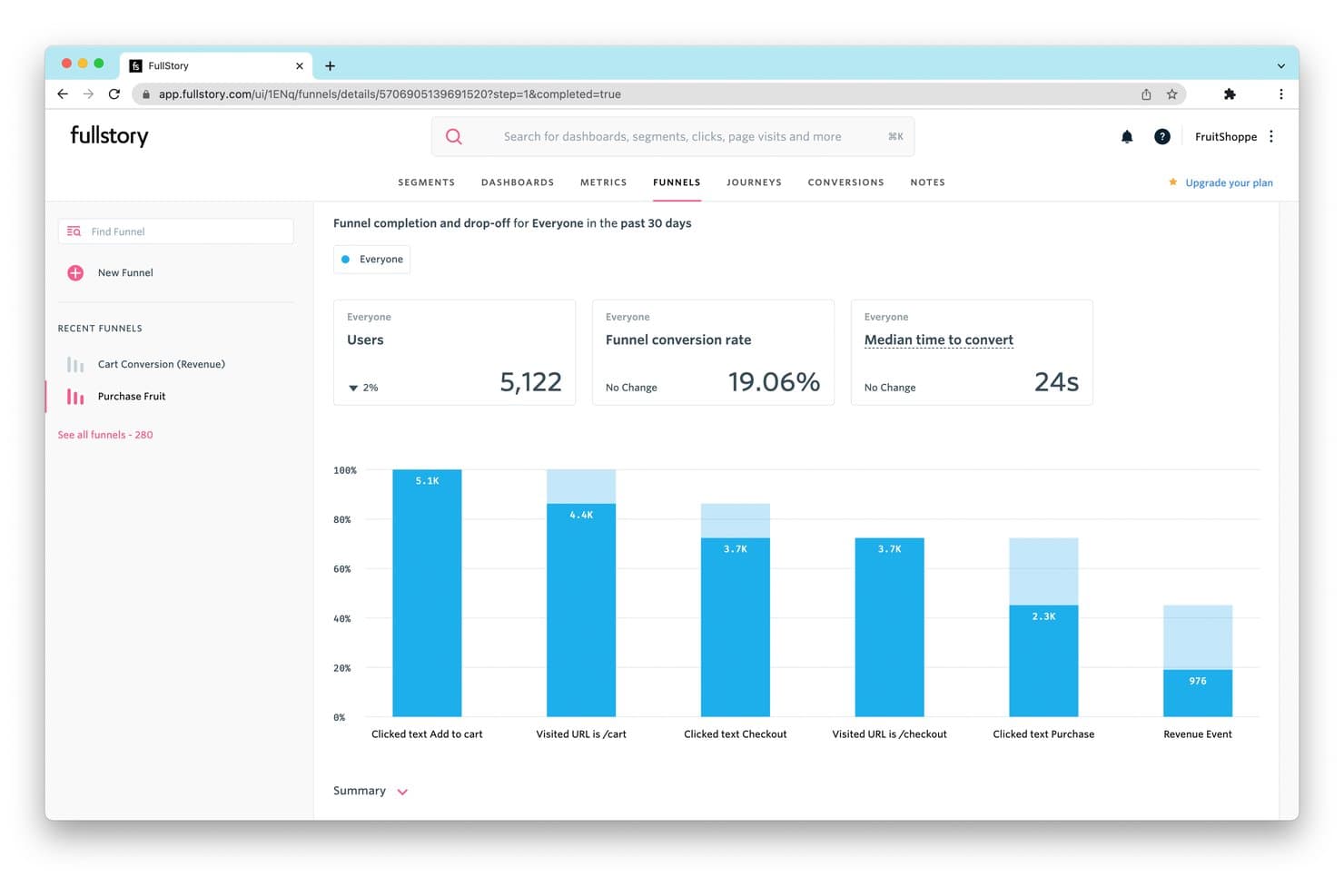
FullStory tracks funnel drop-off rates to reveal where users abandon purchases. Fullstory is a product intelligence platform that combines session replay, autocapture-based behavioral analytics, funnel and path analysis, retention tracking, in-app guides, and AI-powered insight detection across web and native mobile apps.
Who Is Fullstory Best For?
Fullstory is a strong fit for product and growth teams at mid-market to enterprise companies that need to connect qualitative session behavior with quantitative analytics in one place.
Why I Picked Fullstory
Fullstory earns its spot on my shortlist because its session replay capability goes further than most tools I've tested, pairing high-fidelity recordings with AI-generated session summaries via StoryAI that cut through hours of footage in seconds. I'm particularly drawn to Fullcapture™, which captures every click, scroll, and interaction retroactively, so I can define a new behavioral signal today and apply it to data from months ago. Frustration Signals automatically flag rage clicks and error clicks, linking them to estimated revenue impact.
Fullstory Key Features
- Conversion funnels: Multi-step funnel analysis with drop-off visualization that links directly to session replays of users who abandoned at each step.
- Journey Maps: ML-powered path analysis that surfaces the most common routes users take through your product, including unexpected detours and exit paths.
- In-app guides and surveys: Deploy product tours, onboarding checklists, tooltips, and NPS surveys from within Fullstory without engineering support.
- Anywhere: Warehouse: Hourly behavioral data sync to Snowflake, BigQuery, and Redshift for downstream BI and predictive modeling workflows.
Fullstory Integrations
Fullstory offers native integrations with Twilio Segment, Amplitude, Snowflake, Google BigQuery, Amazon Redshift, and RudderStack, plus Intercom, Invoca, Kustomer, and Olark. Its FS.Identity, Element, fs.event, and Consent APIs support custom integrations.
Pros and Cons
Pros:
- Privacy-first data capture with automatic PII masking
- Retroactive behavioral event tracking for web and mobile
- Session replay with AI-powered session summaries
Cons:
- Advanced analytics locked to higher-tier plans
- No built-in A/B testing or feature flags
Learn more about Fullstory: Best for capturing all user interactions automatically
- Free plan + free demo available
- Pricing upon request
Visit WebsiteCustomer Rating:4.3/5
Here's the path comparisons feature in Heap. Heap is a product analytics platform that makes user interactions and activity data instantly accessible and usable for businesses. Its primary strength is its automatic data capture feature, which eliminates the need for manual tracking setup, thereby reducing the chances of missed data or insights.
Why I Picked Heap:
I selected Heap for my list due to its automatic user interaction capture capability, which sets it apart from many other tools in the market. While most tools require manual configuration for tracking different events, Heap captures all user actions from the get-go, making it truly "best for capturing all user interactions automatically."
Standout features & integrations:
Heap's key features include automatic event capturing, retroactive analytics, and data governance, which offer a rich, flexible, and secure environment for data analysis. Heap smoothly integrates with platforms such as Salesforce, Optimizely, and Google Ads.
Pros and Cons
Pros:
- Integrates well with many commonly used platforms
- Ability to perform retroactive analytics
- Automatic capturing of all user interactions
Cons:
- Some users might find the user interface less intuitive than competitor platforms
- Can be expensive for small businesses or startups
- Custom pricing may lack transparency for potential customers
Learn more about Heap (by Contentsquare): Best for open-source product analytics
- Free plan available
- From $250/month
Visit WebsiteCustomer Rating:4.5/5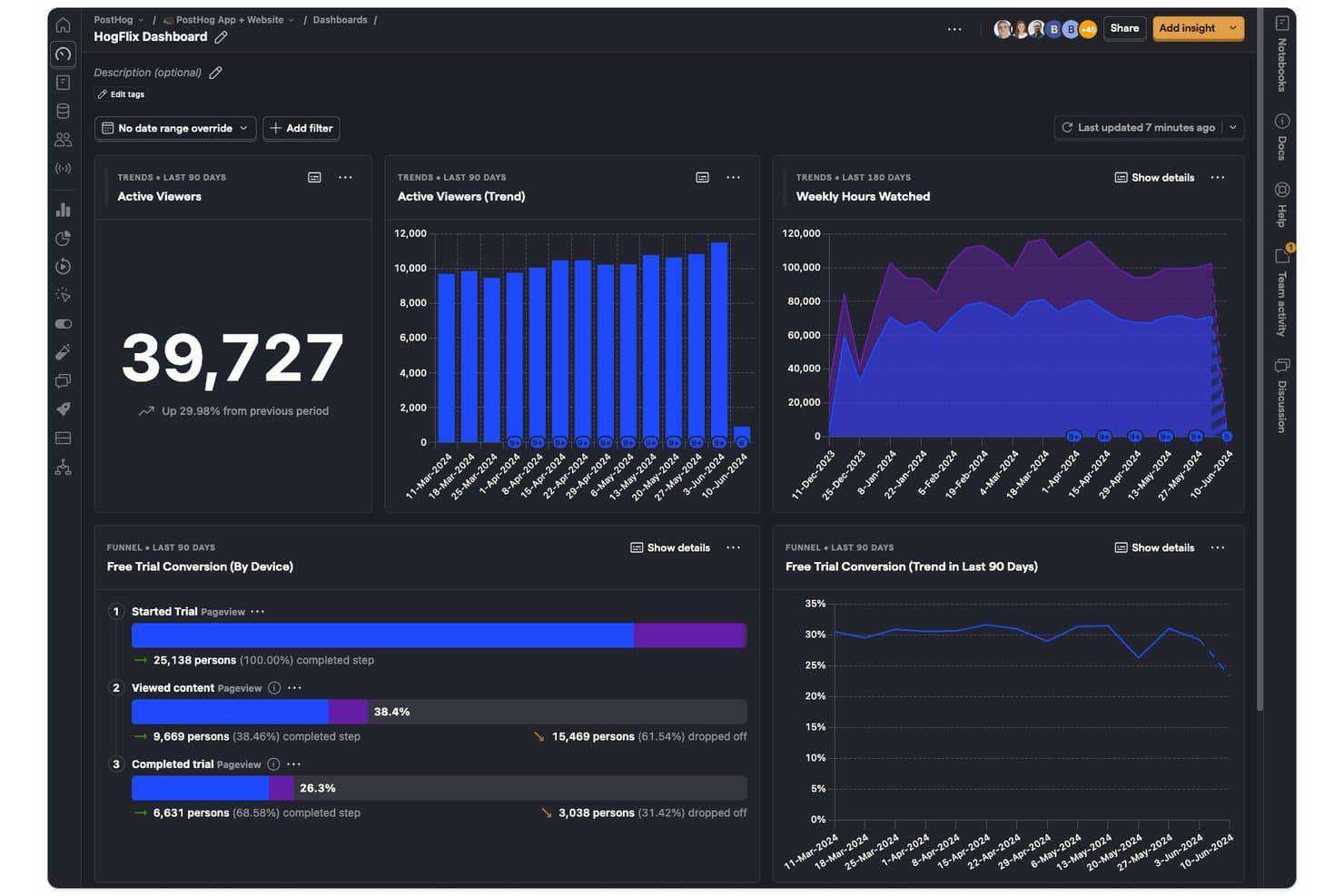
PostHog tracks viewer trends, hours watched, and trial conversions in one dashboard. PostHog is an open-source product intelligence platform that combines product analytics, session replay, feature flags, A/B testing, surveys, and a built-in CDP into a single unified toolset.
Who Is PostHog Best For?
PostHog is a strong fit for technical product teams and developers who want a single platform to cover analytics, session replay, feature flags, and experimentation without stitching together multiple tools.
Why I Picked PostHog
PostHog earns its spot as one of the best on my shortlist because its open-source foundation gives technical product teams something most analytics platforms won't: full visibility into how their data is collected, stored, and processed. I love that autocapture logs clicks, pageviews, and form submissions from day one, while Correlation Analysis automatically surfaces the behavioral factors statistically tied to conversion or drop-off. Teams can jump directly from any funnel step into the session recordings behind it, turning a data point into a real user story without switching tools.
PostHog Key Features
- Lifecycle analysis: Segments users into new, returning, resurrecting, and dormant categories so you can track engagement shifts across your entire user base over time.
- Native A/B and multivariate testing: Runs experiments with both Bayesian and frequentist statistical engines, including holdout groups and group-level testing for B2B products.
- In-app surveys: Triggers NPS, CSAT, PMF, and open-text surveys based on user behavior, event history, or feature flag status, with responses linked directly to analytics data.
- HogQL custom queries: Lets you write SQL directly against your PostHog data for ad hoc analysis and custom reporting beyond the standard insight builder.
PostHog Integrations
PostHog offers 50+ native event destinations, including Slack, Braze, Customer.io, Salesforce, HubSpot, Intercom, and PagerDuty. It also connects to Snowflake, BigQuery, Databricks, and Redshift, with open APIs and Hog functions for custom data pipelines.
Pros and Cons
Pros:
- Advanced funnel analysis with correlation insights
- Session replay tightly integrated with analytics
- Open source with self-hosted deployment option
Cons:
- Limited session replay retention to 3 months
- Interface overwhelms non-technical product teams
Learn more about PostHog: Best for visualizing user interactions
- 14-day free trial + free plan available
- From $176/month (billed annually)
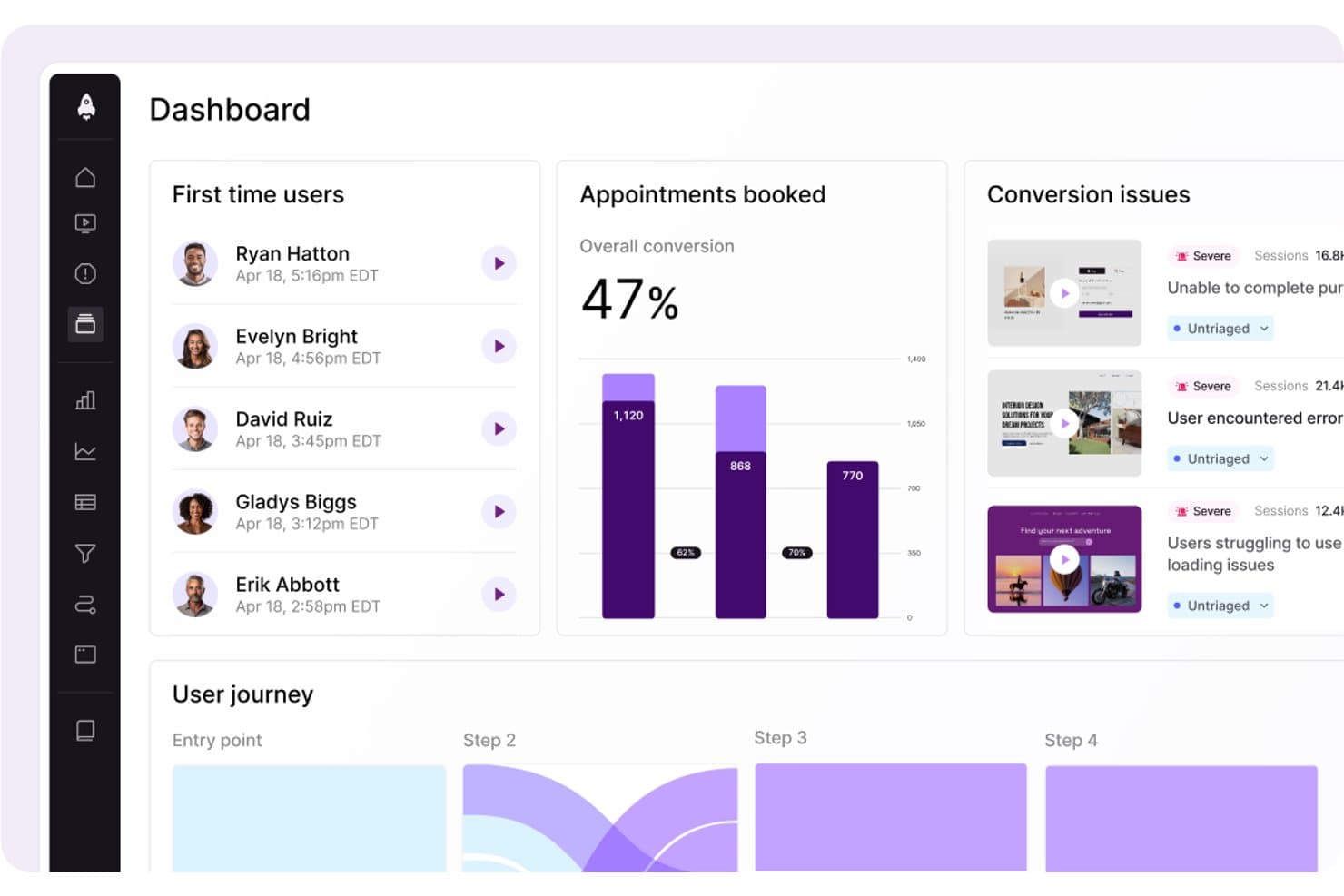
LogRocket surfaces conversion issues and user journey data in one dashboard. LogRocket is a product intelligence platform that combines session replay, product analytics, UX analytics, error tracking, and AI-powered insights through its Galileo AI layer into a single tool.
Who Is LogRocket Best For?
LogRocket is a strong fit for product managers and product analytics teams who need to connect quantitative funnel data with real session context to understand the "why" behind user behavior.
Why I Picked LogRocket
LogRocket earns its spot on my shortlist because of how well it captures and visualizes exactly what users experience. Session replay is the core strength here: pixel-perfect playback across web and native mobile, paired with heatmaps, clickmaps, and rage-click maps that turn raw interaction data into something you can actually act on. I also love that Galileo AI watches sessions automatically and surfaces the moments worth your attention, so you're not scrubbing through hours of footage to find where users struggled.
LogRocket Key Features
- Autocapture with retroactive definitions: LogRocket records every user event automatically and lets you label events in plain language—applied instantly to all historical sessions.
- Path analysis: Visualizes the exact routes users take through your product, forward and backward from any page or event, including drop-off points.
- In-app surveys: Collects qualitative user feedback directly within your product, tied to behavioral session data for added context.
- Streaming data export: Delivers a continuous, warehouse-native data connection to Snowflake, BigQuery, Redshift, Databricks, and Amazon S3 for BI analysis.
LogRocket Integrations
LogRocket offers 75+ integrations, including Amplitude, Mixpanel, Segment, LaunchDarkly, Optimizely, Zendesk, Intercom, Jira, Slack, and Snowflake. It also provides API and MCP access, plus Enterprise streaming exports to Snowflake, BigQuery, Redshift, Databricks, and Amazon S3.
Pros and Cons
Pros:
- AI-driven funnel and heatmap insights
- Autocapture with retroactive event labeling
- Pixel-perfect session replay across web and mobile
Cons:
- Retention analytics less advanced than top competitors
- Advanced AI features require higher plans
Learn more about LogRocket: Best for AI-driven revenue impact prioritization
- Free demo available
- Pricing upon request
Visit WebsiteCustomer Rating:4.7/5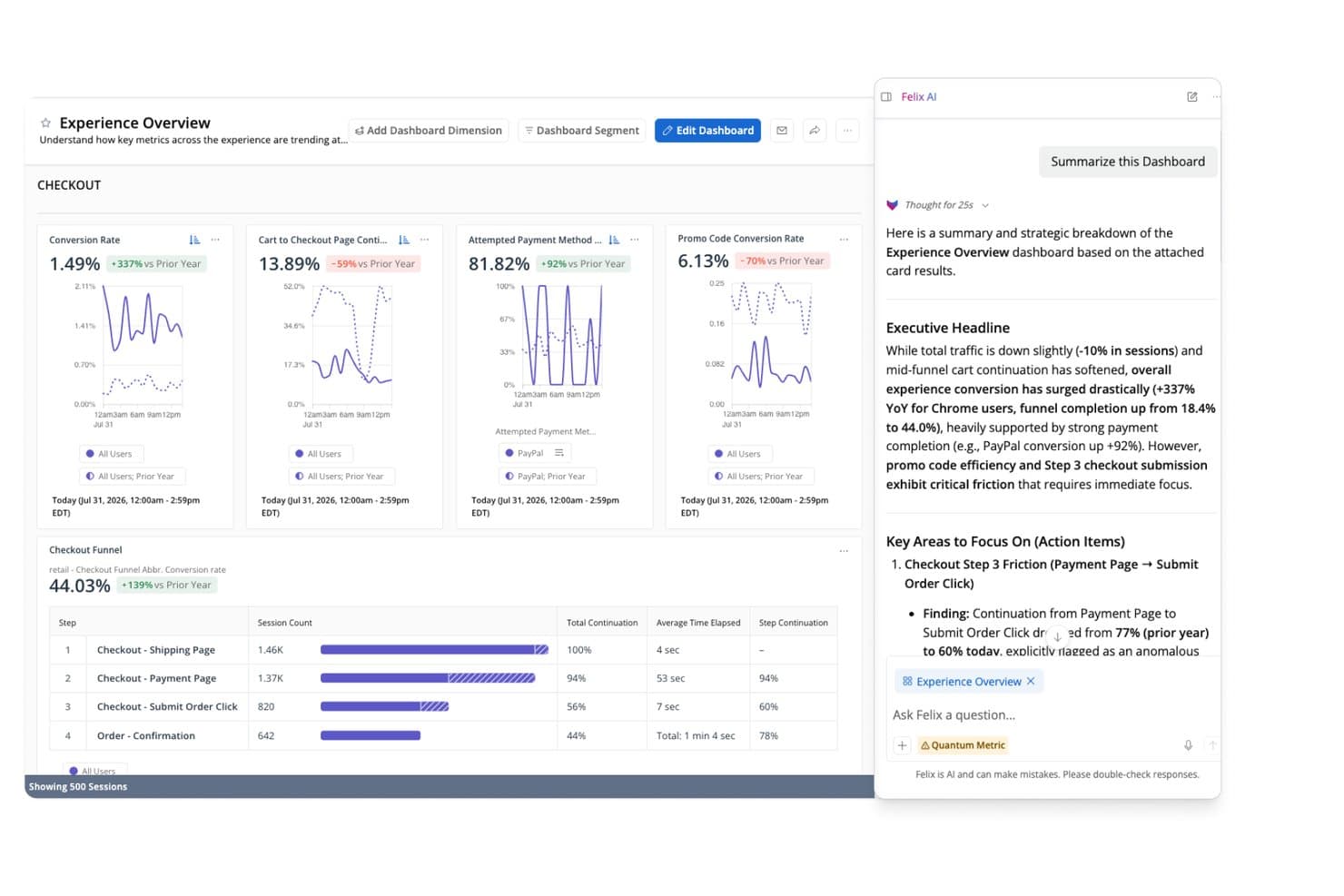
Quantum Metric's Felix AI summarizes checkout funnel insights instantly. Quantum Metric is a product intelligence platform that combines autocapture behavioral analytics, session replay, funnel and journey analysis, AI-driven anomaly detection, and real-time data activation across web and native mobile applications.
Who Is Quantum Metric Best For?
Quantum Metric is a strong fit for enterprise product and digital teams in regulated industries—like financial services, insurance, and retail—that need AI-driven revenue prioritization backed by strict data privacy controls.
Why I Picked Quantum Metric
Quantum Metric earns its spot on my shortlist because its Felix AI Agentic layer does something I haven't seen matched elsewhere: it continuously monitors your digital journeys, quantifies the revenue impact of each friction point, and surfaces prioritized issues before anyone has to go looking. I particularly like Opportunity Analysis, which automatically scores friction against business impact so product and digital teams can defend roadmap decisions with dollar figures, not gut instinct. Pair that with autocapture of 300+ behavioral signals across web and native mobile from day one, and you're working with a platform built around revenue-driven prioritization from the ground up.
Quantum Metric Key Features
- Session replay: Reproduces web and native mobile user interactions with DOM-based fidelity, including a technical pane with network diagnostics for engineering triage.
- Data Streaming: Exports behavioral data in real time to warehouses like Snowflake, BigQuery, Redshift, and Databricks, with support for filters and custom schema alignment.
- Segment Builder: Builds behavioral audience segments using nested AND, OR, THEN, and WHERE logic across hundreds of metrics, usable across all platform views.
- AutoPII scanning: Continuously scans raw data and session replays using Cloud DLP to detect, mask, and purge sensitive information before it's exposed.
Quantum Metric Integrations
Quantum Metric offers documented integrations with Snowflake, Google BigQuery, Databricks, Amazon Redshift, LaunchDarkly, Optimizely, Salesforce Service Cloud, Qualtrics, Medallia, and Slack, plus data enrichment from offline, call center, VoC, and POS sources.
Pros and Cons
Pros:
- Session replay pivots from any aggregate view
- Felix AI agents proactively surface opportunities
- Quantifies revenue impact for every user friction
Cons:
- Relies on third-party tools for experimentation
- No free trial or startup access
Learn more about Quantum Metric: Best for product and user behavior analytics
- Free plan + free demo available
- Pricing upon request
Visit WebsiteCustomer Rating:4.5/5
Here's Amplitude's business KPI dashboard feature. Amplitude is a comprehensive product intelligence platform known for its ability to track and analyze product and user behavior data effectively. Its strength lies in unraveling patterns in user behavior, providing valuable inputs for product development and optimization.
Why I Picked Amplitude:
Amplitude made it to my list due to its robust and detailed user behavior analytics. When evaluating various platforms, I found that Amplitude presents an exceptional ability to parse through user behavior data and draw meaningful inferences, making it a standout choice. Its claim to be "Best for product and user behavior analytics" is underpinned by these strong capabilities.
Standout features & integrations:
Amplitude's key features include real-time analytics, cohort analysis, and advanced segmentation, which are critical in understanding and influencing user behavior. On the integration front, Amplitude aligns well with tools like Slack, Jira, and Zendesk, promoting data sharing and team collaboration.
Pros and Cons
Pros:
- Strong integration capabilities
- Real-time analytics
- Comprehensive user behavior analytics
Cons:
- Custom pricing lacks upfront clarity
- It may take time to navigate and fully utilize the complex feature set
- The cost may be prohibitive for smaller businesses
Learn more about Amplitude: Best for in-app user interaction tracking
- Free plan + 30-day free trial + free demo available
- Pricing upon request
Visit WebsiteCustomer Rating:4.4/5
Here's the multi-app analytics dashboard feature in Pendo. Pendo is a product experience platform that allows businesses to understand their user's interactions within the app. It provides critical insights about in-app user behavior and leverages these to deliver a better user experience.
Why I Picked Pendo:
Pendo emerged as a strong contender in my research, primarily for its in-depth in-app interaction tracking capabilities. I noticed that Pendo excels at providing detailed analytics about how users navigate within an application. It stands apart from the rest because of its unique focus on maximizing user experience, which directly aligns with its prowess in tracking in-app interactions.
Standout features & integrations:
Pendo is loaded with features like user segmentation, which helps in targeting specific user groups. It offers rich feedback and analytics features, providing a holistic view of the user experience. Pendo’s integration capabilities are vast, supporting integration with major CRM and marketing tools like Salesforce, Marketo, and Slack.
Pros and Cons
Pros:
- Vast integration options
- Rich feedback and analytics capabilities
- Extensive in-app tracking
Cons:
- Custom pricing can lack transparency
- Steeper learning curve compared to similar platforms
- Pricing can be high for smaller businesses
Learn more about Pendo:

Screenshot of product metrics dashboard in Mizpanel. Mixpanel is an advanced analytics platform designed to analyze, measure, and improve user engagement across a range of applications. Its ability to provide real-time data analytics makes it a powerful tool for businesses that need to respond quickly to changing user trends.
Why I Picked Mixpanel:
Choosing Mixpanel for this list was a straightforward decision, largely due to its outstanding real-time analytics capabilities. In comparing Mixpanel to similar platforms, I found its real-time data analytics to be a distinct advantage, enabling businesses to make prompt, data-driven decisions. The tool excels in delivering real-time insights, setting it apart in the crowded field of product intelligence software.
Standout features & integrations:
Mixpanel’s standout features include its event-based tracking and user journey funnels, which offer a deep understanding of user interactions. Furthermore, its cohort analysis allows businesses to group users based on behavior, providing targeted insights. As for integrations, Mixpanel syncs with numerous platforms such as Salesforce, Zendesk, and Jira, facilitating a unified workflow across diverse systems.
Pros and Cons
Pros:
- Extensive integration options
- Advanced event-based tracking
- Real-time analytics
Cons:
- Custom pricing lacks upfront transparency
- The user interface may require a learning curve
- Pricing might be steep for startups
Learn more about Mixpanel: Best for unified digital and product analytics
- Free plan + 15-day free trial + free demo available
- From €49/month
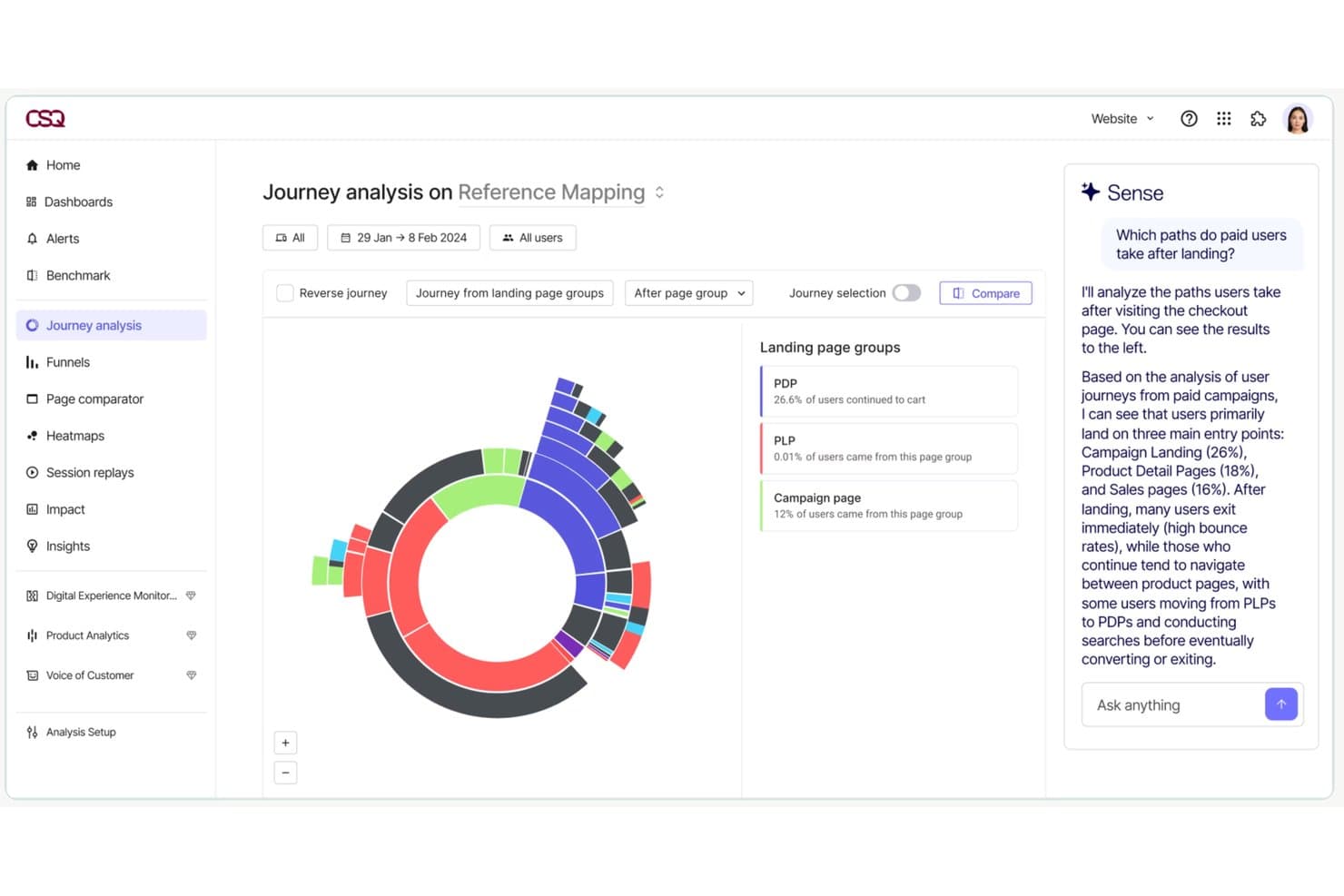
Contentsquare lets users analyze paid user journey paths with AI insights. Contentsquare is a digital and product experience intelligence platform that combines auto-capture behavioral analytics, session replay, heatmaps, journey analysis, in-app surveys, and product analytics into a single suite across web and mobile.
Who Is Contentsquare Best For?
Contentsquare is a strong fit for mid-market and enterprise product teams that need behavioral analytics, session replay, and journey analysis in one place rather than stitched across multiple tools.
Why I Picked Contentsquare
Contentsquare earns its spot on my shortlist because it's the only tool I've seen that genuinely unifies digital and product analytics without forcing you to stitch together separate platforms. I'm particularly impressed by Smart Capture, which auto-records every interaction retroactively, so my team can define new metrics against historical data without bugging engineering. Pair that with Impact Quantification, which ties specific friction points directly to revenue, and you have a clear way to justify roadmap calls with hard numbers.
Contentsquare Key Features
- Smart Capture auto-capture: Automatically records every user interaction across web and native mobile apps without manual event tagging or engineering work.
- In-app surveys: 40+ pre-built survey templates, an AI survey generator, and exit intent triggers let you collect user feedback directly within your product.
- Sense AI chat: A natural language interface that lets you query your analytics data and get plain-language answers without needing data expertise.
- Data Connect ETL export: A managed pipeline that exports Contentsquare behavioral data directly to Snowflake, AWS, or Azure for warehouse-level analysis.
Contentsquare Integrations
Contentsquare offers 100+ integrations, including Snowflake, AWS, Azure, Segment, mParticle, RudderStack, Optimizely, and VWO. Data Connect exports behavioral data to warehouses, while its open API and MCP Server support custom analytics workflows.
Pros and Cons
Pros:
- Combines analytics, session replay, and surveys
- Links behavioral data directly to revenue
- Auto-captures all web and app interactions
Cons:
- Session replay may show incomplete recordings
- Advanced analysis features require higher tiers
Learn more about Contentsquare:
Diğer Ürün İstihbaratı Yazılımları
Kısa listeme giremeyen ancak yine de göz atmaya değer bazı ek ürün istihbaratı yazılımı seçenekleri şunlardır:
- 11Gainsight PXBest for B2B product adoption and CS alignment
- 12StatsigBest for experiment-driven product analytics
- 13KissmetricsBest for customer journey and funnel tracking
- 14GlassboxBest for enterprise digital journey friction analysis
- 15UXCamBest for mobile funnel drop-off to session replay
- 16UserpilotBest for analytics-to-in-app action in one workflow
- 17CleverTapBest for mobile-first businesses
- 18MoEngageGood for customer segmentation and engagement
- 19Adobe AnalyticsBest for marketing performance tracking
- 20KubitBest for warehouse-native product analytics
How I Evaluate Product Intelligence Software
I split my evaluation into two layers: the core capabilities—like funnel analysis and cohort segmentation—a tool must have, and the differentiators that set the best options apart.
Core Functionality (Table Stakes For This List)
When I'm selecting tools for my list, I rank each one on a scale from 0 (does not offer the functionality) to 5 (excels in this area) for each core functionality listed below. Then, I calculate the tool's total score into a percentage. Each tool needs to achieve a minimum total score of 65% to be considered for inclusion.
- Behavioral Event Tracking: I check whether a tool can capture user actions like button clicks, form submissions, and page views across web and mobile with minimal engineering lift.
- Funnel & Path Analysis: Multi-step funnels that show where users drop off—say, between adding an item to a cart and completing checkout—are what I evaluate here.
- Cohort & User Segmentation: I look for the ability to group users by behavior and attributes, such as comparing trial users who completed onboarding against those who didn't.
- Retention & Engagement Analytics: Tools should surface retention curves and stickiness metrics so you can answer questions like "are users coming back after their first week?"
- Session Replay or User-Level Insights: I evaluate whether the tool provides qualitative context, like watching a user struggle with a settings page, alongside quantitative data.
- Integrations & Data Pipeline: Compatibility with warehouses like Snowflake or BigQuery and CDPs like Segment matters here, along with CRM and marketing tool connectivity.
Once I have a list of tools that meet the criteria, I consider what sets each platform apart.
Differentiating Factors (What Sets Vendors Apart)
Here's how I compare and contrast different vendors:
Standout Features
AI-powered insights are a big differentiator—I look for tools that automatically flag unexpected drops in activation or retention without requiring manual dashboard exploration. Native A/B testing is another factor I weigh, since it lets product teams measure the impact of a new onboarding flow or pricing page directly within the analytics environment. I also evaluate feature flag integration, which ties release events to usage data so you can see exactly how a new feature affects engagement.
Beyond Features
Pricing model matters a lot here. Event-based pricing can spiral quickly as your product scales, so I evaluate whether a vendor's model stays predictable as your user base grows. Warehouse and data stack fit is equally important—I check whether a tool works natively with your existing warehouse or requires a separate data pipeline. I also consider data governance, especially role-based access controls and compliance certifications, since product data often contains sensitive user behavior that teams across the organization will access.
Ürün İstihbaratı Yazılımı Nasıl Seçilir?
Uzun özellik listeleri ve karmaşık fiyatlandırma yapıları içinde kaybolmak kolaydır. Kendinize özgü yazılım seçim sürecinizi yürütürken odağınızı korumanıza yardımcı olmak için aklınızda bulundurmanız gereken faktörleri içeren bir kontrol listesi hazırladım:
| Faktör | Dikkate Alınması Gerekenler |
|---|---|
| FaktörÖlçeklenebilirlik | Dikkate Alınması GerekenlerYazılım ekibinizle birlikte büyüyebilir mi? Gelecekteki büyümeyi ve aracın performans sorunları yaşamadan artan veri ve kullanıcı sayısını yönetip yönetemeyeceğini değerlendirin. |
| FaktörEntegrasyonlar | Dikkate Alınması GerekenlerMevcut araçlarınıza bağlanabiliyor mu? İş akışlarında kesintileri önlemek için CRM, analiz ve iletişim platformlarınızla uyumluluğunu kontrol edin. |
| FaktörÖzelleştirilebilirlik | Dikkate Alınması GerekenlerYazılımı ihtiyaçlarınıza göre uyarlayabilir misiniz? Panoları, raporları ve iş akışlarını ekibinizin tercihlerine uygun şekilde ayarlama seçeneklerini arayın. |
| FaktörKullanım kolaylığı | Dikkate Alınması GerekenlerAraç kullanıcı dostu mu? Öğrenme eğrisini ve ekibinizin kapsamlı bir eğitim almadan hızla uyum sağlayıp sağlayamayacağını değerlendirin. |
| FaktörUygulama ve işe alıştırma | Dikkate Alınması GerekenlerKurulum ne kadar sorunsuz? Geçiş sırasında eğitim ve destek de dahil olmak üzere dağıtım için gereken zamanı ve kaynakları göz önünde bulundurun. |
| FaktörMaliyet | Dikkate Alınması GerekenlerBütçenize uygun mu? Fiyatlandırma planlarını karşılaştırın, gizli ücretlere dikkat edin ve her kademede sunulan özelliklerin değerini değerlendirin. |
| FaktörGüvenlik önlemleri | Dikkate Alınması GerekenlerVerileriniz ve gizliliğiniz korunuyor mu? Şifreleme, kullanıcı erişim denetimleri ve ilgili veri koruma düzenlemelerine uyumluluk özelliklerini arayın. |
Ürün İstihbaratı Yazılımı Nedir?
Ürün zekâsı (PI) yazılımı, işletmelerin kullanıcıların ürünleriyle nasıl etkileşim kurduğuna ilişkin verileri toplamasına ve analiz etmesine yardımcı olan bir araçtır. Ürün yöneticileri, pazarlamacılar ve veri analistleri, bilinçli kararlar almak ve ürün tekliflerini geliştirmek için genellikle bu araçları kullanır. Kullanıcı davranışı izleme, veri analizi ve raporlama gibi özellikler, müşteri ihtiyaçlarını anlamaya ve ürün geliştirmeyi iyileştirmeye yardımcı olur. Genel olarak bu araçlar, ürün başarısını ve müşteri memnuniyetini artırmak için değerli içgörüler sunar.
Özellikler
Ürün zekâsı yazılımı seçerken aşağıdaki temel özelliklere dikkat edin:
- Kullanıcı davranışı izleme: Popüler özellikleri ve iyileştirme alanlarını belirlemeye yardımcı olmak için kullanıcıların ürününüzle nasıl etkileşim kurduğuna ilişkin verileri toplar.
- Veri analizi: Kullanıcı verilerini analiz etmek ve ürün kararlarını ve stratejilerini yönlendiren içgörüler oluşturmak için araçlar sunar.
- Raporlama: Veri eğilimlerini görselleştirmek ve ürün performansını zaman içinde izlemek için özelleştirilebilir raporlar sunar.
- Kitle segmentasyonu: Hedefli analiz ve pazarlama için kullanıcıları davranışlarına ve özelliklerine göre kategorilere ayırmanıza olanak tanır.
- Tahmine dayalı analiz: Gelecekteki eğilimleri ve kullanıcı davranışlarını öngörmek için geçmiş verileri kullanır ve proaktif karar almayı destekler.
- Entegrasyon özellikleri: Sorunsuz veri akışı ve kapsamlı analiz sağlamak için diğer araçlara ve platformlara bağlanır.
- Özelleştirilebilir kontrol panelleri: Ekibiniz için en ilgili ölçümleri ve içgörüleri görüntülemek üzere arayüzü ihtiyaçlarınıza göre uyarlamanıza olanak tanır.
- Gerçek zamanlı veri işleme: Kullanıcı etkileşimleri hakkında anında içgörüler sunarak eğilimlere ve sorunlara daha hızlı yanıt verilmesini sağlar.
- Güvenlik önlemleri: Şifreleme ve erişim denetimleriyle veri koruması sağlayarak kullanıcı bilgilerinin güvende tutulmasını sağlar.
- Etkileşimli ürün turları: Yeni kullanıcıları özellikler konusunda yönlendirerek kullanıcıların ürüne alışma sürecini ve kullanıcı deneyimini geliştirir.
Avantajlar
Ürün zekâsı yazılımını uygulamak ekibiniz ve işletmeniz için çeşitli avantajlar sağlar. Yararlanabileceğiniz avantajlardan bazıları şunlardır:
- Geliştirilmiş karar alma: Ayrıntılı veri analizine erişim, ekibinizin gerçek kullanıcı davranışlarına dayalı bilinçli ürün kararları almasına yardımcı olur.
- Gelişmiş müşteri anlayışı: Kullanıcı davranışı izleme, müşteri ihtiyaçları ve tercihleri hakkında içgörüler sunarak daha hedefli ürün iyileştirmelerine olanak tanır.
- Artan verimlilik: Otomatik raporlama, temel ölçümlere ve performans göstergelerine hızlı erişim sağlayarak zamandan tasarruf ettirir.
- Proaktif geliştirme: Tahmine dayalı analiz, ekibinizin eğilimleri öngörmesine ve sorunlar ortaya çıkmadan önce iyileştirmeler planlamasına olanak tanır.
- Hedefli pazarlama çalışmaları: Kitle segmentasyonu, farklı kullanıcı gruplarını belirleyerek daha hassas pazarlama stratejileri oluşturulmasına olanak tanır.
- Daha iyi kullanıcı deneyimi: Etkileşimli ürün turları ve ürüne alıştırma özellikleri, ürünün öğrenilmesini ve kullanılmasını kolaylaştırarak kullanıcı memnuniyetini artırır.
- Veri güvenliği güvencesi: Güvenlik önlemleri kullanıcı verilerini koruyarak gizlilik düzenlemelerine uyulmasını ve müşteri güveninin oluşturulmasını sağlar.
Maliyetler & Fiyatlandırma
Ürün zekâsı yazılımı seçmek, mevcut çeşitli fiyatlandırma modellerinin ve planların anlaşılmasını gerektirir. Maliyetler özelliklere, ekip büyüklüğüne, eklentilere ve daha fazlasına göre değişir. Aşağıdaki tablo, ürün zekâsı yazılımı çözümlerinde yaygın olarak sunulan planları, ortalama fiyatlarını ve tipik özelliklerini özetlemektedir:
Ürün Zekâsı Yazılımı İçin Plan Karşılaştırma Tablosu
| Plan Türü | Ortalama Fiyat | Yaygın Özellikler |
|---|---|---|
| Plan TürüÜcretsiz Plan | Ortalama Fiyat$0 | Yaygın ÖzelliklerTemel analiz, sınırlı kullanıcı izleme ve temel raporlama. |
| Plan TürüKişisel Plan | Ortalama Fiyat$5-$25/kullanıcı/ay | Yaygın ÖzelliklerGelişmiş analiz, özel kontrol panelleri ve e-posta desteği. |
| Plan Türüİşletme Planı | Ortalama Fiyat$30-$60/kullanıcı/ay | Yaygın ÖzelliklerKullanıcı segmentasyonu, entegrasyon özellikleri ve öncelikli destek. |
| Plan TürüKurumsal Plan | Ortalama Fiyat$75-$150/kullanıcı/ay | Yaygın ÖzelliklerTahmine dayalı analiz, özel hesap yöneticisi ve gelişmiş güvenlik özellikleri. |
Ürün Zekâsı Yazılımı Hakkında Sıkça Sorulan Sorular
Ürün zekâsı yazılımı hakkında sık sorulan soruların bazı yanıtlarını burada bulabilirsiniz:
Ürün zekâsı yazılımı verileri nasıl toplar?
Ürün zekâsı yazılımı; web sitenizdeki veya uygulamanızdaki kullanıcı etkileşimlerini izleme, CRM’ler gibi diğer araçlarla entegre olma ve mevcut veri kümelerini içe aktarma gibi çeşitli yöntemlerle veri toplar. Bilgi toplamak için çerezleri, olay izlemeyi ve API bağlantılarını kullanır. Kullanıcı verilerini toplarken yazılımınızın GDPR gibi veri gizliliği düzenlemelerine uygun olduğundan emin olmanız gerekir.
Ürün zekâsı yazılımı birden fazla ekipte çalışabilir mi?
Evet, çoğu araç ürün, pazarlama ve destek ekiplerini aynı anda destekleyebilir. Her ekip, önem verdiği konulara odaklanmak için farklı gösterge panelleri kullanabilir. Ürün yöneticileri özellik kullanımına bakarken pazarlama ekipleri dönüşümlerle ilgilenebilir. Gereksiz bilgi kalabalığını önlemek için özel erişim düzeyleri belirleyebilirsiniz.
Ürün ekipleri, ürün zekâsı yazılımında dönüşüm hunilerini nasıl kullanır?
Dönüşüm hunileri, kullanıcıların ilk kullanım veya ödeme gibi önemli akışlarda nasıl ilerlediğini ölçmenize yardımcı olur. Kullanıcıların nerede ayrıldığını bulabilir ve bu adımı iyileştirmek için değişiklikleri test edebilirsiniz. Ürün ekipleri genellikle hem yeni hem de geri dönen kullanıcılar için dönüşüm hunileri oluşturur. Bunları segmente veya platforma göre de ayrıştırabilirsiniz.
Ürün zekâsı yazılımını kullanmak için eğitim gerekli mi?
Evet, ürün zekâsı yazılımını etkili bir şekilde kullanmak için genellikle bir miktar eğitim gerekir. Birçok araç kullanıcı dostu olsa da tüm özellikleri anlamak için eğitimler veya eğitim oturumları gerekebilir. Ekibinizin hızlı bir şekilde yetkinleşmesini sağlamak için video, web semineri ve dokümantasyon gibi kapsamlı işe alım kaynakları sunan yazılımları tercih edin.