

Oturum tekrarı yazılımı, web sitenizdeki gerçek kullanıcı oturumlarını kaydeder; böylece insanların nerelere tıkladığını, nerelerde kaydırma yaptığını, nerelerde takıldığını veya nerelerde ayrıldığını görebilirsiniz. Tahminde bulunmadan UX sorunlarını belirlemenin, problemleri ayıklamanın ve dönüşümleri artırmanın en hızlı yollarından biridir.
En iyi araçların çoğu oldukça iyi ücretsiz paketler sunar, ancak bunların hepsi zaman ayırmaya değmez. Başlangıçta ödeme yapmadan gerçekten faydalı içgörüler sağlayan araçları bulmanıza yardımcı olmak için önde gelen ücretsiz ve deneme sürümü tabanlı seçenekleri inceledim ve test ettim. Bu liste, bilgi kalabalığını ortadan kaldırarak hiçbir ücret ödemeden gerçekten kullanılabilir olanları gösterir.
Ekibiniz için fark yaratabilecek en iyi seçeneklere göz atalım.
Why Trust Our Software Recommendations
6,700+
Reviews
20
Industry experts
16+
Evaluation factors
14
Years
Our team has been testing and reviewing software since 2012. As product managers ourselves, we know how difficult—and important—it is to choose the right software.
For this guide, we evaluated tools using hands-on testing and independent research, scoring tools using our selection criteria.
Our reviews reflect our human editorial judgment, not a sales pitch.
Expert reviewers:
- Andrew LumbySenior TPM
- Cristiano ValimSenior UI/UX Lead


Ücretsiz Oturum Tekrarı Yazılımları Karşılaştırma Tablosu
Kısa listeme giren araçların ücretli planları için temel maliyetler şunlardır:
Score legend (out of 5)
- Excellent4.5–5
- Good4–4.4
- Average3–3.9
- Below average2–2.9
- Poor1–1.9
Sorted by: Default
| Tool | Starting Price | Website | |||||||
|---|---|---|---|---|---|---|---|---|---|
Best for contextual user session replay | 3.3 out of 5 | 4 | 1 | 3 | 3 | 5 | 4 | $26/month Free plan + 14-day trial + free demo available | Website |
Best for cookieless UX friction detection | 3.8 out of 5 | 5 | 1 | 4 | 4 | 4 | 5 | $2.99/month Free plan + 30-day free trial available | Website |
Best for replays linked to funnel drop-offs | 4.0 out of 5 | 5 | 4 | 3 | 3 | 4 | 5 | $120/month Free plan available | Website |
Best for behavioral data analytics | 5.0 out of 5 | 5 | 5 | 5 | 5 | 5 | 5 | Pricing upon request Free plan available | Website |
Best for replays linked to funnels and journeys | 4.2 out of 5 | 5 | 5 | 3 | 3 | 5 | 4 | Pricing upon request Free plan + free demo available | Website |
Best for behavior-based session filtering | 3.7 out of 5 | 4 | 3 | 3 | 4 | 4 | 4 | $65/month 14-day free trial available | Website |
Best for eye-tracking heatmaps on free plans | 4.2 out of 5 | 5 | 4 | 1 | 5 | 5 | 5 | $39/month Free plan available | Website |
Best for self-hosted open-source replay | 4.0 out of 5 | 5 | 4 | 3 | 4 | 4 | 4 | Pricing upon request Free plan available | Website |
Best for debugging sessions tied to feature flags | 4.0 out of 5 | 4 | 5 | 3 | 4 | 3 | 5 | $50/month Free plan + free trial available | Website |
Best for open-source self-hosted replay | 4.2 out of 5 | 4 | 2 | 5 | 4 | 5 | 5 | $199/month Free plan + 7-day free trial available | Website |


En İyi Ücretsiz Oturum Tekrarı Yazılımları İncelemeleri
Aşağıda, kısa listeme giren en iyi ücretsiz oturum tekrarı yazılımı araçlarına ilişkin ayrıntılı özetlerimi bulabilirsiniz. İncelemelerim, size en uygun aracı bulmanıza yardımcı olmak için her aracın temel özelliklerine, artılarına & eksilerine, entegrasyonlarına ve ideal kullanım alanlarına ayrıntılı bir bakış sunar. Bu araçların çoğu tamamen ücretsiz bir sürüm sunarken, diğerleri ücretsiz deneme süresi sunar. İncelemelerimin her birinde nelerin ücretsiz olduğuna dair bir not ekledim
 Best for contextual user session replay
- Free plan + 14-day trial + free demo available
- From $26/month (billed annually)
Visit WebsiteCustomer Rating:4.5/5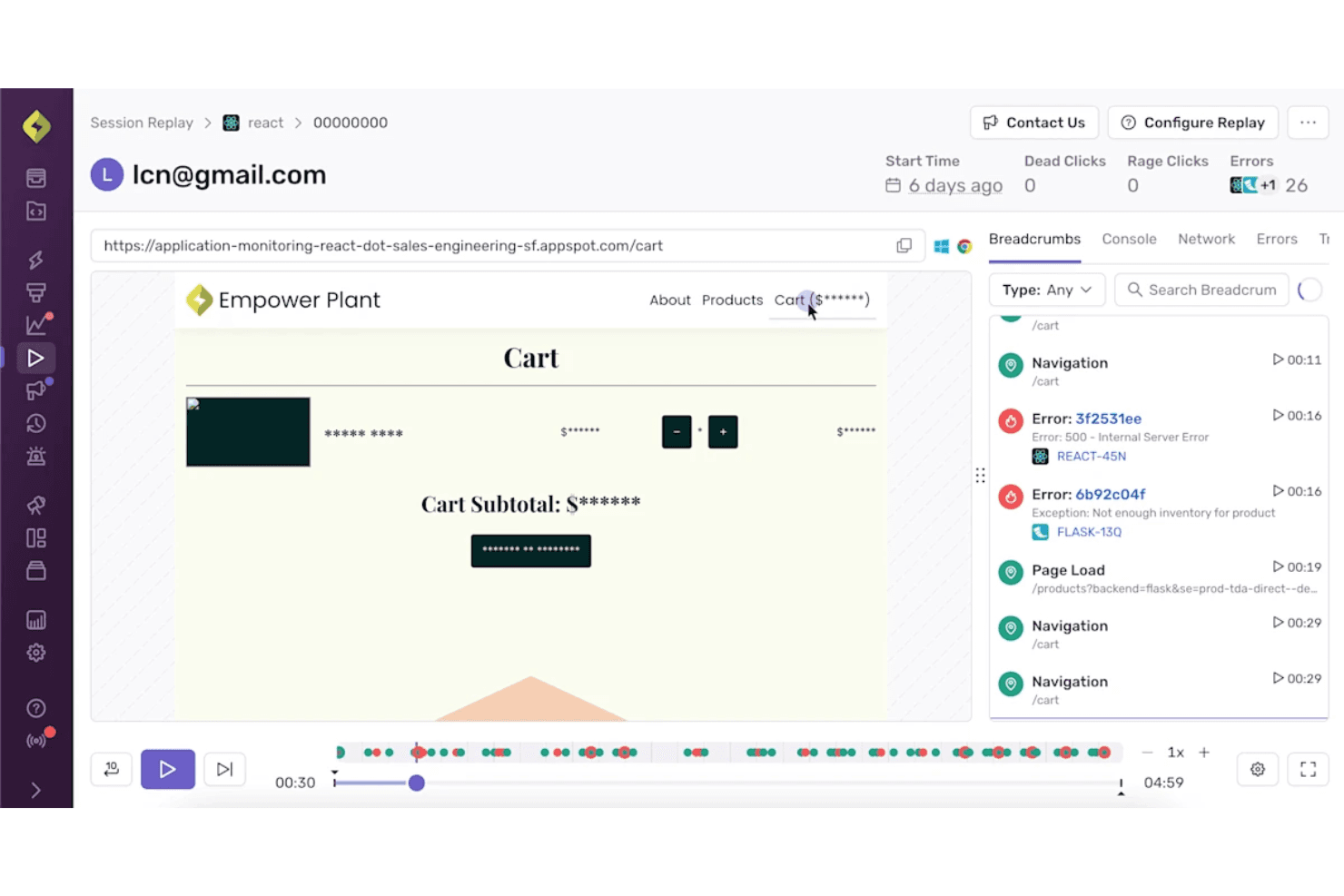
Sentry combines session replay with error details for clearer debugging context. Sentry is a free session replay platform for developer debugging that reconstructs web and mobile sessions, linking playback with errors, traces, console logs, network requests, and rage or dead-click signals.
Who Is Sentry Best For?
Sentry suits developer-led product teams that connect session replays with errors, traces, logs, and rage-click signals during bug triage.
Why I Picked Sentry
I picked Sentry for contextual user session replay because it connects DOM-based replays directly to errors, traces, console logs, and network requests. I use rage-click and dead-click signals to locate broken interactions quickly, then jump from an issue to the exact session moment. Its free plan supports focused debugging with 50 replays per month.
Sentry Key Features
- Mobile app replay: Captures sessions across iOS, Android, React Native, and Flutter apps.
- Session search: Filters replays by browser, device, URL, release, user, and custom tags.
- Privacy masking: Masks text, images, and keystrokes before replay data leaves the browser.
- Replay retention: Stores free-plan replays for 30 days.
Sentry Integrations
Sentry offers integrations with Jira, GitHub, GitLab, Linear, Slack, Microsoft Teams, Datadog, Splunk, Grafana, and Segment, plus SDKs for web, mobile, and server frameworks.
What's Free?
Sentry offers a free-forever plan rather than a limited-time trial. It includes 50 session replays per month, with free-plan replays retained for 30 days.
Pros and Cons
Pros:
- Default masking protects replayed user data
- Rage and dead clicks expose broken interactions
- Error-linked replays speed bug diagnosis
Cons:
- No funnels or heatmaps for UX analysis
- Limited replay volume weakens ongoing monitoring
Learn more about Sentry: Best for cookieless UX friction detection
- Free plan + 30-day free trial available
- From $2.99/month
Visit WebsiteCustomer Rating:4.7/5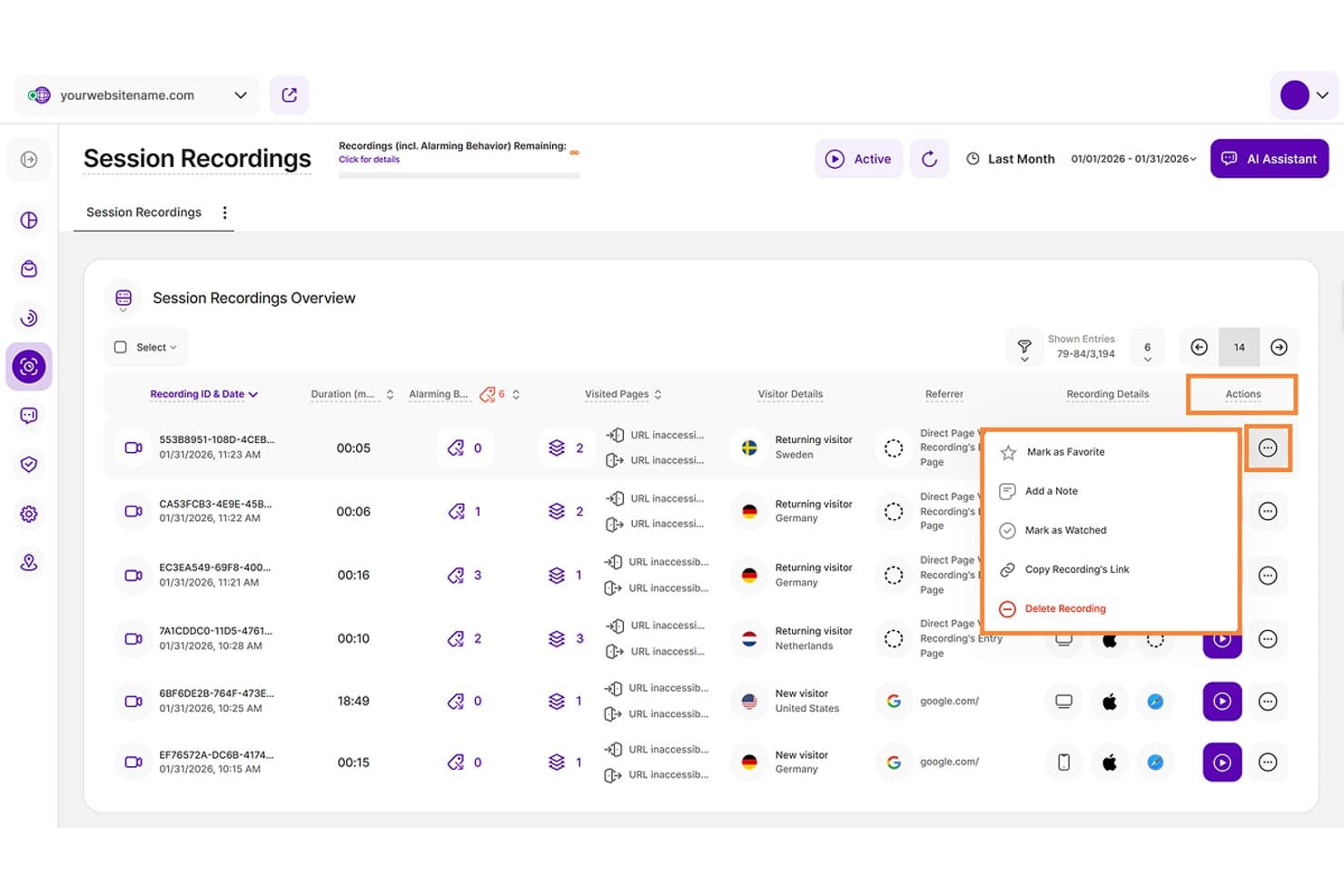
TWIPLA lets users manage session recordings with actions like notes and favorites. TWIPLA is a free session replay and web analytics platform with detailed playback, event timelines, stacked filters, friction signal detection, heatmaps, funnels, and privacy-focused tracking.
Who Is TWIPLA Best For?
Product managers, UX designers, and small teams that need privacy-focused replay analysis and cookieless UX friction detection.
Why I Picked TWIPLA
I picked TWIPLA for Best Free Session Replay Software because its cookieless tracking supports privacy-focused UX analysis. Six automatic friction signals, including rage clicks and dead clicks, appear directly on replay timelines, while stacked filters isolate funnel drop-offs and device patterns. Its Free Forever plan includes 25 recordings total, so it suits targeted investigations rather than ongoing high-volume monitoring.
TWIPLA Key Features
- Replay controls: Skip inactivity and review sessions at speeds up to 8x.
- Recording rules: Record selected URLs, active sessions, or visits above a minimum length.
- Heatmaps: Create click, movement, and scroll maps for desktop, tablet, and mobile.
- Session sharing: Copy recording links and add notes, favorites, or watched statuses.
TWIPLA Integrations
TWIPLA offers marketplace integrations through Wix App Market and Weebly App Center, plus a WordPress plugin. It also supports Google Tag Manager, TYPO3, Smartstore, Drupal, Joomla!, and October CMS, with API keys for custom integrations.
What's Free?
TWIPLA offers a Free Forever plan with 25 recordings total. It also provides a 30-day free trial, while ongoing replay analysis beyond the recording limit requires a paid plan.
Pros and Cons
Pros:
- Cookieless tracking supports privacy-focused UX analysis
- Detailed timelines jump directly to user actions
- Automatic friction signals flag rage clicks
Cons:
- Some iframe content escapes replay capture
- Free recording capacity limits ongoing monitoring
Learn more about TWIPLA: Best for replays linked to funnel drop-offs
- Free plan available
- From $120/month (billed annually)
Visit WebsiteCustomer Rating:4.5/5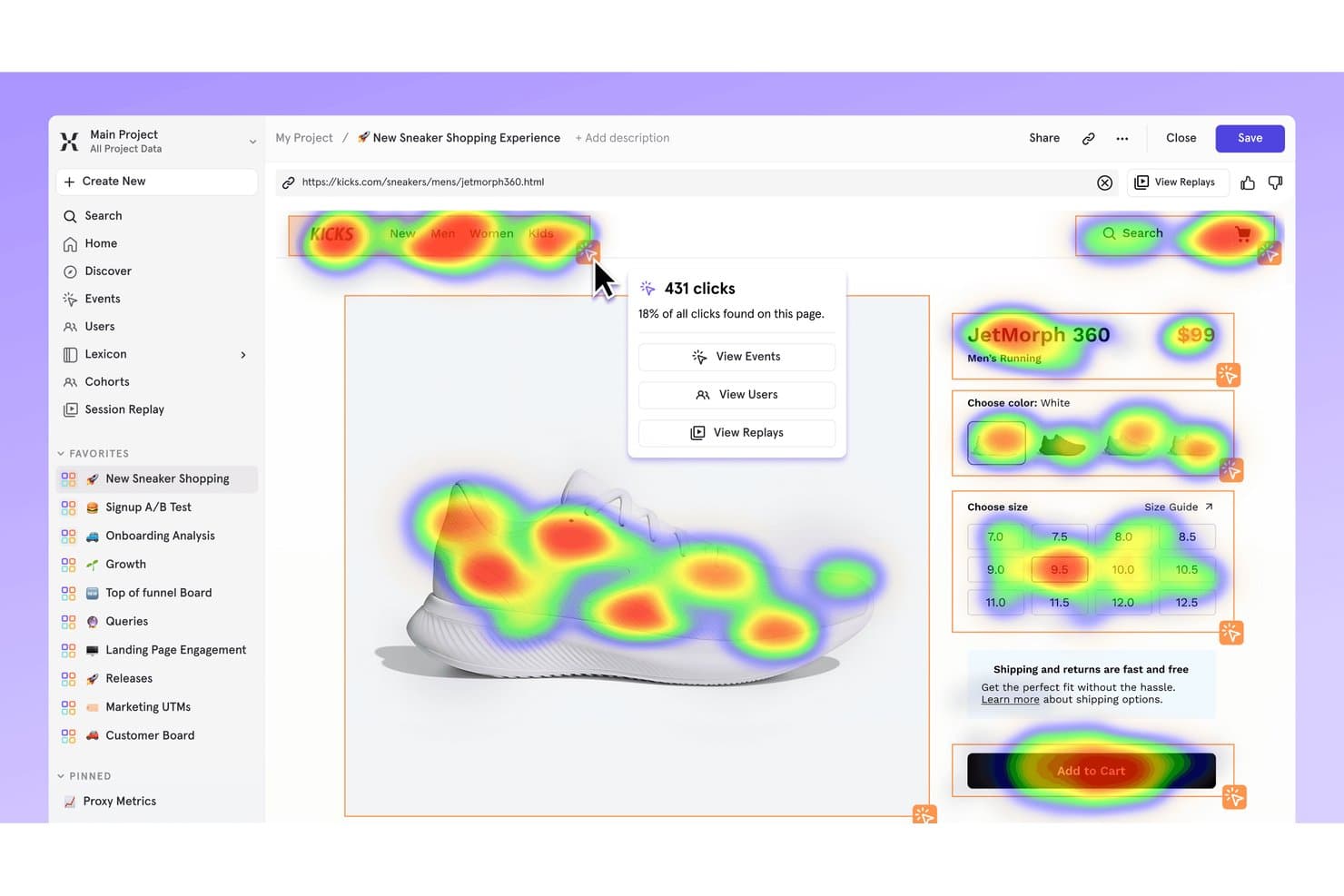
Mixpanel's heatmap shows where users click on a sneaker product page. Mixpanel is a free session replay and product analytics platform with DOM-based playback, funnel and cohort filters, heatmaps, frustration signals, console and network logs, and replay support for web and mobile apps.
Who Is Mixpanel Best For?
Product managers and lean product teams that need to connect session replays with funnel drop-offs, retention data, and user profiles.
Why I Picked Mixpanel
I picked Mixpanel because it links replays directly to funnel drop-offs. I can open sessions from funnel charts, filter them by events, cohorts, or properties, and inspect frustration signals, console logs, and network calls. That helps my team trace a checkout failure from an analytics report to the user behavior behind it.
Mixpanel Key Features
- DOM-based playback: Reconstructs sessions from page structure and changes rather than video.
- Heatmaps and scrollmaps: Visualizes clicks, page views, and scrolling on web pages.
- Mobile session replay: Captures replay data from iOS, Android, React Native, and Flutter apps.
- Privacy masking: Masks text, inputs, images, videos, and sensitive fields by default.
Mixpanel Integrations
Mixpanel offers native integrations with Segment and mParticle, plus JavaScript, iOS, Android, React Native, Flutter, and Electron SDKs. Its ingestion, query, and warehouse APIs support custom integrations.
What's Free?
Mixpanel offers a free-forever plan with unlimited seats, up to 1 million monthly events, and 10,000 session replays per month. It doesn’t charge overages, but platform access is limited after you reach the monthly event limit.
Pros and Cons
Pros:
- Masks sensitive data by default
- Supports web and mobile session replay
- Links replays directly to funnel drop-offs
Cons:
- Heatmaps and scrollmaps exclude mobile
- Retention ends after 30 days
 Best for behavioral data analytics
- Free plan available
- Pricing upon request
Visit WebsiteCustomer Rating:4.5/5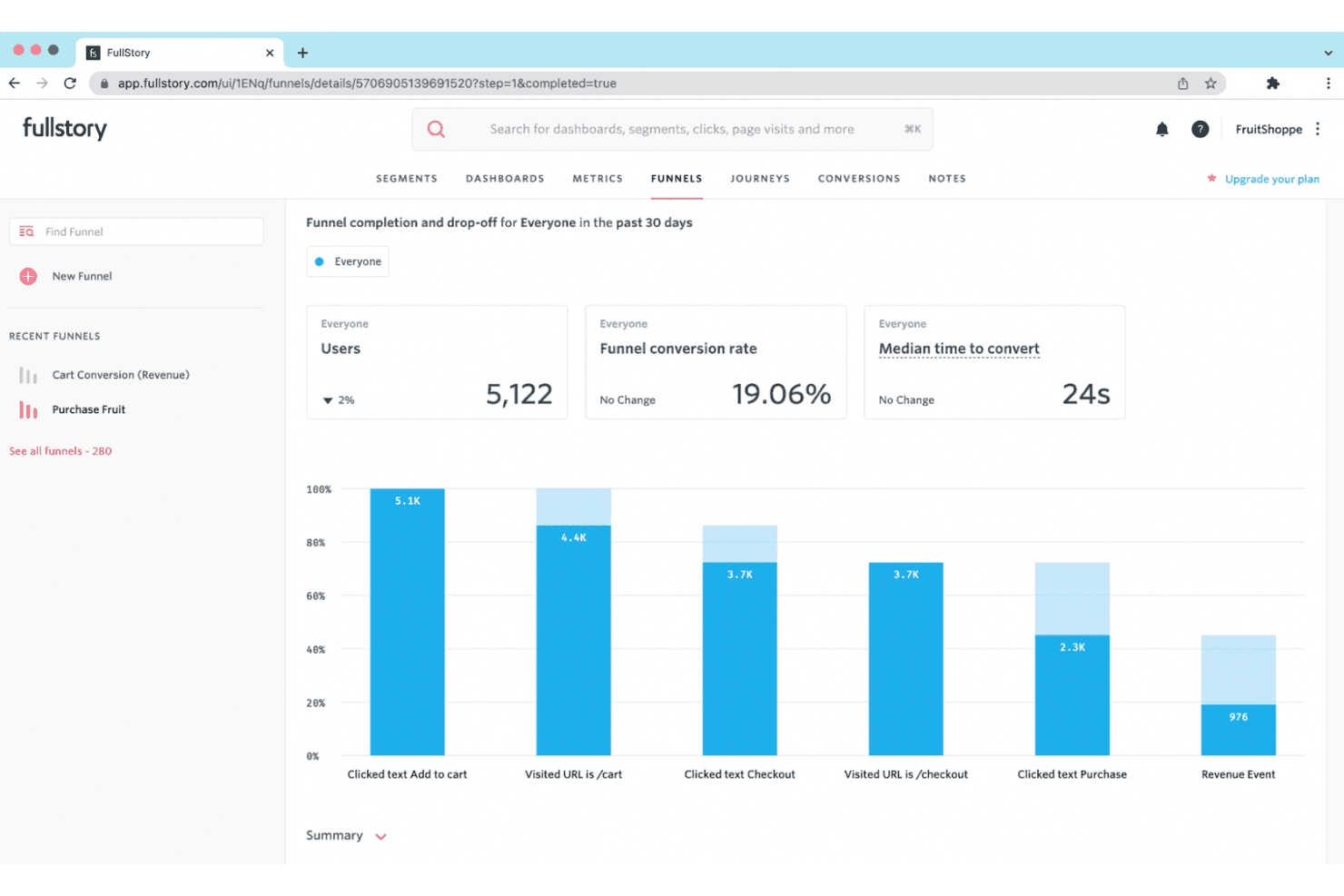
Fullstory provides session replays and behavior insights to help businesses improve digital experiences. Fullstory is a free session replay platform with tagless autocapture, searchable session filters, click and scroll maps, frustration-signal detection, and console and network debugging tools.
Who Is Fullstory Best For?
Fullstory suits product managers and UX designers who need to diagnose usability issues through session replays, heatmaps, and behavioral signals.
Why I Picked Fullstory
I picked Fullstory because its behavioral data analytics connect session evidence with user frustration. I use OmniSearch to isolate rage clicks, dead clicks, and page-speed issues, then review click and scroll maps to locate friction. Dev Tools also links error clicks to console and network activity, helping me trace usability problems to their technical cause.
Fullstory Key Features
- Tagless autocapture: Captures web interactions without manual event tagging.
- Replay controls: Adjust playback speed, skip inactivity, and filter event lists.
- Privacy masking: Masks passwords, payment details, and personal information by default.
- Guest sharing: Creates replay links for external viewers without using team seats.
Fullstory Integrations
Fullstory offers integrations with Slack, Segment, Jira, Adobe Analytics, and Google Tag Manager. It also provides an open API, webhooks, data export, and consent and identity APIs for custom connectivity.
What's Free?
FullstoryFree is a free plan rather than a limited-time trial, with no credit card required. It includes up to 30,000 sessions monthly, 12 months of retention, and 10 users, but excludes advanced features such as dashboards, webhooks, and StoryAI.
Pros and Cons
Pros:
- Heatmaps reveal click and scroll behavior
- Console and network logs aid bug diagnosis
- Detailed frustration signals surface hidden friction
Cons:
- Free data may support AI training
- Capture stops after monthly session cap
Learn more about Fullstory: Best for replays linked to funnels and journeys
- Free plan + free demo available
- Pricing upon request
Visit WebsiteCustomer Rating:4.5/5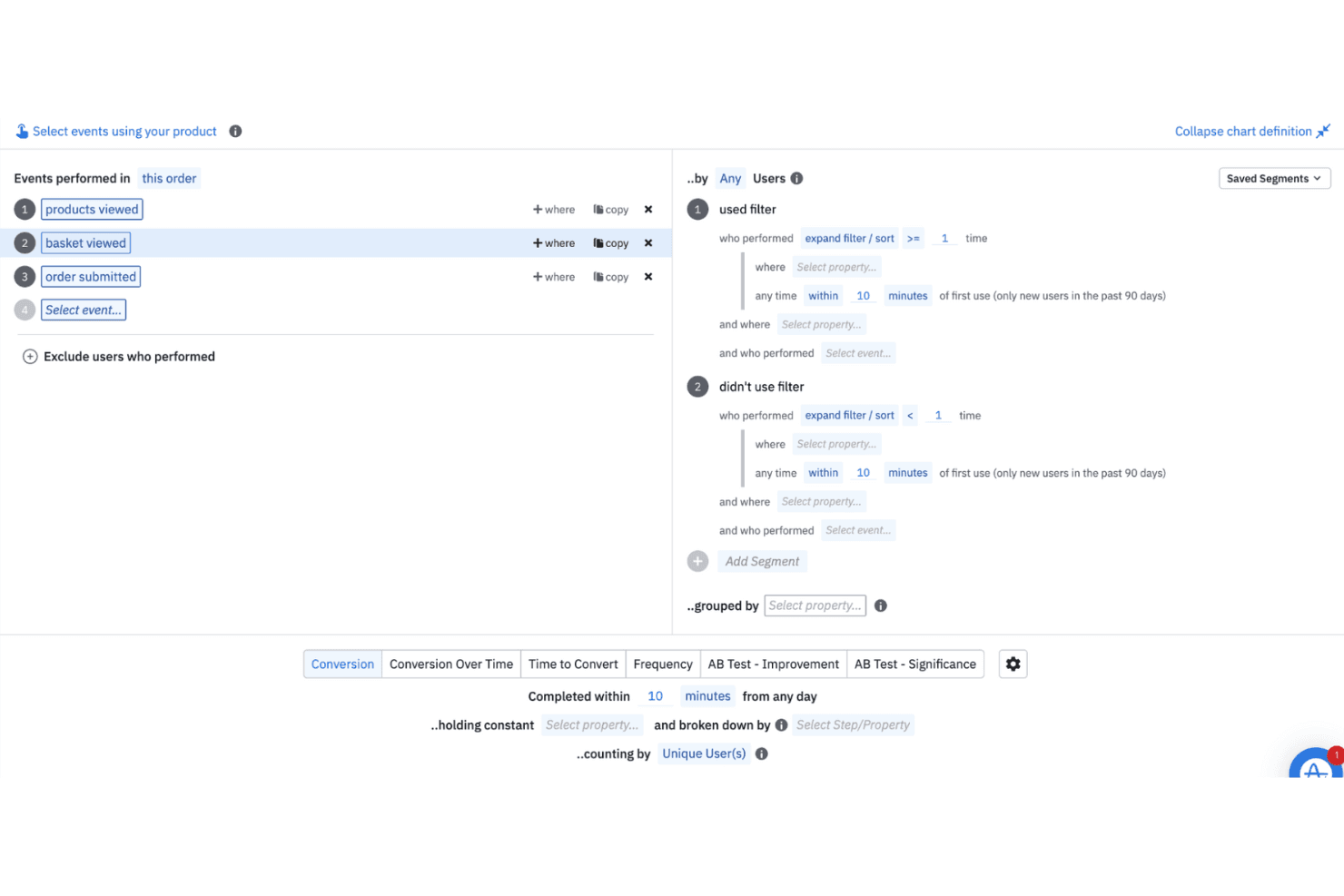
Amplitude helps teams analyze real-time and historical user behavior to guide product decisions. Amplitude is a free session replay software platform with web and mobile recording, event timelines, funnel and journey views, replay search, rage-click detection, and console and network logs.
Who Is Amplitude Best For?
Product managers and digital marketers who need to connect session replays with funnels, journeys, experiments, and user behavior data.
Why I Picked Amplitude
I picked Amplitude because it links session replays directly to funnels and journeys. I can open recordings from a conversion drop-off, then use event timelines, replay search, and rage-click detection to investigate friction. Its free plan includes 10,000 replays monthly, making continuous product diagnosis practical.
Amplitude Key Features
- Console and network logs: Review JavaScript messages, failed requests, and API activity beside replays.
- Mobile app replay: Capture sessions from iOS, Android, React Native, and Flutter applications.
- Privacy masking: Mask text fields, inputs, passwords, cards, phones, and emails by default.
- Skip inactivity: Jump past idle periods with playback controls and adjustable replay speed.
Amplitude Integrations
Amplitude lists 159+ integrations, including Segment, Snowflake, BigQuery, Slack, Optimizely, LaunchDarkly, and HubSpot. SDKs, Google Tag Manager, and the Replay Search API support custom data and replay workflows.
What's Free?
Amplitude offers a free-forever plan with no credit card required. It includes up to 10,000 session replays and 2 million events monthly, with one month of replay retention and unlimited seats.
Pros and Cons
Pros:
- Supports web, iOS, Android, and cross-platform apps
- Exposes console and network errors beside replays
- Links replays directly to funnels and journeys
Cons:
- Requires SDK instrumentation before recording sessions
- Replays expire after one month
Learn more about Amplitude: Best for behavior-based session filtering
- 14-day free trial available
- Plans start at $65/month
Visit WebsiteCustomer Rating:4.6/5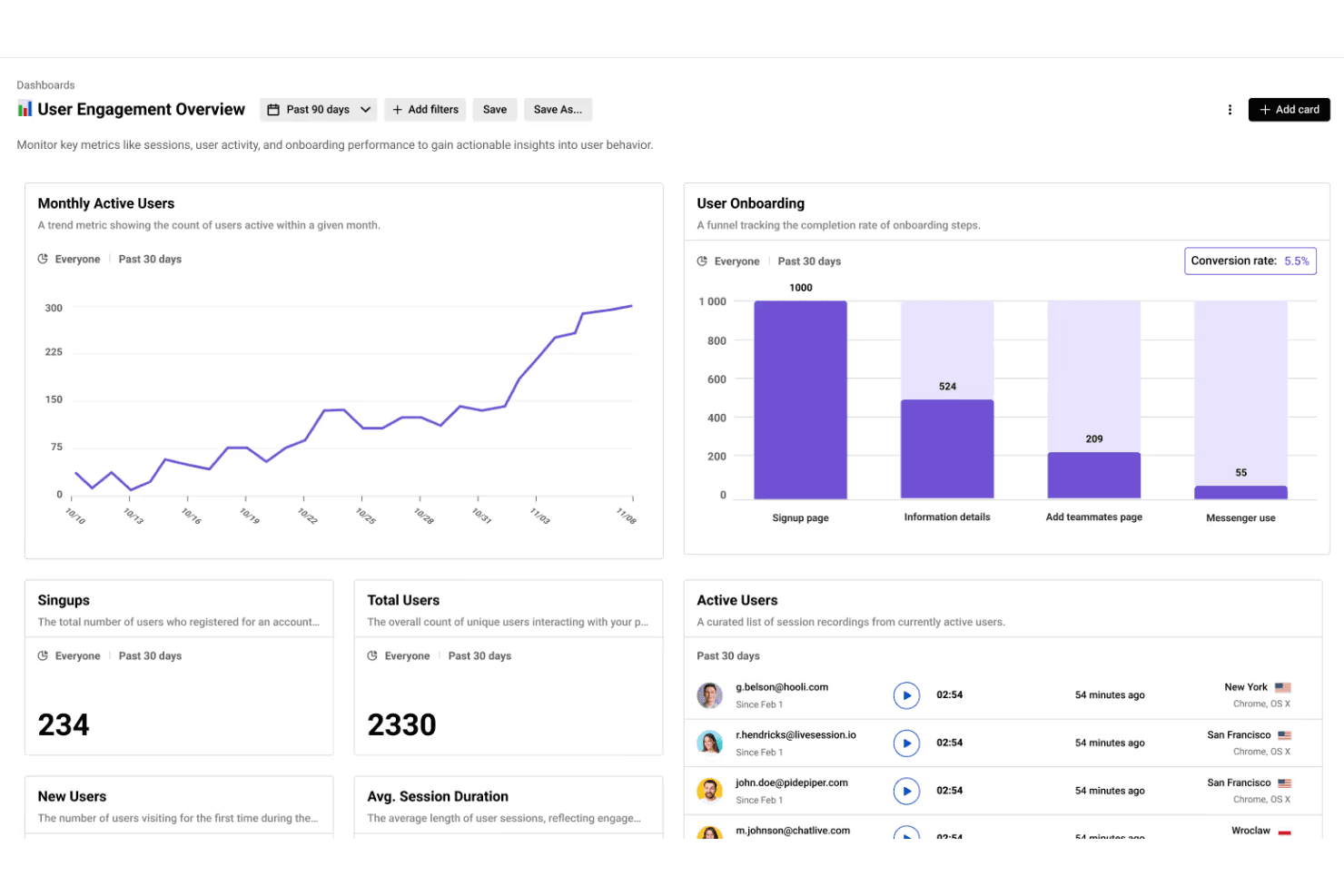
LiveSession combines session replays with analytics to help teams track KPIs and boost user engagement. LiveSession is a session replay and product analytics platform combining mouse, click, and scroll recordings with heatmaps, funnels, segments, filters, and rage and error click detection.
Who Is LiveSession Best For?
LiveSession suits product managers and UX designers at small teams who need behavior-based filtering to diagnose friction in web experiences.
Why I Picked LiveSession
I picked LiveSession because its behavior-based session filtering helps me investigate friction without watching recordings at random. I can combine search terms, save reusable segments, and use Inspect Mode to find clicks on specific CSS elements. The Events explorer also connects rage and error clicks to the replays where users struggled.
LiveSession Key Features
- Heatmaps: Visualize click activity and interaction intensity by URL.
- Funnel analysis: Track user progression through one defined conversion flow.
- Resource backup: Preserve replay styles and fonts after original files are deleted.
- Sensitive input masking: Automatically anonymize passwords and card details.
LiveSession Integrations
LiveSession documents 26 integrations, including Google Analytics, Segment, Mixpanel, Sentry, Bugsnag, Intercom, Zendesk, Slack, Google Tag Manager, and Zapier. Its REST API is available on Pro and above for custom integrations.
What's Free?
LiveSession offers a free-forever plan with session replay, heatmaps, funnels, filters, and segments. It includes 1,000 sessions monthly, one month of data retention, three team members, and two websites or projects; sessions exceeding the monthly limit aren’t recorded. A 14-day Pro trial is also available without a credit card.
Pros and Cons
Pros:
- Heatmaps complement mouse and scroll replays
- Rage and error clicks expose friction
- Behavior-based filtering narrows replay investigations quickly
Cons:
- Developer diagnostics lack console and network context
- Native mobile app replay remains unavailable
Learn more about LiveSession: Best for eye-tracking heatmaps on free plans
- Free plan available
- From $39/month
Visit WebsiteCustomer Rating:4.1/5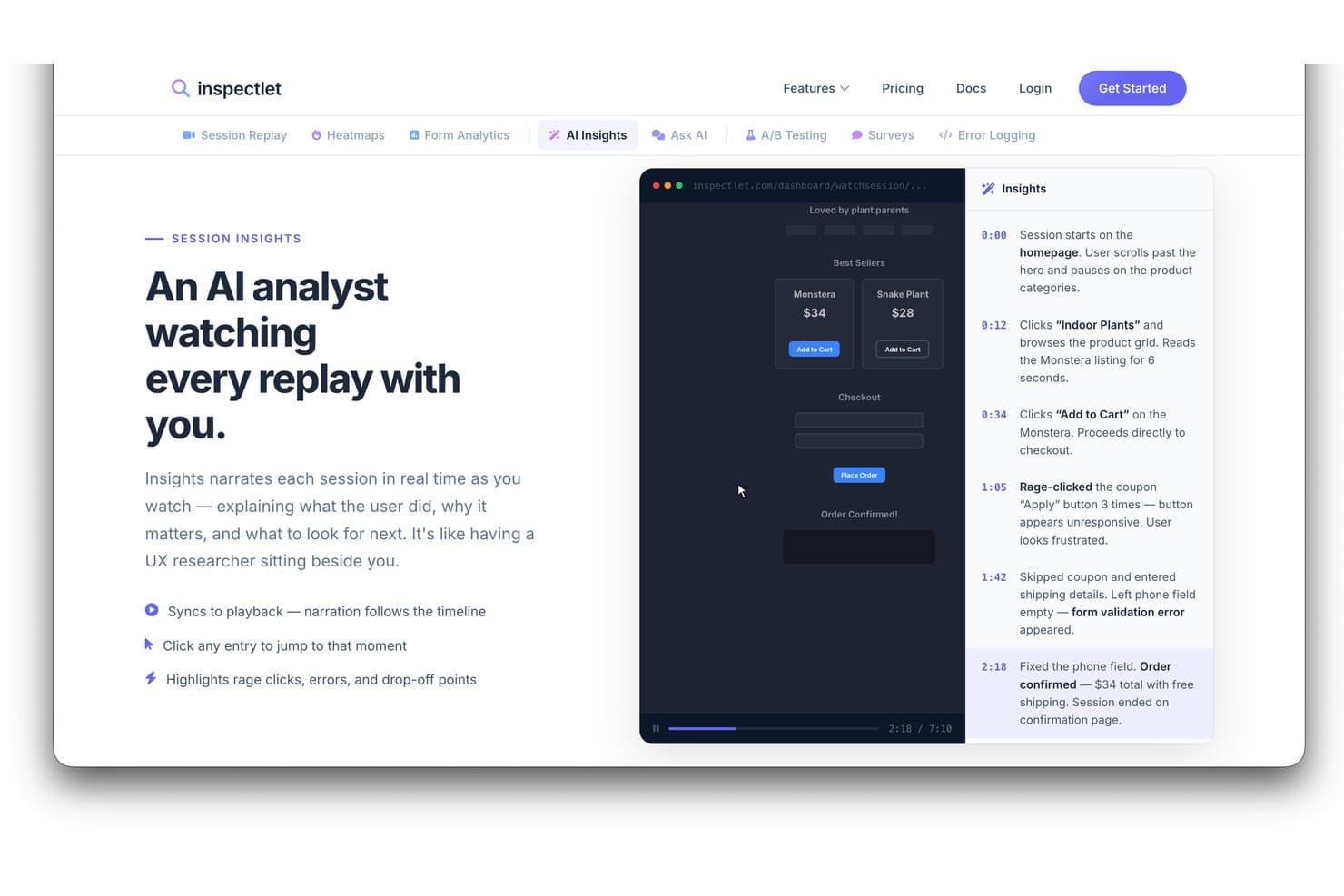
Inspectlet's AI Insights narrates session replays with timestamped events. Inspectlet is free session replay software that combines visitor recordings, heatmaps, AI session analysis, error and rage-click detection, filtering, and A/B testing for websites and single-page applications.
Who Is Inspectlet Best For?
Inspectlet suits product managers and UX designers who need free session replay with eye-tracking heatmaps to diagnose web usability issues.
Why I Picked Inspectlet
I picked Inspectlet as Best for eye-tracking heatmaps on free plans because its free tier maps mouse movement across live pages. I use click dots and scroll-depth maps to see whether visitors notice key CTAs or abandon early. Replay-linked rage-click and JavaScript error detection then connects visual friction to sessions needing investigation.
Inspectlet Key Features
- Session timeline: Review clicks, navigation, and page events in sequence.
- Session filtering: Combine visitor, source, device, page, and conversion filters.
- A/B testing: Create experiments with a visual editor and significance calculations.
- Sensitive data masking: Exclude passwords and selected fields from recordings.
Inspectlet Integrations
Inspectlet documents integrations or setup options for Google Tag Manager, WordPress, Shopify, HubSpot, Convert.com, Slack, and webhooks. API access starts on Growth for custom integrations.
What's Free?
Inspectlet offers a free-forever plan with no credit card or time limit, covering up to 2,500 recorded sessions monthly across three websites. It includes session replay, heatmaps, and A/B testing, but stores data for one month and stops recording new sessions after you reach the monthly limit.
Pros and Cons
Pros:
- Reviewers praise filtering specific sessions
- Rage clicks link directly to replays
- Eye-tracking heatmaps clarify visual attention
Cons:
- Single-user access restricts team review
- Free retention limits historical comparisons
Learn more about Inspectlet: Best for self-hosted open-source replay
- Free plan available
- Pricing upon request
Visit WebsiteCustomer Rating:4.5/5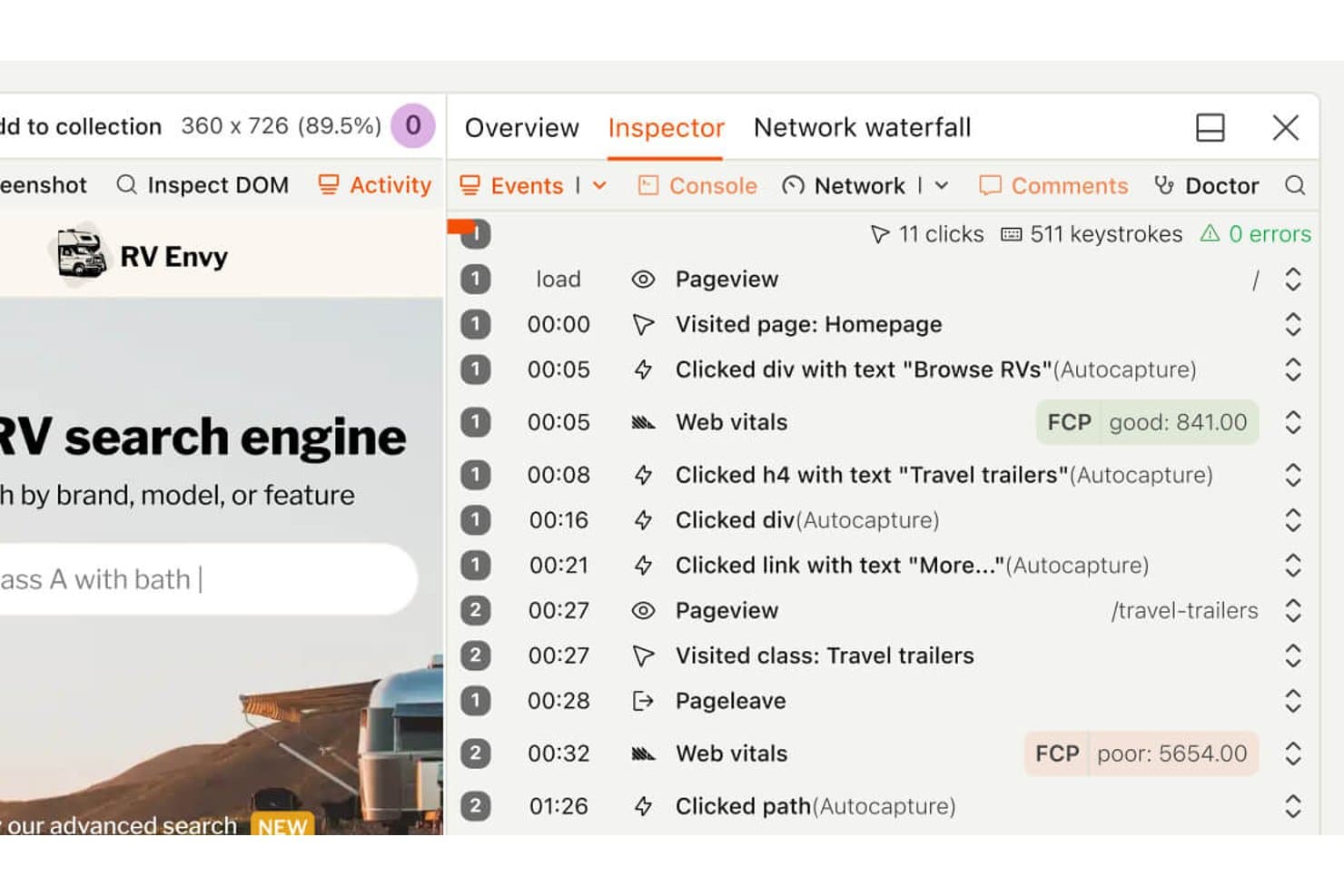
PostHog's session replay timeline shows user clicks and page visits. PostHog is free session replay software that combines DVR-style playback, heatmaps, funnel analysis, feature flags, experiments, error tracking, and synced console and network logs across web and mobile apps.
Who Is PostHog Best For?
PostHog suits product and engineering teams that need open-source, self-hosted session replay alongside funnels, experiments, and error tracking.
Why I Picked PostHog
I picked PostHog because its self-hosted open-source replay runs under the MIT license, giving teams control over their analytics stack. I can pair DVR-style playback with synced console logs, network waterfalls, and a DOM explorer to investigate bugs. Funnel-to-replay links also show where users abandon key product flows.
PostHog Key Features
- Heatmaps: Create heatmaps, scrollmaps, and clickmaps for up to three URLs.
- Frustration signals: Find sessions with rage clicks, dead clicks, or exceptions.
- Mobile replay: Capture sessions from iOS, Android, React Native, and Flutter apps.
- AI session summaries: Ask PostHog AI to find, watch, and summarize recordings.
PostHog Integrations
PostHog integrates with Intercom and Crisp for replay links, plus 50+ CDP destinations including Slack, Salesforce, HubSpot, and PagerDuty. It also provides an API and MCP server for custom workflows.
What’s Free?
PostHog’s free plan lasts indefinitely with no credit card or trial expiry, and includes 5,000 web recordings or 2,500 mobile recordings monthly. It supports unlimited team members but limits you to one project and one month of recording retention; unused recording allowances don’t roll over.
Pros and Cons
Pros:
- Funnel links connect drop-offs to recordings
- Synced console and network logs aid debugging
- Open-source self-hosting supports analytics control
Cons:
- General page text requires manual masking
- Heatmaps cover only three page URLs
Learn more about PostHog: Best for debugging sessions tied to feature flags
- Free plan + free trial available
- From $50/month
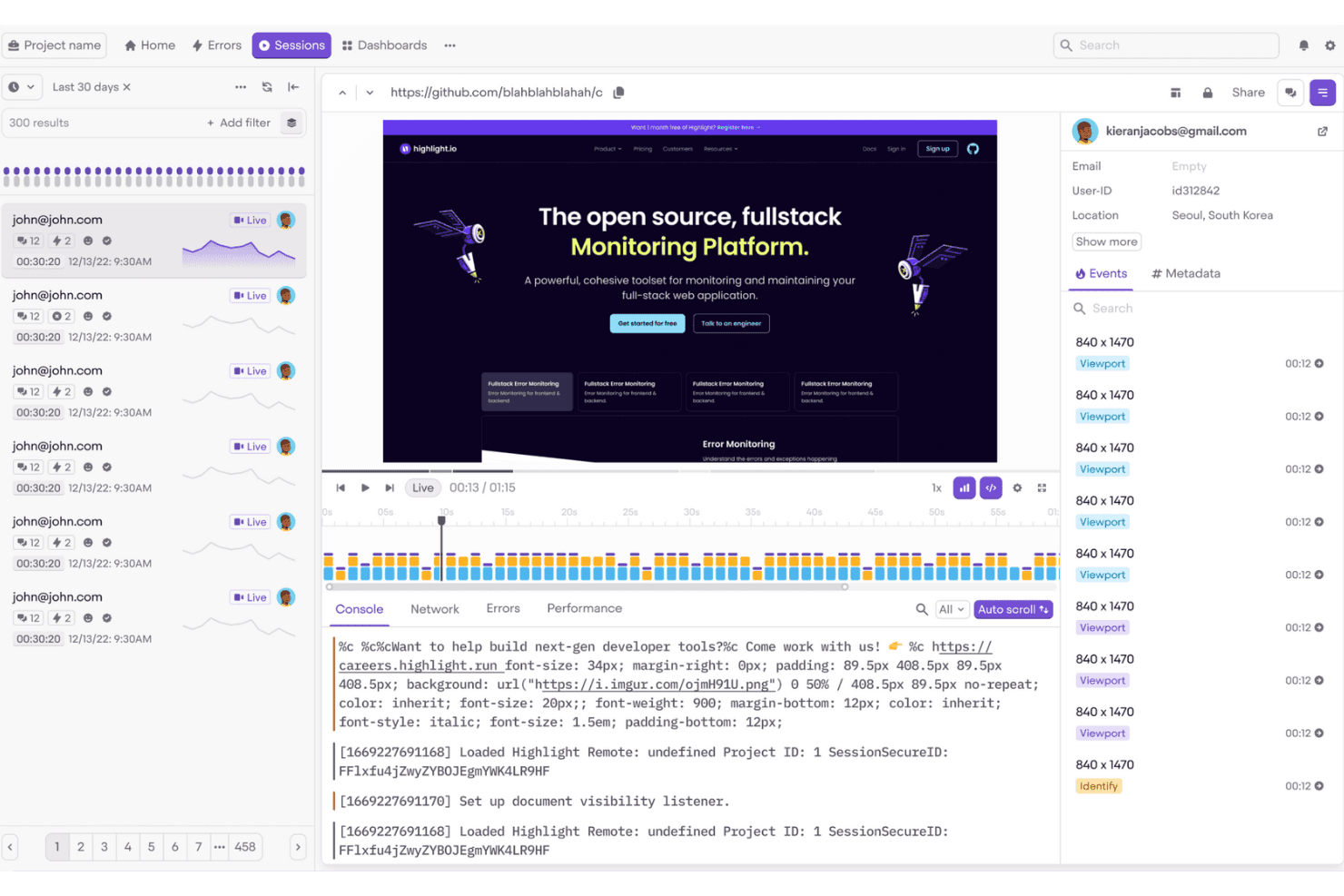
Highlight.io helps frontend teams monitor and debug user sessions easily. Highlight is session replay and observability software, now delivered through LaunchDarkly, with web and mobile playback, flexible session search, console and network logs, error and rage-click detection, and feature-flag context.
Who Is Highlight Best For?
Highlight suits developer-adjacent product teams that need to debug user sessions alongside feature flags, errors, and release context.
Why I Picked Highlight
I picked Highlight because it’s best for debugging sessions tied to feature flags. I can compare replayed sessions by the flags users saw, then inspect console and network logs alongside errors or rage clicks. That makes it easier to verify whether a flagged design change caused friction before expanding its rollout.
Highlight Key Features
- Flexible session search: Filter sessions by identity, device, location, URLs, clicks, and custom event properties.
- Privacy masking: Hide text, images, form inputs, and sensitive data before collection.
- Mobile replay support: Record sessions from Android, iOS, Flutter, and React Native apps.
- Heatmaps: Visualize clicks, taps, and scroll activity with color-coded maps.
Highlight Integrations
Highlight offers a native Jira Cloud integration and connects Vega with GitHub and Slack. It also supports OpenTelemetry and an MCP Server for custom observability workflows.
What’s Free?
Highlight offers a free plan, so you can use it without a time-limited trial. Paid pricing is available upon request, but specific free-plan limits aren’t listed here.
Pros and Cons
Pros:
- Connects replays with errors and logs
- Searches sessions by detailed user context
- Debugs sessions alongside feature flags
Cons:
- Free recording stops at monthly cap
- Requires developer-led SDK setup
Learn more about Highlight: Best for open-source self-hosted replay
- Free plan + 7-day free trial available
- From $199/month
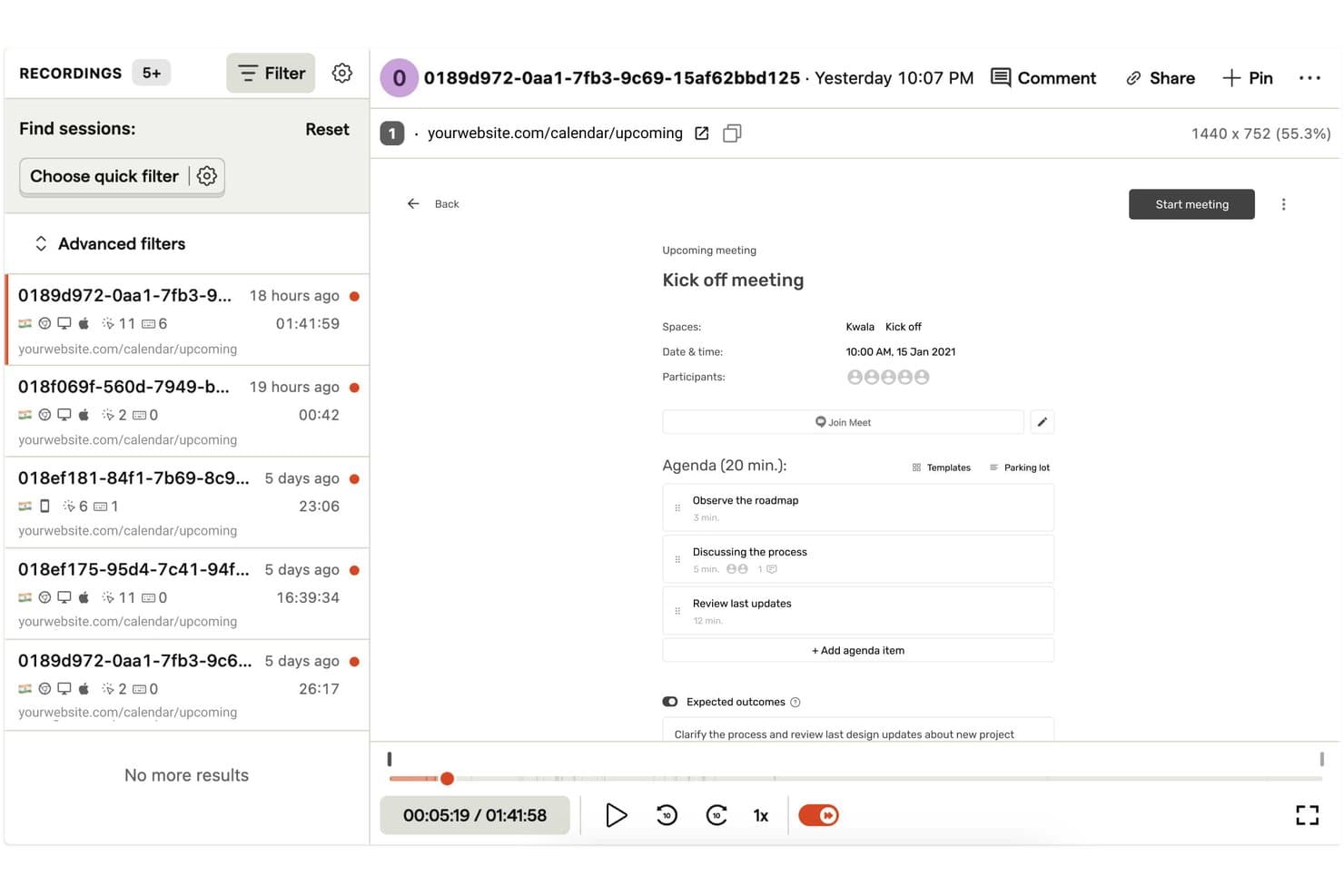
OpenReplay lets users replay and filter recorded user sessions with ease. OpenReplay is a session replay platform with pixel-perfect web and mobile recordings, synchronized console and network logs, heatmaps, error tracking, product analytics, and replay search.
Who Is OpenReplay Best For?
Product and UX teams with DevOps support who need customizable, self-hosted replay and full control over user data.
Why I Picked OpenReplay
I picked OpenReplay because its free, open-source self-hosted edition gives my team control over replay data and customization. We can inspect rage clicks, errors, and dead clicks through OmniSearch, then review synchronized console and network logs. That helps us diagnose a checkout failure without sending customer data to a third-party processor.
OpenReplay Key Features
- Multi-tab sessions: Joins activity across browser tabs into one user journey.
- Heatmaps: Visualizes clicks, mouse movement, and rage-click hotspots.
- Mobile app replay: Supports iOS, Android, React Native, and Flutter SDKs.
- Session highlights: Clips replay moments with notes, tags, and shareable links.
OpenReplay Integrations
OpenReplay offers integrations with Sentry, Datadog, Jira, GitHub, Slack, Google Tag Manager, Redux, Vuex, Pinia, and Apollo. Its REST API supports custom connections for sessions, users, events, and live data.
What's Free?
OpenReplay’s open-source edition is free forever when you host it on your own infrastructure. It’s intended for low-traffic applications, and you’ll manage hosting, storage, scaling, and support through the community.
Pros and Cons
Pros:
- Adjustable 180-day retention supports longer investigations
- Deep diagnostics connect replays with technical context
- Free self-hosting preserves complete data control
Cons:
- Free edition targets low-traffic applications
- Self-hosting demands ongoing DevOps maintenance
Learn more about OpenReplay:
Diğer Ücretsiz Oturum Tekrarı Yazılımları
Ücretsiz paketler veya deneme sürümleri sunan bazı ek oturum tekrarı yazılımı seçenekleri şunlardır. Bu araçlar kısa listeme girememiş olsa da göz atmaya değer:
- 11FullSessionBest for free mobile and web session replay
- 12Microsoft ClarityBest for unlimited session replays at no cost
- 13Hotjar (by Contentsquare)Best for heatmaps, surveys, and session replays in one
- 14UXCamBest for mobile app session replay on free
- 15SmartlookBest for retroactive session replays
- 16Lucky OrangeBest for live chat triggered by rage clicks
- 17MouseflowBest for form drop-off and field-level replay
- 18LogRocketBest for dev-level debugging in session replay
- 19StatsigBest for replays filtered by experiment exposure
- 20ContentsquareBest for enterprises needing GDPR-compliant trials
How I Evaluate Free Session Replay Software
First, I define what counts as free. For session replay, it’s a lasting plan, not a trial, with enough monthly recordings for ongoing review. From there, I split my evaluation into three parts: core functionality, which carries most weight, like replaying and filtering sessions; standout features, like heatmaps; and beyond-feature fit, like upgrade paths.
Core Functionality (Table Stakes For This List)
In addition to my free plan requirements, I use a scoring system to select tools for my list. I score each one on a scale from 0 (does not offer the functionality) to 5 (excels in this area) for each core functionality listed below, based on what's available on the free plan. I then convert the total into a percentage to help assess each tool's overall fit, with extra weight on any functionalities I've deemed essential.
- Session Recording (Essential): I look for reliable playback with standard controls that lets me follow a user’s path through a signup flow or checkout.
- Session Filtering & Search: I check whether you can combine filters such as page, device, and date to find sessions tied to a specific drop-off.
- Click & Scroll Tracking: I assess how clearly recordings show clicks, scrolling, and pointer movement when a user hesitates or misses a key control.
- Error And Rage Click Detection: I look for automatic flags for rage clicks, dead clicks, or JavaScript errors that help pinpoint friction without reviewing every session.
- Data Retention Window: I check how long free-plan recordings remain available so your team can revisit sessions during a review cycle.
Once I have a list of tools that meet the criteria, I consider what sets each platform apart.
Differentiating Factors (What Sets Vendors Apart)
Here's how I compare and contrast different vendors:
Standout Features
I look for click and scroll heatmaps bundled into the free plan, since they let me see aggregate behavior patterns before I dive into individual replays. Console and network logs inside the replay timeline are equally valuable—when I spot a user stalling on a checkout step, I can check for a JS error right there instead of filing a ticket with engineering. I also evaluate how easy it is to share a specific replay clip with a designer or developer through a simple link.
Beyond Features
I check whether free plans include default PII masking, since product teams reviewing sessions with form inputs or personal data need that protection without upgrading. Implementation effort matters too—a single-snippet install like you'll find with Hotjar or Microsoft Clarity gets you recording in minutes, while SDK-heavy setups can stall adoption on lean teams. I also evaluate seat limits, because a free tier that locks you to one login makes it hard to share replays with designers and engineers async.
Ücretsiz Oturum Tekrarı Yazılımı Nasıl Seçilir?
Karmaşık özellik listeleri ve fiyatlandırma yapıları, ücretsiz bir oturum tekrarı yazılımıyla aslında ne elde ettiğinizi anlamanızı zorlaştırabilir. Yazılım seçme sürecinizi yürütürken odağınızı korumanıza yardımcı olmak için göz önünde bulundurmanız gereken bazı faktörler şunlardır:
| Faktör | Dikkat Edilmesi Gerekenler |
| Ücretsiz Teklifin Kapsamı | Oturum sınırları, özellikler ve kullanıcı erişimi gibi ücretsiz pakete nelerin dahil olduğunu kontrol edin. Hemen yükseltme yapmadan temel ihtiyaçlarınızı karşıladığından emin olun. |
| Ölçeklenebilirlik | Aracın ekibinizle birlikte büyüyüp büyüyemeyeceğini değerlendirin. Zaman içinde artan trafiğe ve kullanıcı taleplerine uyum sağlayan esnek planları arayın. |
| Entegrasyonlar | Mevcut araçlarınızla uyumluluğu sağlayın. Google Analytics, CRM sistemleri ve pazarlama araçları gibi platformlarla entegrasyonları arayın. |
| Kullanım Kolaylığı | Kullanıcı arayüzünü ve gezinmeyi değerlendirin. Kurulumu ve kullanımı kolay bir araç, ekibinizin zaman kazanmasını ve öğrenme eğrisinin kısalmasını sağlar. |
| Gizlilik Uyumluluğu | Aracın GDPR gibi veri koruma düzenlemelerine uyduğunu doğrulayın. Bu, kullanıcı verilerini korumak ve güveni sürdürmek için kritik öneme sahiptir. |
| Özelliklerin Kapsamı | Isı haritaları, oturum tekrarları ve kullanıcı segmentasyonu gibi sunulan özelliklerin kapsamını değerlendirin. Daha fazla özellik, kullanıcı davranışı hakkında daha iyi içgörüler sağlar. |
| Müşteri Desteği | Canlı sohbet veya e-posta gibi hızlı yanıt veren destek seçeneklerini arayın. Güvenilir destek, sorunların hızla çözülmesine yardımcı olur ve ekibinizin üretkenliğini korur. |
Ücretsiz Oturum Tekrarı Yazılımı Nedir?
Oturum tekrarı yazılımı, web sitelerinde veya uygulamalarda kullanıcı etkileşimlerini kaydederek kullanıcı davranışları hakkında içgörüler sağlayan bir araçtır. Bu araçlar genellikle sınırlı özelliklere veya kullanım kotalarına sahip ücretsiz planlar ya da deneme sürümleri sunar. Ürün yöneticileri, kullanıcı deneyimi tasarımcıları ve pazarlamacılar, kullanıcı deneyimini iyileştirmek ve dönüşüm oranlarını optimize etmek için bu araçları kullanır. Isı haritaları, oturum kayıtları ve kullanıcı yolu analizi, ekiplerin kullanıcı davranışlarını anlamasına ve iyileştirilmesi gereken alanları belirlemesine yardımcı olur.
Ücretsiz Oturum Tekrarı Yazılımının Özellikleri
Oturum tekrarı yazılımlarında yaygın olarak bulunan özellikleri ve bunların genellikle ücretsiz ve ücretli planlara hangilerinde dahil edildiğini inceleyelim.
Genellikle Ücretsiz Oturum Tekrarı Yazılımı Özellikleri
- Oturum kayıtları: Davranışları anlamak ve sorunları belirlemek için sitenizdeki kullanıcı etkileşimlerini kaydedin.
- Isı haritaları: Sayfa düzenini ve içeriği optimize etmek için kullanıcıların nerelere tıkladığını ve kaydırdığını görselleştirin.
- Kullanıcı yolu analizi: Kullanıcıların sitenizde izlediği yolculuğu takip ederek ayrılma noktalarını bulun.
- Temel analizler: Basit ölçümler ve verilerle kullanıcı davranışları hakkında içgörüler sağlayın.
- Geri bildirim araçları: Genel deneyimi iyileştirmek için kullanıcı görüşlerini doğrudan toplayın.
Genellikle Ücretli Oturum Tekrarı Yazılımı Özellikleri
- Gelişmiş segmentasyon: Daha derin içgörüler elde etmek için oturum verilerini kullanıcı demografik özelliklerine veya davranışlarına göre filtreleyin.
- A/B testi: Kullanıcılar açısından hangisinin daha iyi performans gösterdiğini görmek için sitenizin farklı sürümlerini test edin.
- Gerçek zamanlı izleme: Sorunları hızla ele almak için kullanıcı etkileşimlerini gerçekleştiği anda gözlemleyin.
- Özelleştirilebilir panolar: Veri görünümlerini hedeflerinizle en alakalı ölçümlere odaklanacak şekilde uyarlayın.
- Gizlilik uyumluluğu araçları: Veri toplamanın GDPR ve CCPA gibi düzenlemelerle uyumlu olmasını sağlayın.
Ücretsiz Oturum Tekrarı Yazılımının Faydaları
Ücretsiz oturum tekrarı yazılımını uygulamak, ekibiniz ve işletmeniz için çeşitli faydalar sağlar. Yararlanabileceğiniz birkaç fayda şunlardır:
- Uygun maliyetli analiz: Para harcamadan kullanıcı davranışları hakkında içgörüler elde ederek bu araçları yeni girişimler ve küçük işletmeler için ideal hale getirin.
- Kullanıcı davranışı içgörüleri: Oturum kayıtları ve ısı haritaları aracılığıyla kullanıcıların sitenizle nasıl etkileşim kurduğunu anlayarak sorunlu alanları belirlemenize yardımcı olun.
- İyileştirilmiş kullanıcı deneyimi: Kullanıcı görüşlerini toplamak ve genel deneyimi geliştirmek için gerekli düzenlemeleri yapmak üzere geri bildirim araçlarını kullanın.
- Veriye dayalı kararlar: Kararları yönlendirmek ve web sitesi performansını gerçek kullanıcı verilerine göre optimize etmek için temel analizlerden yararlanın.
- Hızlı kurulum: Birçok ücretsiz araç, kolay kurulum ve ayarlama olanağı sunarak ekibinizin kullanıcı davranışlarını hızlıca analiz etmeye başlamasını sağlar.
- Uzun vadeli taahhüt yok: Bir sözleşmeye bağlı kalmadan özellikleri ve faydaları deneyin; böylece farklı seçenekleri keşfetme esnekliğine sahip olun.
- Gizlilik uyumluluğu: Bazı ücretsiz araçlar, kullanıcı verilerinin sorumlu bir şekilde işlenmesini sağlamaya yardımcı olacak temel gizlilik özelliklerini içerir.
Ücretsiz Oturum Tekrarı Yazılımının Maliyetleri ve Fiyatlandırması
Bu makaleye ücretsiz olarak sunulan en iyi oturum tekrarı yazılımı seçeneklerini arayarak geldiğinizi biliyorum. Ancak ücretsiz planlar yalnızca sınırlı özellikler sunduğundan, gelecekte planınızı yükseltmeniz gerekebilir.
Aşağıdaki tablo, oturum tekrarı yazılımı çözümlerinde yaygın planları, bu planların ortalama fiyatlarını ve genellikle dahil edilen özellikleri özetlemektedir:
Oturum Tekrarı Yazılımı İçin Plan Karşılaştırma Tablosu
| Plan Türü | Ortalama Fiyat | Yaygın Özellikler |
| Ücretsiz Plan | $0 | Oturum kayıtları, temel analizler, ısı haritaları, kullanıcı geri bildirim araçları ve sınırlı veri depolama. |
| Kişisel Plan | $5-$25/kullanıcı/ ay | Gelişmiş analizler, kullanıcı segmentasyonu, daha fazla veri depolama ve öncelikli müşteri desteği. |
| İşletme Planı | $50-$100/kullanıcı /ay | Özelleştirilebilir panolar, gerçek zamanlı izleme, A/B testi ve geliştirilmiş gizlilik uyumluluğu araçları. |
| Kurumsal Plan | $150+/kullanıcı/ ay | Tüm özelliklere erişim, özel hesap yönetimi, özel entegrasyonlar ve kapsamlı destek. |
Ücretsiz Oturum Yeniden Oynatma Yazılımı SSS
Ücretsiz oturum yeniden oynatma yazılımı hakkında sık sorulan bazı soruların yanıtları:
Mobil uygulamalar için kullanıcı araştırmasında oturum yeniden oynatmaları neden kullanılmalı?
Oturum yeniden oynatmaları, uygulamanızdaki kullanıcı etkileşimleri hakkında paha biçilmez içgörüler sağlar. Ekibinizin sorunları hızla belirlemesine ve daha hızlı hata ayıklamasına yardımcı olarak her ziyaretle birlikte kullanıcı deneyimini geliştirir. Bu veriler, kullanıcı beklentilerini karşılamak üzere mobil uygulama tasarımını ve işlevselliğini iyileştirmek için çok önemlidir.
Oturum yeniden oynatmanın temel amacı nedir?
Oturum yeniden oynatmanın temel amacı, kullanıcı davranışını anlamak ve kullanıcı yolculuğunun nerede kesintiye uğradığını belirlemektir. Bu veriler, müşteri beklentilerini karşılayan kullanıcı akışları oluşturmanıza ve genel site performansını iyileştirmenize yardımcı olur.
Datadog oturum yeniden oynatma nasıl çalışır?
Datadog’un oturum yeniden oynatma özelliği, kullanıcı girdileri gibi DOM’daki her değişikliği etkinlik olarak kaydeder. Ardından bu etkinlikleri her kullanıcının oturumunun görsel bir temsilinde birleştirerek kullanıcıların sitenizde tam olarak ne deneyimlediğini görmenizi sağlar.
Datadog oturum yeniden oynatma için örnekleme oranı nedir?
Datadog’un oturum yeniden oynatma yapılandırmasındaki örnekleme oranı 0,0 ile 100,0 arasında değişir. Kaydedilen oturumların yüzdesini belirler; 0, hiçbir yeniden oynatmanın kaydedilmediği, 100 ise tüm oturumların dahil edildiği anlamına gelir. Veri hacminizi kontrol etmek için bu oranı ayarlayın.
Oturum yeniden oynatmaları müşteri yolculuklarını iyileştirmeye nasıl yardımcı olur?
Oturum yeniden oynatmaları, kullanıcıların zorluklarla karşılaştığı alanları öne çıkararak sorunları belirlemenize ve çözmenize yardımcı olur. Ekibiniz, bu sorunlu noktaları anlayarak müşteri yolculuğunu kolaylaştırmak ve memnuniyeti artırmak için veriye dayalı kararlar alabilir.
Oturum yeniden oynatma verileri hata ayıklama için kullanılabilir mi?
Evet, oturum yeniden oynatma verileri hata ayıklama için son derece kullanışlıdır. Geliştiriciler, yeniden oynatmaları izleyerek kullanıcı yolculuğunda hataların tam olarak nerede oluştuğunu görebilir ve böylece sorunları daha hızlı belirleyip çözebilir.