

Bir projeyi yönetmek, özellikle birden fazla işi aynı anda yürütüyor ve ekibinizi aynı hedef doğrultusunda tutmaya çalışıyorsanız, hiçbir zaman kolay değildir. İlham panosu oluşturucuları fikirlerinizi hayata geçirmenize ve ekip üyeleriniz arasındaki iş birliğini güçlendirmenize yardımcı olabilir.
Deneyimlerime göre doğru araç büyük fark yaratabilir. Kavramları görselleştirmenize, ilham kaynaklarını paylaşmanıza ve her zamanki sorunlarla uğraşmadan herkesin aynı noktada buluşmasını sağlamanıza yardımcı olur. Zorlu çalışmayı sizin için yaptım; piyasadaki en iyi çözümleri bulmak için çeşitli seçenekleri test edip inceledim.
Bu makalede, ilham panosu oluşturucuları arasındaki en iyi seçimlerimi paylaşacak ve her birini benzersiz kılan özellikleri vurgulayacağım. Ekibinizin ihtiyaçları için doğru aracı seçmenize yardımcı olacak bilgileri bulacaksınız.
Why Trust Our Software Recommendations
6,700+
Reviews
20
Industry experts
16+
Evaluation factors
14
Years
Our team has been testing and reviewing software since 2012. As product managers ourselves, we know how difficult—and important—it is to choose the right software.
For this guide, we evaluated tools using hands-on testing and independent research, scoring tools using our selection criteria.
Our reviews reflect our human editorial judgment, not a sales pitch.
Expert reviewers:
- Andrew LumbySenior TPM
- Cristiano ValimSenior UI/UX Lead


İlham Panosu Oluşturucu Karşılaştırma Tablosu
Bu karşılaştırma tablosu, en iyi ilham panosu oluşturucu seçimlerimin fiyatlandırma ayrıntılarını özetlemektedir:
Score legend (out of 5)
- Excellent4.5–5
- Good4–4.4
- Average3–3.9
- Below average2–2.9
- Poor1–1.9
Sorted by: Default
| Tool | Starting Price | Website | |||||||
|---|---|---|---|---|---|---|---|---|---|
Best for pitch-ready boards with brand controls | 3.2 out of 5 | 2 | 4 | 3 | 2 | 4 | 4 | $12.25/user/month Free plan + demo available | Website |
Best for Adobe ecosystem brand design | 3.5 out of 5 | 2 | 4 | 4 | 3 | 3 | 5 | $7.99/user/month Free plan available | Website |
Best for cross-functional creative kickoffs | 3.3 out of 5 | 5 | 5 | 3 | 1 | 2 | 4 | $9.99/user/month Free plan available | Website |
Best for canvas-based inspiration gathering | 3.2 out of 5 | 5 | 3 | 5 | 1 | 3 | 2 | $11.99/month 7-day free trial available | Website |
Best for AI-generated visuals in Creative Cloud | 3.0 out of 5 | 5 | 4 | 4 | 1 | 2 | 2 | $9.99/month Free plan available | Website |
Best for cross-functional team visual planning | 3.8 out of 5 | 5 | 5 | 4 | 2 | 4 | 3 | $8/user/month Free plan + 14-day trial available | Book Demo |
Best for design collaboration | 3.5 out of 5 | 4 | 5 | 3 | 2 | 3 | 4 | $3/user/month Free plan available | Website |
Best for drag-and-drop visual brainstorming | 4.3 out of 5 | 5 | 4 | 5 | 4 | 3 | 5 | $144/user/year Free trial + free plan available | Website |
Best for creative professionals and teams | 3.8 out of 5 | 4 | 5 | 5 | 2 | 3 | 4 | $9.99/user/month Free plan + free trial + free demo available | Website |
Best for pitch-ready boards built with AI | 3.7 out of 5 | 4 | 3 | 3 | 3 | 4 | 5 | $7.99/month Not available | Website |


En İyi İlham Panosu Oluşturucu İncelemeleri
Aşağıda, kısa listeme giren en iyi ilham panosu oluşturma araçlarının ayrıntılı özetlerini bulabilirsiniz. İncelemelerim, sizin için en iyi aracı bulmanıza yardımcı olmak amacıyla her aracın temel özelliklerine, artılarına ve eksilerine, entegrasyonlarına ve ideal kullanım alanlarına ayrıntılı bir bakış sunmaktadır.
 Best for pitch-ready boards with brand controls
- Free plan + demo available
- From $12.25/user/month (billed annually)
Visit WebsiteCustomer Rating:4.5/5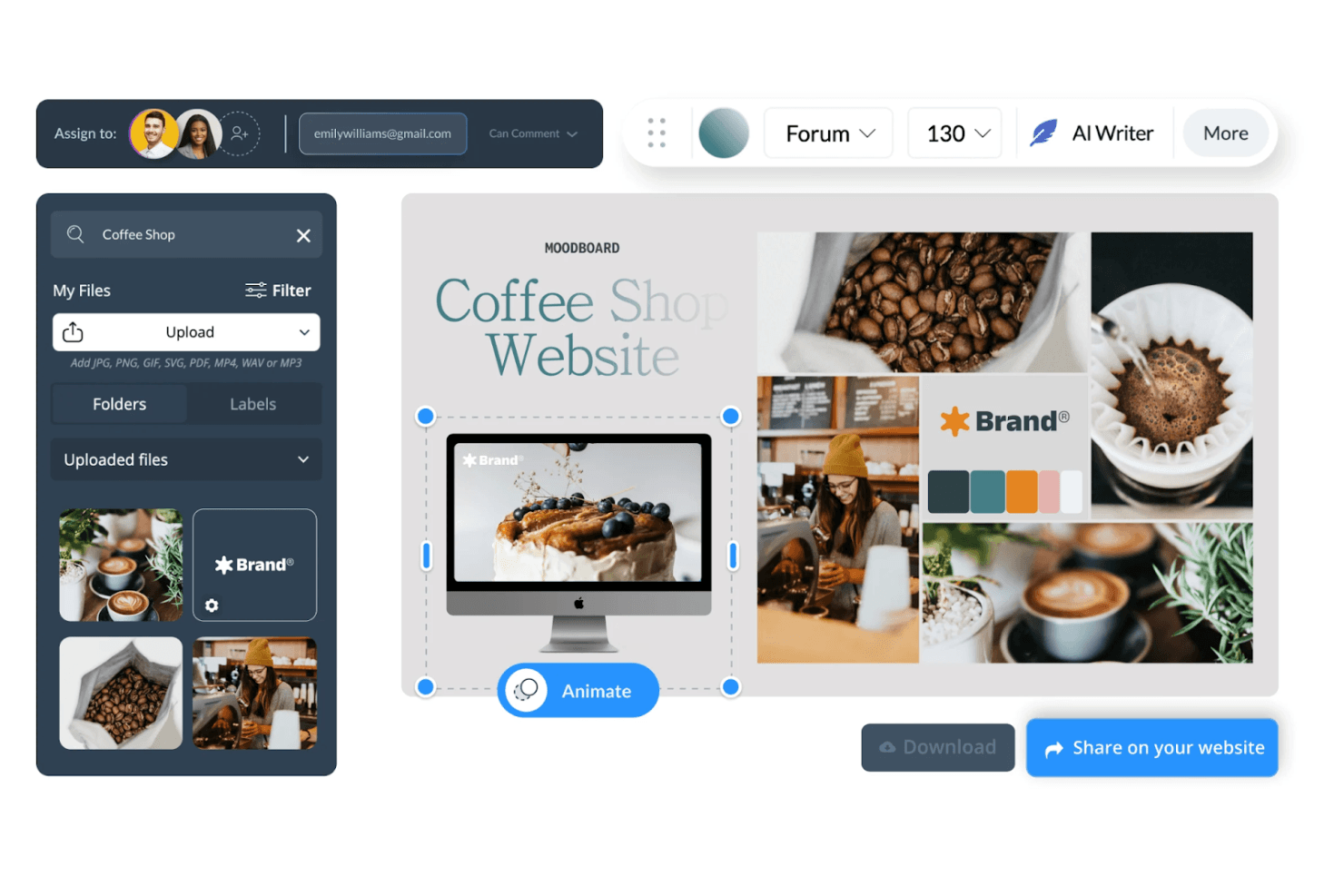
Visme lets users build coffee shop moodboards with photos and brand assets. Visme is an all-in-one visual content platform that lets you build mood boards, presentations, and branded visuals using a template library, drag-and-drop editor, stock asset library, and built-in brand kit tools.
Who Is Visme Best For?
Visme suits marketing and brand teams that need to build polished, presentation-ready mood boards with consistent brand controls baked in.
Why I Picked Visme
I picked Visme as one of the best because it's purpose-built for turning mood boards into pitch-ready presentations. The Brand Kit pulls your logo, fonts, and color palette into one place, so every board your team builds stays visually consistent without manual setup. I also love that you can export directly to PPTX or HTML5, or share a live link with view analytics, which means a mood board moves straight into a client presentation without rebuilding it elsewhere.
Visme Key Features
- Brand Wizard: Enter a website URL and Visme automatically pulls your logo, fonts, and color palette into a ready-to-use Brand Kit.
- 17 mood board templates: Pre-built layouts cover interior design, fashion, makeup, and brand marketing, each sized at 1366×768 px with customizable dimensions.
- In-editor pinned comments: Leave threaded, annotated feedback directly on board elements using pins, shapes, or freehand drawing, with @-tags and resolve controls.
- Multi-format asset library: Pull in visuals from Unsplash, GIPHY, Brandfetch, Google Drive, Dropbox, and a built-in stock library of 3M+ photos, videos, and graphics.
Visme Integrations
Visme offers integrations with Unsplash, GIPHY, Brandfetch, Google Drive, Dropbox, OneDrive, Widen, Slack, and monday.com, plus Zapier. These connections support visual asset sourcing, storage, sharing, and team workflows.
Pros and Cons
Pros:
- Pinned comments support detailed stakeholder feedback
- Brand controls keep visual direction consistent
- Pitch-ready boards become polished presentations
Cons:
- Image-based palette extraction remains limited
- Fixed slides limit freeform visual arrangement
Learn more about Visme: Best for Adobe ecosystem brand design
- Free plan available
- From $7.99/user/month (billed annually)
Visit WebsiteCustomer Rating:4.5/5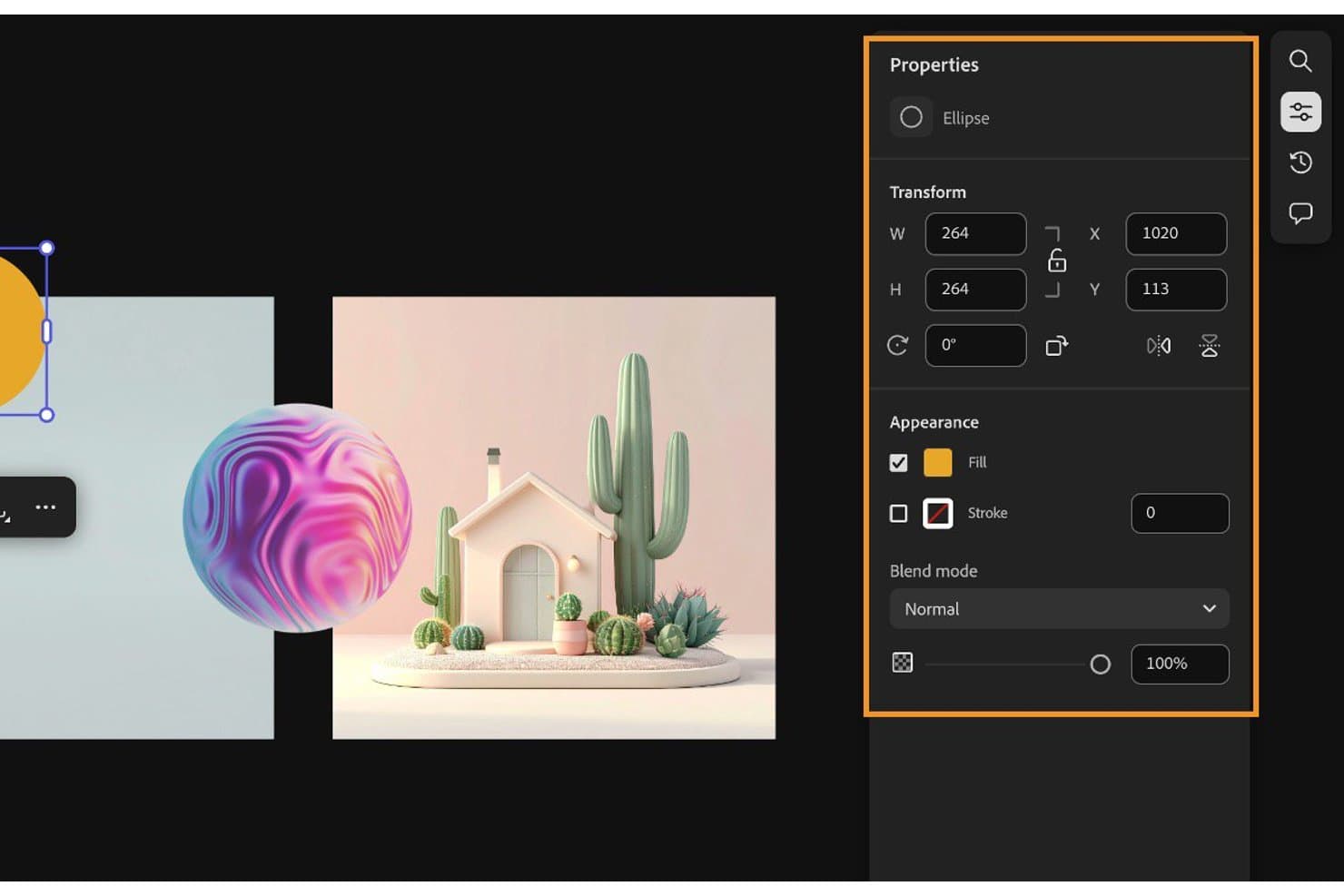
Adobe Express lets users customize ellipse shapes with fill, stroke, and blend options. Adobe Express is a design platform from Adobe that lets you build mood boards, presentations, and branded visuals using a drag-and-drop editor, 200M+ stock assets, AI-powered image generation, and real-time collaboration tools.
Who Is Adobe Express Best For?
Adobe Express is a strong fit for marketing and brand teams that already live in the Adobe ecosystem and need polished, on-brand visuals fast.
Why I Picked Adobe Express
I picked Adobe Express as one of the best because it's the strongest option for teams already working inside the Adobe ecosystem who need mood boards that look polished and stay on-brand. Brand Kit lets you store logos, colors, and fonts in one place, and Brand Check flags anything off-brand before a design goes out. The review-and-approval workflow, with "Needs work" and "Approve" statuses, makes stakeholder sign-off clean and traceable.
Adobe Express Key Features
- AI image generation: Firefly-powered text-to-image, Generative Fill, and object removal let you create or modify visuals directly inside your design canvas.
- Presentation mode: Switch between design and presentation views, set element click-order, preview animations, and export to PDF or PowerPoint for client-ready deliverables.
- Color extraction: Pull a palette automatically from any image, adjust hue and saturation, and save the result directly to your Brand Kit.
- Creative Cloud Libraries: Link assets across Adobe apps so any update to a shared element syncs automatically across every design that uses it.
Adobe Express Integrations
Adobe Express has native integrations across Adobe products, including Photoshop, Firefly, Creative Cloud Libraries, Lightroom, Adobe Stock, and Adobe Fonts. It also connects with Google Drive, Dropbox, OneDrive, SharePoint, and Figma through add-ons.
Pros and Cons
Pros:
- Review approvals clarify stakeholder feedback
- Brand controls protect visual consistency
- Polished presentation exports support creative pitches
Cons:
- Moodboarding splits across separate products
- Fixed canvases restrict freeform layouts
Learn more about Adobe Express: Best for cross-functional creative kickoffs
- Free plan available
- From $9.99/user/month (billed annually)
Mural lets users build visual mood boards with images and sticky notes. Mural is a visual collaboration whiteboard that combines an infinite freeform canvas, real-time co-editing, facilitation tools, and a mood board template to support creative and cross-functional teamwork.
Who Is Mural Best For?
Mural is a strong fit for product managers and UX teams who need a shared visual space to run creative kickoffs, align stakeholders, and gather structured feedback in real time.
Why I Picked Mural
I've included Mural in my top picks because it's the best option when a mood board needs to become a working session, not just a static deliverable. Its infinite canvas paired with a dedicated mood board template gives cross-functional teams a shared visual space to arrange images, sticky notes, and embedded content in real time. I especially like the anonymous voting sessions, which let everyone weigh in on visual directions without groupthink skewing results before the conversation starts.
Mural Key Features
- Mood board template: A pre-built template for arranging images, text, and sticky notes into a visual direction for brand, campaign, or product work.
- Presentation mode: Plays your canvas as a slide-by-slide presentation with laser pointer, timer, and full-screen controls built in.
- Live content embedding: Embed external documents, videos, dashboards, and designs directly on the canvas so collaborators can interact with them in place.
- Figma and Adobe CC integration: Import Figma frames or Adobe Creative Cloud assets directly onto the canvas to keep design assets in sync with your board.
Mural Integrations
Mural has native integrations with Figma, Adobe Creative Cloud Libraries, Unsplash, GIPHY, The Noun Project, Google Drive, Dropbox, OneDrive, Jira, and Azure DevOps. It also offers a public API and Zapier.
Pros and Cons
Pros:
- Presentation mode supports polished visual pitches
- Anonymous voting reduces stakeholder groupthink
- Real-time collaboration supports creative kickoff sessions
Cons:
- Limited image sourcing weakens inspiration gathering
- No automatic palette or font extraction
Learn more about Mural: Best for canvas-based inspiration gathering
- 7-day free trial available
- From $11.99/month (billed annually)
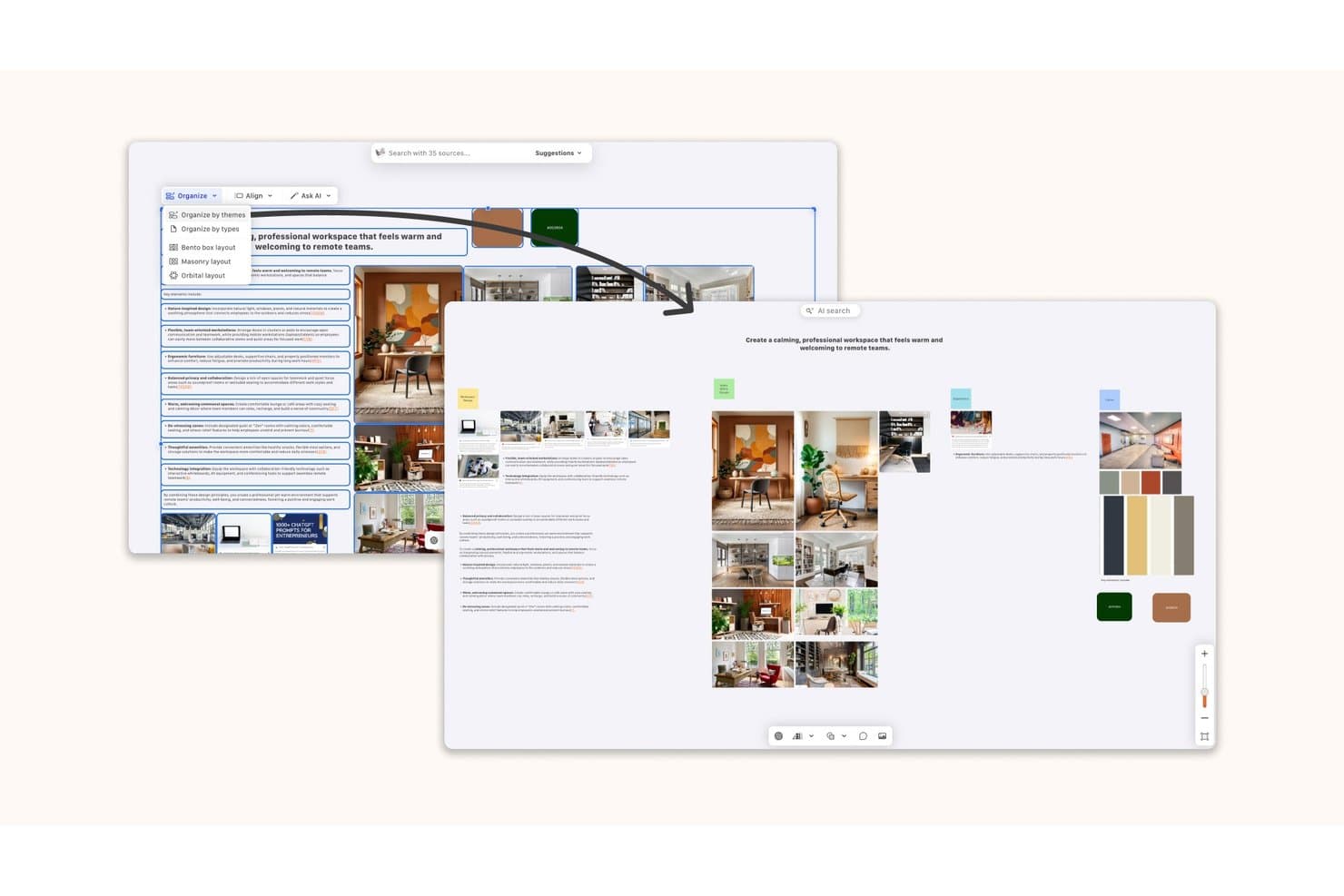
Kosmik lets users organize mood board content with AI-powered layout options. Kosmik is an infinite-canvas mood board app that combines a built-in web browser with capture mode, a Chrome web clipper, AI-powered asset discovery, and drag-and-drop file importing to gather images, videos, PDFs, and web content into a single workspace.
Who Is Kosmik Best For?
Kosmik suits graphic designers and creative researchers who need to pull assets from many sources—web pages, PDFs, videos—into a single infinite canvas workspace.
Why I Picked Kosmik
I picked Kosmik as one of the best because its built-in browser with capture mode is genuinely unlike anything else in this category. I can browse, click an image, and drop it straight onto the canvas without switching apps or losing context. The AI Asset Finder takes that further by searching the web and YouTube for related visuals based on what's already on my board, surfacing assets I wouldn't have found manually.
Kosmik Key Features
- Built-in PDF reader: Import PDFs and drag highlights or images directly from documents onto your canvas.
- Frames: Group and label collections of assets with customizable frames that stay readable at any zoom level.
- AI "Organize by Themes": Select a group of assets and let Kosmik automatically cluster them by visual or conceptual similarity.
- Publish link with duplicate toggle: Share a read-only link to any board and let recipients copy it into their own workspace as a starting template.
Kosmik Integrations
Kosmik’s documented connectivity includes Google Gemini for AI features, Google Drive, and a Chrome/Chromium web clipper for asset capture. No Slack, Jira, Notion, Figma, or API integrations are documented.
Pros and Cons
Pros:
- Frames turn scattered assets into visual sections
- AI clusters inspiration by themes and moods
- Captures web visuals without leaving the canvas
Cons:
- Exports raw assets, not finished boards
- Sunset status makes continued access uncertain
Learn more about Kosmik: Best for AI-generated visuals in Creative Cloud
- Free plan available
- From $9.99/month
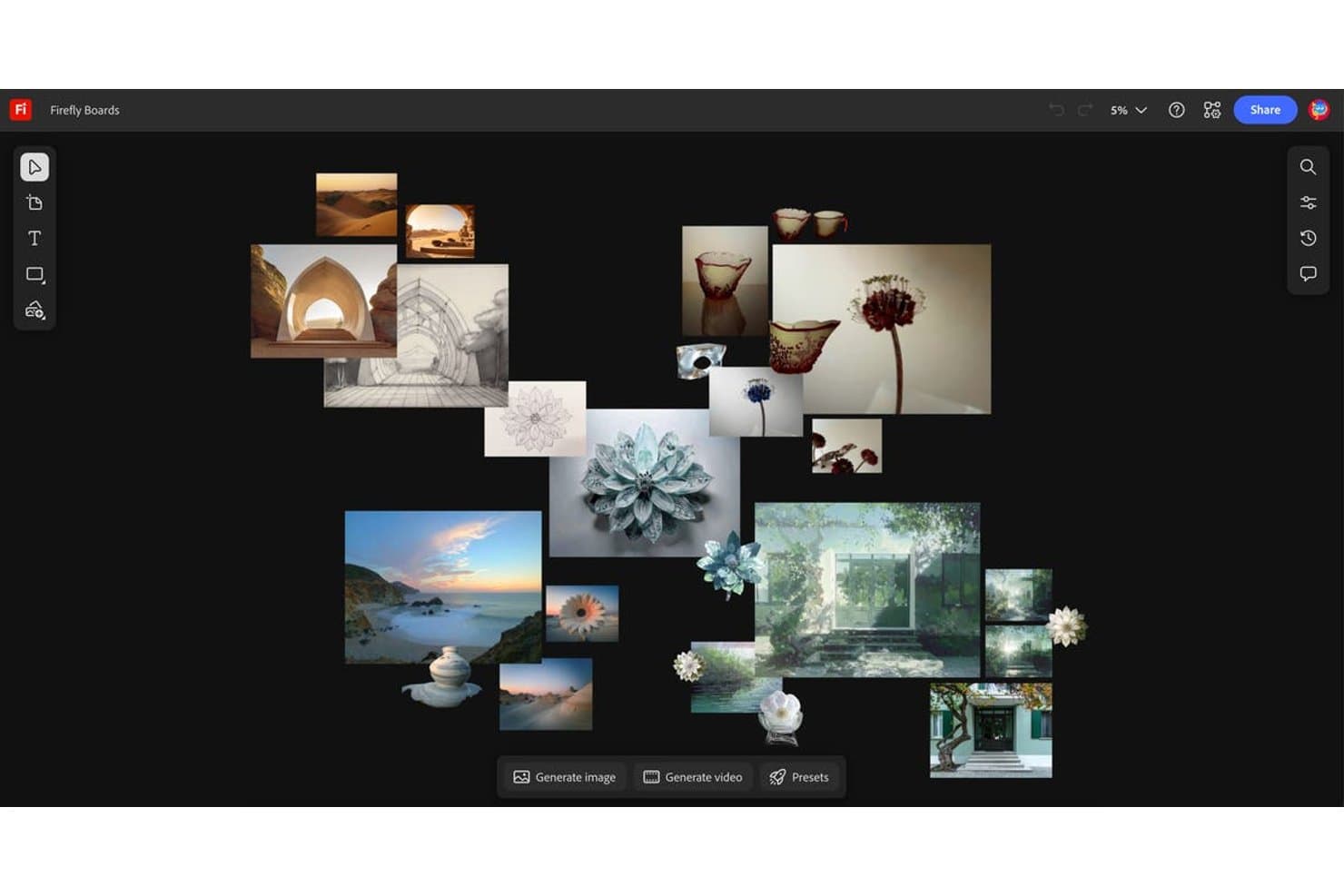
Adobe Firefly Boards lets users arrange AI-generated images into visual mood boards. Adobe Firefly Boards is an AI-first mood board tool with an infinite canvas that lets you collect, generate, and arrange visuals using built-in Adobe Firefly models, Adobe Stock search, and linked Creative Cloud files from Photoshop, Illustrator, and Lightroom.
Who Is Adobe Firefly Boards Best For?
Adobe Firefly Boards is the right fit for graphic, fashion, and interior designers who already live in Creative Cloud and want AI generation built directly into their mood-boarding workflow.
Why I Picked Adobe Firefly Boards
Adobe Firefly Boards earns its spot on my shortlist because it's the only mood board tool where AI generation and Creative Cloud assets coexist on the same infinite canvas. I love that you can generate an image from a text prompt, pull a linked PSD from Photoshop, and search Adobe Stock all without leaving the board. The Style Reference and Composition Reference tools let you lock in a visual direction and apply consistent lighting, texture, or color across every generated asset.
Adobe Firefly Boards Key Features
- Real-time co-editing: Multiple collaborators can work on the same board simultaneously, with live visibility into who's active.
- Linked Creative Cloud documents: PSD and AI files placed on the canvas stay connected to their source files, so board assets update automatically when edited in Photoshop or Illustrator.
- Adobe Stock search: A built-in Stock browser lets you search and pull licensed images directly onto the canvas without leaving the board.
- Artboards: Group and frame sections of the infinite canvas to organize concepts, compare directions, or structure client-ready presentations.
Adobe Firefly Boards Integrations
Adobe Firefly Boards offers native integrations with Photoshop, Illustrator, Lightroom, Adobe Express, Adobe Stock, and Creative Cloud storage. No native Jira, Slack, Notion, or Figma Boards integrations are documented.
Pros and Cons
Pros:
- Real-time comments support review cycles
- Infinite canvas supports precise layouts
- AI-generated visuals directly on canvas
Cons:
- Exported presentations can scramble layouts
- Client sharing requires Adobe ID
Learn more about Adobe Firefly Boards: 6Best for cross-functional team visual planning
Miro
- Free plan + 14-day trial available
- From $8/user/month (billed annually)
Visit WebsiteCustomer Rating:4.8/5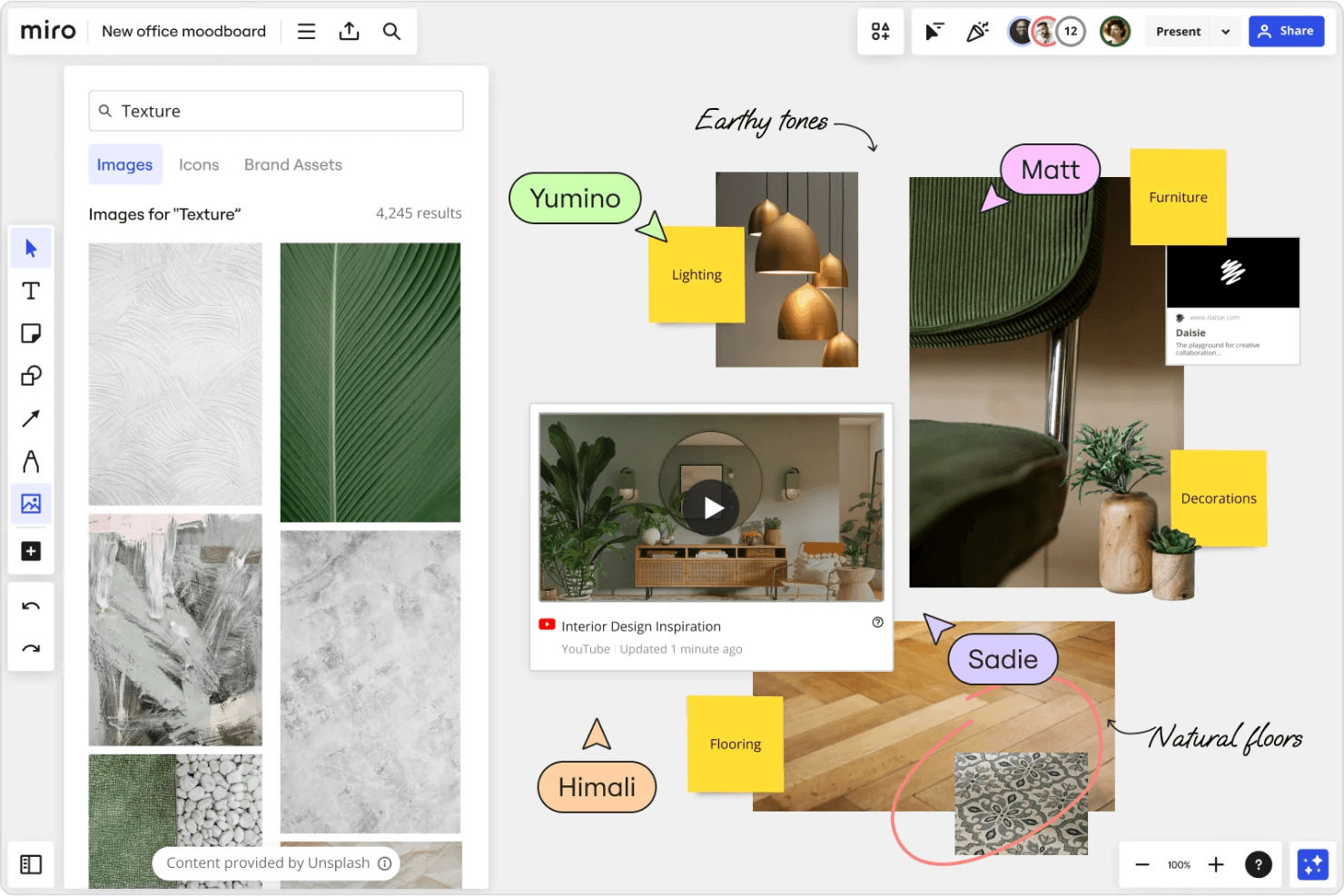
Miro lets you create collaborative mood boards with real-time feedback tools. Miro is a visual collaboration platform with an infinite canvas that supports mood board creation through drag-and-drop asset collection, AI image generation, real-time co-editing, and presentation mode.
Who Is Miro Best For?
Miro works well for product and cross-functional teams who want mood boards to live alongside personas, journey maps, and wireframes in one shared workspace.
Why I Picked Miro
I've included Miro in my top picks because it's the only tool on this list where a mood board can live on the same canvas as your personas, journey maps, and wireframes. I love that cross-functional teams can co-edit boards in real time, then flip directly into Presentation Mode to walk stakeholders through a zoomable, frame-by-frame visual story. The AI Image Creator also generates concept visuals from board content, which speeds up early ideation without leaving the workspace.
Miro Key Features
- Infinite canvas layout: An expandable workspace lets you arrange hundreds of images, links, and files without size constraints.
- Talktrack async recording: Record a narrated walkthrough of your board so stakeholders can review visual concepts on their own time.
- Built-in voting: Team members can vote anonymously on images or concepts directly within the board, with set vote counts and timers.
- Figma live embed: Embed Figma files and frames directly onto your Miro board so design assets stay current without manual re-uploading.
Miro Integrations
Miro offers 250+ integrations, including Figma, Adobe Creative Cloud, Google Drive, Dropbox, Slack, Jira, Asana, Linear, ClickUp, and Azure DevOps. Its APIs and SDKs support custom integrations.
Pros and Cons
Pros:
- Presentation mode turns boards into walkthroughs
- Real-time co-editing supports stakeholder feedback
- Infinite canvas accommodates hundreds of visual assets
Cons:
- Palette extraction requires separate tools
- Image-heavy boards can become sluggish
 Best for design collaboration
- Free plan available
- From $3/user/month
Visit WebsiteCustomer Rating:4.7/5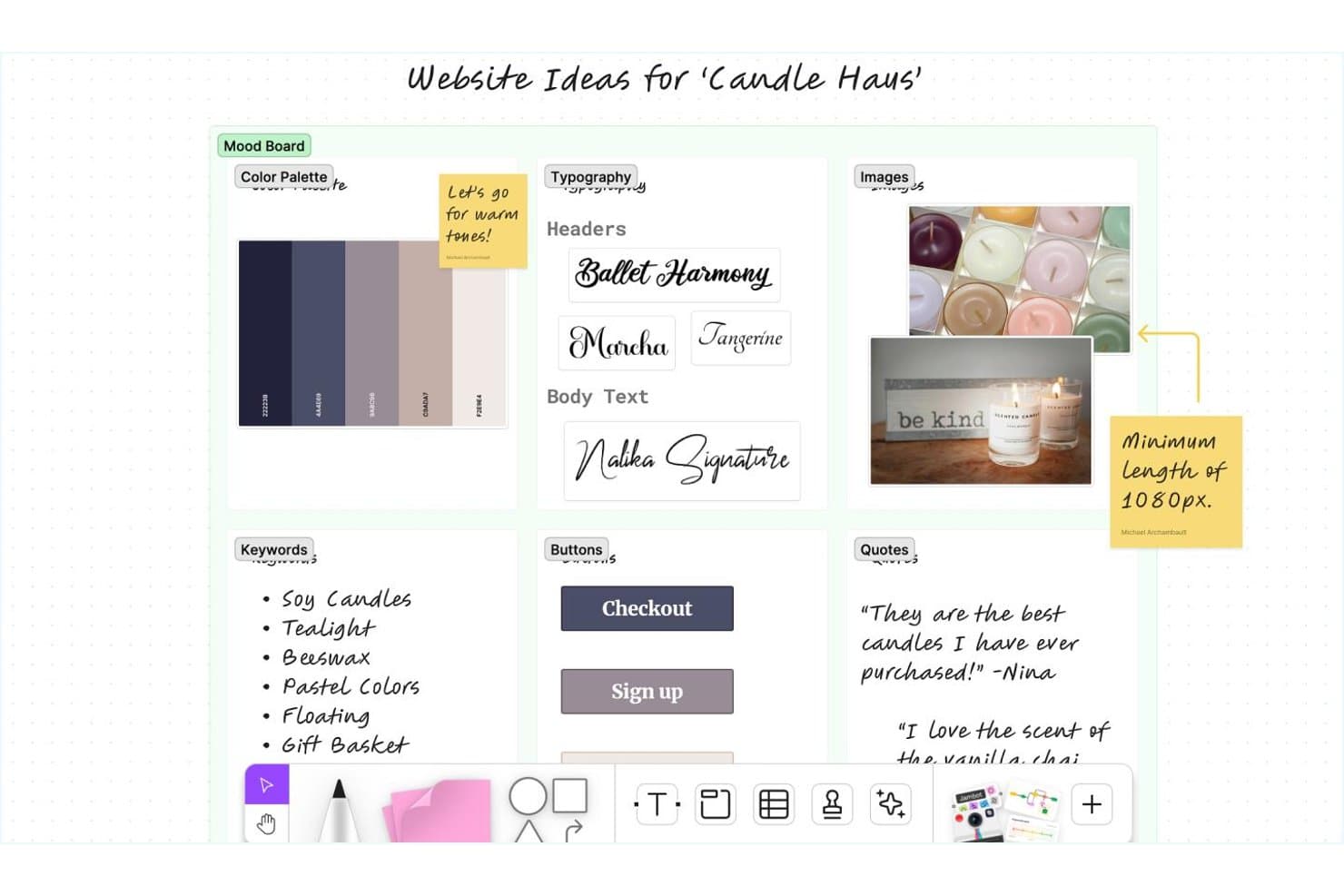
Figma lets users build visual mood boards with colors, fonts, and images. Figma is a design and whiteboarding platform that combines an infinite freeform canvas, real-time multi-user editing, AI image generation, and a direct path from mood boards to polished presentations via Figma Slides.
Who Is Figma Best For?
Figma is a strong fit for product and UX teams who want to move from early visual exploration directly into design and presentation without switching tools.
Why I Picked Figma
Figma earns its spot on my shortlist because real-time collaboration is genuinely where it pulls ahead of other mood board tools. I love that unlimited teammates can edit a FigJam board simultaneously, leave comments, and use cursor chat to react in the moment, which makes visual alignment fast when you're working across design, product, and marketing. From there, any FigJam board converts directly into a Figma Slides deck, so moving from raw inspiration to a polished stakeholder presentation doesn't require rebuilding anything.
Figma Key Features
- AI image generation: Generate reference images from a text prompt directly on the FigJam canvas when you can't find the right visual inspiration elsewhere.
- FigJam-to-Slides conversion: Turn any FigJam board into a Figma Slides deck without rebuilding your layout from scratch.
- Stakeholder voting sessions: Run structured voting in FigJam where votes stay hidden until the session ends, useful for narrowing down visual directions with a team.
- Image Color Picker tool: Upload an image to automatically extract a color palette in HEX, RGB, HSL, or HSB, then open it directly in Figma.
Figma Integrations
Figma offers native integrations with Jira, Asana, Slack, Microsoft Teams, Google Chat, Zoom, Google Meet, and Frontify. It also supports Zapier.
Pros and Cons
Pros:
- AI generates missing visual references
- FigJam boards become polished presentation decks
- Real-time co-editing keeps teams aligned
Cons:
- Palette extraction requires separate tools
- No native stock library or web clipper
 Best for drag-and-drop visual brainstorming
- Free trial + free plan available
- From $144/user/year (billed annually)
Visit WebsiteCustomer Rating:4.6/5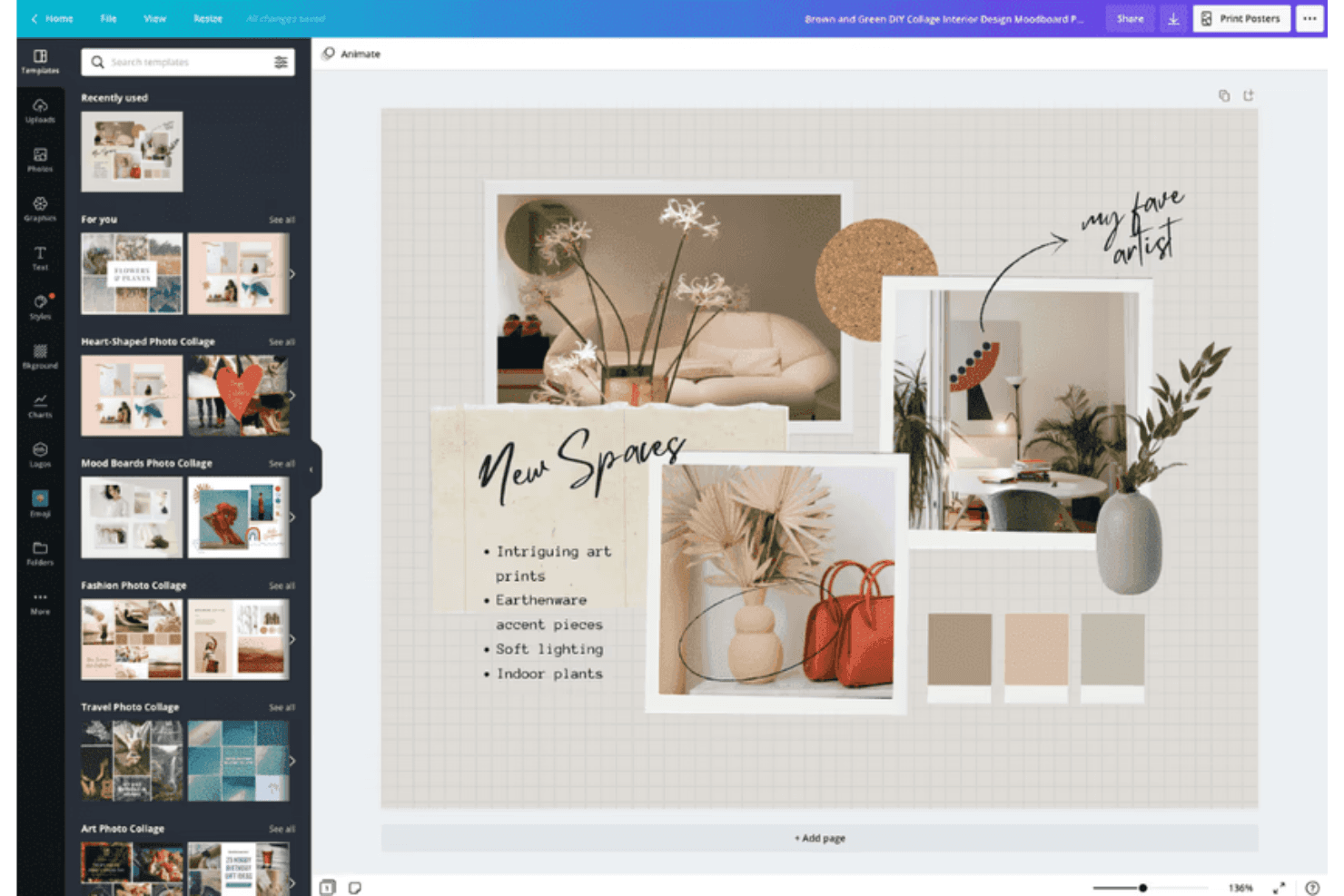
Canva makes it easy to design cozy interior mood boards with stylish templates. Canva is a visual design platform with an infinite-canvas whiteboard, drag-and-drop mood board templates, a 141M+ asset stock library, and real-time co-editing tools.
Who Is Canva Best For?
Canva is a strong fit for designers, marketers, and brand teams who want to build and share polished mood boards without a steep learning curve.
Why I Picked Canva
Canva earns its spot as one of the best on my shortlist because its infinite-canvas whiteboard makes drag-and-drop visual brainstorming feel genuinely fluid. I love how you can pull assets from a 141M+ stock library, clip images directly from the web with the Chrome extension, and arrange everything on a freeform board without ever leaving the platform. The automatic color palette generator, which extracts hex codes straight from uploaded photos, is a feature I find myself using constantly when building cohesive visual directions.
Canva Key Features
- Real-time co-editing: Multiple collaborators can edit the same board simultaneously, with each person shown as a distinct colored cursor.
- Brand Kit storage: Save your brand colors, fonts, and logos in one place so they're always available when building a mood board.
- Present and Record mode: Record yourself presenting a mood board and share the video directly with clients or stakeholders.
- Bulk cloud import: Pull entire folders from Google Drive, Dropbox, or OneDrive directly into Canva, preserving your existing folder structure.
Canva Integrations
Canva’s Apps Marketplace connects with over 100 tools, including Slack, Google Drive, Dropbox, and OneDrive. A third-party Figma to Canva app supports importing Figma files into editable Canva designs.
Pros and Cons
Pros:
- Real-time collaboration supports shared creative feedback
- Extensive templates accelerate polished mood boards
- Infinite canvas supports flexible visual exploration
Cons:
- Large projects may experience performance slowdowns
- Popular templates can produce generic-looking designs
Learn more about Canva: Best for creative professionals and teams
- Free plan + free trial + free demo available
- From $9.99/user/month (billed annually)
Visit WebsiteCustomer Rating:4.7/5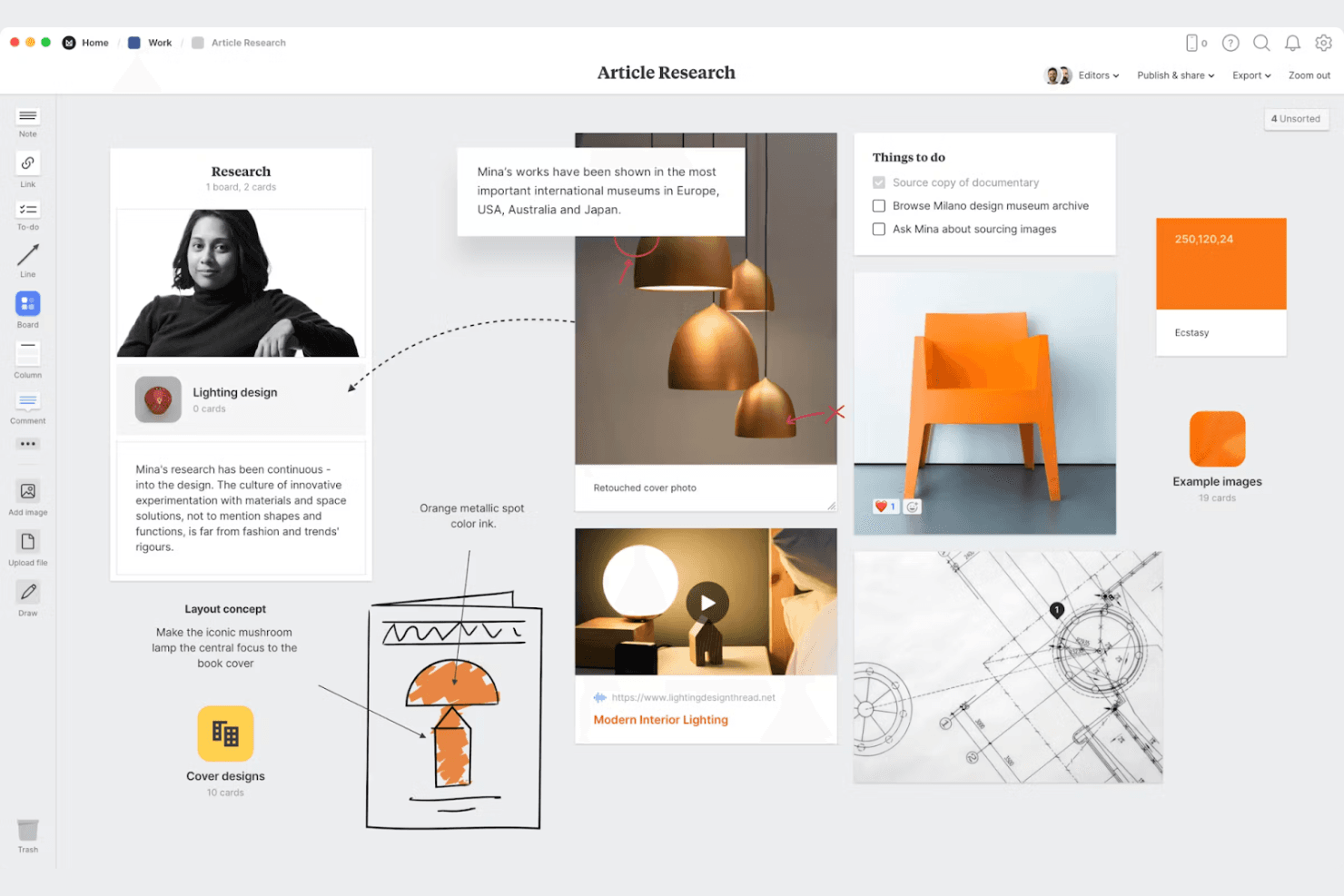
Organize your creative ideas visually with Milanote’s flexible drag-and-drop boards for research, notes, images, and tasks. Milanote is a visual mood board creator with an infinite freeform canvas, built-in Pexels stock image search, a five-browser web clipper, real-time collaboration, and flexible client sharing tools.
Who Is Milanote Best For?
Milanote fits graphic designers, interior designers, and fashion designers who need a visual-first workspace for gathering inspiration and presenting creative direction to clients.
Why I Picked Milanote
Milanote earns its spot as one of the best on my shortlist because it's purpose-built for the way creative teams actually gather and present inspiration. I love that its Web Clipper works across five browsers, letting you pull images, text, and links from any site directly onto your board in one click. The built-in Pexels library (3M+ images) means you rarely need to leave the canvas to find strong visual references, and the freeform infinite canvas makes arranging a cohesive creative direction feel natural rather than forced.
Milanote Key Features
- Real-time co-editing: Multiple team members can work on the same board simultaneously, with changes visible to everyone instantly.
- Presentation mode: A full-screen view that hides editing tools, lets you focus on individual cards, and supports zooming during live presentations.
- Nested boards: You can place boards inside other boards to organize large projects into structured, folder-like hierarchies.
- Color swatches with eyedropper: Pull exact colors from images on your board using the eyedropper, then save them as swatches with HEX, RGB, or HSL values.
Milanote Integrations
Milanote doesn't have any native integrations with tools such as Slack, Figma, Jira, or Notion. It supports Dropbox link cards, YouTube and Vimeo embeds, and website embeds, but no public API is documented.
Pros and Cons
Pros:
- Presents polished boards in focus mode
- Supports real-time visual collaboration
- Clips inspiration from five browsers
Cons:
- Search becomes difficult across many boards
- Large boards can export too small
Learn more about Milanote: Best for pitch-ready boards built with AI
- Not available
- From $7.99/month (billed annually)
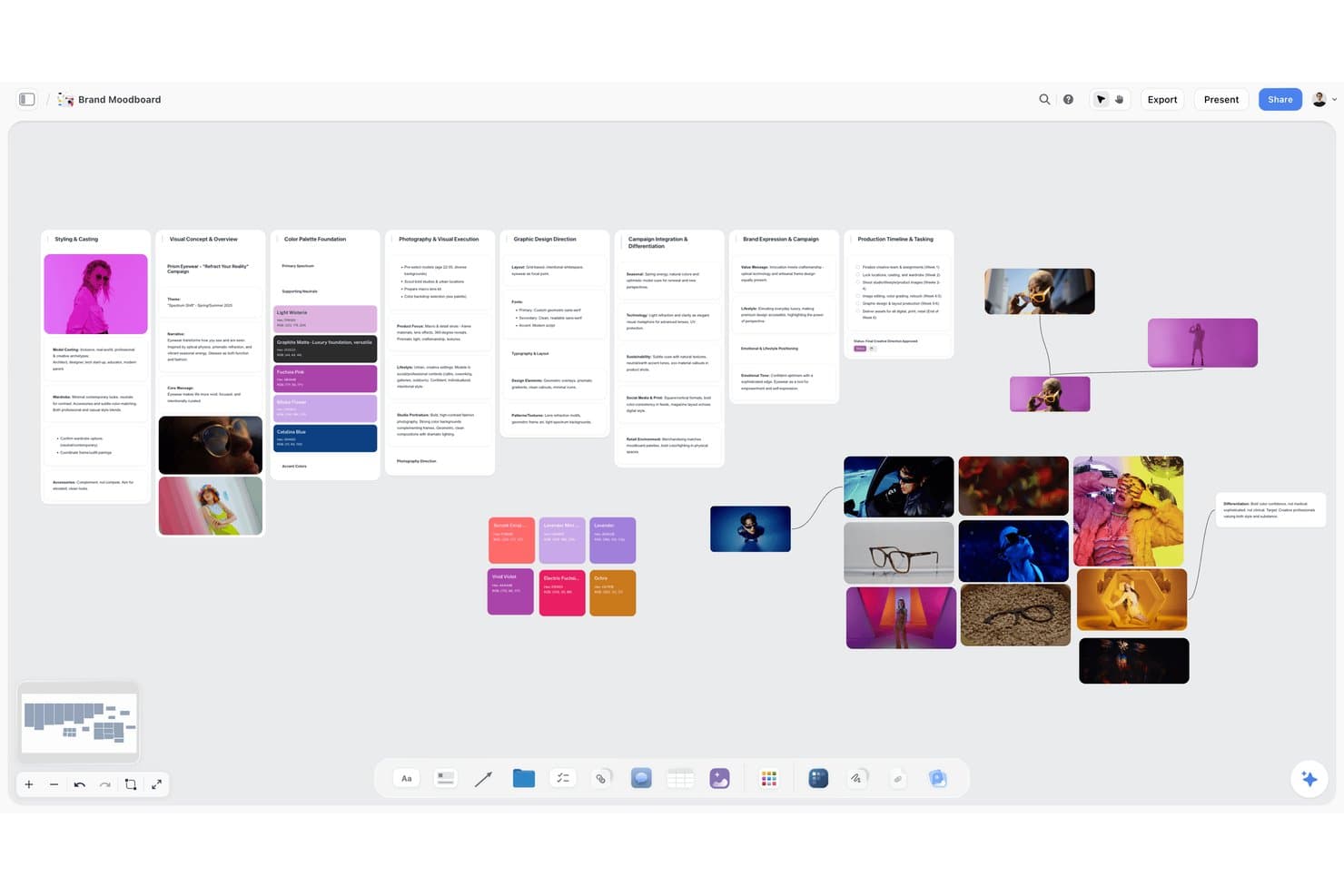
Storyflow lets users build visual brand moodboards with images, color palettes, and text. Storyflow is an AI visual workspace for creative teams that combines infinite-canvas moodboards, AI image generation, color palette extraction, and built-in presentation and export tools.
Who Is Storyflow Best For?
Storyflow is a strong fit for designers and brand teams who need to go from creative brief to client-ready pitch without switching tools.
Why I Picked Storyflow
I picked Storyflow as one of the best because it's built around turning a creative brief into a client-ready board without leaving the canvas. Describe a vibe in a single prompt and the AI drafts a full moodboard with images, named color swatches, and layout in one pass. From there, Presentation Mode lets you step through frames like slides and record a walkthrough, so the same board that held your inspiration becomes the pitch itself.
Storyflow Key Features
- AI image generation: Pro and Max plans let you generate images directly on the canvas, with support for reference images, aspect ratio control, background removal, and upscaling.
- Palette extraction from images: Upload any image and the AI reads its colors, outputting a named swatch grid with hex and RGB values for each tone.
- Presentation Mode with recording: Step through board frames like slides in fullscreen, reorder them on the fly, and record a video walkthrough without leaving the canvas.
- Brief-to-board import: Drop a PDF, Word, PowerPoint, or CSV file onto the canvas and the AI converts it into a laid-out, visual board.
Storyflow Integrations
Storyflow doesn't have any native integrations. It supports Pinterest, YouTube, and Vimeo link previews, plus imports from PDF, Word, PowerPoint, Excel, and CSV files.
Pros and Cons
Pros:
- Presentation mode supports recorded client walkthroughs
- Palette extraction includes named hex swatches
- AI drafts complete moodboards from briefs
Cons:
- Formal approval workflows aren't included
- Web inspiration collection remains largely manual
Learn more about Storyflow:
Diğer İlham Panosu Oluşturucuları
İşte kısa listeme giremeyen ancak yine de göz atmaya değer bazı ilham panosu oluşturucu seçenekleri:
- 11Morpholio BoardBest for interior and fashion design boards
- 12DesignFilesBest for interior designers sourcing and pitching
- 13Adobe PhotoshopBest for layer-based compositing and color extraction
- 14MattoBoardBest for 3D material boards from real product catalogs
- 15PinterestBest for visual inspiration at massive scale
- 16EagleBest for solo visual asset collection and search
How I Evaluate Mood Board Creators
I split my evaluation into three parts, giving the most weight to core functionality: collect visual references and arrange them freely to shape a product direction. Next, I look for differentiators like AI image generation for missing concepts. Finally, I consider onboarding, support, and pricing for cross-functional teams.
Core Functionality (Table Stakes For This List)
When I'm selecting tools for my list, I score each one on a scale from 0 (does not offer the functionality) to 5 (excels in this area) for each core functionality listed below. I then convert the total into a percentage to help assess each tool's overall fit, with extra weight on any functionalities I’ve deemed essential.
- Visual Asset Collection (Essential): I look for ways to add images, colors, and textures from uploads or web sources, so teams can gather references for a product concept in one place.
- Freeform Board Layout (Essential): I assess whether you can resize, layer, and freely arrange assets to compare visual directions without being locked into a rigid template.
- Collaboration & Sharing: I check for shared editing, comments, or view links that let design, product, and business stakeholders discuss a board.
- Multi-Board Organization: I look for ways to sort separate boards by project or concept, so a team can return to the right visual direction.
- Export & Presentation Output: I assess whether you can share a board as a clear export or presentation when pitching a concept or gathering stakeholder feedback.
- Color & Asset Extraction: I check whether tools can pull palettes or other useful details from images to help teams shape a cohesive visual direction.
Once I have a list of tools that meet the criteria, I consider what sets each platform apart.
Differentiating Factors (What Sets Vendors Apart)
Here's how I compare and contrast different vendors:
Standout Features
I check whether a tool offers AI image generation, which helps when a product concept has no existing reference imagery to pull from. Stakeholder feedback voting is another feature I evaluate—tools like Milanote and miro let reviewers react or vote on directions inside the board, cutting out side-channel debates. I also look for browser clipping extensions that capture competitor UI screenshots straight into a board during research sprints.
Beyond Features
I check whether a tool fits the existing stack—boards that connect to Jira, Slack, or Notion save PMs from re-uploading assets across apps during discovery sprints. Pricing models matter too, since per-seat plans can lock out occasional reviewers like leadership or marketing. I also evaluate workspace permissions and private link controls, because mood boards often hold pre-release concepts or competitor teardowns that need tighter access than a shared drive.
İlham Panosu Oluşturucusu Nasıl Seçilir?
Uzun özellik listeleri ve karmaşık fiyatlandırma yapılarına takılıp kalmak kolaydır. Kendinize özgü yazılım seçme sürecinizi yürütürken odağınızı korumanıza yardımcı olmak için aklınızda bulundurmanız gereken faktörleri içeren bir kontrol listesi hazırladım:
| Faktör | Dikkat Edilmesi Gerekenler |
| Ölçeklenebilirlik | Aracın ekibinizle birlikte büyüyebildiğinden emin olun. Performanstan ödün vermeden artan kullanıcı ve proje sayılarını destekleyen özellikleri arayın. |
| Entegrasyonlar | İş akışınızı kolaylaştırmak için Adobe Creative Cloud veya Slack gibi ekibinizin hâlihazırda kullandığı tasarım araçlarıyla entegre olup olmadığını kontrol edin. |
| Özelleştirilebilirlik | Şablonları ayarlamak veya özel iş akışları oluşturmak gibi aracı özel ihtiyaçlarınıza uyacak şekilde düzenleyebildiğinizden emin olun. |
| Kullanım Kolaylığı | Arayüz tüm kullanıcılar için sezgisel olmalıdır. Öğrenme eğrisini ve ekibinizin ne kadar hızlı çalışmaya başlayabileceğini göz önünde bulundurun. |
| Bütçe | Bütçenize uygun olanı bulmak için fiyatlandırma planlarını karşılaştırın. Fiyat karşılığında hangi özellikleri elde ettiğinizi değerlendirin ve yıllık aboneliklerde uygulanan indirimleri göz önünde bulundurun. |
| Güvenlik Önlemleri | Yaratıcı çalışmalarınızı korumak için veri şifreleme ve kullanıcı erişim denetimleri gibi güçlü güvenlik önlemleri sunan araçlara öncelik verin. |
| İş Birliği | Ekibiniz arasındaki verimli iş birliğini sağlamak için gerçek zamanlı düzenleme ve yorum dizileri gibi ekip çalışmasını destekleyen özellikleri arayın. |
| Destek | Sorunlar ortaya çıktığında ekibinize yardımcı olmak için canlı sohbet veya telefon desteği gibi müşteri destek seçeneklerinin bulunabilirliğini göz önünde bulundurun. |
İlham Panosu Oluşturucularındaki Eğilimler
Araştırmamda, farklı mood panosu oluşturucu sağlayıcılarından sayısız ürün güncellemesi, basın bülteni ve sürüm günlüğü derledim. Gözlem altında tuttuğum yeni ortaya çıkan trendlerden bazıları şunlar:
- Yapay Zekâ Destekli Tasarım Önerileri: Daha fazla araç, tasarım önerileri sunmak ve tekrarlayan görevleri otomatikleştirmek için yapay zekâyı kullanıyor. Bu, kullanıcıların görsel açıdan etkileyici panoları daha hızlı oluşturmasına yardımcı oluyor. Örneğin, bazı sağlayıcılar artık içeriğe göre renk paletleri ve düzen seçenekleri önermek için yapay zekâdan yararlanıyor.
- 3B Görselleştirme: 3B öğelerin eklenmesi, kullanıcıların daha sürükleyici ve gerçekçi mood panoları oluşturmasını sağlıyor. Bu trend, derinliği ve alanı görselleştirmenin önemli olduğu iç tasarım ve mimarlık gibi sektörler için özellikle yararlı.
- İş Birliği Geliştirmeleri: Gerçek zamanlı iş birliği özellikleri daha gelişmiş hâle geliyor ve kullanıcıların daha etkili bir şekilde birlikte çalışmasını sağlıyor. Araçlar artık projeleri düzenli, ekipleri uyumlu tutmak için gelişmiş yorum sistemleri ve sürüm denetimi sunuyor.
- Artırılmış Gerçeklik (AR) Entegrasyonu: Bazı sağlayıcılar, kullanıcıların mood panolarını gerçek dünya ortamlarında görselleştirmesine olanak tanımak için artırılmış gerçekliği araştırıyor. Tasarımları bağlam içinde görmek karar verme sürecini iyileştirebildiğinden, bu özellik özellikle perakende ve etkinlik planlama alanlarında yararlı.
- Sürdürülebilirlik Özellikleri: Sürdürülebilirliğe giderek daha fazla odaklanılıyor ve araçlar kullanıcıların çevre dostu tasarımlar oluşturmasına yardımcı olan özellikler sunuyor. Buna sürdürülebilir malzemeleri seçme ve dosya boyutlarını optimize ederek dijital israfı azaltma seçenekleri de dâhil.
Mood Panosu Oluşturucu Nedir?
Mood panosu oluşturucu, bir konsepti veya temayı ifade etmek amacıyla görselleri, metinleri ve diğer görsel öğeleri bir araya getirmek için kullanılan dijital bir araçtır. Tasarımcılar, pazarlamacılar ve yaratıcı profesyoneller, fikirleri düzenlemek ve görsel konseptleri etkili bir şekilde sunmak için bu araçları sıklıkla kullanır. Sürükle ve bırak arayüzleri, gerçek zamanlı iş birliği ve özelleştirilebilir şablonlar gibi özellikler, kullanıcıların fikirlerini hızla hayata geçirmesine, ekip çalışmasını geliştirmesine ve yaratıcılığı artırmasına yardımcı olur. Genel olarak bu araçlar, görsel hikâye anlatımı ve fikir paylaşımı sürecini basitleştirir.
Mood Panosu Oluşturucunun Özellikleri
Bir mood panosu oluşturucu seçerken aşağıdaki temel özelliklere dikkat edin:
- Sürükle ve bırak arayüzü: Kullanıcıların görsel öğeleri kolayca düzenlemesine ve sıralamasına olanak tanıyarak tasarım sürecini sezgisel ve verimli hâle getirir.
- Gerçek zamanlı iş birliği: Ekip üyelerinin aynı anda birlikte çalışmasını sağlayarak projelerde iletişimi ve ekip çalışmasını geliştirir.
- Özelleştirilebilir şablonlar: Belirli ihtiyaçlara uyarlanabilen önceden tasarlanmış düzenler sunarak mood panolarını sıfırdan oluşturmak için gereken zaman ve çabayı azaltır.
- Görsel kitaplığına erişim: Kullanıcılara panolarını geliştirecek geniş bir görsel kaynak yelpazesi sunan stok fotoğraf ve grafik koleksiyonu sağlar.
- Yapay zekâ tasarım önerileri: Renk paletleri ve düzenler gibi tasarım öğeleri önermek için yapay zekâ kullanır ve kullanıcıların estetik açıdan hoş panolar oluşturmasına yardımcı olur.
- 3B görselleştirme: Kullanıcıların fikirleri daha sürükleyici ve gerçekçi bir şekilde temsil etmek için 3B öğeler eklemesine olanak tanır.
- Dışa aktarma seçenekleri: Kolay paylaşım ve sunum için panoların PDF veya görsel dosyaları gibi çeşitli biçimlerde dışa aktarılmasını destekler.
- Açıklama araçları: Metin ve not ekleme özellikleri sunarak kullanıcıların görsel öğeleri için bağlam ve açıklamalar sağlamasına olanak tanır.
- Mobil uygulama kullanılabilirliği: Kullanıcıların hareket hâlindeyken mood panoları oluşturup düzenleyebilmesini sağlayarak esneklik ve kolaylık sunar.
- Güvenlik önlemleri: Yaratıcı varlıkları ve hassas bilgileri korumak için veri şifreleme ve kullanıcı erişim denetimleri sunar.
Mood Panosu Oluşturucunun Faydaları
Bir mood panosu oluşturucu kullanmak ekibinize ve işletmenize fayda sağlar. Yararlanmayı bekleyebileceğiniz birkaç avantaj şunlardır:
- Geliştirilmiş yaratıcılık: Özelleştirilebilir şablonların ve kapsamlı bir görsel kitaplığının kullanılması yeni fikirleri teşvik eder ve kavramların daha etkili bir şekilde görselleştirilmesine yardımcı olur.
- Geliştirilmiş iş birliği: Gerçek zamanlı iş birliği özellikleri, ekip üyelerinin verimli bir şekilde birlikte çalışmasına olanak tanıyarak daha iyi ekip çalışması ve iletişim sağlar.
- Zamandan tasarruf: Sürükle ve bırak arayüzleri ile yapay zekâ tasarım önerileri tasarım sürecini hızlandırır ve ilham panolarını hızlı bir şekilde oluşturmayı kolaylaştırır.
- Daha iyi sunum: Dışa aktarma seçenekleri, düzenlenmiş ve profesyonel görünümlü panoları çeşitli biçimlerde paylaşmanıza olanak tanıyarak müşterilere veya paydaşlara yapılan sunumları geliştirir.
- Esneklik: Mobil uygulamanın kullanılabilir olması, ilham panolarını her yerden oluşturup düzenleyebilmenizi sağlar ve farklı çalışma ortamlarına kolaylıkla uyum sunar.
- Bilinçli karar verme: 3B görselleştirme gibi özellikler, ekiplerin fikirleri bağlam içinde görselleştirmesine yardımcı olarak daha bilinçli ve güvenli kararlar alınmasını sağlar.
- Veri güvenliği: Güvenlik önlemleri, yaratıcı çalışmalarınızı ve hassas bilgilerinizi koruyarak çevrimiçi paylaşım ve iş birliği sırasında içinizin rahat olmasını sağlar.
İlham Panosu Oluşturucunun Maliyetleri ve Fiyatlandırması
Bir ilham panosu oluşturucu seçerken mevcut çeşitli fiyatlandırma modellerini ve planlarını anlamak gerekir. Maliyetler özelliklere, ekip büyüklüğüne, eklentilere ve daha birçok etkene göre değişir. Aşağıdaki tabloda ilham panosu oluşturucu çözümlerinde yaygın olarak sunulan planlar, ortalama fiyatları ve genellikle içerdikleri özellikler özetlenmektedir:
İlham Panosu Oluşturucu İçin Plan Karşılaştırma Tablosu
| Plan Türü | Ortalama Fiyat | Yaygın Özellikler |
| Ücretsiz Plan | $0 | Temel şablonlara erişim, sınırlı depolama alanı ve temel düzenleme araçları. |
| Kişisel Plan | $5-$25/kullanıcı/ay | Özelleştirilebilir şablonlar, stok görsel kitaplığına erişim ve birden fazla biçimde dışa aktarma seçenekleri. |
| İşletme Planı | $25-$50/ kullanıcı/ay | Gerçek zamanlı iş birliği, gelişmiş düzenleme araçları ve üçüncü taraf uygulamalarla entegrasyon. |
| Kurumsal Plan | $50-$100/ kullanıcı/ay | Sınırsız depolama alanı, özel destek, gelişmiş güvenlik özellikleri ve özelleştirilmiş işe alıştırma hizmetleri. |
İlham Panosu Oluşturucu SSS
İlham panosu oluşturucular hakkında sık sorulan bazı soruların yanıtları:
İlham panolarında neler bulunmalıdır?
İlham panosu oluşturmak için katı kurallar yoktur, ancak panolar temanızın, renk ve motif yönünüzün etkili bir şekilde aktarılmasını sağlamalıdır. Projenizin hedefleriyle uyumlu, bütünlüklü bir görünüm oluşturmaya odaklanın. Bir ilham panosunun tasarım sürecinize ilham vermek ve yol göstermek için kullanılan bir araç olduğunu unutmayın.
İlham panolarının dezavantajları nelerdir?
İlham panoları genellikle yalnızca tek bir açı göstererek konseptinizin durağan bir görünümünü sunar. Bazı projeler için sınırlayıcı olabilecek aydınlatmayı veya dinamik öğeleri taklit edemezler. Ayrıca ilham panoları, bir tasarımın gerçek hayatta nasıl işlev göreceğini tam olarak gösteremedikleri için gerçekçilikten yoksundur.
Bir ilham panosuna mutlaka eklemeniz gereken 5 öğe nelerdir?
Başarılı bir ilham panosu, estetik ve renk şemalarının ötesine geçen yaratıcı bir konsept içermelidir. Tutarlı tasarım konseptleri ve renk paleti önemli olmakla birlikte tipografi seçimlerini, doku ve baskı örneklerini, görsel yönlendirmeyi ve konuyla ilgili görselleri de göz önünde bulundurun. Bu öğeler, proje vizyonunuzun bütünlüklü bir görsel temsilini oluşturmaya yardımcı olur.
Başarılı bir ilham panosunu ne oluşturur?
Kusursuz bir ilham panosu, net bir proje yönü belirler ve çeşitli ilham verici malzemeler ile tasarım ilhamı konseptlerini içerir. Fiziksel veya dijital bir ilham panosu olması fark etmeksizin, projenizin hedefleriyle uyumlu renk, yazı tipi ve özenle seçilmiş görseller arasında denge kuracak şekilde düzenlenmelidir. Kendi ilham panonuzu geliştirmek için çeşitli kaynaklardan gelen ilhamlara açık olun.
İlham panom için fotoğrafları nasıl seçerim?
Etkileyici ve güzel ilham panoları oluşturmak için projenizin temasıyla uyumlu ve istediğiniz duyguyu uyandıran fotoğrafları seçin. Görselleri seçerken ilham panosu şablonlarını denemeyi ve renk paleti, kompozisyon ile genel estetik üzerinde değişiklikler yapmayı düşünün. Izgaralarınıza derinlik ve ilgi katmak için doku ve desenler gibi farklı görsel türlerini bir arada kullanın.
İlham panoları tasarım dışındaki projelerde kullanılabilir mi?
Evet, ilham panoları tasarımın ötesinde çeşitli projelerde kullanılabilir. Etkinlik planlamak, pazarlama stratejileri geliştirmek veya yeni ürünler için fikir üretmek için harikadırlar. Görsel format, kavramların iletilmesine ve ekip üyelerinin ortak bir vizyon doğrultusunda uyum sağlamasına yardımcı olur.