

Ürün analitiğinde yolunuzu bulmak, özellikle Mixpanel artık SaaS ekibinizin ihtiyaçlarını karşılamıyorsa, bunaltıcı olabilir. Belki artık farklı hedeflerle çalışıyorsunuz, iş akışınızı daha iyi destekleyen özelliklere ihtiyaç duyuyorsunuz ya da sektörünüzün gereksinimleriyle daha yakından örtüşen bir platform istiyorsunuz.
Deneyimlerime göre doğru aracı bulmak, kullanıcı davranışını anlamada ve ürün başarısını artırmada büyük fark yaratabilir. Bu durum, küçük kullanıcı deneyimi değişikliklerinin büyüme üzerinde orantısız derecede büyük bir etkisi olabildiği startup'lar için özellikle geçerlidir. Bu nedenle, bilinçli bir karar vermenize yardımcı olmak için çeşitli Mixpanel alternatiflerini bağımsız olarak test edip inceledim.
Bu makalede, en iyi seçimlerimi paylaşacak; her aracın kendine özgü avantajlarını ve özel zorluklarınızı nasıl ele alabileceklerini vurgulayacağım. Gelişmiş veri gizliliği, gerçek zamanlı içgörüler veya uzmanlaşmış analitik arıyor olmanız fark etmez; burada size uygun bir ürün analitiği aracı mutlaka vardır.
Mixpanel nedir?
Mixpanel, kullanıcı davranışını anlamanıza ve ürün kararlarınızı iyileştirmenize yardımcı olan bir ürün analitiği yazılımıdır. Ürünleriyle kullanıcıların nasıl etkileşime girdiğine dair içgörülere ihtiyaç duyan ürün yöneticileri, pazarlamacılar ve veri analistleri tarafından yaygın olarak kullanılır.
Kullanıcı segmentasyonu, dönüşüm hunileri ve elde tutma takibi gibi özellikler; kullanıcı davranışlarını anlamaya, etkileşimi optimize etmeye ve elde tutma oranlarını iyileştirmeye yardımcı olur. Genel olarak Mixpanel, ekibinizin veriye dayalı kararlar almasına ve kullanıcı deneyimlerini geliştirmesine yardımcı olacak değerli içgörüler sunar.
Mixpanel Alternatifleri Karşılaştırma Tablosu
Bu karşılaştırma tablosu, en iyi Mixpanel alternatifleri seçimlerimin fiyatlandırma ayrıntılarını özetlemektedir:
Score legend (out of 5)
- Excellent4.5–5
- Good4–4.4
- Average3–3.9
- Below average2–2.9
- Poor1–1.9
Sorted by: Default
| Tool | Starting Price | Website | |||||||
|---|---|---|---|---|---|---|---|---|---|
Best for continuous product design at scale | 4.0 out of 5 | 5 | 4 | 4 | 3 | 3 | 5 | Pricing upon request Free demo available | Website |
Best for digital experience insights | 3.7 out of 5 | 4 | 3 | 4 | 3 | 4 | 4 | Pricing upon request Free plan available | Website |
Best for AI-powered product analytics | 4.5 out of 5 | 5 | 4 | 4 | 5 | 5 | 4 | Pricing upon request Free plan + free demo available | Website |
Best for customer engagement value | 3.7 out of 5 | 4 | 3 | 4 | 3 | 4 | 4 | $85/month 30-day free trial | Website |
Best for product adoption tracking | 3.7 out of 5 | 4 | 3 | 4 | 4 | 3 | 4 | Pricing upon request Free plan + 30-day free trial + free demo available | Website |
Best for non-linear customer journey analysis | 4.0 out of 5 | 4 | 4 | 4 | 3 | 4 | 5 | $999/month Free demo + 30-day free trial available | Website |
Best for non-linear funnel analysis | 3.8 out of 5 | 3 | 4 | 4 | 4 | 3 | 5 | Pricing upon request Free demo available | Website |
Best for autocapture without a tracking plan | 4.2 out of 5 | 5 | 4 | 3 | 4 | 4 | 5 | Pricing upon request Free plan available | Website |
Best for behavior-linked revenue tracking | 3.7 out of 5 | 4 | 3 | 4 | 4 | 3 | 4 | $99/month 7-day free trial + free demo available | Website |
Best for developer-focused analytics | 3.8 out of 5 | 4 | 4 | 3 | 4 | 4 | 4 | Pricing upon request Free plan available | Website |


Why Trust Our Software Recommendations
6,700+
Reviews
20
Industry experts
16+
Evaluation factors
14
Years
Our team has been testing and reviewing software since 2012. As product managers ourselves, we know how difficult—and important—it is to choose the right software.
For this guide, we evaluated tools using hands-on testing and independent research, scoring tools using our selection criteria.
Our reviews reflect our human editorial judgment, not a sales pitch.
Expert reviewers:
- Andrew LumbySenior TPM
- Cristiano ValimSenior UI/UX Lead


En İyi Mixpanel Alternatifleri İncelemeleri
Aşağıda, kısa listeme giren en iyi Mixpanel alternatiflerinin ayrıntılı özetlerini bulabilirsiniz. İncelemelerim, her aracın temel özelliklerine, artılarına ve eksilerine, entegrasyonlarına ve ideal kullanım alanlarına ayrıntılı bir bakış sunarak sizin için en iyisini bulmanıza yardımcı olur.
 Best for continuous product design at scale
- Free demo available
- Pricing upon request
Visit WebsiteCustomer Rating:4.7/5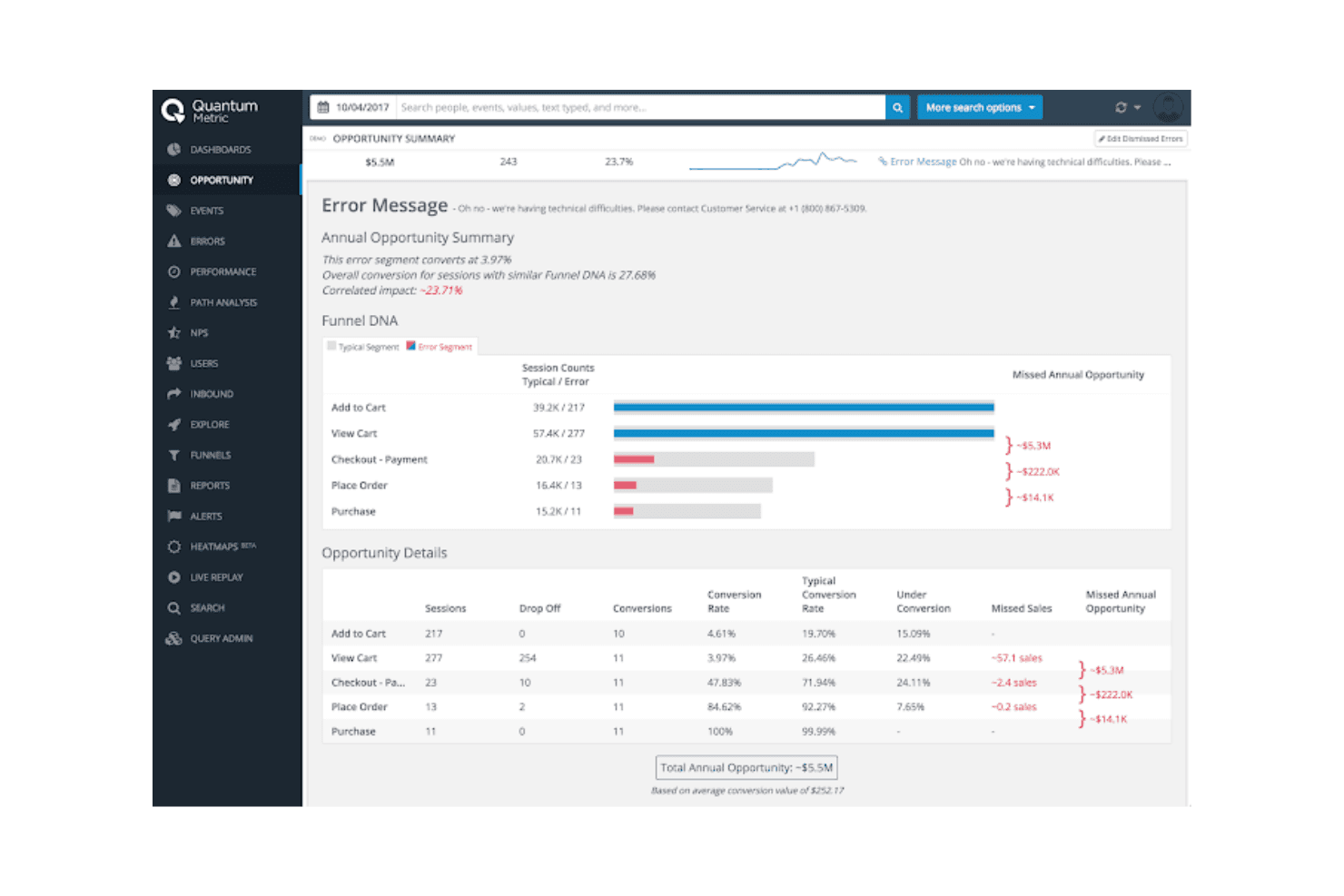
Quantum Metric gives insights into user behavior to improve digital performance Quantum Metric is a product analytics platform for product, UX, and digital teams that combines behavioral data and experience insights to identify friction, understand customer journeys, and guide product improvements.
Who Is Quantum Metric Best For?
Product and UX teams managing complex digital experiences can use Quantum Metric to connect behavioral data with experience insights and guide ongoing product improvements.
Why Quantum Metric Is a Good Mixpanel Alternative
I picked Quantum Metric because my team uses its behavioral data and experience insights to find friction across complex digital journeys. I like how we can connect customer behavior with UX signals, then prioritize product improvements based on where users struggle. That supports continuous product design at scale instead of isolated analytics reviews.
Quantum Metric Key Features
- Autocapture: Collects more than 300 data points across web, mobile, and kiosk experiences.
- Page performance: Measures slow-page impact on digital experiences.
- Dashboards: Organizes analytics and experience indicators in configurable views.
- Monitoring and alerts: Flags changes in aggregate behavior and frustration signals.
Quantum Metric Integrations
Quantum Metric documents official partner integrations with AB Tasty, Split, ServiceNow, Qualtrics, Salesforce Service Cloud, Looker, Slack, Optimizely, Tealium, and Adobe Analytics. Its Optimizely integration uses the Quantum Metric API, while Zapier support and a general custom-integration API aren’t clearly documented.
Pros and Cons
Pros:
- Links page speed to experience friction
- Connects frustration signals with customer journeys
- Autocaptures web, mobile, and kiosk behavior
Cons:
- Deeper experience data increases review overhead
- Product analytics workflows feel less central
Learn more about Quantum Metric: Best for digital experience insights
- Free plan available
- Pricing upon request
Visit WebsiteCustomer Rating:4.5/5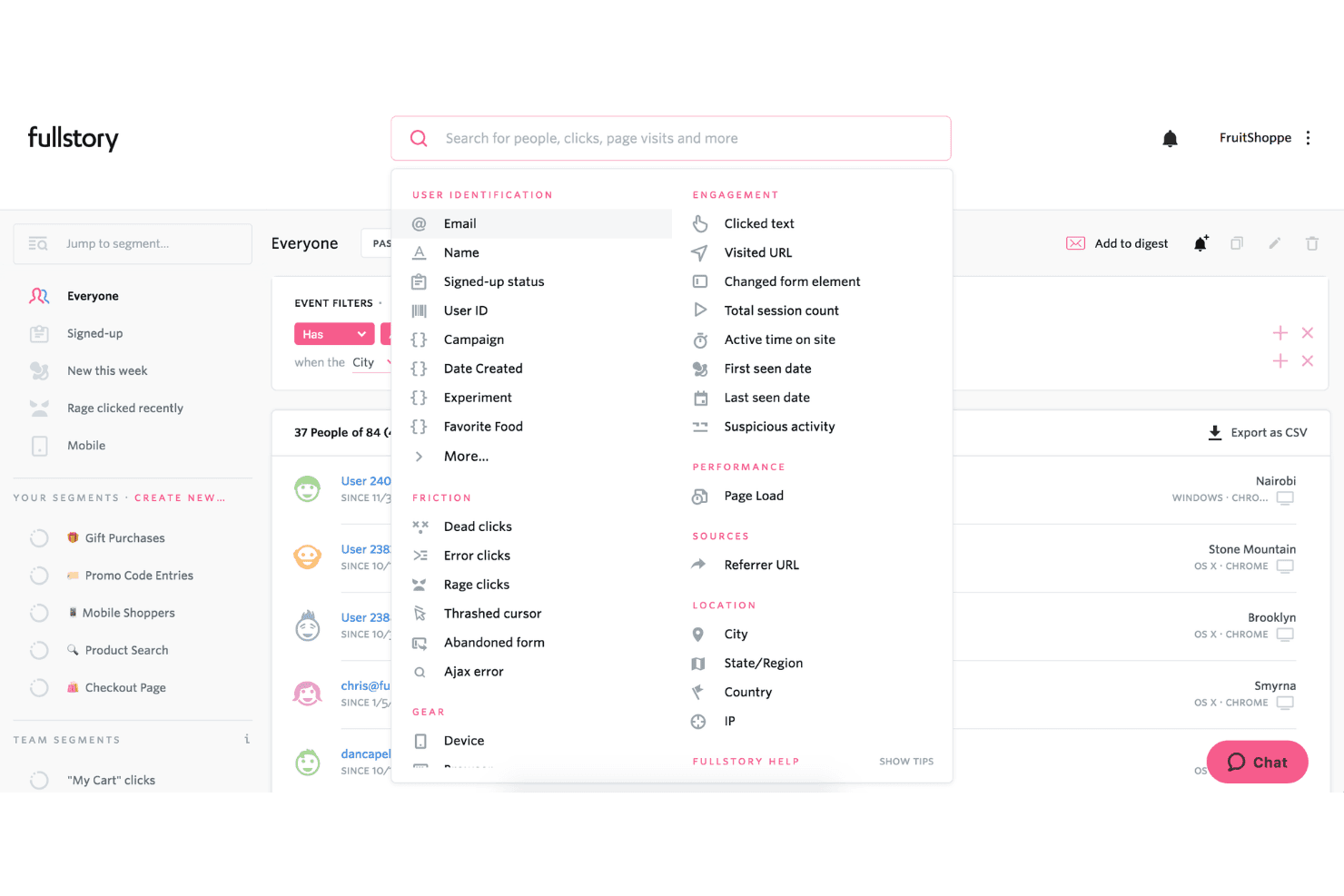
FullStory lets users filter and segment users by behavior, location, and friction signals. Fullstory is a product analytics platform for product, UX, and digital teams that combines user behavior data with session replay to uncover friction, validate product decisions, and improve customer journeys.
Who Is Fullstory Best For?
Product, UX, and digital teams that need to diagnose user friction across websites and applications.
Why Fullstory Is a Good Mixpanel Alternative
I picked Fullstory for digital experience insights because session replay and heatmaps show where users struggle in a product. I use frustration signals, such as rage clicks and dead clicks, to investigate drop-offs and validate UX changes. Its journey analysis connects these behaviors to specific conversion points.
Fullstory Key Features
- Event autocapture: Collects user interactions without manually tagging every event.
- Funnel analysis: Measures progression and drop-off across defined conversion steps.
- Audience segmentation: Filters behavioral data by user attributes, events, and properties.
- Data integrations: Connects product analytics data with other business tools.
Fullstory Integrations
Fullstory supports integrations with Salesforce, Intercom, Segment, Tealium, BigQuery, Optimizely, Adobe Experience Platform, Braze, and Workato, plus Zapier. It also provides webhooks and browser and server APIs for custom integrations.
Pros and Cons
Pros:
- Frustration signals expose rage and dead clicks
- Autocapture reduces manual event instrumentation
- Session replays reveal specific conversion friction
Cons:
- Product analytics feels less granular than Mixpanel
- Privacy masking requires careful implementation
Learn more about Fullstory: Best for AI-powered product analytics
- Free plan + free demo available
- Pricing upon request
Visit WebsiteCustomer Rating:4.5/5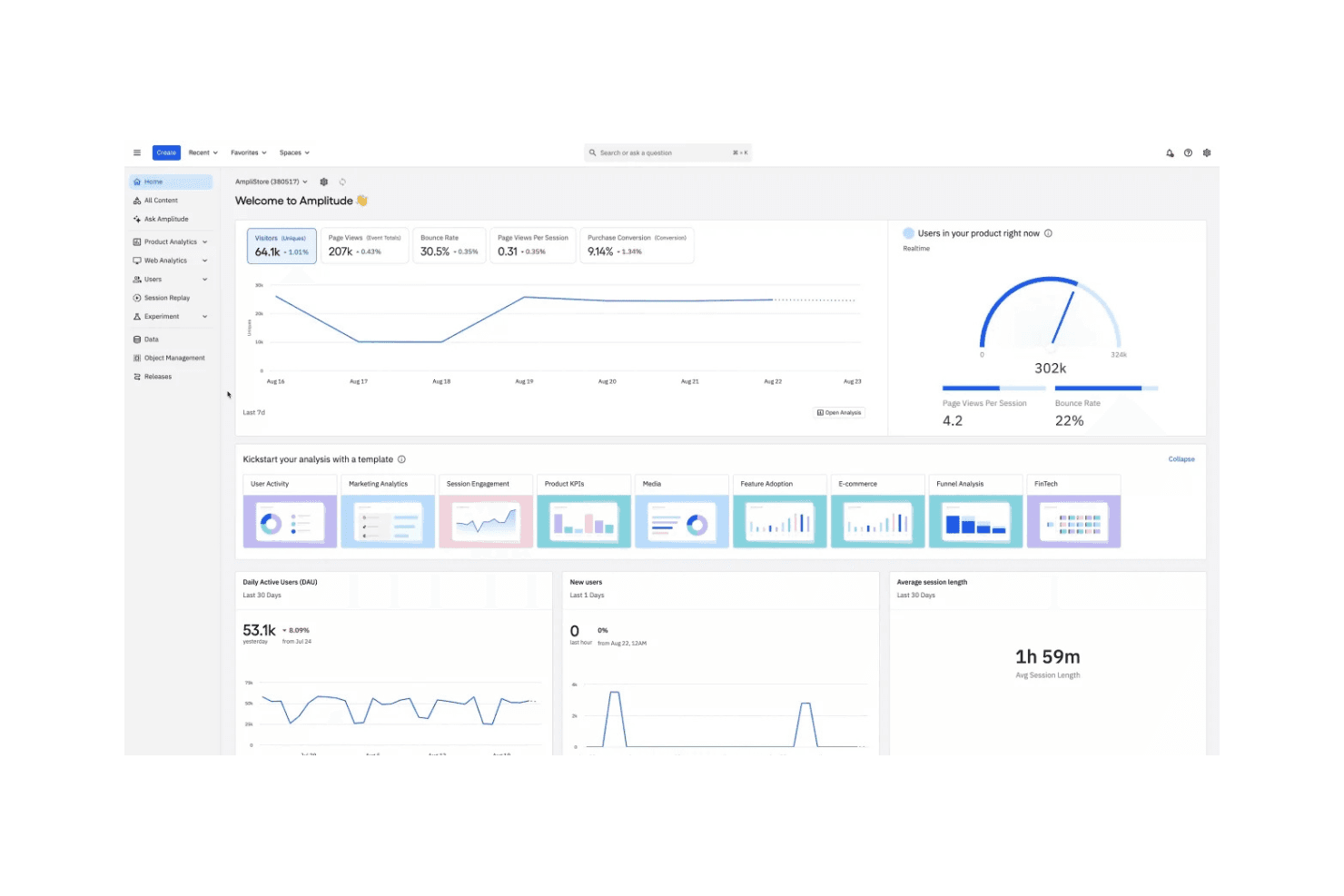
Amplitude helps teams understand user behavior and improve digital products Amplitude is a product analytics platform for product teams that need to understand user behavior, identify adoption barriers, and improve customer journeys through data-driven decisions.
Who Is Amplitude Best For?
Product teams at growing digital businesses can use Amplitude for AI-powered insights, product experimentation, and data-informed decisions.
Why Amplitude Is a Good Mixpanel Alternative
I picked Amplitude because it’s best for AI-powered product analytics. I use its behavioral cohorts, Journeys, and Session Replay to connect conversion trends with specific user actions. Its AI-powered insights help my team investigate drop-offs, identify adoption barriers, and decide which product experiments deserve attention.
Amplitude Key Features
- Funnel analysis: Measure conversion and drop-off across product events.
- Retention analysis: Track whether users return after defined milestones.
- Custom dashboards: Combine charts into shareable product reports.
- Data governance: Manage event definitions, properties, and tracking plans.
Amplitude Integrations
Amplitude offers documented integrations with Segment, Salesforce, HubSpot, Intercom, Braze, Google Analytics 4, Snowflake, BigQuery, Optimizely, and Jira. It also provides SDKs, HTTP and Batch APIs, and REST APIs for custom data ingestion, analytics queries, and programmatic management.
Pros and Cons
Pros:
- Session Replay adds context to funnel drop-offs
- Journeys connect conversion changes to user actions
- AI surfaces behavioral trends for investigation
Cons:
- Interface can feel dense for new analysts
- Advanced analysis requires careful event governance
Learn more about Amplitude:
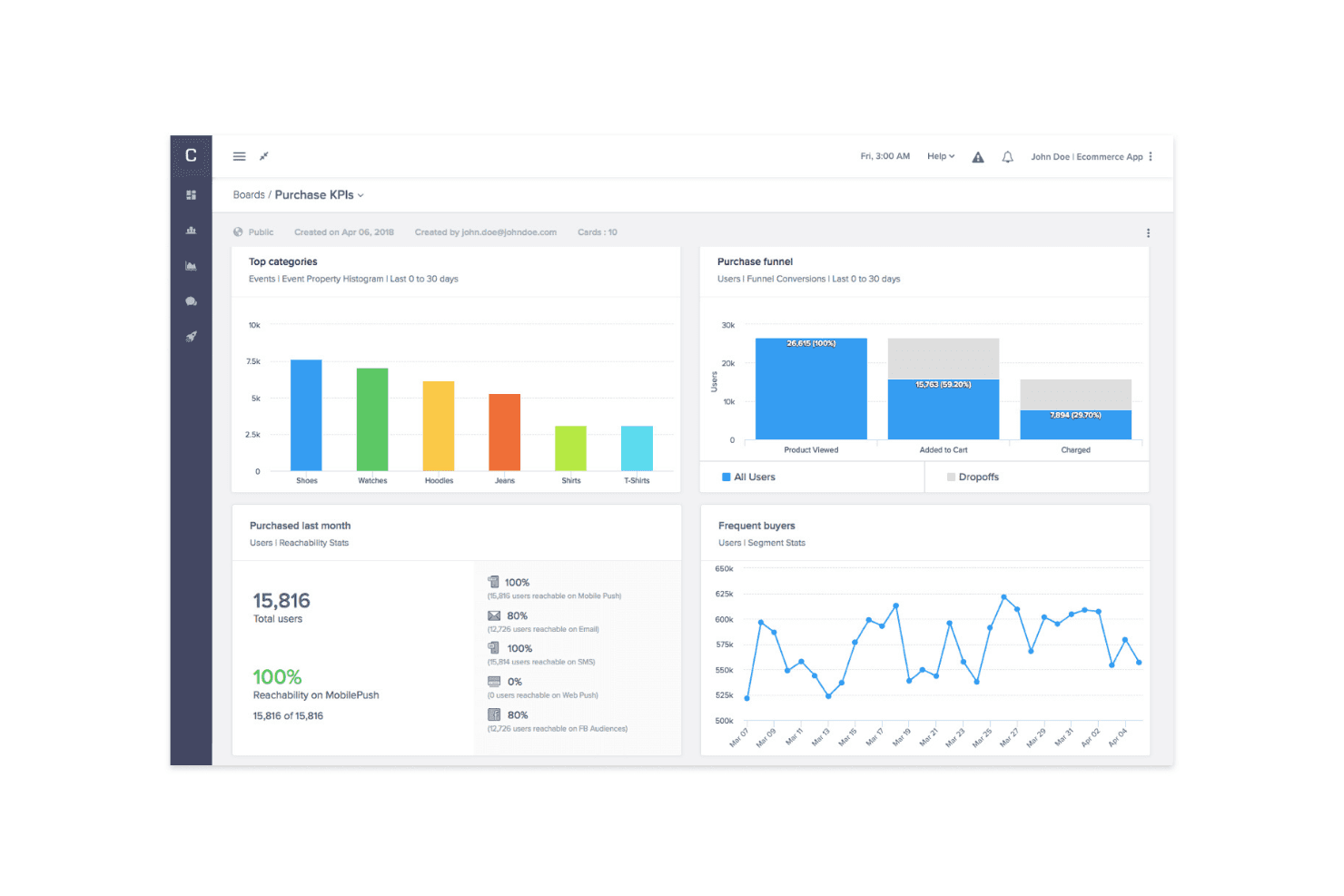
CleverTap's analytics and messaging tools enhance engagement and retention CleverTap is a customer engagement platform for product, marketing, and growth teams that combines behavioral analytics, segmentation, and personalization to improve retention across mobile and digital products.
Who Is CleverTap Best For?
CleverTap suits growth and product teams at mobile-first businesses that need behavioral segmentation and personalized customer engagement.
Why CleverTap Is a Good Mixpanel Alternative
I picked CleverTap because it connects product analytics with customer engagement value. I use behavioral analytics and real-time segmentation to identify users who abandon onboarding, then personalize in-app messages, push notifications, or email journeys. This helps product teams turn usage patterns into retention experiments and targeted actions.
CleverTap Key Features
- Funnel analysis: Track conversion across signup, onboarding, and purchase steps.
- Cohort analysis: Compare retention and behavior among user groups over time.
- Custom dashboards: Monitor selected product metrics in configurable reporting views.
- Data export APIs: Send CleverTap data to external analytics and reporting tools.
CleverTap Integrations
CleverTap has a native Salesforce CRM integration and documented integrations with Shopify, Segment, AppsFlyer OneLink, Amazon SES, SendGrid, Postmark, Mandrill, Gmail, and Google Apps, plus Zapier. It also provides REST APIs for custom integrations.
Pros and Cons
Pros:
- Offers granular segmentation for targeted journeys
- Strong mobile retention and lifecycle messaging
- Connects behavioral analytics with campaign orchestration
Cons:
- Interface can overwhelm new users
- Web application support remains limited
Learn more about CleverTap: Best for product adoption tracking
- Free plan + 30-day free trial + free demo available
- Pricing upon request
Visit WebsiteCustomer Rating:4.4/5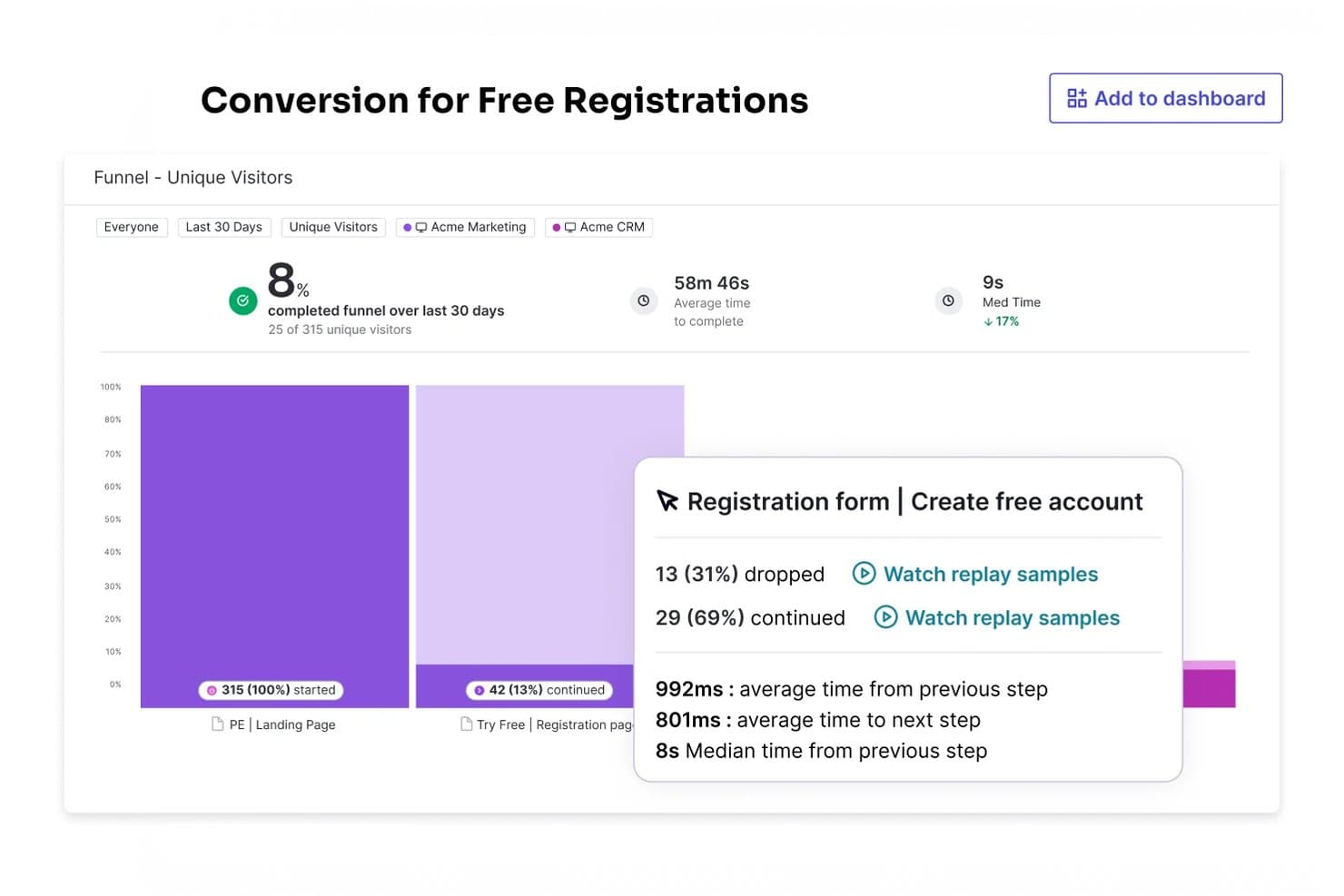
Pendo tracks funnel conversion rates to identify drop-off points. Pendo is a product experience platform for product teams that combines product analytics, in-app guidance, and feedback to help SaaS businesses understand user behavior and improve adoption.
Who Is Pendo Best For?
Pendo suits product teams at SaaS companies that need to measure feature adoption and guide users toward product value.
Why Pendo Is a Good Mixpanel Alternative
I picked Pendo because I can connect product adoption tracking with action. Its feature usage reports show where users drop off, while in-app guides target those users with contextual prompts. I use paths and retention analysis to see whether guidance moves customers toward valuable workflows.
Pendo Key Features
- Session replay: Review recorded user sessions to inspect product interactions.
- NPS surveys: Collect in-app Net Promoter Score responses from users.
- Data explorer: Build custom reports from product usage data.
- Integrations: Connect Pendo with tools such as Salesforce and Slack.
Pendo Integrations
Pendo offers integrations with Salesforce, Slack, HubSpot, Intercom, Jira, Marketo, and Okta through its integrations marketplace. It also provides an API, webhooks, and Zapier for custom integrations and workflow connections.
Pros and Cons
Pros:
- Combines session replay, surveys, and analytics
- Retroactive data reduces upfront event planning
- Connects adoption analytics with in-app guidance
Cons:
- Polls omit several useful question types
- Complex setup can undermine report accuracy
Learn more about Pendo: Best for non-linear customer journey analysis
- Free demo + 30-day free trial available
- From $999/month
Visit WebsiteCustomer Rating:4.4/5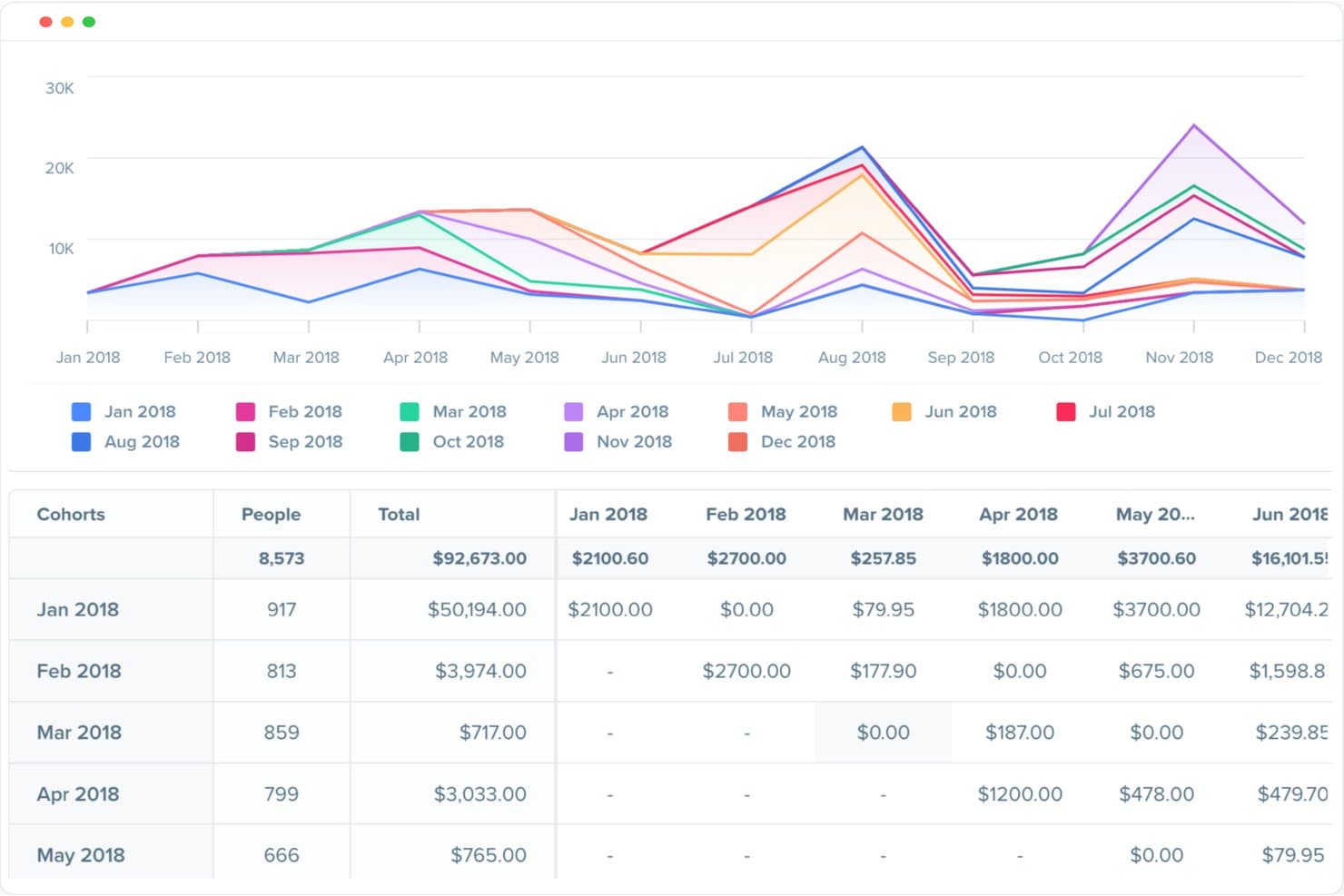
Woopra tracks revenue trends across customer cohorts over time. Woopra is a product analytics platform for SaaS and digital teams that connects customer behavior across touchpoints, helping product managers understand adoption, find friction, and improve retention.
Who Is Woopra Best For?
Product managers and growth teams that need to analyze cross-channel customer journeys, behavioral paths, and retention patterns across SaaS or digital products.
Why Woopra Is a Good Mixpanel Alternative
I picked Woopra because its non-linear customer journey analysis follows the many paths users take across a product. I use journey reports to compare routes to activation, conversion, or churn instead of forcing behavior into a single funnel. Retention and cohort analysis then show which paths lead to lasting product use.
Woopra Key Features
- Real-time analytics: Monitor incoming product events as they occur.
- Custom event tracking: Define and track user actions across your product.
- Customer profiles: View individual users’ activity and account details.
- Integrations: Connect Woopra with tools such as Salesforce and Segment.
Woopra Integrations
Woopra supports integrations with Salesforce and Segment for connecting customer data across product and business systems.
Pros and Cons
Pros:
- Retention views compare long-term behavior by cohort
- Individual profiles connect events to customer context
- Journey reports expose paths beyond linear funnels
Cons:
- Some reports require extra event configuration
- Dashboard loading can slow with large datasets
Learn more about Woopra: Best for non-linear funnel analysis
- Free demo available
- Pricing upon request
Visit WebsiteCustomer Rating:4.4/5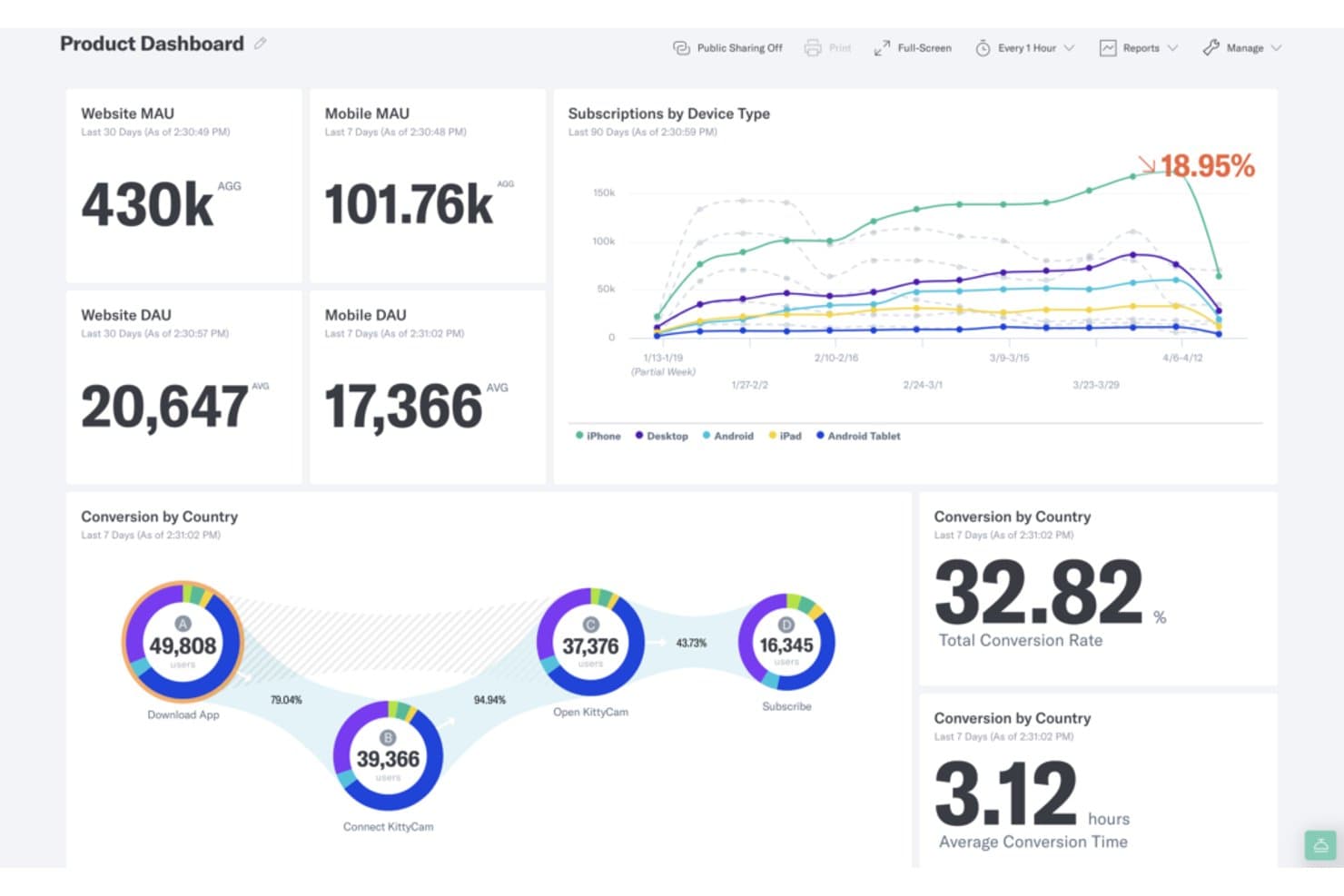
Indicative tracks MAU, DAU, subscriptions, and funnel conversions in one dashboard. Indicative is a product analytics platform for product, growth, and data teams that need to understand customer behavior, identify drop-off points, and improve experiences across complex user journeys.
Who Is Indicative Best For?
Indicative suits product and growth teams analyzing complex customer journeys with multiple paths, channels, and conversion points.
Why Indicative Is a Good Mixpanel Alternative
I picked Indicative because it handles non-linear funnel analysis better than tools built around fixed step sequences. Its Journey reports show the paths users take before conversion, while behavioral cohorts help compare customers who reach the same outcome through different routes. My team can use it to investigate onboarding paths, repeat purchases, and unexpected drop-off points.
Indicative Key Features
- Data warehouse connection: Connect Indicative directly to your existing warehouse.
- Custom dashboards: Arrange KPI widgets and visualizations in drag-and-drop dashboards.
- Scheduled reporting: Send dashboards as PDF reports at selected intervals.
- Public dashboards: Share embedded analytics with people outside Indicative.
Indicative Integrations
Indicative connects directly to data sources including Snowflake, Google BigQuery, Amazon Redshift, and Amazon S3. It also provides SDKs and an API for streaming events from websites, mobile apps, or servers, plus partner integrations for additional data sources.
Pros and Cons
Pros:
- Offers clear visualization choices
- Creates reports without SQL queries
- Maps non-linear customer paths
Cons:
- Dashboard updates can be infrequent
- Cohort analysis needs improvement
Learn more about Indicative: Best for autocapture without a tracking plan
- Free plan available
- Pricing upon request
Visit WebsiteCustomer Rating:4.3/5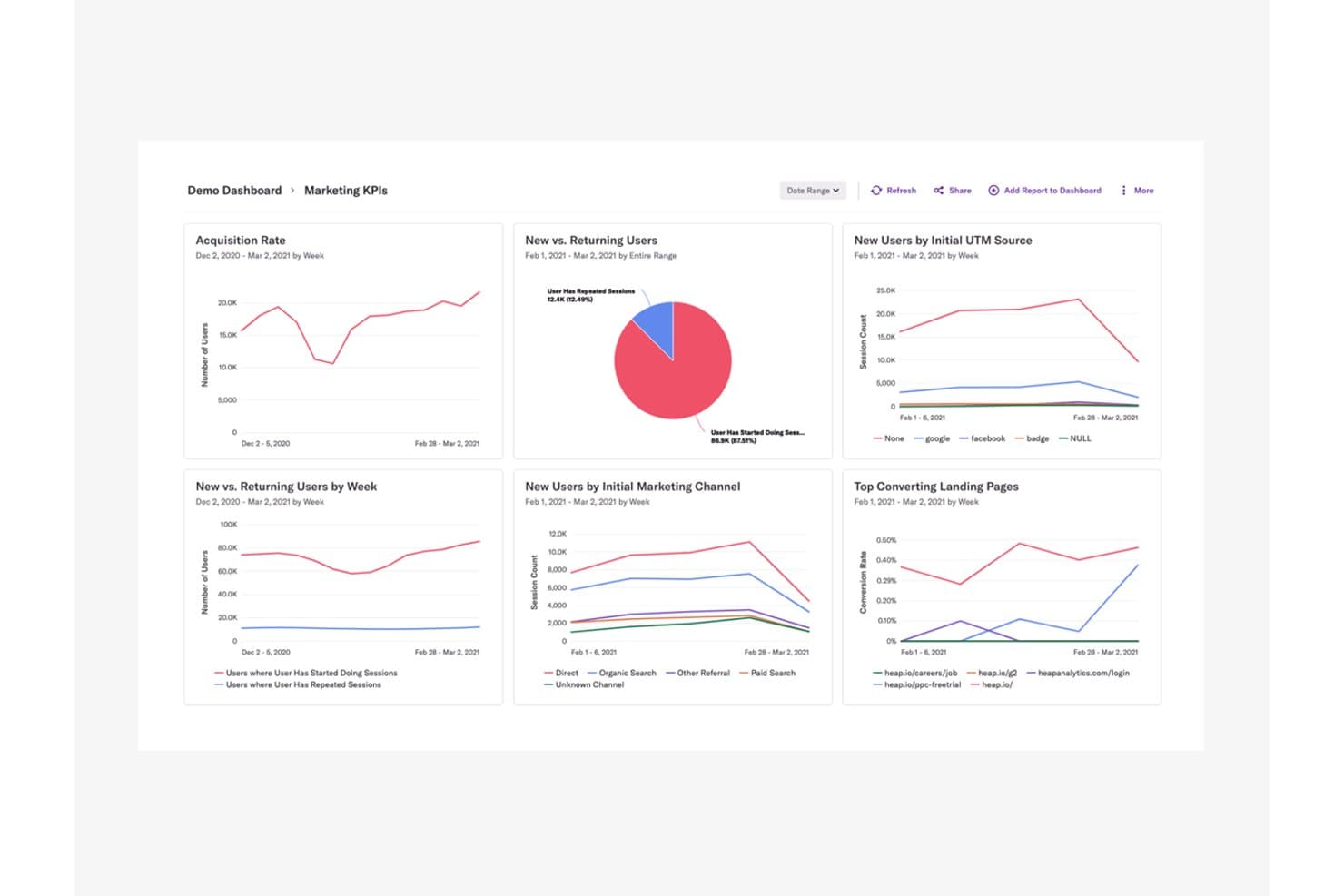
Heap centralizes marketing KPIs into a single analytics dashboard. Heap is a product analytics platform for product, UX, and growth teams that reveals user behavior, surfaces experience friction, and supports better roadmap decisions across digital products.
Who Is Heap (by Contentsquare) Best For?
Heap suits product and UX teams that need to study digital behavior without defining an event-tracking plan upfront.
Why Heap (by Contentsquare) Is a Good Mixpanel Alternative
I picked Heap (by Contentsquare) because it is best for autocapture without a tracking plan. I use its automatic event capture and retroactive analysis to investigate signup drop-offs or feature adoption after the fact. Session replay then helps my team connect behavioral patterns with the user experience behind them.
Heap (by Contentsquare) Key Features
- Funnel analysis: Compare conversion rates across defined steps.
- Path analysis: Explore the sequences users follow through your product.
- User segmentation: Build cohorts from behavioral and account attributes.
- Dashboards: Monitor product metrics in shareable visual reports.
Heap (by Contentsquare) Integrations
Heap documents built-in integrations with Salesforce, Intercom, Marketo, Iterable, and Snowflake through Heap Connect, plus a Contentsquare SDK integration for syncing mobile data. Its API supports custom event tracking and user identity management.
Pros and Cons
Pros:
- Session replay connects friction to behavior
- Retroactive event definitions recover unplanned questions
- Automatic capture avoids upfront event planning
Cons:
- Session replay and heatmaps require separate add-ons
- Advanced analyses take time to learn
Learn more about Heap (by Contentsquare): Best for behavior-linked revenue tracking
- 7-day free trial + free demo available
- From $99/month
Visit WebsiteCustomer Rating:4.1/5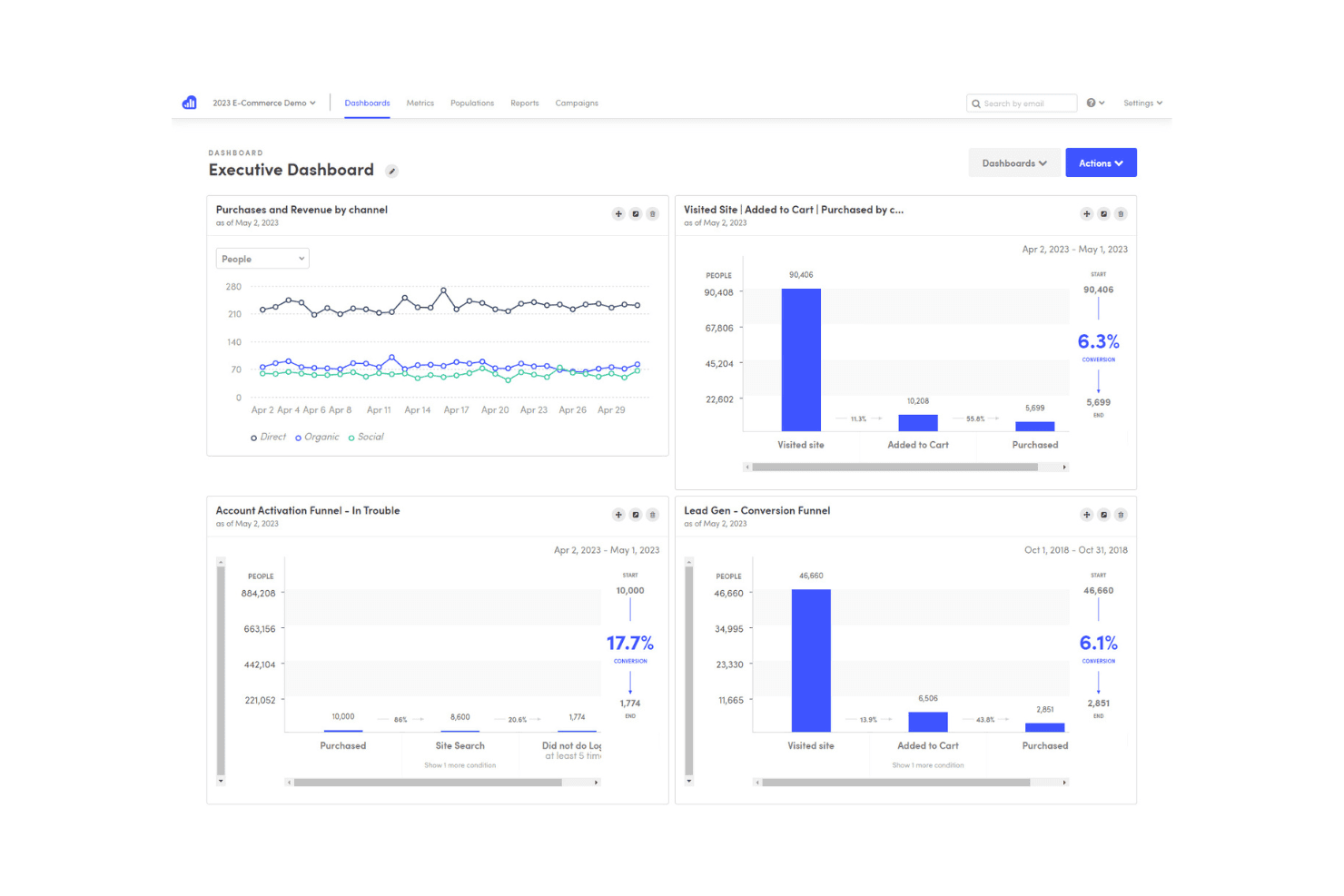
Kissmetrics tracks user behavior to help optimize marketing and conversions Kissmetrics is a product analytics platform for SaaS and ecommerce teams that connects customer behavior with conversion, retention, and revenue outcomes to guide better product decisions.
Who Is Kissmetrics Best For?
Kissmetrics suits SaaS and ecommerce product teams that need to connect user behavior with conversions, retention, and revenue.
Why Kissmetrics Is a Good Mixpanel Alternative
I rate Kissmetrics highly because it ties product behavior directly to revenue outcomes. I use customer-level tracking, funnel reports, and cohort analysis to see which actions lead to purchases, upgrades, or churn. For example, a SaaS team can compare revenue from users who adopt a feature, while an ecommerce team can trace repeat purchases back to specific journeys.
Kissmetrics Key Features
- Path reports: Map the actions users take before or after an event.
- A/B test reports: Compare experiment results across selected user groups.
- Behavioral segmentation: Filter reports by actions, properties, or attributes.
- Event tracking: Capture product interactions as customizable events.
Kissmetrics Integrations
Kissmetrics offers 30+ native integrations, including Salesforce, HubSpot, Marketo, Mailchimp, Shopify, WooCommerce, Magento, Recurly, Optimizely, and Segment, and connects with Zapier. It also provides a REST API for custom integrations, data imports, exports, webhooks, and reporting workflows.
Pros and Cons
Pros:
- Path reports reveal journeys around key events
- Detailed cohort comparisons support retention analysis
- Connects behaviors directly to revenue outcomes
Cons:
- Larger analyses can become slow and complicated
- Dashboard options and scheduled reports feel limited
Learn more about Kissmetrics: 10Best for developer-focused analytics
PostHog
- Free plan available
- Pricing upon request
Visit WebsiteCustomer Rating:4.5/5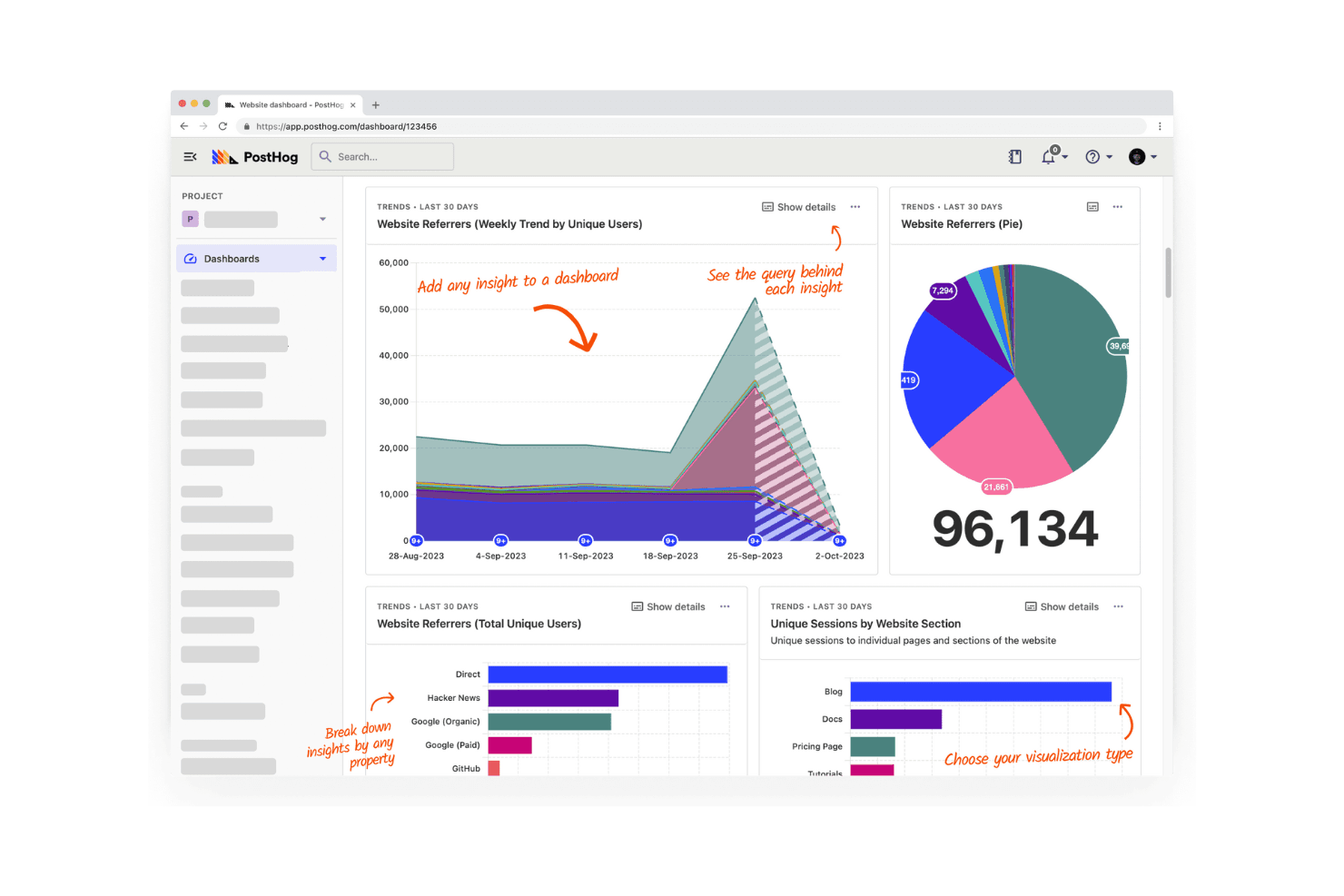
PostHog tracks and analyzes user behavior across web and mobile apps. PostHog is a product analytics platform for software teams that brings user behavior data, feature flags, session insights, and experimentation into one workspace, helping product managers connect technical work with customer outcomes.
Who Is PostHog Best For?
PostHog suits product and engineering teams at software companies that need analytics, feature flags, session insights, and experimentation in one workspace.
Why PostHog Is a Good Mixpanel Alternative
I rate PostHog highly as an option that’s Best for developer-focused analytics. I use its product analytics, session insights, and feature flags to connect event data with releases and user behavior. My team can test a new onboarding flow, inspect recordings, and roll back a feature from one developer-oriented workspace.
PostHog Key Features
- Funnel analysis: Measure conversion across user-defined steps.
- Cohort management: Group users by shared traits or behaviors.
- User paths: Visualize journeys through your product.
- In-product surveys: Collect feedback with targeted questionnaires.
PostHog Integrations
PostHog offers dozens of pre-configured destinations, including Slack, Customer.io, Zendesk, and Zapier. It also supports webhooks and an API for custom integrations.
Pros and Cons
Pros:
- Session replay supports behavioral debugging
- Feature flags connect analytics to releases
- Developer-oriented event instrumentation
Cons:
- Nontechnical teams may need onboarding support
- Data modeling requires technical setup
Learn more about PostHog:
Diğer Mixpanel Alternatifleri
İşte kısa listeme giremeyen ancak yine de göz atmaya değer bazı ek Mixpanel alternatifleri:
- 11Adobe AnalyticsBest for advanced attribution analysis
- 12StatsigBest for feature experimentation
- 13Google AnalyticsBest for free customer insights
- 14CountlyBest for self-hosted product analytics
- 15UXCamBest for mobile app analytics
- 16LogRocketBest for pairing session replay with funnel analysis
- 17Gainsight PXBest for B2B customer success analytics
- 18UserpilotBest for user onboarding journeys
- 19OpenPanelBest for open-source privacy
- 20mitzuBest for warehouse-native product analytics
How I Evaluate Mixpanel Alternatives
I split my evaluation into three parts. First, core functionality—the essentials carry the most weight: a tool must capture user interactions as structured events and visualize multi-step funnels with cohort retention. Second, I look for standout features like session replay or autocapture. Third, I consider pricing transparency and onboarding support.
Core Functionality (Table Stakes For This List)
When I'm selecting tools for my list, I score each one on a scale from 0 (does not offer the functionality) to 5 (excels in this area) for each core functionality listed below. I then convert the total into a percentage to help assess each tool's overall fit, with extra weight on any functionalities I’ve deemed essential.
- Event Tracking (Essential): I look for custom events, useful properties, and identity stitching across web and app, such as linking sign-up to later activation.
- Funnels & Retention (Essential): I assess whether teams can build multi-step funnels and cohort retention views to pinpoint where users drop off during onboarding.
- Segmentation & Cohorts: I check whether teams can save reusable behavioral and attribute-based cohorts for comparing feature adoption across user groups.
- Dashboards & Reporting: I look for shareable dashboards that combine relevant charts, so teams can monitor activation or retention without rebuilding reports.
- Data Integration & Export: I evaluate how teams can move behavioral data between the platform, a warehouse, and other tools through integrations or APIs.
- Self-Serve Queries: I consider whether non-technical teammates can build ad hoc behavioral queries without SQL, such as comparing conversion by acquisition source.
Once I have a list of tools that meet the criteria, I consider what sets each platform apart.
Differentiating Factors (What Sets Vendors Apart)
Here's how I compare and contrast different vendors:
Standout Features
Session replay is the first thing I check beyond core analytics. Watching a real user struggle through a checkout flow reveals friction that funnel charts alone can't explain. I also evaluate autocapture tracking, since teams without dedicated analytics engineers need click and pageview data logged automatically from day one. Feature flags round out my list—tools like PostHog tie rollout controls directly to behavioral data, so you can measure a new feature's impact without stitching together separate systems.
Beyond Features
Pricing predictability matters most at scale. I check whether a tool bills by tracked users or by event volume, since a viral feature launch can spike costs overnight on event-based plans. I also evaluate how each platform fits an existing stack—native connections to warehouses like Snowflake or BigQuery and CDPs like Segment determine whether your team inherits extra integration work. GDPR and data residency options round out my review, especially for teams shipping products across multiple regions.
Neden Bir Mixpanel Alternatifi Aramalısınız?
Mixpanel iyi bir ürün analitiği yazılımı seçeneği olsa da bazı kullanıcıların alternatif çözümler aramasının çeşitli nedenleri vardır. Aşağıdaki nedenlerden biriyle Mixpanel alternatifi arıyor olabilirsiniz…
- Daha esnek fiyatlandırma seçeneklerine ihtiyacınız vardır
- Ekibiniz daha basit bir işe alım sürecine ihtiyaç duyuyordur
- Veri gizliliği düzenlemelerine odaklanıyorsunuzdur
- Mevcut araçlarla daha iyi entegrasyon istiyorsunuzdur
- İşletmeniz daha gelişmiş özellikler gerektiriyordur
- Daha büyük veri hacimleri için desteğe ihtiyacınız vardır
Bunlardan herhangi biri size uyuyorsa doğru yere geldiniz. Listemde, Mixpanel ile ilgili bu zorluklarla karşılaşan ve alternatif çözümler arayan ekipler için daha uygun olan çeşitli ürün analitiği yazılımı seçenekleri bulunuyor.
Özellikler
Mixpanel'in bazı temel özellikleri aşağıda yer almaktadır; böylece alternatif çözümlerin sunduklarını karşılaştırıp değerlendirebilirsiniz:
- Etkinlik izleme: Kullanıcı davranışını anlamak için hem otomatik yakalama hem de manuel izleme yöntemleriyle kullanıcı etkileşimlerini yakalayın ve analiz edin.
- Kullanıcı segmentasyonu: Hedefli analiz ve pazarlama için kullanıcıları davranışlarına ve demografik özelliklerine göre belirleyin ve gruplandırın.
- Kohort analizi: Farklı grupların ürününüzle nasıl etkileşime girdiğini anlamak için kullanıcıların zaman içindeki elde tutulma ve etkileşim düzeylerini analiz edin.
- Dönüşüm hunisi analizi: Kullanıcı yolculuğunun verimliliğini artırmak için kullanıcıların dönüşüm yollarını görselleştirin ve optimize edin.
- Elde tutma raporları: Kullanıcıları zaman içinde ne ölçüde elde tuttuğunuzu izleyin ve kullanıcıların elde tutulmasına katkıda bulunan faktörleri belirleyin.
- Gerçek zamanlı analiz: Ekibiniz için hızlı ve bilinçli kararlar almak üzere dakikası dakikasına güncel verilere erişin.
- Özel panolar: Ekibinizin ihtiyaçlarıyla en alakalı verileri görüntülemek için kişiselleştirilmiş panolar oluşturun.
- Entegrasyonlar: Kapsamlı veri yönetimi için Shopify ve Stripe gibi platformlara bağlanın.
- Güvenlik ve gizlilik: Kullanıcı verilerinin güvenliğini sağlamak için erişim denetimleri ve veri koruma önlemleri uygulayın.
- Yapay zekâ ile metin analizi: Veri analizi yeteneklerinizi geliştirerek metin verilerini sıralamak ve kategorilere ayırmak için yapay zekâdan yararlanın.