

Web sitesi A/B testi araçları, gerçek kullanıcılarla hangisinin daha iyi performans gösterdiğini görmek için web sitenizin farklı sürümlerini karşılaştırmanıza olanak tanır. En iyi web sitesi A/B testi araçlarını arıyorsanız muhtemelen dönüşüm oranlarını artırmayı, tasarım değişikliklerini doğrulamayı veya işletme sonuçlarınızı etkileyen veriye dayalı kararlar almayı hedefliyorsunuzdur.
Her biri analiz, kişiselleştirme veya iş akışı entegrasyonu için farklı özellikler sunduğundan, bu kadar çok seçenek arasından doğru aracı seçmek zor olabilir. Bu liste, önde gelen çözümleri hızlıca değerlendirmenize, her birini farklı kılan özellikleri anlamanıza ve ekibinizin deneme ihtiyaçlarına en uygun seçeneği bulmanıza yardımcı olacaktır.
Why Trust Our Software Recommendations
6,700+
Reviews
20
Industry experts
16+
Evaluation factors
14
Years
Our team has been testing and reviewing software since 2012. As product managers ourselves, we know how difficult—and important—it is to choose the right software.
For this guide, we evaluated tools using hands-on testing and independent research, scoring tools using our selection criteria.
Our reviews reflect our human editorial judgment, not a sales pitch.
Expert reviewers:
- Andrew LumbySenior TPM
- Cristiano ValimSenior UI/UX Lead


Web Sitesi A/B Testi Araçları Karşılaştırma Tablosu
Aşağıdaki tablo, en iyi web sitesi A/B testi araçları seçimlerimdeki fiyatlandırma ayrıntılarını karşılaştırmaktadır.
Score legend (out of 5)
- Excellent4.5–5
- Good4–4.4
- Average3–3.9
- Below average2–2.9
- Poor1–1.9
Sorted by: Default
| Tool | Starting Price | Website | |||||||
|---|---|---|---|---|---|---|---|---|---|
Best for statistical rigor across test types | 4.0 out of 5 | 4 | 5 | 5 | 3 | 3 | 4 | $420/month 15-day free trial + free demo available | Book Demo |
Best for actionable cohort-based insights | 4.0 out of 5 | 4 | 5 | 4 | 3 | 4 | 4 | Pricing upon request Free plan + free demo available | Website |
Best for ecommerce growth experimentation | 3.8 out of 5 | 4 | 4 | 3 | 3 | 4 | 5 | $350/100k users/month 30-day free trial + free demo available | Website |
Best for enterprise-level personalization | 4.2 out of 5 | 3 | 5 | 5 | 4 | 4 | 4 | Pricing upon request Free demo available | Website |
Best for engineering-centric experimentation workflows | 3.7 out of 5 | 2 | 5 | 4 | 3 | 4 | 4 | $150/month Free plan available | Website |
Best for AI-driven test ideation at scale | 4.2 out of 5 | 4 | 5 | 4 | 4 | 4 | 4 | $495/month 30-day free trial + free demo available | Website |
Best for marketing-led emotion-based targeting | 4.0 out of 5 | 4 | 4 | 4 | 4 | 4 | 4 | Pricing upon request 30-day free trial + demo available | Website |
Best for all-in-one behavioral and test analytics | 4.0 out of 5 | 4 | 5 | 4 | 3 | 4 | 4 | Pricing upon request 30-day free trial + free demo available | Website |
Best for open-source warehouse-native experimentation | 4.0 out of 5 | 3 | 5 | 5 | 3 | 4 | 4 | $40/user/month Free plan + free demo available | Website |
Best for multivariate testing at scale | 4.0 out of 5 | 4 | 5 | 4 | 3 | 4 | 4 | Pricing upon request Free demo available | Website |


Web Sitesi A/B Testi Araçları İncelemeleri
Aşağıda, kısa listeme giren web sitesi A/B testi araçlarının ayrıntılı özetlerini bulabilirsiniz. İncelemelerim, size en uygun seçeneği bulmanıza yardımcı olmak için her platformun özelliklerine, en iyi kullanım alanlarına ve entegrasyonlarına ayrıntılı bir bakış sunmaktadır.
 Best for statistical rigor across test types
- 15-day free trial + free demo available
- From $420/month (billed annually)
Visit WebsiteCustomer Rating:4.6/5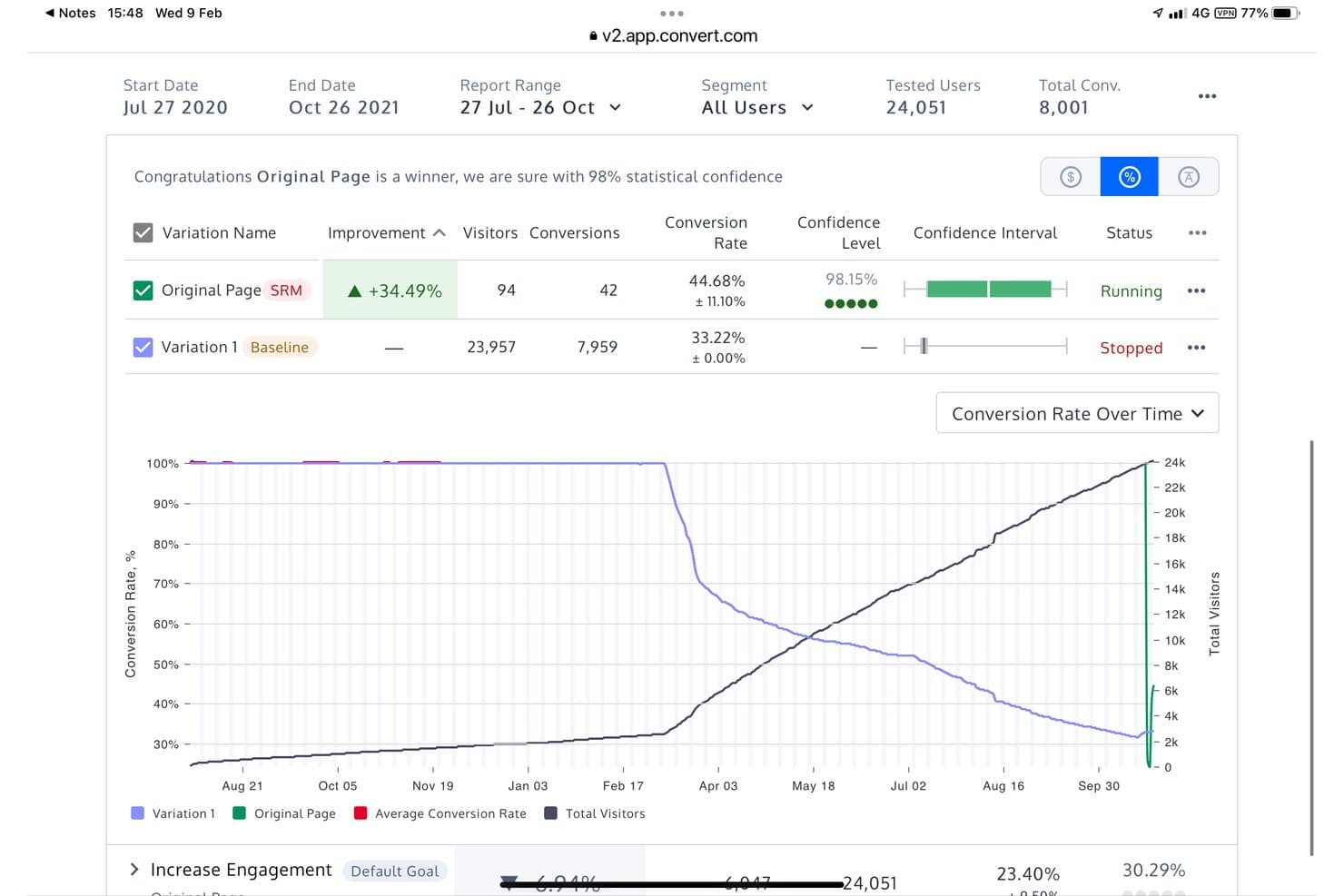
Convert Experiences supports both Frequentist and Bayesian analysis. Convert Experiences is a website A/B testing platform that supports A/B, split URL, multivariate, and multi-page experiments through a visual editor and code editor, with a choice of Frequentist, Bayesian, and sequential statistical engines, plus server-side testing and feature flags via Full Stack.
Who Is Convert Experiences Best For?
Convert Experiences is a strong fit for CRO specialists and growth marketers who need flexibility in how they evaluate test results—whether that means Frequentist, Bayesian, or sequential testing.
Why I Picked Convert Experiences
Convert Experiences earns its spot on my shortlist because no other tool at this price point gives you three fully functional statistical engines: Frequentist, Bayesian, and sequential testing. I particularly like the sequential engine, which uses Asymptotic Confidence Sequences so you can check results as they come in without inflating false positives. Pair that with multi-armed bandit auto-allocation using Thompson Sampling, and you've got a setup that's genuinely rigorous whether you're running a careful hypothesis test or optimizing traffic in real time.
Convert Experiences Key Features
- Multi-armed bandit auto-allocation: Automatically shifts traffic toward better-performing variants using Thompson Sampling, Epsilon-Greedy, or UCB strategies.
- Sample ratio mismatch (SRM) checks: Runs a chi-square test at 99% confidence to detect imbalances in how visitors are distributed across variants.
- Convert Signals® session replay: Flags sessions showing friction signals—like rage clicks, hesitation, and abandonment—broken down by variation.
- Full Stack SDKs: Lets you run server-side experiments and manage feature flags across web and mobile apps using six language SDKs.
Convert Experiences Integrations
Convert Experiences offers 90+ integrations, including GA4, Adobe Analytics, Amplitude, Segment, Tealium, HubSpot, Salesforce, Shopify, Hotjar, and Microsoft Clarity. REST API access and webhooks support custom data connections.
Pros and Cons
Pros:
- Flicker-free delivery protects experiment validity
- Bandit allocation adapts traffic toward better variants
- Three statistical engines support rigorous test decisions
Cons:
- Advanced experiments require technical implementation skills
- Segmentation reports limit cross-variant analysis
Learn more about Convert Experiences: Best for actionable cohort-based insights
- Free plan + free demo available
- Pricing upon request
Visit WebsiteCustomer Rating:4.5/5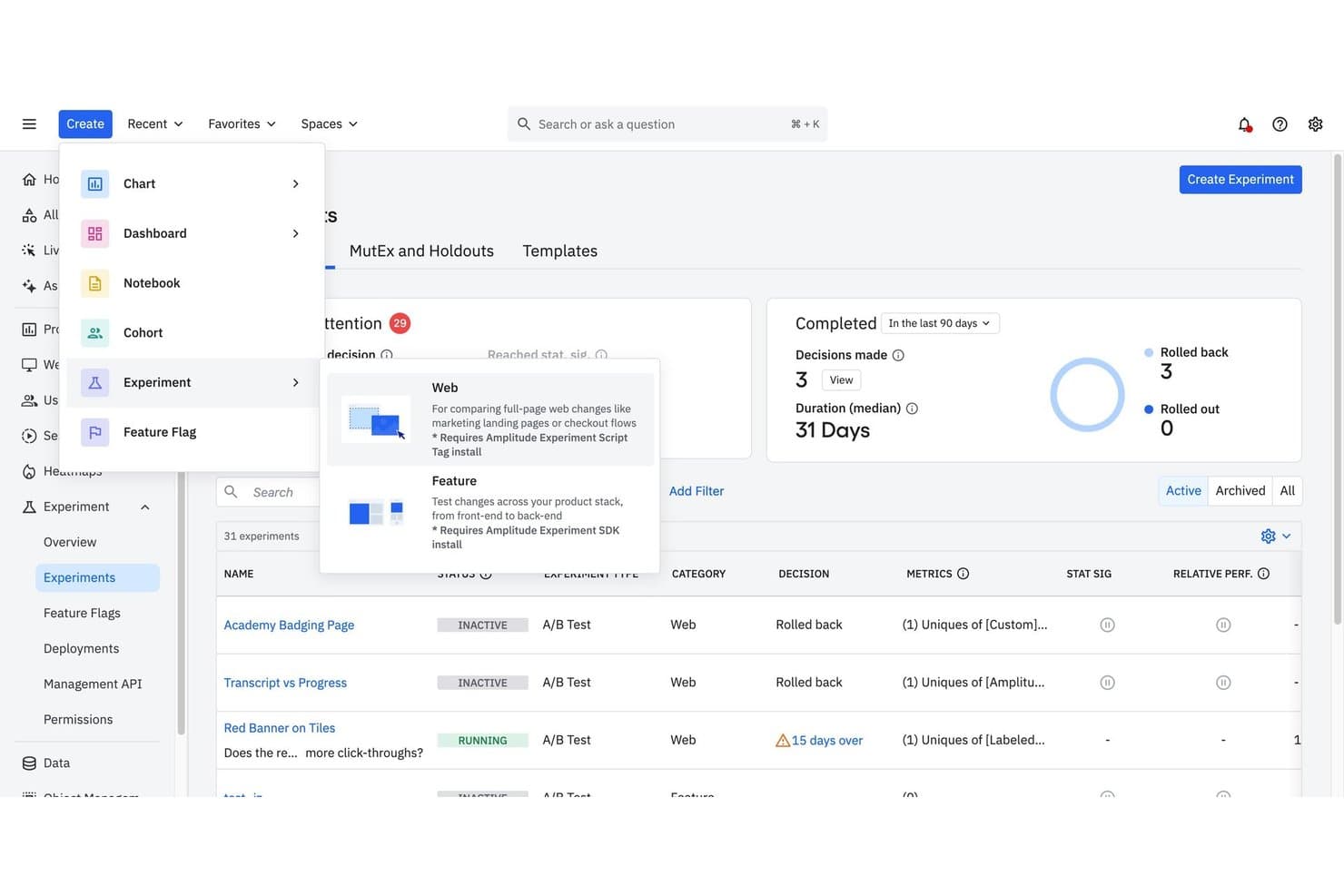
Amplitude supports running and managing A/B test experiments across web and feature types. Amplitude is an analytics-native A/B testing platform that combines a no-code visual editor for web experiments with server-side feature experimentation, behavioral cohort targeting, and built-in session replay and heatmaps.
Who Is Amplitude Best For?
Amplitude is a strong fit for product and growth teams that already live inside Amplitude Analytics and want experimentation tied directly to behavioral cohorts and event data.
Why I Picked Amplitude
Amplitude earns its spot on my shortlist because its behavioral cohort targeting ties directly into the same analytics data powering your broader product insights. I love that you can target an experiment to a cohort built from real event sequences, like users who triggered a specific funnel step in the last 30 days, without any data stitching. The statistical engine backs that up with sequential testing, CUPED variance reduction, and SRM checks baked in, so results you act on are actually trustworthy.
Amplitude Key Features
- Visual experiment builder: A no-code editor lets you select, edit, move, hide, or restyle any page element directly without touching code.
- AI Stylizer: A built-in AI tool that accepts natural-language prompts to rewrite copy, apply brand styling, and generate multiple variants inside the editor.
- URL redirect variants: Lets you run split-URL and landing page tests, with query parameter carryover and built-in SEO guidance.
- Session Replay and Heatmaps: Native qualitative tools that let you filter replays and heatmaps by experiment group to understand why a variant performed the way it did.
Amplitude Integrations
Amplitude documents 159+ integrations, including Segment, Tealium, HubSpot, GA4, BigQuery, LaunchDarkly, and Optimizely. Its cohort, webhook, and CI/CD APIs support custom data connections and experiment rollouts.
Pros and Cons
Pros:
- Session replays explain why variants convert
- Statistical safeguards support trustworthy experiment decisions
- Cohort targeting connects directly to analytics
Cons:
- Some reviewers report slow support responses
- Closed shadow DOM limits visual edits
Learn more about Amplitude: Best for ecommerce growth experimentation
- 30-day free trial + free demo available
- From $350/100k users/month
Visit WebsiteCustomer Rating:4.4/5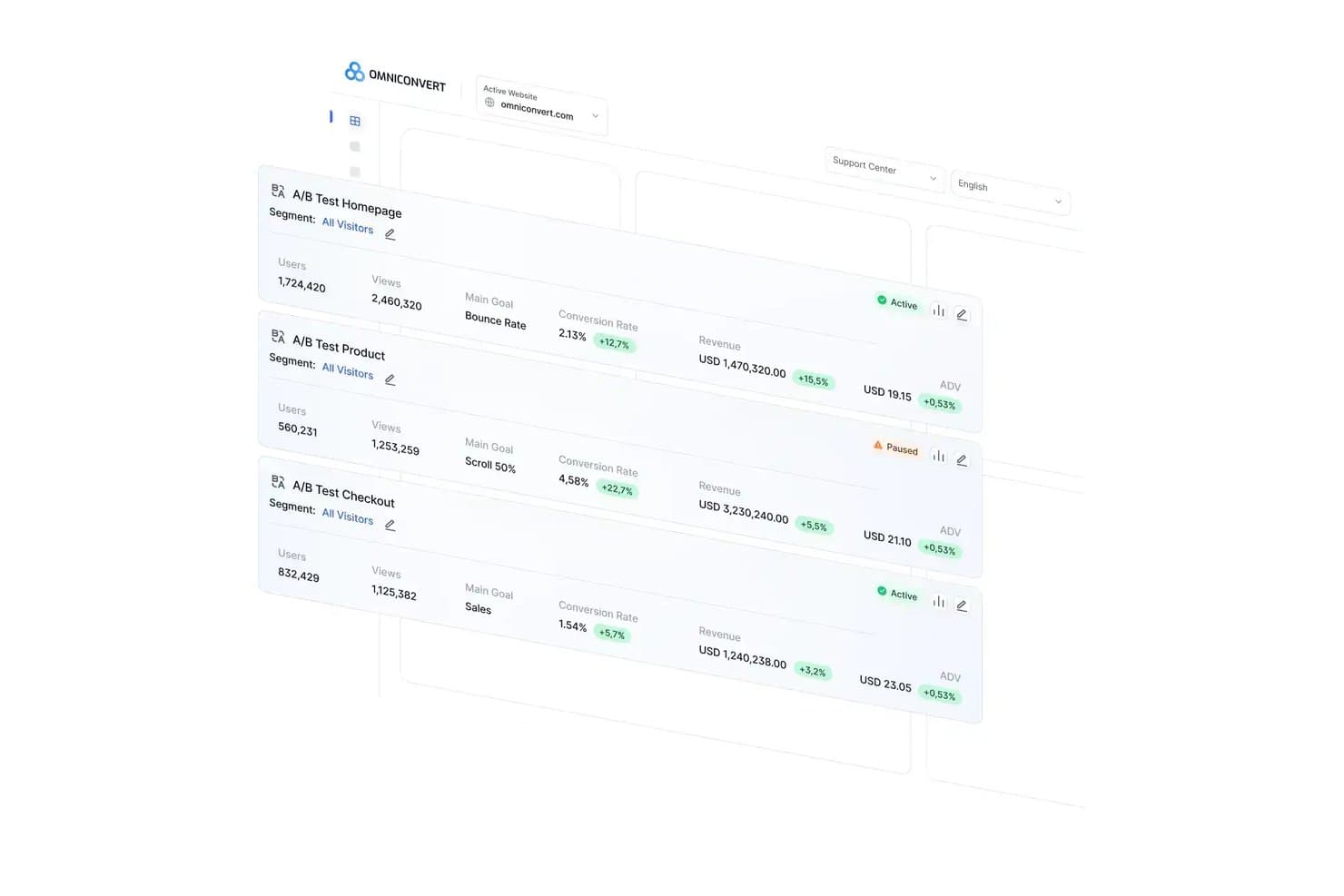
Omniconvert tracks A/B test performance across key metrics in one dashboard. Omniconvert Explore is a website A/B testing and CRO platform built for ecommerce teams, offering client-side, server-side, and split URL testing alongside multivariate experiments, 40+ segmentation parameters, and dual Bayesian/Frequentist statistical engines.
Who Is Omniconvert Best For?
Omniconvert is a strong fit for ecommerce teams that need revenue-focused experimentation, from CRO specialists running segmented tests to growth marketers optimizing checkout and post-purchase flows.
Why I Picked Omniconvert
I've included Omniconvert in my top picks because it's built specifically for ecommerce growth experimentation in a way that most A/B testing tools aren't. Its 40+ segmentation parameters let you target by RFM score, CLV, and cart value, so you can run a test on high-value returning customers at checkout without touching your general traffic. I also rate its dual Bayesian and Frequentist statistical engines highly, since you can run both on the same test and see chance-to-win metrics alongside classical significance.
Omniconvert Key Features
- AI prompt-to-code builder: Describe a variation in plain English and Omniconvert writes, checks, and previews the experiment code automatically.
- Stacked testing: The winning variation becomes the new control without any developer involvement, so you can run sequential tests continuously.
- Mutually exclusive experiment groups: Assign visitors to separate, non-overlapping test groups to prevent experiments from interfering with each other's results.
- Server-side testing: Run experiments on pricing logic, checkout flows, and algorithms via a PHP SDK, with Redis caching and full goal tracking.
Omniconvert Integrations
Omniconvert has native integrations with GA4, Google Tag Manager, Shopify, Magento, BigCommerce, Klaviyo, Salesforce, and Hotjar. It also offers a REST API for custom integrations and Zapier connectivity.
Pros and Cons
Pros:
- Granular RFM and CLV audience targeting
- Bayesian and Frequentist results support cross-checking
- Revenue and AOV reporting guides ecommerce decisions
Cons:
- No native heatmaps or session replay
- Complex custom campaigns can become buggy
Learn more about Omniconvert: Best for enterprise-level personalization
- Free demo available
- Pricing upon request
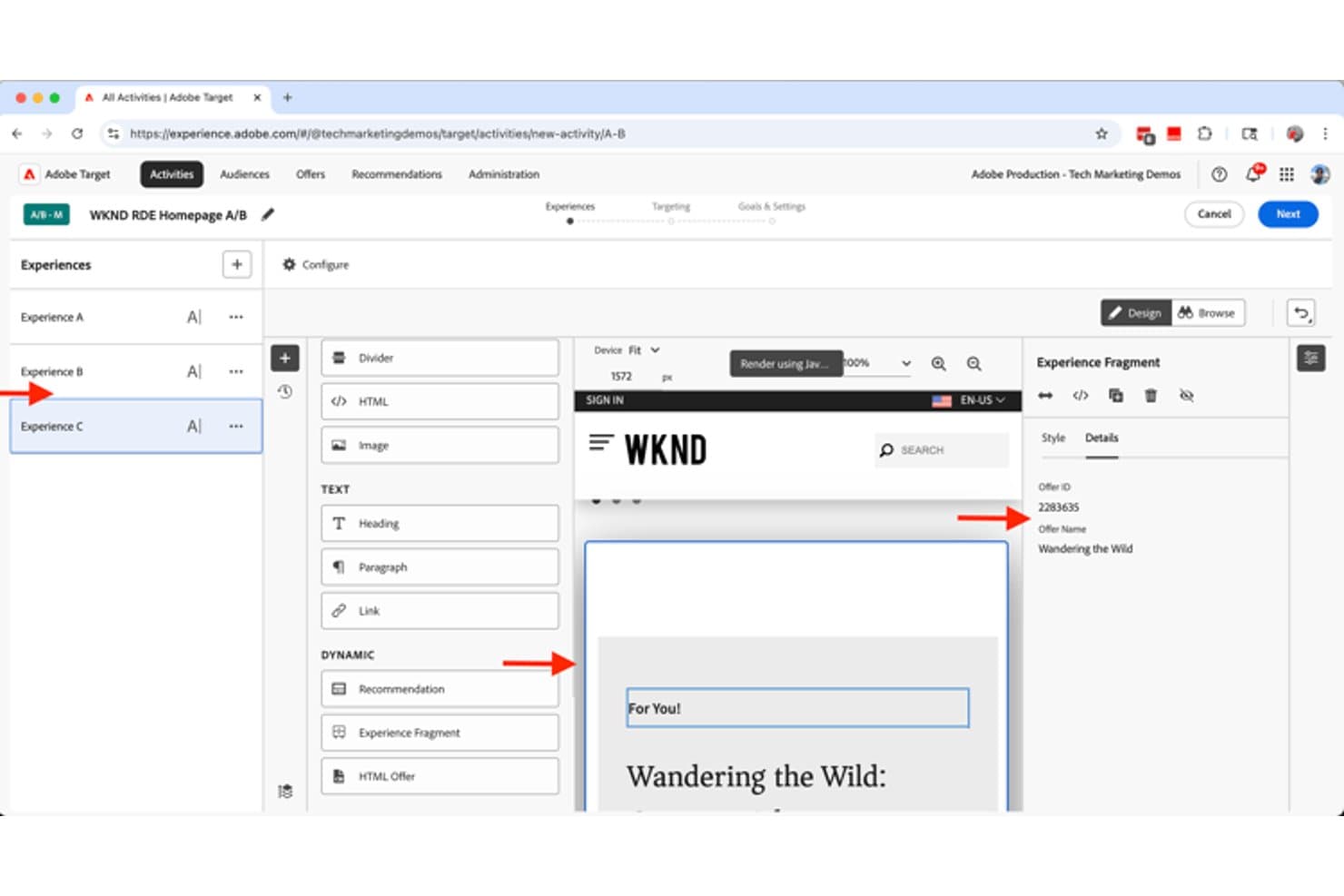
Adobe Target lets users build A/B test experiences with dynamic content fragments. Adobe Target is an enterprise A/B testing and personalization platform that supports A/B/n, multivariate, and multipage testing alongside AI-driven traffic allocation, audience targeting, and server-side feature-flag experimentation.
Who Is Adobe Target Best For?
Adobe Target is a strong fit for large enterprises with dedicated implementation teams running high-volume, cross-channel personalization programs.
Why I Picked Adobe Target
Adobe Target earns its spot on my shortlist because its AI-driven personalization goes beyond standard A/B testing. I'm particularly impressed by Auto-Target, which uses machine learning to serve the best experience to each individual visitor in real time, and by Automated Personalization, which builds separate models per visitor profile. The Experimentation Accelerator also analyzes past test results to generate prioritized test ideas automatically, which speeds up planning significantly.
Adobe Target Key Features
- Multipage activity testing: Build and test experiences across multiple connected pages, like homepage to category to product, within a single activity.
- Auto-Allocate traffic control: Automatically shifts traffic toward better-performing variations every two hours using a multi-armed bandit approach.
- Dual statistical methods: Applies Bayesian analysis for conversion goals and Welch's t-test for revenue and engagement metrics, with continuous monitoring and no early-stopping penalty.
- Enterprise user permissions: Restrict view, edit, approve, and publish rights by region, environment, or channel through role-based Product Profiles.
Adobe Target Integrations
Adobe Target offers native integrations with Adobe Analytics, Customer Journey Analytics, Real-Time CDP, Adobe Journey Optimizer, Adobe Experience Manager, and Audience Manager. It also supports custom integrations through its APIs, at.js, Web SDK, and Node.js and Java SDKs.
Pros and Cons
Pros:
- Multipage funnel testing supports complex journeys
- Auto-Allocate shifts traffic toward winners
- Bayesian and frequentist result analysis
Cons:
- SPA experiments require technical implementation work
- Visual editor struggles with complex changes
Learn more about Adobe Target : Best for engineering-centric experimentation workflows
- Free plan available
- From $150/month
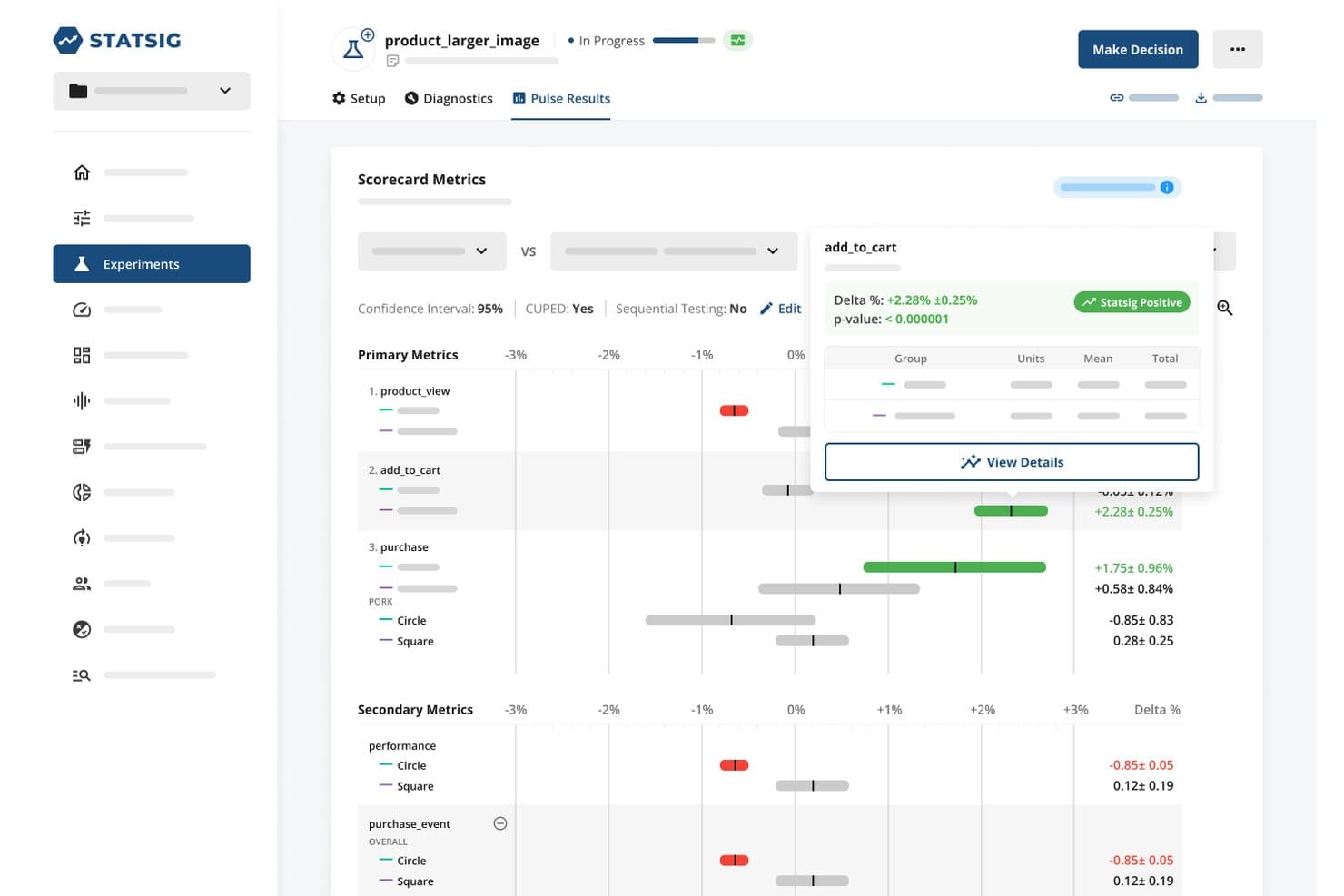
Statsig lets users analyze A/B test metrics with statistical significance at a glance. Statsig is a feature flagging and experimentation platform that combines A/B testing, server-side and client-side experiments, audience targeting, a statistical analysis engine, and built-in session replay and product analytics.
Who Is Statsig Best For?
Statsig is a strong fit for product and engineering teams that want to run rigorous, code-first experiments alongside feature flagging in a single platform.
Why I Picked Statsig
I picked Statsig as one of the best because its statistical engine is genuinely unlike what most A/B testing tools offer. You get Bayesian and frequentist analysis in the same platform, plus CUPED variance reduction, sequential testing, and automatic detection of heterogeneous effects across segments. I've found that kind of depth invaluable when running server-side experiments on checkout flows or feature rollouts where a weak stats layer leads to bad ship decisions.
Statsig Key Features
- Audience targeting rules: Layer targeting conditions by URL pattern, country, device type, browser, and custom user attributes to control exactly who sees each experiment.
- Traffic allocation and layers: Assign percentage-based rollouts and use experiment layers to prevent concurrent tests from interfering with each other.
- Autocapture for web events: Automatically capture clicks, page views, and Core Web Vitals without custom instrumentation, then use them directly as experiment metrics.
- Session replay with experiment context: Replay individual user sessions tagged with which experiment variant they were exposed to, so you can investigate unexpected results visually.
Statsig Integrations
Statsig offers documented integrations with Amplitude, Mixpanel, Google Analytics, Segment, Snowflake, BigQuery, Datadog, Jira, Slack, and GitHub. It also supports a data export API and webhooks for custom connectivity.
Pros and Cons
Pros:
- Flags connect rollouts with website experiments
- CUPED reduces variance in noisy tests
- Deep Bayesian and frequentist experiment analysis
Cons:
- SPA targeting still requires JavaScript configuration
- Visual Editor supports only basic page edits
Learn more about Statsig: Best for AI-driven test ideation at scale
- 30-day free trial + free demo available
- From $495/month
Visit WebsiteCustomer Rating:4.7/5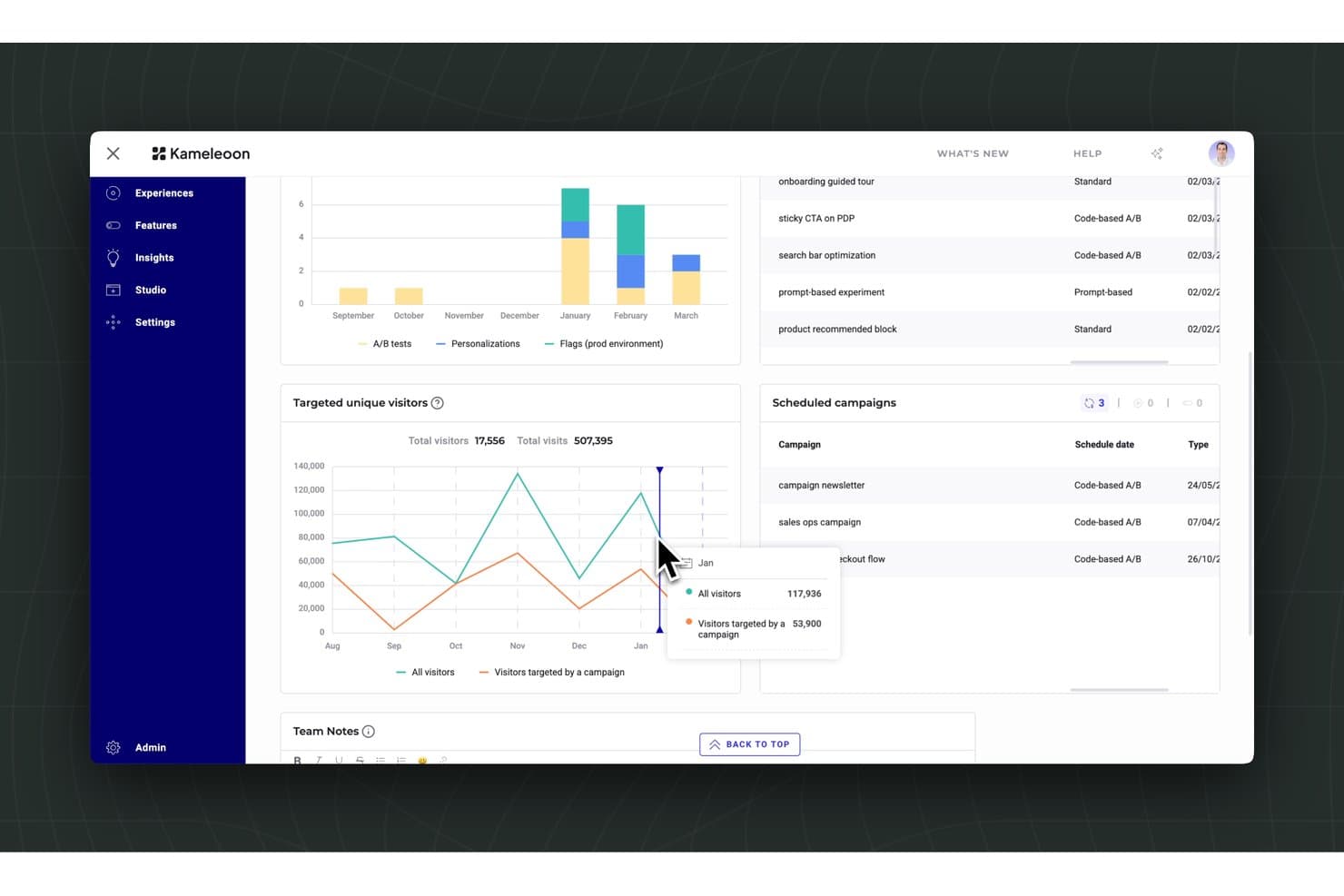
Kameleoon tracks visitor targeting and scheduled A/B campaign performance. Kameleoon is a website A/B testing and experimentation platform that combines an AI-driven prompt-based builder, a visual editor, server-side testing, feature flags, and audience personalization into a single tool.
Who Is Kameleoon Best For?
Kameleoon is a strong fit for product and growth teams at mid-market to enterprise companies that need to run high-volume experiments across web and product surfaces without bottlenecking developers.
Why I Picked Kameleoon
Kameleoon earns its spot on my shortlist because its Prompt-Based Experimentation (PBX) genuinely changes how fast you can get tests live. I love that the Ideate agent pulls from over 25,000 historical experiments to suggest ranked test ideas, each with a confidence score and projected uplift, so you're not starting from a blank page. The Build agent then reads your entire site, not just the current page, and turns a plain-language description into a live variation in minutes.
Kameleoon Key Features
- Statistical engine: Combines Bayesian and Frequentist methods, CUPED variance reduction, sequential testing, and automatic SRM detection in one built-in results engine.
- Multi-page experiment type: Tests full visitor journeys—like checkout flows or multi-step signups—as a single experiment, with flexible URL and element-based page targeting.
- Audience segmentation builder: Lets you build segments from 40+ behavioral and contextual criteria, with support for CDP and data warehouse sync for richer targeting.
- Feature flags with rollback: Supports percentage-based rollouts across unlimited environments, with automatic rollback triggered when KPIs drop below set thresholds.
Kameleoon Integrations
Kameleoon offers 100+ native integrations, including Google Analytics, Adobe Analytics, Amplitude, Contentsquare, Hotjar, Segment, Snowflake, Google Tag Manager, and Figma. JavaScript, Data, Automation, and MCP APIs support custom integrations and developer workflows.
Pros and Cons
Pros:
- Statistical safeguards catch SRM and test interactions
- PBX creates complex variations from prompts
- AI ranks test ideas with confidence scores
Cons:
- Native heatmaps and session replay are absent
- Graphic editor challenges nontechnical optimization teams
Learn more about Kameleoon: Best for marketing-led emotion-based targeting
- 30-day free trial + demo available
- Pricing upon request
Visit WebsiteCustomer Rating:4.5/5
AB Tasty supports enterprise experimentation with multivariate and server-side testing. AB Tasty is a website A/B testing and experimentation platform that combines a visual editor, multipage and multivariate testing, EmotionsAI-powered audience segmentation, and server-side feature flags in one tool.
Who Is AB Tasty Best For?
AB Tasty is a strong fit for growth marketers and CRO teams who want to run emotion-based audience targeting and personalization campaigns without relying heavily on developers.
Why I Picked AB Tasty
I've included AB Tasty in my top picks because its EmotionsAI segmentation does something most A/B testing tools can't: it groups visitors by emotional state, like frustration, enthusiasm, or hesitation, and lets you serve different test variations to each segment. Pair that with multipage campaign testing across full funnel journeys (home to product page to checkout) and you get experiments that reflect how real buyers actually behave. I especially like that Bayesian stats with Chance to Win and automatic Bonferroni correction are built in, so results from multi-variation emotion-targeted tests stay statistically sound.
AB Tasty Key Features
- Visual WYSIWYG editor: A no-code editor lets you modify copy, layouts, CTAs, and page elements across A/B, split, multipage, and multivariate campaign types without developer support.
- Dynamic traffic allocation: A multi-armed bandit option automatically shifts new traffic toward the best-performing variation based on a primary conversion goal.
- Guardrail metrics: Pro and above let you define guardrail metrics that flag when a winning variation is hurting a secondary KPI, keeping rollout decisions grounded in full-funnel data.
- Server-side feature flags: Open-source SDKs across 10+ languages enable sub-millisecond flag evaluation, with OpenFeature compliance and support for staged rollouts and auto-killswitches.
AB Tasty Integrations
AB Tasty offers native integrations with GA4, Adobe Analytics, Segment, BigQuery, Snowflake, Shopify, Salesforce Commerce Cloud, OneTrust, Jira, and Slack. Enterprise plans include REST API access for custom integrations, and Zapier is also supported.
Pros and Cons
Pros:
- Multipage testing follows complete buyer journeys
- Visual widgets speed campaign launches
- Emotion-based segments sharpen audience-specific experiments
Cons:
- Client-side rendering can cause visible flicker
- Advanced controls require higher-tier plans
Learn more about AB Tasty: 8Best for all-in-one behavioral and test analytics
VWO
- 30-day free trial + free demo available
- Pricing upon request
Visit WebsiteCustomer Rating:4.3/5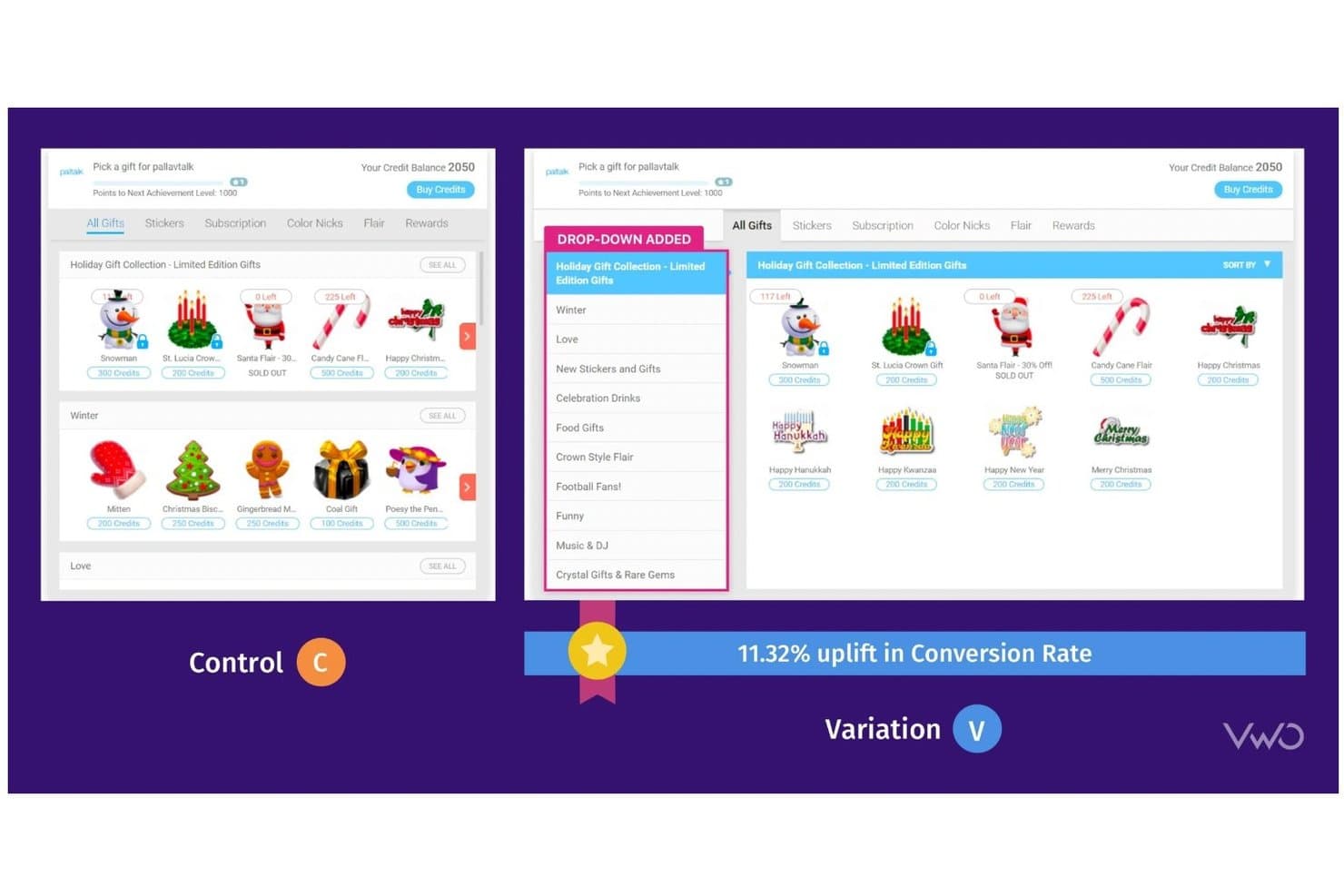
VWO lets users A/B test UI changes to boost conversion rates. VWO is a digital experience optimization platform that combines A/B, split URL, and multivariate testing with behavioral analytics tools like heatmaps, session recordings, and surveys, alongside server-side feature experimentation and AI-assisted test ideation.
Who Is VWO Best For?
VWO is a strong fit for mid-market and enterprise product and growth teams that want testing, behavioral analytics, and feature experimentation in a single platform.
Why I Picked VWO
VWO earns its spot on my shortlist because it's the only tool that pulls behavioral analytics and experiment data into one place, so I'm not juggling Hotjar alongside a separate testing platform. I particularly like SmartStats, VWO's Bayesian engine, which applies guardrail metrics and SRM detection to automatically flag unhealthy tests before bad data drives a bad call. The Wingz AI layer adds another dimension I find genuinely useful: it reads session recordings, heatmaps, and funnel data to surface hypotheses, then builds and QA-checks variations before launch.
VWO Key Features
- Multi-armed bandit traffic allocation: Automatically shifts traffic toward better-performing variations using Thompson Sampling and epsilon-greedy methods, without waiting for a test to end.
- Mutually exclusive groups: Prevents test collisions by ensuring visitors are only ever assigned to one experiment at a time across concurrent campaigns.
- Session recording filters by variation: Lets you replay sessions segmented by which test variation a visitor saw, directly inside the platform.
- Split URL testing: Runs experiments across entirely separate URLs, making it practical for testing major redesigns or alternate page flows.
VWO Integrations
VWO lists 54 documented integrations, including GA4, Adobe Analytics, Amplitude, Mixpanel, HubSpot, Salesforce, Shopify, Segment, FullStory, and Google Tag Manager. Its REST API and 10+ SDKs support custom integrations.
Pros and Cons
Pros:
- Behavioral analytics inform stronger test hypotheses
- AI generates and QA-checks test variations
- SmartStats flags unhealthy experiments early
Cons:
- Funnel tracking follows rigid step sequences
- Visual editor glitches on dynamic pages
Learn more about VWO: Best for open-source warehouse-native experimentation
- Free plan + free demo available
- From $40/user/month
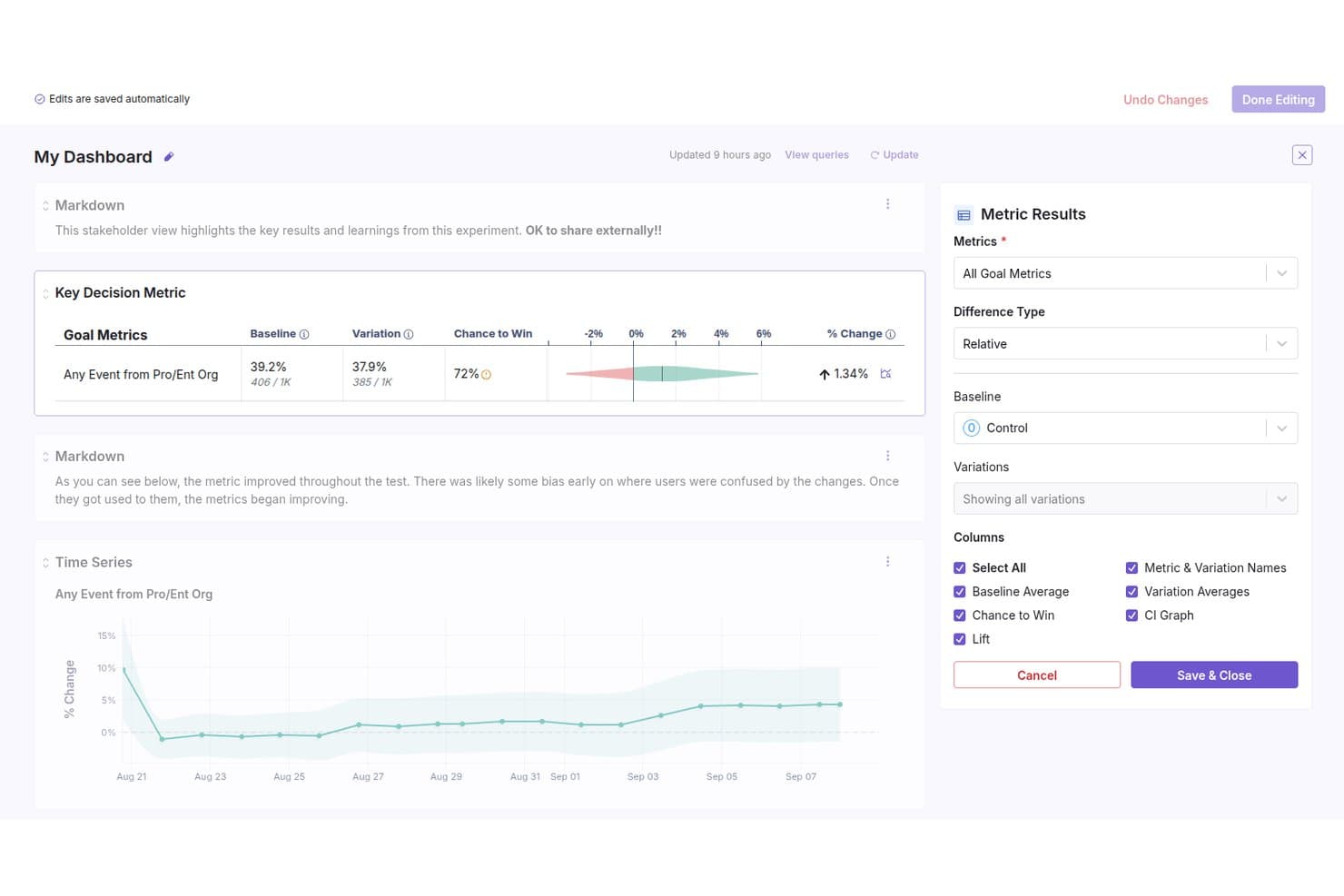
GrowthBook lets users build shareable experiment dashboards with metric results. GrowthBook is an open-source A/B testing and feature flagging platform that supports visual experiment building, a Bayesian and frequentist statistical engine, audience targeting, multi-armed bandits, and warehouse-native data integration.
Who Is GrowthBook Best For?
GrowthBook is a strong fit for technically sophisticated product and engineering teams that want to run rigorous experiments without sending user data to a third-party platform.
Why I Picked GrowthBook
GrowthBook earns its spot on my shortlist because it's built from the ground up for teams that need experiment data to stay inside their own warehouse. I love that it runs SELECT-only queries against Snowflake, BigQuery, or Redshift, so no raw user data ever leaves your infrastructure. Pair that with a Bayesian and frequentist stats engine that includes CUPED variance reduction and automatic SRM checks, and you get genuinely rigorous results without a third-party data handoff.
GrowthBook Key Features
- AI Visual Editor: A Chrome side-panel tool that lets you build test variations using plain-language prompts or point-and-click editing, without writing code.
- Sticky bucketing: Keeps users in the same variation if rollout percentages or targeting rules change mid-experiment, using cookies, localStorage, or Redis.
- Multi-armed bandits: Automatically shifts traffic toward better-performing variations using Thompson sampling, while keeping every variation at a minimum of 1% traffic.
- Dimension breakdowns: Slice experiment results by attributes like browser or country directly in the results tab, with high-cardinality dimensions grouped automatically.
GrowthBook Integrations
GrowthBook integrates with Snowflake, BigQuery, Redshift, Databricks, GA4, Segment, Rudderstack, Firebase, FullStory, and Microsoft Clarity. It also offers REST API access, webhooks, a CLI, and an MCP server for custom workflows.
Pros and Cons
Pros:
- Traffic allocation includes Thompson-sampling bandits
- Warehouse-native privacy controls
- Deep Bayesian and frequentist experiment analysis
Cons:
- Client-rendered SPAs can flicker
- Visual editor requires developer setup
Learn more about GrowthBook: Best for multivariate testing at scale
- Free demo available
- Pricing upon request
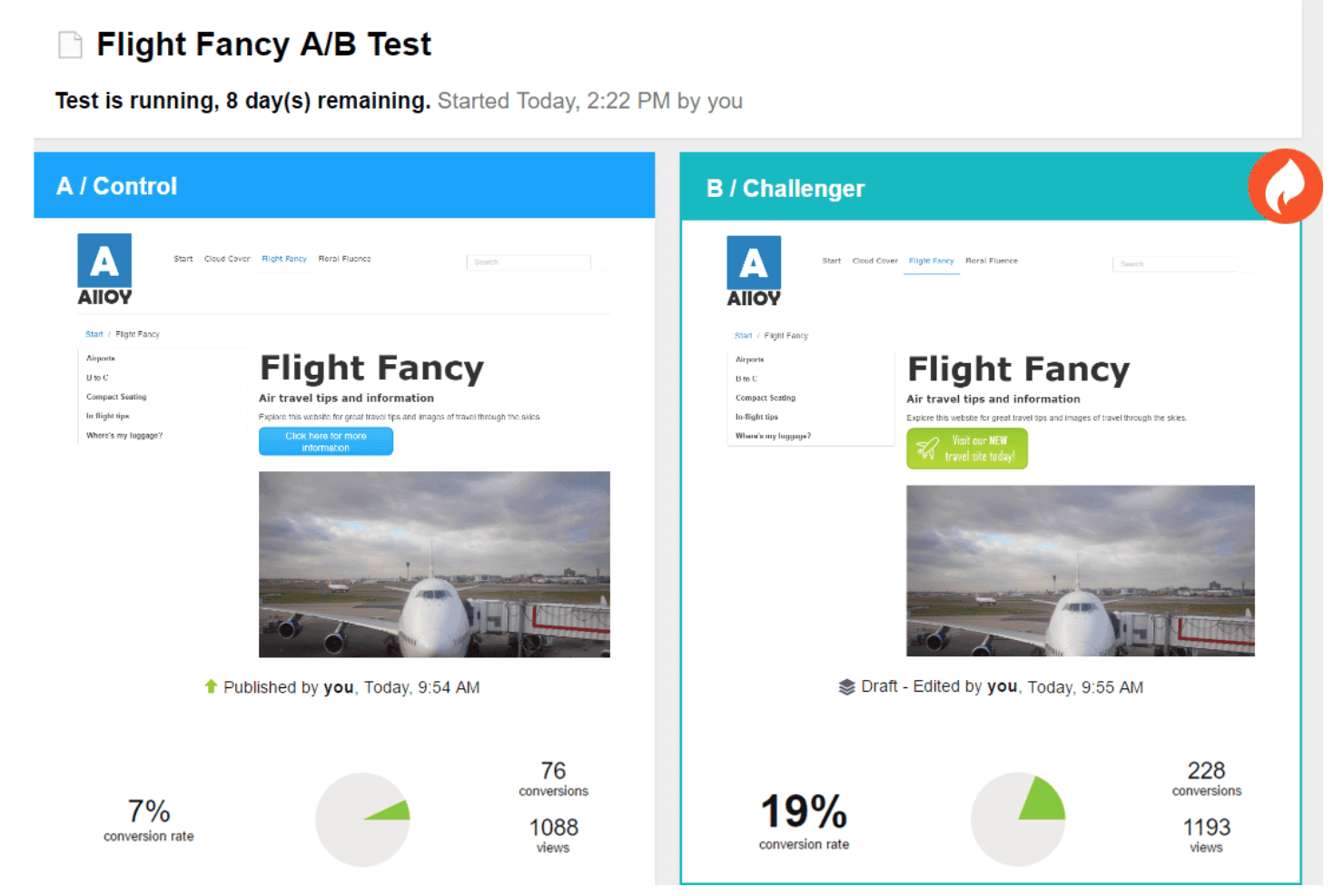
Optimizely Web Experimentation runs A/B tests comparing page variants by conversion rate. Optimizely Web Experimentation is a website A/B testing platform that supports A/B/n, multivariate, multi-page, and bandit-based tests through a visual editor, AI-assisted variation building, advanced statistical analysis, and audience targeting tools.
Who Is Optimizely Web Experimentation Best For?
Optimizely Web Experimentation is a strong fit for enterprise teams running high-volume experiment programs that demand rigorous statistical controls and complex multivariate test designs.
Why I Picked Optimizely Web Experimentation
Optimizely Web Experimentation earns its spot on my shortlist because of how thoroughly it handles multivariate testing at scale. I love that it supports full and partial factorial MVT designs with up to 64 combinations, plus section rollups that let individual test sections reach significance faster with less traffic. Its Stats Accelerator uses a bandit-based approach to automatically shift traffic toward winning variations hourly, so large-scale tests don't stall waiting for results.
Optimizely Web Experimentation Key Features
- Visual overlay editor: Edit variations directly on your live site without an iframe, using a no-code interface with AI-assisted element creation via Opal.
- Audience Builder: Define test audiences with AND/OR logic across behavioral, geographic, cookie, and custom attribute conditions, plus a code mode for custom JSON rules.
- Multi-page funnel testing: Run tests across unlimited pages while keeping each visitor in a consistent variation throughout the entire funnel.
- Stats Accelerator: Automatically shifts traffic toward better-performing variations hourly using an Upper Confidence Bound bandit approach.
Optimizely Web Experimentation Integrations
Optimizely Web Experimentation connects with Google Analytics 4, Google Tag Manager, Amplitude, Contentsquare, Hotjar, Mouseflow, SessionCam, Segment, and Fivetran through native, add-on, or third-party connectors. REST and JavaScript APIs support custom integrations.
Pros and Cons
Pros:
- Section rollups reduce traffic requirements for MVTs
- Stats Engine supports peeking without invalidating results
- Handles multivariate tests with 64 combinations
Cons:
- Audience segmentation loses statistical error controls
- Dynamic React sites can create code conflicts
Learn more about Optimizely Web Experimentation:
Diğer Web Sitesi A/B Testi Araçları
Kısa listeme giremeyen ancak yine de göz atmaya değer bazı ek web sitesi A/B testi aracı seçenekleri şunlardır:
- 11Dynamic YieldBest for Bayesian-powered audience-targeted testing
- 12MidaBest for Bayesian-first testing with revenue metrics
- 13Crazy EggBest for visual heatmap-driven insights
- 14LaunchDarklyBest for feature flag-driven testing
- 15Zoho PageSenseBest for integrated analytics and personalization
- 16PostHogBest for product teams needing self-hosting
- 17OptibaseBest for privacy-focused experimentation
- 18EppoBest for advanced statistical analysis options
- 19Nelio A/B TestingBest for WordPress site integration
How I Evaluate Website A/B Testing Tools
I split my evaluation into three parts, weighting core functionality most: visually build variants, control traffic splits, and interpret confidence. Next come differentiators like server-side tests or session replay and heatmaps. Finally, I weigh beyond-feature factors: onboarding, support, privacy, performance, integrations, and pricing.
Core Functionality (Table Stakes For This List)
When I'm selecting tools for my list, I score each one on a scale from 0 (does not offer the functionality) to 5 (excels in this area) for each core functionality listed below. I then convert the total into a percentage to help assess each tool's overall fit, with extra weight on any functionalities I’ve deemed essential.
- Visual Experiment Builder (Essential): Can a PM change page copy, images, or layout in a visual editor, then preview the variant without routing every edit through engineering?
- Statistical Results (Essential): I check whether reports explain confidence and significance, and flag sample-size limits before a team calls a checkout or signup variant a winner.
- Audience Targeting: I assess whether rules can target visitors by device, source, location, or behavior—for example, testing a message for returning mobile visitors.
- Traffic Allocation: Look for editable percentage splits across control and variants, so teams can limit exposure while checking a high-impact pricing-page change.
- Multi-Page Testing: I consider whether one experiment can follow visitors across steps, such as product detail, cart, and checkout, without breaking variation consistency.
- Results Reporting: Dashboards should compare conversions and other chosen outcomes by variant; I look for segment views that explain who responded to a landing-page change.
Once I have a list of tools that meet the criteria, I consider what sets each platform apart.
Differentiating Factors (What Sets Vendors Apart)
Here's how I compare and contrast different vendors:
Standout Features
Session replay and heatmaps paired with test data tell me why a variant won, not just that it did. I look for tools that layer click maps and recordings onto specific variants so I can spot where users hesitate on a checkout flow. Server-side and feature-flag experimentation matters when a test goes deeper than UI copy—like toggling a pricing algorithm or gating a new API response. I also check how each platform handles SPA rendering, because flicker or broken state on a JavaScript-heavy app undermines both user trust and data quality.
Beyond Features
I check how each tool's snippet affects page load times, because added latency skews test results and hurts Core Web Vitals. Integration depth matters just as much—I look for native connections to analytics platforms like GA4 or Amplitude so experiment outcomes tie directly to retention and engagement metrics. Pricing models also shape my evaluation, since MTU-based costs can spike fast on high-traffic sites if tiered plans don't scale with your experiment velocity.
Web Sitesi A/B Testi Araçları Nasıl Seçilir?
Uzun özellik listeleri ve karmaşık fiyatlandırma yapılarına kendinizi kaptırmanız kolaydır. Kendinize özgü yazılım seçim sürecinizi yürütürken odaklanmanıza yardımcı olmak için göz önünde bulundurmanız gereken faktörlerin bir kontrol listesi aşağıdadır:
| Etken | Dikkat Edilmesi Gerekenler |
|---|---|
| EtkenÖlçeklenebilirlik | Dikkat Edilmesi GerekenlerAraç, birden fazla siteyi veya yüksek trafikli sayfaları da kapsayacak şekilde mevcut ve gelecekteki test hacminizi destekleyecek mi? |
| EtkenEntegrasyonlar | Dikkat Edilmesi GerekenlerAraç, geçici çözümlere ihtiyaç duymadan CMS'niz, analiz ve pazarlama platformlarınızla yerel olarak bağlantı kuruyor mu? |
| EtkenÖzelleştirilebilirlik | Dikkat Edilmesi GerekenlerTest parametrelerini, raporlamayı ve iş akışlarını ekibinizin süreçleri ve hedefleriyle uyumlu olacak şekilde özelleştirebilir misiniz? |
| EtkenKullanım kolaylığı | Dikkat Edilmesi GerekenlerTeknik olmayan kullanıcılar testleri kurup yorumlayabilecek mi, yoksa sürekli geliştirici desteğine mi ihtiyaç duyacaksınız? |
| EtkenUygulama ve işe alıştırma | Dikkat Edilmesi GerekenlerÇalışmaya başlamak ne kadar sürecek ve ekibinizin testlere başlamak için hangi kaynaklara veya eğitime ihtiyacı olacak? |
| EtkenMaliyet | Dikkat Edilmesi GerekenlerFiyatlandırma kademeleri kullanımınızla uyumlu mu ve alan adları, kullanıcılar veya gelişmiş özellikler için ek ücretler var mı? |
| EtkenGüvenlik önlemleri | Dikkat Edilmesi GerekenlerAraç veri şifreleme, kullanıcı erişim denetimleri ve GDPR gibi gizlilik düzenlemelerine uyumluluk sunuyor mu? |
| EtkenDestek kullanılabilirliği | Dikkat Edilmesi GerekenlerHangi destek kanalları sunuluyor ve yanıt süreleri ile uzmanlık düzeyi işletmenizin ihtiyaçları için yeterli mi? |
Web Sitesi A/B Testi Araçları Nedir?
Web sitesi A/B testi araçları, hangi sürümün daha iyi performans gösterdiğini belirlemek için web sayfalarının test varyasyonlarını karşılaştırarak ekiplerin denemeler yürütmesine yardımcı olan yazılım platformlarıdır. Bu araçlar trafiği bölerek, kullanıcı davranışlarını ölçerek ve hemen çıkma oranları ile eylem çağrısı performansı gibi metrikleri analiz ederek dönüşüm oranı optimizasyonunu destekler. Daha geniş bir pazarlama stratejisinin parçası olarak değişiklikleri doğrulamak ve müşteri deneyimini iyileştirmek amacıyla pazarlama ekipleri, ürün yöneticileri ve küçük işletmeler tarafından yaygın olarak kullanılır.
En iyi A/B test araçlarının birçoğu ayrıca görsel veya kod düzenleyici, kitle hedefleme ve yerleşik analizler gibi özellikler de içerir. Bu sayede hem yeni başlayanlar hem de ileri düzey kullanıcılar, yoğun teknik çaba gerektirmeden deneyler yürütebilir. Google Optimize gibi araçlar geçmişte bu alanda önemli bir rol oynamış olsa da modern platformlar artık daha derin içgörülere, daha hızlı denemelere ve bir şirketin dijital ekosistemi içinde daha iyi entegrasyona odaklanıyor.
Web Sitesi A/B Test Araçlarının Özellikleri
Web sitesi A/B test araçlarını seçerken aşağıdaki temel özelliklere dikkat edin:
- A/B testi oluşturma: Bir web sayfasının iki veya daha fazla sürümünü karşılaştırmak için deneyler oluşturun; böylece içerik, düzen veya tasarım değişikliklerini test edebilirsiniz.
- Trafik dağılımı: İstatistiksel olarak geçerli sonuçlar elde etmek için ziyaretçi trafiğinin farklı sayfa varyantları arasında nasıl bölüneceğini kontrol edin.
- Dönüşüm izleme: Her varyantın etkisini ölçmek için tıklamalar, kayıtlar veya satın almalar gibi belirli kullanıcı eylemlerini izleyin.
- Gerçek zamanlı raporlama: Devam eden testler için güncel analizlere ve performans verilerine erişerek zamanında kararlar almanıza yardımcı olun.
- Görsel düzenleyici: Kod yazmanıza gerek kalmadan sayfa öğelerinde değişiklikler yapın ve varyantlar oluşturun; böylece testleri geliştirici olmayan kullanıcılar için de erişilebilir hale getirin.
- Kitle segmentasyonu: Daha kesin içgörüler elde etmek için deneyleri konum, cihaz veya davranış gibi ölçütlere göre belirli kullanıcı gruplarına hedefleyin.
- İstatistiksel anlamlılık hesaplama: Test sonuçlarının güvenilir olup olmadığını ve rastgele oluşmadığını otomatik olarak belirleyin.
- Analiz araçlarıyla entegrasyon: Deney verilerini zenginleştirmek ve raporlamayı kolaylaştırmak için harici analiz platformlarına bağlanın.
- Test planlama: Deneylerin başlangıç ve bitiş tarihlerini kampanyalarla veya iş döngüleriyle uyumlu olacak şekilde belirleyin.
- Role dayalı erişim denetimi: Ekip üyelerinin izinlerini yönetin ve doğru kişilerin testleri ve sonuçları oluşturabilmesini, düzenleyebilmesini veya görüntüleyebilmesini sağlayın.
Web Sitesi A/B Test Araçlarının Faydaları
Web sitesi A/B test araçlarını uygulamak, ekibiniz ve işletmeniz için çeşitli faydalar sağlar. Yararlanabileceğiniz birkaç fayda şunlardır:
- Veriye dayalı karar alma: Gerçek kullanıcı verilerine ve istatistiksel olarak geçerli test sonuçlarına dayanarak web sitenizde bilinçli değişiklikler yapın.
- İyileştirilmiş dönüşüm oranları: Hangi sayfa öğelerinin veya düzenlerin daha fazla kayıt, satın alma ya da diğer önemli eylemleri sağladığını belirleyin.
- Tahmine dayalı kararların azaltılması: Hipotezleri ve tasarım fikirlerini geniş çapta kullanıma sunmadan önce test ederek olumsuz etki riskini en aza indirin.
- Daha hızlı optimizasyon döngüleri: Deneyleri hızlı bir şekilde başlatın, izleyin ve analiz edin; böylece web sitenizi sürekli olarak iyileştirebilirsiniz.
- Kişiselleştirilmiş kullanıcı deneyimleri: İçeriği ve tasarımı farklı kitle gruplarına uyarlamak için segmentasyon özelliklerinden yararlanın.
- Kaynak verimliliği: Geliştirme ve tasarım kaynaklarını, ölçülebilir sonuçlar sağladığı kanıtlanmış değişikliklere odaklayın.
- Paydaşlar için anlaşılır raporlama: Yerleşik panoları ve raporları kullanarak deney sonuçlarını müşterilerle veya yöneticilerle kolayca paylaşın.
Web Sitesi A/B Test Araçlarının Maliyetleri ve Fiyatlandırması
Web sitesi A/B test araçlarını seçmek, mevcut çeşitli fiyatlandırma modellerini ve planları anlamayı gerektirir. Maliyetler özelliklere, ekip büyüklüğüne, eklentilere ve diğer unsurlara göre değişir. Aşağıdaki tabloda yaygın planlar, bunların ortalama fiyatları ve web sitesi A/B test aracı çözümlerinde genellikle sunulan özellikler özetlenmiştir:
Web Sitesi A/B Test Araçları için Plan Karşılaştırma Tablosu
| Plan Türü | Ortalama Fiyat | Yaygın Özellikler |
|---|---|---|
| Plan TürüÜcretsiz Plan | Ortalama Fiyat$0 | Yaygın ÖzelliklerTemel A/B testi oluşturma, sınırlı sayıda deney, tek alan adı desteği ve temel raporlama. |
| Plan TürüKişisel Plan | Ortalama Fiyat$20-$50/ay | Yaygın ÖzelliklerSınırsız deney, görsel düzenleyici, dönüşüm izleme, öncelikli e-posta desteği ve entegrasyonlar. |
| Plan Türüİşletme Planı | Ortalama Fiyat$100-$300/ay | Yaygın ÖzelliklerBirden fazla alan adı desteği, gelişmiş analizler, kitle segmentasyonu, ekip iş birliği ve planlama. |
| Plan TürüKurumsal Plan | Ortalama Fiyat$500-$2000/ay | Yaygın ÖzelliklerÖzel entegrasyonlar, özel hesap yöneticisi, gelişmiş güvenlik, SLA destekli yardım ve işe alıştırma desteği. |
Web Sitesi A/B Testi Araçları SSS
Web sitesi A/B testi araçları hakkında sık sorulan soruların bazı yanıtları:
Web sitesi A/B testi araçları, varyantlar arasındaki trafiği nasıl böler?
Web sitesi A/B testi araçları, ziyaretçileri farklı sayfa sürümlerine rastgele atamak için algoritmalar kullanır; böylece her varyant toplam trafiğin belirli bir yüzdesini alır. Bu rastgeleleştirme tarafsız sonuçlar üretmeye yardımcı olur ve varyantlar arasındaki kullanıcı davranışını doğru şekilde karşılaştırmanızı sağlar.
Web sitemde aynı anda birden fazla test çalıştırabilir miyim?
Evet, çoğu araç aynı anda birden fazla deneme çalıştırmanıza olanak tanır. Ancak sonuçları etkileyebilecek ve sonuçları yorumlamayı zorlaştırabilecek aynı sayfadaki çakışan değişikliklerden kaçınmak için testleri dikkatli bir şekilde planlamalısınız.
Bir A/B testi sırasında hangi metrikleri izlemeliyim?
Dönüşüm oranı, tıklama oranı, ortalama sipariş değeri veya sayfada geçirilen süre gibi deneme hedeflerinizle uyumlu metrikleri izleyin. İyileştirmek istediğiniz kullanıcı eylemlerini veya iş sonuçlarını doğrudan yansıtan metrikleri seçin.
Web sitesi A/B testi araçlarını kullanmak için kodlama becerilerine ihtiyacım var mı?
Hayır, birçok araç görsel düzenleyiciler ve kod gerektirmeyen arayüzler sunar; böylece teknik olmayan kullanıcılar testler oluşturup başlatabilir. Daha gelişmiş özelleştirmeler için bazı araçlar gerektiğinde özel kod veya komut dosyaları eklemenize olanak tanır.
Bir karar vermeden önce A/B testini ne kadar süre çalıştırmalıyım?
İstatistiksel anlamlılığa ulaşana kadar testinizi çalıştırın; bu süre, trafik hacminize ve ölçtüğünüz etkinin büyüklüğüne bağlıdır. Çoğu araç, sonuçlarınızın ne zaman güvenilir olduğunu belirlemenize yardımcı olmak için hesaplayıcılar veya rehberlik sunar.