

Com tantas soluções diferentes de desenvolvimento de produtos disponíveis, é difícil perceber qual é a mais adequada para si. Sabe que quer gerir as necessidades dos clientes, disponibilizar integração com ferramentas de inquéritos e permitir a recolha de feedback dos utilizadores, mas precisa de perceber qual é a melhor ferramenta. Eu ajudo! Nesta publicação, vou facilitar a sua escolha partilhando as minhas experiências pessoais na utilização de dezenas de ferramentas diferentes de desenvolvimento de produtos com equipas e projetos de grande dimensão, juntamente com as minhas escolhas das melhores ferramentas gratuitas de desenvolvimento de produtos.
Why Trust Our Software Recommendations
6,700+
Reviews
20
Industry experts
16+
Evaluation factors
14
Years
Our team has been testing and reviewing software since 2012. As product managers ourselves, we know how difficult—and important—it is to choose the right software.
For this guide, we evaluated tools using hands-on testing and independent research, scoring tools using our selection criteria.
Our reviews reflect our human editorial judgment, not a sales pitch.
Expert reviewers:
- Andrew LumbySenior TPM
- Cristiano ValimSenior UI/UX Lead


Tabela comparativa: software gratuito de desenvolvimento de produtos
Esta tabela comparativa resume os detalhes de preços das minhas principais escolhas de software gratuito de desenvolvimento de produtos.
| Tool | Best For | Trial Info | Price | ||
|---|---|---|---|---|---|
| 1 | Best for dev-native issue and sprint tracking | Free plan available | From $4/user/month | Website | |
| 2 | Best for self-hosted dev tracking without user caps | Free plan available; 14-day free trial available for Enterprise Cloud and on-premises | From €5.95/user/month (billed annually) | Website | |
| 3 | Best for dev teams tracking sprints with GitHub | Free plan available | From $8.50/user/month (billed annually) | Website | |
| 4 | Best for sprint planning with unlimited free seats | Free plan available | From $10/user/month (billed annually) | Website | |
| 5 | Best for free feedback-to-roadmap workflows | Free plan + 10-day trial + demo available | From $29/user/month (billed annually) | Website | |
| 6 | Best for flexible, database-powered project tracking | Free plan + free demo available | From $20/user/month (billed annually) | Website | |
| 7 | Best for docs, roadmaps, and sprints in one workspace | Free plan + trial available | From $10/user/month | Website | |
| 8 | Best for Agile sprint and backlog management | Free plan + free trial available | From $7.91/user/month | Website | |
| 9 | Best for AI-assisted roadmap and feedback workflows | Free plan available; 14-day free trial; free demo available | From $12/user/month (billed annually) | Website | |
| 10 | Best for visual whiteboarding across teams | Free plan + 14-day free trial + free demo available | From $8/user/month (billed annually) | Website |


Análises do melhor software gratuito de desenvolvimento de produtos
Seguem-se os meus resumos detalhados do melhor software gratuito de desenvolvimento de produtos que entrou na minha seleção. As minhas análises apresentam uma visão detalhada das principais funcionalidades, vantagens e desvantagens, integrações e casos de utilização ideais de cada ferramenta, para o ajudar a encontrar a melhor opção para si. Embora algumas destas ferramentas disponibilizem uma versão totalmente gratuita, outras oferecem um período de teste gratuito. Adicionei uma nota sobre o que é gratuito em cada uma das minhas análises.
 Best for dev-native issue and sprint tracking
- Free plan available
- From $4/user/month
Visit WebsiteCustomer Rating:4.8/5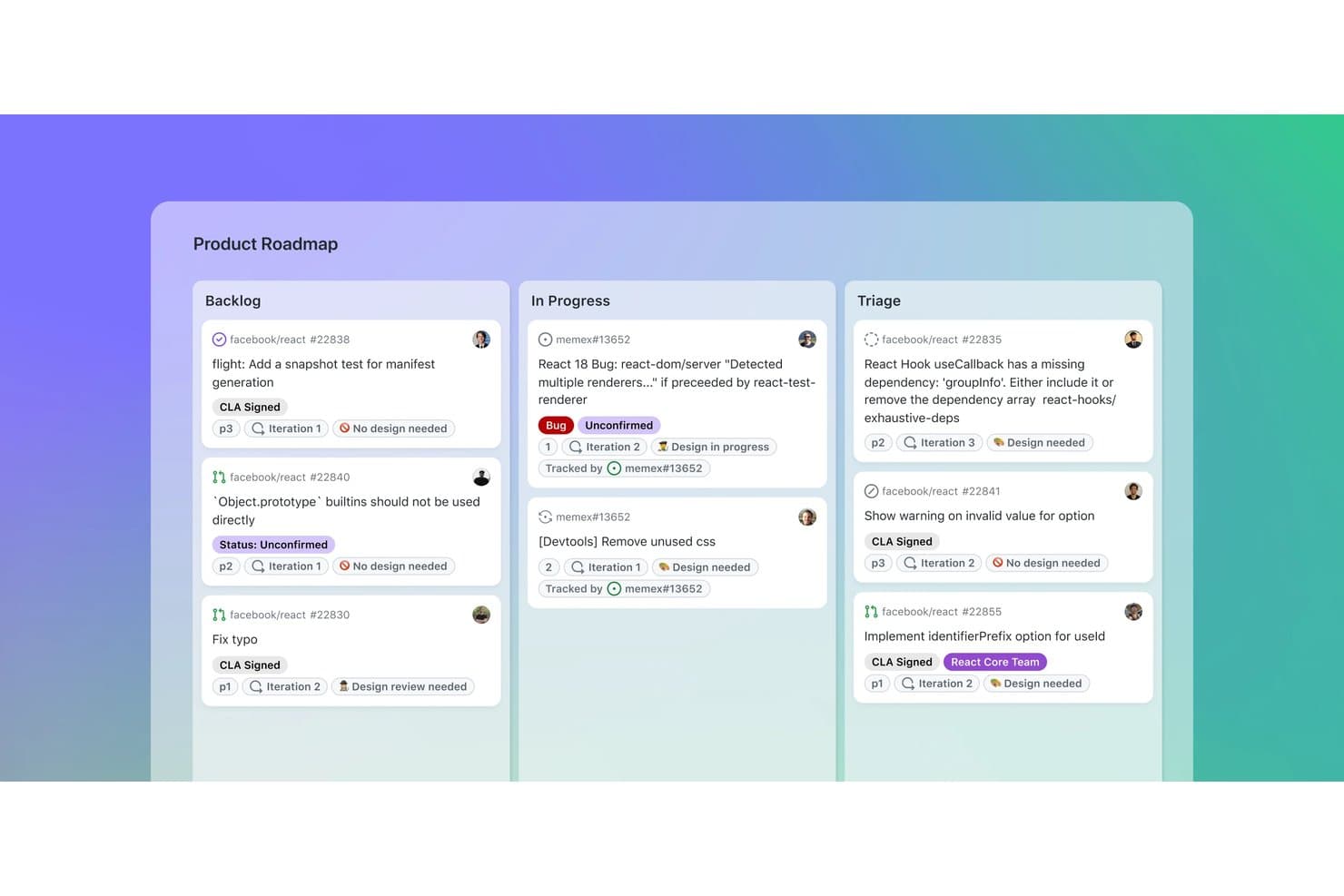
GitHub organizes product tasks across Backlog, In Progress, and Triage boards. GitHub is a product development platform that combines code repositories with issue tracking, project roadmaps, sprint boards, custom fields, pull requests, and team discussions.
Who Is GitHub Best For?
GitHub suits product and engineering teams that want dev-native issue and sprint tracking alongside code, pull requests, and releases.
Why I Picked GitHub
I picked GitHub because it connects product planning directly to the development work that follows. Issues link with commits and pull requests, while Projects adds iteration-based sprint boards, sub-issues, and dependencies. This makes GitHub best for dev-native issue and sprint tracking when product decisions need clear delivery context.
GitHub Key Features
- Issue forms: Create structured requests with fields, labels, and file uploads.
- GitHub Discussions: Organize threaded feedback, polls, upvotes, and marked answers.
- Insights charts: View current project data and historical burn-up charts.
- GitHub Actions: Automate project updates and development workflows.
GitHub Integrations
GitHub offers native Slack integration, plus Marketplace integrations with Zenhub, Azure Boards, Linear, CircleCI, and Codecov. REST and GraphQL APIs, webhooks, GitHub Actions, and the MCP server support custom connectivity and CI/CD workflows.
What's Free?
GitHub offers a free-forever plan with unlimited public and private repositories and unlimited collaborators. Private repositories have feature limits, including 2,000 GitHub Actions minutes and 500 MB of Packages storage per month; additional usage may require payment.
Pros and Cons
Pros:
- Roadmaps are shareable with external stakeholders
- Sprint boards support dependencies and hierarchy
- Issues connect directly with code changes
Cons:
- Feedback collection requires GitHub accounts
- Prioritization lacks built-in scoring frameworks
Learn more about GitHub: Best for self-hosted dev tracking without user caps
- Free plan available; 14-day free trial available for Enterprise Cloud and on-premises
- From €5.95/user/month (billed annually)
Visit WebsiteCustomer Rating:4.5/5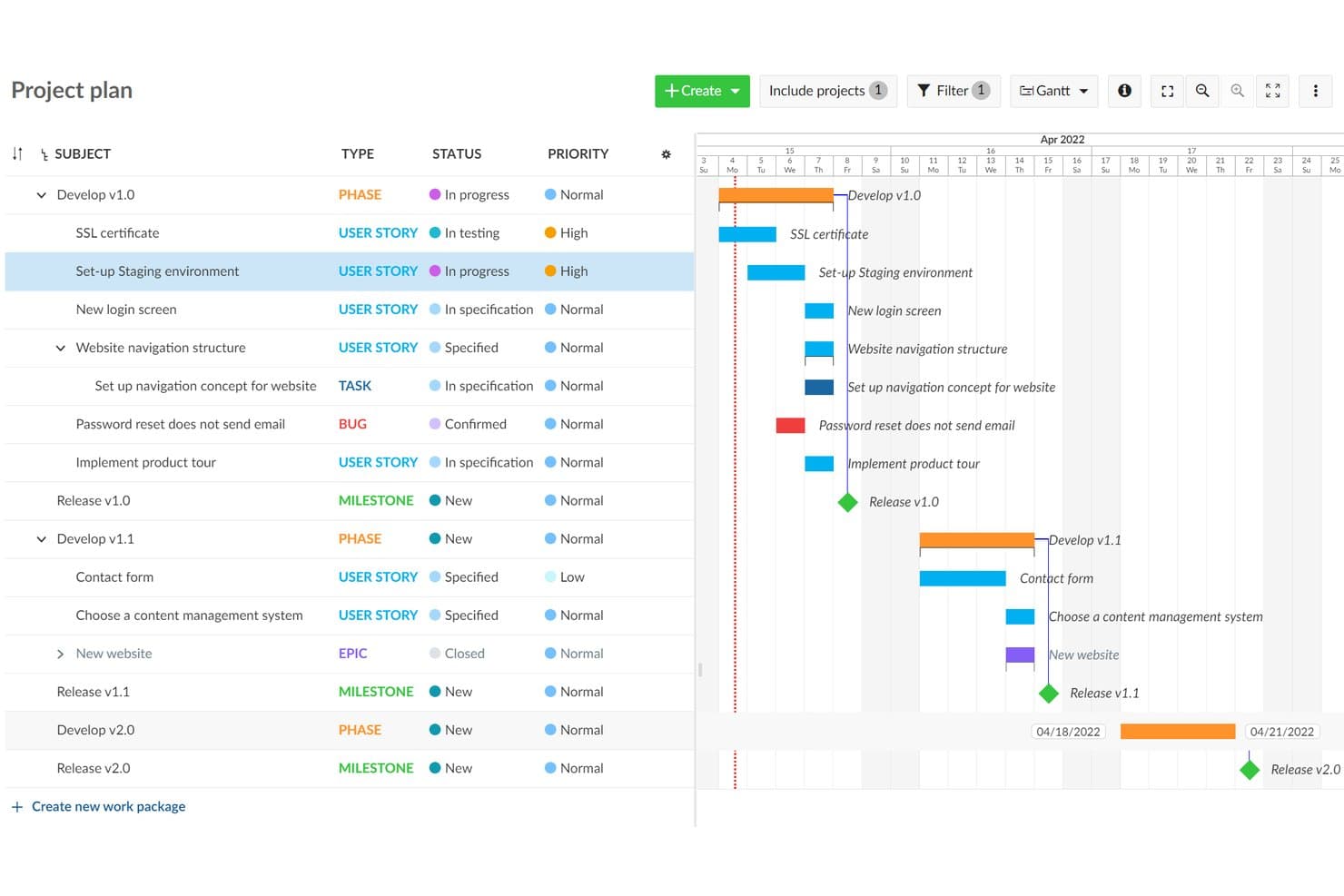
OpenProject visualizes project timelines with a Gantt chart roadmap view. OpenProject is an open-source product development platform combining work package tracking, Scrum backlogs, Gantt planning, roadmaps, collaboration, and workflow boards in a self-hosted workspace.
Who Is OpenProject Best For?
Technical product teams needing unlimited users and projects, self-hosted control, and integrated development tracking will find OpenProject a practical fit.
Why I Picked OpenProject
I picked OpenProject because it combines self-hosted dev tracking without user caps with strong product delivery controls. Unlimited teams can manage work packages, dependencies, and custom workflows, then plan Scrum sprints with story points and burndown charts. Gantt timelines connect release planning to the engineering work behind it.
OpenProject Key Features
- Git integrations: Connect GitHub, GitLab, SVN, and Git repositories to development projects.
- Real-time document editing: Collaborate on shared documents with rich text, linked work packages, and embedded charts.
- Email-to-task conversion: Turn incoming emails into trackable work packages.
- Project templates: Reuse standardized project structures without copying budgets or time data.
OpenProject Integrations
OpenProject offers native integrations with GitHub, GitLab, Nextcloud, SVN, and Git repositories. Its REST API and BCF API support custom integrations.
What’s Free?
OpenProject’s Community edition is free forever, self-hosted, and supports unlimited users and projects. You’ll need to host and administer it yourself, while enterprise add-ons, professional support, and managed cloud hosting require a paid plan.
Pros and Cons
Pros:
- Templates support repeatable delivery workflows
- Scrum backlogs include story points and burndowns
- Handles dependencies across complex project hierarchies
Cons:
- Requires server administration before teams can start
- Roadmaps rely on basic version progress views
Learn more about OpenProject: Best for dev teams tracking sprints with GitHub
- Free plan available
- From $8.50/user/month (billed annually)
Visit WebsiteCustomer Rating:4.5/5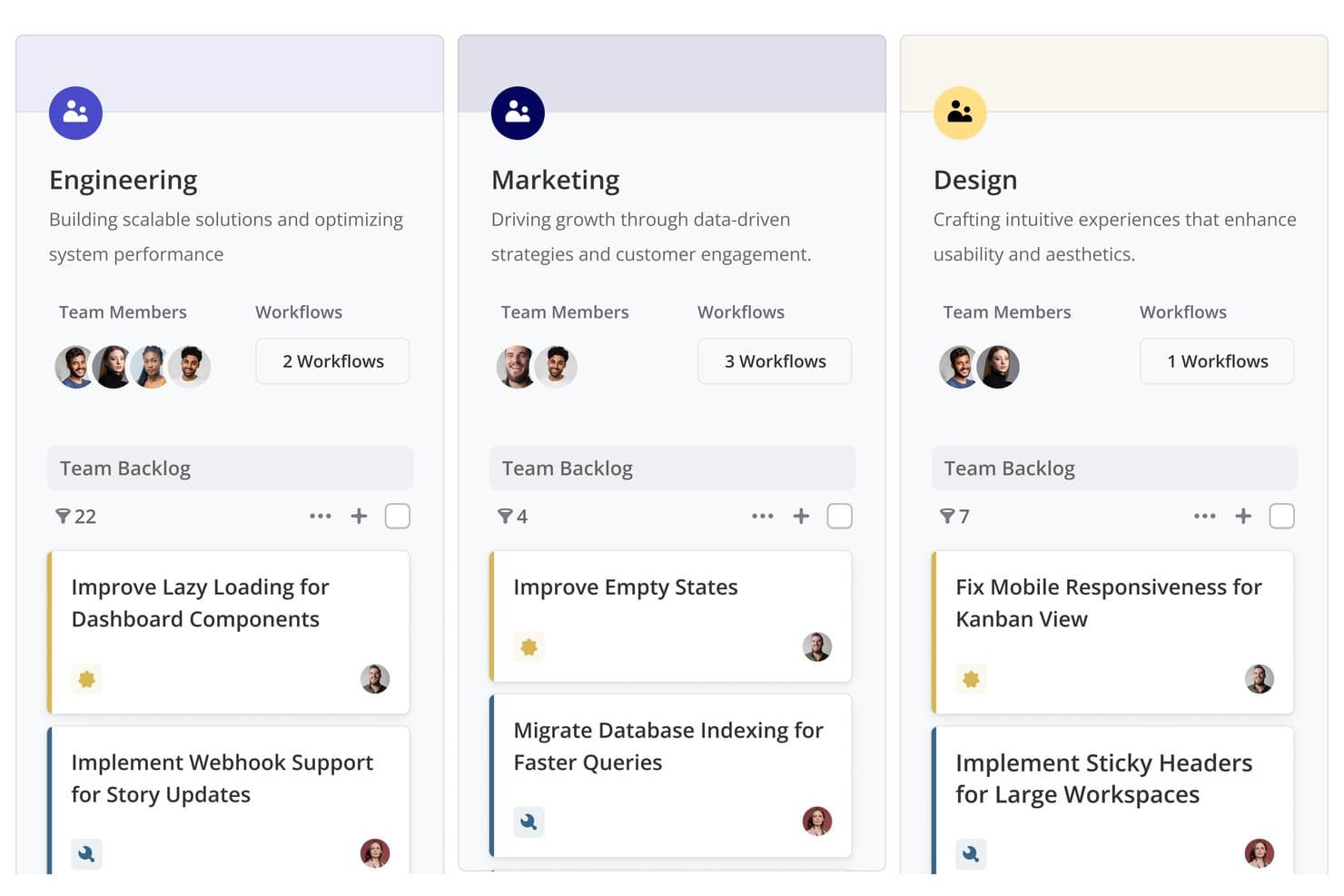
Shortcut organizes team backlogs by department with tasks and workflows. Shortcut is product development software with a free-forever plan that combines roadmaps, Epics, Stories, Kanban boards, Iterations, Docs, and GitHub-linked development workflows.
Who Is Shortcut Best For?
Shortcut fits software development teams that need GitHub-connected sprint planning, roadmaps, and delivery tracking in one workspace.
Why I Picked Shortcut
I rate Shortcut highly for dev teams tracking sprints with GitHub. Its Iterations, Kanban boards, and burndown reports connect sprint planning to daily delivery work. Stories can move as pull requests progress, so my team keeps development status current without updating every ticket manually.
Shortcut Key Features
- Sub-tasks: Break Stories into estimated, trackable work items.
- Custom fields: Organize work with predefined product and technical fields.
- Backlog view: Sort, filter, group, and reorder Stories.
- Slack integration: Create Stories from messages and sync threads.
Shortcut Integrations
Shortcut integrates with GitHub, GitLab, Bitbucket Cloud, Slack, Figma, Zendesk, Productboard, Savio, and Google Sheets. It also offers a REST API and Zapier connectivity for custom workflows.
What's Free?
Shortcut offers a free-forever plan with Epics, Iterations, Roadmaps, Docs, GitHub integration, and unlimited Stories. It supports one Team with up to 10 users, while a 14-day trial provides full access without requiring a credit card.
Pros and Cons
Pros:
- Sprint reports clarify iteration progress
- Roadmap views connect strategy with execution
- Unlimited Stories support ongoing product delivery
Cons:
- No native customer feedback collection
- Prioritization relies on manual ranking
Learn more about Shortcut: Best for sprint planning with unlimited free seats
- Free plan available
- From $10/user/month (billed annually)
Visit WebsiteCustomer Rating:4.6/5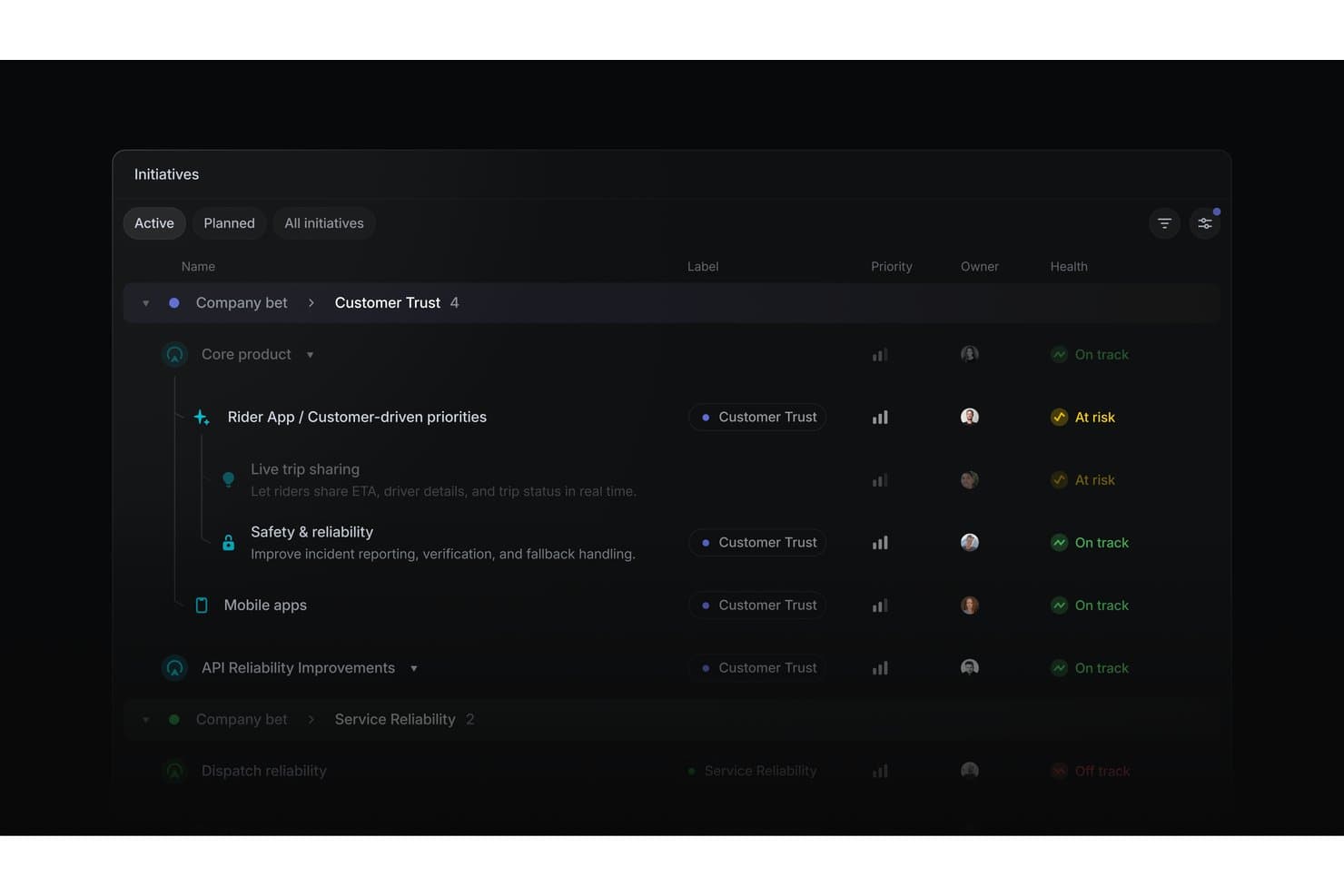
Linear organizes product initiatives by health status, priority, and owner. Linear is product development software for organizing initiatives, projects, issues, cycles, timelines, dependencies, and engineering integrations in one workspace.
Who Is Linear Best For?
Product managers and software developers at startups that need sprint planning, issue tracking, and roadmap coordination with unlimited free seats.
Why I Picked Linear
I picked Linear because it supports sprint planning with unlimited free seats, letting product, engineering, and design collaborate in one workspace. Cycles run one to eight weeks, roll unfinished issues forward, and include capacity tracking. Customizable boards, swimlanes, estimates, dependencies, and issue relationships help my team manage sprint work from backlog to release.
Linear Key Features
- Linear Agent: Creates and updates issues, projects, and initiatives through natural-language prompts.
- Customer Requests: Links manually entered feedback to issues and projects.
- Project templates: Presets milestones, issues, leads, members, and initiatives.
- GitHub integration: Syncs issues and automates pull request updates.
Linear Integrations
Linear offers native integrations with GitHub, GitLab, Slack, Figma, Microsoft Teams, Notion, and Google Sheets. It also supports custom connections through its public API and webhooks, plus Zapier.
What's Free?
Linear offers a free-forever plan at $0 for unlimited members. It includes two teams and up to 250 issues, with file uploads limited to 10 MB.
Pros and Cons
Pros:
- Board swimlanes clarify sprint ownership
- Initiatives connect goals to releases
- Cycles roll unfinished work forward
Cons:
- No built-in impact-effort scoring
- Customer requests require manual entry
Learn more about Linear: Best for free feedback-to-roadmap workflows
- Free plan + 10-day trial + demo available
- From $29/user/month (billed annually)
Visit WebsiteCustomer Rating:4.7/5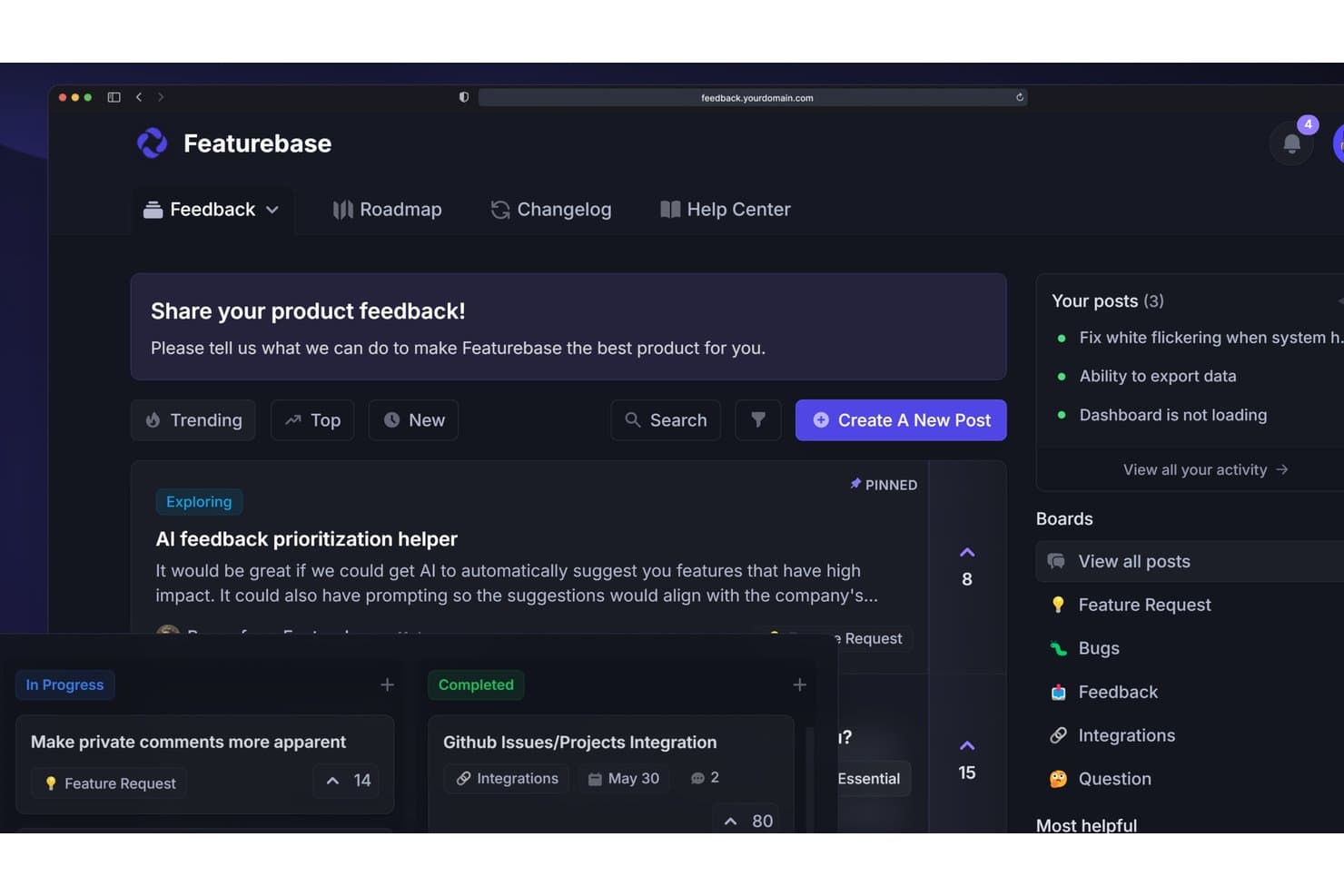
Featurebase lets users collect, prioritize, and track product feedback in one place. Featurebase is product development software that combines customer feedback collection, request prioritization, shareable roadmaps, release changelogs, surveys, and support workflows in one platform.
Who Is Featurebase Best For?
Featurebase suits solo product managers and early-stage founders who need to turn customer feedback into prioritized, shareable roadmaps.
Why I Picked Featurebase
I rate Featurebase Best for free feedback-to-roadmap workflows because its portal and in-app widget turn customer input into organized Requests. I use the value/effort matrix to rank opportunities, then publish status-based or date-based roadmaps for stakeholders. It fits feedback-led planning better than sprint execution.
Featurebase Key Features
- NPS and CSAT surveys: Create in-app surveys to collect customer ratings.
- Public changelog: Publish product updates with segmented release notifications.
- Request comments: Add threaded public or private comments with .
- CSV data management: Import feedback with field mapping and export Request data.
Featurebase Integrations
Featurebase offers native integrations with Linear, Jira, GitHub, ClickUp, Slack, Discord, Intercom, Zendesk, HubSpot, and Segment. It also supports API, MCP, webhooks, and Zapier for custom connectivity.
What's Free?
Featurebase offers a free plan, rather than only a time-limited trial. The available plan details don’t specify user, integration, or usage limits, so check its current pricing page before choosing it for your team.
Pros and Cons
Pros:
- Public roadmaps close the feedback loop
- Value/effort matrix supports clearer prioritization
- Feedback, roadmaps, and changelog stay linked
Cons:
- Free collaboration doesn’t support cross-functional teams
- No native sprint or dependency planning
Learn more about Featurebase: Best for flexible, database-powered project tracking
- Free plan + free demo available
- From $20/user/month (billed annually)
Visit WebsiteCustomer Rating:4.6/5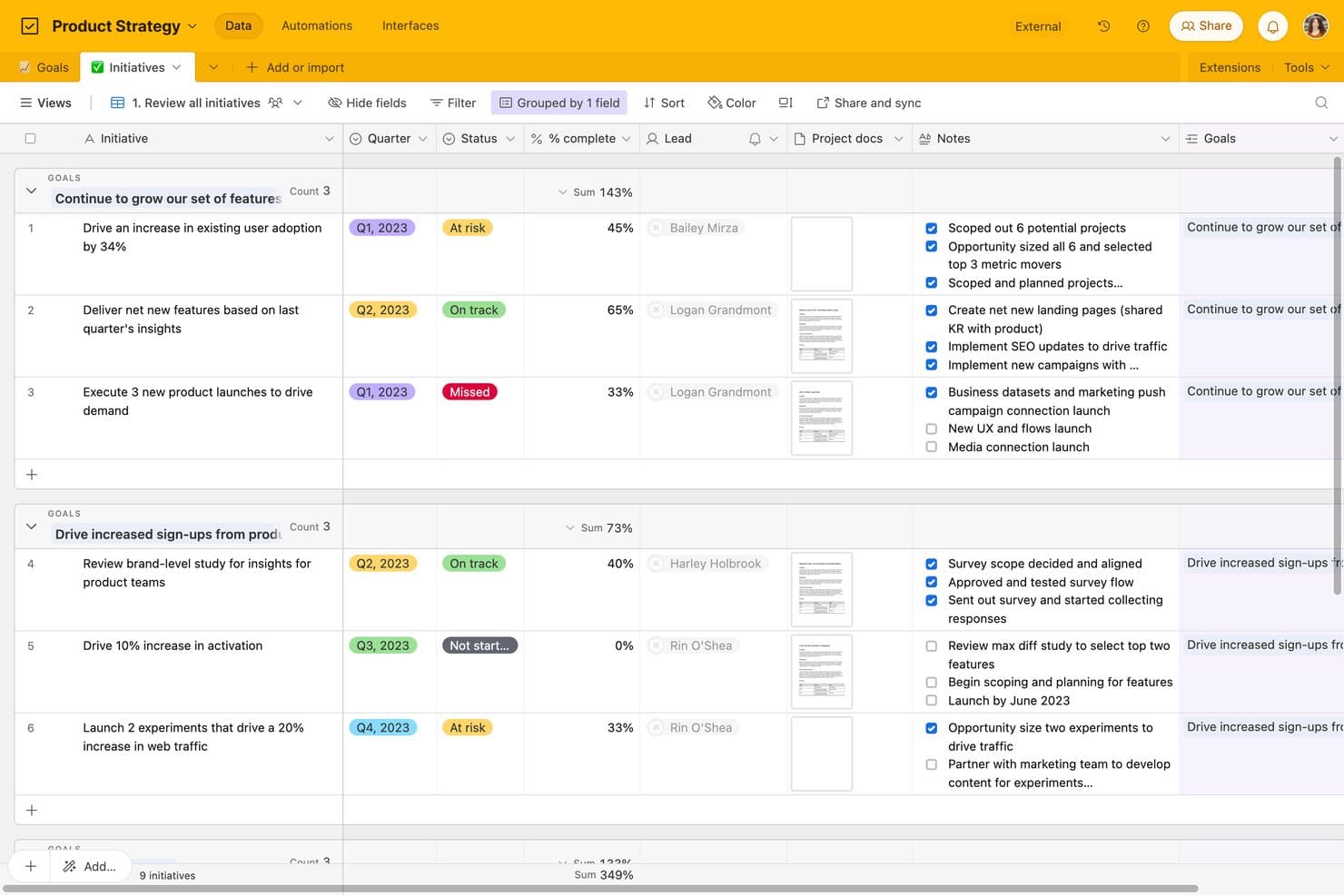
Airtable tracks product initiatives by goal, status, and completion. Airtable is product development software built around relational databases, combining roadmap planning, task tracking, feedback forms, kanban workflows, custom views, and cross-functional collaboration.
Who Is Airtable Best For?
Product managers, startup founders, and program managers can connect roadmaps, feedback, and delivery work in a flexible relational database.
Why I Picked Airtable
I picked Airtable because its relational database structure connects product feedback, roadmap initiatives, and delivery tasks in one workspace. I use linked records and rollups to trace customer requests through epics and sprint work, while kanban views keep execution visible. Forms turn new feedback into records the team can prioritize.
Airtable Key Features
- Interface Designer: Create custom pages with grid, gallery, calendar, form, and dashboard layouts.
- Automation triggers: Start workflows from record changes, form submissions, schedules, webhooks, or buttons.
- Public view sharing: Share views and interface pages through links without requiring viewer accounts.
- CSV import and export: Move data between Airtable and other tools using CSV files.
Airtable Integrations
Airtable lists 27 integrations, including Jira, GitHub, Slack, Google Drive, Google Calendar, Salesforce, Zendesk, Miro, and Typeform. Its free plan includes API access for custom integrations, while sync integrations and Jira automation require paid plans.
What's Free?
Airtable offers a free-forever plan, so you don’t need to start a paid subscription after a trial. It supports unlimited read-only collaborators, up to five editors or creators, 50 commenters, 1,000 records per base, 1 GB of attachments, and 1,000 API calls monthly; sync integrations and Jira automation require a paid plan.
Pros and Cons
Pros:
- Unlimited read-only stakeholder visibility
- Flexible relational tracking for product workflows
- Connects feedback, roadmaps, and tasks
Cons:
- Free tier caps records and automation runs
- Timeline and Gantt views require upgrades
Learn more about Airtable: Best for docs, roadmaps, and sprints in one workspace
- Free plan + trial available
- From $10/user/month
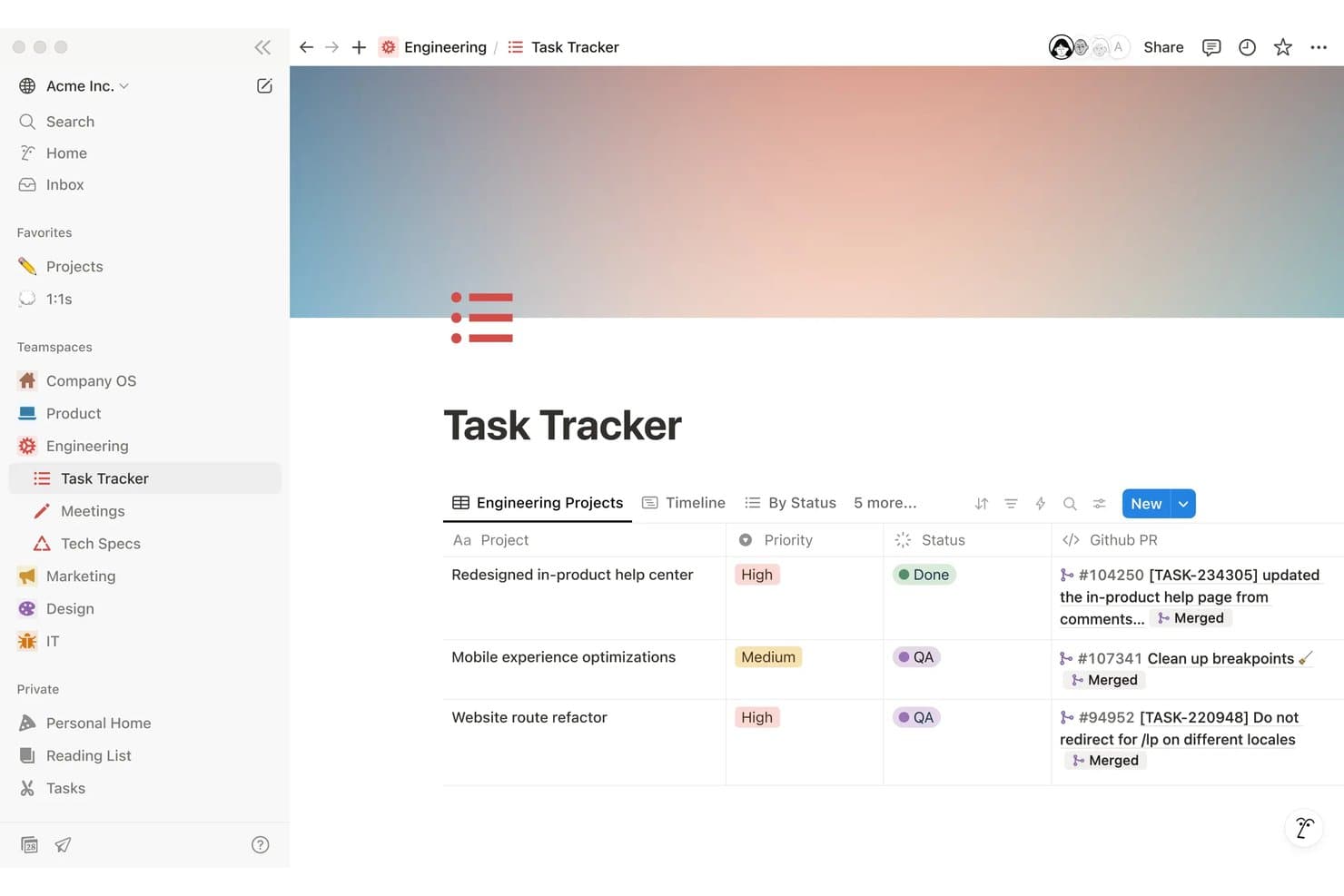
Notion tracks engineering tasks with priority, status, and linked GitHub PRs. Notion is a free product development workspace for creating PRDs, managing roadmaps and tasks, planning sprints, collecting feedback through forms, and collaborating across linked databases and documents.
Who Is Notion Best For?
Product managers at startups and small teams who need one workspace for PRDs, roadmaps, sprint planning, and cross-functional collaboration.
Why I Picked Notion
I picked Notion as one of the best free product development tools because it keeps docs, roadmaps, and sprints in one workspace. I use timeline views to map releases, link PRDs to roadmap items, and run sprints with dedicated backlog and planning views. Teams can also publish roadmap views through Notion Sites.
Notion Key Features
- Unlimited forms: Collect responses through public or embedded forms without requiring Notion accounts.
- Task dependencies: Link related tasks and identify work that must happen first.
- Custom task IDs: Assign prefixes and unique URLs to tasks for easier reference.
- Database comments: Add threaded comments to pages, items, and individual properties.
Notion Integrations
Notion supports connections with GitHub, Jira, Figma, Slack, Trello, Asana, and more. It also provides a public API and webhooks for custom integrations, plus Zapier.
What's Free?
Notion offers a free-forever plan at $0 per member per month, with unlimited pages and blocks for individual users. Important limits include 5 MB file uploads, seven-day page history, up to 10 guests, and limited collaborative blocks for teams.
Pros and Cons
Pros:
- Collects unlimited feedback form responses
- Publishes interactive roadmaps publicly
- Links PRDs, roadmaps, and sprints
Cons:
- Requires manual prioritization scoring setup
- Free team workspaces cap blocks
Learn more about Notion: 8Best for Agile sprint and backlog management
Jira
- Free plan + free trial available
- From $7.91/user/month
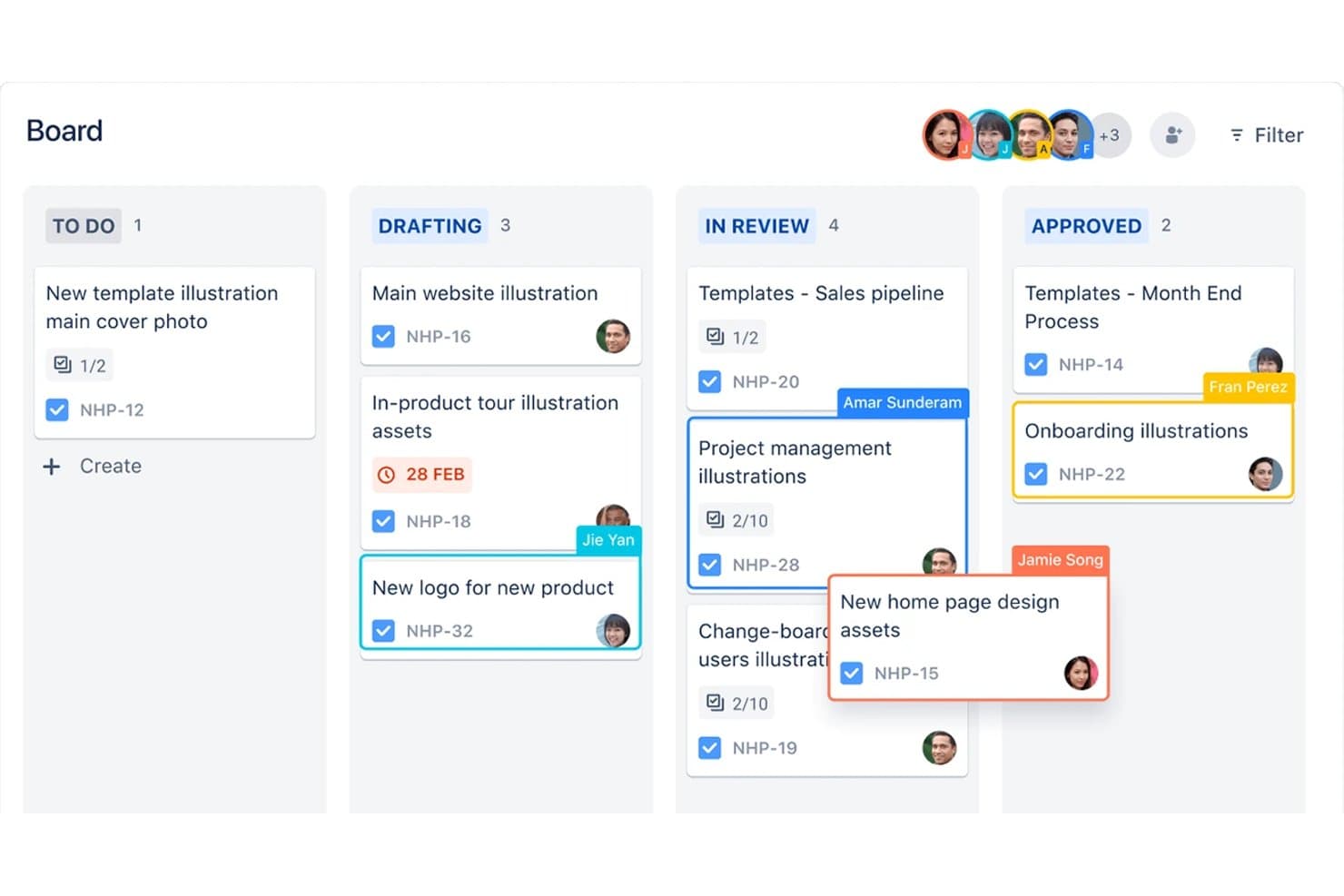
Jira organizes product tasks across kanban board stages by assignee. Jira is product development software from Atlassian that combines backlog and issue tracking, Scrum and Kanban boards, sprint planning, timeline roadmaps, and Jira Product Discovery for prioritization and customer insights.
Who Is Jira Best For?
Jira suits product and engineering teams that manage Agile backlogs, Scrum sprints, Kanban workflows, and cross-functional delivery.
Why I Picked Jira
I picked Jira because it is best for Agile sprint and backlog management, with Scrum and Kanban boards built around ranked backlogs and sprint planning. I use burndown, velocity, cycle time, and cumulative flow reports to spot delivery issues. Its timeline view also connects epics, dependencies, and release work in one delivery plan.
Jira Key Features
- Custom workflows: Configure statuses, rules, and transitions for different delivery processes.
- Custom fields: Add text, dropdown, date, label, and user-picker fields to work items.
- CSV import: Move existing work items into Jira from another tool.
- Marketplace apps: Extend Jira with integrations and add-ons from Atlassian Marketplace.
Jira Integrations
Jira has native integrations with Confluence, Trello, Bitbucket, Slack, Microsoft Teams, Gmail, Figma, and Jira Product Discovery. Its Atlassian Marketplace offers 3,000+ apps, while its REST API supports custom integrations.
What's Free?
Jira has a free-forever plan for up to 10 users, with unlimited projects, boards, backlogs, reports, and basic views. It includes 2 GB of storage and 150 automation steps monthly, but limits support to the community and excludes advanced permissions, data residency, and Rovo AI.
Pros and Cons
Pros:
- JPD connects discovery scores to delivery
- Unlimited work items support detailed tracking
- Agile boards support sprints and WIP limits
Cons:
- Free permissions make every user administrator
- Roadmapping and prioritization span separate products
Learn more about Jira: Best for AI-assisted roadmap and feedback workflows
- Free plan available; 14-day free trial; free demo available
- From $12/user/month (billed annually)
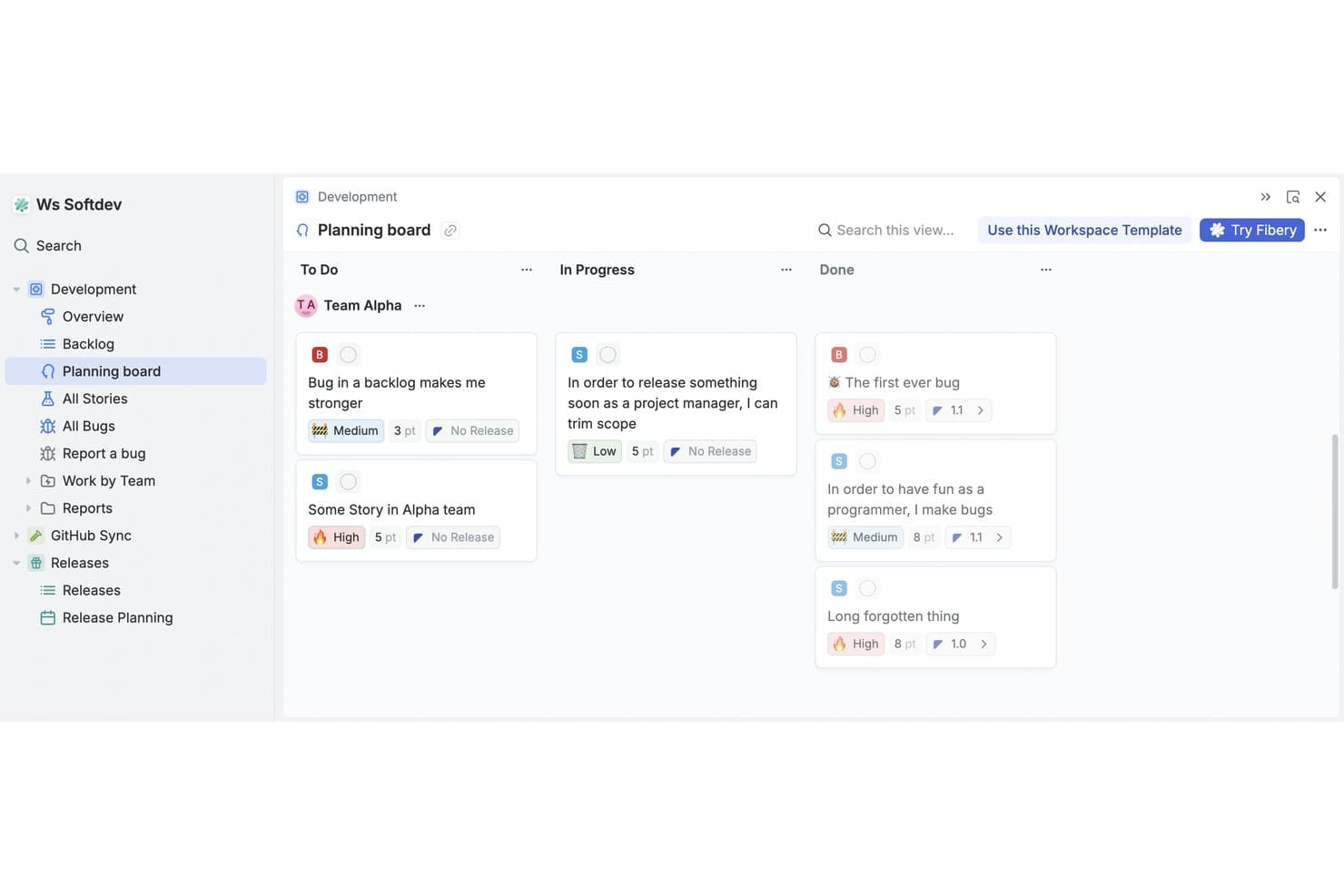
Fibery's planning board organizes tasks by status across teams. Fibery is a free product development platform that combines a no-code relational workspace with customer feedback, feature prioritization, roadmaps, product specs, and software development tracking.
Who Is Fibery Best For?
Product teams at startups and small companies that need AI-assisted feedback analysis, prioritization, roadmaps, and development tracking in one workspace.
Why I Picked Fibery
I picked Fibery because its AI-assisted roadmap and feedback workflows connect customer evidence directly to product decisions. I use AI to identify feedback themes, suggest links to backlog items, and score sentiment before prioritizing work with RICE, Kano, MoSCoW, or WSJF formulas. I can then publish updated roadmaps and changelogs from the same workspace.
Fibery Key Features
- Git sync: Connect GitHub or GitLab branches, commits, and pull requests to issues.
- Custom workflow boards: Configure states, filters, and views for sprints, releases, and priorities.
- Collaborative docs: Create linked product specifications, wikis, and team documentation.
- Feedback forms: Collect submissions through shareable links, embeds, or QR codes.
Fibery Integrations
Fibery offers documented integrations with GitHub, GitLab, Jira, Linear, Intercom, Zendesk, HubSpot, and Slack. It also provides a REST API, webhooks, an MCP server, and Zapier.
What's Free?
Fibery offers a free-forever plan for up to 10 users and 10 guests. It includes 10 databases, unlimited entities, 1 GB of file storage, 14 days of version history, 250 AI credits, and 5,000 entity syncs.
Pros and Cons
Pros:
- Supports tailored product development workflows
- Publishes live roadmaps and changelogs
- Connects feedback directly to prioritization
Cons:
- Free plan limits collaborative views
- Requires substantial initial workspace configuration
Learn more about Fibery: 10Best for visual whiteboarding across teams
Miro
- Free plan + 14-day free trial + free demo available
- From $8/user/month (billed annually)
Visit WebsiteCustomer Rating:4.8/5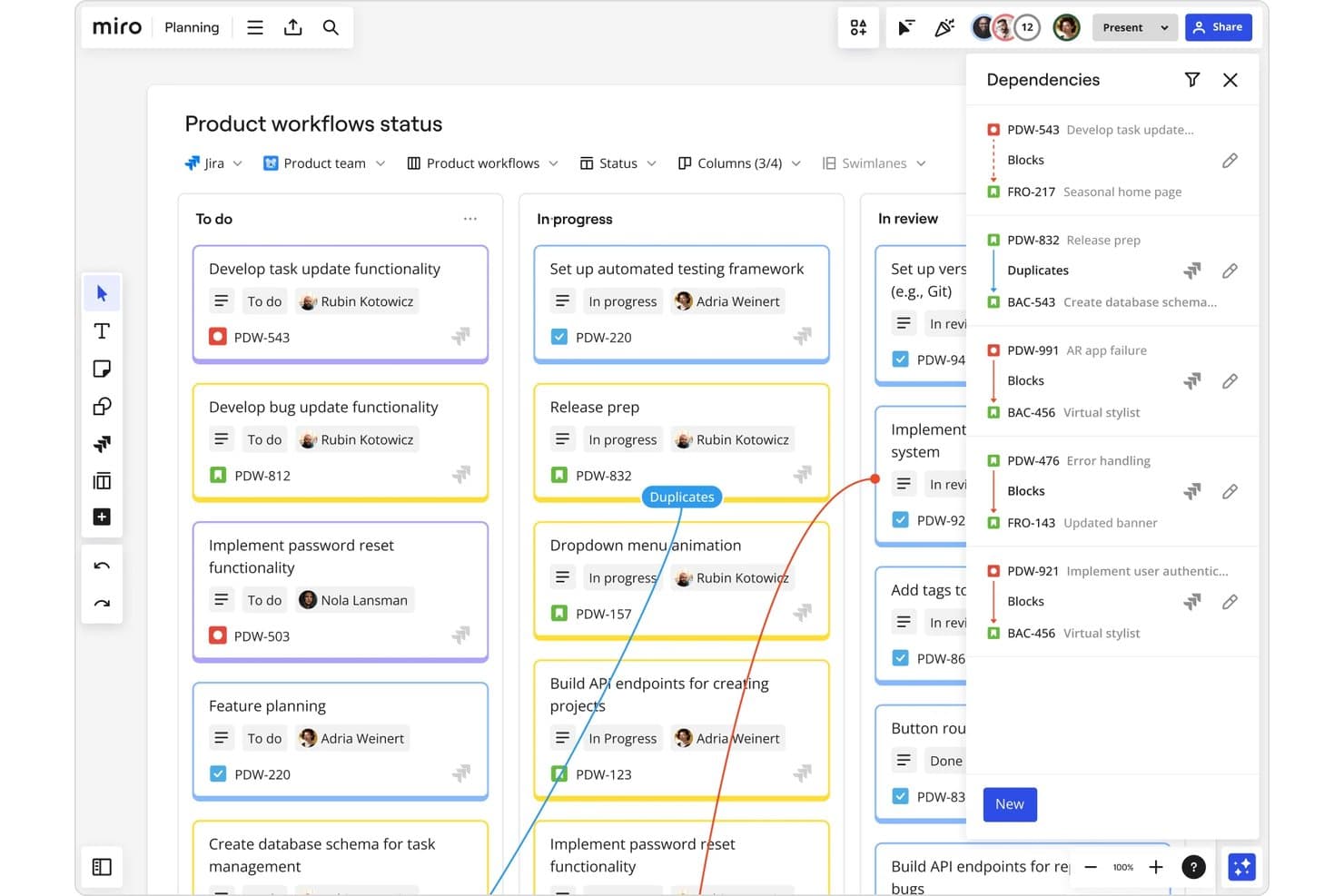
Miro tracks task dependencies across product workflow stages visually. Miro is a free product development workspace built around an infinite canvas, combining visual roadmaps, Kanban boards, Tables, prioritization templates, and real-time comments for cross-functional planning.
Who Is Miro Best For?
Product managers, startup founders, and cross-functional teams that need a shared visual space for product planning and stakeholder alignment.
Why I Picked Miro
I picked Miro because its visual whiteboarding across teams connects product discovery with delivery on one canvas. I use Timeline for roadmap milestones, Kanban for workflow stages, and threaded comments to capture engineering and stakeholder decisions beside the work. Teams can turn workshop notes into structured product plans without losing the original context.
Miro Key Features
- Tables: Organize product records with custom fields, filters, sorting, grouping, and bulk editing.
- Prioritization templates: Apply RICE, MoSCoW, 2x2, and impact-effort frameworks to feature decisions.
- MCP connections: Connect AI tools such as Claude, Cursor, and Copilot to board content.
- Talktracks: Record walkthroughs that explain board context for teammates and stakeholders.
Miro Integrations
Miro offers 250+ integrations, including Microsoft 365, Slack, Google Workspace, Adobe, Jira, Asana, Linear, ClickUp, and Azure DevOps. Its API, SDKs, and Marketplace support custom connectivity, while two-way work-tool sync requires Business or higher.
What's Free?
Miro’s Free plan lasts indefinitely and supports unlimited team members. You get three editable boards, while additional boards are view-only; private boards, advanced sharing controls, and some integrations require a paid plan.
Pros and Cons
Pros:
- Unlimited members enable broad collaboration
- Templates support product planning rituals
- Visual roadmaps keep teams aligned
Cons:
- Feedback collection remains manual on Free
- Three editable boards constrain ongoing work
Outro software gratuito de desenvolvimento de produtos
Eis algumas opções adicionais de software de desenvolvimento de produtos que também disponibilizam planos ou períodos de teste gratuitos. Embora estas ferramentas não tenham entrado na minha seleção, continuam a merecer atenção:
- 11ClickUpBest for unlimited-user sprint and task tracking
- 12Zoho ProjectsGood for Zoho ecosystem project tracking
- 13TrelloBest for Kanban boards on a free plan
- 14CannyBest for closing the customer feedback loop
- 15PlaneBest for open-source, self-hosted roadmap tracking
How I Evaluate Free Product Development Software
First, I define what counts as free. A free product development tool needs a genuine free-forever plan, not just a trial; I consider its user and feature limits. From there, I split my evaluation into three parts: core functionality, which carries the most weight, like building roadmaps and tracking development work; standout features, like public roadmap sharing; and what a tool offers beyond its feature set, like how its free plan scales as a team grows.
Core Functionality (Table Stakes For This List)
In addition to my free plan requirements, I use a scoring system to select tools for my list. I score each one on a scale from 0 (does not offer the functionality) to 5 (excels in this area) for each core functionality listed below, based on what's available on the free plan. I then convert the total into a percentage to help assess each tool's overall fit, with extra weight on any functionalities I've deemed essential.
- Roadmapping & Planning (Essential): I look for editable release plans with clear timelines and views that help teams connect strategic priorities to upcoming work.
- Task & Issue Tracking (Essential): I assess whether teams can assign, organize, and track backlog items, such as a bug fix or launch task, through completion.
- Prioritization Tools: I check for practical ways to rank ideas, such as voting or impact-and-effort scores, before teams commit them to a release.
- Feedback Collection: I look for ways to capture and organize customer requests, then connect recurring themes to planned features or backlog items.
- Collaboration & Comments: I assess whether teammates can discuss roadmap items and tasks in context, with shared visibility for engineering, design, and stakeholders.
- Sprint & Workflow Boards: I look for visual boards that show work by status and support a team's sprint, kanban, or delivery workflow.
Once I have a list of tools that meet the criteria, I consider what sets each platform apart.
Differentiating Factors (What Sets Vendors Apart)
Here's how I compare and contrast different vendors:
Standout Features
I look for a native feedback widget that lets teams collect user input directly inside their product, then link those requests to backlog items without jumping between tools. Public roadmap sharing is another differentiator: I check whether a free plan lets you publish a live, customer-facing view of planned work so stakeholders can track progress without needing a login. I also evaluate cross-tool import support, since most teams switching from spreadsheets or another tracker need a clean CSV migration path on day one.
Beyond Features
I check whether a free plan's user and project caps can actually grow with a small team. Some tools gate functionality behind storage or usage limits that force an upgrade mid-sprint. Data portability matters just as much: I look for native CSV or API export so you can move roadmaps and backlogs to another tool without losing context. I also evaluate how approachable the workspace is for non-PM teammates like engineers and designers, since simple permissions keep everyone aligned without extra seat costs.
Como escolher software gratuito de desenvolvimento de produtos
As listas complexas de funcionalidades e as estruturas de preços podem dificultar a perceção do que está realmente a obter com um software gratuito de desenvolvimento de produtos. Para o ajudar a manter-se concentrado enquanto analisa o processo de seleção do software, eis alguns fatores a ter em conta:
| Fator | O que considerar |
|---|---|
| FatorÂmbito da oferta gratuita | O que considerarAnalise o que está incluído no plano gratuito. Certifique-se de que abrange as necessidades básicas da sua equipa sem custos ocultos. |
| FatorEscalabilidade | O que considerarConsidere se o software pode crescer com a sua empresa. Verifique se suporta mais utilizadores ou projetos à medida que as suas necessidades aumentam. |
| FatorIntegrações | O que considerarCertifique-se de que integra as ferramentas que a sua equipa já utiliza, como o Slack ou o Google Workspace, para evitar perturbar os fluxos de trabalho. |
| FatorFacilidade de utilização | O que considerarAvalie o grau de intuitividade da interface. A sua equipa deve conseguir começar a utilizá-la com um mínimo de formação. |
| FatorSegurança | O que considerarVerifique se o software cumpre as normas de segurança relevantes para o seu setor, especialmente se tratar dados sensíveis. |
| FatorAssistência ao cliente | O que considerarProcure opções de assistência disponíveis na versão gratuita, como apoio por chat ou e-mail, para ajudar a sua equipa quando surgirem problemas. |
| FatorPersonalização | O que considerarDetermine se pode adaptar o software aos seus fluxos de trabalho específicos, mesmo na versão gratuita, para maximizar a produtividade. |
| FatorOpções de feedback | O que considerarConsidere de que forma o software lhe permite recolher e utilizar o feedback dos utilizadores para melhorar o seu processo de desenvolvimento de produtos. |
O que é software gratuito de desenvolvimento de produtos?
O software de desenvolvimento de produtos foi concebido para ajudar as equipas a planear, gerir e executar ideias de produtos. Estas ferramentas oferecem frequentemente planos gratuitos ou períodos de avaliação, permitindo aos utilizadores explorar funcionalidades básicas sem qualquer compromisso financeiro. Normalmente, os gestores de produto, designers e programadores utilizam estas ferramentas para melhorar a colaboração e a eficiência.
Funcionalidades como o planeamento de roteiros, a gestão de tarefas e a recolha de feedback ajudam as equipas a manterem-se organizadas, a estabelecerem prioridades e a reunirem informações essenciais, apoiando um processo de desenvolvimento mais eficaz.
Funcionalidades
Vamos analisar as funcionalidades normalmente encontradas no software de desenvolvimento de produtos e quais são geralmente incluídas nos planos gratuitos e pagos.
Funcionalidades normalmente gratuitas do software de desenvolvimento de produtos
- Gestão de tarefas: Ajuda a organizar e atribuir tarefas aos membros da equipa, mantendo todos no caminho certo.
- Planeamento de roteiros: Fornece uma linha temporal visual para os objetivos do produto, ajudando no planeamento estratégico.
- Recolha de feedback: Permite às equipas recolher informações dos utilizadores, que podem orientar melhorias no produto.
- Ferramentas de colaboração: Facilitam a comunicação e o trabalho em equipa, garantindo que todos estão alinhados.
- Integrações básicas: Ligam-se a outras ferramentas, como o Slack ou o Google Workspace, melhorando o fluxo de trabalho.
- Painéis personalizáveis: Permitem aos utilizadores adaptar a sua vista para obter acesso rápido a informações importantes.
- Gestão de funções dos utilizadores: Permite definir permissões para controlar o acesso com base nas funções da equipa.
Funcionalidades normalmente pagas do software de desenvolvimento de produtos
- Análise avançada: Oferece uma análise aprofundada dos dados para ajudar as equipas a tomar decisões informadas.
- Notificações automáticas: Mantêm as equipas atualizadas através de alertas automáticos sobre alterações nos projetos.
- Colaboração em tempo real: Permite que vários utilizadores trabalhem simultaneamente nos mesmos documentos.
- Funcionalidades de segurança reforçadas: Fornecem medidas de segurança adicionais para proteger dados sensíveis.
- Suporte prioritário ao cliente: Oferece tempos de resposta mais rápidos e suporte dedicado para problemas urgentes.
- Armazenamento ilimitado: Permite acomodar grandes quantidades de dados, algo essencial para equipas em crescimento.
- Opções avançadas de personalização: Proporciona maior flexibilidade para adaptar o software a fluxos de trabalho específicos.
Vantagens
A implementação de software gratuito de desenvolvimento de produtos proporciona várias vantagens à sua equipa e à sua empresa. Eis algumas que pode esperar:
- Poupança de custos: Aceda a ferramentas essenciais sem qualquer compromisso financeiro, libertando orçamento para outras necessidades.
- Melhor organização: Utilize a gestão de tarefas para manter claros e sob controlo os projetos e as responsabilidades.
- Colaboração melhorada: As ferramentas de comunicação integradas garantem que a sua equipa se mantém ligada e alinhada.
- Informações valiosas: As funcionalidades de recolha de feedback ajudam-no a compreender as necessidades dos utilizadores e a tomar decisões informadas.
- Flexibilidade: Os painéis personalizáveis permitem adaptar o seu espaço de trabalho ao seu fluxo de trabalho.
- Escalabilidade: Comece com funcionalidades básicas e expanda à medida que a sua equipa cresce, adaptando-se às necessidades em mudança.
- Configuração rápida: As interfaces simples e as integrações básicas facilitam o início sem necessidade de formação extensa.
Custos & Preços
Compreendo que chegou a este artigo à procura das melhores opções de software de desenvolvimento de produtos disponíveis gratuitamente. No entanto, uma vez que os planos gratuitos oferecem apenas funcionalidades limitadas, é bastante provável que precise de atualizar o seu plano no futuro.
A tabela abaixo resume os planos comuns, os seus preços médios e as funcionalidades normalmente incluídas nas soluções de software de desenvolvimento de produtos:
Tabela de comparação de planos de software de desenvolvimento de produtos
| Tipo de plano | Preço médio | Funcionalidades comuns |
|---|---|---|
| Tipo de planoPlano gratuito | Preço médio$0 | Funcionalidades comunsGestão básica de tarefas, planeamento de roteiros, recolha de feedback, ferramentas de colaboração e integrações básicas. |
| Tipo de planoPlano pessoal | Preço médio$5-$25/utilizador/mês | Funcionalidades comunsTodas as funcionalidades gratuitas, além de gestão de funções dos utilizadores, painéis personalizáveis e armazenamento adicional. |
| Tipo de planoPlano empresarial | Preço médio$30-$75/utilizador/mês | Funcionalidades comunsTodas as funcionalidades pessoais, além de análises avançadas, notificações automatizadas e funcionalidades de segurança reforçadas. |
| Tipo de planoPlano empresarial de grande dimensão | Preço médio$80-$150/utilizador/mês | Funcionalidades comunsTodas as funcionalidades empresariais, além de apoio prioritário ao cliente, armazenamento ilimitado e opções avançadas de personalização. |
Perguntas frequentes sobre software gratuito de desenvolvimento de produtos
Eis algumas respostas a perguntas frequentes sobre software gratuito de desenvolvimento de produtos:
Posso confiar num software gratuito de desenvolvimento de produtos para utilização a longo prazo?
As versões gratuitas podem ser excelentes para empresas em fase de arranque ou equipas pequenas com necessidades básicas. No entanto, à medida que a sua equipa cresce, poderá precisar de funcionalidades avançadas disponíveis nos planos pagos. É importante avaliar se a versão gratuita responde aos seus objetivos a longo prazo.
Que limitações devo esperar num software gratuito de desenvolvimento de produtos?
Os planos gratuitos têm frequentemente armazenamento limitado, menos integrações e apoio básico. Poderá também encontrar restrições quanto ao número de utilizadores ou projetos. Avalie estas limitações face às necessidades da sua equipa para decidir se um plano gratuito é suficiente.
Quão seguro é um software gratuito de desenvolvimento de produtos?
A segurança pode variar consoante o fornecedor. Procure software que ofereça funcionalidades de segurança básicas, como a encriptação de dados. Para lidar com informações sensíveis, considere a conformidade do fornecedor com as normas e regulamentações do setor.
Posso passar facilmente de um plano gratuito para um plano pago?
A maioria dos fornecedores oferece um processo de atualização simples. Normalmente, pode manter os dados e as definições existentes ao mudar para um plano pago. Informe-se junto do fornecedor sobre possíveis períodos de indisponibilidade ou questões relacionadas com a migração de dados durante a atualização.