

Med så mange ulike programmer for brukerhistorier tilgjengelig er det vanskelig å finne ut hvilket som passer for deg. Du vet at du ønsker å holde fokuset på sluttbrukeren ved å beskrive funksjoner fra brukerens perspektiv og oppbevare dem på et søkbart sted, men du må finne ut hvilket verktøy som er best egnet. Jeg hjelper deg! I dette innlegget gjør jeg valget enklere ved å dele mine personlige erfaringer med å bruke dusinvis av ulike verktøy for brukerhistorier med store team, samt mine anbefalinger av den beste programvaren for brukerhistorier.
Hva er programvare for brukerhistorier?
Programvare for brukerhistorier viser til verktøy som hjelper utviklingsteam med å opprette, administrere og organisere brukerhistorier som en del av den smidige utviklingsprosessen. Programvare for brukerhistorier tilbyr vanligvis en sentralisert plattform der team kan skrive, organisere og prioritere brukerhistorier. Disse verktøyene inneholder ofte funksjoner for samarbeid, håndtering av oppgaver i arbeidskøen, sprintplanlegging og sporing av fremdriften til brukerhistorier gjennom hele utviklingsforløpet.
Målet med programvare for brukerhistorier er å forbedre kommunikasjon, samarbeid og åpenhet i utviklingsteam, slik at alle involverte forstår brukerbehovene og kravene. Den brukes vanligvis i smidige metoder og Scrum-metodikken for å støtte iterative og trinnvise utviklingspraksiser.
Why Trust Our Software Recommendations
6,700+
Reviews
20
Industry experts
16+
Evaluation factors
14
Years
Our team has been testing and reviewing software since 2012. As product managers ourselves, we know how difficult—and important—it is to choose the right software.
For this guide, we evaluated tools using hands-on testing and independent research, scoring tools using our selection criteria.
Our reviews reflect our human editorial judgment, not a sales pitch.
Expert reviewers:
- Andrew LumbySenior TPM
- Cristiano ValimSenior UI/UX Lead


Sammenligningstabell for programvare for brukerhistorier
Her er en tabell der du finner alle verktøyene vi nettopp har gjennomgått i oversiktene.
| Tool | Best For | Trial Info | Price | ||
|---|---|---|---|---|---|
| 1 | Best for Agile product management story mapping | 14-day free trial + free demo available | From $9/user/month (billed annually) | Website | |
| 2 | Best for strategy-led new product story planning | 30-day free trial + free demo available | From $59/user/month (billed annually) | Website | |
| 3 | Best for effective communication and collaboration | Free demo + 30-day free trial available | From $6/month | Website | |
| 4 | Best for planning stories alongside code and CI/CD | Free plan available | From $29/user/month (billed annually) | Website | |
| 5 | Best for Zoho-native agile story tracking | Free plan and 15-day free trial available | From $3/user/month | Website | |
| 6 | Best for all-in-one backlog and sprint tracking | Free plan available | From $9/user/month (billed annually) | Website | |
| 7 | Best for creating and managing epics | Free plan + 14-day free trial + free demo available | From $8.50/user/month (billed annually) | Website | |
| 8 | Best for sprint planning across dev and product teams | Free plan available | From $8.48/user/month | Website | |
| 9 | Best for scaled agile story and PI planning | Free trial available | Pricing upon request | Website | |
| 10 | Best for sprint planning within the Microsoft ecosystem | Free plan available | From $6/user/month | Website |


Oversikt over de 9 beste løsningene for brukerhistorier
Her er en kort beskrivelse av hvert system for brukerhistorier, som viser det beste bruksområdet for hvert verktøy, noen bemerkelsesverdige funksjoner og skjermbilder som gir et innblikk i brukergrensesnittet.
 Best for Agile product management story mapping
- 14-day free trial + free demo available
- From $9/user/month (billed annually)
Visit WebsiteCustomer Rating:4.4/5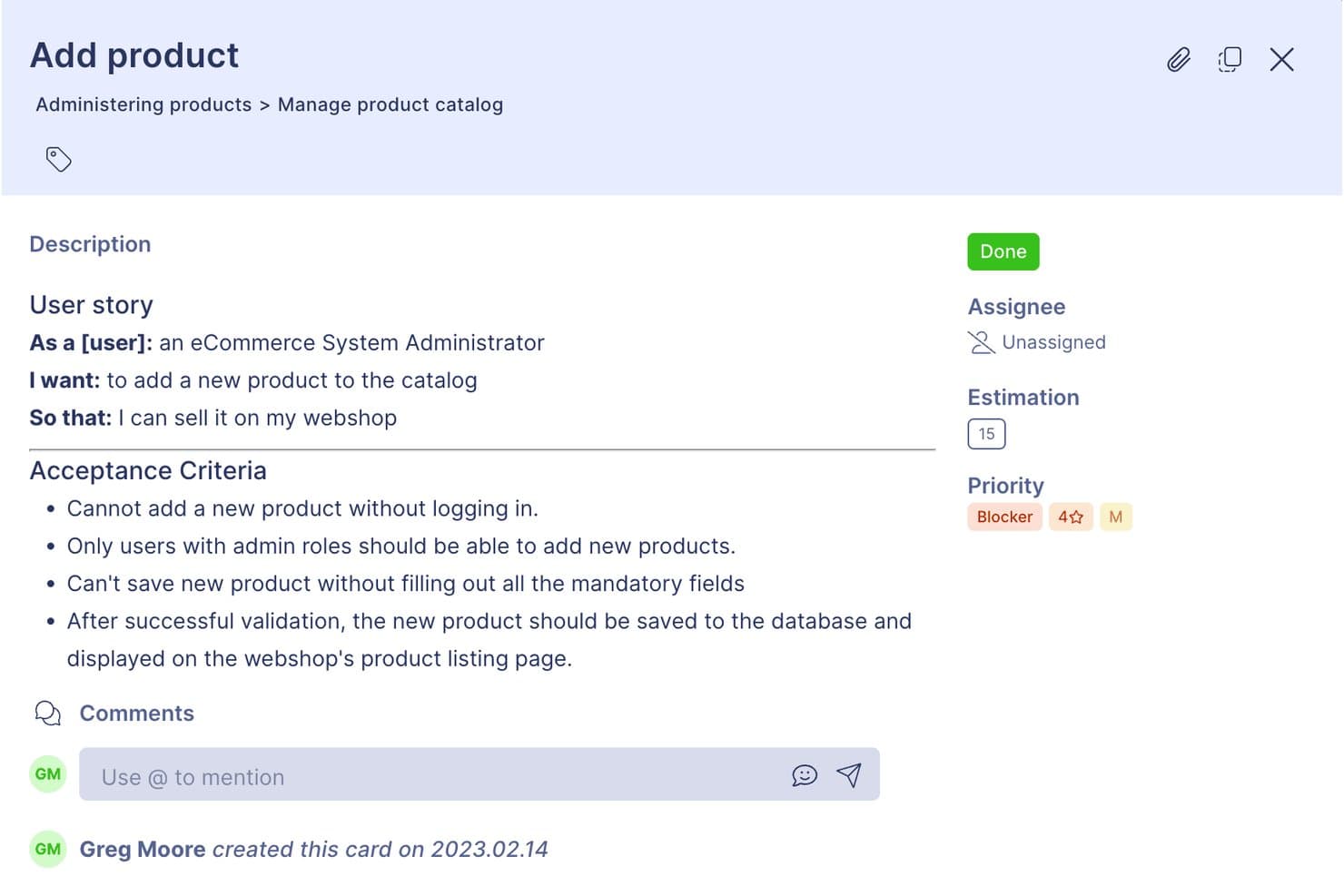
StoriesOnBoard structures user stories with acceptance criteria and priority tags. StoriesOnBoard is a dedicated user story mapping tool that structures your backlog across three levels—user goals, steps, and stories—with built-in prioritization frameworks, release planning, and two-way sync with Jira, Azure DevOps, and other issue trackers.
Who Is StoriesOnBoard Best For?
StoriesOnBoard is a strong fit for product owners and agile teams who need a structured way to map, prioritize, and plan backlogs alongside their existing issue trackers.
Why I Picked StoriesOnBoard
StoriesOnBoard earns its spot on my shortlist because its three-level story map structure (user goals, steps, stories) is purpose-built for agile product planning in a way most tools simply aren't. I love that prioritization is built directly into the mapping workflow, with RICE, MoSCoW, Kano, and Value vs. Effort scoring available collaboratively, so my team can debate tradeoffs without switching tools. The release lanes let us slot prioritized stories into planned iterations and roll up estimates to the release level instantly.
StoriesOnBoard Key Features
- Two-way issue tracker sync: Automatically syncs story cards bidirectionally with Jira, Azure DevOps, Trello, and GitHub Issues, keeping your map and dev backlog in step.
- AI story assistant: Generates user stories, writes personas, collects acceptance criteria, and drafts release summaries using a monthly AI token allowance.
- Portfolio roadmap: Visualizes releases and epics across multiple products in swimlane views with status reporting and roadmap templates.
- Public feedback portal: Lets you collect, tag, and upvote product ideas from external stakeholders through a branded, shareable portal.
StoriesOnBoard Integrations
StoriesOnBoard offers six native integrations, including Jira, Azure DevOps, Trello, GitHub Issues, Pivotal Tracker, and Slack. It also supports Zapier, while custom integration options are limited by the lack of a full public API.
Pros and Cons
Pros:
- Release lanes connect discovery to delivery
- RICE and Kano scoring expose tradeoffs
- Three-level maps clarify new product scope
Cons:
- Concurrent editing limits workshop participation
- Reporting omits burndown and velocity views
Learn more about StoriesOnBoard: Best for strategy-led new product story planning
- 30-day free trial + free demo available
- From $59/user/month (billed annually)
Visit WebsiteCustomer Rating:4.1/5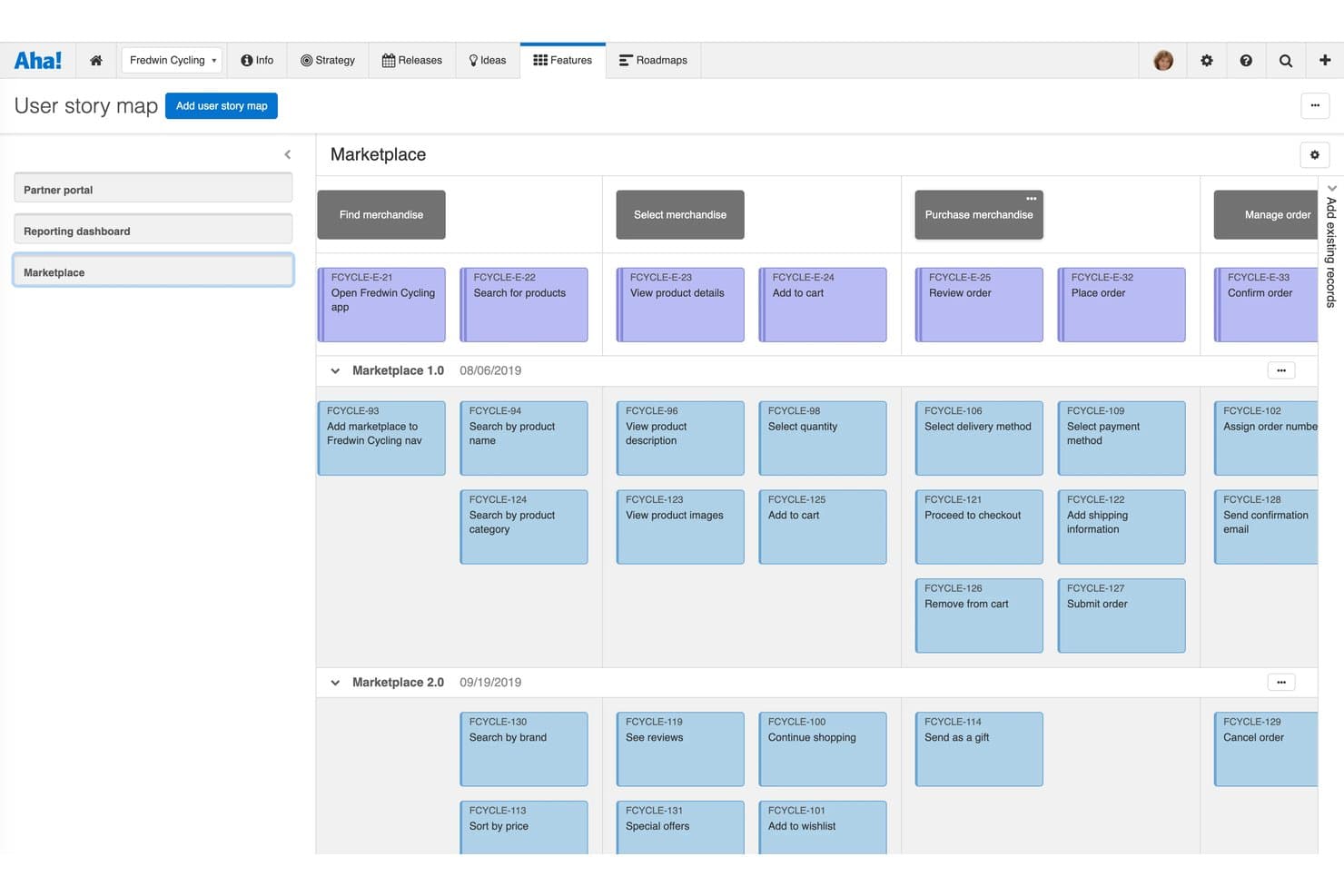
Aha! Roadmaps organizes user stories visually across releases and epics. Aha! Roadmaps is a product management platform that connects strategy to execution through a structured hierarchy of goals, epics, features, and requirements, with native user story mapping, backlog prioritization, AI-assisted acceptance criteria, and two-way sync with development tools like Jira and Azure DevOps.
Who Is Aha! Roadmaps Best For?
Aha! Roadmaps is a strong fit for product managers who need to connect business strategy directly to user stories and feature requirements.
Why I Picked Aha! Roadmaps
Aha! Roadmaps earns its spot on my shortlist because it's the only tool I've used that traces a business goal all the way down to an individual user story without losing the thread. I love how the Goals→Epics→Features→Requirements hierarchy lets me anchor every story to a strategic initiative before a single line of code is written. The native user story map also lets me filter by persona, so I can immediately see which stories serve which user type across a release.
Aha! Roadmaps Key Features
- AI-assisted acceptance criteria generation: Elle AI drafts testable, verifiable acceptance criteria for individual features, including edge cases, directly within the record.
- Two-way dev tool sync: Requirements sync bidirectionally with Jira, Azure DevOps, GitHub, and GitLab, with customizable field mapping between record types.
- Story estimation fields: Each feature and requirement supports initial, detailed, and actual effort estimates in story points or time, with capacity report visualization.
- Idea-to-story promotion: Customer ideas captured in Aha! Ideas can be promoted directly to epics, features, or requirements, linking feedback to backlog items.
Aha! Roadmaps Integrations
Aha! Roadmaps offers 40+ native integrations, including Jira, Azure DevOps, GitHub, GitLab, Rally, Slack, Microsoft Teams, Confluence, Figma, and Zendesk. It also provides a REST API for custom integrations and supports Zapier.
Pros and Cons
Pros:
- AI-drafted acceptance criteria
- Persona-filtered story maps
- Strategy-to-story traceability
Cons:
- Broad configuration can overwhelm smaller teams
- Native sprint execution requires separate product
Learn more about Aha! Roadmaps: Best for effective communication and collaboration
- Free demo + 30-day free trial available
- From $6/month
Visit WebsiteCustomer Rating:4.5/5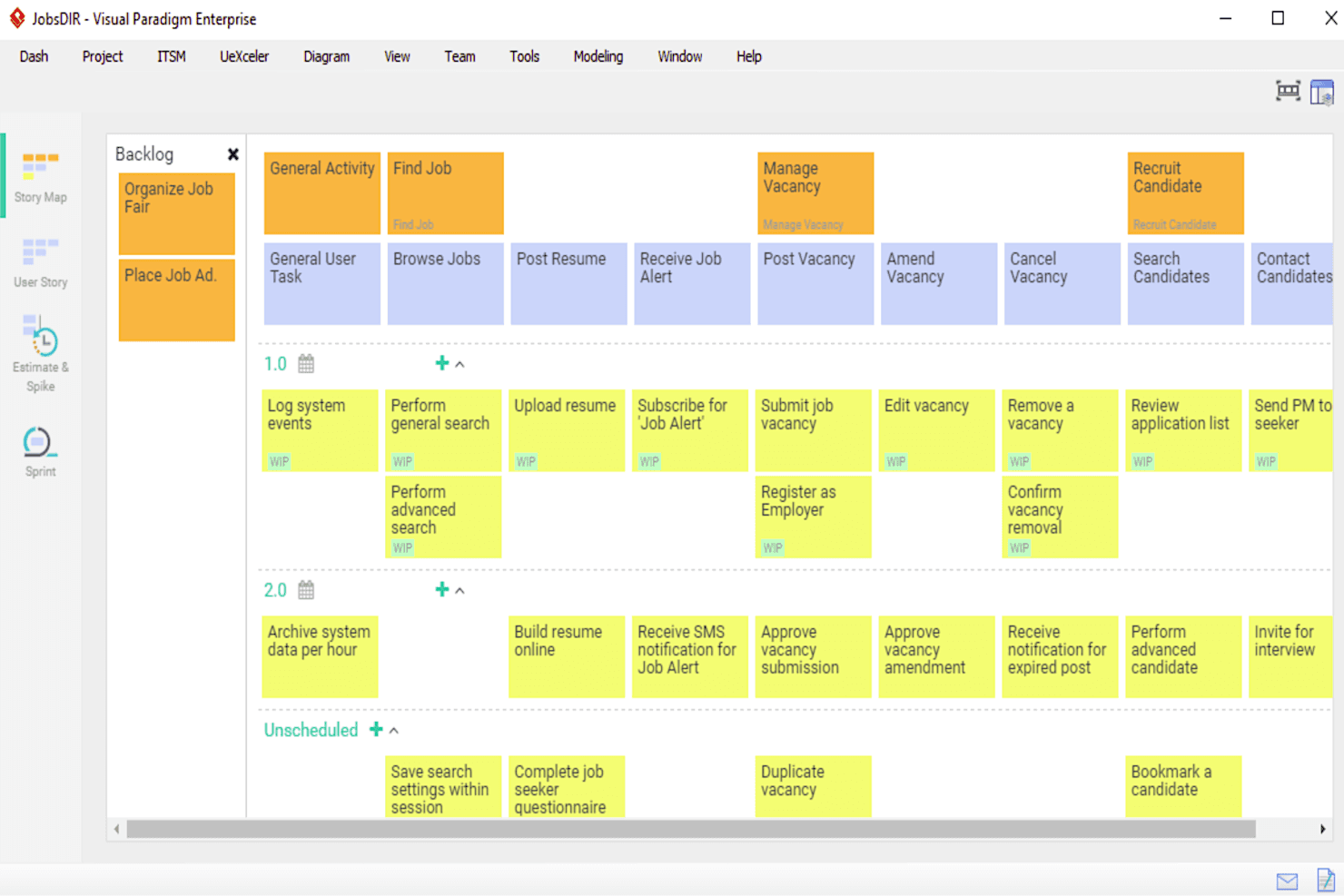
Visual Paradigm lets teams visualize their product roadmap easily and break down user stories into smaller, more manageable components. Visual Paradigm is a modeling and agile planning suite that covers user story mapping, backlog management, sprint planning, and acceptance criteria tracking alongside UML, BPMN, and process modeling tools.
Who Is Visual Paradigm Best For?
Visual Paradigm is a strong fit for business analysts and product teams that need to connect system models—like UML or BPMN diagrams—directly to user stories and sprint backlogs in one place.
Why I Picked Visual Paradigm
I picked Visual Paradigm as one of the best because it treats communication as a structural feature, not an afterthought. Confirmation Items let you attach acceptance criteria checklists directly to each story, while PostMania lets stakeholders comment and approve without needing a license. I also love that Conversation Notes keep discussion and decisions tied to the story itself, so nothing gets lost in a separate thread.
Visual Paradigm Key Features
- Written scenario editor: Build step-by-step user-system interaction flows per story, with if-then-else and loop support that converts directly into sequence or activity diagrams.
- Affinity table estimation: Score stories across configurable effort and risk axes to generate story points and hours for sprint planning.
- Model-to-story traceability: Source backlog items directly from use case diagrams, BPMN models, or EA artifacts, with maintained links between the source model and the story map.
- PostMania stakeholder commenting: Let non-licensed stakeholders review, comment on, and approve diagrams through an online browser without purchasing a seat.
Visual Paradigm Integrations
Visual Paradigm offers integrations with Jira and Atlassian Confluence, including diagram-to-issue creation in Jira and publishing to Confluence. It also supports imports from Visio, Bizagi, Rational tools, ErWin, and PowerDesigner.
Pros and Cons
Pros:
- Storyboards add context beyond text cards
- Acceptance checklists clarify stakeholder expectations
- Model traceability connects requirements with stories
Cons:
- Large diagrams can slow performance
- Diagram-centric workflows burden lightweight Scrum teams
Learn more about Visual Paradigm: Best for planning stories alongside code and CI/CD
- Free plan available
- From $29/user/month (billed annually)
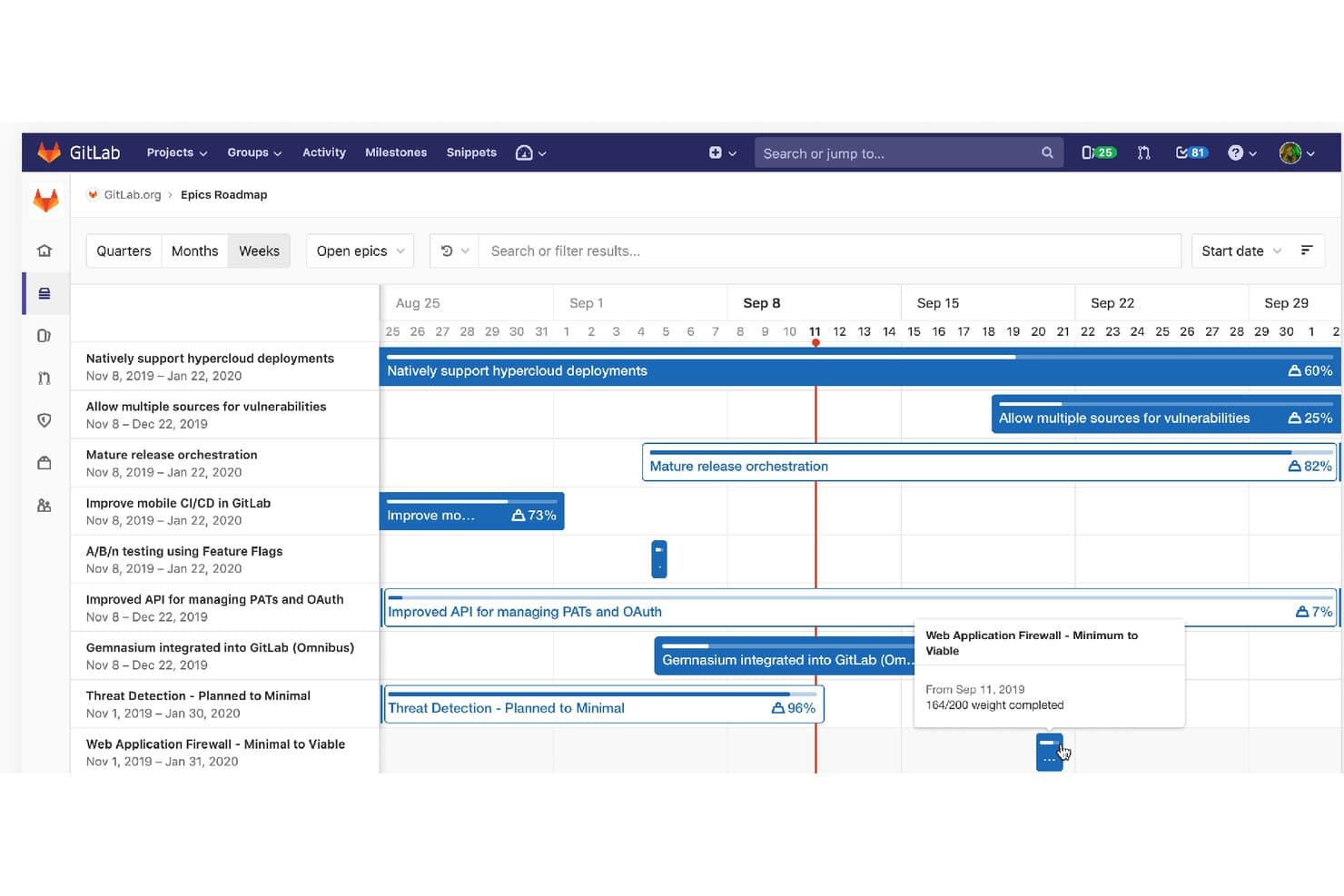
GitLab tracks epic progress and weight across a visual roadmap timeline. GitLab is a DevSecOps platform that brings user story creation, backlog management, sprint planning, and roadmapping together with source code, CI/CD pipelines, and security tooling in a single environment.
Who Is GitLab Best For?
GitLab is a strong fit for engineering-led teams that want to plan and track user stories in the same platform where they write, review, and ship code.
Why I Picked GitLab
I picked GitLab as one of the best because it's the only tool on this list where your user stories and your codebase share the same roof. When I create an issue using an "As a… I want… so that…" description template, I can link it directly to a branch, merge request, and CI/CD pipeline—and GitLab auto-closes the story on merge. I also rely on iteration cadences with automatic rollover to keep sprint planning moving without manual cleanup between cycles.
GitLab Key Features
- Description templates: Store "As a… I want… so that…" Markdown templates in version control and apply them consistently across every project in your group.
- Epic boards and roadmap: Visualize epics on a Gantt-style timeline filtered by milestone, label, or date to track progress across multiple workstreams.
- WIP limits: Set caps on issue count or total weight per board list to prevent teams from overloading a sprint column.
- Burndown and burnup charts: Track iteration progress by issue count or story weight with automatically generated charts updated in real time.
GitLab Integrations
GitLab offers native integrations with Jira, Slack, Microsoft Teams, Jenkins, Confluence Cloud, and Squash TM. REST and GraphQL APIs, webhooks, CI/CD pipelines, and IDE extensions support custom development workflows.
Pros and Cons
Pros:
- Cadences roll unfinished work forward automatically
- Templates standardize consistent story formats
- Stories link directly to code changes
Cons:
- Developer-oriented navigation can slow nontechnical planning
- Acceptance criteria remain unstructured checklists
Learn more about GitLab: Best for Zoho-native agile story tracking
- Free plan and 15-day free trial available
- From $3/user/month
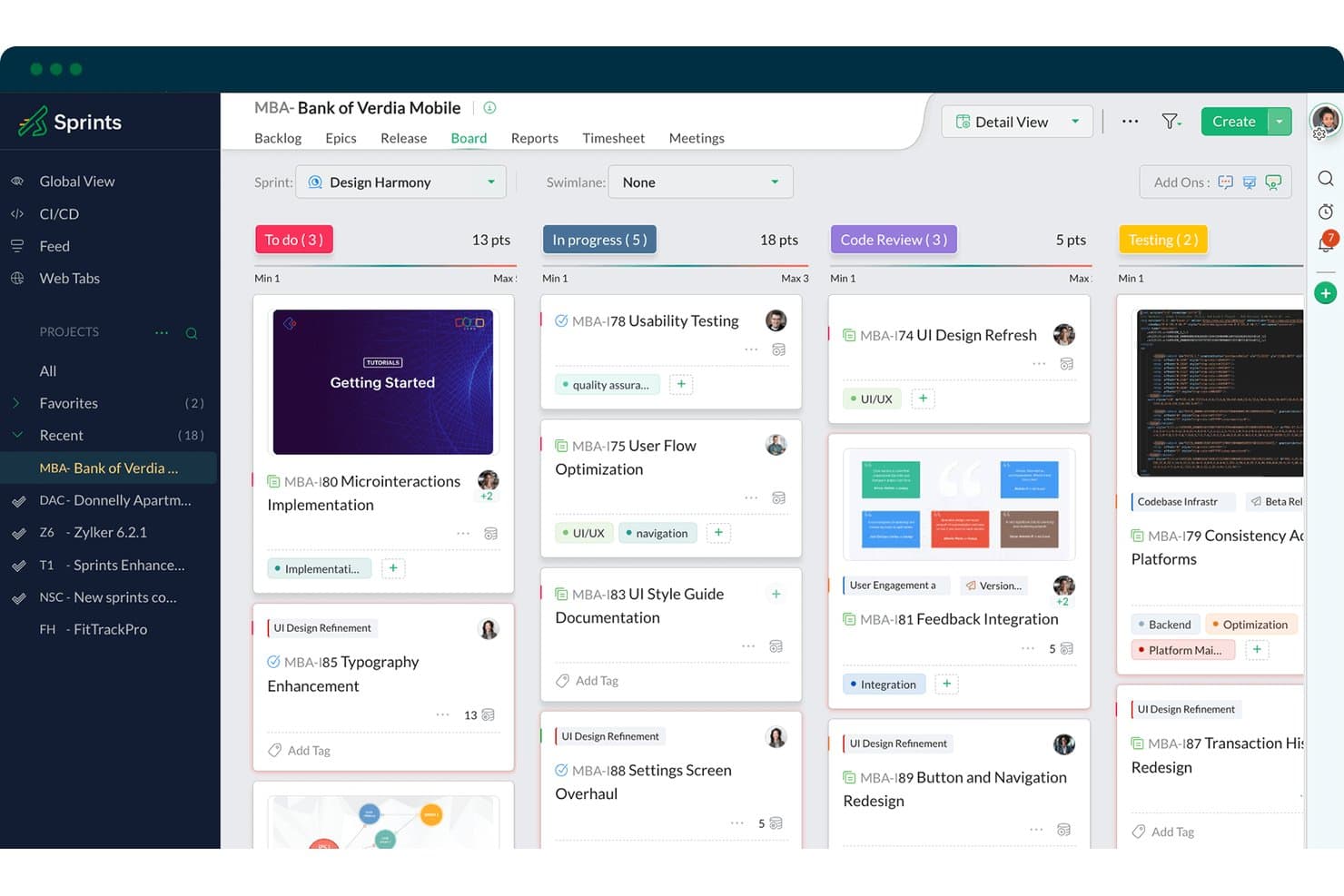
Zoho Sprints organizes user stories across sprint board columns by status. Zoho Sprints is an agile project management tool that covers user story creation, backlog and epic management, sprint planning, and Scrum/Kanban boards within a broader agile lifecycle suite.
Who Is Zoho Sprints Best For?
Zoho Sprints is a strong fit for agile teams already in the Zoho ecosystem who want end-to-end sprint and backlog management without paying enterprise-tool prices.
Why I Picked Zoho Sprints
Zoho Sprints earns its spot on my shortlist because it's purpose-built around the full agile story lifecycle, from backlog to sprint to release, within a single native environment. I particularly like how the epic management module maps user stories directly to epics with live progress roll-ups, so I can see how individual stories contribute to larger objectives at a glance. Teams already running on Zoho get even more value, since Cliq, Desk, and Analytics connect without extra setup, keeping story discussions and reporting in one place.
Zoho Sprints Key Features
- Native user story template: Structures stories using the "As a/I want/So that" format with title, description, and acceptance criteria fields built in.
- Burndown and velocity reports: Tracks sprint progress and team throughput over time with visual charts tied directly to story estimation points.
- Checklist-based acceptance criteria: Lets teams add checkable definition-of-done items to individual stories using reusable checklist templates.
- SCM integration: Connects GitHub, GitLab, Bitbucket, and Azure DevOps so developers can link commits and pull requests to specific user stories.
Zoho Sprints Integrations
Zoho Sprints offers native integrations with GitHub, GitLab, Bitbucket, Azure DevOps, Jenkins, Jira, Zoho Analytics, Zoho Cliq, Microsoft Teams, and Google Drive. It also supports APIs, webhooks, Zoho Flow, and Zapier for custom connectivity.
Pros and Cons
Pros:
- Supports backlog-to-release agile workflows
- Connects acceptance criteria to checklists
- Maps stories to epics with progress roll-ups
Cons:
- No dedicated story-mapping or journey canvas
- Scrum terminology can confuse nontechnical stakeholders
Learn more about Zoho Sprints: Best for all-in-one backlog and sprint tracking
- Free plan available
- From $9/user/month (billed annually)
Visit WebsiteCustomer Rating:4.6/5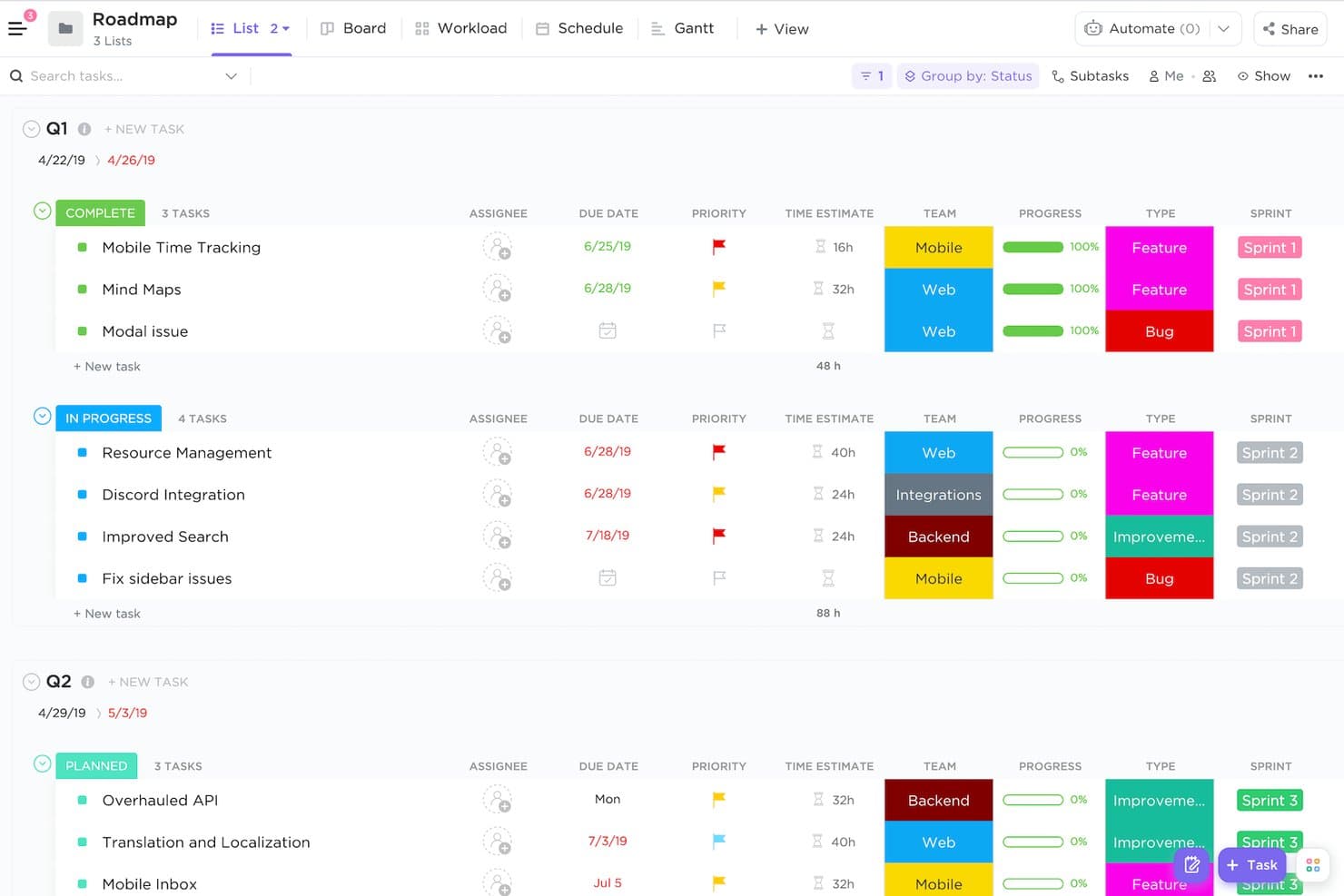
ClickUp organizes product roadmap tasks by status, team, and sprint. ClickUp is a project management platform that brings together user story creation, backlog management, sprint planning, and agile reporting in a single, highly customizable workspace.
Who Is ClickUp Best For?
ClickUp fits product teams that want backlog management, sprint tracking, docs, and collaboration in one workspace without juggling multiple tools.
Why I Picked ClickUp
ClickUp earns its spot on my shortlist because it keeps your entire story workflow, from backlog grooming to sprint closeout, inside one workspace. I particularly like how custom task types let you label work as "Story," "Epic," or "Bug" and attach structured fields like sprint points, priority, and acceptance criteria checklists directly to each story type. Native Sprint Folders with automated carry-over and burndown dashboards mean I'm not stitching together a separate reporting tool just to track velocity.
ClickUp Key Features
- Custom task types: Define task types like "Story," "Epic," or "Bug" and attach unique custom fields to each type for structured, consistent story data.
- ClickUp Brain AI: Use AI to draft user stories, generate acceptance criteria, and summarize sprint progress directly inside tasks and Docs.
- Task dependencies: Link stories with blocking or waiting-on relationships to surface sequencing issues before sprint planning begins.
- Whiteboard story mapping: Map user journeys and story flows visually on a canvas, then convert shapes and sticky notes directly into backlog tasks.
ClickUp Integrations
ClickUp offers 200+ native integrations, including GitHub, GitLab, Bitbucket, Slack, Microsoft Teams, Figma, Miro, Google Drive, and Google Calendar. It also provides an API, webhooks, and Zapier for custom connectivity.
Pros and Cons
Pros:
- Comments keep acceptance criteria discussions attached
- Sprint reporting supports release forecasting
- Backlog hierarchy supports epic breakdown
Cons:
- Acceptance criteria lack a dedicated workflow gate
- Agile setup demands deliberate workspace design
Learn more about ClickUp: Best for creating and managing epics
- Free plan + 14-day free trial + free demo available
- From $8.50/user/month (billed annually)
Visit WebsiteCustomer Rating:4.5/5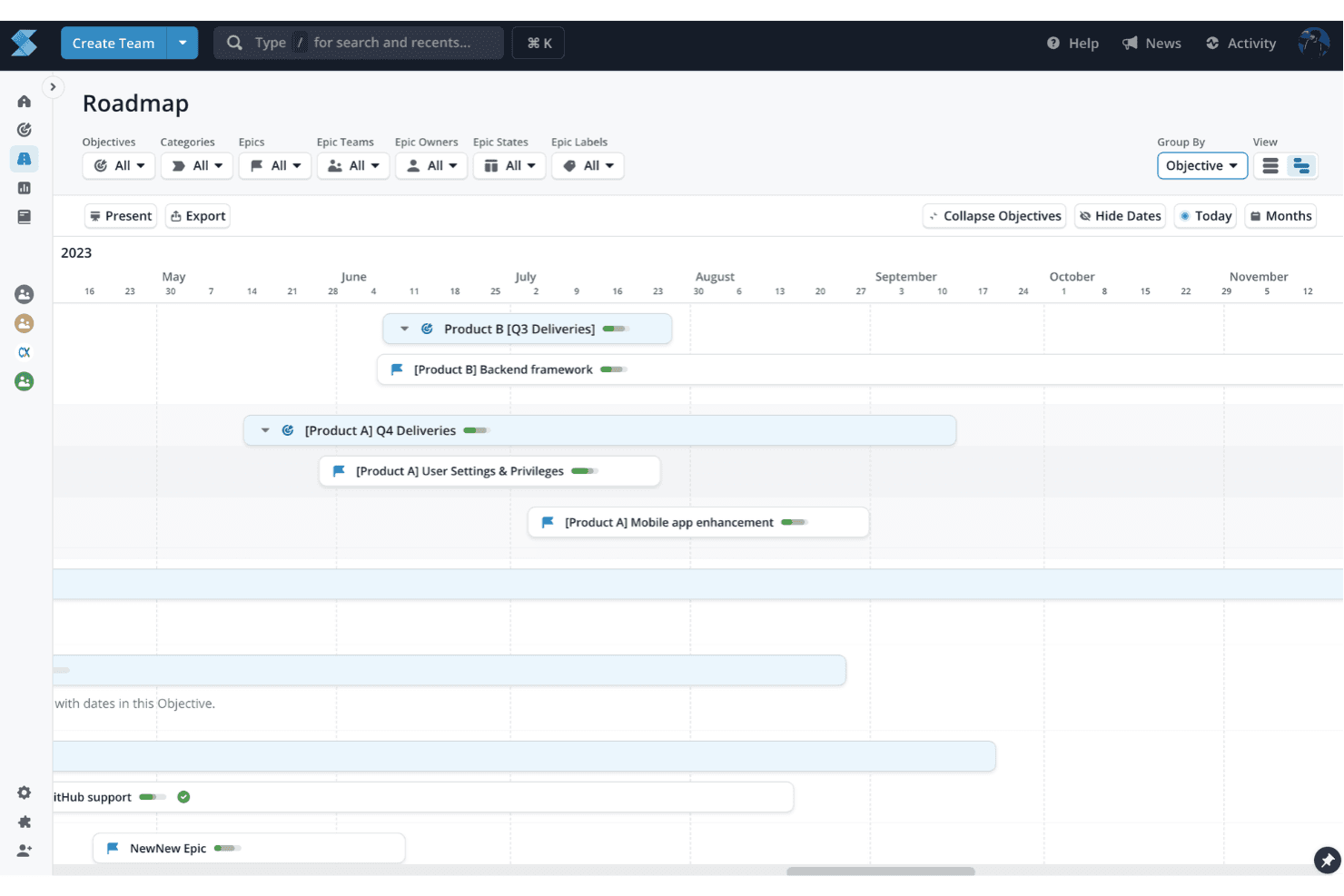
Shortcut offers a roadmap feature that can manage milestones and epics, providing a clear visual representation of project progress and key deliverables. Shortcut is an agile project management tool built around a structured story hierarchy—epics, stories, sub-tasks, and checklists—with backlog management, sprint planning, roadmaps, and AI-assisted story drafting via its Korey agent.
Who Is Shortcut Best For?
Shortcut is a strong fit for agile product teams—particularly product managers and product owners at startups and mid-market companies—who need a structured epic-to-story hierarchy without the overhead of tools like Jira.
Why I Picked Shortcut
Shortcut earns its spot on my shortlist because of how well it handles epics as a first-class organizing layer. I love that each epic comes with ARC charts tracking added, removed, and completed stories, plus velocity charts that make sprint forecasting feel grounded in real data. Korey, Shortcut's AI agent, can also draft acceptance criteria directly from Slack threads, which closes a gap I often see in epic-level planning.
Shortcut Key Features
- Story templates: Pre-fill story fields like type, description, labels, owners, and workflow state to standardize formats across your team.
- Korey AI agent: Turns Slack threads and rough notes into structured stories with auto-drafted acceptance criteria and surfaced open questions.
- Customizable workflows with WIP limits: Set work-in-progress limits per workflow state to manage flow and reduce bottlenecks across sprints.
- Iteration reporting: Access burndown, velocity, cumulative flow, cycle time, and time-in-state reports to track sprint progress in detail.
Shortcut Integrations
Shortcut offers native integrations with GitHub, GitLab, Bitbucket Cloud, Slack, Figma, Miro, Notion, Sentry, and Zendesk. It also provides REST API and webhook access for custom integrations, plus Zapier.
Pros and Cons
Pros:
- Iteration reports support evidence-based sprint forecasts
- Korey drafts stories from Slack discussions
- Epic-to-story hierarchy supports product planning
Cons:
- Workspace-level permissions limit product-area segmentation
- Acceptance criteria cannot gate story closure
Learn more about Shortcut: 8Best for sprint planning across dev and product teams
Jira
- Free plan available
- From $8.48/user/month
Visit WebsiteCustomer Rating:4.4/5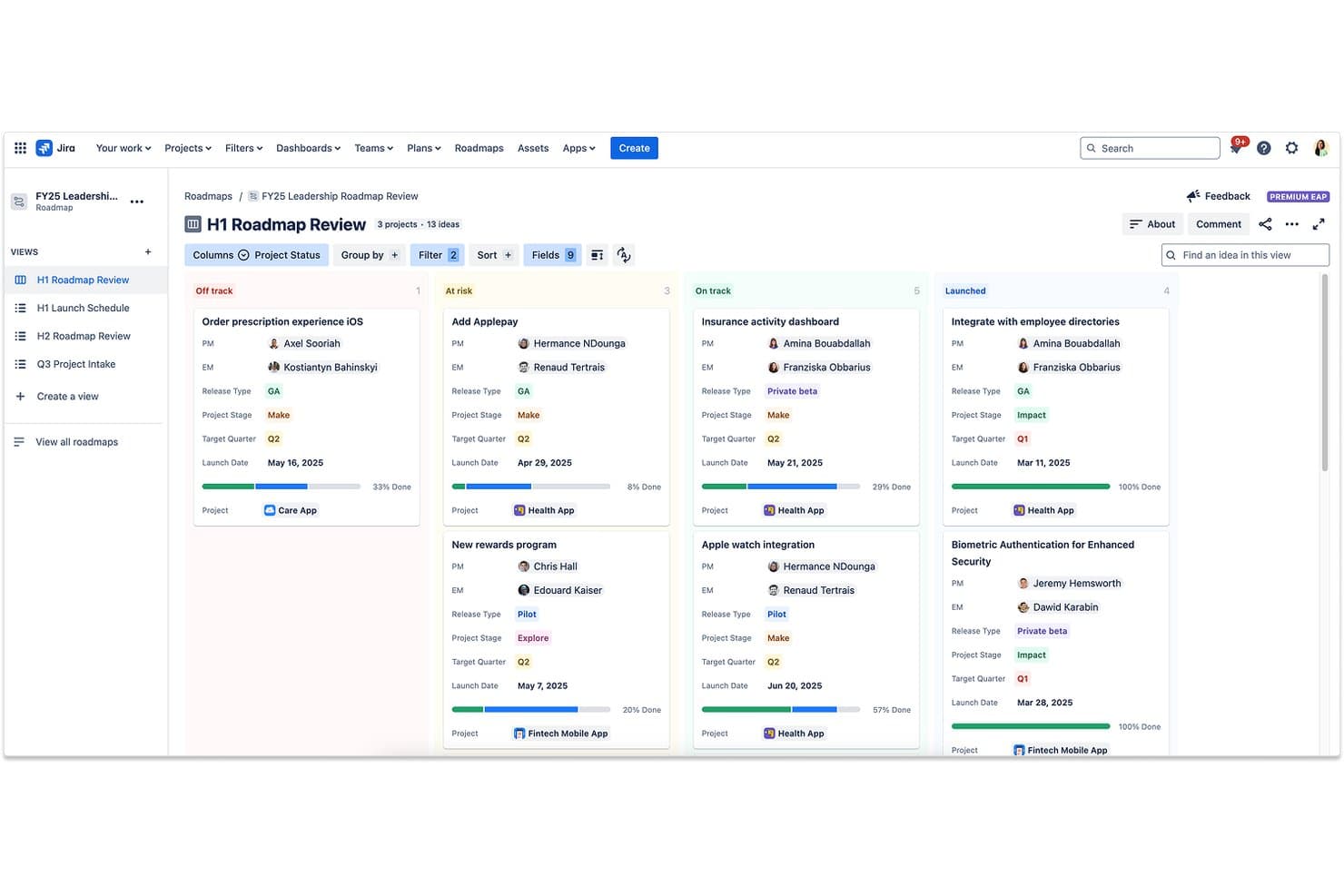
Jira organizes product ideas by status across roadmap swimlanes. Jira is an agile project management platform that offers native user story creation, multi-level backlog management, sprint planning boards, and AI-assisted work breakdown across dev and product teams.
Who Is Jira Best For?
Jira is a strong fit for product and engineering teams that plan and deliver work together in the same agile environment.
Why I Picked Jira
Jira earns its spot on my shortlist because it's the only tool where dev and product teams genuinely live in the same sprint, not parallel systems that sync imperfectly. I love how the native initiative→epic→story hierarchy lets my team break down a new product concept into sprint-ready stories without leaving the board, and Rovo AI can split those epics into tasks with summaries automatically. The scrum board's burndown and velocity reports then give me real data to refine story sizing across releases.
Jira Key Features
- Initiative-to-sub-task hierarchy: Jira's native four-level hierarchy lets you map initiatives down to epics, stories, and sub-tasks within a single project structure.
- Work Readiness Checker Agent: This AI agent reviews work items for clarity and completeness before a developer picks them up.
- Advanced Roadmaps: A Premium feature that gives cross-team visibility into multi-project dependencies, capacity, and timelines.
- Dev-panel integration: Commits, branches, pull requests, and deployment statuses from GitHub or Bitbucket surface directly on each story card.
Jira Integrations
Jira supports 3,000+ Marketplace integrations, including GitHub and GitLab connectors, plus documented integrations with Confluence, Bitbucket, Trello, Slack, Microsoft Teams, Google Workspace, Zoom, Figma, and Gmail. Its rich APIs and Forge/Connect platform support custom connections.
Pros and Cons
Pros:
- AI breaks epics into actionable development tasks
- Sprint boards support story estimation and prioritization
- Hierarchical breakdown connects initiatives to subtasks
Cons:
- Advanced planning requires additional configuration and administration
- Acceptance criteria require custom fields or checklists
 Best for scaled agile story and PI planning
- Free trial available
- Pricing upon request
Visit WebsiteCustomer Rating:4.4/5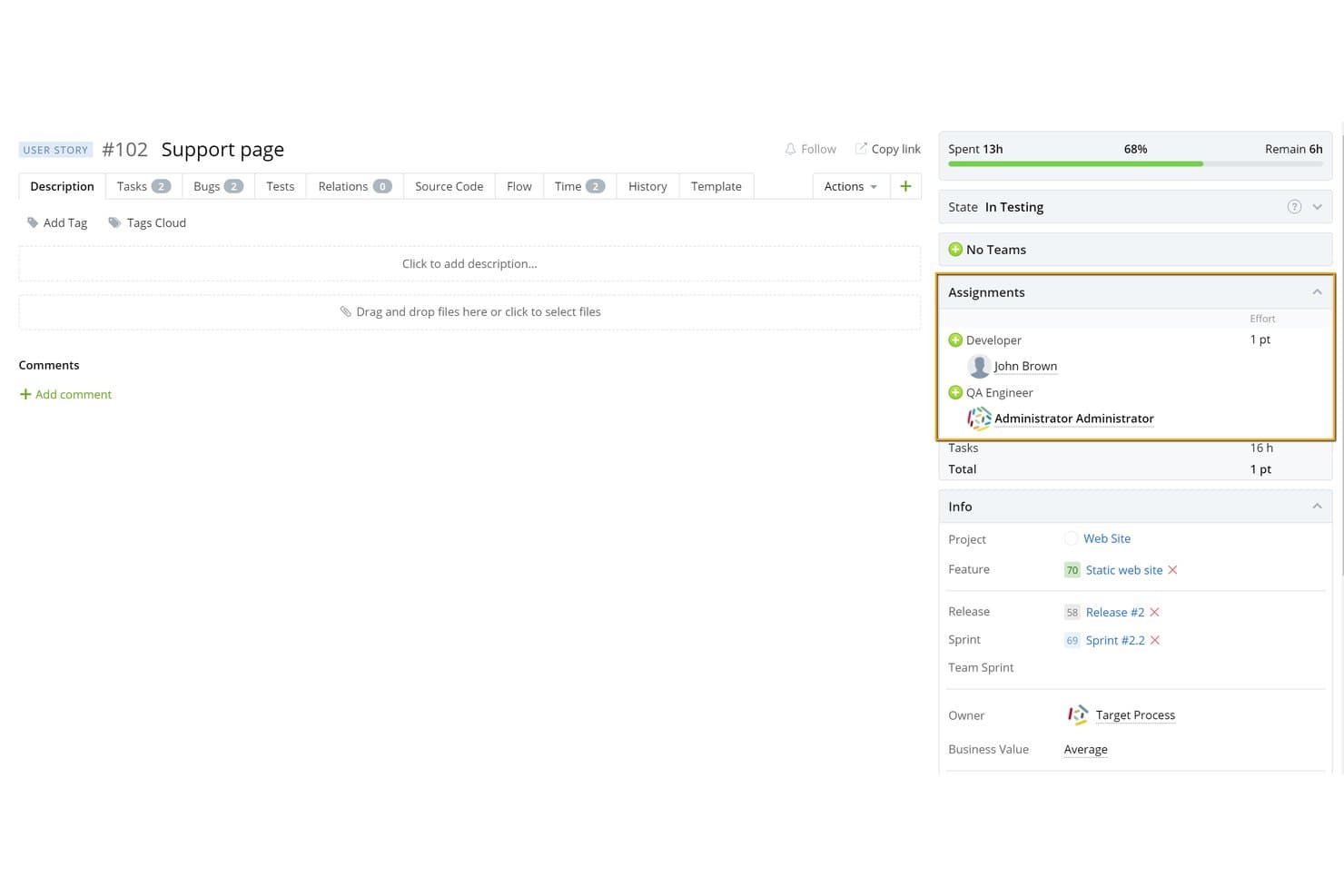
Targetprocess lets users assign roles and track story progress in one view. IBM Targetprocess is an agile project management platform that covers user story creation, multi-level backlog management, sprint and PI planning, estimation with built-in Planning Poker, and dependency visualization across teams and portfolios.
Who Is IBM Targetprocess Best For?
Targetprocess fits enterprise agile teams and program managers running SAFe or multi-team PI planning across complex, multi-product portfolios.
Why I Picked IBM Targetprocess
IBM Targetprocess earns its spot on my shortlist because no other tool handles scaled agile story and PI planning with this level of built-in structure. I love how the Epic → Feature → User Story hierarchy maps directly onto SAFe constructs, so program managers can plan PI increments while individual teams manage their own sprint backlogs in the same tool. Native Planning Poker sits inside the work item itself, and dependency arrows on board and roadmap views flag planning conflicts before a PI commitment is made.
IBM Targetprocess Key Features
- Multi-level backlog hierarchy: Organizes work across Epic, Feature, User Story, Task, and Bug levels in a single ordered backlog with drag-and-drop prioritization.
- Custom entity terminology: Renames "User Story" to any label—Story, Requirement, Use Case, Ticket—so teams can match the tool to their existing vocabulary.
- Velocity tracking and effort forecasting: Calculates team velocity across iterations and uses it to auto-forecast capacity for upcoming sprints and releases.
- Dependency arrows with conflict highlighting: Flags scheduling conflicts in red on board and roadmap views when a dependent item is planned before its predecessor.
IBM Targetprocess Integrations
IBM Targetprocess lists 71 documented integrations, including Jira, Azure DevOps, GitHub, GitLab, Slack, Microsoft Teams, Miro, ServiceNow, Salesforce, and Zendesk. Its REST API, OAuth support, automation rules, and CSV import/export support custom connectivity.
Pros and Cons
Pros:
- Dependency arrows expose roadmap conflicts early
- Native Planning Poker supports shared estimates
- Connects stories across multi-team product portfolios
Cons:
- Configuration can overwhelm single-squad teams
- Acceptance criteria lack structured completion gates
Learn more about Targetprocess: Best for sprint planning within the Microsoft ecosystem
- Free plan available
- From $6/user/month
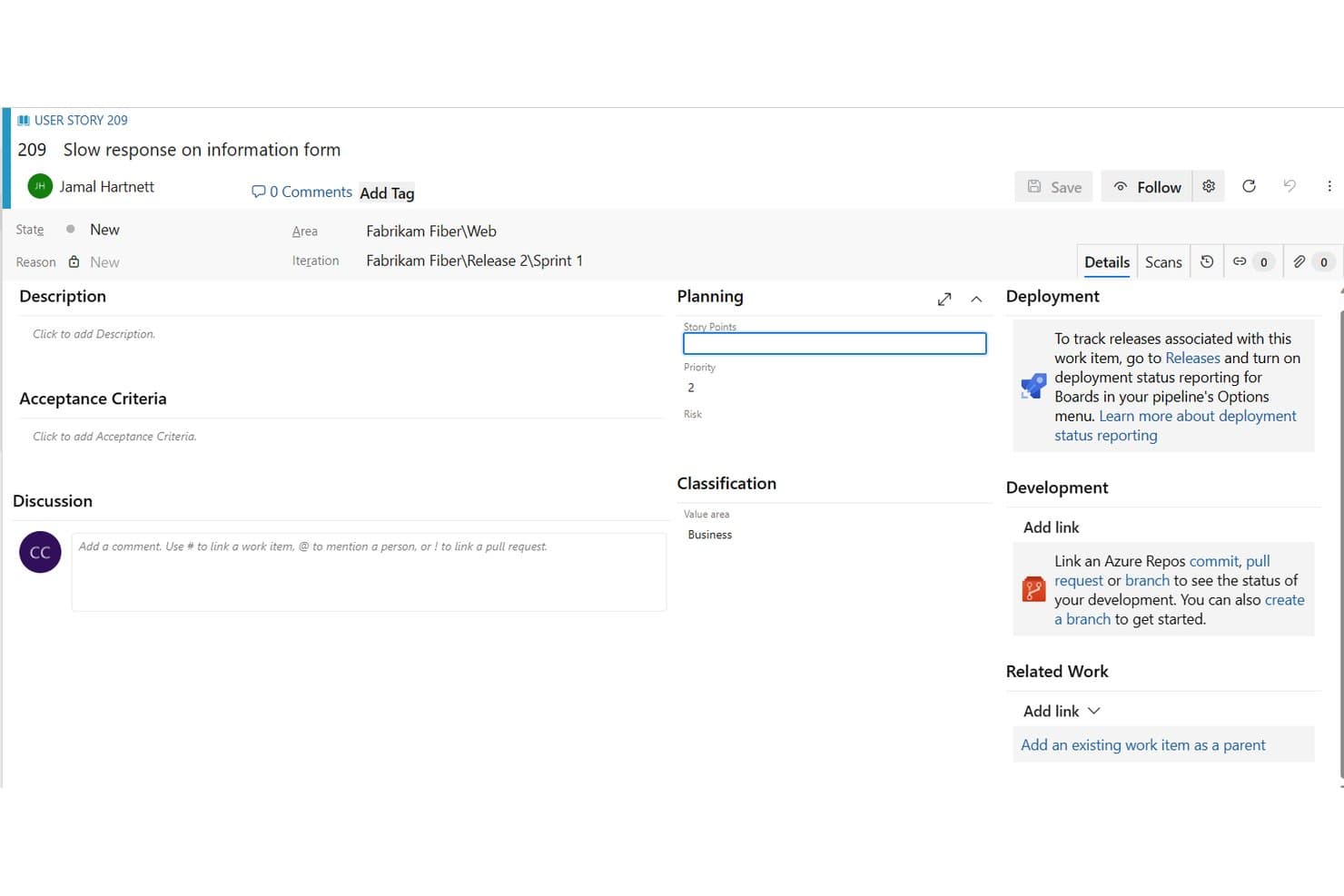
Azure Boards structures user stories with planning, priority, and iteration fields. Azure Boards is a work tracking tool within Azure DevOps that lets teams create and manage user stories, epics, and features across multi-level backlogs, sprint boards, and Delivery Plans.
Who Is Azure Boards Best For?
Azure Boards is a strong fit for Scrum teams and product managers already working within the Microsoft or GitHub ecosystem who need sprint planning, multi-level backlog management, and dev pipeline traceability in one place.
Why I Picked Azure Boards
Azure Boards earns its spot on my shortlist because of how well it handles sprint planning for teams already living in the Microsoft or GitHub ecosystem. I love that the Sprints hub comes with built-in capacity planning, where you can set per-person hours, account for days off, and see remaining work stacked against team capacity in real time. Paired with multi-level backlogs that roll epics down to stories and tasks, it keeps sprint scope decisions grounded in actual portfolio context.
Azure Boards Key Features
- Portfolio backlog hierarchy: Epics, Features, and Stories nest across multi-level backlogs with drag-and-drop reordering and rollup progress tracking.
- Delivery Plans: A calendar-style view that maps deliverables across multiple teams, with dependency lines flagging scheduling conflicts between linked items.
- GitHub Copilot coding agent handoff: Assign a work item to Copilot, which reads the description and comments, then creates a linked branch and draft pull request.
- Azure DevOps MCP Server: Lets AI agents create stories, organize backlogs, estimate items, and surface dependency conflicts using natural language commands.
Azure Boards Integrations
Azure Boards offers native integrations with Azure Repos, Pipelines, Test Plans, Artifacts, Microsoft Teams, GitHub, GitHub Enterprise, and Power BI. It also supports Slack, REST APIs, service hooks, and Marketplace integrations for custom connectivity.
Pros and Cons
Pros:
- Delivery Plans expose cross-team dependencies
- Sprint capacity planning grounds scope decisions
- Multi-level backlogs connect stories to strategy
Cons:
- Backlog hierarchy overwhelms new product teams
- Acceptance criteria remain free-form text
Learn more about Azure Boards:
Andre alternativer for programvare for brukerhistorier
- 11monday AI WorkspaceBest for AI-powered sprint and story workflow
- 12Craft.ioBest for story planning tied to strategy and OKRs
- 13AsanaBest for cross-team project planning
- 14MiroBest for collaborative visual story mapping
- 15LinearBest for dev-team sprint cycles without Scrum overhead
- 16Easy AgileBest for Jira-native backlog and sprint planning
How I Evaluate User Story Software
I split my evaluation into three parts. Core functionality carries the most weight—I look for tools that let you write structured stories and manage a prioritized backlog. Then I check for standout features like AI story generation or built-in planning poker, followed by onboarding quality and pricing value.
Core Functionality (Table Stakes for This List)
When I'm selecting tools for my list, I score each one on a scale from 0 (does not offer the functionality) to 5 (excels in this area) for each core functionality listed below. I then convert the total into a percentage to help assess each tool's overall fit, with extra weight on any functionalities I've deemed essential.
- Story Creation & Templates (Essential): I check whether tools support the "As a… I want… so that…" format with customizable fields, or if stories are just plain text blocks.
- Backlog Management (Essential): Multi-level hierarchy matters here—I look for drag-and-drop prioritization and the ability to group stories under epics or themes.
- Acceptance Criteria Tracking: I evaluate whether criteria are checkable items tied to story completion or just freeform notes buried in a description field.
- Sprint & Iteration Planning: Tools should let you assign stories to sprints with workflow stages and capacity visibility, not just a label that says "Sprint 4."
- Story Estimation: I look for built-in support for story points or t-shirt sizing with backlog-level totals, not a workaround using custom number fields.
- Team Collaboration & Commenting: Threaded comments, @mentions, and activity logs keep conversations attached to the story instead of scattered across Slack or email.
Once I have a list of tools that meet the criteria, I consider what sets each platform apart.
Differentiating Factors (What Sets Vendors Apart)
Here's how I compare and contrast different vendors:
Standout Features
I look for dependency visualization that maps cross-story and cross-team blockers before sprint commitment—without it, teams discover conflicts mid-sprint. AI story generation is another differentiator; tools like Jira and Shortcut now draft acceptance criteria and edge cases from a brief epic description, which saves real time during refinement. I also evaluate built-in planning poker, since distributed teams shouldn't need a separate app just to size stories together.
Beyond Features
I evaluate how quickly a team can adopt a tool without derailing an active sprint. Guided templates and in-app coaching matter here because a Scrum Master shouldn't need a week of setup before the first refinement session. I also check interoperability with existing dev and design tools like GitHub, Figma, and Slack, since native integrations cut down on duplicate data entry between story management and delivery tracking. Scalability rounds out my review—solo squads and multi-team portfolios both need clean backlog visibility without extra admin overhead.
Priser
Med god programvare for brukerhistorier bør prisen samsvare med funksjonene som tilbys. Noe programvare er gratis, men har begrensede funksjoner, og prisbevisste produktmerker velger å arbeide innenfor disse begrensningene. Andre selskaper kan imidlertid ha behov for et bredere funksjonssett og være villige til å betale for det. Uansett er programvare for brukerhistorier med gratis prøveperioder, skalerbare priser som dekker alle behov, og et rettferdig funksjonsutvalg ideell.
Andre spør også
Her er noen spørsmål du kanskje har før du setter i gang.
Hva er en brukerhistorie?
Brukerhistorier er korte og enkle beskrivelser av en funksjon, fortalt fra sluttbrukerens perspektiv. De fungerer som en måte å fange opp og kommunisere krav på i et format som er lett å forstå. Brukerhistorier er en viktig del av utviklingen av nye produkter fordi de definerer den ideelle kunden din og styrer alle oppgaver, funksjoner og utforminger rundt et samlet mål: å hjelpe brukerne med å overvinne et problem de står overfor. Uten en brukerhistorie kan du oppleve at produktet ditt er for bredt, for snevert eller bommer på det som virkelig er viktig for moderne forbrukere.
Alle produktteam bør ha brukerhistorien lett tilgjengelig og knytte alt de gjør tilbake til den. De bør alltid spørre: “Hjelper X egentlig målgruppen min, eller mister jeg tråden?”
«Når alt kommer til alt, er jobben din å minimere produksjonen og maksimere resultatet og effekten.» — Jeff Patton, forfatter av Kartlegging av brukerhistorier: Oppdag hele historien, bygg det riktige produktet
Hva er et eksempel på en brukerhistorie?
En brukerhistorie kan følge dette enkle formatet: “Som [type bruker] ønsker jeg å [utføre en bestemt oppgave] for å [oppnå et mål].” Det er deretter ditt ansvar å fylle ut feltene for målgruppen din slik du ser den for deg. Noen eksempler kan være:
- Som en opptatt teamleder ønsker jeg en mobilapp som kan planlegge og spore de daglige oppgavene mine automatisk slik at jeg kan forbli organisert og øke produktiviteten min.
- Som en treningsentusiast ønsker jeg en smart vannflaske som kan måle vanninntaket mitt og minne meg på å drikke vann regelmessig, slik at jeg kan forbli hydrert og nå treningsmålene mine.
- Som en hyppig reisende ønsker jeg en kompakt bagasjeveske som enkelt kan gjøres om til en ryggsekk, slik at jeg kan bære den komfortabelt og praktisk på reisene mine.
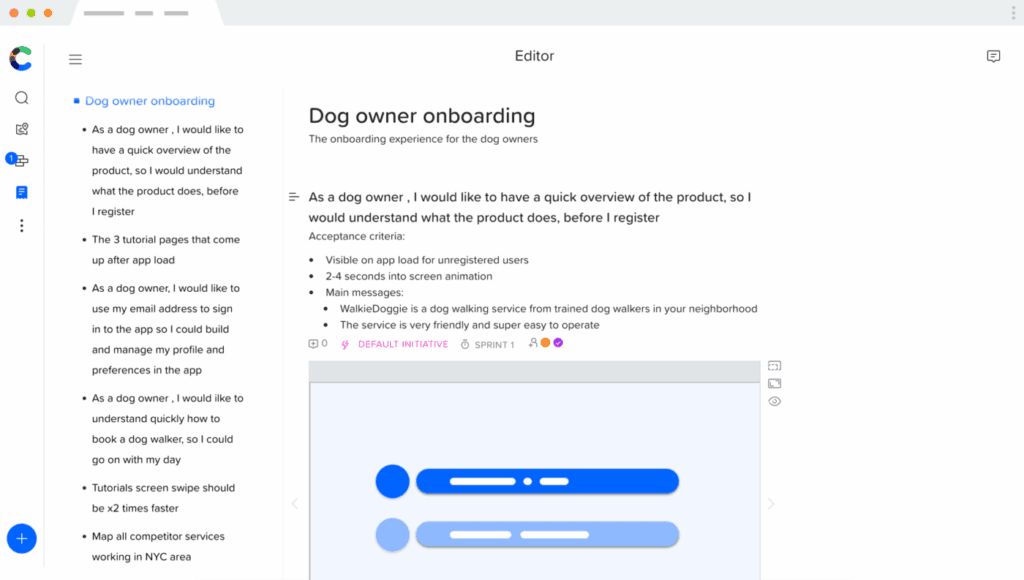
Nedenfor finner du en eksempelbrukerhistorie generert gjennom Craft.io, slik at du kan se hvordan en mer visuell, detaljert og samarbeidsbasert tilnærming ser ut:
Hva er fordelene med programvare for brukerhistorier?
Fordelene ved å bruke programvare for brukerhistorier omfatter:
- Veiledning for prioritering av funksjoner: Du kan enkelt velge hvilke funksjoner du skal fokusere på i oppgavekøen, fordi det ikke er tilfeldig; alt dreier seg om hva sluttbrukeren din trenger mest.
- Organisatorisk fokus: Det som er viktigst for brukerne dine, bør også være viktigst for virksomheten din. Bruk dette til å utforme merkevareverdier.
- Minimer risiko: Du vet nå hva den ideelle brukeren din ønsker, slik at du kan minimere risikoen ved å utforme hver milepæl rundt denne kunnskapen. Ingen omveier!
- Nøkkelindikatorer for ytelse (KPI-er) er tydelige: Målene og KPI-ene dine kan og bør alle dreie seg om elementene som er viktigst for kunden. Kundehistorier hjelper deg med å avgrense hva disse er.
Hva er de viktigste funksjonene i programvare for brukerhistorier?
Viktige funksjoner jeg ser etter når jeg velger den beste programvaren for brukerhistorier, omfatter:
- Brukerpersonas: En kortfattet visualisering av hvem den ideelle kunden din er, hva de gjør, og hva de trenger fra deg.
- Kartlegging av brukerhistorier: Utforming av veien brukerne dine følger når de kommer i gang med og deretter utvikler seg gjennom produktet ditt.
- Smidig rammeverk: Muligheten for smidige team til å produsere, tilpasse, iterere og oppdatere raskt og effektivt.
- Minimum levedyktig produkt (MVP): Forstå det minste produktet brukerne dine trenger for å se verdien av å samarbeide med deg.
- Oppgavekø: Ønskede funksjoner som kan sorteres og prioriteres senere, når ressurser blir tilgjengelige.
- Epikker: Mulighet til å dele store prosjektbehov opp i mindre og mer håndterbare deler.
- Maler: Maler for brukerhistorier, slik at du slipper å begynne helt fra grunnen av.
- Iterasjon: Rom for å endre og utvikle brukerhistorier og personas etter hvert som produktet ditt vokser.
- Arbeidsflytverktøy: Grunnleggende verktøy for arbeidsflytprosessen, som oppgavehåndtering, kommentarer, samarbeid og tidslinjer.
- Visualiseringsalternativer: Digitale tavler, kanban-tavler, virtuelle indekskort, tekst-/bildebaserte historiepoeng og andre kreative måter å oppnå en felles forståelse av brukerens perspektiv på.
- Eksempler på brukerhistorier: Veiledning for produktteamet ditt om hvordan en brukerhistorie bør se ut og hva den bør inneholde når den er ferdig.
Hvilke andre ressurser om brukeropplevelse bør jeg se nærmere på?
Hvis du allerede vurderer programvare for brukerhistorier, kan de neste stegene dine omfatte: