

Med så mange ulike programmer for milepæler tilgjengelig er det vanskelig å finne ut hvilket som passer for deg. Du vet at du vil sørge for at produktutviklingen holder seg på rett spor, er i tråd med strategiske mål og når viktige milepæler gjennom hele livssyklusen, men du må finne ut hvilket verktøy som passer best. Jeg hjelper deg! Jeg har undersøkt den beste tilgjengelige programvaren for milepæler og brukt mine egne erfaringer som produktleder i store team til å samle mine beste anbefalinger i denne artikkelen.
Hva er programvare for milepæler?
Programvare for milepæler er en type verktøy som hjelper produktledere og team med å planlegge, følge opp og nå viktige milepæler i utviklingen og lanseringen av et produkt. Disse milepælene er avgjørende punkter i produktets livssyklus og markerer viktige resultater, tidsfrister eller fullføringen av vesentlige oppgaver.
Programvare for milepæler gjør det enklere å opprette veikart, tydeliggjøre leveranser, administrere oppgaver, planlegge prosjekter, sette opp arbeidsflytautomatiseringer og følge fremdriften med interaktive oversikter. Produktutviklingsteam bruker disse verktøyene for å holde seg samkjørte og på rett spor med arbeidsmengden sin, enten de arbeider med en smidig eller fossefallsbasert arbeidsflytmetodikk.
Hvorfor du kan stole på våre programvareanbefalinger
6,700+
Reviews
20
Industry experts
16+
Evaluation factors
14
Years
Teamet vårt har testet og anmeldt programvare siden 2012. Vi er selv produktledere, så vi vet hvor vanskelig og hvor viktig det er å velge riktig programvare.
I denne guiden har vi vurdert verktøyene gjennom praktisk testing og uavhengig research og gitt dem poeng ut fra våre utvelgelseskriterier.
Anmeldelsene våre bygger på vår egen redaksjonelle vurdering. De er ikke et salgsargument.
Ekspertanmeldere:
- Andrew LumbySenior TPM
- Cristiano ValimSenior UI/UX Lead


Sammenligningstabell for programvare for milepæler
Tabellen nedenfor sammenligner prisdetaljene for mine beste utvalgte programmer for milepæler.
| Tool | Best For | Trial Info | Price | ||
|---|---|---|---|---|---|
| 1 | Best for managing projects with complex data structures | Free plan available; 14-day free trial | From $20/user/month (billed annually) | Website | |
| 2 | Best for marketing teams running Adobe workflows | Free demo available | Pricing upon request | Website | |
| 3 | Best for linking milestones to product strategy | 30-day free trial + free demo available | From $59/user/month (billed annually) | Website | |
| 4 | Best for customizable visual project planning | Free plan available | From $9/user/month (billed annually) | Website | |
| 5 | Best for spreadsheet-like interface | 30-day free trial | From $12/user/month | Website | |
| 6 | Best for an all-in-one work management solution | Free plan available | From $12/user/month | Website | |
| 7 | Best for managing complex, inter-connected projects | Free plan available | From $10.99/user/month (billed annually) | Website | |
| 8 | Best for enterprise PPM with auto-cascading milestones | 14-day free trial | From $10/user/month (billed annually) | Website | |
| 9 | Best with resource management included | Free demo available | From $11/user/month (billed annually) | Website | |
| 10 | Best for visual Gantt-based milestone scheduling | 14-day free trial | From $59/month | Website |


Oversikt over de 10 beste programmene for milepæler
I denne delen har jeg skrevet detaljerte oversikter over de 10 beste programmene for milepæler som kom med på listen min. Jeg har beskrevet det beste bruksområdet for hvert verktøy, fremtredende funksjoner, integrasjoner, prisinformasjon samt fordeler og ulemper. Jeg har også lagt til et skjermbilde av brukergrensesnittet for å gi deg en følelse av brukeropplevelsen.
 Best for managing projects with complex data structures
- Free plan available; 14-day free trial
- From $20/user/month (billed annually)
Visit WebsiteCustomer Rating:4.6/5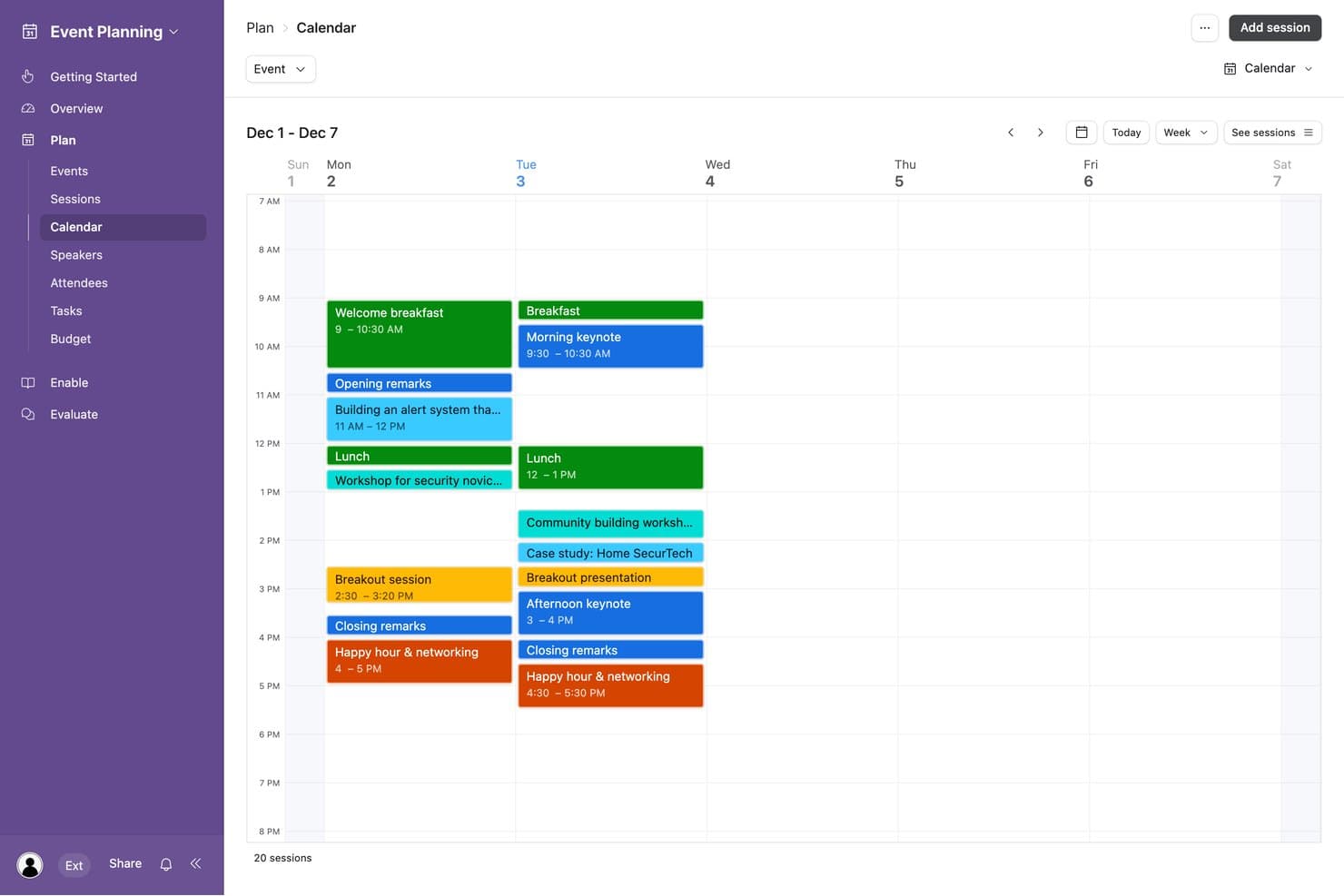
Airtable lets users visualize event milestones on a weekly calendar view. Airtable is a flexible database-driven project management platform that combines milestone tracking, Gantt and timeline views, dependency management, and relational data structures across linked tables.
Who Is Airtable Best For?
Airtable is a strong fit for product managers and project teams who need to connect milestones to linked data—like OKRs, tasks, and roadmaps—across relational tables.
Why I Picked Airtable
I've included Airtable in my top picks because its relational data model lets you connect milestones to linked tables for tasks, OKRs, and roadmaps in ways that flat project tools simply can't match. I love that the Gantt view treats any date-only record as a milestone diamond, complete with dependency arrows and critical-path highlighting across linked records. The milestone template ships with rollup fields that automatically surface task health across those linked tables, so your milestone status reflects real data rather than a manually updated field.
Airtable Key Features
- Date dependency scheduling: Set finish-to-start, start-to-start, finish-to-finish, or start-to-finish dependencies between records, with automatic successor rescheduling and invalid-dependency flagging in the Gantt view.
- Interface dashboards: Build audience-specific pages with charts, timelines, and summary cards that pull live data from your bases for stakeholder-facing reporting.
- Condition-based automation triggers: Fire notifications via email, Slack, or Microsoft Teams when records meet set conditions, such as a deadline falling within three days.
- Linked tables for OKRs and roadmaps: Connect milestone records to separate OKR and roadmap tables using relational links, with rollup fields that surface live task health across those connections.
Airtable Integrations
Airtable lists 100+ integrations, including Jira, Slack, Microsoft Teams, Google Drive, Google Calendar, GitHub, and Salesforce. It also provides a REST API, JavaScript scripting, custom extensions, and an MCP server for custom connectivity.
Pros and Cons
Pros:
- Tailors progress dashboards for stakeholders
- Visualizes dependencies with critical-path highlighting
- Links milestones to tasks and OKRs
Cons:
- Bulk edits bypass dependency rescheduling
- Requires manual setup for health rollups
Learn more about Airtable: Best for marketing teams running Adobe workflows
- Free demo available
- Pricing upon request
Visit WebsiteCustomer Rating:4.3/5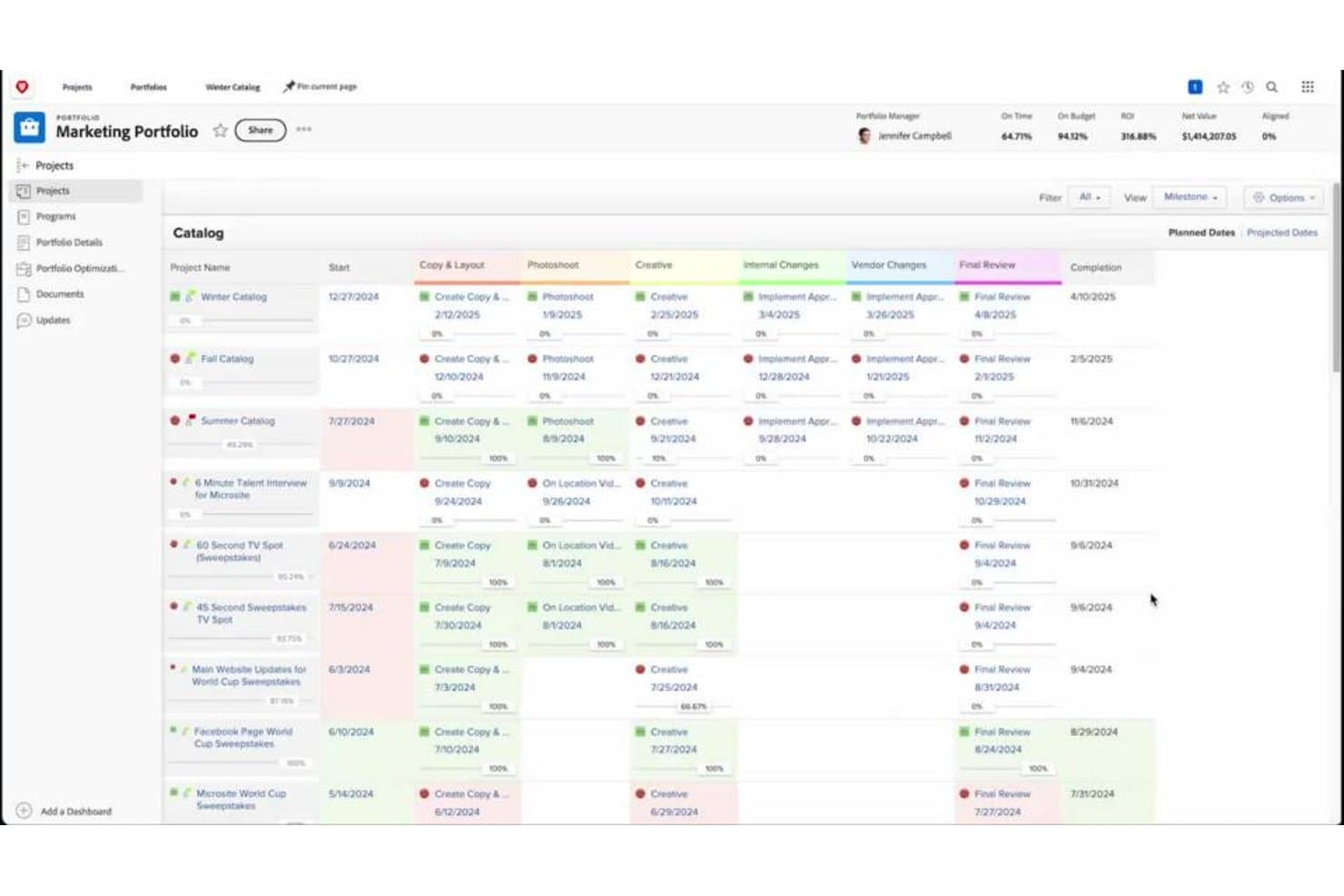
Adobe Workfront tracks project milestones across catalog campaigns in one view. Adobe Workfront is an enterprise work management platform that combines Gantt-based milestone tracking, visual timeline planning, cross-project dependency management, and portfolio-level reporting.
Who Is Adobe Workfront Best For?
Adobe Workfront is a strong fit for enterprise marketing teams that manage complex creative workflows across Adobe's broader product ecosystem.
Why I Picked Adobe Workfront
Adobe Workfront earns its spot on my shortlist because it's purpose-built for marketing teams already running inside Adobe's ecosystem. I love how Workfront connects directly to Creative Cloud, Frame.io, and Experience Manager Assets, so milestone tracking lives alongside the actual creative work. Cross-project predecessors automatically shift successor task dates when a campaign phase slips, keeping timelines accurate without manual intervention. The AI Project Health score adds a real-time, multi-factor risk signal at the portfolio level.
Adobe Workfront Key Features
- Milestone path templates: Administrators build reusable milestone paths that can be embedded in project templates, so new projects launch with phases already defined.
- Baseline snapshots: Workfront captures project, task, and issue data at a point in time, letting you compare planned versus actual progress in reports.
- Data Connect BI integration: Sends Workfront data, including change events and daily historical snapshots, directly to tools like Tableau, Power BI, and Looker.
- Configurable reminder notifications: Admins set automated reminders by object type, trigger date, and recipient group to keep assignees and stakeholders on schedule.
Adobe Workfront Integrations
Adobe Workfront offers native integrations with Adobe Creative Cloud, Experience Manager Assets, Microsoft Teams, Slack, SharePoint, Google Drive, Box, Dropbox, and OneDrive. Its public API and Event Subscription API support custom integrations and real-time project updates.
Pros and Cons
Pros:
- Baselines compare planned versus actual progress
- Gantt charts show milestones and critical paths
- Cross-project predecessors automatically shift successor dates
Cons:
- Each milestone maps to one task
- Administrators alone create milestone paths
Learn more about Adobe Workfront: Best for linking milestones to product strategy
- 30-day free trial + free demo available
- From $59/user/month (billed annually)
Visit WebsiteCustomer Rating:4.1/5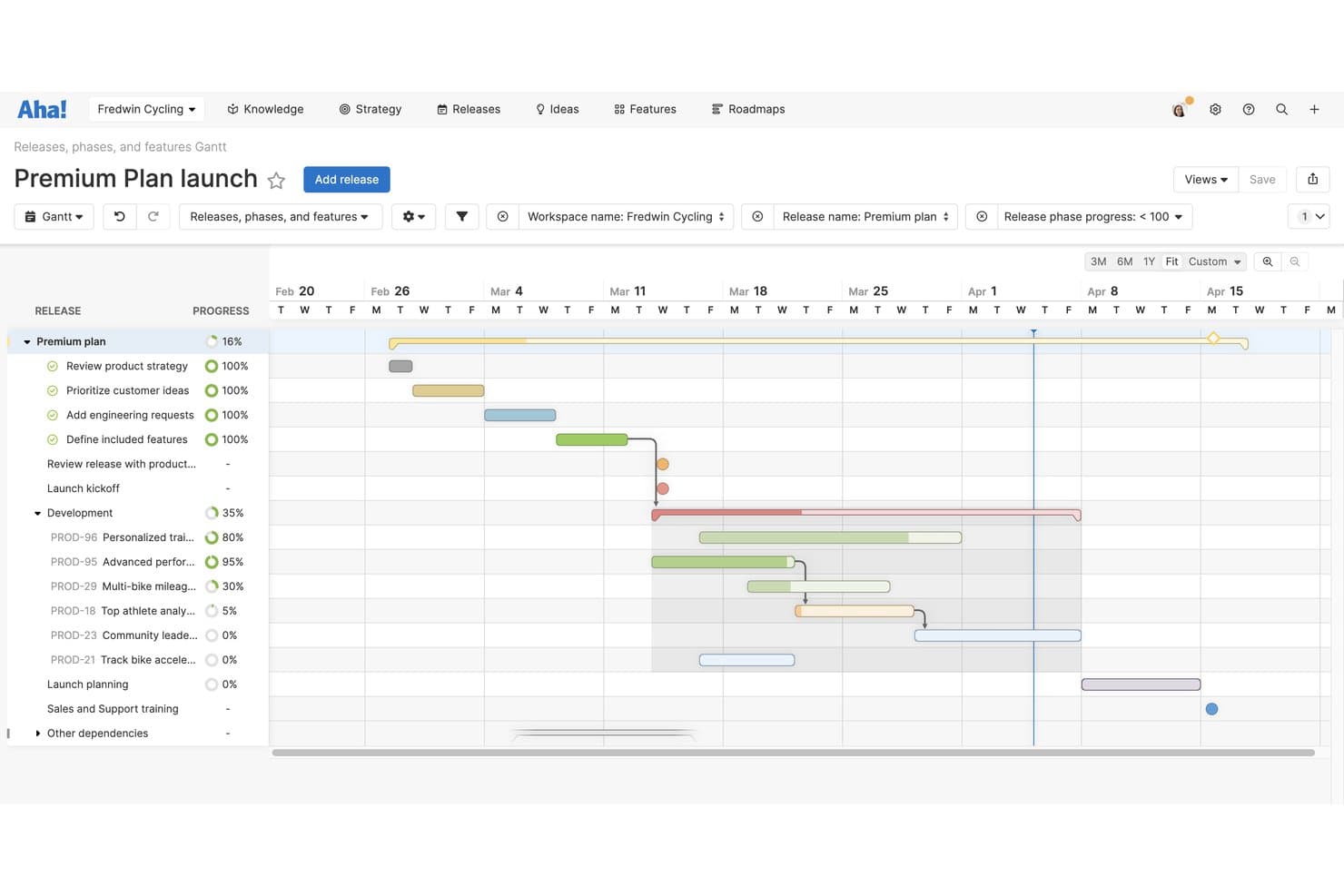
Aha! Roadmaps lets users track milestones and feature progress on a Gantt chart. Aha! Roadmaps is a product roadmapping platform that combines milestone and release planning, interactive Gantt views, dependency tracking, and stakeholder-facing presentations.
Who Is Aha! Roadmaps Best For?
Aha! Roadmaps is a strong fit for product managers and PMO leads who need milestones tied directly to releases, strategic goals, and cross-team dependencies.
Why I Picked Aha! Roadmaps
I picked Aha! Roadmaps as one of the best because it's the only tool on my list where milestones sit directly inside release plans and roll up to strategic goals. I love how progress bars update automatically as features complete, and how you can link milestones to initiatives so stakeholders always see real strategic impact. The portfolio roadmap view makes it easy to spot timing conflicts across teams before they become problems.
Aha! Roadmaps Key Features
- Configurable at-risk alerts: Set rules for overdue work, stalled dependencies, and upcoming deadlines so you catch schedule risks before they become blockers.
- Cross-workspace dependency linking: Drag to link features, phases, and milestones across releases and workspaces, with color-coded lines that flag slippage in real time.
- Stakeholder presentation sharing: Share live roadmap presentations via external links, scheduled recurring emails, or password-protected views without requiring a paid seat.
- Rally milestone mapping integration: Sync milestone data directly from Rally into Aha! Roadmaps, keeping your planning layer aligned with engineering execution.
Aha! Roadmaps Integrations
Aha! Roadmaps supports 40+ integrations, including Jira, Azure DevOps, Rally, Slack, Microsoft Teams, Asana, Smartsheet, Trello, and Figma. It also offers a REST API and Zapier.
Pros and Cons
Pros:
- Stakeholder views expose cross-team timeline conflicts
- Progress rolls up from completed child work
- Milestones connect directly to strategic goals
Cons:
- Gantt setup can overwhelm new users
- Milestones lack dedicated owners and statuses
Learn more about Aha! Roadmaps: Best for customizable visual project planning
- Free plan available
- From $9/user/month (billed annually)
Visit WebsiteCustomer Rating:4.6/5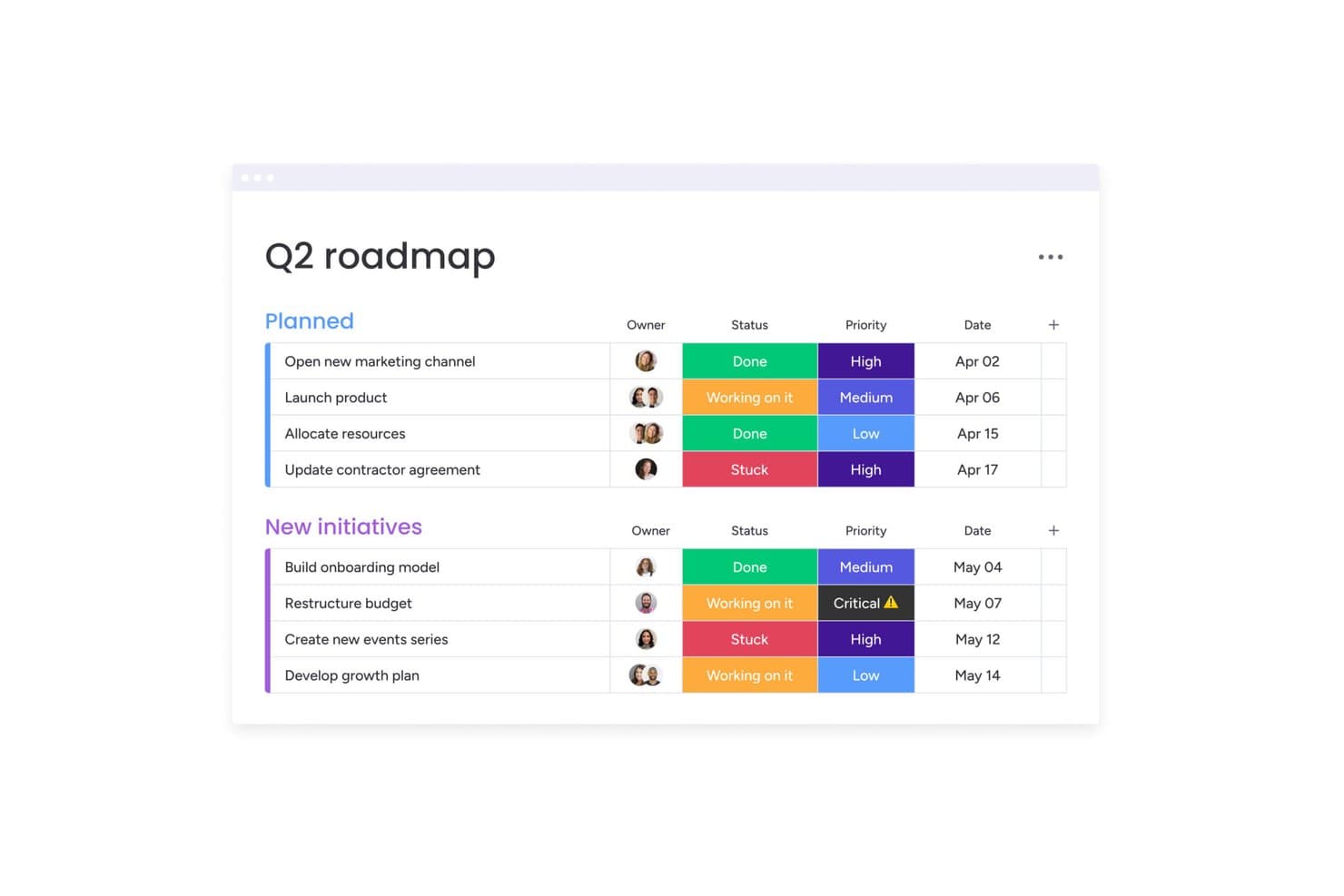
monday AI Workspace organizes milestones by status, priority, and date. monday AI Workspace is a work management platform that combines visual Gantt charts, milestone tracking, dependency management, and AI-assisted project planning across boards, timelines, and portfolio views.
Who Is monday AI Workspace Best For?
monday AI Workspace is a strong fit for cross-functional teams and PMO leads who need flexible, visual milestone tracking across multiple projects in one place.
Why I Picked monday AI Workspace
I picked monday AI Workspace as one of the best because its Gantt view is genuinely built for milestone planning, not just task tracking. Milestones render as diamonds on the timeline, and with baselines enabled, you can instantly see which ones are slipping by color-coded health indicators. I also like that Sidekick can generate a full milestone plan from a plain-language description, mapping dependencies and owners before you've opened a single template.
monday AI Workspace Key Features
- Baseline tracking: Save a snapshot of your original plan and compare it against live progress, with on-track items flagged green and late ones flagged red directly on the Gantt.
- Portfolio Risk Insights: An AI-powered daily scan of linked project boards that flags at-risk projects by severity and lets you notify project owners with a pre-written update in one click.
- Automation-based alerts: Build no-code reminders and overdue notifications triggered by date or timeline columns, including recurring alerts and daily checks for incomplete deliverables.
- Cross-project Gantt view: Display multiple projects on a single timeline to track dependencies and milestone dates across teams without switching between boards.
monday AI Workspace Integrations
monday AI Workspace supports 850+ integrations, including Jira Cloud, Azure DevOps, GitHub, GitLab, Slack, Microsoft Teams, Google Calendar, and Outlook. It also provides APIs and SDKs for custom integrations.
Pros and Cons
Pros:
- AI flags overdue milestones and risks
- Cross-project Gantt coordinates shared timelines
- Baselines reveal slipping milestone dates
Cons:
- Dependencies cannot populate missing dates
- Advanced milestone controls require higher plans
Learn more about monday AI Workspace: Best for spreadsheet-like interface
- 30-day free trial
- From $12/user/month
Visit WebsiteCustomer Rating:4.4/5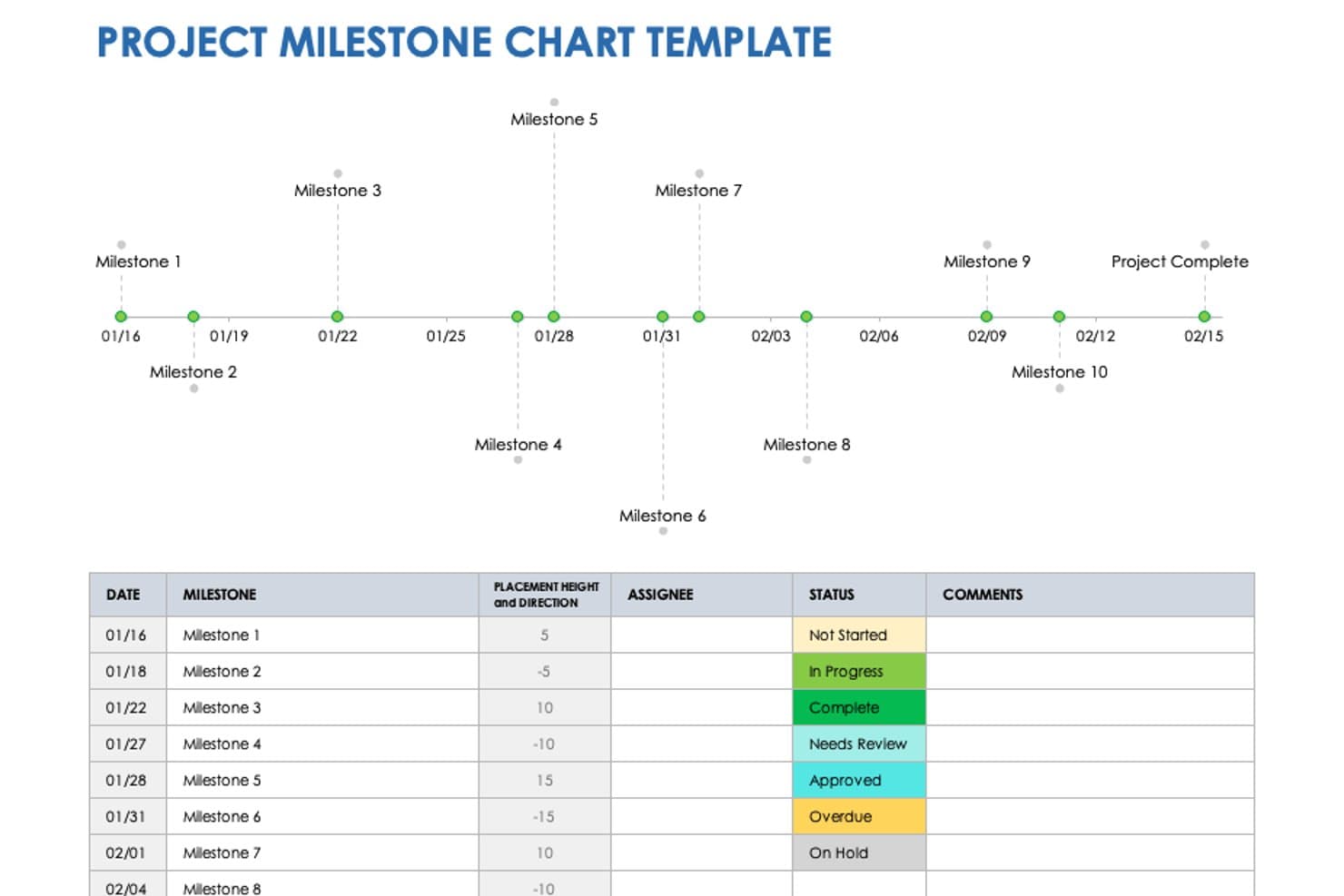
Smartsheet tracks project milestones on a visual timeline with status indicators. Smartsheet is a spreadsheet-style project management platform that offers Gantt and Timeline views, milestone tracking, dependency scheduling, and automated reporting for teams managing complex project timelines.
Who Is Smartsheet Best For?
Smartsheet is a strong fit for project managers and operations teams who already think in spreadsheets and want Gantt-based milestone tracking without abandoning that familiar structure.
Why I Picked Smartsheet
I picked Smartsheet as one of the best because its spreadsheet-style layout makes milestone tracking feel immediately familiar, especially if your team already lives in Excel. I love that Gantt view renders milestones as diamond icons with full dependency support, including finish-to-start, start-to-start, and lag times, so date cascading happens automatically when anything shifts. The baseline variance columns also give me an instant on-schedule or behind signal without any manual math.
Smartsheet Key Features
- Critical and driving path highlighting: Gantt view lets you flag the longest chain of tasks affecting your end date, plus which specific tasks control any given milestone's start.
- Scheduled update requests: automatically email row-level update requests to anyone, even people without a Smartsheet account, on a daily, weekly, or monthly cadence.
- Multi-sheet timeline reports: pull data from multiple sheets into a single editable timeline that can be embedded as a widget in any dashboard.
- Smart Assist health checks: an AI tool that reviews your project, flags risks and dependencies, and drafts stakeholder updates from within the sheet.
Smartsheet Integrations
Smartsheet offers native integrations with Microsoft 365, Google Workspace, Slack, Power BI, and Tableau, plus nearly 100 more. Its marketplace includes a paid Jira Connector, and REST API and webhooks support custom integrations.
Pros and Cons
Pros:
- Baseline variance clarifies schedule performance
- Dependencies automatically cascade schedule changes
- Spreadsheet layout makes milestones familiar
Cons:
- Advanced portfolio oversight requires higher tiers
- Milestones require zero-duration row setup
Learn more about Smartsheet: Best for an all-in-one work management solution
- Free plan available
- From $12/user/month
Visit WebsiteCustomer Rating:4.7/5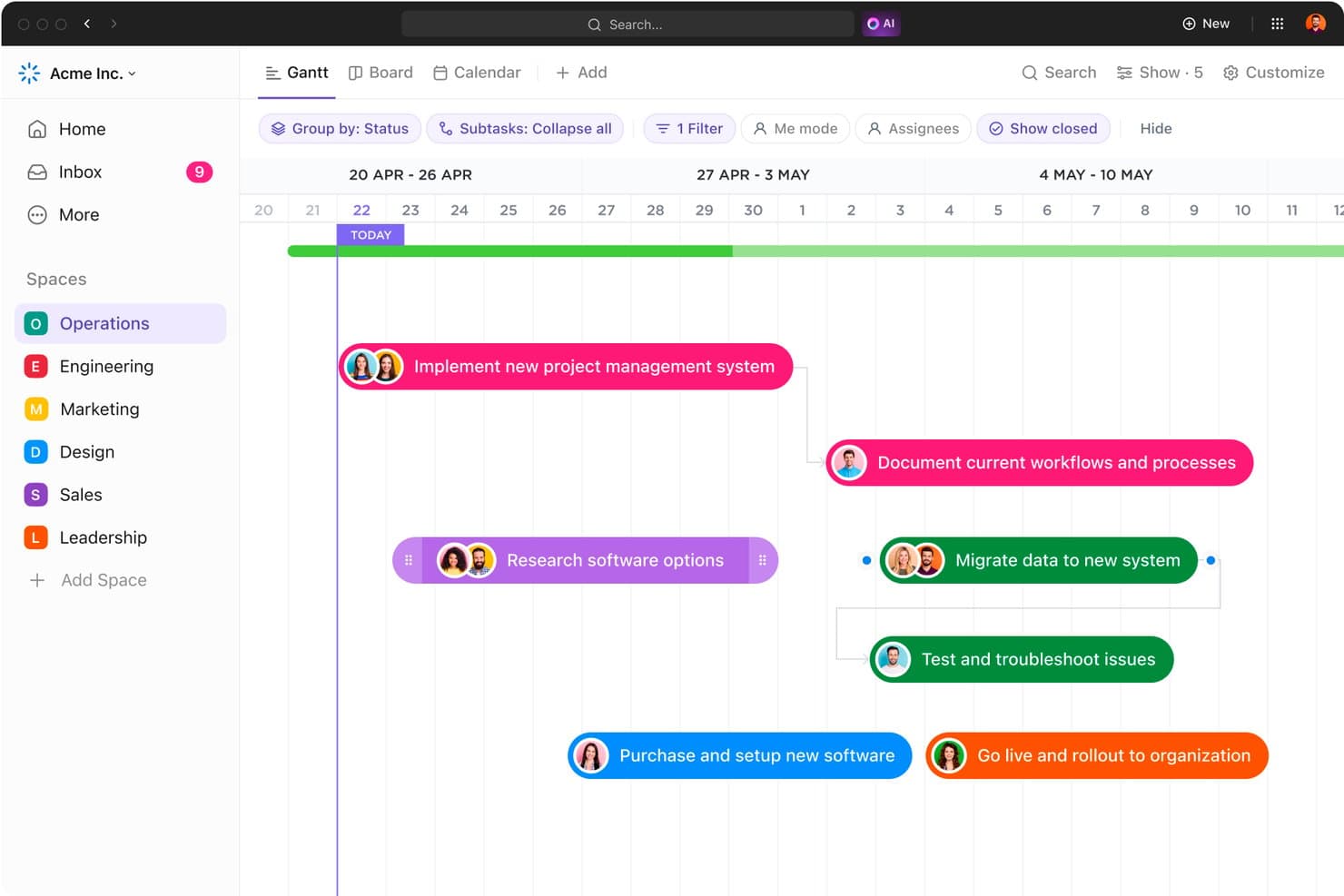
ClickUp's Gantt chart visualizes project milestones and task timelines clearly. ClickUp is a work management platform that brings together milestone tracking, Gantt charts, dependencies, goal linking, portfolio rollups, and dashboards in a single workspace.
Who Is ClickUp Best For?
ClickUp suits project managers, product managers, and PMO leads who want milestones, Gantt charts, goal tracking, and portfolio rollups in one place.
Why I Picked ClickUp
ClickUp earns its spot on my shortlist because it keeps milestones, Gantt charts, goal tracking, and portfolio rollups in one connected workspace. I like that milestones show as diamond icons across every view—Gantt, Board, Calendar, and Dashboards—so nothing gets buried. The Portfolio card is especially useful: it surfaces a Milestones column with overdue counts and progress bars across every List, giving you a cross-team picture without toggling between tools.
ClickUp Key Features
- Dependency types: ClickUp supports four dependency types—Finish-to-Start, Start-to-Start, Finish-to-Finish, and Start-to-Finish—with automatic rescheduling that cascades changes across up to 1,000 linked tasks.
- OKR and goal linking: Goals connect directly to tasks from any team, letting you track progress against objectives in real time alongside your milestone plan.
- AI-generated status reports: ClickUp Brain pulls from tasks, milestones, Docs, and goals to produce live status reports that surface delays and blockers automatically.
- Critical path and slack time overlays: The Gantt view highlights which tasks control your deadline and where schedule buffer exists, so you can prioritize without guesswork.
ClickUp Integrations
ClickUp offers native integrations with Jira, GitHub, GitLab, Bitbucket, Slack, Microsoft Teams, Google Calendar, and Tableau. It also supports custom integrations through its API and Zapier.
Pros and Cons
Pros:
- Portfolio rollups connect milestones to goals
- Dependencies reschedule up to 1,000 tasks
- Milestones appear across every major view
Cons:
- Baselines cover entire lists, not filtered tasks
- Milestone health lacks a dedicated field
Learn more about ClickUp: Best for managing complex, inter-connected projects
- Free plan available
- From $10.99/user/month (billed annually)
Visit WebsiteCustomer Rating:4.4/5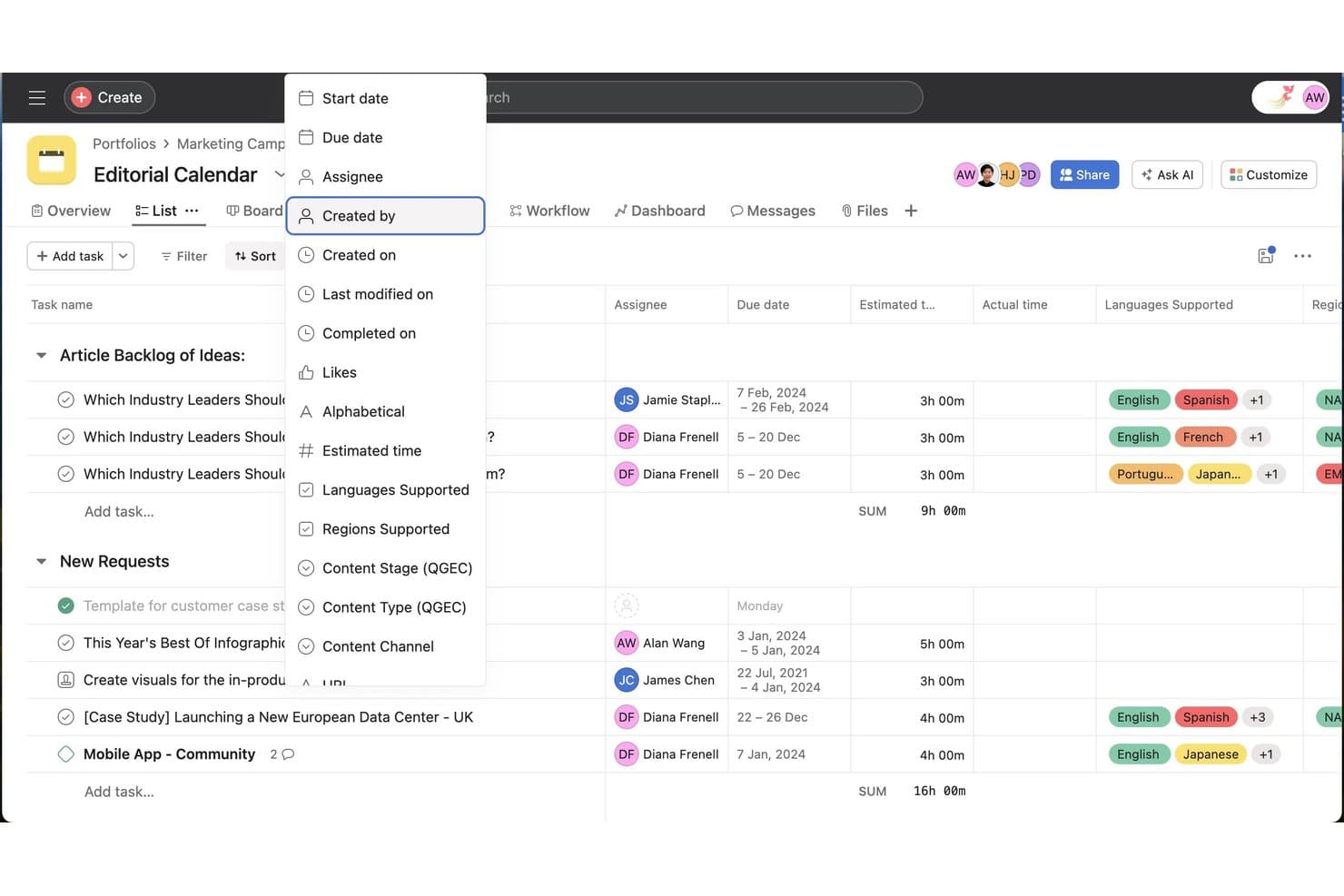
Asana lets users sort tasks by custom fields like milestones and stages. Asana is a work management platform that combines milestone tracking, Gantt and timeline views, dependency management, goal linking, and portfolio-level reporting across projects.
Who Is Asana Best For?
Asana is a strong fit for program managers and PMO leads overseeing multiple interconnected projects with layered dependencies, goals, and cross-team stakeholders.
Why I Picked Asana
I picked Asana as one of the best because it handles layered, cross-linked projects better than most tools I've used. When one milestone slips, Asana's auto-shifting dates cascade through dependent tasks automatically, keeping your timeline intact. I also rely on its portfolio milestone view to track progress across multiple projects at once, and AI-generated risk reports surface issues tied to specific milestones before they become blockers.
Asana Key Features
- Gantt view with baselines: Asana's Gantt view lets you snapshot your original plan and compare it against current progress using hashed versus solid bars, so you can see exactly where timelines have shifted.
- Critical path highlighting: On the Timeline, Asana highlights the critical path in yellow, helping you identify which tasks directly impact your final deadline.
- Rules-based milestone alerts: You can build automated rules that trigger due-date reminders and overdue notifications via email or Slack when milestones are at risk.
- OKR/goal linking: Milestones and projects connect directly to company or team goals, with progress rolling up automatically to give leadership a clear view of strategic momentum.
Asana Integrations
Asana lists 100+ integrations, including native Jira Cloud and GitHub connections, plus Slack, Microsoft Teams, Power BI, Tableau, and Salesforce. It also offers an API for custom integrations and connects with Zapier.
Pros and Cons
Pros:
- AI risk reports flag threatened milestones early
- Portfolio milestones connect project progress to goals
- Baselines reveal slippage against original plans
Cons:
- Large projects can overwhelm notification flows
- Dependencies do not cascade across projects
 Best for enterprise PPM with auto-cascading milestones
- 14-day free trial
- From $10/user/month (billed annually)
Visit WebsiteCustomer Rating:4.5/5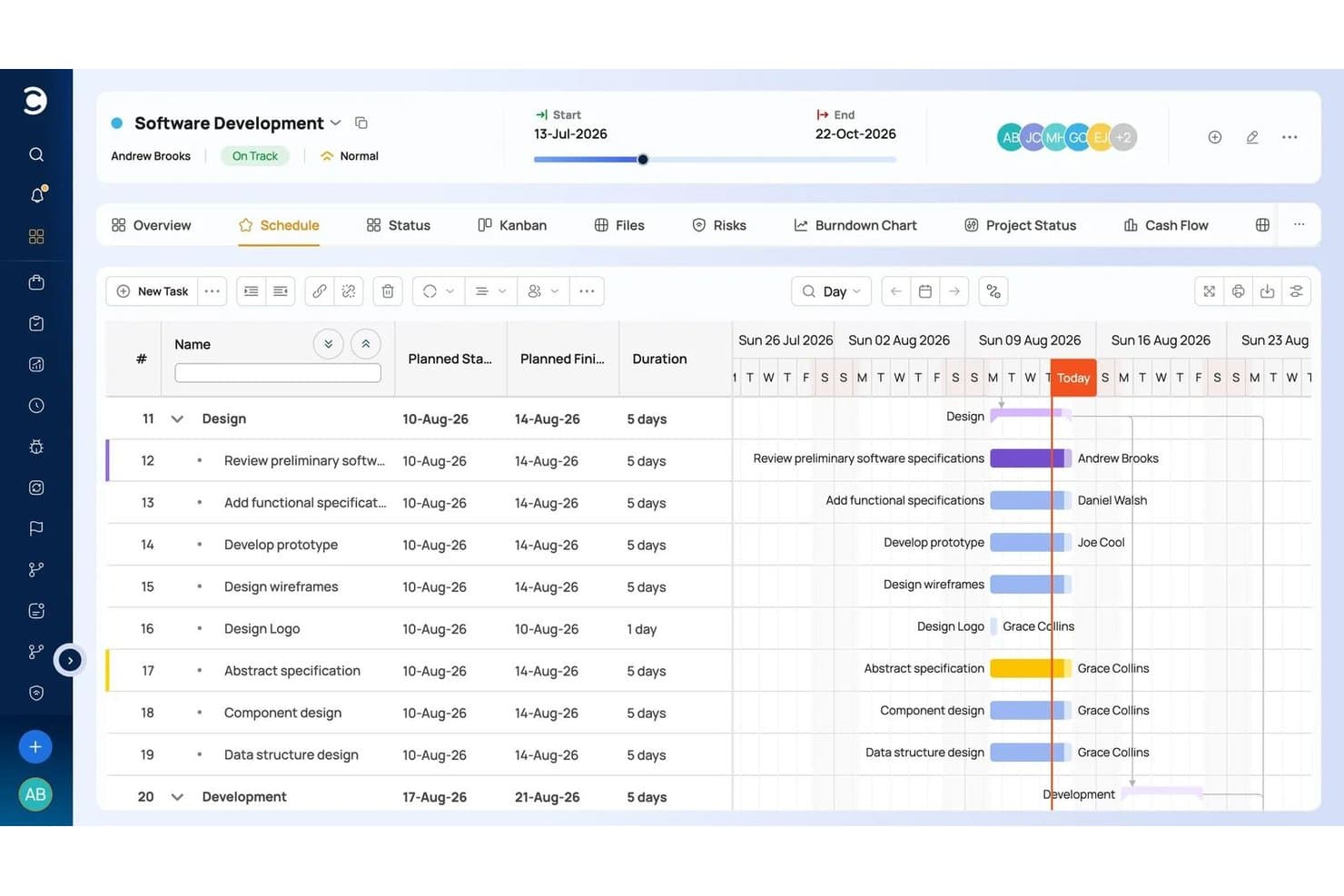
Celoxis tracks milestones and task timelines on a visual Gantt chart. Celoxis is an enterprise project and portfolio management platform with Gantt-based scheduling, cross-project dependency tracking, automated RAG status reporting, and milestone-linked billing.
Who Is Celoxis Best For?
Celoxis is a strong fit for PMO leads and project managers at mid-size to enterprise organizations running complex, multi-project portfolios that require structured scheduling and cross-project dependency tracking.
Why I Picked Celoxis
Celoxis earns its spot on my shortlist because of how well its scheduling engine handles milestone dependencies at scale. When I reschedule a predecessor, every downstream milestone and task shifts automatically across projects, which matters when you're managing a portfolio where one delayed deliverable can ripple through five workstreams. I also like that milestone-based billing is built in natively, so project managers can tie invoices directly to milestone completion without a workaround.
Celoxis Key Features
- RAG status indicators: Celoxis automatically calculates red, amber, and green health status for tasks and milestones based on projected finish dates, without requiring manual input.
- Cross-project dependency tracking: You can link tasks across separate projects so that schedule changes in one project surface knock-on effects in connected workstreams.
- Free client portal: Clients and read-only stakeholders get access to a branded project view at no additional cost, keeping external visibility separate from your working environment.
- Baseline comparison: Celoxis lets you set a schedule baseline and compare it against actual progress, so you can see exactly where a project has drifted from the original plan.
Celoxis Integrations
Celoxis offers 21 native integrations, including Jira, Azure DevOps, GitHub, Microsoft Project, Google Sheets, Salesforce, QuickBooks Online, Slack, and Trello. It also supports 400+ connections through native connectors, Zapier, and its REST API.
Pros and Cons
Pros:
- Baselines expose schedule drift clearly
- RAG flags delayed milestones automatically
- Auto-cascades cross-project milestone dependencies
Cons:
- Complex interface slows milestone adoption
- Milestones remain zero-duration tasks
Learn more about Celoxis: Best with resource management included
- Free demo available
- From $11/user/month (billed annually)
Visit WebsiteCustomer Rating:4.6/5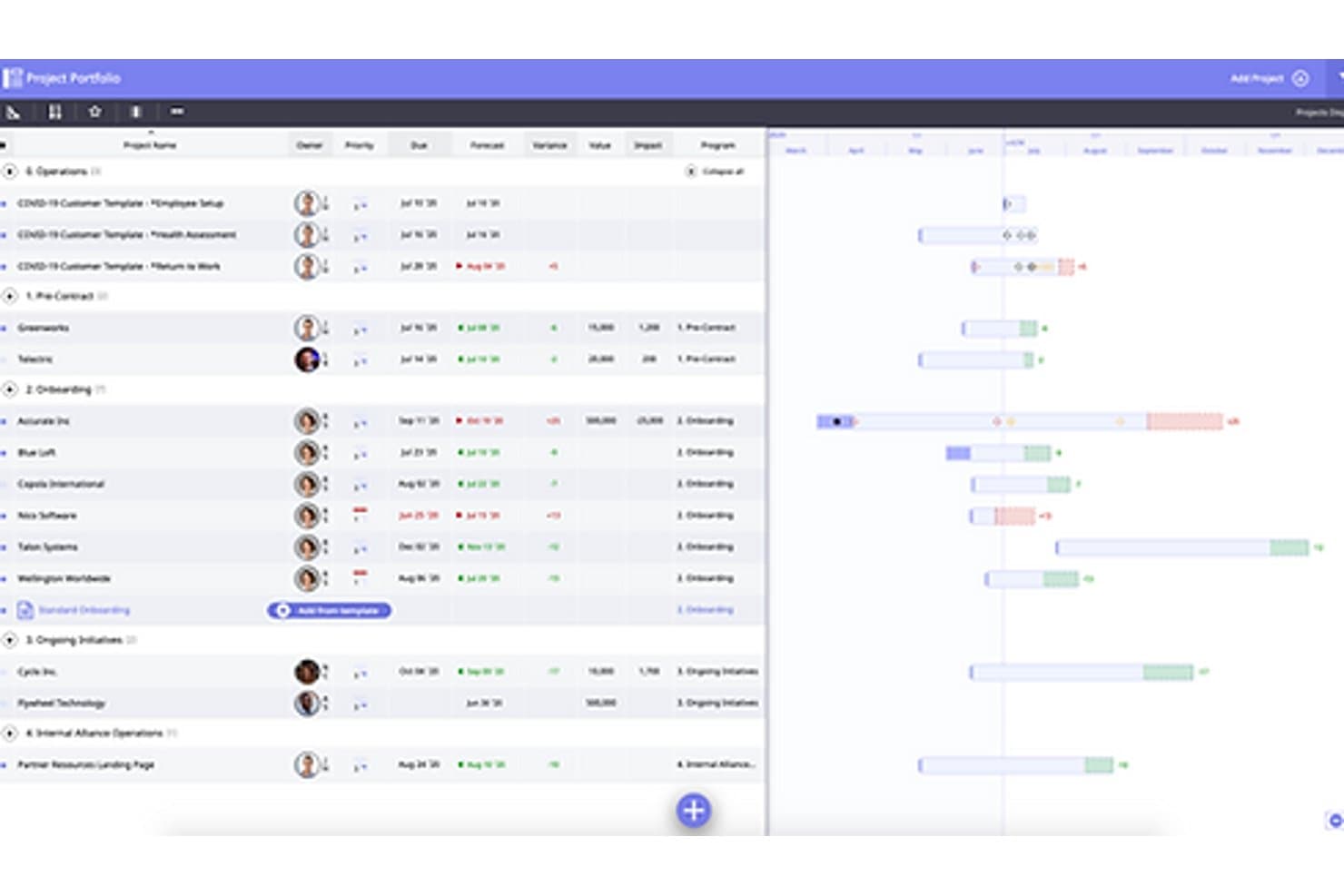
Moovila tracks project milestones and timelines across a portfolio view. Moovila is a project and portfolio management platform with AI-driven scheduling, milestone tracking, dependency management, resource management, and risk detection built into a single critical path engine.
Who Is Moovila Best For?
Moovila is a strong fit for IT service firms and MSPs that need scheduling, milestone tracking, and resource management in one connected platform.
Why I Picked Moovila
Moovila earns its spot on my shortlist because its critical path engine treats resource capacity as a first-class scheduling input, not an afterthought. When a milestone is anchored to a hard delivery date, Moovila schedules backward through dependencies while accounting for team calendars, skills, and availability, then flags capacity bottlenecks before they cause delays. I also rely on RPAX, its automated health scoring system, to surface at-risk milestones across the portfolio without anyone having to manually update a status field.
Moovila Key Features
- Critical path view: A network diagram that maps all tasks, durations, and milestones toward completion, highlighting delayed tasks and their downstream effects.
- Auto-recasting: When a task slips, the scheduling engine recalculates the timeline and proposes updated dates you can apply across the entire project in one click.
- Inter-project dependencies: Link tasks and milestones across separate projects so delays in one plan automatically surface as risks in connected plans.
- Portfolio Timeline view: A cross-portfolio visual that shows all active projects, their milestones, and capacity conflicts in a single timeline.
Moovila Integrations
Moovila offers native integrations with Box, Dropbox, SharePoint, OneDrive, Google Drive, Outlook, Google Calendar, and Microsoft Teams. Enterprise adds two-way ConnectWise, HaloPSA, and Autotask PSA sync, while the REST API supports custom integrations.
Pros and Cons
Pros:
- RPAX flags at-risk milestones automatically
- One-click recasting updates delayed timelines
- Resource capacity shapes milestone schedules
Cons:
- Complex setup can slow initial adoption
- Milestones lack standalone owners and workflows
Learn more about Moovila: Best for visual Gantt-based milestone scheduling
- 14-day free trial
- From $59/month
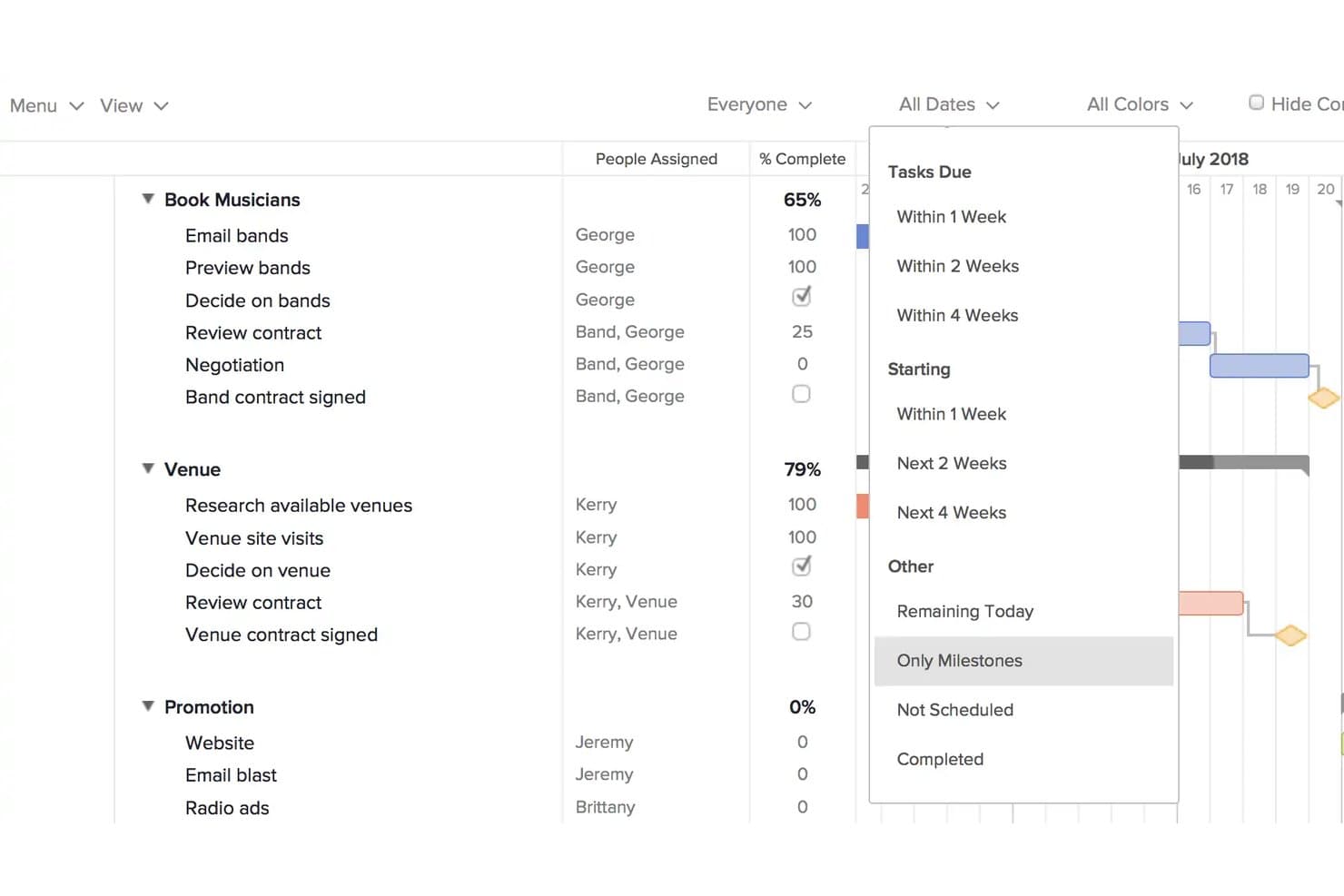
TeamGantt lets users filter Gantt chart tasks to show only milestones. TeamGantt is a Gantt chart-based project management tool that offers drag-and-drop scheduling, milestone tracking, dependency management, and multi-project portfolio views.
Who Is TeamGantt Best For?
TeamGantt suits project managers and PMO leads who need a clear, visual way to schedule milestones and track timelines across multiple projects without a steep learning curve.
Why I Picked TeamGantt
TeamGantt earns its spot on my shortlist because the Gantt chart is genuinely built around milestones, not bolted on as an afterthought. Every milestone renders as a distinct gold diamond on the timeline, and the "Only Milestones" filter lets you strip away all task noise to show stakeholders exactly where the critical checkpoints land. I also like that you can lock milestone dates in Project Settings, so a cascading dependency shift can't quietly move a deadline you've already committed to.
TeamGantt Key Features
- Dependency management: Link tasks using four dependency types—finish-to-start, start-to-start, finish-to-finish, and start-to-finish—with lead and lag time controls.
- Baseline tracking: Save snapshots of your plan and compare planned versus actual dates with a dedicated Baselines column showing days ahead or behind.
- Portfolio view: See Project Health status (Ok, Behind, Overdue) across all your projects in a single dashboard with folder-based organization.
- Multi-project Gantt chart: Open several projects simultaneously on one Gantt timeline to manage cross-project scheduling and dependencies.
TeamGantt Integrations
TeamGantt integrates with Trello, Procore, Slack, Dropbox, Basecamp 2, Google Calendar, iCal, Outlook, and Microsoft Project. It also supports a beta OAuth2 API for custom integrations and Zapier.
Pros and Cons
Pros:
- Baselines reveal schedule variance clearly
- Locked dates protect committed deadlines
- Milestones remain visible as gold diamonds
Cons:
- Stakeholder reporting lacks deeper milestone automation
- Milestones offer only complete/incomplete status
Learn more about TeamGantt:
Annen bemerkelsesverdig programvare for milepæler
Nedenfor finner du en liste over annen programvare for milepæler som jeg vurderte, men som ikke kom med blant de 10 beste. Det er absolutt verdt å ta en titt på dem.
- 11WrikeBest with built-in team collaboration tools
- 12Zoho ProjectsBest for remote team milestone collaboration
- 13ProjectManagerBest for Gantt-based milestone and portfolio tracking
- 14GanttPROBest for Gantt-native milestone scheduling
- 15BacklogBest for Agile release tracking with Gantt
- 16NiftyBest for Agile project management with team chat
- 17FlowluBest with built-in CRM and financial tools
- 18HiveBest for scheduling milestones with AI drafting
- 19NotionBest for milestones within a knowledge workspace
How I Evaluate Milestone Software
I split my evaluation into three parts: core functionality (does it let you define milestones with real dates and track status as work moves?), standout features like OKR linking or cross-team portfolio views, and beyond-feature factors like onboarding support and integration depth with tools like Jira. Core functionality carries the most weight.
Core Functionality (Table Stakes For This List)
When I'm selecting tools for my list, I score each one on a scale from 0 (does not offer the functionality) to 5 (excels in this area) for each core functionality listed below. I then convert the total into a percentage to help assess each tool's overall fit, with extra weight on any functionalities I've deemed essential.
- Milestone Creation & Tracking (Essential): I look for tools where milestones are a distinct object with owners, target dates, and status fields—not just renamed tasks buried in a backlog.
- Visual Timeline Display: I check whether milestones appear on Gantt charts, roadmaps, or calendars with enough context to read sequencing and pacing at a glance.
- Progress Status Indicators: Tools that auto-update milestone health based on linked task completion score higher than those requiring manual status changes.
- Dependency & Sequencing Support: I evaluate how the tool handles linked work—whether shifting a deadline cascades changes to downstream milestones or silently breaks the schedule.
- Collaborative Updates: Teams need to comment, tag stakeholders, and update statuses in place. I look for activity history and permission controls on each milestone.
- Reporting & Notifications: I check for configurable deadline alerts and progress summaries you can share with leadership without exporting data to a slide deck first.
Once I have a list of tools that meet the criteria, I consider what sets each platform apart.
Differentiating Factors (What Sets Vendors Apart)
Here's how I compare and contrast different vendors:
Standout Features
I check whether a tool offers automated dependency cascading—when one milestone slips, downstream dates should recalculate without manual cleanup. OKR linking is another separator; I look for tools that tie milestones directly to business objectives so leadership can see how delivery maps to strategy. I also evaluate cross-team portfolio views, since PMs running multiple product lines need rolled-up milestone dashboards that surface blockers across teams in one place.
Beyond Features
I check whether a tool offers bidirectional syncing with engineering platforms like Jira or Azure DevOps, since milestone status that doesn't reflect actual sprint progress becomes stale within days. Onboarding support matters too—I look for guided setup wizards and roadmap import options that cut migration time when you're moving off spreadsheets. I also evaluate role-based permissions and audit trails, especially for teams sharing milestone data across external stakeholders or operating in regulated industries.
De vanligste spørsmålene om programvare for milepæler (FAQ)
Har du fortsatt spørsmål om programvare for milepæler og oppgavehåndtering? Se ikke lenger, vi har svarene!
Hva er fordelene ved å bruke programvare for milepæler?
Programvare for milepæler gir flere fordeler:
- Bedre oversikt: Det bidrar til å visualisere prosjekt tidslinjer og følge fremdriften for individuelle oppgaver.
- Forbedret effektivitet: Disse verktøyene effektiviserer prosjektstyringsprosessene og øker dermed effektiviteten og produktiviteten.
- Bedre samarbeid: Teammedlemmer kan samarbeide effektivt i sanntid, noe som forbedrer kommunikasjonen og minimerer risikoen for feil.
- Detaljert rapportering: Med omfattende rapporter kan ledere analysere resultater, identifisere flaskehalser og ta datadrevne beslutninger.
-
Finnes det gratis alternativer for programvare for milepæler?
Ja, enkelte verktøy tilbyr gratisversjoner med begrenset funksjonalitet. Trello, MeisterTask og Todoist har alle gratisabonnementer som passer for enkeltpersoner eller små team. Disse gratisversjonene har imidlertid begrensninger når det gjelder funksjoner og antallet prosjekter eller brukere.