

Med så mange ulike løsninger for øktavspilling tilgjengelig er det vanskelig å finne ut hvilken som passer for deg. Du vet at du ønsker å få dyp innsikt i brukeratferd, finne problemer med brukervennligheten og bruke denne innsikten til å forbedre konverteringsfrekvensene, men må finne ut hvilket verktøy som egner seg best til oppgaven. Jeg hjelper deg! I dette innlegget vil jeg gjøre valget enklere ved å dele mine personlige erfaringer med bruk av dusinvis av ulike verktøy i store team og med forskjellige produkter, samt mine anbefalinger av den beste programvaren for øktavspilling.
Hvorfor du kan stole på våre programvareanbefalinger
6,700+
Reviews
20
Industry experts
16+
Evaluation factors
14
Years
Teamet vårt har testet og anmeldt programvare siden 2012. Vi er selv produktledere, så vi vet hvor vanskelig og hvor viktig det er å velge riktig programvare.
I denne guiden har vi vurdert verktøyene gjennom praktisk testing og uavhengig research og gitt dem poeng ut fra våre utvelgelseskriterier.
Anmeldelsene våre bygger på vår egen redaksjonelle vurdering. De er ikke et salgsargument.
Ekspertanmeldere:
- Andrew LumbySenior TPM
- Cristiano ValimSenior UI/UX Lead


Sammenligningstabell for programvare for øktavspilling
Denne sammenligningstabellen oppsummerer prisopplysningene for mine beste utvalgte programmer for øktavspilling:
| Tool | Best For | Trial Info | Price | ||
|---|---|---|---|---|---|
| 1 | Best for integrating replay and error monitoring | Free plan available | From $26/month (billed annually) | Website | |
| 2 | Best for friction-score-led session prioritization | Free plan available | From $25/month | Website | |
| 3 | Watch dynamic heatmaps in real-time | 7-day free trial + free plan available | From $32/month (billed annually) | Website | |
| 4 | Best for revenue-impact journey and funnel analysis | Free demo available | Pricing upon request | Website | |
| 5 | Best for bundled A/B testing with heatmap replay | 30-day free trial available | From $29/month | Website | |
| 6 | Best for quantifying revenue impact of user friction | Free demo available | Pricing upon request | Website | |
| 7 | Make every visitor interaction on your site searchable | Free plan available | Pricing upon request | Website | |
| 8 | Best for AI-driven mobile session friction analysis | Free demo + 14-day free trial available | Pricing upon request | Website | |
| 9 | Organize session replays based on detected issues | Free plan available | From $15/month (billed annually) | Website | |
| 10 | Best for AI-driven issue detection and triage | 14-day free trial + free plan available | From $176/month (billed annually) | Website |


Anmeldelser av den beste programvaren for øktavspilling
Nedenfor finner du mine detaljerte sammendrag av den beste programvaren for øktavspilling som kom med på kortlisten min. Anmeldelsene mine gir en detaljert gjennomgang av de viktigste funksjonene, fordeler & ulemper, integrasjoner og ideelle bruksområder for hvert verktøy, slik at du kan finne det beste alternativet for deg.
 Best for integrating replay and error monitoring
- Free plan available
- From $26/month (billed annually)
Visit WebsiteCustomer Rating:4.5/5
Sentry shows session replays to help teams trace errors through real user actions. For teams seeking to enhance their application’s user experience, Sentry offers a versatile solution that combines session replay functionalities with error tracking and performance monitoring. It's an ideal choice for developers and enterprises looking to gain actionable insights into user interactions on web and mobile applications. By providing a visual reproduction of user sessions, Sentry helps identify the root cause of issues without requiring manual reproduction or customer support intervention.
Why I Picked Sentry
I picked Sentry for its unique ability to integrate session replay with error monitoring, giving you a comprehensive view of user interactions and application performance. Session Replay provides video-like reproductions of user sessions, allowing you to see when and where errors occur, which is crucial for debugging complex issues. Additionally, Sentry's privacy controls protect sensitive user data while still providing detailed insights into application performance. This combination of features makes it a compelling choice for developers who need to quickly diagnose and resolve issues.
Sentry Key Features
In addition to its robust session replay capabilities, Sentry offers:
- Breadcrumbs: Tracks events leading up to an error, providing context for debugging.
- Performance Monitoring: Measures application performance to identify bottlenecks and optimize user experience.
- Error Tracking: Automatically captures and alerts you to new errors, with detailed stack traces for quick resolution.
- Integration with Development Tools: Seamlessly connects with tools like GitHub and Slack to streamline your workflow.
Sentry Integrations
Integrations include GitHub, Slack, Jira, Bitbucket, GitLab, Trello, Azure DevOps, Vercel, Netlify, and Datadog.
Pros and Cons
Pros:
- Strong error tracking with clear stack traces
- Performance monitoring for front-end and back-end applications
- Detailed event timelines make debugging faster
Cons:
- Can generate large amounts of data at scale
- Less focused on qualitative UX research features
Learn more about Sentry: Best for friction-score-led session prioritization
- Free plan available
- From $25/month
Visit WebsiteCustomer Rating:4.7/5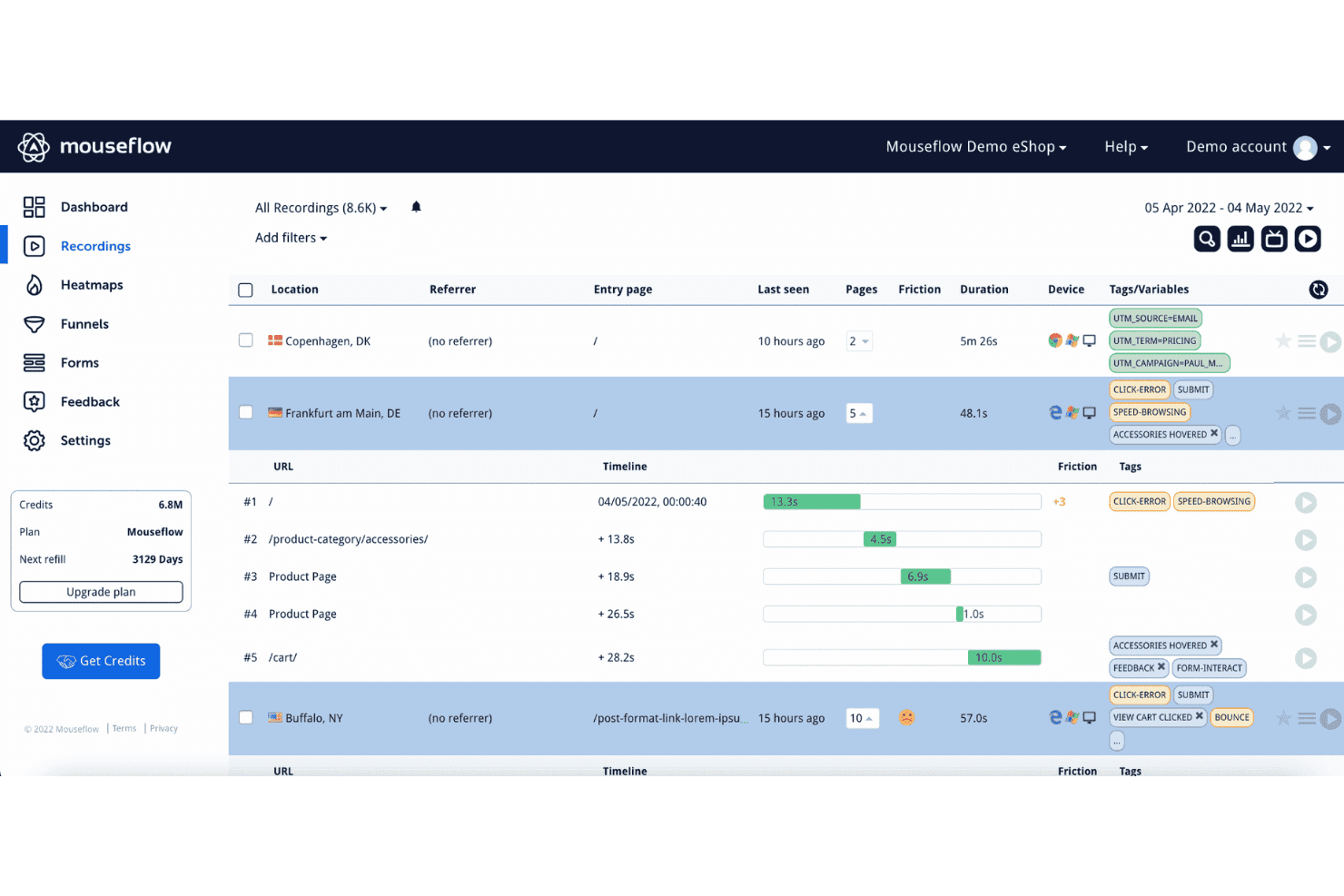
Mouseflow's session recordings feature helps users identify pain points and areas of friction by observing actual user behavior. Mouseflow is a session replay and behavioral analytics platform that captures user recordings, heatmaps, funnels, journey analytics, and form analytics alongside automatic friction signal detection.
Who Is Mouseflow Best For?
Mouseflow is a strong fit for product and UX teams who need to quickly pinpoint where users are getting stuck, without manually sifting through hours of session recordings.
Why I Picked Mouseflow
Mouseflow earns its spot on my shortlist because of how it handles friction detection automatically. Every session gets a Friction Score built from rage clicks, dead clicks, JavaScript errors, and bounces, so I can sort recordings by frustration level instead of watching them at random. The Friction Map then overlays those hotspots directly onto my pages, making it easy to see exactly where users are struggling without digging through individual replays.
Mouseflow Key Features
- Heatmap types: Mouseflow offers seven heatmap types—click, scroll, geo, attention, movement, friction, and interactive—so you can analyze user behavior across multiple dimensions on a single page.
- Form analytics: Tracks where users hesitate, drop off, or abandon forms, giving you field-level visibility into form completion patterns.
- Mina AI segmentation: Lets you pull session segments using plain-English questions, so you can find specific user groups without manually building filters.
- Built-in surveys: Includes NPS and branching survey logic that links responses directly to session recordings for added behavioral context.
Mouseflow Integrations
Mouseflow lists 42 integrations, including Google Analytics, Adobe Analytics, Google Tag Manager, AB Tasty, Salesforce, Slack, and Microsoft Teams. It also offers an open REST API, extended API add-on, data export, and an MCP server for custom connectivity.
Pros and Cons
Pros:
- Heatmaps, funnels, and replays share context
- Friction maps reveal page-level problem areas
- Friction scores prioritize frustrated sessions
Cons:
- Filtering and replay clarity need improvement
- Native mobile app coverage remains limited
Learn more about Mouseflow: Watch dynamic heatmaps in real-time
- 7-day free trial + free plan available
- From $32/month (billed annually)
Visit WebsiteCustomer Rating:4.7/5
Create unlimited dashboards to follow vital marketing campaign metrics or specific traffic sources. Lucky Orange is a session replay and behavior analytics tool that combines session recordings, dynamic heatmaps, conversion funnels, form analytics, and AI-driven insights in one platform.
Who Is Lucky Orange Best For?
Lucky Orange is a strong fit for ecommerce and marketing teams that need to connect session behavior directly to conversion drop-offs and revenue impact.
Why I Picked Lucky Orange
I picked Lucky Orange as one of the best because its dynamic heatmaps update in real time, so I can watch exactly where visitors are clicking and dropping off as it happens, not hours later. Pair that with Discovery AI, which lets me query sessions in plain English and get instant heatmap analysis with prioritized friction points, and I can move from a question to a fix without digging through raw data. Form Analytics adds field-level drop-off visibility, so I can see precisely which input is killing conversions and jump straight to the recordings behind it.
Lucky Orange Key Features
- Live visitor view: Watch individual visitors navigate your site in real time, without waiting for a session to end before reviewing it.
- Form analytics: See field-level drop-off rates and time-on-field data, then jump directly to recordings of visitors who abandoned a specific input.
- Conversion funnels: Track step-by-step drop-off across key user flows, with one-click access to recordings at each funnel stage.
- Behavioral segmentation filters: Narrow recordings and heatmaps by device, traffic source, UTM campaign, or frustration signal before you start watching.
Lucky Orange Integrations
Lucky Orange offers integrations with Shopify, BigCommerce, Magento, HubSpot, Google Analytics 4, Google Tag Manager, Optimizely, and Zapier. It also provides browser JavaScript and Node.js libraries for custom integrations.
Pros and Cons
Pros:
- Form analytics exposes field-level conversion drop-offs
- AI prioritizes friction points for product teams
- Real-time heatmaps reveal changing user behavior
Cons:
- Missing debugging timelines limits engineering investigations
- Website-only tracking excludes native mobile experiences
Learn more about Lucky Orange: Best for revenue-impact journey and funnel analysis
- Free demo available
- Pricing upon request
Visit WebsiteCustomer Rating:4.7/5
Observe, visualize, and elevate your customer’s experience with the Augmented Journey Map. Glassbox is a session replay and digital experience platform that captures 100% of user interactions without manual tagging, combining session replay, journey mapping, funnel analysis, struggle detection, and interaction maps across web and mobile.
Who Is Glassbox Best For?
Glassbox is a strong fit for enterprise product and analytics teams in regulated industries—like financial services and healthcare—that need to tie user behavior directly to revenue impact.
Why I Picked Glassbox
I picked Glassbox as one of the best because its Augmented Journey Map and Funnel Studio both surface revenue impact metrics directly alongside session replays, so you can see not just where users drop off but what that drop-off is actually costing. I love that funnels work retroactively on historical data without any tagging, which means you can investigate a drop you noticed last quarter without having instrumented it in advance. The proprietary Struggle Score then ranks problem pages by severity, giving you a clear, business-grounded case for what to fix first.
Glassbox Key Features
- Tagless session capture: Glassbox records 100% of user interactions automatically, with no manual tagging required, so historical sessions are always available for analysis.
- GIA AI session search: An AI assistant lets you find and summarize sessions using natural-language queries, reducing manual review time.
- Struggle Score: A proprietary scoring model ranks pages and screens by friction severity, helping you prioritize fixes by business impact.
- Native mobile SDK: Supports iOS, Android, React Native, Flutter, and more, with crash replication and cross-platform journey tracking built in.
Glassbox Integrations
Glassbox offers documented integrations with Jira, Slack, Firebase, Google Analytics, Adobe Analytics, Qualtrics, Optimizely, and VWO. Its open API supports custom connections to other product and analytics tools.
Pros and Cons
Pros:
- Struggle scoring prioritizes high-impact friction
- Full capture preserves untagged historical behavior
- Retroactive funnels connect drop-offs to revenue
Cons:
- Report creation requires onboarding time
- Query responses can feel slow
Learn more about Glassbox: Best for bundled A/B testing with heatmap replay
- 30-day free trial available
- From $29/month
Visit WebsiteCustomer Rating:4.3/5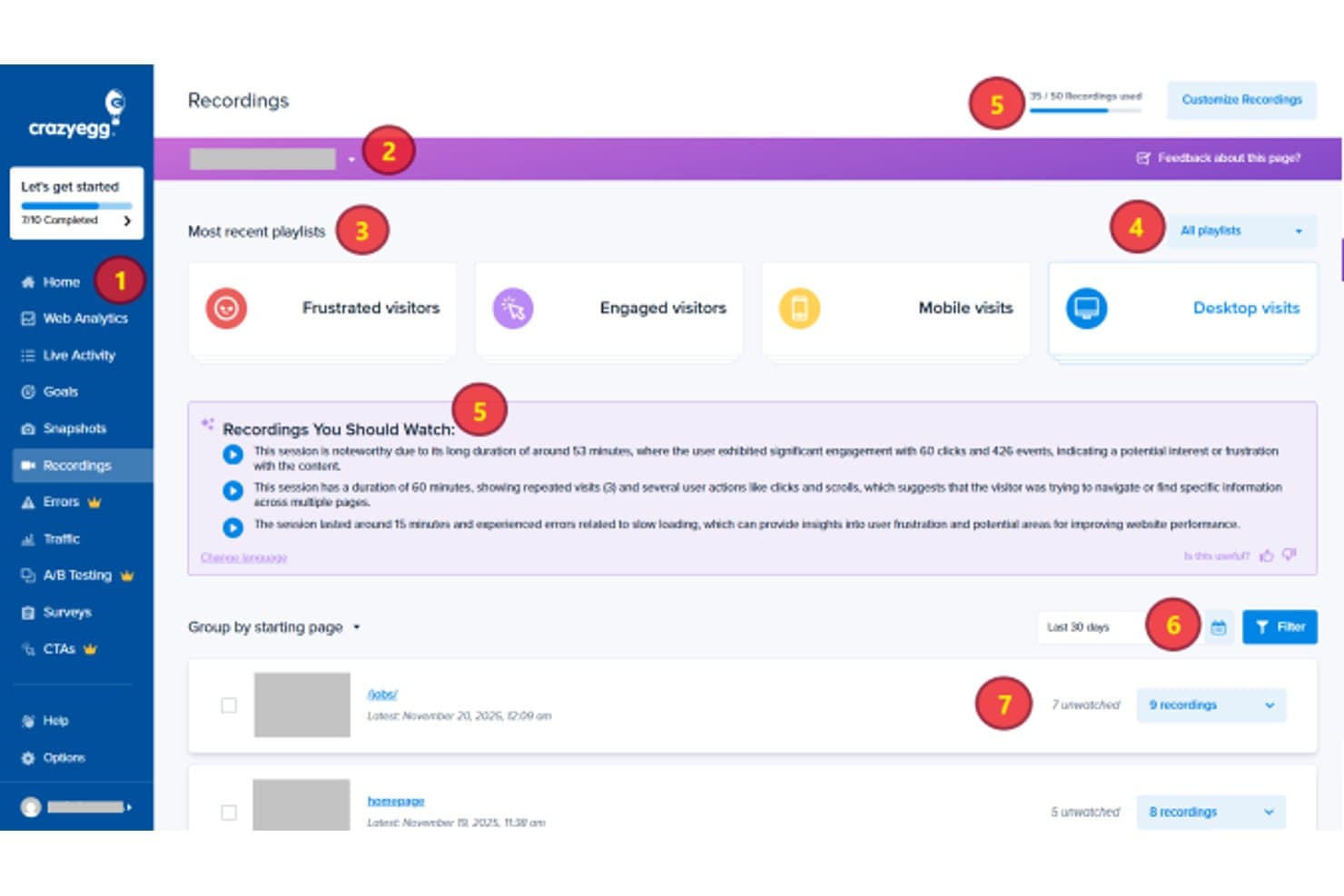
Crazy Egg organizes session recordings by playlist and starting page for review. Crazy Egg is a session replay and behavioral analytics tool that combines heatmaps, click tracking, scroll maps, session recordings, A/B testing, and conversion funnels in a single platform.
Who Is Crazy Egg Best For?
Crazy Egg is a strong fit for CRO marketers and product managers who want heatmaps, session replay, and A/B testing in one tool without juggling multiple subscriptions.
Why I Picked Crazy Egg
I've included Crazy Egg in my top picks because it's the only tool on this list that pairs session replay directly with built-in A/B testing, letting you watch how users behave and then run experiments on the same platform without switching tools. I love that each A/B test variant gets its own heatmap, so you can see exactly why one version outperformed another. The Frictionmap, which surfaces rage clicks, dead clicks, and error clicks visually on the page, makes it fast to spot where users are struggling before you decide what to test.
Crazy Egg Key Features
- Retroactive funnel analysis: Multi-step funnels recalculate automatically on historical data when you change steps, so you don't lose past insights.
- JavaScript error tracking: Automatically detects JS errors and links each one to its associated session recording, including the raw stack trace and device details.
- AI session summaries: Surfaces the most relevant recordings and generates plain-language summaries of usage patterns and UX issues across sessions and heatmaps.
- Confetti maps: Breaks down individual clicks by 17+ metrics—including traffic source, UTM parameters, and device—directly on the page.
Crazy Egg Integrations
Crazy Egg offers integrations with Google Analytics 4, Google Tag Manager, Segment, Shopify, WordPress, and other CMS platforms. Its API supports custom server-side conversion tracking, while an MCP connector enables access through AI assistants.
Pros and Cons
Pros:
- Error sessions connect bugs to behavior
- Variant-level replay supports experiment decisions
- Heatmaps expose product friction visually
Cons:
- No native mobile app session capture
- Low recording caps limit discovery coverage
Learn more about Crazy Egg: Best for quantifying revenue impact of user friction
- Free demo available
- Pricing upon request
Visit WebsiteCustomer Rating:4.7/5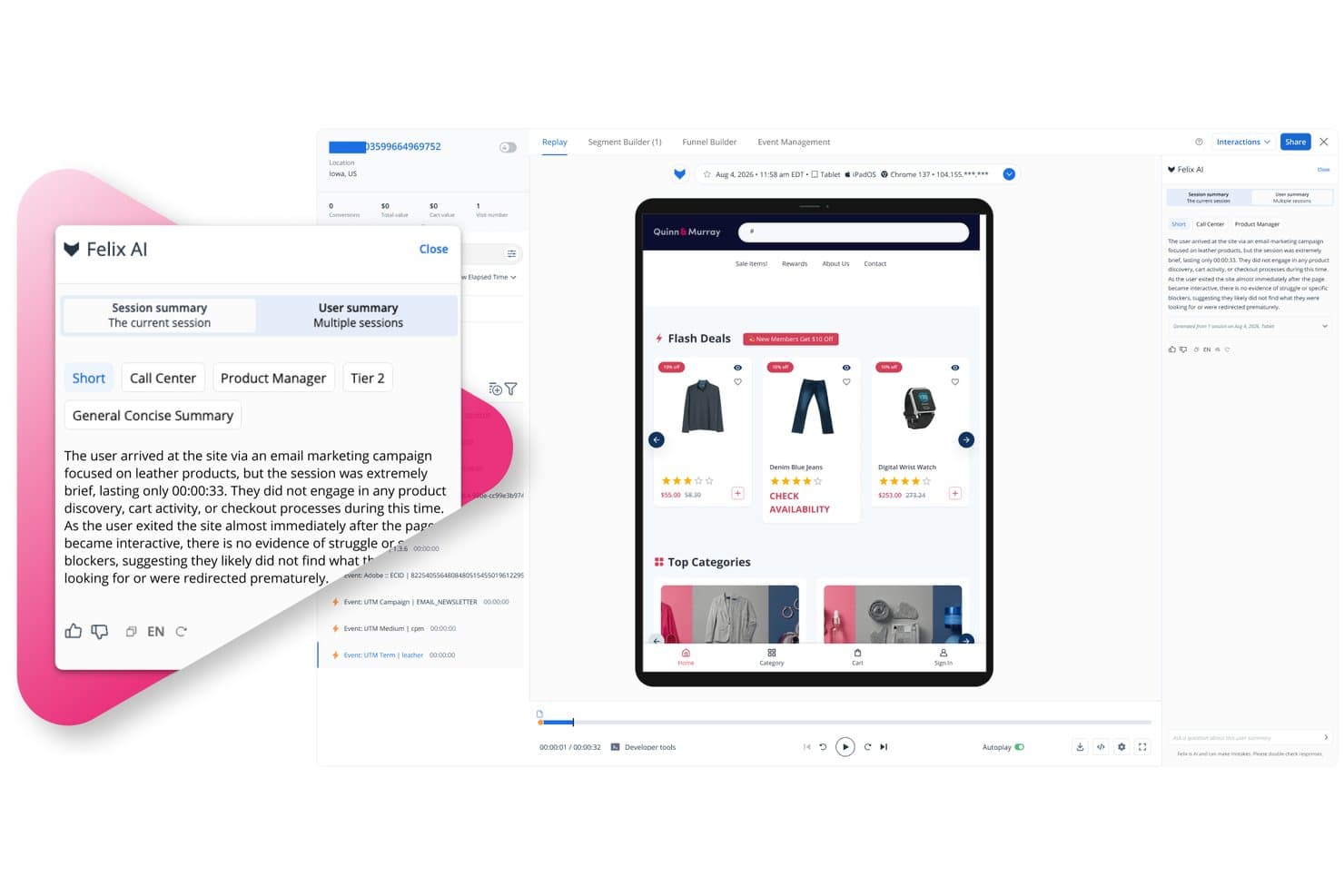
Quantum Metric's Felix AI summarizes session replays for product managers. Quantum Metric is a session replay and digital analytics platform that captures user behavior across web and native mobile, combining high-fidelity session recording, heatmaps, journey mapping, behavioral segmentation, and AI-powered analysis in one connected system.
Who Is Quantum Metric Best For?
Quantum Metric is a strong fit for enterprise product and digital teams that need to tie user friction directly to revenue impact.
Why I Picked Quantum Metric
Quantum Metric earns its spot on my shortlist because it's the only tool I've seen that automatically puts a revenue number next to a friction point. Its Opportunity Analysis surfaces rage clicks and drop-offs and then quantifies what those issues cost, so I'm not guessing at prioritization. Journeys maps real user paths across web and native mobile in real time, and I can drill straight from a drop-off step into the session replay that caused it.
Quantum Metric Key Features
- Felix AI session summaries: Generative AI automatically summarizes individual sessions and user journeys, surfacing friction points, errors, and user intent in plain language.
- Behavioral segment builder: Nested segments built from event attributes, audience attributes, and step sequences apply across the entire platform, including funnels and journey maps.
- Console and network diagnostics pane: A technical panel runs alongside every session replay, giving engineers the context they need to reproduce bugs with full network-level detail.
- Experience alerts: Automated monitoring watches aggregate behavior and frustration signals, sending proactive alerts through Slack, email, and other channels when KPIs shift.
Quantum Metric Integrations
Quantum Metric offers integrations with Optimizely, Split, Slack, Jira, ServiceNow, Qualtrics, Looker, Tealium, and Adobe Experience Platform/CJA. A REST API supports custom integrations, including access to AI-generated session summaries.
Pros and Cons
Pros:
- Adds network diagnostics beside every replay
- Links journey drop-offs to session replays
- Quantifies revenue lost to friction
Cons:
- Some AI analyses have usage limits
- Segment searches can return incomplete results
Learn more about Quantum Metric: Make every visitor interaction on your site searchable
- Free plan available
- Pricing upon request
Visit WebsiteCustomer Rating:4.5/5
Calculate your most significant opportunities to enhance your user’s experience. Fullstory is a digital experience analytics platform that combines session replay, heatmaps, funnel analysis, journey mapping, and behavioral segmentation with tagless autocapture and AI-powered session summaries.
Who Is Fullstory Best For?
Fullstory is a strong fit for product teams at mid-market and enterprise companies that need to connect qualitative session data to quantitative funnel and revenue metrics in one place.
Why I Picked Fullstory
Fullstory earns its spot on my shortlist because tagless autocapture means every click, scroll, and rage click is recorded automatically, with no manual event tagging required. I love that this retroactive data history lets you go back and analyze behavior from before you knew what questions to ask. Pairing that with session replay linked directly to funnel drop-off points means I can see exactly where users abandon a flow and watch the session that proves it.
Fullstory Key Features
- Tagless autocapture: Automatically collects every click, scroll, and interaction without any manual event tagging or instrumentation setup.
- Journey maps: Visualizes the full paths users take through your product, including unexpected routes and drop-off points.
- Sentiment signals: Detects frustration indicators like rage clicks and surfaces them alongside their estimated revenue impact.
- Privacy-by-default masking: Renders sensitive fields as wireframes in replay so you see interaction context without exposing user data.
Fullstory Integrations
Fullstory offers integrations with Segment, Adobe Analytics, and Google Tag Manager, plus data warehouses and cloud storage through Fullstory Anywhere: Warehouse. Webhooks, Data Export, Element API, FS.Identity API, and Consent API support custom connectivity.
Pros and Cons
Pros:
- Privacy masking preserves interaction context
- Replay links funnel drop-offs to sessions
- Retroactive behavior history reduces instrumentation gaps
Cons:
- Event tracking trails replay capabilities
- Reviewing many sessions becomes time-intensive
Learn more about Fullstory: Best for AI-driven mobile session friction analysis
- Free demo + 14-day free trial available
- Pricing upon request
Visit WebsiteCustomer Rating:4.6/5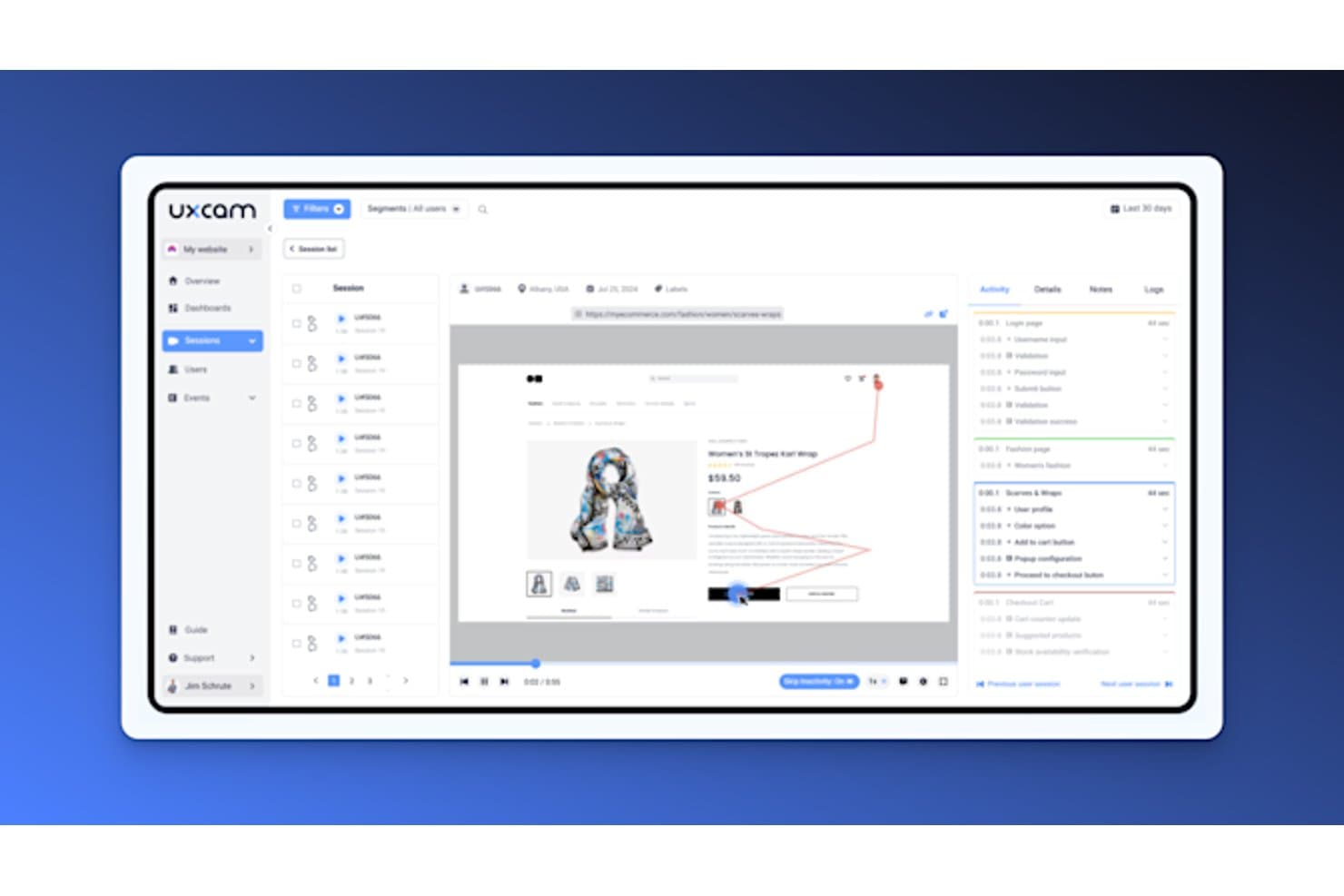
UXCam lets users replay sessions with detailed activity timelines. UXCam is a mobile-first product analytics and session replay platform that combines gesture-level session recording, heatmaps, funnel analysis, and AI-driven friction detection across iOS, Android, and hybrid app frameworks.
Who Is UXCam Best For?
UXCam is a strong fit for mobile product teams that need gesture-level behavioral data to diagnose friction in iOS and Android apps.
Why I Picked UXCam
I picked UXCam as one of the best because its AI analyst, Tara, does something I haven't seen other tools pull off as well: it watches sessions autonomously, surfaces friction patterns like rage taps and dead taps, and ranks them by impact so you're not manually scrubbing through recordings. I also love how funnel drop-offs link directly to the sessions where users abandoned, making it genuinely fast to go from "where are users leaving?" to watching exactly what happened.
UXCam Key Features
- Session replay timeline markers: The replay timeline automatically tags rage taps, UI freezes, and custom events so you can jump straight to the moments that matter.
- Activity tab: A chronological list of screens, gestures, and events shows time spent per screen, with one-click navigation to any point in the session.
- On-device privacy masking: AI text occlusion, blur, and overlay tools process sensitive content directly on the device before any data is transmitted.
- Issue analytics dashboard: Crashes, UI freezes, and handled exceptions are automatically captured and tracked per release with alert monitoring.
UXCam Integrations
UXCam has four documented integrations: Firebase Crashlytics, Salesforce, Zendesk, and Intercom. These connect session context with crash reports and support workflows, though the integration set is smaller than many broader product analytics platforms.
Pros and Cons
Pros:
- On-device masking protects sensitive user data
- Funnel drop-offs link directly to replays
- Tara AI prioritizes mobile friction patterns
Cons:
- Web analysis remains secondary to mobile apps
- Filtering and search frustrate some reviewers
Learn more about UXCam: Organize session replays based on detected issues
- Free plan available
- From $15/month (billed annually)
Visit WebsiteCustomer Rating:4.5/5
A drag-and-drop interface allows anyone to create customizable, real-time dashboards quickly. Datadog is a session replay and real user monitoring tool that captures high-fidelity user sessions across web and mobile, with built-in frustration signal detection, AI-powered summaries, funnel analysis, and full-stack performance tracing.
Who Is Datadog Best For?
Datadog is a strong fit for product and engineering teams that need session replays tied directly to backend errors, performance traces, and technical root causes.
Why I Picked Datadog
I've included Datadog in my top picks because it organizes session replays around detected issues, which means I'm not hunting for problems manually. When a frustration signal fires, like a rage click or an error click, I can jump straight to that moment in the timeline. AI summaries also surface user intent and friction before I even press play, and Smart Chapters break sessions into journey stages so I can go directly to checkout or cart review without scrubbing through the full recording.
Datadog Key Features
- Console and network timelines: Datadog links session replays directly to network failures, error logs, and APM distributed traces so you can trace UX friction to a backend root cause.
- Frustration signals dashboard: A prebuilt, cloneable dashboard tracks rage clicks, dead clicks, and error clicks across your product, with timeline markers that let you jump to the exact moment.
- Session-to-ticket workflow: You can add timestamped comments to any replay, tag teammates, and share links directly to Jira, Slack, or Confluence.
- Configurable session sampling rate: The
sessionReplaySampleRatesetting lets you control what share of sessions gets recorded, so you can manage data volume and cost without losing visibility.
Datadog Integrations
Datadog has native integrations across its platform, including RUM, Product Analytics, Error Tracking, APM, and Logs. Teams can share replay links through Jira, Slack, and Confluence, while the wider Datadog platform lists more than 1,000 integrations.
Pros and Cons
Pros:
- Strong privacy controls protect user data
- AI summaries speed replay review
- Connects friction to backend root causes
Cons:
- Heatmap segmentation remains comparatively limited
- Engineering focus can overwhelm product teams
Learn more about Datadog: Best for AI-driven issue detection and triage
- 14-day free trial + free plan available
- From $176/month (billed annually)

Divide bugs more effectively according to the number of users impacted by them. LogRocket is a session replay platform that pairs DOM-based session recording with product analytics, error monitoring, and AI-driven issue detection to give product teams a unified view of user behavior and frontend performance.
Who Is LogRocket Best For?
LogRocket is a strong fit for product and engineering teams that need to connect real user behavior directly to frontend bugs and performance issues.
Why I Picked LogRocket
I've included LogRocket in my top picks because its Galileo AI doesn't just flag bugs—it ranks issues by severity across real sessions, so I can immediately see which friction points are hurting the most users rather than triaging manually. I also love how the Issues view surfaces rage clicks, dead clicks, and frustration signals in one place, with linked session replays attached. When a release breaks something, Galileo catches the anomaly and surfaces it before anyone files a ticket.
LogRocket Key Features
- Console and network timeline sync: LogRocket syncs console logs, network requests, and JavaScript errors directly with session playback so you can pinpoint exactly what broke and when.
- Conversion funnels with linked replays: Funnel analysis connects drop-off data to the actual sessions behind it, letting you watch what happened at each step.
- 50+ behavioral filters and session playlists: Filter sessions by user ID, URL, custom events, or performance conditions, then save filtered sets as reusable playlists.
- Ticketing integrations: Push issues directly to Jira, Linear, GitHub, or Trello with session context attached, so engineers get everything they need to reproduce a bug.
LogRocket Integrations
LogRocket offers hundreds of integrations, including Jira, Linear, GitHub, Sentry, Datadog, Amplitude, Segment, LaunchDarkly, Zendesk, and Intercom. It also provides API and MCP access for custom workflows.
Pros and Cons
Pros:
- Funnels reveal drop-offs alongside actual sessions
- Replays connect behavior with technical context
- AI-ranked issue triage prioritizes user-impacting problems
Cons:
- Mobile friction detection trails web coverage
- Engineering-focused interface may challenge analysts
Learn more about LogRocket:
Annen programvare for øktavspilling
Her er noen flere alternativer for programvare for øktavspilling som ikke kom med på kortlisten min, men som likevel er verdt å se nærmere på:
- 11Heap (by Contentsquare)Best for linking funnel drop-offs to session replays
- 12PostHogBest for one-tool hypothesis testing and replay
- 13MixpanelBest for linking analytics data to session replays
- 14PendoBest for replay within a full product analytics suite
- 15Zoho PagesenseBest for privacy-first session replays
- 16OpenReplayBest for self-hosted session replay with data control
- 17ContentsquareBest for tag-free capture with AI session summaries
- 18Microsoft ClarityBest for free, unlimited session replay at scale
How I Evaluate Session Replay Software
My evaluation splits into three parts: core functionality (capturing and playing back real sessions, plus filtering sessions by behavior or attributes) carries the most weight, followed by standout features like AI session summarization, then practical factors like pricing and compliance posture.
Core Functionality (Table Stakes For This List)
When I'm selecting tools for my list, I score each one on a scale from 0 (does not offer the functionality) to 5 (excels in this area) for each core functionality listed below. I then convert the total into a percentage to help assess each tool's overall fit, with extra weight on any functionalities I've deemed essential.
- Session Recording (Essential): I check playback fidelity across browsers and devices, plus controls like variable speed and skip-to-event navigation.
- Behavioral Segmentation (Essential): Filtering by layered conditions like rage clicks on a specific page during a date range separates useful tools from basic ones.
- Rage and Error Click Detection: I look for automatic flagging of friction signals like dead clicks and rage clicks, with enough context to prioritize fixes.
- Heatmap Visualization: Good heatmaps let you compare click, scroll, and movement patterns across segments or device types on the same page.
- Funnel and Journey Analysis: I evaluate whether you can jump from a funnel drop-off point directly into a relevant session to understand the "why."
- Privacy and Data Masking: Configurable masking rules that cover sensitive fields by default matter here, along with granular controls for specific elements.
Once I have a list of tools that meet the criteria, I consider what sets each platform apart.
Differentiating Factors (What Sets Vendors Apart)
Here's how I compare and contrast different vendors:
Standout Features
AI session summarization saves hours of manual review by flagging notable moments automatically—I check whether summaries actually surface friction points or just rehash page titles. Session-to-ticket workflows matter just as much; tools like PostHog and LogRocket let you attach a recording directly to a Jira or Linear ticket, which keeps bug reports grounded in real user behavior instead of screenshots. I also evaluate whether a vendor bundles product analytics like feature flags or A/B testing alongside replay, since that lets PMs validate hypotheses without juggling separate tools.
Beyond Features
Pricing models vary widely—some vendors charge per session, others by monthly tracked users—so I check how overage costs and data retention windows align with realistic traffic patterns before committing. Compliance posture matters just as much, especially for teams handling regulated data; I look for clear data residency options and built-in consent management rather than bolted-on workarounds. I also evaluate how each tool fits an existing stack, since native integrations with platforms like Amplitude or Zendesk reduce redundant tagging and keep behavioral context in one place.
Slik velger du programvare for øktavspilling
Det er lett å gå seg vill i lange funksjonslister og kompliserte prismodeller. For å hjelpe deg med å holde fokus mens du går gjennom den unike prosessen med å velge programvare, får du her en sjekkliste over faktorer du bør ha i mente:
| Faktor | Dette bør du vurdere |
|---|---|
| FaktorSkalerbarhet | Dette bør du vurdereKan programvaren vokse sammen med teamet og virksomhetens behov? Vurder om den kan håndtere økt trafikk og datamengder uten å bli tregere. |
| FaktorIntegrasjoner | Dette bør du vurdereKan den kobles til eksisterende verktøy som CRM, analyseverktøy eller CMS? Sjekk om den støtter systemene du allerede bruker, slik at du unngår avbrudd i arbeidsflyten. |
| FaktorTilpasningsmuligheter | Dette bør du vurdereKan du tilpasse programvaren til dine spesifikke prosesser og behov? Se etter muligheter for å tilpasse dashbord, rapporter og brukertillatelser. |
| FaktorBrukervennlighet | Dette bør du vurdereEr grensesnittet intuitivt og brukervennlig? Sørg for at teamet raskt kan ta i bruk verktøyet uten omfattende opplæring eller en bratt læringskurve. |
| FaktorImplementering og oppstart | Dette bør du vurdereHvor mye tid og innsats vil det kreve å komme i gang? Vurder hvor mye støttemateriell som er tilgjengelig, for eksempel veiledninger, guider og oppstartsøkter. |
| FaktorKostnad | Dette bør du vurdereEr prisene transparente og innenfor budsjettet ditt? Ta hensyn til de totale eierkostnadene, inkludert eventuelle skjulte gebyrer eller ekstrakostnader for flere funksjoner. |
| FaktorSikkerhetstiltak | Dette bør du vurdereFølger løsningen bransjens sikkerhetsstandarder og beskytter sensitive data? Kontroller om den tilbyr kryptering, regelmessige sikkerhetsrevisjoner og samsvar med regelverk. |
| FaktorTilgjengelig brukerstøtte | Dette bør du vurdereHvilke støttealternativer er tilgjengelige når problemer oppstår? Se etter brukerstøtte døgnet rundt, direkte chat og dedikerte kundeansvarlige som kan hjelpe ved behov. |
Hva er programvare for øktavspilling?
Programvare for øktavspilling er et verktøy som tar opp og spiller av brukerinteraksjoner på et nettsted eller i en app. Det brukes av fagpersoner som produktledere, UX-designere og markedsførere for å forstå brukeratferd og forbedre digitale opplevelser. Varmekart, øktopptak og analyse av brukerbaner bidrar til å identifisere problemer og optimalisere brukerreiser. Alt i alt gir disse verktøyene verdifull innsikt for å forbedre brukeropplevelsen og øke engasjementet.
Funksjoner
Når du velger programvare for øktavspilling, bør du se etter følgende viktige funksjoner:
- Øktopptak: Ta opp og spill av brukerinteraksjoner for å forstå atferden deres og identifisere problemer.
- Varmekart: Visualiser hvor brukerne klikker og ruller på nettstedet ditt for å se interesseområder og potensielle problemer.
- Analyse av brukerbaner: Følg reisen brukerne tar gjennom nettstedet ditt for å optimalisere navigasjonen og forbedre brukerflyten.
- Overvåking i sanntid: Følg med på brukerinteraksjoner mens de skjer, slik at du raskt kan håndtere problemer og forbedre kundestøtten.
- Konverteringstrakter: Analyser trinnene brukerne tar før de konverterer, for å identifisere frafallssteder og forbedre konverteringsratene.
- Oppdagelse av vanskeligheter: Identifiser automatisk brukerfrustrasjoner og feil for å løse brukervennlighetsproblemer raskt.
- Tilpassbare kontrollpaneler: Tilpass grensesnittet slik at det viser viktige måltall og innsikter som betyr mest for teamet ditt.
- Avansert filtrering: Segmenter øktdata etter ulike kriterier for å fokusere på bestemte brukergrupper og atferd.
- Samsvarsovervåking: Sørg for personvern og overhold regelverk som GDPR ved å overvåke og administrere praksis for datainnsamling.
- Integrasjonsmuligheter: Koble til eksisterende verktøy som CRM- og analyseplattformer for å effektivisere dataflyten og utvide funksjonaliteten.
Fordeler
Implementering av programvare for øktavspilling gir flere fordeler for teamet og virksomheten din. Her er noen av fordelene du kan se frem til:
- Forbedret brukeropplevelse: Ved å analysere øktopptak og varmekart kan du identifisere problemområder og forbedre brukerreisen.
- Økte konverteringsrater: Med konverteringstrakter kan du finne ut hvor brukerne faller fra, og gjøre endringer for å øke konverteringene.
- Rask problemoppdagelse: Overvåking i sanntid og oppdagelse av vanskeligheter hjelper deg med å oppdage og løse problemer før de påvirker flere brukere.
- Datadrevne beslutninger: Tilpassbare kontrollpaneler og avansert filtrering gir innsikt som danner grunnlag for strategiske valg og optimaliseringer.
- Bedre samsvar: Samsvarsovervåking sikrer at praksisen for datainnsamling oppfyller personvernregelverket, og beskytter virksomheten og brukerne dine.
- Bedre kundestøtte: Ved å spille av brukerøkter kan kundestøtteteam forstå problemer og gi mer presis hjelp.
- Effektiviserte arbeidsflyter: Integrasjonsmuligheter gjør det mulig å koble øktdata med andre verktøy, noe som forbedrer effektiviteten og samarbeidet.
Kostnader og priser
Valg av programvare for øktavspilling krever en forståelse av de ulike prismodellene og abonnementene som er tilgjengelige. Kostnadene varierer basert på funksjoner, teamstørrelse, tillegg og mer, og gratis programvare for øktavspilling er tilgjengelig når du vil komme i gang uten en forhåndskostnad for programvaren. Tabellen nedenfor oppsummerer vanlige abonnementer, gjennomsnittsprisene deres og typiske funksjoner som er inkludert i løsninger for programvare for øktavspilling:
Sammenligningstabell for abonnementer for programvare for øktavspilling
| Abonnementstype | Gjennomsnittspris | Vanlige funksjoner |
|---|---|---|
| AbonnementstypeGratisabonnement | Gjennomsnittspris$0 | Vanlige funksjonerGrunnleggende øktopptak, begrensede varmekart og begrenset datalagring. |
| AbonnementstypePersonlig abonnement | Gjennomsnittspris$5-$25/bruker/måned | Vanlige funksjonerØktopptak, varmekart og grunnleggende analyse av brukerbaner. |
| AbonnementstypeBedriftsabonnement | Gjennomsnittspris$50-$150/bruker/måned | Vanlige funksjonerAvanserte varmekart, konverteringstrakter, overvåking i sanntid og samsvarsovervåking. |
| AbonnementstypeStorbedriftsabonnement | Gjennomsnittspris$200-$500/bruker/måned | Vanlige funksjonerFullt funksjonssett, inkludert avansert filtrering, tilpassede kontrollpaneler, dedikert kundestøtte og omfattende integrasjoner. |
Vanlige spørsmål om programvare for øktavspilling
Her er noen svar på vanlige spørsmål om programvare for øktavspilling:
Hvordan påvirker programvare for øktavspilling nettstedets ytelse?
Programvare for øktavspilling kan påvirke nettstedets ytelse dersom den ikke administreres riktig. Den samler inn store mengder data, noe som kan gjøre nettstedet tregere hvis verktøyet ikke er optimalisert for ytelse. Sørg for at programvaren bruker effektive metoder for datainnsamling og tilbyr alternativer for å håndtere datamengden, for eksempel utvalgsbasert innsamling eller begrensning av opptaksvarigheten. Overvåk nettstedets ytelse regelmessig, og juster innstillingene etter behov for å opprettholde optimal hastighet.
Er programvare for øktavspilling i samsvar med personvernregelverket?
Ja, mange verktøy for øktavspilling er utviklet for å overholde personvernregelverk som GDPR og CCPA. De tilbyr ofte funksjoner for å maskere eller utelate sensitive data fra opptakene. Det er imidlertid ditt ansvar å konfigurere disse innstillingene riktig og informere brukerne om praksisen for datainnsamling. Gå alltid gjennom programvarens funksjoner for regelverksetterlevelse, og rådfør deg med juridiske eksperter for å sikre at implementeringen oppfyller kravene i regelverket.
Hvor mye teknisk kompetanse kreves for å bruke programvare for øktavspilling?
Hvor mye teknisk kompetanse som kreves, varierer fra verktøy til verktøy. Noen er brukervennlige og utviklet for brukere uten teknisk bakgrunn, mens andre kan kreve noe teknisk kunnskap for oppsett og konfigurasjon. Se etter programvare med omfattende ressurser for oppstart, for eksempel veiledninger og brukerstøtte, slik at du kommer i gang. Vurder teamets tekniske ferdigheter, og velg et verktøy som samsvarer med hvor komfortable dere er med teknologi.