

Å administrere produktutvikling på tvers av separate apper for spesifikasjoner, veikart og sprintsporing skaper friksjon og tap av kontekst. De beste alternativene til Trello løser dette ved å koble sammen produktstrategi, PRD-er, tilbakemeldinger og gjennomføring i én smidig arbeidsflyt.
Enten du trenger relasjonsdatabaser, innebygd veikartfunksjonalitet eller samlet dokumentsamarbeid, bryter denne veiledningen ned de beste plattformene som er utviklet for å hjelpe produktledere med å lansere raskere ved hjelp av færre verktøy.
Hva er Trello?
Trello er en visuell programvare for prosjektstyring som organiserer gjøremålslister ved hjelp av tavler, lister og kort. Team bruker Trello til å planlegge arbeidsflyter, følge prosjektfremdrift og samarbeide om alt fra funksjonslanseringer til markedsføringskampanjer. Den fleksible Kanban-inspirerte utformingen gjør det nyttig for daglig oppgavesporing, men produktledere ser ofte etter mer avanserte alternativer når de trenger å samle overordnet strategi, planlegging og dokumentasjon på ett sted.
Sammenligningstabell for Trello-alternativer
Sammenlign priser og spesifikasjoner side om side for Trello-alternativene som kom med på kortlisten min.
| Tool | Best For | Trial Info | Price | ||
|---|---|---|---|---|---|
| 1 | Best for consolidating docs, tasks, and goals | Free plan available | From $7/user/month (billed annually) | Website | |
| 2 | Best for building relational databases | Free plan available; 14-day free trial | From $20/user/month (billed annually) | Website | |
| 3 | Best for strategy-to-sprint product planning | 30-day free trial + free demo available | From $9/user/month | Website | |
| 4 | Best for client-facing product delivery and billing | Free plan available; 14-day free trial | From $9.99/user/month (billed annually) | Website | |
| 5 | Best for managing enterprise product portfolios | 14-day free trial | Pricing upon request | Website | |
| 6 | Best for linking product PRDs to roadmaps | Free plan available | From $10/user/month (billed annually) | Website | |
| 7 | Best for tracking cross-functional feature launch plans | Free plan available | From $10.99/user/month (billed annually) | Website | |
| 8 | Best for native time tracking and chat option | Free plan + 14-day free trial available | From $5/user/month | Website | |
| 9 | Best for scaled agile and sprint planning | Free plan available | From $8.48/user/month | Website | |
| 10 | Best for enterprise strategic capacity planning | Free demo available | Pricing upon request | Website |


Hvorfor du kan stole på våre programvareanbefalinger
6,700+
Reviews
20
Industry experts
16+
Evaluation factors
14
Years
Teamet vårt har testet og anmeldt programvare siden 2012. Vi er selv produktledere, så vi vet hvor vanskelig og hvor viktig det er å velge riktig programvare.
I denne guiden har vi vurdert verktøyene gjennom praktisk testing og uavhengig research og gitt dem poeng ut fra våre utvelgelseskriterier.
Anmeldelsene våre bygger på vår egen redaksjonelle vurdering. De er ikke et salgsargument.
Ekspertanmeldere:
- Andrew LumbySenior TPM
- Cristiano ValimSenior UI/UX Lead


Anmeldelser av Trello-alternativer
Nedenfor finner du mine detaljerte sammendrag av de beste Trello-alternativene som kom med på kortlisten min. Anmeldelsene mine gir en detaljert gjennomgang av funksjonene, de beste bruksområdene og integrasjonene til hver plattform, slik at du kan finne den beste løsningen for deg.
 Best for consolidating docs, tasks, and goals
- Free plan available
- From $7/user/month (billed annually)
Visit WebsiteCustomer Rating:4.6/5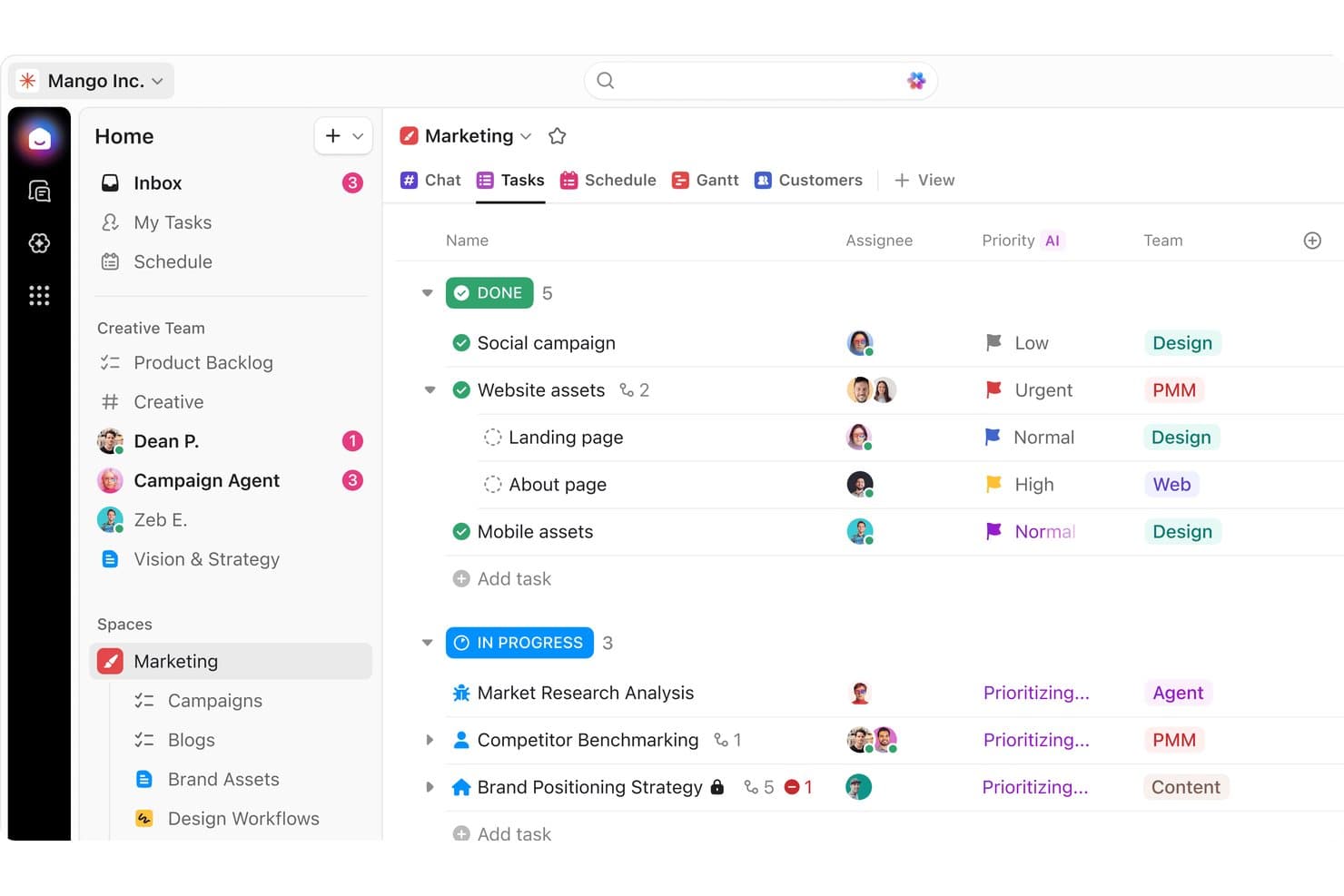
ClickUp organizes marketing tasks by status, priority, and team. ClickUp is a product planning platform for teams and organizations that want to keep docs, tasks, and project goals connected in one place, making it easier for product managers and cross-functional teams to organize and align their work.
Who Is ClickUp Best For?
ClickUp is a strong choice for product managers and cross-functional teams that need to keep docs, tasks, and project goals closely connected.
Why ClickUp Is a Good Trello Alternative
I picked ClickUp as a top Trello alternative because it combines document editing, task tracking, and OKR management inside one app. Its native Docs feature allows product managers to embed live specs and requirements directly into action items, while integrated goal tracking keeps team progress aligned in real time.
ClickUp Key Features
- Custom views: Create and save lists, calendars, Kanban views, and Gantt charts for different workflows.
- Automated sprint management: Roll over unfinished work and clear completed backlog items automatically.
- Time tracking: Log hours directly within tasks and generate time reports for unlimited projects.
- Dashboards: Build interactive dashboards to visualize project metrics, workload, and priorities in real time.
ClickUp Integrations
ClickUp integrates with Slack, Google Drive, Dropbox, Zoom, Microsoft Teams, OneDrive, Zapier, and offers an API for custom connections.
Pros and Cons
Pros:
- Dashboards visualize progress and team workloads
- Automation builder reduces routine manual updates
- Links docs, tasks, and goals in one workspace
Cons:
- Notifications can overwhelm when managing multiple projects
- Performance slows with very large workspaces
Learn more about ClickUp: Best for building relational databases
- Free plan available; 14-day free trial
- From $20/user/month (billed annually)
Visit WebsiteCustomer Rating:4.6/5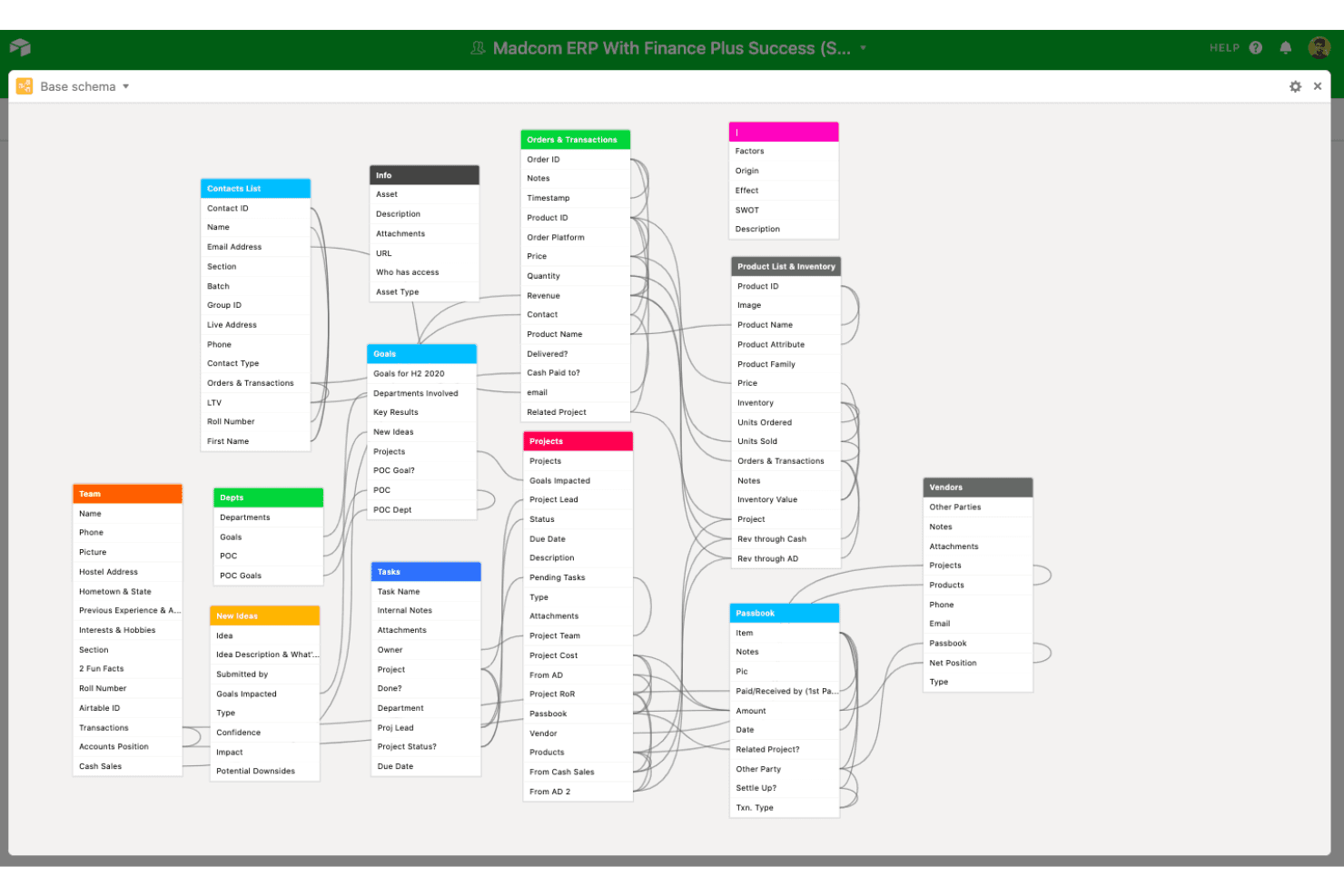
Airtable's schema view maps all table relationships in a database. Airtable gives product, operations, and project teams a flexible workspace for organizing, visualizing, and connecting information to plan and coordinate work in one place.
Who Is Airtable Best For?
Airtable is a good fit for product and operations teams in midsize to large organizations who need a flexible way to organize and link complex data.
Why Airtable Is a Good Trello Alternative
I picked Airtable as one of my top choices because it provides a level of data modeling that standard Kanban boards in Trello cannot replicate. You can link records across tables—connecting user stories, bug reports, customer feedback, and release dates into a relational database tailored to your exact workflow.
Airtable Key Features
- Automations: Build custom triggers and actions to automate repetitive tasks right within your workspace.
- Interface designer: Create tailored dashboards and views for different users without writing code.
- Real-time collaboration: Edit bases, comment, and manage updates with teammates at the same time.
- App marketplace: Add extensions for charts, reporting, time tracking, and other specialized workflows.
Airtable Integrations
Airtable integrates with Box, Jotform, Tableau, Stripe, Slack, Google Workspace, and Microsoft Teams. It connects with Zapier and has an API for custom integrations.
Pros and Cons
Pros:
- Offers flexible data views beyond Kanban
- Customization options for workflows and dashboards
- Builds complex relational project databases
Cons:
- Relational setup requires upfront planning
- Advanced features come with a steep learning curve
Learn more about Airtable: 3Best for strategy-to-sprint product planning
Aha!
- 30-day free trial + free demo available
- From $9/user/month
Visit WebsiteCustomer Rating:4.6/5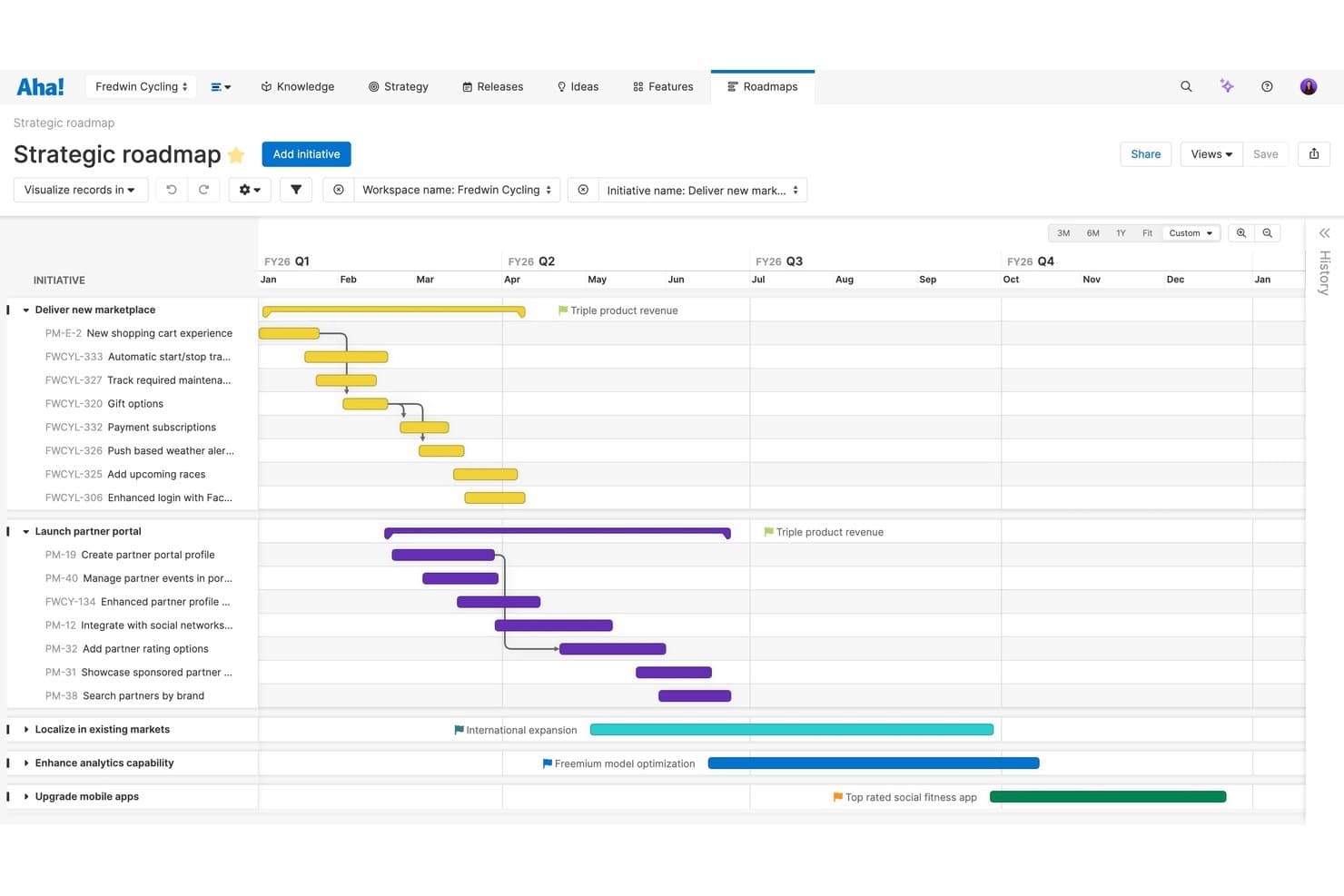
Aha! lets users visualize strategic roadmaps with timelines and dependencies. Aha! is a product management platform that brings together strategy, idea capture, visual roadmaps, and sprint planning for software teams, product leaders, and organizations rolling out complex product portfolios.
Who Is Aha! Best For?
Aha! is a strong fit for product managers at growing software companies who need to align strategy with actionable delivery plans.
Why Aha! Is a Good Trello Alternative
Unlike Trello's general-purpose task management, Aha! is built specifically for product management. I like that it enables product leaders to capture user feedback, set strategic objectives, score backlog items, and translate vision into actionable sprint boards and visual roadmaps.
Aha! Key Features
- Ideas portal: Collect, review, and prioritize feedback from internal teams and external users in a centralized workspace.
- Custom workflow templates: Define and automate unique product workflows to match how your team manages product development.
- Advanced reporting and analytics: Build detailed reports and custom dashboards to visualize progress, performance, and product portfolio insights.
- Prioritization scorecards: Rank backlog features using customizable Value vs. Effort scoring matrices.
Aha! Integrations
Aha! offers native integrations with Jira, Azure DevOps, Salesforce, and Slack. An API for custom integrations is also available.
Pros and Cons
Pros:
- Custom dashboards track portfolio performance visually
- Capacity planning helps balance resource allocation
- Connects strategy, roadmap, and sprint planning
Cons:
- No native support for kanban card checklists
- Interface feels overwhelming for new users
Learn more about Aha!: Best for client-facing product delivery and billing
- Free plan available; 14-day free trial
- From $9.99/user/month (billed annually)
Visit WebsiteCustomer Rating:4.4/5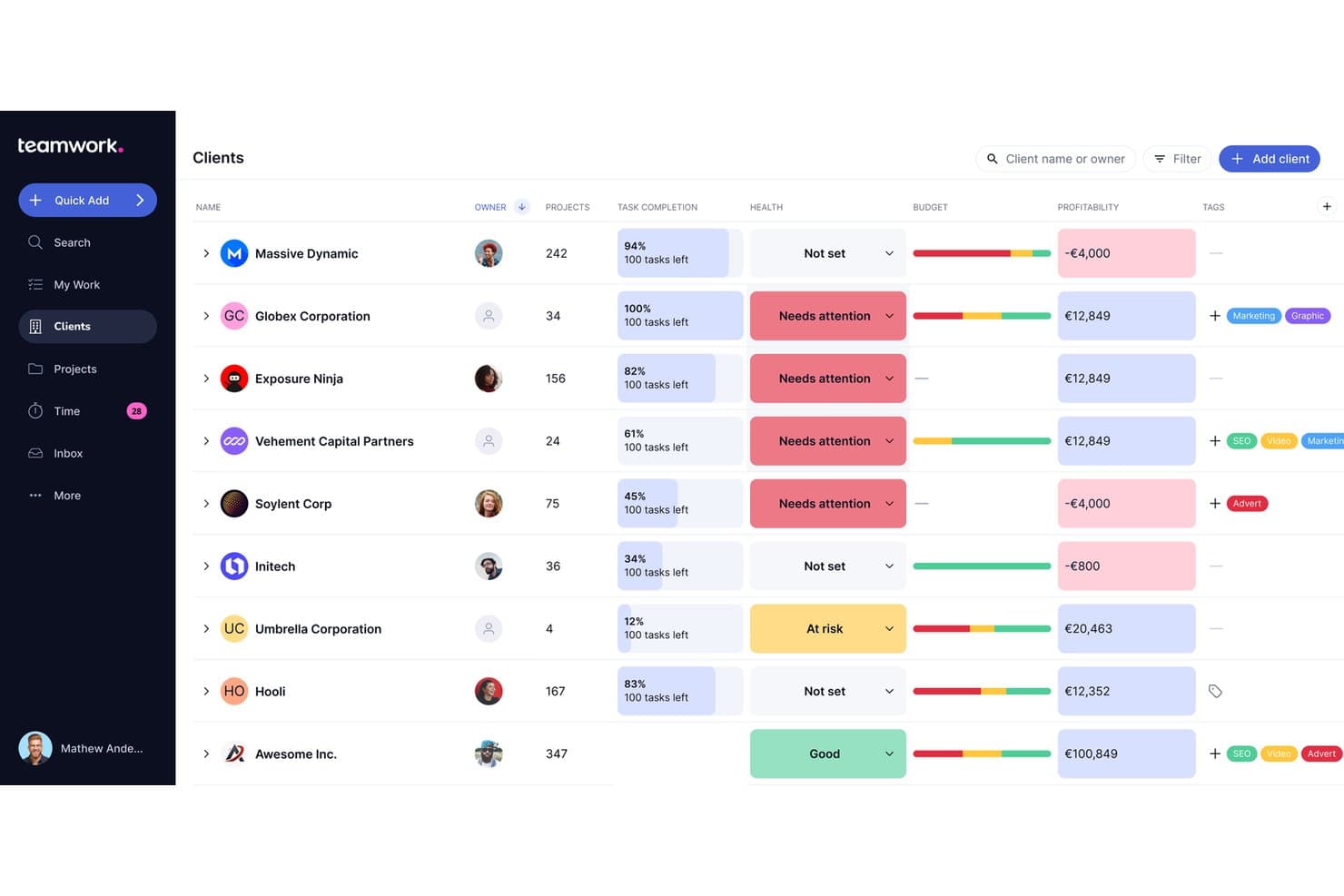
Teamwork.com lets users track client health, budget, and profitability in one view. Teamwork.com gives product managers and client-focused teams a workspace for project planning, resource management, and delivering multi-stage projects with clear task assignments, timelines, and budget tracking.
Who Is Teamwork.com Best For?
Teams managing client projects who need project planning, task assignments, billing, and visibility into multi-stage project delivery.
Why Teamwork.com Is a Good Trello Alternative
I picked Teamwork.com because it handles client-facing project work that needs advanced task assignments, phased project timelines, and budget tracking. Its built-in time tracking and billing tools keep client projects on schedule and invoices accurate. Collaboration features make it simple to manage multi-stage delivery with full client visibility.
Teamwork.com Key Features
- Gantt chart planning: Build and adjust project timelines visually with interactive Gantt charts.
- Custom project templates: Create reusable templates to standardize project setup across your team.
- Document management: Store, organize, and collaborate on files directly within your projects.
- Automated task workflows: Set up automation rules to trigger actions when project tasks reach certain statuses.
Teamwork.com Integrations
Teamwork.com offers native integrations with Slack, Google Drive, Microsoft 365, Dropbox, HubSpot, Xero, QuickBooks, and Zapier. An API is available for custom integrations.
Pros and Cons
Pros:
- Advanced task dependencies and workload tracking
- Visual Gantt charts for timeline management
- Built-in billing and invoicing for client projects
Cons:
- Initial setup is often more complex than card-based tools
- Resource management requires frequent manual updates
Learn more about Teamwork.com: Best for managing enterprise product portfolios
- 14-day free trial
- Pricing upon request
Visit WebsiteCustomer Rating:4.3/5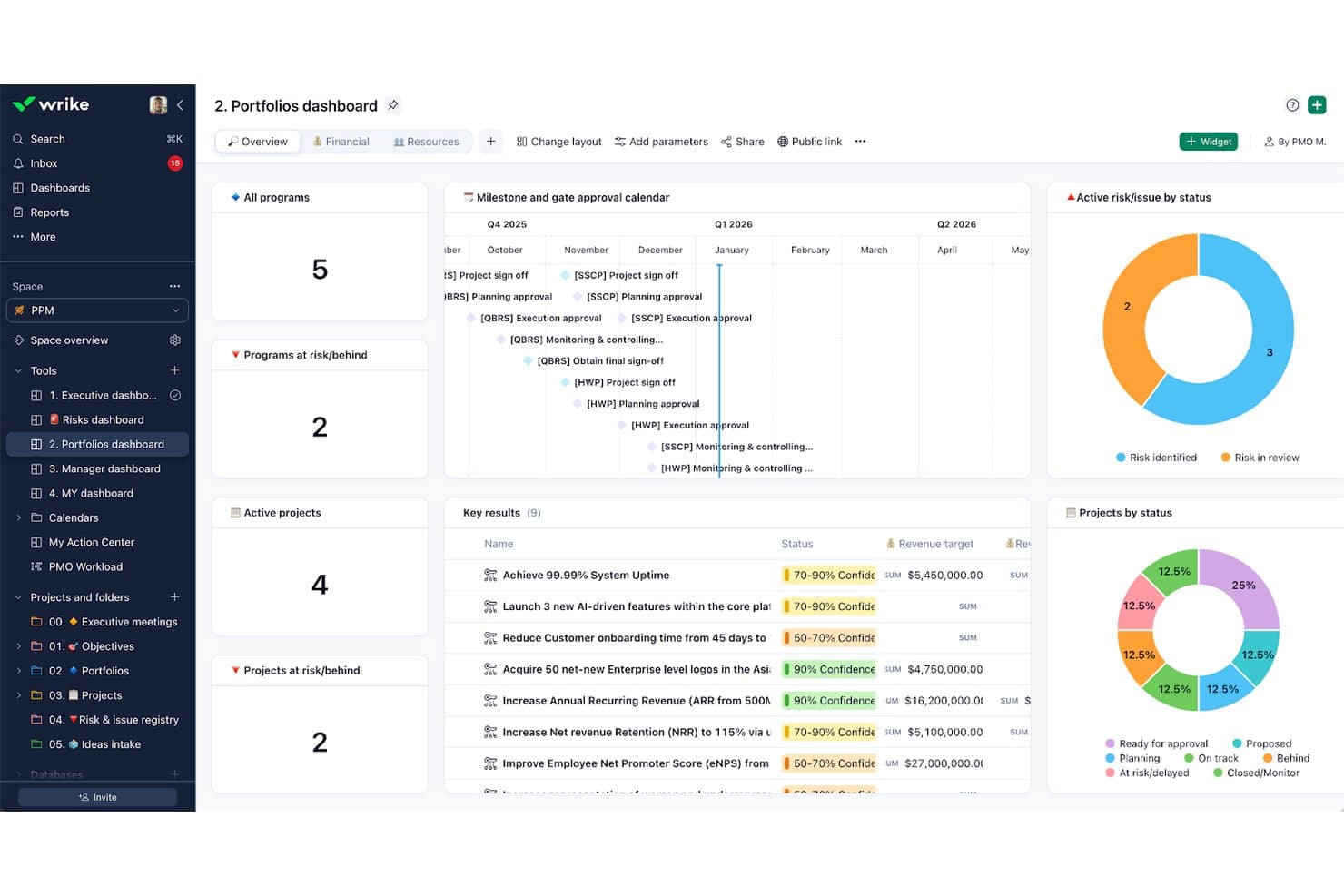
Wrike's portfolio dashboard tracks programs, risks, and project status in one view. Wrike is a work management platform designed for organizations overseeing multiple products or teams, offering advanced tools for planning, visibility, and cross-functional collaboration across complex product portfolios.
Who Is Wrike Best For?
Wrike is a good fit for large organizations and enterprises that need to coordinate multiple teams and complex project portfolios.
Why Wrike Is a Good Trello Alternative
Wrike is a strong Trello alternative for enterprise teams that have outgrown simple visual boards. It offers structured multi-folder task hierarchies, real-time portfolio reporting, and advanced workload management, enabling cross-functional teams to balance capacity and track complex dependencies at scale.
Wrike Key Features
- Gantt charts: Visualize tasks, dependencies, and milestones with interactive Gantt charts.
- Custom request forms: Collect and organize project intake with configurable forms for standardized submissions.
- Built-in time tracking: Track the time each team member spends on specific tasks directly within the platform.
- Document version control: Store, share, and manage project files with automated version history and access controls.
Wrike Integrations
Wrike integrates with hundreds of tools like Power BI, Salesforce, Slack, GitHub, Adobe Creative Cloud, and Zoom. It also offers an API for custom integrations.
Pros and Cons
Pros:
- Real-time reporting at portfolio level
- Built-in time tracking for tasks
- Advanced Gantt charts for portfolio planning
Cons:
- Permission settings often require manual adjustment
- Interface is not user-friendly
 Best for linking product PRDs to roadmaps
- Free plan available
- From $10/user/month (billed annually)
Visit WebsiteCustomer Rating:4.6/5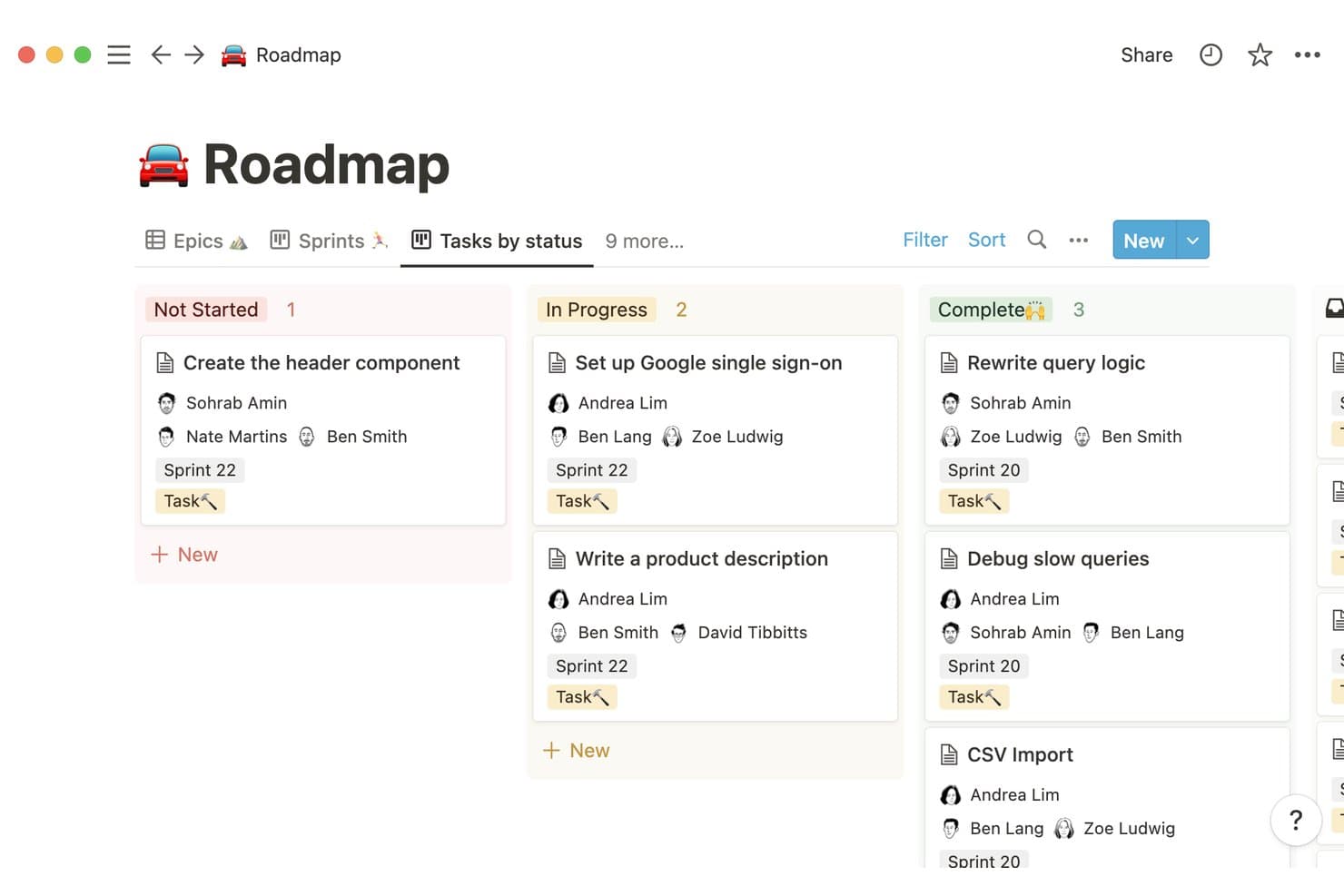
Notion organizes tasks by status across sprints in a kanban roadmap view. Notion is a flexible digital workspace for teams that want customizable workflows, doc collaboration, and linked knowledge bases in their product planning process. Product managers and cross-functional teams can adapt Notion to match their specific planning, documentation, and communication needs.
Who Is Notion Best For?
Notion is a strong fit for cross-functional product teams who need adaptable connected documentation, planning, and knowledge sharing in one place.
Why Notion Is a Good Trello Alternative
I picked Notion because of its ease of use. I can link product requirements documents to roadmaps, making it easy to connect context to plans. My team uses its database and page-linking features to tie detailed project specs to broader timelines. The flexibility helps us edit docs, update roadmaps, and keep everything organized in one place.
Notion Key Features
- Database views: Visualize projects, tasks, and timelines as boards, calendars, or tables for flexible planning.
- Permission controls: Set granular access for pages and databases to manage sharing within teams.
- Template gallery: Use and customize pre-built templates for product specs, sprint planning, and release notes.
- Inline comments: Add comments directly within documents and databases for easy feedback and discussion.
Notion Integrations
Notion offers native integrations with Slack, GitHub, Jira, Asana, Google Drive, Figma, and Zoom. It also connects with Zapier and provides an API for custom integrations.
Pros and Cons
Pros:
- Supports various database views for planning
- Offers flexible page linking and document organization
- Connects project specs directly to roadmaps
Cons:
- Can feel unstructured for task-heavy workflows
- No native kanban automation features
Learn more about Notion: Best for tracking cross-functional feature launch plans
- Free plan available
- From $10.99/user/month (billed annually)
Visit WebsiteCustomer Rating:4.4/5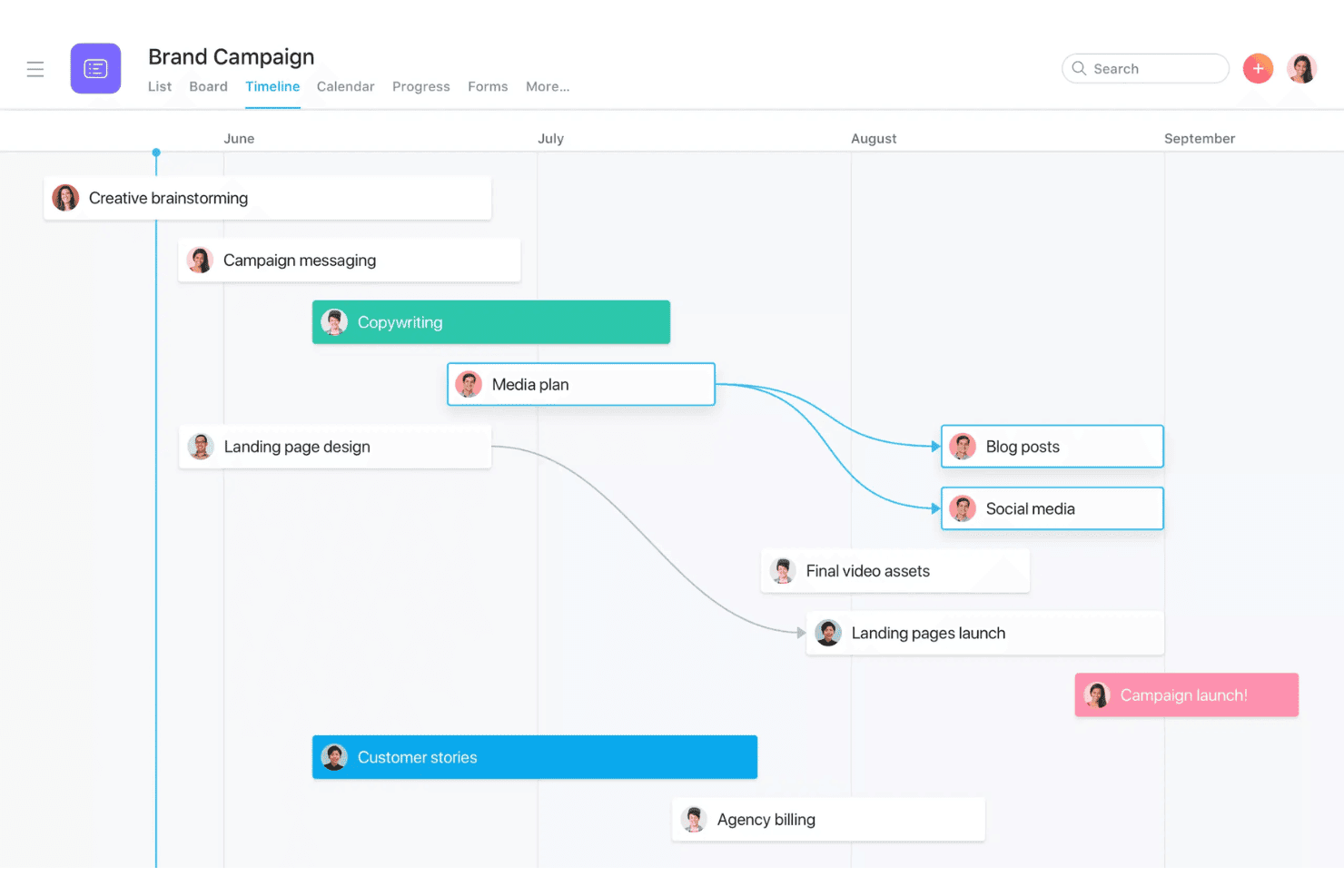
Asana's Timeline view maps campaign tasks with dependencies and deadlines. Asana is a project management software that helps product teams, marketing leads, and cross-functional groups organize projects, track deliverables, and manage complex workflows in one platform, making it easier to keep everyone focused on shared product priorities and schedules.
Who Is Asana Best For?
Asana is a great fit for small teams who work cross-functionally and need to coordinate project timelines and manage feature launches.
Why Asana Is a Good Trello Alternative
I picked Asana as one of the best because it helps teams coordinate cross-functional feature launches using detailed project timelines, customizable workflows, and clear task dependencies. I can map every stage of our launch plan and keep every stakeholder on track, which is something Trello doesn’t handle well for larger, multi-team projects.
Asana Key Features
- Custom fields: Add specific details to tasks to track status, priority, or any data you want.
- Workload management: Visualize team capacity and reallocate work to avoid overloading people.
- Timeline view: Use a drag-and-drop Gantt chart to map out projects and dependencies visually.
- Automated workflows: Set up rules to automate routine actions like handoffs, status changes, or notifications.
Asana Integrations
Asana offers native integrations with Slack, Google Drive, Microsoft Teams, Dropbox, Salesforce, Jira Cloud, Zoom, GitHub, Adobe Creative Cloud, and Box. It also connects with Zapier and offers an API for custom integrations.
Pros and Cons
Pros:
- Project dependencies help coordinate complex launches
- Custom fields allow tailored task tracking
- User-friendly interface makes it easy to use
Cons:
- Permissions granularity sometimes lacks flexibility
- Notification volume can overwhelm active users
 8Best for native time tracking and chat option
Hive
- Free plan + 14-day free trial available
- From $5/user/month
Visit WebsiteCustomer Rating:4.5/5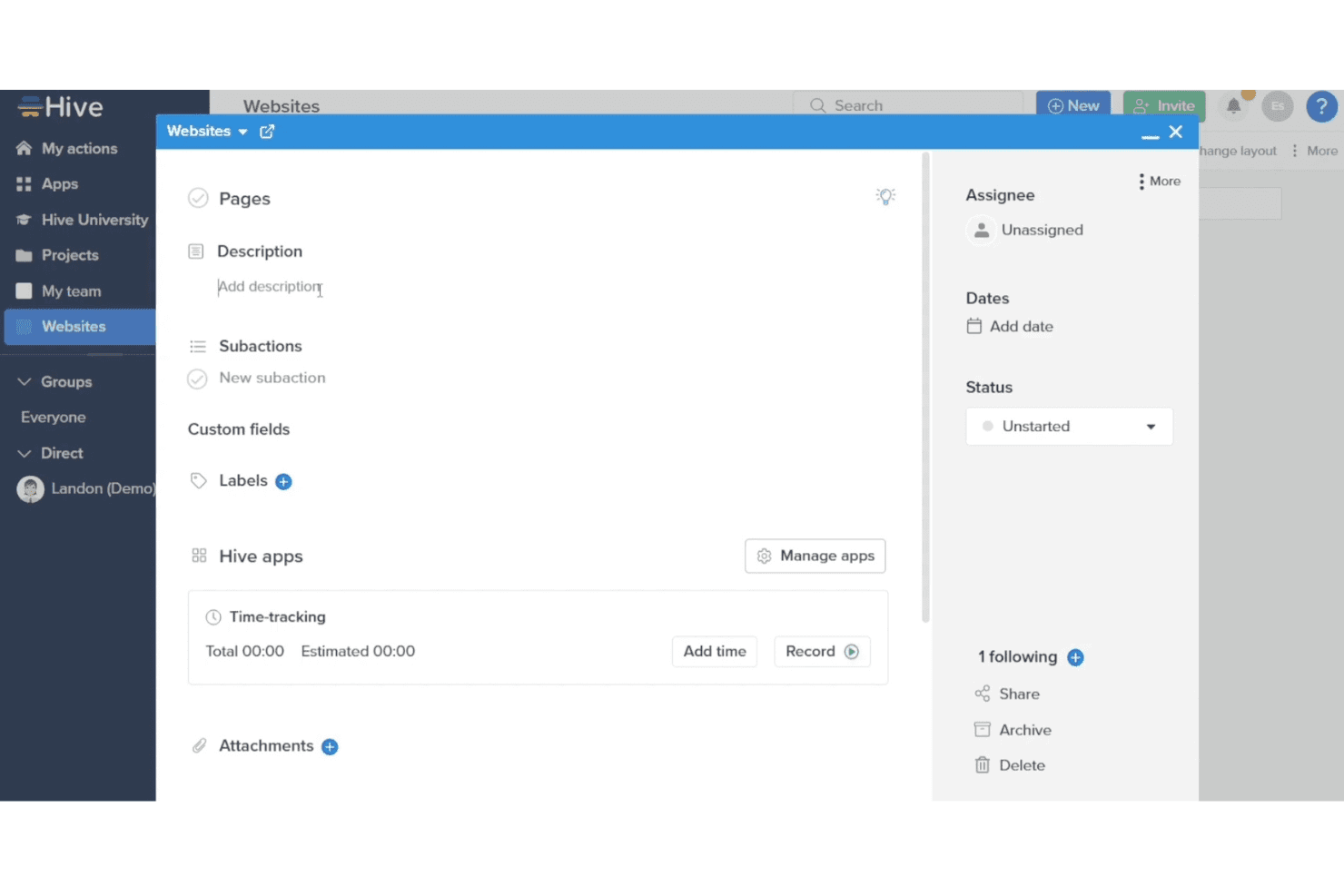
Hive lets users track time and manage task details in one panel. Hive is a project planning platform designed for teams that want centralized task management, flexible workflows, and real-time collaboration in fast-paced environments. It’s a good fit for product managers who need visibility and structure across complex initiatives.
Who Is Hive Best For?
Hive suits cross-functional teams in fast-paced companies that need a central workspace for project tracking, time management, and real-time communication.
Why Hive Is a Good Trello Alternative
I picked Hive as one of the best Trello alternatives because it combines task management with built-in chat and timesheets, reducing the need to run separate apps for team messaging and time logging. It allows product managers to track feature development times directly on cards while holding project discussions in adjacent channels.
Hive Key Features
- Gantt chart view: Visualize project timelines and task dependencies for complex initiatives.
- Customizable project templates: Standardize workflows by creating and reusing tailored project setups.
- Automated task assignments: Automatically assign tasks based on triggers, project rules, or workflow needs.
- Proofing and approvals: Review, annotate, and approve digital assets directly within the project workspace.
Hive Integrations
Hive offers 1000+ integrations with tools like Google Drive, Dropbox, Slack, Zoom, Microsoft Teams, OneDrive, Salesforce, Box, and GitHub. It connects with Zapier and offers an API for custom integrations.
Pros and Cons
Pros:
- Automated workflows handle recurring assignments
- In-app chat reduces switching between tools
- Native timesheets track team hours within tasks
Cons:
- Notification overload reported in active workspaces
- Interface can feel cluttered with many projects
Learn more about Hive: 9Best for scaled agile and sprint planning
Jira
- Free plan available
- From $8.48/user/month
Visit WebsiteCustomer Rating:4.4/5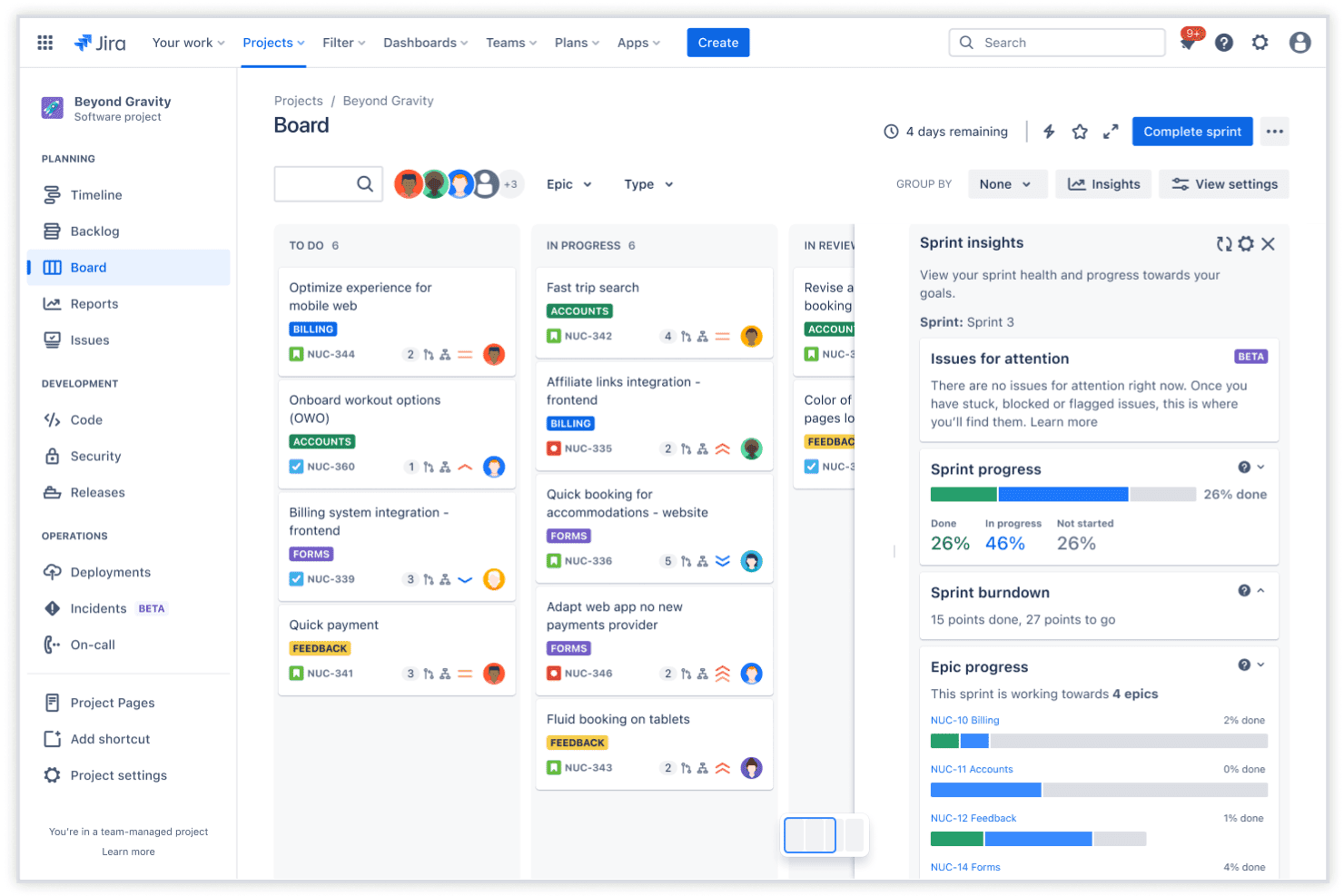
Jira's sprint board tracks task progress across workflow stages. Jira is a project planning tool built for product teams who need to manage complex workflows, coordinate across cross-functional groups, and keep iterative work on track at scale.
Who Is Jira Best For?
Jira is a solid option for product and engineering teams in medium to large organizations managing complex, iterative workflows.
Why Jira Is a Good Trello Alternative
While both tools are owned by Atlassian, Jira is tailored for software development. It provides deep backlog grooming tools, burndown charts, version release tracking, and granular dev-level workflows that go far beyond Trello's basic capabilities.
Jira Key Features
- Custom issue types: Create and categorize issues tailored to your team’s workflow needs.
- Advanced automation engine: Set up rule-based triggers to automate repetitive tasks across projects.
- Granular permissions: Manage user access at the project, issue, and field level for better control.
- Built-in reporting dashboards: Visualize project data with configurable charts and agile reports.
Jira Integrations
Jira offers 200+ built-in integrations like Confluence, GitHub, Slack, and Salesforce. It also integrates with Zapier and offers a native REST API for custom connections.
Pros and Cons
Pros:
- Supports detailed role and permission settings
- Offers advanced backlog prioritization tools
- Handles complex workflows across multiple squads
Cons:
- UI feels overwhelming for new users
- Setup for agile frameworks can be complex
 Best for enterprise strategic capacity planning
- Free demo available
- Pricing upon request
Visit WebsiteCustomer Rating:4.3/5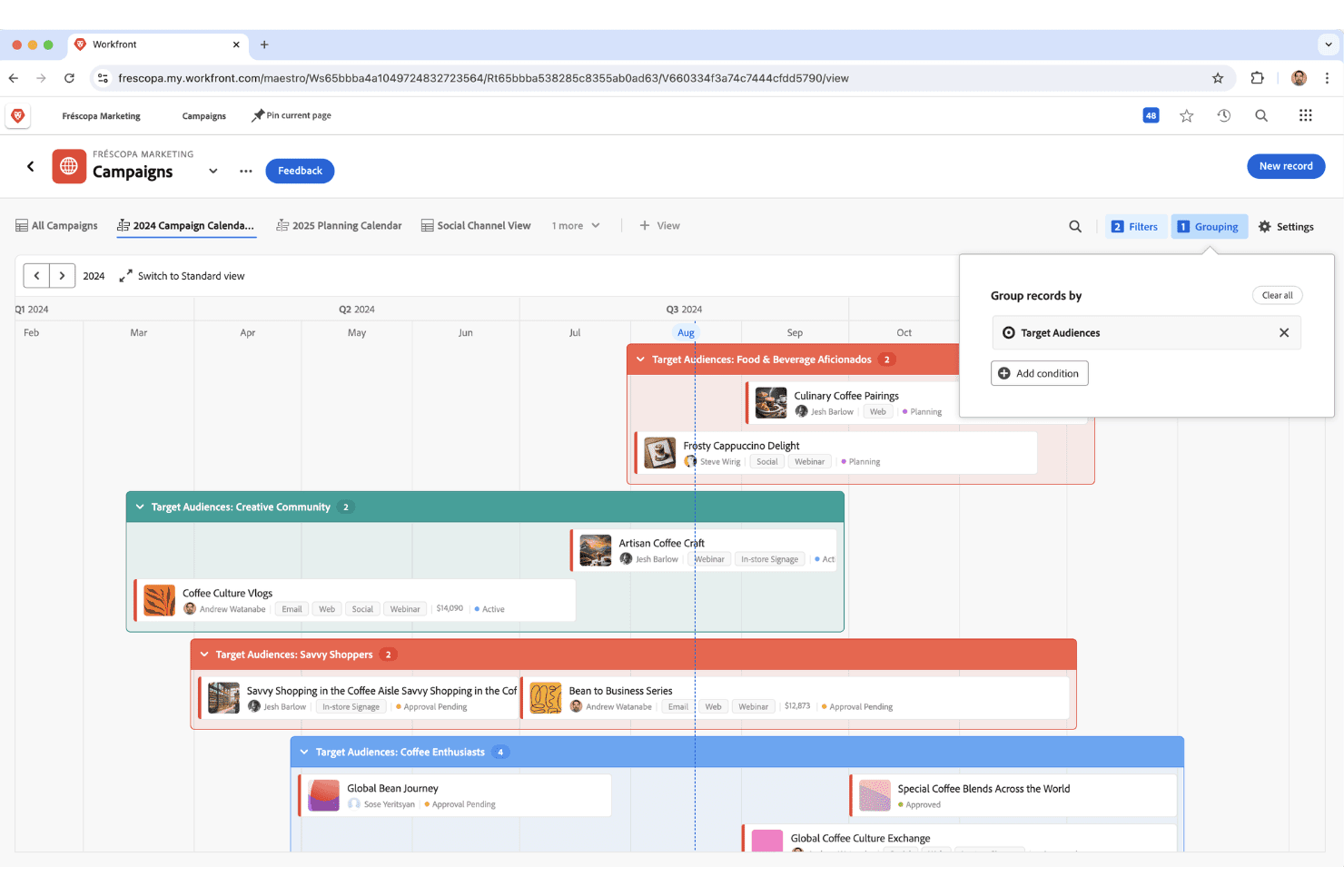
Adobe Workfront organizes campaigns visually by target audience on a timeline. Adobe Workfront is a work management platform designed for large organizations that need to manage complex project portfolios, support cross-functional collaboration, and bring structure to resource planning across multiple teams.
Who Is Adobe Workfront Best For?
Workfront is a strong fit for large organizations with complex portfolios that need advanced work management and resource planning across departments.
Why Adobe Workfront Is a Good Trello Alternative
Adobe Workfront provides enterprise-grade governance and strategic resource modeling that lightweight tools cannot match. It gives leadership real-time visibility into workforce capacity, budget allocations, and portfolio health across global business units.
Adobe Workfront Key Features
- Automated workflows: Create repeatable workflow templates with configurable triggers and rules for task management.
- Document management: Store, share, and collaborate on files within each project or task.
- Time tracking: Log hours directly on tasks to keep resource usage visible and accurate.
- Project portfolio dashboards: Track progress, risks, and project health across your portfolio in real time.
Adobe Workfront Integrations
Adobe Workfront offers native integrations with Adobe Creative Cloud, Jira, Microsoft Teams, Slack, Salesforce, Google Drive, OneDrive, Box, and Dropbox. It also offers an API for custom integrations.
Pros and Cons
Pros:
- Real-time dashboards across multiple teams
- Scenario planning for resource allocation decisions
- Enterprise-level project portfolio management tools
Cons:
- Setup and training require significant time investment
- Interface and workflows can feel overwhelming
Learn more about Adobe Workfront:
Andre alternativer til Trello
Her er noen flere alternativer til Trello som ikke kom med på kortlisten min, men som likevel er verdt å se nærmere på:
- 11QuickbaseBest for building no-code workflow apps at scale
- 12monday.comBest for cross-team product workflows and roadmaps
- 13SmartsheetBest for spreadsheet-style product release tracking
- 14Zoho ProjectsBest for project tracking within the Zoho suite
- 15NiftyBest for automated milestone tracking tied to tasks
- 16MiroBest for visual product discovery and wireframing
- 17CodaBest for building product specs with embedded databases
- 18LinearBest for engineering-led sprint and roadmap planning
- 19ShortcutBest for scaling issue tracking alongside roadmaps
- 20BusinessmapBest for Kanban-to-portfolio OKR alignment
How I Evaluate Trello Alternatives
I split my evaluation into three parts. Core functionality carries the most weight: I look for visual task boards and card-level task detail. From there, I check for sprint and backlog tools. Finally, I consider pricing transparency and onboarding support.
Core Functionality (Table Stakes For This List)
When I'm selecting tools for my list, I score each one on a scale from 0 (does not offer the functionality) to 5 (excels in this area) for each core functionality listed below. I then convert the total into a percentage to help assess each tool's overall fit, with extra weight on any functionalities I’ve deemed essential.
- Visual Task Boards (Essential): I look for customizable kanban columns, drag-and-drop cards, labels, filters, and swimlanes for discovery and delivery stages.
- Card-Level Details (Essential): I check descriptions, due dates, owners, attachments, comments, checklists, subtasks, and custom fields for detailed delivery work.
- Multiple Work Views: I compare synced board, list, calendar, table, and timeline views for sprint planning, dependencies, and stakeholder updates.
- Workflow Automation: I assess no-code rules for status changes, due dates, assignments, notifications, and recurring handoffs across workflows.
- Team Collaboration: I look for comments, @mentions, notifications, activity history, and shared ownership during design, engineering, and launch work.
- Third-Party Integrations: I check connections to communication, file storage, calendar, and development tools, plus API access for connected product workflows.
Once I have a list of tools that meet the criteria, I consider what sets each platform apart.
Differentiating Factors (What Sets Vendors Apart)
Here's how I compare and contrast different vendors:
Standout Features
I look for sprint and backlog tools that go beyond basic task lists—native velocity tracking and backlog grooming help product teams plan iterations without bolting on workarounds. Portfolio-level roadmapping matters just as much. When I'm coordinating three squads shipping toward a shared objective, I need a rollup view that connects individual boards to a strategic timeline. I also evaluate workload and capacity views, since spotting overallocation before a sprint starts beats discovering it at standup on day three.
Beyond Features
Pricing transparency matters because some platforms lock automation limits or timeline views behind higher tiers, which catches teams off guard mid-rollout. I also evaluate cross-functional fit—whether marketing, engineering, and product can share one workspace without forcing identical terminology on every team. Security rounds out my checklist: role-based guest permissions and audit logs are non-negotiable when external stakeholders need board access.
Hvorfor se etter et alternativ til Trello?
Selv om Trello er et godt valg av programvare for produktplanlegging, er det flere grunner til at noen brukere ser etter alternative løsninger. Team ser vanligvis etter alternative løsninger når de møter bestemte driftsmessige begrensninger:
- Du trenger innebygd produktveikartlegging og tidslinjevisninger
- Du ønsker innebygd dokumentsamarbeid direkte ved siden av oppgavene
- Du har vokst fra grunnleggende Kanban-verktøy som din primære arbeidsflytmotor
- Du trenger avansert automatisering for å håndtere komplekse prosesser med flere trinn
- Du administrerer flere prosjekter og tverrfunksjonelle team med ulike behov for tilgangstillatelser
- Du ønsker dypere, innebygde integrasjoner med spesialiserte utvikler- og designverktøy
Viktige funksjoner i Trello-alternativer
Her er noen av de viktigste funksjonene i Trello-alternativer, slik at du kan sammenligne hva de alternative løsningene tilbyr:
- Kanban-tavler: Organiser arbeidet visuelt med tavler og kort som støtter svømmebaner, WIP-grenser og tilpassbare felt for arbeidsflyter fra virkeligheten.
- Flere prosjektvisninger: Bytt mellom tavle-, liste-, kalender- og tidslinjevisninger for å se prosjekter fra ulike perspektiver og tilpasse planleggingstilnærmingen din.
- Oppgavehåndtering: Følg opp arbeidet med deloppgaver, avhengigheter og gjentakende oppgaver for å støtte alt fra overordnet planlegging til detaljert levering.
- Teamsamarbeid: Legg til rette for kommentarer i sanntid, fildeling og gjestetilgang, slik at tverrfunksjonelle team og interessenter kan bidra og holde seg informert.
- Automatisering av arbeidsflyt: Bygg automatiserte regler med utløsere i flere trinn og betinget logikk for å redusere manuelt arbeid på tvers av prosjekter.
- Integrasjoner og API: Koble til verktøy som Slack, GitHub, Google Workspace og Figma for å opprette alt-i-ett-arbeidsflyter og synkronisere informasjon på tvers av plattformer.
- Produktveikart: Planlegg produktlanseringer og kartlegg avhengigheter med veikartvisninger for å dele kommende arbeid og leveringstidslinjer med teamet.
- Innebygd dokumentasjon: Opprett og lagre dokumenter, wikier eller produktspesifikasjoner sammen med oppgaver for å holde all kontekst og alle planleggingsdetaljer på ett sted.
- Avansert rapportering: Bruk visuelle dashbord med diagrammer, arbeidsbelastningsvisninger og rapporter om syklustid som synliggjør fremdrift og flaskehalser for alle interessenter.
- Verktøy for import og migrering: Overfør tavler, kort og vedlegg fra Trello eller andre plattformer uten å miste data.
Kostnader og priser for Trello-alternativer
Valg av Trello-alternativer krever en forståelse av de ulike prismodellene og abonnementene som er tilgjengelige. Kostnadene varierer basert på funksjoner, teamstørrelse, tillegg og mer. Tabellen nedenfor oppsummerer vanlige abonnementer, gjennomsnittsprisene deres og typiske funksjoner som er inkludert i Trello-alternativer:
Sammenligningstabell for abonnementer for Trello-alternativer
| Abonnementstype | Gjennomsnittspris | Vanlige funksjoner |
|---|---|---|
| AbonnementstypeGratisabonnement | Gjennomsnittspris$0 | Vanlige funksjonerGrunnleggende Kanban-tavler, begrensede prosjektvisninger, grunnleggende oppgavehåndtering, enkelt samarbeid og grunnleggende integrasjoner. |
| AbonnementstypePersonlig abonnement | Gjennomsnittspris$5–$10/bruker/måned | Vanlige funksjonerUbegrenset antall tavler, flere prosjektvisninger, avansert oppgavehåndtering, begrenset automatisering og filvedlegg. |
| AbonnementstypeBedriftsabonnement | Gjennomsnittspris$10–$25/bruker/måned | Vanlige funksjonerAvansert automatisering, tidslinje- og kalendervisninger, gjestetilgang, detaljert rapportering og forbedrede integrasjoner. |
| AbonnementstypeStorbedriftsabonnement | Gjennomsnittspris$20–$40/bruker/måned | Vanlige funksjonerTilpassede roller og tillatelser, avanserte sikkerhetskontroller, prioritert brukerstøtte, integrasjoner på premiumnivå og revisjonslogger. |