

Recensione di Notion: Pro, Contro, Caratteristiche e Prezzi
L’interfaccia flessibile di Notion permette al tuo team di personalizzare i flussi di lavoro in modo più efficace rispetto a qualsiasi altro strumento di gestione progetti, rafforzando collaborazione e organizzazione.

Recensiamo gli strumenti in modo indipendente e le commissioni aiutano a finanziare i nostri test. Consulta la nostra politica sulla trasparenza, la nostra metodologia oppure suggerisci uno strumento.
Notion is a product management tool that combines docs, wikis, databases, and project tracking in a single flexible workspace. It's a strong fit for product teams that want to manage roadmaps, product specs, and meeting notes without switching between separate tools. If you're weighing it against Confluence, Notion gives you more flexibility in how you structure and connect your content—without the administrative overhead that comes with a more rigid, enterprise-oriented setup.
Notion Evaluation Summary
4.6/5
- From $10/user/month (billed annually)
- Free plan available
Perché fidarsi dei nostri consigli sui software
6,700+
Reviews
20
Industry experts
16+
Evaluation factors
14
Years
Il nostro team testa e recensisce software dal 2012. In quanto product manager noi stessi, sappiamo quanto sia difficile — e importante — scegliere il software giusto.
Per questa guida, abbiamo valutato gli strumenti attraverso test pratici e ricerche indipendenti, assegnando un punteggio agli strumenti in base ai nostri criteri di selezione.
Le nostre recensioni riflettono il nostro giudizio editoriale umano, non un discorso di vendita.
Revisori esperti:
- Andrew LumbySenior TPM
- Cristiano ValimSenior UI/UX Lead


Notion Overview
In my opinion, Notion is a standout tool for those seeking flexibility in a project and product management platform. Its customization and integration options set it apart, making it ideal for startups and tech teams that value adaptability. While its interface is user friendly, the onboarding could be smoother for those new to tools such as this. Compared to other product management tools, Notion excels in offering a tailored experience, but it is slightly lacking in customer support responsiveness. If you're choosing a product management tool for a dynamic and creative team, Notion's features might align with your needs.
Pros
- You can customize your workspace to fit your team's needs.
- The interface is clean and intuitive, making it straightforward to navigate.
- It offers a flexible structure for organizing projects and documents.
Cons
- Your team might find the learning curve steep.
- It lacks advanced task management features compared to competitors.
- Some features aren't available if you are working offline.
Is Notion Right For Your Needs?
Who Would be a Good Fit for Notion?
Notion is perfect for creative teams and startups that need flexibility in managing projects and tasks. If your team members value customization and want to structure work in a distinctive manner, Notion's adaptable interface and flexible organization make it ideal. The ability to organize documents and projects in a way that fits your team's workflow can significantly boost productivity. Tech companies and remote teams will appreciate its collaboration tools that allow everyone to work in an integrated way from different locations.
- Creative AgenciesNotion lets you customize workflows and manage creative projects smoothly.
- Tech StartupsYour team can adapt Notion's features to suit evolving project structures.
- Remote TeamsIt supports collaboration with flexible document and task management along with its mobile apps for Androids and iPhones.
- Project ManagersYou can organize projects and tasks in a way that aligns with your goals.
- FreelancersNotion's interface is perfect for managing multiple clients and projects.
- Education DepartmentsIt offers tools for organizing curriculums and collaborative workspaces for staff.
Who Would be a Bad Fit for Notion?
Notion might not suit large enterprises needing advanced task management and workflow automation. If your team manages complex project timelines with strong task dependencies, you might find Notion lacking. Industries with strict compliance requirements may struggle without dedicated features for security and audit trails. Teams that need offline functionality or have limited internet access might find they aren't able to fully utilize Notion's capabilities.
- Large EnterprisesYou may need more advanced task management features than Notion offers.
- Manufacturing TeamsNotion lacks the detailed workflow automation critical for your operations.
- Finance DepartmentsThe tool doesn't provide the compliance and auditing tools you require.
- Healthcare ProvidersThe security features may not meet your strict data protection needs.
- Construction FirmsYour team needs better project timeline tools.
- Government AgenciesNotion's lack of dedicated compliance features could be a limitation for your work.
Come Testiamo e Valutiamo gli Strumenti
Abbiamo passato anni a costruire, perfezionare e migliorare il nostro sistema di test e valutazione del software. Il nostro metodo è stato progettato per cogliere le sfumature della selezione del software e ciò che rende efficace uno strumento, concentrandosi sugli aspetti critici del processo decisionale. Qui sotto puoi vedere esattamente come funzionano i nostri test e la nostra valutazione suddivisa in sette criteri. Questo ci consente di offrire una valutazione imparziale del software sulla base delle funzionalità principali, delle caratteristiche distintive, della facilità d’uso, dell’onboarding, dell’assistenza clienti, delle integrazioni, delle recensioni dei clienti e del rapporto qualità/prezzo.
Funzionalità Principali (25% del punteggio finale)
Il punto di partenza della nostra valutazione sono sempre le funzionalità principali dello strumento. Possiede le funzioni di base che un utente si aspetterebbe di trovare? Alcune di queste sono riservate ai piani tariffari più alti? Ci aspettiamo che uno strumento rispetti almeno le funzionalità di base dei competitors.
Caratteristiche Distintive (25% del punteggio finale)
Successivamente, valutiamo le caratteristiche distintive e non comuni che vanno oltre le funzioni di base normalmente riscontrate in strumenti simili. Un punteggio alto indica funzionalità specializzate o uniche che rendono il prodotto più rapido, efficiente o forniscono un valore aggiunto all’utente. Valutiamo anche la facilità con cui si possono integrare altri strumenti solitamente presenti nella stack tecnologica, ampliando così funzionalità e utilità del software. Gli strumenti che offrono molte integrazioni native, collegamenti di terze parti e accesso API per integrazioni personalizzate ottengono i punteggi migliori.
Facilità d’Uso (10% del punteggio finale)
Consideriamo quanto sia rapido e semplice eseguire le attività definite dalle funzionalità principali tramite lo strumento. Il software con il punteggio più alto è ben progettato, intuitivo da usare, offre app per dispositivi mobili, modelli preimpostati e semplifica anche le attività più complesse.
Onboarding (10% del punteggio finale)
Sappiamo quanto sia importante una rapida adozione da parte del team, quindi valutiamo quanto sia facile imparare ad usare lo strumento con una formazione minima. Valutiamo la velocità con cui un membro del team può configurarsi e iniziare a utilizzare lo strumento senza esperienza. Le soluzioni con punteggio più alto richiedono poco o nessun supporto.
Assistenza Clienti (10% del punteggio finale)
Osserviamo quanto sia facile e veloce ottenere supporto tramite telefono, chat dal vivo o knowledge base. Gli strumenti che offrono supporto in tempo reale ottengono punteggi più alti, mentre i chatbot ricevono i punteggi peggiori.
Recensioni Clienti (10% del punteggio finale)
Oltre ai nostri test e valutazioni, consideriamo il net promoter score di clienti attuali e passati. Valutiamo la probabilità che scelgano nuovamente lo strumento in base alle funzionalità principali. Un software con punteggio elevato riflette un net promoter score alto.
Rapporto Qualità/Prezzo (10% del punteggio finale)
Infine, considerando tutti gli altri criteri, confrontiamo il prezzo medio dei piani base con le funzionalità principali, esaminando il valore degli altri criteri di valutazione. Il software che offre di più, a meno, otterrà un punteggio maggiore.
Core Features
Task Management: You can create, assign, and track tasks efficiently. This keeps your team organized and on top of deadlines.
Document Collaboration: Share and edit documents in real-time with your team. It strengthens collaboration and keeps everyone aligned.
Custom Templates: Use pre-made templates or create your own for recurring tasks. It saves time and ensures consistency in your work.
Kanban Boards: Visualize tasks and projects with Kanban boards. This helps your team see progress and prioritize work efficiently.
Notes and Wikis: Use the AI note-taking feature and note-taking app to quickly create meeting notes. Use wikis to build team spaces and knowledge bases to readily access notifications and resources to stay informed.
Calendar View: Sync task lists and deadlines in a calendar format. It helps you plan and manage your team's schedule effectively.

Ease of Use
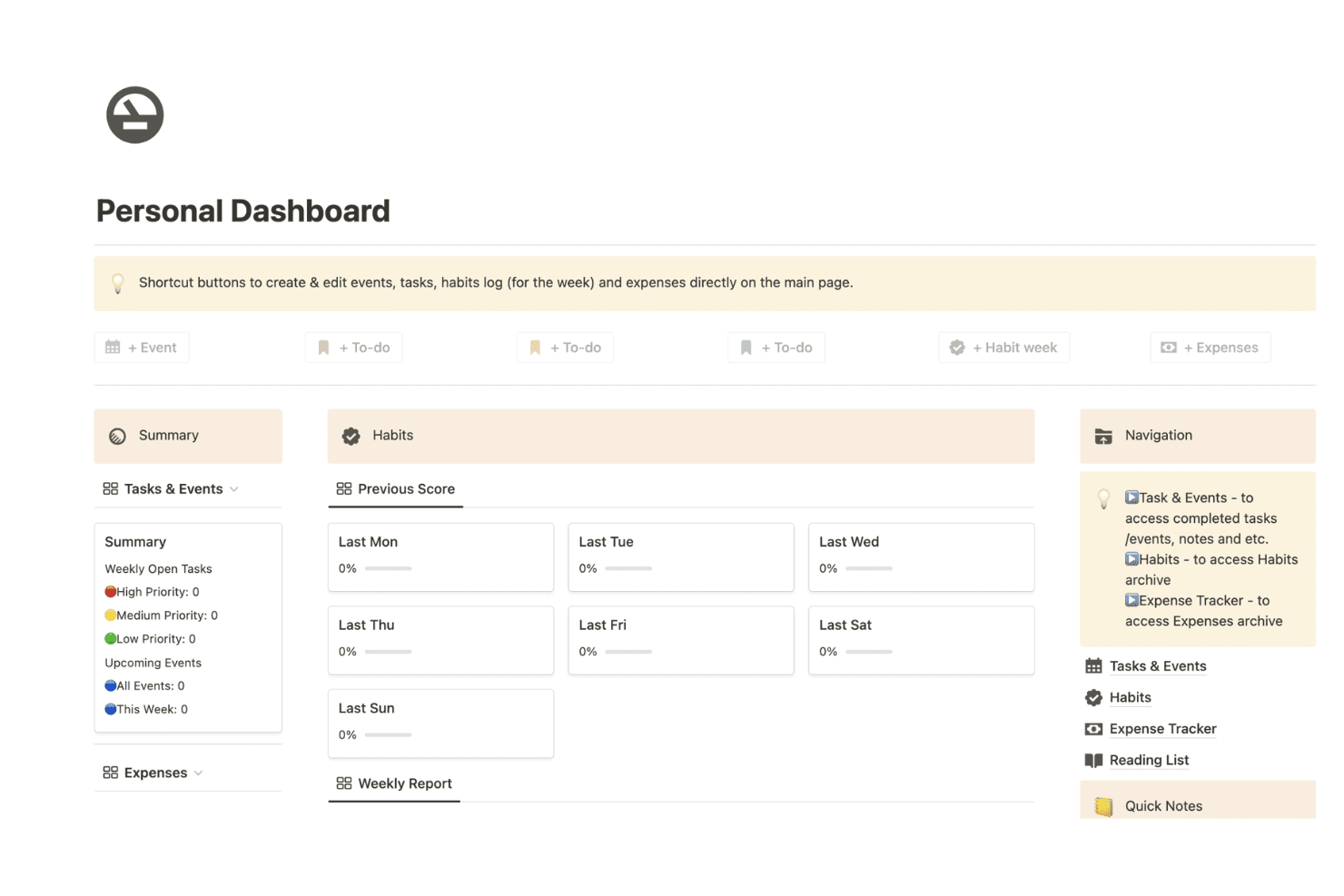
Notion is user friendly with its clean interface and intuitive navigation, making it simple for your team to get started. The drag-and-drop functionality lets you organize tasks and projects quickly. While there's a steep learning curve initially, the customization options soon become straightforward. Users appreciate the flexibility in designing their workspace to fit specific needs. Compared to other tools, Notion stands out for its functionality in creating a productive workspace.
Integrations
Notion integrations include Google Drive, Slack, Trello, GitHub, Asana, Typeform, Figma, and Miro.
Notion also offers an API for custom integrations and connects with third-party integration tools such as Zapier.

Notion Specs
- API: Yes
- Calendar Management: Yes
- Data Export: Yes
- Data Import: Yes
- External Integrations: Yes
- Inventory Tracking: No
- Multi-User: Yes
- Notifications: Yes
- Project Management: Yes
- Scheduling: No
- Supplier Management: No
- Task Scheduling/Tracking: Yes


