
Recensione di Adobe Photoshop: Vantaggi, Svantaggi, Funzionalità e Prezzi
Adobe Photoshop eccelle in flessibilità e profondità, diventando la scelta ideale per la creazione di mood board sofisticati e l’editing avanzato delle immagini.

Recensiamo gli strumenti in modo indipendente e le commissioni aiutano a finanziare i nostri test. Consulta la nostra politica sulla trasparenza, la nostra metodologia oppure suggerisci uno strumento.
Adobe Photoshop is a mood board creator built around layer-based image editing, giving you precise control over every visual element in your board. It's a strong fit for designers and creative teams who need to assemble detailed, high-fidelity mood boards from scratch using custom assets. I'd consider it over something like Canva if your work demands pixel-level image manipulation, masking, and compositing rather than a template-driven approach.
Adobe Photoshop Evaluation Summary
4.3/5
- From $22.99/user/month (billed annually)
- 7-day free trial available
Perché fidarsi dei nostri consigli sui software
6,700+
Reviews
20
Industry experts
16+
Evaluation factors
14
Years
Il nostro team testa e recensisce software dal 2012. In quanto product manager noi stessi, sappiamo quanto sia difficile — e importante — scegliere il software giusto.
Per questa guida, abbiamo valutato gli strumenti attraverso test pratici e ricerche indipendenti, assegnando un punteggio agli strumenti in base ai nostri criteri di selezione.
Le nostre recensioni riflettono il nostro giudizio editoriale umano, non un discorso di vendita.
Revisori esperti:
- Andrew LumbySenior TPM
- Cristiano ValimSenior UI/UX Lead


Adobe Photoshop Overview
In my opinion, Adobe Photoshop is a solid choice for those looking to combine photo editor functionality and mood boards with detailed customization. It shines with its vast array of tools and features, setting it apart from simpler mood board apps. While it might not be the easiest to use for beginners, the depth it offers makes it a great fit for professional designers and creative teams who need precision and control. Compared to its competitors, Photoshop might be more complex, but it offers unparalleled creative freedom. It's best suited for environments where high-quality, intricate designs are required. If your team values flexibility and advanced editing capabilities, Photoshop is worth considering.
Pros
- You get a wide range of advanced editing tools.
- It's highly customizable for detailed design work.
- Your team can create professional-quality visuals.
Cons
- You might find it difficult to learn at first.
- It can be overwhelming with too many features.
- It requires significant system resources to run smoothly.
Is Adobe Photoshop Right For Your Needs?
Who Would be a Good Fit for Adobe Photoshop?
Adobe Photoshop is perfect for creative professionals like graphic designers, advertisers, and photographers. Your team will benefit from its advanced editing features and customization options, allowing you to create intricate designs and high-quality visuals. It's especially useful for industries where precision and detail are key, such as fashion, advertising, and publishing. If your work demands versatility and control over design elements, Photoshop's extensive toolset will meet your needs.
- Graphic DesignPhotoshop's robust tools make it ideal for creating detailed graphics and image manipulation.
- Advertising AgenciesYour agency can produce high-quality campaigns with Photoshop's advanced features.
- PhotographyIt's perfect for retouching and enhancing your photos with precision, including removing blemishes.
- Fashion IndustryDesigners benefit from its ability to create and edit intricate patterns and textures.
- PublishingPhotoshop helps you produce polished layouts and visuals for magazines and books.
- Marketing TeamsCreate compelling visual content to engage your audience using Photoshop's versatile tools.
Who Would be a Bad Fit for Adobe Photoshop?
Adobe Photoshop isn't ideal for small businesses or teams that need quick, simple design solutions. If your work involves basic graphic tasks or you lack the time for extensive training, Photoshop's complexity can be overwhelming. It's not the best choice for those with limited budgets or resources, as it requires a significant investment in both time and money. Teams that prioritize speed over detail, like social media managers or event planners, might find it excessive for their needs.
- Small BusinessesYour team might find it too costly and complex for simple design needs.
- Event PlanningPhotoshop's detailed tools are unnecessary for quick, straightforward designs.
- Social MediaIt can be too intricate for creating fast, everyday content.
- NonprofitsLimited budgets and resources make simpler tools a better fit for your needs.
- StartupsIf you're just starting out, you might prefer more intuitive and cost-effective solutions.
- Administrative RolesYour work likely doesn't require the extensive design capabilities Photoshop offers.
Come Testiamo e Valutiamo gli Strumenti
Abbiamo passato anni a costruire, perfezionare e migliorare il nostro sistema di test e valutazione del software. Il nostro metodo è stato progettato per cogliere le sfumature della selezione del software e ciò che rende efficace uno strumento, concentrandosi sugli aspetti critici del processo decisionale. Qui sotto puoi vedere esattamente come funzionano i nostri test e la nostra valutazione suddivisa in sette criteri. Questo ci consente di offrire una valutazione imparziale del software sulla base delle funzionalità principali, delle caratteristiche distintive, della facilità d’uso, dell’onboarding, dell’assistenza clienti, delle integrazioni, delle recensioni dei clienti e del rapporto qualità/prezzo.
Funzionalità Principali (25% del punteggio finale)
Il punto di partenza della nostra valutazione sono sempre le funzionalità principali dello strumento. Possiede le funzioni di base che un utente si aspetterebbe di trovare? Alcune di queste sono riservate ai piani tariffari più alti? Ci aspettiamo che uno strumento rispetti almeno le funzionalità di base dei competitors.
Caratteristiche Distintive (25% del punteggio finale)
Successivamente, valutiamo le caratteristiche distintive e non comuni che vanno oltre le funzioni di base normalmente riscontrate in strumenti simili. Un punteggio alto indica funzionalità specializzate o uniche che rendono il prodotto più rapido, efficiente o forniscono un valore aggiunto all’utente. Valutiamo anche la facilità con cui si possono integrare altri strumenti solitamente presenti nella stack tecnologica, ampliando così funzionalità e utilità del software. Gli strumenti che offrono molte integrazioni native, collegamenti di terze parti e accesso API per integrazioni personalizzate ottengono i punteggi migliori.
Facilità d’Uso (10% del punteggio finale)
Consideriamo quanto sia rapido e semplice eseguire le attività definite dalle funzionalità principali tramite lo strumento. Il software con il punteggio più alto è ben progettato, intuitivo da usare, offre app per dispositivi mobili, modelli preimpostati e semplifica anche le attività più complesse.
Onboarding (10% del punteggio finale)
Sappiamo quanto sia importante una rapida adozione da parte del team, quindi valutiamo quanto sia facile imparare ad usare lo strumento con una formazione minima. Valutiamo la velocità con cui un membro del team può configurarsi e iniziare a utilizzare lo strumento senza esperienza. Le soluzioni con punteggio più alto richiedono poco o nessun supporto.
Assistenza Clienti (10% del punteggio finale)
Osserviamo quanto sia facile e veloce ottenere supporto tramite telefono, chat dal vivo o knowledge base. Gli strumenti che offrono supporto in tempo reale ottengono punteggi più alti, mentre i chatbot ricevono i punteggi peggiori.
Recensioni Clienti (10% del punteggio finale)
Oltre ai nostri test e valutazioni, consideriamo il net promoter score di clienti attuali e passati. Valutiamo la probabilità che scelgano nuovamente lo strumento in base alle funzionalità principali. Un software con punteggio elevato riflette un net promoter score alto.
Rapporto Qualità/Prezzo (10% del punteggio finale)
Infine, considerando tutti gli altri criteri, confrontiamo il prezzo medio dei piani base con le funzionalità principali, esaminando il valore degli altri criteri di valutazione. Il software che offre di più, a meno, otterrà un punteggio maggiore.
Core Features
Layer Management
You can organize your designs with layers, making complex projects more manageable and improving overall functionality.
Neural Filters
Apply AI-powered effects and adjustments to portraits and images with just a few clicks, speeding up complex edits.
Selection and Remove Tools
Use precise selection tools to isolate and edit specific parts of your image with complete control.
Color Adjustment
Adjust colors with precision using adjustment layers and presets to match your brand or project theme perfectly.
Text Tools
Add and customize text with a variety of fonts, gradients, and effects to include compelling written elements in your designs.
Smart Objects
You can keep image quality intact while making non-destructive edits to maintain original integrity.
.png&w=3840&q=75)
Ease of Use
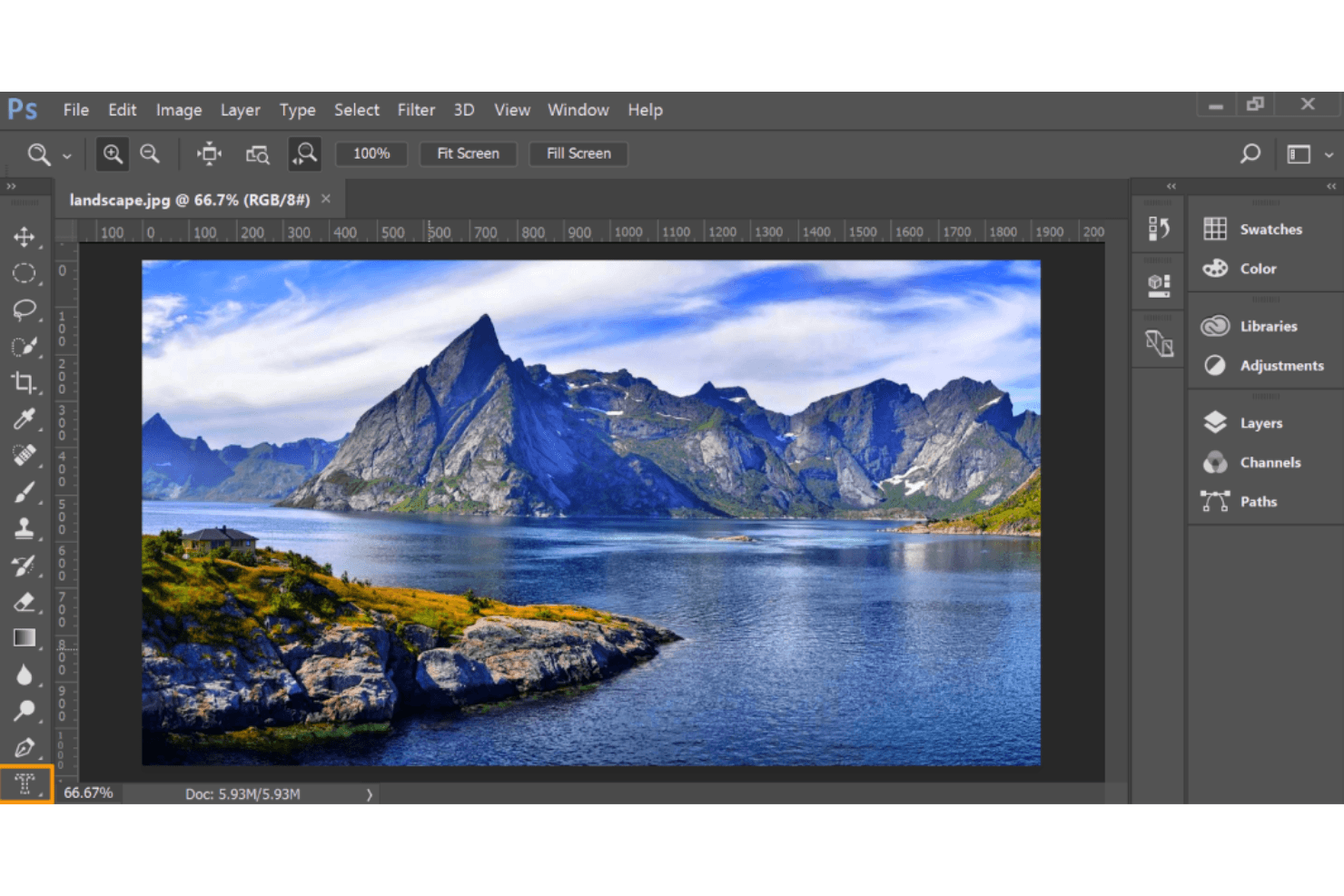
Adobe Photoshop’s interface can be daunting for newcomers due to its vast array of features. Your team might find the learning curve steep, especially if you're used to simpler tools. However, once you get the hang of it, the control and precision it offers are unmatched. Experienced users appreciate the depth and versatility, which allow for detailed customization. For those willing to invest the time, Photoshop becomes an invaluable tool in your creative arsenal.
.png&w=3840&q=75)
Integrations
Adobe Photoshop integrates with the entirety of the Adobe Creative Cloud suite: Adobe Illustrator, Adobe InDesign, Adobe XD, Adobe Premiere Pro, Adobe After Effects, Adobe Lightroom, Adobe Bridge, Microsoft Teams, Dropbox, and Slack.
Adobe Photoshop also has an API, allowing for custom integrations, plugins, and connections with third-party integration tools.
Adobe Photoshop Specs
- A/B Testing: No
- API: Yes
- Data Export: Yes
- Data Import: Yes
- External Integrations: Yes
- Multi-User: Yes
- Third-Party Plugins/Add-Ons: Yes


