

Con così tanti strumenti diversi di pensiero progettuale disponibili, capire quale sia quello giusto per te richiede tempo. Sai di volere uno strumento che ti aiuti a comprendere i problemi di progettazione e a generare soluzioni creative, ma devi capire quale opzione sia la migliore. In questo articolo ti aiuterò a rendere più semplice questa scelta condividendo le mie opinioni sui migliori strumenti di pensiero progettuale per favorire creatività, innovazione e collaborazione quando si affrontano sfide di progettazione.
Perché fidarsi dei nostri consigli sui software
6,700+
Reviews
20
Industry experts
16+
Evaluation factors
14
Years
Il nostro team testa e recensisce software dal 2012. In quanto product manager noi stessi, sappiamo quanto sia difficile — e importante — scegliere il software giusto.
Per questa guida, abbiamo valutato gli strumenti attraverso test pratici e ricerche indipendenti, assegnando un punteggio agli strumenti in base ai nostri criteri di selezione.
Le nostre recensioni riflettono il nostro giudizio editoriale umano, non un discorso di vendita.
Revisori esperti:
- Andrew LumbySenior TPM
- Cristiano ValimSenior UI/UX Lead


Riepilogo dei migliori strumenti di pensiero progettuale
Questa tabella comparativa riassume i dettagli di base di ciascuno dei miei migliori strumenti di pensiero progettuale. Puoi visualizzare fianco a fianco i dettagli sui prezzi e sulla disponibilità di prove gratuite o demo, per aiutarti a trovare la migliore piattaforma di progettazione in base al tuo budget e alle esigenze della tua azienda.
| Tool | Best For | Trial Info | Price | ||
|---|---|---|---|---|---|
| 1 | Miglior strumento agile per il pensiero progettuale | Piano gratuito + prova gratuita disponibili | A partire da $8/utente/mese (con fatturazione annuale) | Website | |
| 2 | Ideale per modelli strutturali e diagrammi generati dall'IA | Piano gratuito disponibile | A partire da $10/utente/mese (con fatturazione annuale) | Website | |
| 3 | Ideale per la sintesi della ricerca visiva collegata ai dati | Piano gratuito disponibile | A partire da $5/mese (fatturato annualmente) | Website | |
| 4 | Ideale per la collaborazione su lavagne attenta al GDPR | Prova gratuita di 30 giorni + piano gratuito disponibile | A partire da 5 €/utente/mese | Website | |
| 5 | Ideale per l'ideazione all'interno di una suite di progettazione più ampia | Piano gratuito disponibile e prova gratuita di 30 giorni | Gratis da usare | Website | |
| 6 | Ideale per l'ideazione e il passaggio di consegne end-to-end | Piano gratuito disponibile | Da $16/utente/mese (con fatturazione annuale) | Website | |
| 7 | Ideale per la facilitazione di laboratori dal vivo e l'ideazione con l'IA | Piano gratuito disponibile | A partire da 24,90 $/utente/mese (con fatturazione annuale) | Website | |
| 8 | Ideale per le funzionalità di raccolta dei riscontri e votazione della squadra | Demo gratuita + piano gratuito disponibile | A partire da $9.99/utente/mese (con fatturazione annuale) | Website | |
| 9 | La migliore lavagna virtuale per sprint facilitati | Prova gratuita di 7 giorni + piano gratuito disponibile | A partire da $9/mese (con fatturazione annuale) | Website | |
| 10 | Ideale per l'ideazione all'interno dei flussi di lavoro Atlassian | Piano gratuito + prova gratuita di 7 giorni disponibile | A partire da $5.42/utente/mese | Website |


Recensioni dei migliori strumenti di pensiero progettuale
Ecco brevi descrizioni dei 10 migliori strumenti di pensiero progettuale presenti nel mio elenco, che evidenziano i punti di forza di ciascuno, oltre a schermate che mostrano alcune funzionalità. Ho incluso anche altre opzioni aggiuntive qui sotto, se desideri prendere in considerazione ancora più alternative.
 1Miglior strumento agile per il pensiero progettuale
Miro
- Piano gratuito + prova gratuita disponibili
- A partire da $8/utente/mese (con fatturazione annuale)
Visit WebsiteCustomer Rating:4.8/5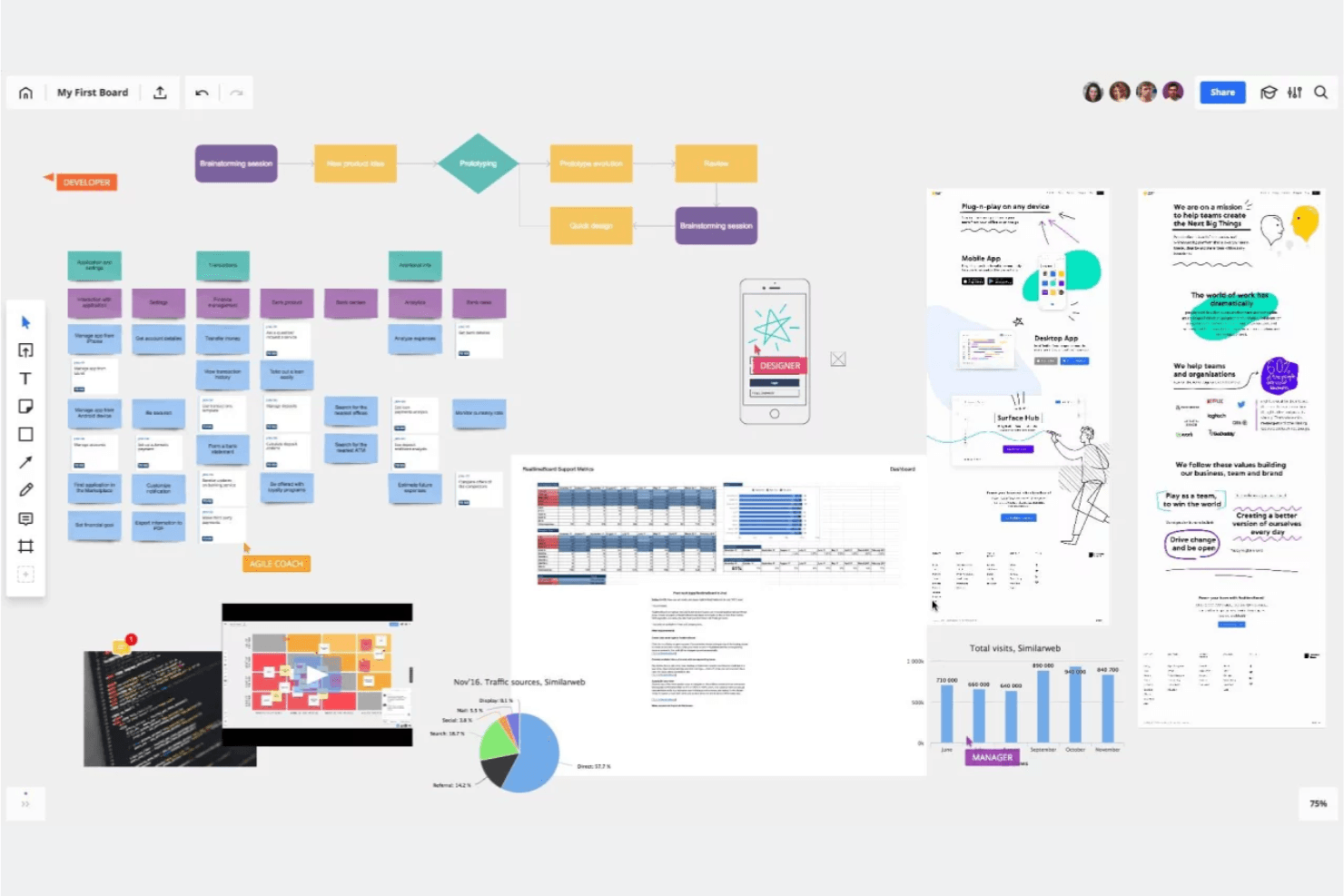
Miro è come una lavagna visiva collaborativa in cui tu e il tuo team potete generare idee, raggrupparle e votare i passaggi successivi. Miro è una piattaforma di collaborazione visiva con area di lavoro infinita che combina modifica multiutente in tempo reale, oltre 7.000 modelli, ideazione assistita dall'IA e strumenti di prototipazione per supportare i flussi di lavoro del pensiero progettuale, dalla mappatura dell'empatia agli sprint di progettazione.
Per chi è più adatto Miro?
Miro è ideale per i team interfunzionali — responsabili di prodotto, progettisti UX e consulenti per l'innovazione — che hanno bisogno di uno spazio condiviso per organizzare sprint di progettazione, mappare i percorsi degli utenti e trasformare le idee in prototipi.
Perché ho scelto Miro
Ho scelto Miro come uno dei migliori strumenti perché è stato progettato specificamente per i cicli agili del pensiero progettuale, in cui gli sprint procedono rapidamente e i team devono passare dalla mappatura dell'empatia alla prototipazione senza cambiare strumento. Il modello ufficiale di Miro per lo Sprint di progettazione da remoto di 5 giorni (creato con esperti di sprint di progettazione di Google) e la versione di AJ&Smart, utilizzata oltre 12.000 volte, offrono una struttura collaudata pronta all'uso. Apprezzo inoltre il fatto che il piano Business consenta di trasformare direttamente le lavagne in prototipi interattivi, così il team può testare i concetti prima ancora che venga scritta una sola riga di codice.
Funzionalità principali di Miro
- Generazione assistita dall'IA di diagrammi e riepiloghi: l'IA di Miro può generare direttamente sull'area di lavoro diagrammi, tabelle e riepiloghi, aiutando i team a trasformare più rapidamente le idee grezze in elementi visivi strutturati.
- Attività di facilitazione coinvolgenti: il piano Business include sondaggi, attività con matrici 2x2 e scale per un massimo di 50 partecipanti, con sintesi dei risultati tramite IA integrata.
- Sincronizzazione bidirezionale con gli strumenti di gestione dei progetti: Miro si connette bidirezionalmente con Jira, Asana, Linear, ClickUp e Azure DevOps, così il lavoro sulla lavagna rimane sincronizzato con i flussi di lavoro di distribuzione.
- Sicurezza e conformità di livello enterprise: Miro dispone delle certificazioni ISO/IEC 27001, SOC 2 Type II e GDPR, con opzioni di hosting dei dati nell'UE, negli Stati Uniti, in Australia o in Giappone.
Integrazioni di Miro
Miro offre oltre 250 integrazioni, tra cui Jira, Asana, Linear, ClickUp, Azure DevOps, Confluence, Slack, Microsoft 365 e Google Workspace. Le sue API e i suoi SDK supportano integrazioni personalizzate, mentre il piano Business aggiunge la sincronizzazione bidirezionale con Jira, Asana, Linear, ClickUp e Azure DevOps.
Pros and Cons
Pros:
- I modelli ufficiali per gli sprint di progettazione supportano laboratori strutturati
- L'area di lavoro infinita collega la ricerca ai prototipi
- L'IA sintetizza i risultati dell'ideazione collaborativa
Cons:
- Le lavagne di grandi dimensioni possono diventare lente
- L'esperienza mobile è meno efficace rispetto ai flussi di lavoro desktop
 Ideale per modelli strutturali e diagrammi generati dall'IA
- Piano gratuito disponibile
- A partire da $10/utente/mese (con fatturazione annuale)
Visit WebsiteCustomer Rating:4.6/5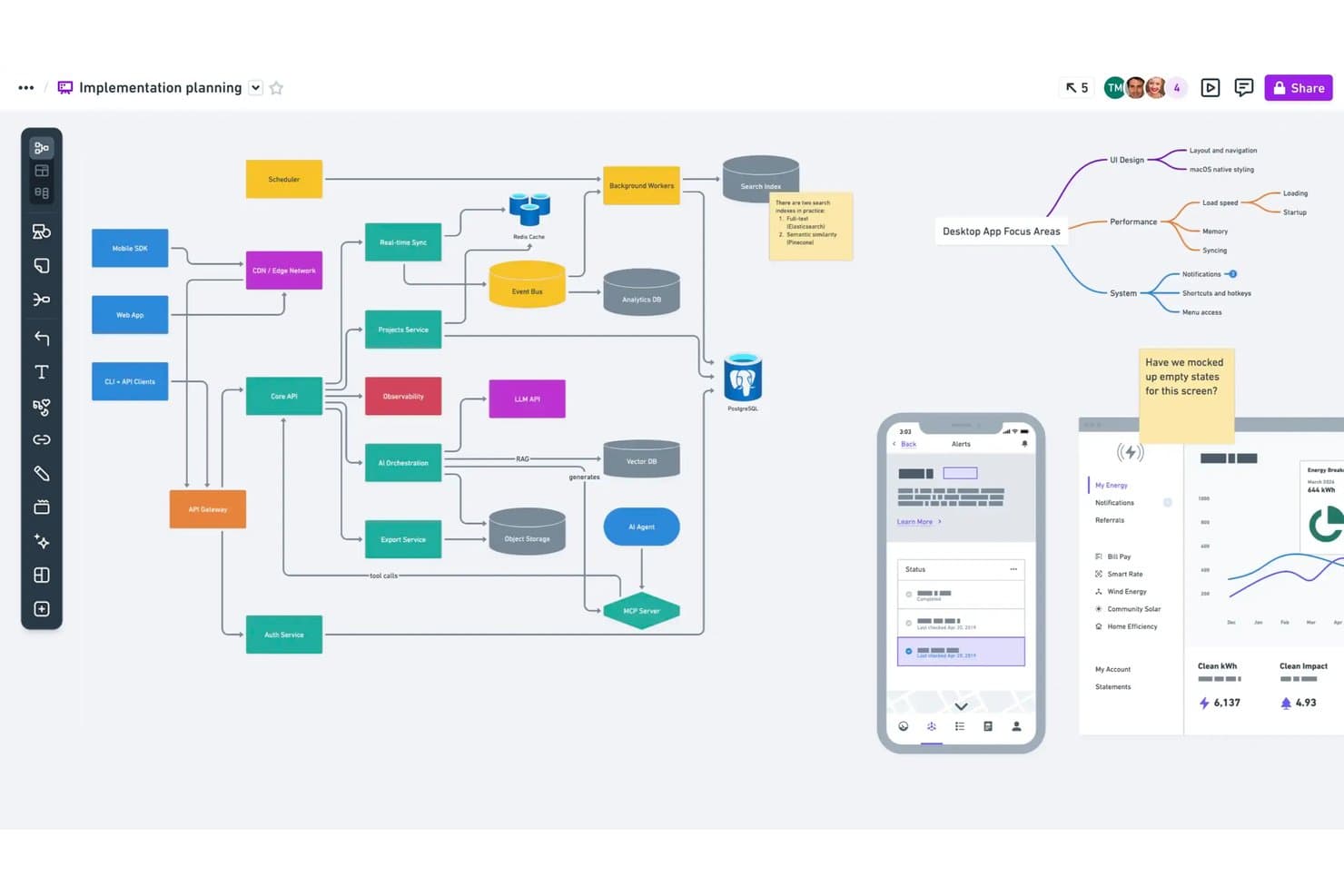
Whimsical consente agli utenti di mappare l'architettura e i flussi di sistema su un unico canvas. Whimsical è uno strumento di collaborazione visiva pensato per i team di prodotto, che combina bacheche a canvas infinito, modelli strutturali, mappe mentali, diagrammi di flusso e documenti in un unico spazio di lavoro, con generazione assistita dall'IA per modelli strutturali e diagrammi.
Per chi è più adatto Whimsical?
Whimsical è particolarmente adatto a product manager e designer UX che hanno bisogno di modelli strutturali, diagrammi di flusso e mappe mentali in uno spazio di lavoro condiviso.
Perché ho scelto Whimsical
Ho scelto Whimsical come uno dei migliori strumenti perché la sua generazione di modelli strutturali tramite IA accelera concretamente il lavoro sui concetti iniziali. È possibile digitare una richiesta e ottenere in pochi secondi un modello strutturale o un flusso strutturale modificabile, una funzione che trovo preziosa durante le prime sessioni intensive di ideazione. L'agente Whimsical crea inoltre mappe mentali e diagrammi di flusso a partire da una singola idea, consentendo al team di passare rapidamente da pensieri frammentari a rappresentazioni visive strutturate. Questa combinazione di diagrammi e modelli strutturali assistiti dall'IA in un unico canvas rende Whimsical una scelta naturale per i team di prodotto che eseguono test rapidi dei concetti.
Funzionalità principali di Whimsical
- Modifica collaborativa in tempo reale: Più membri del team possono modificare contemporaneamente bacheche, modelli strutturali e mappe mentali, con commenti inclusi in ogni piano.
- Modello per diagrammi di affinità: Un modello predefinito per i workshop di brainstorming consente ai team di raggruppare i post-it in temi e organizzare sessioni di votazione con punti per far emergere le idee migliori.
- Collegamenti inversi tra i file: I collegamenti inversi connettono bacheche, documenti e diagrammi correlati all'interno dello spazio di lavoro, permettendo di seguire le idee dalla fase di scoperta fino alla consegna.
- Cronologia delle versioni: Whimsical salva la cronologia dello spazio di lavoro, per 90 giorni nel piano Pro e senza limiti nel piano Business, così puoi tornare alle versioni precedenti di qualsiasi bacheca o modello strutturale.
Integrazioni di Whimsical
Whimsical offre integrazioni documentate con ChatGPT, Claude, Claude Code, Cursor, Jira, Linear, GitHub, Notion, Google Docs e Slack. Il suo server MCP collega inoltre Whimsical ai client compatibili con MCP per la prototipazione assistita dall'IA.
Pros and Cons
Pros:
- I modelli strutturali generati dall'IA accelerano i test dei concetti
- I flussi strutturali modificabili supportano rapide iterazioni dei prototipi
- I diagrammi di affinità raggruppano le idee per facilitarne la sintesi
Cons:
- La facilitazione dei workshop non dispone di stanze separate
- Non sono stati confermati modelli dedicati per la mappatura dei percorsi
Learn more about Whimsical: Ideale per la sintesi della ricerca visiva collegata ai dati
- Piano gratuito disponibile
- A partire da $5/mese (fatturato annualmente)
Visit WebsiteCustomer Rating:4.4/5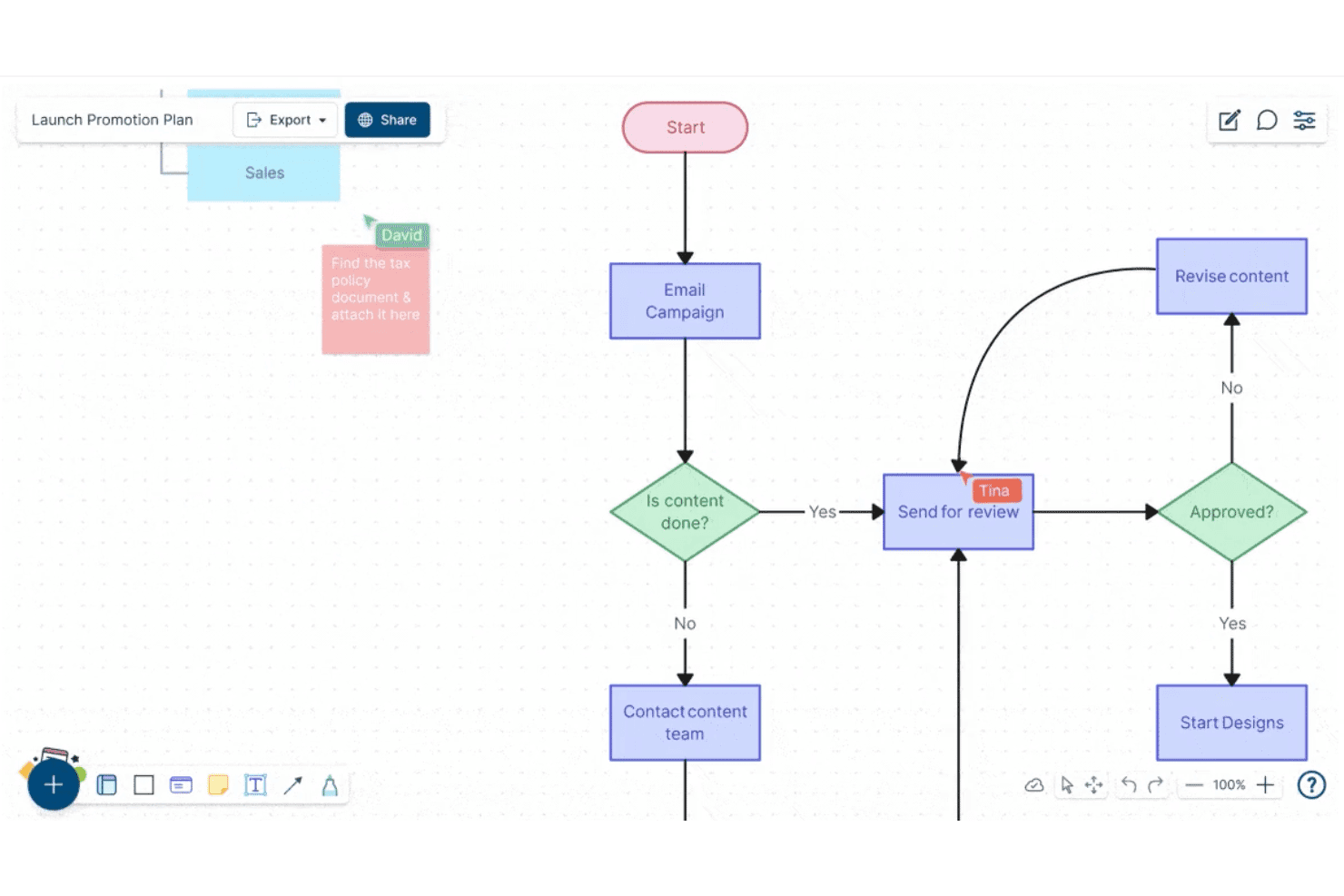
Creately consente agli utenti di creare e collaborare sui diagrammi di flusso in tempo reale. Creately è una piattaforma di collaborazione visiva e creazione di diagrammi che combina una tela infinita, tipi di diagrammi strutturati, note adesive, database collegati ai dati e modifica in tempo reale per più utenti, pensata per i team che lavorano alla sintesi della ricerca, all'ideazione e alla pianificazione.
Per chi è più adatto Creately?
Creately è ideale per i team interfunzionali che devono collegare la ricerca visiva e i diagrammi direttamente a dati strutturati, attività e monitoraggio dei progetti in un unico spazio di lavoro.
Perché ho scelto Creately
Creately è entrato nella mia rosa di preferiti perché la sua tela collegata ai dati va oltre il normale utilizzo delle lavagne, collegando gli elementi visivi della ricerca direttamente a database strutturati. Mi piace molto il fatto che sia possibile contrassegnare e monitorare gli insight tra viste sincronizzate: così, quando il team conclude una sessione di mappatura per affinità, le note adesive non rimangono semplicemente lì, ma confluiscono in un database ricercabile e filtrabile, collegato ad attività di progetto reali. La funzionalità di database personalizzato, con ricerca a testo integrale e diverse viste sincronizzate, è davvero utile per trasformare il lavoro di scoperta disorganizzato in record di insight organizzati e utilizzabili.
Funzionalità principali di Creately
- Sessioni di votazione a tempo: Esegui votazioni anonime o pubbliche direttamente sugli elementi della tela per aiutare i team a dare priorità alle idee senza che conversazioni parallele facciano deragliare il processo.
- Modalità presentazione: Crea e aggiorna le diapositive direttamente dalla tela, così la ricerca e i diagrammi diventano la presentazione senza dover copiare e incollare.
- Mappe mentali e mappe concettuali: Crea strutture visive ramificate per esplorare le relazioni tra le idee durante le prime fasi dell'ideazione e della definizione dei problemi.
- Cronologia delle versioni: Tieni traccia nel tempo delle modifiche apportate a qualsiasi tela, con un feed di stato per ogni elemento e fino a un anno di cronologia nei piani di livello superiore.
Integrazioni di Creately
Creately documenta 11 integrazioni, tra cui Confluence Cloud, Microsoft Teams, Slack, Zoom, Jira e Google Drive. Il piano Business supporta la sincronizzazione bidirezionale con Microsoft Excel e Google Sheets, mentre il piano Enterprise aggiunge GitHub, Azure DevOps e SharePoint.
Pros and Cons
Pros:
- Collega gli insight della ricerca a database strutturati
- Supporta la creazione di diagrammi e la sintesi visiva in tempo reale
- Offre votazioni a tempo per stabilire la priorità delle idee
Cons:
- Non dispone di modelli dedicati ai framework del design thinking
- Non offre strumenti di prototipazione o test interattivi
Learn more about Creately: Ideale per la collaborazione su lavagne attenta al GDPR
- Prova gratuita di 30 giorni + piano gratuito disponibile
- A partire da 5 €/utente/mese
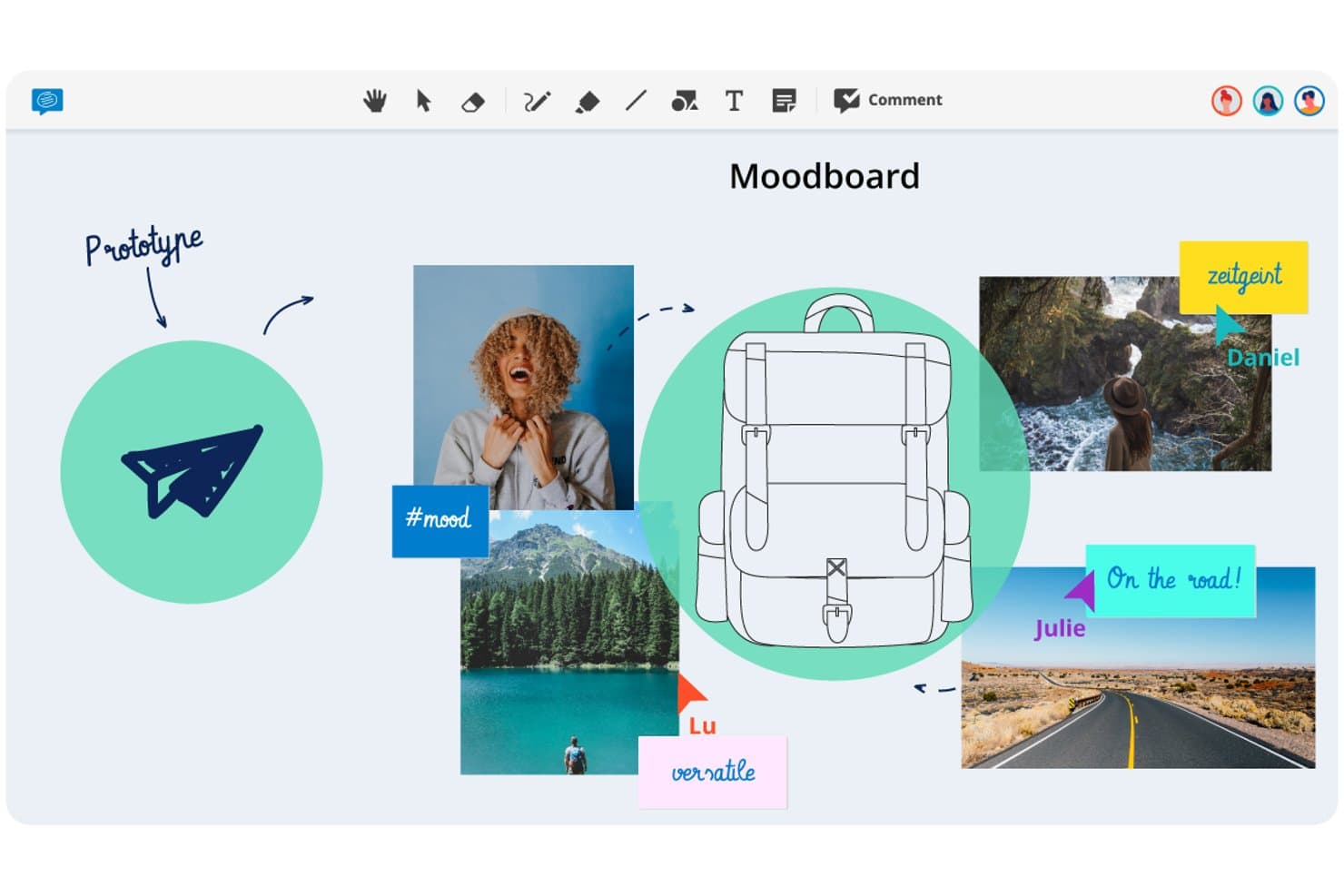
Conceptboard consente agli utenti di creare tavole d'ispirazione visive per sviluppare prototipi di idee di progettazione. Conceptboard è una lavagna online basata su browser che combina la modifica in tempo reale da parte di più utenti, note adesive, votazioni, controlli per la facilitazione e integrazioni con strumenti per la gestione delle attività su una tela visiva flessibile.
Per chi è più adatto Conceptboard?
Conceptboard è particolarmente adatto ai team che operano in settori regolamentati, soprattutto in Europa, dove la conformità al GDPR e opzioni flessibili di localizzazione dei dati sono imprescindibili.
Perché ho scelto Conceptboard
Ho incluso Conceptboard tra le mie scelte principali perché è l'unico strumento per lavagne di questo elenco progettato fin dall'inizio con la localizzazione europea dei dati come funzionalità fondamentale, non come aggiunta successiva. Se il tuo team opera in un settore regolamentato, il fatto che i dati siano ospitati sull'infrastruttura AWS in Germania, certificata ISO 27001/27017/27018, e che sia disponibile come implementazione completamente in sede cambia ciò che è possibile fare in termini di approvazione da parte degli stakeholder. Mi piace anche il fatto che i controlli per la facilitazione, come le votazioni a tempo, la moderazione e la funzionalità Nascondi sezioni (che consente di mostrare gradualmente i contenuti della tela durante una sessione), siano disponibili anche nei piani base.
Funzionalità principali di Conceptboard
- Modifica in tempo reale da parte di più utenti: più utenti possono modificare contemporaneamente la stessa bacheca, con accesso ospite tramite link e senza che i partecipanti esterni debbano creare un account.
- Strumento avanzato di votazione: organizza sessioni di votazione a tempo con modalità incognito automatica, una visualizzazione semplificata dei risultati e la possibilità di esportare gli esiti della votazione.
- Integrazione con Jira e Azure DevOps: importa i ticket direttamente sulla bacheca e gestisci lo stato e gli assegnatari senza lasciare la tela.
- Tag delle bacheche ed esportazione CSV: assegna tag alle bacheche per organizzare la ricerca e il recupero, ed esporta i contenuti della bacheca come tabella da utilizzare in strumenti esterni.
Integrazioni di Conceptboard
Conceptboard documenta nove integrazioni, tra cui Microsoft Teams, Webex, Confluence, Google Drive, Jira, Azure DevOps, Dropbox, Box e OneDrive. Non sono documentate API pubbliche né un'integrazione con Figma.
Pros and Cons
Pros:
- L'hosting in Germania è adatto ai team di progettazione regolamentati
- Le votazioni a tempo supportano decisioni strutturate durante i laboratori
- L'accesso ospite semplifica la partecipazione degli stakeholder
Cons:
- Nessun modello per mappare il percorso del cliente nella ricerca sui clienti
- I report segnalano rallentamenti durante le sessioni con i clienti
Learn more about Conceptboard: Ideale per l'ideazione all'interno di una suite di progettazione più ampia
- Piano gratuito disponibile e prova gratuita di 30 giorni
- Gratis da usare
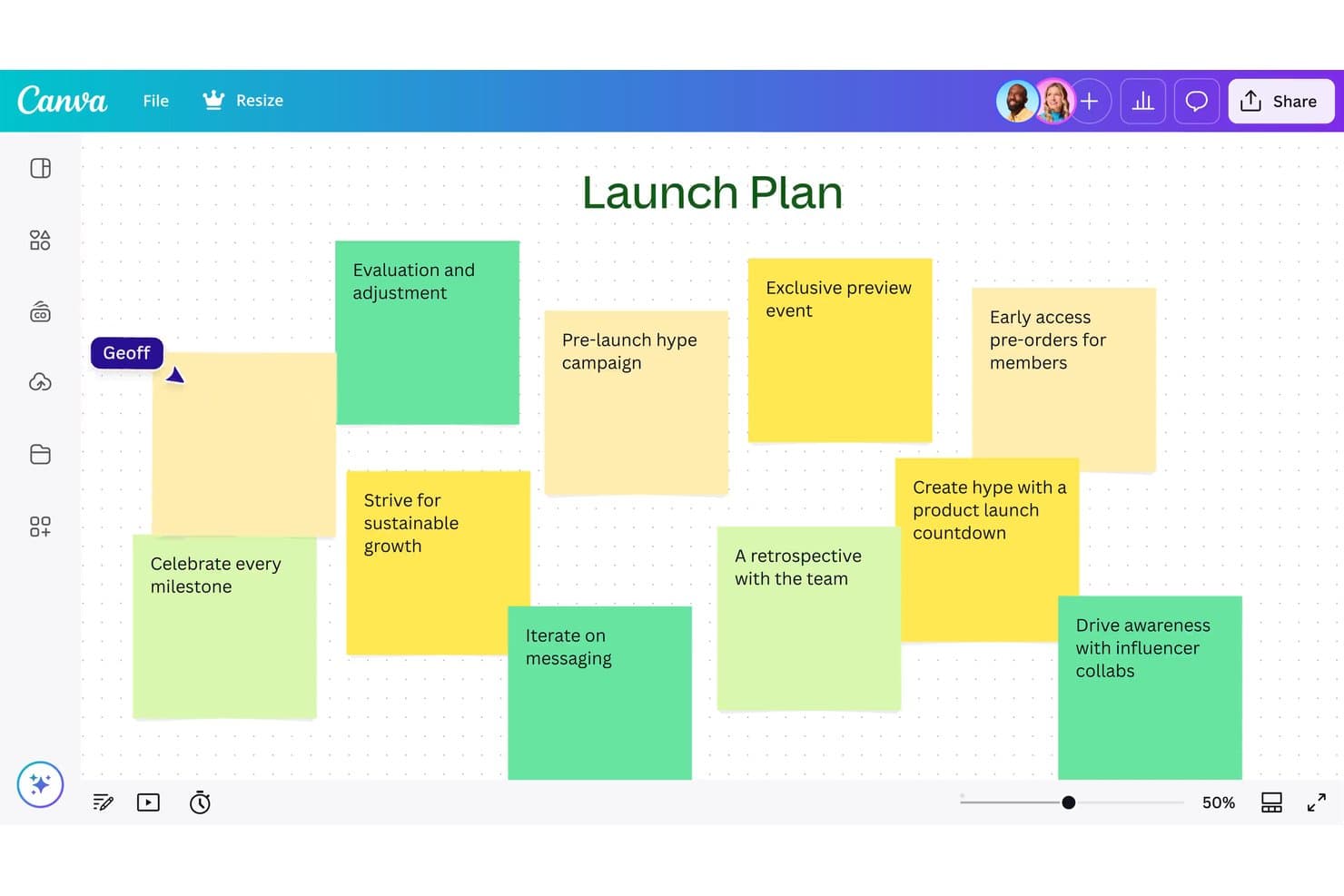
Canva Whiteboard consente agli utenti di elaborare idee per il lancio utilizzando note adesive. Canva Whiteboard è uno strumento basato sul Web con canvas infinito che combina collaborazione in tempo reale, note adesive, ordinamento delle idee assistito dall'IA e un'ampia libreria di modelli per lavagne—tra cui mappe del percorso, diagrammi di flusso e mappe mentali—all'interno della Visual Suite più ampia di Canva.
Per chi è più adatto Canva Whiteboard?
Canva Whiteboard è particolarmente adatto ai team che utilizzano già Canva e vogliono passare dal brainstorming alla realizzazione di contenuti rifiniti senza cambiare strumento.
Perché ho scelto Canva Whiteboard
Ho incluso Canva Whiteboard tra le mie scelte migliori perché è l'unico strumento qui presente in cui l'ideazione e il risultato finale si trovano nello stesso posto. Puoi fare brainstorming su un canvas infinito con note adesive, usare l'IA per ordinare e riepilogare le idee del tuo team per argomento e trasferire poi direttamente quei contenuti in una presentazione o in un documento Canva senza dover ricreare nulla. Mi piace anche il fatto che le modalità lavagna e presentazione coesistano in un unico file, così gestire una sessione e condividere successivamente risultati rifiniti diventa un unico flusso di lavoro continuo.
Funzionalità principali di Canva Whiteboard
- Canvas infinito: Un'area di lavoro illimitata in cui i team possono aggiungere forme, immagini, disegni ed elementi grafici senza esaurire lo spazio.
- Ordinamento delle note adesive: Organizza automaticamente le note adesive per nome, colore o argomento con un solo clic, aiutando i team a dare un senso a grandi quantità di idee.
- Timer con musica: Un timer integrato per il conto alla rovescia con musica di sottofondo mantiene le sessioni nei tempi previsti durante le attività di brainstorming o dei workshop.
- Passaggio tra formati di file: La lavagna e le diapositive della presentazione coesistono in un unico file, consentendo di passare da una modalità di lavoro all'altra senza aprire un documento separato.
Integrazioni di Canva Whiteboard
Canva Whiteboard offre integrazioni native con la Visual Suite di Canva, tra cui Canva Docs, Sheets e Presentations. Supporta inoltre le integrazioni del marketplace tramite l'Apps Marketplace di Canva, mentre le integrazioni tramite API e le app personalizzate sono disponibili principalmente per il piano Enterprise.
Pros and Cons
Pros:
- Collega direttamente il brainstorming ai risultati rifiniti
- Ordina automaticamente le note adesive per argomento
- Supporta la collaborazione sulla lavagna ottimizzata per i dispositivi mobili
Cons:
- Offre funzionalità limitate per la facilitazione strutturata dei workshop
- Non offre funzionalità di prototipazione né trasferimento agli sviluppatori
Learn more about Canva Whiteboard: Ideale per l'ideazione e il passaggio di consegne end-to-end
- Piano gratuito disponibile
- Da $16/utente/mese (con fatturazione annuale)
Visit WebsiteCustomer Rating:4.7/5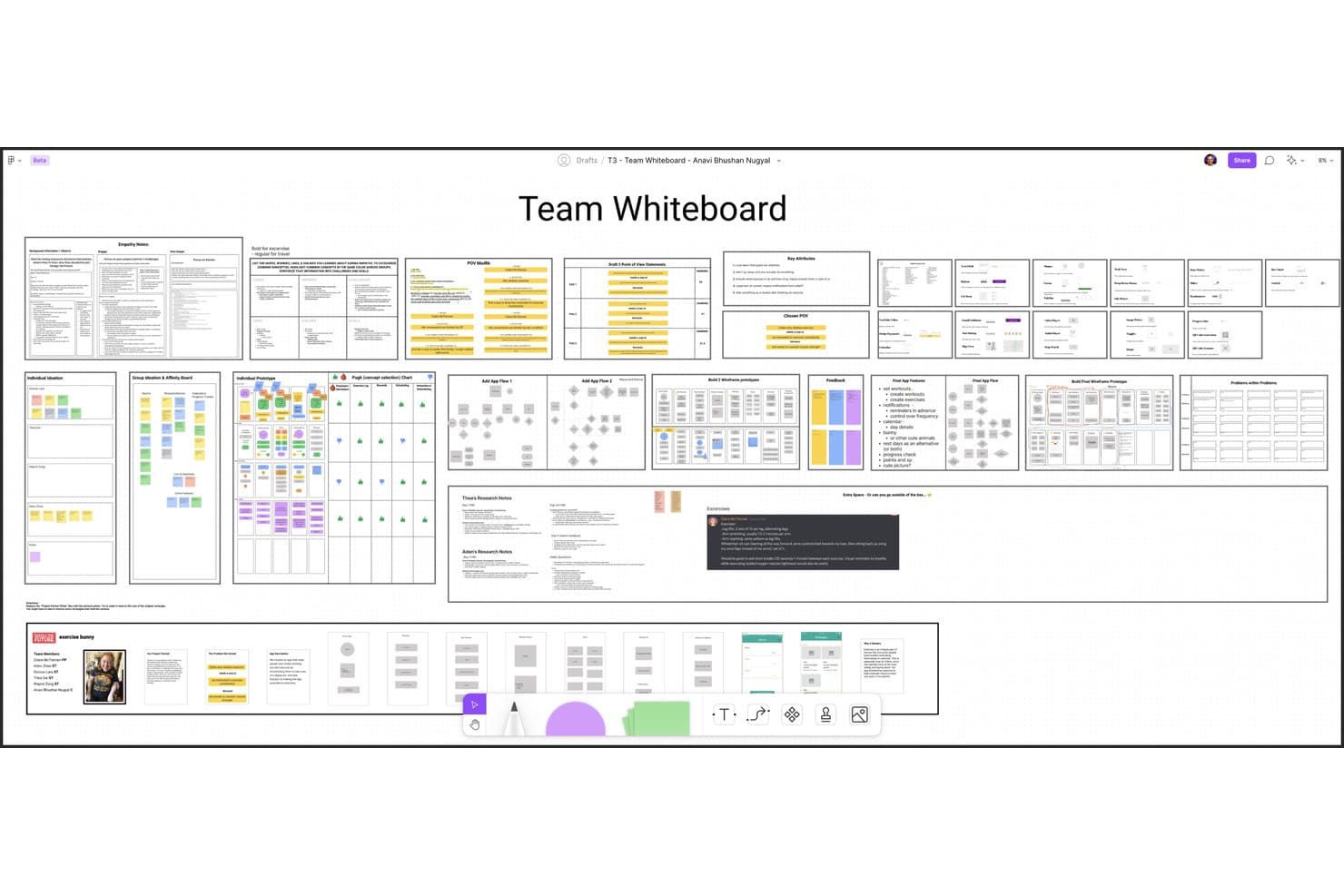
Figma consente agli utenti di creare e organizzare in modo collaborativo i flussi di lavoro del design thinking. Figma è una piattaforma di progettazione che abbina FigJam, una lavagna collaborativa infinita, a strumenti per la prototipazione, i test e il passaggio di consegne agli sviluppatori in un unico ecosistema connesso.
Per chi è più adatto Figma?
Figma è la scelta principale per i team di prodotto e progettazione che hanno bisogno di uno spazio di lavoro connesso per portare le idee dalle prime sessioni di brainstorming fino al passaggio di consegne agli sviluppatori.
Perché ho scelto Figma
Figma si è guadagnato un posto nella mia selezione perché è l'unico strumento che accompagna il lavoro da una sessione di brainstorming in FigJam fino al passaggio di consegne agli sviluppatori senza dover cambiare piattaforma. Apprezzo in particolare il modo in cui il raggruppamento per affinità basato sull'IA in FigJam raggruppa automaticamente le note adesive per tema, trasformando in pochi secondi una sessione di ideazione disordinata in una sintesi strutturata. Da lì, il team può passare direttamente alla prototipazione avanzata con logica condizionale e variabili, quindi condividere le specifiche tramite la Modalità Dev.
Funzionalità principali di Figma
- Votazione e definizione delle priorità: I membri del team possono votare direttamente sulla tela di FigJam le note adesive o le idee, così da far emergere i concetti più apprezzati.
- Sessioni aperte: Gli ospiti esterni alla tua organizzazione possono partecipare a una bacheca FigJam per 24 ore senza dover acquistare una licenza a pagamento.
- Figma Make: Uno strumento di IA che trasforma i prompt testuali in prototipi funzionanti e applicazioni web, con connessioni opzionali al backend.
- Modalità Dev: Una visualizzazione dedicata che mostra frammenti di codice, specifiche e misurazioni dai file di progettazione per il passaggio di consegne al team di sviluppo.
Integrazioni di Figma
Figma offre due integrazioni native documentate con Jira e Asana. Supporta inoltre plugin e widget della community, un'estensione per VS Code, un server MCP e connessioni a Supabase tramite Figma Make.
Pros and Cons
Pros:
- Collega ideazione, prototipazione e passaggio di consegne
- L'IA raggruppa le note adesive per tema
- Oltre 300 modelli supportano i workshop di design thinking
Cons:
- Le bacheche di grandi dimensioni possono presentare problemi di prestazioni
- Nessuna stanza separata o agenda guidata
 Ideale per la facilitazione di laboratori dal vivo e l'ideazione con l'IA
- Piano gratuito disponibile
- A partire da 24,90 $/utente/mese (con fatturazione annuale)
Visit WebsiteCustomer Rating:4.7/5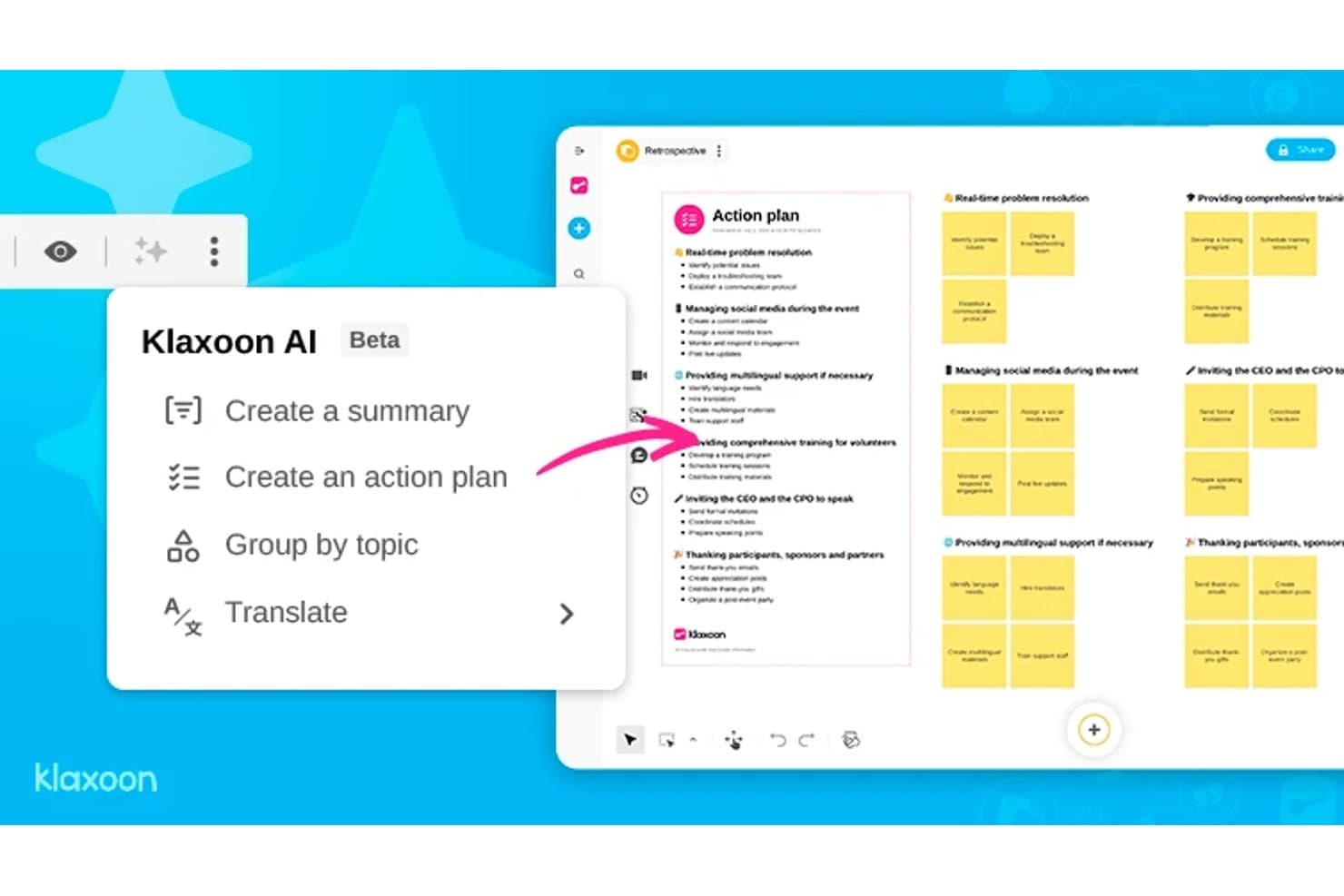
L'IA di Klaxoon genera automaticamente piani d'azione dalle lavagne retrospettive. Klaxoon è una piattaforma di collaborazione visiva che combina una lavagna infinita, sessioni guidate da un facilitatore, ideazione assistita dall'IA e componenti interattivi come sondaggi, votazioni e nuvole di parole.
Per chi è più adatto Klaxoon?
Klaxoon è particolarmente adatto a facilitatori, coach e consulenti per l'innovazione che gestiscono laboratori strutturati e hanno bisogno di controlli per le sessioni dal vivo integrati nello spazio di collaborazione.
Perché ho scelto Klaxoon
Klaxoon si è guadagnato un posto nella mia selezione perché è l'unico strumento qui presente che considera la facilitazione dal vivo una funzionalità di primo livello, al pari dell'ideazione. Mi piace molto il modo in cui la sincronizzazione della lavagna mi permette di spostare in tempo reale la visualizzazione di ogni partecipante sulla stessa sezione della lavagna, evitando che i laboratori vadano in pezzi quando le persone si muovono in direzioni diverse. L'IA integrata può anche raggruppare e riassumere le note adesive per argomento non appena termina la votazione, trasformando una parete piena di idee in un elenco prioritario senza doverle ordinare manualmente.
Funzionalità principali di Klaxoon
- Votazione a punti con classifica in tempo reale: I partecipanti votano le idee durante una sessione e i risultati vengono classificati automaticamente man mano che arrivano i voti, così il gruppo vede emergere le priorità senza alcun ordinamento manuale.
- Campi aggiuntivi sulle note adesive: Allega direttamente alle singole idee sulla lavagna metadati come nomi, date e parole chiave per dare struttura ai risultati dell'ideazione.
- Generazione di modelli con l'IA: Genera un modello di lavagna con un solo clic in base agli obiettivi della sessione, evitando la configurazione iniziale di una tela vuota.
- Sincronizzazione delle attività con Wrike e Jira: Trasforma direttamente le idee della lavagna in attività su Wrike o Jira, sincronizzando gli aggiornamenti in entrambe le direzioni tra la lavagna e gli strumenti di progetto.
Integrazioni di Klaxoon
Klaxoon offre integrazioni native con Wrike, Jira, Confluence, Microsoft Teams e Google Workspace, oltre a Zapier. Un'API e un server MCP consentono di supportare connessioni personalizzate.
Pros and Cons
Pros:
- Solidi controlli per la facilitazione di laboratori dal vivo
- L'IA raggruppa e riassume le idee
- Trasforma il brainstorming in azioni prioritarie
Cons:
- Nessuna prototipazione o trasferimento agli sviluppatori
- Gli approfondimenti della ricerca non dispongono di un archivio dedicato
Learn more about Klaxoon: Ideale per le funzionalità di raccolta dei riscontri e votazione della squadra
- Demo gratuita + piano gratuito disponibile
- A partire da $9.99/utente/mese (con fatturazione annuale)
Visit WebsiteCustomer Rating:4.6/5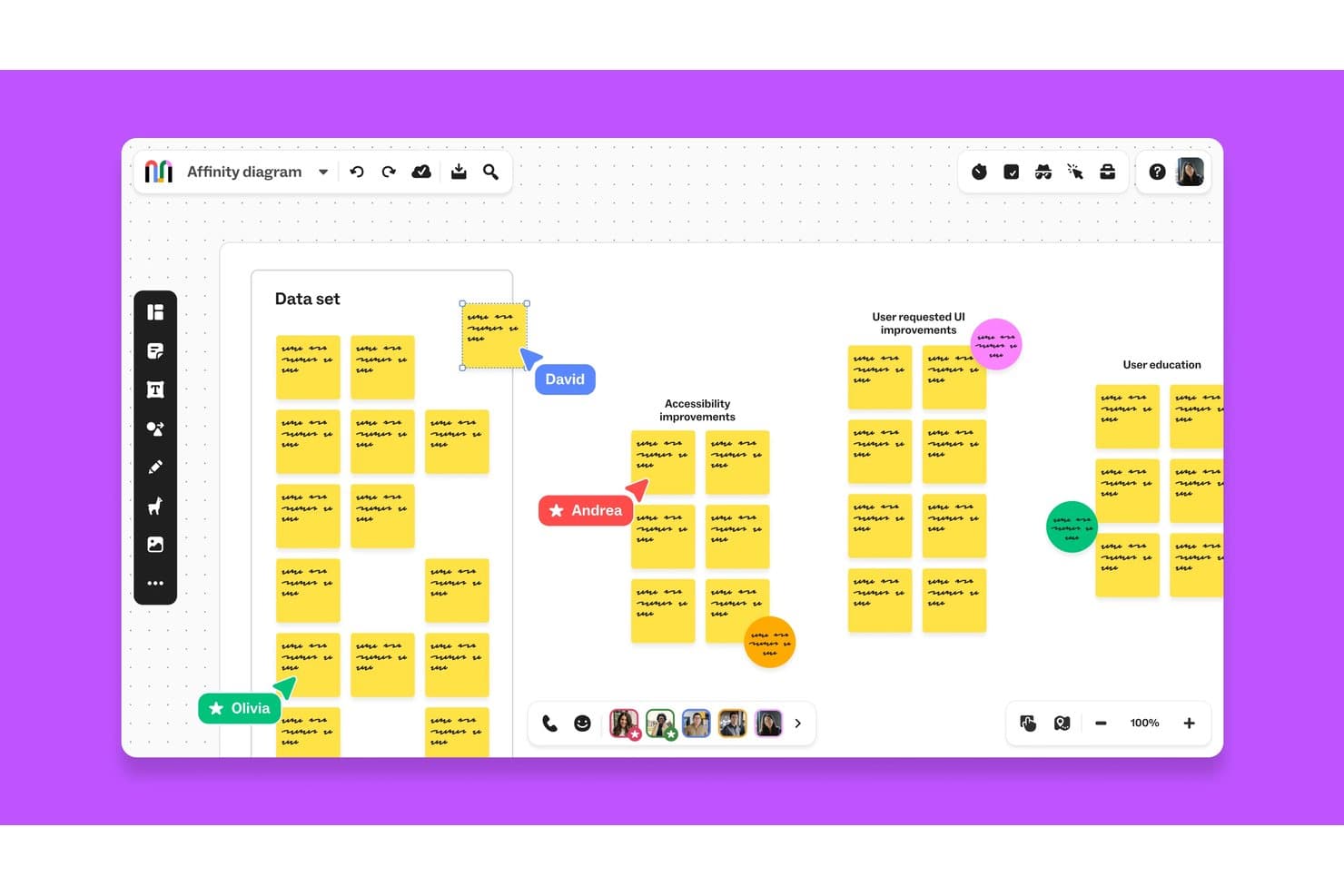
Mural consente alle squadre di collaborare in tempo reale sui diagrammi di affinità. Mural è una piattaforma di collaborazione visiva che combina una tela infinita, modelli di pensiero progettuale dell'Istituto LUMA, modifica in tempo reale per più utenti e controlli di facilitazione per gestire sessioni strutturate di generazione di idee e raccolta di riscontri.
Per chi è più adatto Mural?
Mural è particolarmente adatto a facilitatori, consulenti dell'innovazione e squadre di prodotto che hanno bisogno di metodi strutturati per raccogliere contributi, gestire sessioni di votazione e sintetizzare i riscontri tra gruppi distribuiti.
Perché ho scelto Mural
Ho scelto Mural come uno dei migliori perché i suoi strumenti di votazione e raccolta dei riscontri sono realmente integrati nel prodotto a ogni livello, invece di essere aggiunti come elemento secondario. La modalità privata consente a ogni membro della squadra di inviare idee autonomamente prima che chiunque possa vedere i contributi del gruppo, eliminando così il pensiero di gruppo che impedisce di ottenere riscontri sinceri nelle sessioni di progettazione. Inoltre, i Superpoteri di facilitazione, come il controllo per riunire i partecipanti e la scaletta passo dopo passo, mantengono in movimento le sessioni di votazione strutturate senza perdere il controllo del gruppo.
Funzionalità principali di Mural
- Libreria di metodi dell'Istituto LUMA: Accedi a una libreria completa di modelli di pensiero progettuale predefiniti basati sui framework dell'Istituto LUMA, disponibili nei piani Business ed Enterprise.
- Raggruppamento e riepiloghi basati sull'IA: Mural AI raggruppa automaticamente le note adesive per argomento e genera riepiloghi delle bacheche per aiutare le squadre a sintetizzare i risultati delle sessioni.
- Tela infinita ridimensionabile: Crea flussi, mappe dei percorsi e diagrammi di processo su una tela illimitata nelle applicazioni web, iOS, Android e per computer.
- Sincronizzazione bidirezionale con Asana e Jira: Collega direttamente i murales agli strumenti di gestione dei progetti, così gli elementi di azione passano dalla bacheca ai flussi di lavoro esistenti della tua squadra.
Integrazioni di Mural
Mural documenta le integrazioni con Jira, Asana, Figma, Confluence, Microsoft Teams, Slack, Google Workspace e Productboard. Offre inoltre un'API pubblica per integrazioni personalizzate e supporta Zapier.
Pros and Cons
Pros:
- La votazione privata limita il pensiero di gruppo
- I metodi LUMA guidano laboratori strutturati
- I controlli di facilitazione mantengono le sessioni sulla giusta direzione
Cons:
- Le bacheche di grandi dimensioni possono rallentare con molti partecipanti
- Nessuna prototipazione nativa o consegna agli sviluppatori
Learn more about Mural: La migliore lavagna virtuale per sprint facilitati
- Prova gratuita di 7 giorni + piano gratuito disponibile
- A partire da $9/mese (con fatturazione annuale)
Visit WebsiteCustomer Rating:4.5/5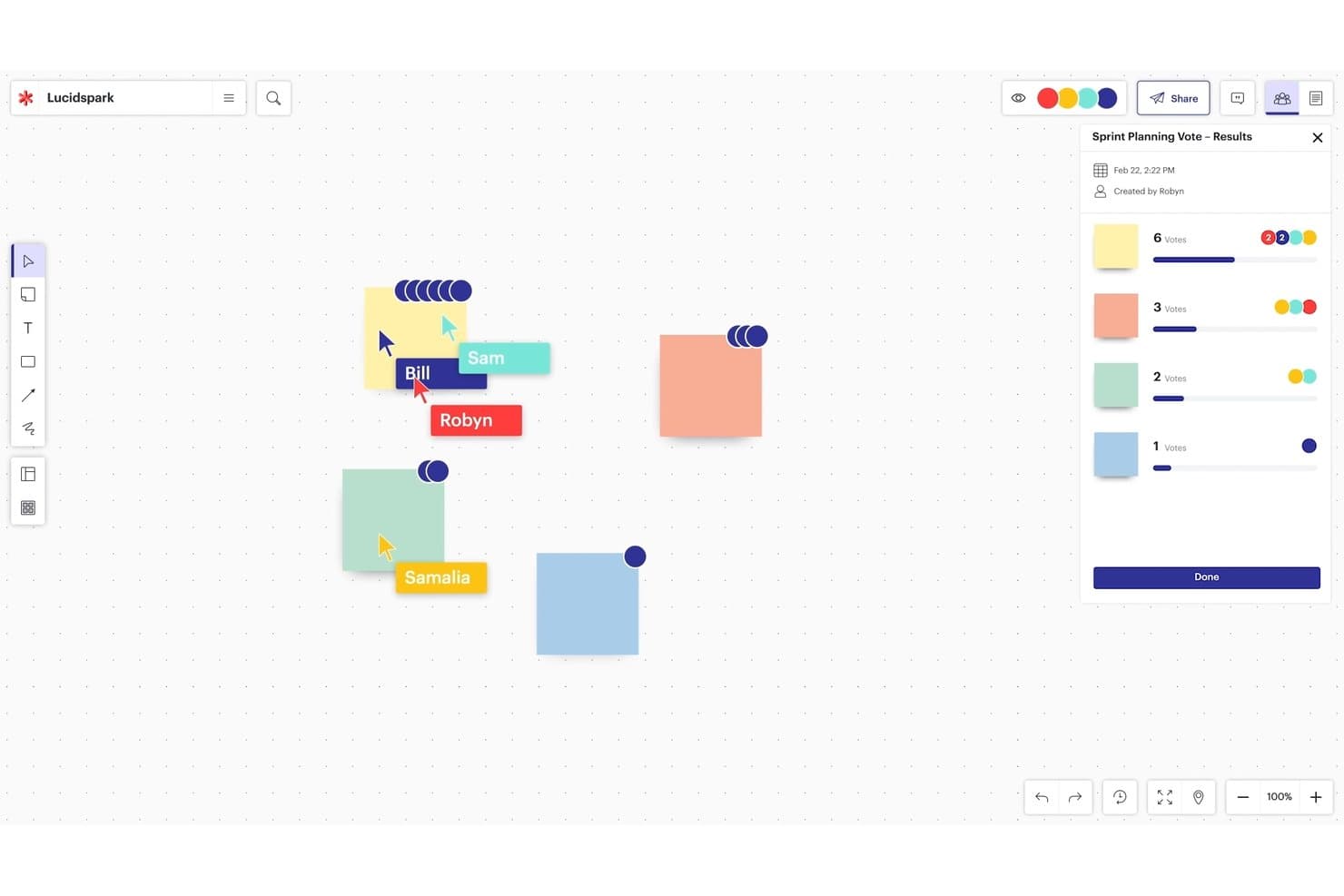
La tela infinita di Lucidspark supporta la pianificazione collaborativa e le votazioni. Lucidspark è una lavagna virtuale progettata per il brainstorming e il design thinking, che offre una tela infinita, note adesive, votazioni, controlli di facilitazione e strumenti di ideazione basati sull'intelligenza artificiale.
Per chi è più adatto Lucidspark?
Lucidspark è particolarmente adatto ai facilitatori e ai team di prodotto che organizzano sessioni di brainstorming strutturate e hanno bisogno di controlli integrati per mantenere i gruppi concentrati.
Perché ho scelto Lucidspark
Ho scelto Lucidspark come uno dei migliori perché la sua suite di facilitazione è progettata appositamente per gestire gli sprint di design, non solo per supportarli. Mi piace il fatto che la modalità privata nasconda le note adesive e i cursori mentre tutti elaborano idee individualmente; poi le funzioni di votazione e 'prendi il comando' mi permettono di guidare il gruppo verso una decisione senza perdere il controllo della sessione. Le Bacheche per gruppi di lavoro possono suddividere uno sprint di grandi dimensioni in un massimo di 50 gruppi di lavoro più piccoli contemporaneamente, una funzione che ho trovato preziosa quando gestisco percorsi di ideazione paralleli.
Funzionalità principali di Lucidspark
- Ideazione basata sull'intelligenza artificiale e ordinamento per temi: l'intelligenza artificiale di Lucid genera idee a partire dai suggerimenti, identifica i temi ricorrenti tra le note adesive e riassume i brainstorming direttamente sulla tela.
- Carte Lucid: trasformano le idee sulla bacheca in elementi di lavoro Jira o Azure DevOps, collegando le sessioni di brainstorming al backlog del prodotto.
- Attività visive: consentono ai partecipanti di classificare gli elementi su scale a cursore, ordinarli in categorie o posizionarli su una matrice, mostrando i risultati per persona o come media del gruppo.
- Oltre 100 integrazioni: si collega a strumenti come Figma, Confluence, Microsoft 365, Slack, Zoom e Microsoft Teams tramite il marketplace delle integrazioni di Lucid.
Integrazioni di Lucidspark
Lucidspark offre oltre 100 integrazioni del marketplace, tra cui Jira, Azure DevOps, Confluence, Figma, Slack, Zoom, Microsoft Teams e Google Workspace. Le Carte Lucid collegano le idee a Jira e Azure DevOps, mentre le pagine Confluence possono essere aggiunte, visualizzate e modificate all'interno di Lucid.
Pros and Cons
Pros:
- I controlli del facilitatore guidano sessioni di sprint strutturate
- L'intelligenza artificiale raggruppa i temi del brainstorming
- Le bacheche per gruppi di lavoro supportano gruppi di ideazione paralleli
Cons:
- Le bacheche di grandi dimensioni possono rallentare con una collaborazione intensa
- Gli strumenti di facilitazione principali richiedono piani a pagamento
Learn more about Lucidspark: Ideale per l'ideazione all'interno dei flussi di lavoro Atlassian
- Piano gratuito + prova gratuita di 7 giorni disponibile
- A partire da $5.42/utente/mese
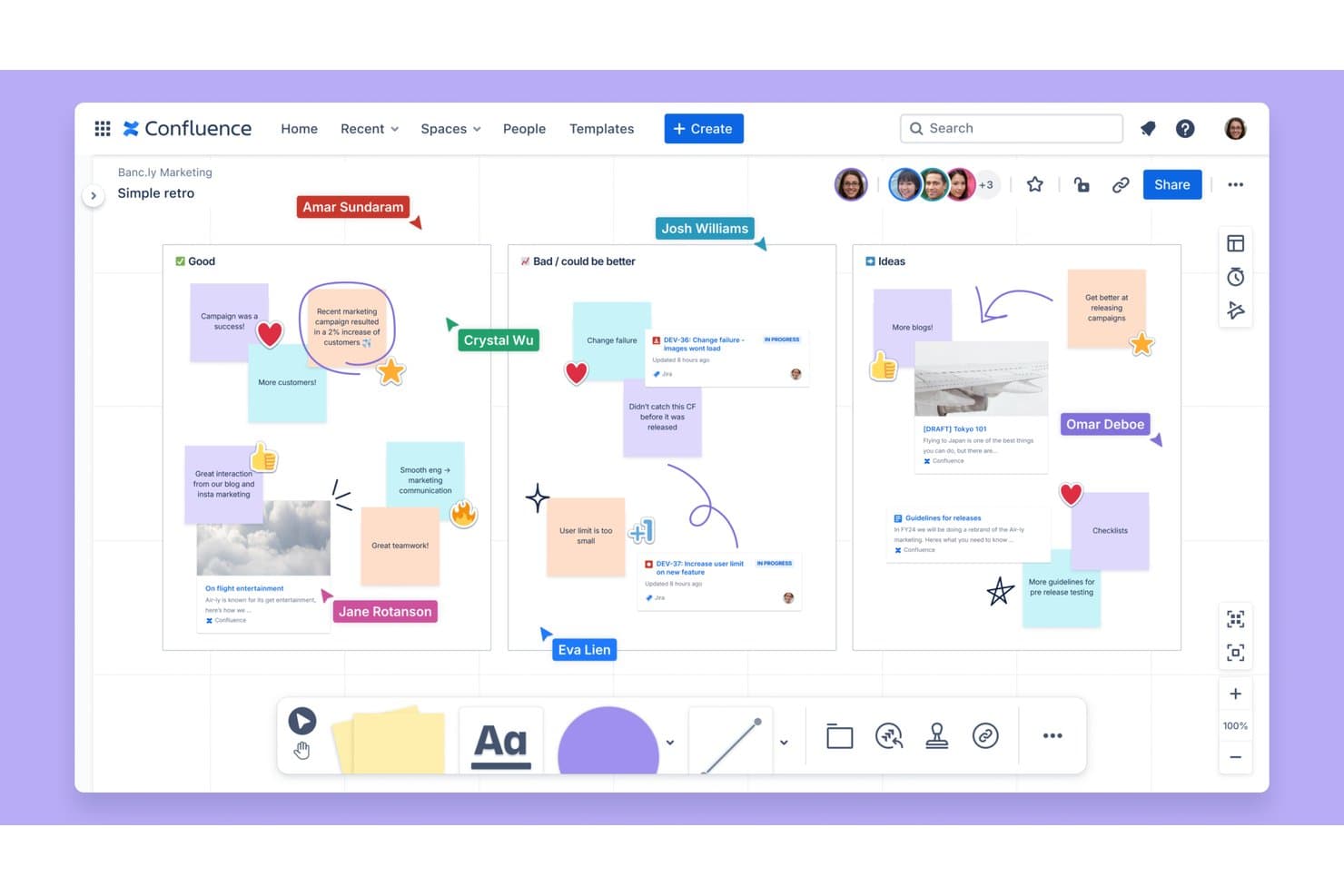
Confluence Whiteboards supporta retrospettive di team in tempo reale con note adesive. Confluence Whiteboards è una tela di collaborazione visiva integrata in Confluence che supporta la modifica in tempo reale da parte di più utenti, note adesive, votazioni, disegno a mano libera e ideazione collegata a Jira su una bacheca infinita.
Per chi è più adatto Confluence Whiteboards?
Confluence Whiteboards è particolarmente adatto ai product manager che lavorano già in Jira e vogliono trasformare le idee emerse da un brainstorming direttamente in attività monitorate senza cambiare strumento.
Perché ho scelto Confluence Whiteboards
Ho incluso Confluence Whiteboards tra le mie scelte principali perché è l'unico strumento per lavagne che consente di convertire una nota adesiva direttamente in un'attività Jira senza uscire dalla tela. Per i product manager che organizzano sessioni di ideazione all'interno dei flussi di lavoro Atlassian, questo collegamento è davvero utile: si fa brainstorming, si votano le idee migliori utilizzando sessioni di votazione nominate con schede anonime e si inseriscono direttamente nel backlog quelle vincitrici. Il raggruppamento dei temi basato sull'intelligenza artificiale e i riepiloghi delle pagine Confluence fanno inoltre risparmiare tempo prezioso quando è necessario documentare i risultati di una sessione.
Funzionalità principali di Confluence Whiteboards
- Visibilità dei cursori in tempo reale: Visualizza in tempo reale il cursore di ogni collaboratore sulla tela, con la possibilità di nascondere i cursori per concentrarsi sul lavoro individuale.
- Sessioni di votazione nominate: Organizza votazioni strutturate con limiti di voto configurabili, schede anonime e risultati visibili che mostrano le idee principali e i voti individuali.
- Registrazione video con Loom: Registra e allega video dimostrativi di Loom direttamente dalla barra degli strumenti della lavagna per i membri del team che lavorano in modalità asincrona.
- Raggruppamento dei temi con l'IA Rovo: Utilizza l'intelligenza artificiale per raggruppare automaticamente le note adesive per tema e generare riepiloghi esportati direttamente nelle pagine Confluence.
Integrazioni di Confluence Whiteboards
Confluence Whiteboards offre integrazioni native con Jira, Confluence, Figma, Google Docs, YouTube, Loom e altro ancora. La sua API REST supporta i dettagli di base delle bacheche, ma non può accedere al contenuto delle bacheche.
Pros and Cons
Pros:
- Supporta il lavoro dal vivo sulla tela con più utenti
- Organizza votazioni anonime con limiti configurabili
- Raggruppa i brainstorming per tema con l'intelligenza artificiale
Cons:
- Non dispone di mappe dedicate dell'empatia o del percorso
- Esporta solo PDF e immagini statici
Learn more about Confluence Whiteboards:
Altri strumenti
Ecco alcune altre piattaforme di progettazione valide che non sono entrate nel mio elenco dei 10 migliori strumenti di pensiero progettuale, ma che vale comunque la pena provare:
- 11SprintbaseLa migliore suite di analisi e reportistica per il pensiero progettuale
- 12StormboardLo strumento migliore per creare uno spazio di lavoro condiviso
- 13FigJamIdeale per una lavagna virtuale altamente flessibile
- 14LucidchartIdeale per creare diagrammi con Jira e Confluence
- 15MindMeisterIdeale per mappe mentali collaborative
- 16MilanoteIdeale per la creazione di tavole visive d'ispirazione e la ricerca UX
- 17IdeaflipIdeale per sessioni di lavoro in piccoli gruppi
- 18Microsoft WhiteboardIdeale per il brainstorming all'interno di Microsoft 365
- 19BoardmixIdeale per l'ideazione generata dall'IA su una tela aperta
- 20SessionLabIdeale per la pianificazione e la strutturazione dei workshop
Cómo evalúo las herramientas de hojas de ruta de productos
Divido mi evaluación en tres partes: primero, la funcionalidad principal (visualización de cronogramas y compatibilidad con marcos de priorización), que es la que tiene mayor peso; después, las funciones destacadas, como el modelado de escenarios; y, por último, los factores ajenos a las funciones, como la asistencia para la incorporación y la relación calidad-precio.
Funcionalidad principal (requisitos básicos para esta lista)
Al seleccionar herramientas para mi lista, puntúo cada una en una escala de 0 (no ofrece la funcionalidad) a 5 (sobresale en esta área) para cada una de las funcionalidades principales que se indican a continuación. Después convierto el total en un porcentaje para ayudar a evaluar la adecuación general de cada herramienta, dando un peso adicional a las funcionalidades que he considerado esenciales.
- Visualización de la hoja de ruta (esencial): Compruebo si una herramienta ofrece varios tipos de vista—cronograma, carriles y tablero—y con qué rapidez se adaptan las vistas cuando cambian las fechas o las prioridades.
- Marcos de priorización (esencial): Los modelos de puntuación integrados, como RICE o valor frente a esfuerzo, son importantes, pero también evalúo con qué facilidad los equipos pueden personalizar las ponderaciones y los criterios.
- Recopilación de comentarios e ideas: Busco portales estructurados de recepción que vinculen las solicitudes directamente con elementos de la hoja de ruta, no simples hilos de comentarios sin etiquetas ocultos en una barra lateral.
- Compartición y vistas para las partes interesadas: Evalúo la capacidad de publicar vistas personalizadas y de solo lectura para ejecutivos y clientes; las exportaciones estáticas a PDF por sí solas no son suficientes.
- Colaboración entre equipos: Los comentarios en tiempo real, las @menciones y los permisos basados en roles me muestran que una herramienta puede ayudar a que los equipos de producto, diseño e ingeniería trabajen en un mismo espacio.
- Integración con herramientas de entrega: La sincronización bidireccional con herramientas como Jira o Azure DevOps mantiene actualizado el estado de la hoja de ruta, por lo que verifico el nivel de profundidad de la sincronización y la frecuencia con la que se actualizan los datos.
Una vez que tengo una lista de herramientas que cumplen los criterios, considero qué diferencia a cada plataforma.
Factores diferenciadores (lo que distingue a los proveedores)
Así es como comparo y contrasto distintos proveedores:
Funciones destacadas
Lo primero que compruebo son las consolidaciones de OKR y objetivos, porque muestran si una función lanzada realmente impulsó una métrica empresarial. Busco consolidaciones automáticas del progreso que conecten las iniciativas individuales con los objetivos de la empresa sin actualizaciones manuales del estado. El modelado de escenarios es igualmente valioso: evalúo con qué facilidad un equipo puede simular el intercambio de dos iniciativas y ver al instante el impacto posterior en los cronogramas y la capacidad. Herramientas como Productboard y Aha! abordan esto de forma diferente, así que comparo la profundidad del análisis de compensaciones que ofrece cada una antes de que un equipo se comprometa con una secuencia.
Más allá de las funciones
Evalúo con qué rapidez un responsable de producto puede migrar un registro de trabajo pendiente existente y empezar a obtener valor. Proveedores como Productboard y Aha! ofrecen plantillas guiadas, pero la complejidad de la configuración varía mucho una vez que se dejan atrás las opciones predeterminadas. La escalabilidad es igual de importante: una herramienta que funciona para un solo equipo a menudo falla a nivel de cartera cuando se necesitan consolidaciones entre docenas de hojas de ruta. También compruebo el alcance de la API y la compatibilidad con notificaciones mediante webhooks, ya que la mayoría de los equipos necesitan automatizaciones personalizadas que van más allá de las integraciones nativas.
Come scegliere uno strumento di pensiero progettuale
È facile perdersi in lunghi elenchi di funzionalità e strutture tariffarie complesse. Per aiutarti a rimanere concentrato mentre affronti il tuo specifico processo di selezione del software, ecco un elenco di fattori da tenere presenti:
| Fattore | Cosa valutare |
|---|---|
| FattoreScalabilità | Cosa valutareLo strumento può crescere insieme al tuo team quando vengono aggiunti altri utenti, progetti o modelli? Evita gli strumenti che limitano le funzionalità nei piani inferiori. |
| FattoreIntegrazioni | Cosa valutareSi collega facilmente agli strumenti che il tuo team utilizza già, come Jira, Miro, Slack o Trello? Le soluzioni manuali fanno perdere rapidamente slancio. |
| FattorePersonalizzazione | Cosa valutarePuoi adattare flussi di lavoro, modelli o bacheche al processo specifico del tuo team? Gli strumenti rigidi creano rapidamente difficoltà. |
| FattoreSemplicità d’uso | Cosa valutareChi non si occupa di progettazione può iniziare a usarlo senza dover partecipare a una sessione di formazione? Se le persone evitano di utilizzarlo, non è di aiuto. |
| FattoreImplementazione e avviamento | Cosa valutareQuanto tempo ci vorrà per ottenere valore dopo l’acquisto? Cerca modelli predefiniti, video esplicativi e dimostrazioni guidate dal vivo. |
| FattoreCosto | Cosa valutareQual è il costo effettivo per utente e si adatta bene alle dimensioni del tuo team? Fai attenzione ai limiti nascosti relativi agli utenti o alle bacheche. |
| FattoreMisure di sicurezza | Cosa valutareOffre SSO, conformità SOC 2 o controlli degli accessi? Se stai realizzando prototipi basati su idee sensibili, non trascurare questo aspetto. |
| FattoreDisponibilità dell’assistenza | Cosa valutareCi sarà qualcuno disponibile ad aiutarti se incontri un ostacolo a metà del ciclo di lavoro? Verifica se l’assistenza è dal vivo, tramite ticket o basata sulla comunità. |
Cosa sono gli strumenti di pensiero progettuale?
Gli strumenti del pensiero progettuale includono i software, i metodi, le tecniche e i processi utilizzati per facilitare l'approccio del pensiero progettuale, un metodo di risoluzione dei problemi incentrato sulle persone che pone le esigenze e le esperienze degli utenti in primo piano nel processo di progettazione. Questi strumenti mirano a promuovere empatia, creatività e collaborazione tra i membri del team per generare soluzioni innovative a problemi complessi.
Alcuni esempi di strumenti del pensiero progettuale includono la creazione di profili utente, la mappatura del percorso, le mappe dell'empatia, il brainstorming, lo storyboard, la prototipazione e i test con gli utenti. Questi strumenti aiutano i team a raccogliere informazioni, identificare le esigenze degli utenti, ideare e sviluppare soluzioni, nonché convalidarle e perfezionarle sulla base dei riscontri degli utenti. Nel complesso, gli strumenti del pensiero progettuale aiutano i team ad affrontare i problemi con una mentalità incentrata sull'utente e a generare soluzioni significative che soddisfino le esigenze degli utenti.
Caratteristiche degli strumenti del pensiero progettuale
Quando scegli uno strumento di pensiero progettuale, presta attenzione alle seguenti caratteristiche principali:
- Lavagna collaborativa: consente ai team di fare brainstorming, mappare le idee e lavorare insieme in tempo reale da qualsiasi luogo.
- Libreria di modelli: fornisce strutture pronte all'uso, come mappe dell'empatia, percorsi degli utenti e lavagne per l'ideazione, per velocizzare le sessioni.
- Note adesive e votazioni: consente agli utenti di aggiungere rapidamente contributi e votare le idee per dare priorità ai concetti durante i laboratori.
- Generatore di profili utente: aiuta a creare e visualizzare i profili utente per mantenere il team allineato sulle esigenze degli utenti.
- Interfaccia di prototipazione: consente di creare rapidamente prototipi a bassa fedeltà per testare e perfezionare le soluzioni fin dalle prime fasi.
- Strumenti per la facilitazione dei laboratori: include timer, modalità relatore e strumenti per i gruppi di lavoro, per guidare sessioni strutturate.
- Cronologia delle versioni: tiene traccia delle modifiche e consente agli utenti di tornare alle iterazioni precedenti per gestire idee in evoluzione.
- Commenti e riscontri: supporta commenti in tempo reale o asincroni per raccogliere contributi e incoraggiare la discussione.
- Opzioni di esportazione e condivisione: semplifica la condivisione del lavoro con le parti interessate tramite link, PDF o integrazioni.
- Accesso da più dispositivi: garantisce che gli utenti possano accedere alle sessioni e contribuire da computer portatili, tablet o telefoni.
Vantaggi degli strumenti del pensiero progettuale
L'implementazione di strumenti di pensiero progettuale offre diversi vantaggi al tuo team e alla tua azienda. Eccone alcuni:
- Sviluppo più rapido delle idee: i modelli integrati e la collaborazione in tempo reale aiutano i team a passare più rapidamente dall'idea al concetto.
- Maggiore allineamento del team: le lavagne condivise e gli strumenti visivi aiutano tutti a essere sulla stessa lunghezza d'onda durante laboratori e revisioni.
- Risultati più incentrati sull'utente: gli strumenti per i profili utente e le mappe dell'empatia facilitano il mantenimento delle esigenze degli utenti in primo piano.
- Collaborazione a distanza più semplice: l'accesso al cloud e il supporto per più dispositivi consentono a tutti di contribuire indipendentemente da dove si trovino.
- Processo decisionale più chiaro: le funzioni di votazione e gli strumenti di riscontro aiutano i team a dare priorità alle idee senza lunghe discussioni.
- Minore rischio di rilavorazione: le funzioni di prototipazione e test nelle fasi iniziali individuano i problemi prima che vengano investiti troppo tempo o denaro.
- Maggiore adesione delle parti interessate: la facilità di condivisione e le esportazioni visive semplificano la presentazione dei progressi e la raccolta di contributi.
Costi e prezzi degli strumenti del pensiero progettuale
La scelta degli strumenti di pensiero progettuale richiede la comprensione dei vari modelli di prezzo e dei piani disponibili. I costi variano in base alle funzionalità, alle dimensioni del team, agli extra e ad altri fattori. La tabella seguente riassume i piani più comuni, i relativi prezzi medi e le funzionalità tipicamente incluse nelle soluzioni per gli strumenti di pensiero progettuale:
Tabella comparativa dei piani per gli strumenti del pensiero progettuale
| Tipo di piano | Prezzo medio | Funzionalità comuni |
|---|---|---|
| Tipo di pianoPiano gratuito | Prezzo medio$0 | Funzionalità comuniLavagna di base, modelli limitati, collaboratori limitati e opzioni di esportazione di base. |
| Tipo di pianoPiano personale | Prezzo medio$5–$15/utente/mese | Funzionalità comuniAccesso completo ai modelli, lavagne illimitate, cronologia delle versioni e integrazioni standard. |
| Tipo di pianoPiano aziendale | Prezzo medio$15–$30/utente/mese | Funzionalità comuniStrumenti di collaborazione del team, autorizzazioni avanzate, controlli amministrativi e supporto prioritario. |
| Tipo di pianoPiano aziendale avanzato | Prezzo medio$30–$60/utente/mese | Funzionalità comuniFunzionalità SSO e di sicurezza, analisi avanzate, supporto dedicato e inserimento iniziale personalizzato. |
Qual è il prossimo passo?
Se stai cercando informazioni sugli strumenti di design thinking, contatta gratuitamente un consulente SoftwareSelect per ricevere consigli personalizzati.
Compila un modulo e fai una breve conversazione durante la quale il consulente approfondirà le specificità delle tue esigenze. In seguito riceverai una selezione di software da valutare e assistenza durante l'intero processo di acquisto.