

10 migliori software per la gestione dei traguardi per il monitoraggio dei progetti nel 2026

10 La selezione dei migliori software per le milestone


Con così tanti software diversi per la gestione delle milestone, capire quale sia quello giusto per te è difficile. Sai di voler garantire che lo sviluppo del prodotto proceda secondo i piani, sia in linea con gli obiettivi strategici e raggiunga con successo le milestone chiave durante tutto il suo ciclo di vita, ma devi capire quale strumento sia il più adatto. Ci penso io! Ho analizzato i migliori software per la gestione delle milestone disponibili e ho utilizzato la mia esperienza personale come responsabile di prodotto in grandi team per raccogliere in questo articolo le mie scelte migliori.
Che cos'è un software per la gestione delle milestone?
Il software per la gestione delle milestone è un tipo di strumento che aiuta i responsabili di prodotto e i team a pianificare, monitorare e raggiungere traguardi significativi nello sviluppo e nel lancio di un prodotto. Queste milestone sono momenti cruciali nel ciclo di vita del prodotto e segnano risultati importanti, scadenze o il completamento di attività essenziali.
Il software per la gestione delle milestone facilita la creazione della tabella di marcia, chiarisce i risultati finali, gestisce le attività, pianifica i progetti, configura le automazioni dei flussi di lavoro e monitora i progressi tramite pannelli di controllo interattivi. I team di sviluppo del prodotto utilizzano questi strumenti per rimanere allineati e rispettare i piani di lavoro, sia quando lavorano con una metodologia di flusso di lavoro Agile sia con una metodologia a cascata.
Perché Fidarsi delle Nostre Recensioni Software
Testiamo e recensiamo software per il product management dal 2020. Come product manager sappiamo quanto sia fondamentale e difficile fare la scelta giusta in termini di software. Investiamo in una ricerca approfondita per aiutare il nostro pubblico a prendere decisioni migliori sugli acquisti di software. Abbiamo testato oltre 2.000 strumenti per diversi casi d’uso e scritto più di 1.000 recensioni approfondite.Scopri come assicuriamo la trasparenza & la nostra metodologia di recensione software.
Riepilogo dei 10 migliori software per le milestone
| Tool | Best For | Trial Info | Price | ||
|---|---|---|---|---|---|
| 1 | Ideale per costruire workflow personalizzati | Prova gratuita di 30 giorni + demo gratuita disponibile | Da $24/utente/mese (fatturato annualmente) | Website | |
| 2 | Ideale per la gestione di progetti Agile | Piano gratuito + prova gratuita di 30 giorni disponibile | Da $35/mese (fino a 30 utenti) | Website | |
| 3 | Ideale per gestire progetti complessi e interconnessi | Piano gratuito + demo gratuita disponibile | Da $10.99/utente/mese (fatturazione annuale) | Website | |
| 4 | Ideale per gestire processi di servizio e conformità | Prova gratuita di 14 giorni | Da $10/utente/mese | Website | |
| 5 | Ideale per monitoraggio del tempo e stima dei costi di progetto | Demo gratuita disponibile | Da $10.50/utente/mese (fatturato annualmente) | Website | |
| 6 | Il migliore per la gestione risorse inclusa | Prova gratuita di 30 giorni | Prezzo su richiesta | Website | |
| 7 | Il miglior software per le tappe fondamentali nella gestione di più team | Prova gratuita di 30 giorni | Da $8/utente/mese | Website | |
| 8 | Ideale per la gestione dei prodotti di sviluppo software | Piano gratuito + prova gratuita di 14 giorni disponibile | Da $7,91/utente/mese (fatturato annualmente) | Website | |
| 9 | Ideale per la pianificazione visiva del progetto personalizzabile | Piano gratuito disponibile | Da $9/utente/mese (fatturazione annuale) | Website | |
| 10 | Ideale per la gestione e reportistica finanziaria | Demo gratuita disponibile | Da $20/utente/mese | Website |
Panoramiche dei 10 migliori software per le milestone
In questa sezione ho scritto panoramiche dettagliate dei 10 migliori software per le milestone inclusi nella mia lista. Ho illustrato il caso d’uso migliore di ogni strumento, le funzionalità principali, le integrazioni, le informazioni sui prezzi e i pro e i contro. Ho anche aggiunto uno screenshot dell’interfaccia utente, per darti un’idea dell’esperienza.

Kintone
Ideale per costruire workflow personalizzati
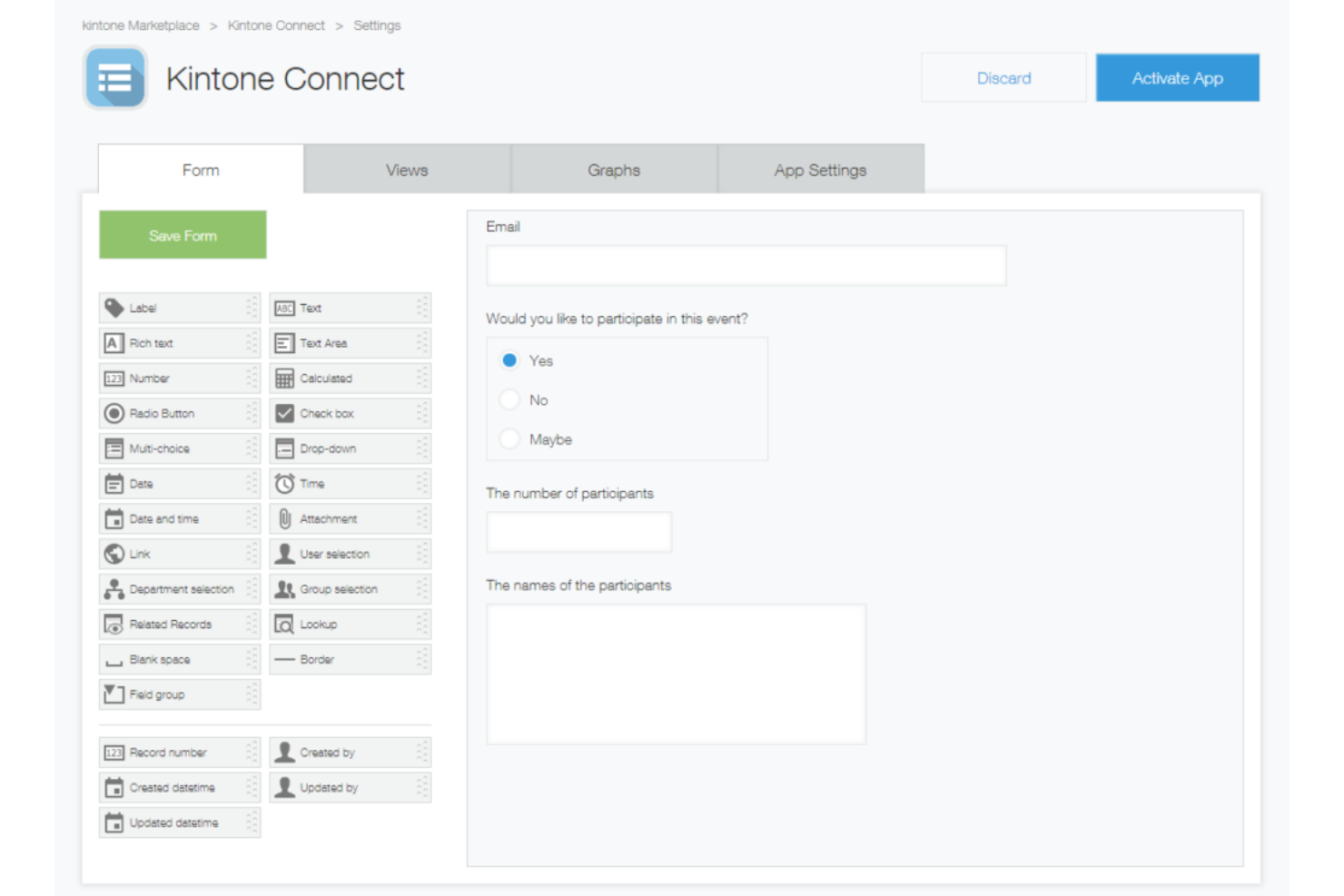
Kintone è una piattaforma workplace no-code che permette di creare app database personalizzate, gestire flussi di lavoro dei progetti con passaggi di compiti e approvazioni automatizzate, e monitorare dati del team e l'avanzamento delle attività tramite un dashboard centrale.
Per chi è più indicato Kintone?
Kintone è adatto a team di piccole e medie dimensioni che devono creare e gestire app di monitoraggio progetti personalizzate senza dipendere da uno sviluppatore.
Perché ho scelto Kintone
Ho incluso Kintone tra le mie scelte migliori perché il suo costruttore di workflow drag-and-drop consente di progettare catene di approvazione, passaggi di compiti e notifiche automatiche che si adattano esattamente alle modalità operative del tuo team. Mi piace in particolare la possibilità di creare flussi di approvazione multi-step con ramificazioni condizionali, così che una convalida di una milestone possa automaticamente essere inviata alla persona giusta in base a stato o ruolo. Puoi anche impostare promemoria automatici collegati a record specifici, mantenendo così in movimento le fasi del progetto senza bisogno di follow-up manuali.
Funzionalità chiave di Kintone
- Costruttore di app personalizzate: Aggiungi campi drag-and-drop come selettori di data, menu a tendina e campi numerici per creare un'app di monitoraggio progetti da zero.
- Spazi progetto: Crea spazi condivisi dove i team possono pubblicare aggiornamenti in thread, allegare file e collegare direttamente alle app rilevanti.
- Visualizzazioni grafiche: Visualizza i dati dei record come grafici a barre, a torta o tabelle incrociate all'interno di qualsiasi app.
- Permessi dettagliati: Controlla chi può visualizzare, modificare o aggiungere record a livello di app, spazio o singolo record.
Pros and Cons
Pros:
- Altamente personalizzabile e flessibile
- Controlli di permesso dettagliati
- Adatto a varie funzioni aziendali
Cons:
- La configurazione può richiedere alcune competenze tecniche
- L'interfaccia può essere complessa per i principianti
Backlog
Ideale per la gestione di progetti Agile
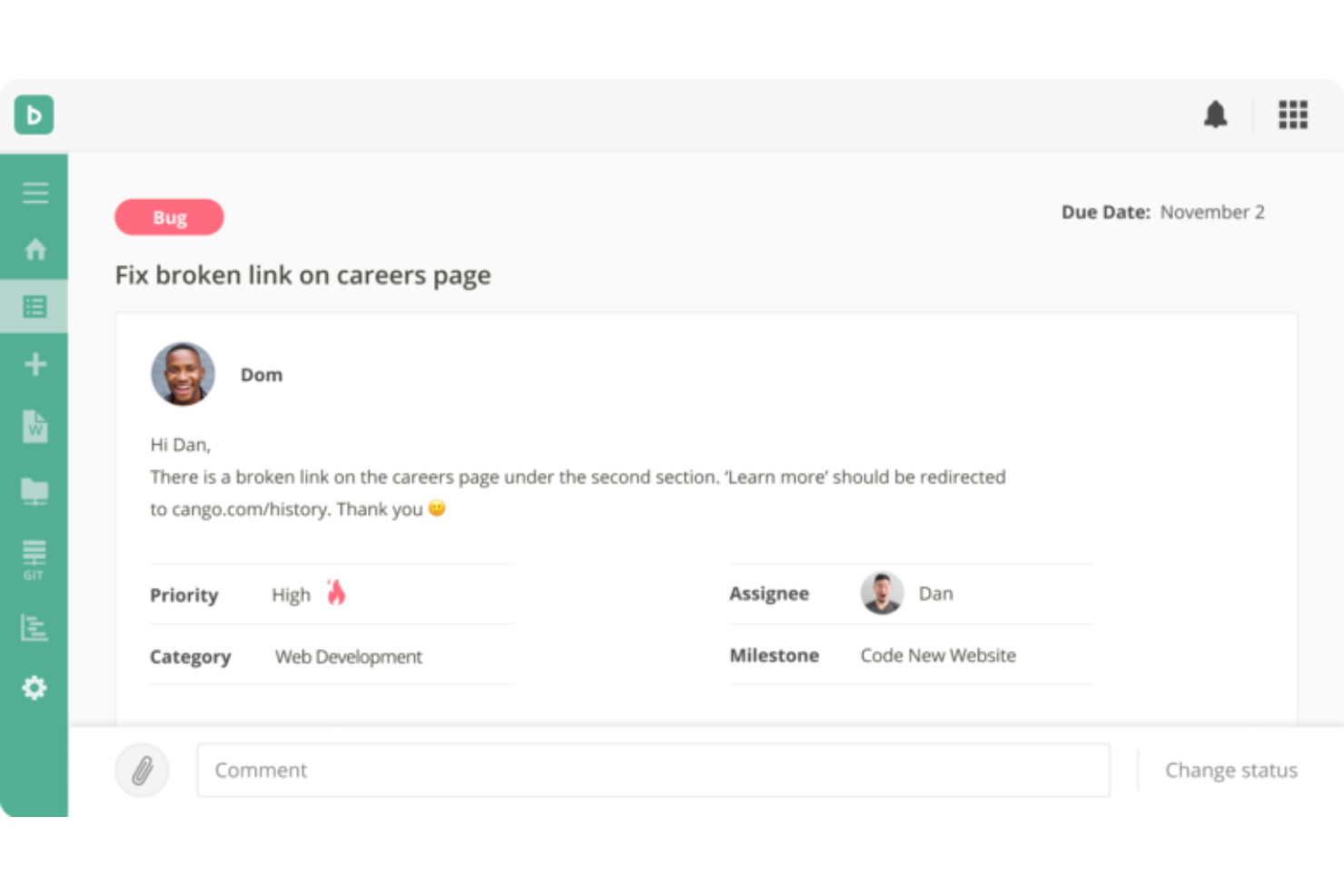
Backlog è una piattaforma di gestione progetti e tracciamento dei problemi che combina monitoraggio delle milestone, diagrammi di Gantt, bacheche Kanban, grafici burndown e il controllo versione integrato per team di sviluppo e cross-funzionali.
Per chi è più adatto Backlog?
Backlog è particolarmente adatto a team di sviluppo software e IT che hanno bisogno di gestire le milestone del progetto insieme a repository di codice e tracciamento dei problemi in un unico posto.
Perché ho scelto Backlog
Ho incluso Backlog tra le mie scelte principali perché gestisce il tracciamento delle milestone Agile in modo strettamente connesso al lavoro di sviluppo reale. Mi piace che i grafici burndown siano visualizzati direttamente accanto ai task dello sprint, così quando il mio team è nel pieno dello sprint, posso vedere in tempo reale se siamo sulla buona strada per raggiungere una milestone o se dobbiamo riorganizzare le priorità. Le milestone e le versioni sono integrate direttamente nella gerarchia delle attività, il che significa che posso collegare singoli problemi, sotto-attività e commit di codice a un obiettivo di rilascio specifico senza dover usare uno strumento separato.
Funzionalità principali di Backlog
- Diagrammi di Gantt: Visualizza l’intera cronologia del progetto e modifica le dipendenze dei task quando cambiano le date delle milestone.
- Bacheche Kanban: Tieni traccia dello stato dei task attraverso le colonne così il tuo team può vedere a colpo d’occhio cosa è in corso, bloccato o completato.
- Campi personalizzati: Aggiungi campi a problemi e attività per raccogliere i dati specifici che il tuo team deve monitorare per il progresso delle milestone.
- Integrazione con Git e SVN: Gestisci i repository di codice direttamente all’interno di Backlog e collega i commit a task e problemi specifici.
Pros and Cons
Pros:
- Funzionalità specifiche per lo sviluppo software
- Piano gratuito fino a 10 utenti e 1 progetto
- App mobili per Android e iOS
Cons:
- Progetti limitati con i piani di fascia inferiore
- Potrebbe non essere adatto a metodologie non-Agile
Asana
Ideale per gestire progetti complessi e interconnessi

Asana è una piattaforma di gestione dei progetti che consente ai team di pianificare il lavoro, impostare traguardi, monitorare le dipendenze e tenere sotto controllo l'avanzamento dei progetti attraverso viste a cronologia, bacheca ed elenco.
Per chi è ideale Asana?
Asana è particolarmente adatta a team di medie e grandi dimensioni che gestiscono più progetti contemporaneamente e necessitano di un monitoraggio strutturato delle tappe fondamentali tra diversi dipartimenti.
Perché ho scelto Asana
Asana si è guadagnata un posto nella mia lista per come gestisce il monitoraggio delle tappe fondamentali tra progetti interconnessi. Apprezzo molto la possibilità di collegare traguardi a specifiche dipendenze delle attività: così, quando un'attività precedente subisce ritardi, è possibile vederne immediatamente l'impatto sulle tempistiche generali. La vista Portfolios è la vera caratteristica che rende Asana unico per i lavori complessi: la utilizzo per monitorare lo stato dei traguardi su più progetti contemporaneamente, senza dover passare da una bacheca all'altra.
Funzionalità principali di Asana
- Vista timeline: Una visualizzazione stile Gantt che mostra attività, traguardi e le loro relazioni di pianificazione nell'arco dell'intero progetto.
- Obiettivi: Una funzione che consente di collegare i traguardi del progetto direttamente agli obiettivi aziendali, monitorando i progressi in un unico luogo.
- Regole: Trigger automatici che attivano azioni—come riassegnare attività o inviare notifiche—quando un traguardo viene segnato come completato.
- Vista carico di lavoro: Una visualizzazione grafica dell'assegnazione delle attività a ciascun membro del team, così da bilanciare la capacità produttiva rispetto alle principali scadenze dei traguardi.
Pros and Cons
Pros:
- Builder di workflow automatizzati semplice
- Sistema di gestione delle attività drag-and-drop
- Piano gratuito con progetti illimitati
Cons:
- Non dispone di un sistema di rilevazione del tempo integrato
- Il piano gratuito offre funzionalità limitate

beSlick
Ideale per gestire processi di servizio e conformità

beSlick è una piattaforma di gestione dei processi e delle attività che consente ai team di creare modelli di flusso di lavoro, eseguirli come checklist di attività e monitorare i progressi con una traccia di controllo con data e ora per la conformità.
Per chi è più adatto beSlick?
beSlick è ideale per piccole e medie imprese di servizi che necessitano di flussi di lavoro ripetibili e guidati da processi, con responsabilità integrata e monitoraggio della conformità.
Perché ho scelto beSlick
Ho scelto beSlick perché collega direttamente l'esecuzione dei processi al monitoraggio della conformità. Quando il mio team esegue un flusso di lavoro per un servizio, ogni passaggio può essere contrassegnato come non conforme, contribuendo a un punteggio complessivo di performance per quell'attività. Questo significa che non devo rincorrere la documentazione dopo un audit: le prove si generano automaticamente mentre il lavoro viene svolto. Ogni modifica a modelli o attività, azione ed invio viene registrata in una traccia di controllo con data e ora, e posso esportare quei dati come file CSV che mostra le attività come prova della conformità.
Funzionalità Principali di beSlick
- Libreria di modelli di flusso di lavoro: Archivia e gestisci modelli di processo riutilizzabili che generano automaticamente checklist di attività quando attivati.
- Monitoraggio delle tappe fondamentali: Contrassegna tappe chiave all'interno di un flusso di lavoro per monitorare i progressi rispetto alle fasi critiche di un processo.
- Assegnazione dei compiti basata sui ruoli: Assegna i passaggi di un flusso di lavoro a specifici ruoli o membri del team, così la persona giusta è responsabile di ciascun compito.
- Moduli incorporati: Aggiungi campi modulo direttamente nelle fasi del flusso di lavoro per acquisire dati, approvazioni o firme man mano che il lavoro prosegue.
Pros and Cons
Pros:
- Attività, modelli e moduli illimitati con tutti i piani
- Onboarding personalizzato con tutti i piani
- App mobile disponibile
Cons:
- Tutti i piani consentono 15 utenti, tariffa per ogni utente aggiuntivo
- Nessuna integrazione nativa, solo tramite Zapier

Ideale per monitoraggio del tempo e stima dei costi di progetto
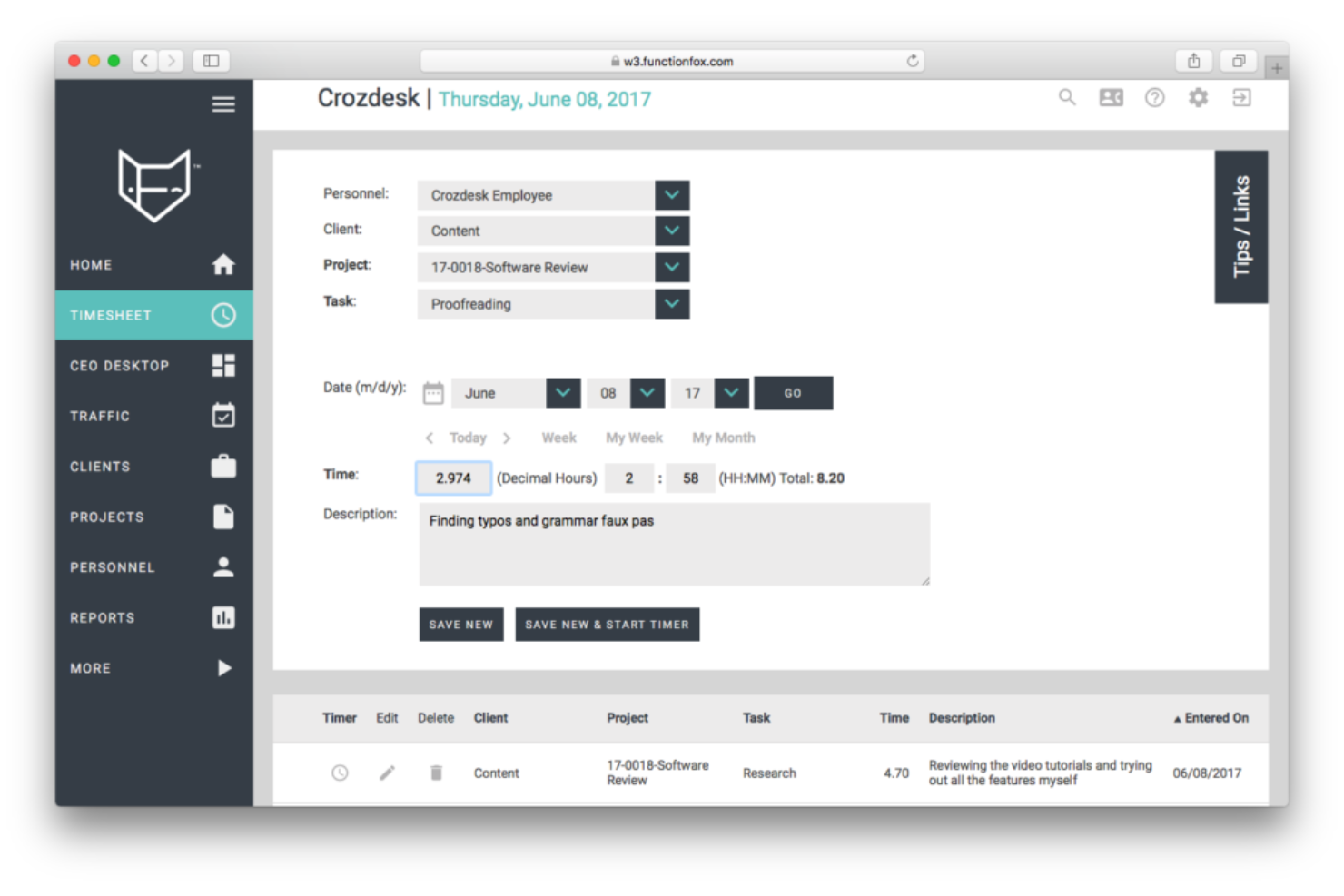
FunctionFox è una piattaforma di gestione dei progetti e monitoraggio del tempo creata appositamente per agenzie creative, con strumenti per la pianificazione delle tappe fondamentali, diagrammi di Gantt, stima dei costi dei progetti e monitoraggio del budget.
Per chi è ideale FunctionFox?
FunctionFox è particolarmente adatto a piccole e medie agenzie creative, studi di design e team di marketing che hanno bisogno di gestire i progetti insieme al monitoraggio di tempo e budget.
Perché ho scelto FunctionFox
Ho incluso FunctionFox tra le mie migliori scelte perché collega il monitoraggio del tempo direttamente alle tappe chiave del progetto, così posso vedere non solo a che punto si trova un progetto nella timeline, ma anche quante ore e quanti soldi sono stati spesi per raggiungere ogni fase. Mi piace che i timesheet integrati registrino il tempo fatturabile e non fatturabile attribuito a progetti specifici, e che gli strumenti di stima dei costi di progetto permettano di confrontare i budget stimati con la spesa effettiva, man mano che si raggiungono nuovi obiettivi.
Funzionalità principali di FunctionFox
- Pianificazione con diagramma di Gantt: Visualizza l'intera linea temporale del progetto come un diagramma di Gantt interattivo con tappe, azioni e riunioni illustrate in modo visivo.
- Strumento di pianificazione turni: Sposta in avanti o indietro tutte le tappe, le azioni e le riunioni di un numero stabilito di giorni in un solo passaggio.
- Filtri per tappe: Filtra la cronologia di pianificazione del progetto o il diagramma di Gantt per visualizzare solo le tappe principali.
- Report di progetto: Genera report sui progetti attivi per verificare lo stato, il progresso dei task e il rispetto delle scadenze.
Pros and Cons
Pros:
- Piano gratuito per un massimo di 3 utenti e 2 progetti
- Utenti illimitati con tutti i piani a pagamento
- Fatturazione e preventivi inclusi nei piani a pagamento
Cons:
- Reportistica limitata nel piano classic
- Funzionalità di project management limitate nel piano classic

Moovila
Il migliore per la gestione risorse inclusa

Moovila è una piattaforma di project e portfolio management basata su pianificazione guidata dall'IA, monitoraggio delle milestone, gestione delle dipendenze, pianificazione delle risorse e monitoraggio in tempo reale dei rischi nei piani di lavoro attivi.
Per chi è ideale Moovila?
Moovila è adatto a uffici di gestione progetti di medie e grandi dimensioni e a team di servizi professionali impegnati su più progetti simultanei e con scadenze rigorose.
Perché ho scelto Moovila
Moovila si guadagna un posto nella mia lista perché è uno dei pochi strumenti di milestone che integra la gestione delle risorse direttamente nel motore di pianificazione invece di aggiungerla in un secondo momento. Mi piace molto come la procedura guidata di assegnazione delle risorse tenga conto della capacità del team quando si impostano le date delle milestone, così da non impegnarsi su scadenze irraggiungibili per il team. Inoltre, la previsione delle risorse sulla pipeline mi consente di vedere in anticipo come le prossime milestone di progetto si confrontano con la disponibilità delle risorse ancor prima che il lavoro inizi.
Funzionalità principali di Moovila
- Punteggio di rischio RPAX: Un motore AI che valuta costantemente la salute del progetto e segnala i rischi di pianificazione prima che causino ritardi nelle milestone.
- Pianificazione con data ancora: Imposta una data di fine fissa e lascia che Moovila pianifichi automaticamente all'indietro tutte le attività e le milestone a partire da quel punto.
- Dipendenze inter-progetto: Collega milestone e attività tra diversi progetti in modo che un ritardo in un piano attivi aggiornamenti automatici negli altri collegati.
- Riprogrammazione automatica: Se un'attività è in ritardo, Moovila ricalcola in tempo reale le date delle milestone successive e invia avvisi automatici.
Pros and Cons
Pros:
- Funzionalità robuste di gestione delle attività
- Interfaccia utente intuitiva
- Strumenti efficaci per l'identificazione dei rischi
Cons:
- Personalizzazione limitata
- Nessun periodo di prova gratuita


Flow è uno strumento per la gestione di progetti e attività che combina il monitoraggio delle attività, la pianificazione delle tappe fondamentali, le timeline e la collaborazione tra i team su più progetti e gruppi di lavoro.
Per chi è ideale Flow?
Flow è adatto a team di piccole e medie dimensioni che hanno bisogno di un unico spazio di lavoro per coordinare attività e progetti tra diversi reparti o gruppi di lavoro.
Perché ho scelto Flow
Flow si guadagna un posto nella mia lista perché mi permette di impostare traguardi direttamente sulle timeline di progetto e monitorarli tra più team in un solo spazio di lavoro. Mi piace che ogni team possa avere il proprio spazio dedicato mentre le tappe fondamentali restano visibili a livello di progetto, così che nulla venga isolato. La vista 'timeline' rende facile individuare quando un team è in ritardo su una consegna importante prima che ciò influisca sull'intero programma.
Caratteristiche principali di Flow
- Dipendenze tra attività: Collega tra loro le attività in modo che il lavoro dipendente sia bloccato fino al completamento di quelle prerequisito.
- Vista Le mie attività: Una casella personale che mostra tutte le attività assegnate a ciascun membro su tutti i progetti attivi in un unico posto.
- Flussi di lavoro: Spazi di progetto dedicati in cui i team possono organizzare attività, condividere file e monitorare i progressi in modo indipendente.
- Date di scadenza e priorità: Assegna date di scadenza e livelli di priorità alle singole attività per mantenere i programmi di progetto sotto controllo.
Pros and Cons
Pros:
- Attività illimitate con tutti i piani
- Molti contenuti nel centro assistenza self-service
- Crittografia completa inclusa in tutti i piani
Cons:
- Minimo 2 utenti, non ideale per privati
- I pagamenti possono essere effettuati solo in USD

Jira
Ideale per la gestione dei prodotti di sviluppo software

Jira è una piattaforma agile di gestione dei progetti e di tracciamento dei problemi con funzionalità di pianificazione degli sprint, gestione del backlog, visualizzazioni della timeline e monitoraggio delle dipendenze per flussi di lavoro di sviluppo orientati alle milestone.
Per chi è ideale Jira?
Jira è particolarmente indicato per i team di sviluppo software e le organizzazioni guidate dall'ingegneria che gestiscono il lavoro tramite sprint e necessitano di un monitoraggio strutturato delle milestone legato ai rilasci.
Perché ho scelto Jira
Ho scelto Jira come uno dei migliori perché la sua funzionalità di Versioni e Rilasci consente ai team di sviluppo di definire obiettivi di milestone direttamente all'interno del backlog e quindi monitorare quali problemi stanno bloccando una data di rilascio. Mi piace come la vista timeline mappa l'avanzamento dello sprint rispetto a quelle milestone di rilascio, così posso vedere a colpo d'occhio le catene di dipendenza. La roadmap di Jira mi permette inoltre di fissare le date delle versioni come punti fissi, mantenendo la pianificazione delle milestone direttamente collegata all'esecuzione degli sprint.
Funzionalità principali di Jira
- Epic: Raggruppa problemi correlati sotto un unico epic per organizzare il lavoro attorno a deliverable più ampi che si allineano agli obiettivi di milestone.
- Grafici burndown: Visualizza il lavoro residuo all'interno di uno sprint o di una versione rispetto alla scadenza della milestone per individuare tempestivamente i rischi di scopo.
- Regole di automazione: Imposta trigger che aggiornano automaticamente lo stato dei problemi o inviano notifiche quando vengono soddisfatte condizioni relative alle milestone.
- Bacheche trasversali ai progetti: Recupera problemi da più progetti in una sola visualizzazione della bacheca per monitorare i progressi delle milestone attraverso diversi team.
Pros and Cons
Pros:
- Ampia banca di modelli disponibili
- Piano gratuito fino a 10 utenti
- Automazioni disponibili con tutti i piani
Cons:
- Complesso per principianti o utenti non tecnici
- Nessuna modifica massiva e scripting

Ideale per la pianificazione visiva del progetto personalizzabile
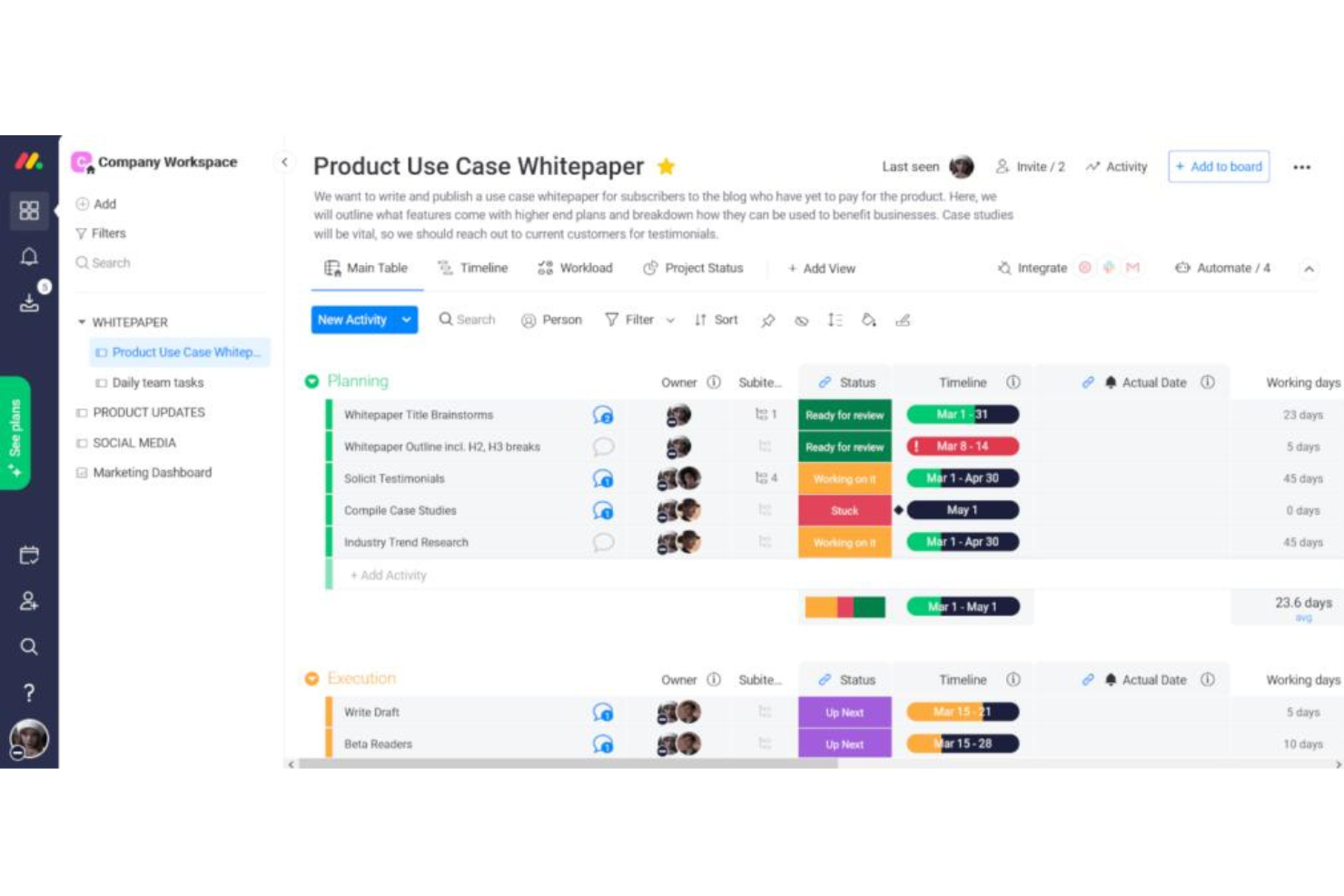
monday.com è una piattaforma di project management visivo con monitoraggio delle milestone, diagrammi di Gantt, visualizzazioni della timeline, gestione delle dipendenze e pianificazione assistita dall'intelligenza artificiale per progetti e portafogli.
Per chi è ideale monday.com?
monday.com si adatta perfettamente a team trasversali e aziende di medie dimensioni che gestiscono più progetti contemporaneamente e necessitano di strumenti di pianificazione visiva flessibili.
Perché ho scelto monday.com
monday.com si guadagna un posto nella mia shortlist grazie all'elevato livello di personalizzazione visiva che offre per la pianificazione delle milestone, davvero impressionante. Posso impostare qualsiasi attività come milestone direttamente nella visualizzazione timeline, dove appare come un indicatore a forma di diamante distinto, e poi codificarlo a colori in base allo stato o al responsabile. Mi piace anche come i diagrammi di Gantt permettano di trascinare e riordinare le milestone, impostare le dipendenze tra le attività e visualizzare i percorsi critici, così posso vedere esattamente cosa sta bloccando una data chiave prima che diventi un problema.
Funzionalità principali di monday.com
- Vista del carico di lavoro: Visualizza il carico delle attività tra i membri del team rispetto alle scadenze imminenti delle milestone.
- Dashboard del portafoglio: Monitora lo stato delle milestone su più progetti da una panoramica in tempo reale.
- Automatismi: Crea regole che attivano notifiche o aggiornamenti di stato quando si avvicina la scadenza di una milestone.
- Assistente progetto AI: Genera l'intero piano di progetto, incluse milestone e tempistiche suggerite, a partire da un semplice prompt testuale.
Pros and Cons
Pros:
- Piano gratuito con fino a 3 board
- App mobili disponibili per iOS e Android
- Interfaccia intuitiva e facile da usare
Cons:
- Spazio di archiviazione limitato nei piani base e gratuito
- Integrazioni non incluse nel piano base o gratuito
New Product Updates from monday AI Workspace
monday AI Workspace Adds Human Approval Routing
monday AI Workspace adds a human-in-the-loop approval block to AI Workflows, sending approval requests and routing workflow paths based on responses. For more information, visit monday AI Workspace's official site.
 .
.
BigTime
Ideale per la gestione e reportistica finanziaria

BigTime è una piattaforma di automazione dei servizi professionali (PSA) basata su intelligenza artificiale che integra pianificazione dei progetti, monitoraggio di milestone e task, gestione delle risorse, rilevamento di tempi e spese, e reportistica finanziaria in un unico sistema.
Per chi è ideale BigTime?
BigTime è adatto a società di servizi professionali—come team di consulenza, contabilità, architettura e ingegneria—che hanno bisogno di gestire l’erogazione dei progetti insieme a fatturazione e monitoraggio finanziario.
Perché ho scelto BigTime
Ho scelto BigTime tra i migliori per il modo in cui collega in modo preciso il monitoraggio delle milestone di progetto alle performance finanziarie. Mi piace poter controllare in tempo reale il budget rispetto ai valori effettivi a ogni livello di progetto—quindi se una milestone supera i limiti, l’impatto finanziario è subito visibile, non scoperto a fine mese. Il reporting sulla redditività dei progetti mi permette di analizzare i margini per cliente, team o periodo, dando così al riesame delle milestone un vero contesto aziendale e non solo un aggiornamento sullo stato dei task. Un’altra funzione di cui faccio grande uso è la pianificazione di scenari: posso simulare come un ritardo o una variazione di ambito influisca sulla salute finanziaria dell’intero portafoglio prima di prendere decisioni.
Funzionalità principali di BigTime
- Allocazione delle risorse: Assegna i membri del team a specifiche fasi di progetto o milestone e monitora la capacità sull’intero portafoglio in tempo reale.
- Fatturazione basata su milestone: Collega l’emissione delle fatture direttamente alle milestone di progetto completate affinché la fatturazione sia allineata allo stato di avanzamento.
- Modelli di progetto: Crea strutture di progetto riutilizzabili con milestone, task e tempistiche predefinite per standardizzare l’avvio dei nuovi progetti.
- Rilevamento di tempi e spese: Registra ore e spese su specifici task o milestone per mantenere dati accurati e pronti per audit a livello di progetto.
Pros and Cons
Pros:
- Adatto alle esigenze delle aziende di servizi professionali
- Onboarding personalizzato con tutti i piani
- Ampio materiale nella knowledge base disponibile
Cons:
- L’interfaccia può risultare complessa ai nuovi utenti
- Opzioni di personalizzazione limitate
Altri software per le milestone degni di nota
Di seguito è riportato un elenco di altri software per le milestone che ho selezionato, ma che non sono rientrati tra i primi 10. Vale sicuramente la pena dare un’occhiata anche a questi.
- Wrike
Il migliore con strumenti di collaborazione per il team integrati
- Zoho Projects
Il miglior software per milestone per team remoti
- PathPro
Ideale per lo sviluppo guidato dalla community


Come Valuto i Software per le Milestone
Quando le dipendenze dei rilasci cambiano o le date di lancio slittano, valuto gli strumenti per le milestone su due livelli: le capacità di base richieste per essere inclusi nella lista e i fattori distintivi che rendono i migliori superiori agli altri.
Funzionalità di Base (Requisiti Minimi per Questa Lista)
Quando seleziono gli strumenti per la mia lista, ne valuto ciascuno su una scala da 0 (non offre la funzionalità) a 5 (eccelle in quest'area) per ogni funzionalità di base elencata qui sotto. Poi trasformo il punteggio totale dello strumento in una percentuale. Ogni strumento deve ottenere un punteggio totale minimo del 65% per essere preso in considerazione.
- Creazione & Tracciamento delle Milestone: Verifico che si possano definire veri oggetti milestone con date target, responsabili e aggiornamenti di stato: non semplici attività etichettate come milestone.
- Visualizzazione della Roadmap: Ogni strumento dovrebbe offrire viste su timeline, Gantt o swimlane che collochino le milestone nel contesto delle iniziative di prodotto e dei rilasci più ampi.
- Gestione delle Dipendenze: Cerco la possibilità di collegare le milestone ad attività bloccanti o a consegne incrociate tra team, così un'integrazione API in ritardo evidenzia il suo impatto su una data di lancio.
- Reportistica su Avanzamento & Stato: Dashboard e report che mostrano lo stato di salute delle milestone a colpo d'occhio sono fondamentali qui—specialmente viste aggregate che un responsabile di portafoglio prodotto può condividere in riunione di leadership.
- Avvisi su Scadenze & Rischi: Notifiche automatizzate per milestone in avvicinamento, a rischio o in ritardo aiutano i team prodotto a prevenire slittamenti che possono estendersi all'intera roadmap.
- Integrazioni con Strumenti di Prodotto: Lo strumento deve sincronizzarsi con issue tracker e piattaforme di sviluppo come Jira, Azure DevOps o GitHub, in modo che lo stato delle milestone rispecchi l'avanzamento reale.
Quando ho una lista di strumenti che soddisfano questi criteri, considero cosa distingue ciascuna piattaforma.
Fattori Differenzianti (Cosa Distingue i Fornitori)
Ecco come confronto i vari fornitori:
Funzionalità di Spicco
La pianificazione di scenari è un grande fattore distintivo. Cerco strumenti che permettano di simulare spostamenti temporali "what-if" prima di confermare, così puoi capire come lo slittamento di un lancio beta influisca su tutte le milestone a valle. Anche l'allineamento strategico agli obiettivi è importante. Collegare direttamente le milestone a OKR o risultati aziendali aiuta i responsabili di prodotto a giustificare le priorità durante le revisioni di portafoglio. Valuto anche se uno strumento offre viste pronte per le presentazioni o report esportabili che gli stakeholder possano consultare senza dover accedere al prodotto.
Oltre le Funzionalità
La profondità delle integrazioni è una delle prime cose che valuto. Uno strumento milestone che non si sincronizza con il tuo issue tracker genera un carico di reportistica manuale che ne vanifica lo scopo. Collaborazione e accesso degli stakeholder pesano molto nei miei confronti. Verifico se uno strumento offre posti visualizzatore gratuiti o link condivisibili affinché dirigenti e partner possano seguire i progressi senza una licenza a pagamento. Per i team che gestiscono più linee di prodotto, guardo quanto bene le milestone si scalano tra i vari portafogli con viste gerarchiche, dal livello di team fino a quello organizzativo.
Domande più frequenti sul software per le milestone (FAQ)
Hai ancora domande sui software per la gestione delle milestone e delle attività? Non cercare oltre, abbiamo le risposte!
Quali sono i vantaggi dell'utilizzo di un software per le milestone?
Il software per le milestone offre diversi vantaggi:
- Maggiore visibilità: aiuta a visualizzare le tempistiche del progetto e a monitorare l’avanzamento delle singole attività.
- Maggiore efficienza: questi strumenti semplificano i processi di gestione dei progetti, aumentando così l’efficienza e la produttività.
- Migliore collaborazione: i membri del team possono collaborare efficacemente in tempo reale, migliorando la comunicazione e riducendo al minimo il rischio di errori.
- Report dettagliati: grazie a report completi, i responsabili possono analizzare le prestazioni, identificare i colli di bottiglia e prendere decisioni basate sui dati.
-
Esistono opzioni gratuite di software per le milestone?
Sì, alcuni strumenti offrono versioni gratuite con funzionalità limitate. Trello, MeisterTask e Todoist dispongono tutti di piani gratuiti adatti a singoli utenti o piccoli team. Tuttavia, queste versioni gratuite presentano limitazioni in termini di funzionalità e di numero di progetti o utenti.
Il software per le milestone mantiene i team concentrati sulle attività
In conclusione, scegliere il software per le milestone più adatto può migliorare significativamente la gestione dei prodotti, semplificare i processi e aumentare la produttività. Il software scelto dovrebbe essere in linea con il flusso di lavoro del team, adattarsi al caso d'uso specifico e offrire un prezzo compatibile con il budget.
Punti chiave per scegliere il miglior software per le milestone:
- Funzionalità principali: il software per le milestone più adatto offrirà funzionalità personalizzate in base alle esigenze del progetto. Dalla pianificazione visiva dei progetti alle funzionalità complete per lo sviluppo software, lo strumento scelto dovrebbe aiutare a gestire e monitorare efficacemente le milestone.
- Funzionalità chiave: cerca funzionalità uniche che distinguano uno strumento dagli altri. Potrebbe trattarsi di un'interfaccia facile da usare, di potenti integrazioni o di solide funzionalità di reporting. Queste caratteristiche possono migliorare significativamente la produttività e l'efficienza del team.
- Prezzo e usabilità: considera il modello di prezzo e l'usabilità dello strumento. Sebbene il budget sia un fattore fondamentale, l'usabilità influisce sulla rapidità con cui il team può adattarsi al software. Pertanto, trovare un equilibrio tra convenienza e design intuitivo è essenziale per implementare con successo un software per le milestone.
Vuoi rimanere aggiornato sugli ultimi contenuti di The CPO Club? Iscriviti alla nostra newsletter per ricevere gli aggiornamenti!