

Con così tante soluzioni diverse per la riproduzione delle sessioni disponibili, capire quale sia quella giusta per te può essere difficile. Sai di voler ottenere informazioni approfondite sul comportamento degli utenti, individuare con precisione i problemi di usabilità e utilizzarli per migliorare i tassi di conversione, ma devi capire quale strumento sia più adatto allo scopo. Ci penso io! In questo post ti aiuterò a rendere semplice la tua scelta, condividendo le mie esperienze personali nell'utilizzo di decine di strumenti diversi con team numerosi e prodotti eterogenei, insieme alle mie scelte per il miglior software di riproduzione delle sessioni.
Perché fidarsi dei nostri consigli sui software
6,700+
Reviews
20
Industry experts
16+
Evaluation factors
14
Years
Il nostro team testa e recensisce software dal 2012. In quanto product manager noi stessi, sappiamo quanto sia difficile — e importante — scegliere il software giusto.
Per questa guida, abbiamo valutato gli strumenti attraverso test pratici e ricerche indipendenti, assegnando un punteggio agli strumenti in base ai nostri criteri di selezione.
Le nostre recensioni riflettono il nostro giudizio editoriale umano, non un discorso di vendita.
Revisori esperti:
- Andrew LumbySenior TPM
- Cristiano ValimSenior UI/UX Lead


Tabella comparativa dei software per la riproduzione delle sessioni
Questa tabella comparativa riassume i dettagli dei prezzi delle mie migliori selezioni di software per la riproduzione delle sessioni:
| Tool | Best For | Trial Info | Price | ||
|---|---|---|---|---|---|
| 1 | Ideale per integrare replay e monitoraggio degli errori | Piano gratuito + prova gratuita + demo gratuita disponibili | Da $26/mese (fatturazione annuale) | Website | |
| 2 | Ideale per dare priorità alle sessioni in base al punteggio di attrito | Piano gratuito disponibile | A partire da $25/mese (fatturato annualmente) | Website | |
| 3 | Guarda le mappe di calore dinamiche in tempo reale | Prova gratuita di 7 giorni + piano gratuito disponibile | A partire da $32 al mese (con fatturazione annuale) | Website | |
| 4 | Ideale per l'analisi dei percorsi e dei funnel con impatto sui ricavi | Demo gratuita disponibile | Prezzi su richiesta | Website | |
| 5 | Ideale per test A/B integrati con riproduzione delle mappe di calore | Prova gratuita di 30 giorni disponibile | Da $29/mese | Website | |
| 6 | Ideale per quantificare l'impatto sui ricavi degli attriti degli utenti | Demo gratuita disponibile | Prezzi disponibili su richiesta | Website | |
| 7 | Rendi ricercabile ogni interazione dei visitatori sul tuo sito | Piano gratuito + demo gratuita disponibile | Prezzi su richiesta | Website | |
| 8 | Ideale per l'analisi degli ostacoli nelle sessioni per dispositivi mobili basata sull'AI | Piano gratuito disponibile | Prezzi su richiesta | Website | |
| 9 | Organizza le riproduzioni delle sessioni in base ai problemi rilevati | Piano gratuito + prova gratuita di 14 giorni disponibile | A partire da 15 $/host/mese (con fatturazione annuale) | Website | |
| 10 | Ideale per il rilevamento e il triage dei problemi basati sull'IA | Demo gratuita + piano gratuito + prova gratuita di 14 giorni disponibili | A partire da $83/10.000 sessioni/mese | Website |


Recensioni dei migliori software per la riproduzione delle sessioni
Di seguito trovi i miei riepiloghi dettagliati dei migliori software per la riproduzione delle sessioni inclusi nella mia selezione. Le mie recensioni offrono uno sguardo approfondito alle funzionalità principali, ai pro e contro, alle integrazioni e ai casi d’uso ideali di ogni strumento, per aiutarti a trovare quello più adatto a te.
 Ideale per integrare replay e monitoraggio degli errori
- Piano gratuito + prova gratuita + demo gratuita disponibili
- Da $26/mese (fatturazione annuale)
Visit WebsiteCustomer Rating:4.5/5
Sentry mostra replay delle sessioni per aiutare i team a tracciare gli errori attraverso le vere azioni degli utenti. Per i team che desiderano migliorare l'esperienza utente delle proprie applicazioni, Sentry offre una soluzione versatile che combina funzionalità di replay delle sessioni con il monitoraggio degli errori e delle prestazioni. È una scelta ideale per sviluppatori e aziende che vogliono ottenere informazioni utili sulle interazioni degli utenti su applicazioni web e mobile. Fornendo una riproduzione visiva delle sessioni utente, Sentry aiuta a identificare la causa principale dei problemi senza la necessità di riprodurli manualmente o di coinvolgere il supporto clienti.
Perché ho scelto Sentry
Ho scelto Sentry per la sua capacità unica di integrare il replay delle sessioni con il monitoraggio degli errori, offrendo una visione completa delle interazioni degli utenti e delle prestazioni dell'applicazione. Session Replay fornisce riproduzioni delle sessioni utente simili a video, permettendoti di vedere quando e dove si verificano gli errori, elemento cruciale per la risoluzione di problemi complessi. Inoltre, i controlli sulla privacy di Sentry proteggono i dati sensibili degli utenti pur continuando a offrire dettagli approfonditi sulle prestazioni dell'applicazione. Questa combinazione di funzionalità lo rende una scelta interessante per gli sviluppatori che necessitano di diagnosticare e risolvere velocemente i problemi.
Funzionalità principali di Sentry
Oltre alle sue solide capacità di replay delle sessioni, Sentry offre:
- Breadcrumbs: Tiene traccia degli eventi precedenti a un errore, fornendo un contesto utile per il debug.
- Monitoraggio delle prestazioni: Misura le prestazioni dell'applicazione per identificare i colli di bottiglia e ottimizzare l'esperienza utente.
- Monitoraggio degli errori: Cattura automaticamente e segnala i nuovi errori, con tracce degli stack dettagliate per una rapida risoluzione.
- Integrazione con gli strumenti di sviluppo: Si collega senza problemi a strumenti come GitHub e Slack per ottimizzare il flusso di lavoro.
Integrazioni Sentry
Le integrazioni includono GitHub, Slack, Jira, Bitbucket, GitLab, Trello, Azure DevOps, Vercel, Netlify e Datadog.
Pros and Cons
Pros:
- Cronologie dettagliate degli eventi rendono il debug più rapido
- Monitoraggio delle prestazioni per applicazioni front-end e back-end
- Solido monitoraggio degli errori con tracce dello stack chiare
Cons:
- Meno focalizzato sulle funzionalità di ricerca UX qualitativa
- Può generare grandi quantità di dati su larga scala
Learn more about Sentry: Ideale per dare priorità alle sessioni in base al punteggio di attrito
- Piano gratuito disponibile
- A partire da $25/mese (fatturato annualmente)
Visit WebsiteCustomer Rating:4.7/5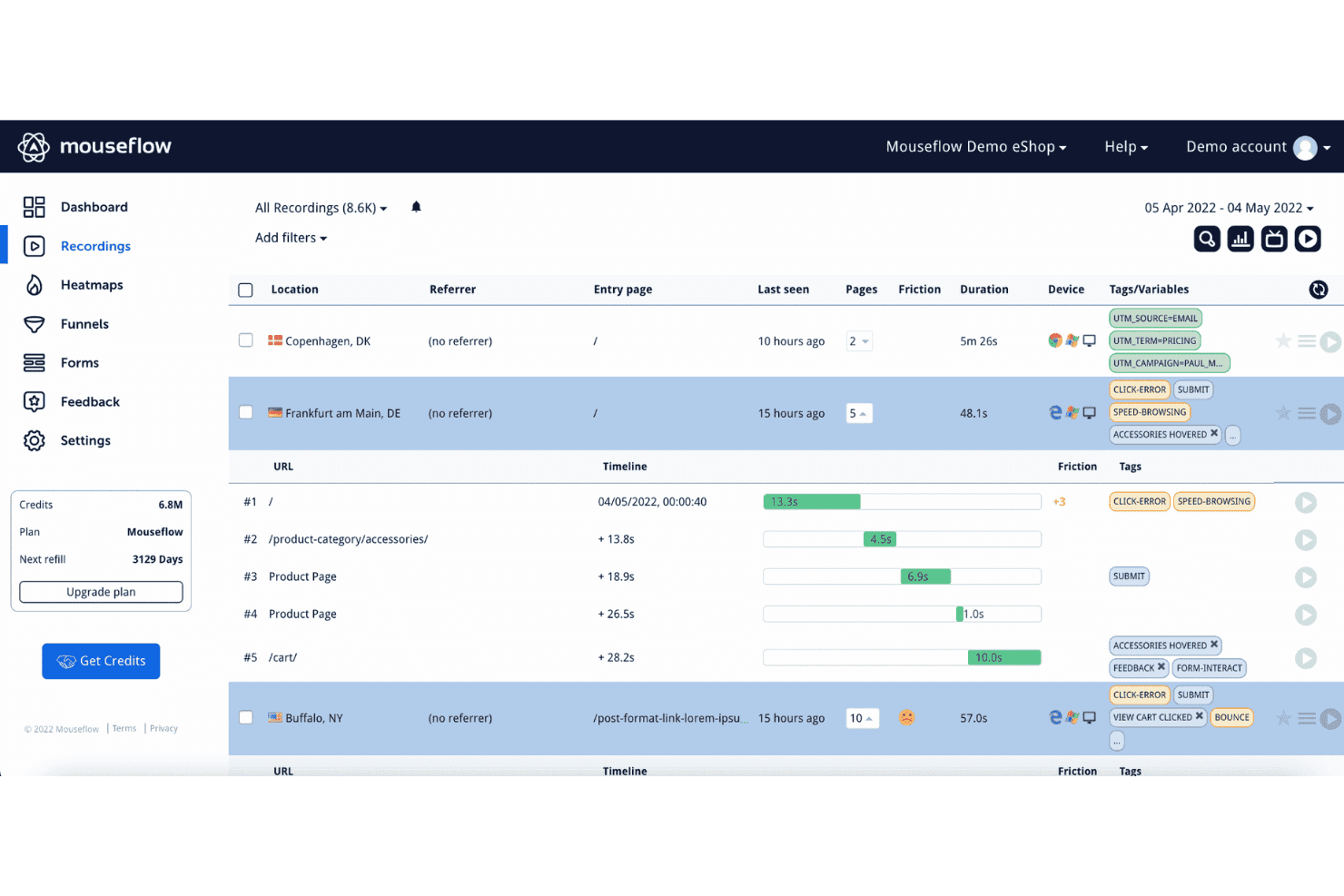
La funzionalità di registrazione delle sessioni di Mouseflow aiuta gli utenti a identificare i punti critici e le aree di attrito osservando il comportamento effettivo degli utenti. Mouseflow è una piattaforma di riproduzione delle sessioni e analisi comportamentale che acquisisce registrazioni degli utenti, mappe di calore, imbuti, analisi dei percorsi e analisi dei moduli, oltre al rilevamento automatico dei segnali di attrito.
Per chi è più adatto Mouseflow?
Mouseflow è particolarmente adatto ai team di prodotto e UX che devono individuare rapidamente i punti in cui gli utenti si bloccano, senza dover esaminare manualmente ore di registrazioni delle sessioni.
Perché ho scelto Mouseflow
Mouseflow rientra nella mia rosa di strumenti preferiti grazie al modo in cui gestisce automaticamente il rilevamento degli attriti. Ogni sessione riceve un punteggio di attrito basato su clic ripetuti, clic a vuoto, errori JavaScript e abbandoni, così posso ordinare le registrazioni in base al livello di frustrazione invece di guardarle casualmente. La mappa dell'attrito sovrappone quindi questi punti critici direttamente alle mie pagine, rendendo facile vedere esattamente dove gli utenti incontrano difficoltà senza dover analizzare singolarmente ogni riproduzione.
Funzionalità principali di Mouseflow
- Tipi di mappe di calore: Mouseflow offre sette tipi di mappe di calore — clic, scorrimento, area geografica, attenzione, movimento, attrito e interattiva — per analizzare il comportamento degli utenti secondo diverse dimensioni su un'unica pagina.
- Analisi dei moduli: Tiene traccia dei punti in cui gli utenti esitano, abbandonano o interrompono la compilazione dei moduli, offrendo una visibilità a livello di campo sui modelli di completamento.
- Segmentazione con Mina AI: Consente di estrarre segmenti di sessione usando domande formulate in linguaggio naturale, così puoi trovare gruppi specifici di utenti senza creare manualmente filtri.
- Sondaggi integrati: Include la logica dei sondaggi NPS e dei sondaggi ramificati, collegando direttamente le risposte alle registrazioni delle sessioni per aggiungere contesto comportamentale.
Integrazioni di Mouseflow
Mouseflow elenca 42 integrazioni, tra cui Google Analytics, Adobe Analytics, Google Tag Manager, AB Tasty, Salesforce, Slack e Microsoft Teams. Offre inoltre un'API REST aperta, un componente aggiuntivo per l'API estesa, l'esportazione dei dati e un server MCP per connessioni personalizzate.
Pros and Cons
Pros:
- I punteggi di attrito danno priorità alle sessioni degli utenti frustrati
- Le mappe dell'attrito rivelano le aree problematiche a livello di pagina
- Mappe di calore, imbuti e riproduzioni condividono il contesto
Cons:
- La copertura delle app mobili native rimane limitata
- Il filtraggio e la chiarezza delle riproduzioni devono essere migliorati
Learn more about Mouseflow: Guarda le mappe di calore dinamiche in tempo reale
- Prova gratuita di 7 giorni + piano gratuito disponibile
- A partire da $32 al mese (con fatturazione annuale)
Visit WebsiteCustomer Rating:4.7/5
Crea dashboard illimitate per seguire le metriche fondamentali delle campagne di marketing o specifiche fonti di traffico. Lucky Orange è uno strumento di riproduzione delle sessioni e analisi del comportamento che combina registrazioni delle sessioni, mappe di calore dinamiche, imbuti di conversione, analisi dei moduli e approfondimenti basati sull'intelligenza artificiale in un'unica piattaforma.
Per chi è più adatto Lucky Orange?
Lucky Orange è particolarmente adatto ai team di ecommerce e marketing che devono collegare direttamente il comportamento durante le sessioni ai cali di conversione e all'impatto sui ricavi.
Perché ho scelto Lucky Orange
Ho scelto Lucky Orange come uno dei migliori strumenti perché le sue mappe di calore dinamiche si aggiornano in tempo reale, permettendomi di osservare esattamente dove i visitatori fanno clic e abbandonano il sito mentre accade, non ore dopo. A questo si aggiunge Discovery AI, che mi consente di interrogare le sessioni in linguaggio naturale e ottenere un'analisi istantanea delle mappe di calore con i punti di attrito ordinati per priorità; in questo modo posso passare da una domanda a una soluzione senza dover analizzare dati grezzi. L'analisi dei moduli aggiunge una visibilità dettagliata degli abbandoni a livello di campo, così posso vedere con precisione quale campo di input sta causando la perdita di conversioni e passare direttamente alle registrazioni corrispondenti.
Funzionalità principali di Lucky Orange
- Visualizzazione dei visitatori in tempo reale: Osserva i singoli visitatori mentre navigano sul sito in tempo reale, senza aspettare la fine di una sessione per esaminarla.
- Analisi dei moduli: Visualizza i tassi di abbandono e il tempo trascorso su ciascun campo, quindi passa direttamente alle registrazioni dei visitatori che hanno abbandonato uno specifico campo di input.
- Imbuto di conversione: Monitora gli abbandoni fase per fase nei principali percorsi degli utenti, con accesso in un clic alle registrazioni di ogni fase dell'imbuto.
- Filtri di segmentazione comportamentale: Restringi le registrazioni e le mappe di calore in base al dispositivo, alla fonte di traffico, alla campagna UTM o al segnale di frustrazione prima di iniziare la riproduzione.
Integrazioni di Lucky Orange
Lucky Orange offre integrazioni con Shopify, BigCommerce, Magento, HubSpot, Google Analytics 4, Google Tag Manager, Optimizely e Zapier. Fornisce inoltre librerie JavaScript per browser e Node.js per integrazioni personalizzate.
Pros and Cons
Pros:
- Le mappe di calore in tempo reale rivelano i cambiamenti nel comportamento degli utenti
- L'AI assegna la priorità ai punti di attrito per i team di prodotto
- L'analisi dei moduli mostra gli abbandoni della conversione a livello di campo
Cons:
- Il monitoraggio limitato ai siti web esclude le esperienze native su dispositivi mobili
- L'assenza di sequenze temporali per il debug limita le analisi da parte del team tecnico
Learn more about Lucky Orange: Ideale per l'analisi dei percorsi e dei funnel con impatto sui ricavi
- Demo gratuita disponibile
- Prezzi su richiesta
Visit WebsiteCustomer Rating:4.7/5
Osserva, visualizza e migliora l'esperienza dei tuoi clienti con la Mappa del percorso aumentata. Glassbox è una piattaforma per la riproduzione delle sessioni e l'esperienza digitale che registra il 100% delle interazioni degli utenti senza codifica manuale, combinando riproduzione delle sessioni, mappatura dei percorsi, analisi dei funnel, rilevamento delle difficoltà e mappe delle interazioni sul web e sui dispositivi mobili.
Per chi è più indicato Glassbox?
Glassbox è particolarmente adatto ai team aziendali di prodotto e analisi dei dati nei settori regolamentati, come i servizi finanziari e la sanità, che devono collegare direttamente il comportamento degli utenti all'impatto sui ricavi.
Perché ho scelto Glassbox
Ho scelto Glassbox come una delle soluzioni migliori perché sia la sua Mappa del percorso aumentata sia Funnel Studio mostrano direttamente le metriche relative all'impatto sui ricavi accanto alle riproduzioni delle sessioni, permettendo di vedere non solo dove gli utenti abbandonano il percorso, ma anche quanto costa effettivamente tale abbandono. Apprezzo molto il fatto che i funnel funzionino retroattivamente sui dati storici senza alcuna codifica, il che consente di analizzare un calo notato lo scorso trimestre senza averlo tracciato in anticipo. Il punteggio proprietario delle difficoltà classifica quindi le pagine problematiche in base alla gravità, offrendo una motivazione chiara e basata sui dati aziendali per stabilire cosa correggere per primo.
Funzionalità principali di Glassbox
- Registrazione delle sessioni senza tag: Glassbox registra automaticamente il 100% delle interazioni degli utenti, senza richiedere codifica manuale, così le sessioni storiche sono sempre disponibili per l'analisi.
- Ricerca delle sessioni con l'IA GIA: Un assistente IA consente di trovare e riepilogare le sessioni usando query in linguaggio naturale, riducendo il tempo necessario per la revisione manuale.
- Punteggio delle difficoltà: Un modello di valutazione proprietario classifica pagine e schermate in base al livello di frizione, aiutando a dare priorità alle correzioni in base all'impatto aziendale.
- SDK nativo per dispositivi mobili: Supporta iOS, Android, React Native, Flutter e altri, con replica degli arresti anomali e tracciamento dei percorsi multipiattaforma integrati.
Integrazioni di Glassbox
Glassbox offre integrazioni documentate con Jira, Slack, Firebase, Google Analytics, Adobe Analytics, Qualtrics, Optimizely e VWO. La sua API aperta supporta connessioni personalizzate ad altri strumenti di prodotto e analisi.
Pros and Cons
Pros:
- I funnel retroattivi collegano gli abbandoni ai ricavi
- La registrazione completa conserva il comportamento storico non contrassegnato
- Il punteggio delle difficoltà dà priorità alle frizioni ad alto impatto
Cons:
- Le risposte alle query possono risultare lente
- La creazione dei report richiede tempo per l'inserimento iniziale
Learn more about Glassbox: Ideale per test A/B integrati con riproduzione delle mappe di calore
- Prova gratuita di 30 giorni disponibile
- Da $29/mese
Visit WebsiteCustomer Rating:4.3/5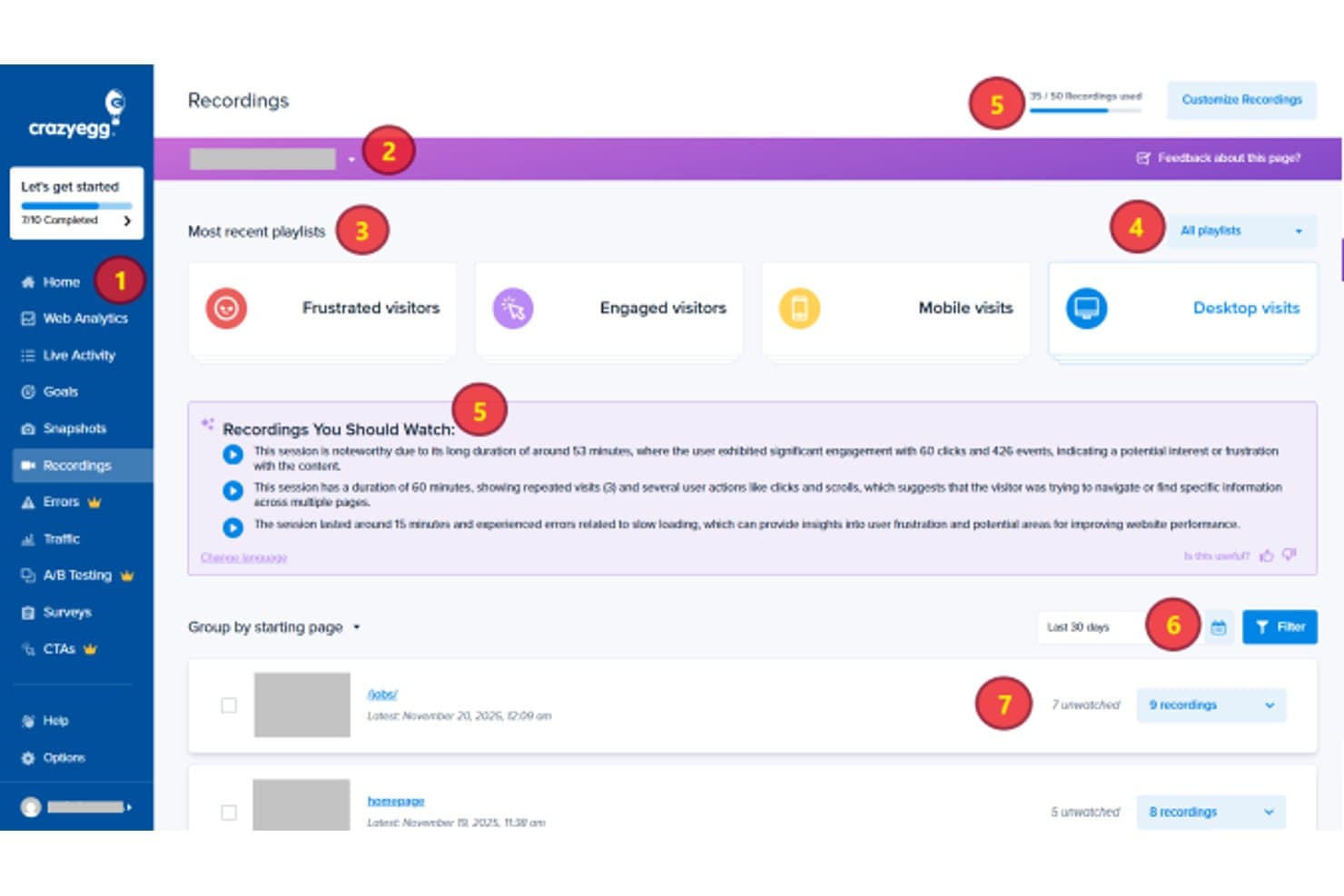
Crazy Egg organizza le registrazioni delle sessioni per playlist e pagina iniziale per la revisione. Crazy Egg è uno strumento di riproduzione delle sessioni e analisi comportamentale che combina mappe di calore, monitoraggio dei clic, mappe di scorrimento, registrazioni delle sessioni, test A/B e canalizzazioni di conversione in un'unica piattaforma.
Per chi è più indicato Crazy Egg?
Crazy Egg è particolarmente adatto ai professionisti del marketing CRO e ai product manager che desiderano mappe di calore, riproduzione delle sessioni e test A/B in un unico strumento, senza dover gestire più abbonamenti.
Perché ho scelto Crazy Egg
Ho incluso Crazy Egg tra le mie scelte principali perché è l'unico strumento di questo elenco che abbina la riproduzione delle sessioni ai test A/B integrati, consentendoti di osservare il comportamento degli utenti e poi eseguire esperimenti sulla stessa piattaforma senza cambiare strumento. Apprezzo molto il fatto che ogni variante del test A/B abbia una propria mappa di calore, così puoi capire esattamente perché una versione ha ottenuto risultati migliori di un'altra. Frictionmap, che evidenzia visivamente sulla pagina i clic ripetuti, i clic senza effetto e i clic sugli errori, rende rapido individuare le difficoltà degli utenti prima di decidere cosa testare.
Funzionalità principali di Crazy Egg
- Analisi retroattiva delle canalizzazioni: le canalizzazioni a più passaggi vengono ricalcolate automaticamente sui dati storici quando modifichi i passaggi, così non perdi gli approfondimenti passati.
- Monitoraggio degli errori JavaScript: rileva automaticamente gli errori JS e collega ciascuno di essi alla registrazione della sessione associata, includendo la traccia dello stack grezza e i dettagli del dispositivo.
- Riepiloghi delle sessioni generati dall'AI: mette in evidenza le registrazioni più pertinenti e genera riepiloghi in linguaggio semplice dei modelli di utilizzo e dei problemi di UX nelle sessioni e nelle mappe di calore.
- Mappe Confetti: suddivide i singoli clic in base a oltre 17 metriche, tra cui fonte di traffico, parametri UTM e dispositivo, direttamente sulla pagina.
Integrazioni di Crazy Egg
Crazy Egg offre integrazioni con Google Analytics 4, Google Tag Manager, Segment, Shopify, WordPress e altre piattaforme CMS. La sua API supporta il monitoraggio personalizzato delle conversioni lato server, mentre un connettore MCP consente l'accesso tramite assistenti AI.
Pros and Cons
Pros:
- Le mappe di calore evidenziano visivamente i punti di attrito del prodotto
- La riproduzione a livello di variante supporta le decisioni sugli esperimenti
- Le sessioni con errori collegano i bug al comportamento
Cons:
- I limiti ridotti alle registrazioni limitano la copertura dell'analisi
- Nessuna acquisizione nativa delle sessioni tramite app mobile
Learn more about Crazy Egg: Ideale per quantificare l'impatto sui ricavi degli attriti degli utenti
- Demo gratuita disponibile
- Prezzi disponibili su richiesta
Visit WebsiteCustomer Rating:4.7/5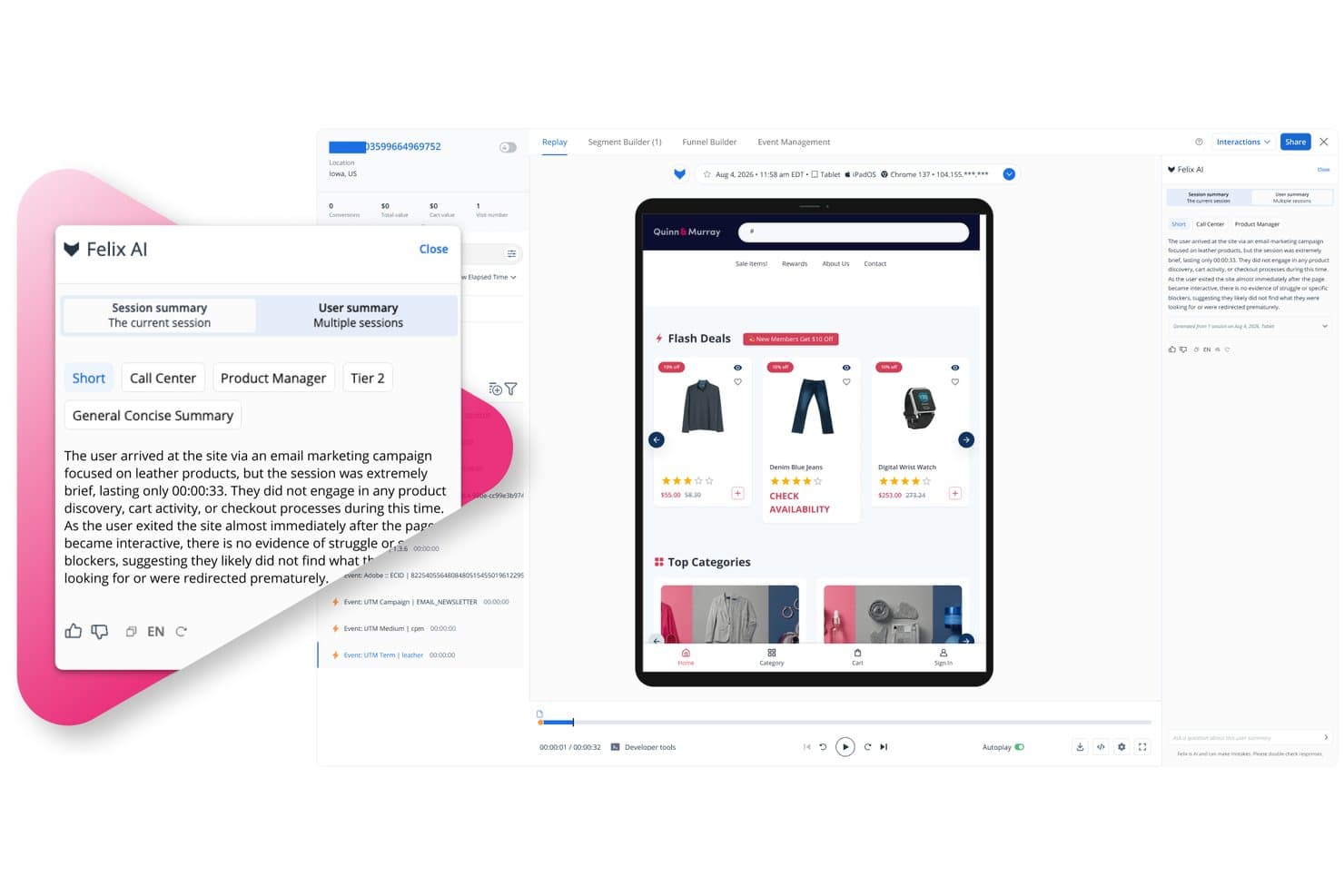
L'IA Felix di Quantum Metric riassume le riproduzioni delle sessioni per i responsabili di prodotto. Quantum Metric è una piattaforma di riproduzione delle sessioni e analisi digitale che acquisisce il comportamento degli utenti sul web e sulle app mobili native, combinando registrazioni delle sessioni ad alta fedeltà, mappe di calore, mappatura dei percorsi, segmentazione comportamentale e analisi basata sull'IA in un unico sistema connesso.
Per chi è più adatto Quantum Metric?
Quantum Metric è particolarmente adatto ai team aziendali di prodotto e digitali che devono collegare direttamente gli attriti degli utenti all'impatto sui ricavi.
Perché ho scelto Quantum Metric
Quantum Metric si è guadagnato un posto nella mia rosa di candidati perché è l'unico strumento che ho visto mettere automaticamente un valore dei ricavi accanto a un punto di attrito. La sua Analisi delle opportunità evidenzia i clic ripetuti e gli abbandoni, quindi quantifica quanto costano questi problemi, così non devo basarmi su supposizioni per stabilire le priorità. I Percorsi mappano in tempo reale i percorsi reali degli utenti sul web e sulle app mobili native, e posso passare direttamente da una fase di abbandono alla riproduzione della sessione che lo ha causato.
Funzionalità principali di Quantum Metric
- Riepiloghi delle sessioni con Felix AI: L'IA generativa riassume automaticamente le singole sessioni e i percorsi degli utenti, evidenziando punti di attrito, errori e intenzioni degli utenti in un linguaggio semplice.
- Generatore di segmenti comportamentali: I segmenti nidificati creati a partire da attributi degli eventi, attributi del pubblico e sequenze di fasi si applicano all'intera piattaforma, inclusi gli imbuti di conversione e le mappe dei percorsi.
- Riquadro di diagnostica della console e della rete: Un pannello tecnico viene eseguito accanto a ogni riproduzione della sessione, fornendo agli ingegneri il contesto necessario per riprodurre gli errori con tutti i dettagli a livello di rete.
- Avvisi sull'esperienza: Il monitoraggio automatizzato osserva il comportamento aggregato e i segnali di frustrazione, inviando avvisi proattivi tramite Slack, e-mail e altri canali quando gli indicatori KPI cambiano.
Integrazioni di Quantum Metric
Quantum Metric offre integrazioni con Optimizely, Split, Slack, Jira, ServiceNow, Qualtrics, Looker, Tealium e Adobe Experience Platform/CJA. Un'API REST supporta integrazioni personalizzate, incluso l'accesso ai riepiloghi delle sessioni generati dall'IA.
Pros and Cons
Pros:
- Quantifica i ricavi persi a causa degli attriti
- Collega gli abbandoni dei percorsi alle riproduzioni delle sessioni
- Aggiunge la diagnostica di rete accanto a ogni riproduzione
Cons:
- Le ricerche nei segmenti possono restituire risultati incompleti
- Alcune analisi dell'IA prevedono limiti di utilizzo
Learn more about Quantum Metric: Rendi ricercabile ogni interazione dei visitatori sul tuo sito
- Piano gratuito + demo gratuita disponibile
- Prezzi su richiesta
Visit WebsiteCustomer Rating:4.5/5
Calcola le opportunità più significative per migliorare l’esperienza dei tuoi utenti. Fullstory è una piattaforma di analisi dell’esperienza digitale che combina la registrazione delle sessioni, le mappe di calore, l’analisi dei funnel, la mappatura dei percorsi e la segmentazione comportamentale con l’acquisizione automatica senza tag e i riepiloghi delle sessioni basati sull’intelligenza artificiale.
Per chi è più adatto Fullstory?
Fullstory è particolarmente adatto ai team di prodotto di aziende del mercato medio e di grandi imprese che devono collegare in un unico luogo i dati qualitativi delle sessioni alle metriche quantitative dei funnel e dei ricavi.
Perché ho scelto Fullstory
Fullstory si è guadagnato un posto nella mia rosa ristretta perché l’acquisizione automatica senza tag registra automaticamente ogni clic, scorrimento e clic ripetuto e rabbioso, senza richiedere l’etichettatura manuale degli eventi. Apprezzo molto il fatto che questa cronologia retroattiva dei dati permetta di tornare indietro e analizzare il comportamento precedente al momento in cui si sapeva quali domande porre. Abbinando questa funzione alla registrazione delle sessioni collegata direttamente ai punti di abbandono del funnel, posso vedere esattamente dove gli utenti abbandonano un flusso e guardare la sessione che lo dimostra.
Funzionalità principali di Fullstory
- Acquisizione automatica senza tag: Raccoglie automaticamente ogni clic, scorrimento e interazione senza etichettatura manuale degli eventi o configurazione del tracciamento.
- Mappe dei percorsi: Visualizza i percorsi completi seguiti dagli utenti all’interno del prodotto, inclusi gli itinerari imprevisti e i punti di abbandono.
- Indicatori dello stato d’animo: Rileva segnali di frustrazione come i clic ripetuti e rabbiosi e li presenta insieme al relativo impatto stimato sui ricavi.
- Mascheramento della privacy predefinito: Visualizza i campi sensibili come strutture a fil di ferro durante la riproduzione, così puoi vedere il contesto delle interazioni senza esporre i dati degli utenti.
Integrazioni di Fullstory
Fullstory offre integrazioni con Segment, Adobe Analytics e Google Tag Manager, oltre a data warehouse e archiviazione cloud tramite Fullstory Anywhere: Warehouse. Webhook, Data Export, Element API, FS.Identity API e Consent API supportano connessioni personalizzate.
Pros and Cons
Pros:
- La cronologia retroattiva del comportamento riduce le lacune nel tracciamento
- La riproduzione collega gli abbandoni del funnel alle sessioni
- Il mascheramento della privacy preserva il contesto delle interazioni
Cons:
- La revisione di molte sessioni richiede molto tempo
- Il monitoraggio degli eventi è indietro rispetto alle funzionalità di riproduzione
Learn more about Fullstory: Ideale per l'analisi degli ostacoli nelle sessioni per dispositivi mobili basata sull'AI
- Piano gratuito disponibile
- Prezzi su richiesta
Visit WebsiteCustomer Rating:4.6/5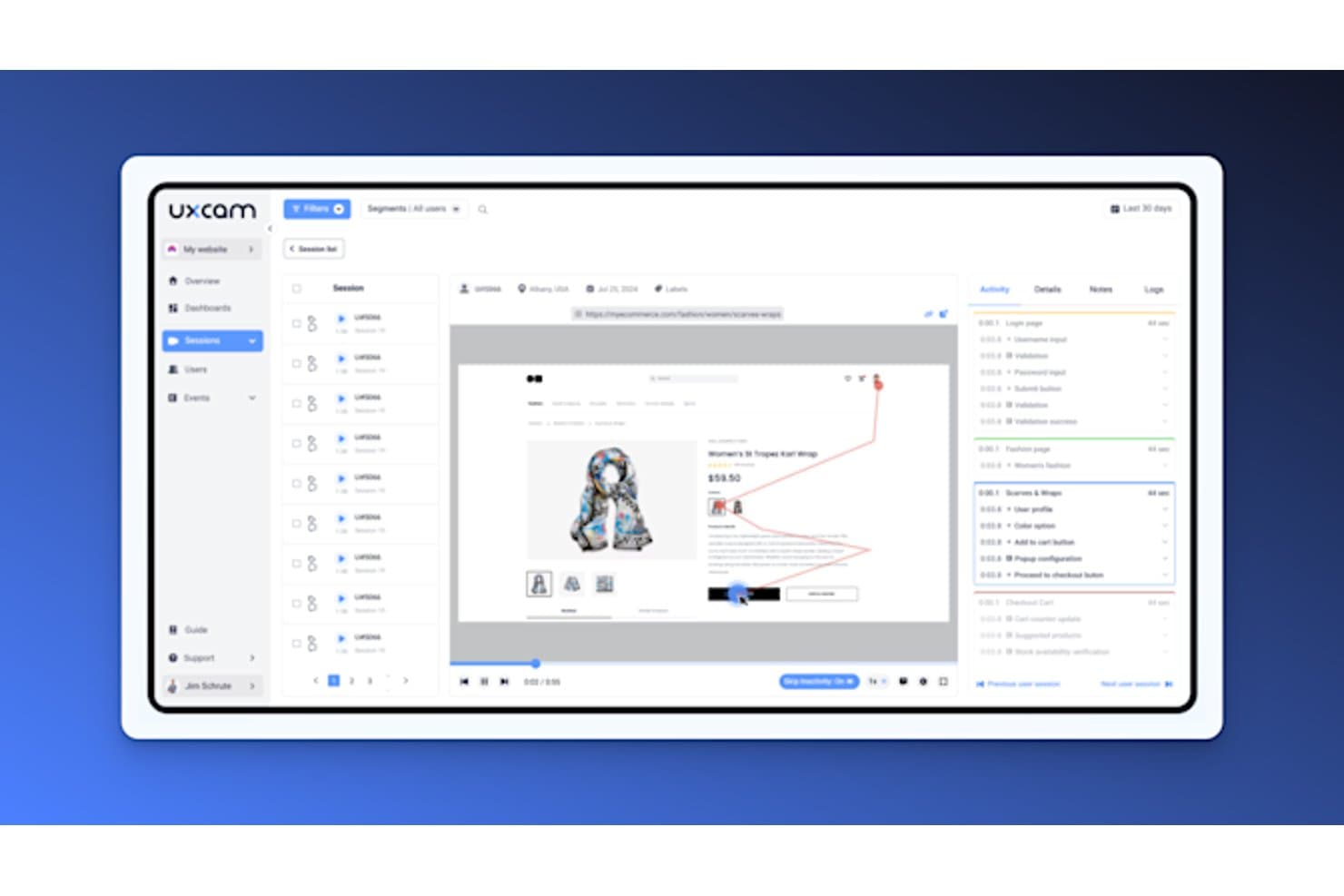
UXCam consente agli utenti di riprodurre le sessioni con cronologie dettagliate delle attività. UXCam è una piattaforma di analisi dei prodotti e riproduzione delle sessioni per dispositivi mobili che combina la registrazione delle sessioni a livello di gesto, mappe di calore, analisi degli imbuti e rilevamento degli ostacoli basato sull'AI su iOS, Android e framework per app ibride.
Per chi è più adatto UXCam?
UXCam è ideale per i team di prodotto per dispositivi mobili che hanno bisogno di dati comportamentali a livello di gesto per diagnosticare gli ostacoli nelle app iOS e Android.
Perché ho scelto UXCam
Ho scelto UXCam come uno dei migliori strumenti perché la sua analista AI, Tara, fa qualcosa che non ho visto realizzare altrettanto bene da altri strumenti: osserva autonomamente le sessioni, individua schemi di ostacoli come i tocchi frenetici e i tocchi a vuoto e li ordina in base all'impatto, così non devi scorrere manualmente le registrazioni. Mi piace anche molto il fatto che gli abbandoni nell'imbuto rimandino direttamente alle sessioni in cui gli utenti hanno abbandonato, rendendo davvero rapido passare dalla domanda su dove abbandonano gli utenti alla visione esatta di ciò che è successo.
Funzionalità principali di UXCam
- Indicatori nella cronologia della riproduzione delle sessioni: La cronologia della riproduzione contrassegna automaticamente i tocchi frenetici, i blocchi dell'interfaccia utente e gli eventi personalizzati, così puoi passare direttamente ai momenti importanti.
- Scheda Attività: Un elenco cronologico di schermate, gesti ed eventi mostra il tempo trascorso su ciascuna schermata, con la navigazione con un clic verso qualsiasi punto della sessione.
- Mascheramento della privacy sul dispositivo: Gli strumenti di occultamento del testo tramite AI, sfocatura e sovrapposizione elaborano i contenuti sensibili direttamente sul dispositivo prima che vengano trasmessi.
- Pannello di analisi dei problemi: Arresti anomali, blocchi dell'interfaccia utente ed eccezioni gestite vengono acquisiti e monitorati automaticamente per ogni versione, con monitoraggio degli avvisi.
Integrazioni di UXCam
UXCam dispone di quattro integrazioni documentate: Firebase Crashlytics, Salesforce, Zendesk e Intercom. Queste collegano il contesto della sessione ai report sugli arresti anomali e ai flussi di lavoro dell'assistenza, anche se l'insieme di integrazioni è più limitato rispetto a molte piattaforme più ampie di analisi dei prodotti.
Pros and Cons
Pros:
- L'AI Tara assegna la priorità agli schemi di ostacoli per dispositivi mobili
- Gli abbandoni nell'imbuto rimandano direttamente alle riproduzioni
- Il mascheramento sul dispositivo protegge i dati sensibili degli utenti
Cons:
- I filtri e la ricerca frustrano alcuni recensori
- L'analisi web rimane secondaria rispetto alle app per dispositivi mobili
Learn more about UXCam: Organizza le riproduzioni delle sessioni in base ai problemi rilevati
- Piano gratuito + prova gratuita di 14 giorni disponibile
- A partire da 15 $/host/mese (con fatturazione annuale)
Visit WebsiteCustomer Rating:4.5/5
Un'interfaccia con trascinamento consente a chiunque di creare rapidamente pannelli di controllo personalizzabili e in tempo reale. Datadog è uno strumento per la riproduzione delle sessioni e il monitoraggio degli utenti reali che acquisisce sessioni utente ad alta fedeltà sul web e sui dispositivi mobili, con rilevamento integrato dei segnali di frustrazione, riepiloghi basati sull'intelligenza artificiale, analisi dei percorsi di conversione e monitoraggio delle prestazioni dell'intero sistema.
Per chi è più adatto Datadog?
Datadog è una soluzione ideale per i team di prodotto e ingegneria che necessitano di riproduzioni delle sessioni collegate direttamente agli errori del back-end, alle tracce delle prestazioni e alle cause tecniche alla radice.
Perché ho scelto Datadog
Ho incluso Datadog tra le mie scelte principali perché organizza le riproduzioni delle sessioni in base ai problemi rilevati, il che significa che non devo cercare manualmente le anomalie. Quando si attiva un segnale di frustrazione, come un clic ripetuto o un clic su un errore, posso passare direttamente a quel momento nella sequenza temporale. I riepiloghi basati sull'intelligenza artificiale evidenziano anche l'intento dell'utente e i punti di attrito prima ancora che avvii la riproduzione, mentre i Capitoli intelligenti suddividono le sessioni in fasi del percorso, così posso passare direttamente al pagamento o alla revisione del carrello senza scorrere l'intera registrazione.
Funzionalità principali di Datadog
- Sequenza temporale della console e della rete: Datadog collega le riproduzioni delle sessioni direttamente ai malfunzionamenti di rete, ai log degli errori e alle tracce distribuite APM, così puoi ricondurre gli attriti dell'esperienza utente alla causa principale nei sistemi di elaborazione sul server.
- Pannello di controllo dei segnali di frustrazione: Un pannello di controllo predefinito e clonabile monitora i clic ripetuti, i clic inattivi e i clic su errori nell'intero prodotto, con indicatori nella sequenza temporale che consentono di passare al momento esatto.
- Flusso di lavoro dalla sessione al ticket: Puoi aggiungere commenti con marca temporale a qualsiasi riproduzione, menzionare i colleghi e condividere collegamenti direttamente con Jira, Slack o Confluence.
- Frequenza di campionamento delle sessioni configurabile: L'impostazione
sessionReplaySampleRateconsente di controllare quale percentuale di sessioni viene registrata, così puoi gestire il volume dei dati e i costi senza perdere visibilità.
Integrazioni di Datadog
Datadog dispone di integrazioni native in tutta la sua piattaforma, tra cui RUM, analisi del prodotto, monitoraggio degli errori, APM e log. I team possono condividere i collegamenti alle riproduzioni tramite Jira, Slack e Confluence, mentre la piattaforma Datadog nel suo complesso elenca più di 1.000 integrazioni.
Pros and Cons
Pros:
- Collega gli attriti alle cause principali nei sistemi di elaborazione sul server
- I riepiloghi basati sull'intelligenza artificiale velocizzano la revisione delle riproduzioni
- Solidi controlli della privacy proteggono i dati degli utenti
Cons:
- L'orientamento verso l'ingegneria può risultare eccessivo per i team di prodotto
- La segmentazione delle mappe di calore rimane relativamente limitata
Learn more about Datadog: Ideale per il rilevamento e il triage dei problemi basati sull'IA
- Demo gratuita + piano gratuito + prova gratuita di 14 giorni disponibili
- A partire da $83/10.000 sessioni/mese

Classifica i bug in modo più efficace in base al numero di utenti coinvolti. LogRocket è una piattaforma per la riproduzione delle sessioni che combina la registrazione delle sessioni basata sul DOM con l'analisi dei prodotti, il monitoraggio degli errori e il rilevamento dei problemi basato sull'IA, per offrire ai team di prodotto una visione unificata del comportamento degli utenti e delle prestazioni frontend.
Per chi è più adatto LogRocket?
LogRocket è particolarmente adatto ai team di prodotto e di ingegneria che devono collegare il comportamento reale degli utenti direttamente ai bug frontend e ai problemi di prestazioni.
Perché ho scelto LogRocket
Ho incluso LogRocket tra le mie scelte principali perché la sua IA Galileo non si limita a segnalare i bug: assegna una priorità ai problemi in base alla gravità riscontrata nelle sessioni reali, così posso vedere immediatamente quali punti di attrito danneggiano il maggior numero di utenti, invece di eseguire manualmente il triage. Mi piace anche il modo in cui la vista Problemi riunisce in un unico posto i clic ripetuti, i clic senza effetto e i segnali di frustrazione, con le relative riproduzioni delle sessioni collegate. Quando una versione introduce un problema, Galileo rileva l'anomalia e la segnala prima ancora che qualcuno apra un ticket.
Funzionalità principali di LogRocket
- Sincronizzazione della sequenza temporale della console e della rete: LogRocket sincronizza i log della console, le richieste di rete e gli errori JavaScript direttamente con la riproduzione della sessione, così puoi individuare esattamente cosa si è rotto e quando.
- Imbuti di conversione con riproduzioni collegate: L'analisi degli imbuti collega i dati sull'abbandono alle sessioni effettive che ne sono alla base, permettendoti di guardare cosa è successo a ogni passaggio.
- Oltre 50 filtri comportamentali e raccolte di sessioni: Filtra le sessioni in base all'ID utente, all'URL, agli eventi personalizzati o alle condizioni di prestazione, quindi salva gli insiemi filtrati come raccolte riutilizzabili.
- Integrazioni con i sistemi di ticketing: Invia i problemi direttamente a Jira, Linear, GitHub o Trello con il contesto della sessione allegato, così gli ingegneri ricevono tutto ciò di cui hanno bisogno per riprodurre un bug.
Integrazioni di LogRocket
LogRocket offre centinaia di integrazioni, tra cui Jira, Linear, GitHub, Sentry, Datadog, Amplitude, Segment, LaunchDarkly, Zendesk e Intercom. Fornisce inoltre accesso tramite API e MCP per flussi di lavoro personalizzati.
Pros and Cons
Pros:
- Il triage dei problemi classificato dall'IA dà priorità ai problemi che incidono sugli utenti
- Le riproduzioni collegano il comportamento al contesto tecnico
- Gli imbuti rivelano gli abbandoni insieme alle sessioni effettive
Cons:
- L'interfaccia orientata all'ingegneria può risultare complessa per gli analisti
- Il rilevamento degli attriti sui dispositivi mobili è meno avanzato rispetto alla copertura web
Learn more about LogRocket:
Altri software per la riproduzione delle sessioni
Ecco alcune ulteriori opzioni di software per la riproduzione delle sessioni che non sono entrate nella mia selezione, ma che vale comunque la pena prendere in considerazione:
- 11Heap (by Contentsquare)Ideale per collegare gli abbandoni del percorso di conversione alle riproduzioni delle sessioni
- 12PostHogIdeale per testare ipotesi con un unico strumento e la riproduzione delle sessioni
- 13MixpanelIdeale per collegare i dati analitici alle registrazioni delle sessioni
- 14PendoIdeale per la riproduzione delle sessioni all'interno di una suite completa di analisi del prodotto
- 15Zoho PagesenseIdeale per la riproduzione delle sessioni con la privacy al primo posto
- 16OpenReplayIdeale per la riproduzione autonoma delle sessioni con controllo dei dati
- 17ContentsquareIdeale per acquisizioni senza tag con riepiloghi delle sessioni basati sull'IA
- 18Microsoft ClarityIdeale per la riproduzione gratuita e illimitata delle sessioni su larga scala
Come valuto i software per la riproduzione delle sessioni
La mia valutazione si divide in tre parti: la funzionalità fondamentale (acquisizione e riproduzione di sessioni reali, oltre al filtraggio delle sessioni in base al comportamento o agli attributi) ha il peso maggiore, seguita da funzionalità distintive come la sintesi delle sessioni tramite IA e poi da fattori pratici come i prezzi e il livello di conformità.
Funzionalità fondamentali (requisiti essenziali per questo elenco)
Quando seleziono gli strumenti per il mio elenco, assegno a ciascuno un punteggio su una scala da 0 (la funzionalità non è disponibile) a 5 (eccelle in quest'area) per ogni funzionalità fondamentale elencata di seguito. Converto quindi il totale in una percentuale per contribuire a valutare l'idoneità complessiva di ogni strumento, dando un peso aggiuntivo alle funzionalità che ho ritenuto essenziali.
- Registrazione delle sessioni (essenziale): verifico la fedeltà della riproduzione su browser e dispositivi diversi, oltre a controlli come la velocità variabile e la navigazione per saltare direttamente a un evento.
- Segmentazione comportamentale (essenziale): la possibilità di filtrare in base a condizioni stratificate, come clic ripetuti e frustrati su una pagina specifica durante un determinato intervallo di date, distingue gli strumenti utili da quelli di base.
- Rilevamento dei clic ripetuti e dei clic con errore: cerco la segnalazione automatica di indicatori di frizione come clic inattivi e clic ripetuti e frustrati, con un contesto sufficiente per stabilire la priorità delle correzioni.
- Visualizzazione delle mappe di calore: le mappe di calore efficaci consentono di confrontare i modelli di clic, scorrimento e movimento tra segmenti o tipi di dispositivo diversi sulla stessa pagina.
- Analisi dei funnel e dei percorsi: valuto se sia possibile passare direttamente da un punto di abbandono del funnel a una sessione pertinente per comprendere il "perché".
- Privacy e mascheramento dei dati: in questo caso sono importanti regole di mascheramento configurabili che coprano per impostazione predefinita i campi sensibili, insieme a controlli granulari per elementi specifici.
Dopo aver ottenuto un elenco di strumenti che soddisfano i criteri, considero ciò che distingue ogni piattaforma.
Fattori distintivi (ciò che distingue i fornitori)
Ecco come confronto e metto in evidenza le differenze tra i vari fornitori:
Funzionalità distintive
La sintesi delle sessioni tramite IA consente di risparmiare ore di revisione manuale segnalando automaticamente i momenti degni di nota: verifico se le sintesi fanno davvero emergere i punti di frizione o se si limitano a ripetere i titoli delle pagine. Anche i flussi di lavoro dalla sessione al ticket sono altrettanto importanti; strumenti come PostHog e LogRocket consentono di allegare una registrazione direttamente a un ticket Jira o Linear, mantenendo le segnalazioni di bug ancorate al comportamento reale degli utenti anziché alle schermate. Valuto inoltre se un fornitore includa nell'offerta analisi del prodotto come flag delle funzionalità o test A/B insieme alla riproduzione, poiché ciò consente ai responsabili di prodotto di validare le ipotesi senza dover gestire strumenti separati.
Oltre le funzionalità
I modelli di prezzo variano notevolmente: alcuni fornitori applicano costi per sessione, altri in base agli utenti monitorati mensilmente. Per questo verifico in che modo i costi per eccedenza e i periodi di conservazione dei dati siano compatibili con modelli di traffico realistici prima di prendere un impegno. Anche il livello di conformità è altrettanto importante, soprattutto per i team che gestiscono dati soggetti a normative; cerco opzioni chiare per la residenza dei dati e una gestione integrata del consenso, invece di soluzioni aggiunte successivamente. Valuto inoltre come ogni strumento si integri nello stack esistente, poiché le integrazioni native con piattaforme come Amplitude o Zendesk riducono la necessità di aggiungere tag ridondanti e mantengono il contesto comportamentale in un unico luogo.
Come scegliere il software per la riproduzione delle sessioni
È facile perdersi in lunghi elenchi di funzionalità e strutture di prezzo complesse. Per aiutarti a rimanere concentrato mentre affronti il tuo processo di selezione del software, ecco un elenco di fattori da tenere a mente:
| Fattore | Cosa considerare |
|---|---|
| FattoreScalabilità | Cosa considerareIl software può crescere insieme al tuo team e alle esigenze della tua azienda? Verifica se è in grado di gestire un aumento del traffico e dei dati senza rallentamenti. |
| FattoreIntegrazioni | Cosa considerareSi collega agli strumenti che già utilizzi, come CRM, strumenti di analisi o CMS? Controlla se supporta i sistemi che usi già, per evitare interruzioni del flusso di lavoro. |
| FattorePersonalizzazione | Cosa considerarePuoi adattare il software ai tuoi processi e alle tue esigenze specifiche? Cerca opzioni per personalizzare dashboard, report e autorizzazioni degli utenti. |
| FattoreSemplicità d'uso | Cosa considerareL'interfaccia è intuitiva e facile da usare? Assicurati che il tuo team possa adottare rapidamente lo strumento senza una formazione approfondita o una curva di apprendimento ripida. |
| FattoreImplementazione e avviamento | Cosa considerareQuanto tempo e impegno saranno necessari per iniziare a utilizzarlo? Valuta la disponibilità di materiali di supporto come tutorial, guide e sessioni di avviamento. |
| FattoreCosto | Cosa considerareIl prezzo è trasparente e rientra nel tuo budget? Considera il costo totale di proprietà, incluse eventuali commissioni nascoste o spese aggiuntive per funzionalità extra. |
| FattoreMisure di sicurezza | Cosa considerareÈ conforme agli standard di sicurezza del settore e protegge i dati sensibili? Verifica se offre crittografia, verifiche periodiche della sicurezza e conformità alle normative. |
| FattoreDisponibilità dell'assistenza | Cosa considerareQuali opzioni di assistenza sono disponibili quando si verificano problemi? Controlla la disponibilità di assistenza 24 ore su 24, 7 giorni su 7, chat dal vivo e responsabili di account dedicati per ricevere supporto quando necessario. |
Che cos'è il software per la riproduzione delle sessioni?
Il software di riproduzione delle sessioni è uno strumento che registra e riproduce le interazioni degli utenti su un sito web o un'app. Viene utilizzato da professionisti come responsabili di prodotto, progettisti UX e addetti al marketing per comprendere il comportamento degli utenti e migliorare le esperienze digitali. Le mappe di calore, le registrazioni delle sessioni e l'analisi dei percorsi degli utenti aiutano a identificare i problemi e a ottimizzare i percorsi degli utenti. Nel complesso, questi strumenti forniscono informazioni preziose per migliorare l'esperienza utente e aumentare il coinvolgimento.
Funzionalità
Quando selezioni un software di riproduzione delle sessioni, presta attenzione alle seguenti funzionalità principali:
- Registrazioni delle sessioni: Acquisisci e riproduci le interazioni degli utenti per comprenderne il comportamento e identificare i problemi.
- Mappe di calore: Visualizza dove gli utenti fanno clic e scorrono sul tuo sito per individuare le aree di interesse e i potenziali problemi.
- Analisi dei percorsi degli utenti: Monitora il percorso seguito dagli utenti nel tuo sito web per ottimizzare la navigazione e migliorare il flusso degli utenti.
- Monitoraggio in tempo reale: Osserva le interazioni degli utenti mentre avvengono per rispondere rapidamente ai problemi e migliorare l'assistenza clienti.
- Imbuti di conversione: Analizza i passaggi compiuti dagli utenti prima della conversione per identificare i punti di abbandono e migliorare i tassi di conversione.
- Rilevamento delle difficoltà: Identifica automaticamente le frustrazioni e gli errori degli utenti per affrontare rapidamente i problemi di usabilità.
- Pannelli di controllo personalizzabili: Adatta l'interfaccia per visualizzare le metriche principali e le informazioni più rilevanti per il tuo team.
- Filtri avanzati: Segmenta i dati delle sessioni in base a diversi criteri per concentrarti su gruppi e comportamenti specifici degli utenti.
- Monitoraggio della conformità: Garantisci la privacy dei dati e rispetta normative come il GDPR monitorando e gestendo le pratiche di raccolta dei dati.
- Funzionalità di integrazione: Collega gli strumenti esistenti, come le piattaforme CRM e di analisi, per semplificare il flusso dei dati e migliorare le funzionalità.
Vantaggi
L'implementazione di un software di riproduzione delle sessioni offre diversi vantaggi al tuo team e alla tua azienda. Ecco alcuni dei vantaggi che puoi aspettarti:
- Esperienza utente migliorata: Analizzando le registrazioni delle sessioni e le mappe di calore, puoi identificare i punti critici e migliorare il percorso degli utenti.
- Aumento dei tassi di conversione: Con gli imbuti di conversione, puoi individuare il punto in cui gli utenti abbandonano il percorso e apportare modifiche per aumentare le conversioni.
- Rilevamento rapido dei problemi: Il monitoraggio in tempo reale e il rilevamento delle difficoltà ti aiutano a individuare e risolvere i problemi prima che coinvolgano altri utenti.
- Decisioni basate sui dati: I pannelli di controllo personalizzabili e i filtri avanzati forniscono informazioni utili per orientare le scelte strategiche e le ottimizzazioni.
- Conformità migliorata: Il monitoraggio della conformità garantisce che le pratiche di raccolta dei dati rispettino le normative sulla privacy, proteggendo l'azienda e gli utenti.
- Assistenza clienti migliore: Riproducendo le sessioni degli utenti, i team di supporto possono comprendere i problemi e fornire un'assistenza più precisa.
- Flussi di lavoro semplificati: Le funzionalità di integrazione consentono di collegare i dati delle sessioni ad altri strumenti, migliorando l'efficienza e la collaborazione.
Costi e prezzi
La scelta di un software di riproduzione delle sessioni richiede la comprensione dei vari modelli e piani tariffari disponibili. I costi variano in base alle funzionalità, alle dimensioni del team, ai componenti aggiuntivi e ad altri fattori; sono disponibili anche software gratuiti di riproduzione delle sessioni quando desideri iniziare senza costi iniziali per il software. La tabella seguente riepiloga i piani più comuni, i relativi prezzi medi e le funzionalità tipicamente incluse nelle soluzioni software di riproduzione delle sessioni:
Tabella comparativa dei piani per il software di riproduzione delle sessioni
| Tipo di piano | Prezzo medio | Funzionalità comuni |
|---|---|---|
| Tipo di pianoPiano gratuito | Prezzo medio$0 | Funzionalità comuniRegistrazioni di base delle sessioni, mappe di calore limitate e spazio di archiviazione dei dati ridotto. |
| Tipo di pianoPiano personale | Prezzo medio$5-$25/utente/mese | Funzionalità comuniRegistrazioni delle sessioni, mappe di calore e analisi di base dei percorsi degli utenti. |
| Tipo di pianoPiano aziendale | Prezzo medio$50-$150/utente/mese | Funzionalità comuniMappe di calore avanzate, imbuti di conversione, monitoraggio in tempo reale e monitoraggio della conformità. |
| Tipo di pianoPiano per grandi aziende | Prezzo medio$200-$500/utente/mese | Funzionalità comuniSet completo di funzionalità, inclusi filtri avanzati, pannelli di controllo personalizzati, assistenza dedicata e integrazioni estese. |
Domande frequenti sul software di riproduzione delle sessioni
Ecco alcune risposte alle domande comuni sul software di riproduzione delle sessioni:
In che modo il software di riproduzione delle sessioni influisce sulle prestazioni del sito web?
Il software di riproduzione delle sessioni può influire sulle prestazioni del sito web se non viene gestito correttamente. Raccoglie molti dati, che possono rallentare il sito se lo strumento non è ottimizzato per le prestazioni. Assicurati che il software utilizzi metodi efficienti di raccolta dei dati e offra opzioni per gestire il carico di dati, come il campionamento o la limitazione della durata delle registrazioni. Monitora regolarmente le prestazioni del sito web e modifica le impostazioni secondo necessità per mantenere una velocità ottimale.
Il software di riproduzione delle sessioni è conforme alle normative sulla privacy?
Sì, molti strumenti di riproduzione delle sessioni sono progettati per essere conformi alle normative sulla privacy come il GDPR e il CCPA. Spesso offrono funzionalità per oscurare o escludere i dati sensibili dalle registrazioni. Tuttavia, è tua responsabilità configurare correttamente queste impostazioni e informare gli utenti sulle pratiche di raccolta dei dati. Esamina sempre le funzionalità di conformità del software e consulta esperti legali per assicurarti che la tua implementazione soddisfi gli standard normativi.
Quanta competenza tecnica è necessaria per utilizzare il software di riproduzione delle sessioni?
Il livello di competenza tecnica richiesto varia in base allo strumento. Alcuni sono intuitivi e progettati per utenti non tecnici, mentre altri possono richiedere una certa conoscenza tecnica per la configurazione e l’impostazione. Cerca un software con risorse complete per l’avvio, come tutorial e assistenza, che ti aiutino a iniziare. Valuta le competenze tecniche del tuo team e scegli uno strumento che corrisponda al tuo livello di familiarità con la tecnologia.