

In qualità di responsabile di prodotto, conosco sia la soddisfazione di lanciare un'esperienza del prodotto fluida sia le difficoltà di correre ai ripari per colmare le lacune individuate inaspettatamente dagli utenti.
Nei giorni più difficili, potresti:
- Faticare a tenere traccia dei feedback dei clienti, rendendo più difficile capire di cosa gli utenti abbiano davvero bisogno.
- Affrontare team non allineati, in cui la collaborazione interfunzionale sembra più una gara di tiro alla fune che uno sforzo condiviso.
- Perdere tempo prezioso cercando di misurare il successo delle funzionalità con dati poco chiari e strumenti che non comunicano tra loro.
Riflettendo su queste difficoltà, mi sono reso conto che spesso derivano dalla mancanza degli strumenti giusti per semplificare i flussi di lavoro, centralizzare gli approfondimenti e favorire l'allineamento. Per questo ho raccolto in questa panoramica i migliori software per la gestione dell'esperienza del prodotto. Queste soluzioni sono progettate per aiutare i team di prodotto a pianificare, analizzare e migliorare il modo in cui i clienti vivono i loro prodotti.
In questo articolo troverai una panoramica dei principali strumenti, un riepilogo del loro funzionamento e informazioni su ciò che ciascuno sa fare meglio, per aiutarti a scegliere il software giusto con sicurezza.
Perché fidarsi dei nostri consigli sui software
6,700+
Reviews
20
Industry experts
16+
Evaluation factors
14
Years
Il nostro team testa e recensisce software dal 2012. In quanto product manager noi stessi, sappiamo quanto sia difficile — e importante — scegliere il software giusto.
Per questa guida, abbiamo valutato gli strumenti attraverso test pratici e ricerche indipendenti, assegnando un punteggio agli strumenti in base ai nostri criteri di selezione.
Le nostre recensioni riflettono il nostro giudizio editoriale umano, non un discorso di vendita.
Revisori esperti:
- Andrew LumbySenior TPM
- Cristiano ValimSenior UI/UX Lead


Tabella comparativa dei software per la gestione dell'esperienza del prodotto
Questa tabella comparativa riassume i dettagli dei prezzi delle mie migliori selezioni di software per la gestione dell’esperienza del prodotto:
| Tool | Best For | Trial Info | Price | ||
|---|---|---|---|---|---|
| 1 | Ideale con una tassonomia adattiva dei feedback | Demo gratuita disponibile | Prezzi su richiesta | Website | |
| 2 | Ideale per la categorizzazione avanzata dei testi basata sull'IA | Demo gratuita disponibile | Prezzi su richiesta | Website | |
| 3 | Ideale per dashboard di analisi del feedback sui prodotti | Demo gratuita disponibile | Prezzi su richiesta | Website | |
| 4 | Ideale per esperienze utente personalizzate | Prova gratuita di 14 giorni | A partire da 174 $/mese (con fatturazione annuale) | Website | |
| 5 | Il miglior strumento per sondaggi con integrazione CRM integrata | Prova di 10 giorni | A partire da $56/mese | Website | |
| 6 | Ideale per distribuire contenuti sulle reti dei rivenditori | Demo gratuita disponibile | Prezzi su richiesta | Website | |
| 7 | Ideale per l'automazione e l'analisi PIM | Demo gratuita disponibile | Prezzi su richiesta | Website | |
| 8 | Ideale per distribuire cataloghi a oltre 500 rivenditori | Prova gratuita + demo gratuita disponibili | A partire da $45,000/anno | Website | |
| 9 | Ideale per la distribuzione di cataloghi B2B con DAM integrato | Website | |||
| 10 | Ideale per l'intelligence sui clienti basata sull'IA | Demo gratuita disponibile | Prezzi su richiesta | Website |


Recensioni dei migliori software per la gestione dell'esperienza del prodotto
Ecco una breve descrizione di ciascun software per la gestione dell’esperienza del prodotto presente nel mio elenco, con indicazione delle sue funzionalità principali e schermate che mostrano alcune delle funzioni disponibili.
 Ideale con una tassonomia adattiva dei feedback
- Demo gratuita disponibile
- Prezzi su richiesta
Visit WebsiteCustomer Rating:4.8/5This rating combines scores from multiple user review sites to reflect overall customer sentiment about the product.
Enterpret mette in evidenza i fattori che determinano l'abbandono e automatizza gli avvisi di escalation dei clienti. Enterpret è una piattaforma di intelligence sui clienti che aggrega i feedback provenienti da supporto, vendite, sondaggi, recensioni e dati di utilizzo del prodotto, quindi li organizza in una tassonomia adattiva per far emergere approfondimenti utili per i team di prodotto.
Per chi è più adatto Enterpret?
Enterpret è adatto ai team di prodotto di aziende SaaS di medie e grandi dimensioni che devono interpretare elevati volumi di feedback dei clienti provenienti dai canali di supporto, vendite e recensioni.
Perché ho scelto Enterpret
Ho incluso Enterpret tra le mie migliori scelte perché la sua tassonomia adattiva dei feedback si rimodella automaticamente man mano che evolvono il linguaggio dei clienti e il prodotto, evitando di dover ricategorizzare manualmente i feedback per mantenere aggiornati gli approfondimenti. Apprezzo particolarmente il modo in cui il Grafo del contesto cliente collega i singoli segnali di feedback a risultati aziendali come abbandono e fidelizzazione, consentendo ai team di prodotto di vedere quali reclami producono effettivamente un impatto significativo. Il livello di approfondimenti IA permette di interrogare l'intero corpus di feedback in linguaggio naturale, riducendo il tempo che intercorre tra l'individuazione di uno schema e l'azione conseguente.
Funzionalità principali di Enterpret
- Integrazioni con le fonti di feedback: Importa i segnali dei clienti da ticket di supporto, chiamate di vendita, sondaggi, recensioni degli app store, social media e dati CRM in un'unica area di lavoro.
- Grafo del contesto cliente: Collega i singoli record di feedback a funzionalità specifiche del prodotto, segmenti di clientela e risultati aziendali come abbandono e ricavi derivanti dall'espansione.
- Integrazioni dei flussi di lavoro: Crea automaticamente ticket Jira o Linear e invia avvisi Slack quando l'analisi dei feedback rileva uno schema su cui vale la pena intervenire.
- Misurazione dell'impatto: Tiene traccia delle variazioni nel volume dei ticket, nel sentiment e nell'adozione prima e dopo un aggiornamento del prodotto, per mostrare se un problema è stato risolto.
Integrazioni di Enterpret
Enterpret si integra con Salesforce, Slack, Jira, Linear, Claude e ChatGPT tramite il suo server MCP. Fornisce inoltre accesso API per integrazioni personalizzate.
Pros and Cons
Pros:
- Centralizza i feedback tra i punti di contatto del prodotto
- La tassonomia adattiva tiene traccia dei cambiamenti nel linguaggio dei clienti
- Collega i reclami ai risultati in termini di fidelizzazione e abbandono
Cons:
- Nessun catalogo prodotti o gestione degli attributi
- Nessuna diffusione, gestione delle risorse digitali o formattazione dei canali
Learn more about Enterpret: Ideale per la categorizzazione avanzata dei testi basata sull'IA
- Demo gratuita disponibile
- Prezzi su richiesta
Visit WebsiteCustomer Rating:4.4/5This rating combines scores from multiple user review sites to reflect overall customer sentiment about the product.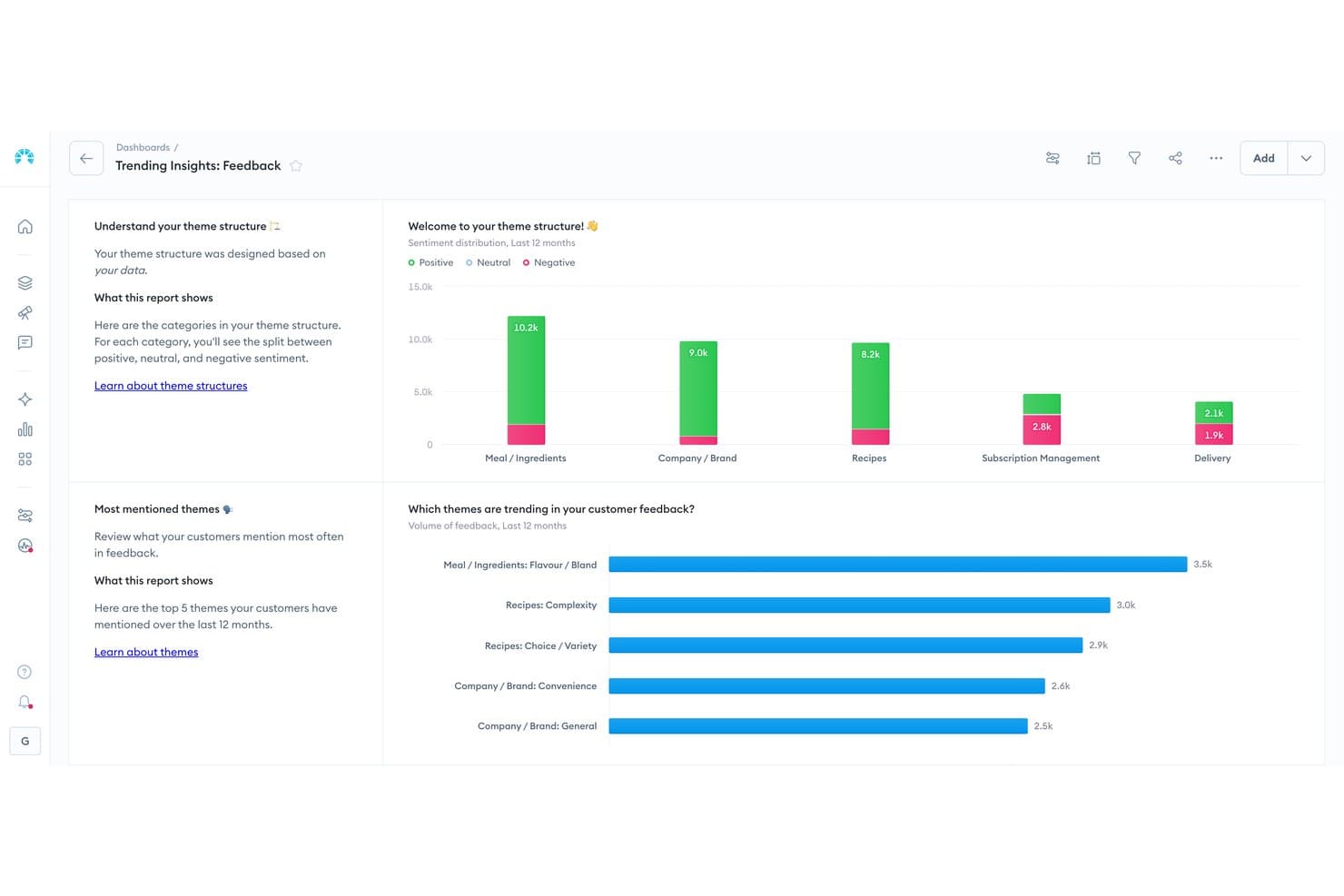
Chattermill visualizza il sentiment dei feedback dei clienti tra i temi dei prodotti. Chattermill è una piattaforma nativa per l'IA per l'analisi dei feedback dei clienti che acquisisce dati da sondaggi, recensioni, ticket di assistenza e social media per evidenziare temi, sentiment e cause profonde nell'intera esperienza del cliente.
Per chi è più indicato Chattermill?
Chattermill è adatto ai team aziendali dedicati all'esperienza del cliente e al prodotto che necessitano di un'analisi basata sull'IA di grandi volumi di feedback dei clienti per individuare su larga scala i modelli di sentiment e le cause dei resi.
Perché ho scelto Chattermill
Ho scelto Chattermill come una delle migliori soluzioni perché il suo motore di IA Lyra fa qualcosa che non ho visto fare allo stesso livello altrove: assegna automaticamente tag a temi, sentiment e cause profonde su migliaia di elementi di feedback non strutturati, dalle recensioni ai ticket di assistenza, senza tagging manuale. Quando i team di prodotto devono sapere esattamente perché i clienti restituiscono gli articoli o abbandonano il percorso, Lyra Agent fornisce queste risposte con citazioni dirette dei clienti e dati sull'impatto aziendale.
Funzionalità principali di Chattermill
- Lyra Agent: Un analista IA che risponde alle domande su NPS, CSAT, abbandono e resi dei prodotti, presentando risposte con citazioni dirette dei clienti e grafici dei dati.
- Rilevamento proattivo delle anomalie: Segnala automaticamente picchi, problemi emergenti e opportunità nei dati dei feedback, quindi invia avvisi a Slack, email o Jira.
- Analisi dell'impatto: Collega direttamente i temi dei feedback a metriche aziendali come abbandono e ricavi, così puoi dare priorità agli elementi che determinano risultati misurabili.
- Integrazione con MCP e Skills: Rende i dati di Chattermill accessibili all'interno di assistenti IA come Claude e ChatGPT per l'analisi nei flussi di lavoro esistenti.
Integrazioni di Chattermill
Chattermill offre oltre 65 integrazioni native, tra cui Shopify App Store, Loop Returns, Trustpilot, Bazaarvoice, Salesforce e Zendesk. Supporta inoltre l'accesso tramite API, il caricamento di file CSV e feed di dati sicuri per connettività personalizzata.
Pros and Cons
Pros:
- L'IA categorizza temi, sentiment e cause profonde
- L'analisi dei resi orienta le decisioni sui contenuti dei prodotti
- Gestisce l'analisi di grandi volumi di feedback dei clienti
Cons:
- Nessun archivio centralizzato dei dati dei prodotti
- Nessuna distribuzione o formattazione specifica per canale
Learn more about Chattermill: Ideale per dashboard di analisi del feedback sui prodotti
- Demo gratuita disponibile
- Prezzi su richiesta
Visit WebsiteCustomer Rating:4.7/5This rating combines scores from multiple user review sites to reflect overall customer sentiment about the product.
Sogolytics aiuta i team responsabili dell'esperienza del prodotto a comprendere il sentiment degli utenti grazie a diverse metriche visualizzate nella dashboard. Sogolytics è una piattaforma per l'esperienza di clienti e dipendenti che raccoglie feedback tramite sondaggi, email, chat e canali social, quindi mette in evidenza temi, sentiment e tendenze attraverso analisi basate sull'IA e dashboard di analisi in tempo reale.
A chi è più adatto Sogolytics?
Sogolytics è adatto ai team di prodotto che devono centralizzare il feedback dei clienti proveniente da più canali e mettere in evidenza tendenze utili attraverso dashboard di analisi in tempo reale.
Perché ho scelto Sogolytics
Ho scelto Sogolytics come una delle soluzioni migliori per la sua capacità di centralizzare feedback provenienti da sondaggi, chat, social e recensioni in dashboard di analisi che mettono davvero in evidenza ciò che conta. Mi piace il fatto che la sua analisi basata sull'IA identifichi automaticamente temi, sentiment e fattori determinanti tra tutti questi dati, così i team di prodotto non devono esaminare manualmente il rumore. Le sue dashboard in tempo reale rendono semplice individuare le tendenze nel feedback dei clienti prima che si trasformino in problemi più grandi per il prodotto.
Funzionalità principali di Sogolytics
- Raccolta di feedback multicanale: Raccoglie in un unico luogo i contributi dei clienti provenienti da sondaggi, email, chat, social media, feedback in-app e recensioni.
- Analisi dei fattori determinanti: Identifica quali fattori del feedback influenzano maggiormente il sentiment dei clienti e i risultati dell'esperienza del prodotto.
- Instradamento automatico delle azioni: Assegna gli elementi del feedback ai responsabili designati, con scadenze e monitoraggio degli SLA per garantire il completamento delle attività.
- Previsione dell'abbandono: Utilizza l'analisi predittiva per segnalare i clienti a rischio in base agli schemi presenti nel loro feedback e nei segnali di coinvolgimento.
Integrazioni di Sogolytics
Sogolytics elenca 14 integrazioni, tra cui Shopify, Webflow, Salesforce, HubSpot, Snowflake, Zendesk, ServiceNow, Slack e Microsoft Teams.
Pros and Cons
Pros:
- Centralizza il feedback tra i diversi punti di contatto con i clienti
- Mette in evidenza i temi attraverso analisi in tempo reale
- Assegna responsabili al feedback con monitoraggio degli SLA
Cons:
- Non gestisce i cataloghi o gli attributi dei prodotti
- Non può distribuire gli annunci sui canali di vendita
Learn more about Sogolytics: Ideale per esperienze utente personalizzate
- Prova gratuita di 14 giorni
- A partire da 174 $/mese (con fatturazione annuale)
Visit WebsiteCustomer Rating:4.7/5This rating combines scores from multiple user review sites to reflect overall customer sentiment about the product.
Le guide interattive di UserGuiding possono contribuire a definire l'esperienza utente dal momento in cui interagisce per la prima volta con il tuo prodotto. UserGuiding è una piattaforma di adozione digitale che offre onboarding in-app, tour del prodotto, tooltip, checklist e supporto self-service attraverso una guida mirata e segmentata all'interno delle applicazioni web.
Per chi è più adatto UserGuiding?
UserGuiding è particolarmente adatto ai team di prodotto SaaS che desiderano guidare gli utenti attraverso le funzionalità con esperienze in-app personalizzate e segmentate, senza bisogno di risorse di sviluppo.
Perché ho scelto UserGuiding
Ho scelto UserGuiding come una delle soluzioni migliori per l'efficacia con cui il suo motore di segmentazione offre esperienze in-app realmente personalizzate. Puoi rivolgerti a gruppi specifici di utenti con tour del prodotto personalizzati, checklist di onboarding e modali di annuncio basati sul comportamento, sul ruolo o sulla fase del ciclo di vita. Apprezzo particolarmente il fatto che il suo Centro risorse e l'Assistente IA si adattino a chi pone le domande, mostrando indicazioni pertinenti senza bisogno di aprire un ticket di supporto.
Funzionalità principali di UserGuiding
- Checklist di onboarding: Elenchi di attività passo dopo passo che guidano gli utenti nel completamento delle azioni principali all'interno del prodotto.
- Sondaggi in-app: Moduli di feedback leggeri attivati all'interno del prodotto per raccogliere i commenti degli utenti in momenti specifici.
- Monitoraggio degli eventi senza codice: Uno strumento di analisi basato su puntamento e clic che traccia le interazioni degli utenti senza richiedere il supporto del team di sviluppo.
- Modali di annuncio: Messaggi pop-up che puoi pubblicare all'interno del prodotto per mettere in evidenza aggiornamenti, nuove funzionalità o messaggi mirati a specifici segmenti di utenti.
Integrazioni di UserGuiding
UserGuiding offre integrazioni con HubSpot, Segment, Mixpanel, Google Analytics, Intercom, Amplitude, Salesforce e Webhook.
Pros and Cons
Pros:
- Personalizza le esperienze in-app attraverso la segmentazione
- Implementa rapidamente una guida all'onboarding senza codice
- Combina strumenti per feedback, supporto e adozione
Cons:
- Non dispone di una gestione centralizzata dei contenuti di prodotto
- Non può distribuire i contenuti sui diversi canali di vendita
Learn more about UserGuiding: Il miglior strumento per sondaggi con integrazione CRM integrata
- Prova di 10 giorni
- A partire da $56/mese
Visit WebsiteCustomer Rating:4.6/5This rating combines scores from multiple user review sites to reflect overall customer sentiment about the product.
Survicate offre un modo semplice e diretto per analizzare le risposte ai sondaggi, inclusi i punteggi NPS, i punteggi CSAT e le risposte testuali aperte. Survicate è una piattaforma per il feedback dei clienti e i sondaggi che raccoglie risposte tramite canali web, e-mail, mobile e integrati nel prodotto, utilizzando l'AI per analizzare il sentiment, raggruppare i feedback per argomento e sincronizzare i risultati con strumenti CRM e di marketing.
Per chi è più adatto Survicate?
Survicate è adatto ai team di prodotto e di esperienza del cliente che hanno bisogno di raccogliere feedback in diversi punti di contatto e trasferire i risultati direttamente nel proprio CRM o insieme di strumenti di marketing.
Perché ho scelto Survicate
Ho incluso Survicate tra le mie scelte principali perché la sua integrazione CRM integrata fa sì che il feedback non rimanga isolato: le risposte ai sondaggi vengono sincronizzate direttamente con Salesforce, HubSpot o Pipedrive, consentendo ai team di prodotto di agire sui segnali dei clienti senza esportazioni manuali. Apprezzo in particolare il modo in cui il suo Hub di ricerca AI assegna automaticamente tag al sentiment e raggruppa i feedback per argomento tra sondaggi, ticket di assistenza e registrazioni delle chiamate. Questo tipo di analisi trasversale alle fonti offre ai responsabili di prodotto una visione più chiara di ciò che i clienti pensano realmente della loro esperienza.
Funzionalità principali di Survicate
- Distribuzione di sondaggi multicanale: Distribuisci sondaggi sul web, tramite e-mail, app mobile, all'interno del prodotto, codici QR e strumenti di chat come Intercom da un'unica piattaforma.
- Hub di ricerca AI: Importa automaticamente feedback da sondaggi, ticket di assistenza, registrazioni delle chiamate e recensioni, quindi assegna tag al sentiment e raggruppa le risposte per argomento.
- Attivatori automatici dei sondaggi: Avvia sondaggi in base a eventi specifici dell'utente, come un acquisto, un'interazione con l'assistenza o una cancellazione, senza intervento manuale.
- Logica di diramazione personalizzata: Crea sondaggi con percorsi di domande condizionali che si adattano in base alle risposte date dagli intervistati alle domande precedenti.
Integrazioni di Survicate
Survicate offre oltre 50 integrazioni, tra cui Productboard, Salesforce, HubSpot, Google Sheets, Segment e Zapier. I piani Growth e superiori includono webhook e un'API di esportazione per connessioni personalizzate.
Pros and Cons
Pros:
- Centralizza il feedback dei clienti per le decisioni di prodotto
- L'AI raggruppa il sentiment tra diverse fonti di feedback
- Attiva sondaggi dopo eventi chiave del prodotto
Cons:
- Nessun catalogo prodotti o distribuzione delle schede
- Nessuna governance delle risorse digitali o dei rivenditori
Learn more about Survicate: Ideale per distribuire contenuti sulle reti dei rivenditori
- Demo gratuita disponibile
- Prezzi su richiesta
Visit WebsiteCustomer Rating:4.4/5This rating combines scores from multiple user review sites to reflect overall customer sentiment about the product.
Salsify automatizza l'estrazione e la distribuzione dei dati dei prodotti con flussi di lavoro basati sull'intelligenza artificiale. Salsify è una piattaforma di gestione dell'esperienza di prodotto (PXM) che combina la gestione centralizzata delle informazioni sui prodotti, la gestione delle risorse digitali, l'arricchimento dei contenuti basato sull'intelligenza artificiale e una rete di distribuzione per i rivenditori.
Per chi è più indicato Salsify?
Salsify è particolarmente adatto ai brand che gestiscono cataloghi di prodotti di grandi dimensioni su più canali di vendita al dettaglio e che hanno bisogno di automatizzare la distribuzione su larga scala.
Perché ho scelto Salsify
Salsify è entrato nella mia selezione finale grazie alla sua rete di distribuzione, che si collega a oltre 7.500 destinazioni per la vendita al dettaglio e si aggiorna automaticamente in base ai requisiti più recenti sui contenuti di ciascun rivenditore. Mi piace molto il fatto che, quando un rivenditore come Walmart modifica le specifiche di configurazione dei propri articoli, Salsify segnala le lacune e ti guida nella loro correzione prima che i contenuti vengano distribuiti. Il livello di intelligenza artificiale della piattaforma, che include l'assistente Angie e Intelligence Suite, gestisce inoltre attività di massa sui contenuti, come la traduzione e la personalizzazione a livello di persona, direttamente all'interno del flusso di lavoro.
Funzionalità principali di Salsify
- Intelligence Suite: Un livello di automazione basato sull'intelligenza artificiale che esegue attività come la traduzione dei contenuti e la personalizzazione a livello di persona direttamente nei flussi di lavoro esistenti.
- Motore di convalida dei dati: Verifica in tempo reale i contenuti dei prodotti rispetto ai requisiti specifici di ciascun rivenditore, prima della pubblicazione.
- Gestione dell'esperienza dei fornitori (SXM): Un modulo dedicato alla raccolta e alla gestione dei dati dei prodotti direttamente dai fornitori all'interno della piattaforma.
- Motore dei flussi di lavoro: Assegna, monitora e impone le attività relative ai contenuti tra i team, per mantenere coerenti le regole di governance nell'intero catalogo.
Integrazioni di Salsify
La rete di distribuzione di Salsify si collega a oltre 7.500 destinazioni per la vendita al dettaglio, tra cui Walmart. Supporta inoltre un pool di dati GDSN, API, webhook e integrazioni con marketplace tramite Acquia DAM e Bynder.
Pros and Cons
Pros:
- Distribuisce i contenuti a oltre 7.500 destinazioni per la vendita al dettaglio
- Segnala i cambiamenti nei requisiti dei rivenditori prima della pubblicazione
- Centralizza i dati e le risorse dei prodotti
Cons:
- Gli asset meno recenti possono essere difficili da trovare
- Alcune connessioni con i rivenditori richiedono un intervento manuale
Learn more about Salsify: Ideale per l'automazione e l'analisi PIM
- Demo gratuita disponibile
- Prezzi su richiesta
Visit WebsiteCustomer Rating:4.1/5This rating combines scores from multiple user review sites to reflect overall customer sentiment about the product.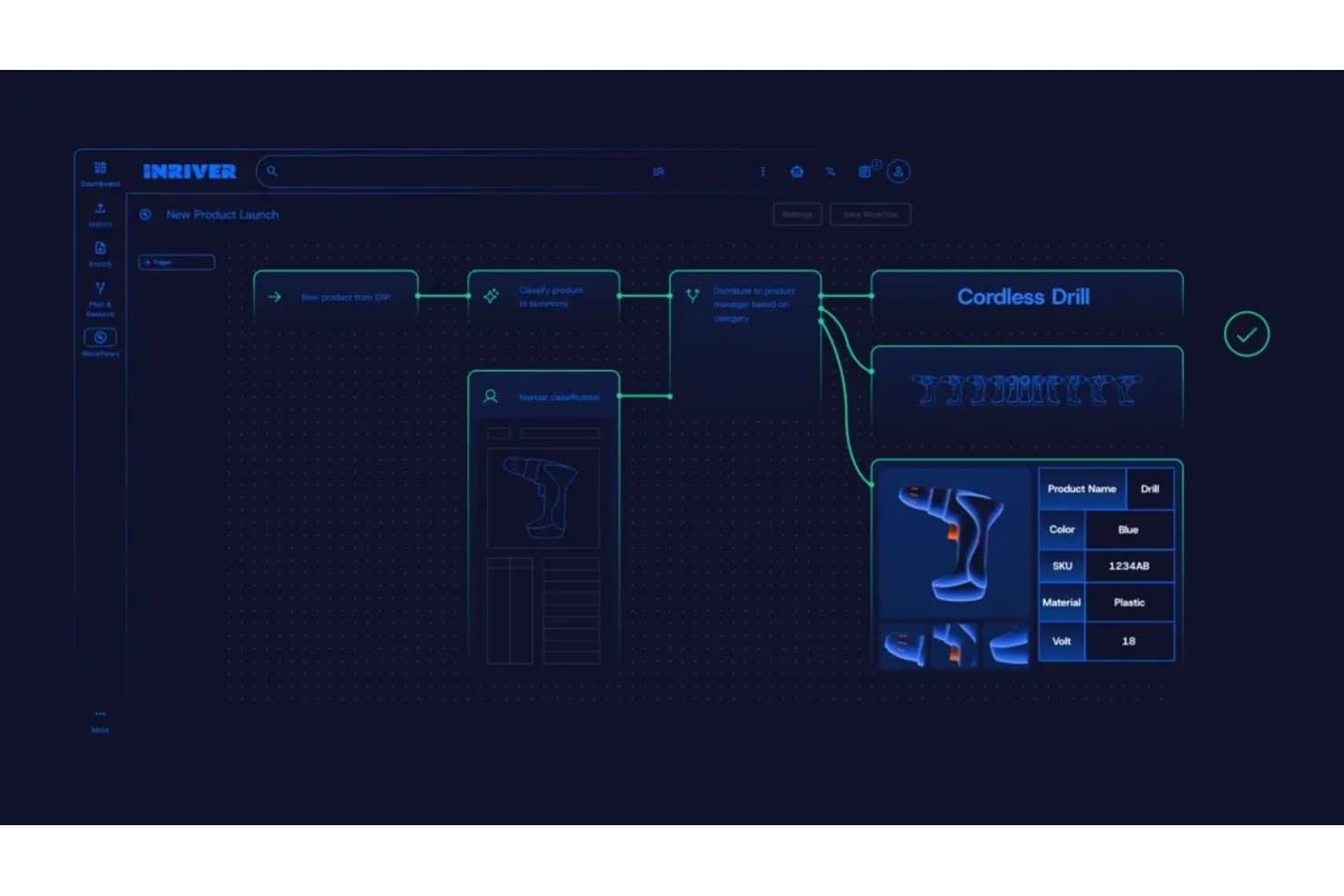
Inriver automatizza i flussi di lavoro dei dati dei prodotti, dall'importazione all'arricchimento. Inriver è una piattaforma PIM basata sull'intelligenza artificiale che centralizza la gestione dei dati dei prodotti, la distribuzione multicanale, l'arricchimento dei contenuti e l'analisi dello scaffale digitale per cataloghi complessi e di grandi dimensioni.
Per chi è più adatto Inriver?
Inriver è una soluzione particolarmente adatta ai team aziendali e alle aziende di medie dimensioni che gestiscono cataloghi di prodotti grandi e complessi in più regioni e canali di vendita.
Perché ho scelto Inriver
Inriver si è guadagnato un posto nella mia selezione perché la sua automazione basata sull'intelligenza artificiale copre l'intero ciclo di vita dei dati dei prodotti, dall'acquisizione e classificazione dei dati in arrivo dai fornitori fino alla generazione di schede pronte per i vari canali con Inspire AI. Sono particolarmente colpito dal modo in cui Digital Shelf Analytics completa il ciclo: monitora le schede pubblicate per individuare soppressioni o imprecisioni, quindi si collega direttamente al PIM affinché il mio team corregga i dati di origine invece di inseguire i sintomi. Questo ciclo di pubblicazione-monitoraggio-correzione è qualcosa che raramente vedo integrato in modo così completo in un'unica piattaforma.
Funzionalità principali di Inriver
- Modello dati elastico: Supporta cataloghi da 1.000 a 1.000.000 di SKU con una struttura completamente configurabile che si adatta alla crescita dell'azienda.
- Acquisizione dei contenuti: Importa nel PIM i dati di fornitori e partner, mentre l'intelligenza artificiale li associa agli attributi corretti e segnala le lacune prima dell'inizio dell'arricchimento.
- Brand Store: Un portale self-service in cui i team interni, i distributori e i partner possono accedere su richiesta ai contenuti dei prodotti approvati e agli asset del brand.
- Mappatura delle relazioni tra prodotti: Consente di definire e gestire direttamente nella piattaforma le relazioni di upselling, cross-selling e bundle, disponibile a partire dal livello Professional.
Integrazioni di Inriver
Le integrazioni di Inriver includono SAP Commerce Cloud, Adobe Commerce, Salesforce B2C Commerce, Adobe Experience Manager Assets, Bynder, Aprimo, Shopify, Amazon e Microsoft. La distribuzione basata su API e l'Integration Framework configurabile supportano connettori personalizzati.
Pros and Cons
Pros:
- La modellazione flessibile si adatta ai cataloghi complessi
- L'intelligenza artificiale arricchisce, traduce e convalida le schede
- L'analisi dello scaffale collega i problemi ai dati di origine
Cons:
- La gestione nativa degli asset digitali rimane limitata
- Alcuni flussi di lavoro dipendono dall'assistenza dei partner
Learn more about Inriver: Ideale per distribuire cataloghi a oltre 500 rivenditori
- Prova gratuita + demo gratuita disponibili
- A partire da $45,000/anno

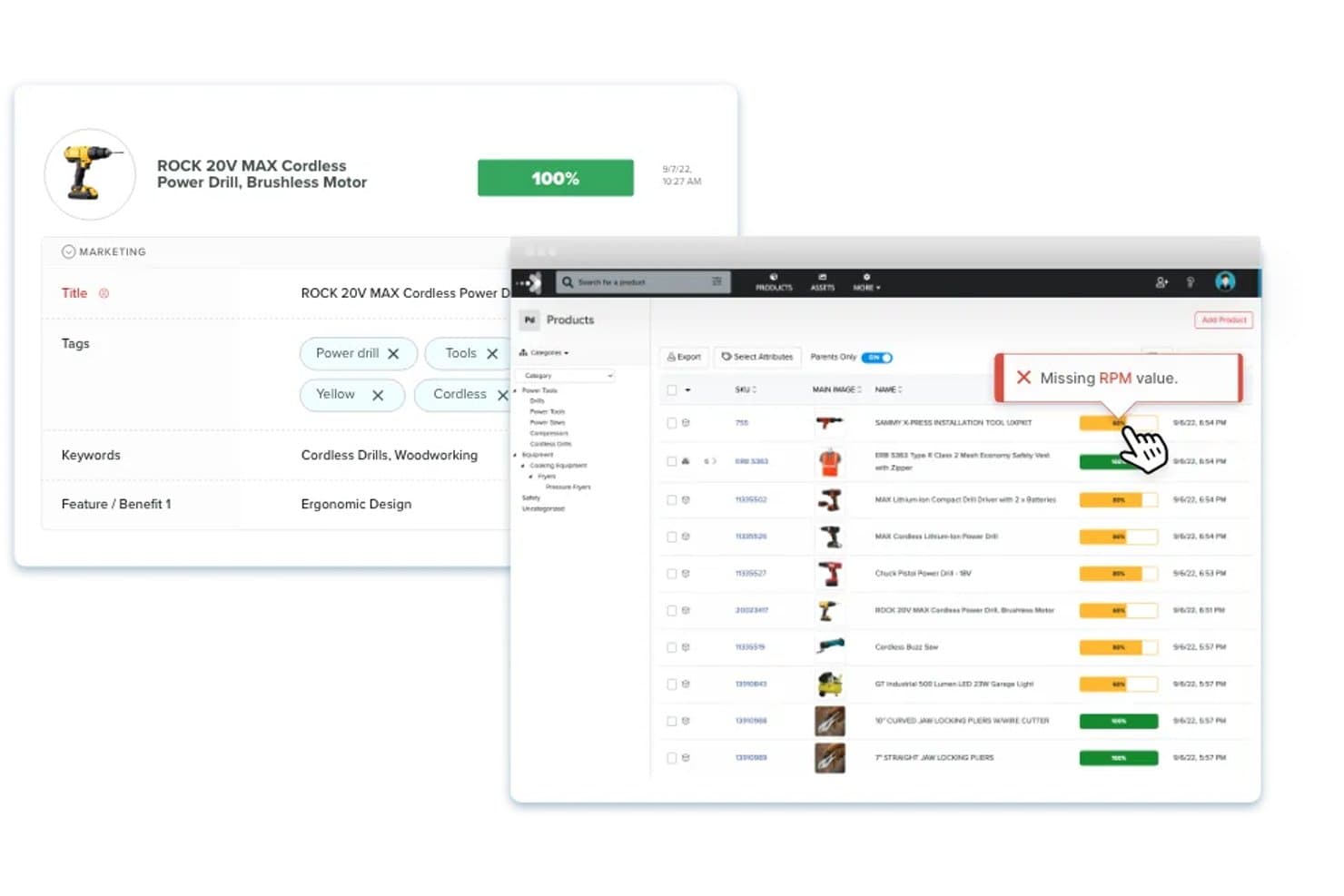
Akeneo consente agli utenti di alternare le visualizzazioni degli elenchi di prodotti raggruppate, piatte o consolidate. Akeneo è una piattaforma per la gestione dell'esperienza di prodotto che combina PIM centralizzato, DAM integrato, arricchimento dei contenuti basato sull'IA e distribuzione multicanale in un unico cloud di prodotto.
Per chi è più adatto Akeneo?
Akeneo è particolarmente adatto ai team di merchandising digitale ed ecommerce che gestiscono cataloghi ampi e complessi su decine di canali retail e marketplace.
Perché ho scelto Akeneo
Ho scelto Akeneo come uno dei migliori perché nessun altro strumento di questo elenco è all'altezza della sua portata di distribuzione: oltre 500 destinazioni tra rivenditori e marketplace attraverso il suo modulo Activation, completo di mappatura automatica basata sull'IA e gestione degli errori di distribuzione. Apprezzo il fatto che il punteggio di prontezza del canale segnali i problemi prima che un annuncio venga pubblicato, un aspetto importante quando si invia simultaneamente lo stesso catalogo a decine di destinazioni. La generazione dei contenuti tramite IA adatta inoltre le descrizioni alla voce del brand, alla lingua e ai requisiti del canale senza riscritture manuali.
Funzionalità principali di Akeneo
- Dashboard degli approfondimenti sulla qualità dei dati: monitora la completezza dei contenuti dei prodotti e i punteggi di qualità per ogni canale e lingua, fornendo consigli basati sull'IA per correggere le lacune prima della pubblicazione.
- Gestore dei dati dei fornitori: automatizza l'inserimento dei fornitori e raccoglie i dati dei prodotti direttamente dai fornitori, riducendo l'inserimento manuale dei dati.
- Vetrina digitale: trasforma i dati del catalogo dei prodotti in materiali di vendita condivisibili e assistiti dall'IA per acquirenti e distributori.
- Motore di regole: aggiorna automaticamente gli attributi dei dati dei prodotti in base alle condizioni definite dall'utente, riducendo il lavoro ripetitivo di arricchimento su larga scala.
Integrazioni di Akeneo
Akeneo offre integrazioni native con Salesforce Commerce Cloud, Adobe Commerce e Shopify, oltre a più di 250 integrazioni con marketplace tramite Akeneo App Store. La sua API REST supporta connessioni personalizzate a sistemi ERP, PLM, MDM, CRM, ecommerce e marketplace.
Pros and Cons
Pros:
- Distribuisce i cataloghi a oltre 500 rivenditori
- L'IA mappa i canali e segnala le lacune di prontezza
- Centralizza cataloghi di prodotti complessi e multilingue
Cons:
- La gestione delle risorse può risultare macchinosa
- La reportistica sembra limitata per analisi più approfondite
Learn more about Akeneo:
 Learn more about Catsy:
 10Ideale per l'intelligence sui clienti basata sull'IA
Unwrap
- Demo gratuita disponibile
- Prezzi su richiesta
Visit WebsiteCustomer Rating:4.8/5This rating combines scores from multiple user review sites to reflect overall customer sentiment about the product.
Unwrap evidenzia le principali tendenze del feedback dei clienti per supportare le decisioni sull'esperienza del prodotto. Unwrap è una piattaforma di intelligence sui clienti che utilizza l'IA per raccogliere, categorizzare e analizzare il feedback dei clienti proveniente da sondaggi, ticket di assistenza, chiamate e recensioni, così da evidenziare le tendenze e orientare le decisioni sui prodotti.
Per chi è più indicato Unwrap?
Unwrap è adatto ai team responsabili dei prodotti e dell'esperienza del cliente che devono interpretare grandi volumi di feedback non strutturato proveniente da sondaggi, ticket di assistenza e recensioni.
Perché ho scelto Unwrap
Ho scelto Unwrap come una delle soluzioni migliori perché il suo Classificatore automatico basato sull'IA analizza grandi volumi di feedback non strutturato dei clienti, classificando istantaneamente i segnali provenienti da recensioni, ticket di assistenza e chiamate in temi di prodotto concreti. Apprezzo particolarmente l'Assistente in linguaggio naturale, che consente ai team di prodotto di interrogare i dati relativi al feedback proprio come farebbero con un collega, evidenziando le tendenze senza analisi manuali. Abbinandolo agli Avvisi in tempo reale, è possibile individuare i problemi emergenti del prodotto prima che si amplifichino.
Funzionalità principali di Unwrap
- Risponditore del feedback: Consente al team di rispondere direttamente al feedback dei clienti dalla piattaforma, senza dover passare da uno strumento all'altro.
- Segmentazione degli utenti: Filtra e suddivide il feedback in base a segmenti specifici di clienti, permettendo di confrontare le risposte tra gruppi diversi.
- Supporto multilingue: Elabora e analizza automaticamente il feedback inviato in più lingue, senza necessità di traduzione manuale.
- Rimozione dei dati personali identificabili: Rileva e oscura automaticamente le informazioni personali identificabili dal feedback ricevuto prima che venga archiviato o analizzato.
Integrazioni di Unwrap
Unwrap si collega a oltre 3.000 fonti di feedback, inclusi sondaggi, ticket di assistenza, chiamate e recensioni. Offre l'accesso API per integrazioni personalizzate.
Pros and Cons
Pros:
- L'IA classifica i temi del feedback dei clienti
- L'analisi in linguaggio naturale supporta le decisioni sui prodotti
- La redazione dei dati personali identificabili protegge il feedback dei clienti
Cons:
- Nessuna gestione centralizzata dei dati dei prodotti
- Nessuna funzionalità di distribuzione dei contenuti dei prodotti
Learn more about Unwrap:
Altre soluzioni per la gestione dell'esperienza del prodotto
Ecco alcuni altri software per la gestione dell’esperienza del cliente che non sono rientrati nell’elenco principale.
- 11SyndigoIdeale per la distribuzione ai principali rivenditori globali
- 12PimberlyIdeale per i dati dei cataloghi B2B e la governance degli asset
- 13Bluestone PIMIdeale per PIM componibile con agenti IA nativi di MCP
- 14PimcoreIdeale per la modellazione di cataloghi con modello a sorgente aperta e scalabilità illimitata
- 15PIMworksIdeale per la diffusione del catalogo omnicanale
- 16PlytixIdeale per centralizzare i dati dei prodotti su più canali
- 17Pattern PXMIdeale per la distribuzione di cataloghi integrata nativamente nei marketplace
- 18QuableIdeale per l'arricchimento combinato di DAM e PIM
- 19Centric PXMIdeale per distribuire cataloghi su oltre 1.000 canali
Come valuto i software per la gestione dell'esperienza di prodotto
La mia valutazione si articola in tre parti. Innanzitutto, e soprattutto, cerco strumenti in grado di consolidare i dati di prodotto in un'unica fonte e distribuire le schede su rivenditori e piattaforme di vendita online. Poi verifico la presenza di funzionalità distintive, come le schede di valutazione dello scaffale digitale. Infine, considero il supporto all'onboarding e il rapporto qualità-prezzo.
Funzionalità principali (requisiti fondamentali per questo elenco)
Quando seleziono gli strumenti da inserire nel mio elenco, assegno a ciascuno un punteggio su una scala da 0 (non offre la funzionalità) a 5 (eccelle in quest'area) per ogni funzionalità principale elencata di seguito. Converto quindi il totale in una percentuale per aiutare a valutare l'idoneità complessiva di ogni strumento, attribuendo un peso aggiuntivo a tutte le funzionalità che ho ritenuto essenziali.
- Gestione dei dati di prodotto (essenziale): valuto quanto bene ogni strumento struttura gli attributi, gestisce le varianti e si adatta a cataloghi complessi con migliaia di SKU.
- Distribuzione multicanale (essenziale): ogni strumento deve poter inviare i contenuti dei prodotti a piattaforme di vendita online, portali dei rivenditori e vetrine online, con mappatura specifica per canale e sincronizzazione continua.
- Gestione delle risorse digitali: verifico se immagini, video e documenti sono collegati direttamente ai record dei prodotti e se lo strumento supporta il controllo delle versioni tra i diversi canali.
- Arricchimento e valutazione dei contenuti: gli strumenti validi segnalano le descrizioni incomplete e valutano la qualità delle schede rispetto ai requisiti del canale, non limitandosi a controlli generici di completezza.
- Convalida e governance dei dati: cerco regole configurabili, flussi di approvazione basati sui ruoli e registri di audit che mantengano accurati i dati del catalogo man mano che i team crescono.
- Formattazione specifica per canale: lo strumento dovrebbe adattare automaticamente i contenuti dei prodotti ai requisiti dei modelli di ciascun rivenditore, invece di costringere a effettuare rielaborazioni manuali per ogni canale.
Una volta ottenuto un elenco di strumenti che soddisfano i criteri, considero ciò che distingue ogni piattaforma.
Fattori distintivi (ciò che differenzia i fornitori)
Ecco come confronto i diversi fornitori e ne evidenzio le differenze:
Funzionalità di spicco
Le schede di valutazione dello scaffale digitale sono la prima cosa che verifico. Voglio capire in che modo uno strumento confronta le tue schede con quelle dei concorrenti in termini di conformità dei contenuti, immagini e posizionamento nei risultati di ricerca presso ciascun rivenditore. Gli avvisi di conformità dei rivenditori sono altrettanto importanti: strumenti come Salsify e Syndigo segnalano le violazioni delle linee guida di stile prima della pubblicazione, evitando le problematiche rimozioni dopo il lancio. Valuto anche le funzionalità di generazione dei contenuti tramite IA, in particolare se l'IA è in grado di redigere e localizzare descrizioni adattate alle norme della categoria, invece di produrre testi generici.
Oltre le funzionalità
Valuto la rapidità con cui una piattaforma porta i nuovi SKU dalla bozza alla pubblicazione sui diversi canali, soprattutto durante le campagne stagionali, quando perdere la finestra di lancio comporta una perdita concreta di ricavi. La scalabilità è altrettanto importante: gli strumenti devono gestire cataloghi multimarca con migliaia di attributi senza bloccarsi durante gli aggiornamenti in blocco. Verifico inoltre la presenza di connettori nativi per piattaforme ERP e commerciali come Shopify o SAP, poiché le soluzioni personalizzate comportano rapidamente un debito di manutenzione.
Tendenze nei software per la gestione dell'esperienza del prodotto
Durante la mia ricerca, ho raccolto innumerevoli aggiornamenti dei prodotti, comunicati stampa e registri delle versioni di diversi fornitori di software per la gestione dell'esperienza del prodotto. Ecco alcune delle tendenze emergenti che sto tenendo d'occhio:
- Approfondimenti basati sull'intelligenza artificiale: i fornitori utilizzano l'intelligenza artificiale per analizzare più a fondo i dati degli utenti. Questo aiuta i team a comprendere rapidamente il comportamento e le preferenze dei clienti. Ad esempio, alcuni strumenti offrono ora analisi predittive per anticipare le esigenze degli utenti.
- Funzionalità di personalizzazione: si sta ponendo sempre più attenzione alla personalizzazione delle esperienze degli utenti. Ora i software consentono di adattare le interazioni con il prodotto ai singoli utenti, rendendo l'esperienza più pertinente e coinvolgente.
- Programmi di ascolto della voce del cliente: sempre più strumenti offrono funzionalità per raccogliere e analizzare il feedback diretto dei clienti. Questa tendenza è importante per creare prodotti che rispondano alle esigenze degli utenti e alcuni fornitori mettono a disposizione pannelli di controllo per il feedback in tempo reale.
- Metriche di sostenibilità: Poiché le aziende si concentrano sulla sostenibilità, alcuni software ora includono funzionalità per monitorare l'impatto ambientale. Questo aiuta i team ad allineare lo sviluppo dei prodotti agli obiettivi di sostenibilità aziendale.
- Integrazione della realtà aumentata (AR): La realtà aumentata viene utilizzata per migliorare l'esperienza dei prodotti, soprattutto nel commercio al dettaglio e nell'e-commerce. Alcuni fornitori offrono strumenti AR per prove virtuali dei prodotti, offrendo agli utenti un'esperienza più interattiva.
Che cos'è il software per la gestione dell'esperienza del prodotto?
Il software per la gestione dell'esperienza del prodotto è uno strumento che aiuta le aziende a offrire un'esperienza coerente e coinvolgente per i propri prodotti attraverso diversi punti di contatto digitali. Fornisce strumenti per gestire le informazioni sui prodotti e le risorse digitali, nonché per raccogliere, archiviare, gestire e analizzare le interazioni e i feedback dei clienti sui prodotti in un'unica posizione centralizzata, garantendo che i clienti ricevano informazioni accurate e convincenti sui prodotti ovunque interagiscano con il marchio.
Questo tipo di software include funzionalità come la gestione centralizzata dei contenuti dei prodotti, la gestione delle risorse digitali, la pubblicazione multicanale e l'analisi. Insieme, queste funzionalità contribuiscono a offrire un'esperienza unificata e positiva attraverso i vari canali, portando a una maggiore soddisfazione e fidelizzazione dei clienti.
Funzionalità del software per la gestione dell'esperienza del prodotto
Quando selezioni un software per la gestione dell'esperienza del prodotto, considera queste funzionalità chiave:
- Funzionalità di localizzazione: Adattano i contenuti dei prodotti alle lingue, alle valute e alle peculiarità culturali regionali per i mercati globali.
- Strumenti di personalizzazione: Offrono esperienze personalizzate dei prodotti sulla base delle preferenze e dei comportamenti dei clienti.
- Contenuti dei prodotti centralizzati: Garantiscono dati sui prodotti coerenti e accurati su tutte le piattaforme, per ottenere risultati efficaci sugli scaffali digitali.
- Adattabilità multiregionale: Supporta promozioni, prezzi e conformità localizzati per soddisfare le diverse esigenze dei clienti.
- Raccomandazioni dinamiche: Forniscono suggerimenti personalizzati sui prodotti per aumentare il coinvolgimento e favorire le conversioni.
- Sistemi di feedback iterativi: Raccolgono e analizzano continuamente i contributi dei clienti per perfezionare le esperienze dei prodotti e affrontare i punti critici.
- Strumenti di definizione delle priorità della roadmap: Allineano la roadmap e lo sviluppo del prodotto alle esigenze dei clienti classificando le funzionalità in base al feedback e all'impatto.
Vantaggi del software per la gestione dell'esperienza del prodotto
L'implementazione di un software per la gestione dell'esperienza del prodotto può offrire diversi vantaggi al tuo team e alla tua azienda. Ecco alcuni esempi:
- Messaggi coerenti del marchio: La gestione centralizzata dei contenuti garantisce informazioni sui prodotti accurate e uniformi su tutti i canali.
- Maggiore fidelizzazione dei clienti: La personalizzazione e la localizzazione creano connessioni significative, incoraggiando gli acquisti ripetuti.
- Ingresso più rapido nel mercato: Le funzionalità di localizzazione semplificano l'adattamento dei contenuti dei prodotti ai nuovi mercati, accelerando i tempi di espansione.
- Riduzione degli errori: Gli aggiornamenti automatizzati e la sincronizzazione dei contenuti riducono al minimo il rischio di imprecisioni o dettagli dei prodotti obsoleti.
- Tassi di conversione più elevati: Le raccomandazioni dinamiche e le esperienze di acquisto personalizzate aumentano il coinvolgimento e favoriscono le vendite.