

Con così tanti strumenti basati sull’IA che vengono lanciati ogni giorno, capire quale sia quello giusto per te è difficile. Sai di voler sfruttare la potenza dell’intelligenza artificiale per automatizzare le attività che richiedono molto tempo, comprendere le preferenze degli utenti, formulare suggerimenti basati su tali preferenze e persino offrire elementi di progettazione predittivi, ma devi ancora capire quale strumento sia il migliore. Ci penso io! In questo articolo ti aiuterò a rendere semplice la tua scelta, condividendo le mie esperienze personali nell’esplorazione di decine di diversi strumenti basati sull’IA e nel vederli in azione con prodotti diversi, con la mia selezione dei migliori software di progettazione basati sull’IA.
Che cos’è un software di progettazione basato sull’IA?
Il software di progettazione basato sull’IA è uno strumento tecnologico avanzato che integra l’intelligenza artificiale e gli algoritmi di apprendimento automatico nei processi di progettazione visiva. Consente ai designer di creare elementi visivi più precisi e personalizzati, in modo più rapido ed efficiente. Le funzionalità principali includono generalmente l’automazione della progettazione, suggerimenti intelligenti, esperienze utente personalizzate, impostazioni regolabili per i controlli dell’IA e l’integrazione con altri strumenti di progettazione.
Inoltre, lo strumento potrebbe offrire risorse per addestrare l’IA e funzionalità di analisi dei dati per orientare le progettazioni future.
Perché fidarsi dei nostri consigli sui software
6,700+
Reviews
20
Industry experts
16+
Evaluation factors
14
Years
Il nostro team testa e recensisce software dal 2012. In quanto product manager noi stessi, sappiamo quanto sia difficile — e importante — scegliere il software giusto.
Per questa guida, abbiamo valutato gli strumenti attraverso test pratici e ricerche indipendenti, assegnando un punteggio agli strumenti in base ai nostri criteri di selezione.
Le nostre recensioni riflettono il nostro giudizio editoriale umano, non un discorso di vendita.
Revisori esperti:
- Andrew LumbySenior TPM
- Cristiano ValimSenior UI/UX Lead


Tabella comparativa dei software di progettazione basati sull’IA
Questa tabella comparativa riassume i dettagli dei prezzi delle mie migliori selezioni di software di progettazione basati sull’IA:
| Tool | Best For | Trial Info | Price | ||
|---|---|---|---|---|---|
| 1 | Ideale per convertire schizzi in wireframe | Piano gratuito disponibile | A partire da $12/utente/mese (con fatturazione annuale) | Website | |
| 2 | Ideale per la progettazione di siti web basata sull'IA | Piano gratuito disponibile | A partire da 17 $/mese (con fatturazione annuale) | Website | |
| 3 | Ideale per la progettazione di interfacce che esporta codice pronto per la produzione | Piano gratuito + prova gratuita di 14 giorni disponibile | A partire da $29/utente/mese (fatturato annualmente) | Website | |
| 4 | Ideale per flussi di lavoro a codice aperto dalla progettazione al codice basati sull'IA | Piano gratuito + prova gratuita di 14 giorni disponibile | A partire da $7/utente/mese | Website | |
| 5 | Ideale per trasformare i PRD in flussi dell'interfaccia utente pronti per Figma | Piano gratuito disponibile | A partire da $14/mese | Website | |
| 6 | Ideale per la progettazione tra team senza competenze di progettazione | Piano gratuito + prova gratuita di 14 giorni disponibile | A partire da $144/utente/anno (con fatturazione annuale) | Website | |
| 7 | Ideale per chi non è designer e deve creare rapidamente prototipi UI | Piano gratuito disponibile | A partire da $14/editor/mese | Website | |
| 8 | Ideale per modifiche con riempimento generativo sicure per la proprietà intellettuale | Piano gratuito disponibile | A partire da $9.99/mese | Website | |
| 9 | Ideale per la progettazione di siti web generata dall'intelligenza artificiale su un'area di lavoro in tempo reale | Piano gratuito disponibile | A partire da $10 al mese (con fatturazione annuale) | Website | |
| 10 | Ideale per la generazione nativa di risorse vettoriali e SVG | Piano gratuito disponibile | A partire da $10/mese (con fatturazione annuale) | Website |


Panoramiche dei migliori software di progettazione basati sull’IA
Ecco la mia recensione approfondita di ogni strumento. Ti illustrerò i pro & contro, le caratteristiche e le funzionalità per evidenziare ciò che rende eccezionale ciascuno strumento.
 Ideale per convertire schizzi in wireframe
- Piano gratuito disponibile
- A partire da $12/utente/mese (con fatturazione annuale)
Visit WebsiteCustomer Rating:4.6/5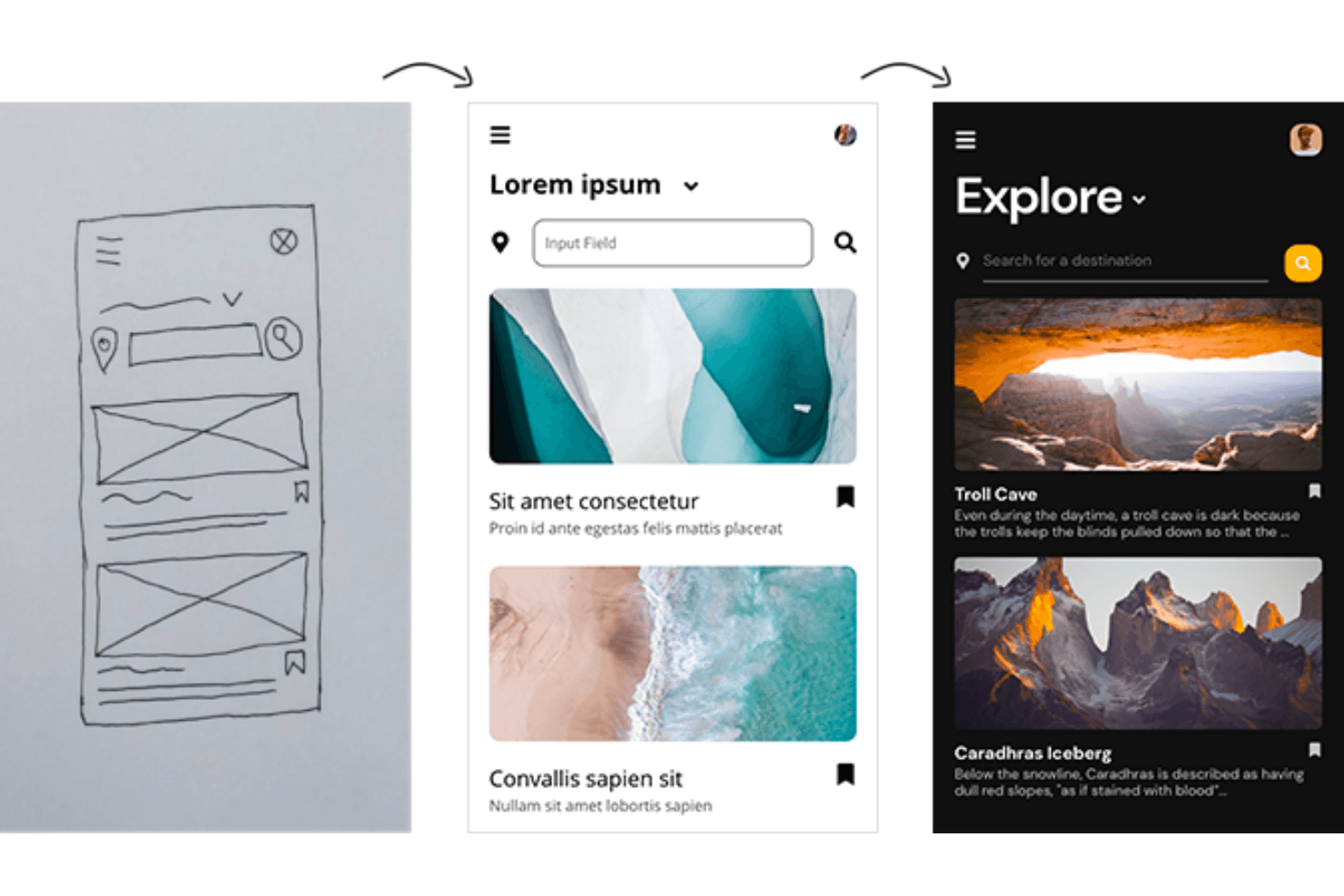
Converti i tuoi disegni a mano in wireframe dell'interfaccia utilizzando Uizard. Uizard è uno strumento di progettazione basato sull'IA che converte schizzi disegnati a mano, schermate e prompt testuali in prototipi modificabili, multipagina e cliccabili.
Per chi è più adatto Uizard?
Uizard è particolarmente adatto ai responsabili di prodotto e ai fondatori privi di competenze di progettazione che devono trasformare schizzi o idee preliminari in prototipi cliccabili senza fare affidamento su un team di progettazione.
Perché ho scelto Uizard
Ho incluso Uizard tra le mie scelte principali perché il suo scanner di wireframe è il percorso più diretto che conosca per trasformare uno schizzo disegnato a mano in un prototipo cliccabile e multipagina. Basta fotografare lo schizzo su carta o la struttura disegnata su una lavagna e Uizard la converte in schermate dell'interfaccia modificabili in pochi secondi. Autodesigner 2.0 va oltre, consentendo di perfezionare qualsiasi componente generato descrivendo in linguaggio naturale la modifica desiderata, ad esempio 'aggiungi tre sezioni e cambia il carattere in Roboto'.
Caratteristiche principali di Uizard
- Autodesigner 2.0: Un'interfaccia in stile chat integrata nell'editor che genera prototipi multipagina e cliccabili a partire da prompt testuali e consente di perfezionare qualsiasi componente descrivendo la modifica desiderata.
- Scanner di schermate: Converte le schermate di app o siti web esistenti in modelli grafici dell'interfaccia modificabili, che puoi poi trasformare in un prototipo cliccabile.
- Mappe di calore predittive dell'attenzione: Prevedono i punti in cui è probabile che gli utenti guardino su una schermata, fornendo un rapido riscontro visivo sulla disposizione prima di effettuare test con utenti reali.
- Trasferimento del codice React e CSS: Esporta singoli componenti come codice React o CSS tramite la modalità di trasferimento, disponibile nei piani Pro e superiori.
Integrazioni di Uizard
Uizard non dispone di integrazioni native. Il suo plugin beta per Figma importa gli elementi in Uizard, mentre gli incorporamenti web e il trasferimento dei componenti React/CSS supportano i flussi di condivisione e sviluppo.
Pros and Cons
Pros:
- Converte rapidamente gli schizzi in prototipi cliccabili
- Supporta commenti in tempo reale e modifica collaborativa
- Genera schermate modificabili a partire da prompt testuali
Cons:
- La modifica manuale non offre la profondità di un canvas professionale
- I risultati dell'IA possono sembrare ripetitivi o semplicistici
Learn more about Uizard: 2Ideale per la progettazione di siti web basata sull'IA
Wix
- Piano gratuito disponibile
- A partire da 17 $/mese (con fatturazione annuale)
Visit WebsiteCustomer Rating:4.4/5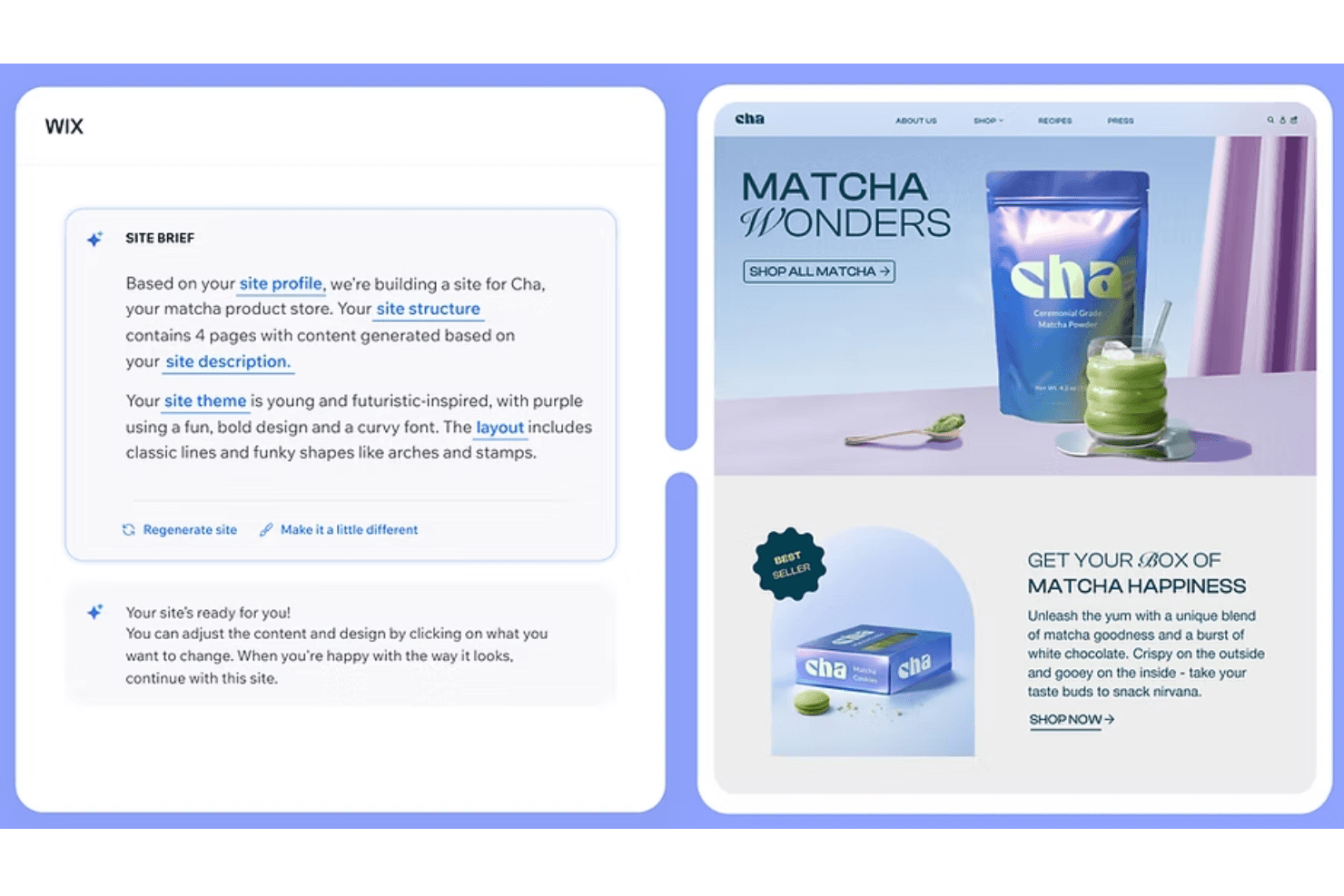
Per configurare un sito generato dall'IA con Wix, puoi scrivere una richiesta che descriva il brand e le indicazioni generali sul design. Wix è un creatore di siti web basato sull'IA che genera pagine complete e in linea con il brand a partire da richieste testuali, abbinando il risultato a un editor a livello di pixel, controlli del brand e strumenti di collaborazione per i team.
Per chi è più indicato Wix?
Wix è particolarmente adatto ai team di marketing e ai non designer che hanno bisogno di creare e lanciare rapidamente siti web in linea con il brand utilizzando layout e contenuti generati dall'IA.
Perché ho scelto Wix
Ho incluso Wix tra le mie scelte migliori perché Wix Harmony genera siti web completi e in linea con il brand a partire da una richiesta formulata in linguaggio naturale, occupandosi della struttura delle pagine, dei testi e delle immagini in pochi minuti. Apprezzo in particolare il fatto che Aria, l'agente IA integrato di Wix, possa riprogettare intere pagine o sostituire le palette di colori senza compromettere il codice sottostante. Passare dal risultato generato dall'IA alla modifica manuale a livello di pixel nello stesso canvas significa non essere mai vincolati a una bozza che non è possibile perfezionare.
Funzionalità principali di Wix
- Pannello del brand: Imposta e gestisci i colori, i caratteri e gli stili dei pulsanti del tuo sito in un unico posto, applicando automaticamente le modifiche a ogni pagina.
- Importazione da Figma: Importa frame e stili di Figma in Wix Studio come pagine, sezioni o contenitori utilizzando il plugin Figma to Wix Studio.
- Collaborazione in tempo reale: Più editor possono lavorare contemporaneamente su un sito Studio, con commenti sul canvas, assegnazione delle attività e ruoli personalizzati per ogni collaboratore.
- Assistente di codifica basato sull'IA: Un IDE cloud integrato basato su VS Code, con supporto dell'IA, consente di scrivere e modificare direttamente in Studio JavaScript, componenti React e funzioni back-end Node.
Integrazioni di Wix
Wix si integra con Figma, GitHub, Google Search Console e Google Workspace. Il suo App Market offre centinaia di integrazioni del marketplace, mentre le API Wix e il supporto Headless consentono connessioni personalizzate.
Pros and Cons
Pros:
- Genera siti web completi e in linea con il brand a partire da richieste
- Consente modifiche a livello di pixel dopo la generazione tramite IA
- Supporta la collaborazione alla progettazione in tempo reale in Studio
Cons:
- Si concentra sui siti web, non sulle interfacce dei prodotti
- Non consente di esportare file di progettazione autonomi
Learn more about Wix: Ideale per la progettazione di interfacce che esporta codice pronto per la produzione
- Piano gratuito + prova gratuita di 14 giorni disponibile
- A partire da $29/utente/mese (fatturato annualmente)
Visit WebsiteCustomer Rating:4.2/5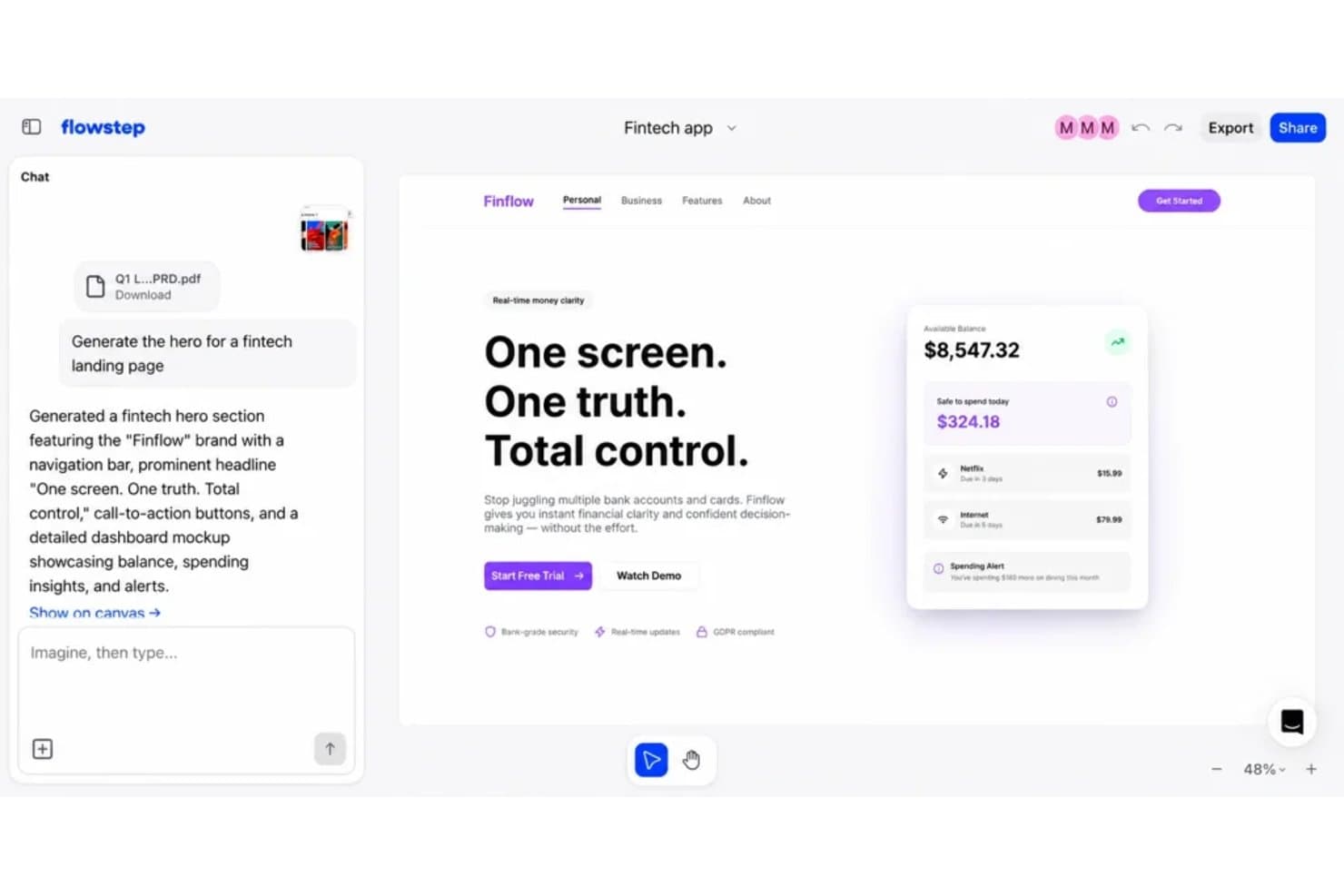
UXPin consente agli utenti di generare istantaneamente progetti di interfacce a partire da prompt testuali. UXPin è una piattaforma per la progettazione e la prototipazione delle interfacce utente che utilizza l'IA per generare componenti React con codice a partire da prompt testuali, wireframe caricati o screenshot, con strumenti per la gestione dei sistemi di progettazione, la prototipazione ad alta fedeltà e il passaggio di consegne agli sviluppatori.
Per chi è più adatto UXPin?
UXPin è adatto ai team di prodotto e ai designer di interfacce con competenze tecniche che hanno bisogno di progetti generati dall'IA ed esportabili come codice React reale e pronto per la produzione.
Perché ho scelto UXPin
UXPin è presente nella mia lista dei migliori strumenti perché è l'unico strumento di progettazione basato sull'IA che conosco in grado di generare veri componenti React invece di forme vettoriali che devono ancora essere consegnate a uno sviluppatore. Apprezzo molto il fatto che Forge permetta di caricare un wireframe o uno screenshot e ricostruisca il layout come JSX pronto per la produzione, consentendo al mio team di saltare il passaggio consueto del 'ora uno sviluppatore deve ricrearlo da zero'. La funzione Wire si spinge oltre, producendo un'app React completamente eseguibile con routing, convalida dei moduli e logica condizionale.
Funzionalità principali di UXPin
- Feedback sull'usabilità basato sull'IA: UX Review assegna un punteggio ai tuoi progetti in base a chiarezza, gerarchia, coerenza e accessibilità, fornendoti indicazioni specifiche su cui intervenire.
- Linee guida del sistema di progettazione: Le regole in testo semplice che scrivi una volta vengono salvate per progetto e Forge le segue automaticamente in ogni generazione successiva basata sull'IA.
- Logica condizionale e variabili: I prototipi supportano stati, espressioni e contenuti dinamici, comportandosi come vere app funzionanti durante le revisioni con gli stakeholder.
- Flussi di approvazione degli stakeholder: Un numero illimitato di visualizzatori e commentatori può esaminare e approvare i prototipi senza dover creare un account UXPin.
Integrazioni di UXPin
UXPin offre integrazioni con Figma, Sketch, Storybook, Git, Jira, FullStory, Slack, npm, CodeSandbox e StackBlitz. Storybook e Jira richiedono il piano Growth o superiore, mentre l'integrazione con Git è disponibile nel piano Enterprise.
Pros and Cons
Pros:
- Esporta le interfacce generate come codice React pronto per la produzione
- Ricostruisce gli screenshot in layout codificati e modificabili
- Supporta prototipi ad alta fedeltà con logica condizionale
Cons:
- I flussi di lavoro avanzati richiedono notevoli conoscenze tecniche
- L'output dell'IA si concentra principalmente sulle schermate dell'interfaccia
Learn more about UXPin: Ideale per flussi di lavoro a codice aperto dalla progettazione al codice basati sull'IA
- Piano gratuito + prova gratuita di 14 giorni disponibile
- A partire da $7/utente/mese
Visit WebsiteCustomer Rating:4.5/5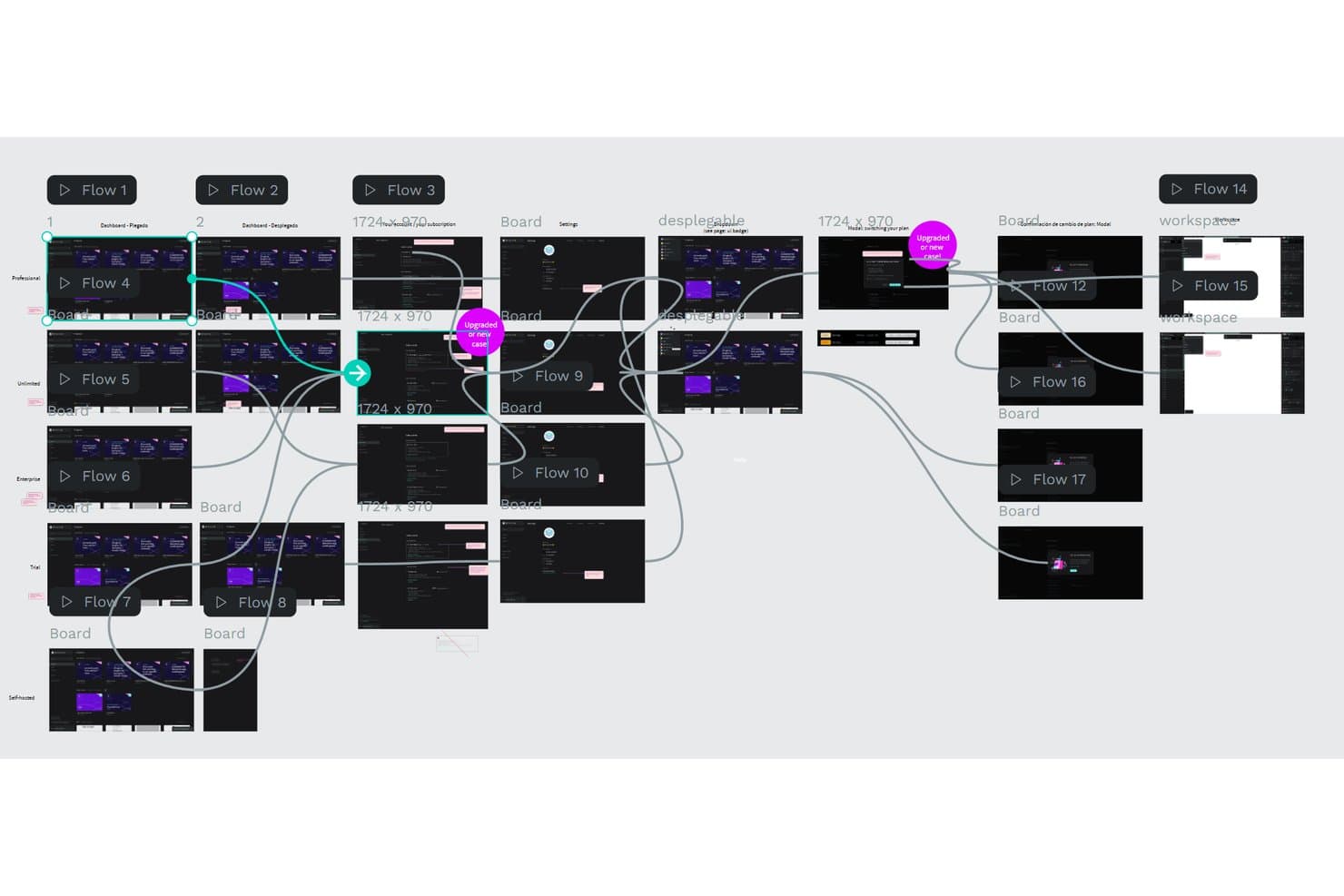
Penpot consente agli utenti di mappare visivamente prototipi complessi con più flussi. Penpot è uno strumento a codice aperto per la progettazione e la prototipazione che combina modifica vettoriale, librerie di componenti, token di progettazione, collaborazione in tempo reale e flussi di lavoro basati sull'IA dalla progettazione al codice tramite il suo server MCP.
Per chi è più adatto Penpot?
Penpot è particolarmente adatto ai designer UX/UI e ai team di prodotto tecnici che desiderano il pieno controllo dei propri file di progettazione e un flusso di lavoro basato sull'IA che si colleghi direttamente alla loro base di codice.
Perché ho scelto Penpot
Ho incluso Penpot tra le mie scelte principali perché il suo server MCP trasforma la tela di progettazione in uno spazio programmabile in cui qualsiasi agente IA, che si tratti di Claude, Cursor o OpenAI Codex, può leggere e modificare i tuoi file Penpot effettivi. Apprezzo particolarmente il fatto che funzioni utilizzando il sistema di progettazione esistente come contesto, così un agente può generare nuove schermate, sostituire una tavolozza di colori o creare token per la spaziatura e la tipografia senza compromettere la coerenza. È inoltre completamente a codice aperto e può essere installato su infrastrutture proprie, un aspetto importante quando il team non può inviare i file di progettazione a servizi cloud di terze parti.
Funzionalità principali di Penpot
- Modifica collaborativa in tempo reale: Più membri del team possono modificare contemporaneamente lo stesso file, con presenza dei cursori in tempo reale e commenti sulla tela.
- Token di progettazione W3C: Supporto nativo per token di colore, tipografia e spaziatura conformi allo standard W3C e sincronizzati tra le librerie condivise del team.
- Layout a griglia CSS e Flexbox: Strumenti di layout reattivo che corrispondono direttamente al codice di produzione, rendendo più preciso il passaggio di consegne agli sviluppatori.
- Scheda Ispeziona con codice generato: Genera CSS, SVG e HTML da qualsiasi elemento di progettazione, consentendo agli sviluppatori di copiare codice pronto per la produzione senza uscire da Penpot.
Integrazioni di Penpot
Penpot si integra con Claude Desktop, Claude Code, Cursor, OpenAI Codex ed estensioni di VS Code tramite il suo server MCP. La sua API REST, i webhook e l'API per i plugin supportano connessioni personalizzate, mentre i plugin si collegano ai flussi di lavoro di GitHub, GitLab, Azure DevOps, Bitbucket, Miro e Storybook.
Pros and Cons
Pros:
- Flussi di lavoro a codice aperto dalla progettazione al codice
- Governance precisa di token e componenti
- Prototipazione e collaborazione in tempo reale
Cons:
- Nessuna generazione nativa di progetti a partire da istruzioni
- La configurazione dell'IA richiede dimestichezza tecnica
Learn more about Penpot: Ideale per trasformare i PRD in flussi dell'interfaccia utente pronti per Figma
- Piano gratuito disponibile
- A partire da $14/mese
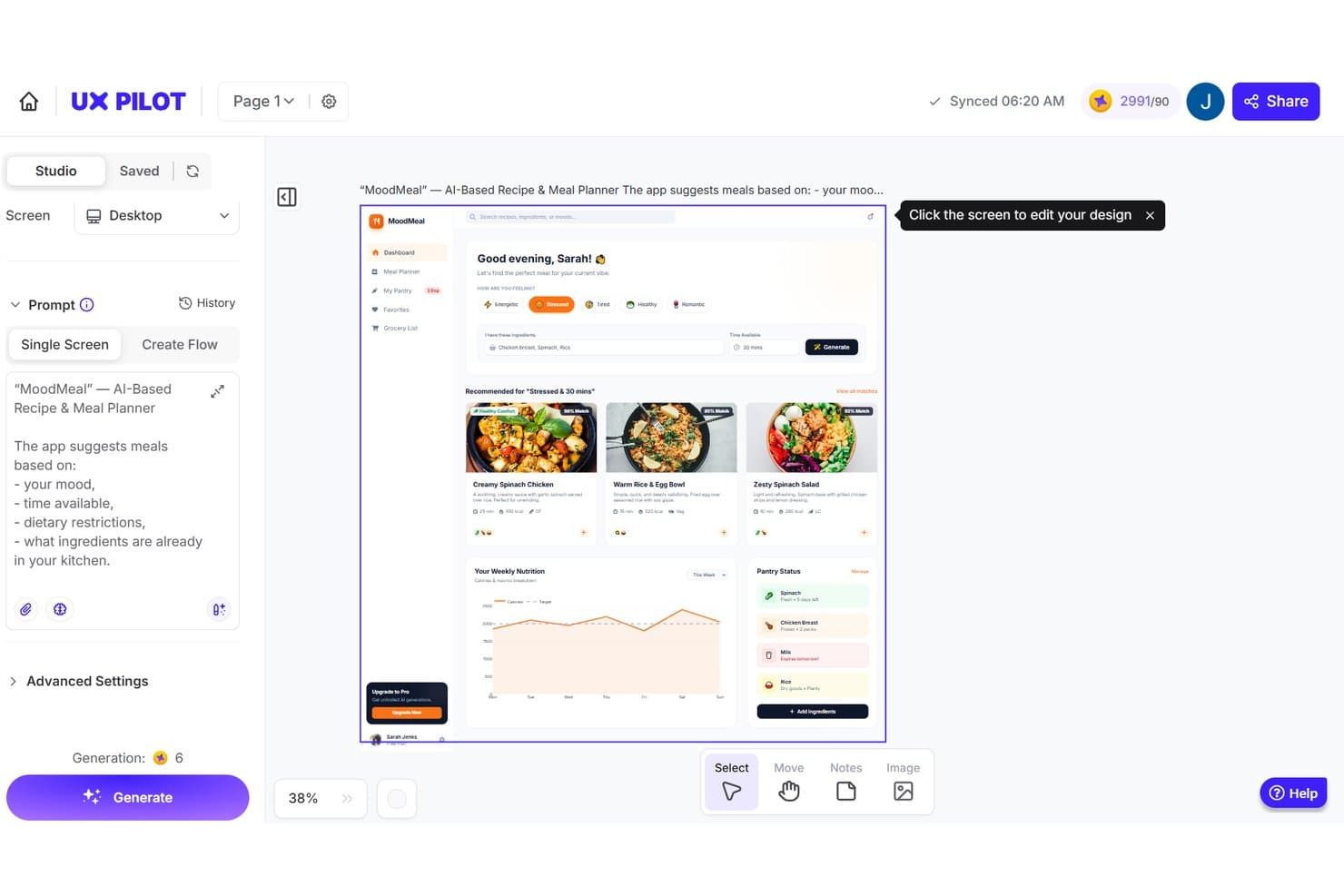
UX Pilot genera progetti IA per l'interfaccia di un pianificatore di pasti a partire da comandi testuali. UX Pilot è uno strumento di progettazione nativo per l'IA di Figma che genera wireframe, schermate dell'interfaccia utente ad alta fedeltà e flussi multi-schermata a partire da comandi testuali, PRD, schizzi e screenshot.
Per chi è più adatto UX Pilot?
UX Pilot è particolarmente adatto a designer UX/UI e product manager che lavorano all'interno di Figma e hanno bisogno di passare rapidamente dalle idee o dai PRD a flussi multi-schermata testabili.
Perché ho scelto UX Pilot
Ho scelto UX Pilot come uno dei migliori perché è uno dei pochi strumenti che colma davvero il divario tra un PRD e un prototipo Figma testabile. Mi piace il fatto che Autoflow prenda una descrizione del prodotto e generi in un'unica soluzione una mappa completa di schermate collegate e modificabili, consentendo ai PM di consegnare qualcosa di concreto al team di sviluppo prima ancora dell'inizio della pianificazione dello sprint. La funzionalità Importa componenti importa i token e i componenti Figma esistenti, così le schermate generate non partono da zero dal punto di vista dello stile.
Funzionalità principali di UX Pilot
- Variazioni: genera fino a quattro disposizioni alternative per qualsiasi schermata, ciascuna con una struttura, una gerarchia visiva o uno stile grafico diverso.
- Modalità incentrata su React: crea, modifica ed esporta prototipi React funzionanti utilizzando un editor visivo, modifiche basate sulla chat o un editor di codice in tempo reale.
- Riscontri IA sull'usabilità: esegui mappe di calore predittive dell'attenzione e controlli di progettazione automatizzati per il contrasto e la spaziatura direttamente nello strumento.
- Nodey: un agente IA gratuito che opera all'interno di Figma e crea livelli nativi e modificabili preservando il layout automatico e i token di progettazione.
Integrazioni di UX Pilot
UX Pilot si integra con Figma, GitHub, Jira, Notion, Linear, ChatGPT e Claude. Offre inoltre un'API aziendale per integrazioni personalizzate, con sincronizzazione bidirezionale con Figma e sincronizzazione con GitHub per le esportazioni del codice.
Pros and Cons
Pros:
- I comandi PRD diventano flussi di schermate collegate
- I livelli modificabili preservano i token di progettazione importati
- Le mappe di calore predittive segnalano tempestivamente i problemi di usabilità
Cons:
- Le generazioni a volte si bloccano o distorcono le disposizioni
- Le generazioni non riuscite possono comunque consumare crediti
Learn more about UX Pilot: Ideale per la progettazione tra team senza competenze di progettazione
- Piano gratuito + prova gratuita di 14 giorni disponibile
- A partire da $144/utente/anno (con fatturazione annuale)
Visit WebsiteCustomer Rating:4.7/5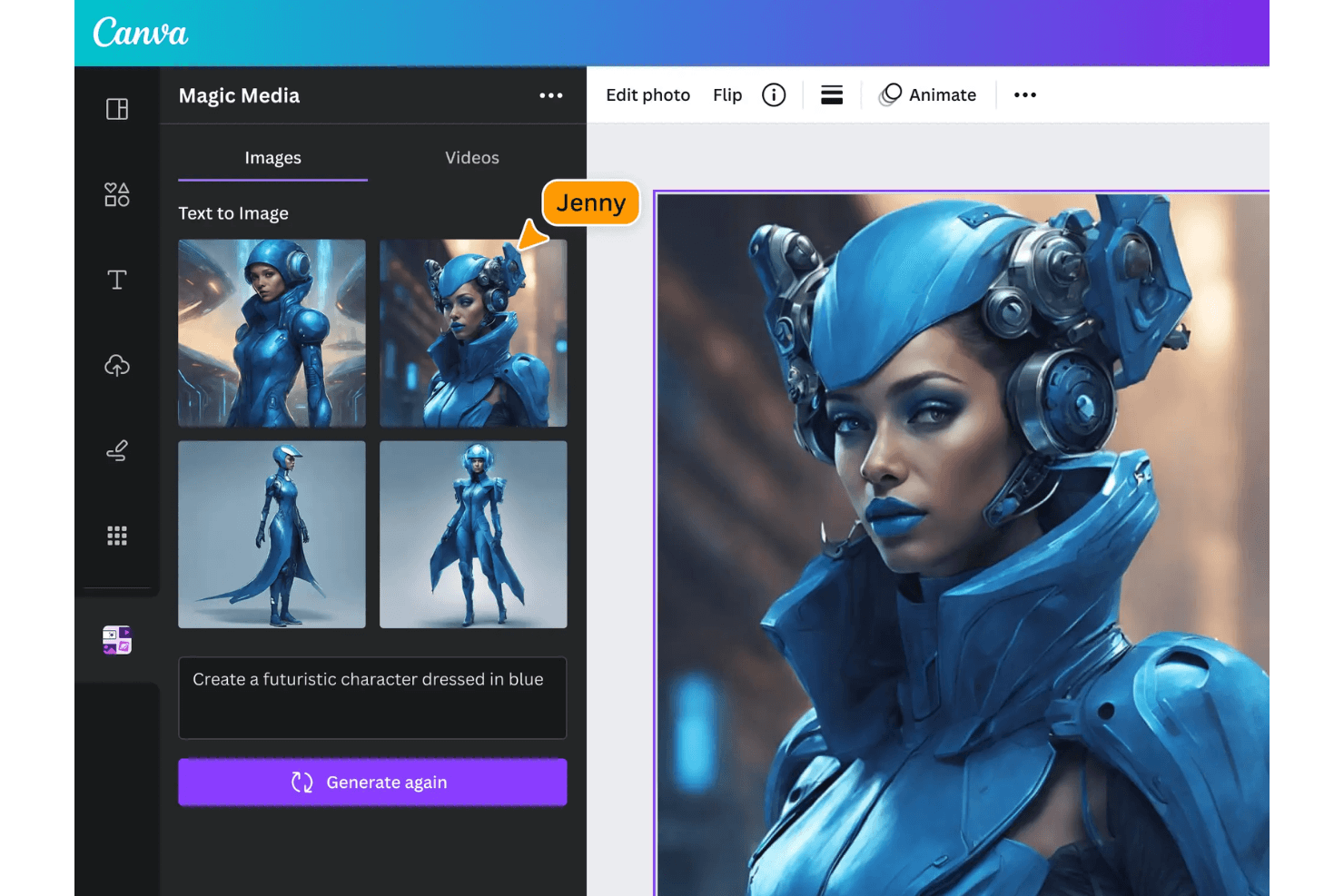
Canva consente di creare e modificare progetti visivi generati dall'intelligenza artificiale. Canva è una piattaforma di progettazione basata sull'intelligenza artificiale che combina una tela con funzionalità di trascinamento, un'enorme libreria di modelli e risorse, strumenti di intelligenza artificiale generativa, controlli per la gestione del marchio e collaborazione in tempo reale in un unico spazio di lavoro.
Per chi è più adatto Canva?
Canva è adatto ai team interfunzionali in cui esperti di marketing, responsabili di prodotto e persone senza competenze di progettazione devono produrre elementi visivi coerenti con il marchio senza dipendere da una risorsa di progettazione dedicata.
Perché ho scelto Canva
Ho incluso Canva tra le mie scelte principali perché è lo strumento che affiderei a un responsabile di prodotto o a un esperto di marketing che deve produrre un risultato di progettazione concreto e coerente con il marchio senza avere un progettista presente. I Kit del marchio, abbinati ai Controlli del marchio, definiscono colori, font e modelli per tutto il team, così nulla perde coerenza con il marchio anche quando sono persone senza competenze di progettazione a creare le risorse. Canva AI 2.0 fa un ulteriore passo avanti generando progetti completamente strutturati a livelli e modificabili a partire da un'istruzione, consentendo al team di passare dall'idea a un elemento visivo rifinito senza alcun passaggio di consegne.
Funzionalità principali di Canva
- Ridimensionamento magico: adatta automaticamente qualsiasi progetto a più formati e dimensioni con un solo clic, eliminando la necessità di riformattare manualmente i contenuti sulle diverse piattaforme.
- Collaborazione in tempo reale: più membri del team possono modificare, commentare e assegnare attività all'interno dello stesso progetto contemporaneamente, in tutti i piani incluso quello gratuito.
- Livelli magici: converte le immagini piatte in singoli livelli modificabili, consentendo di isolare e modificare elementi specifici del progetto senza dover ricominciare da zero.
- Cronologia delle versioni: registra fino a 1.000 versioni salvate per progetto, mostrando quale membro del team ha apportato ogni modifica, così puoi ripristinare con sicurezza le iterazioni precedenti.
Integrazioni di Canva
Canva si integra con ChatGPT, Claude, Gemini, Microsoft Copilot, Slack, Google Drive, Notion, Linear, HubSpot e Atlassian Rovo tramite il suo connettore AI e i connettori. Offre inoltre un'API REST per applicazioni personalizzate nei piani Enterprise e l'importazione di progetti da Figma di terze parti.
Pros and Cons
Pros:
- Le impaginazioni generate dall'intelligenza artificiale e modificabili conservano la struttura a livelli
- L'enorme libreria di modelli accelera l'esplorazione visiva
- La collaborazione in tempo reale mantiene allineati i team di prodotto
Cons:
- Precisione limitata per la prototipazione delle interfacce
- I progetti di grandi dimensioni possono risultare lenti o poco fluidi
Learn more about Canva: Ideale per chi non è designer e deve creare rapidamente prototipi UI
- Piano gratuito disponibile
- A partire da $14/editor/mese
Visit WebsiteCustomer Rating:4.8/5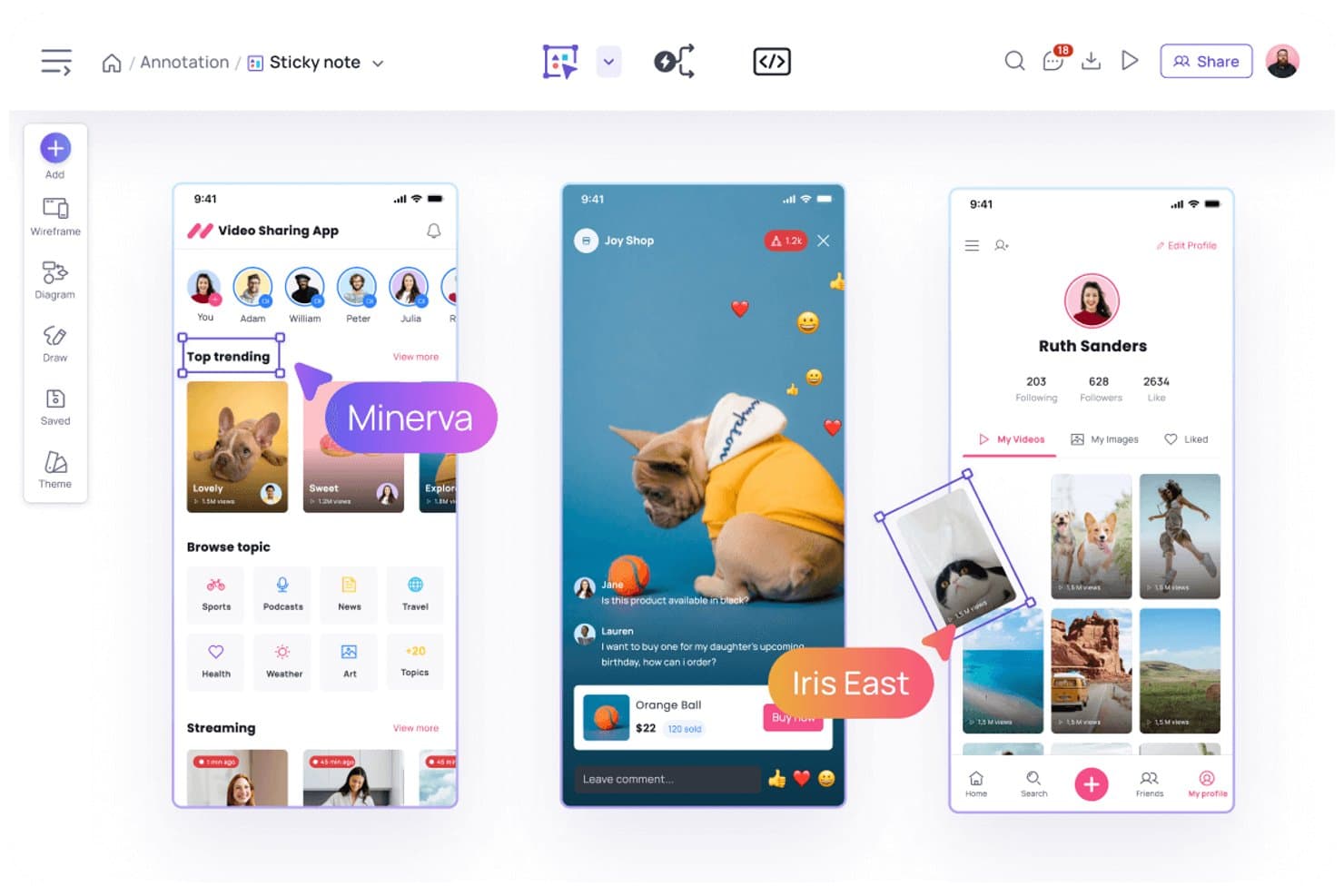
Visily consente agli utenti di annotare i design con note adesive e commenti. Visily è uno strumento di progettazione UI basato sull'intelligenza artificiale che consente di generare wireframe, prototipi e schermate ad alta fedeltà a partire da prompt testuali, schermate e diagrammi.
Per chi è più adatto Visily?
Visily è particolarmente adatto a product manager e fondatori di startup che devono trasformare le idee in prototipi UI condivisibili senza affidarsi a un designer dedicato.
Perché ho scelto Visily
Ho scelto Visily come uno dei migliori strumenti perché elimina concretamente il collo di bottiglia della progettazione per i product manager che devono muoversi rapidamente. La funzione da schermata a wireframe consente di acquisire qualsiasi UI attiva e ottenere istantaneamente una schermata modificabile, mentre da diagramma a design trasforma un diagramma di flusso della sessione di scoperta in vere schermate UI. Mi piace anche il fatto che la modalità Piano costruisca un piano di progettazione strutturato e composto da più schermate prima di generare qualsiasi elemento, così il risultato riflette un'effettiva progettazione del prodotto anziché un layout generico.
Funzionalità principali di Visily
- Modifica collaborativa in tempo reale: Più membri del team possono lavorare contemporaneamente sulla stessa bacheca, con chat tramite cursore e commenti per fornire feedback contestuali.
- Esportazione in codice: I piani Pro e Business esportano i design come codice React, Vue o HTML, scaricabile come file ZIP per il passaggio agli sviluppatori.
- Libreria dell'area di lavoro: Archivia temi condivisi, caratteri personalizzati e immagini a livello di area di lavoro, così ogni bacheca mantiene una coerenza visiva.
- Prototipazione automatica: Visily collega automaticamente le schermate in prototipi interattivi, consentendo di visualizzare in anteprima i flussi senza configurare manualmente i collegamenti.
Integrazioni di Visily
Visily supporta le integrazioni con Figma, Jira, Notion, Slack e Google Docs, oltre a un'estensione del browser per Chrome, Edge e Firefox. I piani Pro e Business includono un server MCP per strumenti di programmazione come Claude Code, Cursor e ChatGPT.
Pros and Cons
Pros:
- Genera schermate da testo, diagrammi e screenshot
- Collega automaticamente i prototipi senza consumare crediti IA
- Supporta una collaborazione rapida tra i team di prodotto
Cons:
- Le modifiche tramite IA spesso rigenerano intere schermate
- I layout complessi limitano il controllo dettagliato del design
Learn more about Visily: Ideale per modifiche con riempimento generativo sicure per la proprietà intellettuale
- Piano gratuito disponibile
- A partire da $9.99/mese
Visit WebsiteCustomer Rating:4.4/5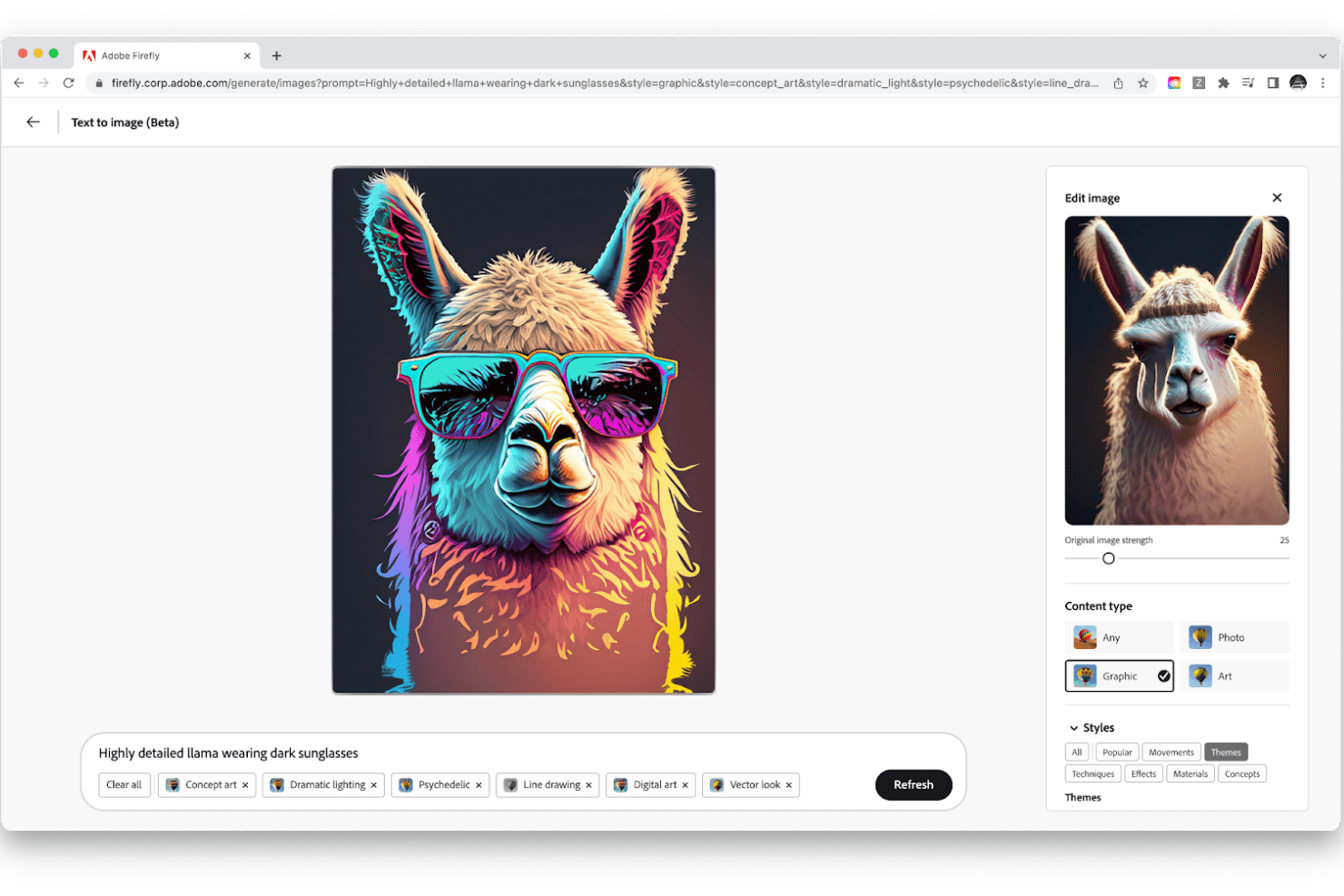
Adobe Firefly trasforma i tuoi prompt testuali in immagini. Adobe Firefly è una suite aziendale di progettazione basata sull'intelligenza artificiale che riunisce la creazione generativa di immagini, video, elementi vettoriali e audio, con una profonda integrazione con Creative Cloud in Photoshop, Illustrator e Adobe Express.
Per chi è più adatto Adobe Firefly?
Adobe Firefly è particolarmente adatto a graphic designer e team di marketing che lavorano già all'interno di Creative Cloud e hanno bisogno di modifiche generative sicure per la proprietà intellettuale su larga scala.
Perché ho scelto Adobe Firefly
Ho incluso Adobe Firefly tra le mie scelte principali perché il suo approccio alle modifiche generative sicure per la proprietà intellettuale è davvero difficile da replicare altrove. I dati di addestramento di Firefly provengono esclusivamente da contenuti concessi in licenza e di pubblico dominio, e ogni risultato include le credenziali dei contenuti, così puoi risalire esattamente a ciò che è stato generato e alle modalità. In pratica, questo significa che posso usare il Riempimento generativo in Photoshop per rimuovere oggetti, espandere immagini o aggiungere nuovi elementi alla scena a partire da un prompt testuale senza preoccuparmi di possibili problemi di copyright successivi.
Funzionalità principali di Adobe Firefly
- Firefly Boards: Un'area di lavoro basata innanzitutto sull'intelligenza artificiale per creare tavole d'ispirazione e storyboard, con preimpostazioni di stile applicabili con un clic e supporto per più modelli di partner come Google, Runway e Luma.
- Modelli personalizzati di Firefly: Modelli di intelligenza artificiale ottimizzati e addestrati sulle tue risorse di marca, che generano risultati coerenti con il marchio per immagini, elementi vettoriali e modelli.
- Flussi di lavoro in batch per la produzione creativa: Un'area di lavoro con trascinamento e rilascio e oltre 30 modelli di flusso di lavoro che automatizza il ridimensionamento delle risorse su larga scala, la conversione dei formati e la localizzazione in diverse regioni.
- Grafico Firefly per aziende: Un generatore di flussi di lavoro basato su nodi con oltre 300 nodi, che consente di concatenare azioni di Photoshop, Illustrator e Premiere insieme a modelli di intelligenza artificiale di terze parti in pipeline riutilizzabili.
Integrazioni di Adobe Firefly
Adobe Firefly si integra con Photoshop, Illustrator, Premiere, Adobe Express, Adobe Stock, Workfront, Frame.io e Adobe Experience Manager Assets. Si collega inoltre a Microsoft Teams, Slack, Gmail, Jira e Zapier, mentre Firefly Services mette a disposizione oltre 30 API REST per integrazioni personalizzate.
Pros and Cons
Pros:
- La modifica in Photoshop trasforma i concept generati in risorse
- I dati di addestramento concessi in licenza favoriscono risultati più sicuri per uso commerciale
- La generazione in batch accelera la produzione ripetitiva di risorse
Cons:
- Nessun flusso di lavoro per wireframe o dalla progettazione al codice
- I limiti di crediti possono interrompere il lavoro generativo
Learn more about Adobe Firefly: Ideale per la progettazione di siti web generata dall'intelligenza artificiale su un'area di lavoro in tempo reale
- Piano gratuito disponibile
- A partire da $10 al mese (con fatturazione annuale)
Visit WebsiteCustomer Rating:4.4/5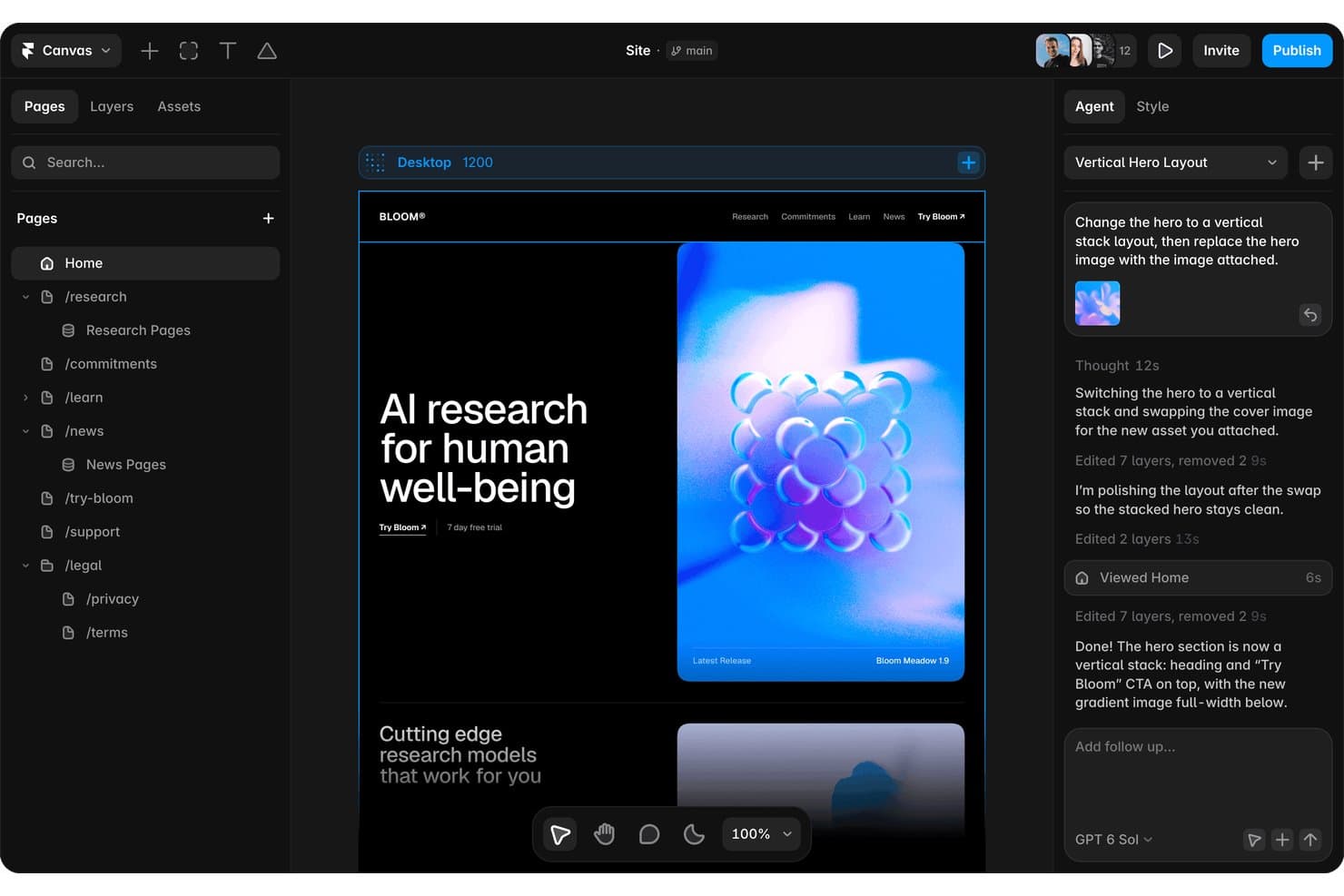
L'agente di intelligenza artificiale di Framer riprogetta le disposizioni principali a partire da una semplice istruzione nella chat. Framer è una piattaforma di progettazione di siti web basata sull'intelligenza artificiale che combina un'area di lavoro visiva in tempo reale, un agente di progettazione basato sull'intelligenza artificiale, la collaborazione in tempo reale e strumenti integrati di hosting, CMS e pubblicazione.
Per chi è più adatto Framer?
Framer è particolarmente adatto a designer di siti web e team di marketing che desiderano passare dall'idea a un sito attivo e rifinito senza un lungo processo di passaggio di consegne.
Perché ho scelto Framer
Framer si è guadagnato un posto nella mia rosa di candidati perché il suo agente di progettazione basato sull'intelligenza artificiale opera direttamente su un'area di lavoro in tempo reale, generando disposizioni modificabili, testi e varianti di sezioni a partire da un'istruzione o da uno screenshot in 40–100 secondi. Mi piace molto il fatto che si possa inserire uno screenshot di Figma e osservarne la ricostruzione come livelli reali e manipolabili, anziché come un'immagine bloccata. Il sistema di ramificazione consente inoltre di applicare le modifiche generate dall'intelligenza artificiale al proprio URL di anteprima, così il mio team può esaminarle e unirle senza intervenire sul sito principale.
Funzionalità principali di Framer
- Modifica collaborativa in tempo reale: Più membri del team possono modificare contemporaneamente lo stesso progetto, con cursori in tempo reale che mostrano la posizione di ciascuna persona sull'area di lavoro.
- Ramificazione con URL di anteprima: Ogni ramo ha il proprio URL di prova, consentendo di esaminare e approvare le modifiche prima di unirle al sito principale.
- Importazione da Figma con livelli modificabili: È possibile incollare direttamente i progetti di Figma in Framer mantenendo la struttura dei livelli per continuare a modificarli sull'area di lavoro.
- Revisione e controllo automatico del sito tramite intelligenza artificiale: Prima della pubblicazione, Framer segnala problemi di contrasto, testo alternativo mancante, refusi, lacune SEO e stili incoerenti nel progetto.
Integrazioni di Framer
Framer offre integrazioni con Figma, Slack, GitHub, Notion, Google Sheets, Airtable e agenti esterni tra cui Claude Code, Cursor e Codex. La sua API per le estensioni supporta integrazioni personalizzate, con estensioni del catalogo per Unsplash, Rive e Phosphor.
Pros and Cons
Pros:
- Genera disposizioni di siti modificabili a partire dalle istruzioni
- Preserva i livelli del progetto durante le importazioni da Figma
- Supporta la ramificazione per revisioni dei progetti più sicure
Cons:
- Produce progetti di siti web anziché interfacce per applicazioni
- Non consente di esportare codice o risorse grezzi
 10Ideale per la generazione nativa di risorse vettoriali e SVG
Recraft
- Piano gratuito disponibile
- A partire da $10/mese (con fatturazione annuale)
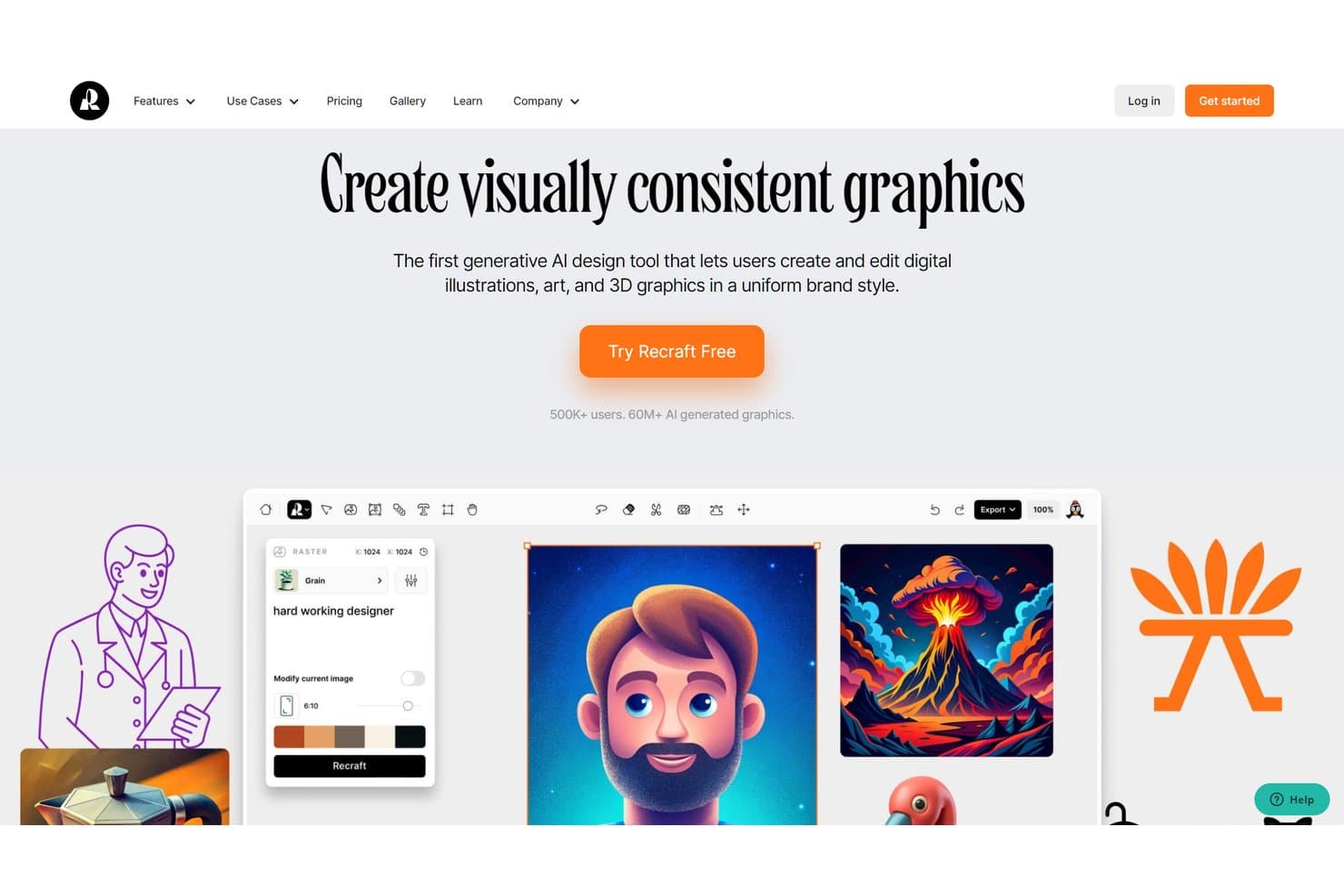
Recraft consente agli utenti di creare grafiche generate dall'IA con uno stile coerente con il brand. Recraft è una piattaforma per la generazione di immagini e grafica vettoriale tramite IA che consente di creare, modificare ed esportare immagini raster, SVG, illustrazioni, icone, modelli dimostrativi e risorse video da un'unica tela infinita.
A chi è più adatto Recraft?
Recraft è una soluzione particolarmente adatta ai graphic designer e ai team di marketing che devono produrre risorse vettoriali, icone e modelli dimostrativi di alta qualità senza passare continuamente da uno strumento all'altro.
Perché ho scelto Recraft
Ho incluso Recraft tra le mie scelte principali perché è l'unico strumento della mia lista a generare nativamente veri SVG modificabili, non immagini raster presentate come vettori. Quando mi serve un set completo di icone o un'illustrazione scalabile, il modello vettoriale di Recraft produce veri tracciati SVG con contorni e riempimenti modificabili. Il suo agente di progettazione fa un ulteriore passo avanti, producendo un kit coerente di risorse, inclusi loghi, icone per app e grafiche per i social, a partire da un'unica richiesta.
Funzionalità principali di Recraft
- Creazione di stili personalizzati: Carica da 1 a 10 immagini di riferimento per creare uno stile riutilizzabile che applichi la tua identità visiva a tutte le risorse generate.
- Plugin per Figma: Genera immagini raster e SVG modificabili direttamente sulla tua tela di Figma, con vettorializzazione, rimozione dello sfondo e aumento della risoluzione integrati.
- Generatore di modelli dimostrativi: Produci modelli dimostrativi pronti per la stampa e il web in diverse categorie, tra cui abbigliamento, imballaggi, schermi digitali e prodotti, a partire da un'unica richiesta.
- Esportazione in più formati: Esporta le risorse come PNG, JPG, TIFF, PDF, SVG o Lottie, con supporto per CMYK e 300 DPI per una produzione pronta per la stampa.
Integrazioni di Recraft
Recraft offre integrazioni con Figma, Framer, Google Docs, Google Slides e Chrome. Fornisce inoltre un'API per integrazioni personalizzate e un server MCP per Claude, Cursor e altri client MCP.
Pros and Cons
Pros:
- Genera nativamente risorse SVG modificabili
- Crea kit coerenti di risorse per il brand
- Produce modelli dimostrativi e set di icone curati
Cons:
- Non genera wireframe o layout dell'interfaccia utente
- I progetti condivisi non supportano la modifica collaborativa in tempo reale
Learn more about Recraft:
Altre opzioni di software di progettazione basati sull’IA
Ecco altri strumenti che non sono entrati nella mia lista dei migliori, ma che vale comunque la pena prendere in considerazione:
- 11Relume AIIdeale per trasformare un brief in un sito e consegnare il design al codice
- 12MiroIdeale per la prototipazione di IA interfunzionale su un'unica tela
- 13FigmaIdeale per il trasferimento dal design al codice basato sull'IA
- 14ClaudeIdeale per la prototipazione guidata dai PM con passaggio del codice
- 15LookaMiglior strumento di design AI con offerta di brand kit
- 16Builder.ioIdeale per prototipi da Figma a codice con dati in tempo reale
- 17v0Ideale per la prototipazione di interfacce utente reali con il tuo sistema di progettazione
Come valuto i software di progettazione con IA
Per creare questo elenco, l’IA di uno strumento deve essere in grado di gestire attività reali di progettazione di prodotti, come generare layout a partire da prompt o creare risorse visive. Da qui, valuto tre aspetti. La funzionalità principale ha il peso maggiore, ad esempio la modifica dei progetti e l’applicazione degli elementi del brand. Poi esamino le funzionalità distintive, come la conversione da progetto a codice, e ciò che uno strumento offre oltre al suo insieme di funzionalità, come la privacy dei dati e la proprietà intellettuale.
Funzionalità principali (requisiti fondamentali per questo elenco)
Quando seleziono gli strumenti per il mio elenco, assegno a ciascuno un punteggio su una scala da 0 (non offre la funzionalità) a 5 (eccelle in quest’area) per ogni funzionalità principale elencata di seguito. Converto quindi il totale in una percentuale per contribuire a valutare l’idoneità complessiva di ciascuno strumento, attribuendo un peso aggiuntivo a tutte le funzionalità che ho ritenuto essenziali.
- Progettazione generata dall’IA (essenziale): cerco layout, wireframe o risorse visive basati su prompt che riflettano un brief di prodotto e offrano varianti utili da esaminare.
- Tela di progettazione modificabile (essenziale): valuto se i team possono perfezionare livelli, testi, componenti e spaziature dopo la generazione, quindi preparare i concetti per i test o la consegna.
- Modelli e risorse: verifico modelli, kit per interfacce utente, icone e componenti riutilizzabili per flussi di prodotto comuni, formati di campagne e casi d’uso dei team.
- Esportazione in più formati: valuto le esportazioni per web, dispositivi mobili, presentazioni e consegna agli sviluppatori, inclusi formati dei file, dimensioni e varianti responsive.
- Controlli di coerenza del brand: colori, caratteri, loghi e stili riutilizzabili salvati dovrebbero essere applicati a tutti i concetti senza costringere a riformattazioni manuali.
- Collaborazione e condivisione: cerco commenti, condivisione, autorizzazioni e modifica simultanea che supportino le revisioni con i team di prodotto, progettazione, ingegneria e marketing.
Una volta ottenuto un elenco di strumenti che soddisfano i criteri, considero ciò che distingue ciascuna piattaforma.
Fattori distintivi (ciò che differenzia i fornitori)
Ecco come confronto i diversi fornitori:
Funzionalità distintive
La conversione da progetto a codice è il primo aspetto che valuto. Verifico se uno strumento produce codice React o HTML/CSS pulito che gli ingegneri possano effettivamente utilizzare, non solo modelli visivi che richiedono una ricostruzione. Il supporto all’input multimodale è altrettanto importante: cerco strumenti che consentano di inserire uno schizzo su una lavagna o uno screenshot e ottenere in cambio un layout strutturato, accelerando così le prime fasi di esplorazione. Considero anche il feedback sull’usabilità basato sull’IA, con cui uno strumento segnala i rapporti di contrasto o i problemi relativi alle aree di attivazione prima ancora di eseguire un singolo test.
Oltre le funzionalità
Valuto come ciascuno strumento gestisce la privacy dei dati e la proprietà intellettuale, soprattutto se i prompt e i progetti generati vengono utilizzati per addestrare il modello sottostante. Questo è importante quando si progettano concetti di prodotto non ancora rilasciati. Verifico anche quanto bene uno strumento si integri nei flussi di lavoro esistenti: se non si collega agli ambienti in cui il team lavora già, come Figma, Jira o GitHub, l’adozione si arresta. Infine, considero quanto lo strumento sia accessibile ai non designer, poiché spesso i product manager devono generare concetti senza attendere il supporto dedicato del team di progettazione.
Facilità d’uso
Ho dato priorità agli strumenti di progettazione basati sull’IA che offrono un’interfaccia utente intuitiva e semplice. Ho inoltre indicato se strumenti specifici offrono un’interfaccia con funzionalità di trascinamento per facilitare la progettazione.
Integrazioni software
La maggior parte degli strumenti presenti in questo elenco non dispone di integrazioni native. Per quelli che offrono integrazioni, ho menzionato le varie possibilità. Idealmente, questi strumenti dovrebbero collegarsi al tuo strumento di progettazione e facilitare il lavoro con i risultati prodotti.
Prezzi
Come altri prodotti SaaS, gli strumenti di progettazione basati sull’IA seguono un modello di prezzi ricorrenti mensili o annuali. Ho indicato i prezzi di ciascuno strumento insieme alla disponibilità di una prova gratuita. Ho inoltre specificato se il software dispone di una versione gratuita e fornito qualsiasi altra informazione rilevante.
Domande frequenti sul software di progettazione basato sull'IA
Trova le risposte alle domande più comuni che altre persone pongono su questo argomento.
Quali stili di opere d'arte può generare l'IA?
Gli strumenti di IA possono generare moltissimi tipi diversi di opere d’arte. Questi strumenti generano solitamente opere d’arte in base agli input testuali forniti e addestrano i loro modelli sulla base dell’enorme quantità di dati visivi disponibili. Pertanto, l’IA può generare quasi ogni stile che si possa immaginare. Alcuni stili artistici popolari includono l’astratto, il realistico, il manga, il surrealismo e il cubismo.
Qual è il miglior strumento gratuito di progettazione basato sull'IA?
Sebbene esistano strumenti di IA completamente gratuiti come TinyWow, i migliori strumenti di IA di solito offrono una prova gratuita o crediti per permetterti di testarli. Strumenti come Midjourney e Leonardo.ai sono ottimi strumenti di progettazione basati sull’IA che ti consentono di generare un numero fisso di immagini nell’ambito dei loro piani gratuiti.
ChatGPT genera immagini?
Attualmente, ChatGPT non può disegnare o generare immagini. Tuttavia, OpenAI (l’azienda alla base di ChatGPT) ha rilasciato DALL-E2, uno strumento che genera immagini a partire dal testo.