

Adentrarse en el mundo del diseño UX puede resultar abrumador, especialmente cuando el presupuesto es limitado. Necesitas herramientas que ayuden a tu equipo a diseñar de forma eficaz sin arruinarse. Ahí es donde entra en juego el software UX gratuito.
Según mi experiencia probando y analizando software, he descubierto que las soluciones gratuitas pueden satisfacer muchas de tus necesidades, desde la creación de prototipos hasta la colaboración. Estas herramientas alivian el problema de los costes elevados y, al mismo tiempo, ofrecen funciones esenciales.
En este artículo, compartiré mis principales opciones de software UX gratuito. Te ofreceré un análisis imparcial y bien documentado para que puedas elegir la herramienta adecuada para tu equipo. Tanto si tienes una startup como una pequeña empresa, aquí encontrarás algo para ti.
Por qué confiar en nuestras recomendaciones de software
6,700+
Reviews
20
Industry experts
16+
Evaluation factors
14
Years
Nuestro equipo lleva probando y evaluando software desde 2012. Como gestores de producto, sabemos lo difícil —y lo importante— que es elegir el software adecuado.
Para esta guía, evaluamos las herramientas mediante pruebas prácticas e investigación independiente, puntuando las herramientas según nuestros criterios de selección.
Nuestras reseñas reflejan nuestro criterio editorial humano, no un discurso de ventas.
Revisores expertos:
 Hannah ClarkSenior TPM
- Cristiano ValimSenior UI/UX Lead

Tabla comparativa de software UX gratuito
Esta tabla comparativa resume los detalles de precios de mis principales selecciones de software UX gratuito:
| Tool | Best For | Trial Info | Price | ||
|---|---|---|---|---|---|
| 1 | La mejor opción para talleres y flujos de UX multifuncionales | Plan gratuito disponible | Desde $16/usuario/mes | Website | |
| 2 | Ideal para convertir bocetos en prototipos mediante IA sin programar | Plan gratuito disponible | Desde $12/usuario/mes (facturado anualmente) | Website | |
| 3 | Ideal para crear esquemas de estructura y prototipos sin ser diseñador | Plan gratuito disponible | Desde $12.45/usuario/mes (facturado anualmente) | Website | |
| 4 | Mejor para la profundidad de prototipos respaldados por código | Prueba gratuita de 14 días y plan gratuito disponibles | Desde $49/mes (facturado anualmente) | Website | |
| 5 | La mejor opción para crear bocetos de interfaz sin ser diseñador junto con equipos de producto | Plan gratuito disponible | Desde $14/mes (facturado anualmente) | Website | |
| 6 | La mejor opción para el acceso multifuncional a archivos de diseño | Plan gratuito disponible | Desde $16/usuario/mes (facturado anualmente) | Website | |
| 7 | La mejor opción para el diseño de UI sin conexión en cualquier sistema operativo | Plan gratuito disponible | Desde $4.99/usuario/mes | Website | |
| 8 | La mejor opción para la entrega de diseños de código abierto a desarrollo | Plan gratuito y prueba gratuita de 14 días disponibles | Desde $7/usuario/mes | Website | |
| 9 | Mejor para la creación de prototipos funcionales de alta fidelidad | Plan gratuito disponible | Desde $19/usuario/mes | Website | |
| 10 | La mejor opción para crear prototipos de UI/UX todo en uno | Hay un plan gratuito disponible | Desde $12/usuario/mes | Website |


Análisis del mejor software UX gratuito
A continuación encontrarás mis resúmenes detallados del mejor software UX gratuito que se ha incluido en mi selección. Mis análisis ofrecen una visión detallada de las funciones principales, las ventajas y desventajas, las integraciones y los casos de uso ideales de cada herramienta para ayudarte a encontrar la mejor opción para ti. Aunque algunas de estas herramientas ofrecen una versión completamente gratuita, otras ofrecen un periodo de prueba gratuito. He añadido una nota sobre lo que es gratuito en cada uno de mis análisis.
 La mejor opción para talleres y flujos de UX multifuncionales
- Plan gratuito disponible
- Desde $16/usuario/mes
Visit WebsiteCustomer Rating:4.7/5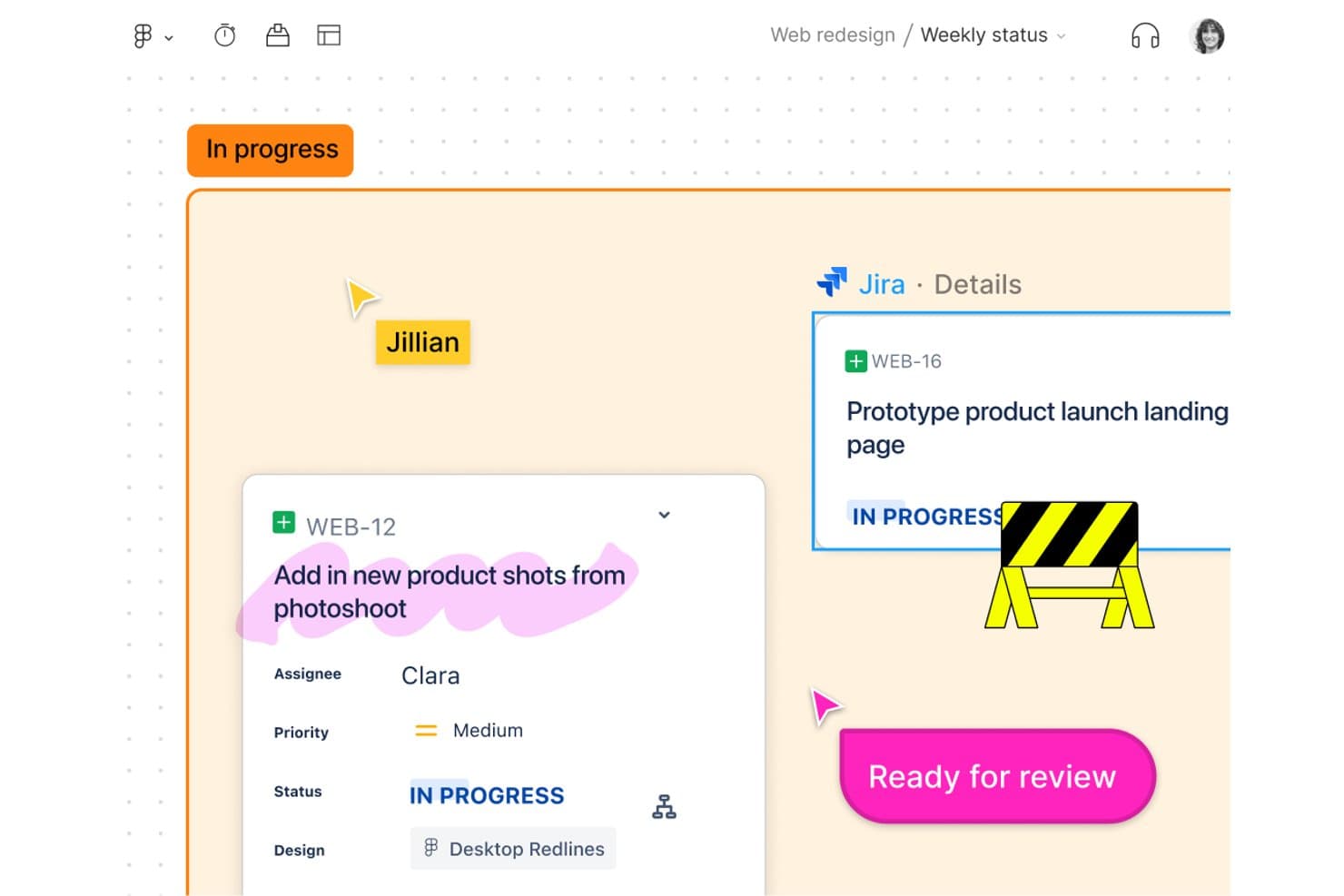
FigJam vincula las tareas de Jira directamente con los tableros de diseño para el seguimiento del equipo. FigJam es una plataforma de pizarras colaborativas en línea diseñada para talleres de UX y el mapeo de recorridos, que ofrece un lienzo infinito, herramientas de colaboración en tiempo real, plantillas e integración fluida con el ecosistema de Figma.
¿Para quién es mejor FigJam?
Responsables de producto y equipos multifuncionales que necesitan un espacio sencillo y colaborativo para mapear recorridos de usuario, organizar talleres y alinear los flujos de los proyectos.
Por qué elegí FigJam
Elegí FigJam como una de las mejores opciones porque los talleres multifuncionales y el mapeo de recorridos son muy sencillos gracias a sus pizarras multijugador en tiempo real, sesiones de votación y más de 300 plantillas listas para usar. Mi equipo utiliza Open Sessions para invitar a clientes y partes interesadas sin cuentas, lo que mantiene a todos involucrados en el proceso, desde la generación de ideas hasta el diagrama de flujo.
Características principales de FigJam
- Acceso de invitados mediante Open Sessions: Invita a cualquier persona a colaborar en una pizarra durante 24 horas sin crear una cuenta de Figma.
- Llamadas de audio integradas y Spotlight: Inicia sesiones de voz en directo y dirige la atención a un área específica del lienzo mediante la herramienta Spotlight.
- Importación y conversión de tablas CSV: Importa datos CSV para crear tablas o convertir rápidamente la información en notas adhesivas.
- Widgets y complementos de Figma Community: Amplía las pizarras con complementos interactivos, herramientas de votación y widgets personalizados creados por Figma Community.
Integraciones de FigJam
FigJam ofrece integraciones nativas con Asana y Jira, lo que te permite crear y gestionar tareas directamente en la pizarra. También puedes ampliar las pizarras mediante widgets y complementos de Figma Community, e importar contenido de herramientas como Miro, Mural, Lucid y Google Jamboard.
¿Qué incluye el plan gratuito?
FigJam ofrece un plan gratuito para siempre que incluye hasta 3 archivos de FigJam, colaboradores ilimitados y funciones básicas para crear pizarras y trabajar en equipo. Algunas integraciones, widgets avanzados y controles de administración requieren un plan de pago.
Pros and Cons
Pros:
- Colaboradores ilimitados con acceso de invitados sin iniciar sesión
- Amplia biblioteca de plantillas para el mapeo de recorridos
- Pizarras en tiempo real para talleres multifuncionales
Cons:
- No incluye funciones nativas de creación de prototipos interactivos
- Limitado a 3 pizarras activas en el plan gratuito
Learn more about FigJam: Ideal para convertir bocetos en prototipos mediante IA sin programar
- Plan gratuito disponible
- Desde $12/usuario/mes (facturado anualmente)
Visit WebsiteCustomer Rating:4.6/5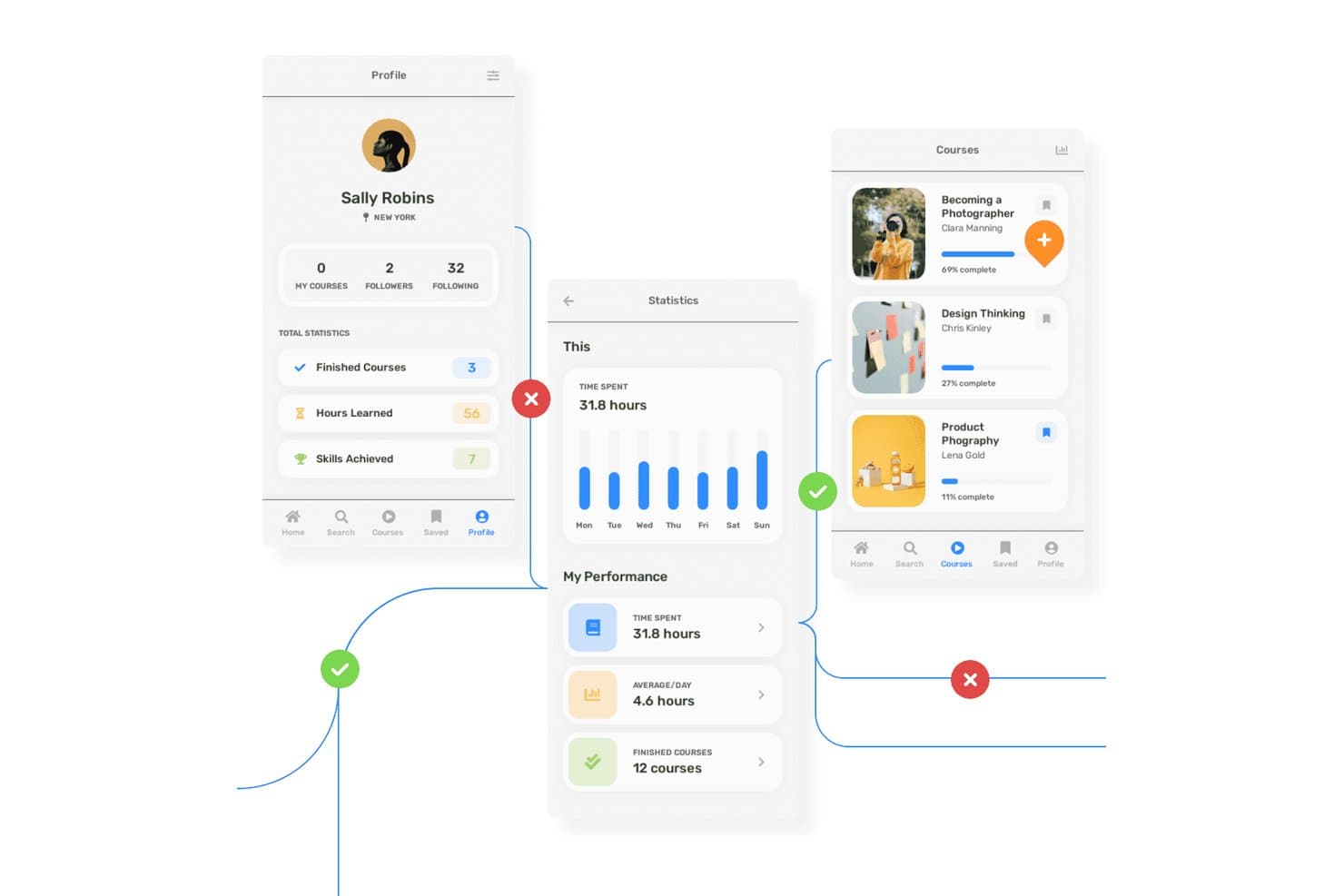
Uizard permite a los usuarios crear prototipos de flujos de aplicaciones de aprendizaje con varias pantallas y anotaciones. Uizard es una herramienta de diseño de UX basada en el navegador que permite crear estructuras alámbricas, maquetas, prototipos interactivos y conceptos de diseño generados por IA con colaboración del equipo en tiempo real.
¿Para quién es más adecuado Uizard?
Uizard es una excelente opción para gerentes de producto y equipos que necesitan prototipos rápidos potenciados por IA para facilitar los comentarios de las partes interesadas y la validación temprana sin conocimientos avanzados de diseño.
Por qué elegí Uizard
Elegí Uizard porque mi equipo puede convertir bocetos dibujados a mano o capturas de pantalla de aplicaciones en prototipos interactivos mediante sus escáneres potenciados por IA. El interruptor de un solo clic entre la estructura alámbrica y la maqueta nos permite pasar rápidamente de diseños de baja a alta fidelidad, lo que resulta perfecto para los flujos de usuario iniciales. Utilizo su Autodiseñador de IA para generar diseños de varias pantallas a partir de texto simple, acelerando la validación de conceptos sin necesidad de programar.
Funciones principales de Uizard
- Interruptor del modo de estructura alámbrica: Cambia al instante entre las vistas de estructura alámbrica y maqueta de alta fidelidad para cualquier pantalla.
- Escáner de capturas de pantalla: Convierte capturas de pantalla existentes de aplicaciones o sitios web en prototipos editables mediante IA.
- Edición colaborativa en tiempo real: Colabora en directo con tu equipo en el mismo proyecto sin conflictos de versiones.
- Mapa de calor de atención mediante IA: Visualiza dónde es probable que se concentren los usuarios en tu interfaz con un mapa de calor generado por IA.
Integraciones de Uizard
Uizard ofrece integraciones con Figma mediante su complemento de la comunidad, permite importar desde Sketch y Adobe XD a través de la conversión de PNG/JPG + IA y permite exportar código React/CSS en los planes de pago. No hay ninguna API pública ni compatibilidad nativa con Zapier documentada.
¿Qué es gratis?
Uizard ofrece un plan gratuito para siempre sin límite de tiempo. El plan gratuito admite hasta 3 proyectos, 10 pantallas por proyecto e incluye colaboración en tiempo real, pero limita algunas funciones avanzadas de IA y las exportaciones.
Pros and Cons
Pros:
- La IA convierte bocetos en prototipos en los que se puede hacer clic
- Permite alternar al instante entre las vistas de estructura alámbrica y maqueta
- Los espectadores gratuitos ilimitados pueden comentar en los prototipos
Cons:
- Solo ofrece mapas de calor predichos por IA para obtener comentarios sobre la usabilidad
- La exportación gratuita está limitada a archivos de baja resolución
Learn more about Uizard: Ideal para crear esquemas de estructura y prototipos sin ser diseñador
- Plan gratuito disponible
- Desde $12.45/usuario/mes (facturado anualmente)
Visit WebsiteCustomer Rating:4.5/5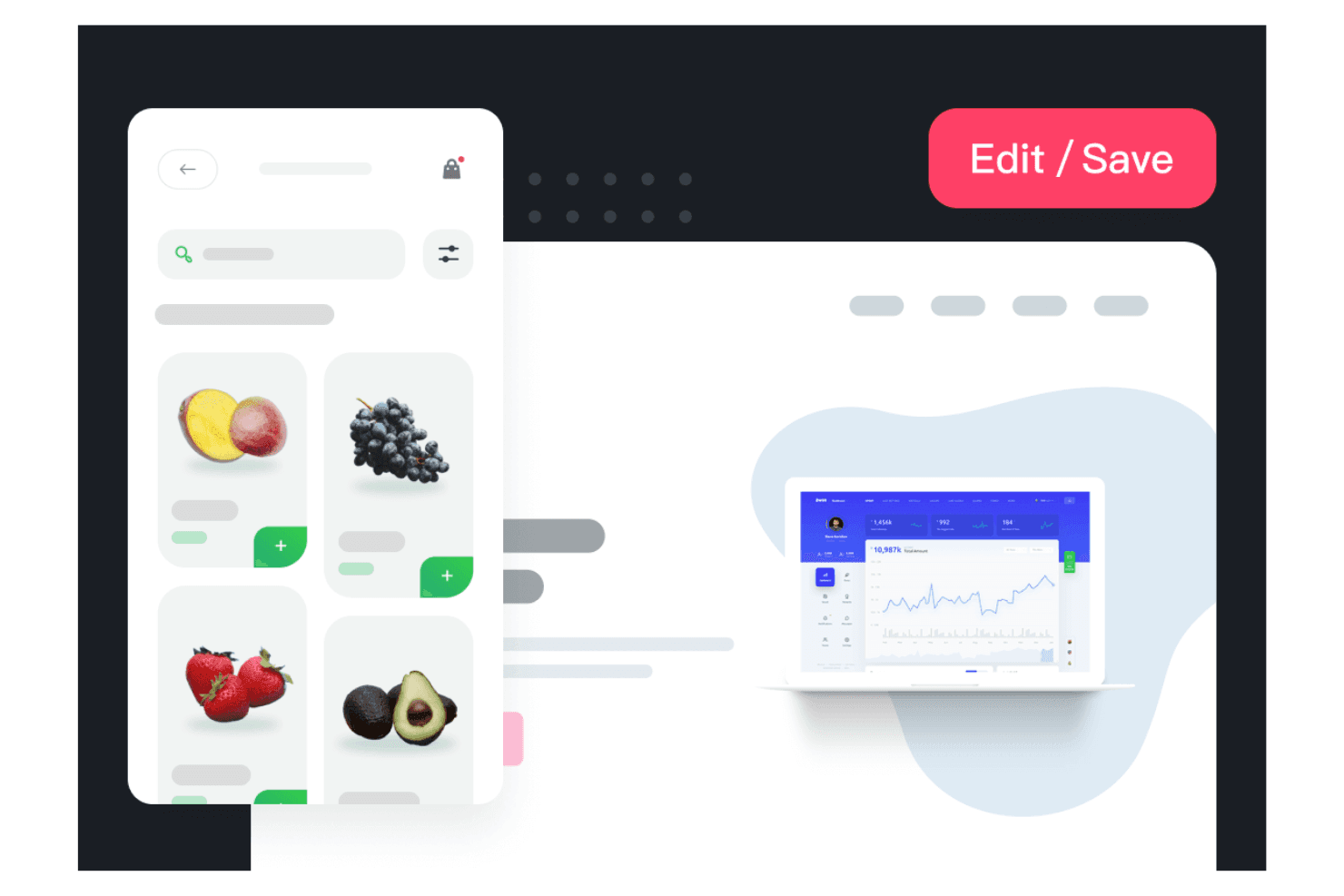
Mockplus permite que tu equipo cree diseños visuales rápidamente. Mockplus es una plataforma de diseño de UX basada en navegador que ofrece herramientas de creación de esquemas de estructura, prototipado, diseño de interfaces de usuario y entrega a desarrolladores en sus productos RP, Cloud y DT, con colaboración en tiempo real y amplias bibliotecas de plantillas.
¿Para quién es mejor Mockplus?
Equipos que buscan una plataforma basada en navegador para crear y revisar esquemas de estructura o prototipos conjuntamente, con una formación o incorporación al diseño mínimas.
Por qué elegí Mockplus
Elegí Mockplus porque puedo convertir rápidamente las ideas en esquemas de estructura y prototipos interactivos con plantillas listas para usar, más de 3.000 componentes prediseñados y colaboración en tiempo real. Mis equipos utilizan su plan gratuito Equipo para diseñar flujos conjuntamente y lado a lado sin experiencia en diseño ni una incorporación compleja.
Características principales de Mockplus
- Coedición en tiempo real: Varios miembros del equipo pueden trabajar juntos en directo en el mismo prototipo sin conflictos de versiones.
- Bibliotecas de componentes y recursos: Accede a más de 3.000 iconos y componentes integrados, además de bibliotecas compartidas de recursos reutilizables para tus proyectos.
- Importaciones de diseños de terceros: Importa diseños directamente desde Figma, Sketch, Adobe XD y Axure para agilizar la incorporación y la migración.
- Control de acceso basado en roles: Establece distintos niveles de permisos y gestiona el acceso de los usuarios para colaborar dentro de los equipos.
Integraciones de Mockplus
Mockplus ofrece integraciones nativas con Figma, Sketch, Adobe XD, Photoshop, Axure, Slack, Jira, Confluence y Lark. Se conecta directamente con Mockplus Cloud para los flujos de revisión y entrega a desarrolladores, y admite la importación de diseños y la colaboración con estas herramientas clave.
¿Qué incluye el plan gratuito?
Mockplus ofrece un plan gratuito para siempre, Equipo, que permite que hasta 10 usuarios colaboren en 3 proyectos con revisores ilimitados. Este plan incluye coedición en tiempo real, pero limita el número de proyectos y algunas funciones avanzadas, como la gestión de roles y el historial de versiones.
Pros and Cons
Pros:
- Codiseño en tiempo real para hasta 10 usuarios
- Más de 3.000 componentes e iconos prediseñados
- Conversión rápida de una idea en un prototipo
Cons:
- No incluye funciones de pruebas de usabilidad
- Las opciones de exportación están bloqueadas en los planes de pago
Learn more about Mockplus: Mejor para la profundidad de prototipos respaldados por código
- Prueba gratuita de 14 días y plan gratuito disponibles
- Desde $49/mes (facturado anualmente)
Visit WebsiteCustomer Rating:4.2/5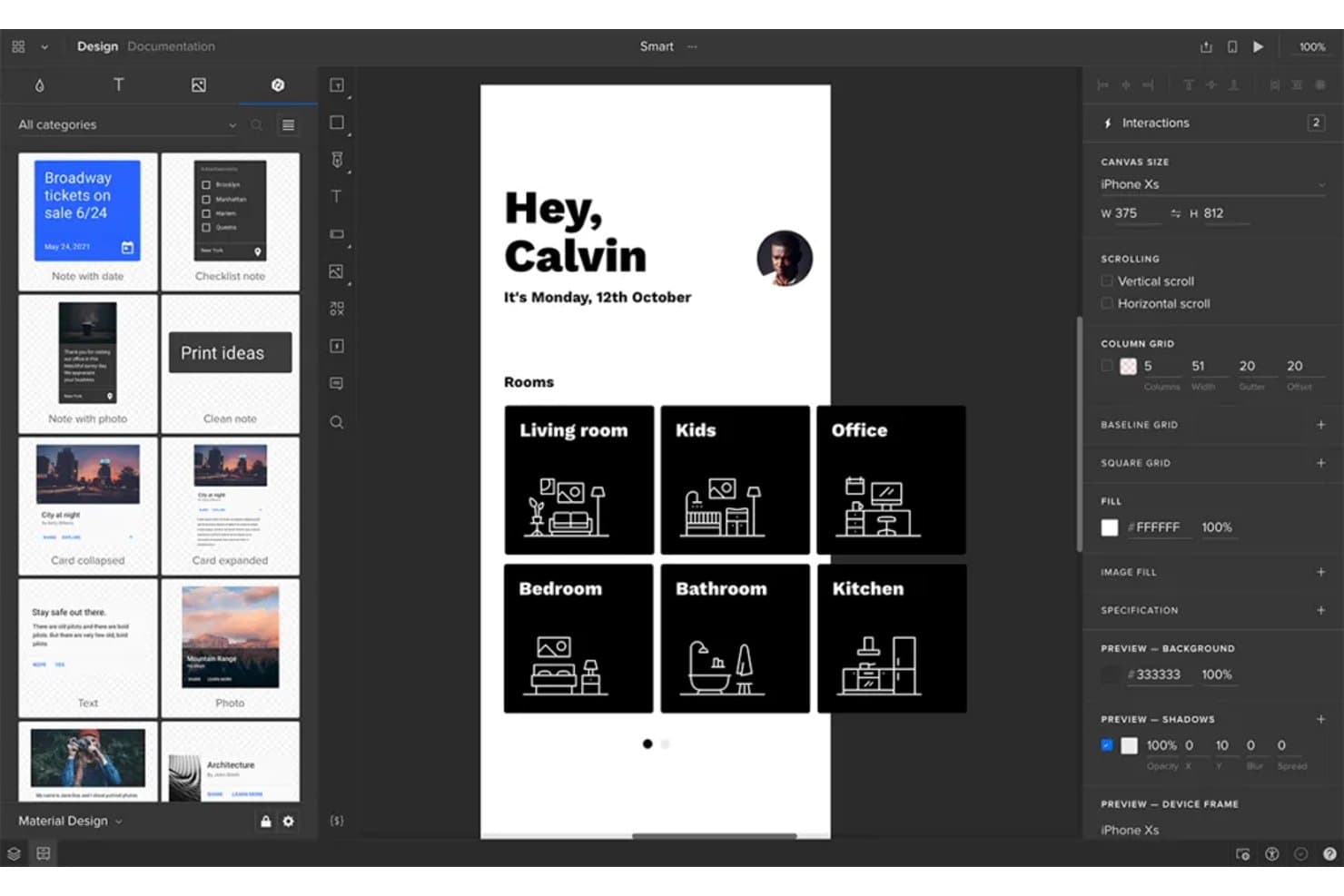
UXPin permite a los usuarios crear prototipos de pantallas de aplicaciones móviles con interacciones reales. UXPin es una plataforma de prototipado de UX basada en navegador que ofrece wireframes respaldados por código, diseño interactivo con estados y componentes reales, y herramientas de colaboración integradas.
¿Para quién es más adecuado UXPin?
UXPin es una opción sólida para diseñadores de UX/UI de equipos centrados en productos que necesitan prototipado avanzado, componentes respaldados por código y vistas previas listas para presentar a las partes interesadas.
Por qué elegí UXPin
Elegí UXPin porque creo que su prototipado respaldado por código permite a mi equipo crear prototipos casi idénticos al producto final, con estados reales, lógica condicional y bibliotecas de componentes avanzadas. Hemos podido probar recorridos de usuario complejos, validar casos extremos y crear vistas previas interactivas completas antes de escribir una sola línea de código de producción.
Características principales de UXPin
- Coedición en tiempo real: Varios miembros del equipo pueden trabajar simultáneamente en el mismo diseño desde el navegador.
- Importación desde Figma y Sketch: Importa fácilmente archivos de diseño de Figma o Sketch para iterar rápidamente.
- Creador de componentes con IA: Genera diseños y elementos de interfaz respaldados por código a partir de indicaciones de texto mediante modelos de IA integrados.
- Aplicaciones de vista previa móvil: Obtén una vista previa y prueba tus prototipos en directo en dispositivos iOS y Android mientras diseñas.
Integraciones de UXPin
UXPin ofrece integraciones con Figma (mediante un plugin), Sketch, Slack, Jira y FullStory. En los planes de pago, admite la importación de componentes personalizados programados mediante Git, npm y Storybook. Las aplicaciones Mirror permiten obtener vistas previas en iOS y Android. Hay una API disponible para integraciones personalizadas.
¿Qué es gratis?
UXPin ofrece un plan gratuito para siempre con funciones limitadas. El plan gratuito normalmente te limita a un prototipo y ofrece menos funciones avanzadas que los niveles de pago, por lo que es más adecuado para probar la plataforma o gestionar proyectos sencillos.
Pros and Cons
Pros:
- Crea prototipos de alta fidelidad respaldados por código de forma gratuita
- Permite la colaboración en tiempo real para el diseño desde el navegador
- Permite obtener vistas previas interactivas gratuitas en dispositivos móviles
Cons:
- El plan gratuito limita los flujos de exportación y aceptación
- Solo se permiten dos prototipos en el nivel gratuito
Learn more about UXPin: La mejor opción para crear bocetos de interfaz sin ser diseñador junto con equipos de producto
- Plan gratuito disponible
- Desde $14/mes (facturado anualmente)
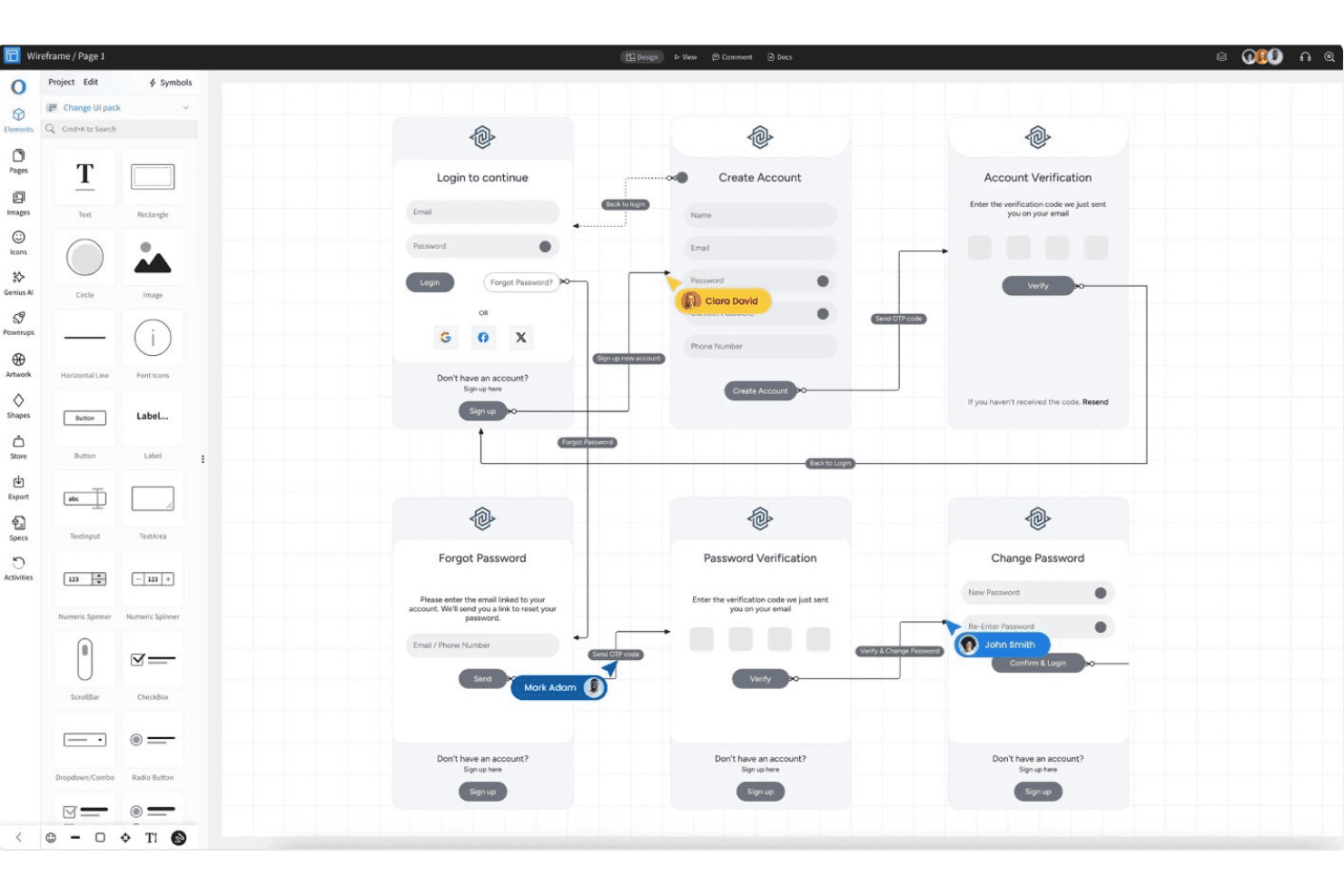
MockFlow permite coordinarse más rápido y mantener la coherencia al exportar rápidamente. MockFlow es una plataforma de diseño de experiencia de usuario basada en navegador que se centra en la creación rápida de bocetos de interfaz, la lluvia de ideas colaborativa, la ideación de interfaces mediante plantillas, los comentarios en tiempo real y la reutilización mediante símbolos y páginas maestras.
¿Para quién es más adecuado MockFlow?
MockFlow es una opción sólida para responsables de producto y personas que no son diseñadoras en empresas emergentes u organizaciones sin ánimo de lucro que necesitan crear rápidamente bocetos de interfaz y desarrollar ideas de interfaces de forma colaborativa.
Por qué elegí MockFlow
Elegí MockFlow porque valoro la rapidez con la que puedo crear bocetos de interfaz detallados utilizando más de 1.000 componentes, símbolos reutilizables y páginas maestras. La biblioteca de plantillas y la función de IA que convierte texto en bocetos de interfaz ayudan a mi equipo a desarrollar ideas rápidamente. El modo de presentación y las herramientas de revisión multiusuario facilitan la coordinación entre responsables de producto y personas que no son diseñadoras.
Funciones principales de MockFlow
- Componentes de interfaz importables: Carga y utiliza componentes creados por desarrolladores con compatibilidad con Tailwind CSS para crear bocetos de interfaz más personalizados.
- Asistente de diseño con IA: Utiliza las funciones de texto a boceto de interfaz, captura de pantalla a boceto de interfaz y elementos de interfaz generados por IA para acelerar los conceptos iniciales.
- Plazas gratuitas para revisores: Invita hasta cinco revisores con el plan gratuito sin consumir plazas de pago ni de edición.
- Herramientas de diagramación en la nube: Accede a iconos integrados de arquitectura de AWS, Azure y Google Cloud para crear diagramas técnicos.
Integraciones de MockFlow
MockFlow ofrece integraciones nativas con Slack, Microsoft Teams, Office 365, Google Drive, Trello, Atlassian Jira y Confluence, Notion, Fathom, Google Meet y Figma (nivel Max). También admite conexiones basadas en API y asistentes de IA como Claude y ChatGPT.
¿Qué incluye el plan gratuito?
MockFlow ofrece un plan gratuito permanente que incluye bocetos de interfaz básicos ilimitados, un proyecto y hasta cinco plazas gratuitas para revisores. El plan gratuito limita las integraciones y las funciones avanzadas, por lo que tendrás que actualizarlo para obtener más proyectos o plazas de edición.
Pros and Cons
Pros:
- La función de texto a boceto de interfaz con IA acelera la creación de borradores
- Las plazas gratuitas para revisores facilitan los comentarios entre equipos
- Los símbolos y las páginas maestras permiten reutilizar elementos
Cons:
- El plan gratuito prohíbe el uso comercial por parte de empresas
- La creación de prototipos se limita a acciones básicas en pantalla
Learn more about MockFlow: La mejor opción para el acceso multifuncional a archivos de diseño
- Plan gratuito disponible
- Desde $16/usuario/mes (facturado anualmente)
Visit WebsiteCustomer Rating:4.7/5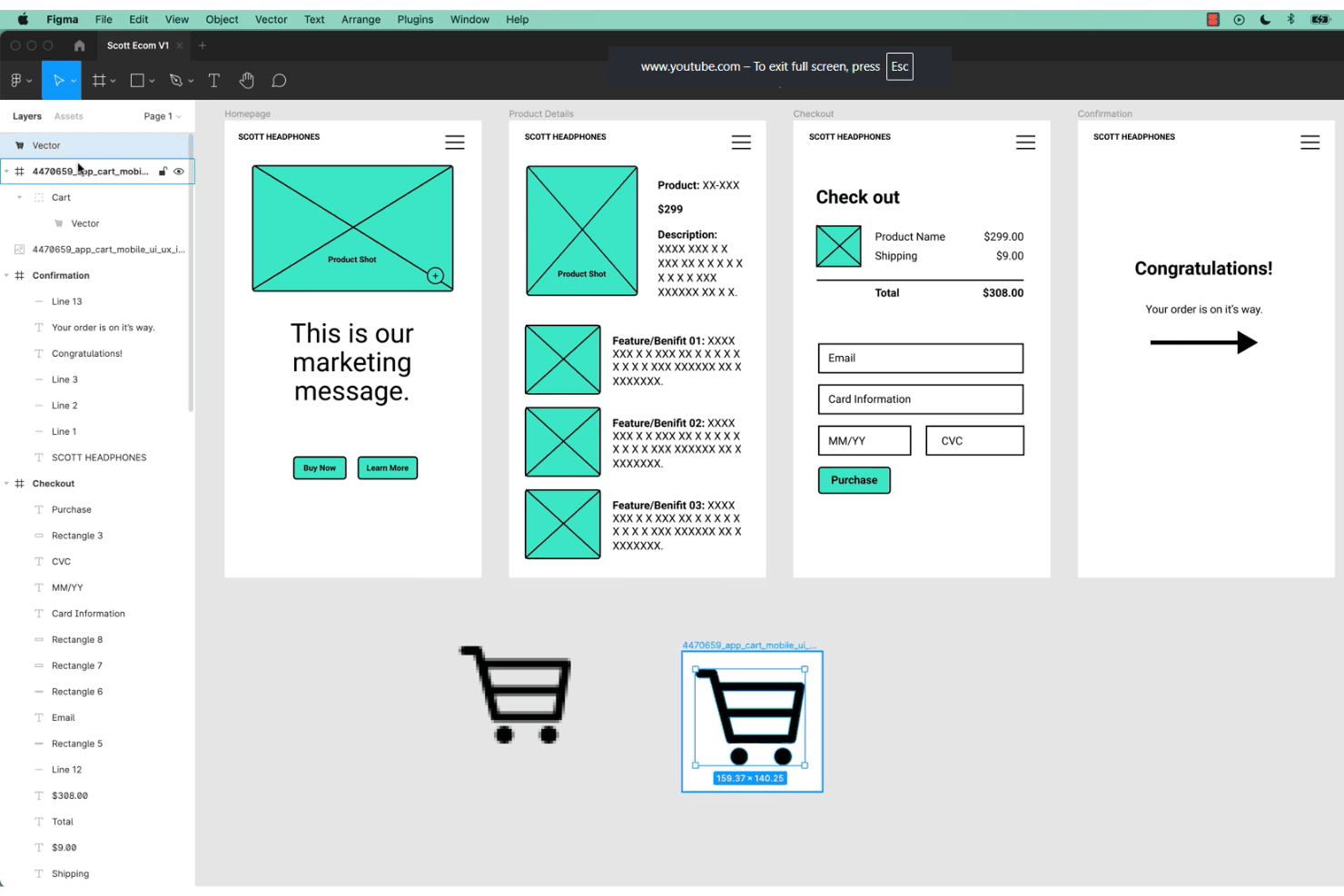
Figma permite a los equipos colaborar en el diseño UX y la creación de prototipos en tiempo real. Figma es una plataforma de diseño UX/UI basada en navegador que combina edición vectorial de nivel profesional, creación de prototipos sin código, colaboración en tiempo real y sistemas de componentes reutilizables para crear y compartir diseños de interfaces.
¿Para quién es mejor Figma?
Equipos multifuncionales que necesitan diseño de interfaces basado en navegador y colaboración en tiempo real sin límites de plazas para espectadores o partes interesadas.
Por qué elegí Figma
Figma se gana un lugar entre mis principales opciones porque confío en su colaboración basada en navegador para permitir que los equipos de producto, diseñadores y partes interesadas editen y revisen juntos los diseños de interfaces, sin necesidad de instalar una aplicación ni límites de plazas para los espectadores. El lienzo multijugador en tiempo real, los comentarios en directo y los espectadores gratuitos ilimitados hacen que el acceso a los archivos de diseño sea realmente multifuncional.
Características principales de Figma
- Variantes de componentes: Permiten admitir múltiples estados visuales e interacciones dentro de un solo componente para simplificar la gestión de archivos.
- Creación de prototipos interactivos: Permite crear prototipos en los que se puede hacer clic, con activadores, transiciones animadas y previsualizaciones en marcos de dispositivos reales, todo dentro del archivo de diseño.
- Pizarra de FigJam: Permite colaborar en la síntesis de investigaciones, mapas de experiencia y flujos de usuario mediante una herramienta de pizarra digital específica.
- Centro de recursos de la comunidad: Permite acceder a miles de kits de interfaz de usuario, plantillas y complementos gratuitos aportados por la comunidad de usuarios de Figma.
Integraciones de Figma
Figma ofrece más de 40 integraciones, incluidas Slack, Jira, GitHub, Notion, Google Workspace, Microsoft Teams, Maze, UXtweak, UserTesting, Asana y Trello. También proporciona una API REST abierta y un mercado de complementos para integraciones personalizadas y de terceros.
¿Qué incluye el plan gratuito?
Figma ofrece un plan Inicial gratuito para siempre que permite diseñar archivos ilimitados con hasta dos editores y espectadores ilimitados. Algunas funciones avanzadas, como las bibliotecas de equipo y las conversaciones de audio, están restringidas a los planes de pago.
Pros and Cons
Pros:
- Edición multijugador en tiempo real para todos los usuarios
- Espectadores gratuitos ilimitados con permisos para comentar
- Amplia biblioteca gratuita de plantillas de interfaces de usuario
Cons:
- El plan gratuito limita los archivos de equipo editados conjuntamente
- No incluye funciones integradas de pruebas de usabilidad
 La mejor opción para el diseño de UI sin conexión en cualquier sistema operativo
- Plan gratuito disponible
- Desde $4.99/usuario/mes
Visit WebsiteCustomer Rating:4.4/5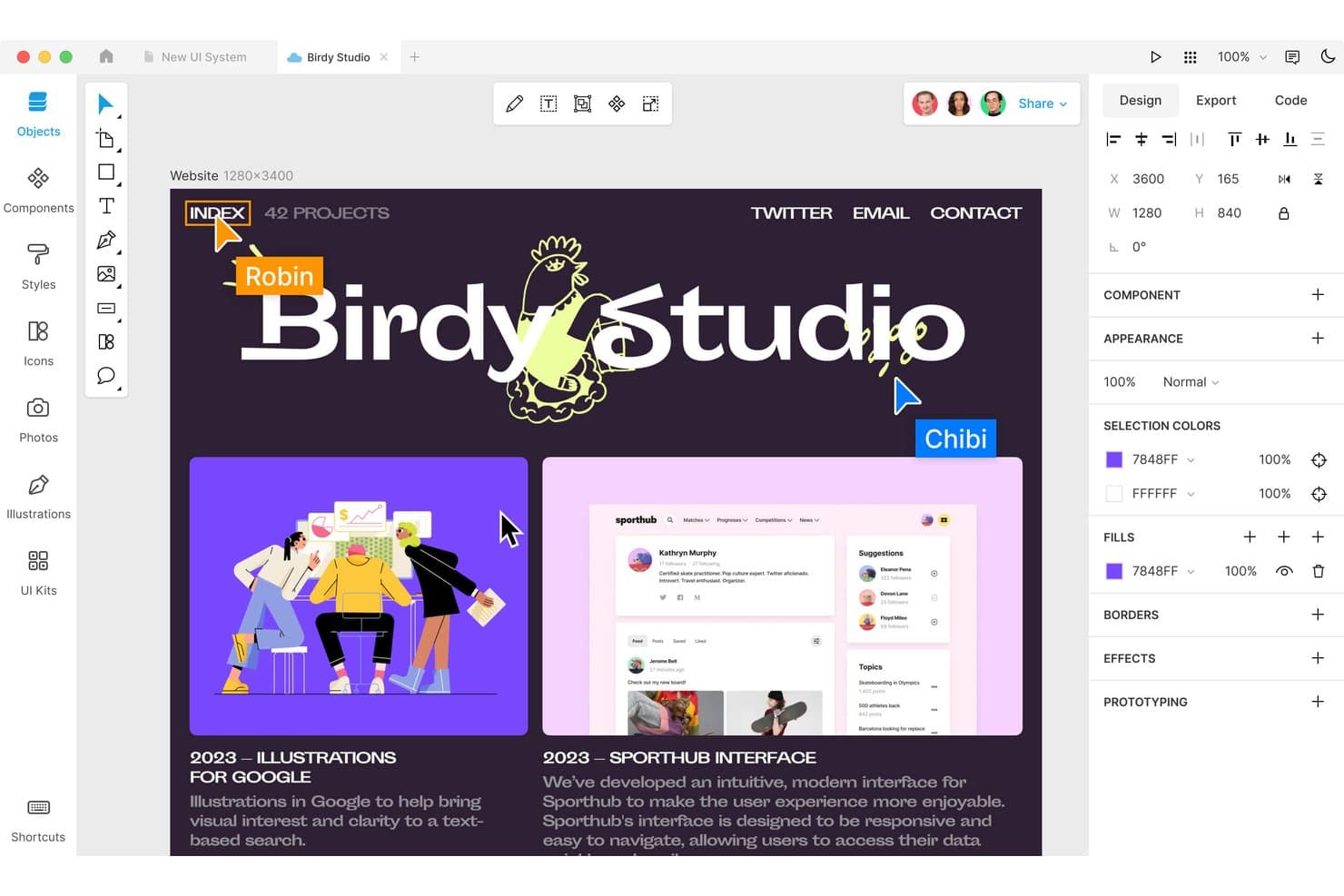
Lunacy permite a los usuarios diseñar y colaborar en diseños web en tiempo real. Lunacy es una herramienta multiplataforma de diseño de UI y UX que ofrece un lienzo vectorial completo, creación de prototipos, componentes reutilizables y colaboración en tiempo real, todo en una aplicación de escritorio con compatibilidad con documentos en la nube.
¿Para quién es Lunacy más adecuado?
Diseñadores independientes y equipos que buscan una herramienta gratuita de diseño de UI sin conexión que funcione en equipos de escritorio con Windows, macOS y Linux.
Por qué elegí Lunacy
Elegí Lunacy porque dependo de su flujo de trabajo centrado en el uso sin conexión, que se ejecuta de forma nativa en Windows, macOS y Linux. La biblioteca integrada de 1.5M de recursos y las herramientas de IA agilizan el diseño de UI sin necesidad de conexión a internet. Puedo crear prototipos de interacciones, crear componentes reutilizables y exportar recursos para la entrega a desarrolladores desde una única aplicación de escritorio rápida.
Funciones principales de Lunacy
- Creación de prototipos basada en marcos: Configura flujos interactivos con puntos interactivos, activadores y transiciones animadas en tus diseños.
- Biblioteca de recursos integrada: Accede a más de 1.5 millones de iconos, ilustraciones y fotos directamente desde el editor.
- Editor de componentes: Crea, anida y administra componentes de diseño reutilizables con variantes y anulaciones.
- Vista previa del código de exportación: Genera y visualiza al instante código CSS, XAML, JSON o SVG para los elementos de diseño seleccionados.
Integraciones de Lunacy
Lunacy admite la compatibilidad con archivos de Sketch para flujos de trabajo de apertura, edición y guardado, la importación de archivos de Figma y la exportación a Adobe XD mediante archivos de Sketch. Ofrece integración con Avocode, Zeplin, Abstract y Simpli, además de una API para desarrolladores y un marco de complementos local para automatización personalizada.
¿Qué incluye el plan gratuito?
Lunacy ofrece un plan gratuito para siempre con funciones básicas de diseño, creación de prototipos y biblioteca de recursos para usuarios ilimitados. La versión gratuita incluye acceso de escritorio, pero algunas herramientas avanzadas de colaboración y almacenamiento adicional en la nube requieren una actualización de pago.
Pros and Cons
Pros:
- Funciona sin conexión en Windows, macOS y Linux
- Amplia biblioteca de recursos integrada con herramientas de IA
- Diseño vectorial y creación de prototipos completos
Cons:
- No cuenta con un editor basado en navegador para editar
- No incluye pruebas de usabilidad ni análisis integrados
Learn more about Lunacy: La mejor opción para la entrega de diseños de código abierto a desarrollo
- Plan gratuito y prueba gratuita de 14 días disponibles
- Desde $7/usuario/mes
Visit WebsiteCustomer Rating:4.5/5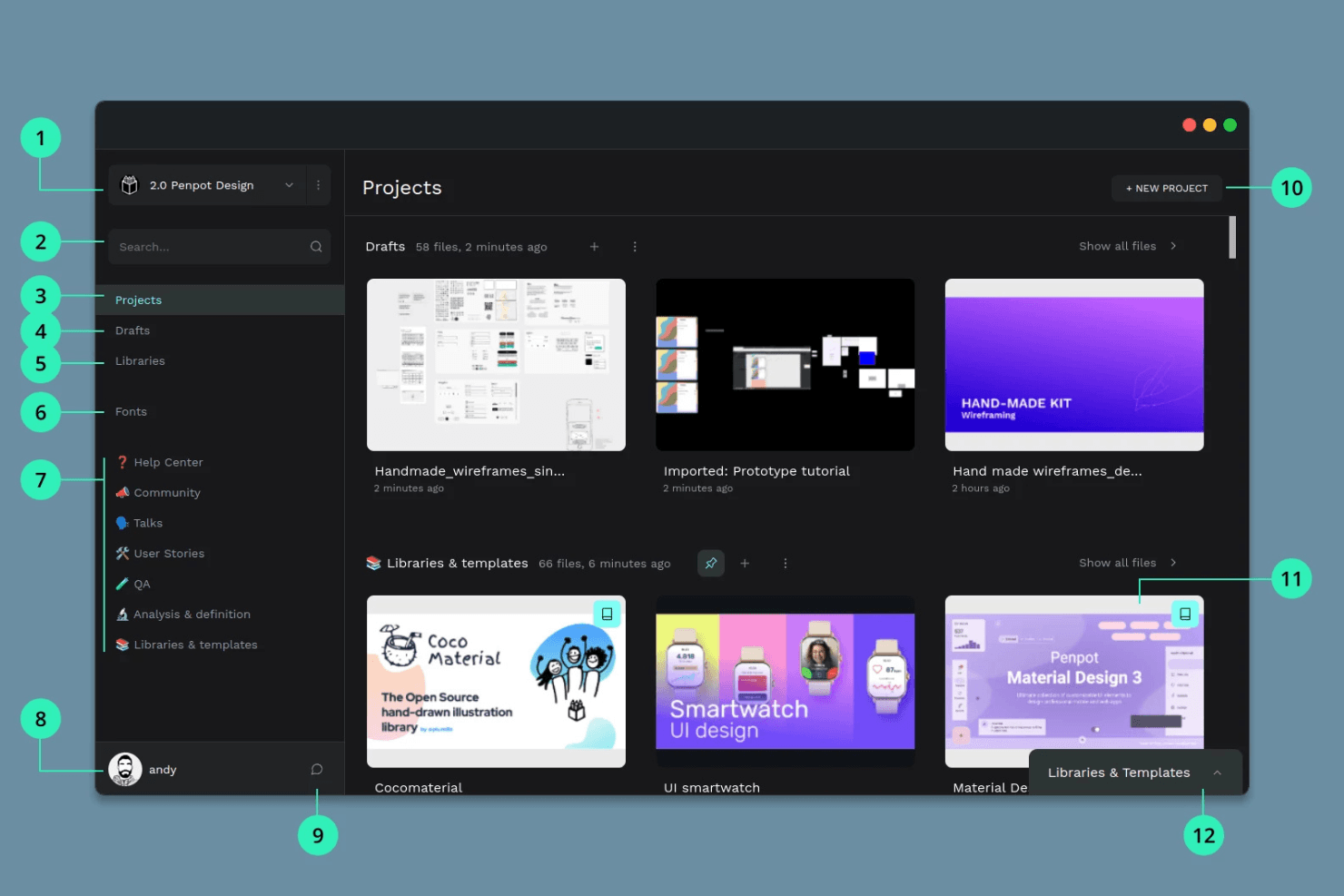
Penpot ofrece colaboración de código abierto para equipos que utilizan diversos sistemas. Penpot es una plataforma de diseño de UX y UI de código abierto basada en navegador para crear esquemas, prototipos interactivos, componentes reutilizables y sistemas de diseño, con colaboración en equipo en tiempo real y herramientas para la entrega a desarrolladores.
¿Para quién es más adecuado Penpot?
Equipos de UX y de producto que necesitan herramientas de diseño, creación de prototipos y entrega a desarrolladores de código abierto, sin quedar atados a un proveedor.
Por qué elegí Penpot
Elegí Penpot como una de las mejores opciones porque su plataforma de código abierto combina un lienzo vectorial basado en navegador con herramientas reales de diseño de disposición CSS Flex/Grid. Me gusta que mi equipo pueda crear prototipos de flujos con activadores interactivos y compartir enlaces de presentación para la entrega a desarrolladores, manteniendo al mismo tiempo los archivos totalmente portables gracias a un formato basado en un estándar abierto.
Características principales de Penpot
- Edición colaborativa en tiempo real: Varios usuarios pueden editar juntos el mismo archivo para colaborar en directo.
- Variantes de componentes: Crea componentes reutilizables con múltiples variantes para acelerar los flujos de trabajo de diseño.
- Disposiciones CSS Flex y Grid nativas: Aplica modelos de disposición CSS reales sin código para reproducir una estructura de interfaz lista para producción.
- Modo de inspección para la entrega a desarrolladores: Los desarrolladores pueden ver y copiar código CSS, HTML y SVG, además de las medidas, sin necesidad de una licencia de pago.
Integraciones de Penpot
Penpot admite más de 125 integraciones del marketplace a través de Penpot Hub, incluidas Iconify, Feather Icons, Lucide Icons, Locofy Lightning (para exportar código a React, Vue y Angular, y sincronizar con GitHub/VS Code) y Miro. También ofrece una API abierta, webhooks salientes y compatibilidad con flujos de trabajo personalizados de DesignOps.
¿Qué es gratis?
Penpot ofrece un plan gratuito para siempre con usuarios ilimitados, archivos ilimitados y acceso completo a las funciones de diseño y creación de prototipos. El plan gratuito también incluye colaboración en tiempo real y herramientas de entrega a desarrolladores sin restricciones, aunque los controles avanzados del espacio de trabajo solo están disponibles en los niveles de pago.
Pros and Cons
Pros:
- Código completamente abierto con opción de autoalojamiento
- Herramientas nativas de disposición CSS Flex y Grid
- Edición colaborativa y modo de inspección para desarrolladores
Cons:
- No incluye herramientas integradas de pruebas de usabilidad
- El rendimiento se ralentiza con archivos complejos o grandes
Learn more about Penpot: Mejor para la creación de prototipos funcionales de alta fidelidad
- Plan gratuito disponible
- Desde $19/usuario/mes
Visit WebsiteCustomer Rating:4.2/5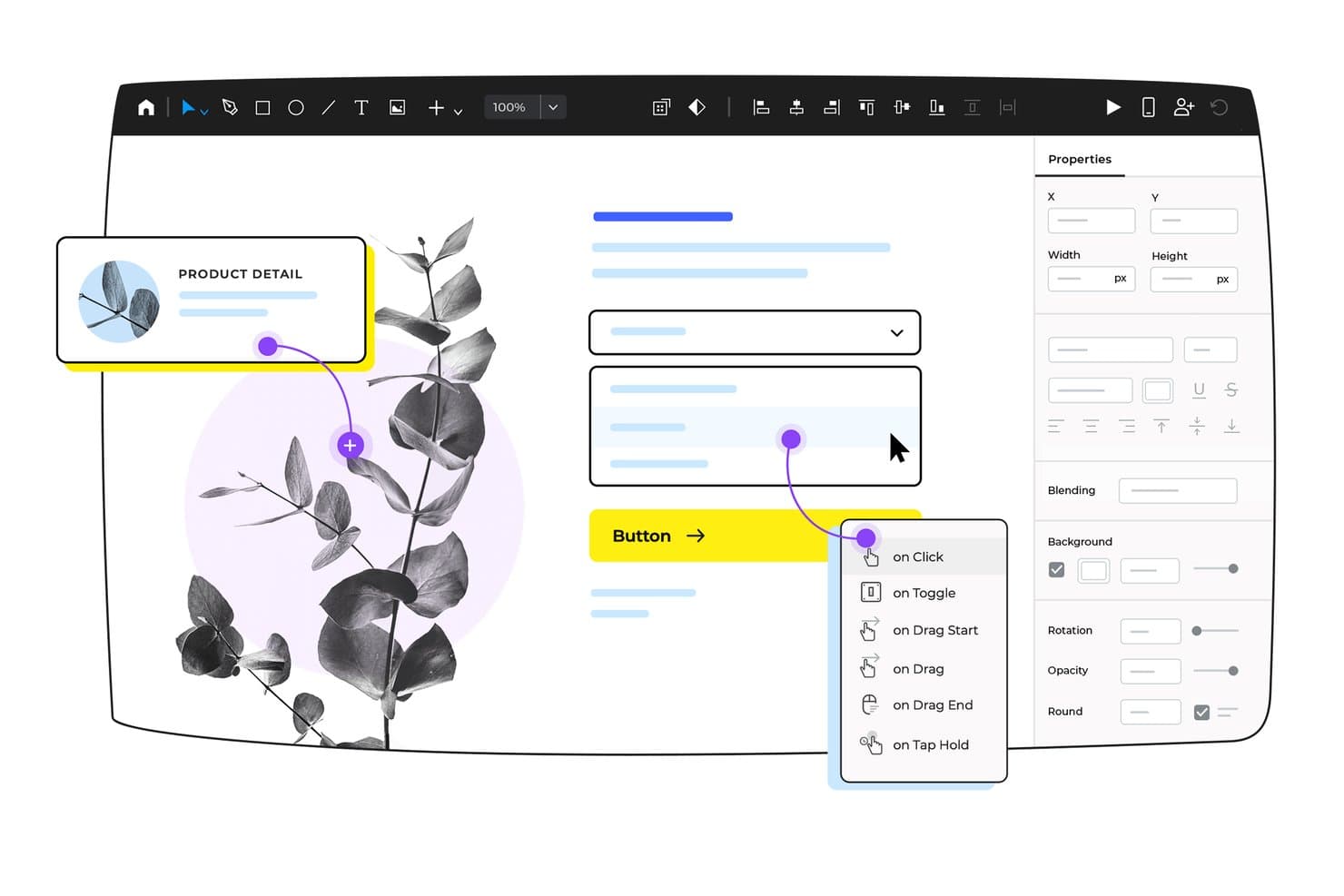
Justinmind permite a los usuarios añadir visualmente activadores interactivos a los elementos de la interfaz de usuario. Justinmind es una plataforma de diseño y creación de prototipos de UX para equipos que necesitan herramientas de dibujo vectorial, componentes interactivos, formularios basados en datos y mapeo avanzado de flujos de usuario en una aplicación dedicada, creada para trabajar en interfaces web y móviles de alta fidelidad.
¿Para quién es más adecuado Justinmind?
Equipos de producto y diseñadores que necesitan prototipos detallados y funcionales para validar y documentar flujos de usuario de alta fidelidad en una aplicación de escritorio dedicada.
Por qué elegí Justinmind
Incluí Justinmind porque obtengo una fidelidad cercana a la de producción al crear prototipos de flujos de usuario avanzados, con lógica completa y datos dinámicos. He creado prototipos utilizando sus más de 4.000 componentes de interfaz de usuario, condiciones de arrastrar y soltar y formularios con datos reales para validar los requisitos antes de entregar el trabajo al equipo de ingeniería. Mi equipo puede mapear flujos completos y simular la funcionalidad real de una aplicación con una sola herramienta.
Características principales de Justinmind
- Amplia biblioteca de componentes de interfaz: Elige entre más de 4.000 widgets prediseñados para interfaces web, iOS y Android.
- Colección de plantillas de diseño: Accede a plantillas prediseñadas para aplicaciones móviles, paneles e interfaces interactivas.
- Creación de prototipos basada en datos: Importa archivos .csv para crear cuadrículas de datos y formularios realistas para prototipos en los que se puede hacer clic.
- Modo de entrega para desarrolladores: Inspecciona estilos CSS, exporta recursos y genera documentos de especificaciones para la entrega.
Integraciones de Justinmind
Justinmind ofrece integraciones nativas con Figma, Sketch, Adobe XD, Adobe Photoshop, Jira, Confluence, Azure DevOps, UserTesting y UserZoom. También proporciona una API y un SDK para integraciones personalizadas y el desarrollo de complementos.
¿Qué incluye el plan gratuito?
Justinmind ofrece un plan gratuito permanente con funciones básicas de creación de prototipos. Necesitarás un plan de pago para acceder a la entrega para desarrolladores, las integraciones avanzadas y todas las herramientas de colaboración.
Pros and Cons
Pros:
- Fidelidad cercana a la de producción con interacciones complejas
- Amplia biblioteca de plantillas web y móviles
- Pantallas y visualizadores ilimitados en el plan gratuito
Cons:
- El nivel gratuito está limitado a un proyecto
- Sin exportación HTML ni lógica avanzada en el plan gratuito
Learn more about Justinmind: 10La mejor opción para crear prototipos de UI/UX todo en uno
Pixso
- Hay un plan gratuito disponible
- Desde $12/usuario/mes
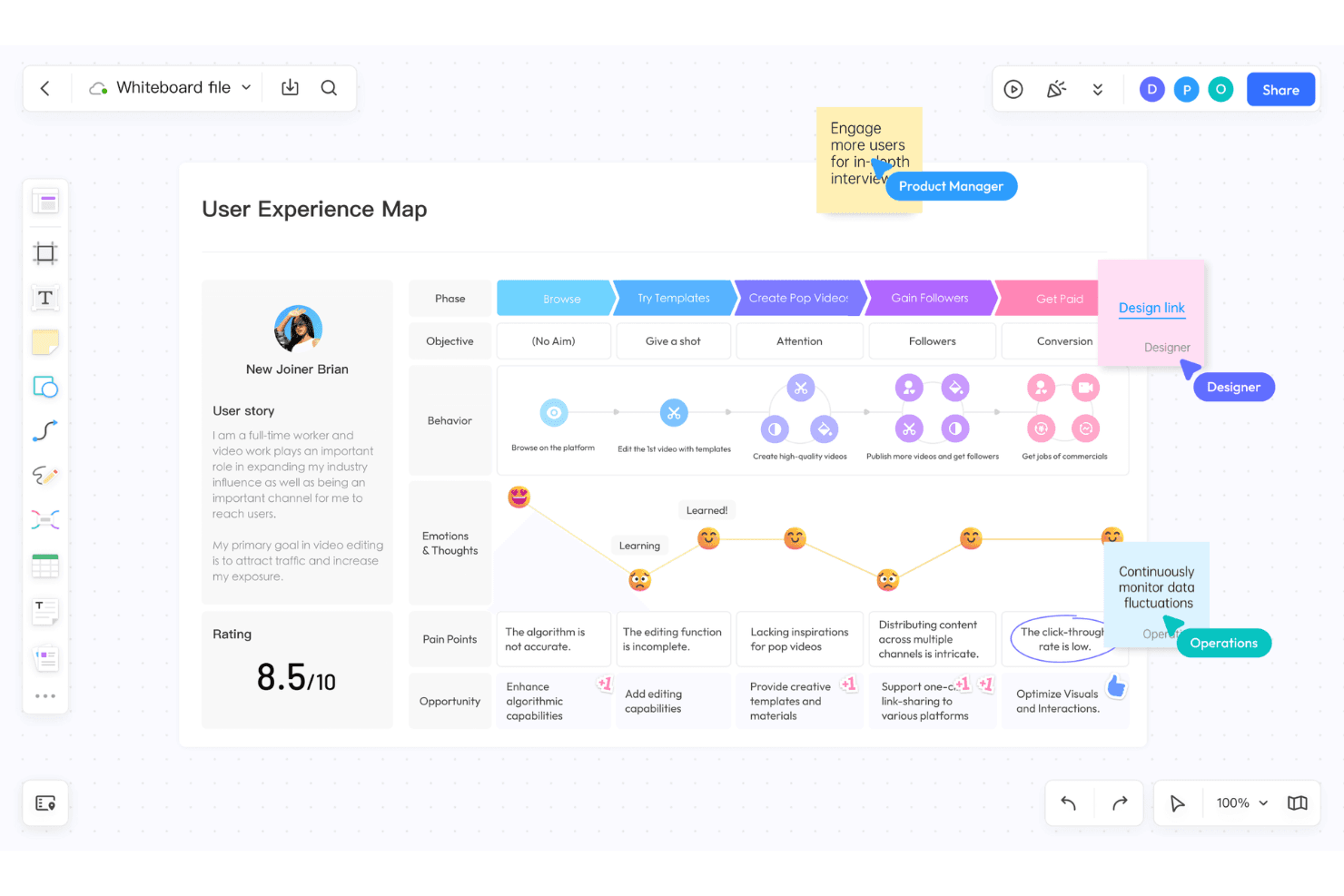
Pixso integra el diseño de UI/UX, las pizarras digitales y los elementos de IA. Pixso es una plataforma de diseño UX/UI basada en el navegador que unifica la edición vectorial, la creación de prototipos, la pizarra colaborativa, las bibliotecas de componentes y la transferencia a desarrollo en un solo espacio.
¿Para quién es más adecuado Pixso?
Pixso es una opción excelente para equipos de producto multifuncionales y diseñadores de UX/UI que quieren crear prototipos y utilizar una pizarra en el navegador con una sola herramienta.
Por qué elegí Pixso
Elegí Pixso porque mi equipo puede gestionar el diseño de interfaces, la creación de prototipos y los talleres de descubrimiento en un solo espacio de trabajo del navegador. Me gusta usar su pizarra para los recorridos de usuario junto al lienzo de diseño y después convertir los flujos en prototipos interactivos con animaciones, superposiciones y variables listos para la transferencia a desarrollo.
Funciones principales de Pixso
- Módulo de pizarra: Ofrece un lienzo infinito para lluvias de ideas, mapas mentales y la creación de recorridos de usuario.
- Edición multijugador en tiempo real: Permite que los equipos editen diseños simultáneamente con indicadores de presencia del cursor y comentarios.
- Bibliotecas de componentes y estilos: Permite crear, gestionar y actualizar elementos de diseño reutilizables compartidos.
- Importación desde Figma, Sketch y XD: Admite la importación directa de archivos para facilitar la migración desde otras plataformas de diseño.
Integraciones de Pixso
Pixso admite la importación desde Figma, Sketch, Adobe XD, Axure y archivos SVG, así como la exportación de recursos a PDF, PNG, JPG y SVG. Cuenta con un mercado de complementos con herramientas para exportar código y utilidades de diseño, pero no documenta integraciones nativas con herramientas SaaS externas.
¿Qué es gratis?
Pixso ofrece un plan gratuito permanente que permite crear archivos y proyectos ilimitados con hasta 3 miembros del equipo. El plan gratuito no incluye funciones avanzadas de gestión ni compatibilidad con equipos más grandes, pero es adecuado para probar la plataforma y gestionar pequeños proyectos de diseño.
Pros and Cons
Pros:
- Importa archivos de Figma, Sketch y XD
- Pizarra integrada para talleres de descubrimiento
- Edición multijugador en tiempo real
Cons:
- No incluye funciones específicas para pruebas de usabilidad
- El límite de archivos restringe los proyectos de equipos gratuitos
Learn more about Pixso:
Otro software UX gratuito
Estas son algunas opciones adicionales de software UX que también ofrecen planes o pruebas gratuitas. Aunque estas herramientas no se han incluido en mi selección, merece la pena echarles un vistazo:
- 11MiroIdeal para revisiones de diseño de UX multifuncionales
- 12FramerIdeal para pasar del diseño a la publicación sin entregar el trabajo a un desarrollador
- 13MarvelIdeal para pasar del prototipado al desarrollo en un solo enlace
- 14WhimsicalIdeal para flujos de baja fidelidad con invitados gratuitos ilimitados
- 15VisilyIdeal para wireframes impulsados por IA sin conocimientos de diseño
- 16MoqupsLa mejor opción para crear estructuras alámbricas y maquetas en línea todo en uno
Cómo evalúo el software UX gratuito
Primero, defino qué se considera gratuito. Una herramienta solo cumple los requisitos si ofrece un plan gratuito a largo plazo, no solo una prueba, ya que el software UX permite realizar de forma continua tareas de diseño y pruebas, no únicamente proyectos puntuales. A partir de ahí, divido la evaluación en dos niveles: las funciones esenciales que una herramienta debe tener para entrar en la lista y los factores diferenciadores que distinguen una opción de otra.
Funciones esenciales (requisitos básicos para esta lista)
Además de mis requisitos para las ofertas gratuitas, también utilizo un sistema de puntuación para seleccionar las herramientas de mi lista. Así es como funciona:
Al seleccionar herramientas para mi lista, califico cada una en una escala de 0 (no ofrece la funcionalidad) a 5 (sobresale en esta área) para cada una de las funciones esenciales que se indican a continuación. Después calculo la puntuación total de la herramienta como porcentaje y la utilizo para evaluar su adecuación general para la lista.
- Herramientas de creación de prototipos: Compruebo si se pueden vincular pantallas mediante zonas interactivas en las que se puede hacer clic y añadir transiciones que simulen un flujo de usuario real, no solo diapositivas estáticas.
- Lienzo de diseño: El espacio de trabajo debe admitir formas, texto, imágenes y controles de diseño para que puedas pasar de estructuras alámbricas preliminares a maquetas pulidas en un mismo lugar.
- Funciones de colaboración: Busco comentarios, edición compartida o enlaces de revisión que permitan a los gestores de producto y desarrolladores dar su opinión sin crear una cuenta independiente.
- Reutilización de componentes: Los botones, barras de navegación y campos de formulario reutilizables que se actualizan en todas las pantallas al editar el original ahorran horas durante los ciclos de iteración.
- Compatibilidad con pruebas de usabilidad: Evalúo si la herramienta permite compartir un enlace al prototipo y recopilar comentarios estructurados, datos de clics o resultados de finalización de tareas de usuarios reales.
- Exportación y entrega: Los desarrolladores necesitan enlaces compartibles o recursos descargables con suficiente detalle para poder crear el producto, por lo que compruebo si existen vistas de especificaciones, exportación de recursos y fragmentos de código.
Una vez que tengo una lista de herramientas que cumplen los criterios, considero qué distingue a cada plataforma.
Factores diferenciadores (lo que distingue a los proveedores)
Así es como comparo y contrasto distintos proveedores:
Funciones destacadas
Busco widgets de comentarios integrados que permitan a las partes interesadas fijar comentarios directamente en una pantalla del prototipo. Esto elimina el intercambio constante de capturas de pantalla en conversaciones de chat durante las revisiones de los sprints. Los cursores multiusuario son igual de importantes: cuando un responsable de producto y un ingeniero pueden editar un archivo conjuntamente en tiempo real, la alineación se logra en minutos en lugar de ciclos asíncronos. También evalúo la biblioteca de plantillas de la comunidad de cada herramienta, ya que los kits gratuitos de estructuras alámbricas y las plantillas iniciales de mapas de experiencia ayudan a los equipos a superar la parálisis ante un lienzo en blanco y pasar directamente a la validación.
Más allá de las funciones
Compruebo con qué facilidad los no diseñadores pueden utilizar la herramienta sin formación. Un responsable de producto debería poder abrir un enlace compartido, dejar comentarios y salir en cuestión de minutos, no tener que ver vídeos de incorporación. Los planes gratuitos también limitan el número de archivos o editores activos, así que evalúo si un equipo en crecimiento alcanzará esos límites a mitad del sprint. Por último, analizo las opciones de exportación. Herramientas como Figma y Penpot permiten descargar recursos o archivos sin procesar, lo que protege tu trabajo si más adelante cambias de plataforma o pierdes el acceso a una cuenta gratuita.
Cómo elegir software UX gratuito
Las listas de funciones complejas y las estructuras de precios pueden dificultar la comprensión de lo que realmente obtienes con un software UX gratuito. Para ayudarte a mantener la concentración mientras avanzas en el proceso de selección del software, estos son algunos factores que debes tener en cuenta:
| Factor | Qué debes tener en cuenta |
|---|---|
| FactorAlcance de la oferta gratuita | Qué debes tener en cuentaComprueba qué incluye el plan gratuito. ¿Cubre funciones esenciales como la creación de wireframes y prototipos, o están bloqueadas tras un muro de pago? |
| FactorEscalabilidad | Qué debes tener en cuentaConsidera si la herramienta puede crecer junto a tu equipo. ¿Admitirá más usuarios y proyectos a medida que aumenten tus necesidades? |
| FactorIntegraciones | Qué debes tener en cuentaConfirma que el software se integra con las herramientas que tu equipo ya utiliza, como Slack, Atlassian Jira o Google Drive, para organizar los flujos de trabajo. |
| FactorFacilidad de uso | Qué debes tener en cuentaBusca una interfaz intuitiva que reduzca la curva de aprendizaje y permita a tu equipo empezar a diseñar rápidamente sin una formación exhaustiva. |
| FactorColaboración | Qué debes tener en cuentaEvalúa las funciones de colaboración de la herramienta. ¿Pueden los miembros del equipo trabajar simultáneamente y proporcionar comentarios en tiempo real sobre los proyectos? |
| FactorPersonalización | Qué debes tener en cuentaDetermina si el software permite personalizar plantillas y componentes para adaptarlos a las necesidades de diseño específicas de tu equipo. |
| FactorAsistencia | Qué debes tener en cuentaComprueba la disponibilidad de opciones de atención al cliente, como chat en directo, correo electrónico o foros, para ayudar a tu equipo cuando surjan problemas. |
| FactorSeguridad | Qué debes tener en cuentaVerifica que la herramienta cumple los requisitos de seguridad de datos de tu organización, especialmente si gestiona información confidencial de los proyectos. |
Qué es el software UX gratuito
El software de UX es un tipo de herramienta diseñada para ayudar a diseñadores y desarrolladores a crear experiencias de usuario mediante la creación de esquemas, prototipos y la colaboración en el diseño. Por lo general, las ofertas gratuitas incluyen versiones básicas de estas herramientas con funciones limitadas o períodos de prueba. Profesionales como diseñadores de UI/UX, gerentes de producto y desarrolladores utilizan estas herramientas para optimizar los procesos de diseño y mejorar la satisfacción del usuario. Funciones como la colaboración en tiempo real, las interfaces intuitivas y la integración con otras herramientas favorecen unos flujos de trabajo de diseño eficientes y la colaboración en equipo.
Funciones
Repasemos las funciones que suelen encontrarse en el software de UX y cuáles suelen estar incluidas en los planes gratuitos y de pago.
Funciones habituales del software de UX gratuito
- Herramientas de creación de esquemas: Permiten a los usuarios crear diseños y estructuras básicos para sus proyectos, lo que ayuda a visualizar la interfaz de usuario.
- Interfaz de arrastrar y soltar: Simplifica el proceso de diseño al permitir colocar y ajustar elementos fácilmente sin necesidad de programar.
- Biblioteca de plantillas: Proporciona plantillas prediseñadas para iniciar rápidamente los proyectos y ahorrar tiempo en la configuración del diseño.
- Colaboración en tiempo real: Permite a los miembros del equipo trabajar juntos en los proyectos de forma simultánea, mejorando la comunicación y la eficiencia.
- Creación de prototipos básica: Permite a los usuarios crear prototipos interactivos sencillos para probar los flujos de usuario y recopilar comentarios.
- Opciones de exportación: Permiten a los usuarios guardar y compartir diseños en varios formatos para su posterior desarrollo o presentación.
Funciones habituales del software de UX de pago
- Creación de prototipos avanzada: Ofrece interacciones y animaciones más complejas para crear prototipos de alta fidelidad que imitan fielmente los productos finales.
- Componentes personalizables: Permiten a los usuarios crear y modificar elementos de diseño para adaptarlos a las necesidades específicas de cada proyecto, proporcionando flexibilidad.
- Control de versiones: Proporciona un sistema para realizar un seguimiento de los cambios y gestionar distintas iteraciones del diseño, manteniendo la coherencia y la organización.
- Herramientas de pruebas de usuario: Permiten recopilar comentarios de los usuarios mediante funciones de prueba integradas para mejorar la validación del diseño.
- Análisis e informes: Ofrecen información sobre el rendimiento del diseño y el comportamiento de los usuarios, lo que ayuda a tomar decisiones basadas en datos.
- Integración con herramientas externas: Favorece flujos de trabajo completos al conectarse con otros programas, como herramientas de gestión de proyectos o comunicación.
Ventajas
Implementar software de UX gratuito ofrece varias ventajas para tu equipo y tu empresa. Estas son algunas de las que puedes esperar:
- Ahorro de costes: Los planes gratuitos permiten a tu equipo acceder a herramientas de diseño esenciales sin asumir un compromiso financiero, reduciendo los gastos.
- Mayor colaboración: Las funciones de colaboración en tiempo real ayudan a tu equipo a trabajar de forma eficiente, incluso a distancia.
- Creación rápida de prototipos: Las herramientas básicas de creación de prototipos permiten crear diseños interactivos rápidamente, lo que ayuda a acelerar el proceso de desarrollo.
- Accesibilidad: Las soluciones basadas en la nube permiten a tu equipo acceder a los proyectos de diseño desde cualquier lugar, favoreciendo modalidades de trabajo flexibles.
- Facilidad de uso: Las interfaces intuitivas y la funcionalidad de arrastrar y soltar simplifican el proceso de diseño, haciéndolo accesible para quienes no son diseñadores.
- Optimización de recursos: Las plantillas y los componentes prediseñados ahorran tiempo y esfuerzo, lo que permite a tu equipo centrarse en la creatividad y la innovación.
Costes y precios
Entiendo que has llegado a este artículo buscando las mejores opciones de software de UX disponibles de forma gratuita. Sin embargo, como los planes gratuitos solo ofrecen funciones limitadas, es muy probable que en el futuro necesites ampliar tu plan.
La siguiente tabla resume los planes habituales, sus precios medios y las funciones que suelen incluir las soluciones de software de UX:
Tabla comparativa de planes de software de UX
| Tipo de plan | Precio medio | Funciones habituales |
|---|---|---|
| Tipo de planPlan gratuito | Precio medio$0 | Funciones habitualesHerramientas básicas de creación de esquemas, interfaz de arrastrar y soltar, plantillas limitadas, creación de prototipos básica y colaboración en tiempo real. |
| Tipo de planPlan personal | Precio medio$4-$10/usuario/mes | Funciones habitualesTodas las funciones gratuitas, plantillas adicionales, opciones de creación de prototipos mejoradas, integraciones limitadas y opciones de exportación. |
| Tipo de planPlan empresarial | Precio medio$10-$30/usuario/mes | Funciones habitualesTodas las funciones personales, creación de prototipos avanzada, marca personalizada, herramientas de colaboración en equipo y más integraciones. |
| Tipo de planPlan para empresas | Precio medio$24+/usuario/mes | Funciones habitualesTodas las funciones empresariales, asistencia prioritaria, seguridad avanzada, análisis personalizados y gestión de cuentas exclusiva. |
Preguntas frecuentes sobre el software UX gratuito
Estas son algunas respuestas a preguntas frecuentes sobre el software UX gratuito:
¿Cómo se protegen ahora los datos de los proyectos en las herramientas UX gratuitas?
La mayoría de las plataformas UX gratuitas utilizan alojamiento en la nube, así que empieza por revisar su política de privacidad, sus certificaciones de seguridad y los detalles sobre la residencia de los datos. Confirma si los proyectos están cifrados durante la transmisión y en reposo, y quién puede acceder a los archivos almacenados. Utiliza roles del espacio de trabajo, inicio de sesión único cuando esté disponible y desactiva los enlaces públicos para los trabajos confidenciales. Exporta copias de seguridad periódicamente, elimina los proyectos que no utilices y confirma que los contratos o acuerdos de confidencialidad cubren cualquier recurso de diseño compartido en línea mediante estas herramientas.
¿Qué ocurre si nuestro equipo supera de repente los límites de un plan UX gratuito?
Cuando tu equipo supera los límites de un plan UX gratuito, revisa primero las restricciones de uso, como los proyectos activos, el almacenamiento de archivos, los editores y los invitados. Determina qué funciones avanzadas necesitas realmente, como sistemas de diseño, permisos o integraciones. Después, compara los niveles de actualización con tu hoja de ruta y las previsiones de crecimiento de la plantilla. Antes de actualizar, limpia los archivos antiguos y acuerda unas normas internas de nomenclatura para que la transición parezca una actualización planificada del sistema y no una respuesta desordenada y precipitada a haber alcanzado límites estrictos.
¿Puedo combinar varias herramientas UX gratuitas en un mismo flujo de trabajo?
Sí, combinar varias herramientas UX gratuitas es habitual, pero resulta útil asignar a cada herramienta una función clara. Por ejemplo, utiliza una plataforma para esquemas de baja fidelidad, otra para prototipos interactivos y una tercera para almacenar investigaciones UX o tableros de comentarios. Define cuál es la fuente de referencia para los diseños finales, documenta los pasos de entrega para los desarrolladores y programa tareas periódicas de mantenimiento para que los recursos no se dispersen entre espacios de trabajo solapados y cuentas personales a medida que los proyectos crecen.
¿Cómo pueden los no diseñadores aprender rápidamente a utilizar herramientas UX gratuitas?
Empieza con una herramienta UX gratuita y crea un proyecto de práctica sencillo y realista, como rediseñar un formulario que tu equipo ya utilice. Comparte vídeos breves de Loom o capturas de pantalla internas que muestren acciones clave: añadir marcos, vincular pantallas, dejar comentarios y exportar archivos. Forma parejas entre los no diseñadores y un compañero de UX para realizar revisiones semanales y celebra los pequeños logros. Un glosario claro y una lista de comprobación de consulta rápida reducirán la sensación de intimidación y acelerarán su confianza al utilizar software de diseño.
¿Qué métricas demuestran que las herramientas UX gratuitas mejoran los productos?
Mira más allá de la satisfacción de los diseñadores y realiza un seguimiento de resultados medibles. Supervisa el tiempo del ciclo de revisión de prototipos, el número de iteraciones antes de la aprobación de las partes interesadas y los errores relacionados con problemas de UX después del lanzamiento. Compara las tasas de finalización de tareas y los tickets de asistencia antes y después de adoptar las herramientas. También puedes encuestar a los usuarios y a los equipos internos sobre la claridad y la facilidad de uso, y relacionar después esas puntuaciones con métricas empresariales como la conversión, la retención y la adopción de funciones en los sprints y lanzamientos.
¿Pueden funcionar bien las herramientas UX gratuitas con una conexión a Internet débil?
Las herramientas UX gratuitas suelen estar basadas en la nube, por lo que una conexión a Internet débil afecta principalmente a la colaboración y a la sincronización de archivos grandes. Prueba cada plataforma con tu conexión habitual cargando proyectos grandes, exportando recursos y participando en comentarios o talleres en directo. Anima a los compañeros a cerrar las aplicaciones que consumen mucho ancho de banda durante las sesiones de diseño y ten preparadas notas o bocetos sin conexión. Como respaldo, establece horarios de sincronización programados desde casa o desde espacios de trabajo compartido con una conectividad más potente durante los lanzamientos importantes.