

Gestionar el ciclo de vida de un producto puede ser complicado, especialmente cuando tienes que atender las necesidades de los clientes, las tendencias del mercado y la dinámica del equipo. Es posible que te sientas abrumado por los datos y no tengas claro cuál es la dirección adecuada. Ahí es donde entran en juego las herramientas de descubrimiento de productos.
Estas herramientas te ayudan a ti y a tu equipo a recopilar información, priorizar funcionalidades y tomar decisiones fundamentadas. Según mi experiencia, reducen el estrés de tener que hacer suposiciones.
He probado y analizado varias opciones para ofrecerte una lista imparcial y bien documentada de las mejores herramientas disponibles. En este artículo encontrarás análisis concisos, funcionalidades clave y los aspectos que hacen destacar a cada herramienta. Encontremos la herramienta adecuada para ayudar a tu equipo a alcanzar el éxito.
Por qué confiar en nuestras recomendaciones de software
6,700+
Reviews
20
Industry experts
16+
Evaluation factors
14
Years
Nuestro equipo lleva probando y evaluando software desde 2012. Como gestores de producto, sabemos lo difícil —y lo importante— que es elegir el software adecuado.
Para esta guía, evaluamos las herramientas mediante pruebas prácticas e investigación independiente, puntuando las herramientas según nuestros criterios de selección.
Nuestras reseñas reflejan nuestro criterio editorial humano, no un discurso de ventas.
Revisores expertos:
 Hannah ClarkSenior TPM
- Cristiano ValimSenior UI/UX Lead

Tabla comparativa de herramientas de descubrimiento de productos
Esta tabla comparativa resume los detalles de precios de mi selección de las mejores herramientas de descubrimiento de productos:
| Tool | Best For | Trial Info | Price | ||
|---|---|---|---|---|---|
| 1 | Ideal para la trazabilidad de evidencias desde el descubrimiento hasta la hoja de ruta | Demostración gratuita disponible | Precios disponibles previa solicitud | Website | |
| 2 | Ideal para la trazabilidad de evidencias desde el descubrimiento hasta la hoja de ruta | Demostración gratuita disponible | Precios disponibles previa solicitud | Website | |
| 3 | Ideal para flujos de trabajo de comentarios a hoja de ruta impulsados por IA | Plan gratuito disponible | Precio bajo solicitud | Website | |
| 4 | Ideal para la trazabilidad integral desde los comentarios hasta la hoja de ruta | Plan gratuito + demostración gratuita disponible | Desde $12/usuario/mes (facturado anualmente) | Website | |
| 5 | Ideal para el descubrimiento continuo basado en OST | Prueba gratuita de 7 días | Desde $25/usuario/mes | Website | |
| 6 | Ideal para entrevistas moderadas por IA a escala | Plan gratuito disponible | Precios bajo solicitud | Website | |
| 7 | Ideal para el intercambio visual de ideas en equipos de producto | Prueba gratuita de 14 días + plan gratuito disponible | Desde $8/usuario/mes (facturado anualmente) | Website | |
| 8 | La mejor opción para la priorización de funcionalidades vinculada a evidencias | Prueba gratuita de 14 días + plan gratuito + demostración gratuita disponible | Desde $19/creador/mes (facturado anualmente) | Website | |
| 9 | Ideal para decisiones sobre funcionalidades basadas en la priorización | Demostración gratuita disponible | Precios disponibles previa solicitud | Website | |
| 10 | La mejor opción para la trazabilidad entre comentarios y planificación | Prueba gratuita de 14 días + demostración gratuita disponible | Desde $36/mes (facturado anualmente) | Website |


Análisis de las mejores herramientas de descubrimiento de productos
A continuación encontrarás mis resúmenes detallados de las mejores herramientas de descubrimiento de productos que han entrado en mi selección. Mis análisis ofrecen una visión detallada de las funcionalidades clave, ventajas y desventajas, integraciones y casos de uso ideales de cada herramienta para ayudarte a encontrar la mejor opción para ti.
 Ideal para la trazabilidad de evidencias desde el descubrimiento hasta la hoja de ruta
- Demostración gratuita disponible
- Precios disponibles previa solicitud
Visit WebsiteCustomer Rating:4.4/5
La plataforma de hojas de ruta de ProductPlan se centra en el desarrollo de productos. ProductPlan es una plataforma especializada en la elaboración de hojas de ruta, diseñada para facilitar la planificación estratégica y la visualización de los cronogramas de productos. Sus funciones permiten a los usuarios establecer estrategias de producto claras y comunicarlas eficazmente, en consonancia con su fortaleza en la planificación estratégica de alto nivel y la visualización.
Por qué elegí ProductPlan:
Seleccioné ProductPlan debido a su enfoque exclusivo en ofrecer una plataforma integral de planificación estratégica. Su capacidad para mostrar visualmente cronogramas de productos complejos la distingue de herramientas similares. Según mi comparación y criterio, ProductPlan es una opción óptima para los equipos que necesitan visualizar eficazmente sus hojas de ruta de productos y realizar una planificación estratégica.
Funciones e integraciones destacadas:
Las funciones más útiles de ProductPlan incluyen la creación de hojas de ruta, plantillas de planificación, establecimiento y seguimiento de objetivos, priorización y herramientas de colaboración. Sus integraciones incluyen plataformas populares como Jira, Trello, Slack y Microsoft Teams, entre otras, lo que facilita su incorporación a un flujo de trabajo existente.
Pros and Cons
Pros:
- Potente visualización de los cronogramas de productos
- Integraciones sólidas con herramientas populares de gestión de proyectos
- Herramientas eficientes de colaboración
Cons:
- La interfaz de usuario puede requerir tiempo para comprenderse
- Carece de funciones detalladas de gestión de proyectos
- Precio más elevado en comparación con algunos competidores
Learn more about ProductPlan:- Ideal para la trazabilidad de evidencias desde el descubrimiento hasta la hoja de ruta
- Demostración gratuita disponible
- Precios disponibles previa solicitud
Visit WebsiteCustomer Rating:4.4/5La plataforma de hojas de ruta de ProductPlan se centra en el desarrollo de productos. ProductPlan es una plataforma especializada en la elaboración de hojas de ruta, diseñada para facilitar la planificación estratégica y la visualización de los cronogramas de productos. Sus funciones permiten a los usuarios establecer estrategias de producto claras y comunicarlas eficazmente, en consonancia con su fortaleza en la planificación estratégica de alto nivel y la visualización.
Por qué elegí ProductPlan:
Seleccioné ProductPlan debido a su enfoque exclusivo en ofrecer una plataforma integral de planificación estratégica. Su capacidad para mostrar visualmente cronogramas de productos complejos la distingue de herramientas similares. Según mi comparación y criterio, ProductPlan es una opción óptima para los equipos que necesitan visualizar eficazmente sus hojas de ruta de productos y realizar una planificación estratégica.
Funciones e integraciones destacadas:
Las funciones más útiles de ProductPlan incluyen la creación de hojas de ruta, plantillas de planificación, establecimiento y seguimiento de objetivos, priorización y herramientas de colaboración. Sus integraciones incluyen plataformas populares como Jira, Trello, Slack y Microsoft Teams, entre otras, lo que facilita su incorporación a un flujo de trabajo existente.
Pros and Cons
Pros:
- Potente visualización de los cronogramas de productos
- Integraciones sólidas con herramientas populares de gestión de proyectos
- Herramientas eficientes de colaboración
Cons:
- La interfaz de usuario puede requerir tiempo para comprenderse
- Carece de funciones detalladas de gestión de proyectos
- Precio más elevado en comparación con algunos competidores
Learn more about ProductPlan:  Ideal para flujos de trabajo de comentarios a hoja de ruta impulsados por IA
- Plan gratuito disponible
- Precio bajo solicitud
Visit WebsiteCustomer Rating:5/5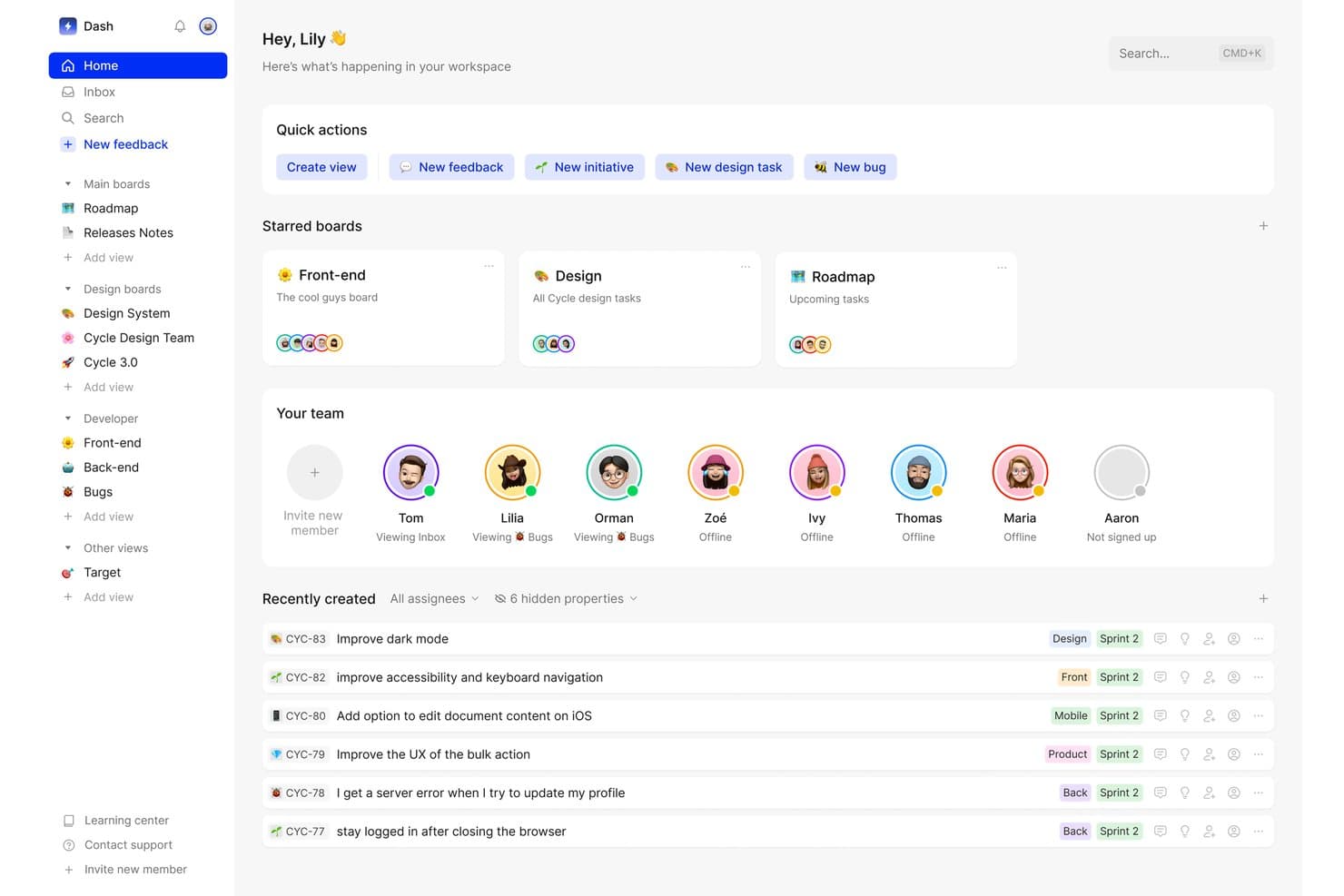
Cycle centraliza las tareas del equipo, los comentarios y los paneles en un único espacio de trabajo. Cycle era una plataforma de descubrimiento de productos y gestión de comentarios que centralizaba los comentarios de clientes procedentes de múltiples fuentes, generaba información basada en IA y conectaba esa información con la planificación de la hoja de ruta y la gestión de lanzamientos.
¿Para quién es más adecuado Cycle?
Cycle era una excelente opción para equipos de producto que necesitaban consolidar grandes volúmenes de comentarios de clientes procedentes de múltiples canales y conectar directamente esa información con las decisiones sobre la hoja de ruta.
Por qué elegí Cycle
He incluido Cycle entre mis principales opciones porque gestiona todo el proceso, desde la señal de cliente sin procesar hasta la decisión sobre la hoja de ruta, mejor que casi cualquier otra herramienta que haya visto. El agente @VoiceHunter sintetiza automáticamente las notas de las entrevistas y etiqueta los comentarios entrantes, mientras que @LoopCloser notifica a los clientes en el momento en que se lanza la funcionalidad que solicitaron. Lo que me parece más interesante es cómo estos agentes de IA convierten un proceso que normalmente es manual y disperso en un flujo de trabajo continuo y, en gran medida, automatizado.
Características principales de Cycle
- Incorporación de comentarios de múltiples fuentes: Cycle extrae automáticamente los comentarios de clientes de Slack, Intercom, Zendesk, Gong, HubSpot y las transcripciones de reuniones, y los reúne en un único centro.
- Consultas de Cycle Ask mediante NLP: Un complemento que permite buscar en todo el corpus de comentarios mediante preguntas en lenguaje natural para encontrar señales relevantes de los clientes bajo demanda.
- Asientos de colaborador gratuitos ilimitados: Las partes interesadas, como ingenieros, representantes de ventas y miembros del equipo de atención al cliente, pueden unirse, comentar y enviar comentarios sin ocupar un asiento de pago.
- Publicación de notas de lanzamiento y registro de cambios: Los equipos pueden redactar y publicar notas de lanzamiento asistidas por IA conectadas a un registro de cambios alojado públicamente y con dominio personalizado.
Integraciones de Cycle
Cycle ofrecía integraciones nativas con Notion, Linear, GitHub, Figma y Miro, además de integraciones con Slack, Jira, Confluence, HubSpot y Salesforce. También proporcionaba una API pública y conectividad con Zapier.
Pros and Cons
Pros:
- Sobresale en la agregación de comentarios procedentes de múltiples fuentes
- Los agentes de IA automatizan el flujo de trabajo de síntesis de comentarios
- Los asientos de colaborador gratuitos ilimitados favorecen el trabajo en equipo
Cons:
- Ya no está disponible como producto independiente
- Carece de funciones nativas de validación de hipótesis
Learn more about Cycle: Ideal para la trazabilidad integral desde los comentarios hasta la hoja de ruta
- Plan gratuito + demostración gratuita disponible
- Desde $12/usuario/mes (facturado anualmente)
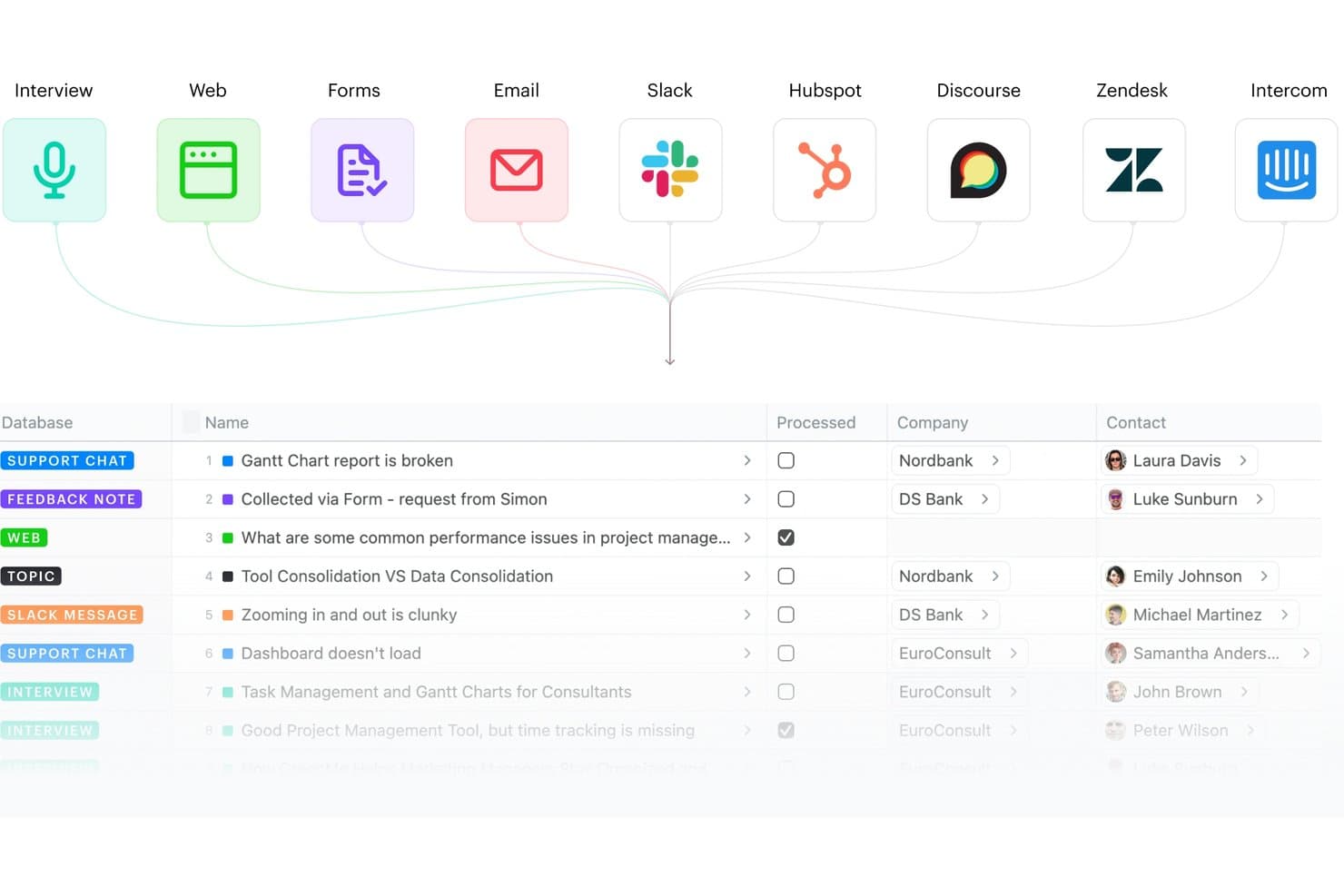
Fibery centraliza los comentarios de múltiples fuentes en una sola base de datos. Fibery es una plataforma modular de descubrimiento y desarrollo de productos que conecta la agregación de comentarios de clientes, la síntesis de información, el mapeo de oportunidades y la planificación de hojas de ruta en un único espacio de trabajo relacional.
¿Para quién es más adecuado Fibery?
Fibery es ideal para equipos de producto que desean un espacio de trabajo único y profundamente conectado para rastrear cada hallazgo, desde los comentarios sin procesar de los clientes hasta las funcionalidades lanzadas en la hoja de ruta.
Por qué elegí Fibery
Fibery ocupa un lugar en mi lista de opciones principales por la estrecha conexión que establece entre los comentarios sin procesar de los clientes y las funcionalidades lanzadas, sin enlaces rotos en el proceso. Me encanta que su árbol de oportunidades y soluciones nativo (basado en el marco de Teresa Torres) permita mapear directamente las evidencias con las oportunidades y soluciones, de modo que cada elemento de la hoja de ruta se remonte a un hallazgo real de un cliente. Su agrupación semántica basada en IA y su plantilla de Investigación atómica también permiten a mi equipo sintetizar notas de entrevistas en hechos etiquetados y vinculados, en lugar de dejar que los hallazgos se acumulen en documentos desconectados.
Características principales de Fibery
- Bandeja de entrada de comentarios: Un centro centralizado que recopila y dirige los comentarios entrantes de fuentes como Intercom, Zendesk, Slack, HubSpot y el correo electrónico hacia una única cola de procesamiento.
- Transcripción de llamadas mediante IA: Transcribe automáticamente las entrevistas y reuniones grabadas, y luego genera resúmenes y extrae notas clave sin esfuerzo manual.
- Priorización personalizada basada en fórmulas: Permite crear modelos de puntuación utilizando cualquier combinación del volumen de comentarios, el segmento de clientes, la gravedad del problema y el impacto empresarial, vinculados a datos activos del CRM.
- Hojas de ruta y registros de cambios públicos: Permite a los equipos publicar hojas de ruta y actualizaciones de producto activas y compartibles, para que las partes interesadas y los clientes puedan seguir el progreso sin necesitar una licencia de pago.
Integraciones de Fibery
Fibery ofrece integraciones nativas con Intercom, Zendesk, HubSpot, Slack, Discourse, Jira, GitHub, GitLab y Google Workspace. También admite integraciones personalizadas mediante su API y Zapier.
Pros and Cons
Pros:
- Conecta los comentarios directamente con las funcionalidades lanzadas
- Plantillas de descubrimiento e investigación altamente flexibles
- La IA agrupa y resume los hallazgos de investigación
Cons:
- No incluye reclutamiento de usuarios ni encuestas integrados
- Hay menos integraciones especializadas de investigación disponibles
Learn more about Fibery: Ideal para el descubrimiento continuo basado en OST
- Prueba gratuita de 7 días
- Desde $25/usuario/mes
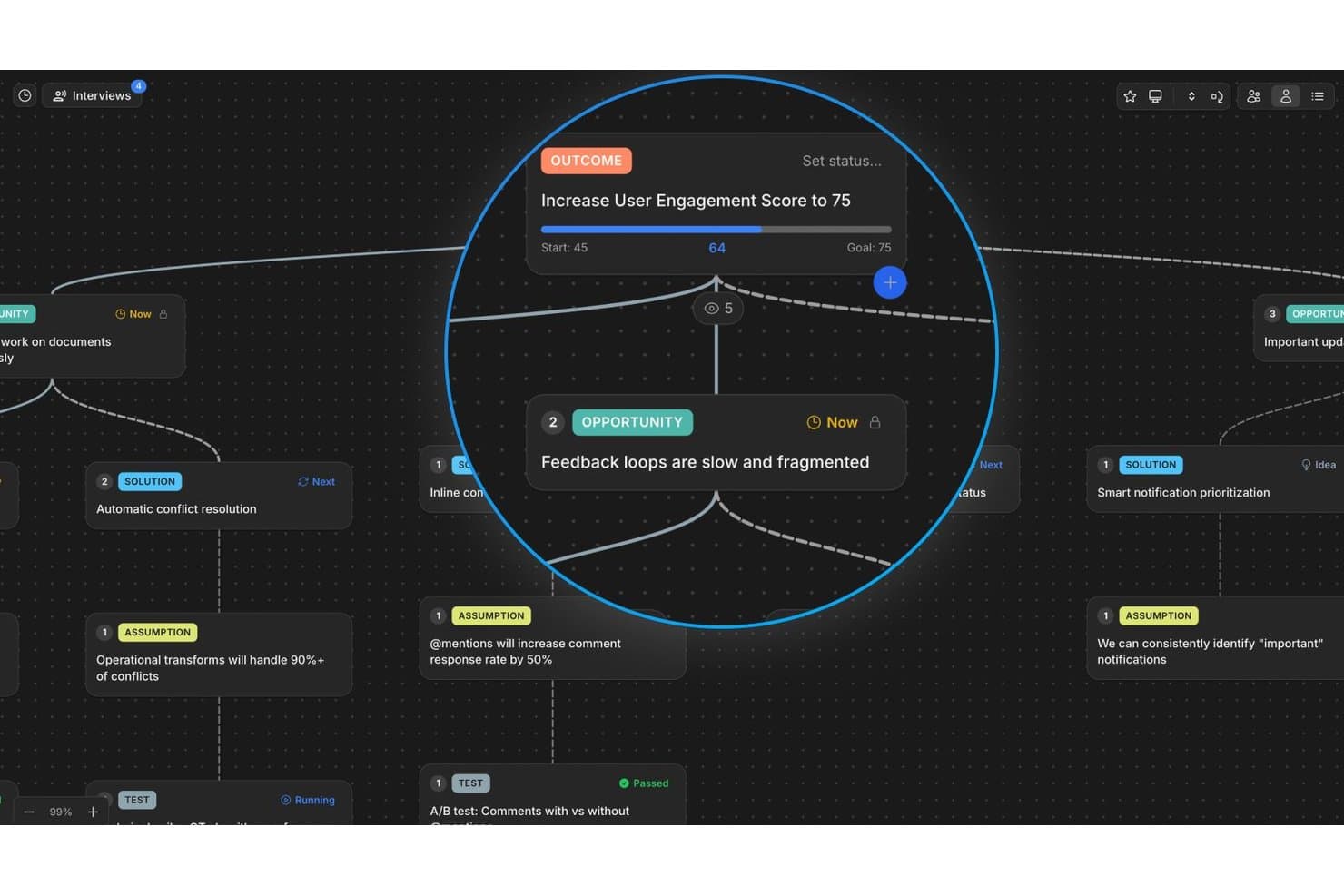
Vistaly mapea oportunidades y resultados en un árbol visual de descubrimiento. Vistaly es una plataforma de descubrimiento de productos basada en el marco del Árbol de Oportunidades y Soluciones, que ofrece un lienzo OST interactivo, síntesis de entrevistas impulsada por IA, trazabilidad de evidencias y mapeo de estrategias para conectar el trabajo de descubrimiento con los resultados empresariales.
¿Para quién es más adecuado Vistaly?
Vistaly es una excelente opción para equipos de producto que han adoptado —o están desarrollando activamente— una práctica de descubrimiento continuo basada en el marco del Árbol de Oportunidades y Soluciones.
Por qué elegí Vistaly
Vistaly ocupa un lugar en mi lista de finalistas porque es la única herramienta de descubrimiento de productos desarrollada en colaboración formal con Teresa Torres, creadora del marco del Árbol de Oportunidades y Soluciones. La elegí específicamente para equipos que realizan descubrimiento continuo: puedes cargar entrevistas de clientes en cualquiera de unos 29 formatos, y la IA sintetiza tres o más en un OST completamente estructurado, con cada tarjeta de oportunidad vinculada a citas textuales. Lo que me resulta más convincente es que la hoja de ruta no es un artefacto independiente: es el propio OST, reorganizado según el estado de las tarjetas.
Características principales de Vistaly
- Espacio de estrategia: Conecta las oportunidades de descubrimiento directamente con árboles de OKR y KPI, con sincronización de métricas en vivo desde herramientas como PostHog, Amplitude y Mixpanel.
- Tarjetas espejo: Vincula una única tarjeta de oportunidad o solución a múltiples resultados, manteniendo la evidencia y el estado sincronizados en todas las instancias.
- Tarjetas de supuestos y pruebas: Registra y estructura hipótesis directamente en el lienzo OST mediante tipos de tarjetas específicos vinculados a soluciones concretas.
- Asientos ilimitados para lectores: Ofrece a las partes interesadas, ingenieros y ejecutivos acceso de lectura al árbol de descubrimiento completo sin requerir licencias de edición.
Integraciones de Vistaly
Vistaly ofrece integraciones nativas con Jira, Linear, GitHub, Slack, Gong y PostHog. También proporciona una API REST, acceso MCP para Claude, ChatGPT y Cursor, además de Zapier.
Pros and Cons
Pros:
- La IA convierte las entrevistas en OST estructurados
- Árbol de Oportunidades y Soluciones desarrollado en colaboración con expertos
- Cada tarjeta enlaza con evidencia textual de clientes
Cons:
- No incluye un creador nativo de encuestas o pruebas con clientes
- Carece de funciones integradas para reclutar participantes
Learn more about Vistaly: Ideal para entrevistas moderadas por IA a escala
- Plan gratuito disponible
- Precios bajo solicitud

Marvin centraliza los hallazgos de investigación y las próximas sesiones en un único centro. Marvin es una plataforma de conocimiento del cliente nativa de IA que centraliza la investigación cualitativa de entrevistas, tickets de soporte, llamadas de ventas y encuestas, con síntesis integrada mediante IA, entrevistas moderadas y análisis entre proyectos.
¿Para quién es más adecuado Marvin?
Marvin es una excelente opción para equipos de investigación de experiencia de usuario (UX) y descubrimiento de productos que realizan un gran volumen de entrevistas cualitativas y necesitan que la IA gestione la síntesis a escala.
Por qué elegí Marvin
Elegí Marvin como una de las mejores opciones porque es la única herramienta de mi lista que permite realizar cientos de entrevistas moderadas por IA simultáneamente, sin que haya un investigador presente. Su función de Intercepción en vivo integra un entrevistador de IA de voz a voz directamente en tu producto y activa sesiones en tiempo real con usuarios activos en más de 40 idiomas. Si a esto le sumas la función de Investigación profunda para probar hipótesis, puedes validar suposiciones con todo tu corpus de investigación mediante evidencia citada y vinculada a sus fuentes.
Características principales de Marvin
- Centro de conocimiento: Un repositorio centralizado que incorpora datos de entrevistas, tickets de soporte, llamadas de ventas, encuestas y reseñas en un único sistema con capacidad de búsqueda.
- Preguntar a la IA: Una herramienta de consultas en lenguaje natural que busca en todo tu corpus de investigación y devuelve respuestas citadas y rastreables hasta los datos de origen.
- Boletines de resumen de investigación: Correos electrónicos quincenales generados automáticamente que destacan hallazgos de investigación seleccionados y los envían directamente a tu equipo.
- Sala virtual de observación: Una función de transmisión en directo que permite a las partes interesadas observar entrevistas en tiempo real de forma silenciosa y colaborar mediante un chat en directo.
Integraciones de Marvin
Marvin ofrece más de 30 integraciones nativas, incluidas Notion, Jira, Confluence, Figma, Miro, Zoom, Google Meet, Gong, Zendesk y Qualtrics. Su API de importación permite crear integraciones personalizadas.
Pros and Cons
Pros:
- Realiza cientos de entrevistas moderadas por IA simultáneamente
- Proporciona entrevistas de voz a voz mediante IA dentro del producto
- Ofrece hallazgos citados por IA que se pueden rastrear hasta sus fuentes
Cons:
- No incluye árboles de oportunidades ni funciones de mapeo de soluciones
- Carece de marcos nativos de puntuación para la priorización
Learn more about Marvin: 7Ideal para el intercambio visual de ideas en equipos de producto
Miro
- Prueba gratuita de 14 días + plan gratuito disponible
- Desde $8/usuario/mes (facturado anualmente)
Visit WebsiteCustomer Rating:4.8/5
Miro simplifica la presentación de planes y plazos, garantizando la adaptabilidad ante retrasos y las exigencias de los clientes. Miro es una plataforma de colaboración visual en línea que permite a los equipos trabajar juntos en tiempo real. Su enfoque en la colaboración interactiva y visual la convierte en una excelente opción para los equipos de producto que buscan intercambiar ideas y desarrollar conceptos juntos, independientemente de su ubicación geográfica.
Por qué elegí Miro:
Según mi criterio, elegí Miro por su excepcional enfoque en la colaboración visual en tiempo real. La plataforma se diferencia por su amplio conjunto de herramientas de dibujo y creación de diagramas, que permite realizar una gran variedad de actividades de intercambio de ideas. Este enfoque convierte a Miro en la mejor opción para los equipos de producto que necesitan visualizar ideas y participar en sesiones colaborativas de intercambio de ideas.
Características e integraciones destacadas:
Miro destaca por funciones como el lienzo infinito, las plantillas prediseñadas, la colaboración y los comentarios en tiempo real, y las intuitivas herramientas de dibujo. La plataforma se integra bien con muchas otras herramientas de productividad, como Slack, Google Drive, Dropbox y Microsoft Teams, lo que facilita su incorporación a los flujos de trabajo existentes.
Pros and Cons
Pros:
- Ofrece una amplia variedad de herramientas de dibujo y creación de diagramas
- Excelentes integraciones con herramientas de productividad de uso habitual
- Las funciones de colaboración y comentarios en tiempo real mejoran la cooperación del equipo
Cons:
- Puede resultar abrumador para los nuevos usuarios debido a la gran cantidad de funciones
- Es más caro que algunos competidores cuando se factura anualmente
- Se han informado problemas ocasionales de retraso durante un uso intensivo
 La mejor opción para la priorización de funcionalidades vinculada a evidencias
- Prueba gratuita de 14 días + plan gratuito + demostración gratuita disponible
- Desde $19/creador/mes (facturado anualmente)
Visit WebsiteCustomer Rating:4.5/5
Productboard mejora la retención de clientes y la innovación al identificar necesidades críticas y ofrecer soluciones oportunas. Productboard es una herramienta integral de gestión de productos diseñada para ayudar a los equipos de producto a priorizar funcionalidades, centralizar la información del producto y crear hojas de ruta de producto atractivas. Su enfoque centrado en el usuario la hace invaluable para los equipos dedicados a crear productos que satisfagan las necesidades reales de los usuarios.
Por qué elegí Productboard:
Elegí Productboard por su gran énfasis en la priorización de funcionalidades y la visualización de hojas de ruta. Simplifica el proceso, normalmente complejo, de determinar qué desarrollar a continuación y establece un camino claro para lograrlo. La herramienta destaca por funcionalidades como un portal de comentarios de usuarios y una matriz de priorización.
Por lo tanto, considero que es 'la mejor opción para' los responsables de producto que buscan priorizar funcionalidades de forma sistemática y establecer hojas de ruta claras.
Funciones e integraciones destacadas:
Productboard destaca por funcionalidades como un repositorio de comentarios de clientes, un sistema de puntuación de funcionalidades y hojas de ruta visualmente atractivas. Además, ofrece herramientas de creación de perfiles y segmentación para satisfacer las distintas necesidades de los usuarios. En cuanto a las integraciones, Productboard funciona perfectamente con herramientas populares como Slack, Jira, Intercom y Salesforce para optimizar los flujos de trabajo de gestión de productos.
Pros and Cons
Pros:
- Excelente para la priorización de funcionalidades y la visualización de hojas de ruta
- Sistema sólido de gestión de comentarios
- Integraciones completas con otras herramientas
Cons:
- La interfaz de usuario puede resultar un poco abrumadora al principio
- Los niveles superiores son bastante caros
- Opciones limitadas para campos personalizados en algunos planes
Learn more about Productboard: Ideal para decisiones sobre funcionalidades basadas en la priorización
- Demostración gratuita disponible
- Precios disponibles previa solicitud
Visit WebsiteCustomer Rating:4.4/5
Maximiza la estrategia, el descubrimiento y la ejecución mediante flujos de trabajo personalizados con Airfocus. Airfocus es una herramienta de gestión de productos que ofrece funciones de planificación estratégica y priorización. Mediante un sistema de puntuación único y visualizaciones, ayuda a los equipos de producto a tomar decisiones fundamentadas sobre la priorización de funcionalidades, por lo que es la opción ideal para los equipos de producto que necesitan asignar recursos estratégicamente y priorizar las tareas de desarrollo.
Por qué elegí Airfocus:
Para determinar cuáles eran las mejores herramientas, seleccioné Airfocus debido a su excepcional capacidad para la toma de decisiones estratégicas. Lo que distingue a Airfocus es su sistema de priorización exclusivo, que ayuda a los equipos a comprender qué funcionalidades ofrecerán el mayor valor. Esta cualidad específica me llevó a considerar Airfocus la mejor herramienta para priorizar el desarrollo de funcionalidades de productos.
Funciones e integraciones destacadas:
Airfocus ofrece funciones sólidas, como un sistema de puntuación de prioridades, una vista de hoja de ruta para la planificación estratégica y una función de colaboración para incluir a todos en el proceso de toma de decisiones. Se integra con otras herramientas de gestión de proyectos, como Jira, Trello y Asana, lo que la convierte en una incorporación flexible a la caja de herramientas de cualquier equipo de producto.
Pros and Cons
Pros:
- Su exclusivo sistema de puntuación de prioridades respalda la toma de decisiones estratégicas
- Se integra eficazmente con otras herramientas de gestión de proyectos
- Permite la colaboración de todo el equipo en la priorización de funcionalidades
Cons:
- La facturación anual podría ser un obstáculo para algunos equipos
- Tiene una curva de aprendizaje algo pronunciada, especialmente para usuarios no técnicos
- El precio puede ser elevado en comparación con el de otras herramientas
 10La mejor opción para la trazabilidad entre comentarios y planificación
ProdPad
- Prueba gratuita de 14 días + demostración gratuita disponible
- Desde $36/mes (facturado anualmente)
Visit WebsiteCustomer Rating:4.2/5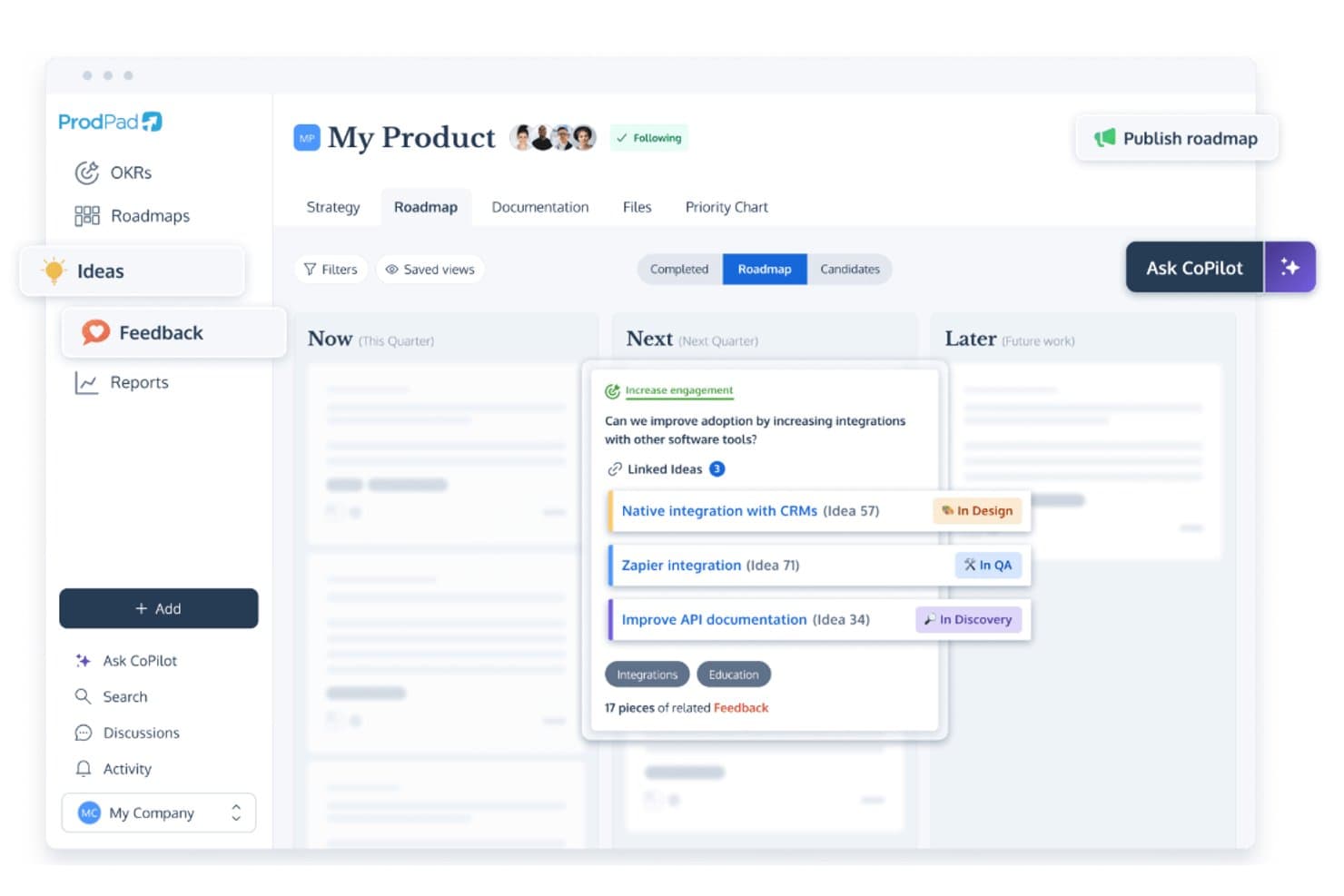
ProdPad vincula las ideas de planificación con los comentarios y realiza un seguimiento del estado del desarrollo. ProdPad es una plataforma de descubrimiento y planificación de productos basada en la gestión de comentarios, la organización del listado de ideas pendientes, la síntesis asistida por IA y la planificación Ahora-Siguiente-Más adelante.
¿Para quién es más adecuado ProdPad?
ProdPad es una excelente opción para los gerentes de producto que necesitan un vínculo claro y rastreable entre los comentarios de los clientes y las decisiones de planificación.
Por qué elegí ProdPad
Elegí ProdPad como una de las mejores opciones porque ninguna otra herramienta de esta lista hace que la conexión entre los comentarios sin procesar de los clientes y las decisiones de planificación sea tan rastreable. Cada comentario se vincula bidireccionalmente con la idea en la que influyó y con la iniciativa a la que corresponde, por lo que siempre sabes por qué algo está incluido en la planificación. AI Signals identifica automáticamente temas recurrentes en todo tu conjunto de comentarios, y CoPilot señala las ideas duplicadas en el listado antes de que generen ruido.
Características principales de ProdPad
- Planificación Ahora-Siguiente-Más adelante: Un formato de planificación optimizado organizado por horizonte temporal estratégico en lugar de fechas fijas, que ayuda a los equipos a priorizar los resultados por encima de la producción.
- Asientos ilimitados gratuitos para revisores: Cualquier cantidad de partes interesadas—ingenieros, ejecutivos, personal de ventas o de atención al cliente—puede acceder a ProdPad como revisores sin coste adicional.
- Asesor de productos con IA CoPilot: Un asistente de IA integrado que somete las decisiones a pruebas de rigor, redacta especificaciones y resúmenes, y genera resultados clave medibles a partir de objetivos estratégicos generales.
- Precios modulares: Los equipos pueden comprar solo los módulos que necesitan—Planificaciones, Ideas o Comentarios—y añadir más a medida que crece su práctica de descubrimiento.
Integraciones de ProdPad
ProdPad ofrece integraciones nativas con Jira, Azure DevOps, Linear, Salesforce, Intercom, Slack, Microsoft Teams y Confluence. También admite una API, webhooks y Zapier para conectividad personalizada.
Pros and Cons
Pros:
- Los comentarios se vinculan directamente con los elementos de planificación
- Asientos ilimitados gratuitos para revisores para facilitar la colaboración
- La IA detecta automáticamente temas y duplicados en los comentarios
Cons:
- No incluye herramientas integradas para encuestas o pruebas
- No dispone de un repositorio nativo para entrevistas de investigación
Learn more about ProdPad:
Otras herramientas de descubrimiento de productos
Estas son algunas opciones adicionales de herramientas de descubrimiento de productos que no entraron en mi selección, pero que aún merece la pena consultar:
- 11DovetailIdeal para obtener información continua de los clientes mediante IA
- 12DragonboatIdeal para la priorización del descubrimiento basada en la cartera
- 13Zeda.ioIdeal para sintetizar comentarios vinculados a los ingresos
- 14UserTestingMejor para la validación de usabilidad con mucha investigación
- 15AirtableIdeal para priorizar funcionalidades en múltiples marcos de trabajo
- 16HarvestrIdeal para priorizar comentarios vinculados a los ingresos
- 17ZefiIdeal para el mapeo de la VoC a oportunidades impulsado por IA
Cómo evalúo las herramientas de descubrimiento de productos
Evalúo las herramientas de descubrimiento de productos en dos niveles: requisitos básicos como la síntesis de los comentarios de los clientes, la gestión de oportunidades y la validación de ideas, y luego los factores diferenciadores que separan a las herramientas sólidas del resto.
Funcionalidad principal (requisitos básicos de esta lista)
Cuando selecciono herramientas para mi lista, clasifico cada una en una escala de 0 (no ofrece la funcionalidad) a 5 (sobresale en esta área) para cada funcionalidad principal que se indica a continuación. Después, calculo la puntuación total de la herramienta como un porcentaje. Cada herramienta debe alcanzar una puntuación total mínima del 65% para que se la considere para su inclusión.
- Agregación de comentarios de los clientes: Compruebo si una herramienta puede centralizar los comentarios cualitativos y cuantitativos procedentes de fuentes como entrevistas con clientes, encuestas, tickets de soporte y llamadas de ventas, para que los equipos puedan trabajar desde un repositorio compartido.
- Síntesis y etiquetado de información: Busco herramientas que puedan convertir los comentarios sin procesar en información estructurada mediante etiquetas, agrupaciones, agrupaciones temáticas u otros métodos de síntesis que ayuden a los equipos a identificar patrones recurrentes.
- Gestión de oportunidades e ideas: Evalúo si los equipos pueden capturar, organizar y hacer seguimiento de las oportunidades de producto, las hipótesis y las ideas descubiertas mediante la investigación. Las herramientas sólidas conectan estas oportunidades con las pruebas de los clientes y los resultados que las sustentan.
- Herramientas de validación de hipótesis: Analizo cómo ayuda la plataforma a los equipos a probar los supuestos del producto antes de comprometerse con el desarrollo, ya sea mediante encuestas, pruebas de prototipos, entrevistas con clientes, experimentos u otros métodos de validación.
- Marcos de priorización: Evalúo si los equipos pueden clasificar las oportunidades utilizando modelos integrados de puntuación o priorización, como RICE, MoSCoW o la puntuación ponderada. También busco flexibilidad en la forma de configurar los criterios y vincularlos con las pruebas de los usuarios y el impacto empresarial.
- Colaboración y uso compartido del descubrimiento: El trabajo de descubrimiento necesita aportaciones de las áreas de producto, diseño e investigación. Busco espacios de trabajo compartidos, comentarios, vistas para las partes interesadas y otras formas en que los equipos puedan revisar y aplicar juntos los hallazgos del descubrimiento.
Una vez que tengo una lista de herramientas que cumplen este criterio, considero qué diferencia a cada plataforma.
Factores diferenciadores (lo que distingue a los proveedores)
Así es como comparo y contrasto a los distintos proveedores:
Funciones destacadas
La síntesis de investigación mediante IA es un factor diferenciador importante. Las herramientas que pueden transcribir entrevistas, extraer aspectos destacados y mostrar temas recurrentes pueden reducir el trabajo manual implicado en el análisis de la investigación de clientes. También busco árboles de soluciones de oportunidades que conecten resultados, oportunidades, soluciones y experimentos, así como enlaces de pruebas que permitan rastrear las decisiones de producto hasta la información obtenida de los clientes. La captación continua de participantes para entrevistas puede ayudar a los equipos a mantener una cadencia regular de investigación, mientras que las integraciones con las hojas de ruta y la entrega facilitan trasladar las oportunidades validadas a herramientas como Jira o Linear sin perder el contexto del descubrimiento.
Más allá de las funciones
La profundidad de las integraciones es una de las primeras cosas que evalúo. Una herramienta de descubrimiento que se conecta con tu CRM, plataforma de soporte, herramientas de investigación y conjunto de herramientas de entrega implica menos trabajo manual para trasladar las pruebas de los clientes entre sistemas. También considero hasta qué punto una plataforma respalda a los equipos multifuncionales y los distintos niveles de madurez en el descubrimiento. La alineación con la metodología también es importante, especialmente para los equipos que utilizan enfoques como los Hábitos de Descubrimiento Continuo, los Trabajos por Realizar, el desarrollo ágil de doble vía o la metodología de emprendimiento esbelto. Por último, considero factores de seguridad e incorporación, como los permisos, los controles de privacidad de datos, las plantillas, la asistencia para la migración y los recursos de capacitación.
Cómo elegir herramientas de descubrimiento de productos
Es fácil perderse entre largas listas de funcionalidades y estructuras de precios complejas. Para ayudarte a mantener la concentración mientras avanzas en tu proceso específico de selección de software, aquí tienes una lista de factores que debes tener en cuenta:
| Factor | Qué debes considerar |
|---|---|
| FactorEscalabilidad | Qué debes considerar¿Puede la herramienta crecer junto con tu equipo? Considera si gestiona mayores volúmenes de datos y más usuarios sin problemas de rendimiento. Busca indicadores como límites de usuarios o de datos. |
| FactorIntegraciones | Qué debes considerar¿Se conecta con las herramientas que ya utilizas? Comprueba si se integra con tu CRM, aplicaciones de comunicación o plataformas de análisis de datos. Evita las herramientas con API limitadas. |
| FactorCapacidad de personalización | Qué debes considerar¿Puedes adaptarla a tu flujo de trabajo? Busca campos, paneles y roles de usuario personalizables. Evita los sistemas rígidos que no se adaptan a tus necesidades. |
| FactorFacilidad de uso | Qué debes considerar¿Es intuitiva para tu equipo? Prueba la interfaz para comprobar que ofrece una navegación sencilla y que requiere una formación mínima. Evita las configuraciones complejas que frustran a los usuarios. |
| FactorImplementación e incorporación | Qué debes considerar¿Cuánto tardarás en tenerla operativa? Comprueba que ofrezca una configuración rápida, recursos de formación y asistencia durante la incorporación. Evita los tiempos de implementación prolongados que frenan el progreso. |
| FactorCoste | Qué debes considerar¿Se ajusta a tu presupuesto? Compara el coste total con tu presupuesto, incluidas las tarifas ocultas. Busca planes de precios flexibles o descuentos por pagos anuales. |
| FactorMedidas de seguridad | Qué debes considerar¿Están protegidos tus datos y tu privacidad? Asegúrate de que la herramienta cumple estándares de seguridad como el cifrado y los controles de acceso. Evita las herramientas con políticas de seguridad poco claras. |
¿Qué son las herramientas de descubrimiento de productos?
Las herramientas de descubrimiento de productos son soluciones de software que ayudan a los equipos a recopilar información y priorizar las funciones de los productos. Los responsables de producto, diseñadores de UX y equipos de desarrollo suelen utilizar estas herramientas para alinearse con las necesidades de los clientes y los objetivos empresariales. Funciones como la recopilación de comentarios de los clientes, la priorización de funciones y la creación de hojas de ruta ayudan en la toma de decisiones y la colaboración. En general, estas herramientas proporcionan claridad y dirección para desarrollar productos con éxito.
Características
Al seleccionar herramientas de descubrimiento de productos, presta atención a las siguientes características clave:
- Recopilación de comentarios de los clientes: Recopila información de los usuarios para orientar las decisiones sobre el producto y alinearlas con las necesidades de los clientes.
- Priorización de funciones: Ayuda a los equipos a clasificar las funciones según su impacto, asegurándose de desarrollar primero las más valiosas.
- Creación de hojas de ruta: Representa visualmente el recorrido de desarrollo del producto y ayuda a los equipos y las partes interesadas a comprender los plazos y las prioridades.
- Capacidades de integración: Se conecta con herramientas existentes, como CRM y aplicaciones de comunicación, para garantizar un flujo de datos fluido entre plataformas.
- Paneles personalizables: Permiten a los usuarios adaptar su vista para centrarse en las métricas y la información relevantes.
- Herramientas de colaboración: Facilitan la comunicación y la alineación del equipo, asegurándose de que todos estén al tanto.
- Información basada en IA: Utiliza inteligencia artificial para proporcionar recomendaciones y previsiones basadas en datos.
- Medidas de seguridad: Protege los datos mediante cifrado y controles de acceso, garantizando la privacidad de los usuarios y el cumplimiento normativo.
- Recorridos interactivos del producto: Ofrece recorridos guiados para ayudar a los nuevos usuarios a comprender y utilizar rápidamente la herramienta.
- Análisis e informes: Proporciona información detallada sobre el rendimiento del producto y el comportamiento de los usuarios para facilitar la toma de decisiones fundamentadas.
Ventajas
La implementación de herramientas de descubrimiento de productos ofrece varias ventajas para tu equipo y tu empresa. Estas son algunas de las que puedes esperar:
- Mejor toma de decisiones: Con los comentarios de los clientes y la información basada en datos, tu equipo puede tomar decisiones fundamentadas sobre las funciones y prioridades del producto.
- Colaboración mejorada: Las hojas de ruta compartidas y las herramientas de colaboración ayudan a mantener a tu equipo alineado y trabajando hacia objetivos comunes.
- Mayor eficiencia: Las funciones de priorización garantizan que tu equipo se centre primero en las tareas de mayor impacto, ahorrando tiempo y recursos.
- Mayor satisfacción del cliente: Al alinear el desarrollo del producto con las necesidades de los usuarios, ofreces productos que conectan mejor con tu público.
- Visión clara del producto: La creación de hojas de ruta proporciona una representación visual del futuro de tu producto y ayuda a las partes interesadas a comprender la dirección y los plazos.
- Reducción de riesgos: La información basada en IA y los análisis ayudan a identificar posibles problemas desde el principio, lo que permite a tu equipo abordarlos de forma proactiva.
- Seguridad de los datos: Gracias a unas medidas de seguridad sólidas, los datos de tu equipo y de tus clientes permanecen protegidos, lo que garantiza el cumplimiento normativo y la confianza.
Costes y precios
La selección de herramientas de descubrimiento de productos requiere comprender los distintos modelos de precios y planes disponibles. Los costes varían según las funciones, el tamaño del equipo, los complementos y otros factores. La siguiente tabla resume los planes habituales, sus precios medios y las funciones que suelen incluir las soluciones de herramientas de descubrimiento de productos:
Tabla comparativa de planes para herramientas de descubrimiento de productos
| Tipo de plan | Precio medio | Funciones habituales |
|---|---|---|
| Tipo de planPlan gratuito | Precio medio$0 | Funciones habitualesRecopilación básica de comentarios, priorización limitada de funciones y creación sencilla de hojas de ruta. |
| Tipo de planPlan personal | Precio medio$5-$25/usuario/mes | Funciones habitualesHerramientas mejoradas para recopilar comentarios, paneles personalizables e integraciones con aplicaciones básicas. |
| Tipo de planPlan empresarial | Precio medio$30-$75/usuario/mes | Funciones habitualesAnálisis avanzados, herramientas de colaboración en equipo e integraciones múltiples. |
| Tipo de planPlan para empresas | Precio medio$80+/usuario/mes | Funciones habitualesConjunto completo de funciones, asistencia especializada y medidas de seguridad avanzadas. |
Preguntas frecuentes sobre herramientas de descubrimiento de productos
Aquí tienes algunas respuestas a preguntas frecuentes sobre las herramientas de descubrimiento de productos:
¿Cómo capturan los equipos información mediante las herramientas de descubrimiento de productos?
Los equipos suelen registrar las entrevistas con usuarios, los datos de las encuestas y los patrones de uso del producto en un mismo lugar. Puedes etiquetar la información, vincularla a ideas y compartirla entre equipos. Esto mantiene visible el trabajo de descubrimiento y conectado con la toma de decisiones. También evita que la investigación quede aislada.
¿Cómo gestionan las herramientas de descubrimiento de productos el registro de ideas pendientes?
Puedes crear, etiquetar y organizar las ideas a medida que surgen. Algunas herramientas puntúan las ideas en función del impacto, el esfuerzo o la alineación con los objetivos. Esto ayuda a tu equipo a evitar el exceso de funcionalidades y a centrarse en lo que importa. Puedes volver a consultar ideas antiguas cuando cambie el contexto.
¿Admiten las herramientas de descubrimiento de productos el desarrollo ágil de doble vía?
Sí, muchas herramientas permiten que el descubrimiento y la entrega se realicen al mismo tiempo. Te permiten explorar y validar ideas mientras tu equipo sigue desarrollando el producto. Puedes mover fácilmente las ideas entre las vías de descubrimiento y entrega, manteniendo ambos esfuerzos alineados.
¿Son adecuadas las herramientas de descubrimiento de productos para equipos pequeños?
Sí, las herramientas de descubrimiento de productos son adecuadas para equipos pequeños. Muchas ofrecen funciones escalables que se adaptan al tamaño y las necesidades de tu equipo. Proporcionan funcionalidades esenciales, como la recopilación de comentarios y la priorización de funcionalidades, y ayudan a los equipos pequeños a mantenerse organizados y centrados en sus objetivos sin una complejidad abrumadora.