

10 Mejores Herramientas de Análisis del Comportamiento de Usuarios de 2026

10 Mejor Lista Rápida de Herramientas de Análisis de Comportamiento del Usuario
- 1. Amplitude


Con tantas soluciones diferentes de comportamiento del usuario disponibles, puede ser difícil saber cuál es la adecuada para ti. Sabes que quieres identificar cómo los usuarios navegan, se comprometen e interactúan con varios elementos para ayudarte a tomar decisiones basadas en datos, mejorar la experiencia de usuario y optimizar las conversiones, pero necesitas descubrir qué herramienta es la mejor. ¡Te ayudo! En este artículo te facilito la elección, usando mis experiencias personales con docenas de herramientas diferentes en equipos grandes y productos complejos para ofrecerte mi lista seleccionada de las mejores herramientas de análisis de comportamiento del usuario.
Por Qué Confiar en Nuestras Reseñas de Software
Llevamos revisando y probando software de gestión de productos desde 2020. Como product managers, sabemos lo crucial y complicado que es tomar la decisión correcta al seleccionar software. Invertimos en investigación profunda para ayudar a nuestra audiencia a tomar mejores decisiones de compra de software. Hemos probado más de 2,000 herramientas para distintos casos de uso y escrito más de 1,000 reseñas exhaustivas. Conozca cómo mantenemos la transparencia & nuestra metodología de reseñas de software.
Resumen de las Mejores Herramientas de Análisis de Comportamiento del Usuario
Esta tabla comparativa resume los detalles de precios de mis selecciones principales de herramientas de análisis de comportamiento del usuario para ayudarte a encontrar la mejor según tu presupuesto y necesidades empresariales.
| Tool | Best For | Trial Info | Price | ||
|---|---|---|---|---|---|
| 1 | Plan gratuito disponible | Precios bajo petición | Website | ||
| 2 | Ideal para la captura automática móvil vinculada a la revisión de sesiones mediante IA | Plan gratuito disponible | Precios bajo solicitud | Website | |
| 3 | Ideal para la captura sin etiquetas en sectores regulados | Demostración gratuita disponible | Precio bajo solicitud | Website | |
| 4 | La mejor opción para el seguimiento visual de eventos sin código | Plan gratuito disponible | Precio bajo solicitud | Website | |
| 5 | La mejor opción para unificar la reproducción de sesiones, los mapas de calor y la analítica de producto | Prueba gratuita de 15 días + plan gratuito + demostración gratuita disponible | Desde $39/mes (facturado anualmente) | Website | |
| 6 | Ideal para la monitorización de la interfaz y el análisis de productos | Plan gratuito disponible | Desde $83/mes | Website | |
| 7 | Ideal para vincular el impacto de los lanzamientos con la analítica de comportamiento | Plan gratuito disponible | Desde $150/mes | Website | |
| 8 | Mejor para informes detallados | Plan gratuito disponible | Desde $120/mes (facturado anualmente) | Website | |
| 9 | Ideal para el análisis de recorridos y fricción basado en IA | Demostración gratuita disponible | Precios disponibles previa solicitud | Website | |
| 10 | Ideal para combinar datos cuantitativos y cualitativos | Plan gratuito y demostración gratuita disponibles | Precios disponibles previa solicitud | Website |
Reseñas de las Mejores Herramientas de Análisis de Comportamiento del Usuario
A continuación encontrarás mis resúmenes detallados de las mejores herramientas de análisis de comportamiento del usuario que han entrado en mi lista destacada. Mis reseñas ofrecen una mirada detallada a las características clave, pros y contras, integraciones y casos de uso ideales de cada herramienta para ayudarte a encontrar la mejor para ti.

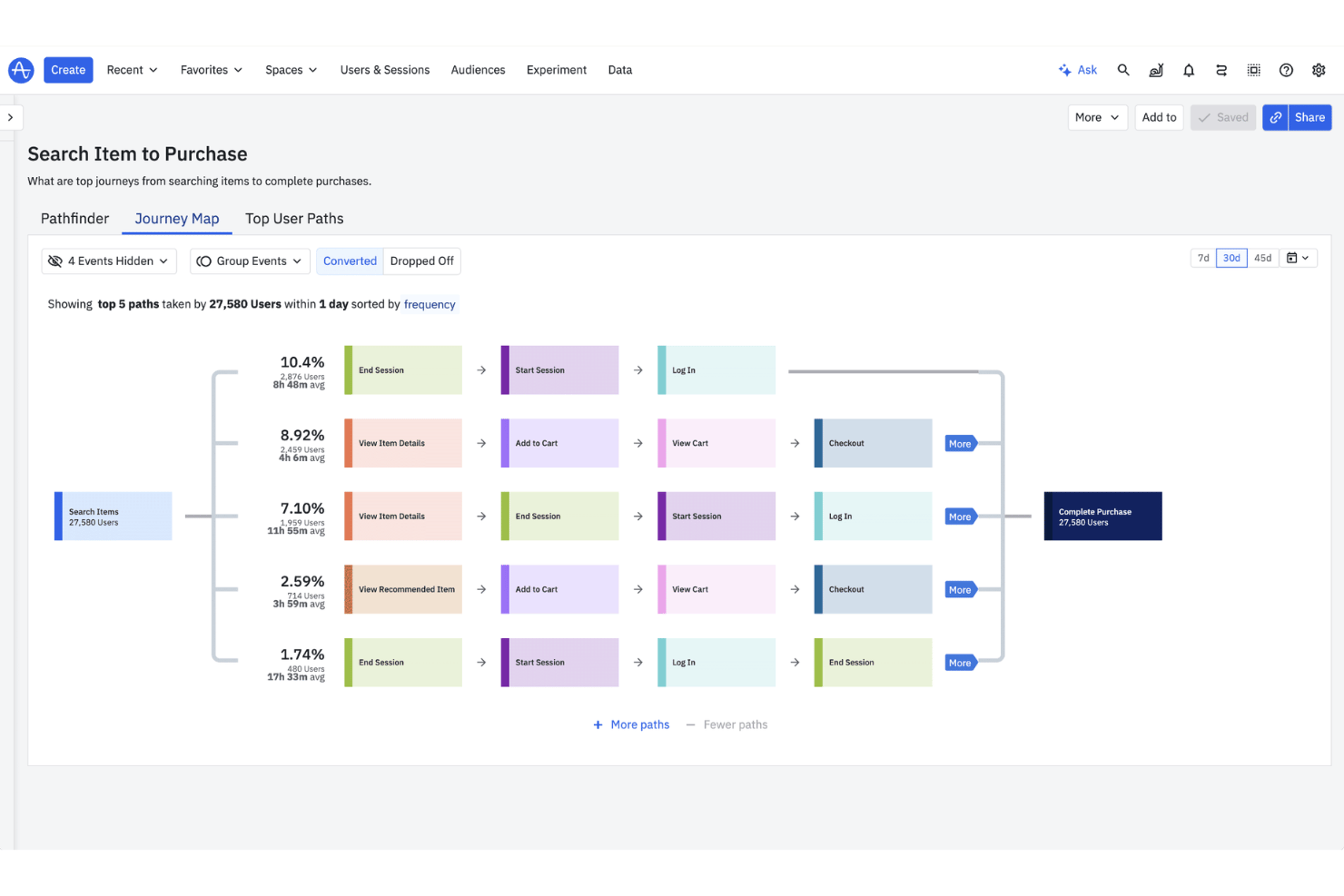
Amplitude es una plataforma de análisis de productos que combina el seguimiento de eventos de comportamiento, el análisis de embudos y rutas, la reproducción de sesiones, los mapas de calor, la segmentación de usuarios y herramientas de experimentación integradas en la web y los dispositivos móviles.
¿Para quién es más adecuado Amplitude?
Amplitude es una excelente opción para equipos de producto que realizan experimentos y necesitan vincular directamente los resultados con los datos de comportamiento.
Por qué elegí Amplitude
Amplitude ocupa un lugar en mi lista de finalistas porque es la única herramienta de aquí que vincula directamente la experimentación con los datos de comportamiento en un único flujo de trabajo. Me encanta que puedas realizar un experimento de funcionalidad y, después, desglosar inmediatamente los resultados según el comportamiento de los usuarios mediante embudos, recorridos y gráficos de retención, sin exportar nada. El etiquetado visual permite definir eventos retrospectivamente sobre datos reales, de modo que el comportamiento pasado se vuelve analizable en cuanto le asignas un nombre.
Características principales de Amplitude
- Captura automática: Recopila automáticamente clics, vistas de página, sesiones e interacciones con formularios en la web, iOS y Android con una configuración mínima.
- Cohortes de comportamiento: Crea y sincroniza segmentos de usuarios basados en el comportamiento dentro del producto, con sincronizaciones programadas de cohortes y acceso a la API en los planes Growth y superiores.
- Reproducción de sesiones: Permite ver sesiones reales de usuarios directamente en la plataforma de análisis, disponible en todos los planes con hasta 50K reproducciones al mes en Enterprise.
- Comentarios de IA: Recopila y muestra automáticamente los comentarios de los usuarios, con hasta 2.000 registros al mes incluidos en la plataforma.
Integraciones de Amplitude
Amplitude admite conexiones MCP con Claude, Cursor, Lovable y Figma Make, además de una API de cohortes de comportamiento y transmisión personalizada en tiempo real en los planes Growth y superiores.
Pros and Cons
Pros:
- Vincula los experimentos de funcionalidades con los datos de comportamiento
- El etiquetado visual asigna nombres a los eventos sin necesidad de asistencia de ingeniería
- Combina la reproducción de sesiones, los embudos y el análisis de retención
Cons:
- El análisis avanzado requiere conocimientos propios de un analista
- Los límites de retención de las reproducciones dificultan el análisis longitudinal de las sesiones

UXCam
Ideal para la captura automática móvil vinculada a la revisión de sesiones mediante IA
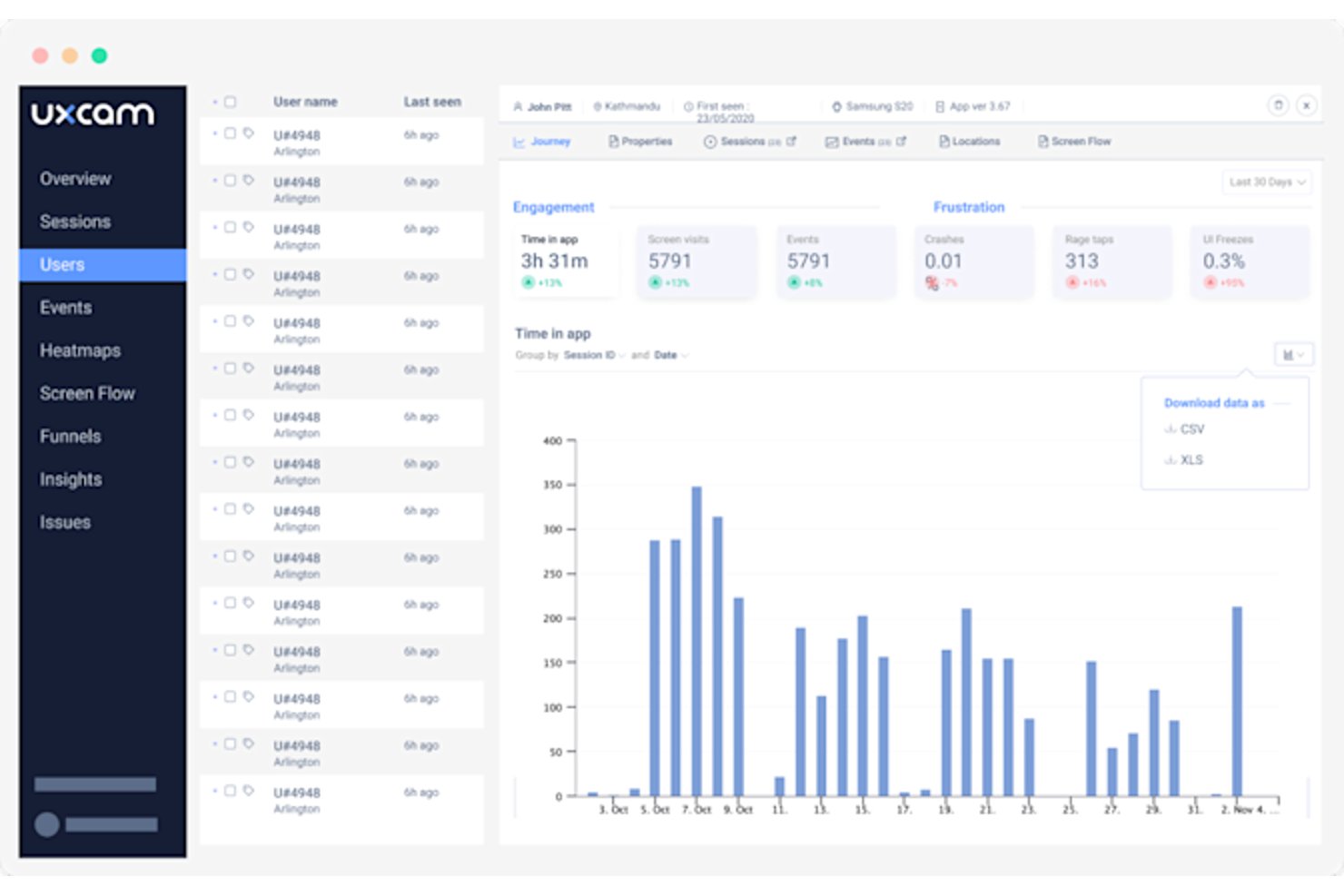
UXCam es una plataforma de análisis del comportamiento de los usuarios basada en la captura automática, la reproducción de sesiones, los mapas de calor móviles, el análisis de embudos y un analista de IA que identifica automáticamente problemas en las sesiones grabadas.
¿Para quién es más adecuado UXCam?
UXCam es una opción ideal para equipos de productos centrados en dispositivos móviles que necesitan reproducción de sesiones a nivel de gestos y detección de problemas asistida por IA sin realizar un trabajo complejo de instrumentación.
Por qué elegí UXCam
UXCam ocupa un lugar destacado en mi lista porque conecta estrechamente la captura automática móvil con la revisión de sesiones basada en IA mediante su analista de IA Tara. Tara supervisa automáticamente las sesiones grabadas y muestra los problemas principales, así que no tengo que pasar horas revisando grabaciones para descubrir dónde los usuarios tocaron repetidamente la pantalla por frustración o se encontraron con un bloqueo de la interfaz. También me encanta que la captura automática registre cada gesto e interacción con la pantalla desde el primer día, lo que significa que puedo realizar análisis de embudos retrospectivos sin volver a modificar el código de seguimiento.
Características principales de UXCam
- Detección de señales de frustración: Identifica automáticamente toques repetidos por frustración, gestos sin respuesta y bloqueos de la interfaz sin necesidad de configuración manual.
- Reproducción de fallos: Registra todo el recorrido del usuario previo a un fallo, para que puedas ver exactamente qué ocurrió antes de que la aplicación dejara de funcionar.
- Compatibilidad con SDK multiplataforma: Un único SDK es compatible con iOS, Android, React Native, Flutter, Xamarin, Cordova y la web.
- Controles de cumplimiento: Bloquea automáticamente los campos confidenciales en el dispositivo e incorpora el cumplimiento de SOC 2 Tipo 2, HIPAA, GDPR, CCPA y PCI.
Integraciones de UXCam
UXCam ofrece integraciones con Salesforce, Intercom, Zendesk, Firebase Crashlytics, Slack y Amplitude. Sus SDK son compatibles con iOS, Android, React Native, Flutter, Xamarin, Cordova y la web.
Pros and Cons
Pros:
- Captura los gestos sin etiquetado manual de eventos
- Relaciona los abandonos del embudo con las reproducciones de sesiones
- Tara, la IA, identifica problemas de usabilidad de gran impacto
Cons:
- Los paneles pueden resultar abrumadores por el exceso de datos
- Los límites de sesiones pueden interrumpir el acceso a las grabaciones

Glassbox
Ideal para la captura sin etiquetas en sectores regulados
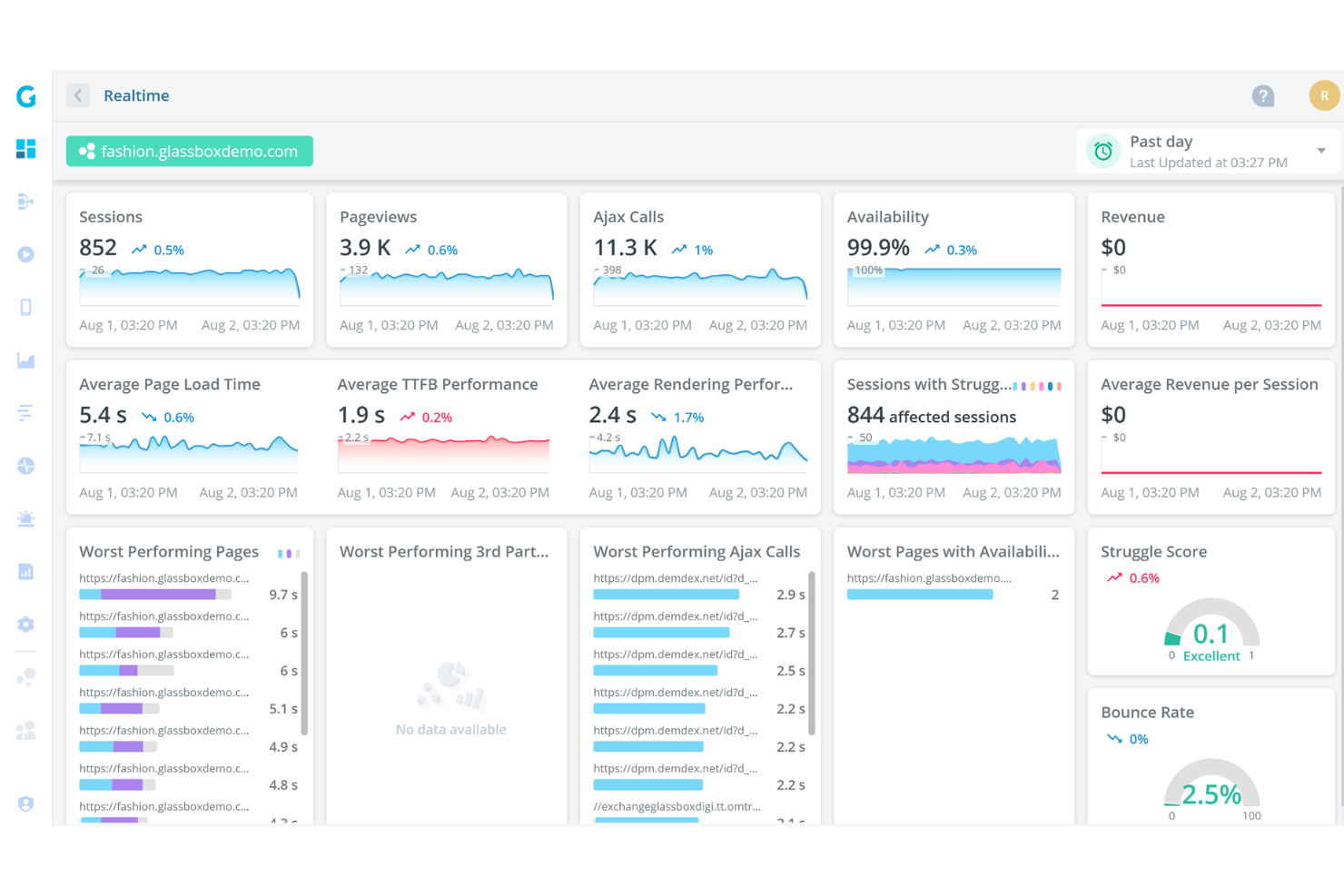
Glassbox es una plataforma de análisis del comportamiento de los usuarios que captura automáticamente las interacciones digitales—sin etiquetado manual—en la web y dispositivos móviles, y ofrece reproducción de sesiones, análisis de embudos, mapeo de recorridos e información conductual basada en IA.
¿Para quién es más adecuado Glassbox?
Glassbox es una opción excelente para los equipos de producto y digitales de grandes empresas en sectores regulados como la banca, los seguros y la atención sanitaria, donde los requisitos de privacidad de los datos y cumplimiento normativo no son negociables.
Por qué elegí Glassbox
Glassbox ocupa un lugar en mi lista de opciones principales porque su captura patentada sin etiquetas registra automáticamente el 100 % de las interacciones digitales, sin necesidad de etiquetado manual, algo de enorme importancia en sectores regulados, donde añadir etiquetas posteriormente a flujos sensibles supone un riesgo de cumplimiento. Me encanta que se pueda analizar de forma retrospectiva el comportamiento pasado mediante el Mapa de recorridos aumentado y el Estudio de embudos, incluso en flujos que nunca se instrumentaron de forma explícita. El cumplimiento integrado de HIPAA, GLBA, PCI y GDPR, combinado con las opciones de implementación local, la convierte en una de las pocas plataformas de análisis que recomendaría con confianza a un equipo de producto bancario o sanitario.
Características principales de Glassbox
- Búsqueda de reproducciones de sesiones: Encuentra reproducciones específicas por ID de usuario, puntuación de dificultad, tipo de navegador o valores de texto libre capturados durante cualquier sesión.
- GIA (Asistente de información de Glassbox): Consulta sesiones en lenguaje natural y obtén resúmenes generados por IA de embudos, recorridos y reproducciones.
- Análisis de fallos en aplicaciones móviles: Detecta y registra automáticamente los fallos de las aplicaciones junto con el contexto de la sesión, incluidos los datos de versión y rendimiento.
- Alertas conductuales proactivas: Configura activadores de alertas manuales o permite que Glassbox detecte automáticamente cambios inusuales en el comportamiento o las métricas de rendimiento.
Integraciones de Glassbox
Glassbox se integra con Google Analytics, Adobe Analytics, Jira, Slack, Microsoft Teams, Firebase, Optimizely, Qualtrics y Medallia. También ofrece una API abierta para integraciones personalizadas.
Pros and Cons
Pros:
- La captura sin etiquetas permite analizar retrospectivamente el comportamiento
- Los embudos se conectan directamente con las reproducciones de sesiones
- Una sólida gobernanza respalda a los equipos de producto de sectores regulados
Cons:
- El análisis de cohortes y retención sigue estando poco desarrollado
- La conservación de las reproducciones varía considerablemente según el paquete

La mejor opción para el seguimiento visual de eventos sin código
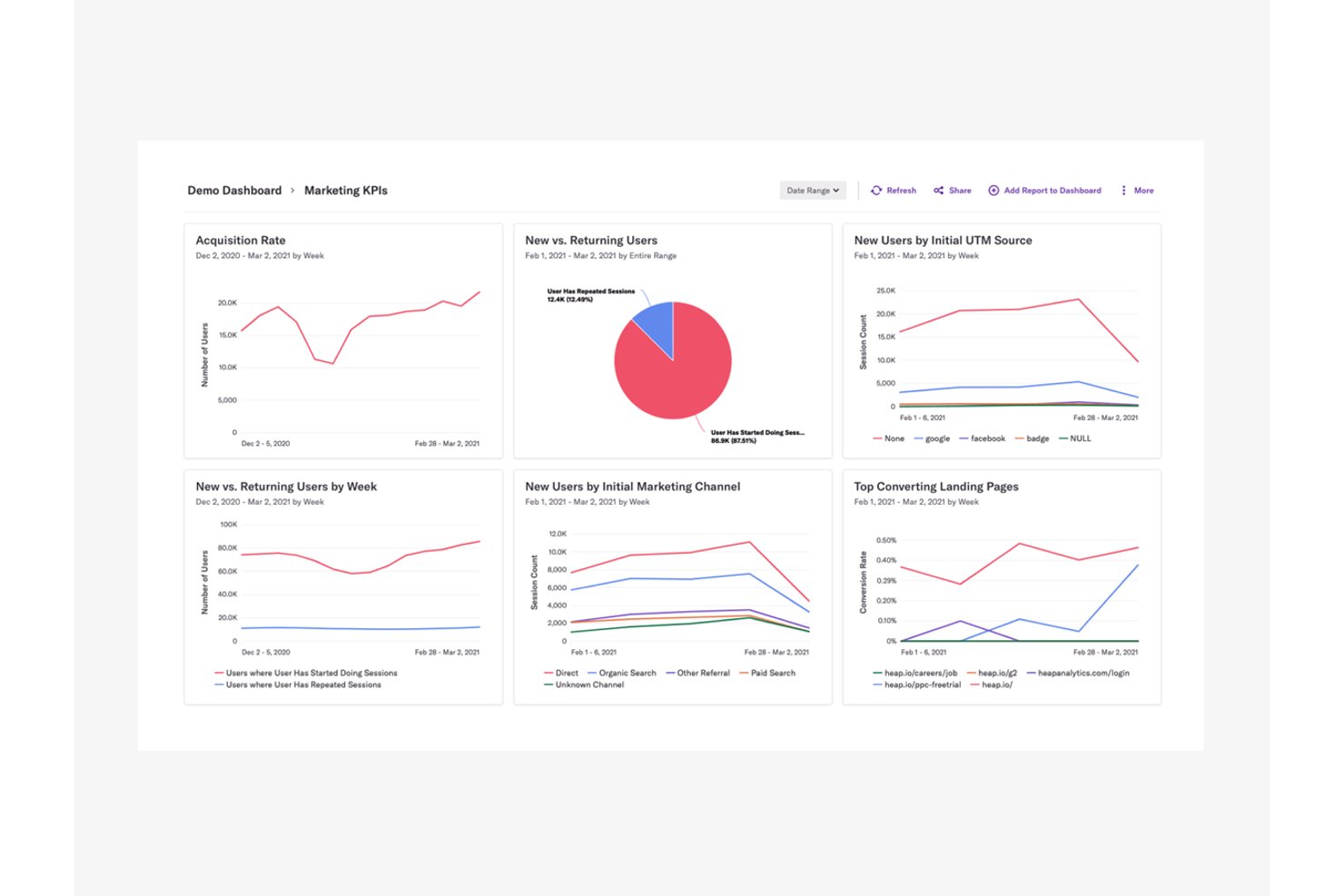
Heap de Contentsquare es una plataforma de análisis del comportamiento de los usuarios que captura automáticamente clics, toques, cumplimentaciones de formularios y vistas de pantalla en la web y dispositivos móviles, sin etiquetado manual de eventos, y presenta esos datos mediante embudos, mapas de recorrido, reproducciones de sesiones, mapas de calor e informes de retención.
¿Para quién es más adecuado Heap?
Heap es una opción excelente para equipos de producto que desean datos conductuales detallados sin depender de los ingenieros para etiquetar manualmente cada evento.
Por qué elegí Heap
Heap ocupa un lugar en mi lista de favoritos porque el seguimiento visual de eventos sin código es realmente su punto fuerte. En lugar de esperar a que los ingenieros etiqueten los eventos, puedo utilizar el etiquetado visual de eventos para definir lo que quiero seguir directamente desde la interfaz, y Autocapture ya ha registrado los datos de forma retroactiva. Eso significa que puedo volver atrás y analizar un flujo de usuario de hace tres meses, aunque no hubiera pensado en realizar su seguimiento en ese momento. La posibilidad de pasar directamente desde un punto de abandono del embudo a una reproducción de sesión vinculada hace que diagnosticar los puntos de fricción sea rápido y concreto.
Funciones principales de Heap
- Análisis retroactivo de eventos: Como Autocapture registra todas las interacciones desde el momento en que se instala, puedes definir y analizar eventos a partir de datos históricos sin volver a instrumentar nada.
- Asistente de IA Sense: La herramienta de IA integrada de Heap permite consultar datos de comportamiento, obtener resúmenes y dar seguimiento a los hallazgos mediante lenguaje natural, disponible a partir del plan Growth.
- Sincronización con almacenes de datos mediante Heap Connect: Este complemento sincroniza automáticamente tus datos de Heap, incluidos los segmentos de comportamiento, con un almacén de datos como Snowflake para realizar análisis más profundos fuera de la plataforma.
- Alertas de informes: Disponible en el plan Pro y superiores, esta función te avisa cuando una métrica clave supera un umbral, para que detectes cambios importantes en el comportamiento de los usuarios sin tener que consultar manualmente los paneles.
Integraciones de Heap
Heap ofrece docenas de integraciones documentadas, incluidas Snowflake, Salesforce, Intercom, Shopify, Marketo, Iterable, AWS y WalkMe. Sus API admiten integraciones de eventos personalizadas, mientras que Heap Connect sincroniza datos y segmentos de comportamiento con Snowflake.
Pros and Cons
Pros:
- Captura las interacciones automáticamente para realizar análisis retroactivos
- Vincula directamente los abandonos del embudo con las reproducciones
- El etiquetado visual reduce el trabajo de los ingenieros relacionado con el etiquetado
Cons:
- Los datos capturados pueden saturar el análisis
- El historial limitado dificulta las comparaciones de cohortes a largo plazo

La mejor opción para unificar la reproducción de sesiones, los mapas de calor y la analítica de producto
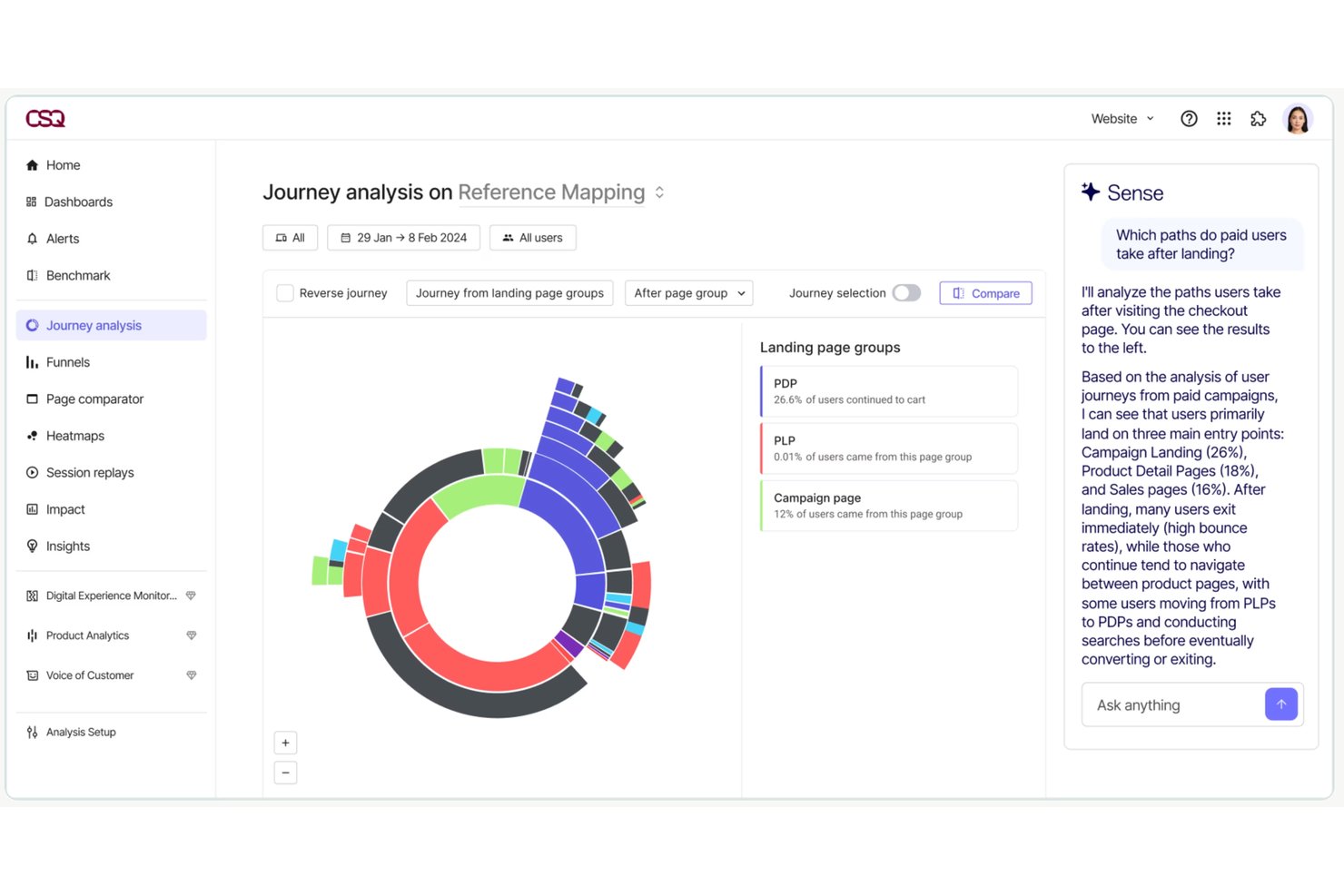
Contentsquare es una plataforma de analítica del comportamiento de los usuarios que unifica la reproducción de sesiones, los mapas de calor, el análisis de embudos, el mapeo de recorridos y la analítica de producto en un solo lugar, con consultas basadas en IA y captura automática de eventos en la web, dispositivos móviles y equipos de escritorio.
¿Para quién es más adecuado Contentsquare?
Contentsquare es una opción excelente para los equipos de producto y UX que necesitan reproducción de sesiones, mapas de calor y analítica de producto en un solo lugar, en vez de combinar herramientas independientes.
Por qué elegí Contentsquare
Contentsquare se gana un lugar en mi lista de opciones principales porque reúne la reproducción de sesiones, los mapas de calor y la analítica de producto en una sola plataforma, lo que significa que no tengo que alternar entre Hotjar y Heap para conectar las fricciones de UX con los datos de adopción de funcionalidades. Me gusta especialmente Smart Capture, que registra automáticamente todas las interacciones de los usuarios para que pueda volver atrás y analizar comportamientos que nunca pensé en rastrear. Sense AI me permite consultar esos datos en lenguaje sencillo y vincular directamente las señales de fricción con el impacto en los ingresos.
Funciones principales de Contentsquare
- Detección de señales de frustración: Identifica automáticamente los clics repetidos, las zonas muertas y los clics en errores dentro de las reproducciones de sesiones para mostrar dónde tienen dificultades los usuarios.
- Cuantificación del impacto: Estima el efecto de puntos específicos de fricción de UX en los ingresos y las conversiones, disponible a partir del plan Growth.
- Resolución de identidades entre dispositivos: Conecta sesiones anónimas con perfiles de usuarios que han iniciado sesión en la web, dispositivos móviles y equipos de escritorio para obtener una visión completa del comportamiento.
- Supervisión de errores y rendimiento: Rastrea errores de JavaScript, API y red junto con datos de rendimiento de usuarios reales, incluidos en todos los planes.
Integraciones de Contentsquare
Contentsquare ofrece más de 115 integraciones, incluidas Google Analytics, Adobe Analytics, Jira, Slack, Microsoft Teams, HubSpot y Optimizely. Los planes Pro y Enterprise incluyen capacidades de API y exportación, mientras que Enterprise añade Data Connect para exportaciones al almacén de datos; Voice of Customer también se integra con Zapier.
Pros and Cons
Pros:
- Captura automáticamente las interacciones para analizarlas de forma retrospectiva
- Conecta la fricción detectada en las reproducciones con el impacto en los ingresos
- Unifica los recorridos en la web, dispositivos móviles y equipos de escritorio
Cons:
- Los límites de reproducción pueden restringir la investigación histórica
- La analítica de producto sigue siendo una aplicación independiente


LogRocket es una plataforma de monitorización de la interfaz y análisis de productos que combina en una sola herramienta la reproducción de sesiones, los mapas de calor, los embudos de conversión, el análisis de rutas, la segmentación de usuarios y los análisis basados en IA.
¿Para quién es más adecuado LogRocket?
LogRocket es una opción excelente para los equipos de producto e ingeniería que necesitan reproducción de sesiones, monitorización de la interfaz y análisis de productos en una sola plataforma.
Por qué elegí LogRocket
LogRocket ocupa un lugar en mi lista de opciones principales porque combina realmente la monitorización de la interfaz con el análisis de productos de una forma que la mayoría de las herramientas no ofrece. Me encanta que los embudos estén vinculados directamente a las reproducciones de sesiones, porque cuando veo una caída en un embudo de conversión, puedo ver inmediatamente las sesiones que hay detrás de esa cifra. Galileo AI añade otra capa al mostrar señales de dificultad antes de que los usuarios abandonen realmente un flujo, lo que cambia la rapidez con la que puedo actuar ante los puntos de fricción.
Características principales de LogRocket
- Seguimiento automático de eventos: Registra automáticamente cada evento del usuario, vista de página y acción, sin necesidad de modificar el código.
- Segmentación basada en cohortes: Crea cohortes de audiencia a partir de cualquier combinación de comportamiento, características y metadatos, y después las aplica a cualquier gráfico.
- Gráficos de retención: Realiza un seguimiento de la capacidad de retención de tu producto y de sus funciones individuales, y muestra qué acciones impulsan el regreso de los usuarios.
- Grabación condicional: Captura únicamente las sesiones que cumplen los criterios que defines, para que controles el volumen de datos y el coste.
Integraciones de LogRocket
LogRocket ofrece cientos de integraciones, entre ellas Zendesk, Intercom, Qualtrics, G2 y Gong. También proporciona acceso mediante API y MCP para conexiones de datos personalizadas.
Pros and Cons
Pros:
- Los embudos se conectan directamente con las reproducciones de sesiones
- La monitorización de la interfaz complementa el análisis de productos
- La IA muestra los puntos de fricción antes del abandono
Cons:
- Un gran volumen de sesiones puede resultar costoso
- El enfoque técnico puede suponer un desafío para los equipos de investigación

Statsig
Ideal para vincular el impacto de los lanzamientos con la analítica de comportamiento
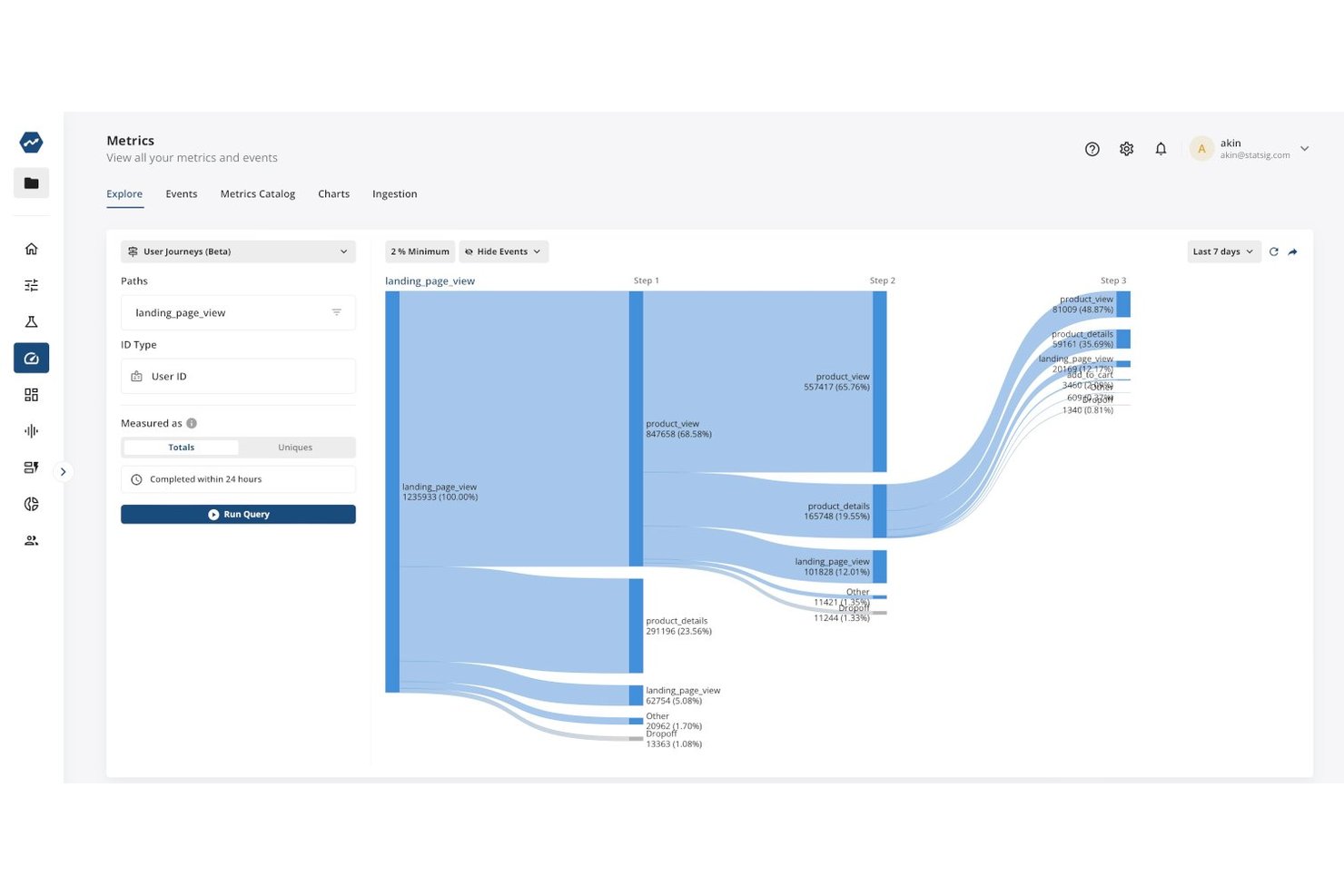
Statsig es una plataforma de analítica de productos y experimentación que combina el seguimiento de eventos de comportamiento, el análisis de embudos y rutas, la reproducción de sesiones, la segmentación de usuarios y las banderas de funcionalidades y pruebas A/B integradas en un solo lugar.
¿Para quién es más adecuado Statsig?
Statsig es una excelente opción para los equipos de producto que desean conectar directamente los lanzamientos de funcionalidades con los datos de comportamiento sin tener que combinar herramientas independientes de analítica y experimentación.
Por qué elegí Statsig
Statsig ocupa un lugar en mi lista de favoritos porque conecta directamente los lanzamientos de banderas de funcionalidades con los datos de comportamiento, por lo que puedes ver exactamente cómo un lanzamiento modificó los resultados sin cambiar de herramienta. Me encanta que cada reproducción de sesión incluya una línea de tiempo completa de eventos que muestra las comprobaciones de las banderas de funcionalidades y las exposiciones a experimentos, lo que significa que puedes rastrear la experiencia frustrante de un usuario hasta la variante específica de la bandera que se le asignó. Combinado con el análisis de embudos integrado y los factores que impulsan la conversión, esto hace que la medición del impacto de los lanzamientos sea realmente concreta.
Características principales de Statsig
- Cohortes de comportamiento: Crea segmentos de audiencia reutilizables, como usuarios avanzados o usuarios que han abandonado el servicio, y luego aplícalos en embudos, gráficos de retención y experimentos.
- Implementación nativa del almacén de datos: Ejecuta Statsig directamente en tu instancia existente de Snowflake, BigQuery, Databricks o Redshift para tener un control total de la gobernanza de los datos.
- Captura automática web: Captura clics, envíos de formularios, clics repetidos por frustración, profundidad de desplazamiento y métricas web vitales con una sola línea de JavaScript, sin necesidad de etiquetado manual.
- Análisis de rutas: Visualiza las rutas que siguen los usuarios antes y después de cualquier acción para identificar patrones de navegación inesperados sin escribir SQL.
Integraciones de Statsig
Statsig admite conexiones de datos con seis almacenes documentados: Snowflake, Databricks, BigQuery, Redshift, Athena y Microsoft Fabric. También ofrece controles de API en Pro para integraciones personalizadas, además de importaciones de datos empresariales e integraciones salientes.
Pros and Cons
Pros:
- Las banderas de funcionalidades vinculan los lanzamientos con el comportamiento
- Las líneas de tiempo de reproducción revelan la fricción detrás de las conversiones
- Los embudos conectan los abandonos con los resultados de los experimentos
Cons:
- No hay mapas de calor disponibles para el análisis visual
- La captura automática en dispositivos móviles requiere instrumentación manual

Mixpanel
Mejor para informes detallados

Mixpanel es una plataforma de análisis del comportamiento de los usuarios que combina el seguimiento de eventos, el análisis de embudos y flujos, la reproducción de sesiones, los mapas de calor, la segmentación de cohortes, los informes de retención y las marcas de funcionalidades y experimentos integrados para la web y dispositivos móviles.
¿Para quién es más adecuado Mixpanel?
Mixpanel es una opción excelente para los equipos de producto y datos que necesitan ir más allá de las métricas superficiales y analizar exactamente cómo se mueven los usuarios dentro de un producto.
Por qué elegí Mixpanel
Mixpanel ocupa un lugar en mi lista de favoritos porque la profundidad de sus informes es realmente difícil de igualar. Me encanta cómo los embudos permiten establecer ventanas de conversión personalizadas, excluir pasos específicos y desglosar los resultados según cualquier propiedad del usuario, de modo que no solo ves dónde abandonan los usuarios, sino también qué segmentos tienen dificultades y por qué. Si a esto le sumas el informe de Flujos, que muestra las rutas que los usuarios realmente siguen en lugar de las que esperabas, obtienes un nivel de detalle conductual que cambia constantemente mi forma de interpretar los datos del producto.
Características principales de Mixpanel
- Vinculación con la reproducción de sesiones: Abre una reproducción de sesión directamente desde un paso del embudo o un punto de datos del gráfico para ver exactamente qué hizo un usuario en ese momento.
- Marcas de funcionalidades y experimentos: Ejecuta experimentos multivariantes con métodos estadísticos que incluyen CUPED y la corrección de Bonferroni, integrados en la misma plataforma que tus análisis.
- Cohortes de comportamiento: Crea y guarda cohortes basadas en el comportamiento de los usuarios, y luego reutilízalas como filtros en los informes o sincronízalas con herramientas de marketing externas.
- Conectores de almacenes de datos: Extrae datos de Snowflake, BigQuery, Databricks y Redshift para ejecutar análisis directamente sobre tu almacén de datos existente.
Integraciones de Mixpanel
Las integraciones de Mixpanel incluyen Segment, mParticle, Snowflake, BigQuery, Databricks, Redshift, HubSpot, ChurnZero, Slack y Workato. Las API de ingesta, exportación y consulta admiten conexiones de datos personalizadas.
Pros and Cons
Pros:
- Vincula las reproducciones de sesiones con los abandonos del embudo
- Los flujos revelan recorridos de usuario no planificados
- Los experimentos conectan los lanzamientos con los resultados conductuales
Cons:
- Los informes avanzados requieren un tiempo considerable de incorporación
- La detección de anomalías y el análisis de las causas raíz están restringidos a los planes empresariales

Ideal para el análisis de recorridos y fricción basado en IA
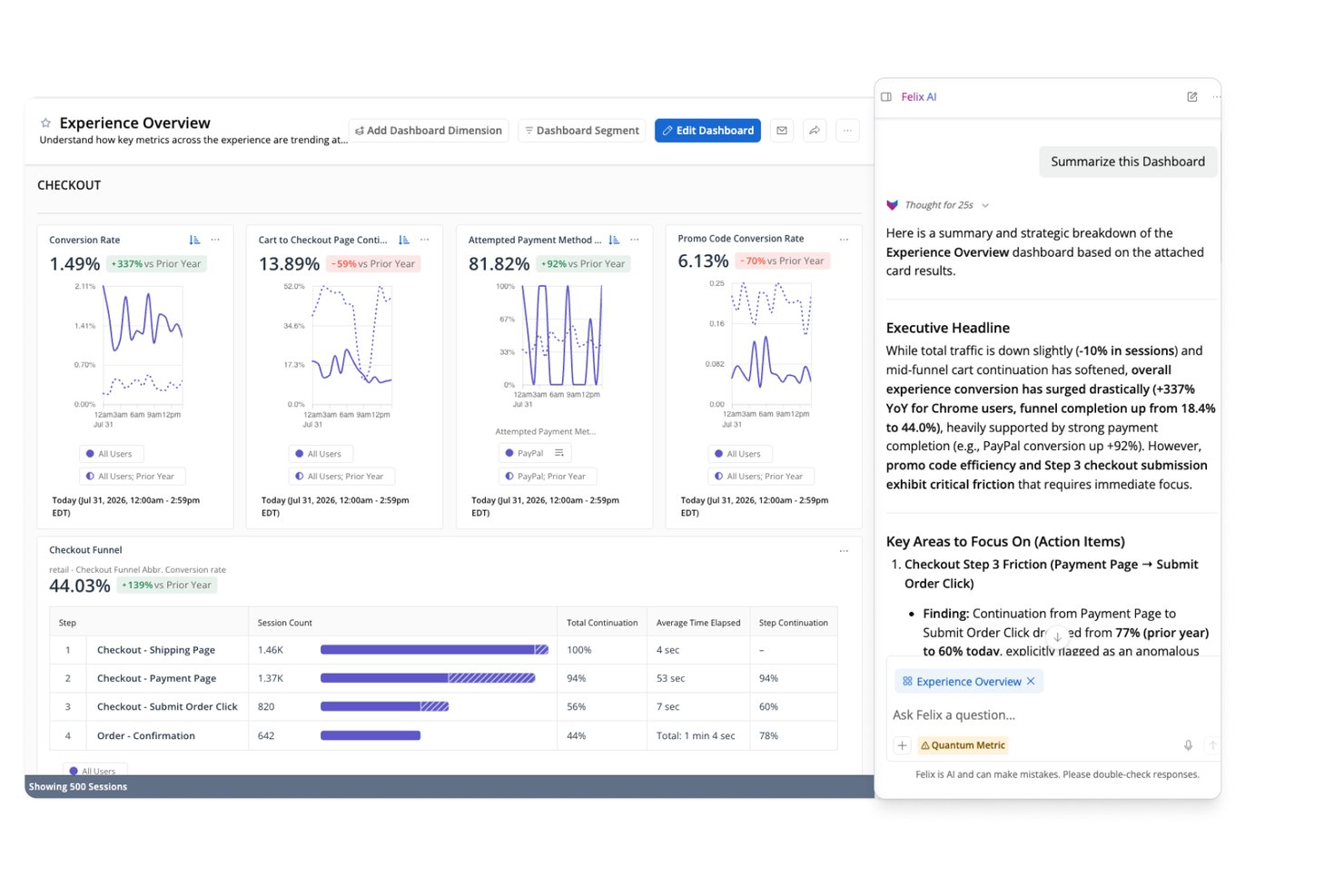
Quantum Metric es una plataforma de análisis del comportamiento de los usuarios que captura señales conductuales, técnicas y de fricción en sitios web, aplicaciones móviles y quioscos, combinando reproducción de sesiones, mapas de calor de interacciones, análisis de recorridos e información basada en IA en un solo lugar.
¿Para quién es más adecuado Quantum Metric?
Quantum Metric es una opción sólida para los equipos empresariales de producto y experiencia digital de grandes empresas B2C que necesitan conectar datos conductuales, análisis de recorridos y reproducción de sesiones en un solo lugar.
Por qué elegí Quantum Metric
Quantum Metric se ganó un lugar en mi lista de opciones porque su análisis de recorridos y fricción basado en IA profundiza más que la mayoría de las herramientas de este nivel. Me impresiona especialmente el Análisis de oportunidades, que cuantifica automáticamente el impacto empresarial de los puntos de fricción en los flujos de usuarios, por lo que no tengo que adivinar qué abandonos son realmente importantes. Felix AI se suma a esto supervisando continuamente los recorridos y señalando problemas antes de que siquiera los haya detectado, con cada alerta vinculada directamente a las reproducciones de sesiones para ofrecer contexto inmediato.
Características principales de Quantum Metric
- Captura automática: Una sola etiqueta de JavaScript o un SDK móvil recopila más de 300 señales conductuales, técnicas y de fricción sin necesidad de etiquetado manual.
- Creador de segmentos: Crea segmentos anidados a partir de atributos de audiencia o secuencias de pasos y aplícalos en recorridos, sesiones y mapas de calor.
- Transmisión de datos: Exporta datos de sesiones y del comportamiento a almacenes como Snowflake, BigQuery y Redshift mediante un complemento de pago con alineación de esquemas.
- Mapas de calor de interacciones: Visualiza clics, desplazamientos y la interacción a nivel de página en sitios web y aplicaciones móviles para ver dónde se concentran los usuarios.
Integraciones de Quantum Metric
Quantum Metric se integra con Split, Optimizely, Google Analytics, Adobe Analytics, Salesforce, Jira, Slack, Snowflake, BigQuery y Redshift. La transmisión de datos se conecta con almacenes y destinos adicionales, incluidos Databricks, Amazon S3 y Oracle.
Pros and Cons
Pros:
- La IA cuantifica el impacto empresarial de la fricción
- El análisis de recorridos enlaza directamente con las reproducciones
- La captura automática abarca sitios web, aplicaciones móviles y quioscos
Cons:
- Los flujos de trabajo empresariales requieren tiempo para dominarlos
- La profundidad de las cohortes de retención sigue sin estar clara

Fullstory
Ideal para combinar datos cuantitativos y cualitativos

Fullstory es una plataforma de análisis de experiencias digitales que captura el comportamiento de los usuarios mediante la reproducción de sesiones con captura automática, mapas de calor, embudos, análisis de recorridos e informes de retención en la web y dispositivos móviles.
¿Para quién es más adecuada Fullstory?
Fullstory es una opción excelente para los equipos de producto y experiencia de usuario que necesitan conectar los datos cuantitativos de embudos y retención con la reproducción cualitativa de sesiones en una sola plataforma.
Por qué elegí Fullstory
Fullstory ocupa un lugar en mi lista de favoritas porque es una de las pocas herramientas que realmente conecta los datos cuantitativos y cualitativos en un único flujo de trabajo. Me encanta que puedas pasar de un abandono en el embudo directamente a las reproducciones de las sesiones de los usuarios que abandonaron, sin cambiar de herramienta ni combinar conjuntos de datos. La captura automática de Fullcapture registra cada interacción de forma retroactiva, por lo que nunca te quedas sin poder analizar comportamientos que no pensaste etiquetar de antemano.
Funciones clave de Fullstory
- Omnisearch: Busca en todas las reproducciones de sesiones utilizando cualquier señal capturada, incluidos los clics repetidos por frustración, los errores o las visitas a páginas específicas, para encontrar exactamente las sesiones que necesitas.
- Estado y alertas de los segmentos: Supervisa los segmentos de usuarios a lo largo del tiempo y recibe notificaciones cuando el comportamiento de un segmento cambia de forma significativa.
- Almacén de datos Fullstory Anywhere: Envía datos de comportamiento preformateados directamente a tu almacén de datos para que puedas combinarlos con tus datos empresariales existentes.
- Señales de sentimiento: Detecta automáticamente indicios de frustración y confusión, y muestra las sesiones en las que es más probable que los usuarios estén teniendo dificultades.
Integraciones de Fullstory
Fullstory admite integraciones nativas, webhooks, exportación de datos y el almacén de datos Fullstory Anywhere para enviar datos de comportamiento a almacenes de datos y almacenamiento en la nube. Sus API Activation, Consent, FS.Identity y Element permiten establecer conexiones personalizadas.
Pros and Cons
Pros:
- La captura automática retroactiva revela comportamientos no planificados
- Conecta los abandonos del embudo con las reproducciones de sesiones
- Combina datos cuantitativos y cualitativos del producto
Cons:
- La implementación móvil puede requerir un esfuerzo adicional
- Las alertas pueden requerir el apoyo del equipo de ingeniería a gran escala
Otras Herramientas de Análisis de Comportamiento del Usuario
Aquí tienes algunas opciones adicionales de herramientas de análisis de comportamiento del usuario que no llegaron a mi lista principal, pero que aún vale la pena revisar:
- CleverTap
Ideal para el análisis de la interacción con aplicaciones móviles
- Pendo
Ideal para análisis de productos con orientación dentro de la aplicación
- Mouseflow
Ideal para el seguimiento automático de la puntuación de fricción
- Zoho Pagesense
Ideal para obtener información visual con mapas de calor
- PostHog
Ideal para vincular las reproducciones con el análisis del abandono del embudo
- Userpilot
Ideal para análisis vinculados a correcciones dentro de la aplicación
- Datadog Real User Monitoring
Ideal para datos de comportamiento vinculados a trazas de observabilidad


Cómo evalúo las herramientas de análisis de comportamiento de usuario
Divido mi evaluación en criterios básicos—seguimiento de eventos, embudos, cohortes—y diferenciadores como la reproducción de sesiones, análisis con IA y compatibilidad con tu stack de datos, que distinguen a las mejores herramientas del resto.
Funcionalidad principal (Requisitos mínimos para esta lista)
Al seleccionar herramientas para mi lista, califico cada una en una escala del 0 (no ofrece la funcionalidad) al 5 (sobresale en esta área) para cada función principal que aparece a continuación. Luego, calculo la puntuación total de la herramienta como porcentaje. Cada herramienta debe alcanzar una puntuación mínima total del 65% para ser considerada.
- Seguimiento de eventos: Verifico si una herramienta captura clics, visualizaciones de página y eventos personalizados tanto en web como en móvil —y si la configuración requiere mucho desarrollo o si ofrece opciones de captura automática.
- Análisis de embudos y conversiones: Crear embudos de varios pasos alrededor de flujos como registro a activación o finalización de compra me muestra qué tan bien una herramienta identifica en qué momento los usuarios abandonan.
- Análisis de cohortes y retención: Busco la capacidad de agrupar usuarios por acciones compartidas y monitorear la retención a lo largo del tiempo, como seguir las tasas de retorno semanal de una cohorte recién incorporada.
- Segmentación de usuarios: Es relevante filtrar usuarios por comportamiento, propiedades y atributos personalizados. Evalúo qué tan flexible es combinar condiciones para aislar grupos como usuarios avanzados o cuentas de prueba.
- Análisis de rutas y trayectorias: Evalúo qué tan claramente una herramienta visualiza las secuencias reales de navegación de los usuarios dentro de un producto, especialmente al diagnosticar patrones de navegación inesperados tras un cambio en la interfaz.
- Tableros e informes de comportamiento: Los tableros personalizables y compartibles facilitan que las ideas lleguen a los interesados. Reviso su flexibilidad de diseño, opciones de programación y si los informes pueden adaptarse según el público.
Una vez que tengo una lista de herramientas que cumplen estos criterios, considero qué hace única a cada plataforma.
Factores diferenciadores (lo que distingue a los proveedores)
Así es como comparo y contrasto diferentes proveedores:
Características sobresalientes
La reproducción de sesiones es un gran diferenciador. Busco herramientas que permitan filtrar grabaciones por señales de frustración como clics repetidos o vueltas atrás, convirtiendo abandonos abstractos en embudos en soluciones concretas. También es importante la experimentación integrada, porque ejecutar pruebas A/B vinculadas directamente a métricas de comportamiento mantiene la validación en un único flujo de trabajo. Además, reviso si hay análisis impulsado por IA que alerten automáticamente sobre anomalías, como un repentino aumento en la tasa de abandono durante la integración, sin necesidad de exploraciones manuales por parte del equipo de producto.
Más allá de las funciones
La integración con tu stack de datos existente es fundamental. Verifico si hay integraciones nativas con CDPs como Segment y almacenes de datos como BigQuery, ya que canalizar los datos de comportamiento en estos sistemas es clave para operacionalizar ideas en la mayoría de los equipos de producto. También tiene importancia la estructura de precios. Los modelos basados en eventos pueden crecer rápidamente conforme aumenta el uso del producto, por lo que evalúo si los precios siguen siendo previsibles a mayor volumen. Para equipos en industrias reguladas, reviso coberturas de cumplimiento, incluyendo GDPR, SOC 2 y controles de anonimización de datos personales (PII).
Cómo Elegir una Herramienta de Análisis de Comportamiento del Usuario
Es fácil perderse entre listas largas de funciones y estructuras de precios complejas. Para ayudarte a mantener el enfoque durante tu proceso único de selección de software, aquí tienes una lista de factores a tener en cuenta:
| Factor | Qué considerar |
|---|---|
| Escalabilidad | ¿Puede la herramienta crecer con tu negocio? Busca soluciones que gestionen más usuarios y datos a medida que te expandes. Considera las necesidades futuras y si la herramienta puede adaptarse a ellas sin costes adicionales o mayor complejidad. |
| Integraciones | ¿Se conecta con tus sistemas existentes? Asegúrate de que se integre con tu CRM, email marketing y otras herramientas en las que confíes. Comprueba si ofrece integraciones nativas o acceso sencillo a API para evitar transferencias manuales de datos. |
| Personalización | ¿Puedes adaptarla a tus flujos de trabajo? Busca opciones que permitan paneles e informes personalizados. Evita sistemas rígidos que te obliguen a trabajar de una manera específica. |
| Facilidad de uso | ¿Es fácil de usar para tu equipo? Prueba la interfaz y la navegación. Una curva de aprendizaje pronunciada puede ralentizar la adopción. Busca diseños intuitivos que requieran poca formación. |
| Implementación y onboarding | ¿Cuánto tiempo hasta que puedas empezar a usarla? Considera el tiempo y los recursos necesarios para implementar la herramienta. Busca plataformas que ofrezcan configuraciones guiadas, tutoriales y soporte durante la fase de incorporación. |
| Costo | ¿Cómo se ajusta el precio a tu presupuesto? Compara el coste total de propiedad, incluidas tarifas de instalación y cuotas de suscripción. Ten cuidado con cargos ocultos y exige transparencia en las estructuras de precios. |
| Salvaguardas de seguridad | ¿Tus datos e información de usuario están protegidos? Comprueba la existencia de cifrado, cumplimiento de normativas de protección de datos y registros de auditoría. Asegúrate de que el proveedor priorice la seguridad para evitar posibles brechas. |
| Disponibilidad de soporte | ¿Qué opciones de soporte existen? Asegúrate de poder acceder a ayuda oportuna mediante varios canales como chat, correo electrónico o teléfono. Ten en cuenta la calidad y rapidez de respuesta del soporte del proveedor cuando surjan problemas. |
¿Qué son las herramientas de análisis de comportamiento de usuario?
Las herramientas de análisis de comportamiento de usuario son programas que rastrean y analizan cómo interactúan las personas con tu sitio web o aplicación. Los profesionales de marketing, gestores de producto y diseñadores UX las utilizan para comprender qué hacen los usuarios, detectar tendencias y encontrar puntos donde las personas se quedan atascadas o abandonan. Al observar las acciones reales de los usuarios, puedes tomar decisiones más inteligentes durante auditorías UX y otros esfuerzos para mejorar la experiencia y aumentar la interacción.
Características
Al seleccionar herramientas de análisis de comportamiento de usuario, presta atención a las siguientes características clave:
- Repeticiones de sesión: Captura y revisa las interacciones de los usuarios en tu plataforma para comprender su recorrido e identificar áreas que necesitan mejoras.
- Mapas de calor: Visualiza dónde hacen clic, se desplazan y pasan el cursor los usuarios en tu sitio para medir la interacción y optimizar el diseño.
- Análisis de embudos: Sigue los recorridos de los usuarios en tu sitio para identificar puntos de abandono y mejorar las tasas de conversión.
- Análisis de cohortes: Segmenta a los usuarios según su comportamiento a lo largo del tiempo para comprender las tendencias de retención e interacción.
- Pruebas A/B: Experimenta con diferentes estrategias para optimizar las experiencias de los usuarios y mejorar los resultados.
- Paneles personalizables: Adapta la visualización de datos a tus necesidades específicas, permitiendo el acceso rápido a métricas importantes.
- Análisis en tiempo real: Accede a información inmediata para tomar decisiones oportunas y responder al comportamiento de los usuarios en el momento.
- Segmentación automática: Clasifica a los usuarios según sus acciones para realizar campañas de marketing y acciones de interacción más focalizadas.
- Resolución de errores: Detecta y soluciona rápidamente problemas en la experiencia de usuario para mantener la satisfacción y reducir la pérdida de usuarios.
- Seguimiento multiplataforma: Monitoriza las interacciones de los usuarios a través de múltiples dispositivos para obtener una visión completa de su comportamiento.
Beneficios
Implementar herramientas de análisis de comportamiento de usuario ofrece varios beneficios para tu equipo y tu negocio. Aquí tienes algunos a los que puedes aspirar:
- Mejora del compromiso del usuario: Analizando los mapas de calor y las reproducciones de sesiones, puedes comprender mejor las interacciones de los usuarios y mejorar su experiencia en tu sitio.
- Incremento en las tasas de conversión: El análisis de embudos ayuda a identificar los puntos de abandono, lo que permite optimizar los recorridos y aumentar las conversiones.
- Decisiones basadas en datos: La analítica en tiempo real proporciona información inmediata, permitiendo que tu equipo tome decisiones rápidas e informadas.
- Campañas de marketing más efectivas: La segmentación automatizada categoriza a los usuarios según su comportamiento, permitiendo estrategias de marketing más precisas y efectivas.
- Mayor satisfacción del usuario: Las funciones de resolución de errores ayudan a identificar y solucionar rápidamente problemas de experiencia del usuario, manteniendo la satisfacción y lealtad.
- Información integral sobre los usuarios: El seguimiento entre dispositivos ofrece una visión completa del comportamiento, ayudando a comprender cómo interactúan los usuarios en distintas plataformas.
- Desarrollo de producto optimizado: Las pruebas A/B permiten experimentar con funciones y cambios de diseño, guiando las mejoras basadas en las respuestas de los usuarios.
Costes y Precios
Seleccionar herramientas de análisis del comportamiento de usuarios requiere comprender los diferentes modelos y planes de precios disponibles. Los costes varían según las funciones, el tamaño del equipo, los complementos y más. La siguiente tabla resume los planes más comunes, sus precios promedio y las características habituales incluidas en las soluciones de herramientas de análisis del comportamiento de usuarios:
Tabla comparativa de planes para herramientas de análisis del comportamiento de usuarios
| Tipo de Plan | Precio promedio | Características comunes |
|---|---|---|
| Plan Gratuito | $0 | Reproducción básica de sesiones, mapas de calor limitados y análisis básicos. |
| Plan Personal | $10-$30/user/month | Mapas de calor avanzados, análisis de embudos, análisis de cohortes y soporte por correo electrónico. |
| Plan de Negocios | $50-$150/user/month | Análisis en tiempo real, paneles personalizables, pruebas A/B y soporte prioritario. |
| Plan Empresarial | $200+/user/month | Seguimiento entre dispositivos, segmentación avanzada, integraciones completas y gestión de cuenta dedicada. |
Preguntas frecuentes sobre herramientas de análisis del comportamiento de usuarios
Aquí tienes respuestas a preguntas comunes sobre las herramientas de análisis del comportamiento de usuarios:
¿Las herramientas de análisis del comportamiento de usuarios requieren conocimientos técnicos para usarse?
No, muchas herramientas de análisis del comportamiento de usuarios están diseñadas con interfaces fáciles de usar y no requieren amplios conocimientos técnicos. Sin embargo, algunas funciones avanzadas pueden necesitar algo de experiencia técnica. Es recomendable elegir una herramienta que se adapte al nivel de habilidad de tu equipo y ofrezca soporte adecuado o recursos de capacitación.
¿Es seguro usar las herramientas de análisis del comportamiento de usuarios?
Sí, las herramientas reputadas de análisis del comportamiento de usuarios priorizan la seguridad y la protección de los datos. Suelen ofrecer cifrado, cumplimiento con normativas de protección de datos y otras medidas para proteger tu información. Revisa siempre las funciones de seguridad y las políticas de privacidad de la herramienta para asegurarte de que cumplen los estándares de tu organización.
¿Cómo se mide el ROI de las herramientas de análisis del comportamiento de usuarios?
Para medir el ROI, comienza estableciendo objetivos de rendimiento claros, como mejorar las conversiones o reducir la tasa de abandono. Analiza los indicadores antes y después de usar la herramienta para ver cómo tus decisiones influyeron en los resultados. La diferencia entre los beneficios obtenidos y la inversión en tiempo o recursos te da una visión clara del ROI.
¿Cuáles son los retos más comunes al adoptar herramientas de análisis del comportamiento de usuarios?
Los equipos suelen enfrentar problemas de precisión, consistencia de los datos y de alineación de los análisis con los resultados reales del negocio. Sin objetivos claros, puedes recopilar datos que no llevan a acciones relevantes. También es común que los equipos subestimen el esfuerzo necesario para mantener la relevancia de los datos con el tiempo.
¿Cómo ayudan las herramientas de análisis del comportamiento de usuarios a mejorar las estrategias de retención?
Estas herramientas muestran cómo los usuarios interactúan con tu producto a lo largo del tiempo, lo que te ayuda a identificar los puntos en los que pierden interés o dejan de interactuar. Al comprender esos comportamientos, puedes adaptar la incorporación, el contenido o la comunicación para fomentar un uso continuado. La retención mejora cuando los análisis informan directamente las estrategias de engagement.
¿Qué sigue?
Si estás investigando herramientas de análisis del comportamiento de usuarios, conéctate con un asesor de SoftwareSelect para obtener recomendaciones gratuitas.
Solo necesitas rellenar un formulario y tener una breve charla en la que analizarán tus necesidades específicas. Después recibirás una lista corta de software para revisar. Incluso te acompañarán durante todo el proceso de compra, incluidas las negociaciones de precios.