

El software de creación de estructuras alámbricas ayuda a los equipos de UX y de producto a crear diseños de baja fidelidad que representan la estructura, el contenido y el flujo de usuario de un sitio web o una aplicación, sin perderse en los detalles del diseño visual. Es la etapa de planos del diseño, en la que la velocidad y la claridad son lo más importante.
Estás aquí porque has hecho los deberes o porque has usado Balsamiq lo suficiente como para saber que es una herramienta sólida para crear estructuras alámbricas. Es rápida, fácil de aprender y excelente para crear maquetas con estilo de boceto. Pero es posible que estés empezando a notar sus limitaciones.
Quizá buscas más interactividad, funciones de creación de prototipos más completas o colaboración en tiempo real con tu equipo. Tal vez te has encontrado con la frustración de necesitar diseños de alta fidelidad o una transferencia más fluida a los desarrolladores. En cualquier caso, estás preparado para descubrir qué más hay disponible, y estamos aquí para ayudarte a tomar una decisión inteligente.
Hemos probado y analizado de forma independiente una amplia variedad de herramientas para crear estructuras alámbricas, desde Balsamiq hasta sus competidores más avanzados y especializados. Esta guía elimina el ruido para ayudarte a:
- Encontrar herramientas que se adapten mejor a tu flujo de trabajo
- Superar los problemas específicos que Balsamiq no resuelve
- Tomar decisiones informadas teniendo en cuenta las funciones, la facilidad de uso y el precio
Vamos a ello.
¿Qué es Balsamiq?
Balsamiq es una herramienta para crear estructuras alámbricas que te ayuda a elaborar rápidamente maquetas de baja fidelidad de tus diseños. La utilizan habitualmente diseñadores de UX, responsables de producto y desarrolladores que necesitan visualizar y perfeccionar conceptos de diseño. Los elementos de arrastrar y soltar, los componentes de interfaz de usuario prediseñados y una interfaz sencilla ayudan a crear y compartir estructuras alámbricas rápidamente. En general, Balsamiq ofrece una forma directa de convertir ideas en formatos visuales que tu equipo puede comprender y debatir fácilmente.
Por qué confiar en nuestras recomendaciones de software
6,700+
Reviews
20
Industry experts
16+
Evaluation factors
14
Years
Nuestro equipo lleva probando y evaluando software desde 2012. Como gestores de producto, sabemos lo difícil —y lo importante— que es elegir el software adecuado.
Para esta guía, evaluamos las herramientas mediante pruebas prácticas e investigación independiente, puntuando las herramientas según nuestros criterios de selección.
Nuestras reseñas reflejan nuestro criterio editorial humano, no un discurso de ventas.
Revisores expertos:
 Hannah ClarkSenior TPM
- Cristiano ValimSenior UI/UX Lead

Tabla comparativa: alternativas a Balsamiq
Esta tabla comparativa resume los detalles de precios de mis principales alternativas a Balsamiq seleccionadas.
| Tool | Best For | Trial Info | Price | ||
|---|---|---|---|---|---|
| 1 | Ideal para mapas mentales vinculados a wireframes | Plan gratuito disponible | Desde $10/usuario/mes (facturado anualmente) | Website | |
| 2 | Ideal para personas no diseñadoras que crean bocetos de interfaz con IA | Plan gratuito disponible | Desde $14/editor/mes | Website | |
| 3 | Ideal para herramientas de diseño en macOS | Prueba gratuita de 30 días | Desde $12/editor/mes (facturado anualmente) | Website | |
| 4 | Ideal para la creación de prototipos interactivos sin código | Plan gratuito disponible | Desde $29/usuario/mes (facturado anualmente) | Website | |
| 5 | Ideal para diagramar sin conexión a Internet | Uso gratuito | Uso gratuito | Website | |
| 6 | Ideal para wireframes que pueden escalar hasta la entrega completa | Plan gratuito disponible | Desde $3/usuario/mes | Website | |
| 7 | Ideal para anotaciones de especificaciones y entrega a desarrollo | Plan gratuito disponible | Desde $24.90/usuario/mes (facturado anualmente) | Website | |
| 8 | Ideal para planificar interfaces en distintas pantallas y flujos | Plan gratuito disponible | Desde $14/usuario/mes (facturado anualmente) | Website | |
| 9 | Ideal para crear prototipos con componentes de código reales | Prueba gratuita de 14 días | Desde $29/usuario/mes (facturado anualmente) | Website | |
| 10 | Ideal para prototipos de alta fidelidad | Plan gratuito disponible | Desde $19/usuario/mes | Website |


Probamos y analizamos software de gestión de productos desde 2020. Como diseñadores de UX, sabemos lo importante y difícil que es tomar la decisión correcta al elegir un software. Invertimos en una investigación exhaustiva para ayudar a nuestra audiencia a tomar mejores decisiones de compra de software.
Hemos probado más de 2.000 herramientas para diferentes casos de uso de gestión de productos y hemos escrito más de 1.000 análisis exhaustivos de software. Descubre cómo mantenemos la transparencia y consulta nuestra metodología de análisis de software.
Reseñas de las mejores alternativas a Balsamiq
A continuación encontrarás mis resúmenes detallados de las mejores alternativas a Balsamiq que incluí en mi lista final. En mis reseñas analizo en profundidad las funciones principales, las ventajas y desventajas, las integraciones y los casos de uso ideales de cada herramienta para ayudarte a encontrar la mejor opción para ti
 Ideal para mapas mentales vinculados a wireframes
- Plan gratuito disponible
- Desde $10/usuario/mes (facturado anualmente)
Visit WebsiteCustomer Rating:4.6/5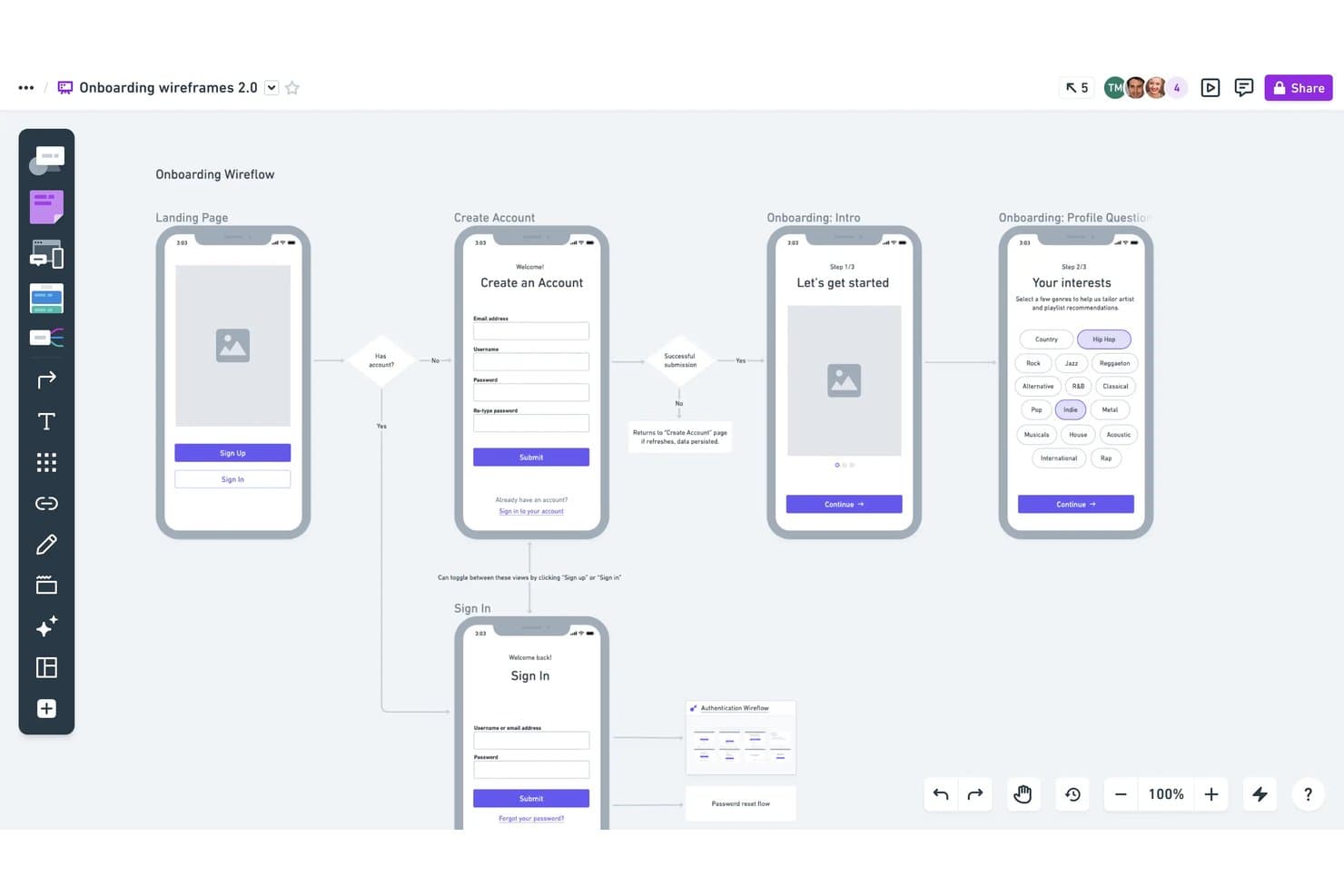
Whimsical permite a los usuarios crear flujos de wireframes anotados con lógica. Whimsical es un espacio de trabajo visual para gerentes de producto, diseñadores y fundadores que necesitan crear wireframes, mapear flujos de usuario y alinear a los equipos en torno a ideas iniciales de productos.
¿Para quién es mejor Whimsical?
Whimsical es adecuado para equipos de producto distribuidos que necesitan un espacio compartido para la creación colaborativa de mapas mentales y la lluvia de ideas visual.
Por qué Whimsical es una buena alternativa a Balsamiq
Elegí Whimsical porque es ideal para crear mapas mentales durante las primeras etapas del descubrimiento de productos. Utilizo sus mapas ramificados y nodos contraíbles para conectar los problemas de los clientes, las hipótesis y las ideas de funcionalidades antes de esbozar los wireframes. La edición compartida permite que mi equipo convierta esos mapas en flujos de interfaz durante el mismo taller.
Funciones principales de Whimsical
- Plantillas de wireframes: Comienza los diseños con diseños prediseñados para pantallas y flujos de productos habituales.
- Biblioteca de componentes de interfaz: Añade botones, campos de entrada, tarjetas, menús y otros elementos de interfaz.
- Carga de imágenes: Coloca imágenes directamente en los wireframes para obtener referencias visuales realistas.
- Exportación de tableros: Descarga los tableros como archivos PDF, PNG o SVG para compartirlos.
Integraciones de Whimsical
Whimsical admite integraciones con Jira, Confluence, Google Docs, ClickUp, Asana, Notion, Slack, GitHub, Linear y Canva. También ofrece una API beta para integraciones personalizadas.
Pros and Cons
Pros:
- Los mapas mentales ramificados conectan el descubrimiento con los flujos
- Las plantillas de wireframes agilizan la exploración inicial de interfaces
- Los cursores en tiempo real facilitan la colaboración enfocada en talleres
Cons:
- Demasiado básico para especificaciones detalladas de la interfaz
- Las sesiones de planificación más grandes pueden sentirse limitadas por el lienzo
Learn more about Whimsical: Ideal para personas no diseñadoras que crean bocetos de interfaz con IA
- Plan gratuito disponible
- Desde $14/editor/mes
Visit WebsiteCustomer Rating:4.8/5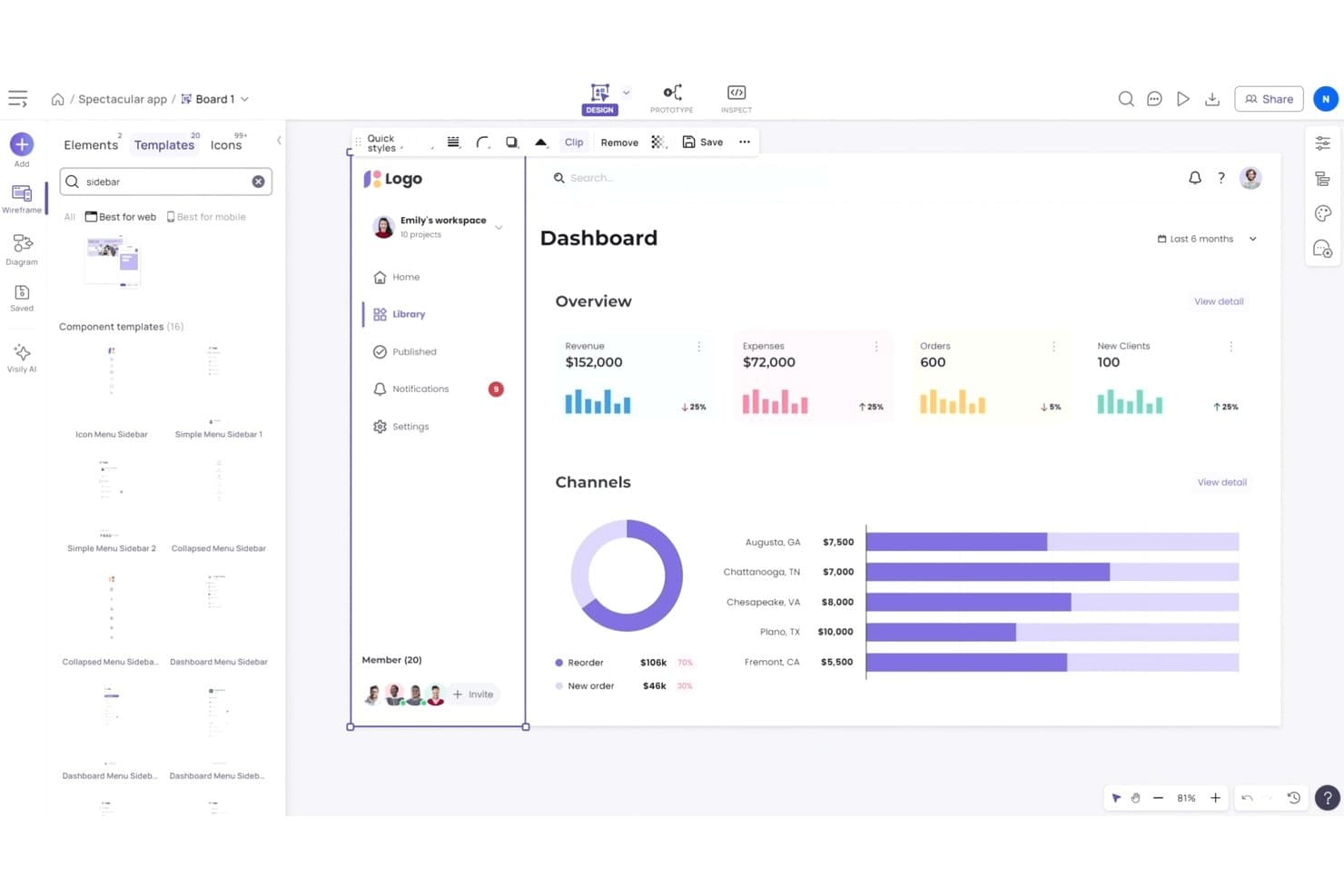
Visily ofrece plantillas listas para usar de barras laterales y paneles de control de interfaz de usuario. Visily es una plataforma de bocetos de interfaz asistida por IA para gerentes de producto, fundadores y equipos empresariales que necesitan convertir ideas en conceptos de producto claros sin conocimientos avanzados de diseño.
¿Para quién es mejor Visily?
Visily es ideal para gerentes de producto y fundadores que necesitan convertir ideas iniciales de productos en bocetos de interfaz generados por IA sin conocimientos de diseño.
Por qué Visily es una buena alternativa a Balsamiq
Elegí Visily porque es ideal para personas no diseñadoras que crean bocetos de interfaz con IA. Uso indicaciones de texto para crear pantallas iniciales y luego perfecciono los diseños con su asistente de diseño basado en IA. La conversión de capturas de pantalla a diseños también ayuda a mi equipo a convertir referencias de productos existentes en bocetos de interfaz editables para las primeras fases de descubrimiento.
Funciones principales de Visily
- Biblioteca de componentes de interfaz de usuario: Añade elementos de interfaz editables desde una biblioteca reutilizable.
- Plantillas de bocetos de interfaz: Inicia proyectos con plantillas prediseñadas para pantallas de productos habituales.
- Prototipado interactivo: Conecta pantallas para mapear los flujos de usuario y simular la navegación.
- Colaboración en equipo: Invita a tus compañeros a revisar los diseños y dejar comentarios.
Integraciones de Visily
Visily ofrece integraciones oficiales con Slack y Figma, además de una aplicación de Jira disponible a través de Atlassian Marketplace. También admite conexiones MCP con Claude Code, Codex, Cursor, Gemini CLI, Antigravity, Kiro, ChatGPT y Lovable.
Pros and Cons
Pros:
- Las indicaciones de texto producen rápidamente bocetos de interfaz de alta fidelidad
- Las capturas de pantalla se convierten en puntos de partida editables
- Los prototipos interactivos aclaran los comentarios de las partes interesadas
Cons:
- Las ediciones de IA pueden regenerar pantallas completas
- La lógica de los diagramas puede generar flujos poco fiables
Learn more about Visily: Ideal para herramientas de diseño en macOS
- Prueba gratuita de 30 días
- Desde $12/editor/mes (facturado anualmente)
Visit WebsiteCustomer Rating:4.5/5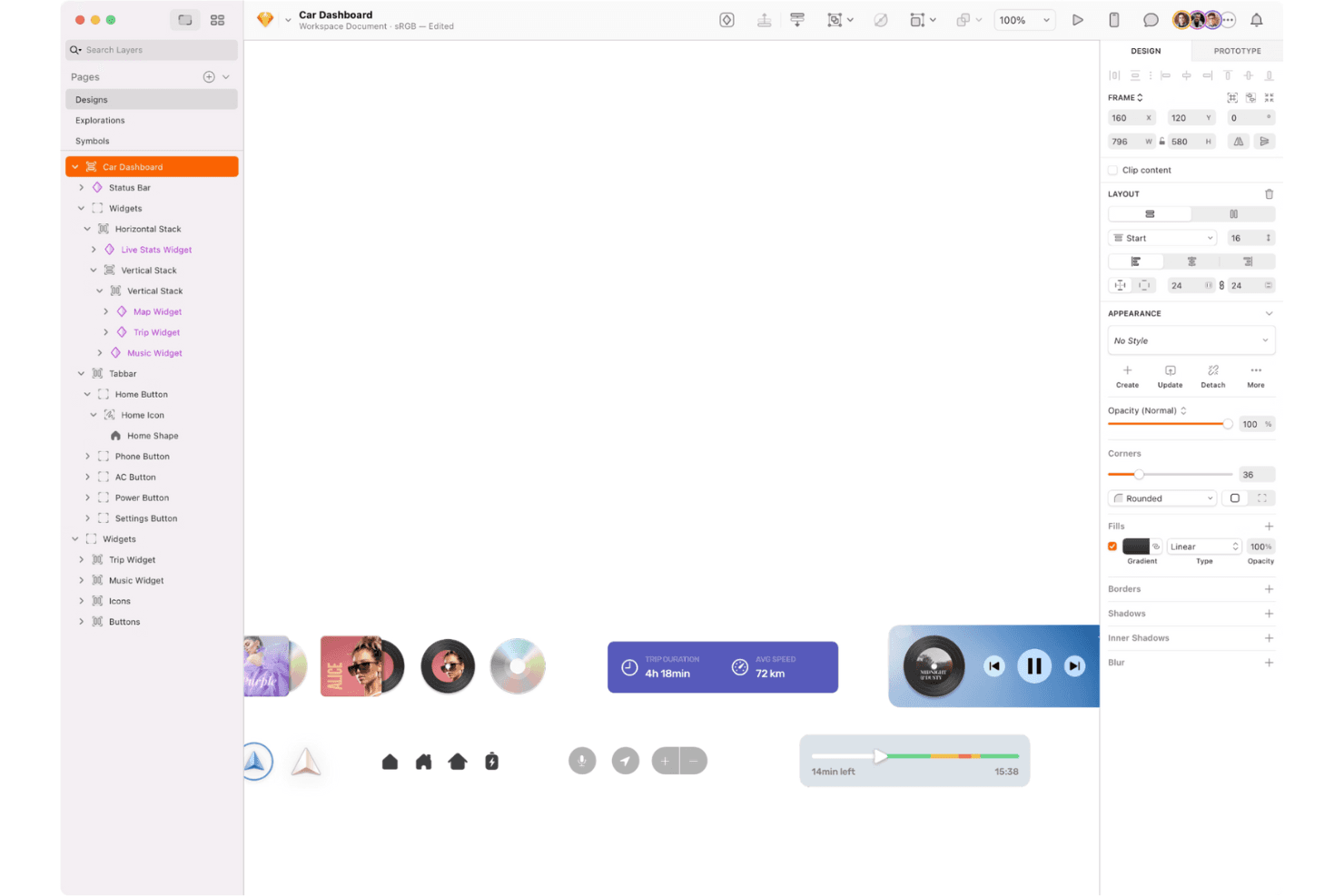
Sketch es un conjunto de herramientas de diseño para macOS destinado a la edición vectorial, la creación de diseños y la creación de prototipos interactivos. Sketch es una plataforma de diseño de interfaces de usuario y creación de esquemas centrada en macOS para equipos de producto que necesitan convertir conceptos iniciales en interfaces pulidas, alinear a las partes interesadas y mantener sistemas de diseño coherentes.
¿Para quién es más adecuado Sketch?
Sketch es adecuado para equipos de diseño de productos basados en macOS que crean interfaces, esquemas, prototipos y sistemas de diseño compartidos.
Por qué Sketch es una buena alternativa a Balsamiq
Elegí Sketch porque su posicionamiento como herramienta de diseño para macOS se adapta a los equipos que pasan de los esquemas a pantallas de producto pulidas. Utilizo símbolos y bibliotecas compartidas para mantener coherentes la navegación, los formularios y los patrones de interfaz recurrentes en los distintos flujos. Sus herramientas de creación de prototipos permiten a mi equipo conectar esas pantallas y probar recorridos de usuario realistas antes del desarrollo.
Características principales de Sketch
- Mesas de trabajo: Crea lienzos separados para pantallas, tamaños de dispositivos y flujos de usuario.
- Edición vectorial: Dibuja y ajusta elementos de interfaz con rutas y formas precisas.
- Estilos de texto: Guarda configuraciones tipográficas reutilizables para encabezados, etiquetas y texto principal.
- Diseño inteligente: Define reglas de redimensionamiento que adaptan las capas cuando cambia el contenido.
Integraciones de Sketch
Sketch ofrece complementos e integraciones con Slack, Notion, Jira, Zeplin, ProtoPie, Overflow, Frontify y Google Sheets. También proporciona una API de JavaScript oficialmente compatible y una especificación del formato de archivo para integraciones personalizadas.
Pros and Cons
Pros:
- Los flujos de trabajo nativos de macOS resultan rápidos y pulidos
- Los símbolos reutilizables mantienen la coherencia de los patrones de interfaz
- La edición vectorial permite crear pantallas pulidas y listas para la entrega
Cons:
- La edición de diseño exclusiva para Mac limita la flexibilidad entre plataformas
- Las interfaces pulidas requieren más tiempo que los esquemas rápidos
 Ideal para la creación de prototipos interactivos sin código
- Plan gratuito disponible
- Desde $29/usuario/mes (facturado anualmente)
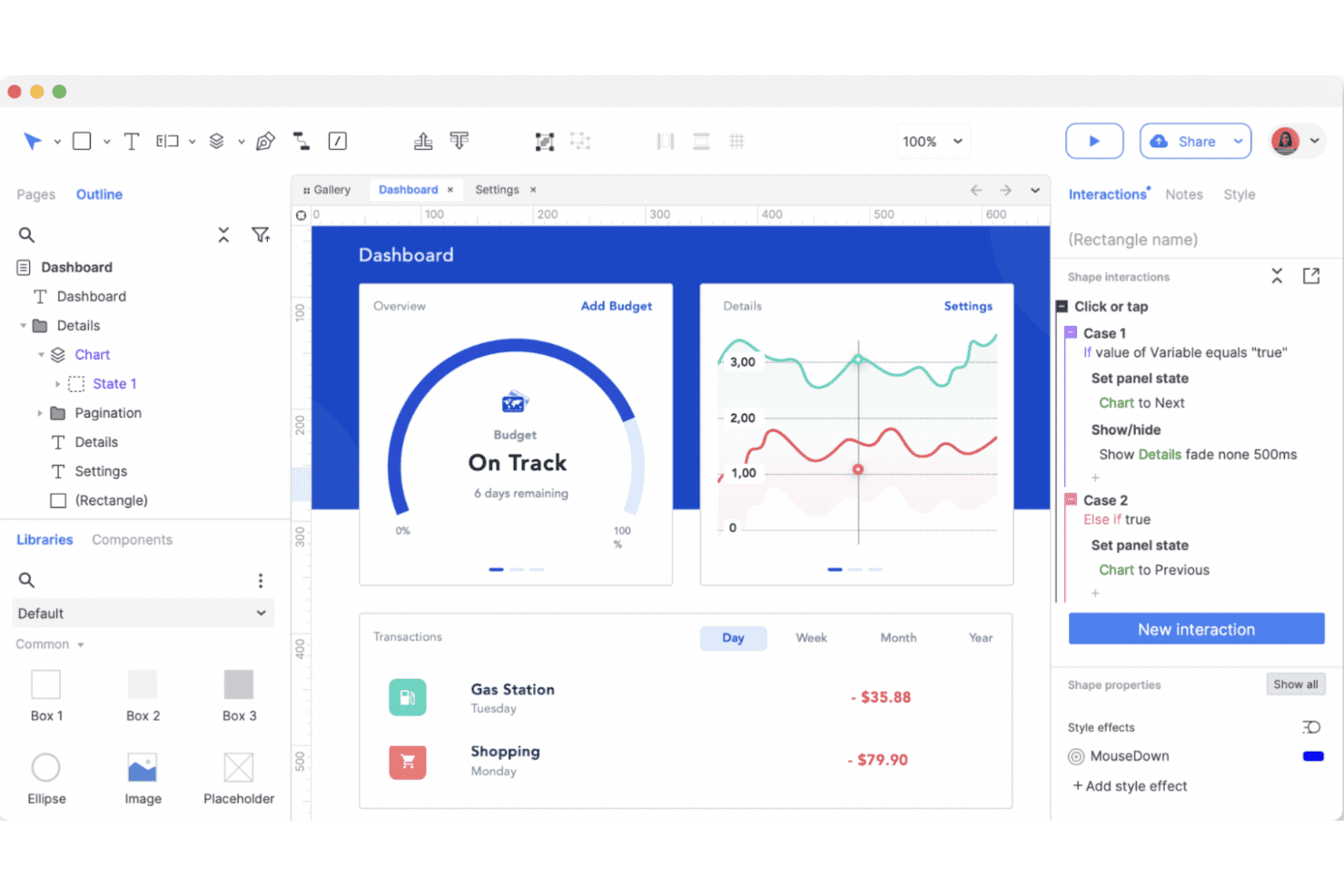
Axure RP es una herramienta de creación de prototipos para desarrollar diseños interactivos y flujos de usuario complejos. Axure RP es una plataforma de creación de esquemas y prototipos para gerentes de producto, diseñadores de UX y equipos empresariales que necesitan aclarar requisitos complejos, probar flujos de trabajo y alinear a las partes interesadas antes del desarrollo.
¿Para quién es más adecuado Axure RP?
Los gerentes de producto y diseñadores de UX de organizaciones medianas y empresariales pueden usar Axure RP para modelar interacciones complejas antes del desarrollo.
Por qué Axure RP es una buena alternativa a Balsamiq
Elegí Axure RP porque está diseñado para el diseño de UX dinámico. Utilizo paneles dinámicos, lógica condicional y variables para crear prototipos de flujos de trabajo ramificados, estados de validación y paneles personalizados sin escribir código de producción. Esto permite que mi equipo pruebe interacciones realistas antes de que el área de ingeniería se comprometa con la implementación.
Funciones principales de Axure RP
- Vistas adaptables: Crea diseños que se ajustan a distintos tamaños de pantalla y dispositivos.
- Bibliotecas de widgets: Añade elementos de interfaz reutilizables de bibliotecas integradas o personalizadas.
- Notas de página: Documenta requisitos, decisiones y detalles de implementación junto a los diseños.
- Proyectos de equipo: Gestiona archivos compartidos y realiza un seguimiento de los cambios en trabajos de diseño colaborativos.
Integraciones de Axure RP
Axure RP ofrece integraciones y complementos oficiales para Jira, Confluence, Slack, Microsoft Teams, Figma, Sketch y Adobe XD. Las conexiones con Jira y Confluence utilizan aplicaciones de Atlassian Marketplace; Slack y Microsoft Teams proporcionan notificaciones de actividad de Axure Cloud; y Figma, Sketch y Adobe XD permiten importar diseños.
Pros and Cons
Pros:
- La lógica condicional modela flujos de trabajo realistas
- Las vistas adaptables permiten crear prototipos responsivos
- La documentación permanece junto a las decisiones de diseño
Cons:
- Las interacciones avanzadas requieren configuración adicional
- Los proyectos grandes pueden volverse difíciles de gestionar
Learn more about Axure RP :
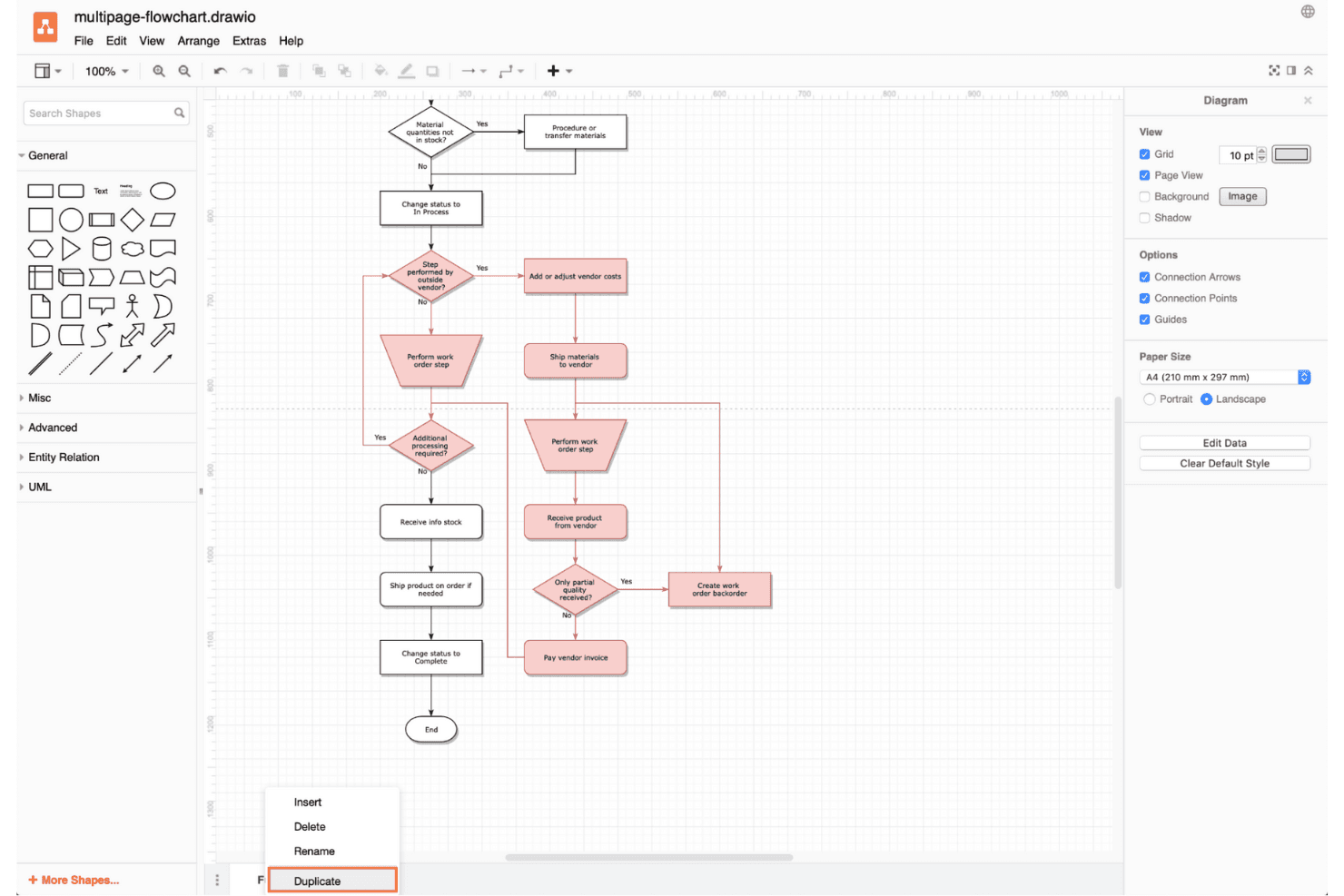
Draw.io es una herramienta flexible de diagramación para crear diagramas de flujo y visualizar ideas complejas sin conexión. draw.io es una herramienta flexible de diagramación y creación de bocetos de interfaz para equipos de producto que necesitan trazar flujos de usuario, esbozar interfaces y alinear a las partes interesadas sin adoptar una suite de diseño dedicada.
¿Para quién es más adecuado draw.io?
draw.io es adecuado para gerentes de producto, analistas e ingenieros que necesitan crear y editar diagramas localmente sin depender de un espacio de trabajo en la nube.
Por qué draw.io es una buena alternativa a Balsamiq
Elegí draw.io porque su diagramación sin conexión permite trabajar con bocetos de interfaz sin requerir un espacio de trabajo en la nube. Utilizo sus bibliotecas de formas de interfaz de usuario y conectores para trazar pantallas, flujos de usuario y relaciones entre sistemas localmente. La aplicación de escritorio también permite a mi equipo guardar los diagramas como archivos editables para su revisión y control de versiones.
Características principales de draw.io
- Capas: Organiza los elementos del boceto de interfaz en niveles separados y fáciles de gestionar.
- Plantillas: Inicia los diseños con distribuciones prediseñadas de bocetos de interfaz y diagramas de flujo.
- Hipervínculos: Vincula formas con pantallas, páginas o recursos externos.
- Formatos de exportación: Guarda los bocetos de interfaz como archivos PNG, SVG, PDF o de imagen.
Integraciones de draw.io
draw.io admite integraciones con Google Drive, GitHub, GitLab, Microsoft OneDrive, SharePoint, Microsoft 365, Notion y las aplicaciones de Google Workspace, incluidos Google Docs, Sheets y Slides. Las aplicaciones de Atlassian Marketplace también integran draw.io con Confluence y Jira, mientras que otras integraciones de terceros son compatibles con plataformas como VS Code, MediaWiki, Nextcloud y Wiki.js.
Pros and Cons
Pros:
- Admite la diagramación sin conexión y el almacenamiento local de archivos
- Conecta los bocetos de interfaz con diagramas de sistemas más amplios
- Exporta diseños como archivos vectoriales editables
Cons:
- La interfaz resulta compleja para bocetos de interfaz sencillos
- Carece del flujo de trabajo centrado en bocetos de interfaz de baja fidelidad de Balsamiq
Learn more about draw.io: Ideal para wireframes que pueden escalar hasta la entrega completa
- Plan gratuito disponible
- Desde $3/usuario/mes
Visit WebsiteCustomer Rating:4.7/5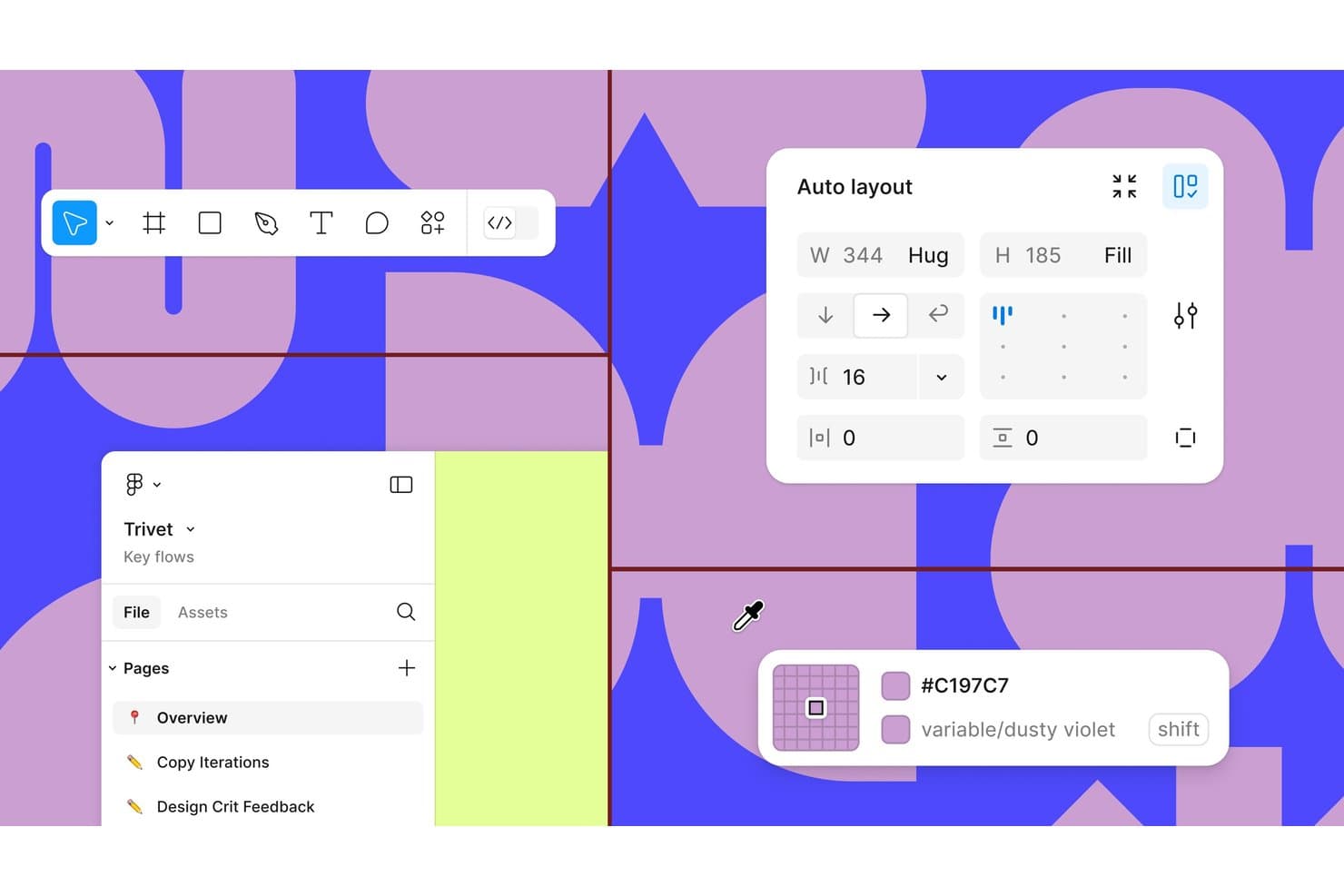
Figma ofrece diseño automático, variables de color y organización de proyectos en varias páginas. Figma es una plataforma colaborativa de diseño UX para gerentes de producto, diseñadores e ingenieros que necesitan convertir ideas en prototipos, alinearse sobre las interfaces y resolver comentarios antes del desarrollo.
¿Para quién es más adecuado Figma?
Figma se adapta a equipos de producto distribuidos que necesitan archivos de diseño compartidos, comentarios en tiempo real y entregas sin instalar software de escritorio.
Por qué Figma es una buena alternativa a Balsamiq
Elegí Figma porque su diseño basado en navegador permite la edición colaborativa en tiempo real, los comentarios y los archivos de diseño compartidos. Utilizo prototipos interactivos para probar los flujos de usuario y luego entrego las pantallas aprobadas a los ingenieros mediante el Modo de desarrollo. Esto lo hace práctico cuando una alternativa a Balsamiq necesita una colaboración más estrecha entre el descubrimiento, el diseño y la entrega.
Características principales de Figma
- Diseño automático: Organiza diseños que se adaptan al contenido cambiante.
- Componentes y variantes: Crea elementos de interfaz reutilizables con múltiples estados.
- Variables: Define valores reutilizables para colores, espaciado y modos.
- Complementos: Añade herramientas para comprobaciones de accesibilidad, contenido y flujos de trabajo.
Integraciones de Figma
El catálogo oficial de integraciones de Figma incluye Jira, Slack, Microsoft Teams, Google Workspace, Notion, Asana, Linear, Trello, Maze, Zeplin y Zapier. Figma también proporciona una API para integraciones personalizadas.
Pros and Cons
Pros:
- La edición colaborativa en tiempo real basada en navegador permite realizar críticas en directo
- Los prototipos interactivos prueban los flujos antes de la ingeniería
- Los componentes y las variables permiten crear interfaces escalables
Cons:
- La complejidad de la interfaz puede dificultar la creación rápida de wireframes
- Los archivos grandes pueden volverse lentos en ocasiones
 Ideal para anotaciones de especificaciones y entrega a desarrollo
- Plan gratuito disponible
- Desde $24.90/usuario/mes (facturado anualmente)
Visit WebsiteCustomer Rating:4.5/5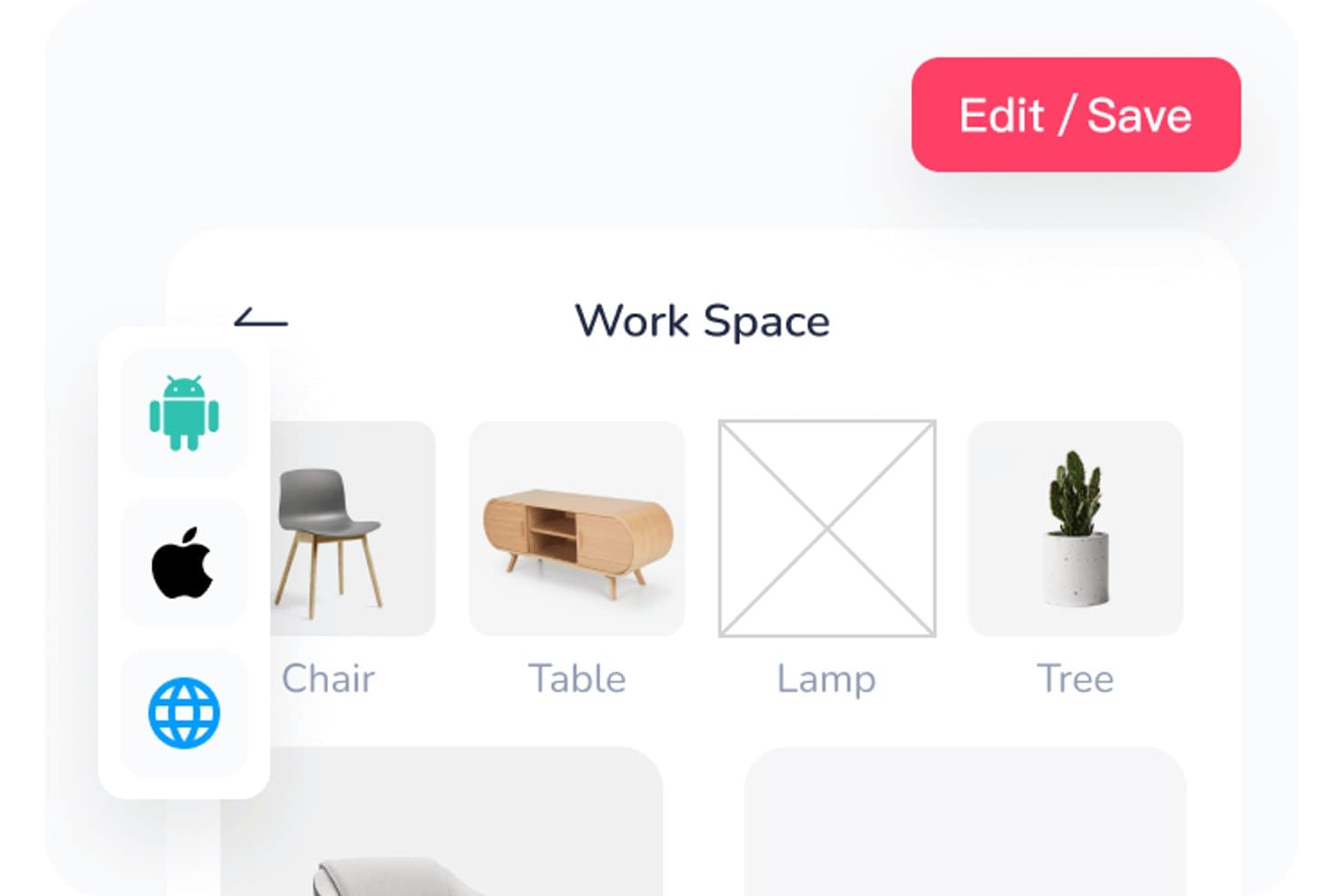
Mockplus permite a los usuarios organizar los recursos del espacio de trabajo en una cuadrícula visual. Mockplus es una plataforma de creación de prototipos sin código para gerentes de producto, diseñadores y equipos que necesitan convertir ideas en conceptos de productos interactivos, probar flujos de usuario y alinear a las partes interesadas antes del desarrollo.
¿Para quién es más adecuado Mockplus?
Mockplus es adecuado para gerentes de producto y diseñadores de UX que necesitan validar rápidamente los flujos de usuario antes del desarrollo.
Por qué Mockplus es una buena alternativa a Balsamiq
Elegí Mockplus porque uso sus prototipos interactivos para probar flujos de usuario completos antes del desarrollo. Los componentes reutilizables y las bibliotecas compartidas ayudan a mi equipo a crear pantallas coherentes rápidamente, mientras que las transiciones y las interacciones revelan problemas de navegación que los esquemas estáticos de Balsamiq pueden pasar por alto. Es adecuado para validar rápidamente paneles, aplicaciones móviles y recorridos de incorporación.
Funciones clave de Mockplus
- Herramientas de edición vectorial: Crea formas personalizadas con herramientas de pluma, lápiz, Bézier y operaciones booleanas.
- Importación de archivos de Axure: Importa archivos de Axure directamente a Mockplus.
- Vista previa multidispositivo: Previsualiza prototipos en teléfonos, tabletas y pantallas de escritorio.
- Historial de revisiones: Revisa y restaura versiones anteriores de los prototipos.
Integraciones de Mockplus
Mockplus RP se integra con Mockplus Cloud para la colaboración en línea, la inspección de diseños y la entrega a desarrolladores. A través de Mockplus Cloud, los equipos pueden conectar flujos de trabajo con Figma, Sketch, Axure, Adobe XD, Photoshop, Slack, Jira, Confluence y Lark.
Pros and Cons
Pros:
- Las transiciones interactivas permiten probar flujos de usuario completos
- Los componentes reutilizables aceleran la creación repetida de pantallas
- Las vistas previas multidispositivo permiten una validación específica para cada dispositivo
Cons:
- El comportamiento adaptable requiere trabajo manual adicional
- Los prototipos complejos se vuelven difíciles de gestionar
Learn more about Mockplus: Ideal para planificar interfaces en distintas pantallas y flujos
- Plan gratuito disponible
- Desde $14/usuario/mes (facturado anualmente)
Visit WebsiteCustomer Rating:4.3/5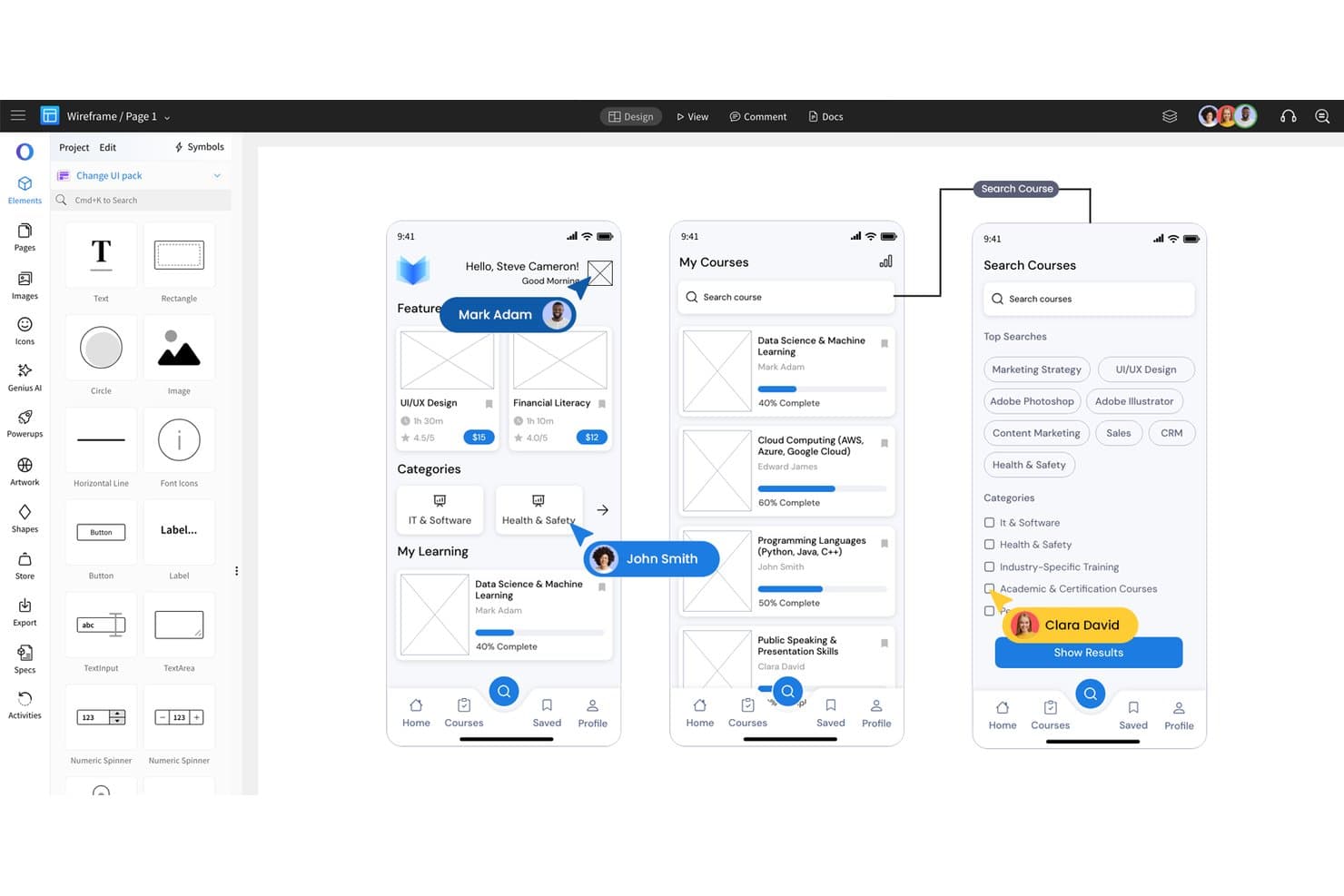
MockFlow permite diseñar esquemas de estructura de aplicaciones móviles con elementos de interfaz de usuario de arrastrar y soltar. MockFlow es una plataforma de diseño de interfaces de usuario para gerentes de producto, diseñadores y equipos que necesitan convertir ideas iniciales en esquemas de estructura, prototipos y requisitos de producto más claros.
¿Para quién es más adecuado MockFlow?
Gerentes de producto y equipos de experiencia de usuario que necesitan definir flujos de usuario, esbozar interfaces y alinear a las partes interesadas antes de comenzar el desarrollo.
Por qué MockFlow es una buena alternativa a Balsamiq
Elegí MockFlow porque lo uso para convertir ideas iniciales de productos en interfaces de usuario estructuradas. Sus herramientas para crear esquemas de estructura y prototipos ayudan a mi equipo a definir flujos de usuario, probar secuencias de pantallas y aclarar los requisitos del producto antes del desarrollo. También uso esos materiales para alinear a las partes interesadas de producto, diseño e ingeniería en torno a la experiencia prevista.
Características principales de MockFlow
- Paquetes de componentes de interfaz: Elige entre elementos prediseñados para sitios web, aplicaciones web y aplicaciones móviles.
- Edición colaborativa en tiempo real: Edita el mismo diseño simultáneamente con tus compañeros de equipo.
- Comentarios: Añade comentarios directamente en áreas específicas del diseño.
- Historial de versiones: Revisa versiones anteriores del diseño y restaura trabajos previos.
Integraciones de MockFlow
MockFlow ofrece integraciones nativas con Slack, Microsoft Teams, Microsoft Word mediante Microsoft 365, Google Drive, Atlassian Jira y Atlassian Confluence. También admite una extensión de Trello para añadir diseños de MockFlow a los flujos de trabajo de Trello.
Pros and Cons
Pros:
- Los amplios paquetes de componentes de interfaz aceleran la creación de esquemas de estructura
- La edición colaborativa en tiempo real facilita los talleres con las partes interesadas
- El historial de versiones simplifica las revisiones de diseño
Cons:
- Los prototipos avanzados requieren herramientas más especializadas
- Los proyectos grandes pueden dificultar la navegación
Learn more about MockFlow: Ideal para crear prototipos con componentes de código reales
- Prueba gratuita de 14 días
- Desde $29/usuario/mes (facturado anualmente)
Visit WebsiteCustomer Rating:4.2/5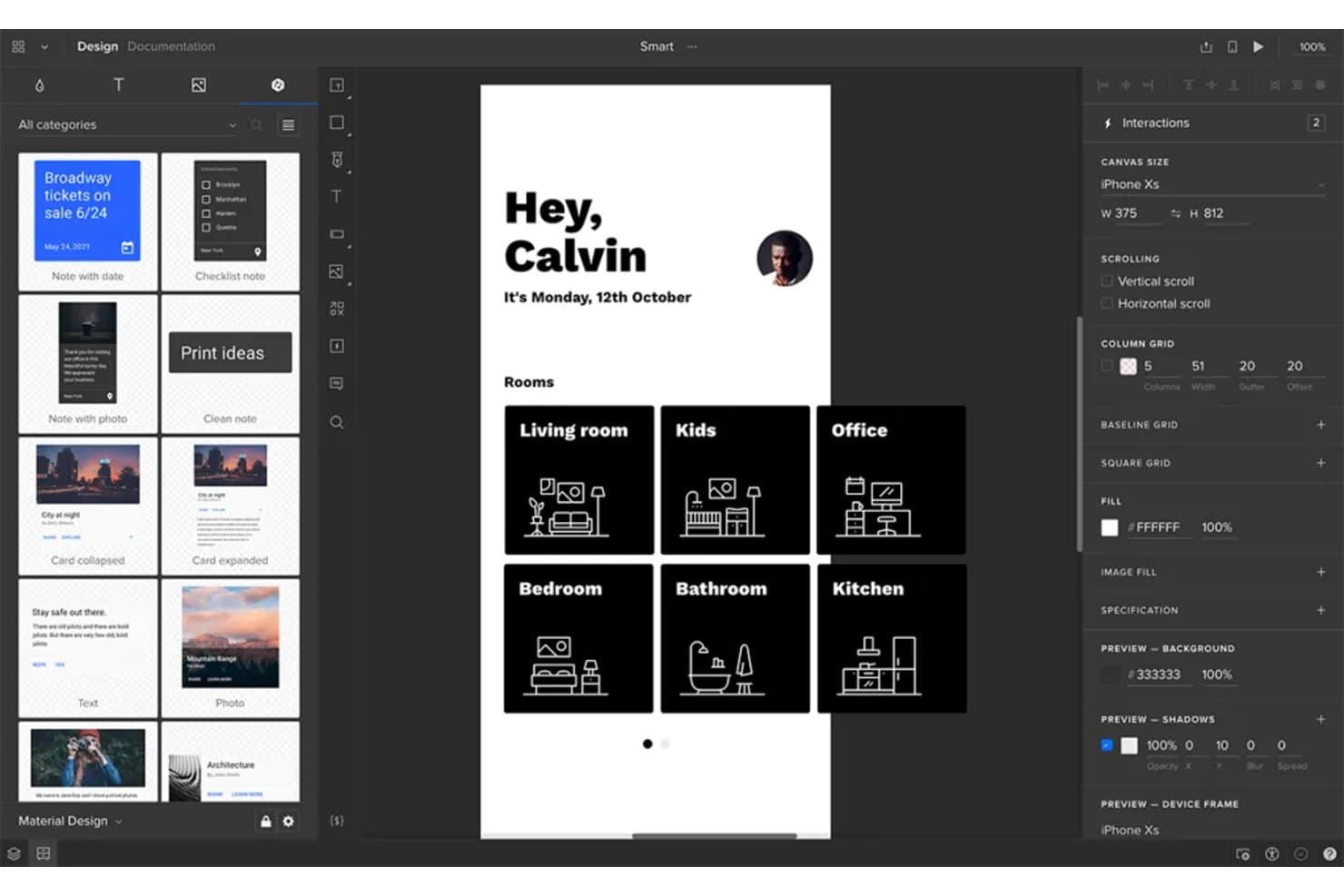
UXPin permite a los usuarios diseñar y crear prototipos de pantallas de aplicaciones móviles de forma interactiva. UXPin es una plataforma de diseño UX y creación de prototipos para equipos de producto que necesitan interfaces realistas y comprobables para alinear a las partes interesadas, validar ideas y reducir el trabajo repetido antes del desarrollo.
¿Para quién es más adecuado UXPin?
UXPin es adecuado para diseñadores de producto e ingenieros frontend que necesitan crear prototipos de interfaces con componentes de código reutilizables y similares a los de producción.
Por qué UXPin es una buena alternativa a Balsamiq
Elegí UXPin porque permite crear prototipos con componentes de código reales, no solo maquetas visuales. Utilizo sus bibliotecas de componentes reutilizables, estados e interacciones para probar interfaces similares a las de producción antes del desarrollo. Esto ayuda a mi equipo a validar flujos complejos, como la configuración de una cuenta o el proceso de pago, con prototipos cuyo comportamiento se acerca más al del producto final.
Funciones principales de UXPin
- Diseños adaptables : Establece puntos de interrupción y previsualiza los diseños en distintos tamaños de pantalla.
- Variables : Define valores reutilizables para texto, colores y propiedades de los componentes.
- Lógica condicional : Configura reglas de tipo si-entonces para el comportamiento dinámico de los prototipos.
- Colaboración en equipo : Añade comentarios y revisa diseños dentro de proyectos compartidos.
Integraciones de UXPin
UXPin incluye integraciones con Storybook, Git, Jira, Slack, FullStory, Figma, Sketch, Adobe Fonts y Google Fonts. Las integraciones con Storybook y Git permiten a los equipos incorporar componentes basados en código en UXPin, mientras que Jira y Slack facilitan la colaboración y la transferencia al desarrollo.
Pros and Cons
Pros:
- Los prototipos se comportan como interfaces de producción
- Los componentes de código reales reducen las ambigüedades en la transferencia al desarrollo
- Las variables y la lógica permiten gestionar flujos complejos
Cons:
- Requiere más configuración que las maquetas rápidas de Balsamiq
- Las funciones avanzadas pueden resultar abrumadoras durante la ideación inicial
Learn more about UXPin: Ideal para prototipos de alta fidelidad
- Plan gratuito disponible
- Desde $19/usuario/mes
Visit WebsiteCustomer Rating:4.2/5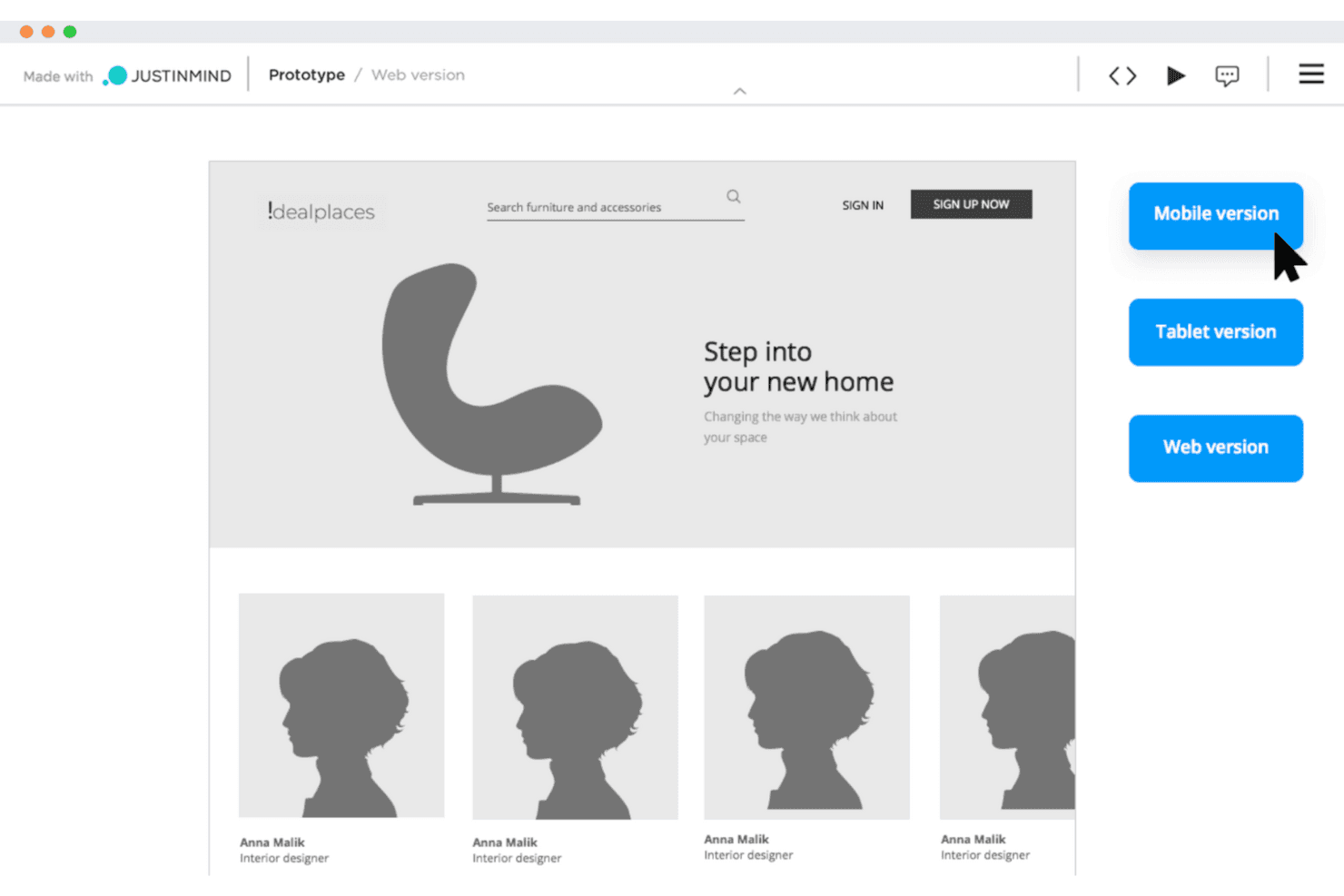
Justinmind permite a los equipos de UX crear wireframes interactivos para probar los diseños desde el principio. Justinmind es una plataforma de diseño UX y creación de prototipos para equipos de producto que necesitan validar flujos de trabajo complejos en la web o dispositivos móviles, alinear a las partes interesadas y reducir el retrabajo antes del desarrollo.
¿Para quién es más adecuado Justinmind?
Diseñadores de UX y gerentes de producto que necesitan prototipos realistas e interactivos para probar experiencias detalladas en la web y dispositivos móviles antes del desarrollo.
Por qué Justinmind es una buena alternativa a Balsamiq
Elegí Justinmind porque permite crear prototipos de alta fidelidad que se asemejan mucho a productos web y móviles terminados. Utilizo formularios interactivos, paneles dinámicos, lógica condicional y listas basadas en datos para probar flujos de varios pasos, como el registro inicial o el proceso de pago. Esto ayuda a mi equipo a validar comportamientos detallados antes de que comience el desarrollo.
Características principales de Justinmind
- Bibliotecas de UI: Inicia los diseños con recursos y plantillas de interfaz reutilizables.
- Pantallas maestras: Aplica diseños compartidos en varias pantallas del prototipo.
- Comentarios: Recopila y organiza los comentarios de las partes interesadas dentro de los proyectos.
- Control de versiones: Guarda y revisa versiones anteriores de los prototipos.
Integraciones de Justinmind
Justinmind ofrece una integración nativa con Atlassian Jira, además de integraciones y complementos oficiales para Sketch, Adobe Creative Cloud, Figma, Confluence y Microsoft Azure DevOps. Su API y SDK permiten crear complementos personalizados, entregables e integraciones con herramientas internas.
Pros and Cons
Pros:
- Simula flujos condicionales sin código de producción
- Prueba formularios, listas y estados basados en datos
- Las pantallas maestras reutilizables reducen el retrabajo de los prototipos
Cons:
- Resulta demasiado complejo para crear bocetos rápidos de wireframes
- Los prototipos grandes pueden volverse difíciles de gestionar
Learn more about Justinmind:
Otras alternativas a Balsamiq
Estas son algunas alternativas adicionales a Balsamiq que no llegaron a mi lista final, pero que aún merece la pena considerar:
- 11MiroIdeal para generar ideas y crear bocetos de estructura en conjunto
- 12FramerIdeal para publicar prototipos web interactivos
- 13InvisionIdeal para crear esquemas interfuncionales en un solo lienzo
- 14FluidUIIdeal para crear y probar prototipos rápidamente
- 15MoqupsIdeal para una herramienta de diseño todo en uno
Cómo evalúo las alternativas a Balsamiq
Divido mi evaluación en tres partes. Primero, la funcionalidad principal: cualquier alternativa debe permitir crear wireframes de varias pantallas y vincularlos en flujos navegables y en los que se pueda hacer clic; esto es lo que tiene más peso. Segundo, busco funciones destacadas, como la creación de wireframes asistida por IA o los modos de entrega para desarrolladores. Tercero, considero la simplicidad del proceso de incorporación y la transparencia de los precios.
Funcionalidad principal (elementos imprescindibles para esta lista)
Al seleccionar herramientas para mi lista, puntúo cada una en una escala de 0 (no ofrece la funcionalidad) a 5 (sobresale en este ámbito) para cada una de las funcionalidades principales que se indican a continuación. Después convierto el total en un porcentaje para ayudar a evaluar la adecuación general de cada herramienta, con peso adicional para las funcionalidades que he considerado esenciales.
- Herramientas de creación de wireframes (esencial): evalúo diseños de varias pantallas, marcadores de posición, cuadrículas y elementos reutilizables para representar conceptos iniciales de productos.
- Creación de prototipos (esencial): busco pantallas vinculadas, rutas de navegación, superposiciones y estados que permitan realizar pruebas realistas de los flujos de usuario.
- Biblioteca de componentes de interfaz de usuario: compruebo si ofrece botones, formularios, menús, iconos y plantillas personalizables que favorezcan una planificación coherente de la interfaz.
- Colaboración en tiempo real: evalúo la edición compartida, los comentarios y los flujos de revisión para las conversaciones entre los equipos de producto, diseño, ingeniería y las partes interesadas.
- Exportación y uso compartido: busco enlaces que se puedan compartir, formatos de exportación habituales y opciones de entrega para las revisiones y la implementación.
- Historial de versiones: compruebo si los equipos pueden restaurar diseños anteriores, comparar iteraciones y recuperar cambios durante el rápido proceso de descubrimiento de productos.
Una vez que tengo una lista de herramientas que cumplen los criterios, considero qué diferencia a cada plataforma.
Factores diferenciadores (lo que distingue a los proveedores)
Así es como comparo y contrasto los distintos proveedores:
Funciones destacadas
Busco la creación de wireframes asistida por IA que convierta una instrucción de texto en un diseño utilizable. Esto es importante cuando un PM necesita explorar tres variantes del proceso de incorporación antes de una revisión con las partes interesadas y dispone de una hora para hacerlo. También evalúo los modos de entrega para desarrolladores: herramientas como Figma y Zeplin ofrecen vistas de especificaciones específicas con espaciado, tokens de color y recursos exportables que reducen el intercambio constante de información con los ingenieros. Las anotaciones de requisitos son igual de importantes; compruebo si se pueden adjuntar criterios de aceptación directamente a un elemento del wireframe en lugar de mantener un documento de especificaciones independiente.
Más allá de las funciones
Evalúo con qué rapidez un PM puede pasar del registro a un wireframe que se pueda compartir. Herramientas como Whimsical y Miro ofrecen una incorporación guiada que permite a quienes no son diseñadores empezar a trabajar de forma productiva en cuestión de minutos, mientras que otras dan por supuesta experiencia previa en diseño. La transparencia de los precios también es importante: compruebo si los planes gratuitos permiten a los equipos pequeños validar la adecuación antes de comprometerse y si los costes por usuario siguen siendo razonables a medida que crece el equipo. También analizo la profundidad de las integraciones con herramientas como Jira o Confluence, ya que insertar un prototipo en el que se pueda hacer clic dentro de un ticket del sprint reduce los cambios de contexto durante el perfeccionamiento del backlog.
¿Por qué buscar una alternativa a Balsamiq?
Aunque Balsamiq es una buena opción entre las herramientas para crear estructuras alámbricas, hay varios motivos por los que algunos usuarios buscan soluciones alternativas. Es posible que estés buscando una alternativa a Balsamiq porque…
- Necesitas más funciones de creación de prototipos interactivos
- Tu equipo necesita herramientas de colaboración en tiempo real
- Quieres una herramienta compatible con diseños de alta fidelidad
- Necesitas una solución con funciones sin conexión
- Tu equipo utiliza dispositivos no compatibles con Balsamiq
- Quieres más opciones de personalización para tus diseños
Si te identificas con alguno de estos casos, has llegado al lugar adecuado. Mi lista incluye varias opciones de herramientas para crear estructuras alámbricas que se adaptan mejor a los equipos que afrontan estos desafíos con Balsamiq y buscan soluciones alternativas.
Funciones principales de Balsamiq
Balsamiq ofrece herramientas esenciales para el diseño de productos en sus primeras fases y el diseño de interfaces de usuario, por lo que es una opción fiable para los equipos que desarrollan conceptos de diseño web o experimentan con ideas nuevas. Esto es lo que puedes esperar:
- Interfaz de arrastrar y soltar: Crea rápidamente estructuras alámbricas arrastrando elementos de la biblioteca de la interfaz hasta tu lienzo. Es ideal para generar ideas con rapidez en tu espacio de trabajo de diseño.
- Biblioteca de controles de la interfaz: Accede a una amplia variedad de componentes prediseñados que siguen patrones habituales de los sistemas de diseño, lo que te ayuda a mantener la coherencia entre proyectos.
- Función de dibujo rápido: Utiliza sencillos atajos de teclado para esbozar diseños e interacciones de forma eficaz durante las primeras fases del diseño.
- Diseño de baja fidelidad: Céntrate en la estructura y la funcionalidad en lugar de en los acabados. El aspecto dibujado a mano fomenta la iteración rápida y una comunicación clara durante las previsualizaciones.
- Herramientas de colaboración: Comparte estructuras alámbricas con los miembros del equipo o las partes interesadas para recabar opiniones y revisar tus diseños según los comentarios recibidos en tiempo real.
- Opciones de exportación: Guarda tus estructuras alámbricas en formatos como PNG o PDF, o utilízalas como referencia visual al trasladar tu diseño a HTML.
Balsamiq es especialmente útil para los diseñadores que valoran la claridad y la rapidez durante el desarrollo inicial de conceptos, sobre todo al planificar proyectos de diseño de interfaces de usuario y diseño web.