

10 mejores programas gratuitos de gestión de productos que he probado en 2026

Selección del mejor software gratuito de gestión de productos
- 8. Fibery


Con tantas opciones diferentes de software gratuito de gestión de productos, es difícil determinar cuál es la más adecuada para ti. Necesitas todas las funciones esenciales para planificar la hoja de ruta, gestionar tareas, crear documentación, colaborar con el equipo e integrarte con otras herramientas, pero aun así tienes que ajustarte a un presupuesto limitado. ¡Yo te ayudo! En esta publicación te ayudaré a elegir fácilmente, compartiendo mis experiencias personales con varias herramientas gratuitas utilizadas por equipos grandes y en docenas de lanzamientos de productos con un presupuesto ajustado, junto con mis selecciones del mejor software gratuito de gestión de productos.
¿Qué es el software gratuito de gestión de productos?
El software gratuito de gestión de productos es un tipo de herramienta que ayuda a los equipos a planificar, organizar y optimizar el proceso de desarrollo de productos.
El software gratuito de gestión de productos ofrecerá limitaciones en sus funciones, a menos que se trate de software de código abierto. Puedes esperar limitaciones en el nivel de asistencia al cliente, el número de productos para los que puedes crear hojas de ruta, los usuarios que pueden acceder al software y las integraciones disponibles. La mayoría de las herramientas de esta lista ofrecen la posibilidad de registrarse gratis y, posteriormente, pasar a un plan de pago a medida que cambien tus necesidades o crezca tu equipo.
Por qué confiar en nuestras recomendaciones de software
Nuestro equipo lleva probando y evaluando software desde 2012. Como gestores de producto, sabemos lo difícil —y lo importante— que es elegir el software adecuado.
Para esta guía, evaluamos las herramientas mediante pruebas prácticas e investigación independiente, puntuando las herramientas según nuestros criterios de selección.
Nuestras reseñas reflejan nuestro criterio editorial humano, no un discurso de ventas.
Tabla comparativa del mejor software gratuito de gestión de productos
Aquí tienes una tabla donde puedes comparar todas las herramientas que acabamos de analizar en las descripciones generales.
| Tool | Best For | Trial Info | Price | ||
|---|---|---|---|---|---|
| 1 | Ideal para la gestión de trabajo personalizable | Plan gratuito + prueba gratuita de 14 días + demostración gratuita disponible | Desde $10/usuario/mes (facturado anualmente) | Website | |
| 2 | La mejor opción para una colaboración y visualización fluidas | Plan gratuito + prueba gratuita disponible | Desde $8/usuario/mes (facturado anualmente) | Website | |
| 3 | Ideal para documentos, wikis y hojas de ruta todo en uno | Plan gratuito + demostración gratuita disponible | Desde $10/usuario/mes (facturado anualmente) | Website | |
| 4 | Ideal para equipos de desarrollo de software | Plan gratuito + demostración gratuita + prueba de 14 días disponibles | Desde $9.05/usuario/mes | Website | |
| 5 | El mejor software gratuito de gestión de productos de código abierto | Plan gratuito + prueba gratuita disponible | Precio bajo solicitud | Website | |
| 6 | Mejor para la planificación de sprints con cambio automático de ciclo | Plan gratuito disponible | Desde $10/usuario/mes (facturado anualmente) | Website | |
| 7 | Ideal para la planificación de sprints ágiles autoalojada | Plan gratuito + prueba gratuita de 14 días + demostración gratuita disponible | Desde $4.5/usuario/mes (facturado anualmente) | Website | |
| 8 | Plan gratuito + prueba gratuita + demostración gratuita disponibles | Desde $12/usuario/mes (facturado anualmente) | Website | ||
| 9 | Ideal para conectar el descubrimiento con la entrega en equipos de Jira | Plan gratuito + prueba gratuita disponible | Desde $10/usuario/mes | Website | |
| 10 | El mejor software de gestión de productos para integraciones | Plan gratuito disponible | Desde $12/mes (facturado anualmente) | Website |


Descripciones generales del mejor software gratuito de gestión de productos
Aquí tienes una breve descripción del mejor software y de las versiones gratuitas de herramientas de pago que pueden ayudarte a comenzar.

Wrike
Ideal para la gestión de trabajo personalizable
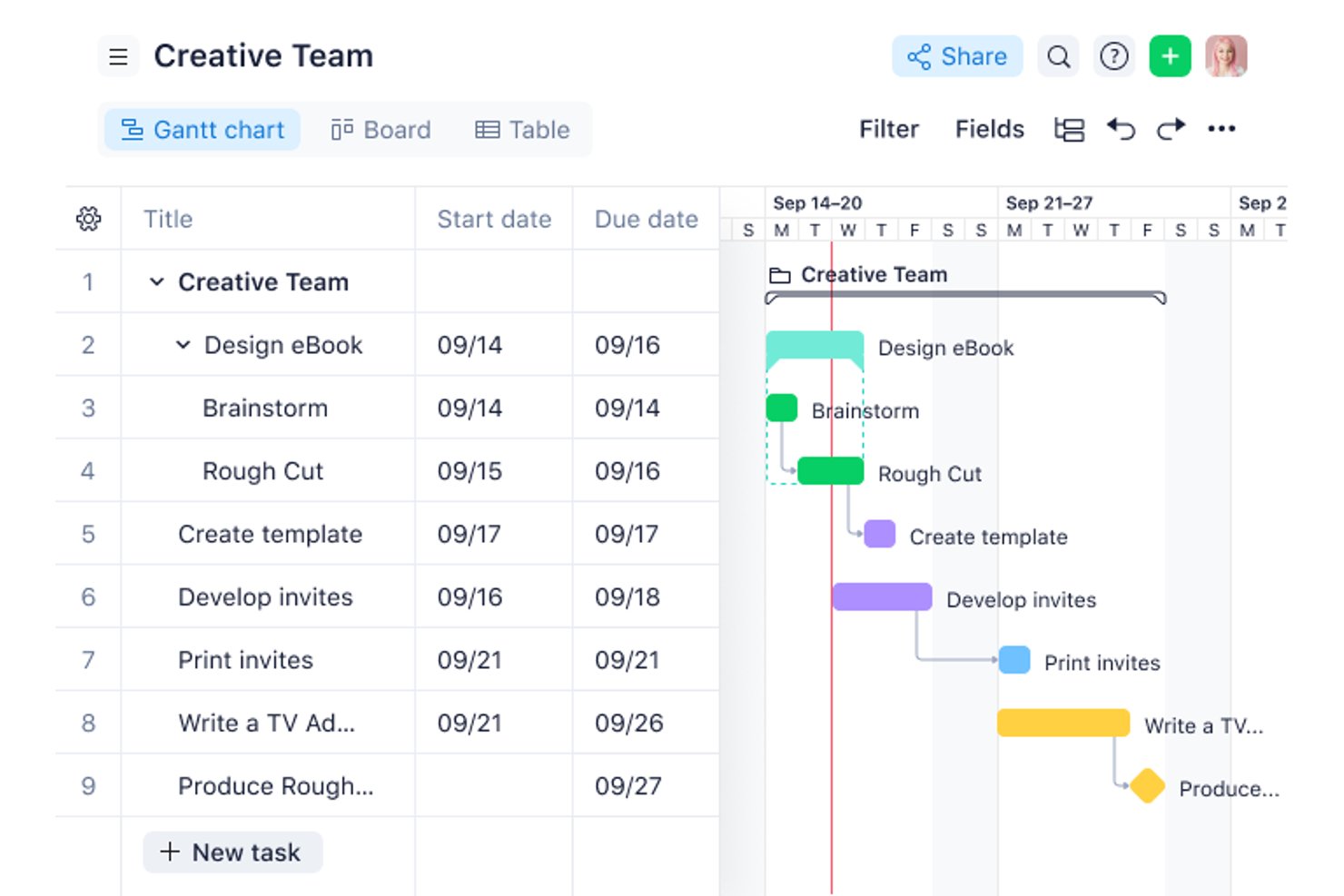
Wrike es una plataforma gratuita de gestión de proyectos con vistas de Tablero, Tabla y Gráfico para organizar tareas y subtareas, además de comentarios, menciones, uso compartido de archivos y un espacio compartido limitado a 200 tareas activas.
¿Para quién es más adecuado Wrike?
Equipos pequeños multifuncionales que necesitan un seguimiento de tareas personalizable y colaboración básica sin costes iniciales.
Por qué elegí Wrike
Elegí Wrike para la gestión de trabajo personalizable cuando los equipos de producto necesitan una organización flexible de las tareas sin una configuración compleja. Utilizo sus vistas de Tablero, Tabla y Gráfico para realizar un seguimiento de las tareas de descubrimiento, las dependencias de diseño y el progreso de la entrega. Las subtareas, los estados personalizados, los comentarios, las menciones y el historial de versiones de los archivos mantienen conectado el trabajo multifuncional, aunque carece de hojas de ruta y planificación de sprints.
Funciones principales de Wrike
- Actualizaciones masivas de tareas: Cambia estados o mueve varias tareas a la vez.
- Filtros de tareas: Filtra el trabajo por estado, responsable o fecha.
- Flujo de actividad en tiempo real: Revisa las actualizaciones y los cambios en todo tu espacio de trabajo.
- Integración con el correo electrónico: Conecta los flujos de trabajo del correo electrónico con tus tareas de Wrike.
Integraciones de Wrike
Wrike anuncia más de 400 integraciones, incluidas Jira, GitHub, GitLab, Slack, Microsoft Teams, Google Workspace y Zoom. El plan gratuito está limitado a las integraciones de correo electrónico y almacenamiento en la nube, mientras que la sincronización bidireccional con Jira y GitHub requiere opciones de pago.
¿Qué incluye el plan gratuito?
Wrike ofrece un plan gratuito permanente con vistas de Tablero, Tabla y Gráfico, además de funciones de colaboración en tareas. Admite un espacio compartido limitado a 200 tareas activas, mientras que las integraciones están limitadas al correo electrónico y el almacenamiento en la nube.
Pros and Cons
Pros:
- Incluye vistas de tablero, tabla y gráfico
- Los comentarios y las menciones conectan el trabajo multifuncional
- Las actualizaciones masivas reducen el mantenimiento repetitivo de las tareas
Cons:
- No ofrece visualización de hojas de ruta ni de cronologías
- Las 200 tareas activas limitan las listas de tareas pendientes en crecimiento
New Product Updates from Wrike

Wrike Activity Reports Add Actor Type Details
Wrike’s Activity Report now displays actor type details, helping admins identify whether changes came from the UI, Automation, Wrike Agents, API, or AI via MCP. For more information, visit Wrike's official site.

Miro
La mejor opción para una colaboración y visualización fluidas
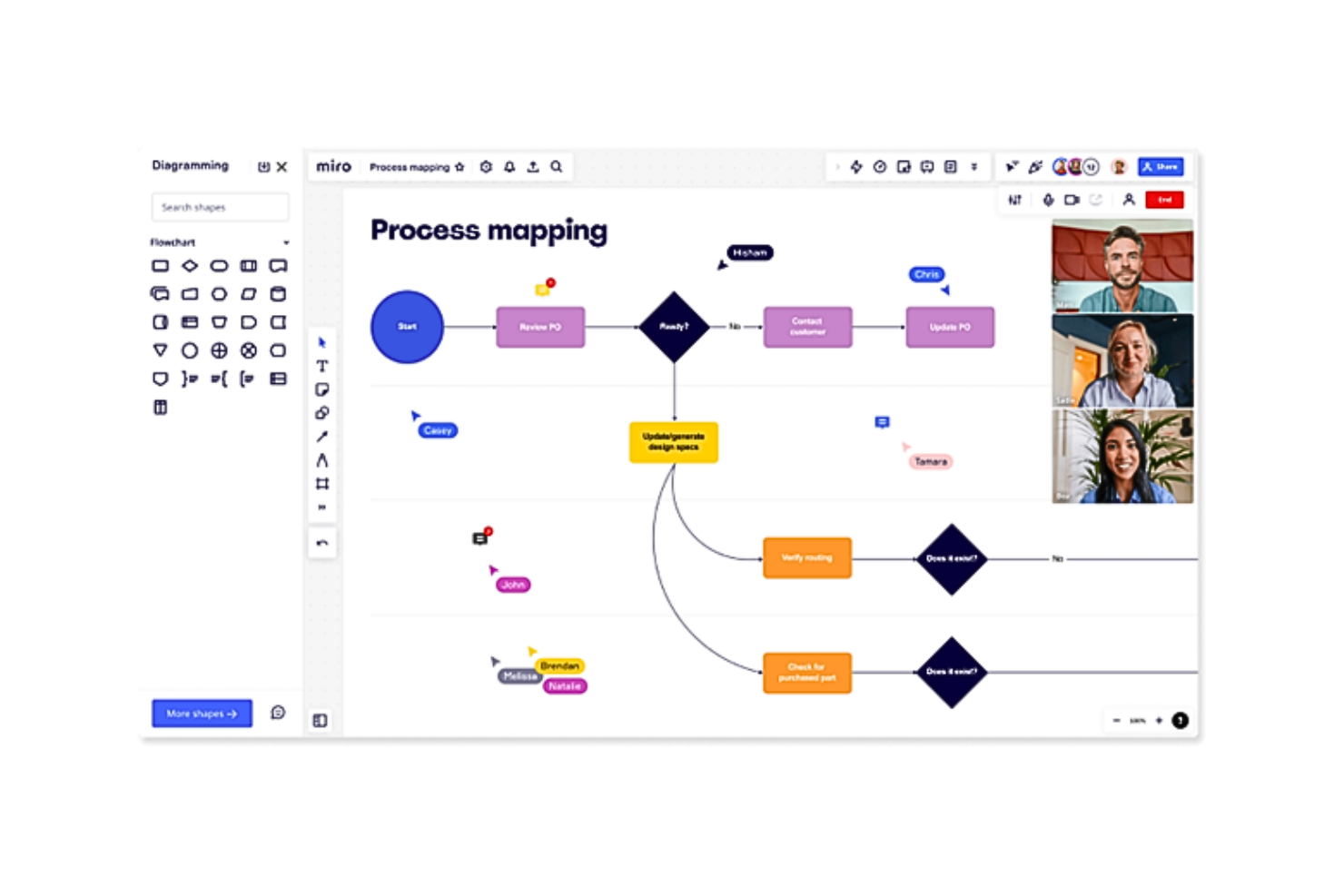
Miro es una plataforma visual de gestión de productos con un plan gratuito para crear hojas de ruta, organizar acumulaciones en tablas y cronogramas, planificar sprints con plantillas, recopilar comentarios en tableros y colaborar mediante comentarios y espacios de trabajo compartidos.
¿Para quién es más adecuado Miro?
Miro es adecuado para fundadores de startups y equipos de producto multifuncionales que necesitan planificación visual de sprints, organización sencilla de acumulaciones y talleres compartidos sin coste inicial.
Por qué elegí Miro
Elegí Miro por su adecuación como “La mejor opción para una colaboración y visualización fluidas”. Utilizo plantillas de hojas de ruta para definir hitos, tableros Kanban para organizar el trabajo y comentarios para alinear a los equipos de ingeniería y diseño, así como a las partes interesadas, en torno a las decisiones. Su planificación visual de sprints ayuda a convertir los talleres y las conversaciones sobre lanzamientos en planes de producto compartidos.
Características principales de Miro
- Generadores de hojas de ruta y PRD con IA: Crea documentos iniciales de planificación con IA.
- Documentos, tablas y presentaciones: Crea artefactos de producto en múltiples formatos.
- Más de 250 integraciones: Conecta Miro con herramientas como Slack y Google.
- Tableros de voz del cliente: Recopila información de investigaciones de usuarios y notas de entrevistas.
Integraciones de Miro
Miro admite más de 250 integraciones, incluidas Jira, Azure DevOps, Asana, Linear, ClickUp, CA Rally, Slack, Google, Microsoft y Adobe. Los planes Business y Enterprise añaden sincronización bidireccional con Jira, Azure DevOps, Asana, Linear, ClickUp y CA Rally.
¿Qué es gratis?
Miro cuenta con un plan gratuito permanente con miembros de equipo ilimitados y tres tableros editables activos. Todos los miembros del equipo pueden acceder a esos tableros, pero los tableros privados, las funciones de visitante y algunas funciones de colaboración requieren un plan de pago.
Pros and Cons
Pros:
- Las plantillas visuales de hojas de ruta facilitan la alineación de las partes interesadas
- Los miembros ilimitados facilitan la planificación multifuncional
- La colaboración en tiempo real es adecuada para equipos de producto remotos
Cons:
- Tres tableros editables limitan los flujos de trabajo continuos
- Los tableros manuales sustituyen el seguimiento estructurado de acumulaciones
New Product Updates from Miro
Miro Adds Japan Data Residency for Enterprise Customers
Miro has introduced Japan data residency for enterprise customers, offering in-region storage for production data, backups, and metadata, plus in-region compute infrastructure. For more information, visit Miro's official site.

Notion
Ideal para documentos, wikis y hojas de ruta todo en uno
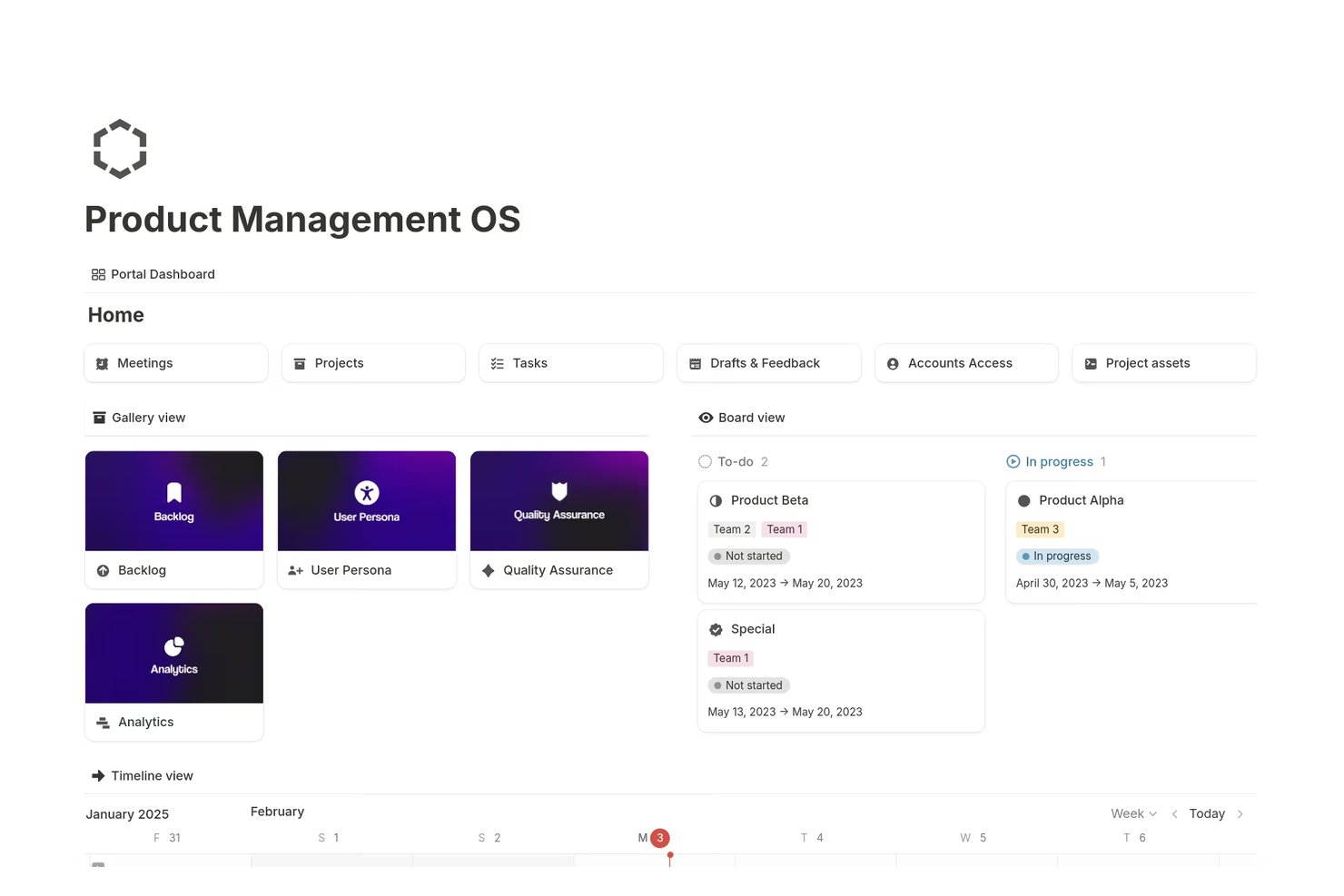
Notion es un espacio de trabajo gratuito para la gestión de productos que combina documentos conectados, wikis, hojas de ruta, listas de pendientes, bases de datos, vistas de tareas y formularios básicos de comentarios en una plataforma personalizable.
¿Para quién es más adecuada Notion?
Los gerentes de producto y fundadores de startups que quieren documentos, wikis, listas de pendientes y hojas de ruta en un espacio de trabajo personalizable encontrarán que Notion se adapta bien a sus necesidades.
Por qué elegí Notion
Elegí Notion porque combina documentos de producto, wikis, listas de pendientes y hojas de ruta en un solo espacio de trabajo. Uso bases de datos vinculadas para conectar documentos de requisitos de producto y solicitudes de funcionalidades con vistas de Cronología, Tablero, Calendario o Tabla. Los formularios básicos también envían los comentarios de los clientes directamente a una base de datos de ideas, mientras que las páginas publicadas permiten compartir la hoja de ruta con las partes interesadas.
Características principales de Notion
- Subtareas y dependencias: Divide el trabajo en tareas más pequeñas y establece relaciones entre los elementos.
- Barras de progreso: Supervisa el estado de finalización de las tareas del proyecto.
- Autorrelleno con IA: Redacta historias de usuario, resultados clave y actualizaciones del proyecto.
- Permisos de página: Controla quién puede ver o editar páginas individuales.
Integraciones de Notion
Las integraciones de Notion incluyen Figma, Slack, GitHub, Amplitude, Jira y Asana, aunque algunas conexiones y funciones de sincronización están limitadas a los planes de pago. También ofrece una API pública, webhooks, inserciones y vistas previas de enlaces para integraciones personalizadas.
¿Qué incluye el plan gratuito?
Notion ofrece un plan gratuito para siempre para crear documentos, wikis, hojas de ruta, bases de datos y vistas de tareas. Algunas integraciones y funciones de sincronización, incluidas las conexiones con herramientas como Figma, Slack y GitHub, requieren un plan de pago.
Pros and Cons
Pros:
- Las hojas de ruta permiten cambiar entre cinco vistas de base de datos
- Los formularios gratuitos recopilan comentarios en bases de datos
- Los documentos vinculados conectan los documentos de requisitos de producto y las tareas
Cons:
- Los espacios de trabajo de equipo gratuitos tienen límites de bloques
- No ofrece votación nativa ni puntuación de prioridades

Jira
Ideal para equipos de desarrollo de software

Jira es una plataforma de gestión de productos y seguimiento ágil de proyectos con listas de pendientes, tableros Scrum y Kanban, planificación de sprints, cronogramas, paneles, gestión de lanzamientos y formularios de solicitudes.
¿Para quién es más adecuado Jira?
Jira es adecuado para equipos de desarrollo de software que necesitan planificación gratuita de sprints, listas de pendientes, tableros, seguimiento de lanzamientos y vistas de tareas.
Por qué elegí Jira
Elegí Jira porque ofrece a los equipos de desarrollo de software un espacio gratuito para el trabajo con Scrum y Kanban. Mi equipo puede organizar listas de pendientes, planificar sprints, revisar informes de trabajo pendiente y hacer seguimiento de lanzamientos desde un solo espacio de trabajo. Sus vistas de cronograma y tareas también conectan el trabajo de entrega con hitos de producto más amplios, mientras que Jira Product Discovery permite capturar y priorizar ideas cuando esas necesidades aumentan.
Características principales de Jira
- Formularios de solicitudes: Recopila solicitudes de trabajo estructuradas con un creador de formularios de arrastrar y soltar.
- Campos personalizados: Añade campos de texto, listas desplegables, fechas, etiquetas y selección de usuarios a las incidencias.
- Reglas de automatización: Automatiza acciones repetitivas con 150 pasos mensuales en el plan Gratis.
- Integraciones de aplicaciones: Conecta Jira con Confluence, Slack, Figma, Gmail y más de 3.000 aplicaciones de Marketplace.
Integraciones de Jira
Jira ofrece más de 3.000 integraciones de Marketplace, incluidas Confluence, Slack, Figma, Gmail y productos de Google y Microsoft. También proporciona API para integraciones personalizadas.
¿Qué incluye el plan Gratis?
El plan Gratis de Jira es gratuito para siempre para un máximo de 10 usuarios e incluye 2 GB de almacenamiento de archivos. Limita la automatización a 150 pasos al mes y las notificaciones por correo electrónico a 100 al día, excluye Rovo AI y proporciona asistencia de la comunidad.
Pros and Cons
Pros:
- Sólida planificación de sprints y seguimiento de lanzamientos
- Varias vistas conectan las tareas con los hitos
- Los campos personalizados permiten adaptar los flujos de trabajo de las listas de pendientes
Cons:
- La priorización de ideas requiere herramientas de producto independientes
- La colaboración gratuita carece de permisos basados en roles

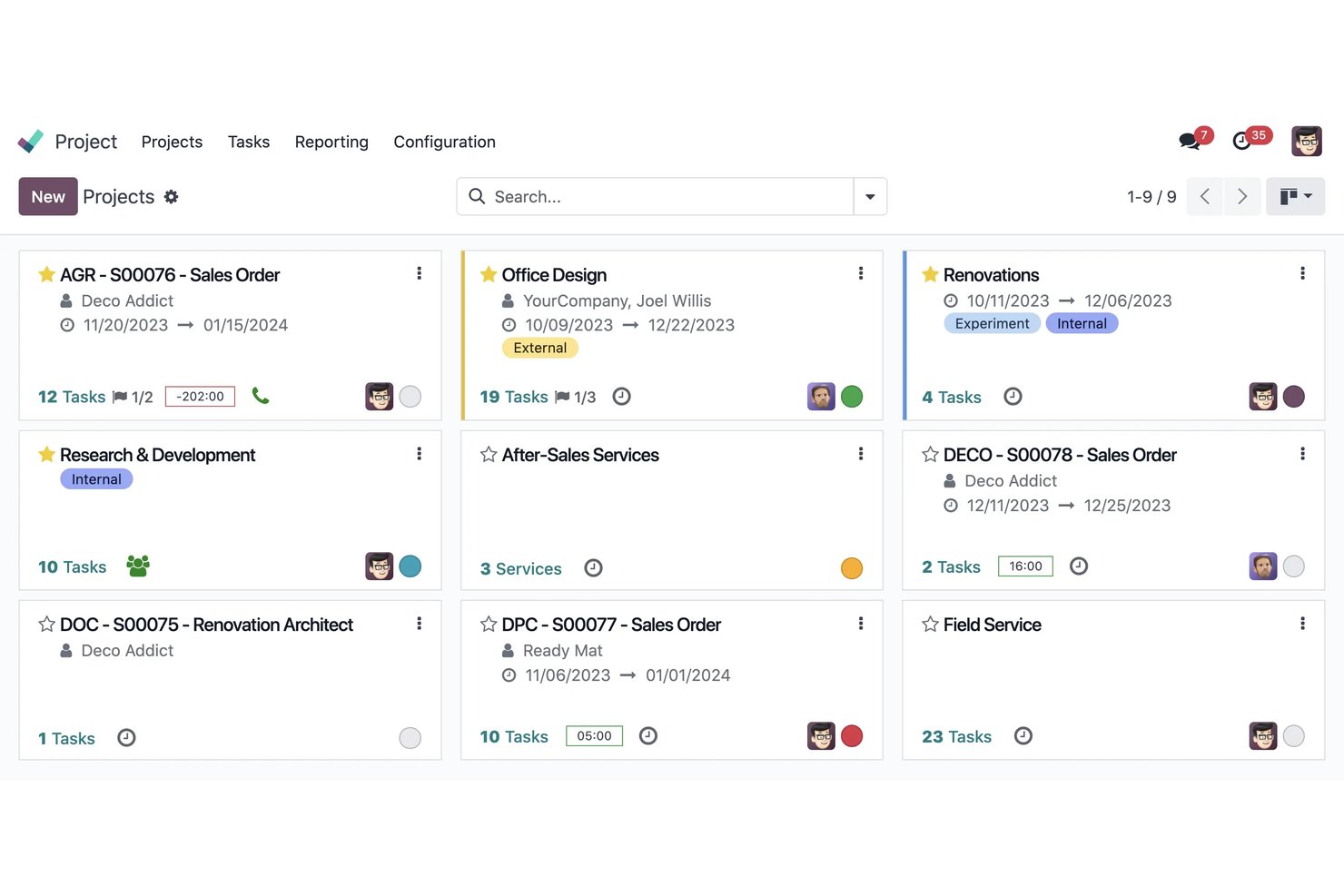
Odoo es una suite empresarial de código abierto con una aplicación de proyectos para gestionar tareas de productos, listas de pendientes, hitos, dependencias y colaboración mediante vistas Kanban, de Gantt, de calendario y de lista.
¿Para quién es más adecuado Odoo?
Odoo es adecuado para equipos de operaciones de producto que necesitan un seguimiento de proyectos de código abierto y autohospedado, con vistas flexibles y colaboración interfuncional.
Por qué elegí Odoo
Elegí Odoo porque aporta flexibilidad de código abierto al software gratuito de gestión de productos. Utilizo su aplicación de proyectos para conectar las tareas de la lista de pendientes con vistas Kanban, de Gantt, de hitos y de dependencias. Su edición Community autohospedada también permite a los equipos adaptar flujos de trabajo, campos y estructuras de datos para el trabajo de producto sin quedar vinculados a un proveedor.
Características principales de Odoo
- Chat dentro de las tareas : Usa Chatter para menciones, registros de actividad y debates sobre las tareas.
- Tareas recurrentes : Programa trabajos repetitivos sin tener que volver a crear las tareas manualmente.
- Formularios de comentarios : Recopila solicitudes mediante formularios web, alias de correo electrónico y encuestas.
- Edición por lotes : Filtra, agrupa, importa, exporta y actualiza tareas desde la vista de lista.
Integraciones de Odoo
Odoo ofrece integraciones nativas con Ventas, Planificación, Hojas de horas, Servicio de asistencia, Facturación y Conocimientos. Las integraciones personalizadas requieren la API externa en el plan Custom de pago, mientras que los usuarios de Community autohospedados pueden acceder a la base de código abierta.
¿Qué es gratis?
Odoo ofrece una edición Community gratuita y autohospedada, con código de fuente abierta y sin cuota de suscripción. Los planes alojados pueden limitarte a una aplicación, mientras que funciones como el acceso a la API externa requieren el plan Custom de pago.
Pros and Cons
Pros:
- El autohospedaje de código abierto conserva el control de los datos
- Varias vistas permiten un seguimiento flexible de las tareas
- La colaboración mediante el portal incluye a las partes interesadas externas
Cons:
- No cuenta con un marco específico de hojas de ruta o puntuación
- El uso en la nube de una sola aplicación limita los flujos de trabajo

Linear
Mejor para la planificación de sprints con cambio automático de ciclo
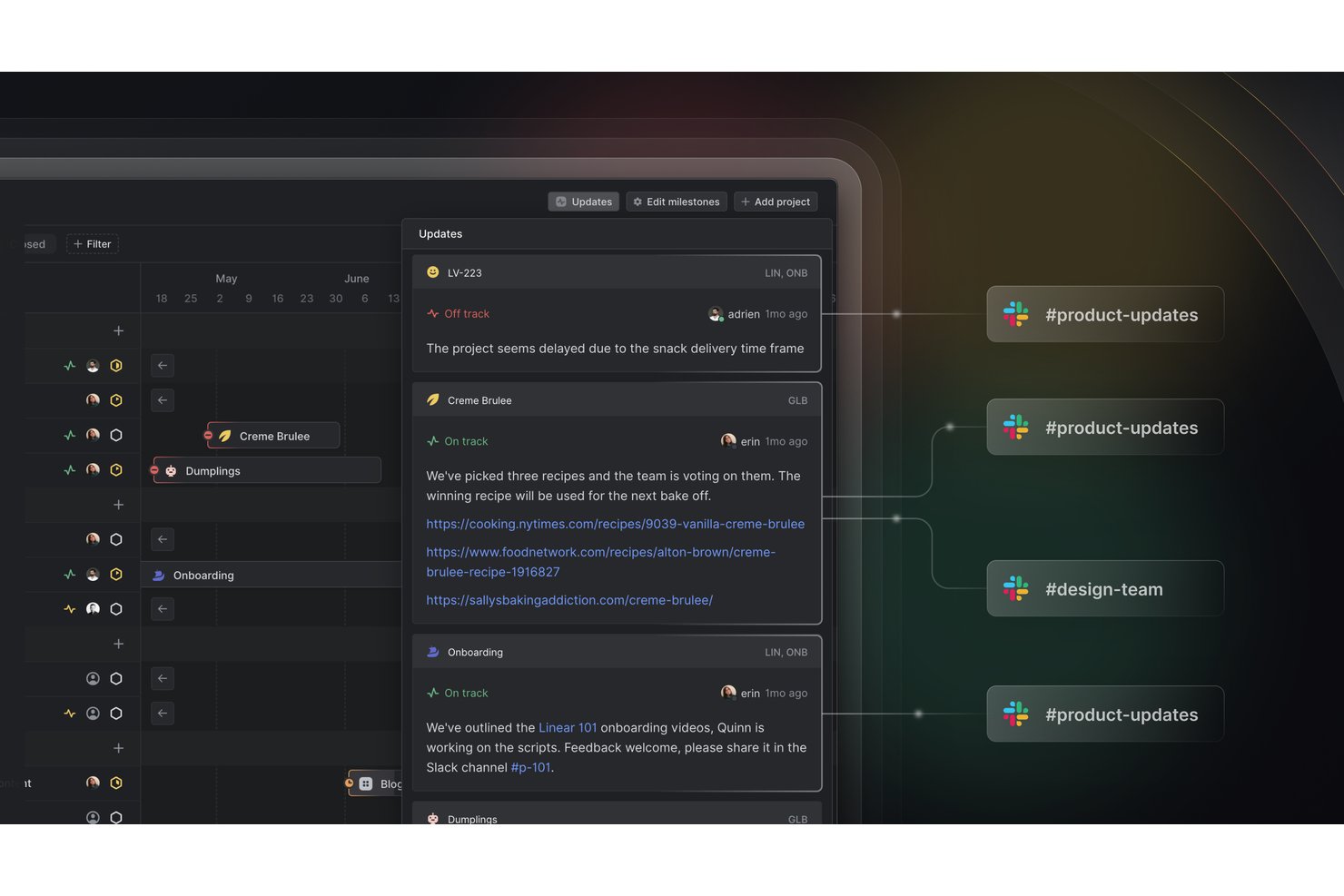
Linear es una plataforma de gestión de productos con un plan gratuito para gestionar incidencias, proyectos, iniciativas, ciclos y solicitudes de clientes, además de herramientas de API, webhooks, importación y exportación.
¿Para quién es mejor Linear?
Linear es adecuado para equipos de productos ágiles que necesitan planificación de sprints con cambio automático de ciclo, especialmente startups que coordinan entregas sin costes por miembro.
Por qué elegí Linear
Elegí Linear porque sus ciclos permiten planificar sprints con cambio automático de ciclo. Utilizo la previsión de capacidad para dimensionar el trabajo próximo, mientras que las incidencias sin terminar pasan automáticamente al ciclo siguiente. Las solicitudes de clientes también conectan los comentarios de los usuarios, los ingresos y los niveles de las cuentas con las decisiones sobre el backlog.
Características principales de Linear
- Seguimiento de incidencias: Crea y organiza hasta 250 incidencias en el plan gratuito.
- Proyectos e iniciativas: Agrupa el trabajo relacionado en proyectos e iniciativas de nivel superior.
- API y webhooks: Conecta Linear con herramientas externas mediante GraphQL y webhooks.
- Importación y exportación: Traslada los datos del espacio de trabajo a Linear o expórtalos desde Linear.
Integraciones de Linear
Linear ofrece una integración nativa con Slack para crear solicitudes de clientes. Su plan gratuito también incluye una API de GraphQL, webhooks, herramientas de importación y exportación, y exportación a CSV para permitir una conectividad personalizada y la portabilidad de datos.
¿Qué incluye el plan gratuito?
Linear ofrece un plan gratuito para siempre con miembros ilimitados, que incluye incidencias, proyectos, ciclos, iniciativas, acceso a la API, webhooks, importación y exportación. El plan está limitado a dos equipos y 250 incidencias; las incidencias ilimitadas, los equipos privados y las integraciones adicionales requieren un plan de pago.
Pros and Cons
Pros:
- El cambio automático de sprint reduce la reasignación manual
- La previsión de capacidad orienta compromisos de ciclo realistas
- Las solicitudes de clientes conectan los comentarios con los ingresos
Cons:
- El límite de 250 incidencias restringe los backlogs en crecimiento
- No incluye puntuación RICE o Kano
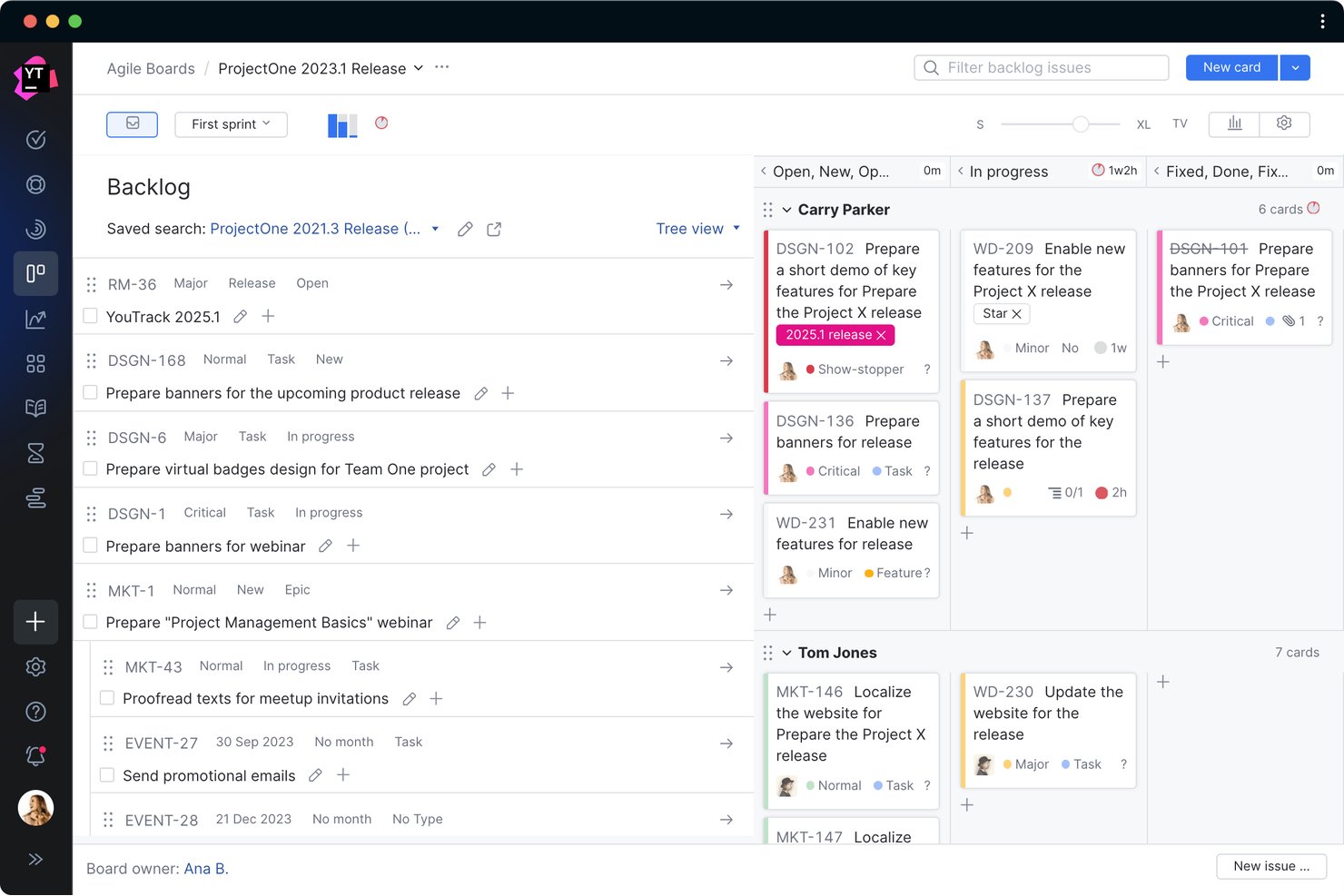
YouTrack es un software de gestión de productos para equipos ágiles que combina listas de trabajo pendiente personalizables, tableros Scrum y Kanban, diagramas de Gantt, informes de sprints, bases de conocimientos y proyectos de mesa de ayuda.
¿Para quién es más adecuado YouTrack?
Equipos ágiles que necesitan planificación de sprints autoalojada, tableros personalizables y funciones completas de entrega de productos para hasta 10 usuarios.
Por qué elegí YouTrack
Elegí YouTrack porque incorpora la planificación de sprints ágiles autoalojada en un espacio de trabajo gratuito de gestión de productos. Mi equipo puede utilizar tableros Scrum o Kanban, planificar sprints, realizar un seguimiento de las dependencias y revisar informes de trabajo pendiente junto con listas de trabajo pendiente y cronogramas de Gantt. Valoro especialmente la opción de servidor cuando los datos del producto deben permanecer dentro de nuestro propio entorno.
Funciones principales de YouTrack
- Proyectos de mesa de ayuda: Recopila solicitudes mediante correo electrónico o formularios web con SLA y automatización.
- Base de conocimientos: Crea artículos con diseños, documentos, calendarios, vídeos y listas de incidencias integrados.
- Pizarras: Convierte notas en tareas mientras mantienes sincronizadas las dependencias vinculadas.
- Asistente de IA: Resume tareas, artículos y solicitudes, y después sugiere respuestas.
Integraciones de YouTrack
YouTrack se integra con los IDE de JetBrains y TeamCity, mientras que JetBrains Marketplace ofrece integraciones adicionales y aplicaciones personalizadas para automatización, generación de informes y conectividad.
¿Qué incluye el plan gratuito?
YouTrack tiene un plan gratuito para siempre para equipos de hasta 10 usuarios, con acceso a sus funciones principales de gestión de productos. Los equipos más grandes necesitan un plan de pago, y la implementación autoalojada de servidor puede requerir una licencia independiente.
Pros and Cons
Pros:
- La planificación ágil autoalojada mantiene los datos en las instalaciones
- Los informes completos de sprints facilitan las revisiones del trabajo pendiente
- Las pizarras conectan las ideas con tareas ejecutables
Cons:
- No incluye una hoja de ruta de productos basada en temas
- El límite de diez usuarios restringe la colaboración interfuncional

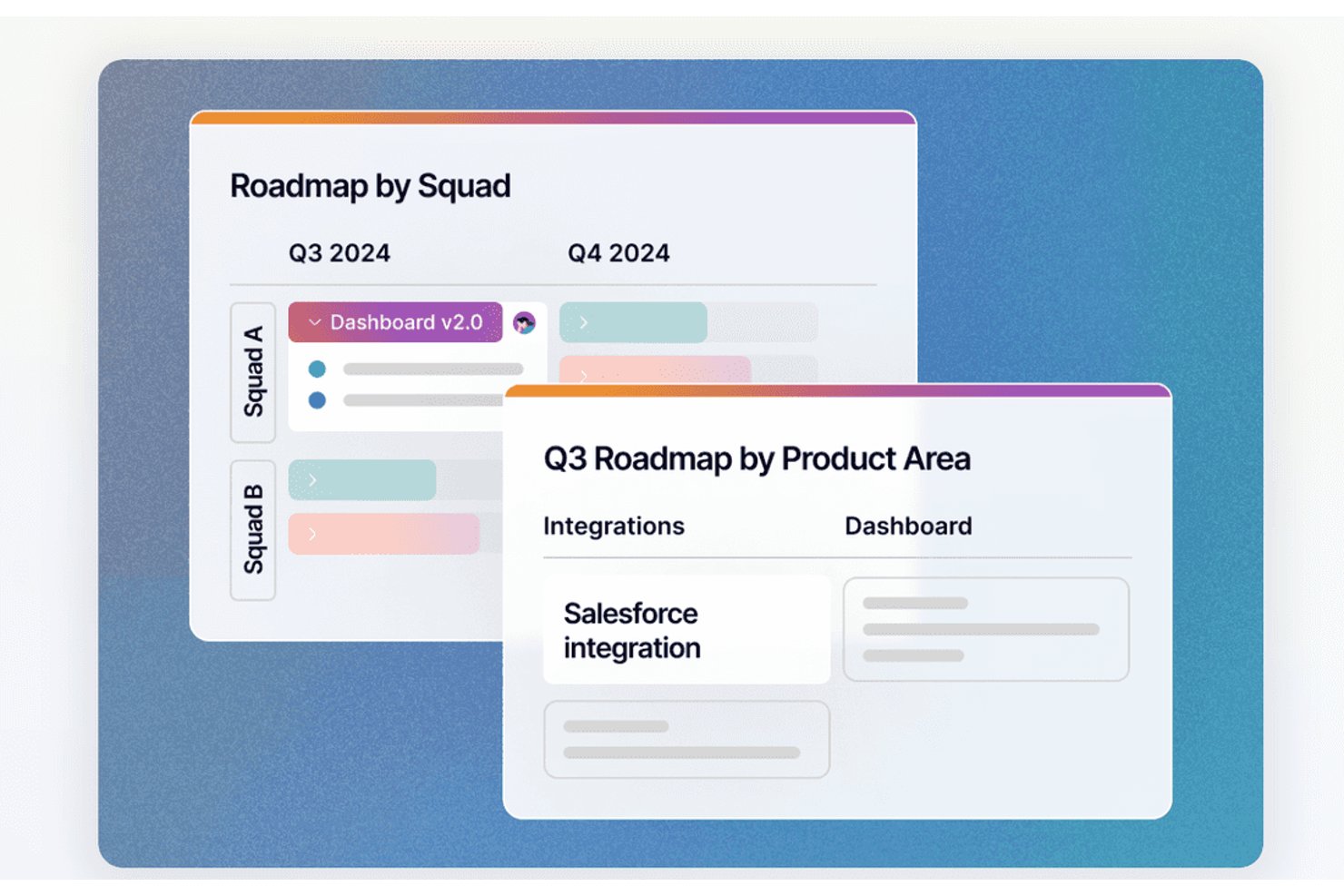
Fibery es una plataforma de gestión de productos con un plan gratuito que conecta los comentarios de los clientes, las listas de pendientes, las hojas de ruta, la planificación de sprints, la documentación de productos y las integraciones de ingeniería en un solo espacio de trabajo.
¿Para quién es más adecuado Fibery?
Responsables de producto, propietarios de productos y fundadores de startups que necesitan priorizar listas de pendientes mediante fórmulas en distintos ámbitos, como los comentarios, las hojas de ruta y la planificación de sprints.
Por qué elegí Fibery
Elegí Fibery porque su priorización de listas de pendientes mediante fórmulas conecta los comentarios de los clientes con las decisiones de producto. Utilizo fórmulas ponderadas para factores como el nivel de dificultad, el perfil de cliente ideal y el volumen de solicitudes, y luego filtro los resultados por segmento de clientes. Los comentarios, las áreas de producto y las tareas vinculados mantienen la priorización basada en datos concretos.
Funciones principales de Fibery
- Flujos de trabajo de sprints: Configura flujos de trabajo Scrum o Kanban para los equipos de desarrollo.
- Informes de progreso: Realiza un seguimiento de la velocidad, los gráficos de avance, los gráficos de trabajo pendiente y el flujo acumulativo.
- Integraciones con Git: Sincroniza solicitudes de incorporación de cambios, ramas y confirmaciones de GitHub o GitLab.
- Documentos colaborativos: Crea documentos de requisitos de producto con diagramas, maquetas, gráficos y comentarios.
Integraciones de Fibery
Fibery ofrece integraciones nativas con GitHub y GitLab, sincronizando solicitudes de incorporación de cambios, ramas y confirmaciones con el trabajo de producto. Las integraciones están incluidas en el plan gratuito, con un límite de 5.000 registros sincronizados.
¿Qué incluye el plan gratuito?
Fibery ofrece un plan gratuito de $0 que sigue disponible después de que finaliza la prueba de 14 días del plan Pro. Admite hasta 10 usuarios y 10 invitados, con 10 bases de datos, 1 GB de almacenamiento de archivos, un historial de versiones de 14 días y 5.000 actualizaciones de entidades sincronizadas al mes.
Pros and Cons
Pros:
- La priorización mediante fórmulas conecta los comentarios con las listas de pendientes
- Los segmentos de clientes mejoran las decisiones sobre la hoja de ruta
- Los flujos de trabajo vinculados conectan el descubrimiento con la entrega
Cons:
- La configuración inicial requiere una personalización considerable
- Las vistas gratuitas limitan el uso compartido de la hoja de ruta con las partes interesadas
Ideal para conectar el descubrimiento con la entrega en equipos de Jira
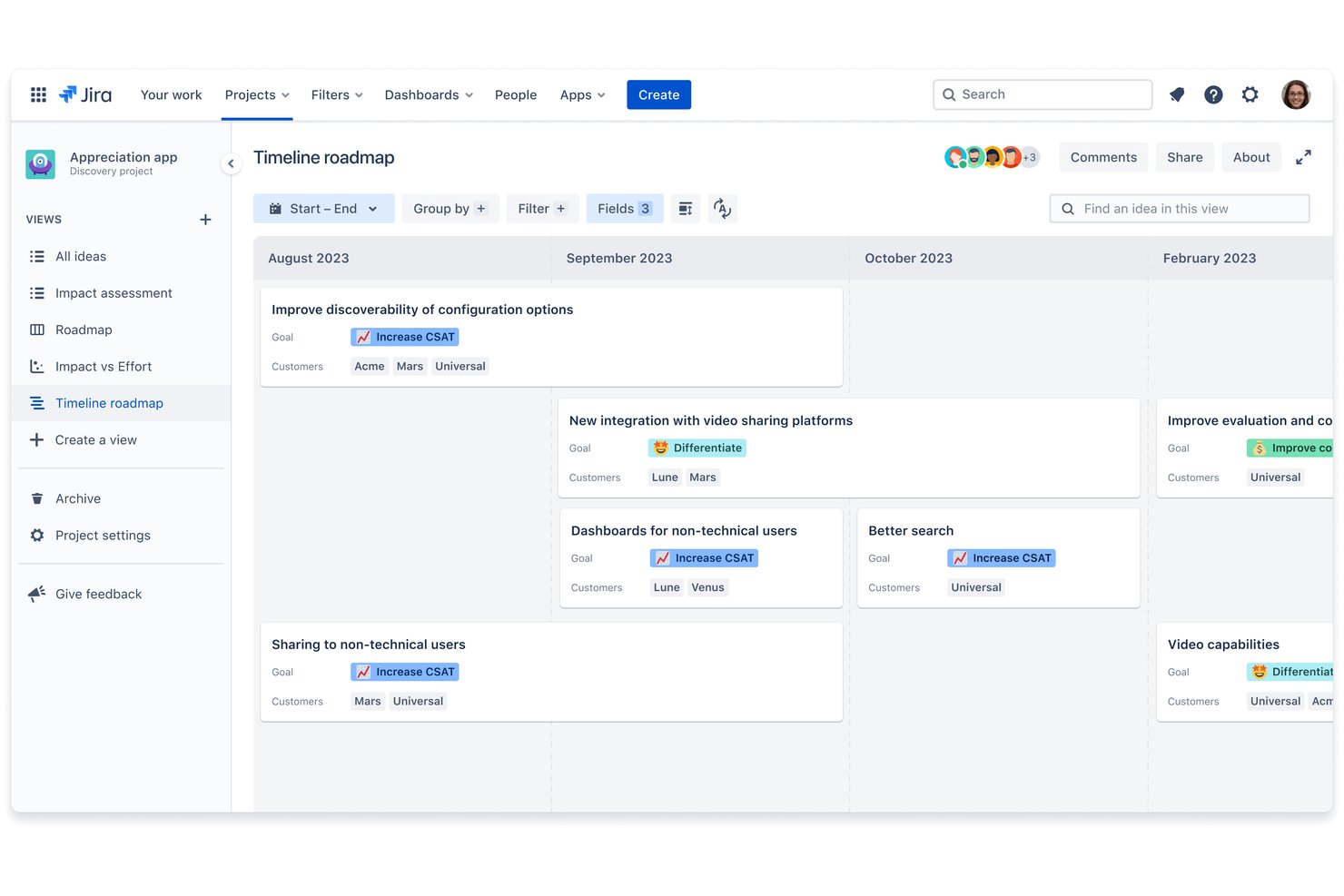
Jira Product Discovery es un software gratuito de gestión de productos para recopilar comentarios, organizar ideas, asignar puntuaciones a las prioridades, crear hojas de ruta y vincular el trabajo de descubrimiento con las incidencias de Jira.
¿Para quién es más adecuado Jira Product Discovery?
Responsables de producto, propietarios de producto y equipos ágiles que ya utilizan Jira para conectar el descubrimiento de clientes con la entrega.
Por qué elegí Jira Product Discovery
Elegí Jira Product Discovery porque conecta el descubrimiento de productos con la entrega para los equipos de Jira. Utilizo la puntuación de ideas, los análisis de comentarios y las vistas de hojas de ruta para convertir las solicitudes de los clientes en trabajo priorizado. Vincular las ideas directamente con las épicas y las incidencias de Jira mantiene las decisiones de producto conectadas con el progreso de la entrega.
Características principales de Jira Product Discovery
- Campos personalizados: Añade datos estructurados a las ideas y los proyectos.
- Campos de fórmulas: Calcula valores para el análisis de productos.
- Plantillas de ideas: Crea formatos reutilizables para nuevas ideas.
- Votaciones y reacciones: Permite que las partes interesadas voten y reaccionen a las ideas.
Integraciones de Jira Product Discovery
Jira Product Discovery incluye integraciones nativas con Jira, Jira Service Management, Confluence y Objetivos y proyectos de Atlassian. Estas conexiones vinculan el descubrimiento, los comentarios, la documentación y la entrega en un único flujo de trabajo de Atlassian.
¿Qué incluye el plan gratuito?
Jira Product Discovery tiene un plan gratuito permanente para un máximo de tres creadores, con colaboradores sin costo, 2GB de almacenamiento y soporte de la comunidad. Si superas los tres creadores, Atlassian inicia automáticamente una prueba de 14 días del plan Estándar; el producto solo está disponible en la nube.
Pros and Cons
Pros:
- Vincula las ideas de descubrimiento con el trabajo de entrega
- La votación nativa facilita la priorización por parte de las partes interesadas
- Vistas de tablero, matriz, cronología y lista
Cons:
- No incluye flujos de trabajo nativos para la planificación de sprints
- Compartir hojas de ruta externamente tiene restricciones según el plan

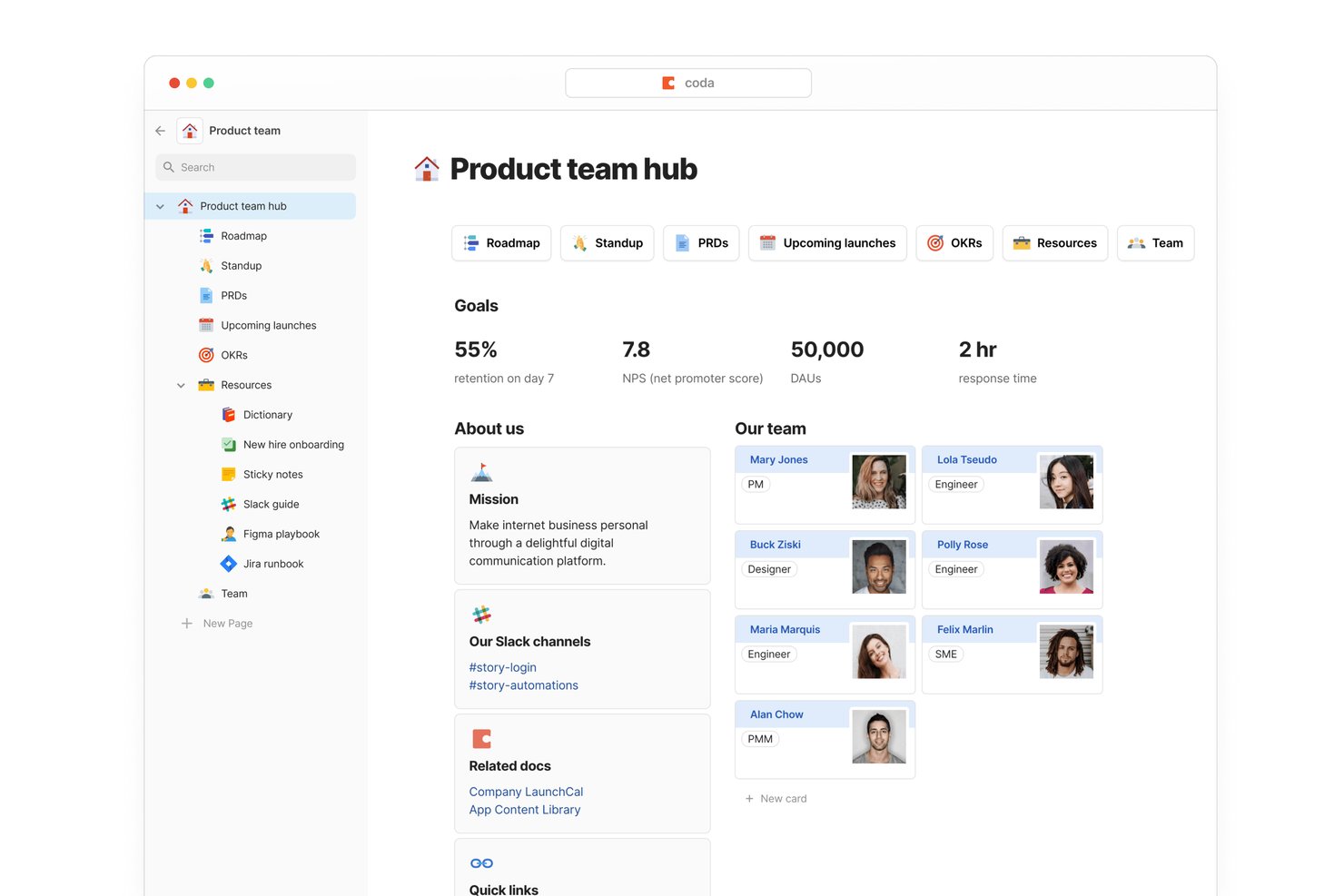
Superhuman Docs es un espacio de trabajo gratuito para la gestión de productos que combina documentos conectados, tablas personalizables, hojas de ruta, listas de tareas pendientes, formularios, fórmulas y vistas de tablero, calendario y cronograma.
¿Para quién es más adecuado Superhuman Docs?
Fundadores de startups y equipos de producto reducidos que necesitan flujos de trabajo de producto flexibles, amplias integraciones y colaboración gratuita para las partes interesadas interfuncionales.
Por qué elegí Superhuman Docs
Elegí Superhuman Docs para equipos de producto que necesitan flujos de trabajo conectados entre sus herramientas existentes. Sus paquetes de Jira, GitHub, Slack, Figma y Salesforce pueden incorporar actualizaciones de entrega, comentarios de clientes y contexto de diseño en tablas de hojas de ruta y listas de tareas pendientes vinculadas. Los usuarios gratuitos tienen acceso a más de 36 paquetes, aunque los datos conectados se actualizan manualmente.
Funciones principales de Superhuman Docs
- Formularios ilimitados: Recopila comentarios y solicitudes de productos directamente en tablas.
- Vistas de tablero: Muestra el trabajo como tarjetas Kanban con filtros y agrupaciones.
- Columnas de fórmulas: Crea cálculos personalizados de puntuación, progreso y estado.
- Automatizaciones: Activa acciones a partir de cambios en filas, programaciones o clics en botones.
Integraciones de Superhuman Docs
Superhuman Docs ofrece más de 36 integraciones en su plan gratuito mediante paquetes, incluidas Jira, GitHub, Slack, Figma, Google Calendar, Gmail, Intercom, Zendesk y Salesforce. Los datos conectados gratuitos se actualizan manualmente.
¿Qué incluye el plan gratuito?
Superhuman Docs ofrece un plan gratuito con formularios ilimitados, vistas de tablero, fórmulas y automatizaciones. Los usuarios gratuitos pueden acceder a más de 36 paquetes, incluidos Jira, GitHub, Slack y Figma, pero los datos conectados se actualizan manualmente.
Pros and Cons
Pros:
- Las tablas conectadas unifican las hojas de ruta y los comentarios
- La puntuación personalizada permite una priorización flexible
- Los formularios ilimitados capturan solicitudes de productos
Cons:
- Los documentos compartidos limitan las filas y los objetos
- Las hojas de ruta y los sprints requieren configuración manual
Otras opciones gratuitas de software de gestión de productos
Aquí tienes algunas opciones más que no entraron en la lista principal, pero que vale la pena considerar.
- Plane
Ideal para la planificación gratuita de sprints y Gantt
- PathPro
La mejor opción para el desarrollo impulsado por la comunidad
- ClickUp
Ideal para el seguimiento gratuito e ilimitado de tareas interfuncionales
- Airtable
Ideal para la gestión flexible de la lista de tareas pendientes asistida por IA
- Nuclino
Ideal para configurar espacios de trabajo de productos basados en documentación
- Yodiz
Los mejores análisis de la cartera de producto para equipos ágiles
- ONES Project
Ideal para la planificación gratuita de sprints y lanzamientos del equipo


Cómo evalúo el software gratuito de gestión de productos
Evalúo las herramientas gratuitas de gestión de productos en dos niveles: si el plan gratuito realmente admite el trabajo de gestión de productos—hojas de ruta, backlogs, priorización—y los diferenciadores que hacen que una herramienta sea la adecuada sobre otras.
Funcionalidades principales (Requisitos mínimos para esta lista)
Cuando selecciono herramientas para mi lista, califico cada una en una escala del 0 (no ofrece la funcionalidad) al 5 (destaca en esta área) para cada funcionalidad principal que se enumera a continuación. Luego, calculo la puntuación total de la herramienta como un porcentaje. Cada herramienta debe lograr una puntuación total mínima del 65% para ser considerada para su inclusión.
- Planificación de hoja de ruta: Busco vistas de hoja de ruta visuales—líneas de tiempo, tableros Kanban, swimlanes—que permitan a un gestor de producto planificar iniciativas trimestrales y compartirlas con la dirección.
- Gestión de backlog y funcionalidades: Un backlog estructurado donde puedas registrar ideas de funcionalidades, etiquetarlas por tema y hacer seguimiento de su estado es más relevante que una simple lista de tareas.
- Frameworks de priorización: Verifico si la herramienta admite modelos de puntuación como RICE o matrices de valor versus esfuerzo, en lugar de depender solo de una organización manual por arrastrar y soltar.
- Disponibilidad de plan gratuito: El plan gratuito debe soportar verdaderos flujos de trabajo de gestión de productos—no solo una prueba de 14 días—para que un PM en solitario o una startup pequeña lo use como herramienta diaria.
- Colaboración y compartición: Valoro cómo interactúan los equipos en la herramienta: comentarios, menciones, vistas compartidas y si los interesados pueden acceder a las hojas de ruta sin una cuenta de pago.
- Integraciones con herramientas de desarrollo y trabajo: Conectar con herramientas como Jira, GitHub o Slack en el plan gratuito es esencial porque los PM rara vez trabajan aislados del área técnica y de diseño.
Una vez tengo una lista de herramientas que cumplen estos criterios, considero lo que diferencia a cada plataforma.
Factores diferenciadores (Qué distingue a los proveedores)
Así es como comparo y contrasto a los distintos proveedores:
Características destacadas
Los portales públicos de hoja de ruta son un gran diferenciador para fundadores de startups que quieren mostrar qué se lanzará próximamente a los primeros usuarios y recoger votos a favor en funcionalidades planeadas. También busco una captura de feedback incorporada que vincule solicitudes directamente a elementos del backlog—esto ahorra al PM copiar manualmente mensajes de soporte a una hoja de cálculo. También vale la pena evaluar los flujos asistidos por IA, especialmente para PM en solitario que necesitan ayuda redactando historias de usuario o resumiendo un backlog lleno de comentarios en temas accionables.
Más allá de las funcionalidades
La generosidad del plan gratuito es muy importante aquí. Verifico cuántos usuarios, proyectos e integraciones se incluyen antes de llegar a una limitación de pago—algunas herramientas restringen las vistas de hoja de ruta o la priorización solo a los planes de pago, lo que no tiene sentido. El tamaño del equipo y el ajuste a su etapa es otro factor que considero. Un PM en solitario necesita algo ligero, mientras que un equipo emergente de cinco personas necesita espacio para crecer sin verse obligado a migrar de plataforma seis meses después. También influyen las opciones de exportación de datos, especialmente para equipos que ven una herramienta gratuita como un trampolín—quieres acceso CSV o API para recuperar tu backlog claramente si decides cambiar de sistema.
¿Qué sigue?
Conoce las etapas de la gestión del ciclo de vida del producto y 15 marcos de priorización de funcionalidades del producto que pueden ayudarte a adquirir mayor experiencia en la gestión de productos. Sin embargo, si buscas algo más avanzado, tenemos un excelente artículo sobre estrategia de producto en el que destacamos 5 elementos clave de una estrategia de desarrollo de productos que no puedes pasar por alto.
Listas de herramientas relacionadas:
- Mejor software de hojas de ruta de productos
- Herramientas gratuitas de análisis de productos
- Herramientas de prototipado rápido
- Software gratuito de incorporación de usuarios
Para mantenerte al día sobre el liderazgo intelectual en la gestión de productos, no olvides suscribirte al boletín de The CPO Club.