

Open source product management software is endlessly useful to any product team because, well, they are open. This means that your product team has much more flexibility and customizability at their fingertips. Your dev team will appreciate being able to manipulate these apps to their whim and you, as a good product manager, will relish the opportunity to create specifically tailored solutions that are unique to the needs of your end user.
In this article, I’ll go over some of the best open source product management software and give a simple summary of each, pointing out what the tool does best and how it can work for you.
What Is Open Source Product Management Software?
Open source product management software refers to software tools that are freely available, customizable, and collaboratively developed by a community of users and developers. These tools support product managers and teams in planning, tracking, and optimizing the development of products, while the open source nature allows users to modify and extend the software based on their specific needs.
Key features include product roadmapping, backlog management, collaboration tools, and integration capabilities. These enable teams to plan and prioritize product features, manage development workflows, collaborate on tasks, and integrate with other tools, all within a customizable and open environment.
Why Trust Our Software Recommendations
6,700+
Reviews
20
Industry experts
16+
Evaluation factors
14
Years
Our team has been testing and reviewing software since 2012. As product managers ourselves, we know how difficult—and important—it is to choose the right software.
For this guide, we evaluated tools using hands-on testing and independent research, scoring tools using our selection criteria.
Our reviews reflect our human editorial judgment, not a sales pitch.
Expert reviewers:
- Andrew LumbySenior TPM
- Cristiano ValimSenior UI/UX Lead


Open Source Product Management Software Comparison Table
Here is a table where you can compare the tools we just covered in the overviews.
| Tool | Best For | Trial Info | Price | ||
|---|---|---|---|---|---|
| 1 | Best for self-hosted dev team issue tracking | Free demo available | Pricing upon request | Website | |
| 2 | Best for Git-linked issue tracking and self-hosting | 30-day free trial | From $9.50/user/month (billed annually) | Website | |
| 3 | Best for MIT-licensed self-hosted kanban tracking | Free plan available | Free forever plan | Website | |
| 4 | Best for neurodivergent-friendly self-hosted teams | Free plan available; 14-day free trial | From $10/user/month | Website | |
| 5 | Best for ERP-scale open source self-hosting | Free demo available | Pricing upon request | Website | |
| 6 | Best for self-hosted kanban with no telemetry | Free plan available | From €50/year (billed annually) | Website | |
| 7 | Best for self-hosted project and roadmap control | Free plan available; 14-day free trial available for Enterprise Cloud and on-premises | From €5.95/user/month (billed annually) | Website | |
| 8 | Best for Git-native CI/CD-linked planning | Free plan available; 30-day free trial | From $29/user/month (billed annually) | Website | |
| 9 | Best Scrum tool | Free plan + free demo available | From $49.9/user/year (billed annually) | Website | |
| 10 | Best for self-hosting with no user seat cap | Free plan + 14-day free trial + free demo available | From $6/user/month (billed annually) | Website |


Overviews Of The 10 Best Open Source Product Management Software
Here’s a brief description of each of the product management software on my list showing what it does best, plus screenshots to showcase some of the features.
 Best for self-hosted dev team issue tracking
- Free demo available
- Pricing upon request
Visit WebsiteCustomer Rating:4/5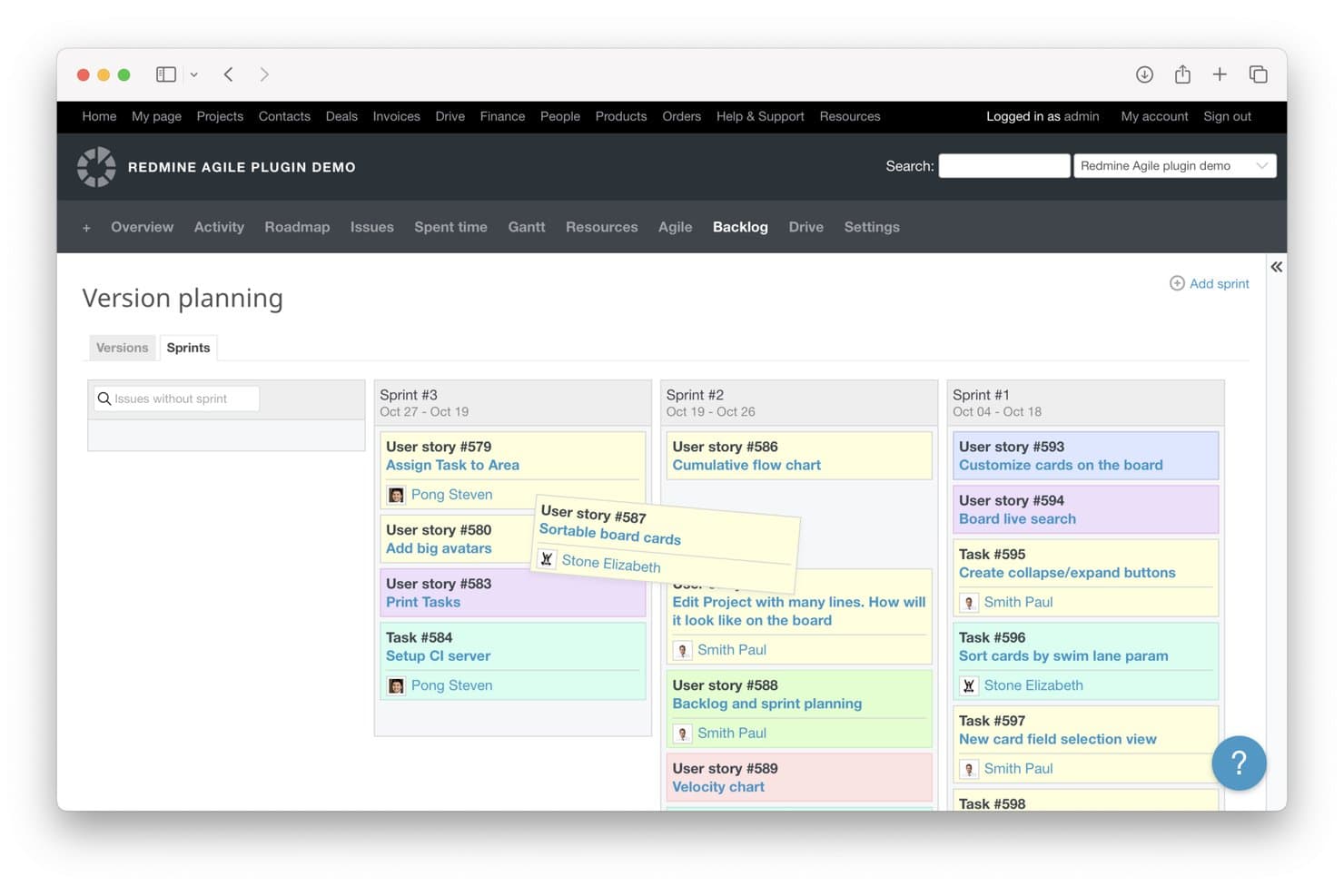
Redmine lets users plan and organize work across sprints in a visual backlog view. Redmine is a self-hosted, open-source project management tool built on Ruby on Rails that covers issue tracking, custom workflows, roadmapping, Gantt charts, wiki collaboration, and repository browsing across Git, SVN, and Mercurial.
Who Is Redmine Best For?
Redmine is a strong fit for engineering and dev teams that need full control over their data and want to self-host a customizable issue tracking system at no licensing cost.
Why I Picked Redmine
Redmine earns its spot on my shortlist because it's one of the few genuinely free, self-hosted issue trackers with the depth that dev teams actually need. I love that you can define custom trackers, statuses, and workflow transitions per role directly in the UI, so a team can model their exact bug-to-release process without writing a line of code. The built-in repository browser links Git or SVN changesets directly to issues, which means I can trace every code change back to the ticket that triggered it.
Redmine Key Features
- Custom trackers and workflows: Define your own issue types, statuses, and role-based workflow transitions directly from the admin UI.
- Multi-project management: Run multiple projects from a single Redmine installation, with subproject support and cross-project issue reporting.
- Time logging and reports: Log time per ticket or project and generate reports filtered by user, issue type, or activity.
- LDAP authentication: Connect Redmine to one or more LDAP servers so users authenticate with existing directory credentials.
Redmine Integrations
Redmine offers five native repository integrations: Git, Subversion, Mercurial, Bazaar, and CVS, plus LDAP authentication. Its documented REST API supports custom integrations and connections to external product workflows.
Pros and Cons
Pros:
- Multi-project views connect roadmaps and backlogs
- Role-based workflows match complex delivery processes
- GPL source supports deep internal customization
Cons:
- Plugin curation adds ongoing maintenance work
- Dated interface slows stakeholder adoption
Learn more about Redmine: Best for Git-linked issue tracking and self-hosting
- 30-day free trial
- From $9.50/user/month (billed annually)
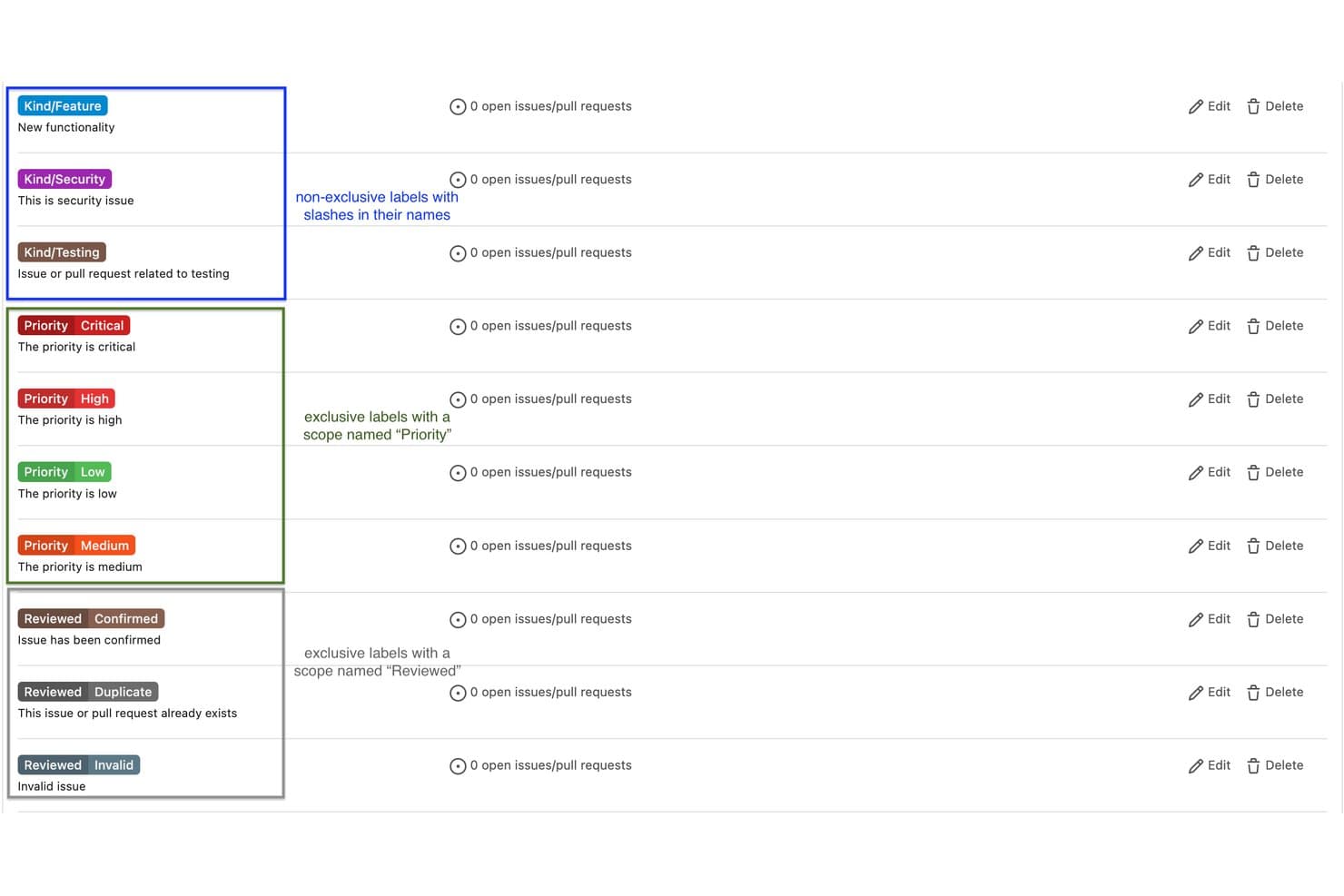
Gitea supports scoped labels to enforce exclusive priority tagging on issues. Gitea is an open-source, self-hostable Git platform that combines code hosting, issue tracking, Kanban boards, pull requests, CI/CD pipelines, and package management in a single deployable instance.
Who Is Gitea Best For?
Gitea is a great fit for engineering-led teams and startups that want Git hosting, issue tracking, and CI/CD in one self-hosted platform without paying per seat.
Why I Picked Gitea
I picked Gitea as one of the best because it's the only tool on this list where issue tracking lives directly inside your Git workflow, not alongside it. When my team links a bug report to a pull request and closes it automatically on merge, that's not a workaround—it's how Gitea is built. I also like that Kanban boards exist at both the repository and organization level, so you can manage sprint-level work without leaving your codebase.
Gitea Key Features
- Gitea Actions: A built-in CI/CD system that uses GitHub Actions syntax, letting you reuse thousands of existing actions without reconfiguring your workflows.
- Package registry: Supports 20+ package types—including Container, npm, Maven, and PyPI—so your code and its dependencies live in one place.
- Milestone tracking: Group issues into milestones with due dates so your team can measure progress toward a release or sprint goal.
- REST API and webhooks: Connect Gitea to external tools like Slack, Jenkins, or Argo CD to automate notifications and trigger custom workflows.
Gitea Integrations
Gitea integrates with Slack, Discord, Microsoft Teams, Lark, GitHub Actions, Drone, Woodpecker, Argo CD, and Jenkins. Its REST API and webhooks support custom integrations and CI/CD workflows.
Pros and Cons
Pros:
- Combines milestones, dependencies, and Kanban boards
- Supports self-hosted data control
- Links issues directly to code changes
Cons:
- Lacks stakeholder feedback voting mechanisms
- Offers no native roadmap visualization
Learn more about Gitea: Best for MIT-licensed self-hosted kanban tracking
- Free plan available
- Free forever plan
Visit WebsiteCustomer Rating:3.7/5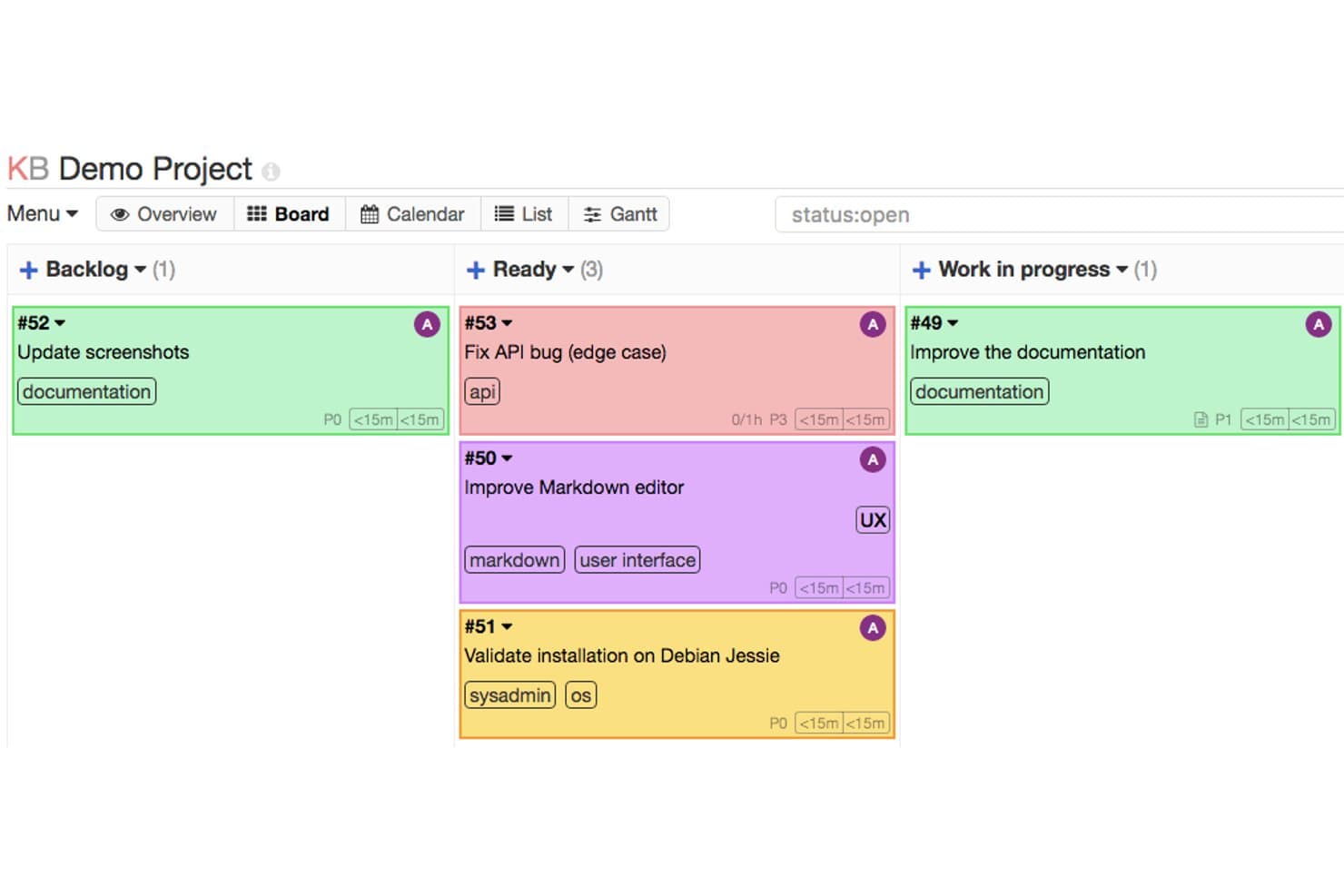
Kanboard organizes tasks visually across Backlog, Ready, and Work in Progress columns. Kanboard is a self-hosted, MIT-licensed kanban tool that offers task and backlog management, automation rules, subtask tracking, and a plugin library for extending functionality like calendar views and Git integrations.
Who Is Kanboard Best For?
Kanboard is a strong fit for engineering leads and IT administrators who want a self-hosted kanban tool with no licensing costs and full control over their data.
Why I Picked Kanboard
Kanboard earns its spot on my shortlist because it's one of the few kanban tools licensed under MIT with no open-core restrictions whatsoever. I like that you get full source code access, maintained Docker images, and Docker Compose files for MariaDB, Postgres, and SQLite out of the box. In practice, that means my team can run the entire stack on our own servers, apply WIP limits to flag overloaded columns, and automate task assignments when work enters a new stage.
Kanboard Key Features
- Automatic actions: Set rules that trigger field changes—like reassigning a task or updating its color—when it moves into a new column.
- LDAP and OAuth2 authentication: Connect Kanboard to LDAP or Active Directory out of the box, or add GitHub, GitLab, and other OAuth2 logins through plugins.
- Custom filters and query language: Search and filter tasks by assignee, category, due date, and description using a built-in query syntax.
- Plugin library: Extend Kanboard with community-built plugins for chat notifications, Git webhooks, time tracking, and more.
Kanboard Integrations
Kanboard offers integrations via plugins with GitHub, GitLab, Bitbucket, Gitea, Gogs, Slack, and Mattermost. Its API and webhooks support custom integrations.
Pros and Cons
Pros:
- Automation supports disciplined kanban workflow management
- Self-hosted deployment preserves complete data control
- MIT license permits unrestricted source modifications
Cons:
- External stakeholder feedback collection is unavailable
- Native roadmap and prioritization tools are absent
Learn more about Kanboard: Best for neurodivergent-friendly self-hosted teams
- Free plan available; 14-day free trial
- From $10/user/month
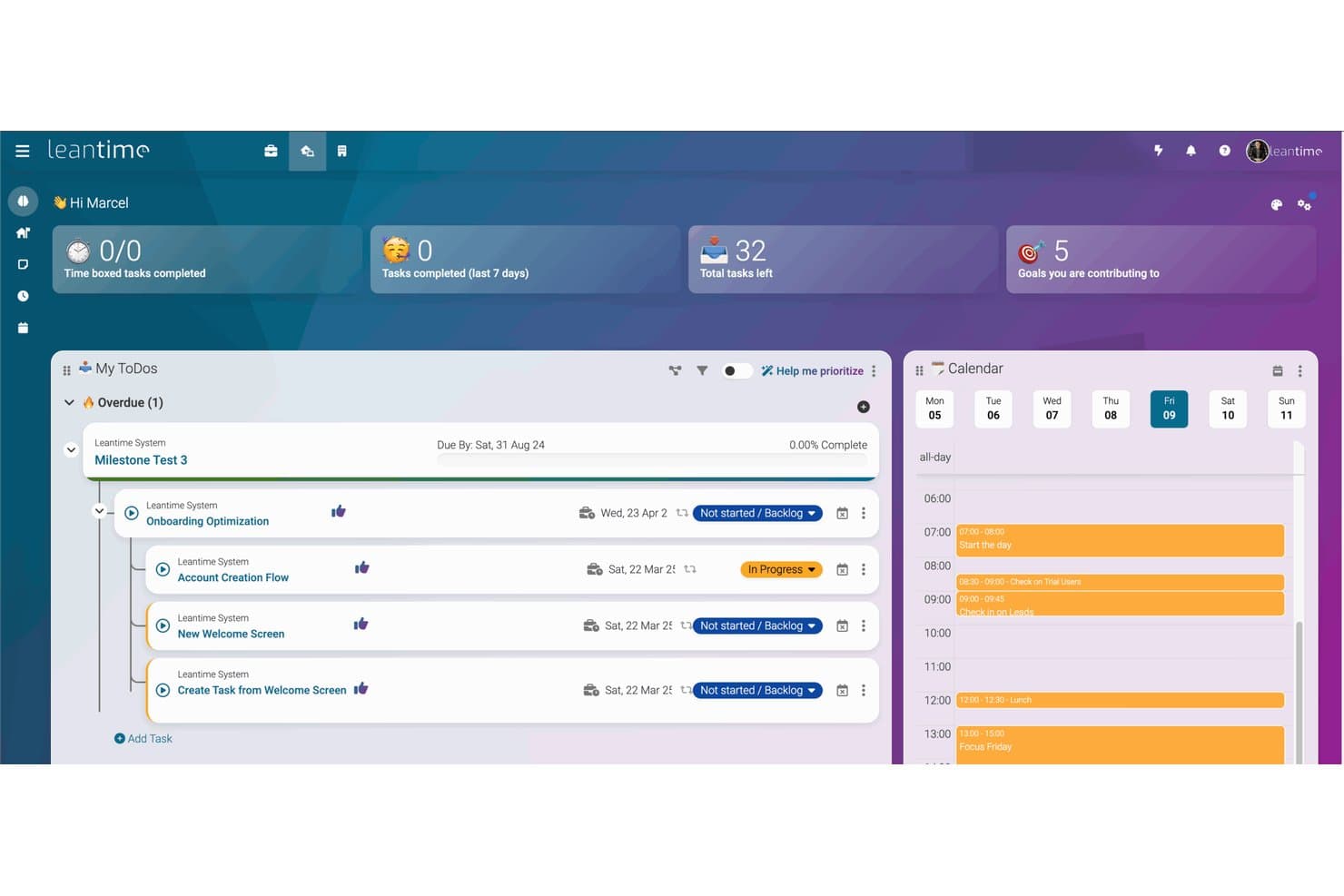
Leantime centralizes tasks, milestones, and daily schedules in one dashboard. Leantime is an open-source project and work management platform that combines Kanban boards, sprint tracking, Gantt milestones, strategy canvases, and wiki-style documentation in a self-hosted or cloud-hosted workspace designed with neurodivergent users in mind.
Who Is Leantime Best For?
Leantime is a strong fit for self-hosted teams who want a structured yet approachable workspace, particularly those supporting neurodivergent contributors.
Why I Picked Leantime
Leantime earns its spot on my shortlist because it's the only open-source project management tool I've found that's built from the ground up with neurodivergent users in mind. Its inclusive theme, emoji-based personal task prioritization, and "My Work" dashboard that surfaces tasks across all projects are practical accommodations, not afterthoughts. I also like that the free Community Edition includes real depth: sprints, Gantt milestones, Lean Canvas and SWOT strategy boards, and LDAP/OIDC authentication, all self-hosted via Docker.
Leantime Key Features
- Sprint management: Plan and track iterative work cycles with built-in sprint boards, task assignments, and progress visibility across your team.
- Time tracking and timesheets: Log hours directly on tasks and export timesheet data for reporting or client billing purposes.
- Strategy canvases: Build Lean Canvas, Business Model Canvas, and SWOT boards to document and align on product strategy within the same workspace.
- Role-based permissions: Assign team roles and configure per-project access controls to manage who can view or edit specific work.
Leantime Integrations
Leantime supports integrations with Slack, Discord, Mattermost, Google Workspace, Microsoft files, LDAP, OIDC, and S3. It also offers iCal import, ICS export, and a JSON-RPC API for custom integrations.
Pros and Cons
Pros:
- Sprints, Gantt, and canvases share one workspace
- Self-hosted AGPL edition preserves data control
- Neurodivergent-inclusive prioritization supports varied working styles
Cons:
- External stakeholder voting remains unavailable
- Advanced strategy tools require paid plugins
Learn more about Leantime:
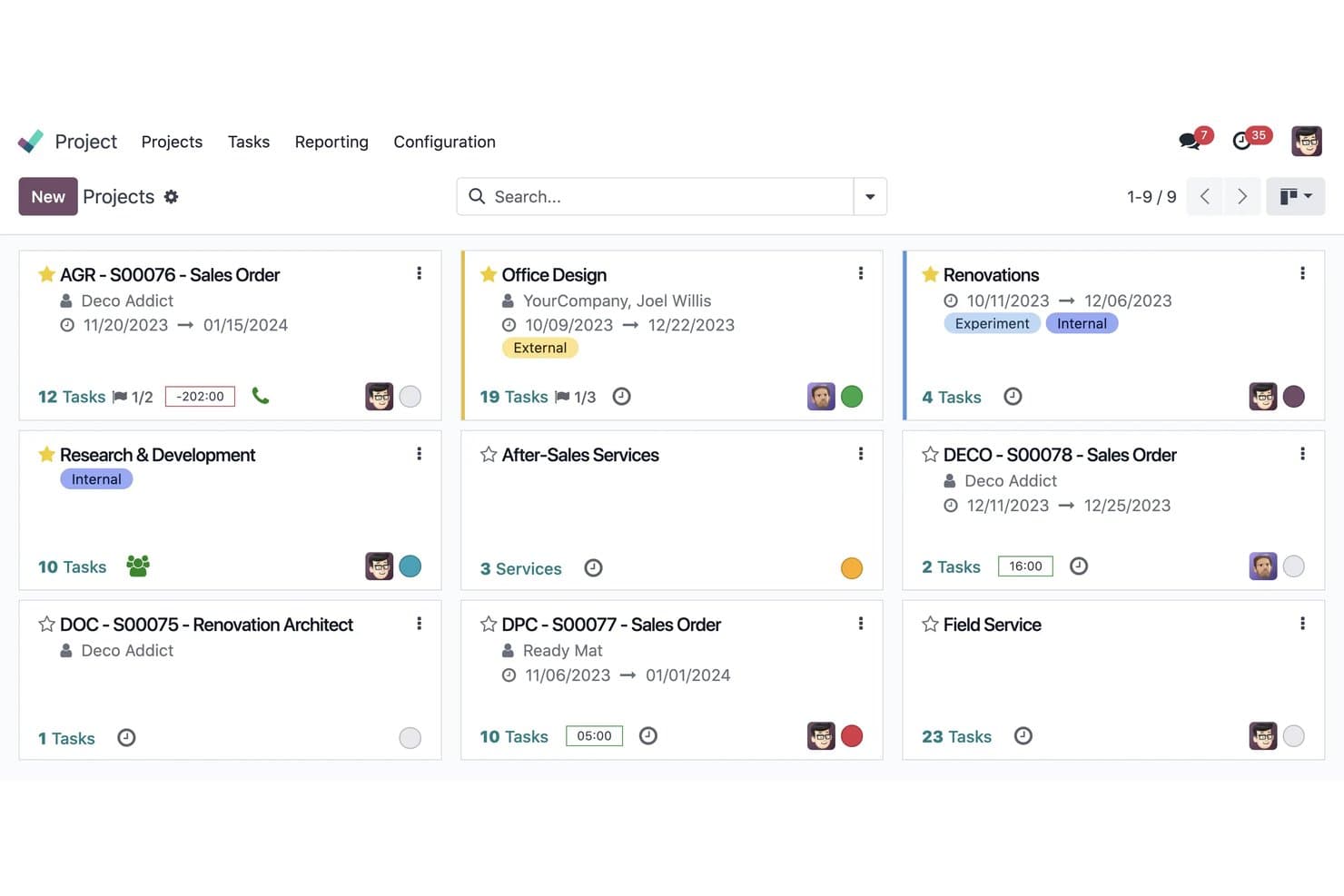
Odoo organizes all projects in a visual kanban card layout. Odoo is an open-core ERP suite with a Project app that covers task management, backlog tracking, kanban and calendar views, milestones, and multi-app integration across timesheets, invoicing, and helpdesk.
Who Is Odoo Best For?
Odoo suits IT administrators and product managers at mid-size organizations that need a self-hosted, customizable system and want their project work connected to invoicing, timesheets, and CRM in one place.
Why I Picked Odoo
I've included Odoo in my top picks because it's the only tool on this list that gives you a full ERP backbone under one open-source roof, making it the right call when your team needs project work connected directly to timesheets, invoicing, and CRM. Its Community edition is self-hostable for free under LGPLv3, with a GitHub repo boasting 54.6k stars and over 211k commits. I especially like that tasks support customizable stages, sub-tasks, dependencies, and automated actions, so you can shape the backlog workflow to match how your team actually operates.
Odoo Key Features
- Chatter thread: Each task and record includes a built-in message thread where team members can post comments, tag colleagues, and log activities directly on the item.
- Client portal access: External stakeholders can view tasks and leave comments through a free portal login, keeping clients in the loop without adding to your user count.
- Multi-app native connections: The Project app links directly to Timesheets, Invoicing, CRM, and Helpdesk, so delivery work and billing data live in the same system.
- Odoo.sh deployment environment: The Custom plan includes access to a GitHub-based CI platform with separate staging, development, and production environments for custom module deployment.
Odoo Integrations
Odoo offers native integrations with Timesheets, Helpdesk, Invoicing, CRM, Sales, and Knowledge. Custom integrations through the external API are available on the Custom plan.
Pros and Cons
Pros:
- Dependencies and automated actions suit delivery backlogs
- Active community supports long-term maintenance
- Public source enables deep workflow changes
Cons:
- ERP scope can overwhelm lean product teams
- Roadmap prioritization lacks scoring frameworks
Learn more about Odoo: Best for self-hosted kanban with no telemetry
- Free plan available
- From €50/year (billed annually)
Visit WebsiteCustomer Rating:4.8/5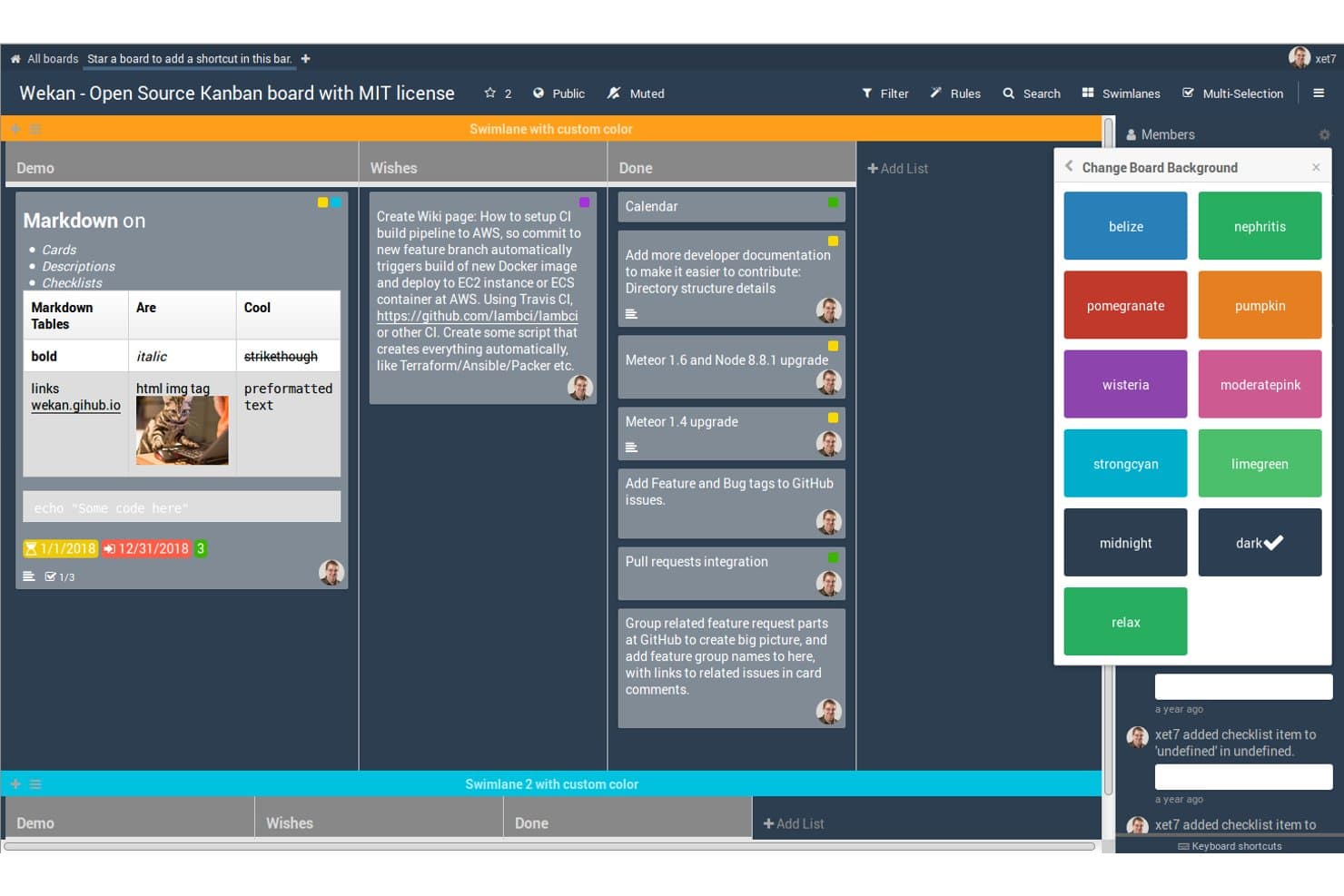
WeKan lets users customize board backgrounds and swimlane colors. WeKan is a self-hosted, MIT-licensed kanban board that offers multiple board views—including Gantt, Calendar, and Table—alongside backlog management, custom fields, role-based access, and enterprise sign-in options like LDAP, OIDC, and SAML.
Who Is WeKan Best For?
WeKan is a strong fit for dev teams and IT admins who need full control over their data and want a self-hosted kanban tool with zero telemetry.
Why I Picked WeKan
WeKan earns its spot on my shortlist because it's the only tool here that ships with zero telemetry baked into its MIT-licensed codebase. I love that you can run it on Docker with your own MongoDB or PostgreSQL backend and know with certainty that no usage data leaves your infrastructure. Its 9 per-board roles, including comment-only access, let you bring in stakeholders without granting edit rights, and the Gantt view gives dev leads a dependency-aware timeline without a separate tool.
WeKan Key Features
- Multiple board views: Switch between Gantt, Calendar, Table, and swimlane views to visualize work across different planning horizons.
- Card dependencies: Link cards so that one task must complete before another begins, giving dev leads a clear picture of blocked work.
- Trigger-based automation: Set up rule-based automations using a trigger-then-action system, with board buttons to run rules on demand.
- Granular import and export: Bring in boards from Trello, Jira, Kanboard, or CSV, and export your data as JSON, Excel, or CSV to avoid lock-in.
WeKan Integrations
Native integrations are not clearly documented. WeKan supports n8n, outgoing webhooks, a REST API, and a Python client for custom integrations.
Pros and Cons
Pros:
- Gantt views connect dependencies to delivery
- MIT licensing enables source-level control
- Zero telemetry supports strict data sovereignty
Cons:
- No undo raises recovery risks
- No dedicated roadmap prioritization framework
Learn more about WeKan: Best for self-hosted project and roadmap control
- Free plan available; 14-day free trial available for Enterprise Cloud and on-premises
- From €5.95/user/month (billed annually)
Visit WebsiteCustomer Rating:4.5/5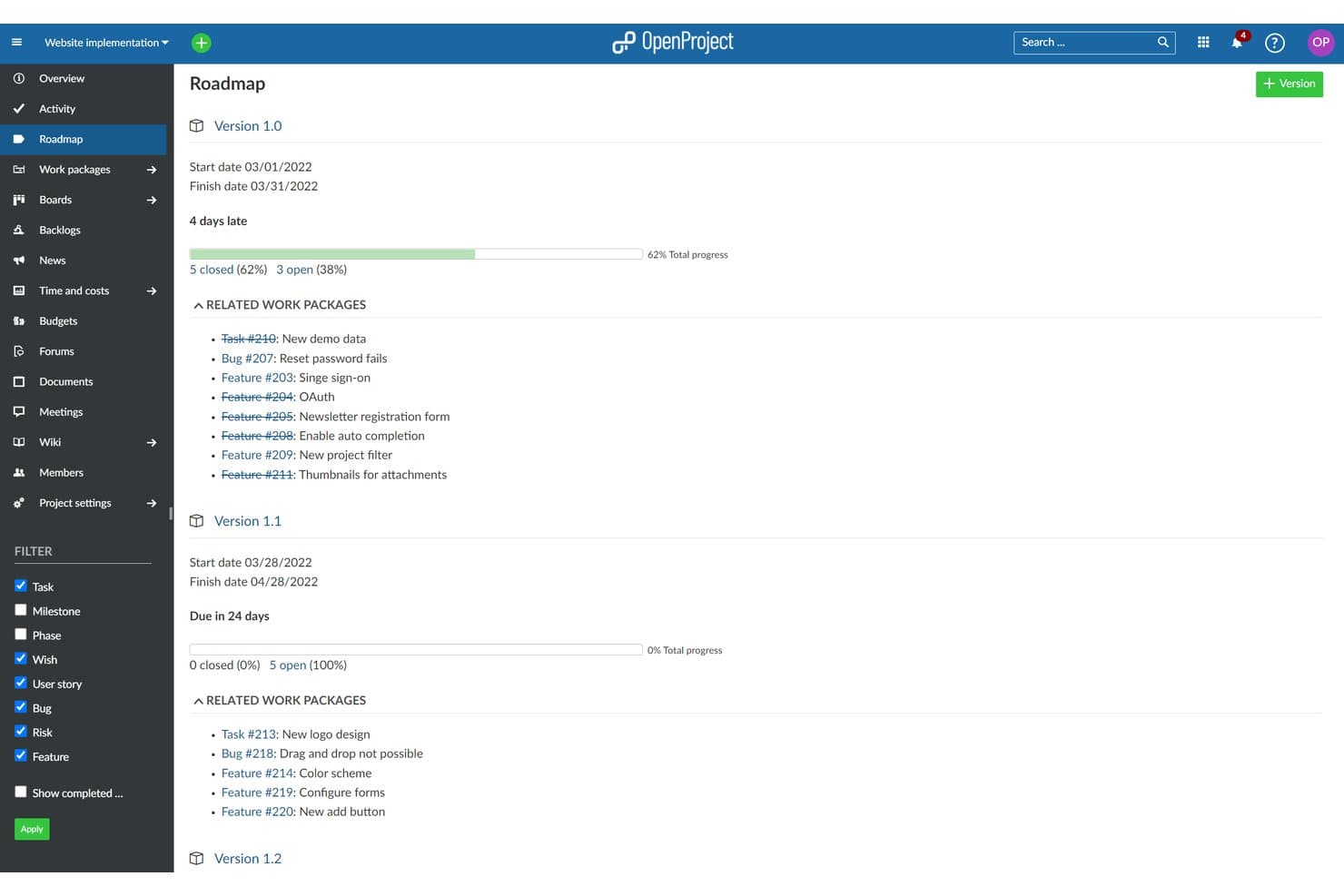
OpenProject visualizes version-based roadmaps with progress and work packages. OpenProject is an open-source project and product management platform built around work packages, Gantt timelines, Scrum and Kanban boards, and self-hosted deployment options including Docker, Kubernetes, and Linux packages.
Who Is OpenProject Best For?
OpenProject is a strong fit for product and engineering teams in regulated industries or public-sector organizations that need full control over where their data lives.
Why I Picked OpenProject
OpenProject earns its spot on my shortlist because it gives teams genuinely full control over their data, down to the server, the deployment method, and the update schedule. I love that you can spin it up via Docker Compose for a small team or scale it across Kubernetes with Helm for a larger org. Its Gantt timeline with baseline comparisons lets you track plan drift over time, and work packages tie roadmap items directly to Scrum backlogs and sprints in one workspace.
OpenProject Key Features
- Work package custom workflows: Configure statuses, transitions, and fields for each work package type to match how your team actually tracks features, bugs, and tasks.
- GitHub and GitLab integration: Link commits, pull requests, and branches directly to work packages so dev activity stays connected to your roadmap items.
- REST API access: Available on the free Community edition, letting you build integrations, automate data exports, and connect OpenProject to your existing toolchain.
- Time and cost tracking: Log hours against individual work packages and monitor budgets across projects without needing a separate tool.
OpenProject Integrations
OpenProject offers native integrations with GitHub, GitLab, and Nextcloud on every edition, OneDrive and SharePoint on Enterprise Professional and above, and XWiki on Enterprise Corporate, plus built-in Git and SVN repositories for on-premises deployments. Its REST API supports custom integrations.
Pros and Cons
Pros:
- Full GPL source enables deep customization
- Roadmaps connect directly to sprint execution
- Self-hosting preserves product data control
Cons:
- No native customer feedback voting portal
- Prioritization requires custom fields and workflows
Learn more about OpenProject: Best for Git-native CI/CD-linked planning
- Free plan available; 30-day free trial
- From $29/user/month (billed annually)
Visit WebsiteCustomer Rating:4.5/5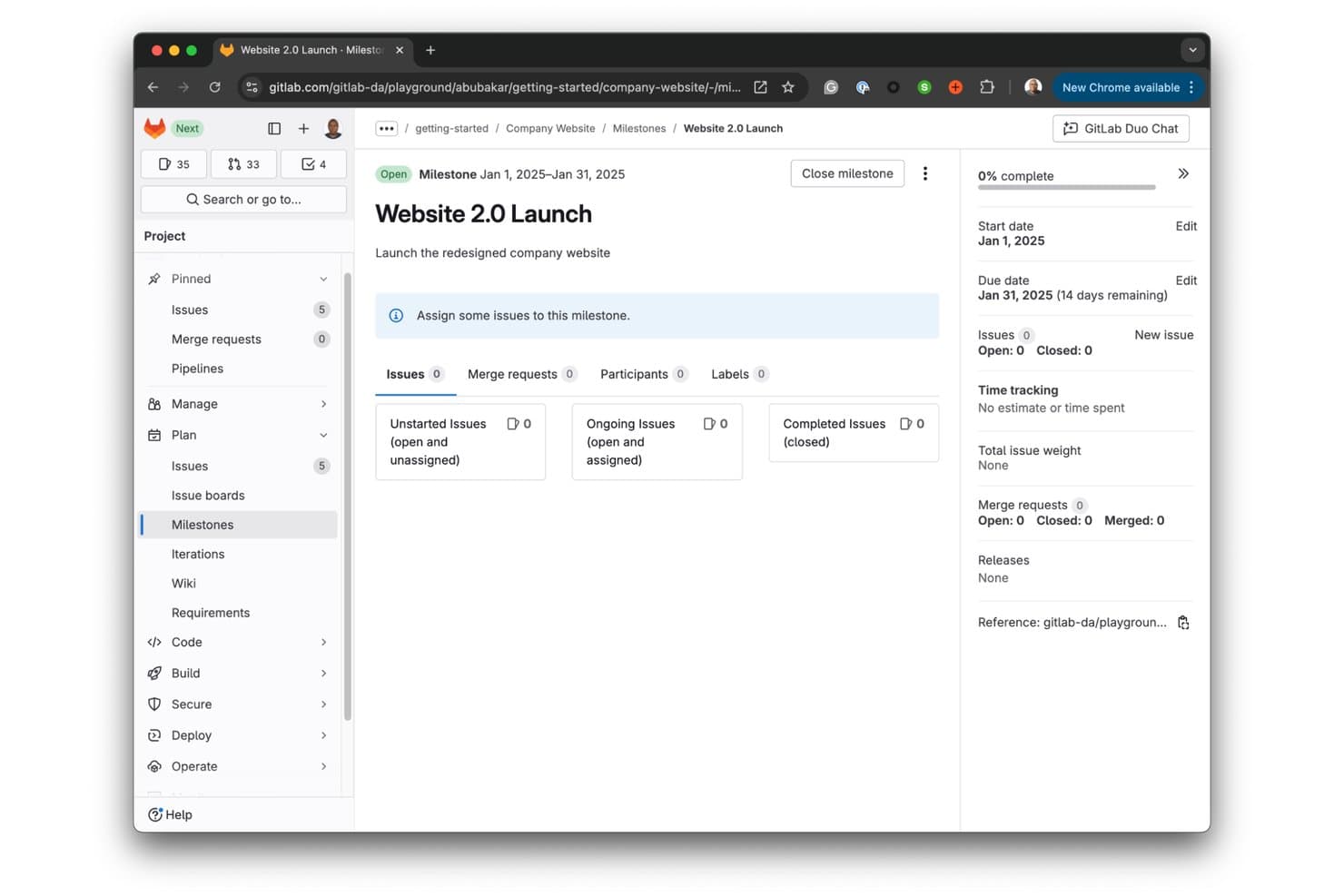
GitLab milestones help teams track project goals with deadlines. GitLab is an open-core DevOps platform that combines Git-based source code management, CI/CD pipelines, issue tracking, and project planning tools in a single self-hostable workspace.
Who Is GitLab Best For?
GitLab is a strong fit for engineering-led teams that want planning, code review, and CI/CD pipelines in one platform without juggling separate tools.
Why I Picked GitLab
GitLab earns its spot on my shortlist because it's the only tool here where your issue board, merge requests, and CI/CD pipelines share the same data model. I love that when a developer closes a merge request, the linked issue updates automatically, so planning and delivery stay in sync without any manual work. For teams that live in Git, that native connection between code and roadmap is genuinely hard to replicate elsewhere.
GitLab Key Features
- MIT-licensed Community Edition: GitLab CE is fully open-source under the MIT Expat license, giving your team complete access to the source code for self-hosting and customization.
- Self-managed deployment options: Install GitLab on your own infrastructure using Linux packages, Docker, or Kubernetes via Helm charts, with no user cap on the Self-Managed Free plan.
- Issue boards with milestone tracking: Kanban-style issue boards let you organize work by label on every tier, with milestone and assignee lists available on Premium and Ultimate.
- Enterprise Agile Planning add-on: A $15/user/month add-on for Ultimate users that extends roadmap and portfolio planning access to non-technical stakeholders with Reporter-level permissions.
GitLab Integrations
GitLab offers native integrations with Jira, Slack, Microsoft Teams, Mattermost, Discord, Google Chat, Asana, Pivotal Tracker, Linear, YouTrack, Jenkins, and GitHub. It also supports REST and GraphQL APIs and webhooks for custom connectivity.
Pros and Cons
Pros:
- Active contributors support ongoing development
- Self-hosting offers complete data control
- MIT-licensed code supports deep customization
Cons:
- External customer feedback needs workarounds
- Roadmaps and epics require paid tiers
Learn more about GitLab: Best Scrum tool
- Free plan + free demo available
- From $49.9/user/year (billed annually)
Visit WebsiteCustomer Rating:4.3/5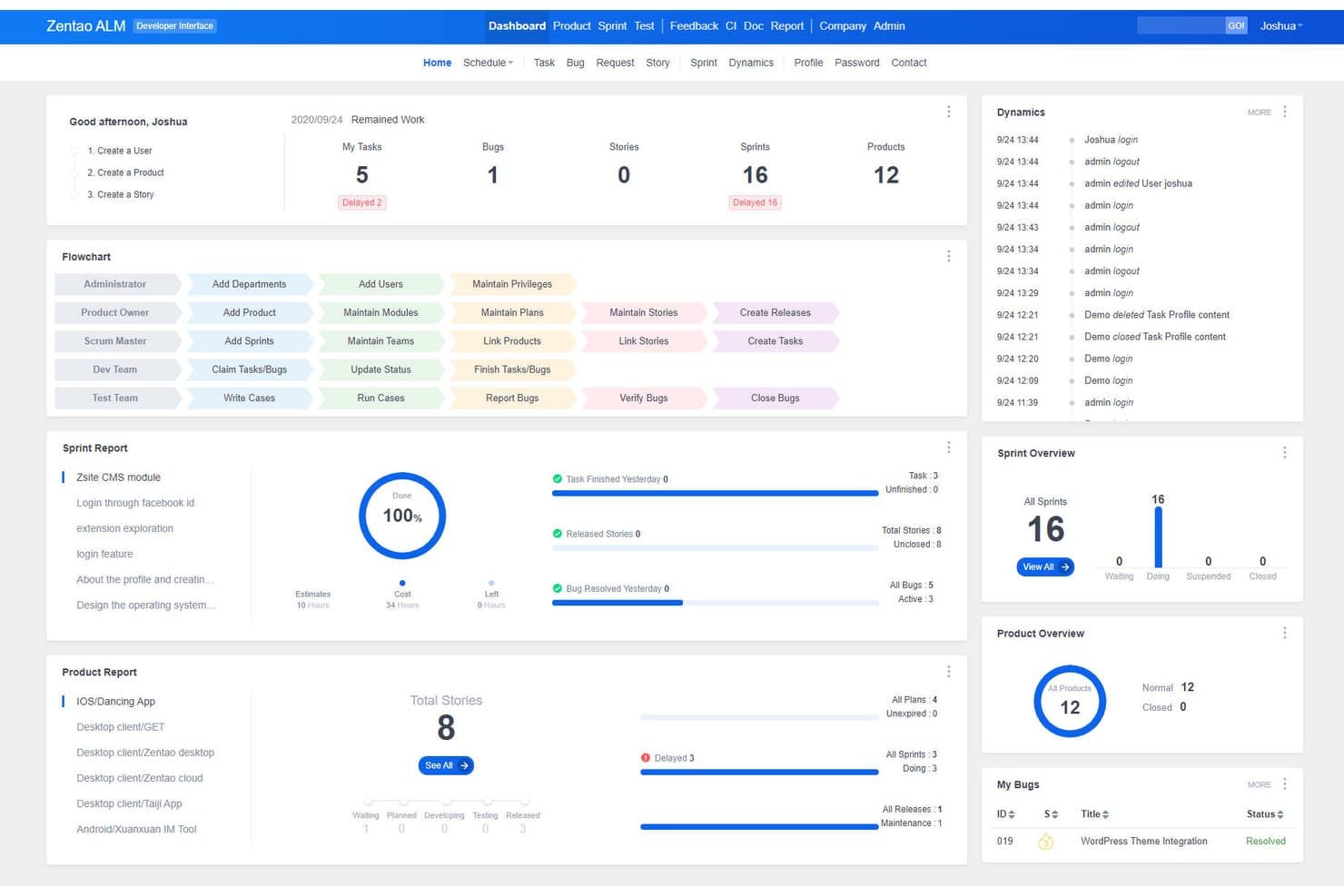
ZenTao centralizes tasks, bugs, sprints, and team workflows in one dashboard. ZenTao is an open-source project management platform that unifies product planning, Scrum and Kanban execution, bug tracking, and QA testing in a single self-hostable workspace.
Who Is ZenTao Best For?
ZenTao is a strong fit for dev-led teams that need product planning, bug tracking, and QA testing in one self-hosted workspace.
Why I Picked ZenTao
ZenTao earns its spot as the best Scrum tool on my shortlist because it treats sprints, stories, and bugs as first-class citizens in one unified workspace. I particularly like how the free tier includes burndown charts, Kanban boards with WIP limits, and full story-to-bug traceability, so nothing slips between planning and QA. Running a sprint review means every story links directly to its test cases and logged defects, without toggling between tools.
ZenTao Key Features
- Feedback-to-story conversion: Collect user feedback directly in the platform and convert it into stories, bugs, or tasks with progress tracking.
- Multi-methodology support: Run Scrum, Kanban, Waterfall, or a hybrid Agile-Waterfall workflow within the same workspace.
- Jira import tool: Migrate projects from Jira Cloud or on-premises using a one-click import with your Jira admin account and API token.
- Four-level hierarchy: Organize work across Program, Product, Project, and Execution levels to connect team delivery to company strategy.
ZenTao Integrations
ZenTao supports built-in Jira Cloud and Jira on-premises imports, plus LDAP login and user import. It also supports Excel import and export for stories, tasks, bugs, and test cases.
Pros and Cons
Pros:
- Multiple Agile and Waterfall workflows
- Unlimited users and projects
- Unified story-to-bug-test traceability
Cons:
- Dense interface slows first-time setup
- ZPL complicates redistribution decisions
Learn more about ZenTao: 10Best for self-hosting with no user seat cap
Plane
- Free plan + 14-day free trial + free demo available
- From $6/user/month (billed annually)
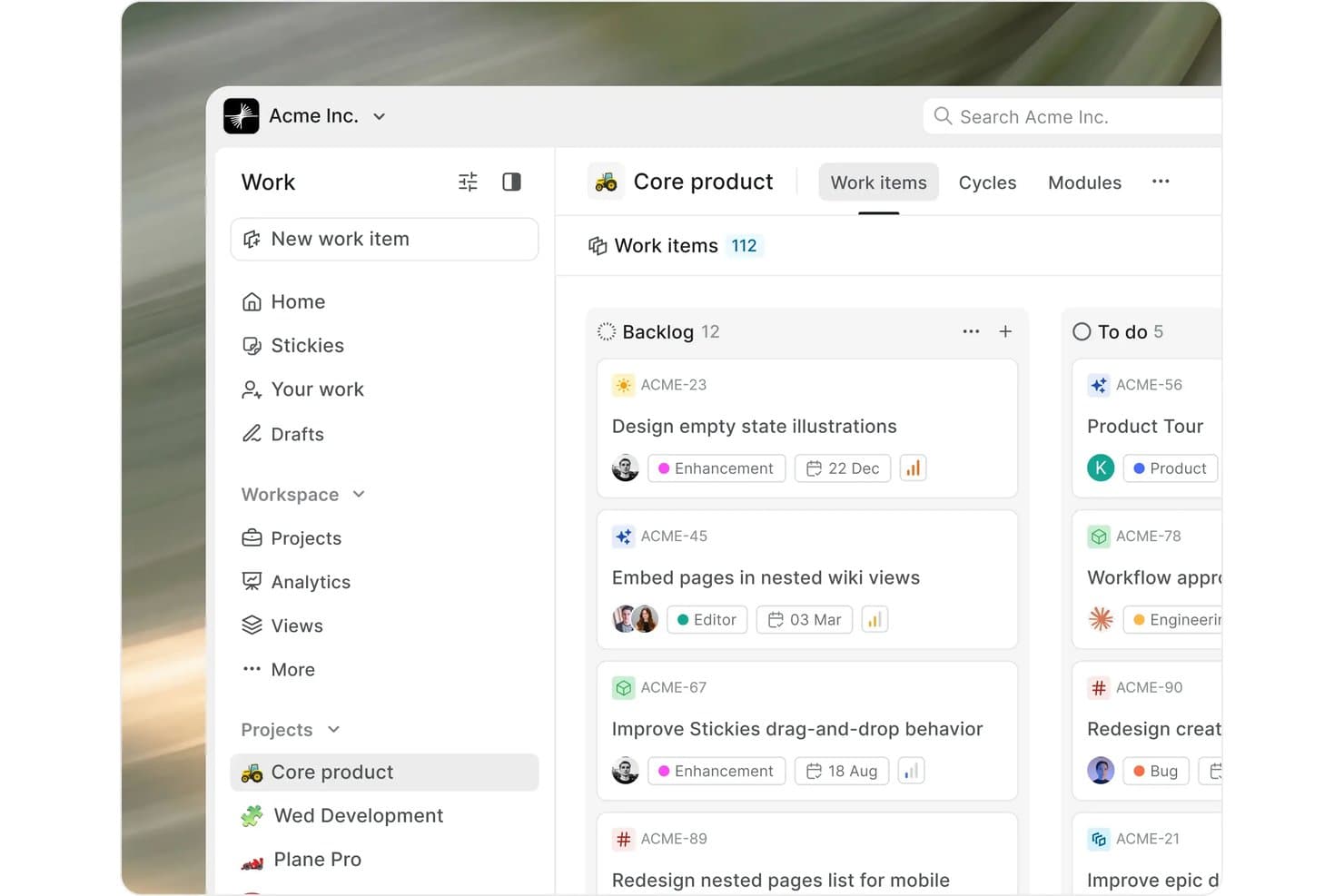
Plane organizes work items in a Kanban board by status and priority. Plane is an open-source product management tool built around work items, cycles, modules, and multi-layout views, with self-hosting options ranging from Docker Compose to air-gapped deployments.
Who Is Plane Best For?
Plane is a strong fit for teams that need to self-host their product management tool without paying per seat, especially startups and engineering-led organizations managing sensitive or proprietary work.
Why I Picked Plane
Plane earns its spot on my shortlist because it's the only tool here that lets you self-host with an unlimited number of users at no cost, which matters most when your team is scaling fast. I love that the Community Edition runs on Docker Compose with a single command, and the air-gapped deployment option means even teams with strict data isolation requirements can get up and running. The "God Mode" admin UI lets you configure SSO, email, and AI models without touching a config file or opening an SSH session.
Plane Key Features
- Cycles with burn-down charts: Time-box work into sprint-style cycles that automatically track progress with burn-down charts as items are completed.
- Multi-layout views: Switch between kanban, list, spreadsheet, gantt, and calendar layouts to visualize the same work items in different ways.
- Intake and triage: Capture incoming requests from teammates through a dedicated intake queue, review them, and convert approved items directly into work items.
- Bring-your-own AI: Connect OpenAI, Anthropic, AWS Bedrock, or an OpenAI-compatible endpoint like a local Ollama instance to power Plane AI on the commercial self-hosted edition.
Plane Integrations
Plane offers seven documented native integrations, including GitHub, GitHub Enterprise Server, GitLab, Slack, GovSlack, Sentry, and Draw.io. REST API, webhooks, and marketplace apps support custom connections, with integrations and Marketplace access starting on Pro.
Pros and Cons
Pros:
- AGPL source enables auditable self-hosting
- Cycles include automatic burn-down tracking
- Air-gapped deployment supports strict data isolation
Cons:
- Self-hosted upgrades require administrator downtime
- Advanced roadmap hierarchy requires paid edition
Learn more about Plane:
Other Open Source Product Management Tool Options
Here are a few more open-source project management software that didn’t make the top list but are worth your consideration
- 11FiderBest for self-hosted feedback voting boards
- 12ClearFlaskBest for feedback-to-roadmap with no licensing fees
- 13TaigaBest for MPL-licensed Scrum and Kanban self-hosting
- 14WP Project ManagerBest for WordPress platforms
- 15VikunjaBest for unlimited-user self-hosted task tracking
- 16HulyBest for all-in-one GitHub-synced self-hosting
- 17LogChimpBest for custom-branded self-hosted feedback boards
- 18FocalboardBest for forking a Trello-style self-hosted board
How I Evaluate Open Source Product Management Software
I split my evaluation into three parts. Core functionality carries the most weight: I look for tools that let you build and adjust visual roadmaps and track issues through a full backlog. Then I check for standout features like native Git linking or Docker-native setup. Finally, I consider community maturity and total cost of self-hosting.
Core Functionality (Table Stakes for This List)
When I'm selecting tools for my list, I score each one on a scale from 0 (does not offer the functionality) to 5 (excels in this area) for each core functionality listed below. I then convert the total into a percentage to help assess each tool's overall fit, with extra weight on any functionalities I've deemed essential.
- Source Code Access (Essential): I check for a public repo under a recognized open-source license, clear contribution docs, and whether core modules stay open or hide behind proprietary gates.
- Roadmapping & Prioritization (Essential): Tools earn higher marks when they offer visual timelines, kanban views, and scoring frameworks like RICE or weighted prioritization baked into the interface.
- Backlog & Issue Tracking: I look for structured backlogs with custom statuses, tagging, and the ability to link items to sprints or roadmap goals rather than flat to-do lists.
- Self-Hosting Deployment: Docker Compose or Helm chart support matters here. I evaluate how well-documented the setup is and whether upgrade paths are maintained between releases.
- Collaboration & Feedback Capture: Teams need threaded comments on specific items, plus a way for external stakeholders to submit and vote on requests without needing full user accounts.
- Community & Contributor Ecosystem: Active commit history, a visible release cadence, and community channels like Discord or GitHub Discussions all signal a project you can rely on long-term.
Once I have a list of tools that meet the criteria, I consider what sets each platform apart.
Differentiating Factors (What Sets Vendors Apart)
Here's how I compare and contrast different vendors:
Standout Features
I check whether a tool offers native Git linking so commits and pull requests automatically move issues across workflow stages. Docker and Helm chart support also matters because a clean one-command deploy saves hours of DevOps setup for small teams. Beyond infrastructure, I look for open API and webhook access that lets you script custom automations no closed SaaS tool can match.
Beyond Features
I evaluate data export formats closely because teams that adopt an open-source tool today may need to migrate tomorrow. CSV and API-based exports protect you from lock-in if a project stalls or your needs outgrow it. Self-hosting also shifts security responsibility to your team, so I check whether a project publishes security advisories and maintains a clear upgrade path between releases. For teams in regulated industries, that same self-hosted setup can satisfy data-residency requirements that rule out most SaaS options entirely.
Pricing
Many open source tools are free to use but that doesn't mean we expect them to be feature-lite. Additionally, I'll be checking if paid open-source product management software offers enough additional functionality to justify the price.
Open Source Product Management Tools FAQs
Find answers to common questions other people ask about this topic.
What is the best open source product management software for startups?
Startups will most likely benefit from free product management software to start and then they can scale up as needed. Per our list, the following have free or freemium plans available: Apache OFBiz, MATTR Enterprise, Open vSwitch, AtroDAM, OpenPIM, and the Akeneo PIM Community Edition.
What key features can I find in open-source product management software?
- Easy product roadmaps
- User-friendly collaboration tools
- Gantt charts and/or Kanban boards
- Milestone tracking for long-term goals and release planning — check out the best free milestone tracking software if that’s a key feature you’re missing
- Prioritization assistance (idea boards, voting, feedback, backlog analysis)
- Project planning templates
- Iteration management and version control (Git or otherwise)
- BONUS: SaaS time tracking, particularly for complex software development
Are there any open source roadmapping tools available?
Many of the software solutions above will have some sort of roadmapping support, as it’s a key part of the product development lifecycle. However, if you are looking for something more specific, you can try something like OpenProject. Additionally, you can check out some interactive product roadmapping tools (most are not open source, though).