

Bir ürün yöneticisi olarak her gün kendine özgü zorluklarla karşılaşırsınız. Paydaşların taleplerini dengelemek, ekibinizin uyum içinde çalışmasını sağlamak ve projelerin planlandığı gibi ilerlemesini güvence altına almak bunaltıcı olabilir. Ekibinizin ihtiyaçlarına daha uygun çözümler bulmak için Productboard alternatiflerini değerlendiriyor olabilirsiniz.
Ürün yönetimi alanında yıllar geçirdim; yazılımları bağımsız olarak test edip incelemeler yaptım. İş akışınızı gerçekten destekleyen araçlara sahip olmanın ne kadar önemli olduğunu biliyorum. Deneyimlerime göre doğru yazılımı bulmak büyük fark yaratabilir.
Bu makalede, Productboard için en iyi alternatiflere ilişkin ilk tercihlerimi paylaşacağım. Her seçeneğin tarafsız ve kapsamlı bir incelemesini bulacak, bu araçların belirli iş zorluklarınızın üstesinden gelmenize nasıl yardımcı olabileceğine odaklanacaksınız. Gelin ekibiniz için en uygun seçeneği birlikte bulalım.
Productboard Nedir?
Productboard, ekiplerin ürünleri etkili bir şekilde önceliklendirmesine, planlamasına ve geliştirmesine yardımcı olan bir ürün yönetimi merkezidir. İster yol haritası yazılımı arayan bir girişim, ister ürün yönetimi platformunu geliştiren yerleşik bir şirket olun, ürün geri bildirimlerini toplamak için kullanılan bileşeni de dâhil olmak üzere Productboard araçları, ekiplerin müşteri ihtiyaçlarıyla bağlantıda kalmasına yardımcı olabilir. Önceliklendirme çerçeveleri ve yol haritası oluşturma gibi özellikler, kullanıcı ihtiyaçlarını takip etmenize, sırada ne geliştireceğinize karar vermenize ve stratejileri paydaşlara verimli bir şekilde aktarmanıza yardımcı olur. Genel olarak Productboard, ürününüzün yaşam döngüsünü yönetmek için yapılandırılmış bir yaklaşım sunarak ekibinizin iş hedeflerine odaklanmasını ve bu hedeflerle uyumlu kalmasını sağlar.
Why Trust Our Software Recommendations
6,700+
Reviews
20
Industry experts
16+
Evaluation factors
14
Years
Our team has been testing and reviewing software since 2012. As product managers ourselves, we know how difficult—and important—it is to choose the right software.
For this guide, we evaluated tools using hands-on testing and independent research, scoring tools using our selection criteria.
Our reviews reflect our human editorial judgment, not a sales pitch.
Expert reviewers:
- Andrew LumbySenior TPM
- Cristiano ValimSenior UI/UX Lead


Productboard Alternatifleri Karşılaştırma Tablosu
En iyi Productboard alternatiflerimin fiyatlandırma ayrıntılarını karşılaştırmak için bu karşılaştırma tablosunu kullanın.
Score legend (out of 5)
- Excellent4.5–5
- Good4–4.4
- Average3–3.9
- Below average2–2.9
- Poor1–1.9
Sorted by: Default
| Tool | Starting Price | Website | |||||||
|---|---|---|---|---|---|---|---|---|---|
Best for AI-driven customer feedback analysis | Not rated | 5 | 5 | Not rated | 3 | 2 | 2 | Pricing upon request Free demo available | Website |
Best for Jira-based public roadmaps | 2.5 out of 5 | 3 | 1 | 4 | 3 | 1 | 3 | $1.10/user/month Free plan + 30-day trial + demo available | Website |
Best for revenue-weighted feedback prioritization | 4.0 out of 5 | 5 | 4 | 3 | 4 | 4 | 4 | Pricing upon request 30-day free trial + free demo available | Website |
Best for strategy-to-roadmap OKR alignment | 4.2 out of 5 | 4 | 4 | 5 | 4 | 4 | 4 | $59/user/month 30-day free trial + free demo available | Website |
Best for product backlog management | 3.8 out of 5 | 4 | 4 | 3 | 4 | 4 | 4 | $24/user/month 7-day free trial + free demo available | Website |
Best for AI-driven portfolio roadmapping | 4.3 out of 5 | 4 | 5 | 5 | 4 | 5 | 3 | Pricing upon request Free demo available | Website |
Best for customizable prioritization frameworks | 4.3 out of 5 | 4 | 4 | 5 | 4 | 5 | 4 | Pricing upon request Free demo available | Website |
Best for product discovery-driven roadmaps | 4.2 out of 5 | 4 | 3 | 5 | 4 | 5 | 4 | $24/user/month 14-day free trial + free demo available | Website |
Best for customer feedback collection via AI | 3.8 out of 5 | 5 | 4 | 3 | 4 | 3 | 4 | $79/month Free plan + free trial + free demo available | Website |
Best for closing the feedback loop with customers | 4.0 out of 5 | 5 | 4 | 3 | 4 | 4 | 4 | $29/user/month Free plan + 10-day trial + demo available | Website |


2020'den beri ürün yönetimi yazılımlarını test ediyor ve inceliyoruz. Biz de ürün yöneticileri olarak yazılım seçerken doğru kararı vermenin ne kadar kritik ve zor olduğunu biliyoruz. Okuyucularımızın daha iyi yazılım satın alma kararları vermesine yardımcı olmak için kapsamlı araştırmalara yatırım yapıyoruz.
Farklı ürün yönetimi kullanım senaryoları için 2.000'den fazla aracı test ettik ve 1.000'den fazla kapsamlı yazılım incelemesi hazırladık. Şeffaflığımızı nasıl koruduğumuzu öğrenin ve yazılım inceleme metodolojimize göz atın.
En İyi Productboard Alternatifleri İncelemeleri
Aşağıda kısa listeme giren en iyi Productboard alternatiflerine ilişkin ayrıntılı özetlerimi bulabilirsiniz. İncelemelerim, sizin için en uygun aracı bulmanıza yardımcı olmak amacıyla her aracın temel özelliklerine, avantajlarına & dezavantajlarına, entegrasyonlarına ve ideal kullanım alanlarına ayrıntılı bir bakış sunar.
 Best for AI-driven customer feedback analysis
- Free demo available
- Pricing upon request
Visit WebsiteCustomer Rating:4.8/5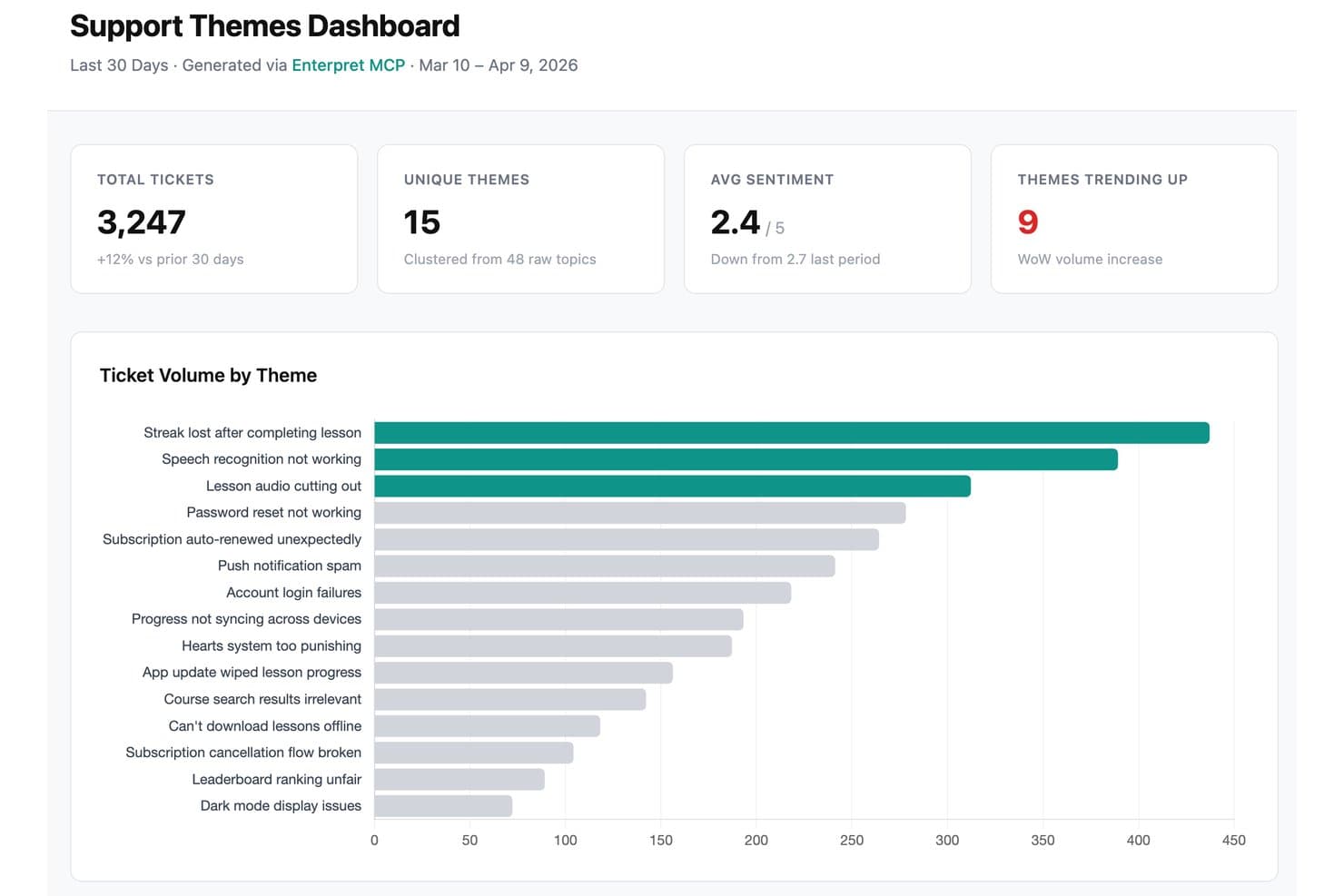
Enterpret offers a Support Themes Dashboard that clusters raw support tickets into themes, displaying ticket volume, sentiment trends, and trending issues. Enterpret is a customer intelligence platform that pulls feedback from 50+ sources and uses AI to automatically theme, analyze, and surface insights—making it a strong fit for product teams that need to make sense of high-volume feedback without manual tagging.
Who Is Enterpret Best For?
Enterpret is a strong fit for mid-market and enterprise product teams managing high volumes of customer feedback across many channels who need AI to do the heavy lifting on analysis.
Why I Picked Enterpret
I picked Enterpret as one of the best because its AI does the analysis work that most feedback tools leave to you. Its Adaptive Taxonomy automatically sorts incoming feedback into a three-level theme hierarchy, so there's no manual tagging backlog to manage. I especially like the Wisdom AI assistant, which lets you ask plain-English questions and get cited answers pulled directly from source feedback, making it easy to put real numbers behind product decisions in planning meetings.
Enterpret Key Features
- Customer Context Graph: Links feedback records to accounts, users, and opportunities so you can rank issues by revenue impact, churn risk, or NPS rather than mention count.
- Close the Loop workflows: Monitors Jira and Linear for resolved tickets, drafts personalized follow-up messages for affected users, and tracks sentiment changes after outreach.
- AI agents: Automated agents flag volume spikes, escalate high-risk feedback from strategic accounts, and deliver personalized trend digests to relevant team members.
- 50+ source integrations: Pulls feedback from support tools, call recordings, surveys, reviews, social platforms, CRMs, and data warehouses into a single unified view.
Enterpret Integrations
Enterpret offers native integrations across 50+ sources, including Jira Software Cloud, Linear, Salesforce Sales Cloud, HubSpot, Zendesk, Intercom, Slack, and Snowflake. It also supports APIs, webhooks, CSV uploads, and Zapier for custom connectivity.
Pros and Cons
Pros:
- Ranks customer issues by business impact
- Wisdom answers include citations to source feedback
- Automates feedback themes without manual tagging
Cons:
- No customer-facing portal for request voting
- No visual roadmap for planning work
Learn more about Enterpret: Best for Jira-based public roadmaps
- Free plan + 30-day trial + demo available
- From $1.10/user/month
Visit WebsiteCustomer Rating:5/5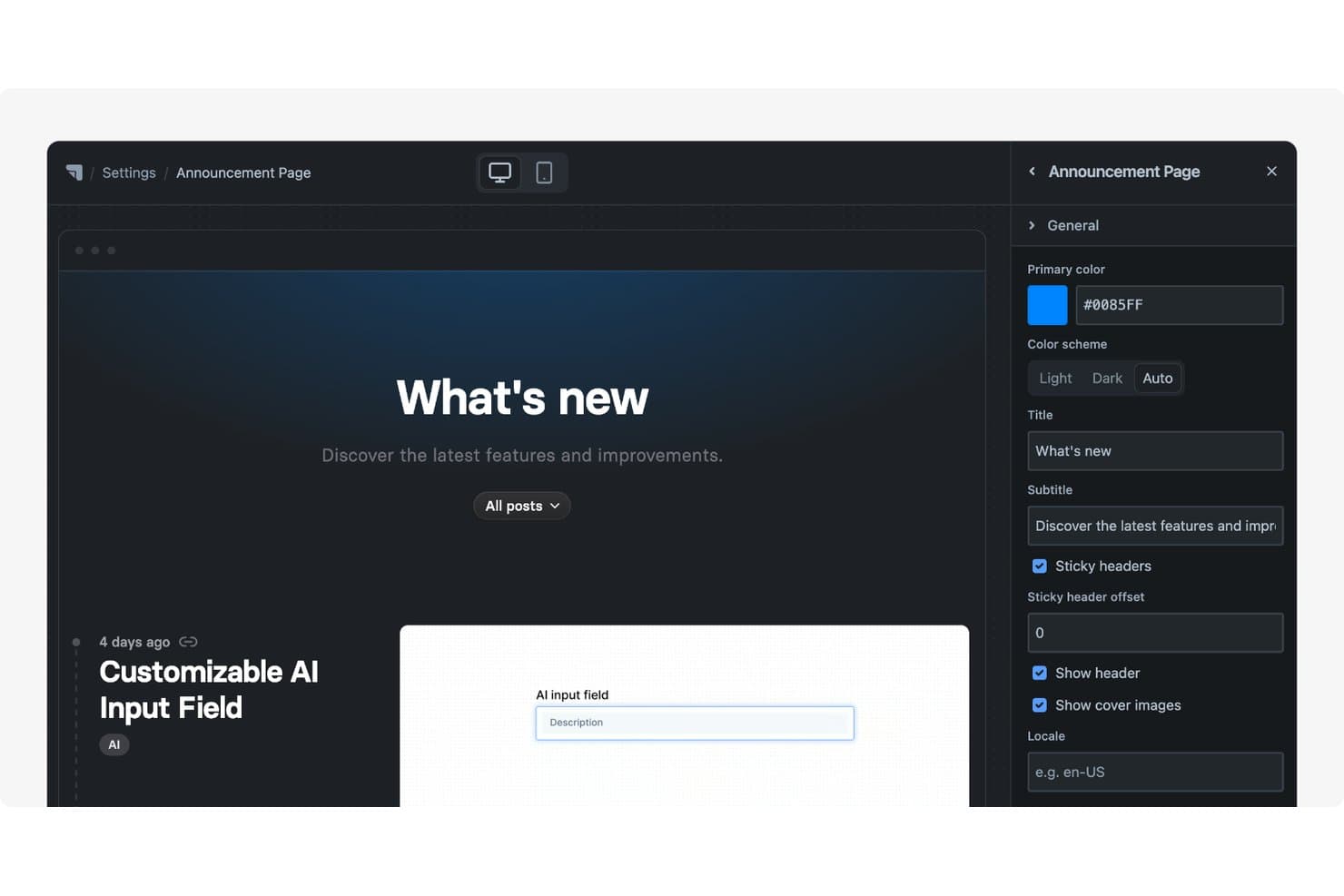
Released offers a customizable Announcement Page with editable title, subtitle, color scheme, and header settings via a side panel. Released Hub is a Jira-native product management app that lets teams publish customer-facing roadmaps, collect feedback, and generate AI-written release notes—all without leaving the Atlassian ecosystem or maintaining a separate database.
Who Is Released Best For?
Released is a great fit for product teams already running on Jira Cloud who want to publish customer-facing roadmaps and release notes without adopting a separate tool.
Why I Picked Released
I picked Released as one of the best because it's the only tool I've found that publishes Jira data directly as a customer-facing roadmap, with no second database to maintain. I love that you can create audience-specific portals, so your customers see a "Now / Next / Later" board while leadership gets a timeline view, all from the same Jira source. The feedback inbox ties it together, letting customers submit requests and receive replies without ever needing a Jira license.
Released Key Features
- AI release notes generator: Drafts release notes from filtered Jira work using custom writing instructions and reusable templates, then publishes them to a branded changelog.
- Feedback inbox: Centralizes customer submissions from your portal, forms, and Slack into one triage view with statuses, internal notes, and threaded replies.
- Embeddable feedback forms: Lets you collect structured feedback directly from your website or product without requiring customers to have a Jira license.
- JPD Insights integration: Automatically converts portal feedback into Jira Product Discovery Insights, linking customer input directly to discovery items in your existing workflow.
Released Integrations
Released Hub has seven documented integrations, including Jira Software, Jira Product Discovery, Confluence, Slack, Webflow, Framer, and Refined. It has no API or webhooks, limiting custom integrations.
Pros and Cons
Pros:
- Customer feedback supports replies and wishlists
- Audience-specific board and timeline views
- Jira-native roadmaps avoid duplicate data entry
Cons:
- No portfolio roadmaps or OKR alignment
- No built-in prioritization frameworks
Learn more about Released: Best for revenue-weighted feedback prioritization
- 30-day free trial + free demo available
- Pricing upon request
Visit WebsiteCustomer Rating:4.3/5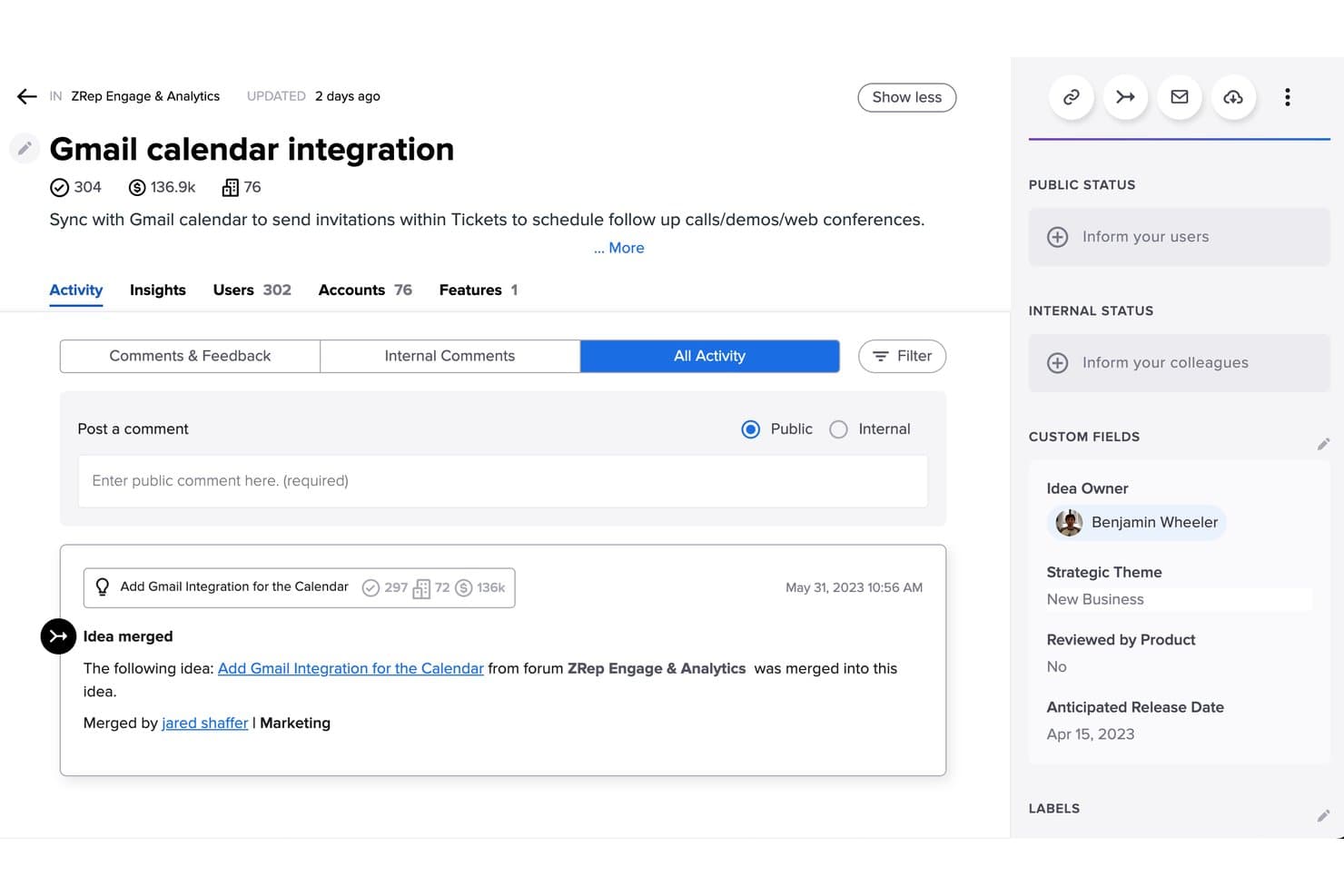
Uservoice merges duplicate ideas to consolidate user feedback efficiently. UserVoice is a customer intelligence platform built for product teams that need to centralize feedback from multiple channels, tie it to real customer and revenue data, and turn it into prioritized product decisions.
Who Is UserVoice Best For?
UserVoice fits product teams at mid-market to enterprise companies that need to tie customer feedback directly to revenue data before making prioritization calls.
Why I Picked UserVoice
I picked UserVoice as one of the best because it's the only tool here that ties feedback directly to revenue data before you make a prioritization call. When an idea comes in, UserVoice attaches ARR exposure, open opportunities, and account-level context to it, so you're scoring against actual business impact, not just vote counts. The Impact Insights grid rolls all of that up per idea, letting you see which requests represent the most revenue at risk.
UserVoice Key Features
- AI-powered label suggestions: An AI beta reviews incoming feedback and recommends labels based on your existing taxonomy, flagging patterns you haven't grouped yet.
- Customer-facing feedback portal: A branded portal lets customers submit ideas, vote, comment, and subscribe to status updates directly on your domain.
- Multi-channel feedback capture: You can collect feedback via a Chrome extension, Slack, CSV import, and in-app widgets, with source and account context attached to every record.
- Automatic supporter notifications: When a feature's status changes, UserVoice notifies every customer who supported a linked idea and logs who was contacted in an audit trail.
UserVoice Integrations
UserVoice offers native integrations with Salesforce, Zendesk, Jira, Azure DevOps, Slack, Microsoft Teams, Gainsight, FullStory, Dragonboat, and Skyvia, plus an Admin API for custom integrations. Jira integration is available on Premium and has limited status syncing.
Pros and Cons
Pros:
- AI groups themes across customer feedback
- Portal closes the loop with supporter updates
- Revenue-weighted feedback beats vote counts
Cons:
- No native OKR alignment or Productboard importer
- Roadmaps lack timeline and Gantt views
Learn more about Uservoice: 4Best for strategy-to-roadmap OKR alignment
Aha!
- 30-day free trial + free demo available
- From $59/user/month (billed annually)
Visit WebsiteCustomer Rating:4.4/5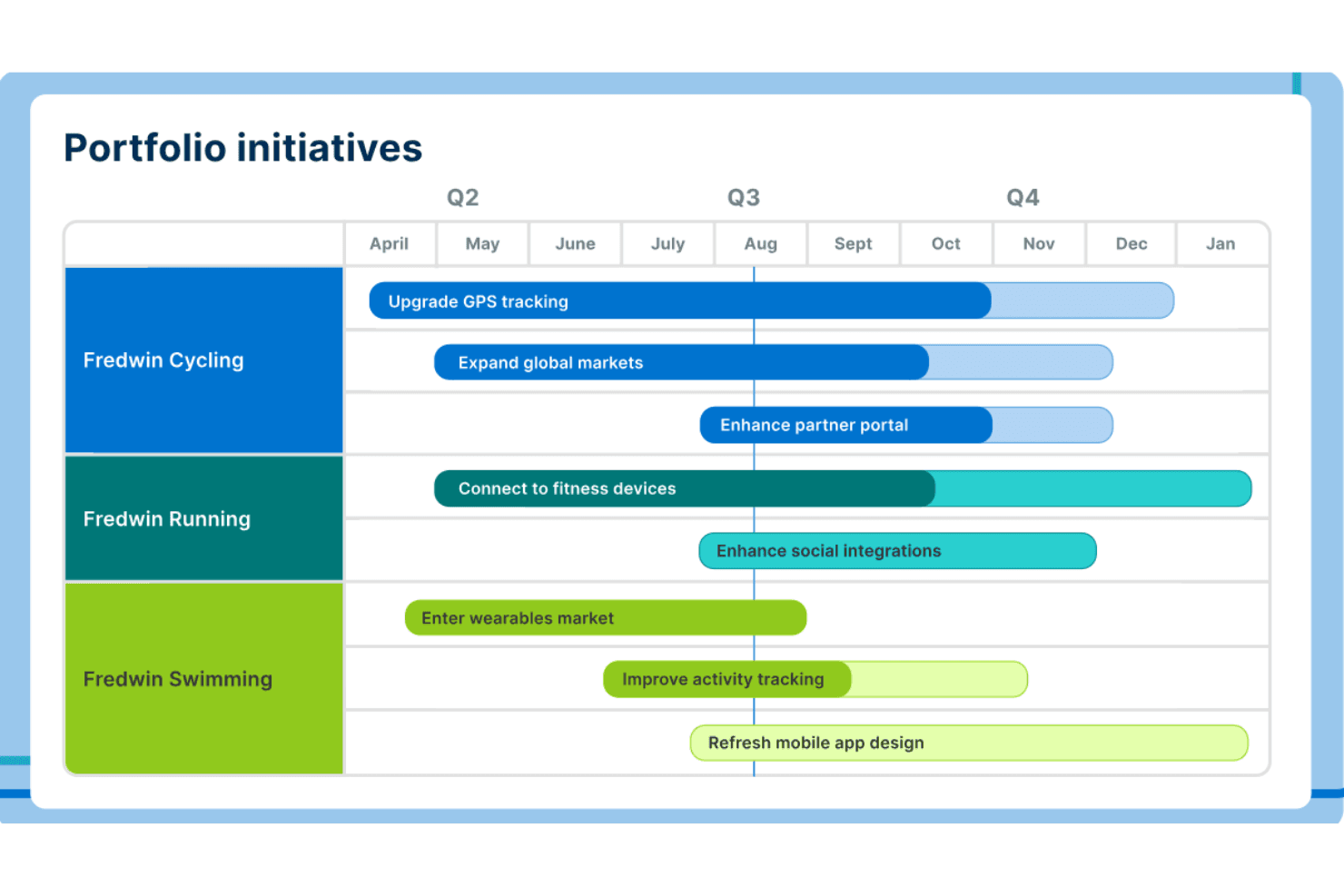
Aha! lets users visualize portfolio initiatives across products on a timeline. Aha! is a product management suite built for product managers and heads of product who need to connect strategy, roadmaps, and customer feedback in one place—without jumping between disconnected tools.
Who Is Aha! Best For?
Aha! is a strong fit for product teams managing multiple product lines who need a clear, traceable link between company strategy and what actually ships.
Why I Picked Aha!
I've included Aha! in my top picks because no other tool on this list traces strategy to delivery as tightly. Goals and initiatives connect directly to epics and features, and the portfolio roadmap rolls all of that up across every product line in one view. What seals it for me is the two-way Jira field mapping: when engineering updates a status in Jira, Aha! reflects it instantly, so the roadmap never drifts from what's actually being built.
Aha! Key Features
- Ideas portal: Run unlimited branded portals where customers can submit, vote on, and comment on ideas, with automatic status updates when work ships.
- Product Value Scorecard: Score features and epics using a customizable formula that factors in population, need, strategy, effort, and confidence.
- AI idea exploration: Automatically group submitted ideas into suggested themes on a visual chart, analyzing up to 1,000 ideas per run.
- Workspace hierarchy: Organize multiple products under workspace lines, with portfolio-level rollups that give leadership a single view across every product.
Aha! Integrations
Aha! lists 65+ integrations across its suite, including Jira, Azure DevOps, GitHub, Slack, Salesforce, HubSpot, Zendesk, Figma, Confluence, and Microsoft Teams. Salesforce, HubSpot, and Zendesk require Ideas Advanced; a REST API and Zapier support custom connectivity.
Pros and Cons
Pros:
- Rolls multiple product lines into portfolio roadmaps
- Syncs shipped features back to idea portals
- Links strategy directly to roadmap delivery
Cons:
- Productboard migration relies on manual CSV imports
- Complex setup can burden smaller teams
Learn more about Aha!: Best for product backlog management
- 7-day free trial + free demo available
- From $24/user/month (billed annually)
Visit WebsiteCustomer Rating:4.2/5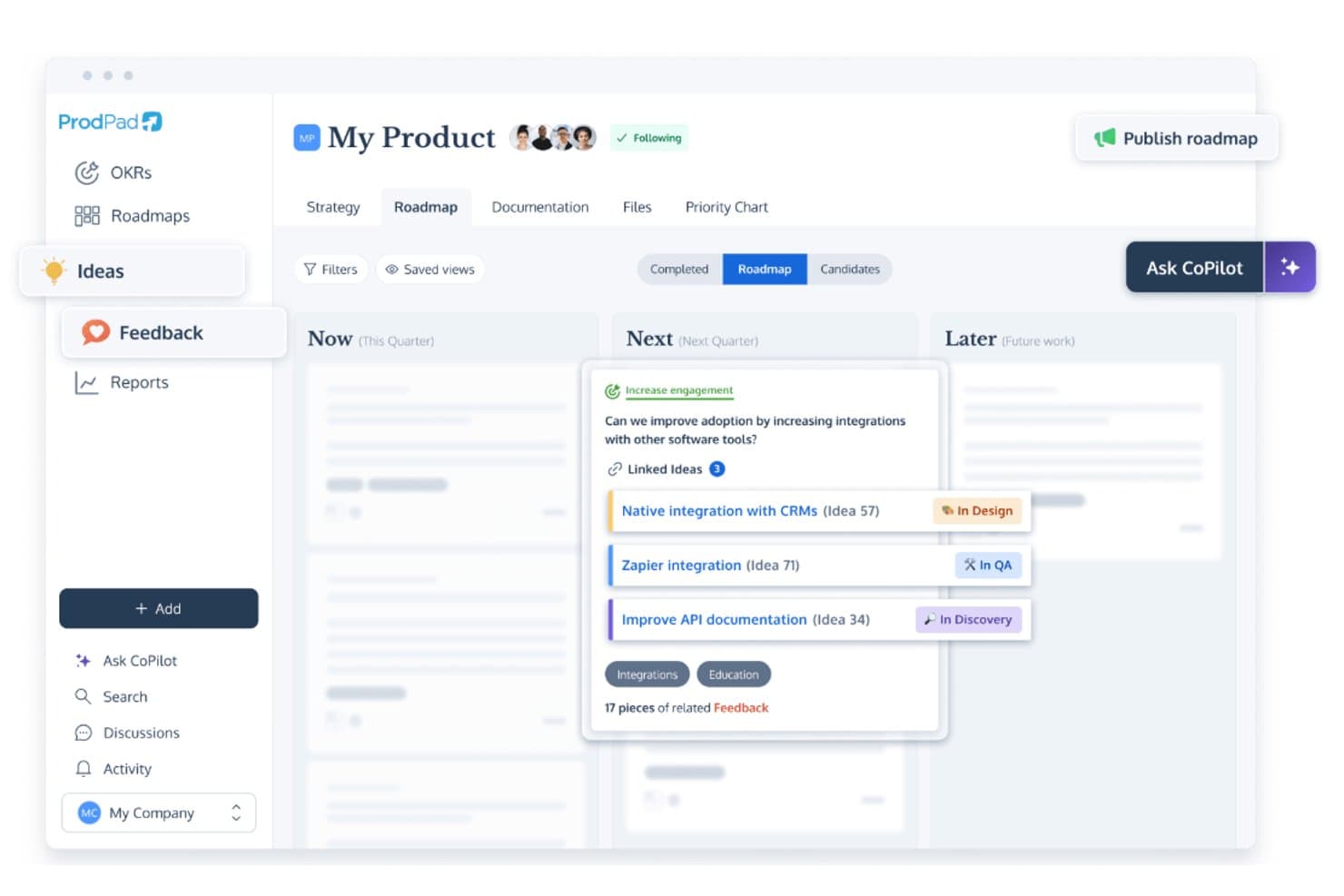
ProdPad links roadmap ideas to feedback and tracks development status. ProdPad is a product management platform built around discovery and strategy, connecting customer feedback, ideas, and roadmaps in one place for product managers who want to make prioritization decisions grounded in real evidence.
Who Is ProdPad Best For?
ProdPad is a strong fit for product managers who want a structured, methodology-driven workspace that connects strategy, discovery, and backlog in one place.
Why I Picked ProdPad
I picked ProdPad as one of the best because its backlog management isn't just a list, it's a structured discovery layer where every idea links directly to the customer feedback that inspired it. I love how the Idea Canvas turns a raw request into a spec with built-in prompts, and how AI automatically surfaces related feedback and flags duplicates so your backlog stays clean. When an idea progresses through a workflow stage, automations notify the right people and close the loop with customers, without any manual follow-up.
ProdPad Key Features
- Now-Next-Later roadmap sharing: Create unlimited custom roadmap views with shareable links so stakeholders can see the right version without needing a login.
- OKR tracking with key results: Link initiatives directly to objectives, track baselines and targets against actual results, and use AI to generate key results from an objective.
- Two-way Jira sync: Map custom fields between ProdPad and Jira, push initiatives and ideas to epics and stories, and sync statuses back without needing Jira admin rights.
- Customer feedback portal: Host a branded portal on your own domain where customers can react to ideas and submit feedback directly into your ProdPad workspace.
ProdPad Integrations
ProdPad offers native integrations with Jira, Azure DevOps, Salesforce, Intercom, Slack, Microsoft Teams, Linear, GitHub, and UserVoice. It also supports API and webhook connections, MCP Server, and Zapier.
Pros and Cons
Pros:
- OKRs connect initiatives to measurable outcomes
- Ideas retain customer evidence through prioritization
- AI links feedback and flags duplicate ideas
Cons:
- Portfolio visuals can become muddy at scale
- Roadmaps lack timeline and Gantt views
Learn more about ProdPad: Best for AI-driven portfolio roadmapping
- Free demo available
- Pricing upon request
Visit WebsiteCustomer Rating:4.8/5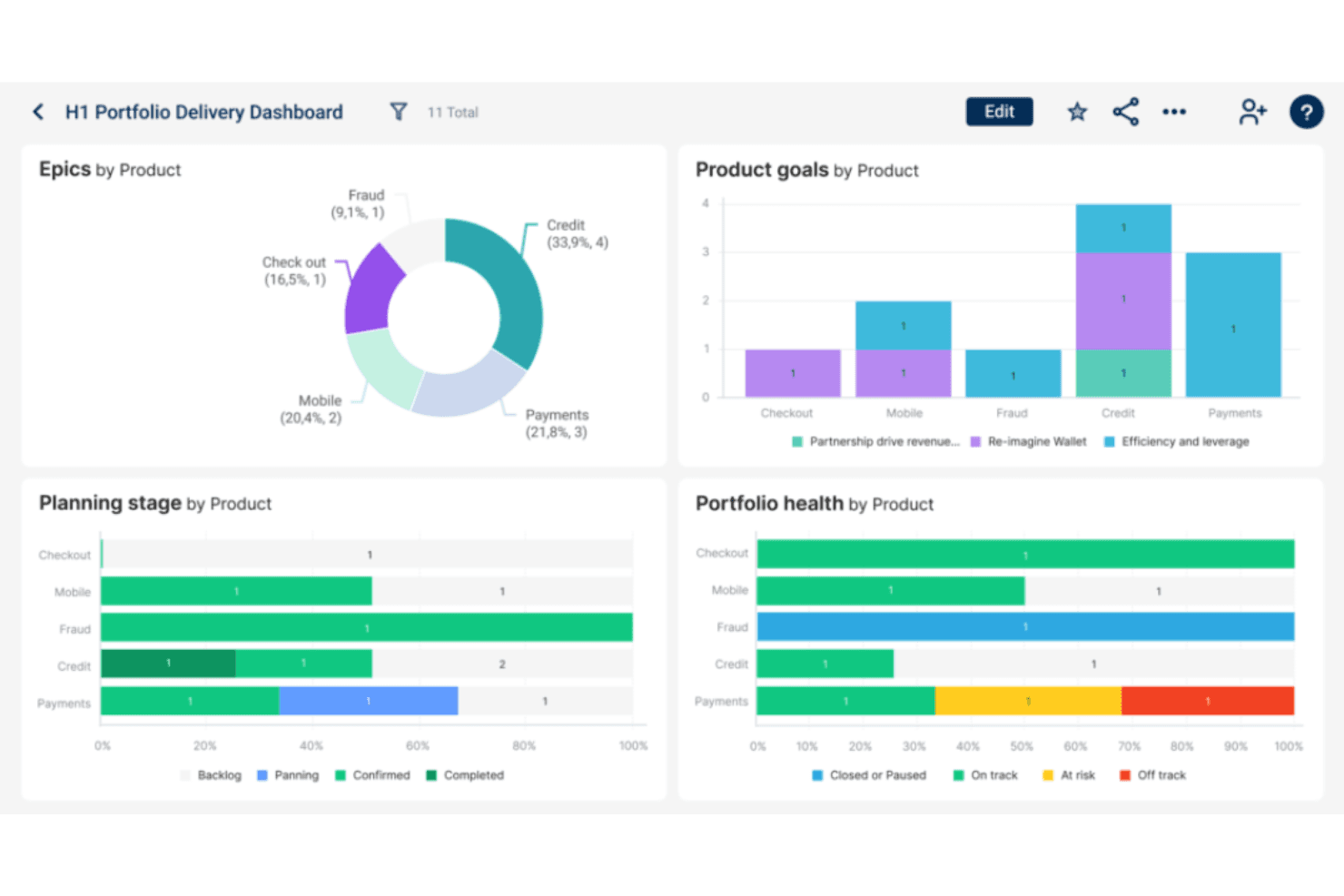
Dragonboat visualizes portfolio health and epic progress by product. Dragonboat is an AI-powered product portfolio platform that connects strategy, customer feedback, and roadmapping in one place—making it a strong fit for product leaders and operations teams managing complex, multi-team environments.
Who Is Dragonboat Best For?
Dragonboat is a strong fit for product operations leads and heads of product managing multi-team portfolios who need strategy, prioritization, and delivery connected in one platform.
Why I Picked Dragonboat
I picked Dragonboat as one of the best because it's the only tool on my list that treats AI-driven portfolio roadmapping as a core function rather than a bolt-on. I especially like its Thematic Insight Analyzer, which surfaces patterns across feedback from Salesforce, Zendesk, and Slack and connects them directly to roadmap items. Its AI Scenario Planner then lets you model trade-offs across your full portfolio before committing to a plan.
Dragonboat Key Features
- OKR alignment: The Strategy app connects multi-level OKRs directly to roadmap items, so you can track targets versus actuals across your full portfolio.
- Two-way Jira and ADO sync: Dragonboat maps custom fields and hierarchy levels across multiple Jira and Azure DevOps instances without requiring engineering changes.
- Allocate-and-prioritize method: Teams set target resource allocations, rank items within each group, and compare planned allocation against actual to surface trade-offs.
- Free requestor and read-only seats: Up to 100 stakeholder users can submit requests, vote, comment, and view roadmap updates at no extra cost on the Essential plan.
Dragonboat Integrations
Dragonboat offers 200+ integrations, including two-way Jira and Azure DevOps, Slack, Microsoft Teams, Zendesk, Salesforce, UserVoice, Pendo Listen, ServiceNow, and Aha! Ideas. REST APIs and an MCP server support custom connections.
Pros and Cons
Pros:
- Multiple scoring models support explicit trade-offs
- Portfolio-wide OKRs tie strategy to delivery
- AI connects feedback themes to portfolio decisions
Cons:
- Public customer voting portal remains unconfirmed
- Setup can feel heavy for smaller teams
Learn more about Dragonboat: Best for customizable prioritization frameworks
- Free demo available
- Pricing upon request
Visit WebsiteCustomer Rating:4.4/5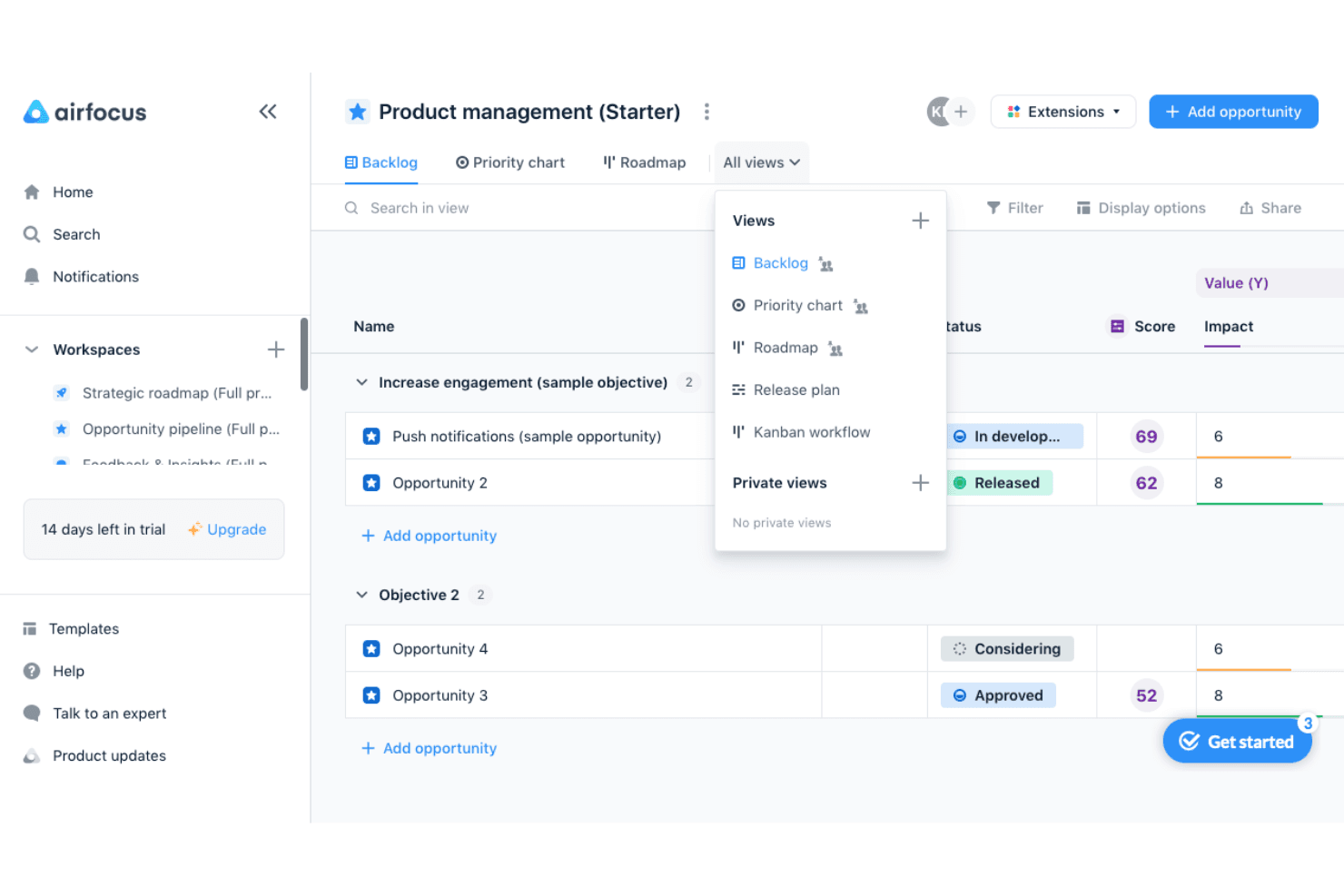
airfocus helps product teams prioritize opportunities and switch between backlog, priority chart, roadmap, release plan, and Kanban views. airfocus is a product management platform built for product teams that need structured, flexible ways to decide what to build next—combining roadmapping, feedback aggregation, and deeply configurable prioritization in one place.
Who Is airfocus Best For?
airfocus is a strong fit for product teams with 5 or more PMs who need to run structured prioritization across multiple workstreams without constant debate.
Why I Picked airfocus
airfocus earns its spot on my shortlist because no other tool I've tested gives you this level of control over how you score and rank work. I love that you can run RICE, ICE, WSJF, or a fully custom weighted formula, then pressure-test those scores in Priority Poker, where each stakeholder scores items independently before the group discusses. The Priority Matrix then plots everything visually, so trade-offs between strategic bets and quick wins are impossible to ignore.
airfocus Key Features
- Feedback inbox with AI Autofill: Incoming feedback is automatically triaged, matched to the right opportunity, and tagged with suggested fields, labels, and owners to reduce manual work.
- Branded customer portal: Share your roadmap externally, collect idea submissions, enable voting, and notify customers when their requested features ship.
- Two-way Jira and Azure DevOps sync: Field-level sync lets you control the direction of each mapped field individually, with support for custom fields, JQL filtering, and parent-child hierarchy.
- Strategic drift detection: Automatically compares roadmap items against your objectives and flags any work that's drifted out of alignment.
airfocus Integrations
airfocus offers native integrations with Jira, Azure DevOps, Linear, GitHub, Intercom, Zendesk, Slack, Microsoft Teams, and Salesforce. It also supports webhooks, open APIs, a Chrome extension, and Zapier.
Pros and Cons
Pros:
- Roadmaps adapt to different audiences
- Priority Poker surfaces stakeholder disagreement
- Custom scoring makes trade-offs explicit
Cons:
- Bulk item setup can feel tedious
- Deep customization can make setup confusing
 Best for product discovery-driven roadmaps
- 14-day free trial + free demo available
- From $24/user/month
Visit WebsiteCustomer Rating:4.4/5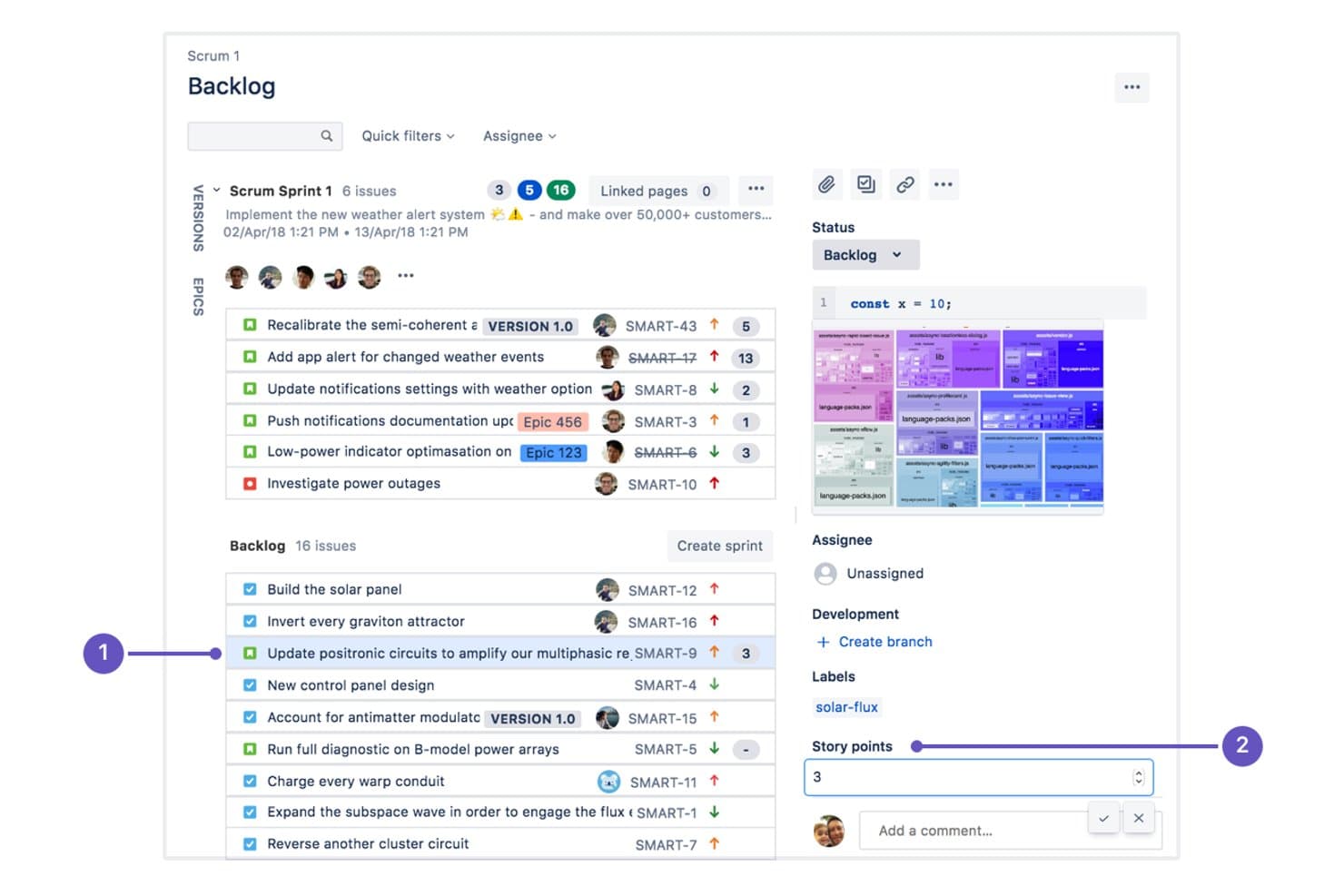
Craft.io integrates with Jira to manage sprint backlogs and story points. Craft.io is a full-lifecycle product management platform that covers strategy, feedback, prioritization, and roadmapping in one place, making it a strong fit for product managers and heads of product who need a single system of record across their entire product operation.
Who Is Craft.io Best For?
Craft.io is a strong fit for product managers and heads of product who need to connect customer feedback, OKRs, and roadmaps in a single platform.
Why I Picked Craft.io
I picked Craft.io as one of the best because it ties product discovery directly into roadmapping in a way that keeps feedback, prioritization, and planning in one flow. I love how Guru AI summarizes all feedback linked to a specific epic, so I can walk into a prioritization session already knowing what customers are actually asking for. Layered on top of that, frameworks like RICE, Kano, and WSJF let me score and rank those insights before they ever hit the roadmap.
Craft.io Key Features
- OKR alignment: Link company-level OKRs to initiatives, epics, and features so your roadmap always connects back to strategic goals.
- Portfolio roadmapping: Manage dependencies and priorities across multiple product lines from a single portfolio view, available on Enterprise.
- LiveShare and Presentation mode: Share live, interactive roadmap views with stakeholders without requiring them to have a paid seat.
- Two-way Jira and Azure DevOps sync: Map fields bidirectionally between Craft.io and your development tools, including story points, sprints, labels, and custom fields.
Craft.io Integrations
Craft.io offers integrations with Jira, Azure DevOps, GitHub, GitLab, Linear, Figma, Slack, Microsoft Teams, Miro, and Google Sheets. Enterprise includes a public API for custom integrations, and Zapier is also supported.
Pros and Cons
Pros:
- Reviewers praise responsive support during onboarding
- Scores priorities with RICE, Kano, and WSJF
- Links customer feedback directly to roadmap decisions
Cons:
- No dedicated Productboard migration path
- Guru AI summarizes only feedback already linked
Learn more about Craft.io: Best for customer feedback collection via AI
- Free plan + free trial + free demo available
- From $79/month (billed annually)
Visit WebsiteCustomer Rating:4.6/5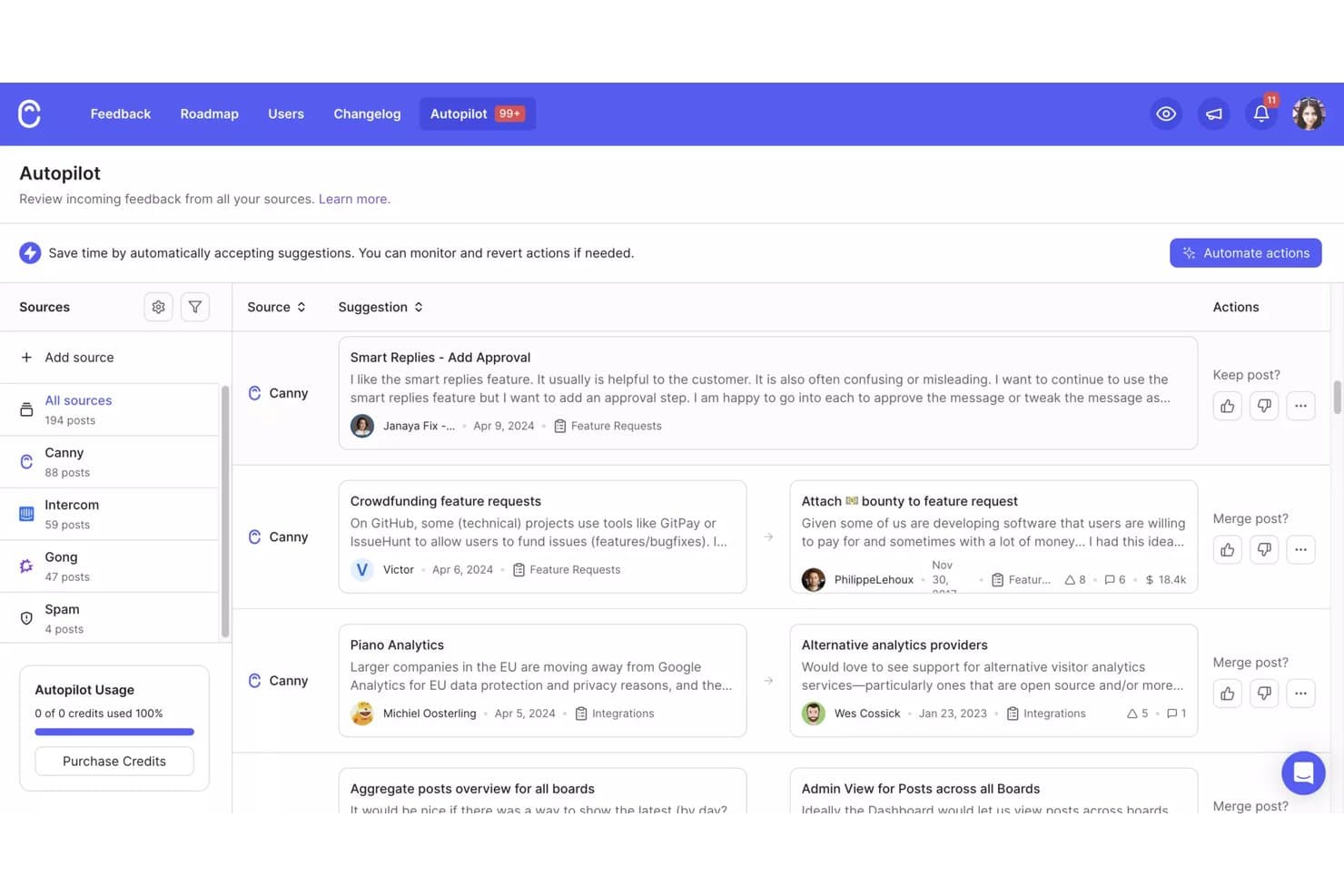
Canny's Autopilot consolidates feedback from multiple sources in one view. Canny is a feedback management platform that helps product teams collect, organize, and act on customer input—making it a practical pick if you want AI-driven feedback capture and a built-in customer portal without the complexity of a heavier product management suite.
Who Is Canny Best For?
Canny is a strong fit for product managers who want AI to handle the heavy lifting of capturing and organizing customer feedback across support, sales, and review channels.
Why I Picked Canny
I picked Canny as one of the best because its Autopilot feature does something I genuinely find impressive: it reads Intercom, Zendesk, Gong, and Zoom conversations automatically, pulls out feature requests, and routes them to the right product area without any manual tagging. In one audited case, it caught 30% more requests than a team doing the same work by hand. I also like that votes tie directly to ARR data from Salesforce or HubSpot, so prioritization reflects real revenue impact.
Canny Key Features
- Public voting portal: Customers submit and upvote feature requests on a branded portal with a custom domain, giving your team a direct, visible channel for external input.
- Changelog: Announce shipped features to the customers who requested them, with email delivery to subscribers on Pro and above.
- Unlimited contributor seats: Every plan includes unlimited contributor seats, so sales, customer success, and other stakeholders can follow relevant features without taking up a manager seat.
- Custom scoring fields: Build a weighted priority score using any numeric input—including ARR, opportunity value, or CRM data—to rank ideas by formula rather than gut feel.
Canny Integrations
Canny offers native integrations with Jira Cloud, Linear, GitHub, ClickUp, Asana, Azure DevOps, Salesforce, HubSpot, Intercom, and Zendesk. It also provides an API, webhooks, and Zapier connectivity for custom workflows.
Pros and Cons
Pros:
- Customer voting closes the feedback loop
- Revenue-linked scoring sharpens prioritization
- Autopilot captures requests across channels
Cons:
- No OKR layer for strategic alignment
- No confirmed timeline or Gantt roadmaps
Learn more about Canny: Best for closing the feedback loop with customers
- Free plan + 10-day trial + demo available
- From $29/user/month (billed annually)
Visit WebsiteCustomer Rating:4.7/5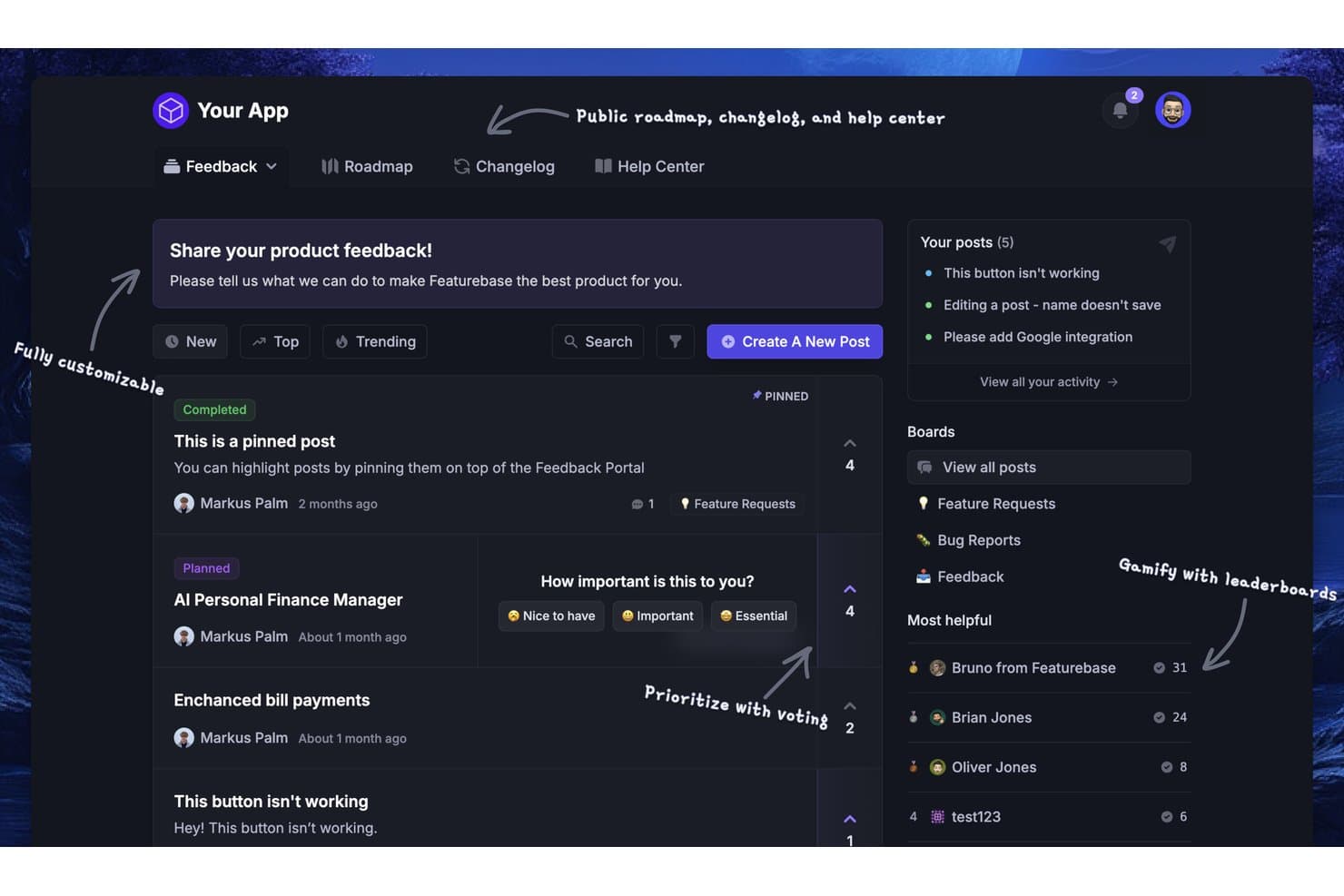
Featurebase lets users collect, vote on, and prioritize product feedback. Featurebase is a feedback and product operations platform that appeals to product managers and product ops leads who want to centralize customer requests, automate triage, and keep customers informed as features ship.
Who Is Featurebase Best For?
Featurebase is a strong fit for product ops leads and product managers who want to consolidate feedback, automate triage, and keep customers informed without managing multiple tools.
Why I Picked Featurebase
Featurebase earns its spot on my shortlist because it closes the feedback loop in a way most tools don't. When a request moves to "shipped," Featurebase automatically notifies every voter by email or in the portal, and it can push that update directly into the original support conversation where the feedback came from. I also love the AI Autopilot, which deduplicates incoming feedback and links it to existing requests so your team isn't manually sorting through repeat submissions before they can act.
Featurebase Key Features
- Customer-facing feedback portal: A branded, public-facing portal where users can submit ideas, vote on requests, and subscribe to status updates—all without needing a Featurebase seat.
- Value and effort prioritization matrix: A 2×2 visual matrix that plots requests by value against effort, with configurable scoring scales including Fibonacci, linear, and exponential options.
- Changelog with linked requests: Publish product updates as changelog entries that connect directly back to the original feature requests that drove them.
- Free Lite seats for internal stakeholders: Professional and Enterprise plans include up to 20–50 free Lite seats so teammates in sales, engineering, and design can view and collaborate without a paid seat.
Featurebase Integrations
Featurebase offers native integrations with Linear, Jira, GitHub, ClickUp, Azure DevOps, Slack, Zendesk, HubSpot, Salesforce, Intercom, Segment, Discord, and Zapier. Its API, MCP, and webhooks support custom connections.
Pros and Cons
Pros:
- Customer feedback connects directly to prioritization scores
- Shipped updates reach voters and source conversations
- AI deduplicates requests before roadmap triage
Cons:
- Productboard imports omit comments and individual voters
- No OKR alignment or executive portfolio rollups
Learn more about Featurebase:
Diğer Productboard Alternatifleri
Hâlâ arayışta mısınız? İşte bazı ek Productboard alternatifleri. İlk 10’a girememiş olsalar da yine de değerlidir ve daha fazla araştırmaya değerler.
- 11Jira Product DiscoveryBest for Jira-connected delivery tracking
- 12MiroBest for canvas-based roadmap collaboration
- 13monday AI WorkspaceBest for cross-functional roadmaps at scale
- 14ProductPlanBest for multi-audience roadmap presentations
- 15Tempo Roadmapping SoftwareBest for timeline roadmaps with Jira sync
- 16PendoBest for in-app analytics tied to feedback
- 17LaunchNotesBest for real-time product visibility
- 18SleekplanBest for flat-rate AI feedback management
- 19IBM TargetprocessBest for SAFe portfolio roadmapping
How I Evaluate a Productboard Alternative
I split my evaluation into three parts. First—and this carries the most weight—I check whether a tool can pull customer feedback from multiple channels into one place and build shareable visual roadmaps. Second, I look for standout capabilities like AI-powered insight extraction or OKR alignment. Third, I consider pricing transparency and onboarding support.
Core Functionality (Table Stakes For This List)
When I'm selecting tools for my list, I score each one on a scale from 0 (does not offer the functionality) to 5 (excels in this area) for each core functionality listed below. I then convert the total into a percentage to help assess each tool's overall fit, with extra weight on any functionalities I’ve deemed essential.
- Feedback Collection (Essential): I look for ways to gather, tag, search, and organize requests from sources such as support conversations, interviews, and sales notes.
- Roadmap Visualization (Essential): I assess whether teams can create and share clear visual roadmaps, with views that suit planning discussions and stakeholder updates.
- Prioritization Scoring: I check for scoring frameworks that help teams compare customer value, effort, and strategic fit when deciding what to build.
- Feedback Links: I look for traceable links between customer requests and roadmap items, so teams can see demand behind planned work.
- Stakeholder Collaboration: I consider whether internal teams and external stakeholders can comment or vote on specific ideas and priorities.
- Integrations: I evaluate how the tool connects with support, CRM, and communication systems to bring feedback in and share updates.
Once I have a list of tools that meet the criteria, I consider what sets each platform apart.
Differentiating Factors (What Sets Vendors Apart)
Here's how I compare and contrast different vendors:
Standout Features
I check whether a tool can tie roadmap items directly to OKRs, so leadership sees business impact rather than a list of shipping dates. AI-powered insight extraction matters too—tools like Productboard and Chisel handle theme detection differently, and I evaluate how well each surfaces recurring patterns without heavy manual tagging. I also look at portfolio roadmapping, especially for teams managing multiple product lines that need a single executive-level view.
Beyond Features
I check whether a vendor offers free or low-cost viewer seats, since product managers rarely work alone—sales, support, and executives all need roadmap visibility without inflating per-seat costs. Migration support matters just as much. Moving years of tagged feedback and prioritized features out of Productboard can break link structures, so I look for dedicated onboarding help and import tools that preserve hierarchy. I also evaluate SOC 2 Type II or ISO 27001 certification, especially for teams handling sensitive customer data in regulated industries.
Neden Bir Productboard Alternatifi Aramalısınız?
Productboard ürün yönetimi yazılımı için iyi bir seçenek olsa da bazı kullanıcıların alternatif çözümler aramasının çeşitli nedenleri vardır. Örneğin, aşağıdaki nedenlerden herhangi biri nedeniyle bir Productboard alternatifi arıyor olabilirsiniz:
- Bütçenize uymuyor
- Ekibiniz daha fazla özelleştirmeye ihtiyaç duyuyor
- Diğer araçlarla daha iyi entegrasyon arıyorsunuz
- Çevrimdışı erişime ihtiyaç duyuyorsunuz
- Daha basit bir kullanıcı arayüzü arıyorsunuz
- Ekibiniz Productboard'un ölçeklenebilirliğinin ötesinde büyüyor
Bunlardan herhangi biri size uyuyorsa doğru yere geldiniz. Listemde, Productboard ile bu zorluklarla karşılaşan ve alternatif çözümler arayan ekipler için daha uygun olan çeşitli temel ürün yönetimi seçenekleri yer alıyor.
Bir Productboard alternatifinde aranması gereken temel özellikler
Bir Productboard alternatifi veya herhangi bir ürün yönetimi yazılımı seçerken aşağıdaki temel özelliklere dikkat edin:
- Kullanıcı geri bildirim portalı: Doğrudan kullanıcı girdileri de dahil olmak üzere birden fazla kaynaktan gelen ürün geri bildirimlerini merkezileştirin. Bir geri bildirim yönetimi aracı, uygulanabilir içgörüler elde etmek için kapsamlı bir geri bildirim panosu oluşturmanıza yardımcı olabilir.
- Özellik önceliklendirme matrisi: Özellik taleplerini değerlendirin ve kaynakları en etkili girişimlere ayırarak ekibinizin daha iyi kullanıcı deneyimleri için önemli olan konulara odaklanmasını sağlayın.
- Yol haritası oluşturma: Ürün yönetimi platformu stratejinizi görselleştirmek için etkileşimli yol haritası yazılımlarından yararlanın. Yeni özellikler için net zaman çizelgeleri oluşturun ve bunları ekibinizin hedefleriyle uyumlu hâle getirin.
- Ekip iş birliği araçları: Fikir paylaşımı, geri bildirim alışverişi ve görev yönetimi için tasarlanmış araçlarla daha sorunsuz bir ekip çalışmasını teşvik edin; böylece ekibiniz uygulama içi güncellemeler ve dönüm noktaları konusunda uyum içinde kalsın.
- Analiz ve raporlama: Ayrıntılı ölçümler ve içgörülerle veriye dayalı ürün kararları alın. Neyin işe yaradığını anlayın, eksiklikleri belirleyin ve yeni özelliklerin başarısını takip edin.
- Görev ve iş akışı yönetimi: Ürün geliştirme iş akışlarını düzenleyin ve yönetin. Değişiklik günlüklerinin ve güncellemelerin zamanında teslim edilmesini sağlamak için ilerlemeyi takip edin ve süreçleri kolaylaştırın.
- Fikir yönetimi: Fikirleri yapılandırılmış bir depoda toplayın, kategorilere ayırın ve yeniden değerlendirin. Bu özellik, müşteri ihtiyaçlarını ele alırken ekibinizin yenilik yapmasını sağlar.
Not: Ürün keşfinin hâlâ ilk aşamalarındaysanız, özelliklere öncelik vermeden önce ruh hâli panosu oluşturma araçları ton ve görsel yön konusunda ortak bir anlayışa ulaşmanıza yardımcı olabilir. - Kullanıcı segmentasyonu: Kullanıcıları tercihlerine göre segmentlere ayırarak ürününüzü çeşitli kitlelere uyarlayın. Belirli pazar ihtiyaçlarını karşılayan daha iyi ürünler sunun.
- Bildirimler ve uyarılar: Gerçek zamanlı bildirimlerle gelişmelerden haberdar olun. Kritik değişiklikler, geri bildirimler ve dönüm noktaları hakkında ekibinizi anında bilgilendirerek hiçbir şeyi kaçırmayın.
- Üçüncü taraf entegrasyonu: Intercom, UserVoice ve diğerleri gibi entegrasyonlarla Productboard'un işlevselliğini genişletin. SaaS teknoloji yığınınızdaki diğer araçlarla iş akışlarınızı senkronize ederek kesintileri en aza indirin.