

Kısıtlı bir bütçeyle çalışırken doğru araçları bulmak bunaltıcı olabilir. İyi görünen ve fikirlerinizi paylaşmanıza yardımcı olan maketler oluşturmanın bir yoluna yine de ihtiyacınız vardır, ancak premium yazılımlara ödeme yapmak her zaman mümkün olmayabilir. Ücretsiz maket oluşturucular, ek maliyet getirmeden kullanışlı seçenekler sunarak bu açığı kapatabilir.
Deneyimlerime göre bu araçlar, fikirleri hızlı bir şekilde görselleştirmenize yardımcı olarak daha hızlı geri bildirim ve yineleme sağlar. Tarafsız bir şekilde sunmak amacıyla mevcut en iyi ücretsiz seçenekleri belirlemek için çeşitli maket oluşturucuları bağımsız olarak inceledim ve test ettim.
Bu makalede, ekibinizin ihtiyaçlarını karşılayacak benzersiz özelliklere sahip en iyi seçeneklerin ayrıntılı incelemelerini bulacaksınız. İster uygulama arayüzleri ister pazarlama materyalleri üzerinde çalışıyor olun, burada başarılı olmanıza yardımcı olacak bir araç var.
Why Trust Our Software Recommendations
6,700+
Reviews
20
Industry experts
16+
Evaluation factors
14
Years
Our team has been testing and reviewing software since 2012. As product managers ourselves, we know how difficult—and important—it is to choose the right software.
For this guide, we evaluated tools using hands-on testing and independent research, scoring tools using our selection criteria.
Our reviews reflect our human editorial judgment, not a sales pitch.
Expert reviewers:
- Andrew LumbySenior TPM
- Cristiano ValimSenior UI/UX Lead


Ücretsiz Maket Oluşturucular Karşılaştırma Tablosu
Bu karşılaştırma tablosu, ücretli yükseltme seçenekleri de dahil olmak üzere kısa listemdeki her ücretsiz maket oluşturucu için başlangıç fiyatlarını gösterir.
Score legend (out of 5)
- Excellent4.5–5
- Good4–4.4
- Average3–3.9
- Below average2–2.9
- Poor1–1.9
Sorted by: Default
| Tool | Starting Price | Website | ||||||
|---|---|---|---|---|---|---|---|---|
Best for quick AI-powered mockups across formats | 4.2 out of 5 | 3 | 4 | 5 | 5 | 4 | $144/user/year Free trial + free plan available | Website |
Best for custom product mockups with 1000+ templates | 3.2 out of 5 | 3 | 2 | 2 | 5 | 4 | $39/month Free plan available | Website |
Best for 3D packaging and device mockup variety | 3.2 out of 5 | 1 | 4 | 3 | 5 | 3 | $17/user/month Free plan available; 7-day free trial | Website |
Best for easy online mockup customization | 3.2 out of 5 | 4 | 3 | 4 | 3 | 2 | €3.75/month Free plan available | Website |
Best for watermark-free AI product mockups | 3.4 out of 5 | 2 | 4 | 5 | 2 | 4 | $5.7/month Free plan available | Website |
Best for drag-and-drop mockups across 5,300+ scenes | 3.2 out of 5 | 2 | 3 | 5 | 2 | 4 | $15/month Free plan available | Website |
Best for 3D and animated device mockup visuals | 3.4 out of 5 | 2 | 4 | 4 | 4 | 3 | $228/year Free plan available | Website |
Best for 3D device mockups with Figma integration | 3.6 out of 5 | 1 | 4 | 5 | 4 | 4 | $79 Free trial available | Website |
Best for App Store screenshot assets, free forever | 3.0 out of 5 | 3 | 3 | 2 | 4 | 3 | $19/month Free plan available | Website |
Best for privacy-first, no-login device mockups | 4.4 out of 5 | 4 | 5 | 4 | 5 | 4 | Pricing upon request Free plan available | Website |


En İyi Ücretsiz Maket Oluşturucu İncelemeleri
Listemdeki tüm maket oluşturucular ücretsiz seçenekler sunsa da yükseltmek isterseniz ücretli planları da vardır. Kısa listeme giren araçların her biri için temel maliyetler aşağıda verilmiştir:
 Best for quick AI-powered mockups across formats
- Free trial + free plan available
- From $144/user/year (billed annually)
Visit WebsiteCustomer Rating:4.6/5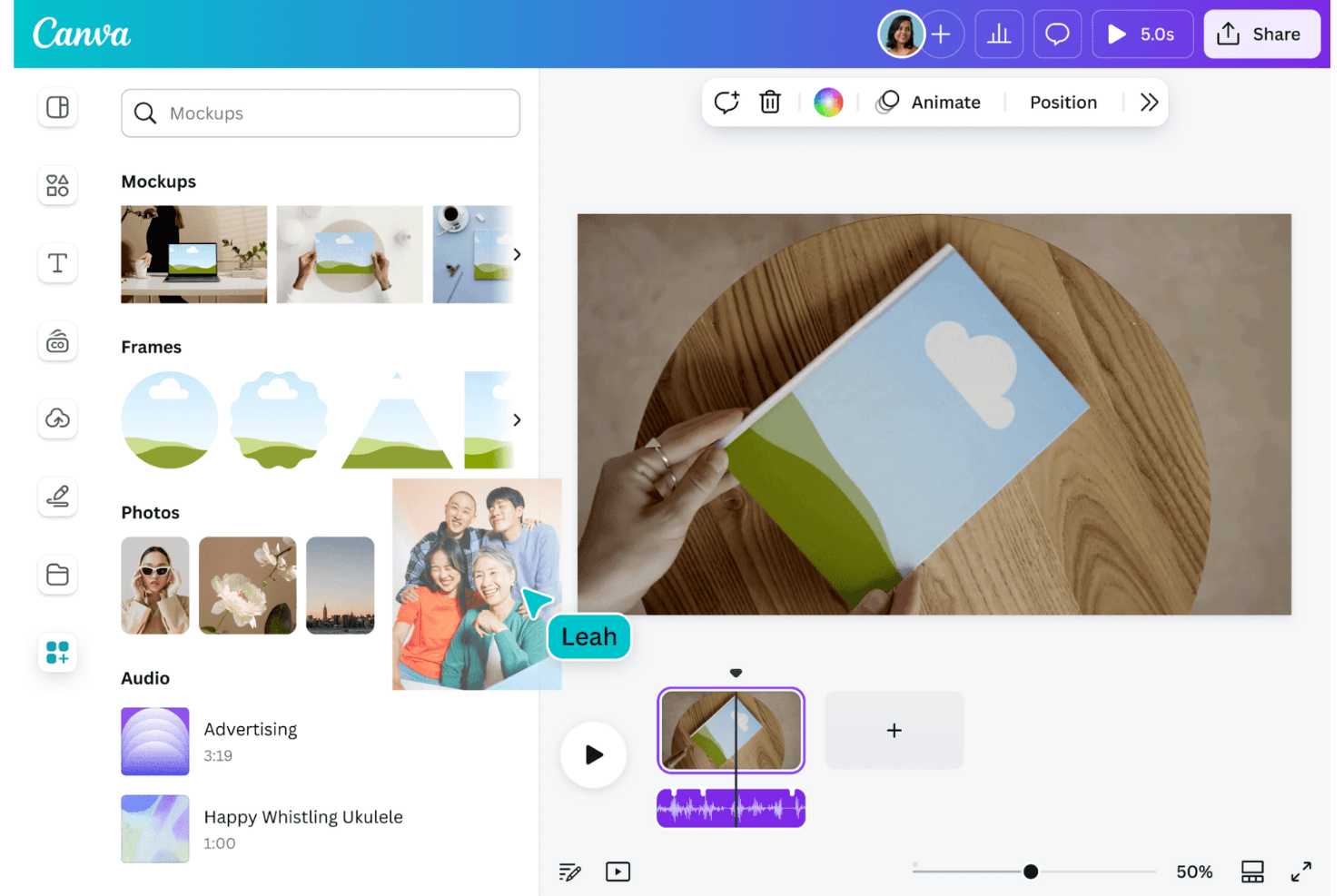
Canva enables users to create graphics and mockups with ease. Canva is a free mockup generator and browser-based design editor with device, apparel, packaging, and print templates, image placement controls, AI-powered mockup creation, customization tools, and export options.
Who Is Canva Best For?
Product managers, UX designers, and marketing teams that need quick, presentation-ready mockups across devices, apparel, packaging, and print.
Why I Picked Canva
I picked Canva because it earns the “Best for quick AI-powered mockups across formats” label. I use its Smart Crop and angle adjustment for phone, laptop, and tablet screens, then place those mockups into pitch decks or social assets. Its library also covers apparel, packaging, print, and lifestyle scenes.
Canva Key Features
- Free mockup allowance: Create up to 2,500 free mockups without watermarks.
- JPG and PNG uploads: Add existing design files through the Uploads panel.
- Fill and Fit controls: Choose how uploaded designs fill each mockup frame.
- Collaborative editing: Share designs, add comments, assign tasks, and edit together.
Canva Integrations
Canva supports Marketplace integrations through its Apps Marketplace, including Mockups, Mockup Studio, and App Screenshot Gen. Bulk Create connects to Canva Sheets, CSV, Excel, Google data apps, HubSpot, and Salesforce.
What's Free?
Canva offers a free-forever plan with up to 2,500 mockups without watermarks. Premium templates, assets, and some AI features require a paid plan.
Pros and Cons
Pros:
- Scene library covers devices, apparel, and packaging
- Smart Crop handles angled device screens
- 2,500 watermark-free mockups support recurring projects
Cons:
- Premium elements can add watermarks to designs
- Account required before exporting mockups
Learn more about Canva: Best for custom product mockups with 1000+ templates
- Free plan available
- From $39/month
Visit WebsiteCustomer Rating:4.6/5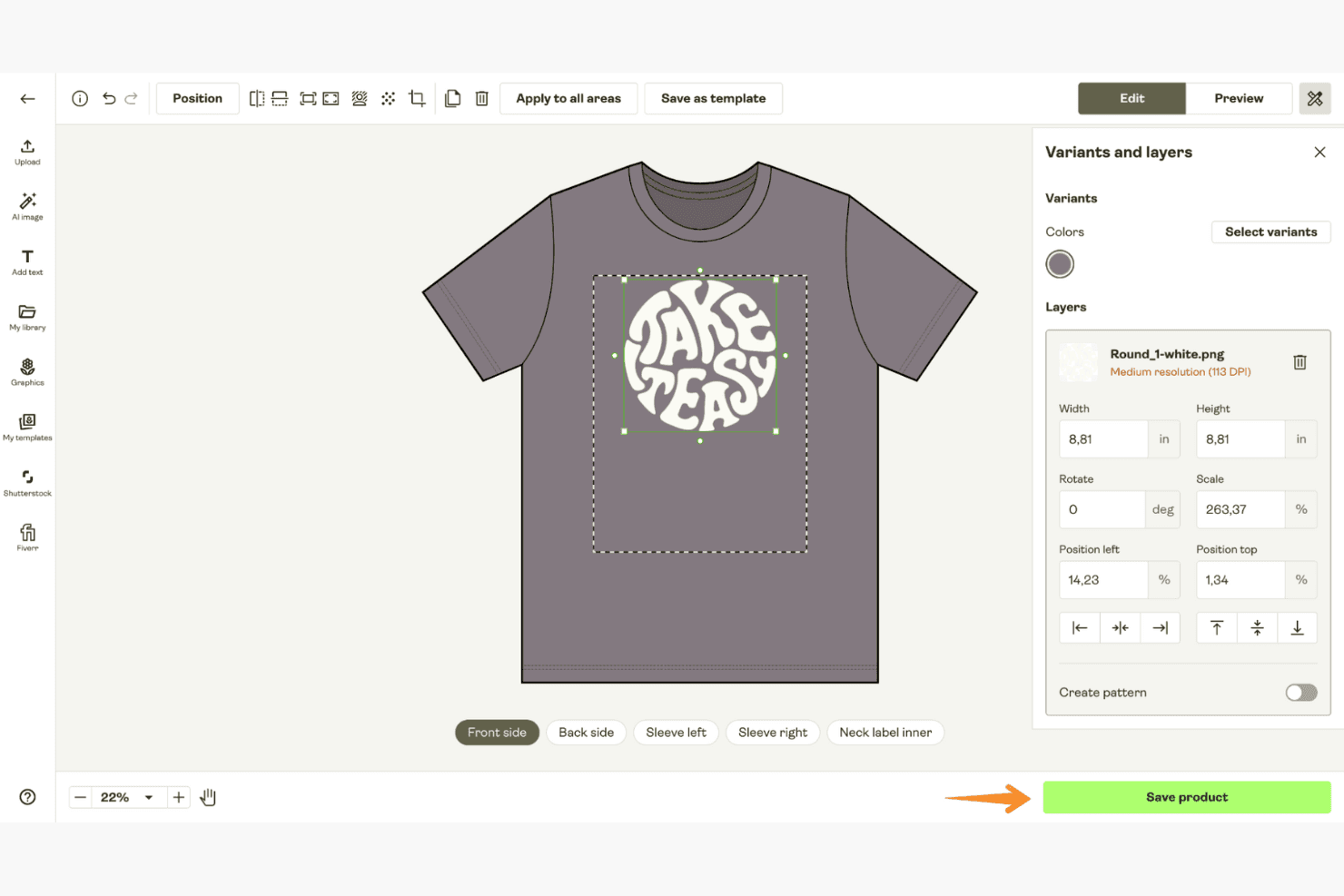
Printify generates custom product mockups across a wide range of printable items. Printify is a free mockup generator for physical products, with a Product Creator for placing uploaded artwork on apparel, drinkware, accessories, posters, and other print-on-demand items across lifestyle and flat-lay scenes.
Who Is Printify Best For?
Printify suits print-on-demand sellers and creative teams that need physical product mockups for apparel, drinkware, posters, and store listings.
Why I Picked Printify
I picked Printify because it’s best for custom product mockups with 1000+ templates. I use its Product Creator to place artwork across apparel, mugs, posters, phone cases, and other products, then select lifestyle, flat-lay, or multi-angle scenes. Its Mockup Library also supports transparent-background downloads and multiple product variants.
Printify Key Features
- Multi-source uploads: Import JPEG, PNG, or SVG files from Dropbox and Google Drive.
- Layer editing: Arrange up to 20 design layers within supported print areas.
- Background removal: Remove image backgrounds with one click.
- Text editor: Add custom fonts, text, and non-Latin scripts to designs.
Printify Integrations
Printify offers integrations with Shopify, WooCommerce, Wix, Squarespace, BigCommerce, Etsy, eBay, Amazon, and TikTok Shop. It also supports Dropbox and Google Drive uploads, plus an API for custom connections.
What's Free?
Printify offers a free-forever plan for creating product mockups and setting up print-on-demand products. Paid upgrades are available for additional features, while the free plan remains available without a time limit.
Pros and Cons
Pros:
- Drag-and-drop editor supports 20 layers
- 2,000-plus physical product mockup options
- Unlimited watermark-free PNG downloads
Cons:
- Custom backgrounds support limited products
- No phone, laptop, or tablet screens
Learn more about Printify: Best for 3D packaging and device mockup variety
- Free plan available; 7-day free trial
- From $17/user/month (billed annually)
Visit WebsiteCustomer Rating:4.5/5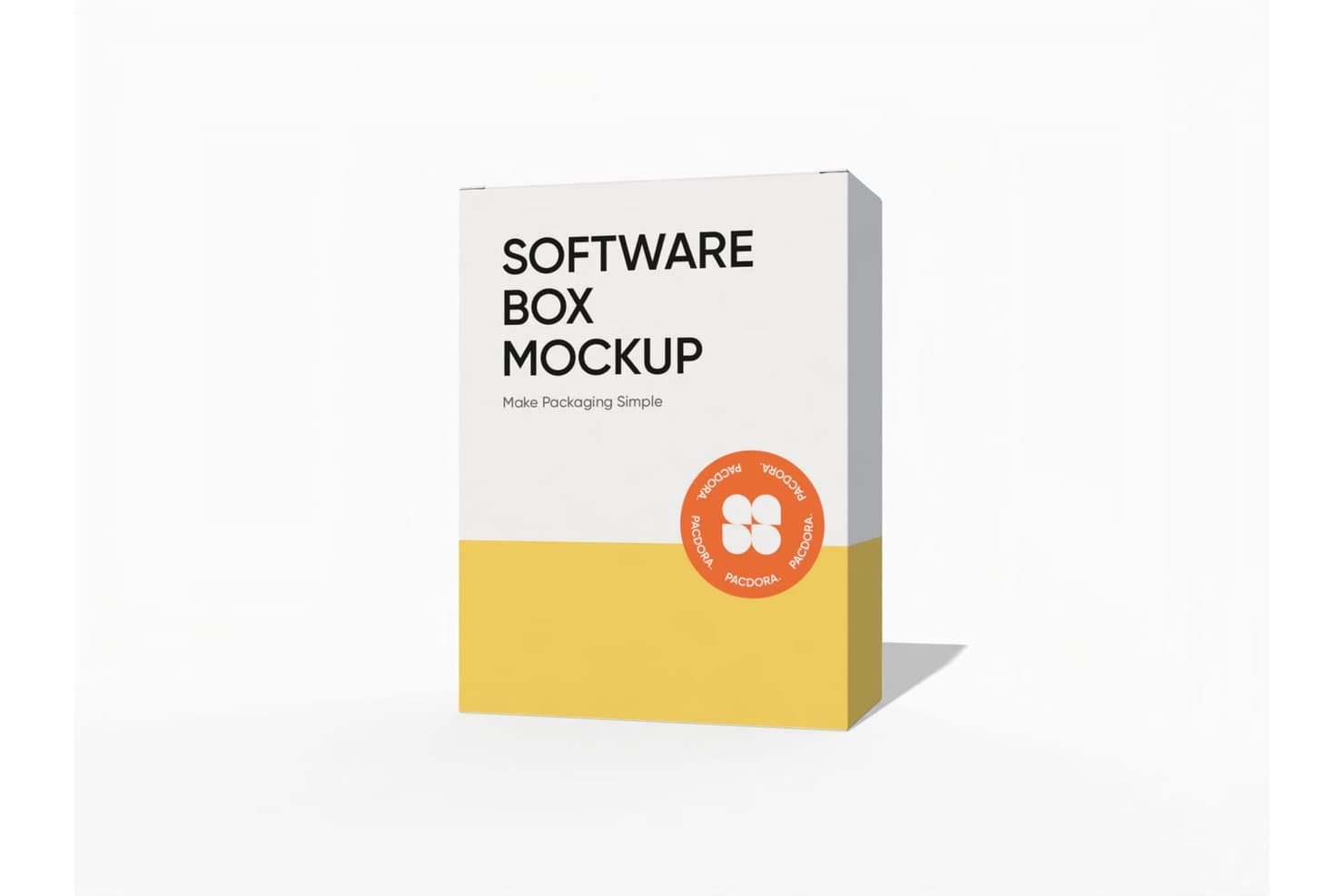
Pacdora lets users create software box mockups with custom designs. Pacdora is a browser-based 3D mockup generator with packaging and device templates, image uploads, customizable scenes, live previews, image and video exports, and shareable 3D links.
Who Is Pacdora Best For?
Pacdora suits packaging designers and product teams needing realistic 3D visuals for concepts, presentations, and stakeholder feedback.
Why I Picked Pacdora
I picked Pacdora for its 3D packaging and device mockup variety, especially when a concept needs more than a flat screen image. Its library includes packaging, iPhone, iPad, MacBook, and Apple Watch templates, plus adjustable lighting, angles, backgrounds, and scenes. I can also create rotating MP4 or MOV visuals for pitch decks and stakeholder reviews, although free exports may include watermarks.
Pacdora Key Features
- Unlimited projects and uploads: Create and store mockups without stated volume limits.
- PNG and JPG exports: Download static mockups in common image formats.
- Shareable 3D links: Send interactive mockups for remote feedback.
- AI background generator: Create custom settings for product visuals.
Pacdora Integrations
Pacdora doesn't have any native integrations. Paid plans export packaging dielines in AI format for use in Adobe Illustrator.
What's Free?
Pacdora offers a free-forever plan alongside a 7-day free trial of paid features. Free exports may include watermarks, and Pacdora has no native integrations.
Pros and Cons
Pros:
- Exports images, videos, and share links
- Realistic 3D scenes and lighting
- Unlimited projects and uploads
Cons:
- Free exports may include watermarks
- Device templates focus heavily on Apple
Learn more about Pacdora: Best for easy online mockup customization
- Free plan available
- From €3.75/month (billed annually)
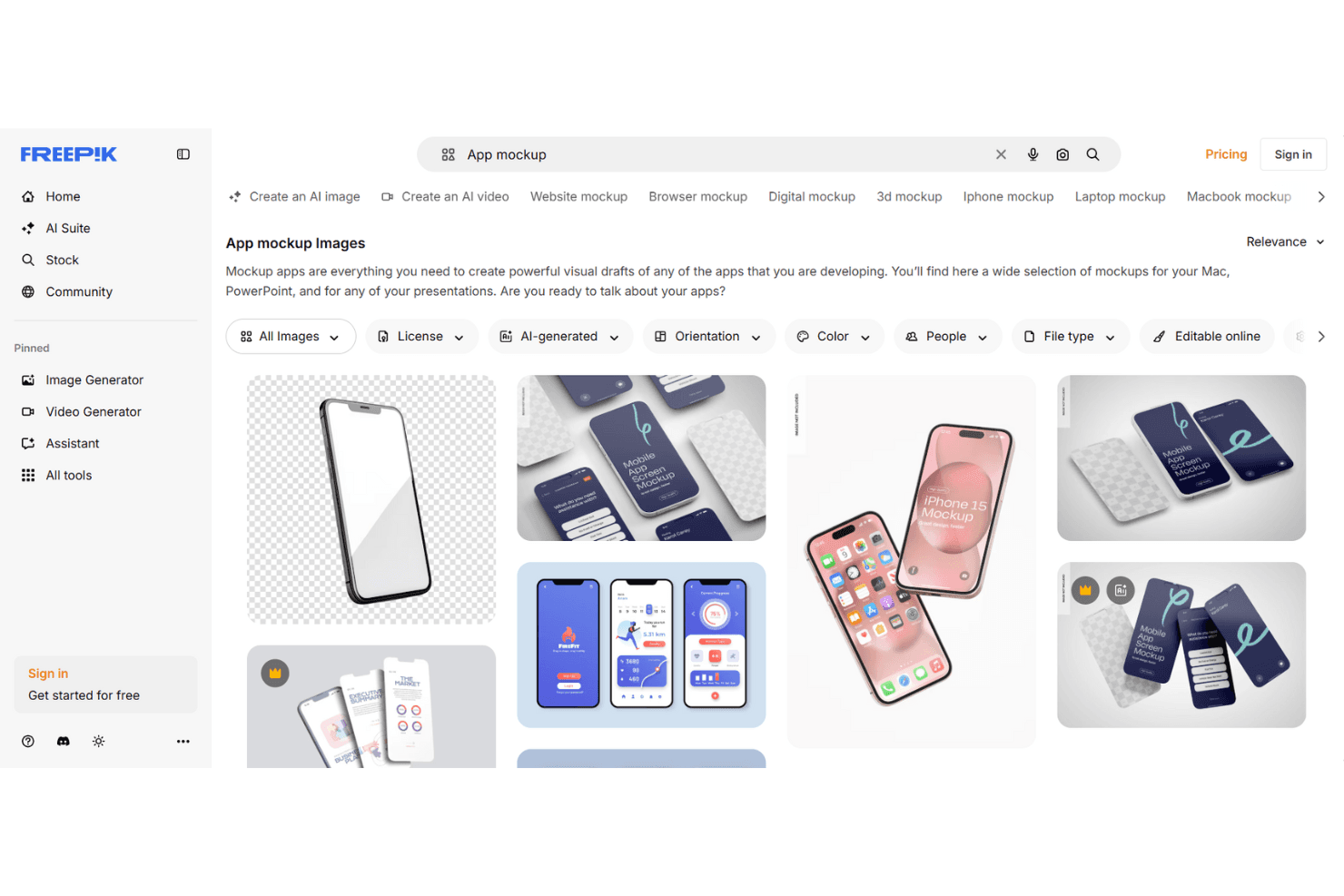
Freepik offers simple mockup customization through a wide selection of templates. Freepik is a browser-based mockup generator with editable apparel, device, print, packaging, and lifestyle templates, manual image placement, AI scene customization, and watermark-free JPEG or PNG exports up to 5K.
Who Is Freepik Best For?
UI/UX designers and creative teams who need polished, presentation-ready mockups without installing design software.
Why I Picked Freepik
I picked Freepik because it makes online mockup customization practical for fast design reviews. I can upload PNG, JPG, SVG, or WebP files, place them in browser-editable apparel, device, packaging, and print scenes, then adjust positioning manually. Its AI scene prompts also help turn a basic product concept into a presentation-ready visual.
Freepik Key Features
- Watermark-free exports: Download JPEG or PNG files up to 5K resolution.
- Free mockup library: Access 100 online-editable mockups without a subscription.
- AI scene generation: Create custom mockup scenes from text prompts.
- Commercial mockup use: Use generated mockups for personal and commercial projects.
Freepik Integrations
Freepik offers integrations via its After Effects plugin, Figma Community plugin, MCP, and ComfyUI. Paid plans include API access for custom integrations.
What's Free?
Freepik offers a free plan, so you can use its mockup tools without starting a paid trial. The free tier includes 100 online-editable mockups, while API access and other paid features require a subscription.
Pros and Cons
Pros:
- Apparel and packaging scenes suit marketing visuals
- AI scenes expand beyond fixed templates
- Watermark-free exports reach 5K resolution
Cons:
- Free library limits repeat mockup work
- Manual placement lacks bezel detection
Learn more about Freepik: Best for watermark-free AI product mockups
- Free plan available
- From $5.7/month (billed annually)
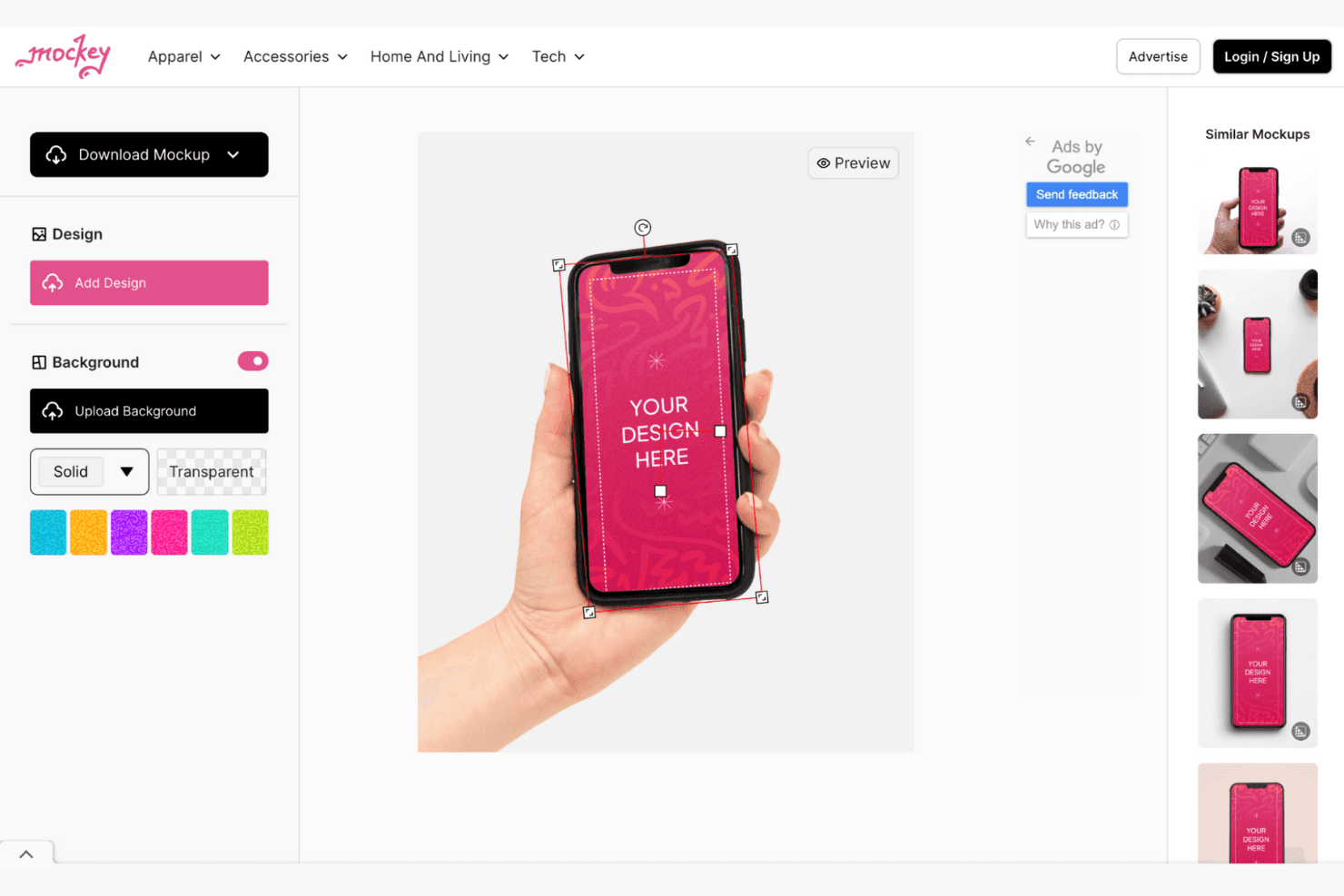
Mockey enables creating diverse product mockups across many categories. Mockey is a browser-based mockup generator with tech, apparel, packaging, and lifestyle templates, plus image uploads, auto-fit device placement, background editing, AI scene tools, and video and 3D mockups.
Who Is Mockey Best For?
Mockey suits UI/UX designers and marketing teams that need watermark-free device, product, and lifestyle mockups without Photoshop.
Why I Picked Mockey
I picked Mockey because it creates watermark-free AI product mockups with realistic tech and lifestyle scenes. I use its iPhone and MacBook templates to place interface designs with model-matched crop ratios, then refine presentations with AI Photoshoot and generated backgrounds. Its free JPG exports suit quick pitch decks, portfolio visuals, and early marketing concepts.
Mockey Key Features
- Multi-format uploads: Import PNG, JPG, and WebP designs.
- Placement controls: Fit, fill, rotate, flip, align, zoom, and warp designs.
- Device color editing: Change product colors with palettes or hex codes.
- Figma plugin: Create mockups directly inside Figma files.
Mockey Integrations
Mockey offers four documented integrations: Figma, Shopify, Etsy, and ChatGPT. The Figma plugin is most relevant for designers, while Shopify and Etsy support ecommerce workflows.
What's Free?
Mockey offers a free plan rather than only a limited-time trial. It includes watermark-free JPG exports, while advanced features and other export options may require a paid plan.
Pros and Cons
Pros:
- AI scenes polish presentation visuals
- Screen ratios match current devices
- Watermark-free exports suit portfolio drafts
Cons:
- No clickable prototypes for user testing
- Free exports remain limited to JPG
Learn more about Mockey: Best for drag-and-drop mockups across 5,300+ scenes
- Free plan available
- From $15/month
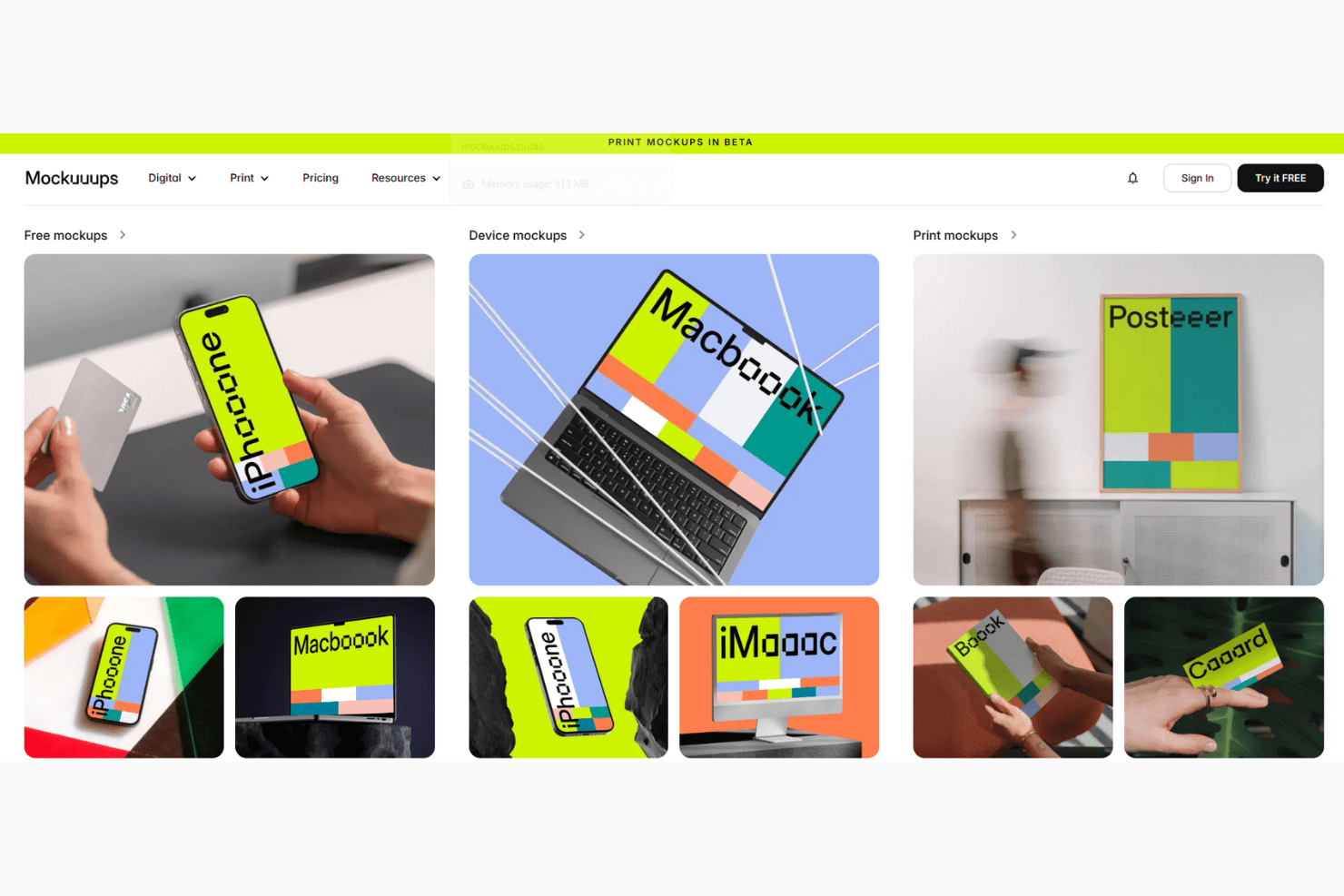
Mockuuups Studio produces app and device mockups with a drag-and-drop workflow. Mockuuups Studio is a free mockup generator with drag-and-drop screenshot placement, photorealistic device and lifestyle scenes, customizable backgrounds, and integrations for Figma, Sketch, Penpot, and Adobe Express.
Who Is Mockuuups Studio Best For?
Product managers and UI/UX designers who need realistic visuals for pitch decks, stakeholder presentations, and quick concept reviews.
Why I Picked Mockuuups Studio
I picked Mockuuups Studio for drag-and-drop mockups across 5,300+ scenes, including phones, laptops, tablets, and lifestyle settings. I can place one screenshot across the library, then choose device angles, colours, shadows, and backgrounds for pitch decks or concept reviews. Free exports are limited and premium mockups carry watermarks.
Mockuuups Studio Key Features
- Design-tool plugins: Integrates with Figma, Sketch, Penpot, and Adobe Express.
- Export formats: Supports PNG, JPG, and WebP downloads.
- Crop tool: Offers manual cropping and preset crop areas.
- Desktop apps: Provides apps for macOS, Windows, and Linux.
Mockuuups Studio Integrations
Mockuuups Studio offers five documented design-tool integrations: Figma, Sketch, Penpot, Adobe Express, and Frontify. It also provides a REST API with Zapier support for custom integrations.
What's Free?
Mockuuups Studio offers a free-forever plan with access to its mockup library and drag-and-drop editor. Free exports are limited, and premium mockups include watermarks.
Pros and Cons
Pros:
- Frequently adds newly released device mockups
- Auto-places screenshots across the entire library
- 5,300+ photorealistic device and lifestyle scenes
Cons:
- No bulk export or store-size templates
- Free exports carry watermarks and attribution requirements
Learn more about Mockuuups Studio: Best for 3D and animated device mockup visuals
- Free plan available
- From $228/year (billed annually)
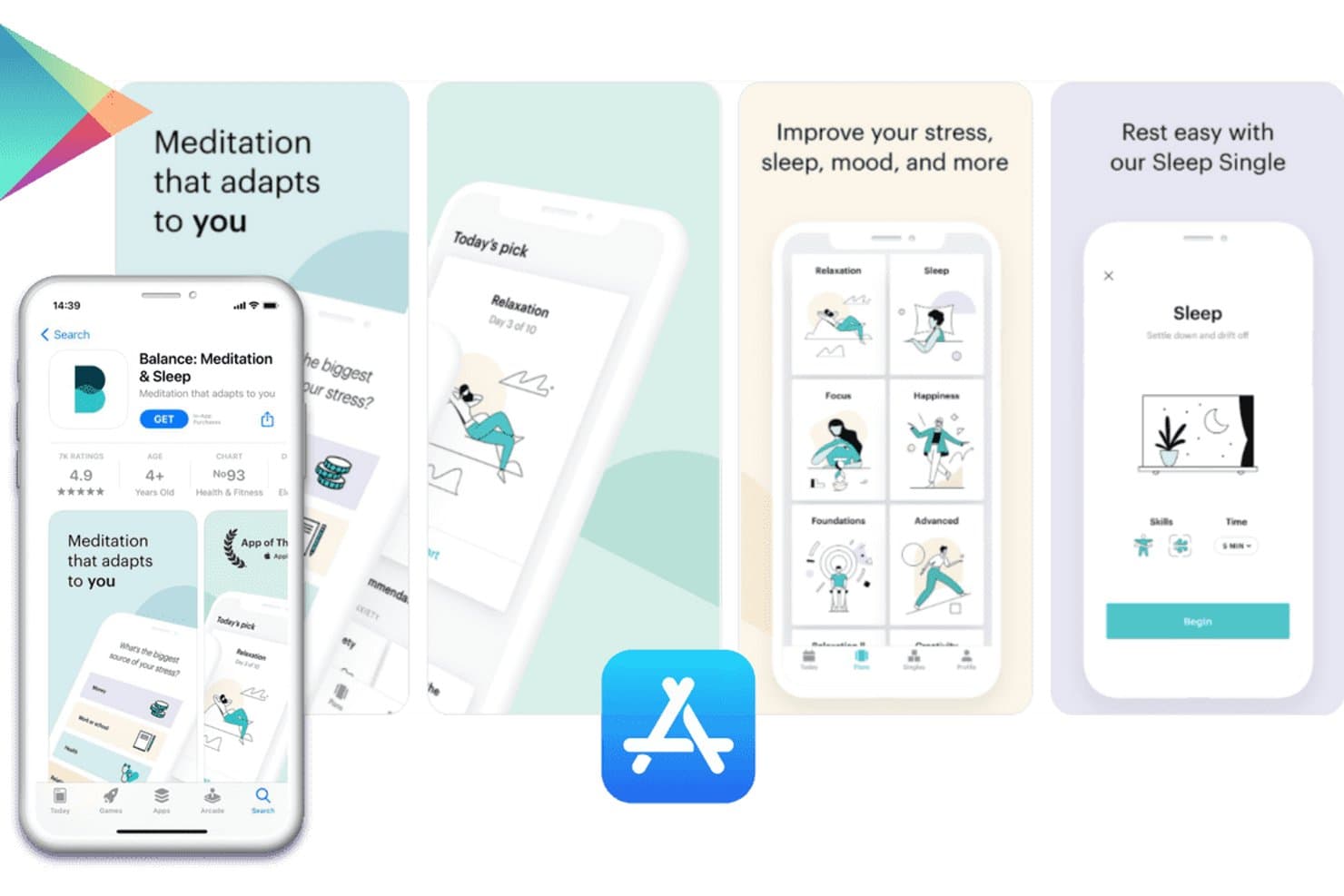
Previewed lets users create App Store screenshots with device mockups. Previewed is a browser-based mockup generator with 2D and 3D device templates, image and video uploads, customizable scenes, social layouts, and static or animated exports.
Who Is Previewed Best For?
UI/UX designers and small product teams creating polished 2D, 3D, and animated device visuals for presentations or portfolios.
Why I Picked Previewed
Previewed earns its place on my shortlist because it handles 3D and animated device mockup visuals alongside standard 2D designs. I use its 3D editor to set camera angles, environments, and clay device styles for product presentations. Animated scenes and MP4 exports also help turn app screens into polished promo visuals.
Previewed Key Features
- Device template library: Includes iPhones, Android phones, tablets, laptops, monitors, and browser frames.
- Screen media uploads: Replaces device placeholders with uploaded images or MP4 videos.
- Panoramic screenshot sets: Creates multi-image App Store and Google Play screenshot layouts.
- Social media templates: Provides layouts for Instagram, Facebook, Twitter, and LinkedIn.
Previewed Integrations
Previewed doesn't have any native integrations, documented API, Figma or Sketch plugin, or direct App Store Connect and Google Play Console connection. It supports sign-in with Google, Facebook, and Twitter, plus team sharing within Previewed.
What's Free?
Previewed offers a free-forever Lite plan for one app or project. It includes unlimited 2D exports at 720p, but adds a Creative Commons attribution requirement and excludes 3D and video exports; commercial use requires a paid plan.
Pros and Cons
Pros:
- Supports panoramic app store screenshot layouts
- Offers deep camera and environment controls
- Creates polished 3D and animated visuals
Cons:
- Device library lacks newer smartphone models
- Free exports require attribution and 720p
Learn more about Previewed: Best for 3D device mockups with Figma integration
- Free trial available
- From $79 (one-time payment)
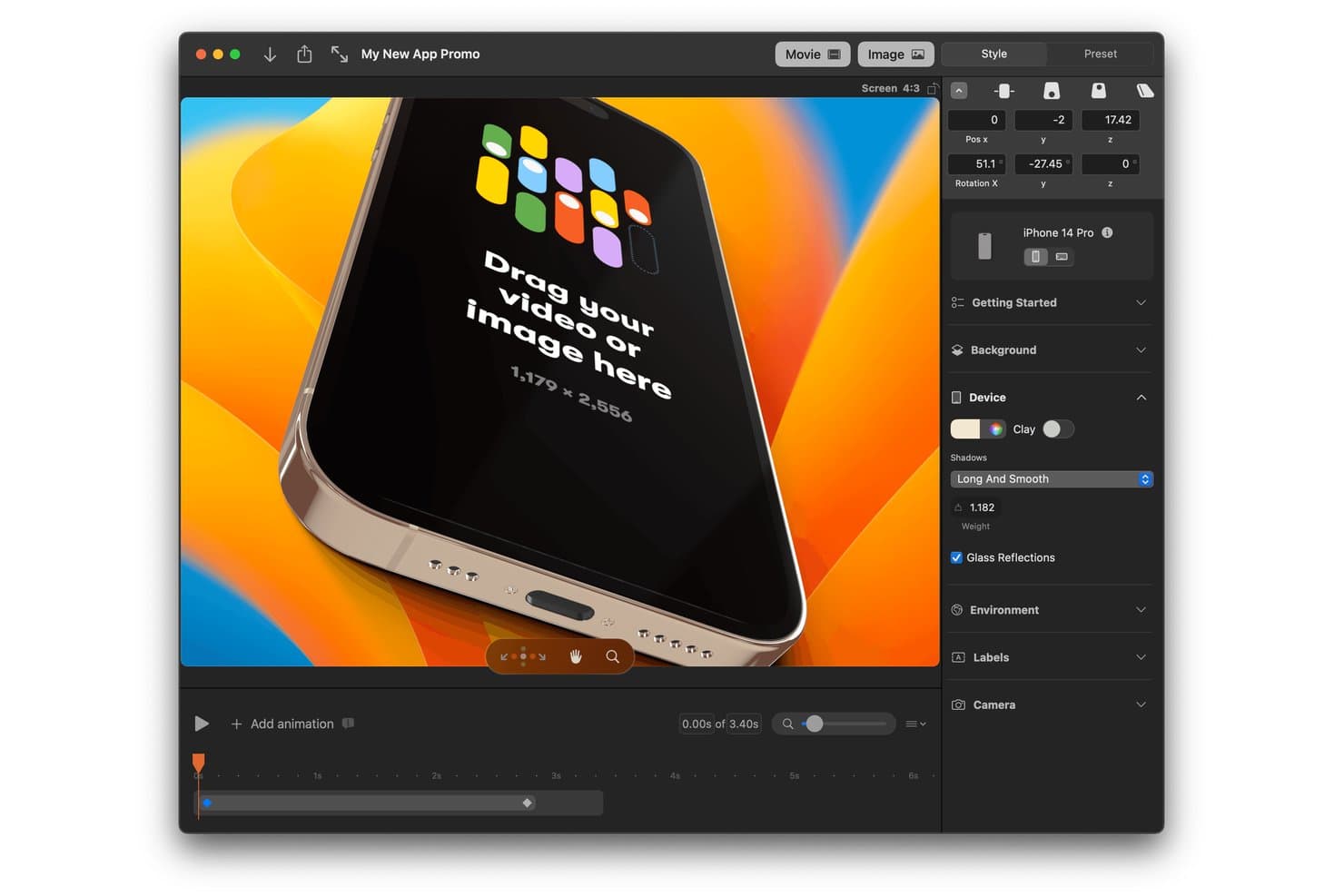
Rotato lets users create 3D iPhone mockups with custom animations and backgrounds. Rotato is a 3D device mockup generator for turning app screens, recordings, and websites into customizable still images and videos, with Figma integration, animated scenes, and App Store screenshot exports.
Who Is Rotato Best For?
UI/UX designers and creative teams on Mac will appreciate Rotato for polished app visuals, animated demos, and presentation-ready device mockups.
Why I Picked Rotato
I picked Rotato for its polished 3D device mockups and Figma integration. I can place app screens or recordings across phones, tablets, laptops, and watches, then create animated scenes for pitch decks or portfolio visuals. Its App Store export handles multiple iPhone sizes, although free exports include a watermark.
Rotato Key Features
- Free unlimited trial: Create unlimited mockups without a time limit, with watermarked exports.
- Broad file support: Import PNG, JPG, HEIC, PSD, SVG, TIFF, WebP, RAW, MOV, and MP4 files.
- Presentation Mode: Present scenes during Zoom, Teams, and Google Meet calls.
- Custom backgrounds: Use colors, images, videos, or 3D gradients behind device renders.
Rotato Integrations
Rotato has documented integrations with Figma and Sketch. No broader native integrations are clearly documented.
What's Free?
Rotato offers a free, unlimited trial with no time limit, but exported mockups include a watermark. You can create mockups and test its features for free, while watermark-free exports require a paid plan.
Pros and Cons
Pros:
- Batch-renders iPhone App Store sizes
- Exports reach 8K with transparent video
- Current device library includes modern phones
Cons:
- Tilted renders can obscure store details
- Free exports retain a watermark
Learn more about Rotato: Best for App Store screenshot assets, free forever
- Free plan available
- From $19/month
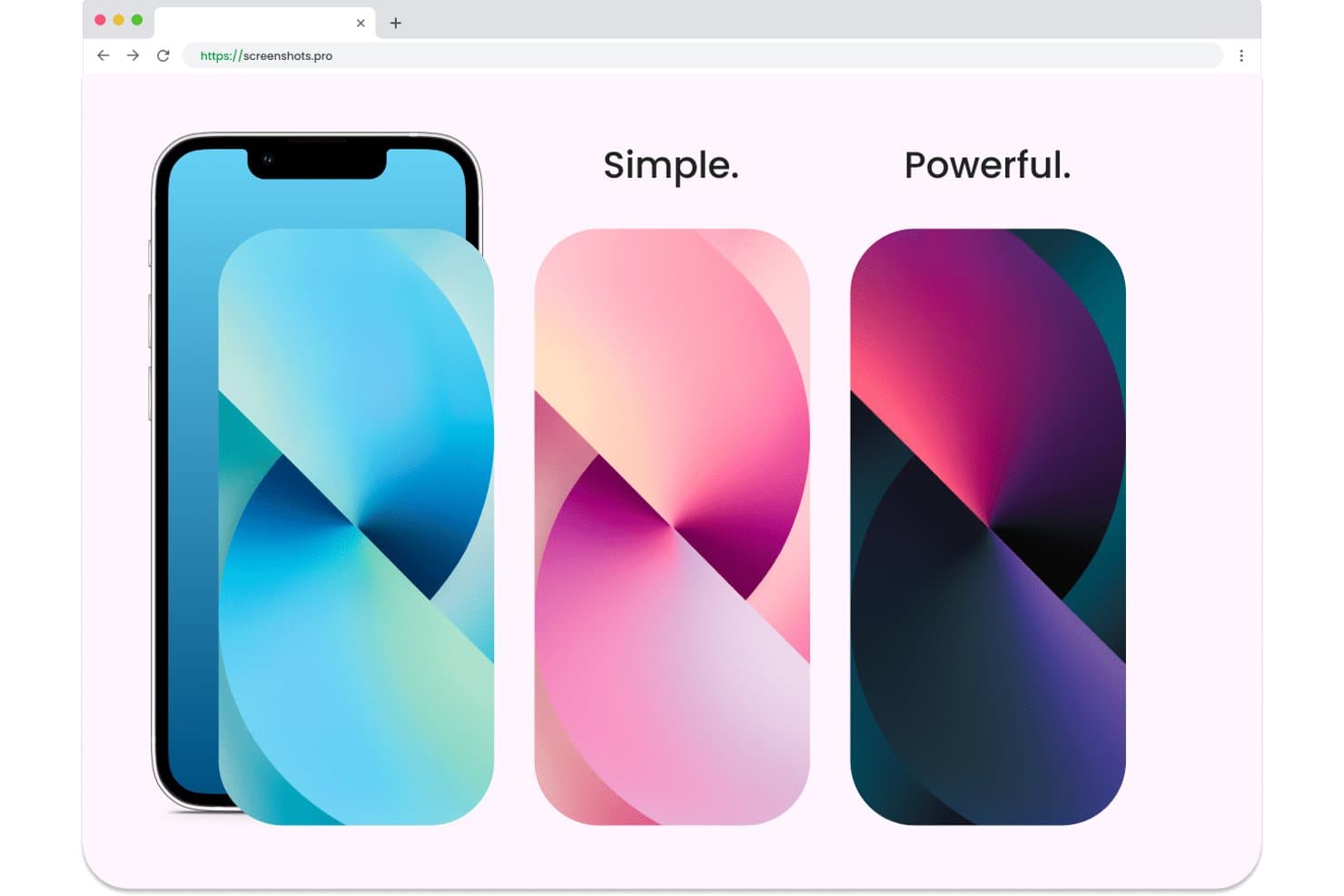
Screenshots.pro lets users create mockups with multiple color themes. Screenshots.pro is a browser-based app mockup generator focused on App Store and Google Play screenshots, with device frames, pre-made templates, drag-and-drop editing, frame customization, and smart export for store sizes.
Who Is Screenshots.pro Best For?
Indie app developers and small product teams that need store-ready App Store and Google Play screenshot sets without design software.
Why I Picked Screenshots.pro
I picked Screenshots.pro because it’s purpose-built for App Store screenshot assets, free forever. I use its device frames, pre-made store templates, and smart export to turn one app design into high-resolution PNGs for every App Store and Google Play size. Its focus suits developers preparing a release rather than creating broad lifestyle mockups.
Screenshots.pro Key Features
- Drag-and-drop editor: Place, resize, rotate, and style screenshots and text.
- Frame customization: Choose realistic or clay styles, colors, and orientations.
- Autosave and sync: Save projects automatically across supported sessions.
- High-resolution PNG export: Download store assets as 4K-plus PNG files.
Screenshots.pro Integrations
Screenshots.pro doesn't have any native integrations. Its REST API, available on the Extended plan, supports custom CI/CD workflows and renders screenshots from public image URLs.
What's Free?
Screenshots.pro offers a free-forever plan for creating App Store and Google Play screenshot assets. Native integrations aren’t available, and REST API access for CI/CD workflows requires the Extended plan.
Pros and Cons
Pros:
- Drag-and-drop layouts support quick iteration
- Device frames fit app-store workflows
- Free exports cover every store size
Cons:
- Templates exclude lifestyle and object mockups
- Free outputs require Screenshots.pro attribution
Learn more about Screenshots.pro: Best for privacy-first, no-login device mockups
- Free plan available
- Pricing upon request
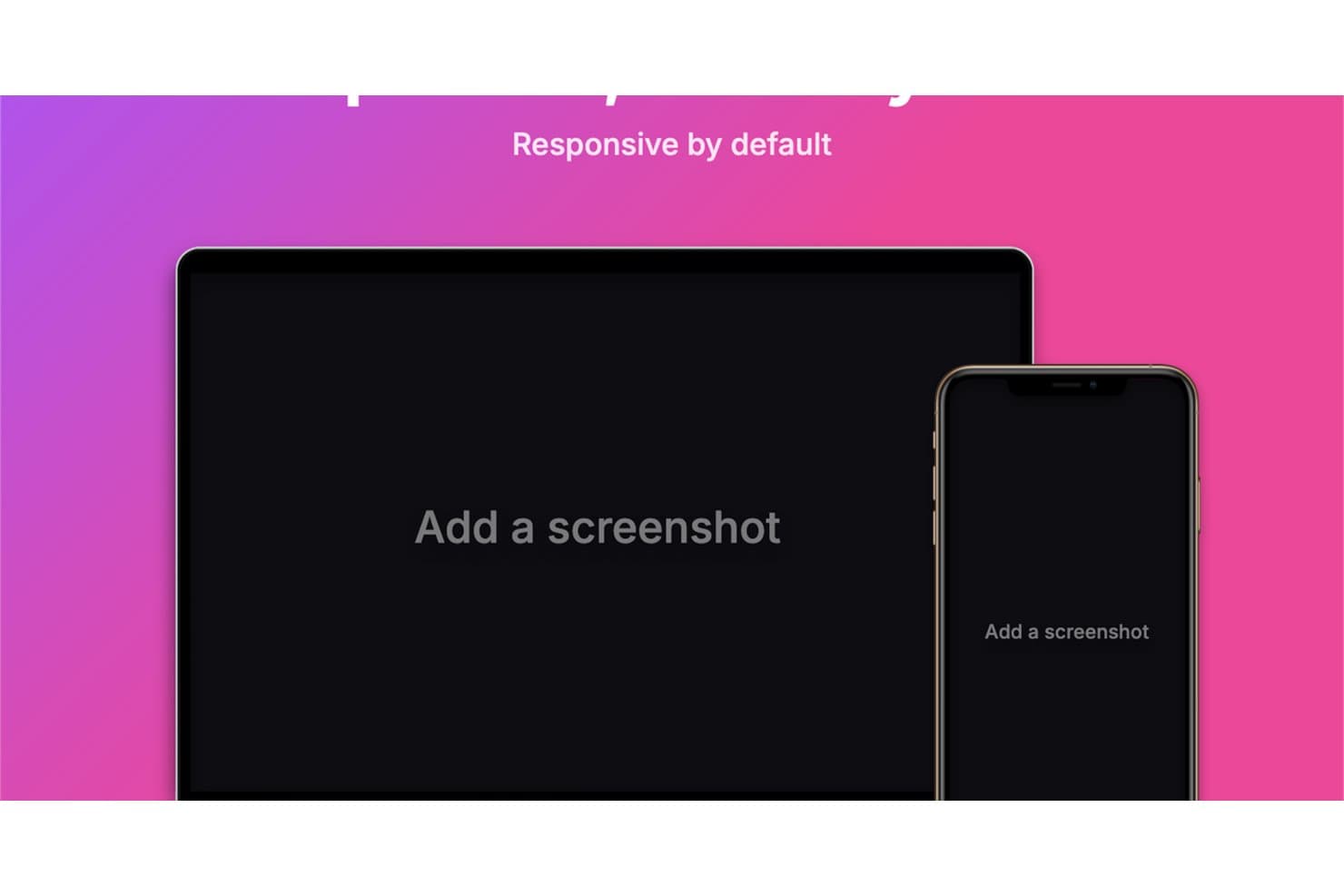
Device Shots generates responsive mockups for desktop and mobile. Device Shots is a free mockup generator with 76 device frames, 412 platform templates, layered editing, multi-device layouts, and PNG, JPG, WebP, or SVG exports.
Who Is Device Shots Best For?
Product managers, UI/UX designers, and marketing teams needing privacy-first, no-login mockups for presentations, prototypes, social assets, and app store visuals.
Why I Picked Device Shots
I picked Device Shots because it’s one of the best free mockup generators for privacy-first, no-login device mockups. I can place confidential screenshots into 76 device frames without uploading them, then refine layouts with layers, guides, icons, and multi-device compositions. Its 412 templates also help me prepare presentation, social, and app store visuals directly in the browser.
Device Shots Key Features
- Fit modes: Choose cover, contain, or stretch placement.
- Export formats: Download PNG, JPG, WebP, or SVG files.
- Canvas presets: Create assets for social networks, app stores, and presentations.
- Background controls: Apply solid colors, gradients, wallpapers, images, or transparency.
Device Shots Integrations
Device Shots doesn't have any native integrations. It supports clipboard copying into Figma, Slack, and Notion, but has no documented API, plugin, or marketplace connections.
What's Free?
Device Shots offers a free plan rather than a time-limited trial, with no login required. It supports privacy-first, browser-based mockup creation, but has no native integrations, API, plugin, or marketplace connections.
Pros and Cons
Pros:
- Layer controls support polished multi-device compositions
- 412 templates cover major content formats
- Browser-only editing protects confidential screenshots
Cons:
- No photographic lifestyle scenes for marketing visuals
- Device frames stop at older hardware
Learn more about Device Shots:
Diğer Maket Oluşturucular
Ücretsiz planlar veya deneme sürümleri sunan bazı ek maket oluşturucu seçenekleri şunlardır. Bu araçlar kısa listeme girmemiş olsa da yine de göz atmaya değer:
- 11ShotsBest for no-login device mockups with style depth
- 12Artboard StudioBest for 5,000+ device and scene templates
- 13KittlBest for high-quality apparel and product mockups
- 14RecraftBest for AI-generated business mockups in seconds
- 15PlaceitBest for large mockup library and business use
- 16MediamodifierBest for browser-based mockup creation on any device
- 17MockupLabsBest for AI-powered mockups with 10k+ templates
- 18Dynamic MockupsBest for automated, realistic product visual creation
Related Reviews
How I Evaluate Free Mockup Generators
First, I define what counts as free. I count a mockup generator as free only if it offers a free-forever plan, not merely a trial, for repeated creation and export. I assess three areas: core functionality, including placing uploaded designs in scenes and exporting mockups; standout features, like no-login export; and free-tier limits for recurring use.
Core Functionality (Table Stakes For This List)
In addition to my free plan requirements, I use a scoring system to select tools for my list. I score each one on a scale from 0 (does not offer the functionality) to 5 (excels in this area) for each core functionality listed below, based on what's available on the free plan. I then convert the total into a percentage to help assess each tool's overall fit, with extra weight on any functionalities I've deemed essential.
- Device And Scene Templates (Essential): I look for a useful range of devices, angles, and settings, such as a phone in a lifestyle scene or a laptop for a product demo.
- Image Upload And Placement (Essential): I assess how reliably a tool fits uploaded screens into a template, including app screenshots and website designs.
- Export And Download: I check whether finished mockups download in common image formats at a quality suited to decks or feedback.
- Basic Customization: I look for free controls over details like background color, angle, or template variant to match a presentation or campaign.
- Multiple Mockup Outputs: I consider whether teams can create and download several versions to compare concepts or prepare visuals for different channels.
Once I have a list of tools that meet the criteria, I consider what sets each platform apart.
Differentiating Factors (What Sets Vendors Apart)
Here's how I compare and contrast different vendors:
Standout Features
I look for no-login quick export because PMs often need a mockup mid-meeting, not after an onboarding flow. Tools like Smartmockups and Magic Mockups let you upload, customize, and download without creating an account. Bulk generation is another factor I evaluate, especially for teams preparing app-store screenshots across multiple device sizes at once. I also check whether a tool's smart auto-cropping reliably fits screens to bezels, since manual resizing slows down non-designers and introduces errors.
Beyond Features
I check whether a tool exports in PNG or JPG at sizes that drop straight into a slide deck or roadmap doc without conversion. Speed matters too—when a PM needs a visual mid-sprint review, templates that are pre-populated and ready to export in under a minute beat feature-rich editors with a learning curve. I also evaluate how stable each vendor's free tier is for recurring use, since mockups come up at every stage from concept through launch and a sudden paywall can disrupt an established workflow.
Ücretsiz Maket Oluşturucu Nasıl Seçilir?
Karmaşık özellik listeleri ve fiyatlandırma yapıları, ücretsiz bir maket oluşturucudan gerçekten ne elde ettiğinizi anlamanızı zorlaştırabilir. Yazılım seçme sürecinizi yürütürken odağınızı korumanıza yardımcı olmak için göz önünde bulundurmanız gereken bazı faktörler şunlardır:
| Faktör | Dikkat Edilmesi Gerekenler |
|---|---|
| FaktörÜcretsiz Teklifin Kapsamı | Dikkat Edilmesi GerekenlerÜcretsiz planda hangi özelliklerin kullanılabildiğini kontrol edin. Şablonlara erişim ve dışa aktarma seçenekleri gibi temel ihtiyaçları karşılıyor mu? Çalışmanızı etkileyebilecek sınırlamalara dikkat edin. |
| FaktörÖlçeklenebilirlik | Dikkat Edilmesi GerekenlerAracın ekibinizle birlikte gelişip gelişemeyeceğini değerlendirin. Artan iş yüklerini veya daha karmaşık projeleri yönetebilir mi? Uzun vadeli ihtiyaçlarınızı desteklediğinden emin olun. |
| FaktörEntegrasyonlar | Dikkat Edilmesi GerekenlerKullandığınız diğer araçlarla uyumluluk arayın. İş akışınızı iyileştirmek için tasarım yazılımlarına veya proje yönetimi platformlarına bağlanabiliyor mu? |
| FaktörKullanım Kolaylığı | Dikkat Edilmesi GerekenlerArayüzün ne kadar sezgisel olduğunu değerlendirin. Siz ve ekibiniz kapsamlı bir eğitim almadan kolayca kullanabilir misiniz? Kullanıcı dostu bir tasarım zamandan tasarruf sağlar ve hayal kırıklığını azaltır. |
| FaktörÖzelleştirme | Dikkat Edilmesi GerekenlerSunulan özelleştirme düzeyini belirleyin. Şablonları marka kimliğinize uyacak şekilde kolayca uyarlayabilir misiniz, yoksa önceden belirlenmiş seçeneklerle mi sınırlısınız? |
| FaktörMüşteri Desteği | Dikkat Edilmesi Gerekenlerİhtiyaç duyduğunuzda desteğe kolayca ulaşabildiğinizi kontrol edin. Size yardımcı olacak birden fazla iletişim seçeneği ve sık sorulan sorular ya da eğitimler gibi kaynaklar var mı? |
| FaktörPerformans | Dikkat Edilmesi GerekenlerAracın ne kadar hızlı ve güvenilir çalıştığını değerlendirin. Büyük dosyaları sorunsuz bir şekilde işleyebiliyor mu, yoksa kritik görevler sırasında yavaşlıyor mu? |
| FaktörMaliyet Verimliliği | Dikkat Edilmesi GerekenlerÜcretsiz planı ücretli seçeneklerle karşılaştırın. Yükseltmeye karar verirseniz özellikler maliyetine değer mi? Hem ücretsiz hem de ücretli katmanlarda değer arayın. |
Ücretsiz Maket Oluşturucu Nedir?
Maketi oluşturucu, kullanıcıların ürünlerin görsel temsillerini oluşturmasına olanak tanıyan ve temel özelliklere erişim için genellikle ücretsiz planlar veya denemeler sunan bir araçtır. Bu araçlar; tasarımcılar, pazarlamacılar ve ürün ekipleri tarafından kavramları görselleştirmek ve fikirleri etkili bir şekilde sunmak için yaygın olarak kullanılır.
Kullanıcıların ileri düzey tasarım becerilerine ihtiyaç duymadan profesyonel görünümlü maketleri hızlıca oluşturabilmesini sağlayarak değer sunarlar. Sürükle ve bırak arayüzleri, şablon kitaplıkları ve özelleştirme seçenekleri gibi özellikler, verimli tasarım oluşturma ve görselleştirme süreçlerine yardımcı olur.
Özellikler
Maketi oluşturucularda yaygın olarak bulunan özellikleri ve bunlardan hangilerinin genellikle ücretsiz ve ücretli planlara dahil edildiğini inceleyelim.
Genellikle Ücretsiz Maketi Oluşturucu Özellikleri
- Şablon kitaplığı: Kullanıma hazır çeşitli tasarımlar sunarak sıfırdan başlamadan maket oluşturmayı kolaylaştırır.
- Sürükle ve bırak arayüzü: Kullanıcıların maketleri içindeki öğeleri kolayca taşımasına ve yerleştirmesine olanak tanıyarak tasarım sürecini basitleştirir.
- Temel özelleştirme: Kullanıcıların tasarımları markalarına uyacak şekilde düzenlemelerine yardımcı olmak için renkleri, metinleri ve görselleri değiştirme seçenekleri sunar.
- Yüksek çözünürlüklü dışa aktarma: Maketlerin sunumlar veya daha ileri düzey düzenlemeler için yüksek kalitede indirilebilmesini sağlar.
- Cihaz maketleri: Tasarımların farklı platformlardaki görünümünü değerlendirmeye yardımcı olmak için akıllı telefonlar ve dizüstü bilgisayarlar gibi çeşitli cihazlara yönelik şablonlar içerir.
- Tasarım varlıklarına erişim: Maketleri geliştirmek için simgeler ve şekiller gibi temel tasarım öğelerine erişim sağlar.
- Kullanıcı dostu arayüz: Sezgisel olacak şekilde tasarlanmıştır; böylece kullanıcılar aracı hızlıca öğrenebilir ve kullanabilir.
Genellikle Ücretli Maketi Oluşturucu Özellikleri
- Gelişmiş özelleştirme: Kişiselleştirilmiş maketler için ayrıntılı ayarlamalar ve benzersiz efektler gibi daha kapsamlı tasarım seçenekleri sunar.
- Gerçek zamanlı iş birliği: Birden fazla kullanıcının aynı tasarım üzerinde eş zamanlı çalışmasına olanak tanıyarak ekip çalışmasını ve geri bildirimleri kolaylaştırır.
- Yapay zekâ destekli araçlar: Otomatik ayarlamalar veya akıllı öneriler gibi tasarım özelliklerini geliştirmek için yapay zekâdan yararlanır.
- Özel markalama: Kullanıcıların belirli marka öğelerini içeren maketler oluşturmasını sağlayarak tüm tasarımlarda tutarlılık sağlar.
- Diğer araçlarla entegrasyon: İş akışı verimliliğini artırmak için tasarım veya proje yönetimi araçları gibi diğer yazılımlara bağlantılar sağlar.
- Geniş varlık kitaplığı: Daha geniş bir tasarım öğeleri ve kaynakları yelpazesi içererek kullanıcılara yaratıcılık için daha fazla seçenek sunar.
- Öncelikli müşteri desteği: Sorunların hızlı bir şekilde çözülmesini sağlamak için ücretli planlardaki kullanıcılara daha hızlı ve kişiselleştirilmiş yardım sunar.
Avantajlar
Ücretsiz bir maketi oluşturucu kullanmak, ekibiniz ve işletmeniz için çeşitli avantajlar sağlar. Yararlanabileceğiniz avantajlardan bazıları şunlardır:
- Maliyet tasarrufu: Para harcamadan temel tasarım araçlarına erişerek ekibinizin bütçe kısıtları içinde çalışmasını sağlar.
- Hızlı başlangıç: Karmaşık yazılımları öğrenmeye zaman harcamadan hemen maket oluşturmaya başlamak için şablon kitaplıklarını ve sürükle ve bırak arayüzlerini kullanabilirsiniz.
- Gelişmiş yaratıcılık: Çeşitli şablonlar ve özelleştirme seçenekleriyle farklı tasarım fikirlerini deneyerek yenilikçiliği teşvik edebilirsiniz.
- Artan verimlilik: Sezgisel araçlarla yüksek kaliteli maketleri hızlıca oluşturarak projelerin daha kısa sürede tamamlanmasını sağlayabilirsiniz.
- İş birliği: Tasarımları ekibinizle kolayca paylaşarak ek maliyet olmadan geri bildirim almayı ve yinelemeli iyileştirmeler yapmayı kolaylaştırabilirsiniz.
- Tasarım varlıklarına erişim: Ücretsiz planda bile tasarımlarınızı zenginleştirmek için temel simgelerden ve şekillerden yararlanabilirsiniz.
- Beceri geliştirme: Kullanıcı dostu araçlarla pratik yaparak ekibinizin tasarım becerilerini geliştirebilir ve onları daha ileri düzey görevler için hazırlayabilirsiniz.
Maliyetler ve Fiyatlandırma
Bu makaleye, ücretsiz olarak sunulan en iyi maketi oluşturucu seçeneklerini aradığınız için geldiğinizi biliyorum. Ancak ücretsiz planlar yalnızca sınırlı özellikler sunduğundan, gelecekte planınızı yükseltmeniz gerekme ihtimali oldukça yüksektir.
Aşağıdaki tablo, maketi oluşturucu çözümlerinde yaygın olarak bulunan planları, bunların ortalama fiyatlarını ve genellikle dahil edilen özellikleri özetlemektedir:
Maketi Oluşturucu İçin Plan Karşılaştırma Tablosu
| Plan Türü | Ortalama Fiyat | Yaygın Özellikler |
|---|---|---|
| Plan TürüÜcretsiz Plan | Ortalama Fiyat$0 | Yaygın ÖzelliklerTemel şablonlara erişim, sınırlı özelleştirme seçenekleri, filigransız indirmeler ve tasarım varlıklarına erişim. |
| Plan TürüKişisel Plan | Ortalama Fiyat$5-$25/kullanıcı/ay | Yaygın ÖzelliklerDaha fazla şablon seçeneği, gelişmiş özelleştirme, daha yüksek çözünürlüklü dışa aktarımlar ve öncelikli destek. |
| Plan Türüİşletme Planı | Ortalama Fiyat$30-$60/kullanıcı/ay | Yaygın ÖzelliklerEkip iş birliği özellikleri, kapsamlı şablon kitaplığı, diğer araçlarla entegrasyon ve özel markalama seçenekleri. |
| Plan TürüKurumsal Plan | Ortalama Fiyat$75+/kullanıcı/ay | Yaygın ÖzelliklerGelişmiş güvenlik özellikleri, özel hesap yöneticisi, tam entegrasyon olanakları ve tüm şablonlara ve tasarım varlıklarına sınırsız erişim. |
Ücretsiz Maket Oluşturucuları Hakkında SSS
Ücretsiz maket oluşturucuları hakkında sık sorulan soruların bazı yanıtlarını burada bulabilirsiniz:
Ücretsiz bir maket oluşturucuyla ne kadar özelleştirme yapabilirim?
Ücretsiz bir maket oluşturucu genellikle PNG veya JPG dosyası yüklemenize, arka planları ayarlamanıza, gölgeler uygulamanıza ve tişört, kapüşonlu üst, kartvizit veya hatta iPhone ve Android ekranları gibi farklı ürünler için tasarımınızın boyutunu değiştirmenize olanak tanır. Ayrıntılı ışıklandırma kontrolü, katmanlı ayarlamalar veya alternatif açılar gibi daha gelişmiş düzenlemeler ücretli yükseltme gerektirebilir. Ücretsiz seçeneklerin çoğu hızlı taslaklar, temel e-ticaret listelemeleri ve basit grafik tasarım görevleri için oldukça uygundur.
Ücretsiz bir maket oluşturucu ticari kullanımı destekler mi?
Bazı araçlar ticari kullanıma izin verirken diğerleri kullanımı yalnızca kişisel projelerle sınırlar. Bir maket görselini pazarlama çalışmalarında, e-ticaret listelemelerinde veya Instagram gönderilerinde kullanmadan önce lisans politikalarını mutlaka inceleyin. Bazı ücretsiz planlar yüksek çözünürlüklü dışa aktarımları veya filigransız indirmeleri sınırlayabilir; bu nedenle profesyonel çalışmalar için gerçekçi maketlere ihtiyacınız varsa kullanım haklarını doğrulayın.
Ücretsiz maket oluşturucuları profesyonel tasarımcılar için uygun mudur?
Evet—ücretsiz maket araçları hızlı konseptler, ilk taslaklar veya hızlı ürün görselleri için yararlı olabilir. Tasarımcılar, tasarımı başka bir yerde geliştirmeden önce genellikle basit bir tişört maketi, düz zeminli ürün düzeni veya cihaz önizlemesi oluşturmak için bu araçları kullanır. Bununla birlikte profesyoneller, özelleştirme derinliği ve dışa aktarma kalitesindeki sınırlamaları fark edebilir; bu da bazen onları gelişmiş özelliklere veya daha geniş tasarım şablonlarına erişim için yükseltme yapmaya yöneltir.
Ücretsiz maket oluşturucularında ne gibi sınırlamalar beklemeliyim?
Yaygın sınırlamalar arasında daha küçük şablon kitaplıkları, azaltılmış özelleştirme seçenekleri ve kısıtlı dışa aktarma kalitesi bulunur. Bazı platformlar kaydedilen proje sayısını veya maket görseli çıktılarının türlerini sınırlar. Ayrıca iPhone veya Android ekranları gibi daha az sayıda gerçekçi maket ya da cihaz tabanlı sahne görebilirsiniz. Son varlıklarınız için bu plana güvenmeden önce ücretsiz planın hedeflerinize uygun olup olmadığını değerlendirin.
Ücretsiz bir maket oluşturucu kullanarak ekibimle iş birliği yapabilir miyim?
Bazı ücretsiz maket oluşturucuları paylaşılan bağlantılar veya temel yorum yapma gibi basit iş birliği araçları içerir. Ancak gerçek zamanlı düzenleme veya çok kullanıcılı destek genellikle ücretli bir plan gerektirir. İş birliği iş akışınız için önemliyse, hemen yükseltme yapmanızı gerektirmeden ekip dostu özellikler sunan ücretsiz maket oluşturucularını arayın.
Ücretsiz maket oluşturucuları şablonlarını ne sıklıkla günceller?
Güncelleme sıklığı değişiklik gösterir. Bazı platformlar giyim ürünleri, kartvizitler, dijital ekranlar ve diğer gerçek yaşam ürünü sahneleri için düzenli olarak yeni tasarım şablonları ekler. Diğerleri ise kitaplıklarını daha seyrek günceller. Maket kategorilerini sık sık yenileyen bir araç seçmek, güncel stillere ve yeni görsel seçeneklere her zaman erişebilmenizi sağlar.