

Ürün yönetimi; sıkı zaman çizelgeleri, ekip katkıları ve fikirleri yolunda tutma baskısı gibi pek çok hareketli parçayı beraberinde getirir. İşte storyboard yazılımı bu noktada yardımcı olabilir. Kavramlarınıza şekil verir ve herkesin aynı anlayışta kalmasına yardımcı olur.
Deneyimlerime göre doğru araç, kafa karışıklığını azaltabilir ve yaratıcı sürecinize yapı kazandırabilir. Piyasadaki en güvenilir seçenekleri inceledim ve değerlendirmeye değer bir kısa liste hazırladım.
Bu makalede, en iyi storyboard araçlarına; özelliklerine, hangi konularda başarılı olduklarına ve hangi noktalarda yetersiz kalabileceklerine dair net bir bakış elde edeceksiniz. Böylece ekibiniz için hangisinin en uygun olduğuna karar verebilirsiniz.
Why Trust Our Software Recommendations
6,700+
Reviews
20
Industry experts
16+
Evaluation factors
14
Years
Our team has been testing and reviewing software since 2012. As product managers ourselves, we know how difficult—and important—it is to choose the right software.
For this guide, we evaluated tools using hands-on testing and independent research, scoring tools using our selection criteria.
Our reviews reflect our human editorial judgment, not a sales pitch.
Expert reviewers:
- Andrew LumbySenior TPM
- Cristiano ValimSenior UI/UX Lead


Storyboard Yazılımları Karşılaştırma Tablosu
Bu karşılaştırma tablosu, en iyi storyboard yazılımı seçimlerimin fiyatlandırma ayrıntılarını özetlemektedir:
Score legend (out of 5)
- Excellent4.5–5
- Good4–4.4
- Average3–3.9
- Below average2–2.9
- Poor1–1.9
Sorted by: Default
| Tool | Starting Price | Website | |||||||
|---|---|---|---|---|---|---|---|---|---|
Best for Figma-native product team ideation | 3.7 out of 5 | 3 | 5 | 3 | 2 | 5 | 4 | $3/user/month Free plan available | Website |
Best for AI-generated storyboards from text prompts | 4.5 out of 5 | 5 | 5 | 3 | 4 | 5 | 5 | $14/user/month Free plan available | Website |
Best for cross-functional storyboard workshops | 3.8 out of 5 | 4 | 5 | 3 | 3 | 4 | 4 | $9.99/user/month Free plan available | Website |
Best for speed-focused manual storyboarding | 3.3 out of 5 | 2 | 4 | 4 | 4 | 3 | 3 | $12/user/month Free trial available | Website |
Best for real-time camera and scene previsualization | 3.3 out of 5 | 2 | 2 | 5 | 5 | 3 | 3 | $39.99/month Free demo available | Website |
Best for polished storyboard slides for non-designers | 4.3 out of 5 | 5 | 5 | 4 | 3 | 4 | 5 | $144/user/year Free trial + free plan available | Website |
Best for educational use | 3.7 out of 5 | 4 | 3 | 4 | 3 | 4 | 4 | $14.99/month Free trial + free plan available | Website |
Best for script-synced animatic collaboration | 3.8 out of 5 | 2 | 5 | 5 | 5 | 4 | 2 | $50/month Free plan + free trial available | Website |
Best for animation studio pre-production | Not rated | 2 | Not rated | 4 | 5 | 4 | 2 | $90/month 14-day free trial | Website |
Best for script-to-animated pitch deck export | 2.8 out of 5 | 2 | 3 | 5 | 4 | 2 | 1 | $12/month Free plan + free demo available | Website |


En İyi Storyboard Yazılımları İncelemesi
Aşağıda, kısa listeme giren en iyi storyboard yazılımlarına ilişkin ayrıntılı özetlerimi bulabilirsiniz. İncelemelerim, size en uygun aracı bulmanıza yardımcı olmak için her aracın temel özelliklerine, artılarına & eksilerine, entegrasyonlarına ve ideal kullanım alanlarına ayrıntılı bir bakış sunuyor.
 Best for Figma-native product team ideation
- Free plan available
- From $3/user/month
Visit WebsiteCustomer Rating:4.7/5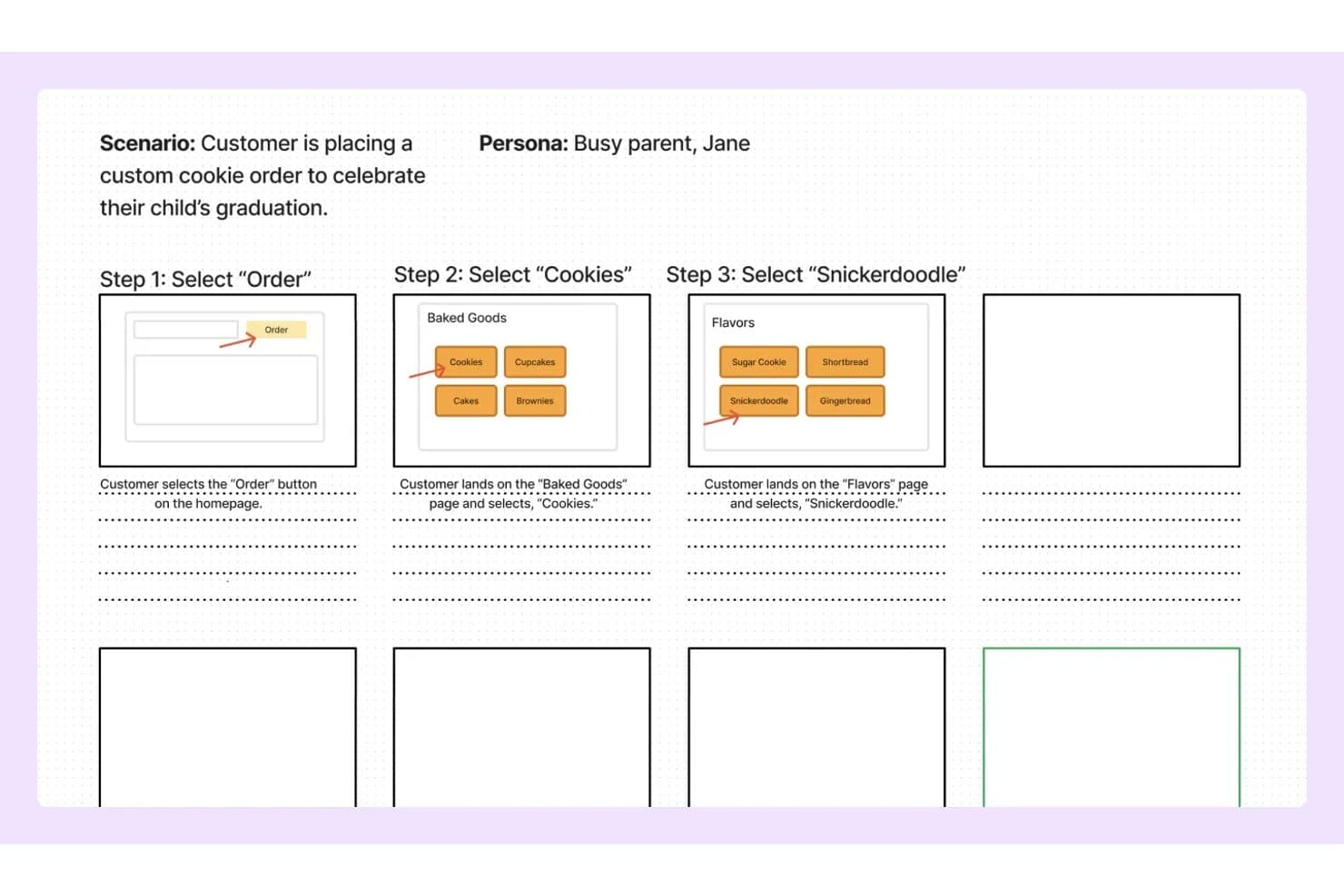
FigJam lets users map storyboard steps with wireframes and notes. FigJam is Figma's collaborative whiteboard tool that combines an infinite canvas, pre-built product and UX templates, real-time multi-user editing, and AI-assisted board generation for ideation and visual mapping.
Who Is FigJam Best For?
FigJam is a natural fit for product and UX teams already working in Figma who want their ideation and storyboarding to live in the same ecosystem as their design work.
Why I Picked FigJam
I picked FigJam as one of the best because it lives where product teams already work: inside Figma. If your team is mapping a user journey in FigJam one day and building the actual screens in Figma Design the next, that handoff is instant, not a file export ritual. I especially like FigJam AI's ability to generate a fully structured board from a single text prompt, which makes spinning up a storyboard for a sprint or discovery session genuinely fast. The customer journey map and storyboard templates are purpose-built for product workflows, not generic placeholders.
FigJam Key Features
- Real-time multi-user editing: Unlimited collaborators can work on the same board simultaneously, with live cursors and cursor chat for in-session communication.
- Audio huddles: Built-in voice calls let your team talk through a storyboard or discovery session without switching to an external conferencing tool.
- Jira widget: Embed Jira issue cards and task boards directly on the canvas to connect storyboard work to your active sprint backlog.
- Guest open sessions: External stakeholders can join and collaborate on a board for up to 24 hours without needing a Figma account.
FigJam Integrations
FigJam offers native integrations with Jira, Asana, Slack, Microsoft Teams, Google Workspace, Figma Design, and more. It also supports Confluence and Notion embeds, marketplace widgets, Zapier, and a REST API for custom integrations.
Pros and Cons
Pros:
- Specialized templates for product and UX workflows
- Real-time collaboration supports unlimited editors
- AI can generate storyboard templates instantly
Cons:
- Cannot export as video or animated file
- No built-in storyboard sequencing tools
Learn more about FigJam: Best for AI-generated storyboards from text prompts
- Free plan available
- From $14/user/month
Visit WebsiteCustomer Rating:4.8/5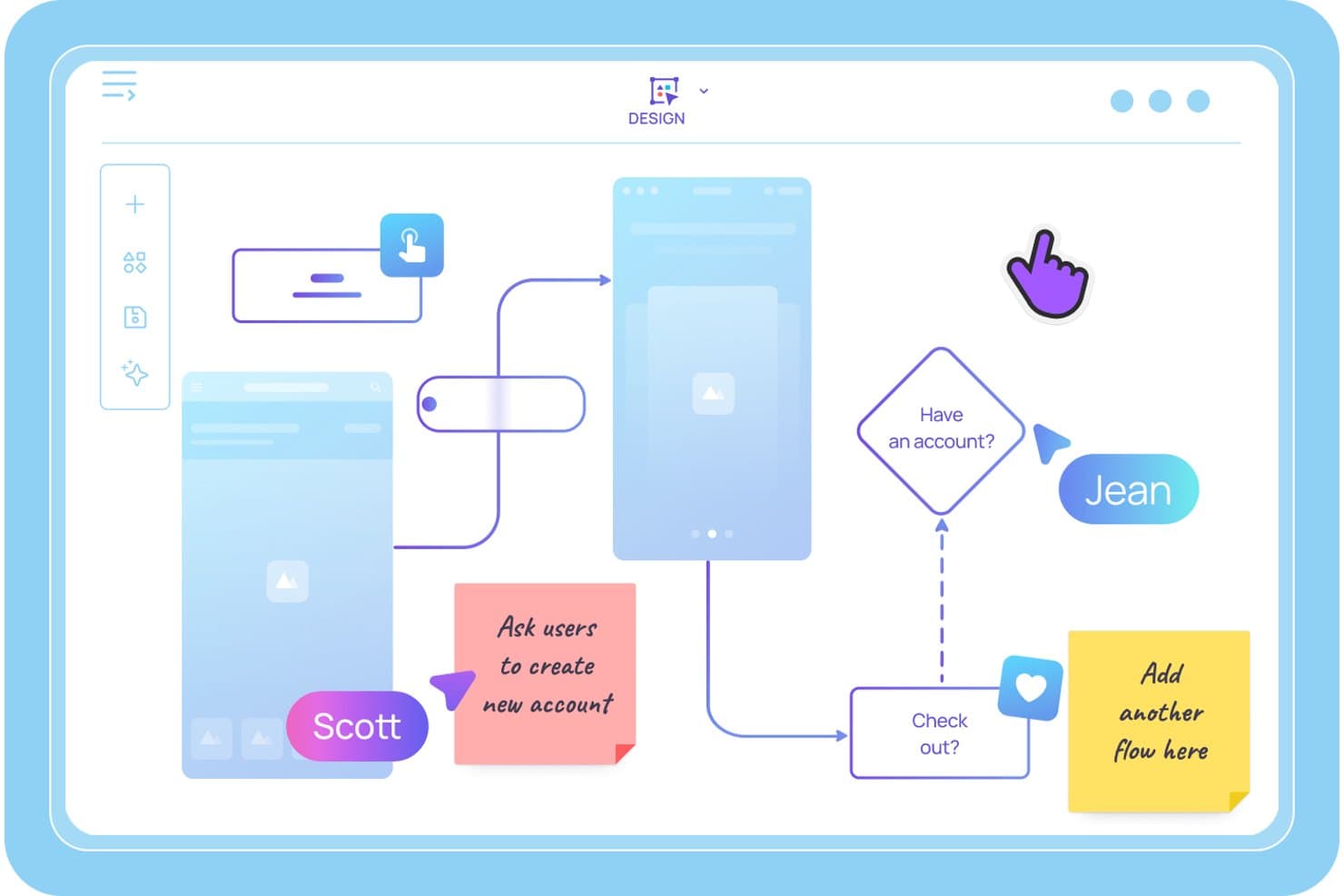
Visily lets users map user flows and storyboards with sticky notes. Visily is an AI-powered storyboard and wireframing tool that lets product teams generate sequential storyboard panels from text prompts, build interactive prototypes, and collaborate on user journey maps and UX flows in real time.
Who Is Visily Best For?
Visily is a strong fit for product managers and agile product owners who need to turn ideas into storyboards and interactive prototypes quickly—without relying on a dedicated designer.
Why I Picked Visily
I picked Visily as one of the best because it's the only tool I've seen that lets you type a plain-language scene description and get a structured, editable storyboard panel back in seconds. The AI Storyboard Maker turns a rough scenario into a sequenced set of frames, and Auto-Prototype then links those frames into a clickable user flow without any manual wiring. I've found that combination especially useful when you need to pressure-test a user journey before a sprint kickoff.
Visily Key Features
- Multimodal AI input: Combine text prompts, screenshots, existing diagrams, and canvas selections into a single AI generation request to build storyboard panels from wherever your ideas already live.
- Real-time co-editing with Cursor Chat: Multiple teammates can edit the same board simultaneously, with live cursors and in-canvas chat visible to everyone in the session.
- Workspace Library: Share custom templates, themes, and synced assets across all projects in your workspace, keeping storyboards consistent across your product team.
- Draw Mode: Use a freehand pen or highlighter directly on the canvas to sketch ideas or annotate storyboard panels without switching to a separate tool.
Visily Integrations
Visily connects with Figma, Claude Code, Cursor, Lovable, and ChatGPT via a plugin, and offers native integrations with Notion, Jira, and Slack.
Pros and Cons
Pros:
- Real-time collaboration supports cross-functional teams
- Auto-Prototyping links storyboard frames instantly
- AI turns text prompts into storyboard panels
Cons:
- Editing with AI overwrites manual screen changes
- No video or animation export options
Learn more about Visily: Best for cross-functional storyboard workshops
- Free plan available
- From $9.99/user/month (billed annually)
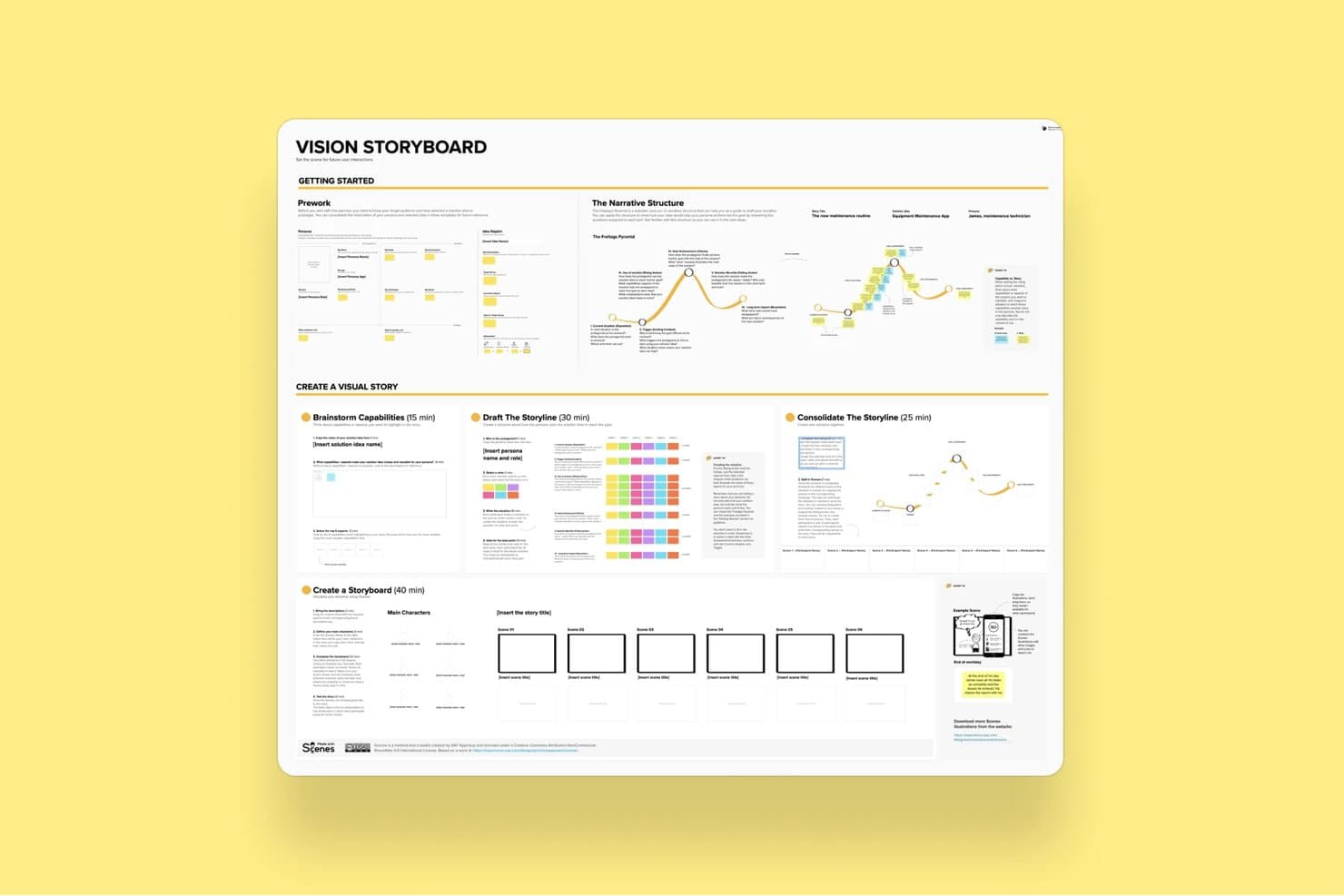
Mural's Vision Storyboard template guides users through building visual stories. Mural is a visual collaboration platform that combines an infinite canvas, a storyboard template, drag-and-drop editing, real-time co-editing, and facilitation tools for running structured ideation and product workshops.
Who Is Mural Best For?
Mural fits cross-functional product teams that run structured workshops, design sprints, or discovery sessions with multiple stakeholders involved in real time.
Why I Picked Mural
Mural earns its spot on my shortlist because its Facilitation Superpowers® toolkit is purpose-built for the kind of messy, multi-stakeholder storyboard sessions that product teams actually run. I love that features like Private Mode and Anonymous Voting let every participant contribute to a storyboard sequence without groupthink shaping the output. The dedicated Storyboard Template gives cross-functional teams a shared structure to build on, while the Summon feature lets me redirect everyone's view to a specific frame mid-session.
Mural Key Features
- Storyboard template: A pre-built, panel-based framework that guides teams through sequential frame creation using sticky notes and captions.
- Mural AI clustering: Automatically groups sticky notes by topic and rearranges them by criteria to help teams synthesize ideas across storyboard frames.
- Anonymous voting: Lets participants vote on storyboard ideas without seeing others' selections, reducing groupthink during collaborative sessions.
- PowerPoint export: Converts your mural canvas directly into a PowerPoint file for sharing storyboard work with stakeholders outside the tool.
Mural Integrations
Mural offers native integrations with Figma, Jira, Azure DevOps, GitHub, Confluence, Notion, Microsoft Teams, and more. It also provides an API for custom integrations and supports Zapier.
Pros and Cons
Pros:
- Extensive template and asset library for PMs
- Powerful real-time facilitation tools for teams
- Dedicated storyboard template for product sessions
Cons:
- Cluttered interface with many objects
- No video or animation export supported
Learn more about Mural: Best for speed-focused manual storyboarding
- Free trial available
- From $12/user/month (billed annually)
Visit WebsiteCustomer Rating:4.7/5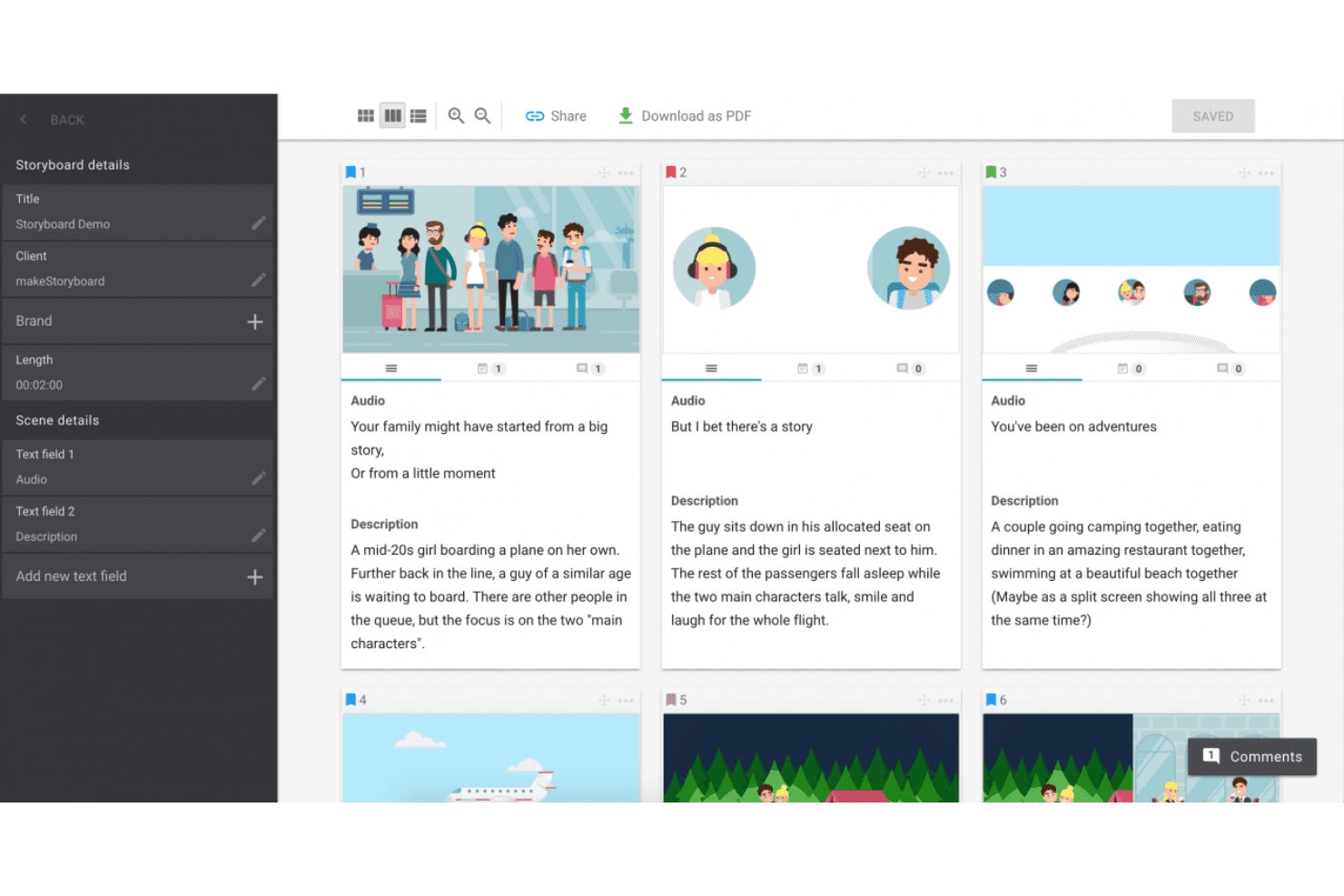
MakeStoryboard simplifies scene planning with organized frames, audio integration, and easy PDF exports. MakeStoryboard is a browser-based storyboarding tool built around frame-by-frame sequencing, a drag-and-drop canvas editor, real-time collaboration, and animatic MP4 export.
Who Is MakeStoryboard Best For?
MakeStoryboard is a good fit for video producers, animators, and content teams who need to build and present storyboards quickly without a steep learning curve.
Why I Picked MakeStoryboard
I picked MakeStoryboard as one of the best because it's purpose-built for getting storyboards done fast, without fighting the tool. The script-to-frames feature is what I find most useful: paste in a script, split it into frames automatically, then drop images and set camera angles per frame. When I need to hand off work to a client quickly, the animatic export lets me stitch frames into a playable MP4 with audio, which lands far better than a static PDF ever does.
MakeStoryboard Key Features
- Real-time collaboration: Multiple team members can edit the same storyboard simultaneously, with per-frame commenting and role-based access controls.
- Passphrase-protected review links: Share storyboards with external clients via a dedicated review link that doesn't require them to create an account.
- Custom branding on exports: Add your company logo and a bespoke cover page to PDF exports before sending them to clients or stakeholders.
- Camera angle indicators: Each frame supports predefined, industry-standard camera motion and shot angle labels for production-ready documentation.
MakeStoryboard Integrations
Native integrations are not publicly listed.
Pros and Cons
Pros:
- Camera angle indicators for production notes
- Passphrase-protected client review links
- Animatic MP4 export for visual storytelling
Cons:
- Lacks templates for user journeys or personas
- No AI-assisted frame or scene generation
Learn more about MakeStoryboard: Best for real-time camera and scene previsualization
- Free demo available
- From $39.99/month
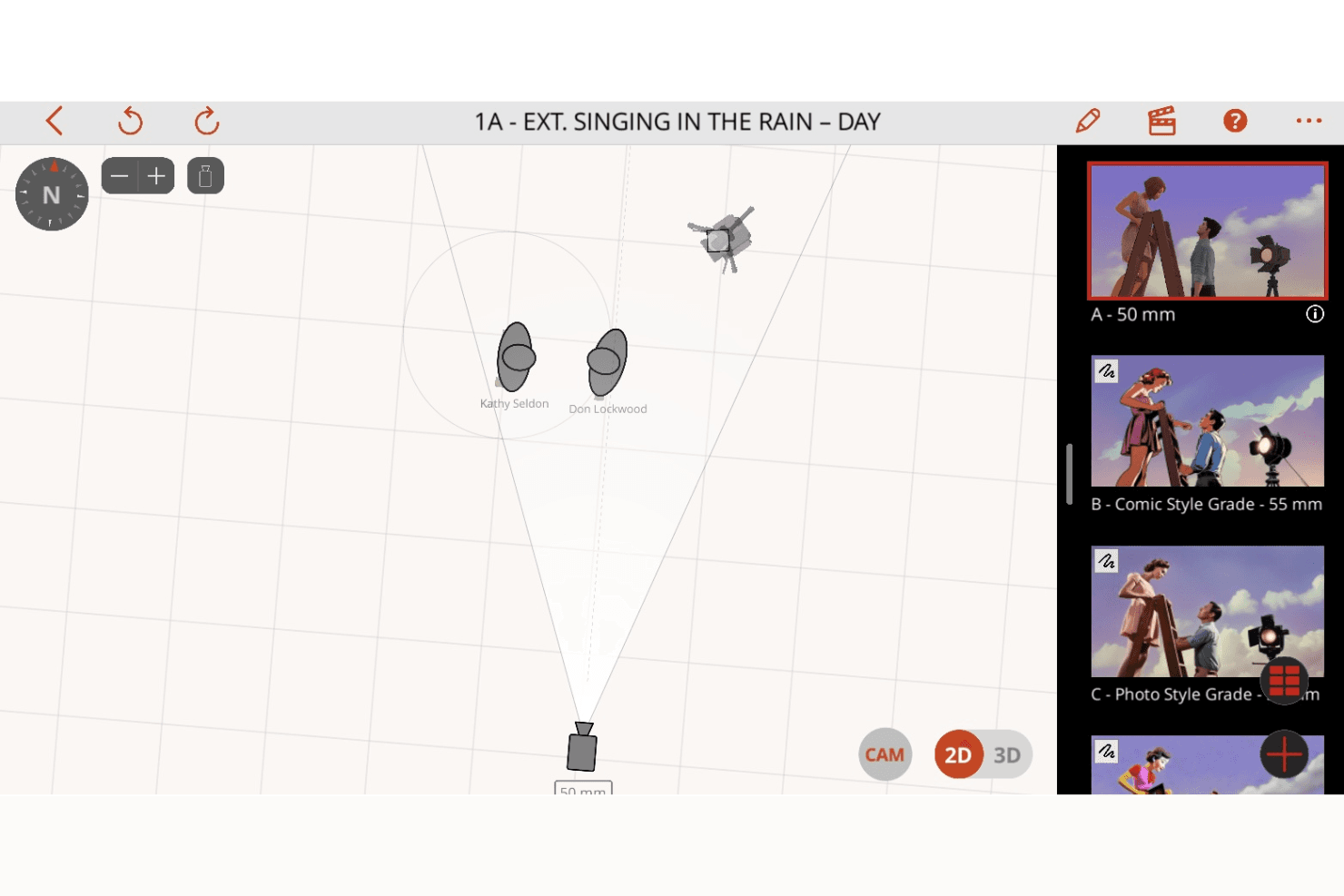
Previs Pro enhances shot planning with 2D and 3D scene visualization, camera controls, and dynamic storyboard creation. Previs Pro is a 3D storyboard and previsualization tool for film and TV production that lets you build scenes with real lens physics, animate shots on an editorial timeline, and import screenplays to auto-generate shot outlines.
Who Is Previs Pro Best For?
Previs Pro is built for film and TV professionals—directors, cinematographers, and previs artists—who need to block shots and visualize camera setups before stepping on set.
Why I Picked Previs Pro
Previs Pro earns its spot as one of the best on my shortlist because it simulates real camera optics inside a 3D scene builder, letting directors and cinematographers block shots with accurate lens physics before a single crew member steps on set. I love how the Virtual Camera feature lets you walk through an actual location with your iPhone and preview character blocking in AR against the real environment. Screenplay import is another standout: drop in a Final Draft or Fountain file and Previs Pro auto-generates a shot outline, complete with scene and cast details.
Previs Pro Key Features
- Animatics timeline: Sequence and animate shots across a multi-scene editorial timeline with four dedicated audio lanes for dialogue, music, SFX, and voiceover.
- Screenplay import: Drop in a Final Draft, Fountain, Fade In, or Celtx file and Previs Pro auto-populates scene descriptions, cast details, and shot outlines directly from the script.
- AI prop and character generation: Use text descriptions to generate custom props and characters via PropGen and ActorGen without sourcing external 3D assets.
- NLE timeline export: Export your storyboard as an FCP7 XML file for direct handoff into Premiere Pro, DaVinci Resolve, or Final Cut Pro.
Previs Pro Integrations
Native integrations are not publicly listed.
Pros and Cons
Pros:
- AI generates props and characters from text
- Imports screenplays and auto-generates storyboards
- Animates shots with real lens physics
Cons:
- No live, real-time collaborative editing
- Only available for Mac, iPad, iPhone
Learn more about Previs Pro: Best for polished storyboard slides for non-designers
- Free trial + free plan available
- From $144/user/year (billed annually)
Visit WebsiteCustomer Rating:4.6/5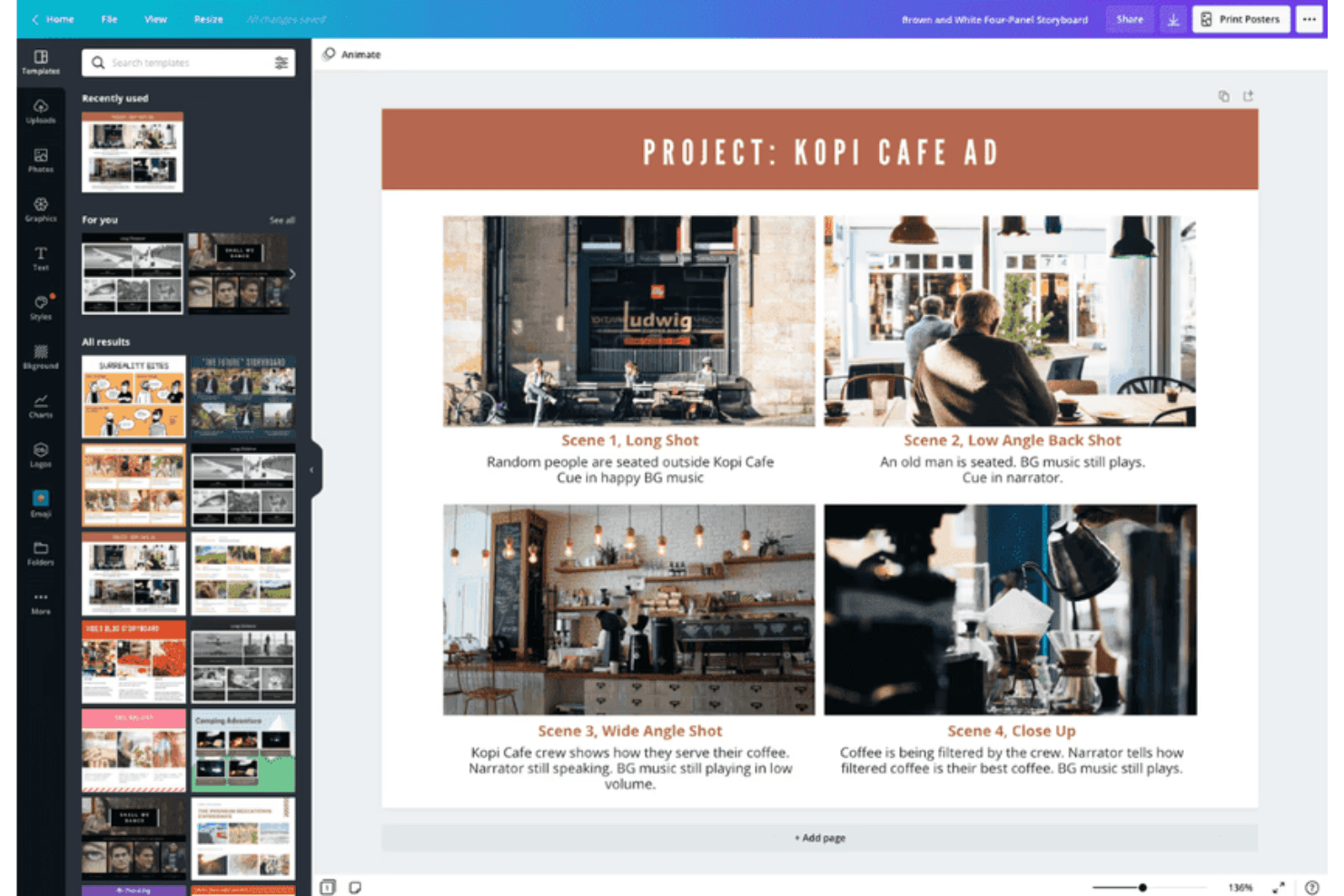
Canva supports storyboard creation with customizable templates for visuals. Canva is a general-purpose visual design tool that supports storyboard creation through a drag-and-drop editor, a large template library, real-time collaboration, AI-assisted design generation, and multi-format export including video and animation.
Who Is Canva Best For?
Canva is a great fit for product managers and product marketing managers who need to produce polished storyboard slides quickly, without relying on a designer.
Why I Picked Canva
I've included Canva in my top picks because it's the tool I'd hand to any product manager who needs a polished storyboard by end of day without touching a single design tool before. The template library includes dedicated storyboard and customer journey map templates, so you're not starting from scratch. Magic Studio's AI suite can generate layouts and captions from a text prompt, which cuts the time from "blank canvas" to "share-ready slides" significantly.
Canva Key Features
- Magic Studio AI suite: Over 20 AI tools—including text-to-design generation, AI writing, and conversational editing—let you build storyboard frames from a text prompt.
- Real-time co-editing: Multiple team members can edit the same storyboard simultaneously, with comments and threaded feedback on individual frames.
- Video and animation export: Animate individual frames with Magic Animate and export finished storyboards as MP4 or GIF files for stakeholder presentations.
- Customer journey map templates: Dedicated templates for user journey mapping and product scenario storyboards are available on both free and paid plans.
Canva Integrations
Canva offers native integrations with Slack, Google Photos, YouTube Embed, Pinterest, Brandfetch, Dropbox, Notion, Asana, and more. Zapier and Canva’s API support additional connections, with custom apps and integrations available on Enterprise.
Pros and Cons
Pros:
- Real-time co-editing with approval workflows
- Magic Studio AI rapidly generates storyboard slides
- Millions of storyboard and journey map templates
Cons:
- No native Jira, Figma, or Notion connections
- No interactive prototyping between storyboard frames
Learn more about Canva: Best for educational use
- Free trial + free plan available
- From $14.99/month
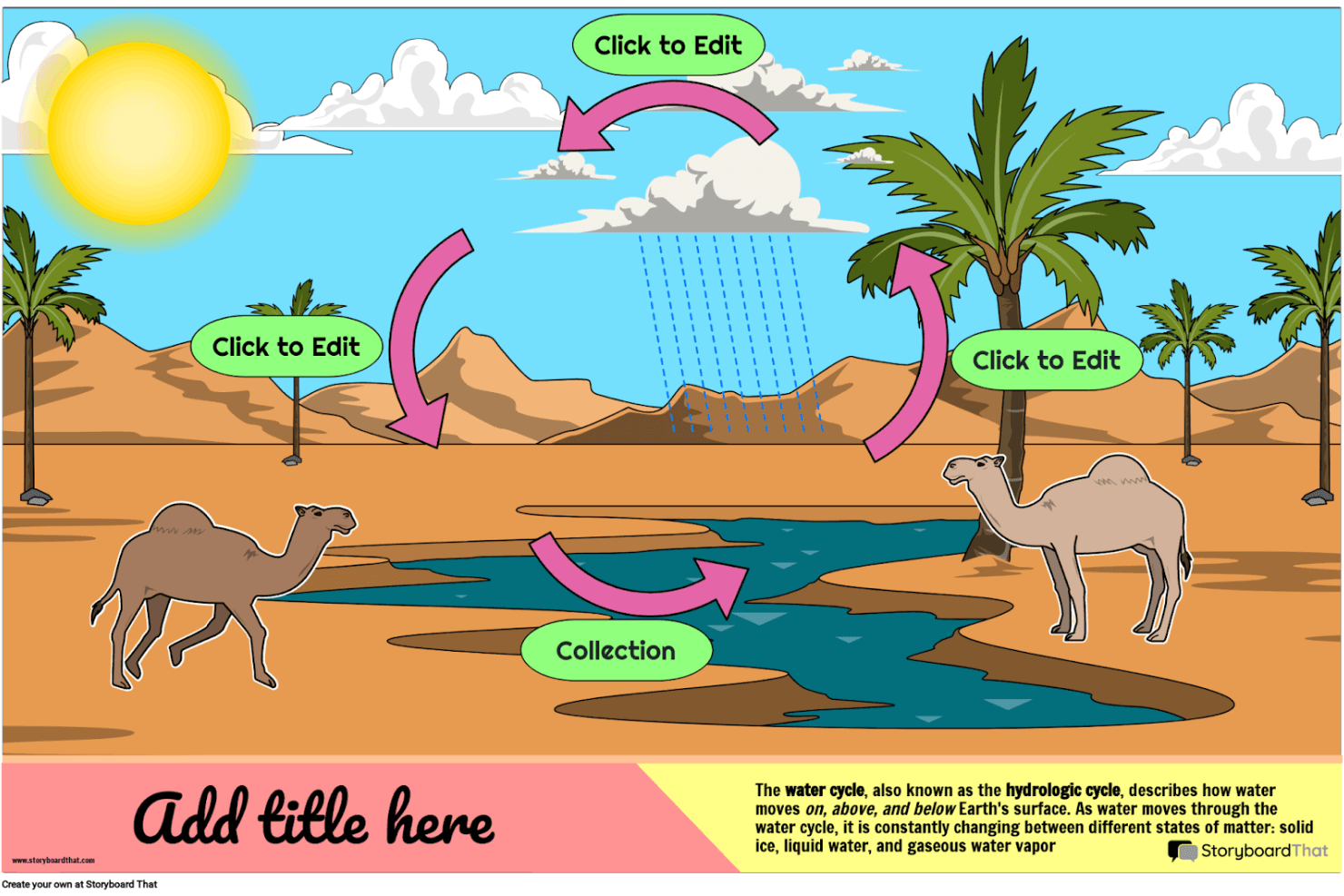
Storyboard That helps you create engaging visual stories and educational diagrams with customizable characters, scenes, and templates. Storyboard That is a drag-and-drop storyboard tool with a large illustrated asset library, business and education templates, and export options including PDF, PowerPoint, and animated GIF.
Who Is Storyboard That Best For?
Storyboard That is a strong fit for educators, instructional designers, and academic teams who need an approachable visual storytelling tool with built-in LMS integrations and student-safe privacy compliance.
Why I Picked Storyboard That
I've included Storyboard That in my top picks because it's built from the ground up for educational environments in a way no other tool on this list matches. It connects directly with Google Classroom, Canvas, and Schoology via LTI, so teachers can assign storyboard projects without leaving their LMS. Its FERPA and COPPA compliance also means student data is genuinely protected, which is a requirement most education teams can't compromise on.
Storyboard That Key Features
- Drag-and-drop canvas editor: Build storyboards by dragging characters, scenes, props, and text elements onto frames without any design expertise required.
- Animated GIF export: Convert finished storyboards into animated GIFs directly from the platform, alongside PDF and PowerPoint export options.
- Audio narration recording: Record and attach spoken narration to individual storyboard frames on paid plans.
- Presentation mode: Walk stakeholders through storyboard frames in a built-in slideshow view without leaving the tool.
Storyboard That Integrations
Storyboard That offers native integrations with Google Classroom, Clever, ClassLink, Canvas, Schoology, Blackbaud, Buzz LMS, and D2L.
Pros and Cons
Pros:
- Supports recorded audio narration per frame
- Extensive illustrated library with business templates
- Built-in presentation mode for direct walkthroughs
Cons:
- Only exports static or animated GIF formats
- No AI or interactive prototyping features
Learn more about Storyboard That: Best for script-synced animatic collaboration
- Free plan + free trial available
- From $50/month (billed annually)
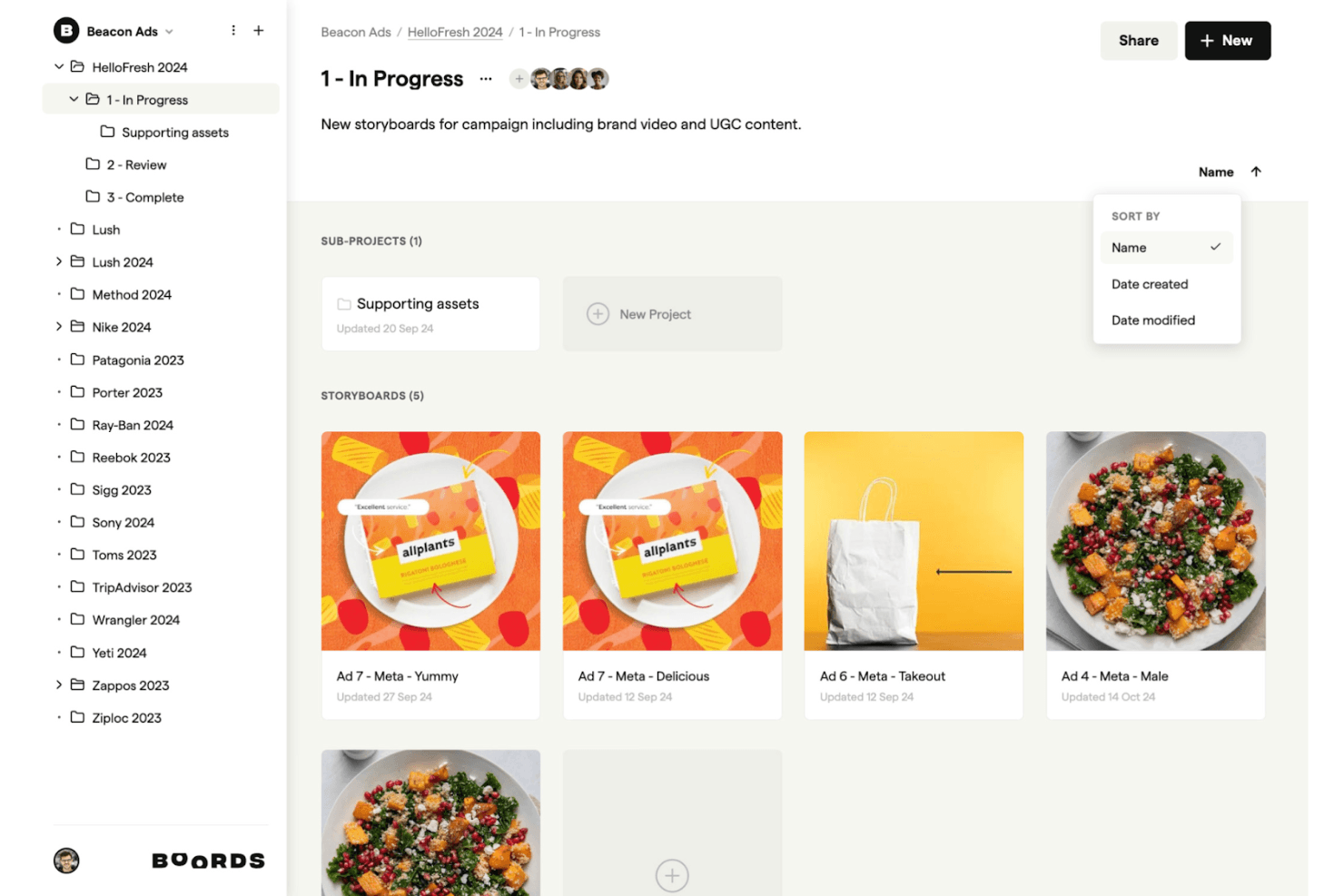
Boords supports your creative process by allowing you to intuitively organize, edit, and share storyboards for campaigns and branded content. Boords is a browser-based storyboard software that combines a script editor, AI storyboard generation, frame-by-frame sequencing, and an in-browser animatic editor with MP4 export.
Who Is Boords Best For?
Boords is a strong fit for creative teams and product marketers who need to build script-synced animatics and share polished video previews with clients or stakeholders.
Why I Picked Boords
Boords earns its spot on my shortlist because the script-to-animatic pipeline it offers is genuinely hard to replicate in a single tool. I love how the built-in script editor syncs directly with the storyboard timeline, so when I adjust voiceover timing, the frame sequence updates alongside it. The in-browser animatic editor then lets me export a finished MP4 without touching any external software, which is exactly what I need when presenting a narrative vision to stakeholders fast.
Boords Key Features
- AI storyboard generator: Paste a script or brief and Boords automatically builds a structured storyboard with AI-generated images for each frame.
- PDF Builder: Customize and export your storyboard as a formatted PDF, giving you full control over how frames and text fields appear in client deliverables.
- Team asset library: Upload and organize shared images in a centralized library so your whole team can reuse approved visuals across multiple projects.
- Guest review links: Share storyboards with clients via password-protected links that require no account signup to view or comment.
Boords Integrations
Boords has 3 documented native integrations: Slack, Dropbox, and Google Drive. It also offers a public API and webhooks for custom integrations with product and design tools.
Pros and Cons
Pros:
- Guest review links require no signup
- In-browser animatic editor with MP4 export
- Script-to-storyboard automation with AI images
Cons:
- Lacks UX or product journey templates
- No interactive prototyping or clickable flows
Learn more about Boords: Best for animation studio pre-production
- 14-day free trial
- From $90/month
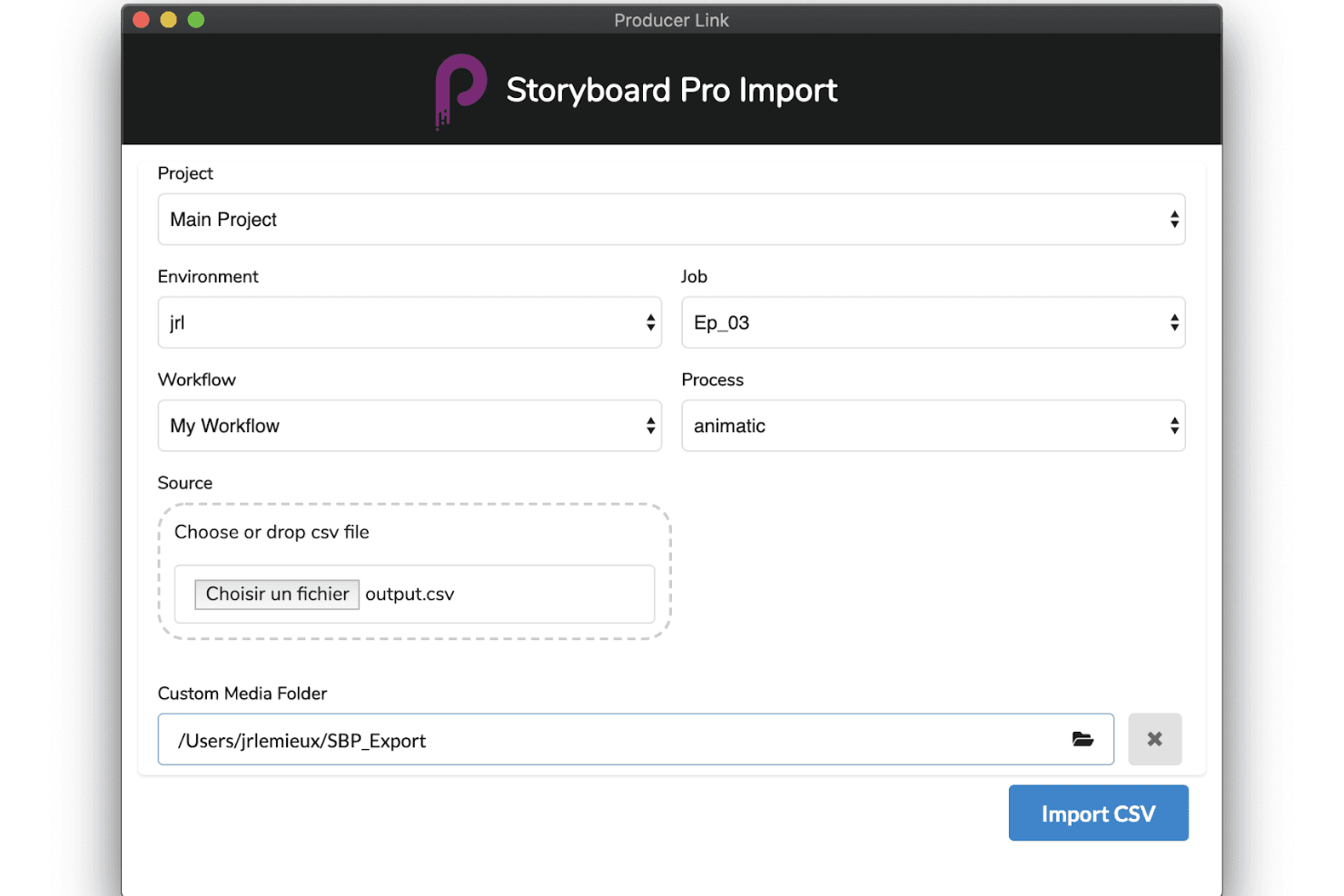
Toon Boom Storyboard Pro supports production with advanced importing tools, customizable workflows, and smooth animatic creation. Toon Boom Storyboard Pro is a professional desktop storyboarding application built for animation pre-production, offering panel-based sequencing, a full animatic timeline, 3D camera tools, multi-track audio sync, and AI-assisted script breakdown via its Ember toolset.
Who Is Toon Boom Storyboard Pro Best For?
Toon Boom Storyboard Pro is built for professional animators and animation studios that need a dedicated pre-production pipeline from script to animatic.
Why I Picked Toon Boom Storyboard Pro
Toon Boom Storyboard Pro earns its spot on my shortlist because it's the closest thing animation studios have to a dedicated pre-production command center. I love how the Panel Timer lets you capture live panel timing by tapping along to a performance, which is a genuinely unique feature for studios building animatics frame by frame. Paired with the 3D camera system and multi-track audio sync, you can move directly from a rough script to a fully timed, camera-animated preview without switching tools.
Toon Boom Storyboard Pro Key Features
- 3D camera system: Animate virtual camera moves—pan, zoom, and tilt—within a 3D environment directly inside your storyboard panels.
- Toon Boom Ember AI script breakdown: Analyzes screenplays to auto-identify scenes, characters, and assets, then auto-populates dialogue and action panels.
- Multi-track audio sync: Import, layer, and scrub multiple audio tracks with waveform display for precise panel-level synchronization.
- Harmony scene export: Exports full storyboard scenes—including layers and timing—directly into Toon Boom Harmony for animation production.
Toon Boom Storyboard Pro Integrations
Toon Boom Storyboard Pro offers native integrations with Toon Boom Harmony and Adobe Photoshop, plus AAF/XML workflows for Pro Tools and video editing software.
Pros and Cons
Pros:
- Integrated 3D camera and asset support
- AI-assisted script breakdown speeds up workflow
- Comprehensive animatic tools for animation storyboarding
Cons:
- Requires professional illustration or animation skills
- No real-time cloud-based collaboration features
Learn more about Toon Boom Storyboard Pro: Best for script-to-animated pitch deck export
- Free plan + free demo available
- From $12/month (billed annually)
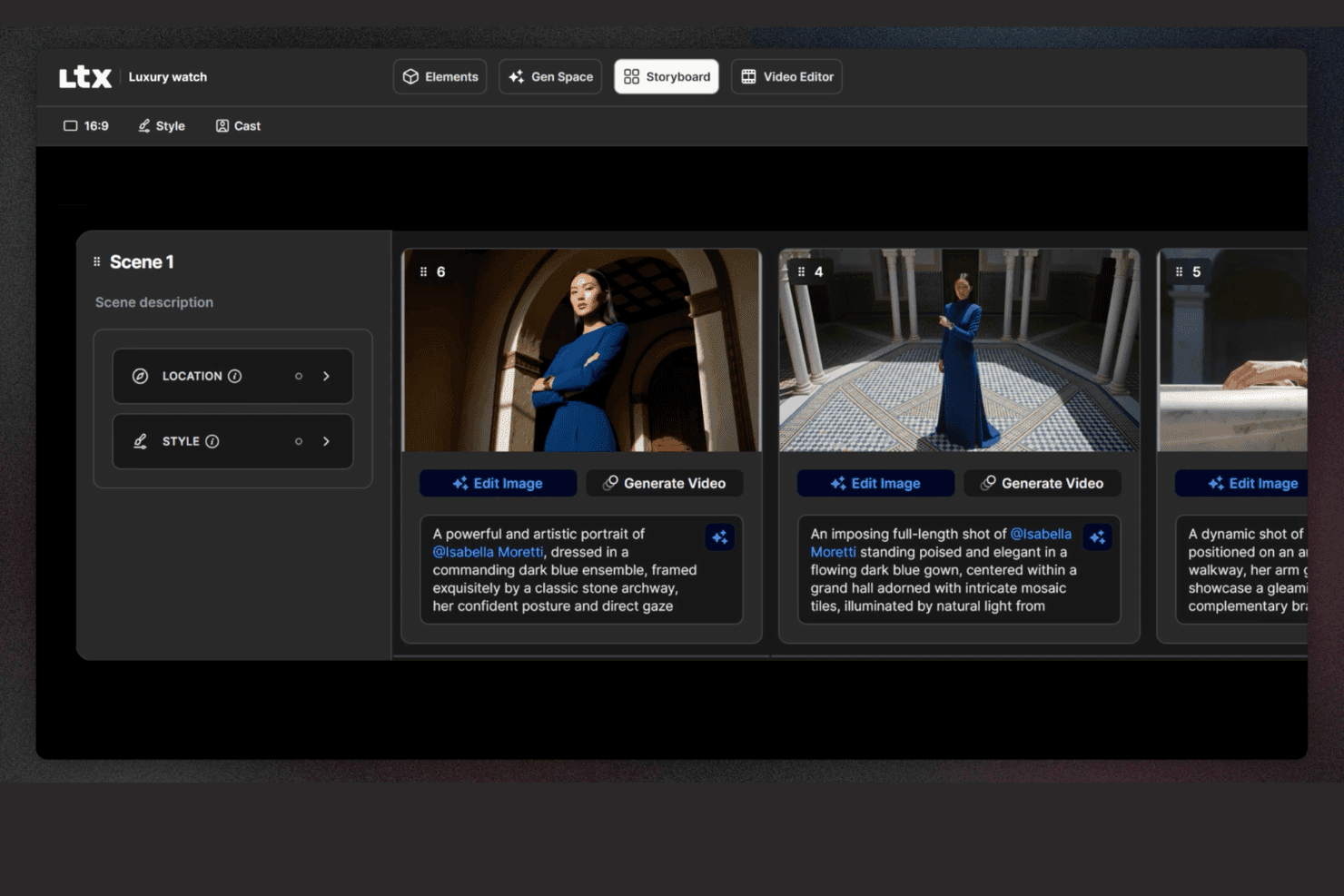
LTX Studio lets users edit storyboards with descriptions, locations, and image editing. LTX Studio is an AI-driven storyboard platform that generates scene-by-scene visual sequences from scripts or text prompts, with built-in timeline editing, animated MP4 export, and a pitch deck generator.
Who Is LTX Studio Best For?
LTX Studio fits product marketing managers and creative teams who need to turn a script or concept into an animated, presentation-ready pitch deck without relying on a designer.
Why I Picked LTX Studio
I picked LTX Studio as one of the best because it's the only tool on my list that takes a raw script and turns it into an animated, presentation-ready pitch deck without a single design asset required. Paste in your product narrative, and the AI breaks it into sequenced shots, generates cinematic frames, and assembles everything into an exportable MP4 or PDF. The Pitch Deck Generator then compiles those visuals into a structured format you can put in front of stakeholders the same day.
LTX Studio Key Features
- AI model selection: Choose from multiple AI generation models—including Google Veo 3.1, Kling 2.6/3.0 Pro, and the proprietary LTX-2—at the project, board, or frame level.
- Persistent character elements: Define a character's appearance once, and the platform maintains consistent facial details, wardrobe, and style across every frame automatically.
- Built-in audio generation: Generate and sync background music, ambient audio, and voice-over narration directly within the timeline editor without a separate audio tool.
- Node-based automation flows: Build custom AI generation workflows using a visual node-based system, available on Standard and above plans.
LTX Studio Integrations
Native integrations are not publicly listed.
Pros and Cons
Pros:
- Exports as MP4 and structured pitch deck
- Persistent characters and elements stay consistent
- AI generates animated storyboards from scripts
Cons:
- Collaboration is limited on non-enterprise plans
- No canvas-based editor or UX templates
Learn more about LTX Studio:
Diğer Storyboard Yazılımları
Kısa listeme giremeyen ancak yine de göz atmaya değer bazı ek storyboard yazılımı seçenekleri şunlardır:
- 11MiroBest for storyboards linked to your dev backlog
- 12LucidsparkBest for mapping user journeys across product teams
- 13WhimsicalBest for lo-fi wireframe and flow storyboarding
- 14Adobe FireflyBest for brand-governed AI visual ideation
- 15StudioBinderBest for film production team storyboarding
- 16KatalistBest for script-to-video storyboard production
How I Evaluate Storyboard Software
I split my evaluation into two layers: whether a tool can build and annotate sequential product flows, then what sets the strongest options apart.
Core Functionality (Table Stakes For This List)
When I'm selecting tools for my list, I rank each one on a scale from 0 (does not offer the functionality) to 5 (excels in this area) for each core functionality listed below. Then, I calculate the tool's total score into a percentage. Each tool needs to achieve a minimum total score of 65% to be considered for inclusion.
- Frame-by-Frame Sequencing: I evaluate how each tool handles building ordered panels, like mapping a user's onboarding flow from sign-up through activation step by step.
- Drag-and-Drop Visual Editor: The editor should let PMs place characters, UI elements, and scenes on a canvas without needing design skills or external tools.
- Pre-Built Asset Library: I check for template variety and asset relevance, looking for things like persona placeholders, device mockups, and environment scenes.
- Real-Time Collaboration: Product teams co-create during discovery sprints, so I look for live co-editing, commenting, and presence indicators within the workspace.
- Annotation & Text Overlays: Each frame should support captions, speech bubbles, or contextual notes that explain what's happening at each step of the story.
- Export & Sharing Options: I consider whether you can share storyboards as PDFs, images, or links for async reviews with stakeholders who don't have tool access.
Once I have a list of tools that meet the criteria, I consider what sets each platform apart.
Differentiating Factors (What Sets Vendors Apart)
Here's how I compare and contrast different vendors:
Standout Features
AI-assisted generation is a big differentiator. Tools that can turn a text prompt into a rough storyboard give PMs a faster path from idea to visual during early discovery. I also look for interactive prototyping, where clickable hotspots on frames let you simulate a user flow and gather feedback before any design handoff. Pre-built user journey templates matter too. Starting from a customer onboarding or feature adoption template saves hours compared to building frames from scratch every sprint.
Beyond Features
Integrations with the broader product stack matter a lot. I check whether storyboards can link to Jira epics or embed in Confluence pages, since that's where most PM teams already work. Learning curve is another key factor. Most PMs aren't designers, so I evaluate how quickly someone can produce a share-ready storyboard in their first session. Pricing structure also plays a role, especially whether guest access lets stakeholders review and comment without requiring paid seats for everyone on the team.
Storyboard Yazılımı Nasıl Seçilir?
Uzun özellik listeleri ve karmaşık fiyatlandırma yapılarına kendinizi kaptırmanız kolaydır. Benzersiz yazılım seçimi sürecinizde ilerlerken odağınızı korumanıza yardımcı olmak için göz önünde bulundurmanız gereken faktörlerin bir kontrol listesini aşağıda bulabilirsiniz:
| Faktör | Nelere Dikkat Edilmeli? |
| Ölçeklenebilirlik | Yazılımın ekibinizle birlikte büyüyebildiğinden, daha fazla kullanıcıyı veya projeyi sorunsuzca destekleyebildiğinden emin olun. Gelecekteki ihtiyaçları ve aracın artan talebi karşılayıp karşılayamayacağını düşünün. |
| Entegrasyonlar | İş akışınızı kolaylaştırmak ve üretkenliği artırmak için Adobe Creative Suite veya proje yönetimi uygulamaları gibi kullandığınız diğer araçlarla entegrasyon sağlayıp sağlamadığını kontrol edin. |
| Özelleştirilebilirlik | Zamandan tasarruf etmek ve ekibinizin özel ihtiyaçlarına uyum sağlamak için özelleştirilebilir şablonlar gibi yazılımı iş akışınıza göre uyarlamanıza olanak tanıyan özellikleri arayın. |
| Kullanım Kolaylığı | Yazılım sezgisel olmalı ve öğrenme eğrisi kısa olmalıdır. Ekibinizin hızlı bir şekilde başlamasını kolaylaştıran sürükle ve bırak arayüzleri veya eğitimler arayın. |
| Bütçe | Yazılımın maliyetini bütçenizle karşılaştırarak değerlendirin. Finansal açıdan uygun olduğundan emin olmak için esnek fiyatlandırma planları veya daha uzun taahhütlerde indirimler arayın. |
| Güvenlik Önlemleri | Ekibinizin verileri korunmalıdır. Şifreleme, güvenli erişim denetimleri ve veri koruma düzenlemelerine uyumluluk gibi özellikleri kontrol edin. |
| İş Birliği | Ekip üyelerinin verimli bir şekilde birlikte çalışmasına ve doğrudan platform içinde geri bildirim sağlamasına olanak tanıyan gerçek zamanlı iş birliğini aracın desteklediğinden emin olun. |
| Destek | Sunulan müşteri desteğinin düzeyini değerlendirin. Her türlü sorunu hızlıca çözmek için 7/24 destek seçenekleri, ayrıntılı belgeler ve hızlı yanıt veren yardım hizmetleri arayın. |
Trendler
Araştırmam sırasında, farklı hikâye panosu yazılımı sağlayıcılarından sayısız ürün güncellemesi, basın bülteni ve sürüm günlüğü inceledim. Takip ettiğim yeni trendlerden bazıları şunlar:
- Yapay Zekâ Destekli Hikâye Panosu Oluşturma: Zamandan tasarruf etmek ve yaratıcılığı tetiklemek için hikâye panosu düzenleri ve sahneleri önermek üzere yapay zekâ kullanılıyor. Bazı araçlar artık yapay zekâ tarafından oluşturulan görseller de sunarak kullanıcıların kavramları hızlıca görselleştirmesine yardımcı oluyor.
- 3D Görselleştirme: Daha fazla hikâye panosu yazılımı, kullanıcıların sahneleri üç boyutlu olarak oluşturmasına ve görüntülemesine olanak tanıyan 3D özelliklerini bünyesine katıyor. Bu trend, ekiplerin mekânsal ilişkileri ve sahne dinamiklerini daha iyi anlamasına yardımcı oluyor.
- Etkileşimli Hikâye Panoları: Araçlar; kullanıcıların tıklanabilir bağlantılar, ses ve video eklemesine olanak tanıyan etkileşimli öğeleri içerecek şekilde gelişiyor. Bu, hikâye panolarını sunumlar için daha ilgi çekici ve kullanışlı hâle getiriyor.
- Gerçek Zamanlı İş Birliği: Gelişmiş iş birliği özellikleri, ekiplerin farklı konumlardan aynı anda hikâye panoları üzerinde çalışmasına olanak tanıyor. Bu trend, verimliliği ve uyumu koruması gereken uzaktan çalışan ekipler için kritik önem taşıyor.
- Bulut Tabanlı Çözümler: Bulut depolama ve erişim standart hâline geliyor; böylece ekipler veri kaybetmeden her yerden çalışabiliyor. Bu trend, uzaktan çalışmayı destekliyor ve hikâye panolarının her zaman erişilebilir ve güncel olmasını sağlıyor.
Hikâye Panosu Yazılımı Nedir?
Hikâye panosu yazılımı, kullanıcıların genellikle film, animasyon ve pazarlama alanlarında kullanılan hikâyelerin görsel temsillerini oluşturmasına yardımcı olan dijital bir araçtır. Film yapımcıları, animatörler ve yaratıcı profesyoneller, sahneleri planlamak ve anlatıları görselleştirmek için genellikle bu araçları kullanır; bu da iletişimi ve proje planlamasını geliştirir. Sürükle ve bırak arayüzleri, yapay zekâ destekli düzenler ve gerçek zamanlı iş birliği özellikleri, yaratıcı iş akışlarını ve ekip uyumunu destekler. Genel olarak bu araçlar, kullanıcıların zamandan tasarruf etmesine ve görsel anlatımlarının netliğini ve etkililiğini artırmasına yardımcı olur.
Özellikler
Hikâye panosu yazılımı seçerken aşağıdaki temel özelliklere dikkat edin:
- Sürükle ve bırak arayüzü: Bu özellik, basit tıklamalar ve sürüklemelerle hikâye panosu panellerini hızlıca düzenlemenize, taşımanıza ve yeniden boyutlandırmanıza olanak tanır. Herhangi bir teknik uzmanlık gerektirmeden projenizin akışını tam olarak hayal ettiğiniz şekilde görselleştirebilirsiniz.
- Özelleştirilebilir şablonlar: Reklamlar, film sahneleri veya animasyonlar gibi farklı hikâye anlatımı türlerine göre hazırlanmış çeşitli kullanıma hazır şablonlar arasından seçim yapın. Şablonlar zamandan tasarruf etmenize ve özellikle fikirleri hızla hayata geçirirken düzenli kalmanıza yardımcı olur.
- İş birliği araçları: Hikâye panolarını gerçek zamanlı olarak paylaşın, görevler atayın veya ekip üyelerine yorum bırakın. Bu özellikler herkesin aynı noktada olmasını sağlar ve grup projelerini daha hızlı ve keyifli hâle getirir.
- Entegre senaryo düzenleyicisi: Görsellerinizi doğrudan araç içinde diyalog ve açıklamalarla eşleştirin; uygulamalar arasında sürekli geçiş yapmanıza gerek kalmaz. Bu, yaratıcı sürecinizi kolaylaştırır ve her şeyi bağlam içinde tutar.
- Dışa aktarma ve paylaşma seçenekleri: Hikâye panolarınızı PDF, görsel veya sunum slaytları olarak kaydedin ya da hızlı bir bağlantıyla paylaşın. Böylece fikirlerinizi herhangi bir teknik engelle karşılaşmadan müşterilerinize veya ekip arkadaşlarınıza sunabilirsiniz.
- Sürüm denetimi: Revizyonları takip edin, eski sürümleri geri yükleyin ve değişiklikleri kimin yaptığını görün. Geçmiş fikirlere dönmeniz veya yanlışlıkla yapılan bir düzenlemeyi geri almanız gerektiğinde bu özellik büyük kolaylık sağlar.
- Ses ve video desteği: Hikâye panonuzu canlandırmak için seslendirmeler, ses efektleri veya video klipleri ekleyin. Çoklu ortam içeriklerini entegre edebilmek, vizyonunuzu daha net bir şekilde aktarmanızı sağlar.
- Düzenleme ve etiketleme: Sahneleri perdelere göre gruplayın, renk etiketleri kullanın veya her şeyi düzenli tutmak için açıklamalar ekleyin. Projeniz karmaşıklaştığında bu araçlar kolayca gezinmenize yardımcı olur.
Yaygın Yapay Zekâ Özellikleri
Yukarıda listelenen standart hikâye panosu yazılımı özelliklerinin yanı sıra bu çözümlerin çoğu aşağıdakilere benzer özelliklerle yapay zekâyı bünyesine katıyor:
- Konuşmadan metne giriş: Konuşarak ifade ettiğiniz fikirleri doğrudan hikâye panosu metin öğelerine dönüştürün. Yüksek sesle beyin fırtınası yapabilir, araçtan kelimelerinizi panolarınızdaki açıklamalara veya diyaloglara dönüştürerek düzenlemesini isteyebilirsiniz.
- Otomatik görsel oluşturma: Yapay zekâ, yazılı açıklamalarınıza göre görsel paneller oluşturur; senaryo fikirlerinizi hızlıca resimlere dönüştürür ve elle çizim yapma süresini azaltır.
- Akıllı sahne önerileri: Yazılım, hikâyenizin bağlamına göre olası sonraki çekimleri, kamera açılarını veya sahne geçişlerini önererek yaratıcı ivmenizi korumanıza yardımcı olur.
- Otomatik diyalog geliştirme: Yapay zekâ senaryonuzu inceler, iyileştirmeler önerir veya kulağa tuhaf gelen ifadeleri işaretler; böylece karakterlerinizin daha özgün ve ilgi çekici konuşmasına yardımcı olur.
- Hikâye yapısı analizi: Yapay zekâ hikâye panonuzu tarayarak tempo sorunlarını, hikâyedeki boşlukları veya gerilim eksikliği bulunan alanları belirler; böylece anlatınızı ince ayardan geçirebilirsiniz.
Avantajlar
Dijital görsel taslak araçlarını benimsemek, ekibinizin yaratıcı projeleri planlama, paylaşma ve geliştirme biçimini dönüştürebilir. Bekleyebilecekleriniz şunlardır:
- Artan yaratıcılık: Yapay zekâ destekli düzenler ve esnek şablonlar, sıfırdan başlamak zorunda kalmadan yeni yönleri keşfetmeniz için size alan sunar.
- Ekip iş birliğinin kolaylaşması: Gerçek zamanlı güncellemeler ve bulut tabanlı erişim, ekibinizin her yerden katkıda bulunmasını sağlayarak herkesin bağlantıda kalmasına yardımcı olur.
- Daha hızlı iş akışları: Sürükle ve bırak araçları ile önceden hazırlanmış şablonlar kurulum süresini azaltır; böylece asıl hikâye anlatımına odaklanabilirsiniz.
- Daha güçlü görsel iletişim: 3B görsel taslaklar ve etkileşimli özellikler sayesinde ekibiniz ve paydaşlarınız konsepti daha net görselleştirebilir.
- Uzaktan görsel taslak oluşturma: Bulut tabanlı erişim, tek bir konuma bağlı kalmamanızı sağlar; bu da özellikle farklı konumlardan çalışan ekipler için faydalıdır.
- Ayrıntılı planlama desteği: Zaman çizelgesi ve çizim araçları sahneleri planlamanıza, karmaşıklığı yönetmenize ve yaratıcı kaliteyi korumanıza yardımcı olur.
- Esnek paylaşım: Çeşitli dışa aktarma seçenekleri sayesinde çalışmanızı sosyal medyada veya iş ortaklarınıza ya da müşterilerinize en uygun formatta paylaşmak kolaydır.
Maliyetler ve Fiyatlandırma
Görsel taslak yazılımı seçmek, mevcut çeşitli fiyatlandırma modelleri ve planlarının anlaşılmasını gerektirir. Maliyetler özelliklere, ekip büyüklüğüne, eklentilere ve diğer unsurlara göre değişir. ücretsiz görsel taslak yazılımı, özellik sınırlamaları dâhilinde çalışabilen ekipler için yelpazenin bir ucunu oluşturur.
Aşağıdaki tabloda yaygın planlar, ortalama fiyatları ve görsel taslak yazılımı çözümlerinde genellikle bulunan özellikler özetlenmektedir:
Görsel Taslak Yazılımı için Plan Karşılaştırma Tablosu
| Plan Türü | Ortalama Fiyat | Yaygın Özellikler |
| Ücretsiz Plan | $0 | Temel görsel taslak oluşturma, sınırlı şablonlar ve temel dışa aktarma seçenekleri. |
| Kişisel Plan | $5-$30/kullanıcı/ ay | Özelleştirilebilir şablonlar, sürükle ve bırak arayüzü ve bulut tabanlı erişim. |
| İşletme Planı | $30-$80/ kullanıcı/ay | Gerçek zamanlı iş birliği, gelişmiş çizim araçları ve zaman çizelgesi yönetimi. |
| Kurumsal Plan | $80-$100+/ kullanıcı/ay | 3B görselleştirme, yapay zekâ destekli düzenler, özel destek ve kapsamlı güvenlik önlemleri. |
Öykü Panosu Yazılımı SSS
Öykü panosu yazılımı hakkında sık sorulan soruların bazı yanıtlarını burada bulabilirsiniz:
Bir öykü panosunun telif hakkı alınabilir mi?
Evet, bir öykü panosunun telif hakkını alabilirsiniz. Oluşturulduğu anda özgün bir çalışma olarak korunur; bu da başkalarının izniniz olmadan yasal olarak onu kopyalayamayacağı veya dağıtamayacağı anlamına gelir. Ancak telif hakkının genel fikri ya da arkasındaki konsepti değil, gerçek içeriği koruduğunu unutmayın.
Bir öykü panosu neleri içermemelidir?
Bir öykü panosu, ana hikâyeden dikkati uzaklaştıran hiçbir şeyi içermemelidir. Bu, gereksiz sahnelerden, aşırı ayrıntılı görsellerden veya çok fazla metinden kaçınmak anlamına gelir. Amaç, ekibinizi her küçük ayrıntıyla bunaltmak değil, projenizin temel akışını net bir şekilde aktarmaktır.
Ekibim için doğru öykü panosu yazılımını nasıl seçerim?
Ekibinizin nasıl çalıştığını düşünerek başlayın. Gerçek zamanlı iş birliğine mi ihtiyacınız var? Çizim araçlarına mı? Diğer platformlarla entegrasyona mı? Bu gereksinimleri karşılayan, öğrenmesi kolay ve bütçenize uygun yazılımları arayın. Projeleriniz büyüdükçe ekibinizle birlikte ölçeklenebiliyorsa bu da bir avantajdır.
Öykü panosu yazılımı kullanmanın geleneksel yöntemlere göre avantajları nelerdir?
Öykü panosu yazılımı daha hızlı çalışmanıza ve düzenli kalmanıza yardımcı olur. Görsellerinizi güncellemenizi, geri bildirim paylaşmanızı ve ekibinizle iş birliği yapmanızı kolaylaştırır; üstelik hiçbir şeyi yazdırmanız veya taramanız gerekmez. Kalem ve kâğıtla karşılaştırıldığında, özellikle hızlı tempolu veya uzaktan çalışan ekipler için daha esnektir.
Ücretsiz öykü panosu yazılımı seçenekleri mevcut mu?
Evet, pek çok araç temel özelliklere sahip ücretsiz planlar sunar. Bunlar serbest çalışanlar, öğrenciler veya yeni başlayan küçük ekipler için harikadır. Ancak ücretsiz sürümlerin genellikle daha az şablon veya sınırlı dışa aktarma seçenekleri gibi kısıtlamalarla geldiğini unutmayın; bu nedenle zamanla ihtiyaçlarınızı karşılamamaya başlayabilirler.
Öykü panosu yazılımımın güvenli olduğundan nasıl emin olurum?
Şifreleme kullanan, kullanıcı izinleri veya erişim denetimleri sunan ve standart veri koruma uygulamalarını izleyen araçları tercih edin. Yazılımın ne sıklıkla güncellendiğini veya güvenlik yamaları aldığını da kontrol etmenizde fayda vardır. Yazılımınızı güncel tutmak, korunmanın en kolay yollarından biridir.